
 4.9 (400+
reviews)
4.9 (400+
reviews)
Overview of a VoIP Provider for Pediatricians
Picture this: Two paediatric clinics. Same number of patients. Same Monday morning chaos.
At Clinic A, the phone is ringing nonstop. The front desk is stuck on hold with insurance, three voicemails are waiting to be checked, and a parent is waving at the counter because no one picked up their call, again. One staff member is scribbling a callback note on a stick note, hoping it doesn’t get lost.
Now walk into Clinic B. The phones are still ringing, but calls are routed automatically. Parents get instant text replies if they miss a call. Voicemails show up as transcripts, so nothing gets missed. The front desk? Calm. Focused. Actually smiling.
The difference? VoIP for healthcare.
With the best VoIP software for paediatricians, communication doesn’t fall through the cracks. Your team handles more, in less time, and parents feel heard, not hurried. So let’s explore exactly how it works, what to look for, and which platforms can truly make a difference in your clinic.
Features to Look For in a Pediatric VoIP Provider
If you’re running a busy pediatric clinic, your phone system needs to actually help you keep things moving. It should help you keep up with parents, patients, and your team, all without making things harder. Whether it’s a Monday morning rush or an after-hours call, the right VoIP setup can make things much smoother. So what should you be looking for?
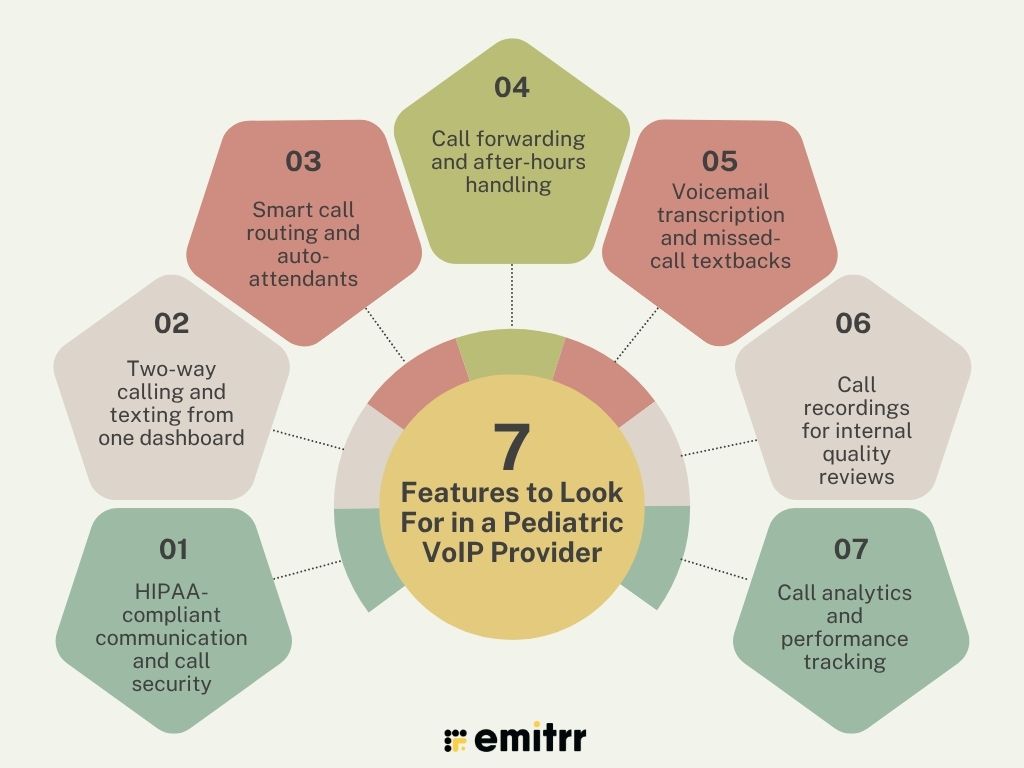
HIPAA-compliant communication and call security
This one’s non-negotiable. Your clinic deals with private health details all day. So your phone system must be HIPAA compliant. That means calls, voicemails, and texts are fully encrypted. Only the right people can access them. It protects patient privacy and keeps your clinic out of legal trouble. Always check if your provider knows healthcare rules, it’s not just about tech, it’s about trust.
Two-way calling and texting from one dashboard
Today’s parents don’t always want to call. Many prefer to text, especially for quick questions. A good VoIP system lets your team call and text from the same screen. No switching apps. No missed updates. You can follow up on missed calls, send reminders, or just confirm an appointment, all from one place. It saves time and keeps everything in one neat record.
Smart call routing and auto-attendants
You’ve probably heard “Press 1 for appointments,” that’s an auto-attendant. Smart call routing means each call goes where it should. Parents with billing questions go to admin. Sick child? Straight to the nurse line. No bouncing around. No waiting forever. It’s faster for families and much easier on your staff.
Call forwarding and after-hours handling
Parents often call late, especially after work. With VoIP, those calls don’t go unanswered. You can forward them to an on-call provider or send them to voicemail with next steps. It keeps things professional even outside office hours. And no one needs to give out their personal number. It’s safe, smooth, and stress-free.
Voicemail transcription and missed-call textbacks
Voicemails pile up fast, especially at lunch or during busy times. VoIP changes that. It turns voicemails into text and sends them to your dashboard or email. You can read and act on them right away. Plus, if a call is missed, the system sends a friendly text: “Sorry we missed your call. Need help?” That tiny nudge makes a big difference to worried parents.
Call recordings for internal quality reviews
Sometimes parents say one thing, and your team remembers another. With call recordings, you can go back and check. Of course, you need consent, but once you have it, this tool is gold. It helps you resolve miscommunications, improve staff training, and make sure everyone’s on the same page.
Call analytics and performance tracking
Want to know what’s really happening on your phone lines? VoIP tells you. You can see how many calls were missed, how long people waited, or what times are the busiest. These insights help you schedule better, staff smarter, and give parents a smoother experience. It’s like a report card for your communication.
Learn about the pros and cons of VoIP here –

Security and Compliance Requirements for Pediatric VoIP Providers
Phones in a pediatric clinic deal with personal health details. That means your phone system has to be safe. Really safe. Here’s what you need to look for to protect your patients and your clinic.
HIPAA-compliant voice communication
HIPAA rules are a must. They protect patient data. Your VoIP system should follow HIPAA rules from day one. This means every call, voicemail, and text is handled securely. No shortcuts. If your VoIP isn’t HIPAA-compliant, it’s not the right fit.
End-to-end encryption for calls and voicemails
Encryption keeps things private. It locks up your calls and voicemails so no one can listen in. The message goes from your phone to the receiver’s phone without being exposed. That’s what “end-to-end” means. It’s like sealing a letter before sending it.
Role-based user access and call logs
Not everyone on your team needs to see everything. Doctors see medical updates. Admins check billing calls. Role-based access lets you control that. It keeps things neat and secure. Call logs also track who handled what. That helps with training and accountability.
Consent-based calling for sensitive topics
Some things like test results shouldn’t be shared without permission. Your VoIP should support consent-based calls and texts. That means you only contact families about sensitive topics if they’ve said it’s okay. It keeps you safe and shows respect to parents.
Secure voicemail access and message audit trails
Voicemails can be full of private info. They need to be protected too. Only your team should have access. Some systems also show you who listened, who replied, and when. That’s called an audit trail. It helps you stay organised and compliant.
Integrations Required for Pediatric VoIP Providers
Your VoIP system shouldn’t sit on its own. It should work together with the tools you already use every day, like your EHR or scheduling system. When these platforms “talk” to each other, your team saves time, avoids mistakes, and delivers better care. Here are the most useful integrations to look for.
EHR integration with patient profiles
Your Electronic Health Record (EHR) holds all the details about your patients. If your VoIP system links with it, you can see patient info during or before a call. This helps your team personalise conversations and take action faster. For example, if a parent calls about a follow-up, you already know the last visit date and what was discussed. No toggling between screens.
PMS sync for appointment-linked calling
Your Practice Management System (PMS) handles scheduling. When your VoIP tool syncs with it, calling becomes smarter. You can call parents directly from the appointment screen or send reminders automatically. If someone misses a visit, the system can trigger a callback or rescheduling message. It’s smooth, fast, and reduces no-shows.
CRM tools for follow-ups and feedback
A Customer Relationship Management (CRM) tool tracks communication and follow-ups. If your VoIP platform connects to a CRM, your team can easily send texts or emails after calls. Want to check in after a vaccine? Or ask for a review? It’s all possible with just a few clicks. You build stronger relationships without extra manual work.
Calendar sync for call scheduling
With calendar sync, your VoIP system can match up with your Google or Outlook calendar. This helps when you need to schedule call-backs or coordinate between providers. You can block time, set reminders, and make sure nothing falls through the cracks. It keeps your team organised, especially when managing high volumes.
Helpdesk or ticketing tools for internal routing
Sometimes, parents call with questions your front desk can’t answer, like a billing query or a tech issue. If your VoIP system integrates with a helpdesk tool, you can create internal tickets and route the task to the right person. No sticky notes, no confusion. Everything’s tracked, so nothing gets missed.
Insurance and billing platforms for dues follow-up
Let’s say a parent has a balance due or an insurance issue. If your VoIP tool connects with your billing system, it can trigger automatic reminders or route calls to the billing team. You can also tag calls with payment status. It keeps money matters off the front desk’s plate and ensures parents get the right help, faster.
How a VoIP Provider Helps Pediatricians
When running a paediatric clinic, some days feel like a blur of ringing phones, missed voicemails, and parents trying to reach someone, anyone for help! A good pediatric VoIP software changes all that. Here’s how it makes life easier for both your team and the families you care for.
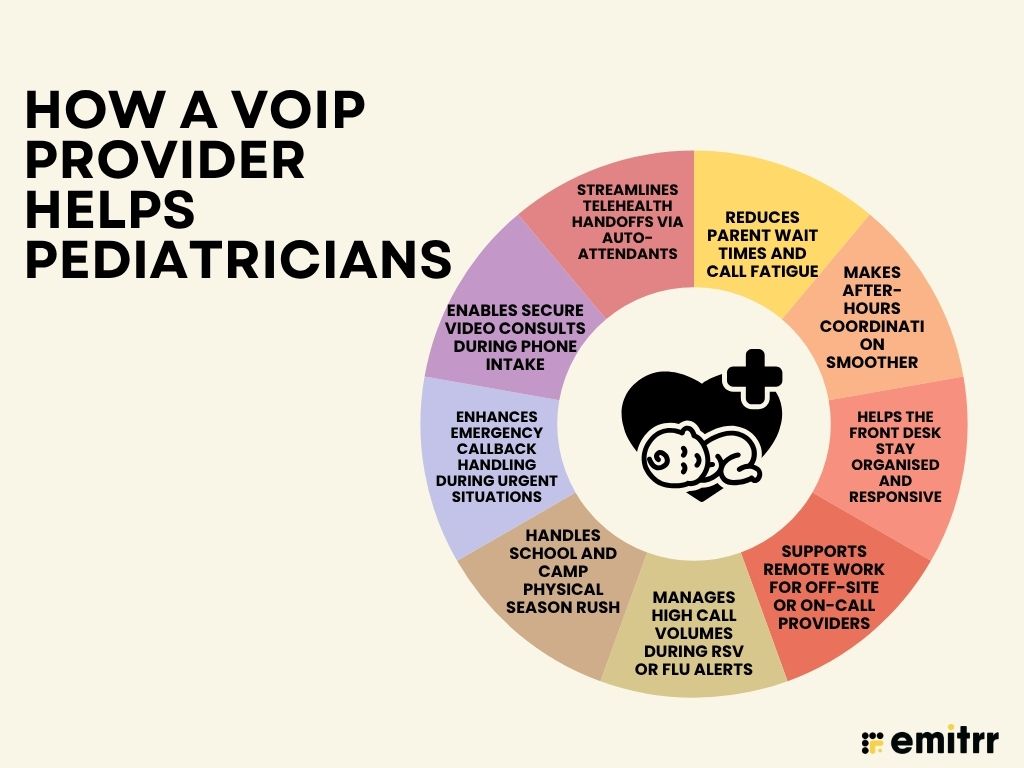
Reduces parent wait times and call fatigue
Imagine a parent calling in for their child’s fever. The line’s busy, so they try again. Then again. Frustrating, right? With VoIP, calls get routed to the next available staff member or go straight to voicemail with a quick callback message. No more endless hold music. Parents feel heard, and your team stays on top of every call.
Makes after-hours coordination smoother
Say a parent calls at 8:30 PM about a missed dose or a rash. Instead of panicking or giving out personal numbers, your VoIP system can route the call to the on-call doctor’s mobile or collect a voicemail that gets transcribed and sent to the right person. Everyone knows what to do, and no one’s caught off guard.
Helps the front desk stay organised and responsive
Your front desk gets swamped, especially on Mondays. With VoIP, all calls, voicemails, and messages show up in one dashboard. The team can prioritise, reply, and move on. No more Post-its or juggling phones. Everything is tracked and tidy, which means parents aren’t stuck repeating the same info to three different people.
Supports remote work for off-site or on-call providers
Got a provider working from home or covering another clinic? No problem. VoIP works on phones, tablets, or laptops. A doctor can pick up calls, reply to messages, or check in on follow-ups without stepping into the clinic. It’s perfect for telehealth and hybrid setups where flexibility matters.
Manages high call volumes during RSV or flu alerts
During flu season, it feels like every parent in town is calling. With VoIP, you can set up special call flows. For example, flu-related calls can be routed to a nurse triage line or a pre-recorded message with tips and next steps. Your main line stays open, and the front desk doesn’t drown in calls.
Handles school and camp physical season rush
You know that rush when every school sends out a form at once? With VoIP, you can set up a dedicated line just for physical appointments. Parents hear clear instructions, can leave messages, or get automated text updates. It keeps things moving without slowing down your regular check-ups.
Enhances emergency callback handling during urgent situations
Picture this: A parent leaves a voicemail about their toddler having trouble breathing. With VoIP, that voicemail is instantly transcribed and flagged as urgent. The nurse on duty sees it right away and can call back within minutes. No digging through messages. No missed alerts. Just a fast, calm response.
Enables secure video consults during phone intake
Let’s say a parent calls unsure whether their child’s rash needs a visit. Your staff can switch the call to a secure video consult within seconds using the VoIP platform. It saves time, avoids unnecessary visits, and reassures the parent immediately. And because it’s a HIPAA-compliant phone system, everything stays private and safe.
Streamlines telehealth handoffs via auto-attendants
Telehealth days can be chaotic if patients don’t know where to call. With VoIP, auto-attendants guide them to the right provider based on time, location, or issue. “Press 2 to speak to your telehealth doctor” actually means something. It cuts down on confusion and helps calls land where they should, without extra steps.
How to Choose the Right VoIP Provider for Pediatricians
There are lots of VoIP options out there, but not all of them are right for your clinic. The goal isn’t to get the most high-tech system. It’s to find one that actually makes life easier for you, your staff, and your patients. Here’s how to go about it.
Step 1: Focus on what your clinic really needs
Start by thinking about your day-to-day. Do you struggle with missed calls? Want voicemail transcriptions? Need easier after-hours coverage? List down your top problems, then look for a VoIP system that solves them. No need to chase fancy extras, just the stuff that actually helps.
Step 2: Make sure it works well on mobile
Let’s face it, your team isn’t always at the front desk. Doctors might check calls from home. Nurses might reply to texts during a break. You’ll want a VoIP system that works just as smoothly on phones and tablets as it does on desktops. That way, no one’s tied to one spot.
Step 3: Check for HIPAA compliance
This one’s a must-have. You’re dealing with patient information, so your VoIP setup has to be HIPAA-compliant phone systems. That means calls and voicemails are encrypted, data is secure, and you’re not risking a breach. So, never just assume, always ask the provider and double-check for compliance.
Learn more about HIPAA compliant VoIP in this video:
Step 4: Look for good integrations
Your phone system shouldn’t feel like a separate island. It should connect to your EHR, calendar, and other tools. That way, when a parent calls, your team can see patient info, upcoming appointments, or past notes, all while they’re still on the call.
Step 5: Understand what you’re paying for
Some platforms look affordable…until the extra charges show up. Ask about setup fees, user limits, support costs, and whether features like texting or call recording are included. You want something that’s simple and clear, no hidden surprises down the road.
Step 6: Always try before you buy
This is a big one. You don’t need to commit right away. Ask for a trial or demo, and actually use it. Let your staff take a few calls, try out the dashboard, and see how it fits your workflow. If it feels clunky now, it won’t magically feel better later.
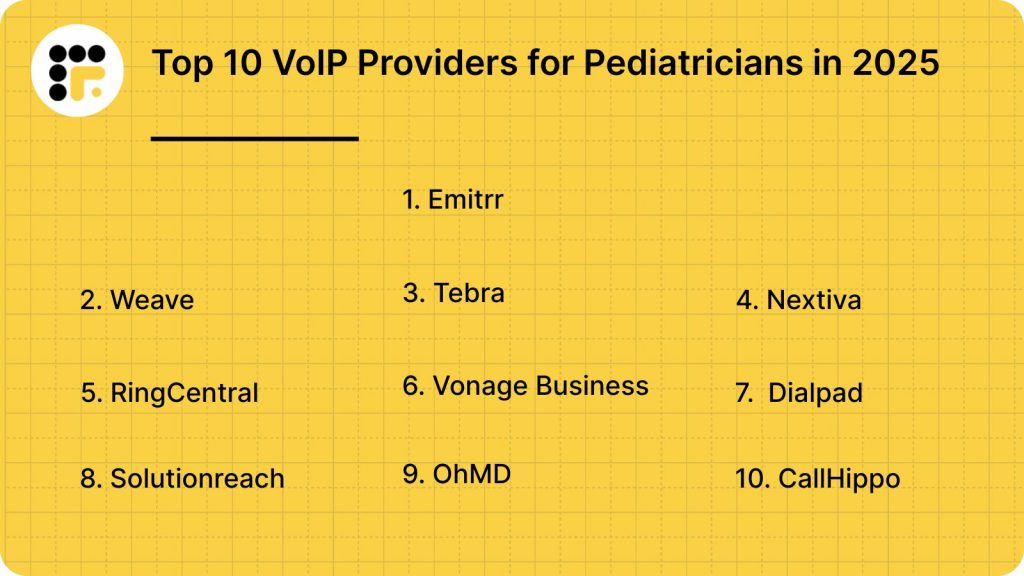
Top 10 VoIP Providers for Pediatricians in 2025
Here’s a list of the top 10 HIPAA compliant VoIP service providers for pediatricians in 2025
Let’s explore each VoIP provider in detail:
1. Emitrr : Best VoIP Competitor
What is Emitrr?
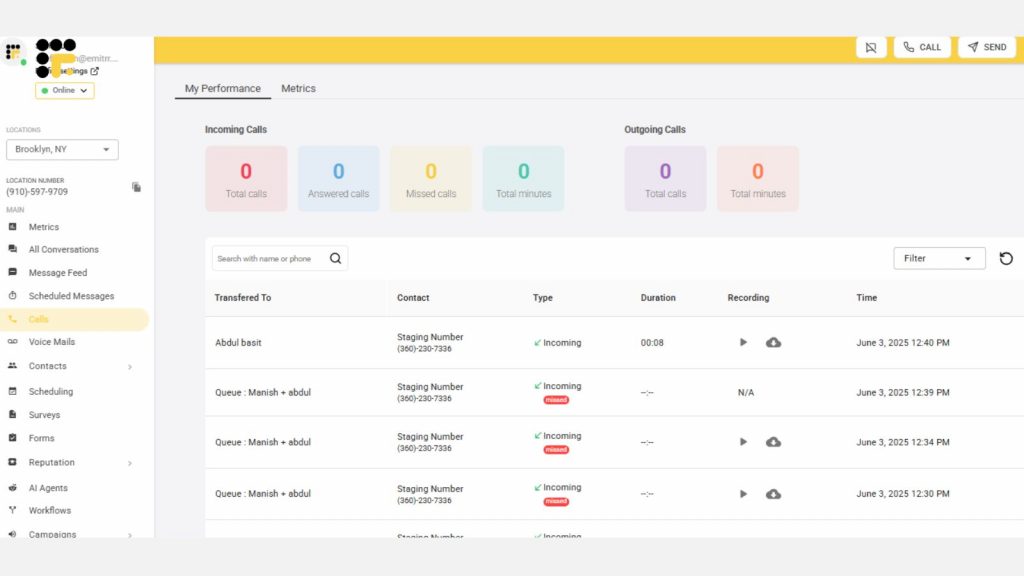
Emitrr is a VoIP and communication platform built especially for healthcare practices. It helps you manage calls, texts, voicemails, and reminders from one place. For pediatric clinics, it’s designed to reduce phone chaos and keep parents in the loop, without extra work for your team.
Emitrr features
- Two-way texting and calling: You can text or call parents right from your desktop or phone app.
- Smart call routing: Automatically sends calls to the right team member, front desk, nurse, or billing.
- Voicemail-to-text: Voicemails get transcribed instantly so your team can read and respond faster.
- Missed-call textbacks: Sends an auto text when no one answers a call, “Sorry, we missed you. How can we help?”
- Appointment reminders: Auto-send reminders for check-ups, vaccines, or follow-ups—fully customisable.
- Online reviews booster: Sends post-visit texts asking for reviews. Great for building your online reputation.
- HIPAA compliant: All messages, calls, and voicemails are encrypted and fully secure.
Emitrr pros
- Easy to use: Very simple dashboard, even for non-tech-savvy staff.
- Made for healthcare: All tools are designed with clinics in mind, not general businesses.
- Fast support: Friendly team, quick replies, and helpful setup help.
- Helps grow reputation: Smart review prompts bring in more 5-star ratings.
Emitrr Cons
Some advanced AI response features are still being rolled out
Emitrr Integrations
Emitrr integrates with your existing tools to streamline communication and reduce admin overload:
- EHR & PMS sync (e.g., PCC, DrChrono): Pulls patient and appointment data for contextual calling.
- Practice management systems: Keep call logs attached to visits.
- Google Workspace & Office 365: Syncs contacts, calendar invites, and voicemails.
- SMS & texting tools: Tie voice and message histories to patient records.
Emitrr Pricing
Plans start at $30 per month per user.
Emitrr Ratings
- Capterra: 4.9/5
- G2: 4.7/5
Emitrr Customer Reviews
“The customer service was excellent, they stepped me through setting up their system on my two websites and worked along with my marketing people. I am still learning it but it appears to be such a simple, but elegant, design that I know I am going to love it once I learn it!“
“It’s very user-friendly. I also love that you can assign messages to staff members, making it easier to keep track of conversations.“
Source: Capterra
Emitrr Support Channels
- Email: support@emitrr.com
- Phone: +1 (210) 941-4696
- Live chat: Available on the Emitrr website
- Knowledge base: Includes training resources, setup guides, and FAQs
- SMS support: Text the support line for assistance
2. Weave

What is Weave?
Weave is a VoIP and communication platform designed specifically for healthcare practices. It combines calling, texting, scheduling, and reviews into one dashboard. It’s popular among clinics that want patient-friendly communication with built-in marketing tools.
Weave features
- Two-way texting and calling: Send and receive texts and calls from a shared inbox
- Integrated digital forms: Let parents complete intake forms before appointments
- Voicemail-to-text: Converts voicemails into readable messages in your dashboard
- Payment collection tools: Send payment links via text to reduce billing delays
- Review generation prompts: Request Google reviews automatically after visits
Weave pros
- Easy to use: Simple interface for staff and front desk
- All-in-one setup: Combines VoIP, reviews, payments, and texting
- Great for follow-ups: Helps drive engagement post-visit
Weave cons
- May lack deep EHR integration: Some clinics report limitations with syncing
- Higher pricing for small practices: Could feel costly if underused
- Occasional syncing lags: Can experience minor delays in updating message status
Weave Integrations
Weave integrates with popular practice systems to simplify daily tasks:
- Connects with systems like Dentrix, Eaglesoft, and Open Dental for synced patient and appointment data.
- Built-in Weave Payments and text-to-pay features streamline collections and reminders.
- Integrates with Google Calendar and telehealth apps for smooth appointment scheduling and virtual consults.
Weave Pricing
Starts around $125–$200/month. Pricing varies by feature set and number of users.
Weave Ratings
- Capterra: 4.3/5
- G2: 4.2/5
Weave Customer Reviews
“With Weave, it’s just a nightmare with the customer service and support. And guess what, any settings or setup you want to change, you only have to go through their customer support because whenever you make changes from their web portal, none of it gets actually reflected.”
“Software features that never worked for me. They increaed my billing fee without any prior notice or my approval.”
Source: Capterra
Weave Support Channels
- Phone
- Chat support
- Email help desk
- Training articles and tutorials are available in the support hub
3. Tebra
What is Tebra?
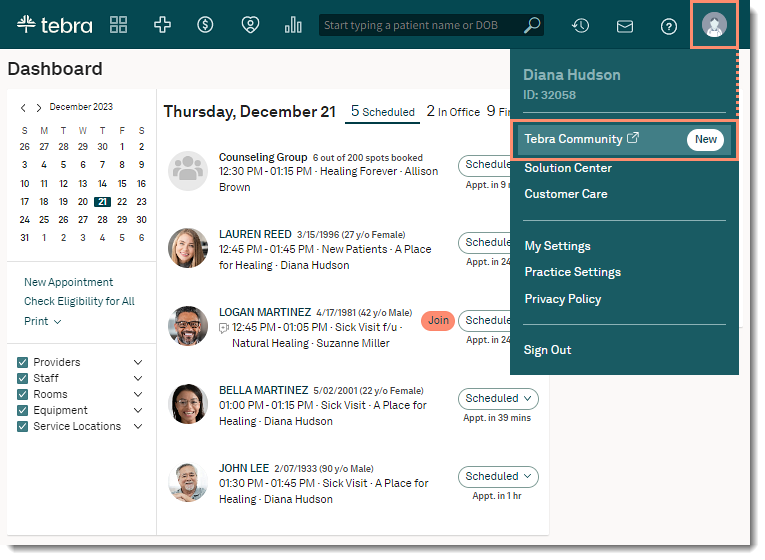
Tebra offers an integrated VoIP and practice growth platform. It’s built for healthcare providers looking to combine scheduling, communication, and marketing under one roof.
Tebra features
- Two-way communication tools: Phone, text, and email from one platform
- Online scheduling: Syncs appointments with your calendar and VoIP system
- HIPAA-compliant messaging: All communication is encrypted and secure
- Automated reminders: Sends texts or emails about upcoming appointments
- Reputation management: Collects reviews and monitors feedback
Tebra pros
- Great EHR compatibility: Works well with Kareo and other major systems
- Strong reputation tools: Helps improve online presence
- User-friendly interface: Smooth experience for both staff and patients
Tebra cons
- Can feel sales-heavy: Add-on services may come up often
- Limited customisation: Some features are preset
- Requires onboarding time: May need training to get the most out of the system
Tebra Integrations
Tebra connects with essential platforms to ensure seamless operations:
- Kareo and PatientPop for practice growth and billing
- QuickBooks for accounting sync
- Curogram and other messaging tools
Tebra pricing
Costs are not listed upfront. Custom pricing based on the size and needs of your clinic.
Tebra Ratings
- Capterra: 3.9/5
- G2: 3.8/5
Tebra Customer Reviews
“Tebra presents itself as a comprehensive solution for providers, yet in reality, it falls short in every critical area. The clearinghouse consistently rejects claims, making the billing process inefficient and unreliable. Additionally, the requirement to download a desktop version just to conduct billing is outdated and inconvenient. To make matters worse, customer service is unresponsive, often taking days or even weeks to provide assistance. This platform fails to deliver on its promises, creating more frustration than solutions.”
Source: Capterra
Tebra Support Channels
- Email and phone
- Onboarding assistance
- Live chat available on website
- Help centre with guides and videos
4. Nextiva

What is Nextiva?
Nextiva is a cloud-based VoIP solution trusted by thousands of businesses, including healthcare providers. It offers powerful call handling, voicemail tools, and analytics to keep communication smooth and professional.
Nextiva features
- Auto-attendants and call flows: Route calls to the right staff without delays
- Voicemail-to-email: Get voicemail messages delivered as emails or text alerts
- Call recording: Record calls for training or compliance
- Team collaboration tools: Use team messaging and file sharing within the platform
- Call analytics: Track call volume, hold times, and resolution trends
Nextiva pros
- Scalable system: Works for both small clinics and multi-location practices
- Reliable support: Good customer service with fast resolution times
- Professional feel: Helps your clinic sound polished and organised
Nextiva cons
- Interface isn’t healthcare-specific: More business-oriented features
- Setup can take time: Might need help from IT to get started
- Fewer patient engagement tools: No texting or forms built-in
Nextiva Integrations
Nextiva supports powerful third-party integrations for communication and workflow management:
- CRM tools like Salesforce, Zoho, and HubSpot
- Productivity apps such as Google Calendar and Microsoft Outlook
- Zapier to enable connections with multiple other platforms
Nextiva pricing
Plans usually start around $25 per user per month. Custom pricing is also available for larger teams or healthcare bundles.
Nextiva ratings
- Capterra: 4.6/5
- G2: 4.5/5
Nextiva customer reviews
“Extremely poor customer support. No one seems to know what they are doing. One thing they are good at is passing the buck to several people and never getting a concrete resolve in the issue of the SMS registration.”
“Lack of follow up for every issue. I would have to reach out to them multiple times to get a response.”
Source: Capterra
Nextiva support channels
- Phone support
- Email and ticket system
- Live chat via website
- Resource center with setup guides and FAQs
5. RingCentral

What is RingCentral?
RingCentral is a widely used VoIP platform that combines calling, messaging, video, and team collaboration. It’s popular with healthcare teams that need a strong, reliable communication backbone.
RingCentral features
- Multi-device calling: Take or make calls from desktop, mobile, or tablet
- Secure messaging and video: HIPAA-compliant options available on select plans
- Call forwarding and routing: Direct calls to the right team members instantly
- Analytics and call logs: Track patterns, missed calls, and team performance
- Integrations: Works with Microsoft Teams, Salesforce, and EHR platforms
RingCentral pros
- Robust features: Covers calling, texting, video, and team chat
- Reliable performance: Strong uptime and call quality
- Flexible plans: Multiple options based on your clinic size
RingCentral cons
- Can be complex to use: Lots of features means a learning curve
- Healthcare focus limited: Not built specifically for pediatric or medical clinics
- HIPAA compliance only on specific plans: Not all plans are compliant by default
RingCentral Integrations
RingCentral supports over 200 integrations to help you streamline clinic operations:
- CRMs like Salesforce, Zendesk, and HubSpot
- Microsoft Teams and Google Workspace for collaboration
- Zapier and custom apps from the RingCentral app gallery
RingCentral pricing
All-inclusive plans start at $119 per month.
RingCentral ratings
- Capterra: 4.4/5
- G2: 4.3/5
RingCentral customer reviews
“I had a lot of issues with this software but mostly with customer service. It was more frequently to bad long customer service experience instead of good. The average time was easily 45 mins to one hour. I felt like any issue I had I was being bounced around different departments of trying to solve the issue and it felt like the representatives did not know the software very well.”
“The desktop version felt dated and could utilize new features. The user’s interface was not friendly to bulk texting, so you had to only personally text per account.”
Source: Capterra
RingCentral support channels
- Phone
- Live Chat
6. Vonage Business

What is Vonage Business?
Vonage Business offers VoIP and unified communication tools that work across voice, video, and messaging. It’s used by many small to mid-sized clinics for its flexibility and strong call features.
Vonage features
- Custom call routing: Set rules for different times, teams, or departments
- Voicemail transcription: Turn voicemails into text and send to email or dashboard
- Team messaging and video calls: Stay connected across locations or shifts
- Mobile app: Manage calls, texts, and voicemails from your phone
- HIPAA-compliant phone system: Available with the right add-ons
Vonage pros
- Highly customisable: Build call flows to suit your clinic’s needs
- Good call quality: Clear audio and minimal drops
- Works well on mobile: Easy for remote or on-call providers
Vonage cons
- HIPAA compliance costs extra: Not included by default
- Interface isn’t healthcare-specific: More suited to general business users
- Support can be slow: Some users report wait times during busy hours
Vonage Business Integrations
Vonage connects with essential software to enhance patient communication:
- Salesforce, HubSpot, and Microsoft Dynamics for CRM needs
- Zendesk and ticketing tools for better support handling
- Google and Microsoft products for calendar and contact syncing
Vonage pricing
Plans start at approximately $19.99 per user/month, with premium options also available.
Vonage ratings
- Capterra: 4.0/5
- G2: 4.3/5
Vonage customer reviews
“Regular outages and glitches, tech support (even the escalation teams) totally apathetic, unresponsive and unsympathetic.”
“Customer service is a joke. They kept my money and didn’t deliver the service on a technicality.”
Source: Capterra
Vonage support channels
- Phone Support
- FAQs
7. Dialpad
What is Dialpad?
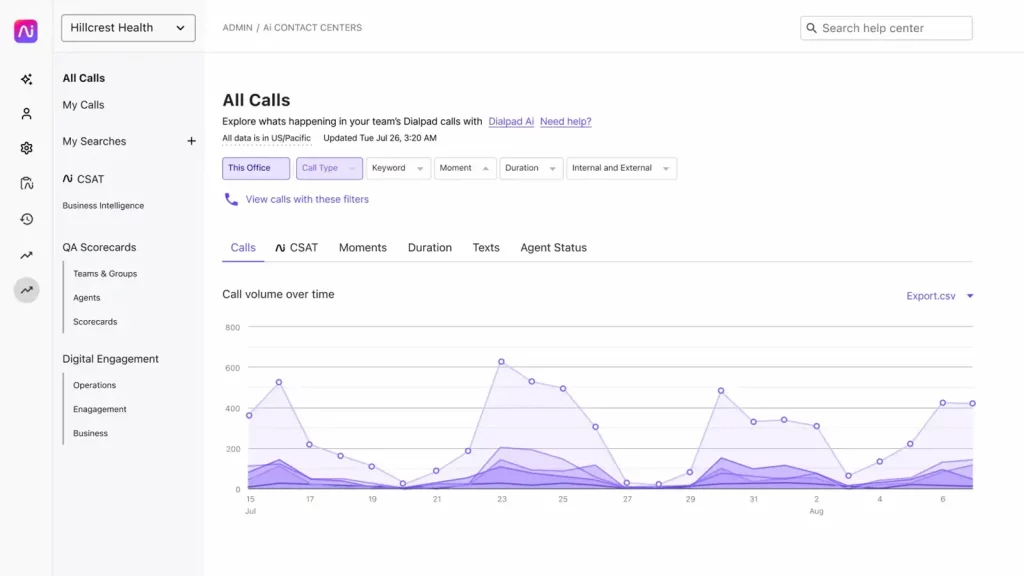
Dialpad is a cloud-based VoIP platform powered by AI. It offers smart calling, texting, and voice insights for clinics that want a modern, tech-forward communication tool.
Dialpad features
- AI-powered call transcription: Live call summaries and searchable transcripts
- Two-way texting: Chat with parents and follow up easily
- Call routing and auto-attendants: Direct calls without needing an operator
- Mobile-friendly: Use from any device, anywhere
Dialpad pros
- Smart call insights: AI helps track keywords and summarise conversations
- Great for remote work: Ideal for on-the-go providers
- Modern interface: Clean, fast, and user-friendly
Dialpad cons
- HIPAA compliance only on select plans: Not all options are compliant
- Limited EHR integrations: Not healthcare-specific by design
- AI transcription accuracy can vary: Especially in noisy settings
Dialpad Integrations
Dialpad works well with major apps to make communication seamless:
- Salesforce, HubSpot, and Zendesk for CRM sync
- Google Workspace and Microsoft 365 for productivity
- Zapier and other APIs for automation
Dialpad pricing
Starts at $23/user/month. HIPAA-compliant VoIP service is only included in the Enterprise plan.
Dialpad ratings
- Capterra: 4.5/5
- G2: 4.3/5
Dialpad customer reviews
“The service is inconsistent and glitchy. We spend too much time troubleshooting when we should be meeting.”
“It continuously dropped calls, the price was pretty high compared to other solutions. We struggled greatly with the software as we would miss key meetings due to dropped calls and had to resort to taking them via phone when we really needed to screen-share with our customers and prospects.”
Source: Capterra
Dialpad AI Support Channels
- Email support
- Live chat
- Help center and tutorials
8. Solutionreach

What is Solutionreach?
Solutionreach is a patient communication platform with VoIP features built in. It’s used by healthcare practices that want to combine texting, email, reminders, and calls in one tool.
Solutionreach features
- VoIP calling and voicemail: Handle patient calls directly from the platform
- Automated appointment reminders: Send SMS, email, or voice alerts
- Patient satisfaction surveys: Collect feedback automatically post-visit
- Recall and reactivation tools: Bring back patients who haven’t visited in a while
- Custom templates and messaging: Personalise communication by age or visit type
Solutionreach pros
- All-in-one patient messaging: Great for clinics that want to streamline
- Good for patient retention: Recall tools help fill appointment slots
- Healthcare focus: Built specifically for medical practices
Solutionreach cons
- Steep learning curve: Takes time to fully customise
- Interface can feel dated: Not as modern as some alternatives
Solutionreach Integrations
Solutionreach enables broad connectivity for clinic automation:
- 400+ EHR and PM systems through SyncAssure
- GoTo Connect for phone integration
- JotForm and other data capture tools
Solutionreach Pricing
Plans start around $300/month. It scales based on features and clinic size.
Solutionreach Ratings
- Capterra: 3.8/5
- G2: 3.9/5
Solutionreach Customer Reviews
“Can be difficult to maneuver from time to time due to updates/ modifications made to the programing.”
“They lock you into an auto renewing contract then when you try to get out of it they drag their feet and continue to bill you for months after you disconnect them. Then they chaise you for the money because they did not stop their servers from sending messages when you disconnected their service.”
Source: Capterra
Solutionreach Support Channels
- Phone support
- Knowledge base
- Onboarding assistance
9. OhMD

What is OhMD?
OhMD focuses on patient texting, secure messaging, and VoIP calling. It’s built for small to mid-sized clinics that need HIPAA-compliant texting with phone call support.
OhMD features
- Two-way texting and voice calling: All from one platform
- Secure messaging: HIPAA-compliant communication between staff and patients
- Broadcast messages: Send updates to large groups (like flu alerts)
- Telehealth tools: Text-to-video visit links for quick virtual consults
- Mobile and desktop access: Easy to use on the go
OhMD pros
- Great texting experience: Easy for both staff and parents
- Fast to set up: Can be running in hours
- Built for healthcare: Fully focused on clinical communication
OhMD cons
- Fewer advanced VoIP tools: More focused on texting than calls
- Limited analytics: Call reporting is basic
- May not scale well for large clinics: Better for small practices
OhMD Integrations
OhMD provides strong EHR compatibility for medical offices:
- 85+ EHRs including Epic, athenahealth, and Allscripts
- Practice Fusion and ModMed for patient record syncing
- HIPAA-compliant platforms for secure messaging
OhMD pricing
Plans start at around $7/month. But, pricing may vary based on features and staff size.
OhMD ratings
- Capterra: 4.7/5
- G2: 4.7/5
OhMD customer reviews
“Some users do not like it because it is a separate app. I can’t figure out a way to delete old clients from my records. At times it seems to freeze. I then just sign out and sign back in which fixes it. I was told that I need to upgrade to a newer version, so that may be my problem.”
Source: Capterra
OhMD support channels
- Email support
- Live chat
- Knowledge base with guides
- Onboarding and training help
10. CallHippo

What is CallHippo?
CallHippo is a cloud-based VoIP solution that works well for clinics needing global calling, virtual numbers, and basic team communication tools. It’s popular with startups and small businesses.
CallHippo features
- Virtual phone numbers: Get local numbers in multiple countries
- Smart call routing: Send calls to the right team or time zone
- Voicemail transcription: Convert voice messages into readable text
- Live call monitoring: Great for training or reviewing call quality
- Call analytics dashboard: See call trends, volumes, and missed calls
CallHippo pros
- Affordable plans: One of the cheaper VoIP options
- Good for remote or multi-location teams
- Easy to scale: Add or remove users as needed
CallHippo cons
- Not built for healthcare: You’ll need to confirm HIPAA compliance
- No built-in texting: Texting requires external integrations
- Support is tier-based: Priority help only on premium plans
CallHippo Integrations
CallHippo offers a wide set of integrations to unify business tools:
- Salesforce, HubSpot, and Zoho for CRM management
- Microsoft Dynamics, Freshdesk, and Zendesk for service coordination
- Intercom, Slack, and Zapier for communication and automation
CallHippo pricing
Plans start at $16/user per month. Higher tiers unlock analytics and integrations.
CallHippo ratings
- Capterra: 4.4/5
- G2: 4.3/5
CallHippo customer reviews
“While CallHippo provides great functionality, there were a few challenges with OTP delivery during account management, which caused some delays. Additionally, some features could be more customizable, particularly in terms of advanced reporting and analytics. It would be helpful to have more detailed settings or flexibility in these areas.”
“It hangs up a lot of times, screen freeze”
Source: Capterra
CallHippo support channels
- Email support
- Live chat on website
- Help center with video tutorials
- Ticket-based support system
Why Emitrr Is the Best VoIP Provider for Pediatricians
Running a paediatric clinic isn’t just about seeing patients, it’s about managing constant communication with parents, schools, and your own team. That’s where Emitrr really shines. It’s built to support exactly how paediatric clinics operate, right from front desk to follow-up. Here’s why it’s one of the best VoIP options for paediatricians:
- HIPAA-compliant phone system: Every parent call, voicemail, and message is protected under HIPAA. No shortcuts when it comes to patient privacy.
- Two-way calling and texting: Whether a parent calls to check symptoms or texts to reschedule, your team can handle both from one place.
- Voicemail-to-text: If a parent leaves a message about a fever at 7 AM, your team can read the voicemail as a text before the clinic even opens.
- Missed-call textbacks: Missed a call during school physical rush hour? Emitrr automatically sends a polite text back asking how you can help.
- Smart call routing: Direct school form queries to the front desk, sick visits to the nurse line, and billing to admin, no more confusion or call transfers.
- Auto-attendant setup: Parents can easily navigate to the right department by pressing 1, 2, or 3. It’s intuitive and saves time.
- Mobile-friendly app: Your on-call doctor can respond to late-night concerns without giving out their personal number.
- Custom caller ID: Always show your clinic’s name when calling parents, even from a mobile or web dashboard.
- After-hours call handling: Route urgent calls to on-call providers, and all others to a friendly voicemail with clear instructions.
- Appointment reminders via call or text: Send vaccine reminders or check-up alerts based on age or due date, fully automated.
- Patient review requests: After a visit, Emitrr sends a gentle nudge to happy parents to leave a review, helping boost your online rep.
- Call recordings: Helpful if there’s confusion about medication instructions or for internal quality checks and staff training.
- Multi-location support: Whether you run one clinic or five, you can manage them all from one platform.
- Call performance analytics: See when phones are busiest, how quickly calls are answered, and how many get missed.
- Integration with EHRs and PMS: When a parent calls, their profile pops up. Every call and text is logged to the patient’s file.
- Internal team chat: Your front desk, nurses, and admin can message each other instantly, without using personal phones.
- Text broadcast for announcements: Running a flu shot clinic? Send a batch text to all eligible parents in seconds.
- Custom voicemail greetings: Add a warm, kid-friendly message that reflects your clinic’s tone and professionalism.
- Secure role-based access: Only nurses see clinical messages. Billing sees only billing. Keeps everything safe and efficient.
- Dedicated onboarding and support: You won’t be left to figure it out alone. Emitrr helps train your staff and offers real-time help when needed.
If you’re a paediatrician tired of juggling voicemails, missed calls, and patient reminders manually, Emitrr is made for you. It’s not just software. It’s a better way to run your clinic’s communication.
FAQs
Look for a system that’s HIPAA-compliant, easy to use, and built for healthcare. Make sure it supports both calling and texting, integrates with your EHR, and comes with solid support.
VoIP helps you forward calls, send missed-call texts, and get voicemails transcribed, so nothing slips through the cracks, even outside clinic hours.
Emitrr is a strong choice. It syncs with most EHRs and lets you link calls to patient records and appointments, making things smoother for your team.
Yes! Emitrr offers secure, HIPAA-compliant calling and texting all from one dashboard.
Not at all. Emitrr guides you through the setup, and you can keep your existing number. Most clinics are up and running in just a few hours.
Conclusion
Let’s be honest, running a pediatric clinic is hard enough without a clunky phone system slowing you down. When parents are calling non-stop, your front desk is juggling a dozen tasks, and voicemails are piling up, the right VoIP setup can make all the difference.
That’s where Emitrr shines. It’s not just another VoIP tool. It’s designed for healthcare, built for busy teams, and packed with features that actually help, like missed-call texts, auto-reminders, EHR syncing, and secure messaging.
Want to see how it works? Book a free demo with Emitrr and find out how much easier daily communication can really be!