
Introduction
On Monday morning, the voicemail box shows forty-one new messages. Some came in Friday evening, some over the weekend, and a handful at 7:50 this morning. The list shows only phone numbers and timestamps. Somewhere in the patient is reporting a reaction to a new medication, a pharmacy is asking about a refill, three people are asking to reschedule, and a wrong number has called twice.
The usual approach is to start at the top and listen. That works until you realise that the order messages that were left in say nothing about the order they need to be handled in. Listening order is not the same as clinical or operational priority. The patient with the medication reaction may be message thirty-four.
Voicemail triage is the process of turning that unstructured audio into categorised, owned, actionable requests. This guide covers what hides in a healthcare voicemail box, how to categorize and prioritise messages, what transcription and AI summaries can and cannot do, how to route and close the loop, how to reduce voicemail volume before it reaches the inbox, and a five-day plan for getting started.
What Is Healthcare Voicemail Triage?
Healthcare voicemail triage is the process of reviewing, categorizing, prioritizing, assigning, and following up on patient voicemail requests. Every message gets a category, a priority, an owner, and an outcome.
It is different from clinical triage. Clinical triage assesses symptoms and makes decisions about care, and qualified clinicians do it. Voicemail triage is operational: it makes sure the right person hears about each request quickly. When a voicemail may involve a clinical concern, the triage process sends it to a clinician for review. It does not decide what the concern means.
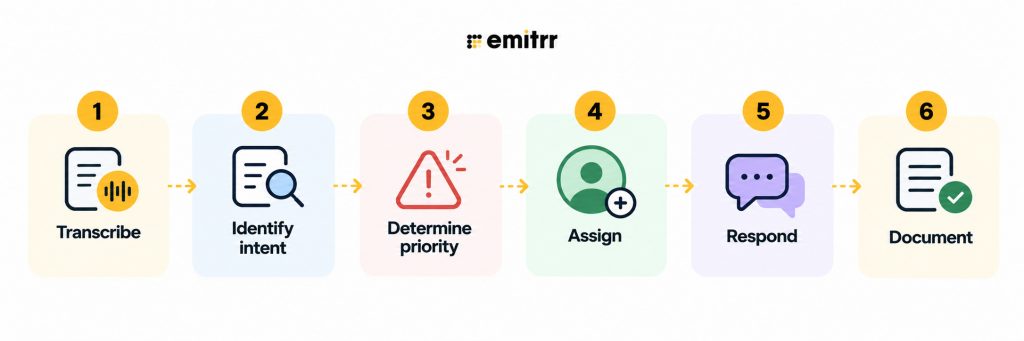
The workflow runs in six steps:
Core Components of an Effective Voicemail Triaging System
A strong voicemail triaging system typically includes:
- Speech-to-text transcription for quick scanning and documentation.
- Natural language processing (NLP) to detect urgency, sentiment, and context.
- Smart routing rules that send messages to the right team or person automatically.
- Visual voicemail dashboards for managers and teams to track and resolve messages in real time.
- Integration hooks for CRMs, ERPs, help desks, and practice management tools.
With triage calls in action, businesses seize the opportunity to build a leaner communication pipeline that keeps teams aligned and customers engaged.
What Types of Requests Are Hiding in a Healthcare Voicemail Box?
A typical practice voicemail box holds a mix like this:
- Refill requests
- Appointment scheduling or changes
- Billing and insurance questions
- Test result questions
- Clinical questions
- New symptoms or concerns
- Pharmacy and referring-office calls
- Wrong numbers and spam
Voicemail is hard to triage because the request is unstructured and the key information can appear anywhere in the recording. A patient may spend thirty seconds explaining the background before stating what they need. Someone may mention a symptom in passing at the end of a message about scheduling. Callers speak quickly, mumble phone numbers, or forget to say their date of birth. A text arrives as a typed line. A voicemail arrives as a recording that has to be interpreted before it can be sorted.

Traditional Voicemail vs. Voicemail Triaging: Key Distinctions
Traditional healthcare voicemail follows a simple process: a patient leaves a message, and staff listen and respond when they get to it. Every message can look equally urgent in the inbox, whether it is a routine scheduling request or a message about a medication concern.
Voicemail triage adds structure to that process. It analyzes the message, identifies the patient’s intent, determines its priority, and routes it to the appropriate team or person. Urgent or potentially clinical messages can be surfaced for review, while routine requests can follow predefined workflows.
The difference also affects accountability. Traditional voicemail depends heavily on staff remembering to check and return messages. A triage workflow can assign ownership, track status, and escalate unclaimed requests so fewer messages remain unresolved.
| Traditional Healthcare Voicemail | Healthcare Voicemail Triage |
|---|---|
| Messages are handled largely in the order they arrive | Messages are prioritized based on intent and urgency |
| Staff listen to each voicemail individually | Transcription and AI summaries make messages faster to scan |
| Routine and potentially urgent requests can sit together | Potentially urgent messages can be flagged for appropriate review |
| Staff decide manually who should handle each message | Messages can be routed to teams or individuals using rules |
| Follow-ups depend on staff remembering to respond | Ownership, status, and escalation rules improve accountability |
| Patients may call again when they do not receive a response | Unresolved requests can be tracked and followed up |
| Staff spend more time listening, sorting, and forwarding | Automation reduces repetitive sorting and routing work |
| Context can be scattered across calls, texts, and other channels | Patient communications can be connected in a shared workflow |
The Critical Problems with Traditional Healthcare Voicemail Systems
Traditional voicemail creates operational problems for healthcare teams because every message requires someone to listen, interpret, prioritise, and decide what happens next.
- Message overload and inbox management: High voicemail volumes make it harder for staff to quickly identify refill requests, scheduling needs, referral updates, and potentially urgent patient concerns.
- Delayed response times: Messages can remain unheard or unanswered during busy periods, weekends, and after-hours, leading patients to call again or wait longer for a response.
- No built-in priority classification: A routine appointment request can appear alongside a message about a medication issue or new symptom, making it difficult to know what should be reviewed first.
- Inefficient staff allocation: Messages may be handled by whoever checks the inbox rather than the person or team responsible for that type of request. This creates unnecessary handoffs and takes clinical staff away from work that requires their expertise.
- Security and compliance challenges: Voicemails and transcripts can contain protected health information. Without appropriate access controls, permissions, retention practices, and audit capabilities, managing that information can become more difficult.
How to Categorize Patient Voicemails by Intent
Keep the category list small, and make sure every category has a clear owner. If a category does not map to a work queue, merge it with another. The categories below, with example phrases patients actually use, are a practical starting point:
- Refill: “I’m almost out of my lisinopril.” “Can you send a refill to my pharmacy?”
- Scheduling: “I need to move my appointment on Thursday.” “I’d like to book a checkup.”
- Billing or insurance: “I got a bill I don’t understand.” “My insurance changed.”
- Clinical question: “Is it okay to take this with my other medication?” “Should I keep using the cream?”
- New symptom or concern: “Since yesterday I’ve had a rash and a fever.” “Something feels off since the procedure.”
- Referral or pharmacy: “This is Riverside Pharmacy calling about a prescription.” “I’m calling from Dr. Patel’s office about a referral.”
- General question: “What are your hours on Friday?” “Do you take walk-ins?”
- Spam or wrong number: “Hi, I’m calling about your car’s extended warranty.” “I think I have the wrong number.”
The reason to map categories to work queues is practical: a refill goes to whoever handles refills, a scheduling request goes to the front desk, and a pharmacy call goes to the person who can answer it. If two categories always go to the same person and get handled the same way, combine them. A broader approach to organizing patient messages by intent can help practices build a consistent intent list across communication channels.
How to Prioritize Patient Voicemails by Urgency
Three Practical Voicemail Priority Levels
Three levels are usually enough. The examples and response windows below are illustrative, and each practice should set its own.
| Priority | Example Request | Target Response | Owner |
| Same day | Medication reaction, post-procedure concern, patient out of a critical medication, recent discharge concern | Reviewed promptly and returned the same day | Clinical team or nurse |
| Within 1 business day | Refill with a few days of supply left, test result question, referral or pharmacy call | Returned within one business day | Refill queue, clinical staff, or referral coordinator |
| Routine, within 2 to 3 business days | General question, billing or insurance question, non-urgent scheduling | Returned within two to three business days | Front desk or billing |
Clinical leadership should define the actual urgency rules and response windows. The table shows the structure, not a standard of care, and a speciality clinic or urgent care will draw the lines differently than a primary care office.
What Should Trigger Human Review?
Certain content should always reach a person quickly, regardless of how a message was categorised:
- New symptoms
- Medication reactions
- Post-procedure concerns
- Recent discharge concerns
- Other practice-defined red flags
Automation can identify and surface potential urgency, for example by flagging a transcript that mentions a symptom or a recent procedure. It should not make the clinical decision. The point of flagging is to put the message in front of a clinician sooner, not to decide what it means. A false alarm that reaches a nurse costs a minute. A missed one can cost much more.
What Voicemail Should Not Be Used For
Voicemail is not an emergency channel. Patients experiencing an emergency should follow the practice’s established emergency instructions, such as calling 911. The voicemail greeting should say so clearly, before the patient starts to talk, and should tell patients what to do if the situation cannot wait. Review the greeting regularly. Practices working on greeting language can use a HIPAA-compliant voicemail script to shape what to say and what to avoid.
Voicemail Transcription and AI Summaries: What They Solve
Transcription converts audio into text, which makes voicemails searchable and quick to scan. Instead of listening to ninety seconds of audio to learn that a patient wants to reschedule, staff can read it in a few seconds. This is where converting voicemail to text can make the review process faster.
It helps to keep three versions of a voicemail distinct:
- Full transcript: the entire message in text. It is complete but can be long, and transcription can contain errors.
- AI summary: a short description of what the caller wants. It is fast to read but condenses the message, so details can be lost.
- Original recording: the actual audio. It is the source of truth, including tone, hesitation, and background context that text does not capture.
Staff can use the transcript or summary for initial sorting, then listen to the original recording when a message is unclear or potentially important. If the transcript has gaps, if the caller sounds distressed, or if the message touches on symptoms or medication, the recording should be reviewed.
Privacy matters here as well. Recordings and transcripts can contain protected health information, so access should be limited to staff who need it, and role-based permissions help. Practices can evaluate voicemail transcription software when assessing transcription capabilities.
They should also review HIPAA-compliant voicemail considerations when evaluating privacy and security requirements.
Watch this video to find out things you must know about voicemail transcription
How to Route Voicemails to the Right Team
A routing workflow gives every message a path:
- A new voicemail arrives.
- It is transcribed and summarized.
- Intent is identified.
- Priority is determined.
- The message is assigned to a team or person.
- Unclaimed work escalates.
- The outcome is documented.
On assignment, there are two common models. Manual assignment lets a lead or the person on the queue choose an owner. Round-robin team assignment rotates new voicemails through team members, which spreads load evenly and prevents the same person from always being the default. Round-robin works well for high-volume, similar requests such as scheduling. Manual assignment works better when a task needs specific skills or a patient has an existing relationship with one staff member. Call routing can also direct incoming calls to the appropriate team or person before a voicemail is created.
Build in coverage rules for absences and after-hours periods. Decide who picks up a queue when its owner is out, who sees weekend messages first on Monday, and what happens to a voicemail that nobody claims within the target window. Unclaimed work should escalate automatically to a backup owner instead of waiting for someone to notice.
6 Proven Benefits of Implementing Voicemail Triage
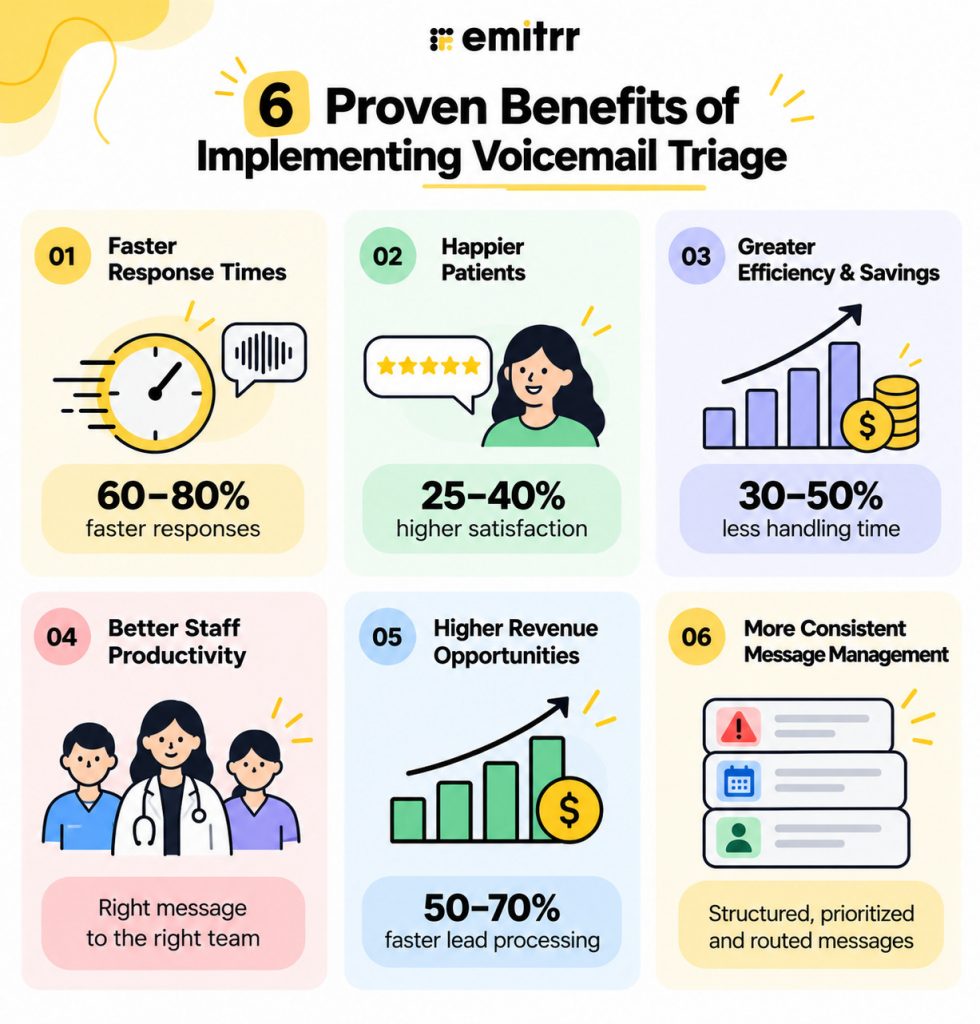
- Dramatic reduction in response times: Emergency messages get 60–80% faster responses. Routine inquiries are processed more efficiently, while automated handling takes care of simple requests and frees staff for complex issues.
- Improved customer satisfaction: Satisfaction typically jumps 25–40% after implementation. Customers get responses from knowledgeable staff who already have the relevant context, while proactive updates and acknowledgments create a more organized experience.
- Enhanced operational efficiency and cost savings: Most companies see a 30–50% reduction in message handling time. Staff spend less time sorting voicemails and more time on higher-value work, with ROI typically reaching within 6–12 months.
- Better resource utilization and staff productivity: Specialists handle specialist work, junior staff manage appropriate inquiries, and workloads are distributed more evenly. Teams can build deeper expertise while maintaining visibility into broader communication patterns.
- Increased revenue through faster lead processing: Sales response times can improve by 50–70%, translating to 15–25% better conversion rates depending on the industry. Faster processing can also surface upselling and expansion opportunities that traditional voicemail handling may miss.
- More consistent voicemail management: Triage creates a structured process for categorizing, prioritizing, and routing messages, reducing the risk of important requests being buried in a general voicemail queue.
The Future of Healthcare Voicemail Triage
Healthcare voicemail triage is moving beyond basic transcription toward AI-powered communication systems and conversational AI that can understand, classify, and act on patient requests. Speech recognition turns conversations into searchable text, while AI analyzes intent and context to determine what a patient needs. Automated workflows can then tag, prioritize, and route each voicemail to the right team, while connected communication channels keep patient context together. As these systems evolve, multilingual processing, predictive analytics, sentiment detection, mobile access, and intelligent automation can make voicemail management increasingly proactive rather than simply reactive.
- AI-powered transcription: Converts every voicemail into searchable text.
- Intent intelligence: Understands what the patient needs, beyond keywords.
- Predictive triage: Identifies patterns and helps anticipate communication demand.
- Automated routing: Directs each request to the appropriate team or owner.
- Sentiment intelligence: Detects tone and signals that may require closer attention.
- Multichannel AI: Connects voicemail with calls, texts, forms, and other patient communications.
- Multilingual intelligence: Supports voicemail triage across different languages.
- Proactive workflows: Triggers the next action instead of leaving messages waiting in an inbox.
Watch how an AI voice agent can handle routine patient calls 24×7, capture intent, and route requests before they become voicemail backlog, even after-hours
Real-World Use Cases of Healthcare Voicemail Triaging
Across healthcare practices, voicemail triaging is quietly powering smoother, faster communication. Here’s where voicemail triaging steps in and makes a real difference.
- Appointment requests: Route new bookings, rescheduling, and cancellations to the front desk.
- Prescription requests: Send refill requests and medication-related messages to the appropriate team.
- Clinical questions: Flag symptom or medical questions for clinician review.
- Referral management: Route referral updates and referring-office calls to referral coordinators.
- Test results: Direct result-related questions to the clinical team.
- Billing & insurance: Send payment, billing, and insurance questions to the billing team.
- After-hours calls: Identify urgent requests and route them according to the practice’s after-hours workflow.
- Post-discharge follow-ups: Prioritize messages from recently discharged patients for timely review.
- Pharmacy communications: Route pharmacy calls about prescriptions, prior authorizations, or medication issues.
- Patient intake: Capture and route new-patient inquiries and required information.
- Multi-location practices: Direct calls based on the patient’s location or practice site.
- High-volume periods: Help teams sort and distribute increased voicemail volume without relying on first-in, first-listened.
How Emitrr’s Voicemail Triaging Can Help You Sharpen Your Care Communication
Emitrr’s phone and messaging tools cover the voicemail journey from the first missed call to the documented outcome. Voicemail transcription, AI summaries, AI tagging, assignment, missed-call text-back, and AI voice handling work as parts of one communication workflow. Features such as AI tags depend on plan, so confirm what your account includes.
If you’re looking for a reason to choose Emitrr as your go-to voicemail triaging service partner, we’ll give you the reasons.
Turn Voicemails Into Reviewable, Structured Requests
AI voicemails can have transcripts and AI summaries, which reduces the amount of audio staff need to review manually. AI tags can categorize voicemail intent. This changes the first step from “listen to every voicemail” to “review the information needed to decide what happens next.” Staff read a summary, see a tag such as refill or scheduling, and move straight to the right action.
Route Voicemail Requests Based on Intent
AI call routing tags and rules can send requests to the appropriate team or person. Assignment can be manual or round-robin, depending on the queue. Channel controls let a practice decide where a tag applies. A tag that works for voicemail may not be wanted on text or fax, and channel settings keep each tag where it is useful.
Move Missed Calls Out of the Voicemail Queue
Missed-call text-back can immediately turn an unanswered call into a two-way text conversation. The patient can continue the interaction asynchronously instead of leaving another voicemail. It is especially useful for routine requests that texts handle well, such as scheduling and simple questions.
Use AI Voice for After-Hours and Overflow Intake
AI voice agent can answer routine calls, collect structured information, and route the resulting request. Use cases can include scheduling, common questions, refills, and other workflows the practice defines. Urgent or unsupported situations can be transferred or escalated to staff instead of being resolved autonomously. Calls can also be forwarded to the AI answering service when they are not answered, which suits overflow and after-hours coverage.
Keep the Original Context Available to Staff
Staff can open transcripts, summaries, recordings, and the surrounding conversation context together. Keeping the original voicemail matters when a transcript is incomplete or ambiguous, since the audio is the final check. Role-based access can be used to control who can view recordings and AI summaries, which helps with sensitive communication.
HIPAA-Compliant Message Handling and Security
Emitrr meets healthcare’s strict security requirements with end-to-end encryption, role-based access controls, and comprehensive audit trails. Business associate agreements ensure regulatory compliance. Data lifecycle management handles retention and disposal according to organizational policies.
Integration with Healthcare Management Systems
Seamless connections with electronic health records and practice management systems create unified patient communication experiences. Patient context gets retrieved automatically when messages arrive. Clinical workflows optimize based on provider schedules and expertise areas.
Sentiment Analysis for Patient Emotional State Detection
Patient communications get analyzed for emotional context affecting response approaches. Anxiety, frustration, and pain levels inform clinical decisions. Risk assessment identifies mental health crisis indicators requiring immediate intervention.
Automated Follow-Up and Care Coordination Features
Care coordination maintains consistent communication across providers and treatment phases. Medication adherence support includes automatic reminders and monitoring. Chronic disease management enables proactive check-ins between appointments.
Compliance Reporting and Quality Assurance Tools
Emitrr’s comprehensive reporting demonstrates regulatory compliance and supports quality improvement. Quality assurance workflows monitor communication standards automatically. Risk management identifies patterns indicating potential liability or safety concerns.
Visual Voicemail Dashboard Feature
Emitrr’s dashboard and data visualization capabilities are a class-apart. Real-time dashboards provide visibility into patient communication queues and care team workload. Patient communication history helps identify patterns and support needs. Performance metrics support quality management and improvement initiatives.
Watch this video to see how Emitrr can streamline healthcare front desk workflows
Key Takeaways
- Voicemail triage turns unstructured audio into categorized, owned, actionable requests. It does not replace clinical triage.
- Listening order is not priority. First-in, first-listened management lets urgent messages sit.
- Use a small set of intent categories that map to work queues, and three priority levels defined with clinical leadership.
- Certain content, such as new symptoms, medication reactions, and post-procedure or discharge concerns, should trigger human review.
- Voicemail is not for emergencies, and the greeting should say so.
- Use transcripts and summaries for sorting, and listen to the original recording when a message is unclear or potentially important.
- Route by intent with manual or round-robin assignment, backup coverage, and escalation for unclaimed work.
- Close the loop: verify identity, respond, document attempts, and record the outcome.
- Reduce volume upstream with missed-call text-back, AI voice, phone menus, booking links, refill workflows, and forms.
- Start with one queue and review results in the second week.
FAQs
Voicemail triage is the process of reviewing, categorizing, prioritizing, assigning, and following up on patient voicemail requests. It turns recordings into organized requests with an intent, a priority, an owner, and an outcome. It is an operational process, and clinical decisions stay with clinicians.
Look for content the practice has defined as urgent: new symptoms, medication reactions, post-procedure concerns, and recent discharge issues. Transcripts and AI summaries can help surface these quickly, but a person should review anything potentially urgent, and clinical leadership should define the criteria.
Transcription is useful for sorting and searching, but it is not perfect. Names, medication names, and phone numbers are common error points. Use transcripts and summaries for initial triage and listen to the original recording when a message is unclear, sensitive, or potentially important.
It depends on the practice and the request. A common structure uses same-day, one-business-day, and two-to-three-business-day windows, but clinical leadership should set the actual response times based on the type of practice and the content of the message.
Automation moves routine requests out of the voicemail queue. Missed-call text-back converts unanswered calls into text conversations, AI voice handles after-hours and overflow calls, and booking links, refill workflows, and forms let patients complete simple tasks without leaving a message.
Assign by intent to the team that handles that work. Use manual assignment when a task needs a specific person, and round-robin to spread similar work evenly. Define backup coverage for absences and after-hours periods, and escalate unclaimed messages automatically.
Yes. AI can transcribe, summarize, tag, and route voicemails, and it can flag content that may need attention. Clinical judgment and urgency decisions stay with qualified staff, and potentially urgent or unclear messages go to a person.
Conclusion
A voicemail box is not a queue to be worked from the top. It is a collection of requests that differ in what they need and how soon. Triage gives each one a category, a priority, an owner, and an outcome, and it does so before anyone spends time on a callback.
Start with a sample of recent voicemails, agree on a short list of categories and three priority levels with clinical input, and pilot the workflow on one queue. Then use transcription, tagging, and upstream tools such as missed-call text-back to keep human attention on the messages that need it. The goal is that the patient with the medication reaction is reached first, no matter where the message sits on the list.
Turn your voicemail box into a structured workflow with Emitrr. Book a demo to see how it helps your team transcribe, tag, and route patient voicemails.

 4.9 (400+
reviews)
4.9 (400+
reviews)