
Overview of VoIP Providers for Radiologists
The radiology industry has undergone a seismic shift in recent years. With the rise of remote consultations and the expansion of decentralized imaging centers, radiologists increasingly rely on tools that allow seamless communication without compromising patient data security.
Traditional landline systems no longer suffice in this dynamic environment. VoIP, or Voice over Internet Protocol, offers a modern, scalable, and secure alternative to landlines, allowing radiology teams to connect effortlessly, whether from hospitals, home offices, or mobile devices.
However, radiology practices can’t just adopt any VoIP system. They need HIPAA-compliant phone solutions tailored to healthcare, with safeguards for Protected Health Information (PHI) and seamless integrations into radiology workflows. This blog presents a carefully curated list of the best VoIP for radiologists, helping practices make informed, compliant decisions.
Key Features to Look for in a Radiologist VoIP Software
When selecting the best HIPAA-compliant VoIP for radiologists, it’s important to prioritize the features that address the unique communication needs of imaging professionals. Here’s what to look for:
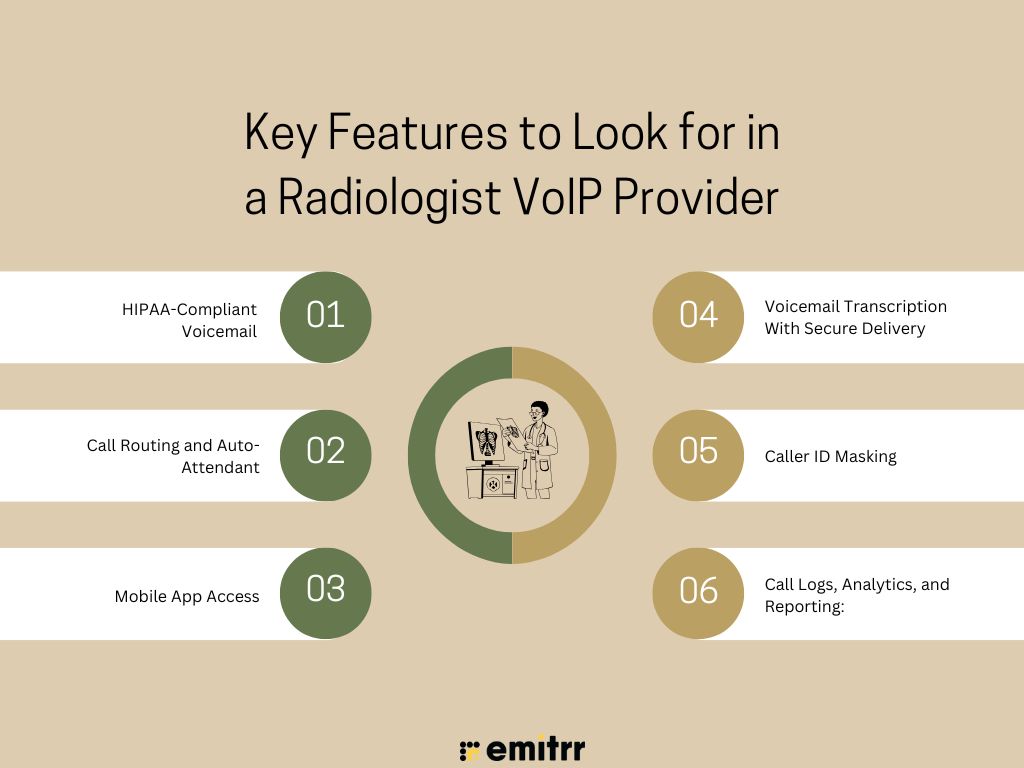
HIPAA-Compliant Voicemail
Ensures voicemail messages are encrypted and securely stored, protecting sensitive PHI and maintaining compliance across all devices and platforms.
Call Routing and Auto-Attendant
Automatically directs incoming calls to the appropriate radiologist or department, minimizing delays and improving patient response times.
Mobile App Access
A HIPAA-compliant mobile app lets radiologists manage calls securely from anywhere, ensuring availability during on-call hours and remote work.
Voicemail Transcription With Secure Delivery
Transcribes voicemails into text and delivers them via encrypted email or app notifications without exposing PHI.
Caller ID Masking
Safeguards radiologists’ numbers by displaying the clinic’s number during outbound calls, maintaining professional boundaries, and ensuring privacy.
Call Logs, Analytics, and Reporting:
Tracks call volume, durations, missed calls, and staff performance, offering actionable insights to improve communication workflows.
Want to know more about VoIP and how it works? Here’s a simple video to walk you through it:
Security & Compliance Requirements for Radiologist VoIP Systems
To qualify as HIPAA-compliant VoIP, a software provider must go beyond basic call features. Security and data governance are paramount. Below are critical compliance benchmarks:
Encrypted Calls & Voicemails
Protects PHI by encrypting voice data during calls and while stored, preventing unauthorized access or interception.
Secure Storage & Access Controls
Voicemails are stored securely with permissions assigned by user roles, ensuring only authorized personnel can access sensitive patient messages.
HIPAA-Compliant BAA
VoIP vendors must sign a BAA to legally ensure responsibility and compliance with HIPAA regulations when handling patient communications.
Secure PHI Across Devices
Ensures protected health information is securely transmitted and stored across all devices, platforms, and environments used by staff.
Essential Integrations for VoIP Providers in Radiology
The best VoIP platforms don’t operate in isolation. They integrate with systems used daily in radiology to streamline operations:
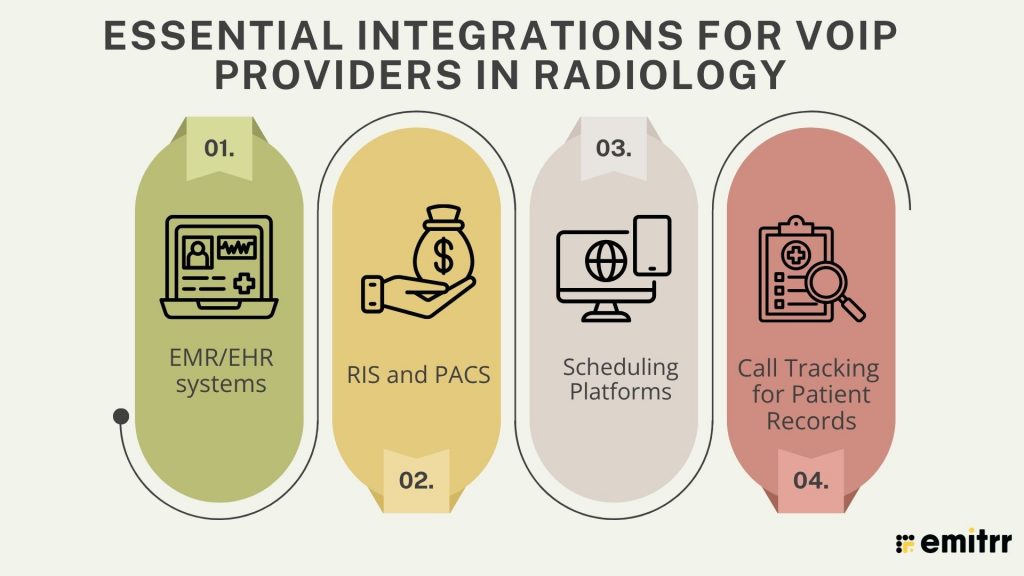
EMR/EHR systems
Integrates with platforms like Epic and Athenahealth to log call activity, access patient records, and maintain continuity of care documentation.
RIS and PACS
Aligns VoIP systems with imaging workflows, enabling radiologists to coordinate seamlessly with technicians and access imaging data during calls.
Scheduling Platforms
Automate appointment reminders and confirmations, reducing no-shows and freeing up staff from manual follow-ups.
Call Tracking for Patient Records
Links incoming and outgoing calls directly to patient profiles, ensuring complete documentation for compliance and improved communication accuracy.
Check out this insightful video on essential things to know about voicemail transcription:
How VoIP Providers Help Radiologists
Modern VoIP solutions go far beyond basic calling—they centralize communication, enhance coordination, reduce manual tasks, and support remote workflows without compromising on compliance or security.
- Team Communication: Unifies staff, referrers, and radiologists—reducing delays, missed updates, and improving patient care coordination.
- Smart Call Routing: Automatically forwards calls based on schedules, keeping radiologists reachable during shifts, emergencies, or after-hours.
- Fewer Missed Calls: Uses alerts, call queuing, and routing rules to reduce unanswered calls and improve response times.
- Voicemail to Email: Transcribes voicemails securely and emails them, ensuring fast follow-up while staying HIPAA-compliant.

How to Choose the Right VoIP Provider for Radiology Practices
Finding the right VoIP solution means balancing functionality, compliance, and integration. These evaluation steps help radiology practices choose a system that supports their specific workflows and priorities.
Define Use Cases
Clarify whether the tool will support internal staff, on-call radiologists, patient communication, or referrals—each use case may require different features and configurations.
Verify HIPAA Compliance
Ensure the provider is fully HIPAA-compliant and offers a signed Business Associate Agreement (BAA) to protect your practice from legal or compliance risks.
Evaluate Voicemail Features
Look for HIPAA-compliant voicemail tools with encryption, transcription, and secure delivery methods to handle patient messages safely across devices and teams.
Download free ready-to-use voicemail greeting script for radiology practices to elevate your patient communication instantly.
Compare Pricing Models
Understand how you’ll be billed—flat-rate per organization, per-user subscription, or by call-minute—and choose what aligns best with your budget and usage patterns.
Review Integration Capabilities
Make sure the VoIP phone system connects with your EMR, RIS, PACS, and scheduling tools to prevent manual entry and streamline radiology workflows.
Check Support & Training
Choose a provider that offers live support, guided onboarding, and thorough training to reduce the learning curve and ensure smooth implementation.
Read Reviews & Uptime
Explore verified reviews from healthcare users and confirm the vendor’s uptime guarantees, especially if you’re running a high-volume or 24/7 radiology operation.
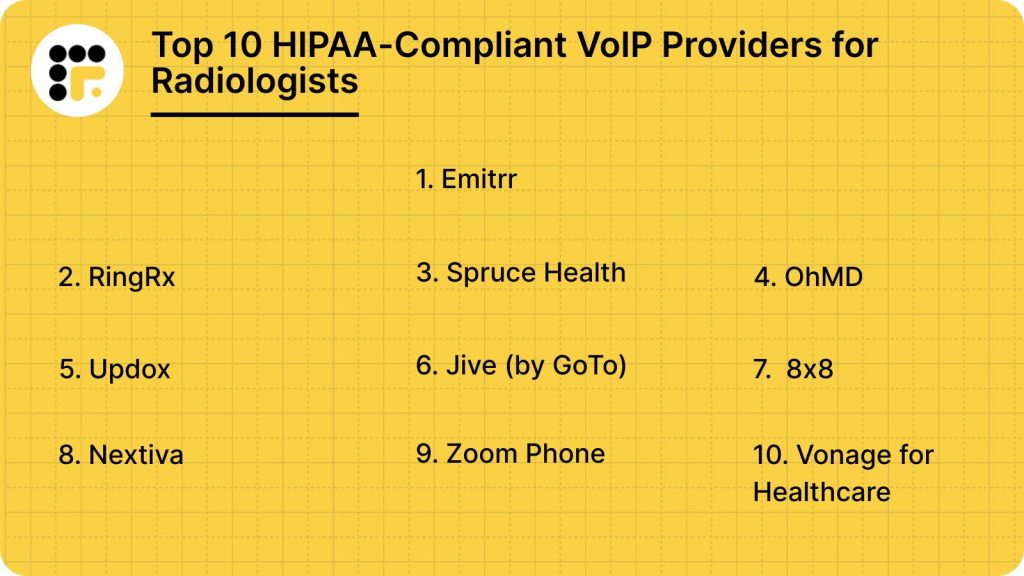
Top 10 HIPAA-Compliant VoIP Providers for Radiologists
Explore top HIPAA-compliant VoIP solutions for radiologists, delivering secure communication, smart call routing, and seamless integrations:
1. Emitrr : Best VoIP Competitor
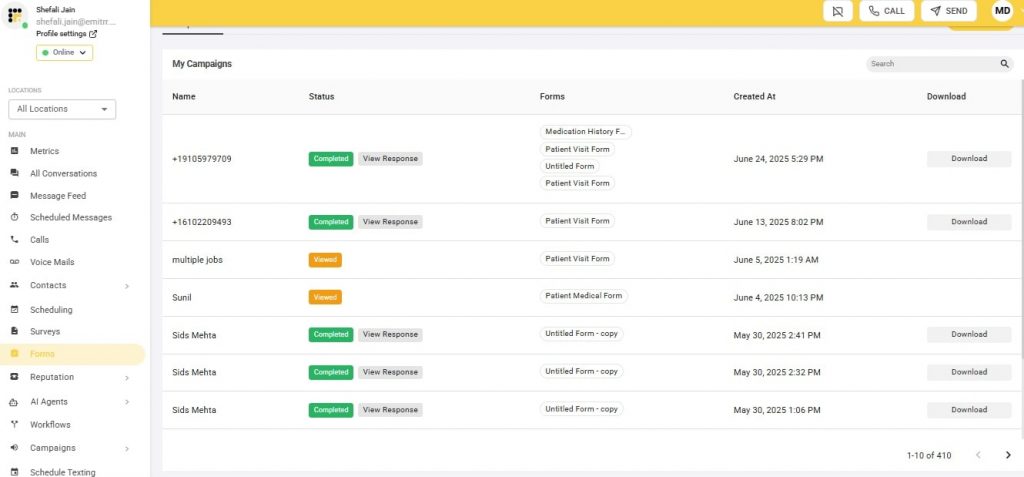
Emitrr is a modern HIPAA-compliant VoIP and texting platform designed for radiologists. It offers AI-powered automation, secure communication, and seamless integration with radiology tools like EHR and RIS systems. It’s especially favored by small to mid-sized practices for its cost-effectiveness, ease of use, and focus on healthcare workflows.
Key Features:
- AI Assistant (Emitrr AI Agent Sarah): Responds to patient queries, schedules appointments, and handles follow-ups 24/7, reducing staff workload and enhancing patient satisfaction through automation.
- HIPAA-Compliant Voicemail & Texting: All voice and text interactions are encrypted and stored securely to ensure full PHI compliance across mobile, desktop, and cloud devices.
- Smart Routing & Auto-Replies: Routes incoming calls to the right radiologist or assistant and sends auto-replies for missed calls, maintaining accessibility and engagement at all hours.
- RIS, EHR, and Scheduling Integrations: Integrates directly with existing radiology software, reducing manual data entry and ensuring accurate, real-time access to patient and imaging records.
- Call Analytics & Sentiment Reporting: Offers reports on call trends and basic sentiment analysis to evaluate patient interactions and staff performance for quality improvements.
Pros:
- Get started quickly with guided setup and live support for training, configuration, and ongoing technical assistance tailored for healthcare workflows.
- Combines robust communication tools with affordability, making it suitable for small and mid-sized radiology practices needing HIPAA-ready solutions.
- Radiologists working from home or satellite clinics can securely communicate using mobile and desktop apps without compromising privacy.
Cons:
- More features are on the way!
Pricing
- Standard Plan ($20/user/month): Includes HIPAA-compliant texting and calling, AI-powered call handling, smart auto-replies, a call analytics dashboard, and EHR/RIS/CRM integrations. Ideal for small to mid-sized radiology clinics seeking streamlined, automated communication.
- Professional Plan ($35/user/month): Adds real-time dashboards, sentiment analysis, automated reporting, predictive analytics, and advanced app integrations. Best for growing radiology practices needing enhanced insights and intelligent workflow automation.
Ratings:
Support:
- 24/7 live chat, onboarding assistance, and email support
2. RingRx
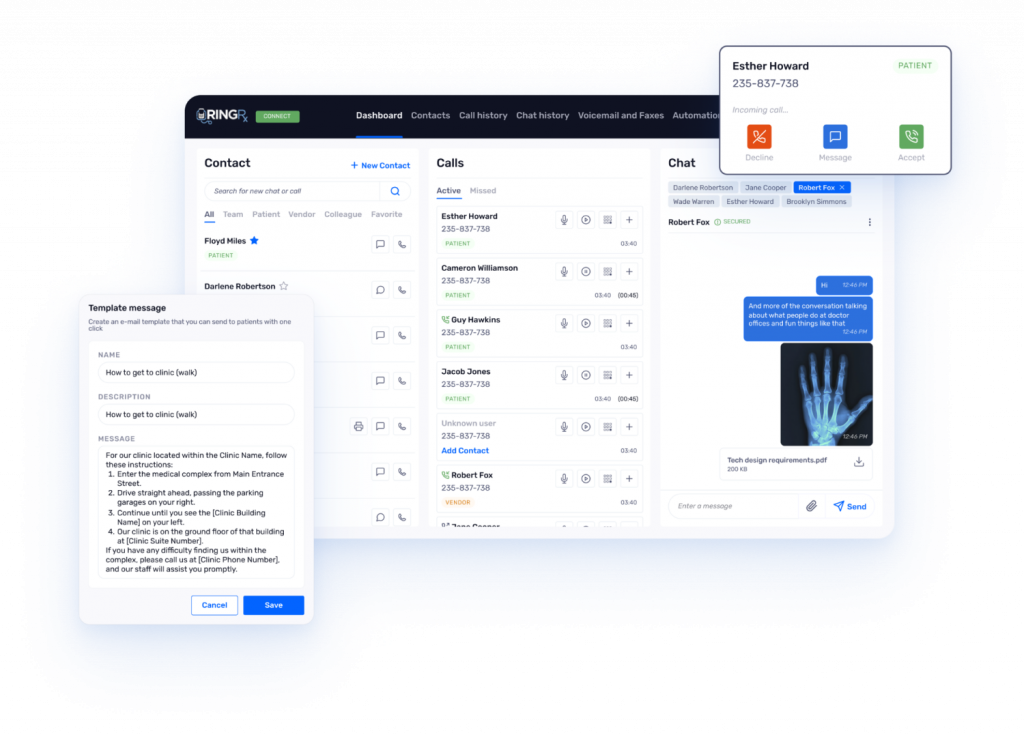
RingRx is a HIPAA-compliant VoIP solution built specifically for healthcare providers. It offers secure calling, SMS, voicemail transcription software, and eFax—accessible through a dedicated HIPAA-compliant mobile app. Designed for simplicity and flexibility, it suits radiologists who need reliable, privacy-focused communication tools without the complexity or cost of enterprise systems.
Key Features:
- HIPAA-Compliant Voicemail: All voicemails are encrypted during storage and transmission, ensuring PHI remains protected while allowing radiologists to review messages securely and efficiently.
- Secure Texting & Faxing: Provides secure SMS and electronic faxing within the same platform, perfect for sending radiology reports or images while staying compliant.
- Call Forwarding & Auto-Attendant: Automatically routes calls based on staff availability, reducing missed calls and helping radiologists stay accessible even during off-site hours.
Pros:
- Easy onboarding and intuitive UI let practices set up quickly without extra training.
- Affordable pricing fits solo radiologists and small groups needing essential HIPAA compliance.
- Dedicated HIPAA-compliant phone numbers protect personal contact details.
Cons:
- Advanced call flows or custom voicemail may need manual setup or admin help.
- No native RIS or PACS integration; requires APIs or third-party solutions.
- The user interface feels dated compared to newer VoIP platforms.
Pricing:
- Lite ($15/user/month): A complete business phone system for any-sized radiology practice. Includes HIPAA-compliant voice, unlimited calling, and a dedicated business phone number. Great for basic communication needs.
- Grow ($19/user/month): Everything in Lite, plus web-based faxing, team and patient texting, voicemail transcription software, and RingRx On-Call. Ideal for radiologists needing more communication flexibility.
- Clinic ($25/user/month): Everything in Grow, plus a free desk phone, two HIPAA-compliant voicemail boxes, web and machine faxing, and virtual conference rooms. Built for larger or multi-provider practices.
Ratings:
Support:
- Email and live chat support are available
3. Spruce Health
Spruce Health is a HIPAA-compliant, all-in-one communication platform that combines VoIP, secure messaging, and telehealth in a mobile-first app. Ideal for remote or small-practice radiologists, it streamlines communication by eliminating the need for separate tools, offering calling, texting, and care coordination in a single, easy-to-use interface designed for healthcare professionals.
Key Features:
- Secure Messaging: Enables encrypted communication with both patients and staff. Helps radiologists manage care updates and consultations from anywhere without risking PHI exposure.
- Caller ID Masking: Allows radiologists to protect their number during outbound calls by displaying the clinic or practice number instead.
- Voicemail Transcription: Converts voice messages into readable text for easy review, helping radiologists save time and prioritize responses while on the move.
Pros:
- Mobile-first design fits radiologists working remotely or away from the clinic.
- Combines calls, texts, and telemedicine into one dashboard for streamlined workflows.
- A user-friendly interface makes adoption quick, even for non-technical staff.
Cons:
- Telemedicine tools may be unnecessary for radiologists who don’t see patients virtually.
- The desktop version offers fewer customization options for administrative tasks.
- Higher monthly costs can be a drawback for solo providers needing only basic VoIP.
Pricing:
- Basic ($24/user/month): Ideal for smaller radiology practices or individual providers. Includes HIPAA compliance, secure messaging, 2-way SMS, video visits, team chat, eFax, and onboarding resources. Great starter plan for mobile-first teams.
- Communicator ($49/user/month): Built for growing radiology teams needing advanced phone features. Adds auto-attendant (IVR), desk phone support, missed-call text-back, after-hours routing, bulk messaging, API access, and mobile payments.
Ratings:
Support:
- Email support, chat assistance, and in-app guides
4. OhMD

OhMD is a HIPAA-compliant communication platform designed for simple, secure patient and team communication through text and voice. It helps radiologists manage appointment reminders, secure texting, and voicemail without complex setups, making it perfect for practices that prioritize patient engagement, follow-ups, and improved communication workflows.
Key Features:
- Voicemail Transcription: Automatically converts voicemails to readable text, allowing radiologists to quickly scan and respond to messages without needing to listen manually.
- Appointment Reminders: Sends automated SMS reminders to patients, significantly reducing missed appointments and saving staff time on manual follow-up calls.
- Two-Way Secure Texting: Facilitates encrypted, HIPAA-compliant communication between patients, radiologists, and staff to ensure fast, safe, and private information exchange.
Pros:
- Great for patient communication with secure texting and reminders to keep patients informed.
- Quick, cloud-based setup requires minimal hardware or IT involvement for fast deployment.
- A user-friendly interface makes it easy for radiology teams to adopt with little training.
Cons:
- Basic call analytics may not meet the detailed reporting needs of larger practices.
- Limited integrations with RIS or PACS can restrict automation and workflow efficiency.
- No advanced call routing features, making it less ideal for multi-department or multi-location groups.
Pricing:
- Basic (Free): Best for small radiology teams wanting secure, unlimited in-app messaging for providers and patients who use the OhMD app. Supports up to 15 team members, message attachments, colleague chats, and includes a standard HIPAA BAA.
- Reach (Starts at $250/month): Popular choice for radiology practices needing two-way SMS without requiring patients to download an app. Includes website chat, automated message workflows, appointment reminders, broadcast texting, electronic forms, patient calling, and more.
Reviews:
Support:
- Premium onboarding and training
5. Updox
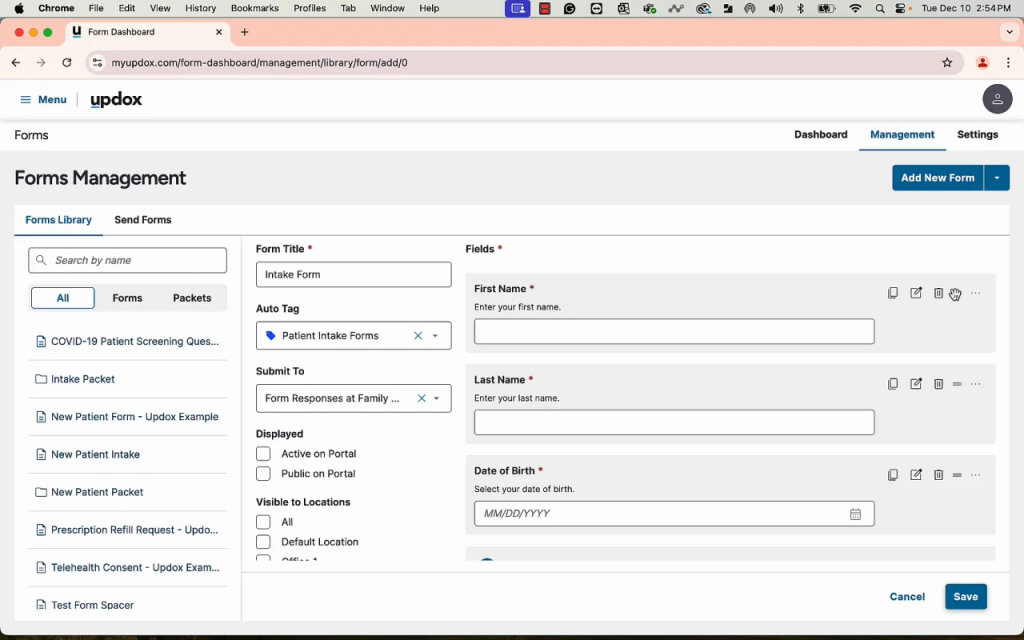
Updox is a comprehensive healthcare communication platform built for enterprise-level practices and hospitals. It streamlines patient engagement, secure messaging, faxing, and voicemail into one interface. With a strong focus on compliance and integrations, it supports high-volume healthcare operations looking to improve coordination, communication, and documentation across departments.
Features:
- Secure Voicemail: Ensures voicemails are stored and accessed through HIPAA-compliant systems, protecting sensitive patient data while improving message accessibility for staff.
- Patient Engagement Tracking: Monitors patient responses and follow-up activities across communication channels, helping providers stay on top of outreach and care coordination.
- Integrated Fax Management: Replaces traditional fax machines with digital, secure faxing capabilities, making document handling faster and more reliable within clinical workflows.
Pros:
- Advanced integrations with EHRs and CRMs for unified data management
- Strong HIPAA-compliant design keeps communication secure
- Customizable workflows tailored to department and practice needs
Cons:
- Pricing may be too high for smaller clinics
- Setup can be complex and IT-intensive
- Occasional lag reported during busy hours
Pricing:
- Available on request.
Reviews:
Support:
- Premium onboarding and training
6. Jive (by GoTo)
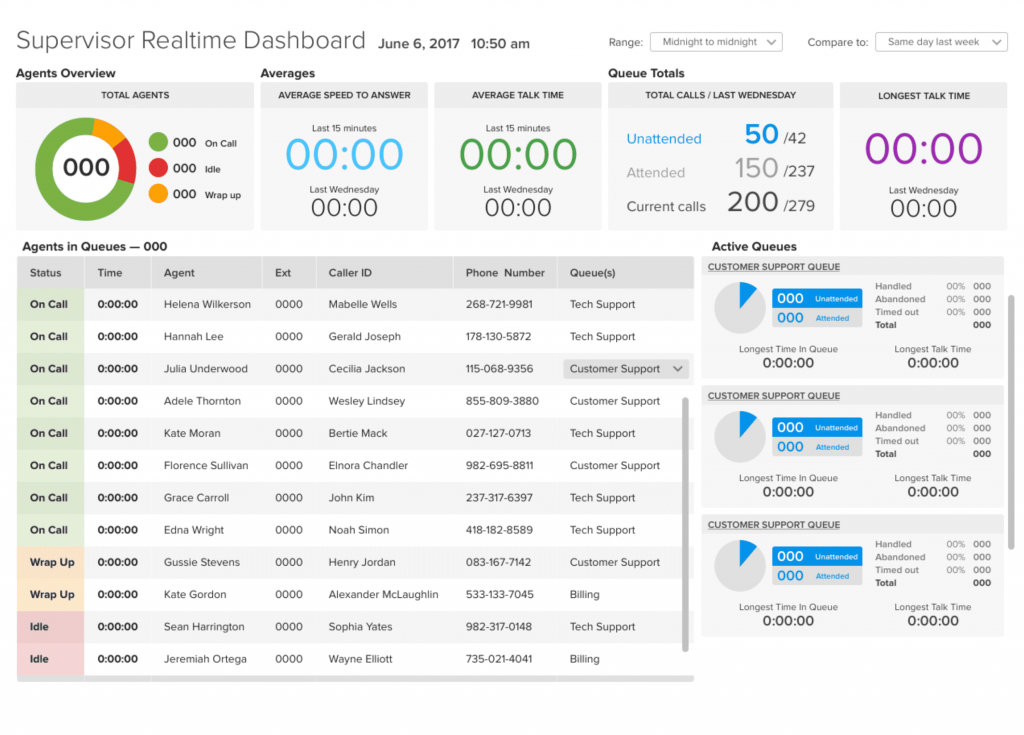
Jive by GoTo is a flexible VoIP solution tailored for radiology groups and multi-location practices. With healthcare-focused add-ons, HIPAA-readiness through BAAs, and scalable call management features, it helps teams enhance patient communication, call routing, and operational efficiency—all while maintaining affordability and compatibility with existing CRM and calendar tools.
Key Features:
- Call Analytics and Call Queuing: Offers detailed call reports and automated queue management to track performance, reduce wait times, and ensure prompt handling of incoming patient and staff calls.
- Auto-Attendants and Dial Plans: Customizable menus route callers efficiently to the right department or staff member, improving patient experience and administrative productivity across locations.
- Call Forwarding & Recording: Enables secure call transfers and recordings, ensuring critical conversations are captured for training, compliance, or quality review purposes.
Pros:
- Affordable VoIP with modular add-ons makes it budget-friendly yet scalable for multi-site radiology practices.
- Cloud-based setup simplifies deployment and management across multiple radiology locations.
- Integrates with CRMs and calendars to sync call data and scheduling seamlessly.
Cons:
- HIPAA compliance is only available with enterprise-level custom plans and signed BAAs.
- A generic VoIP platform without healthcare-specific tools like patient tracking or EHR integration.
- Add-ons for advanced call features and compliance can increase total cost as needs grow.
Pricing:
- Available on request.
Ratings:
Support:
- 24/7 phone and chat support
7. 8×8

8×8 is a global VoIP and unified communications provider offering encrypted calls, call routing, and analytics dashboards. Designed for enterprise-grade reliability, it helps radiology practices maintain secure communication, scale across locations, and monitor call data, while supporting global operations with flexible integrations and priority support for larger organizations.
Key Features:
- Encrypted Voice and Video Calls: Protects sensitive patient information using end-to-end encryption, ensuring radiology practices maintain HIPAA compliance on approved enterprise plans without compromising communication speed.
- Analytics Dashboard: Provides real-time and historical data on call performance, helping radiology teams identify trends, reduce bottlenecks, and improve patient communication efficiency across all sites.
- Call Routing and SMS: Automatically directs calls to the correct department or staff, and enables secure patient text messaging, improving responsiveness while maintaining compliance.
Pros:
- Strong uptime keeps patient calls and team communication reliable, even during peak hours.
- Scales smoothly from single practices to large, multi-location radiology networks.
- Integrates with CRMs, calendars, and practice tools to streamline follow-ups and scheduling.
Cons:
- HIPAA compliance is only included in higher enterprise plans with signed BAAs.
- Initial setup and call flow configuration may need IT support and planning.
- No native RIS or PACS integration; needs third-party tools for radiology workflows.
Pricing:
- Available on request.
Ratings:
Support:
- Priority support for enterprise customers
8. Nextiva

Nextiva offers VoIP, CRM, and customer service tools in a single platform. Radiology practices can sign Business Associate Agreements for HIPAA compliance, making it a practical option for patient engagement, call routing, and analytics — all while scaling alongside practice growth and providing customizable dashboards.
Key Features:
- Call Recording and Analytics: Tracks call quality, patient wait times, and staff responsiveness, helping radiology teams identify service gaps and improve patient engagement through data-driven decisions.
- Auto-Attendant: Customizable phone menus automatically route patients to the right department, reducing manual transfers and wait times, and improving first-contact resolution.
- Voicemail to Email: Transcribes and forwards voicemail messages directly to email inboxes, allowing radiologists and staff to review and prioritize messages more efficiently.
Pros:
- All-in-one platform combining VoIP, CRM, messaging, and analytics to reduce tool sprawl.
- Customizable dashboards let teams track KPIs, call metrics, and patient engagement.
- Easily scales to support single clinics or multi-location radiology networks.
Cons:
- Not specifically built for radiology; lacks native RIS or PACS integrations.
- HIPAA compliance needs add-ons and signed BAAs, adding cost.
- Setup for larger teams may require IT help and longer deployment times.
Pricing:
- Core ($15/user/month): Best for small radiology teams wanting voice, video meetings, business SMS, screenshare, file sharing, and call routing. Desktop, mobile, and browser apps included, plus AI-powered voicemail transcription to never miss patient messages.
- Engage ($25/user/month): Ideal for growing radiology practices needing omnichannel engagement, customer-to-team SMS, toll-free numbers, advanced reporting, MS Teams integration, and web chat with live agents or bots.
- Power Suite ($50/user/month): Designed for larger sales and service-focused radiology groups. Includes inbound call center tools, priority and skills-based call routing, a unified team interface, supervisor dashboards, and ACD callback to improve patient call experiences.
Ratings:
Support:
- US-based support and onboarding
9. Zoom Phone

Zoom Phone extends Zoom’s familiar platform into secure VoIP for healthcare. With add-ons like BAAs and API integrations, it fits hybrid radiology groups seeking affordable, scalable voice solutions alongside virtual meetings, while supporting call forwarding, multi-device syncing, and easy team collaboration.
Key Features:
- Encrypted Calls: Protects sensitive patient conversations with end-to-end encryption on eligible plans, helping radiology practices meet HIPAA compliance requirements for voice communications.
- Integration with Zoom Meetings: Seamlessly move between phone calls and video consults, supporting hybrid workflows where radiologists balance in-person visits and virtual patient discussions.
- Call Forwarding: Redirects incoming patient or staff calls to available team members’ mobiles or other devices, minimizing missed calls during peak hours.
Pros:
- Familiar Zoom interface makes adoption fast with minimal training for radiology teams.
- Affordable pricing helps small and mid-sized practices get started with VoIP.
- Scales easily as your radiology group adds users, numbers, or new locations.
Cons:
- HIPAA compliance is only available on higher enterprise plans with signed BAAs.
- Not built specifically for radiology; lacks RIS or PACS integration out of the box.
- Setups and integrations may need IT support for deployment and maintenance.
Pricing:
- Basic (Free): Best for solo practitioners or small radiology teams starting virtual collaboration. Includes meetings up to 40 minutes, 100 participants, team chat, notes, limited whiteboards, and document sharing.
- Pro ($13.33/user/month billed annually): For small to mid-sized radiology practices needing longer meetings (up to 30 hours), AI Companion, 10GB cloud storage, unlimited docs, AI-first task management, custom avatars, and workflow automation.
- Business ($18.33/user/month billed annually): Ideal for growing radiology groups. Supports up to 300 participants per meeting, unlimited whiteboards, Scheduler, SSO, managed domains, and other enterprise collaboration features.
Ratings:
Support:
- 24/7 ticket and chat
10. Vonage for Healthcare

Vonage for Healthcare delivers secure VoIP, programmable APIs, and CRM integrations designed for enterprise radiology networks. It helps automate patient call flows, manage high volumes, and maintain HIPAA compliance through Business Associate Agreements. Scalable and customizable, it supports large, multi-site practices seeking flexible, reliable communication tools tailored to complex workflows.
Key Features:
- CRM Integration: Syncs call data directly to patient records, improving follow-ups, call tracking, and documentation for radiology teams managing large patient volumes.
- Call APIs for Custom Logic: Let’s practices build automated workflows like appointment reminders, priority routing, or custom notifications without changing core phone systems.
- Voicemail and Auto-Attendants: Efficiently manage high call volumes with automated menus and recorded messages, improving patient experience and reducing staff workload.
Pros:
- Customizable APIs let radiology teams build call flows, reminders, and notifications tailored to clinical workflows.
- Designed for enterprise radiology networks managing complex, multi-location setups.
- Scales easily as new offices or locations are added without major infrastructure changes.
Cons:
- Requires IT staff to configure and manage custom API workflows and advanced features.
- Higher costs make it less practical for small or single-location radiology practices.
- No native integrations with radiology tools like RIS, PACS, or imaging systems.
Pricing:
- Custom enterprise pricing.
Ratings:
Support:
- Enterprise onboarding and 24/7 assistance
Why Emitrr Is the Best VoIP Provider for Radiologists
Emitrr AI stands out by focusing on radiology-specific workflows. Its HIPAA-compliant voicemail, smart routing, and RIS/PACS integrations create an end-to-end communication solution designed to fit radiology practices of any size.
Here’s why Emitrr AI software is the best HIPAA-compliant VoIP for radiologists:
Built for Radiology
Designed specifically to address radiology workflows, from coordinating with technologists to managing urgent after-hours reads, ensuring tools truly fit the needs of diagnostic and imaging teams.
HIPAA-Compliant Messaging
Offers fully encrypted voicemail and texting across mobile and desktop, so radiologists can communicate confidently, keeping PHI secure without complicating everyday operations.
Anytime Access
Mobile and web portals give radiologists flexibility to handle calls, review voicemails, and respond to messages whether on-site, working remotely, or covering night shifts.
Smart Routing
Intelligent call routing and encrypted voicemail-to-email delivery ensure calls always reach the right on-call radiologist quickly, helping reduce missed messages and improve patient care.
Flexible Pricing
Scales to match the size and budget of solo radiologists, small imaging groups, or large multi-site practices—bringing enterprise-level HIPAA features without an enterprise price tag.
RIS/PACS Integration
Connects seamlessly with RIS, PACS, and scheduling tools, linking calls and voicemails to patient imaging workflows and cutting down on repetitive manual data entry.
Curious what that looks like in action? Watch this video to see how it works:
FAQs
Spruce Health and Emitrr offer secure mobile apps, voicemail transcription, and end-to-end encryption, helping radiologists manage PHI securely while staying connected on the go.
Costs typically range from $10 to $30 per user monthly. Additional features like voicemail transcription, EMR integration, or advanced routing may increase pricing.
Yes. Providers like Emitrr and RingRx assign secure, dedicated phone numbers, protecting radiologists’ numbers and maintaining full HIPAA compliance for patient communication.
Choose solutions offering voicemail encryption, secure storage, and transcription. Emitrr and Spruce Health provide these features to ensure PHI stays protected across devices.
Yes, when the VoIP provider supports healthcare integrations. Emitrr and Updox, for example, offer compatibility with RIS and PACS for streamlined workflows.
Conclusion
Outdated phone systems slow down modern radiology teams, making it harder to stay connected across locations and devices. Adopting HIPAA-compliant VoIP software helps practices communicate securely and efficiently, whether coordinating urgent reads, sharing updates, or managing on-call coverage.
Solutions tailored for radiology, like Emitrr AI, go further by protecting patient data, reducing administrative overhead, and integrating seamlessly with RIS and PACS. This combination of compliance, flexibility, and smart routing means radiologists can focus on what matters most: delivering timely, accurate care.
Looking for a cost-effective, compliant VoIP solution for radiologists? Book a demo with Emitrr today.


 4.9 (400+
reviews)
4.9 (400+
reviews)