
Introduction
Communication tools are a vital part of any business communication. Businesses rely on these tools for easy engagement and better reachability. After all, business communication aims to make people aware of the company’s vision and products.
At the very crux of these tools, we find the veteran engagement services SMS and group text messaging service. Group Texting for business is the most reliable and quick form of communication in today’s era and many global organizations use mass messaging for faster advertising and quick customer response.
So let’s take a look at the basics of what is group messaging, how to send group texts and much more in this comprehensive guide.
What is Group Texting?
Group Text Messaging service serves the purpose of conventional two-way messaging but in a supremely efficient way. With group text messaging service, businesses can target even larger audiences with minimum effort. Businesses also compare group SMS vs group MMS to understand which option works better for text-only communication versus multimedia messaging.
In Group texting, you segment your audience into groups based on the type of actionable messaging you want to send. Once the group is formed, you can directly send your messages to the members of the group. This way loads of people receive customized SMS campaigns in less time.
The most well-known fact about messaging is the open rate of SMS is a whopping 95%. That’s why leading corporations choose the best app for group texting for business to send SMS campaigns to target large audiences. Now what’s even more interesting is the open rate of SMS marketing campaigns is 98% which is 5X more than that of emails. These solid statistics make Group messaging a very sought-after communication tool for reachability.

Benefits of Group Texting
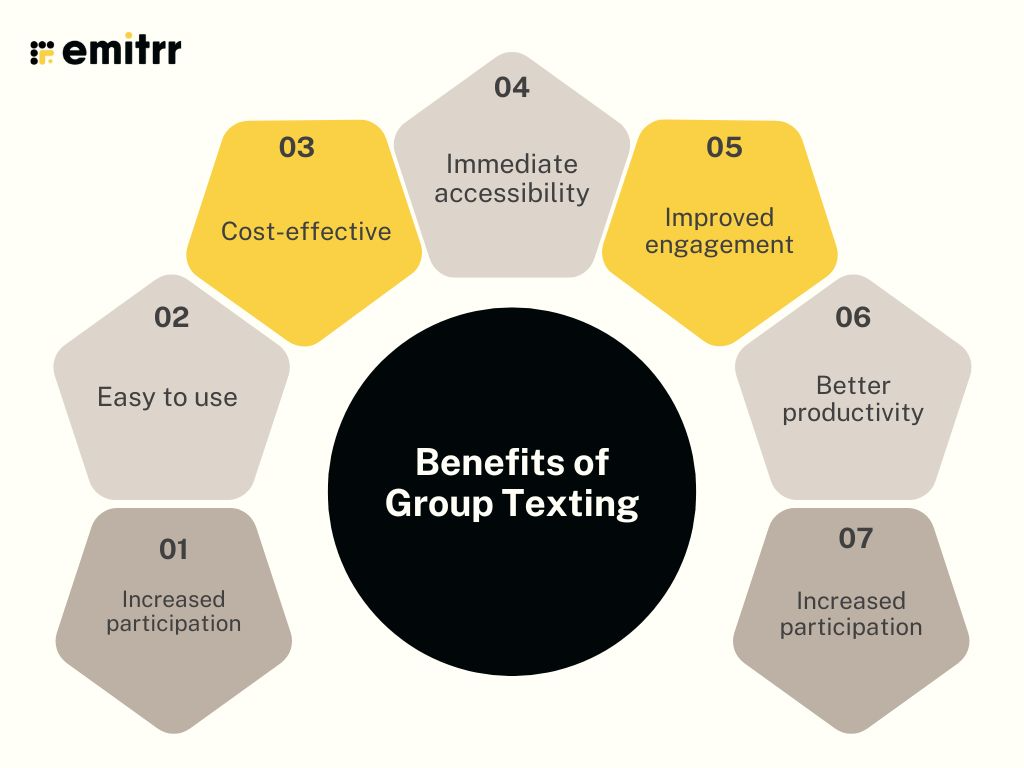
Enhanced collaborations
Group texting for business lets you collaborate and send your ideas through to other customers or clients with a single message. With less effort, you can easily deliver your CTA and get a quick response.
Easy to use
The whole setup and use of group messages is super easy. You just have to curate a message and send it to large groups in your audience. No technical help or tedious process. You can simply send a single text to any group within seconds.
Cost-effective
Group text messaging is affordable and drives results. 96% of business reports show that using text messages helped them drive revenue. But these mass messaging costs just a few cents to send. This makes group messaging very inexpensive and fruitful.
Immediate accessibility
Almost 85% of US adults own a smartphone, and we are well aware of the fact that the open rate of SMS is 98%. If we connect the two dots, it gives a clear picture that group text blast can be easily accessed through a smartphone without having to go through the trouble of receiving a call. People can send and receive group texts from any part of the world.
Improved engagement
SMS and group texts are the easiest way to reach your audience and inform them about special discounts, promo codes, or even charity events. So, using group text messaging services, businesses can easily scale their customer engagement.
Better productivity
Group texts let you contact massive groups of people with just a few clicks. You can schedule group texts for later, and the recipients can easily read and respond without wasting much of their precious time.
Wondering how to schedule group text messages though? Watch this video:
Increased participation
Group texting allows members to ask questions, have conversations and show interest in even participation. This could prompt other members of the group to show interest and contribute to the group setting, helping you boost participation rate.
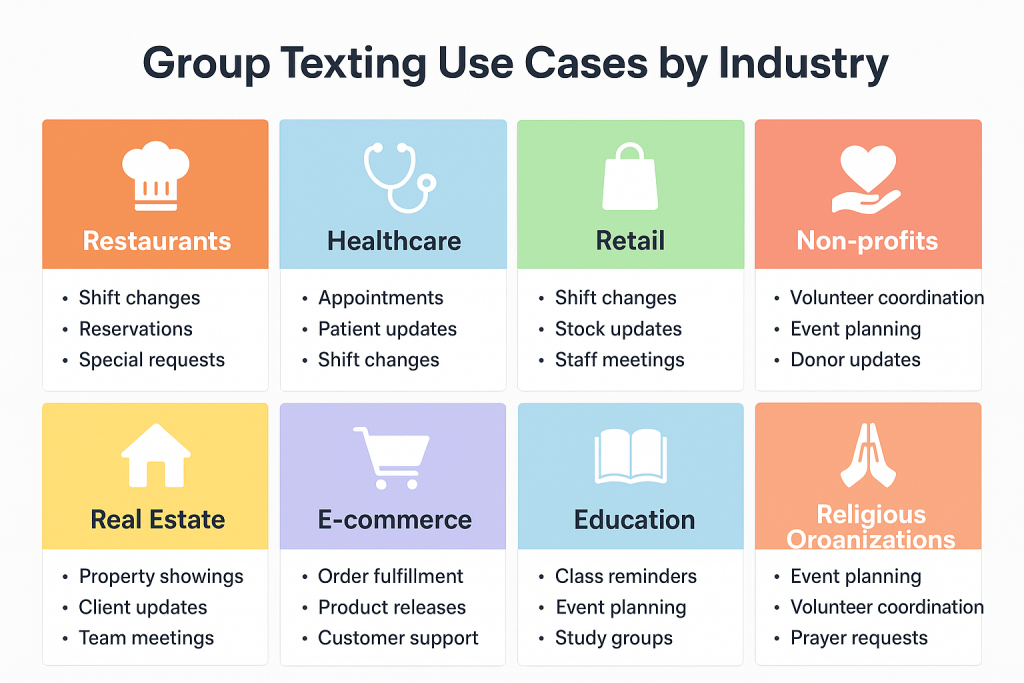
Which Industries Can Use Group Text Messaging?
Restaurants
Restaurants can use a group messaging app for creating:
- Staff groups: To communicate shift changes or for updating out-of-stock items.
- VIP customer groups: To share information about deals or special offers.
- Front-desk group: To communicate with front-desk staff regarding large party arrivals, VIP guest notes, etc.
- Event groups: To discuss weekly targets, staff announcements, urgent issue handling and more.
Healthcare
For healthcare professionals, a HIPAA-compliant group messaging can used to create:
- Staff groups: Doctors can create groups with nurses, pharmacy and other departments to get shift updates, out-of-stock or supply needs updates and patient updates.
- Patient groups: They can create groups with patients and their family members to give updates regarding their treatment, medicinal requirements, follow-ups, and more. There are also ways for them to send texts to multiple contacts without creating groups.
- Patient support groups: Lastly, a group text messaging service for doctors can be used for sharing chronic illness management tips, recovery encouragement, group reminders for therapy sessions, and more.
Retail
Retail businesses can use group text app to create:
- Store staff group: To communicate regarding shift scheduling, daily sales goals, stock updates and more.
- VIP shopper group: To share sales announcements, personal shopping invites, early access alerts.
- Vendor group: To share delivery ETAs, last-minute coordination, product issues or any other challenge that may arise.
Non-profits
Group texting service for Nonprofits can be used to create:
- Volunteer groups: To manage event check-ins, task assignments, quick coordination.
- Community cause groups: To spread awareness and to support peer encouragement.
- Donor groups: To share impact updates, thank-you notes, donation milestones, updates regarding upcoming donation drives and more.
Real Estate
Real Estate professionals can send group text messages for:
- Agent team group: To send new listing alerts, market updates and urgent client needs.
- Client interest group: To share new properties, open house invites, and market insights.
- Investor group: To communicate investment opportunities, property performance updates and ROI discussions.
E-commerce
E-commerce businesses can benefit from group text service by creating:
- Fulfillment team group: To track and communicate order surges, shipping delays, and returns.
- Marketing group: To roll out new campaigns, share live performance updates, and for flash sale coordination.
- Customer niche groups: To test new products and to share usage tips and get peer reviews.
Education
Schools and colleges can use group texting for:
- Class or parent groups: To share homework, to send trip or event information, exam updates and more.
- Staff groups: To share substitution requests, staff meeting reminders, or any other campus alerts.
- Alumni groups: To host reunions or fundraising drives or to post job opportunities, etc.
Religious Organizations
Religious organisations like churches can use a church group texting app to create:
- Youth ministry group: To share updates regarding upcoming meetups, to discuss topics or volunteer needs.
- Volunteer group: To make donation requests, share instructions, etc.
- Choir group: To share rehearsal schedules, song lists, or to communicate last-minute changes.
Recommended for reading: How group texting differs from mass texting
Use Cases of Group Messaging
Internal communications
Easily communicate with your team members and provide them with instructions or reminders about specific tasks. Get most teamwork done through the best app for Group text blast.
Alerts & emergencies
Use group texts to remind your group members of important meetings, urgent client cases, or even hospital emergencies to ensure everyone receives critical information quickly.
Reminders
Use group texting to send reminders about special discounts ending soon, expiring coupon codes, etc. You can also use group messages to send reminders about due payments and installments for different company settings.
Promotional texts
Send the best discount codes and coupons to your specific group of customers using group messaging. You can offer exclusive loyalty program benefits and send special offers to specific loyalty customers using group text messaging.
Appointment scheduling
Easily schedule the messages for your group of clients. In case of unavailability on a particular day, inform all clients from that particular day about the rescheduling using Group texts. Using group texts, you can segment and form customized messages for a particular set of group members.
Sales & marketing
Sales and marketing teams can use group sms messaging for different occasions such as to send Easter or Black Friday messages, or to send messages on your client’s birthdays, etc., to prompt good offers and increase sales during this peak season time.
Customer support queries
Resolve customer queries via texting and keep a touch with all the customers to make sure they don’t run into technical glitches with the product or software. Keep the customers updated in case customer support is not working for a particular period.
Customer engagement
You can utilise group texting apps for business to create groups with your loyal customers to share pre-access to sales, to share updates with them regarding new offers, promotions, etc. Group texting is probably the easiest way to keep your customers engaged and to build loyalty and engagement.
Community updates
Creating community texting groups is a great way to send updates and foster communication quickly and efficiently. Whether you run a hobby club, take group therapy sessions, educate patients about chronic disease management or host other community activities such as language groups for learning Japanese or English, or a local jogging club, group texting is the way to do it right.
Compliance & Legal Considerations of Group Texting for Business
- The legal requirements for a group texting app for business are contained within the Telephone Consumer Protection Act (TCPA) of 1991
- With a lot of improvement and changes, the Act has frequently been updated—most significantly following the passage of the CAN-SPAM Act of 2003.
- Compliance with the Act is overseen by the Federal Communications Commission (FCC).
- Organizations are also ordered to follow the Mobile Marketing Association’s Code of Conduct – even for non-commercial purposes
- This code of conduct is responsible for maintaining best practices to protect the mobile channel from abuse and limit consumer backlash
- Along with TCPA and the Code of Conduct, phone carriers (the telephone companies that carry and deliver text messages) impose their set of rules on what can be included in group texts
- Most carriers will block messages containing illegal drug use, violence, adult material, profanity, hate speech or inappropriate content.
These restrictions apply to both SMS and MMS messages.
Best Practices for Sending Group Text Messages
- Get consent: Before adding anyone to a group, make sure to get their explicit consent, especially if it is related to a marketing purpose.
- Offer easy opt-outs: Offer clear instructions on how a person can opt out from a group, such as reply with “STOP,” so that your contacts have control over their preferences.
- Ensure TCPA compliance: If you have added your customers to a group, then be aware to follow TCPA rules and regulations Act to protect privacy and maintain trust.
- Set texting rules & guidelines: For community members or professional text message groups, it is essential to set texting rules so that members know what is allowed and not allowed.
- Respect the group’s purpose: Stick to the group’s purpose and avoid overwhelming the group with unrelated, unnecessary messages.
- Avoid one-on-one conversations: Be careful when using the “reply all” option, and avoid having one-on-one conversations that could disturb other group members.
- Be mindful of your tone: If in a public or professional group, make sure to keep your tone professional and be mindful of what you share and how you communicate.
- Steer clear of sensitive topics: Groups are not ideal for having conversations around sensitive topics. Such discussions lead to conflict or misunderstanding, so steer clear of such topics.
- Don’t bombard: Text only if necessary and try to say everything in one or two messages; bombarding the group with unnecessary messages could disturb others.
- Be mindful of time: Be mindful of when you text in groups, avoid sending messages early morning or late at night.
Future Trends for Group Texting
The role of Artificial Intelligence in simplifying group texting
The integration of AI in texting is going to be immense. Users will be able to generate more personalised messages using AI text generators, they will be able to automate replies to messages and even get a summary of conversations that happened in a group to help you save time.
RCS Messaging takes center stage
Rich Communication Services (RCS) is slowly switching the way traditional SMSs are being sent by allowing users to send high-resolution media and by offering interactive buttons and verified sender credentials. RCS messaging, be it in one-on-one or group texting is helping businesses create app-like experience to boost trust and engagement.
Role-based smart texting groups
Instead of you needing to create texting groups manually, business texting solutions will automatically cluster groups based on department, needs, roles and permissions.
Temporary or event-based groups
Businesses would see event-based or temporary group functionality where the group will dissolve automatically after the event is finished. This will help keep your inbox free and uncluttered.
Analytics on group engagement
Group texting platforms may start to offer analytics that will help admin to track and see who reads the message, responds the most, or ignore the group messages. This will help them track engagement level and make changes to boost engagement.
Inter-group linking & hierarchies
The future of group texting could allow platforms to add nested groups, where for example, “Hospital Staff,” “ER Nurses,” “Surgery Team,” “Admin” messages can cascade down or bubble up depending on urgency.
AI For Group Texting
Group texting has traditionally been about blasting messages and creating lists manually, but AI is transforming it into a smart, and context-aware communication channel. With the use of AI, group messaging is becoming more personalized and automated, making it especially useful for businesses that rely on team, staff, or community coordination.

AI-powered features in group texting software:
- Smart group creation & management: AI group texting platform can auto-sort members or customers in the relevant group on the basis of their roles, location, preferences, or past interactions.
- Context-aware messaging: AI understands context, timezones, urgency and sends messages accordingly. For example, urgent messages go instantly, while others are scheduled.
- Personalization at Scale: AI can tailor messages, suggest edits and generate replies even in a group setting.
- Automated Summaries & Highlights: AI can generate conversation summaries or highlights, so that you don’t have to scroll through so many messages.
- Data Protection & compliance: AI detects sensitive data and alerts you instantly to prevent it from sharing a group.
- Analytics & Engagement Insights: AI in texting shows which members engage most, who remain silent, and predicts drop-offs risk within groups.
- AI spam detection: It filters spam, toxic content, or off-topic chatter in open community or customer groups.
AI use cases in group text messaging
- Healthcare: Use of AI in healthcare can generate summary so that nurses and doctors don’t miss on any important message. It can auto-group patients by condition or appointment type.
- Schools: AI can smart group students by class, club, or subject, or use AI moderation to keep conversations relevant to the topic of discussion.
- Real estate or Retail: AI groups clients or buyers based on property interests or preferences. Or sends targeted group alerts for new listings or flash sales.
- Other corporate or call center teams: AI filters FAQs and answers automatically within staff groups, gives message summary or helps organise documents more smoothly.
How to Use Emitrr AI for Group Sms Messaging
If you are looking for a group texting platform that has the best of both traditional and AI-powered texting capabilities, then Emitrr is the ideal solution for you.
Here’s how you can use Emitrr AI for group texting:
Step 1: Go to Emitrr’s Dashboard and click on New.
Step 2: Add all the contacts you want to create a group with, by searching or selecting the recipient’s name or number.
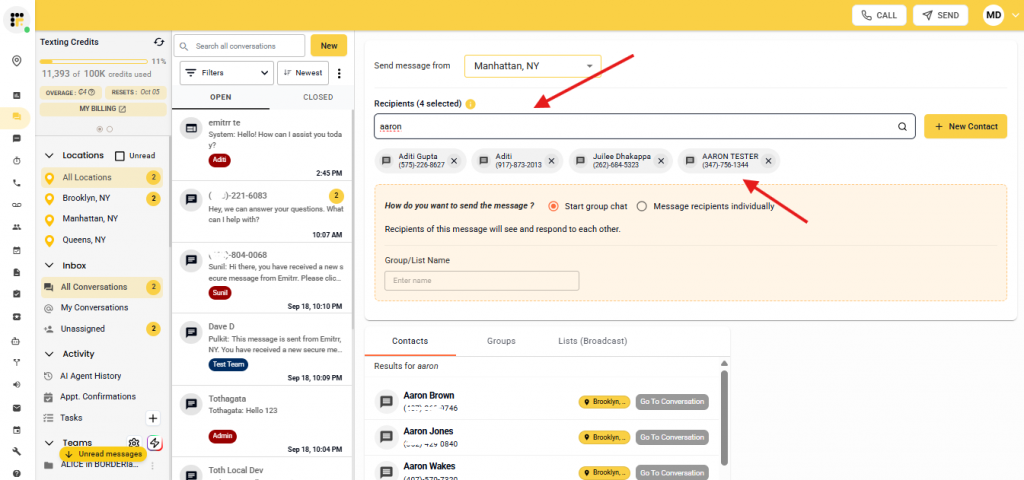
Step 3: Select “Start group chat option,” and name the group.
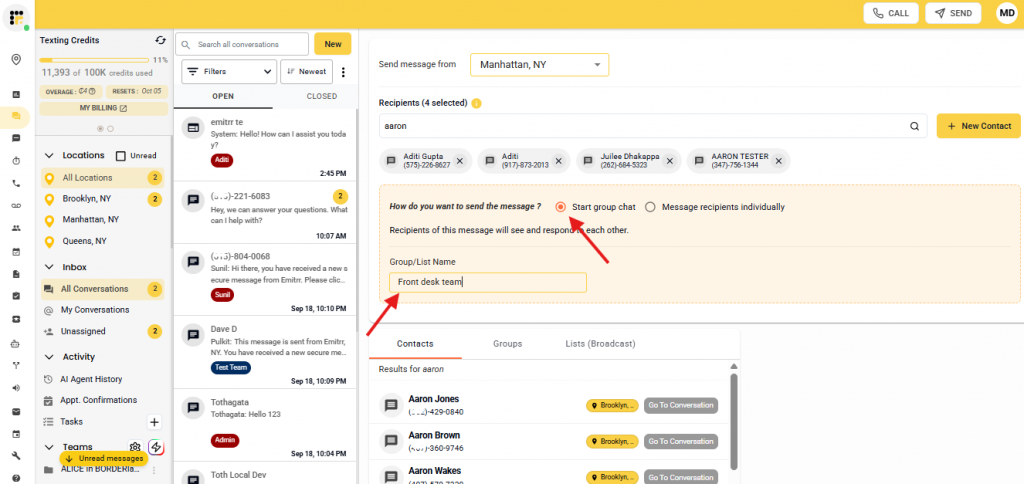
Step 4: Click on the “help me write” icon and give a prompt to Emitrr AI to generate a group sms.
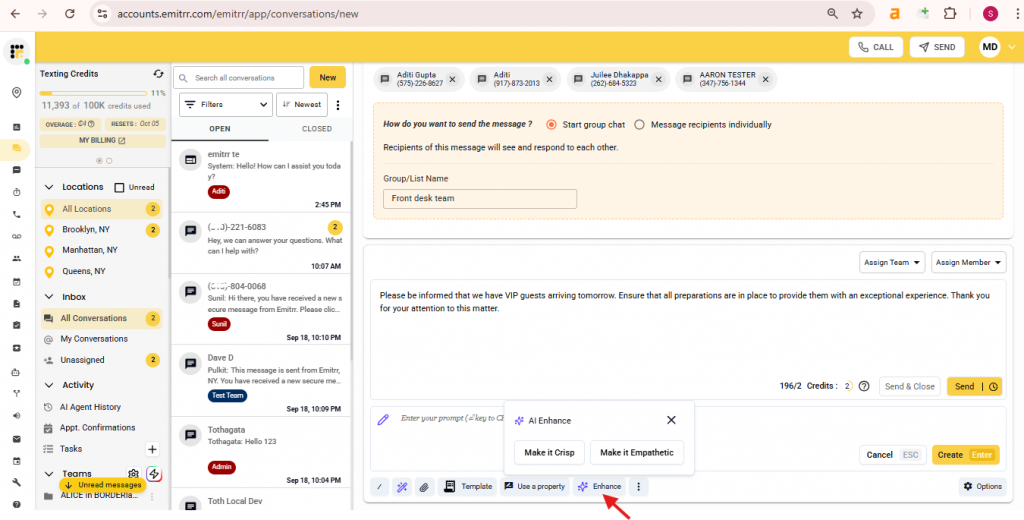
Step 5. You can also write a message yourself and click on “Enhance” to enhance the tone of the message.
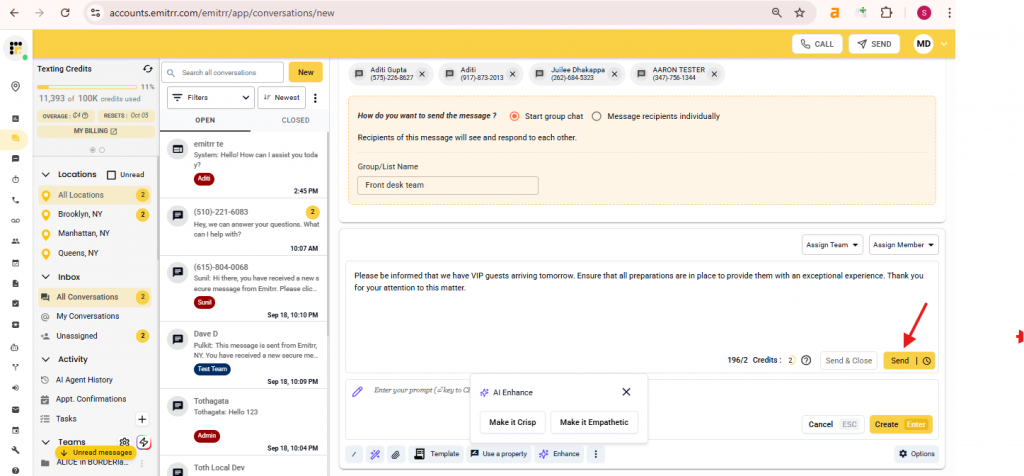
Step 6: Once your message is ready, click on “send” and your group will be created and the message will go to all the group members.
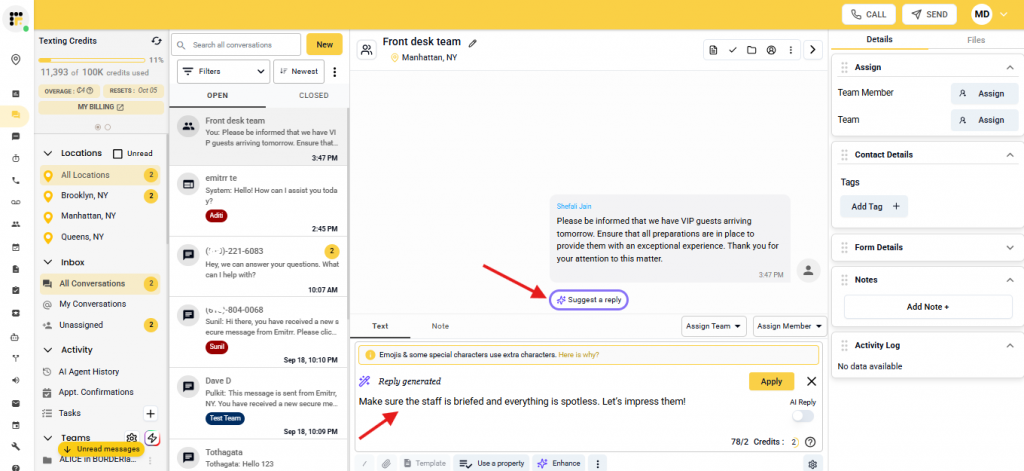
Step 7: Even during the conversation in the group, you can click on “Suggest a reply” option to generate a reply to the message without typing anything.
This is how easy it is to do group sms messaging using Emitrr. Either use AI or type in the messages yourself.
Take a look at what more you can do with Emitrr’s AI for group texting:
Group Texting FAQs
Naming any group text is fairly simple. You can just change the name of the group in the settings menu and add any meaningful name to the group used for sending group texts. Apart from this, you can make use of a robust texting software like Emitrr whose competent technical team helps you with the basics of all such small tasks of group texting service such as naming a group, adding members to a group, etc.
Emitrr is the best group texting app for business that offers advanced group texting capabilities. Emitrr is a highly rated robust software that helps you start your journey of group text messaging at a very affordable price You also get to enjoy the other added texting capabilities along with group SMS campaigns. The best part about Emitrr is its amazing customer support team that walks you through the whole setup and is 24X7 available to aid you in case of any issues.
Adding members to a group is fairly simple. You just need to import your contact list and create a group. Then you can keep adding the members you want in your group for group texting. These simple steps become even easier with a texting platform. Emitrr, a highly rated texting platform, offers great SMS group messaging features and its technical team helps you with complete setup. So you can easily learn and understand the simple steps of adding group members from a team of experts.
Group texting is a fairly simple and easy-to-use capability but it comes with its own set of limitations such as:
– Character limitations: Most text messages have a character limit, so users may need to keep their messages clear and concise
– Opt-out feature: Users must provide recipients with the option to opt out of receiving future messages, as required by regulations.
Message delivery: messages are usually delivered instantly, but factors like network congestion or recipient settings may affect delivery time
Yes, you can more or less turn off group texting. If you are using old SMS standard, then you may not be able to leave the group, but will be able to mute the messages. However, For an iMessage, WhatsApp group or Chat group, you can tap the group name to find a “Leave Conversation” option to leave the group. Or you can long press on the group and select “mute” option to mute conversations as well.
A group text is a message sent via SMS or MMS to multiple people, with all recipients sharing and replying within the same conversation thread. In contrast, a group chat, which is often found in messaging apps, offers more advanced features like real-time discussions, multimedia sharing, chat history, and member management. The main difference is that group chats are interactive and platform-specific, while group texts are a simpler, more basic form of group communication.
The number of people that you can add on a group text messages varies depending on which platform you are using for texting. If you want to add a large number of people to a group for business communication purposes, then Emitrr is a great texting platform that you can go for.
Group texting is when people in the group can view and reply to all messages, making it great for organizations, families, or small teams and businesses that communicate frequently. Whereas, mass texting is where a single message is sent to multiple recipients at once, but replies (if enabled) come back to the sender only and not to the whole group.
MMS, or Multimedia Messaging Service, enables you to send text messages that include images, videos, and audio files. Group messaging, on the other hand, involves communicating with several people within one conversation thread, often using MMS to share multimedia content.
Conclusion
Now that you have all the important points you need to remember for group text messaging. If you are someone looking for a good and efficient group text app, then look no further. Go check out Emitrr and its amazing group texting qualities. Book a demo now!


 4.9 (400+
reviews)
4.9 (400+
reviews)