
Introduction
Effective communication is the lifeline of any thriving business. It forms the foundation for smooth internal operations and outstanding customer service. Companies that prioritize streamlined communication systems often experience improved collaboration, better productivity, and higher customer satisfaction. Comcast Business VoiceEdge is one such tool that has gained popularity for managing voice communications. However, its features, pricing, and limitations may not meet the unique requirements of every business.
If you’re looking for a communication solution tailored to your organization’s specific needs, exploring alternatives to Comcast Business VoiceEdge is crucial. In this article, we’ll dive into the features and highlight some top Comcast Business VoiceEdge alternatives to help optimize your business communications.
What is Comcast Business VoiceEdge?
Comcast Business VoiceEdge is a Voice over Internet Protocol ((VoIP) service designed to help businesses manage their voice communications effectively. By leveraging VoIP technology, it eliminates the dependency on traditional landlines, providing a more flexible and cost-efficient solution for small to medium-sized enterprises.
This platform offers various tools to enhance communication, such as advanced call management features, voicemail integration, and conference calling capabilities. Its user-friendly interface and reliable performance make it an attractive choice for businesses seeking a modern communication system.
Key Features of Comcast Business VoiceEdge
Comcast Business VoiceEdge is a feature-rich communication solution designed to meet the needs of modern businesses. It provides advanced tools to enhance connectivity, streamline operations, and ensure seamless collaboration across teams. Whether you’re managing client calls, team discussions, or staying connected on the go, Comcast Business VoiceEdge offers a reliable and efficient platform to keep your business communication running smoothly. Here are the key features that make it stand out:
- Unified Voicemail and Email: Users can access voicemail messages directly through their email inbox, receiving notifications for new messages and the ability to play them instantly. This feature simplifies communication by integrating voicemail into everyday email workflows, reducing the need to check multiple platforms.
- Call Forwarding and Blocking: Forward incoming calls to alternate numbers, such as mobile phones or other office lines, ensuring that no important calls are missed. Businesses can block specific unwanted numbers, safeguarding against spam or nuisance calls to maintain a secure communication environment.
- Auto-Attendants: Acts as a virtual receptionist, greeting callers and directing them to the appropriate department or extension based on customizable menus. Auto attendant enhances professionalism by offering 24/7 availability and improving caller experience through efficient routing.
- Conference Calling: Enable businesses to connect with multiple participants in a single call, fostering collaboration among team members regardless of their location. It is ideal for client meetings, internal discussions, and brainstorming sessions, saving time and reducing travel requirements.
- Mobile Integration: Seamlessly connects mobile devices to the communication system, allowing employees to make and receive calls as if they were in the office. It ensures uninterrupted connectivity for remote teams and on-the-go employees, enhancing productivity and flexibility.
Comcast Business VoiceEdge Pros
- Easy to Use: Setting up and managing Comcast Business VoiceEdge is a breeze, even if you’re not super tech-savvy.
- 24/7 Support: Their around-the-clock customer support means you can get help whenever you need it.
- Works Anywhere: You can take calls on your phone, laptop, or tablet, so you’re always connected, no matter where you are.
- Secure and Reliable: Your conversations are protected with strong security, and the service is built to keep running smoothly.
- Flexible Options: You can pick features and plans that match your business needs, so you’re not paying for extras you don’t use.
- Local and Long-Distance Coverage: Supports local, national, and international calling with reliable performance.
- Business Continuity: Built-in redundancy and failover features minimize downtime during outages or disruptions.
Comcast Business VoiceEdge Cons
- Limited Integration Options: The platform’s compatibility with third-party tools is restricted, potentially limiting its utility for businesses relying on specific software.
- Higher Costs: Compared to other VoIP solutions, Comcast Business VoiceEdge may be more expensive, especially for small businesses on tight budgets.
- Customer Support Issues: Some users have reported challenges with delayed responses and inefficiencies in customer service, which can hinder operations during critical times.
- Contractual Commitments: Many plans require long-term contracts, which can be difficult to exit without incurring hefty penalties.
- Limited Advanced Features: Lacks some of the more advanced functionalities available in competing VoIP systems, such as AI-powered analytics or extensive customization options.
- Potential Downtime: While redundancy features are included, service interruptions during maintenance or technical issues can still affect business operations.
- Scaling Costs: Adding more users or features as your business grows can lead to significantly higher monthly expenses.
Comcast Business VoiceEdge Pricing
- While the monthly charge for using Comcast varies as on the services, the basic monthly charge for using Comcast Business VoiceEdge is priced at $29.95 per month.
Comcast Business VoiceEdge Integrations
Comcast Business VoiceEdge can seamlessly integrate with various platforms; some of the most popular ones are as follows:
- Slack
- Microsoft 365
- Skype
Comcast Business VoiceEdge Customer Support Channels
Comcast Business VoiceEdge offers multiple customer support channels to assist with your service needs:
- Phone Support
- Online Support
- Support Community Forum
- Live Chat
- Account Management Portal
Comcast Business VoiceEdge Reviews & Ratings
- G2: 3.6/5
- Capterra: 3.9/5
“Comcast has been easy to work with. I do most of my interactions through the web, which works great. I combined numerous locations in the same portal.”
“Decent connection when it works. Slowest Internet Speeds in the industry on upload data and spotty performance for other systems.”
Source: Capterra

Why Do Businesses Seek a Comcast Business VoiceEdge Alternative?
While Comcast Business VoiceEdge is a popular choice for many organizations, its limitations have prompted businesses to explore a Comcast Business VoiceEdge replacement that better aligns with their needs. Below are the key reasons to consider a switch and features to look for when choosing an alternative provider.
High Costs Compared to Competitors
Comcast Business VoiceEdge often demands premium pricing, which may not be justified given the range of features it offers. Small businesses, startups, and even larger organizations on tight budgets often find alternatives with similar or even superior features at significantly lower costs. Overpaying for a service that doesn’t deliver a distinct competitive advantage can drain resources that might be better spent elsewhere.
Limited Third-Party Integrations
Today, the business landscape is interconnected, and a seamless integration with other tools is a must. In such a demanding situation, Comcast Business VoiceEdge has limited compatibility with popular customer relationship management (CRM) systems, project management software, and other productivity platforms. This lack of integration can create bottlenecks in workflows, requiring employees to manually transfer data or juggle multiple platforms, leading to inefficiencies and potential errors.
Reports of Inconsistent Customer Service
Reliable customer support is crucial for maintaining uninterrupted communication. Unfortunately, many Comcast users report experiencing inconsistent customer service, including long wait times, unresolved issues, and unhelpful responses. Such service lapses can result in prolonged downtime, missed opportunities, and frustration, which is especially damaging for businesses that rely on real-time communication with clients and teams.
Need for More Advanced Features Like AI-Driven Analytics
As businesses increasingly depend on data to optimize operations, the lack of advanced features like AI-driven analytics in Comcast Business VoiceEdge is a significant limitation. Tools like call sentiment analysis, predictive insights, and automated reporting can provide valuable business intelligence, helping organizations refine their communication strategies and enhance customer satisfaction. Without these features, businesses may fall behind competitors that leverage cutting-edge technologies.
Scalability Concerns for Growing Businesses
As the business grows, its communication needs evolve. Comcast Business VoiceEdge may not scale efficiently to accommodate larger teams; growing organizations require more complex routing or expanded feature sets. Companies looking to expand globally or support hybrid work environments may find the service’s limitations restrictive, forcing them to switch providers later, which can be costly and disruptive.
What Features to Look for in a Comcast Business VoiceEdge Alternative?
When evaluating alternatives, it’s important to identify features that address the limitations of Comcast Business VoiceEdge. The right solution should not only meet your current communication needs but also position your business for growth and innovation.
Advanced Call Analytics and Reporting
Modern communication platforms should offer robust analytics to help businesses monitor and improve performance. Look for solutions with detailed call tracking, metrics on agent performance, customer satisfaction scores, and AI-driven insights like call sentiment analysis. These tools empower businesses to identify trends, address issues proactively, and improve overall customer experience.
Seamless Third-Party Integrations
Integration capabilities are vital for creating a unified business ecosystem. Choose alternatives that connect effortlessly with widely used platforms like Salesforce for CRM, Microsoft Teams for collaboration, and Slack for team communication. Strong integration options streamline workflows, reduce manual tasks, and provide a cohesive user experience across tools.
Competitive Pricing Plans
Many alternatives to Comcast Business VoiceEdge offer flexible pricing tiers, enabling businesses to select a plan that matches their budget and needs. Transparent, scalable pricing ensures businesses pay only for the features they require, avoiding unnecessary expenses. This is especially beneficial for small businesses and startups that need affordable yet robust solutions.
Reliable Customer Support
Reliable support is critical for addressing technical issues and minimizing disruptions. Seek out providers that offer 24/7 customer support through various channels, such as phone, email, and live chat. Prompt and knowledgeable assistance ensures your business stays connected and operational, even during unforeseen challenges.
Mobile-Friendly and Remote Work Capabilities
With remote work becoming a standard practice, it’s essential for communication solutions to support mobile devices and remote teams. Look for features like mobile apps, virtual phone numbers, and cloud-based access that allow employees to make and receive calls, access voicemail, and manage settings from anywhere. Strong remote capabilities ensure that businesses remain agile and effective in dynamic work environments.
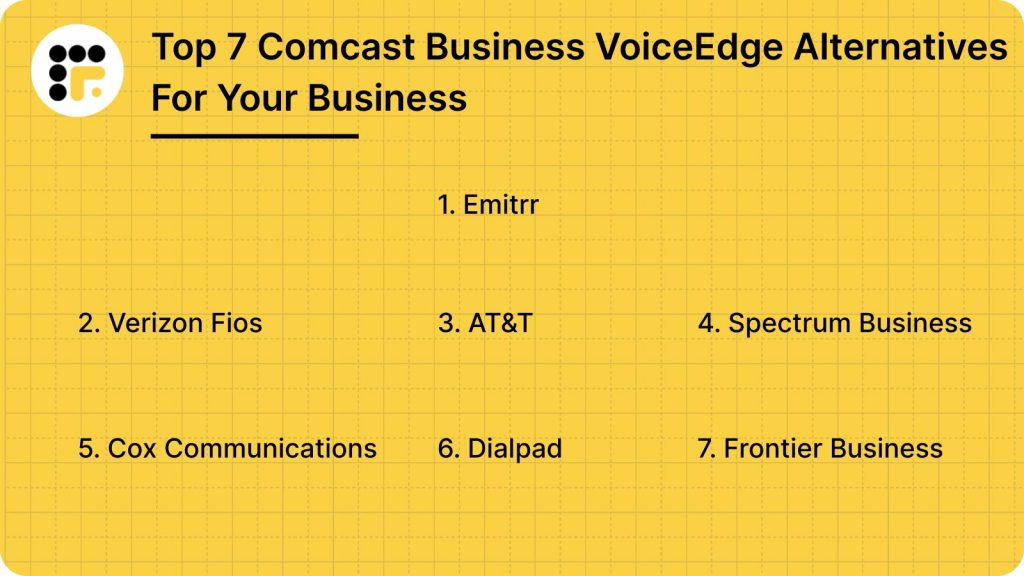
7 Best Comcast Business VoiceEdge Alternatives
1. Emitrr: Best Comcast Business VoiceEdge Alternative
Emitrr Overview
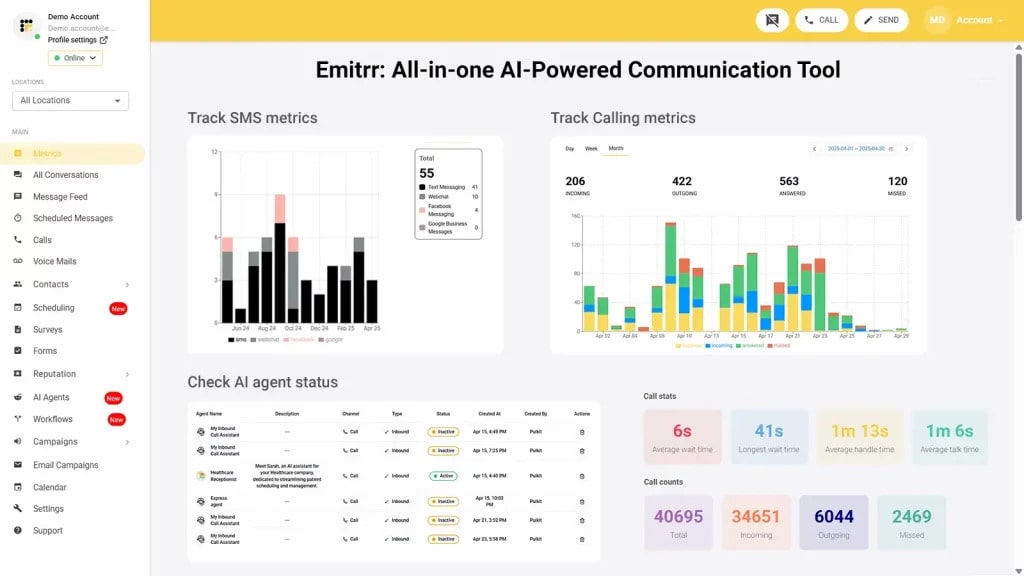
Emitrr is an all-in-one AI communication platform that supports calls, text messaging, and automation tools like SMS appointment reminders and AI VoIP. It’s built for businesses that value efficiency, simplicity, and integration with their existing workflows. Whether you’re a small business owner or managing a large team, Emitrr has the flexibility to scale and adapt to your needs.
When it comes to business communication tools, Emitrr stands out as a superior alternative to Comcast Business VoiceEdge. Designed to meet the evolving needs of modern businesses, Emitrr combines advanced features, affordability, and reliable performance to create a seamless communication experience. Let’s dive deeper into what makes Emitrr an excellent choice:
Emitrr Features
- All-in-one Communication Tool: Emitrr makes it easy to manage everything in one place. Whether it’s phone calls, text messages, or automated appointment reminders, you’ve got all your communication channels covered without juggling multiple apps.
- IVR/Call Tree with Forwarding on Key Press: Emitrr’s IVR (Interactive Voice Response) and Call Tree features allow users to set up multiple branches in the call flow, so calls are directed based on the caller’s input.
- AI call routing: Let AI call routing analyse whether a call is from a new patient or an old one from the existing patient data, and let it transfer the call directly to the relevant person or department without human interference.
- AI call handling: Let AI handle calls, be it level one calls for answering common queries, or canceling, rescheduling, or booking appointments. Or set actions and let it handle more complex calls, you decide.
- AI call forwarding: Let AI call forwarding help forward incoming calls smartly by analysing the caller’s intent and context. Set it up to forward VIP calls to top agents, or to simply escalate urgent calls to the right person.
- AI call screening: Let AI call screening filter spam or robocalls, identify unknown callers to reduce call disruptions and unnecessary long call queues.
- AI call recording: Use Emitrr’s AI call recording call agent to auto-record calls, to flag compliance breaches, and to train your team better for quality and compliance purposes.
- AI call queue: Let AI call queue handle common queries, bookings, cancellations, etc., to reduce call queue lines. Set up an auto message if a caller drops mid-way, and keep them engaged.
- AI SMS nudge: Let AI nudge callers standing in virtual queues to continue the conversation over SMS instead.
- Smart phone trees: Build a smartphone tree system that engages the caller seamlessly.
- AI summary and transcripts: Save time that may be wasted in listening to long calls. Use AI summary and transcript features to get a crisp summary of different phone calls.
- AI data and forms collection: Let AI collect patient forms and other information such as insurance details, patient demographics, reason of visit, medical history, and more beforehand.
- Dashboard and reports: Access the dashboard and reports to analyse how many calls got dropped, the total number of calls received, missed, etc. And take necessary action to fix loopholes.
- Customizable Call Flows: Design detailed call trees to efficiently route callers to the right department or team member, improving customer service.
- Organized Call Groups: Streamline team collaboration by directing incoming calls to groups of employees with shared extensions for faster response times.
- Unique Extensions for Teams: Assign distinct extensions to employees or departments to simplify internal and external communication.
- Business and After-Hours Call Handling: Configure different call routing rules for business hours and after-hours to manage customer expectations effectively.
- Scalable VoIP Capabilities: Easily add new phone numbers, teams, or locations as your business grows without any technical challenges.
- Cloud-Based Access Across Devices: Use Emitrr’s VoIP system on desktops, mobile devices, or tablets for seamless communication from anywhere.
- Team Collaboration with Extensions: Enhance internal communication by enabling direct dialing and extensions for team members.
- Call Recording Options: Record calls automatically or selectively based on compliance needs and business requirements.
- Advanced Performance Metrics: Monitor key call data like response times, missed calls, and average handling times to improve team efficiency.
- Call Queue Groups: Calls can be sent to a pre-defined group of team members (or extensions) who are assigned to handle specific types of inquiries, ensuring callers reach someone in that specialized team.
- Call pop: Use the call pop feature to access caller information and calling history during a live call to offer a quick resolution.
- Missed call text: Send automated SMS to callers whose calls go unanswered.
- Set up Call Groups with Multiple Extensions/Team Members: You can create a call queue with multiple extensions or team members, allowing calls to route to a group rather than a single person, ensuring someone is available to answer during peak hours or when handling high call volumes.
- Multiple Extensions Setup: You can create individual extensions for each user and even customize them for individual availability and forwarding preferences.
- Customize User availability: Customize each user’s availability on a day-by-day basis, allowing flexibility to account for specific schedules, such as part-time shifts, vacations, or other variable working hours. And define specific working hours for each user.
- Set up Business Working Hours: Define standard business hours for your organization to control call routing automatically based on availability.
- Bulk/Mass Text Messaging: Send 1000s of text messages at once and achieve a 98% open rate.
- Automated Text Reminder: Send automated reminders by text, email, and voice.
- Online Appointment Bookings: Easily schedule through the website or by sending a link. Customize by (visit type, insurance details, provider, location).
- Works well with your favorite tools: Emitrr integrates seamlessly with popular tools like Hubspot, Salesforce, and Zoho. This means you don’t have to abandon your current systems; everything works together effortlessly, making your team’s workflow smoother.
- Friendly and fast customer support: Emitrr’s support team is known for being quick and reliable. Whether you need help getting started or run into an issue, they’re just a message away, ready to make things right.
- Grows with your business: Whether you’re just starting or scaling up, Emitrr adapts to your needs. Its customizable features and scalable plans mean you won’t outgrow it- Emitrr grows with you.
- Reliable and crystal-clear: Emitrr ensures you’re always connected with reliable service and excellent call quality. No dropped calls, no glitches- just smooth communication so you can focus on your business.
- AI-Powered Sentiment Analysis: Analyze caller emotions to prioritize urgent issues and address sensitive conversations effectively.
- Efficient Call Routing with Intelligent Systems: Automatically connect calls to the right department for improved response times and customer satisfaction.
- Two-Way SMS: Emitrr is an excellent option if you want to enable text messaging alongside calls for flexible, efficient communication and quick updates.
- Call Analytics to Identify Improvement Opportunities: With Emitrr, you can analyze team performance, response times, and call outcomes to boost overall efficiency.
- Integrate Custom Workflows with API Support: Connect Emitrr with your existing systems to create workflows tailored to your business needs.
- Prioritize Calls with Geolocation-Based Screening: Manage calls based on the caller’s location, perfect for region-specific services or promotions.
- Voicemail to text: A feature that automatically converts voicemails to text for your convenience.
Here’s how Emitrr automatically converts voicemails to text:
Emitrr Pros
- Multi-Channel Communication: Manage calls, SMS, and reminders in one place. Helps streamline communication across your team and with clients.
- Automation Features: Automate routine tasks like appointment confirmations and follow-ups. It saves time and ensures you never miss an important touchpoint.
- Customizable Features: Tailor the platform to meet your specific business needs. Flexible options for workflows, call routing, and reporting.
- Exceptional Customer Support: Fast, reliable assistance from a responsive team. It has a dedicated onboarding support to help you get started effortlessly.
- Scalability: Grows with your business, whether you’re a startup or a large organization. It expands or modifies features as your needs evolve.
- Transparent Pricing: No hidden fees or unexpected charges. It has affordable plans designed for businesses of all sizes.
Emitrr Cons
- More AI calling features will roll out soon!
Emitrr Integrations
Emitrr seamlessly integrates with tools that are commonly used in government operations, including:
Emitrr Pricing
Emitrr offers two VoIP plans, Standard and Professional, to match different levels of business needs. Pricing starts at $20 per user per month when billed annually. Both plans come packed with a myriad of features that help businesses handle calls, automate follow-ups, and streamline customer communication seamlessly.
Take a quick look at Emitrr’s VoIP pricing for each plan:
| Name of the plan | Pricing if paid annually | Pricing if paid monthly |
| Standard | $20 per user per month | $25 per user per month |
| Professional | $30 per user per month | $35 per user per month |
Emitrr Ratings and Reviews
- Capterra – 4.8 / 5
- G2 – 4.7 / 5
“AWESOME. I would recommend to anyone looking for a messaging platform. Especially love having a text friendly retail number that is the SAME as the number we’ve always had.”
“10/10 – they are very responsive and love hearing ideas of how we will use it and what additional features would be helpful.”
2. Verizon Fios

Verizon Fios Overview
If you want crystal-clear calls and a solid internet connection, Verizon Fios delivers on both fronts.
Verizon Fios Business Voice Features:
- Fiber-Optic Clarity: Delivers superior call quality with minimal disruptions.
- Unified Bundles: Combines voice, internet, and TV for seamless operations.
- Call Forwarding: Redirects calls to ensure no missed communications.
- Auto-Attendant: Manages calls professionally with customizable greetings.
- Voicemail-to-Email: Easily access and respond to messages via email.
- Scalability: Options for small businesses and enterprises alike.
Verizon Fios Business Voice is Best for?
Perfect for businesses that demand top-quality voice services integrated with high-speed internet, particularly in industries like healthcare and finance, where communication clarity is critical.
Verizon Fios Business Voice Pros
- High Call Quality: Verizon Fios is known for its reliable fiber-optic network, ensuring crystal-clear voice calls with minimal latency.
- Scalability: Offers solutions for businesses of various sizes, allowing easy addition of lines or features as the business grows.
Verizon Fios Business Voice Cons
- Higher Cost: Pricing can be on the higher side compared to some competitors, which might not suit small businesses with tight budgets.
- Complex Setup for Non-Tech Users: Initial setup and integration of features may require technical expertise, leading to additional costs for professional support.
- Limited Availability: Fios services are not available in all areas, restricting access for some businesses.
- Potential Overhead for Small Teams: Smaller businesses might not fully utilize advanced features, making it less cost-effective.
Verizon Fios Business Voice Pricing
- Price of this Comcast Business VoiceEdge alternative starts from $34.99 per month.
Verizon Fios Business Voice Integrations
- One Talk
- Microsoft Teams
Verizon Fios Business Voice Ratings and Reviews
- G2: 3.6/5
- Capterra: 3.2/5
“If you are a single line business this will work for you, but not any kind of savings over Vonage or any of the other main players. I was sold on a great deal with my Verizon rep and they completely failed to deliver.”
“Low operating cost compared to ATT. Like WiFi desk phones. Good *611 support people.”
3. AT&T Business Voice

AT&T Overview
AT&T has long been a trusted name in telecommunications. Let’s understand the features and how it is different from any other business voice software available in the market.
AT&T Business Voice Features
- Nationwide Coverage: Offers extensive reach across the U.S.
- Voicemail Transcription: Converts voicemail into text for quick reference.
- Video Conferencing: Built-in support for team collaboration.
- Team Messaging: Enhances internal communication efficiency.
- Call Management: Features like call waiting, call forwarding, and call hold.
- Cloud Backup: Safeguards important communication data.
AT&T Business Voice Pros
- Wide Coverage: AT&T’s extensive network provides reliable service across urban, suburban, and even rural areas, making it accessible for businesses in various locations.
- Feature-Rich Packages: Offers advanced functionalities like voicemail-to-text, call forwarding, conferencing, and virtual receptionist services to streamline business communication.
AT&T Business Voice Cons
- Higher Costs for Premium Features: Advanced features and scalability options can lead to higher monthly costs, which might not suit small businesses with tight budgets.
- Complex Setup for Larger Systems: Initial implementation and configuration can be challenging, especially for businesses with intricate requirements.
AT&T Business Voice Pricing
- Price of this Comcast Business VoiceEdge alternative start from $40/month.
AT&T Business Voice Integrations
- Microsoft Teams
- Webex Go
AT&T Business Voice Ratings and Reviews
- G2: 4.0/5
- Capterra: 5.0/5
“I can get through my call efficiently and quickly most of the time. The employees try and make sure they help you to the best of their ability.”
“This software is great because we utilize it daily with our phone systems. Easy to navigate and easy to get in contact with someone regarding issues.”
4. Spectrum Business Voice

Spectrum Overview
Spectrum is well-known for its no-nonsense approach to communication solutions, making it a favorite among startups and small businesses.
Spectrum Business Voice Features
- Unlimited Calling: Includes local and long-distance calls at no extra cost.
- No Contracts: Enjoy flexibility without being locked into long-term commitments.
- Call Blocking: Reduces spam and unwanted calls.
- Hunt Groups: Distributes incoming calls efficiently across teams.
- Voicemail Management: Easy setup and access to voicemail services.
- Scalable Options: Suitable for growing businesses.
What is Spectrum Business Voice Best for?
Spectrum Business Voice is best for small and medium-sized businesses prioritizing cost-effective, hassle-free voice solutions.
Spectrum Business Voice Pros
- Affordable Pricing: Competitive and transparent pricing makes it budget-friendly for small and medium-sized businesses.
- Unlimited Calling: Offers unlimited local and long-distance calling within the U.S., Canada, Mexico, and Puerto Rico.
Spectrum Business Voice Cons
- Limited International Calling: International calling options may incur additional charges, limiting cost-effectiveness for global businesses.
- Service Restrictions: Available only in areas covered by Spectrum, restricting accessibility for some businesses.
- Basic Integrations: Fewer integrations with advanced tools (e.g., CRM or UC platforms) compared to competitors like Verizon or RingCentral.
Spectrum Business Voice Pricing
- Price of this Comcast Business VoiceEdge alternative starts from $64.99 yearly.
Spectrum Business Voice Integrations
- RingCentral
Spectrum Business Voice Ratings and Reviews
- G2: 4.5/5
- Capterra: 3.7/5
“Our overall experience with Spectrum has been great. Although there are things I dislike, I can’t imagine being happier with any other program on the market.”
“Overall experience is greatly satisfied with all aspects & features included within this software.”
5. Cox Communications Business Voice

Cox Communications Overview
Cox Communications is a versatile provider offering tailored voice solutions for various business needs. So let’s check out the top features that make Cox Communications one of the top choices when it comes to business voice software.
Cox Communications Business Voice Features
- Auto-Attendant: Directs calls automatically to the appropriate department.
- Call Queuing: Organizes incoming calls during high-traffic periods.
- Call Conferencing: Enables multi-party communication for teams.
- 24/7 Support: Ensures immediate assistance for technical issues.
- Customizable Plans: Tailored solutions to meet specific business needs.
- Call Analytics: Provides insights into call performance and usage.
What is Cox Communications Best for?
Cox Communications is suitable for mid-sized businesses needing a balance of affordability, customization, and feature-rich services.
Cox Communications Business Voice Pros
- Unified Communication Features: Offers features like call forwarding, voicemail-to-email, and video conferencing, which enhance collaboration.
- Scalability: Flexible plans allow businesses to scale their communication needs as they grow.
Cox Communications Business Voice Cons
- Price Variability: Costs can be higher compared to competitors, especially for smaller businesses.
- Complex Setup for Advanced Features: Some advanced features require technical expertise or additional support during setup.
- Geographic Limitations: Service availability is limited to areas covered by Cox’s infrastructure.
- Customer Support Issues: Mixed reviews about the responsiveness and efficiency of customer support.
Cox Communications Business Voice Pricing
- The price of this Comcast Business VoiceEdge alternative starts from $60 per month.
Cox Communications Business Voice Integration
- Zoho
- Dubber
Cox Communications Business Voice Ratings and Reviews
- G2: 4.5/5
- Capterra:
“Easy setup and connection. Up and running within the hour.”
“If there is ever a problem with Cox it’s fairly easy to contact them by phone. If the problem can’t be solved over the phone they will send someone out in a Cox uniform and Cox vehicle.”
6. Dialpad

Dialpad Overview
One of the stark features that set Dialpad apart from all the other business voice software is that it is innovative and is redefining business solutions with AI-powered business solutions.
Dialpad Features
- Cloud-Based Access: Fully accessible from desktop and mobile devices.
- AI-Powered Tools: Includes real-time transcription, call routing, and sentiment analysis.
- Integrations: Seamlessly connects with Google Workspace, Salesforce, Slack, and more.
- Global Reach: Provides local numbers for international business communication.
- HD Audio: Ensures high-quality calls, even on lower bandwidth.
- Customizable Call Flows: Tailored call routing for improved customer service.
What is Dialpad Best for?
Dialpad is best suited for tech-savvy businesses with remote or hybrid work models, such as startups, IT companies, and creative agencies.
Dialpad Pros
- AI-Powered Features: Dialpad offers AI-driven call analytics, transcriptions, and real-time insights, helping improve customer interactions and overall efficiency.
- Cross-Device Syncing: It works across multiple devices (desktop, mobile, web), ensuring seamless communication regardless of location.
Dialpad Cons
- Pricing: Some users find Dialpad’s pricing plans on the higher side compared to other VoIP solutions, especially for smaller businesses.
- Limited International Calling: The international calling options and rates may not be as competitive as other services.
- Occasional Call Quality Issues: Some users report call quality drops or latency issues, particularly in areas with low internet connectivity.
Dialpad Pricing
- The Dialpad pricing is available at $15/user/month.
Dialpad Integrations
- Slack
- Microsoft Office
Dialpad Ratings and Reviews
- G2: 4.2/5
- Capterra: 4.4/5
“Overall, hands down one of the best VoIP systems I have ever used. Customer support is even great.”
“Dialpad’s interface is user-friendly, and their call quality is generally reliable. The platform offers a range of features that help manage communications, making it convenient for day-to-day use.”
7. Frontier Business

Frontier Business Overview
Frontier Business Voice caters to businesses in underserved areas while maintaining competitive pricing and reliable service.
Frontier Business Features
- Affordable Pricing: Budget-friendly plans for small businesses.
- Call Forwarding and Blocking: Simplifies call management and security.
- Rural Coverage: Reliable service in remote or underserved areas.
- Voicemail Management: Quick and easy access to messages.
- Local and Long-Distance Calls: Included in most plans at no extra cost.
- Fast Installation: Streamlined processes to get started quickly.
What is Frontier Business Best for?
Frontier Business Voice is best for small businesses in rural locations or those looking for low-cost plans.
Frontier Business Voice Pros
- Scalability: Suitable for businesses of all sizes, offering flexible packages that grow with the company.
- Clear Call Quality: High-definition voice quality, enhancing communication efficiency.
Frontier Business Voice Cons
- Limited International Calling Options: May not be ideal for businesses with frequent international calls, depending on the plan.
- Basic Integrations: Some businesses may find that it lacks integration with other business tools compared to more advanced solutions.
- Occasional Service Interruptions: Some users report occasional issues with service reliability, particularly during peak usage times.
Frontier Business Voice Pricing
- The price of this Comcast Business VoiceEdge replacement starts from $24.99 per month.
Frontier Business Voice Integration
- RingCentral
Frontier Business Voice Ratings and Reviews
- G2: 5/5
- Capterra: 4.0/5
“Frontier offers a good and reliable service but for our needs, the costs were too high.”
“Quality service and worked well for us. Had all the features we needed. Reliable and was fixed quickly if it failed for any reason.”
Why Emitrr is the Best Comcast Business VoiceEdge Alternative?
Emitrr is a cloud-based communication platform designed to simplify and enhance business operations with an AI call center. It uses AI-powered automation to manage messaging, voice calls, and customer service support seamlessly. With multiple communication channels, including phone, SMS, and email, Emitrr offers a scalable and efficient solution for small businesses and large enterprises alike.
Why Emitrr Outshines Comcast Business VoiceEdge?
When you’re comparing Emitrr with Comcast Business VoiceEdge, it’s easy to see why Emitrr stands out. If you’re looking for a communication platform that can simplify your business operations without breaking the bank, Emitrr is the perfect alternative to Comcast Business VoiceEdge. It’s designed with modern businesses in mind, offering tools and features that not only make communication easier but also more efficient. Whether it’s saving money, automating tasks, or keeping your customers happy, Emitrr has you covered. Here’s why it’s a better choice:
Affordable Pricing
Mitrr gives you all the features you need at a fraction of the cost compared to Comcast Business VoiceEdge. With pricing that makes sense for businesses of all sizes, Emitrr helps you save money while still delivering a high-quality communication experience. Plus, its VoIP systems allow for reliable voice calls without the hefty bills.
Smart Automation
Emitrr takes the hassle out of customer service with its AI-powered automation. Instead of spending time on repetitive tasks, your team can focus on what matters most. Emitrr can handle customer inquiries, send reminders, and even help schedule appointments automatically. With customizable workflows, you can tailor the system to fit your business perfectly.
All-in-One Messaging
Emitrr connects you with customers via voice calls, SMS, email, and even social media. Whether your customers reach out on Instagram, WhatsApp, or just prefer a simple phone call, Emitrr ensures you can stay in touch without switching between platforms. Comcast simply doesn’t offer that level of flexibility.
Reliable Customer Support
Customer support is the key to any service, and Emitrr really excels here. With around-the-clock support, you can rest assured that whenever you need help, someone is there. Comcast, on the other hand, can sometimes leave you waiting for a response.
Powerful Insights and Easy Integration
Emitrr doesn’t just help you communicate; it also provides real-time analytics to help you track the effectiveness of your outreach. Plus, it integrates seamlessly with popular CRM platforms, ensuring your customer data is always up-to-date and accessible.
Which Industries Are Catered By Emitrr
Emitrr is designed to help businesses simplify their communication needs, and it’s particularly useful in industries where seamless interactions are key.

Healthcare
Emitrr healthcare VoIP acts as a reliable partner for clinics, hospitals, and dental practices. It takes the hassle out of appointment management by sending automated reminders and follow-ups, ensuring patients don’t miss their visits. Beyond that, it helps healthcare providers stay connected with their patients, whether it’s through feedback collection or quick updates. By reducing no-shows and saving time, Emitrr allows healthcare professionals to focus more on what truly matters- providing exceptional care.
Watch this video to learn more about Emitrr’s AI answering service in healthcare:
Real Estate
Emitrr VoIP phone for real estate shines by helping agents and brokers manage their leads and keep their clients engaged. Whether it’s sharing property listings, scheduling viewings, or sending timely updates, the platform makes communication effortless. Real estate is all about building trust and staying top-of-mind, and Emitrr’s automated follow-ups ensure no opportunity slips through the cracks, giving agents a real edge in a competitive market.
Financial Services
Emitrr VoIP for financial services is a game-changer when it comes to secure and efficient communication. Banks, insurance companies, and financial advisors can use it to send reminders about payments, policy renewals, or account updates without worrying about data security. It also helps in managing customer queries and support requests smoothly, ensuring clients feel valued and informed. Emitrr takes the complexity out of these interactions, helping financial institutions maintain trust and credibility.
Small and Medium Businesses
Small and medium businesses love Emitrr for its simplicity and cost-effectiveness. It’s VoIP for small businesses is perfect for businesses looking to scale without a massive team. From voicemail drops and call tracking to marketing automation, Emitrr makes customer engagement easy and efficient. It helps SMBs run promotional campaigns, follow up with customers, and stay connected- all without breaking the bank. It’s a tool that grows with the business, making it ideal for companies aiming to strengthen relationships and streamline their operations.
With its versatile features, Emitrr empowers businesses across industries to communicate better, save time, and deliver standout customer experiences. It’s more than just a tool- it’s a solution that adapts to your needs.
FAQs
Look for scalability, compatibility with your systems, and essential features like call forwarding, voicemail, and analytics.
They offer more flexibility, advanced features, and lower infrastructure costs by leveraging internet-based communication.
Yes, they provide mobile apps, remote access, and collaboration tools, making them ideal for distributed teams.
Yes, most alternatives integrate with CRMs like Salesforce and HubSpot to enhance customer relationship management.
Use providers with encryption, secure your internet connection, and keep the software updated.
Conclusion
Clear communication is the heart of any thriving business, whether it’s connecting with your team or engaging with customers. When you’re looking for an alternative to Comcast Business VoiceEdge, it’s important to think about the key factors like the features offered, the pricing, and the level of customer support.
That’s where Emitrr really shines. It brings together all the right features that businesses need, from easy call management to seamless integrations, without breaking the bank. Plus, their customer support team is top-notch, always there to help when you need it most, so you can stay focused on growing your business. Want to know how Emitrr can transform your business? Book a demo now!!

 4.9 (400+
reviews)
4.9 (400+
reviews)