
Overview of Radiologist Scheduling Software
Managing high patient volumes and complex workflows is a daily challenge for radiology practices. Manual processes often lead to missed appointments, inefficiencies, and imaging delays. This is where specialized radiology scheduling software makes a difference, automating reminders, syncing calendars, and integrating seamlessly with radiology EMR software, RIS, and PACS systems to keep the radiologist’s schedule running smoothly.
Modern radiology scheduler tools reduce no-shows, optimize resource use, and enhance patient satisfaction by offering self-service booking and real-time updates. They also help multi-site practices coordinate across different machines and providers effortlessly.
In this blog, we explore why scheduling software is essential for radiology, key features to consider, integration and compliance must-haves, and a list of the top online scheduling software for radiologists that can help transform how imaging centers manage appointments and patient care.
Features to Look for in Radiology Scheduling Software
The best radiology scheduling software simplifies complex workflows, keeps the radiologist’s schedule full, and seamlessly integrates with radiology EMR software, boosting patient satisfaction and operational efficiency.
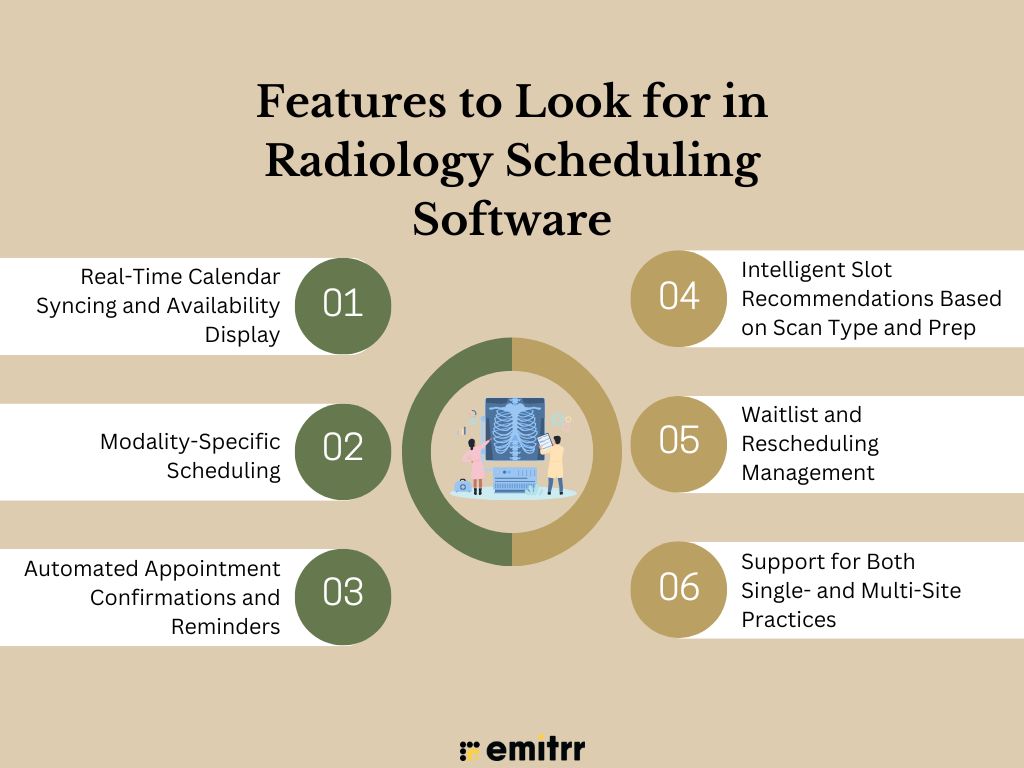
Real-Time Calendar Syncing and Availability Display
Instantly updates schedules across radiologists, technologists, and imaging equipment, ensuring everyone sees accurate, up-to-date availability to reduce double-booking and last-minute conflicts.
Modality-Specific Scheduling
Tailors appointment slots to each imaging modality’s prep time and scan duration, helping maximize machine usage and deliver timely, accurate patient care.
Automated Appointment Confirmations and Reminders
Automatically sends confirmations and reminders via SMS or email, cutting no-shows, keeping patients informed, and easing the administrative workload on front desk teams.
Download ready-to-use SMS templates for radiology appointment scheduling and reminders to reduce no-shows and streamline patient communication.
Intelligent Slot Recommendations Based on Scan Type and Prep
Suggests optimal time slots based on scan complexity and patient prep requirements, improving throughput and ensuring scans are scheduled efficiently without unnecessary gaps.
Waitlist and Rescheduling Management
Keeps the radiologist schedule full by automatically offering open slots to waitlisted patients, minimizing downtime, and boosting overall imaging center productivity.
Support for Both Single- and Multi-Site Practices
Allows centralized scheduling across multiple facilities, ensuring consistency, better resource management, and a seamless patient experience across all imaging center locations.

Security & Compliance Requirements
Radiology scheduling software must protect sensitive patient data by meeting strict compliance standards, ensuring secure integrations with radiology EMR software, and safeguarding every step of the radiologist’s schedule.
HIPAA Compliance and Data Encryption Standards
Ensures patient health data stays confidential by encrypting data at rest and in transit, fully aligning with HIPAA requirements to protect against breaches.
Secure Handling of PHI During Scheduling, Reminders, and Data Sync
Keeps protected health information secure across workflows—whether confirming appointments, sending reminders, or syncing data with RIS, PACS, and radiology EMR software.
Role-Based Access Controls for Staff and Clinicians
Allows practices to define user permissions, ensuring only authorized team members can view or edit sensitive scheduling and patient information.
Audit Trails and Secure Data Backups
Provides a detailed activity log to track changes, along with regular encrypted backups to restore data quickly if needed.
Vendors Should Offer Business Associate Agreements
Establishes legal accountability between the practice and software vendor, confirming compliance with HIPAA and data protection obligations.
Key Integrations for Radiologist Scheduling Software
Effective radiology scheduling software seamlessly connects with radiology EMR software, RIS, and other systems, ensuring the radiologist’s schedule stays accurate, efficient, and patient-centered.
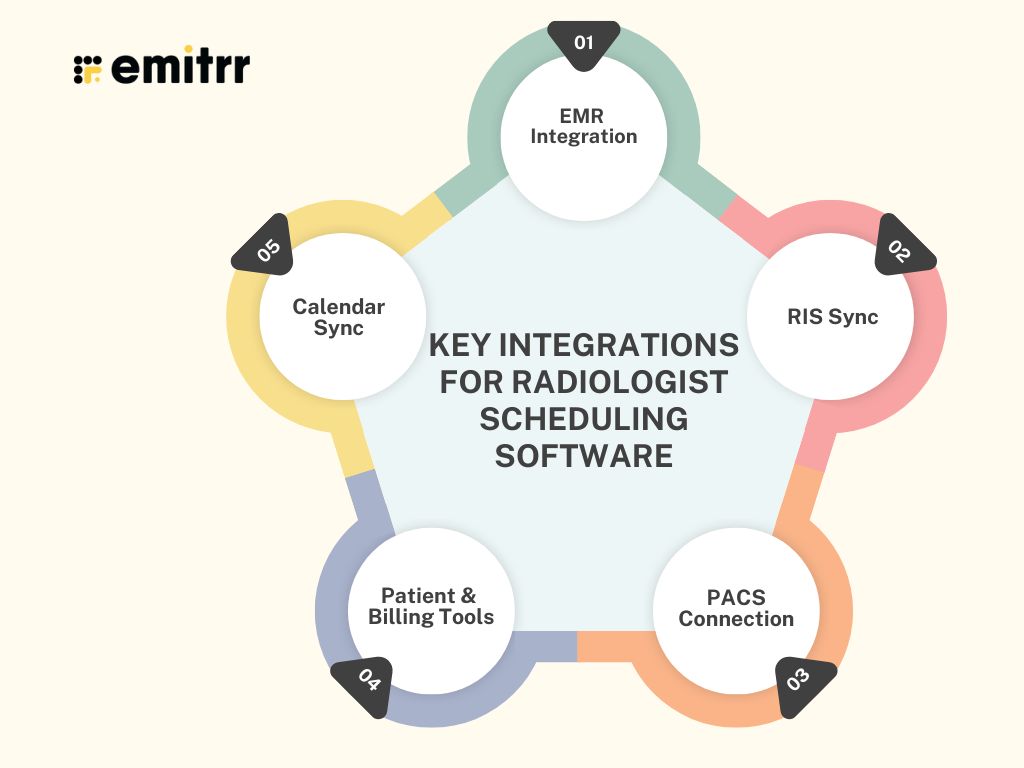
EMR Integration
Syncs appointments and medical data with top radiology EMR software like eClinicalWorks, Epic, and Allscripts, reducing manual work and improving accuracy.
RIS Sync
Connects scheduling to RIS for real-time updates, avoiding duplicate data entry and streamlining radiology workflows.
PACS Connection
Links appointments to imaging archives, so scans and reports stay matched to the correct radiologist schedule automatically.
Patient & Billing Tools
Integrates with patient portals, CRM tools, and billing systems to improve engagement and simplify revenue cycle tasks.
Calendar Sync
Real-time integration with Google Calendar and Outlook ensures staff and radiologists see up-to-date schedules anywhere, anytime.
How Scheduling Software Helps Radiologists
Modern radiology scheduling software transforms daily workflows, keeping the radiologist’s schedule efficient, improving patient care, and integrating seamlessly with radiology EMR software.
Cuts Wait Times
Minimizes bottlenecks by filling open slots quickly, ensuring patients get timely scans and imaging centers keep machines fully utilized.
Boosts Accuracy
Prevents double-booking and aligns schedules across modalities, radiologists, and sites, resulting in fewer errors and smoother operations.
Improves Coordination
Connects radiologists, technologists, and admin staff through shared, real-time updates, enhancing teamwork and speeding up imaging workflows.
Enhances Patient Experience
Self-service booking, reminders, and prep instructions keep patients informed, reduce no-shows, and increase overall satisfaction.
Retains Referrals
Faster scheduling and reporting strengthen relationships with referring physicians, keeping them satisfied and encouraging repeat referrals.
Lowers Staff Workload
Automates confirmations and updates, cutting down on phone calls and freeing staff to focus on patient care, not manual scheduling.
How to Choose the Right Scheduling Software for Radiologists
Selecting the best radiology scheduling software means balancing features, compliance, and usability while ensuring it aligns with your workflows and integrates with radiology EMR software.
- Assess Practice Needs: Consider practice size, number of radiologists, and whether you do diagnostic, interventional, or specialized imaging to choose the right fit.
- Check Modality Support: Look for tools built to manage CT, MRI, X-ray, and ultrasound slots, keeping the radiologist’s schedule optimized across all equipment.
- Prioritize Mobile Access: Ensure staff and patients can view, book, or update appointments easily from phones or tablets, boosting convenience and engagement.
- Verify Integrations: Confirm the software syncs smoothly with RIS, PACS, and radiology EMR software to avoid duplicate work and manual errors.
- Understand Pricing: Compare pricing models per user, per site, or monthly to match your budget and expected patient volume.
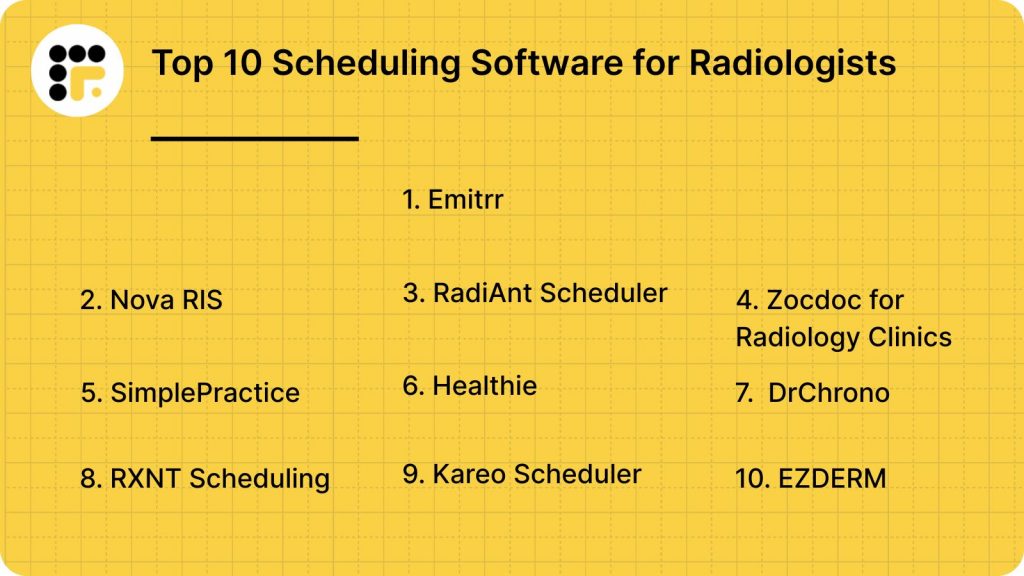
Top 10 Scheduling Software for Radiologists
Below is a curated list of popular tools in the radiology scheduler market. Each supports radiology EMR software integration to varying degrees.
- Emitrr
- Nova RIS
- RadiAnt Scheduler
- Zocdoc for Radiology Clinics
- SimplePractice
- Healthie
- DrChrono
- RXNT Scheduling
- Kareo Scheduler
- EZDERM
1. Emitrr
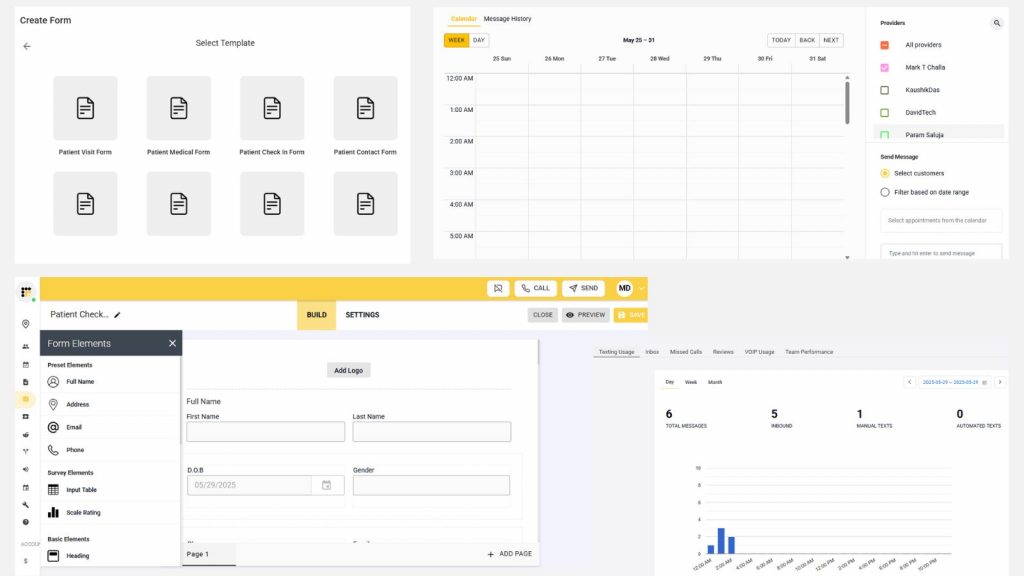
Emitrr is a modern HIPAA-compliant radiology scheduling software built for radiologists and imaging centers. It combines AI-powered automation, secure patient reminders, and seamless integration with RIS, PACS, and radiology EMR software. Popular among small to mid-sized practices, it helps reduce no-shows, streamline the radiologist schedule, and boost patient satisfaction through automated, modality-specific scheduling.
Key Features
- Emitrr AI Assistant: Responds to patient queries, schedules scan appointments, and sends confirmations or prep instructions automatically, 24/7—reducing front-desk workload while ensuring patients stay informed, engaged, and prepared for their appointments.
- Modality-Based Scheduling: Adjusts appointment slots dynamically based on scan type (CT, MRI, X-ray), prep time, and machine availability, preventing double-booking and maximizing utilization of radiology equipment across busy imaging centers.
- HIPAA-Compliant Messaging: Enables secure texting, voice calls, and voicemail—all fully encrypted to protect PHI—so radiology staff can share appointment details, instructions, and reminders without risking compliance or patient privacy.
- RIS & EMR Integrations: Seamlessly syncs schedules and patient data with existing radiology EMR software and RIS, reducing manual data entry errors, speeding up workflows, and keeping radiologists, technologists, and front-office staff on the same page.
- Smart Waitlist & Auto-Fill: Monitors cancellations in real time and offers newly available slots to waitlisted patients automatically, helping keep imaging schedules full, reducing idle machine time, and improving revenue efficiency.
Pros
- Built around imaging center needs, supporting scan-type scheduling, prep workflows, and seamless PACS/RIS integration for a smoother, more efficient radiology operation.
- Integrates effortlessly with popular radiology EMR software and existing systems, offering guided onboarding so teams can start booking patients and sending reminders within days, not weeks.
- Affordable monthly plans deliver AI-driven scheduling and advanced automation typically found in enterprise systems, making modern tools accessible for independent radiology practices.
Cons
- More features are on the way!
Pricing
- Standard Plan ($20/user/month): AI-powered modality-based scheduling, HIPAA-compliant texting and reminders, EMR/RIS integration, smart auto-replies, and waitlist management—perfect for small to mid-sized imaging centers wanting automated patient engagement.
- Professional Plan ($35/user/month): Adds predictive analytics, real-time dashboards, advanced sentiment reporting, and deeper workflow automation, ideal for growing radiology practices needing richer insights and enterprise-ready scheduling features.
Ratings:
Support:
- 24/7 live chat, onboarding assistance, and email support
Watch this short video to see how the Emitrr AI agent works:
2. Nova RIS
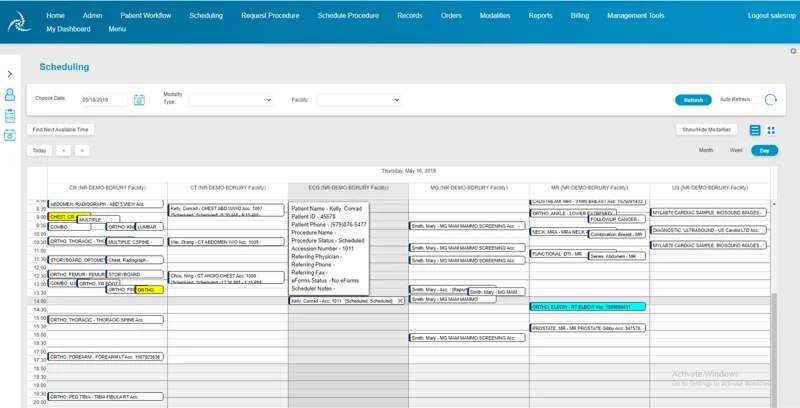
Nova RIS is a powerful radiology information system built for imaging centers and hospital radiology departments. It streamlines modality-based scheduling, patient tracking, reporting, and billing. With real-time PACS and radiology EMR software integration, Nova RIS helps radiology practices manage daily workflows, reduce manual data entry, and oversee multi-site operations efficiently.
Key Features
- Automated Reminders and Prep Instructions: Automatically sends patients appointment confirmations, personalized scan preparation steps, and follow-up reminders via SMS or email—helping reduce no-shows, late cancellations, and last-minute scheduling gaps.
- Integrated Reporting and Billing Workflows: Connects Online appointment scheduling with clinical reporting and billing modules, streamlining administrative work, reducing manual data entry, and supporting accurate, timely reimbursement for imaging services.
- Real-Time PACS and EMR Connections: Synchronizes schedules and imaging data with PACS and radiology EMR software, ensuring radiologists always have up-to-date patient records, prior studies, and reports during interpretation and review management.
Pros
- Purpose-built for radiology workflows, integrating scheduling, billing, and reporting seamlessly.
- Detailed financial and operational reports guide strategic and clinical decisions.
- Scales easily to support multi-location imaging groups and growing radiology practices.
Cons
- Advanced modules require onboarding and training, which can slow early adoption.
- Higher price point may be challenging for smaller independent imaging centers.
- Customization is more limited compared to larger enterprise-grade IT platforms.
Pricing
- Contact vendor directly for a customized quote based on practice size and required modules.
Ratings
Support
- Live chat, phone support, and guided onboarding for radiology teams.
3. RadiAnt Scheduler
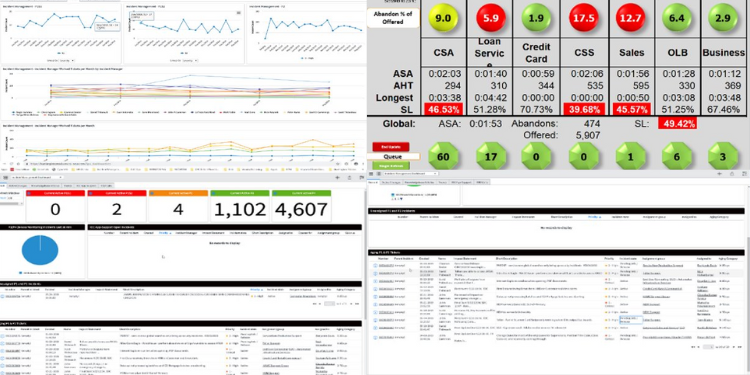
RadiAnt Scheduler is a lightweight radiology scheduling software built to simplify daily imaging center workflows. It streamlines the radiologist schedule with modality-specific slots, waitlist handling, and quick rescheduling. Designed for single-site imaging practices, it offers a clean, intuitive interface focused on core scheduling tasks without enterprise-level complexity or high costs.
Key Features
- Modality-Specific Slot Setup: Allows staff to define time slots by scan type (CT, MRI, X-ray), helping prevent overlaps and optimizing machine usage throughout the day.
- Drag-And-Drop Rescheduling: Enables schedulers to quickly move appointments with a simple drag-and-drop interface, saving time and reducing manual errors during daily changes.
- Waitlist and Cancellation Management: Automatically tracks cancellations and fills empty slots with waitlisted patients, improving equipment utilization and reducing idle machine time.
Pros
- Simple interface designed for quick adoption by radiology staff without extensive training.
- Affordable pricing makes it accessible to independent imaging centers and smaller practices.
- Helps imaging teams keep schedules full and reduce equipment idle time effectively.
Cons
- Lacks advanced reporting or analytics features needed by larger radiology groups.
- Doesn’t support complex multi-location scheduling out of the box.
- Fewer customization options compared to enterprise-level radiology scheduling tools.
Pricing
- Available on request; contact the vendor directly to receive a customized quote based on your imaging center’s specific needs.
Ratings
- NA
Support
- Email-based support and product documentation for troubleshooting and onboarding.
4. Zocdoc for Radiology Clinics
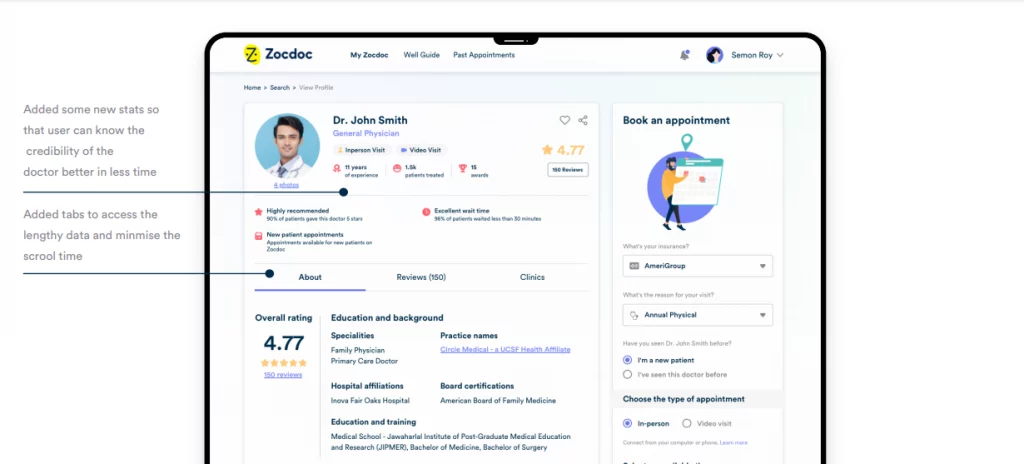
Zocdoc helps radiology clinics fill schedules faster by listing services on its patient-facing marketplace. It offers real-time self-booking, automated reminders, and EMR sync. By boosting online visibility and patient convenience, Zocdoc enables imaging centers to capture last-minute bookings and improve the overall radiologist schedule without adding manual work.
Key Features
- Online Patient Marketplace Listing: Radiology practices can list their services on Zocdoc, reaching thousands of patients actively searching for imaging appointments.
- Self-Scheduling With Real-Time Availability: Patients book directly into the radiology scheduler, automatically reflecting open slots and reducing staff phone time.
- Patient Reviews and Feedback: Collects verified patient feedback to improve reputation management and build trust with new patients online.
Pros
- Great tool for attracting new patients who prefer online self-scheduling convenience.
- Improves clinic efficiency by reducing call volume and last-minute scheduling gaps.
Cons
- Per-booking fees can increase operational costs for high-volume imaging centers.
- Limited customization of modality-specific prep instructions within the standard booking workflow.
Pricing
- Zocdoc pricing is free for patients. Providers can use free tools (Zocdoc Practice Solutions) to manage existing patients. To reach new patients on the Zocdoc Marketplace, practices typically pay per new patient booking, usually around $35–$40 each. Contact Zocdoc directly to explore custom subscription plans or Marketplace details.
Ratings
- NA
Support
- Phone, email, and live chat support are available for radiology clinics.
5. SimplePractice

SimplePractice, originally built for mental health and general healthcare, now offers medical scheduling add-ons useful for small imaging centers. It supports patient self-booking, automated reminders, telehealth, and basic payment tools—helping radiology teams manage the radiologist schedule without needing enterprise-level radiology scheduling software.
Key Features
- Online Self-Booking Portal: Patients can select and confirm appointments anytime through an intuitive, branded portal, reducing inbound calls and front-desk workload and helping fill open imaging slots more efficiently.
- Automated SMS/Email Reminders: The system automatically sends timely reminders and confirmations before each appointment, helping reduce patient no-shows and last-minute cancellations and keeping the daily radiologist schedule running smoothly.
- Telehealth Integration: Adds secure video visit capabilities for virtual consults, follow-up discussions, or patient questions, saving time and improving access without disrupting in-person imaging workflows.
Pros
- Intuitive interface helps radiology teams and admins get started without lengthy training.
- Budget-friendly monthly subscription suits smaller imaging centers and solo radiologists.
- Includes telehealth tools for follow-up calls and virtual patient consults.
Cons
- Doesn’t support modality-based slot setup common in radiology scheduling workflows.
- Limited or no direct PACS integration for imaging data syncing.
- May require extra customization to fit complex multi-location radiology groups.
Pricing
- Starter ($49/user/month): Core scheduling and practice tools including online appointment requests, integrated measurement-based care, and electronic claim filing. Ideal for solo radiologists or small imaging practices needing essential features.
- Essential ($79/user/month): Adds appointment reminders, calendar sync, customizable treatment plans, Wiley Treatment Planners, and 10 free insurance claims monthly. Best for growing imaging centers seeking automation and basic insurance billing.
- Plus ($99/user/month): Includes everything in Essential, plus group appointments, group telehealth, premium phone support, auto insurance status checks, 35 free insurance claims monthly, and unlimited clinician seats. Built for multi-provider radiology practices.
Ratings
Support
- Help center resources, live chat, and email support.
6. Healthie
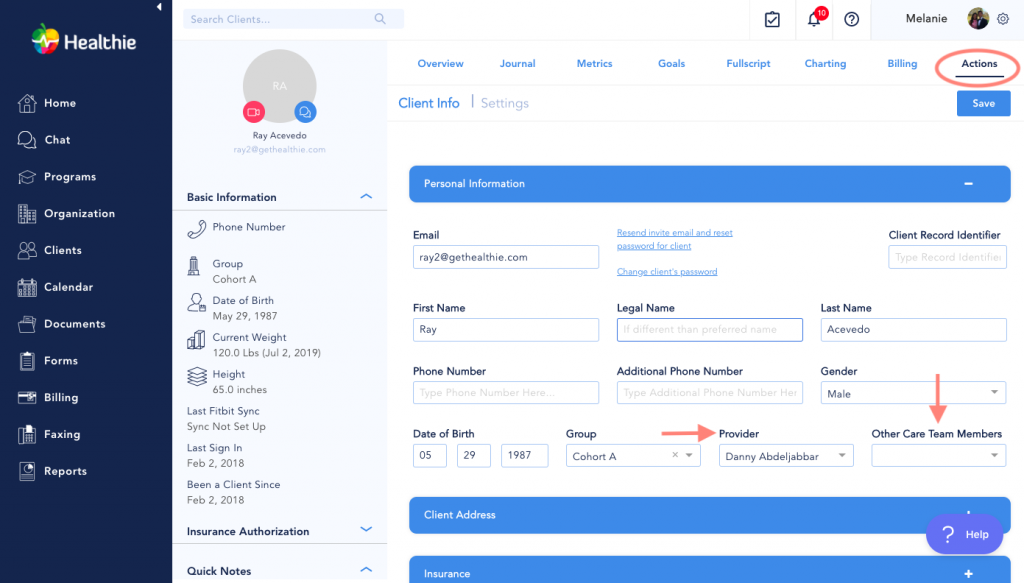
Healthie is an all-in-one practice management platform supporting radiology clinics and multi-specialty groups. It includes patient self-scheduling, telehealth, billing, and digital intake forms. By centralizing scheduling and communication, Healthie helps clinics manage the radiologist schedule while maintaining a modern, patient-friendly experience across desktop and mobile.
Key Features
- Patient Self-Scheduling: Lets patients independently book imaging appointments through an online portal, reducing front-desk workload and improving daily patient flow.
- Automated Reminders and Intake Forms: Automatically sends reminders and digital intake forms to patients, cutting paperwork and helping reduce missed appointments or prep errors.
- Telehealth Integration: Adds secure video visits for virtual consultations or follow-ups, expanding access without disrupting in-person imaging operations.
Pros
- Comprehensive platform covering scheduling, telehealth, and billing in one place.
- Modern, user-friendly interface fits the expectations of today’s patients.
- Offers branded mobile app for patients and providers to stay connected.
Cons
- Modality-specific radiology scheduling may require custom setup and workflow adjustments.
- Initial onboarding and learning curve can be higher for new staff.
- Custom pricing may be less predictable for smaller or single-site practices.
Pricing
- Essentials ($45/user/month): For solo radiologists or small imaging centers. Includes scheduling, payment processing, telehealth, charting, CMS 1500s, and a mobile app great for starting and running a practice.
- Plus ($115/user/month): Adds unlimited clients, ClaimMD integration, group telehealth, online programs, and dedicated eFax. Ideal for growing imaging practices needing scalability and more advanced billing tools.
- Group ($135+/user/month): Everything in Plus, plus shared calendars, team roles, internal chat, API access, and support accounts for added providers. Built for multi-provider radiology clinics or clinician-owned groups.
- Enterprise (custom pricing): Includes white labeling, premium integrations, advanced reporting, and dedicated account management—best for large digital health networks or enterprise radiology providers needing full customization.
Ratings
Support
- Live chat, email assistance, and searchable help center.
7. DrChrono
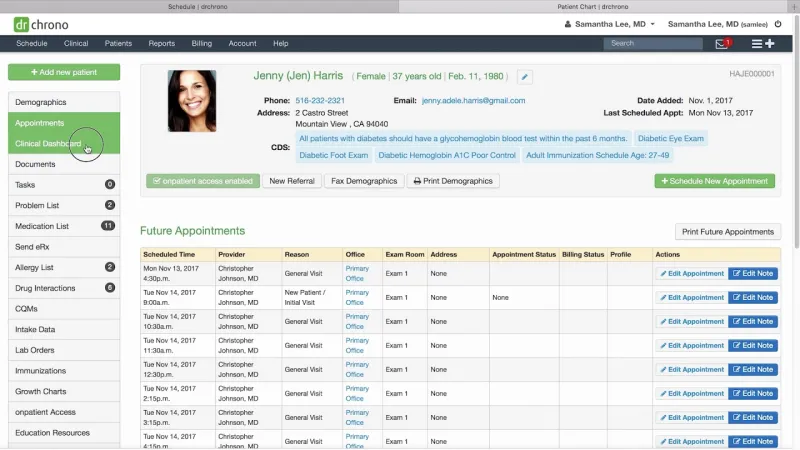
DrChrono is an all-in-one EMR, billing, and scheduling platform built for radiology practices and imaging centers. It streamlines radiologist schedules with modality-based slotting, centralizes clinical data, and offers automated reminders and mobile access, helping teams coordinate patient care efficiently while simplifying administrative workflows.
Key Features
- Modality-Aware Scheduling: Lets staff schedule imaging appointments based on modality, machine availability, and prep times, improving daily workflow efficiency.
- EMR Integration for Orders and Results: Radiologists can view, create, and track imaging orders and results directly within the EMR, reducing manual steps.
- Automated Reminders: Sends SMS or email reminders to patients before appointments, helping reduce no-shows and last-minute cancellations.
Pros
- Robust EMR integration keeps patient data and imaging orders all in one place.
- Mobile apps allow radiologists to check schedules and records anytime, improving flexibility.
Cons
- Premium plans can be costly for small practices wanting advanced features.
- Radiology teams might need training to use all the EMR and billing tools.
Pricing
- DrChrono pricing is available on request; contact the vendor directly for a tailored quote based on your radiology practice needs.
Ratings
Support
- Phone, email, and help center.
8. RXNT Scheduling
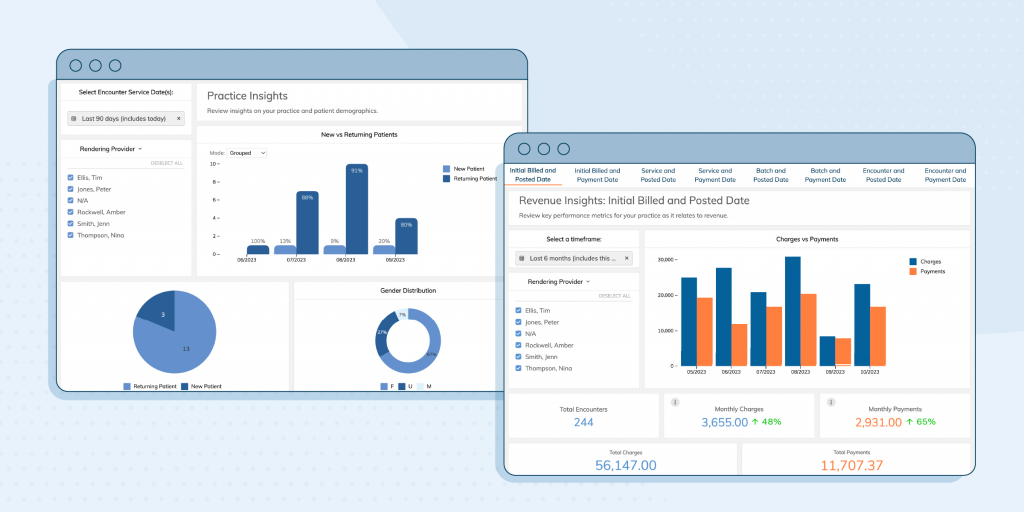
Part of RXNT’s full healthcare suite, RXNT Scheduling helps small imaging centers manage the radiologist schedule through real-time calendar tools, automated reminders, and EMR/billing integration, streamlining patient visits, reducing no-shows, and improving front-office efficiency without the complexity of enterprise systems.
Key Features
- Calendar Syncing: Syncs appointments across staff calendars in real time, helping radiology teams stay coordinated and avoid double bookings.
- Automated SMS/Email Reminders: Sends patients’ appointment reminders automatically, reducing no-shows and freeing staff from manual call follow-ups.
- EMR and Billing Integration: Links directly to RXNT’s EMR and billing tools, enabling seamless scheduling, documentation, and claims processing.
Pros
- Affordable pricing makes it accessible for smaller radiology clinics and independent imaging centers.
- Simple setup and an intuitive interface minimize training time for radiology schedulers and staff.
Cons
- Lacks modality-specific scheduling features needed by larger imaging centers.
- Not built for enterprise radiology groups managing multiple sites or complex workflows.
Pricing
- EHR Bundle ($118/user/month): Designed for radiology practices wanting unified scheduling, e-prescribing, and patient portal tools. Includes EHR, e-prescribing, patient portal, and practice scheduling software for daily imaging workflows.
- PM Bundle ($207/user/month): For imaging centers focused on revenue and operational efficiency. Includes medical billing software and practice scheduling to help maximize revenue and streamline admin tasks.
- Full Suite ($319/user/month): Best value for radiology clinics wanting an all-in-one solution. Combines EHR, billing, scheduling, patient engagement, and more into one fully integrated healthcare software platform.
- E-Prescribing ($665/user/year): Affordable, certified electronic prescribing tool ready for EPCS compliance. Great for radiologists or imaging practices needing standalone e-prescribing without a full EHR system.
Ratings
Support
- Phone, email, and searchable online knowledge base.
9. Tebra Kareo Scheduler
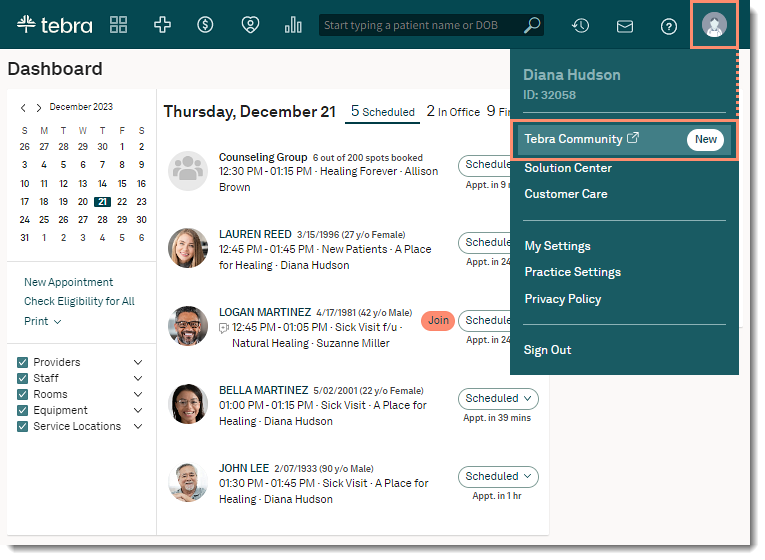
Tebra Kareo Scheduler is part of Kareo’s cloud-based platform, designed for outpatient clinics, yet it is adaptable for radiology practices. It helps manage the radiologist schedule with self-booking, reminders, EMR integration, and dashboards to simplify daily workflows and reduce administrative effort in small- to mid-sized imaging centers.
Key Features
- Patient Self-Booking: Allows patients to view availability and book appointments online, helping radiology clinics keep schedules full and reduce manual scheduling workload.
- Automated Reminders: Automatically sends SMS or email reminders before imaging appointments, reducing patient no-shows and keeping the radiologist’s schedule running smoothly.
- EMR Integration: Links appointments directly into Kareo’s EMR, ensuring radiologists and front-desk staff always see real-time, accurate scheduling and patient details.
Pros
- Easy to deploy and intuitive design reduces training time for radiology staff.
- Well-suited for small and mid-sized radiology clinics needing quick setup.
Cons
- Not built specifically for radiology modality scheduling or machine slot optimization.
- Limited advanced imaging-specific features for multi-location radiology groups.
Pricing
- Tebra (Kareo) pricing is available on request scale your practice with clear, custom pricing and no hidden fees.
Ratings
Support
- Phone, live chat, and email.
10. EZDERM
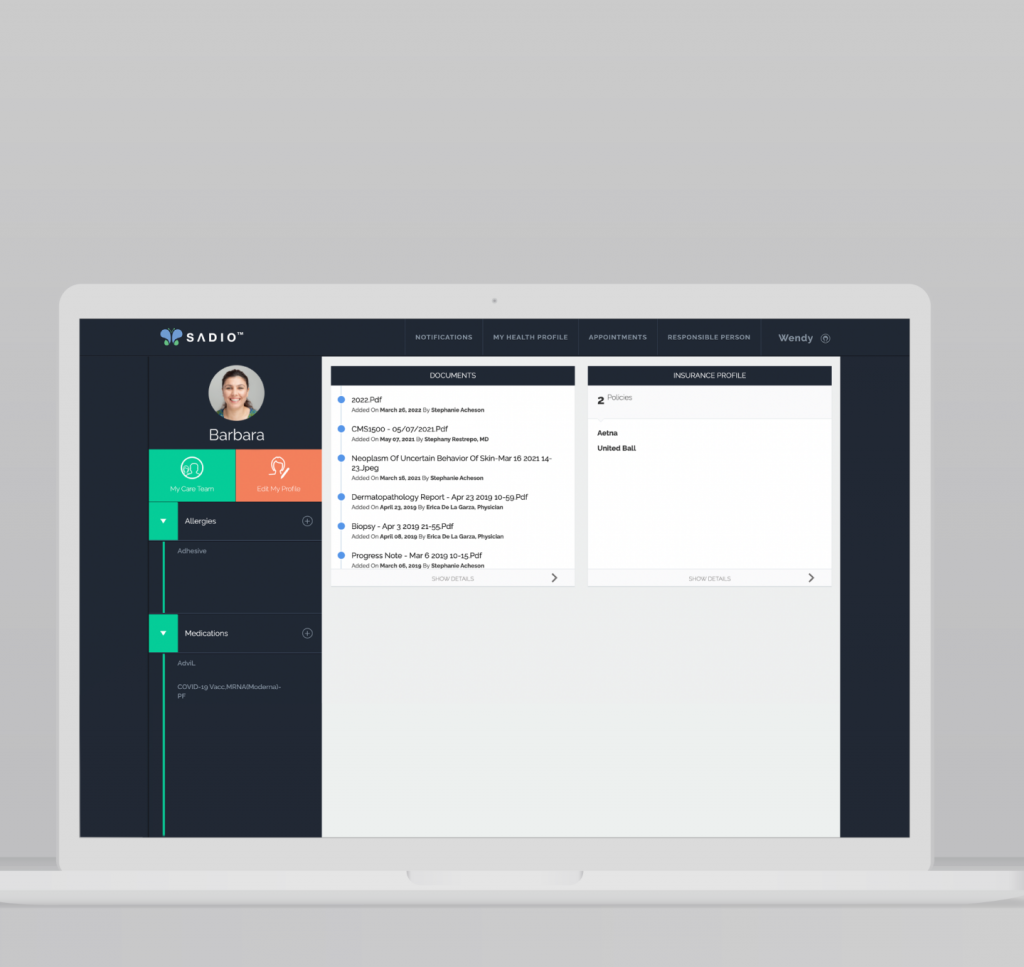
Originally developed for dermatology, EZDERM Scheduler adapts well for radiology and imaging centers that need modality-based scheduling. It offers automated reminders, EMR integration, and an easy-to-use interface, helping small clinics simplify daily workflows and reduce no-show patients without enterprise-level complexity.
Key Features
- Modality Scheduling Templates: Lets clinics create predefined templates by scan type or machine, streamlining the radiologist schedule and reducing scheduling conflicts.
- Automated Reminders: Sends patients SMS or email reminders before appointments, cutting no-shows and improving daily workflow efficiency.
- Patient Portal: Enables patients to check upcoming appointments, prep instructions, and update personal details, improving communication and satisfaction.
Pros
- Supports modality-based imaging workflows, which many small imaging centers find helpful.
- Simple, user-friendly interface makes training quick for radiology schedulers.
Cons
- Most suitable for small or single-site imaging practices, not large enterprise networks.
- Lacks complex analytics, advanced dashboards, and multi-location enterprise scheduling features.
Pricing
- EZDERM pricing is available on request; contact the vendor directly to get a custom quote.
Ratings
Support
- Email, phone, and help center.
Why Emitrr Is the Best Scheduling Software for Radiologists
Emitrr AI stands out as specialized radiology scheduling software that simplifies the radiologist’s schedule, integrates seamlessly with radiology EMR software, and transforms patient engagement through automation.
Built for Radiology Workflows
Handles complex imaging needs like scan prep, modality scheduling, and multi-site coordination, designed specifically to fit real radiology practice workflows.
HIPAA-Compliant & Secure
Protects patient data through encryption, secure reminders, and full HIPAA compliance, ensuring every interaction meets strict healthcare standards.
Smart Scheduling Logic
Recommends appointment slots based on scan type, prep time, and equipment availability, reducing wait times and maximizing machine use.
Seamless EMR/RIS Integration
Connects effortlessly with radiology EMR software, RIS, and PACS, eliminating manual data entry and keeping patient records accurate.
Easy Self-Booking for Patients
Enables patients to book, reschedule, or cancel appointments anytime, improving convenience and cutting down on incoming calls.
Automation & Analytics
Automates confirmations and reminders while offering analytics that help reduce no-shows and keep the radiologist’s schedule running smoothly.
Real-World Results: Case Study
One of Emitrr’s clients, Dr. Mary Tilak and Associates, faced several challenges: patients had to log in to a portal just to confirm appointments, there were no automated reminders, and there was no reactivation strategy for patients who hadn’t visited in a long time.
By implementing Emitrr’s AI-powered scheduling, reminders, and reactivation features, they transformed their workflow. As a result, they reduced no-shows by 90% and significantly improved patient engagement—all without adding staff workload.
This success story shows how Emitrr goes beyond basic scheduling to deliver real-world results for radiology practices.
FAQs
Look for scalable radiology scheduling software that integrates with radiology EMR software, supports self-booking, and offers automation, keeping costs low and the radiologist’s schedule efficient.
Yes, modern tools seamlessly integrate with RIS and PACS, syncing appointments, imaging data, and reports to avoid duplicate entry and streamline the entire radiologist schedule.
Patients automatically get prep instructions via SMS or email after booking, ensuring they arrive ready and keeping your radiology scheduler accurate and patient-friendly.
Absolutely. Advanced radiology scheduling software handles modality-based slots, multi-provider schedules, and even multi-site coordination in a single, centralized interface.
Yes, Emitrr meets HIPAA standards by using secure data encryption, access controls, and audit trails to protect PHI throughout scheduling, reminders, and radiology EMR software integrations.
Conclusion
Choosing the right radiology scheduling software transforms imaging center workflows, reducing no-shows, syncing seamlessly with radiology EMR software, RIS, and PACS, and keeping the radiologist’s schedule accurate and efficient.
From scan prep times to modality-based booking, these tools automate reminders, improve coordination, and let staff focus on patient care instead of manual scheduling. A patient-friendly interface, real-time updates, and strong data security make modern scheduling software an essential investment for radiology practices of any size.
Ready to streamline your imaging center’s schedule? Book a demo with Emitrr and see the difference.


 4.9 (400+
reviews)
4.9 (400+
reviews)