
Introduction
Running a podiatry practice isn’t just about treating feet; it’s about keeping your clinic organized, your patients happy, and your team connected. And that all starts with your healthcare phone system.
If you are a podiatrist or work with one, you know they can’t rely on old-school phones alone. A modern solution like VoIP for podiatrists that handles
calls, texts, reminders, and secure patient communication are a need of the hour. In this guide, we’re breaking down the best VoIP for podiatrist practices, what features you should look for, and why investing in the right VoIP phone systems for healthcare can save time, reduce costs, and improve patient care.
So, it doesn’t matter if you’re running a small clinic or a large podiatry group; choosing the right hospital phone system makes a world of difference.
Let’s look at how the top providers stack up and why Emitrr might just be the perfect fit for your podiatry practice.

Overview of a VOIP Provider For Podiatrists
So here’s the thing. Instead of running calls over traditional phone lines, VoIP, which is Voice over Internet Protocol, uses the internet to handle calls.
What this means is that podiatry clinics can get better call quality, lower costs, and some great handy features like voicemail-to-email, automated attendants, and call recording. It’s not just about making calls, though. It’s about staying connected with patients and running the practice smoothly.
For podiatrists, privacy and security are a big deal. Any healthcare phone system has to comply with HIPAA rules, so patient data stays protected. That’s why choosing VoIP phone systems for healthcare isn’t just about price or features, it’s also about making sure the platform is secure and compliant.
Another reason podiatrists look for healthcare phone systems is efficiency. Many practices juggle a high volume of appointments, follow-ups, and billing questions. Having a good hospital phone system helps staff route calls quickly so patients don’t wait on hold forever.
Cost matters too. On average, VoIP for healthcare can save businesses anywhere from 30% to 50% compared to traditional phone systems. Plus, providers often offer per-user pricing, which helps smaller clinics keep expenses predictable.
Here’s what podiatrists should look for in VoIP for podiatrist solutions:
- HIPAA compliance for patient privacy
- Good call quality and reliability
- Call routing, voicemail transcription, texting, and integrations with EHR systems
- Affordable pricing
- Responsive customer support
At the end of the day, a solid healthcare phone system isn’t just a nice-to-have; it’s part of keeping a podiatry practice running smoothly and keeping patients happy.
Learn about the Pros and Cons of VoIP here –
Features To Look For In a Podiatrist VOIP Provider
When podiatry clinics choose a healthcare phone system, it’s not just about making calls. It’s about managing patient communication safely, efficiently, and without chaos. The right features can save time, cut costs, and improve the patient experience.
Here’s what’s worth looking out for in VoIP for podiatrist solutions:

High-Definition Voice & Video Quality
Nobody likes choppy calls or dropped connections, especially in a medical setting. VoIP phone systems for healthcare should deliver clear audio and video so podiatrists can talk with patients, staff, or other providers without frustration.
Secure Call Encryption & HIPAA Compliance
Security isn’t optional in healthcare. A good healthcare phone system uses strong encryption to protect calls and messages. And, most importantly, it must comply with HIPAA, to make sure that patient conversations and all the records stay private. Did you know that data breaches in healthcare cost an average of $5+ million in the U.S.? That’s a risk no podiatrist wants to take.
Interactive Voice Response (IVR) & Auto-Attendant
Obviously, you know staff can’t answer each and every call the second they come in. That’s where IVR and auto-attendants help. They greet callers, share info like office hours, and direct people to the right department. It’s surely a must-have for any hospital phone system that handles a large volume of calls on a daily basis.
Advanced Call Routing, Forwarding & Queuing
There can be times when calls often need to move between departments or staff. So, advanced routing makes sure calls go to the right person without endless transfers. Queuing helps manage high call volumes so patients don’t hang up in frustration. These are key features in modern VoIP phone systems for healthcare.
Voicemail-to-Email, Text & AI Transcription
Sometimes, patients may leave voicemails at odd hours. Voicemail-to-email or text lets staff read messages quickly without having to play each one. There are some VoIP healthcare tools that even use AI to transcribe voicemails, saving time and reducing errors.
Call Recording & Performance Analytics
For training and QA, Call recording is of great help. Also, having call analytics that show call volumes, peak times, and performance trends is are great addition because for podiatry clinics, this data helps improve patient service and staffing decisions. It’s an important feature in any healthcare phone systems used in busy practices.

Security & Compliance Requirements For Podiatrist VOIP Provider
When it comes to VoIP phone systems for healthcare, security and compliance aren’t optional. Podiatrists handle sensitive patient information every day, and any breach can have serious legal and financial consequences. HIPAA sets strict rules for protecting patient data, and any healthcare phone system that handles calls, messages, or records must meet those standards.
Here’s what podiatry practices should look for when evaluating VoIP for podiatrist services:
Signed Business Associate Agreement (BAA)
A VoIP provider serving healthcare must be willing to sign a Business Associate Agreement (BAA). This document makes sure that the vendor will protect patient data and comply with HIPAA regulations. Without a BAA, a podiatry clinic risks non-compliance, which can lead to fines ranging from $100 to $50,000 per violation, with a maximum annual penalty of $1.5 million. So any healthcare phone system worth considering should provide a BAA upfront.
End-to-End Encryption (TLS/SRTP)
In VoIP healthcare systems, the gold standard is end-to-end encryption using protocols like TLS (Transport Layer Security) and SRTP (Secure Real-time Transport Protocol). This means that calls and messages can’t be read by just anyone. Considering that healthcare data breaches exposed over 133 million records in 2023 alone, encryption is not just a nice feature; it’s critical.
User Authentication & Role-Based Access Control
Not everyone in a podiatry clinic should have access to all patient information. A secure healthcare phone system should include user authentication (like strong passwords or multi-factor authentication) and also role-based access control. This sets limits on who can access sensitive data or system settings, reducing the chance of internal breaches. According to Verizon’s 2023 Data Breach report, 74% of breaches involve a human element, including errors and misuse of access.
Audit Logs, Call Logging & Activity Trails
Audit logs can track if someone accessed the system or made changes, and also when. This is crucial for HIPAA compliance. In case of an investigation, clinics must be able to prove they’re protecting patient data properly. Hospital phone systems should include call logs and activity trails to make compliance reporting easier.
Secure Storage & Encrypted Backups
Voicemails, call recordings, and texts often contain patient info. Storing this data securely is a must. A good VoIP for podiatrist system should encrypt stored data and also ensure encrypted backups. This protects data in case of hardware failure, ransomware, or other disasters. According to IBM, 82% of breaches involved data stored in the cloud or on cloud-connected services. So, secure storage matters for any healthcare phone systems provider.
Incident Response & Breach Notification Protocols
Even with strong security, there are chances that breaches can still happen. HIPAA requires healthcare organizations to have a plan for how to respond which includes notifying affected patients and regulatory bodies promptly. A reliable Voip for medical office should have documented incident response plans and help clients meet their legal obligations. Failure to notify can lead to additional fines and legal consequences.
In short, any hospital phone system used in a podiatry clinic must check all these boxes. It’s not just about compliance, it’s about protecting patients and keeping the practice safe from financial and legal risks.
Integrations Required for Podiatrist VOIP Provider
When choosing a VoIP phone system for healthcare, it’s not enough for it to simply handle calls. Podiatry clinics run on multiple software systems every day, from electronic health records to appointment schedulers. The right integrations help these tools “talk” to each other, saving time and avoiding mistakes. Here’s what podiatrists should look for in VoIP for podiatrist solutions:

EHR & Practice Management System Integration
For podiatrists, one of the most important integrations is with EHR (Electronic Health Records) and practice management systems. A good healthcare phone system should link call data directly to patient charts. For example, when a patient calls, staff can see their medical history or upcoming appointments right away. Amazing, isn’t it? Saves so much time. A survey found that healthcare professionals believe integrated EHR systems improve patient outcomes and practice efficiency.
CRM & Patient Database Sync
Podiatrists often maintain a separate CRM or patient relationship system. So when a hospital phone system like VoIP integrates with a CRM, it lets staff track communication history, follow up on leads, and personalize patient interactions. And yes, this is also useful for marketing reminders like annual check-ups or new services.
API-Level Custom Integrations
Did you know that the global healthcare API market is projected to reach $336.04 million by 2027, which shows how critical API integrations are becoming in healthcare. Every podiatry clinic has unique workflows. An API (Application Programming Interface) allows a VoIP healthcare platform to integrate with custom software used in the practice. So, whether it’s billing software or custom reporting tools, API-level integrations ensure data flows smoothly without manual data entry.
Missed Call-to-Text / Voicemail-to-Text Automation
Patients often call after hours or hang up as soon as they see the line is busy. VoIP for podiatrist solutions that convert missed calls into text messages or voicemails into readable transcripts help practices stay on top of communication. Studies show nearly 70% of patients prefer texting with their healthcare providers because it’s faster and less disruptive than phone calls.
Calendar & Appointment Scheduling Integration
Double-bookings and missed appointments are expensive for podiatry practices. A good healthcare phone system integrates with the clinic’s scheduling software so it’s easier for the staff to confirm, reschedule, or cancel appointments directly during calls. This reduces no-shows, which cost the healthcare system over $150 billion annually in the U.S. alone.
Click‑to‑Call from the Patient Portal or EMR
Click‑to‑call functionality lets staff or providers dial patients directly from the EHR or patient portal. Instead of copying and pasting numbers, they click once and connect. This small feature saves time and prevents dialing errors. It’s a must-have in modern hospital phone systems focused on efficiency.
Secure Messaging & Unified Communications (e.g., Teams/Slack)
Unified communications save time and keep everyone on the same page. No wonder why over 45% of healthcare organizations now use unified communication tools to improve staff coordination, whether Teams or Slack. Integrating a healthcare phone system with these platforms means staff can send secure messages, share patient updates, or even join video calls without switching between apps.
In the end, a strong VoIP phone system for healthcare should fit into a podiatry clinic’s existing tech stack, rather than force clinics to change how they work. Integrations keep patient care seamless and operations efficient.
How a VOIP Provider Helps Podiatrists
For podiatrists, running a clinic isn’t just about treating foot problems; it’s also about keeping the business side organized. There are numerous benefits of using a VoIP phone system.
A good VoIP phone system for healthcare helps podiatrists manage calls, patient follow-ups, and staff communication without getting buried in paperwork or phone chaos.
Efficiency is one big advantage. Instead of juggling multiple phone lines and manual call transfers, healthcare phone systems route calls automatically.
So, when a patient calls to book an appointment, check test results, or ask billing questions, the system sends them to the right person immediately. This keeps hold times short and patients happier.
Another important way VoIP for podiatrist services helps is by supporting remote work. If a podiatrist wants to take calls from home or consult with another doctor, VoIP makes that easy. Calls can ring on a mobile app, desktop, or even a tablet. This flexibility is crucial for modern practices that want to stay connected outside the office.
Cost savings are another factor. Like we mentioned earlier, VoIP phone systems for healthcare can reduce phone expenses by 30% to 50% compared to traditional phone lines. That’s money podiatrists can put back into patient care or practice improvements.
Security and compliance are also major benefits. A reliable healthcare phone system helps protect patient data and maintain HIPAA compliance. Providers often include features like encrypted calls, secure messaging, and audit logs. This reduces the risk of costly data breaches.
VoIP for podiatrist systems also improves patient communication by offering features like:
- Voicemail-to-text transcription so staff can quickly read messages
- Missed call text responses so patients don’t feel ignored
- Call recording for training and quality assurance
- Integration with EHR systems so staff can see patient details during a call
- Appointment reminder sent automatically via text or call
These are the reasons why VoIP systems help podiatrists save time, reduce errors, and keep patients better informed. For busy clinics, switching to VoIP healthcare technology isn’t just about modernizing, it’s about making the day-to-day workload more manageable and improving patient care.
Ultimately, a solid hospital phone system helps podiatrists focus on what matters most: their patients.
How To Choose the Right VOIP Provider For Podiatrists
Picking the right VoIP phone system for healthcare can feel overwhelming, especially with so many vendors making big promises. For podiatrists, it’s important to look beyond just price and check whether a provider truly understands the needs of the healthcare industry. Here’s what to keep in mind when choosing VoIP for podiatrist solutions:
Assess Call Quality & Reliability (Uptime Guarantees)
First, always assess call quality and reliability. In a medical practice, dropped calls or poor audio aren’t just annoying; they can impact patient care. Look for providers that guarantee high uptime (like 99.99% or better) and offer clear high-definition voice quality. A report from Frost & Sullivan found that businesses rank call quality as the most important factor when choosing a VoIP service, even ahead of price.
Evaluate Compliance Credentials & Certifications
Next, evaluate compliance credentials. Any healthcare phone system or VoIP must be HIPAA-compliant, with encryption, data security controls, and a willingness to sign a Business Associate Agreement (BAA). It’s also wise to check whether the vendor has additional certifications like HITRUST, SOC 2, or ISO 27001, which show they’re serious about security.
Review Pricing Models & Total Cost of Ownership
Pricing matters too. Don’t just look at the monthly fee. Review the total cost of ownership, including VoIP setup fees, hardware costs, and charges for premium features. But some providers sneak in fees for call recordings, integrations, or extra users, so it’s important to read the fine print.
Check Customer Support & Healthcare-Specific Onboarding
Good customer support is essential. A podiatry practice can’t afford long phone outages or unsolved technical issues. Look for healthcare phone systems that offer healthcare-specific onboarding, dedicated account managers, and fast response times for support tickets. According to a Zendesk report, 61% of customers will switch brands after one bad support experience. That’s true for medical practices, too.
Look for Scalability & Feature Flexibility
Scalability is another key point. Even if a podiatry clinic is small today, it might expand or add new locations. A solid hospital phone system should easily scale up or down and offer flexible feature packages so clinics only pay for what they use.
Compare Integration Ecosystem & API Support
Finally, consider integrations and API support. A good VoIP for podiatrist system should work smoothly with EHRs, practice management tools, appointment schedulers, and CRM systems. If a practice uses specialized software, check that the VoIP vendor offers open APIs or custom integration support. This avoids manual work and keeps data consistent across systems.
Taking time to evaluate these factors helps podiatrists avoid surprises and keeps their clinics running smoothly.
Top VOIP Providers For Podiatrists
Choosing the right VoIP for podiatrists isn’t just about making calls; it’s about keeping patient data secure, reducing no-shows, and making your day smoother. Below, we’ve listed some of the best VoIP phone systems for healthcare that fit the needs of podiatry clinics. Each has its own strengths, pricing, and unique features to help you decide what works best for your practice.
1. Emitrr : Best VoIP Competitor
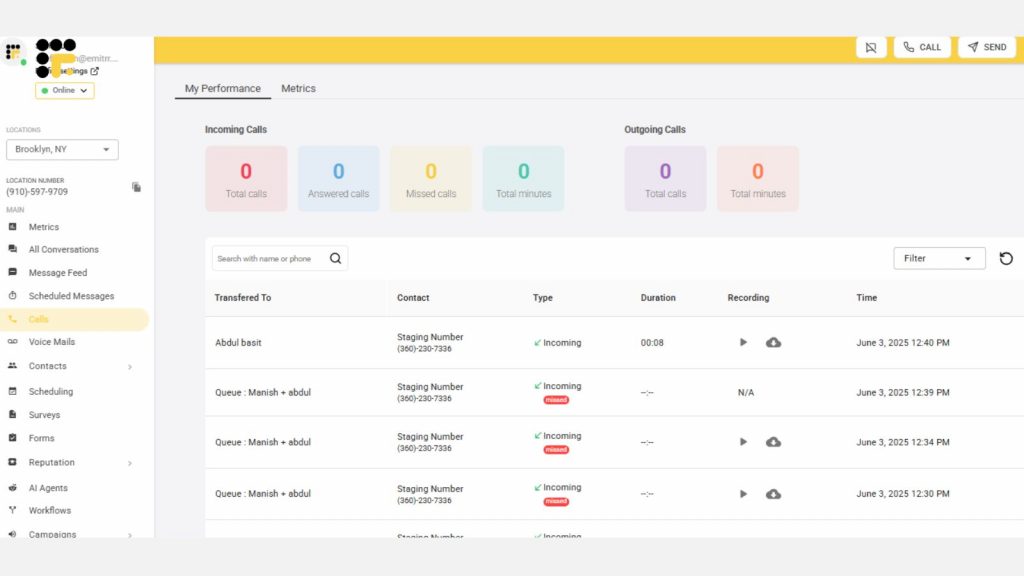
Emitrr is more than just a phone system; it’s like a digital toolbox built to help local businesses, including podiatry clinics, manage patient communication. With VoIP phone systems for healthcare, Emitrr makes it easy to handle calls, send texts, and automate routine tasks so clinics can save time and keep patients happy.
One thing that sets Emitrr apart is how user-friendly it is. It’s designed so both staff and patients can use it without a lot of tech training. From scheduling reminders to two-way texting, it helps clinics stay connected without having to juggle multiple apps. Recently, Emitrr has rolled out AI-powered text enhancements that help craft better messages, making conversations clearer and friendlier for patients.
Emitrr’s VoIP healthcare solution offers reliable, crystal-clear call quality, plus flexible plans that grow with your clinic. Whether you’re a solo podiatrist or a larger practice, it’s built to scale without complicated setups or hardware headaches.
Emitrr Features
- Crystal-clear call quality: Every call sounds sharp and professional, so there’s less room for confusion with patients.
- Two-way texting & bulk messaging: Chat one-on-one or send out mass updates—all from one place.
- Automated reminders & follow-ups: Reduce no-shows with auto-sent appointment nudges and check-ins.
- AI-powered texting tools: Get help writing messages, adjusting tone, or replying faster with smart AI features.
- Call routing & voicemail-to-text: Make sure calls go to the right person and voicemails show up as easy-to-read texts.
- Call & message analytics: See how many calls and texts your clinic handles to better understand your workflow.
- Simple, staff-friendly dashboard: Everything your team needs is neatly organized and easy to use.
Emitrr Pros
- Very easy for both staff and patients to use
- Helps cut down no-shows with automated reminders
- Boosts engagement with tools like texting, calling, and smart automation
- Flexible for different practice sizes
Emitrr Cons
- EHR integrations are a bit limited compared to larger platforms
- Focused mainly on communication, not a full telehealth suite
Emitrr Support Channels
- Live chat with Emitrr’s representatives
- Phone support at +1 (210) 941-4696
- Email support at support@emitrr.com
- Knowledge Base with how-tos, FAQs, and helpful guides
Emitrr Pricing
Emitrr uses a custom pricing model tailored to the size and needs of each practice. Clinics should contact Emitrr directly to get a personalized quote.
Emitrr Reviews
Users often highlight how easy Emitrr is to use and how much time it saves at the front desk. Many podiatrists say it’s a game-changer for keeping patients in the loop and improving follow-ups without overloading staff.
Emitrr Integrations
- Salesforce
- HubSpot
- MailChimp
- Zapier
- Slack
- AthenaHealth
- Denticon
2. Nextiva
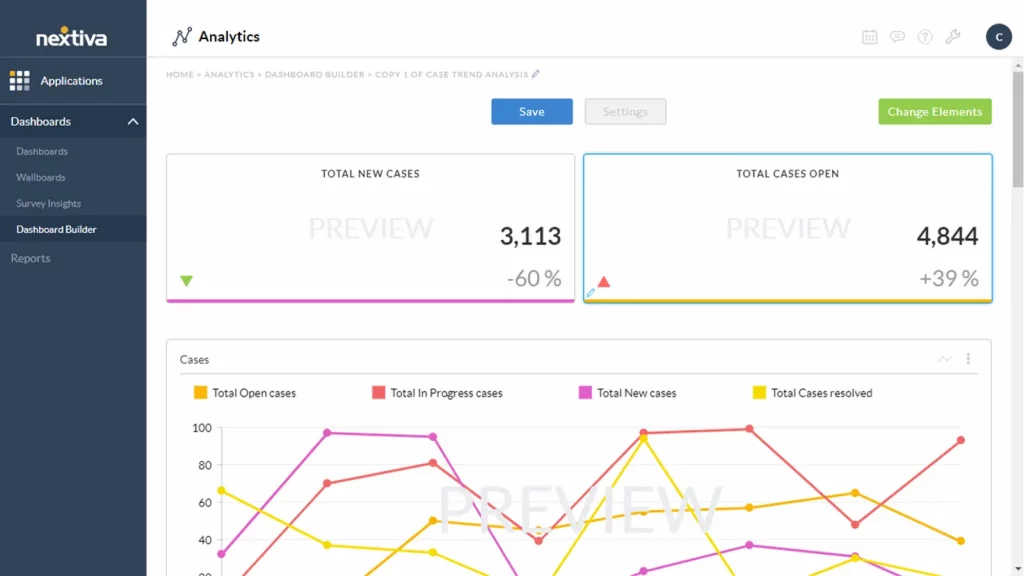
Nextiva offers a VoIP phone system for healthcare that packs in a lot of features for businesses that want more than just voice calls. It’s designed to help podiatrists and other healthcare providers manage communication across calls, texts, and team collaboration, all from one platform.
At its core, Nextiva provides robust call management tools like call routing, call transfer, call waiting, and call forwarding. It also offers video conferencing, team messaging, and integrations with CRM systems, making it a good fit for podiatrists who want to connect patient communication with other business tools. Plus, features like auto-attendants, voicemail transcription, and mobile apps keep things running smoothly whether staff are in the office or working remotely.
While it’s widely used in many industries, Nextiva can also work well as a VoIP for podiatrist option, especially for practices that want advanced call features and integrations with tools like EHRs or CRMs.
Nextiva Features
- Call management tools: Control call flow to ensure patients reach the right person quickly.
- Call analytics: Track call volume, duration, and staff performance for smarter decisions.
- Video conferencing: Host virtual meetings with patients or staff without extra software.
- Team collaboration tools: Chat, share files, and update tasks to keep your team connected.
- Auto-attendant: Automatically greet and route callers to the right department or person.
- Voicemail transcription: Convert voicemails to text and send them to your email for easy access.
- Mobile app: Manage calls and messages on the go from your smartphone or tablet.
- CRM integrations: Sync with tools like Salesforce or HubSpot to streamline patient management.
- Business text messaging: Send and receive texts with patients for quick updates and reminders.
Nextiva Pros
- Affordable compared to many enterprise-level solutions
- Easy to use, even for non-technical staff
- Scalable for growing practices
Nextiva Cons
- Some users report occasional call quality issues
- Management features can be complex for small teams
- Integration capabilities can sometimes be limited or require extra setup
Nextiva Support Channels
- Phone support
- Email support
- Live chat
- How-to videos for self-service help
Nextiva Pricing
Nextiva offers three pricing plans:
- Core – $30 per user/month
- Engage – $40 per user/month
- Power Suite – $60 per user/month
Free demos are available for all plans.
Nextiva Reviews
Reviews of Nextiva’s VoIP healthcare services often mention its reliability and clear call quality. Users like how user-friendly the platform is and appreciate features like voicemail-to-email, auto attendants, and CRM integration. However, some report delays in customer support response times and note that higher-tier plans may be pricey for smaller practices.
Nextiva Integrations
- Integrations with electronic health records (EHR) systems
- CRM systems, including Salesforce, HubSpot, and Zendesk
- Microsoft Teams
- Microsoft Dynamics
- Zoho
3. Dialpad

Dialpad is a cloud-based communications platform that brings together calls, texts, video meetings, and instant messaging into one simple app. For podiatrists looking for a voip phone system for healthcare, Dialpad offers the flexibility to stay connected whether you’re in the office, working from home, or on the go.
With Dialpad, clinics can handle unlimited calls and SMS/MMS messaging, plus host video meetings and chat with staff, all without switching between different tools. Features like call recording, call forwarding, and real-time call summaries help staff manage busy schedules and keep track of important patient conversations. Its AI-powered capabilities, like real-time transcription and sentiment analysis, also make it easier to capture details and follow up with patients accurately.
For podiatrists exploring voip for healthcare, Dialpad offers modern features and strong integrations, but it’s important to watch out for costs tied to SMS usage, which can add up if the practice relies heavily on texting.
Dialpad Features
- Unlimited calling: Make unlimited calls in supported regions without extra charges.
- SMS and MMS messaging: Send texts, images, and videos directly from your Dialpad account.
- Video meetings and conferencing: Host secure video calls for patients or internal meetings with ease.
- Instant messaging and team chat: Communicate in real time with team members via chat and group messages.
- Call recording and forwarding: Record calls for review and forward them to ensure no missed connections.
- Real-time call summaries and AI transcription: Get live notes and AI-generated summaries to capture important call info.
- Voicemail transcription: Read voicemails as text for quick and convenient access.
- Mobile and desktop apps: Stay connected from anywhere using your phone or computer.
Dialpad Pros
- Helps reduce costs compared to traditional phone systems
- Smooth integrations with many popular business apps
- Easy to use for staff at all tech levels
- Works from anywhere, supporting remote and hybrid work
Dialpad Cons
- Certain advanced features require upgrading to higher tiers
- It can become expensive for practices that rely heavily on SMS
- Some users report occasional call reliability issues
Dialpad Support Channels
- Help Center with articles and guides
- Live chat support
- Email support
Dialpad Pricing
- Standard: $15/user/month
- Pro: $25/user/month
- Enterprise: Custom pricing available by contacting Dialpad directly
Dialpad Reviews
Dialpad earns praise for its clean, user-friendly interface and seamless integrations with tools like Salesforce, G Suite, and Slack. Many users appreciate the high call quality and powerful AI features, such as transcription and sentiment analysis. On the flip side, some reviews mention occasional issues with call reliability and surprise fees, especially around SMS usage.
Dialpad Integrations
- CRM systems like Salesforce, HubSpot, and Zendesk
- Google Workspace
- Microsoft 365
- Slack
- Other business productivity apps
4. OhMD

OhMD is a patient communication platform designed specifically for healthcare providers who want to simplify how they connect with patients. For podiatrists exploring voip phone systems for healthcare, OhMD focuses heavily on secure texting, appointment reminders, and easy messaging to keep patient engagement high without a lot of manual work.
The platform offers HIPAA-compliant texting, making it safe for podiatrists to discuss sensitive health details without worrying about privacy risks. Clinics can send automated appointment reminders, reducing no-shows and saving staff time on follow-up calls.
OhMD also supports secure messaging between staff, helping streamline internal communication and keep everyone on the same page.
OhMD Features
- HIPAA-compliant texting: Send secure messages without compromising patient privacy.
- Appointment scheduling & reminders: Book visits and auto-send reminders to cut down no-shows.
- Broadcast messaging: Share announcements with many patients at once.
- Secure staff messaging: Let your team chat privately and securely.
- Two-way patient texting: Have interactive, real-time conversations with patients.
- EHR integrations: Sync messages and patient data with your EHR system.
- Web & mobile access: Use OhMD from any device, anywhere.
OhMD Pros
- Strong HIPAA compliance keeps patient data protected
- Helps boost patient engagement with easy texting
- Streamlines staff workflows and saves time
- Free plan available for small teams
OhMD Cons
- Requires patients to use an extra app in some cases
- The free version has limited features
- Costs can add up for larger practices needing advanced features
OhMD Support Channels
- Email support
- Option to schedule a live demo for walkthroughs and questions
OhMD Pricing
- Basic Plan: Free for up to 15 users
- Reach Plan: $250 per month
- Develop Plan: Custom pricing available by contacting OhMD directly
OhMD Reviews
Reviews of OhMD often highlight how much easier it makes communication, especially through HIPAA-compliant texting. Many podiatrists like how user-friendly it is and the way it helps reduce phone tag with patients. However, some reviews mention that the cost can feel high for the features provided, especially compared to broader VoIP healthcare solutions.
OhMD Integrations
- Greenway EHR
- Agile EMR
- Dentrix
- Epic
- Meditab
- Other integrations for patient data synchronization and messaging
5. JustCall
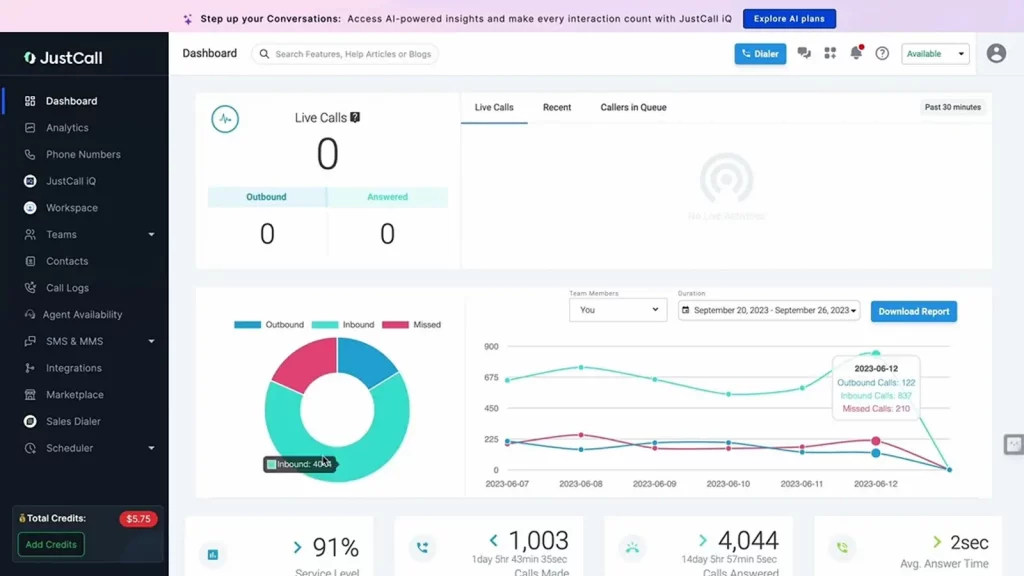
JustCall is a cloud-based business phone system built to help teams manage calls, texts, and even WhatsApp conversations, all from one platform. For podiatrists looking into VoIP phone systems for healthcare, JustCall offers a mix of voice and messaging features that make it easier to stay in touch with patients and coordinate with staff.
It’s designed with usability in mind, offering an intuitive interface and handy automation tools like call distribution, SMS workflows, and scheduled messaging. Practices can handle inbound and outbound calls, send reminders via text, and integrate communication with other software tools they’re already using. This makes it a good choice for podiatry clinics that want to manage patient communication and internal team calls from a single place.
JustCall Features
- VoIP calling: Make and receive internet calls with clear audio and easy setup.
- SMS & WhatsApp messaging: Text patients via SMS or WhatsApp from one platform.
- Automated workflows: Auto-route calls and send texts based on schedules or actions.
- Call recording & analytics: Record calls and track data to boost team performance.
- Click-to-call/text from CRM: Call or text straight from your CRM with a single click.
- Voicemail drop: Send pre-recorded voicemails without waiting for the beep.
- Mobile & desktop apps: Stay connected from any device, anywhere.
- CRM & tool integrations: Connect with HubSpot, Zoho, Slack, and more for seamless operations.
JustCall Pros
- Easy for staff to learn and use
- Automations help save time and reduce manual work
- Scales well for growing practices
- Supports multi-channel communication beyond just voice calls
JustCall Cons
- Users report occasional issues with call quality
- Customer support response times can be slow
- SMS functionality has some limitations and extra costs
JustCall Support Channels
- Phone support
- Live chat
- Email support
- Social media channels
JustCall Pricing
- Team: $29/user/month (billed annually)
- Pro: $49/user/month (billed annually)
- Pro Plus: $89/user/month (billed annually)
- Enterprise: Custom pricing available upon request
JustCall Reviews
Reviews of JustCall often praise its user-friendly interface and strong integrations, particularly with tools like HubSpot, making it appealing for practices looking to connect healthcare phone systems with CRM workflows. Many users appreciate the ease of managing calls and texts in one place. On the downside, some reviews mention occasional call connectivity issues and challenges in getting timely customer support.
JustCall Integrations
- EHR systems (varies by provider)
- CRM tools like HubSpot, Salesforce, and Zoho
- Productivity apps, including Slack, Apollo.io, and Zapier
6. GoTo Connect

GoTo Connect is a cloud-based unified communications platform that rolls together VoIP phone systems, video conferencing, team messaging, and contact center tools into a single solution. For podiatrists exploring VoIP phone systems for healthcare, it offers a centralized way to manage patient calls, virtual meetings, and staff communication without juggling multiple apps.
One of the big advantages of GoTo Connect is how it simplifies communication, especially for practices with remote or hybrid teams. Podiatry clinics can manage calls, set up video consultations, create custom call flows, and use integrations with business apps to connect their healthcare phone systems seamlessly with other tools. The platform also includes handy features like voicemail-to-email, which helps staff stay on top of patient messages even when they’re away from the desk.
GoTo Connect Features
- VoIP with call management: Manage calls with transfers, holds, and queues on a cloud-based system.
- Video conferencing: Host secure virtual meetings for patients or team members.
- Team messaging: Chat with staff in real time for smooth internal coordination.
- Custom call routing: Create call flows so patients reach the right person fast.
- Voicemail-to-email: Get voicemails as text in your inbox for quick follow-up.
- Multi-device support: Use GoTo Connect on desktop, tablet, or mobile.
- CRM/EHR/help desk integrations: Sync with tools like Salesforce, Epic, or Zendesk for unified workflows.
GoTo Connect Pros
- Simple and user-friendly interface
- Easy to implement, even for small practices
- Supports remote work and hybrid teams well
- Helps consolidate communication tools into one platform
GoTo Connect Cons
- Users sometimes report call quality and reliability issues
- App performance can be inconsistent
- Customer service can be slow, especially for billing or contract help
- Some features are less robust than competitors
GoTo Connect Support Channels
- Phone support
- Email support
- Live chat
- Shared inbox support for WhatsApp, SMS, webchat, and social media
GoTo Connect Pricing
GoTo Connect doesn’t list transparent pricing online. Clinics need to contact their sales team directly to get a customized quote based on the size and needs of the practice.
GoTo Connect Reviews
Reviews for GoTo Connect often highlight its simplicity and how easy it is for staff to get started without a steep learning curve. Many podiatrists appreciate the platform’s reliability for day-to-day communication and the convenience of having voice, video, and messaging in one place. However, some users note frustrations with customer support responsiveness and occasional hiccups in app stability, especially compared to other VoIP healthcare solutions.
GoTo Connect Integrations
- EHR systems for syncing patient records and data
- CRM tools like Salesforce, HubSpot, and Zoho
- Help desk platforms like Zendesk and Freshdesk
- Collaboration tools such as Microsoft Teams
7. Vonage

Vonage is a long-standing name in the business communications space. It offers a range of solutions like unified communications, contact centers, and developer-friendly APIs for custom integrations. For podiatrists looking at VoIP for healthcare, Vonage can help handle both internal team communication and patient-facing calls or messages in one place.
What stands out is Vonage’s flexibility. You get features like a virtual receptionist, video conferencing, and call management tools, along with some extras like paperless faxing, spam blocking, and SimulRing, which rings multiple devices at once, so you don’t miss a call. They also have a feature called Boomerang that calls a patient back automatically if they hang up before getting through.
Vonage Features
- VoIP calling & virtual receptionists: Manage patient calls with cloud calling and automated attendants.
- Messaging & video conferencing: Text securely or host virtual consults and team meetings.
- Call recording & analytics: Record and analyze calls to improve service quality.
- Paperless faxing & spam blocking: Send digital faxes and block spam to keep communication secure.
- SimulRing & Boomerang: Ring multiple devices at once or auto-reconnect dropped calls.
- CRM integrations: Sync with CRMs like Salesforce to organize patient data.
- Mobile & desktop access: Stay connected on any device, anywhere.
Vonage Pros
- Easy to set up and use
- Offers solid core features for business calling
- Flexible enough to support different workflows
- Strong integrations with common business tools
Vonage Cons
- Advanced features can add up in cost
- Customer support isn’t always consistent
- Some limitations in automation and healthcare-specific options
Vonage Support Channels
- Customer Community Hub for tracking issues and submitting support requests
- Documentation and expert guidance
- Chat support through the portal
Vonage Pricing
Vonage doesn’t display pricing publicly. You’ll need to contact their sales team for a quote that fits your practice size and needs.
Vonage Reviews
Reviews for Vonage are mixed. Some users really like how simple it is to use, especially for managing calls and meetings across multiple devices. Others appreciate the clear call quality and flexibility. That said, some practices mention frustration with pricing that gets confusing, limited advanced features, and spotty customer support, especially when it comes to billing or technical help.
Vonage Integrations
- Microsoft Teams
- Salesforce
- Zoho CRM
- Google Workspace
- NetSuite
8. RingCentral
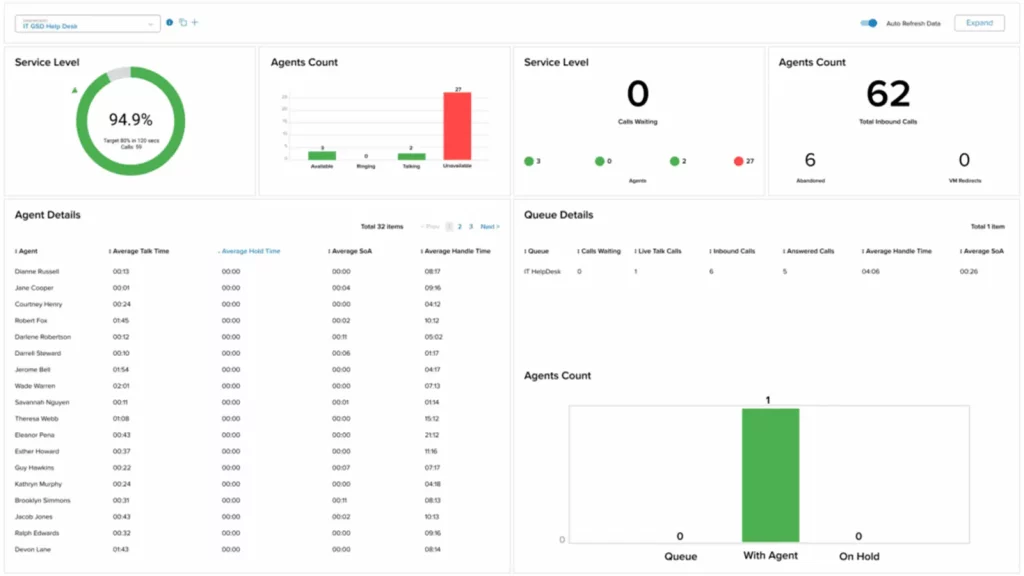
RingCentral is a cloud-based communication and collaboration platform that offers a suite of tools designed to help businesses, like podiatry clinics, manage phone calls, video meetings, team messaging, and more. For podiatrists considering VoIP phone systems for healthcare, RingCentral provides an all-in-one solution that makes it easy to handle patient communication and internal coordination in one place.
One of RingCentral’s standout points is how comprehensive it is. You’re not just getting phone service; you’re getting video meetings, team chat, analytics, and AI-powered tools like live transcriptions and call summaries. This can be especially helpful in a busy clinic environment where quick note-taking and accurate record-keeping are crucial. And for practices with remote or hybrid teams, having everything under one roof means fewer apps to juggle and more streamlined workflows.
RingCentral Features
- VoIP calling: Handle calls with high-quality cloud-based voice services.
- Video meetings & webinars: Host secure virtual consults and team sessions.
- Team messaging & collaboration: Share files and chat instantly to streamline teamwork.
- AI call transcriptions & summaries: Get live transcriptions and smart call recaps.
- Analytics & reporting: Track call data and staff performance with detailed insights.
- Multi-device support: Use RingCentral on any device, anywhere you work.
RingCentral Pros
- Robust feature set covering multiple communication needs
- High reliability for calls and video meetings
- Good option for remote or hybrid clinics
- AI tools help with efficiency and documentation
RingCentral Cons
- Pricing can be higher than some alternatives
- Some users report challenges with customer service
- The interface can feel cluttered for new users
- Occasional call quality or connectivity issues
RingCentral Support Channels
- Phone support
- Live chat
- Email support
- Online knowledge base and community forums
RingCentral Pricing
- Core Plan: $20/user/month
- Advanced Plan: $25/user/month
- Ultra Plan: $35/user/month
Custom enterprise pricing is available for larger practices or specific needs.
RingCentral Reviews
Reviews for RingCentral are generally positive. Users appreciate how much functionality is packed into the platform and how well it works for managing calls, video, and messaging in one place. Many podiatrists and healthcare professionals highlight the reliability and user-friendly design as strong points. However, a few users mention that navigating all the settings can be confusing at first, and there have been occasional issues with call quality or support response times.
RingCentral Integrations
- CRM platforms like Salesforce, HubSpot, and Zendesk
- Google Workspace for calendar and document management
- Microsoft 365 for productivity tools
- Slack for team communication
9. 8×8

8×8 is one of the better-known names in the VoIP healthcare space, especially for businesses that need a unified communication and contact center solution in one. It’s a cloud-based system that covers phone service, video meetings, team chat, and more, making it a good fit for podiatry clinics with growing or distributed teams.
With 8×8, you get HD video conferencing, call routing tools, auto-attendants, and cloud recordings. For practices that hold remote consultations or team huddles, these features come in handy. The platform also supports highlight-to-dial, which makes call handling faster for front-desk staff. Plus, it includes global calling to over 14 countries, which could be useful for practices with international patients or external consultants.
8×8 Features
- Cloud VoIP phone system: Make reliable business calls over the internet with advanced features.
- HD video conferencing: Host clear virtual meetings with customizable backgrounds.
- Auto-attendants & call handling: Route calls smartly with automated menus and controls.
- Team chat & messaging: Stay connected with built-in staff chat and collaboration tools.
- Cloud recordings & controls: Record meetings and manage participants securely.
- Highlight-to-dial & mobile browser access: Dial numbers instantly and work from any browser.
- Multi-device access: Use 8×8 across desktop, tablet, or smartphone effortlessly.
8×8 Pros
- Unlimited calling to at least 14 countries
- Robust video conferencing with high attendee limits
- Built-in team chat and collaboration tools
- Offers communication APIs for flexibility
- Scalable for mid-sized to enterprise practices
8×8 Cons
- Has a learning curve, especially for non-tech users
- Might be more than needed for smaller podiatry practices
- Setup and customization can take time
8×8 Support Channels
- Live chat
- Phone support
- Online forums
- Knowledge base with guides and FAQs
8×8 Pricing
8×8 doesn’t list prices publicly. You’ll need to contact them directly for a custom quote based on your clinic’s size and usage.
8×8 Reviews
Reviews tend to highlight 8×8’s strength in unified communications and its reliability for mid-sized and larger teams. Users like the video quality and feature-rich platform. However, some note that onboarding can be tricky and takes time to figure out, especially when setting up call flows and PBX features.
8×8 Integrations
- Microsoft Teams
- Salesforce
- Google Workspace
- Communication APIs for custom integration
10. Zoom Phone

Zoom Phone is part of the larger Zoom ecosystem, bringing voip healthcare capabilities into the same app many clinics already use for video calls. Instead of juggling multiple tools, podiatry practices can handle voice calls, video meetings, messaging, and conferencing all from one place. This makes it convenient for busy offices that want fewer systems to manage.
With Zoom Phone, calls happen over the internet rather than traditional phone lines, so it’s flexible and scalable. Clinics can easily route calls, monitor calls for quality or training, and use features like voicemail transcription and call recording. It’s available across desktops, mobile devices, and even supported desk phones, helping teams stay connected wherever they are.
Zoom Phone Features
- Cloud VoIP system: Make reliable business calls over the internet with Zoom.
- Call handling & routing: Forward, transfer, and manage calls with custom call flows.
- Voicemail transcription: Read voicemails as text for faster follow-up.
- Call recording & monitoring: Record and monitor calls for training or compliance.
- All-in-one app: Use voice, video, chat, and meetings in one Zoom app.
- Multi-device access: Stay connected on desktop, mobile, or desk phones.
- Platform integrations: Sync with Microsoft 365, Google Workspace, and CRMs
Zoom Phone Pros
- Easy to use, especially for clinics already using Zoom
- Reliable call quality and clear audio
- Affordable entry-level plans for small practices
- Useful features like call recording and transcriptions
- Works seamlessly across devices
Zoom Phone Cons
- Some advanced features are only available on higher-tier plans
- Occasional connectivity issues with poor internet
- Limited support for traditional desk phone hardware
Zoom Phone Support Channels
- Phone support
- Email support
Zoom Phone Pricing
Pricing starts around $10/user/month and goes up to roughly $26/user/month, depending on features and call plans.
Zoom Phone Reviews
Users appreciate Zoom Phone’s seamless integration with Zoom Meetings, making it easier to handle both calls and video appointments. Many praise the call quality and user-friendly interface. However, some reviews mention occasional dropped calls and a learning curve for advanced settings like call flows or detailed analytics.
Zoom Phone Integrations
- Zoom Meetings
- Microsoft Teams
- Salesforce
- Google Workspace
- Slack
Why Emitrr Is The Best VOIP Provider For Podiatrists
Running a podiatry clinic isn’t just about treating foot and ankle issues; it’s about keeping communication smooth between your staff and patients. That’s where Emitrr stands out as the best choice among phone systems for healthcare providers.
Emitrr’s VoIP phone service delivers crystal-clear call quality, which matters when you’re confirming surgery details or handling sensitive patient questions. It’s quick to set up, meaning your practice can get up and running without complicated hardware installations or long downtime. Plus, it’s scalable. Whether you’re a solo podiatrist or managing multiple clinic locations, Emitrr grows with you, making it a solid solution for hospital phone systems or smaller healthcare phone system needs alike.
But what really sets Emitrr apart is how it blends modern communication with smart technology. The new AI-powered text enhancements are perfect for busy podiatry practices where staff often juggle calls, texts, and patient updates all day long. Here’s how these features make life easier:
- Help Me Write: Imagine needing to quickly send a follow-up message to a patient about pre-op instructions. Instead of typing from scratch, Emitrr can generate a clear, professional message based on a short prompt.
- Enhance: Make it Crisp or Empathetic. Sometimes, you want to keep messages brief and direct, like appointment reminders. Other times, you want warmth and reassurance, especially when dealing with post-surgical care. Emitrr helps adjust your tone on the fly.
- Suggest a Reply: When patients text back with questions, Emitrr suggests smart responses, saving your team time and helping maintain fast response times.
For podiatrists, this means fewer no-shows, better patient relationships, and less time spent typing out messages manually. It’s a real advantage over other VoIP phone systems for healthcare that focus only on calling features without smart messaging capabilities.
While some larger platforms may offer deeper integrations with EHRs, Emitrr’s strength lies in making day-to-day patient communication easy, reliable, and secure. It’s also fully HIPAA compliant, which is non-negotiable when dealing with patient information in healthcare VoIP.
In short, Emitrr doesn’t just give podiatrists a VoIP for podiatrist option; it provides an all-in-one communication toolkit tailored to the way modern practices operate. That’s why it’s a top pick for anyone looking for the best VoIP for a podiatrist.
Conclusion
Choosing the right VoIP for a podiatrist practice isn’t just about making calls; it’s about staying connected, protecting patient privacy, and keeping your clinic running smoothly.
Whether you’re a solo podiatrist or part of a larger group, the right healthcare phone system saves time, improves patient satisfaction, and helps you focus on care instead of call management. From advanced features like call routing and AI messaging to solid security and HIPAA compliance, a good VoIP system is a smart investment for modern podiatry practices.
If you’re looking for a solution that’s easy to use, powerful, and built with healthcare in mind, Emitrr deserves a serious look.
Frequently Asked Questions
VoIP systems make it easier to handle calls, texts, and even video chats from one place. They let you respond faster, send reminders, and keep patients updated without extra manual work, all while staying HIPAA-compliant.
Yes. Many VoIP phone systems for healthcare are scalable and cost-effective for small practices. You can start small and add features as you grow.
Because it simplifies communication, reduces costs, and offers features like call routing, voicemail-to-text, and secure messaging, all essential for running a modern healthcare phone system.
Most VoIP services offer call forwarding to cell phones or backup numbers, so you won’t miss urgent calls even during internet outages.
Key features include HIPAA-compliant texting, call routing, voicemail transcription, appointment reminders, and integrations with hospital phone system software or practice management tools.
Yes. Most VoIP providers support number porting so you can keep your existing numbers without disruption.


 4.9 (400+
reviews)
4.9 (400+
reviews)