
Introduction
Spruce Health alternatives are worth exploring when your practice needs more than HIPAA-compliant messaging. Spruce Health focuses on secure patient communication and does it well for solo providers and small practices, but it doesn’t include a built-in phone system, bulk appointment reminders, or review automation. For practices seeing 30 or more patients a day, manual follow-up starts to pile up fast. If you’re at the point where you need reminders, recalls, and two-way texting to actually run without staff manually sending each message, these alternatives cover more ground at a comparable price.
AI Summary
- Spruce Health covers HIPAA messaging for solo providers but has no phone system or bulk reminder automation.
- This blog covers alternatives that add VoIP, recall campaigns, and automated reminders to what Spruce already handles.
- Compares per-user pricing on Spruce against flat-rate alternatives at similar monthly spend.
- Rates each option on how well it scales from a solo provider to a small group practice.
- Emitrr is highlighted for practices that need HIPAA texting plus calling and reminder automation in one plan.
Why Solo Practices Start Outgrowing Spruce Health as Volume Increases
Spruce Health has earned a good reputation for simplifying clinic communication, but that doesn’t mean it’s the perfect fit for everyone. Many practices start off happy with it, then slowly realise there are gaps that make day-to-day operations trickier than they expected. Here’s what real users often say when they go looking for something better:
Limited integrations with EHRs
One of the biggest pain points users talk about is how Spruce doesn’t play well with every EHR. It works fine with systems like Elation and Hint, but that’s about where the list ends. If your clinic runs on something else, you’re often left copying notes manually or toggling between two systems all day. That’s tiring for staff and increases the chance of small mistakes, the kind that add up over time.
Customer support that feels distant
This one comes up again and again on Capterra and G2. Users love the product, but not always the help behind it. Many mention that getting support feels slow, there is no quick phone line to call, and emails can take days to get a reply. When your phone lines or messaging go down, waiting for an email response just isn’t enough. For healthcare teams, that kind of delay can throw off the entire day.
Number porting can be a headache
On paper, switching your clinic’s number to Spruce sounds easy. In reality, a lot of users say it’s anything but. Reviews describe delays lasting weeks and sometimes even missed calls during the transfer. Imagine explaining to a patient why your phone lines were down, it’s not a conversation any clinic wants to have.
Expensive when you start scaling
Spruce’s basic plan is decent for small practices, but once you need automation, reporting, or multi-user features, the costs climb quickly. Several users say the higher-tier plans feel pricey for what they offer. For growing practices, that can make it tough to justify sticking with the platform long term.
Mobile app hiccups
The app itself is pretty solid, but a few users say it lags or skips notifications. It might not sound like a big deal, but for doctors and staff who rely on mobile alerts to manage patients on the go, those tiny glitches can become real interruptions in their workflow.
What a Patient Communication Platform Needs Beyond Secure Messaging
Switching communication platforms isn’t easy, especially when your whole team relies on it every day. You want something that feels smooth, not stressful. The best alternative should fit naturally into how your practice already runs, not make you reinvent everything from scratch. Here’s what to really pay attention to when you start exploring options.
Ease of Use and Onboarding
You shouldn’t need a manual to figure out how to send a message. The best tools just make sense the moment you log in, no confusion, no digging through menus. When onboarding feels easy, your staff actually enjoys using it instead of feeling intimidated. A good platform walks you through setup step by step, and if you ever hit a snag, there’s a real person ready to help. It’s like having a friendly guide showing you around instead of tossing you the keys and saying, “Good luck.”
Pricing Transparency and Value
No one likes surprise charges sneaking up after you’ve already committed. Before you sign up, make sure the pricing is crystal clear, no hidden fees for texting, video calls, or “premium” support. The best companies make their pricing page simple to understand, so you can tell exactly what you’re paying for. You shouldn’t have to decode a pricing table like it’s a puzzle. And more importantly, you should feel like what you’re paying actually helps your team do better work, not just tick boxes on a feature list.
HIPAA-Compliant Security and Privacy
You’re handling some of the most personal data out there, your patients’ health information. So, security isn’t something to compromise on. Look for platforms that make HIPAA compliance a built-in promise, not a checkbox. Encryption should cover everything – texts, calls, attachments, and you should be able to control who sees what within your team. It’s about building trust, not just with your software provider, but with every patient who chooses your practice.
Integrations with EHR and Other Tools
We’ve all been there, juggling five tabs, copying data from one system to another, and hoping you didn’t miss a note. The right platform makes that juggling act disappear. When your communication software integrates with your EHR, billing, or clinic scheduling software, life just gets easier. Imagine sending reminders, logging notes, checking patient details, and managing medical forms without switching screens. That’s the kind of workflow that gives you your time back.
Communication Features That Matter (Calls, Texts, Reminders)
You don’t need a thousand fancy features. You just need the ones that make patient communication simple and personal. Think two-way texting that feels natural, call routing that works every time, and voicemail that turns into text so you never miss a beat. Bonus points if you can automate appointment reminders, because fewer no-shows mean happier patients and a smoother day for your staff. When everything runs through one easy inbox, your whole team stays in sync.
Reliable Support and Training
When your phones stop ringing or messages freeze, you don’t want to send an email and wait three days. You want help right then. That’s why responsive support is such a big deal. Look for platforms with live chat or real human phone support. A team that actually listens, fixes problems quickly, and checks in afterwards makes all the difference. And ongoing training, like short tutorials and live Q&A sessions, keeps everyone confident using the system.
Scalability for Growing Practices
Your clinic today might have two providers. Next year, maybe five. The right tool should grow right alongside you – no limits, no complicated upgrades. Adding a new line, user, or location should be as easy as a few clicks, not a full migration. You would rather not switch systems every time your practice takes off. You want one that evolves with you.
Mobile Access for Staff on the Go
In healthcare, you’re hardly ever sitting still. Whether you’re between exam rooms, at another clinic, or heading home, you still need to stay connected. That’s where a solid mobile app becomes your best friend. It should let you answer calls, check texts, and handle everything securely from your phone – no lag, no missed alerts. When your software moves with you, you can keep your focus on patients instead of screens.
Analytics and Reporting for Smarter Decisions
You can’t improve what you don’t measure. A good platform doesn’t just help you communicate, it helps you see how you’re doing. Detailed reports on call times, missed messages, or team response rates show where you can make small tweaks that lead to big improvements. It’s like having a snapshot of your clinic’s rhythm, so you can fix bottlenecks and celebrate what’s working.
Customization to Match Your Workflow
Every practice has its own style. Some rely on quick replies. The others might rely on detailed follow-ups, and some juggle multiple departments. The right platform fits into your way of doing things. Being able to create custom message templates, auto-replies, and call flows saves your team hours. It’s that sweet spot where technology adapts to you, not the other way around. That’s when a tool stops feeling like “software” and starts feeling like part of your team.
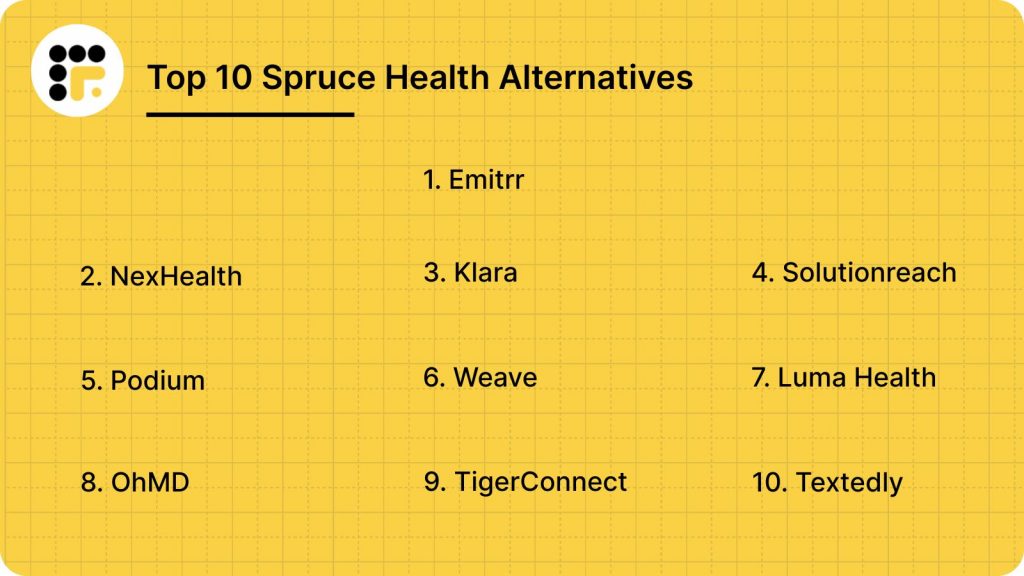
Top 10 Spruce Health Alternatives
There are plenty of tools out there, but only a few truly make communication easier for busy clinics. Here are 10 of the best Spruce Health alternatives to explore.
1. Emitrr: Best Spruce Health Alternative
Emitrr Overview
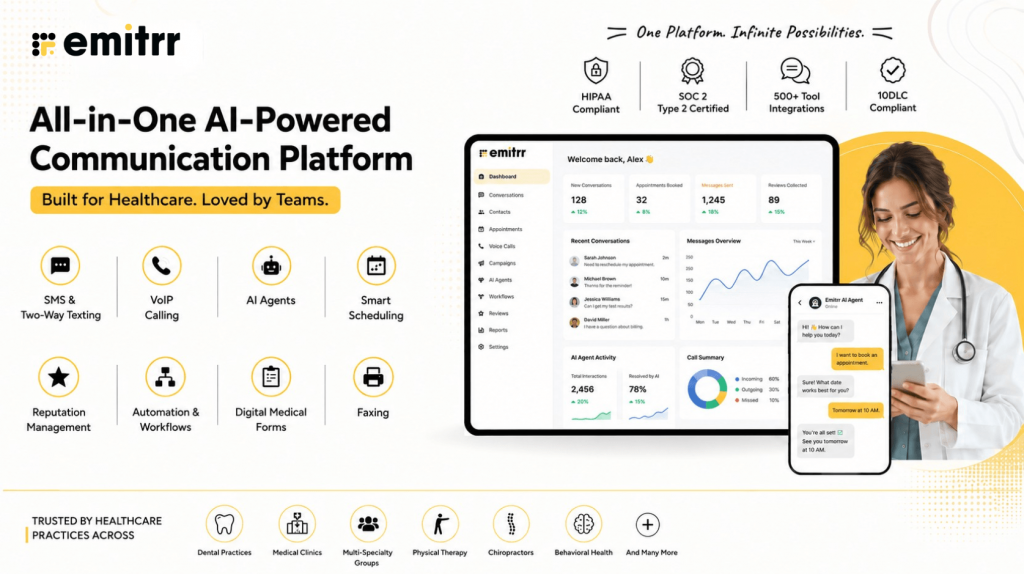
Emitrr is a 100% HIPAA-compliant communication platform made for today’s healthcare teams. It’s often seen as the best alternative to Spruce Health, and it’s easy to see why. From texting and calls to reminders and reviews, everything happens in one simple place. It helps you stay connected with patients, reduce missed messages, and save time every single day.
Emitrr Features
- Omnichannel Messaging: Communicate with patients across multiple channels calls, SMS, and web chat — all from one dashboard.
- Mass and Bulk Texting: Reach hundreds of patients in seconds with updates, appointment reminders, or special announcements.
- Automated Workflows: Set up reminders, review requests, and follow-ups that send automatically, saving your team hours every week.
- 2-Way Text Messaging: Have real conversations over text, patients can reply instantly, and your team can respond without switching tools.
- Web Chat to Text: Continue conversations started on your website directly through SMS, so no patient inquiry goes unanswered.
- VoIP Phone System: Manage calls with features like call routing, voicemail transcription, and analytics, all in the same app.
- Analytics and Reports: Get real-time insights into call volumes, message response times, and team performance to make data-driven improvements.
- Integrations with EHRs and CRMs: Sync patient and contact data effortlessly with tools you already use, like Denticon, AthenaHealth, and Salesforce.
- Review and Reputation Management: Send review requests automatically, track patient feedback, and improve your online reputation with ease.
- Unified Inbox: Keep all patient communication — calls, texts, forms, and faxes, neatly organized in one central place.
- Mobile App: Access everything on the go. The app lets your staff text, call, and check updates from anywhere without missing a beat.
Pros of Emitrr
- Outstanding Support: Emitrr’s customer service is quick, friendly, and available 24/7. Many users even call it the best they’ve ever experienced.
- Simple and User-Friendly: The dashboard is clean and easy to navigate, anyone can get started without training or tech expertise.
- Affordable and Transparent Pricing: You know exactly what you’re paying for. No surprise fees or complicated tiers.
- Feature-Rich Platform: From mass texting to automation and call tracking, Emitrr covers everything you need to improve communication.
- Time-Saving Automation: Set it once and forget it — reminders, review requests, and follow-ups go out automatically, keeping your schedule running smoothly.
Cons of Emitrr
Emitrr keeps adding new tools and upgrades!
Emitrr Integrations
- Compatible Tools: Works with 500+ platforms across industries to keep your workflow seamless.
- Popular Integrations Include: Denticon, AthenaHealth, Salesforce, HubSpot, Zapier, MailChimp, Facebook, HouseCall Pro and more!
- Purpose: These integrations make it easy to sync data, automate tasks, and maintain consistent communication without manual effort.
Emitrr Pricing
Emitrr’s SMS pricing starts at $149 per month, following a simple text-based model that’s easy to understand and scale as your practice grows.
Emitrr Ratings
- Capterra: 4.9/5
- G2: 4.8/5
Emitrr Reviews
“Exceptional service! The system is user-friendly, and customer support is prompt and efficient. I haven’t encountered any drawbacks so far.” – Source: Capterra
“You have it all integrated into one platform, the signatures, the amount of characters, you can attached files, send photos. You are able to create and send forms. Unlimited amount of things we can use and take advantage of.”
Source: Capterra
Emitrr Customer Support Channels
- Email: support@emitrr.com
- Phone: +1 (210) 941-4696
- Live chat: Connect with a representative instantly
- FAQs/Forum: Browse frequently asked questions or forums for assistance
- SMS: Text support for quick help
- Knowledge base: Access in-depth guides and tutorials
Introducing Sarah: The AI Agent That Makes Texting Effortless
2. NexHealth | NexHealth vs Spruce Health
NexHealth Overview
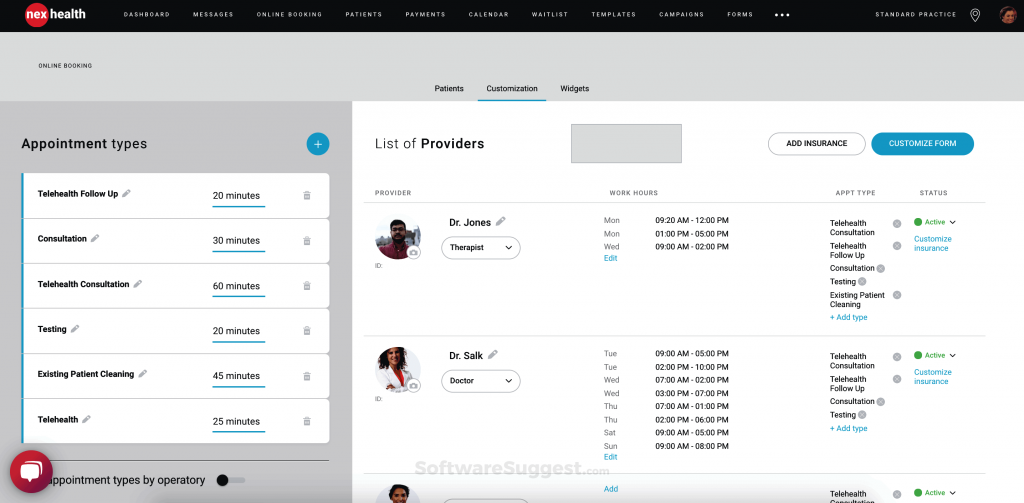
NexHealth is a modern patient communication platform that makes it easy for practices to connect with patients. It’s a popular Spruce Health alternative that combines scheduling, patient reminders, and messaging in one simple place. With real-time EHR sync and a clean interface, it helps busy teams save time and keep everything running smoothly.
NexHealth Features
- Online Scheduling: Let patients book, reschedule, or cancel appointments anytime without calling the office.
- Digital Patient Forms: Collect intake and consent forms electronically before visits, saving front-desk time.
- Automated Reminders: Send text or email reminders automatically to reduce no-shows.
- 2-Way Messaging: Communicate directly with patients over secure, HIPAA-compliant text messaging.
- Analytics Dashboard: Get insights into patient engagement, appointment trends, and revenue performance.
Pros of NexHealth
- User-Friendly Design: The interface feels simple, modern, and intuitive, making it easy for teams to adopt.
- Real-Time EHR Sync: Automatic data updates between systems save time and reduce errors.
- Powerful Automation: Reduces front-desk workload by handling reminders, forms, and follow-ups automatically.
- Enhanced Patient Experience: Patients can book, message, and pay in one smooth flow.
Cons of NexHealth
- Pricing Can Be High: Some users mention higher pricing compared to smaller communication tools.
- Learning Curve for New Users: With so many features, onboarding might take a little time for first-timers.
NexHealth Integrations
NexHealth offers 500+ integrations across different industries such as dental, orthodontics, and medical practices, helping clinics sync data seamlessly across systems.
- Swell
- Dentrix
- Liine
- Curve Dental
- Eaglesoft
- Denticon
- eClinicalWorks
- Open Dental
- Epic
NexHealth Pricing
Nexhealth pricing starts at around $350/month. Custom quotes vary by size and features. There’s no free version available.
NexHealth Ratings
- Capterra: 4.7/5
- G2: 4.6/5
NexHealth Reviews
“They make changes without adequate/any notification. They change workflow and functionality on the fly and expect the office to adapt. They placate, but do not listen to customers. LIMITED support hours. WEST coast centric mentality – east coast starts at 8am, but west coast support starts at 5am so they can fix issues before they impact the day.”
“That it didn’t integrate as nicely with Curve Dental Software. I wanted two custom booking links – one for the general public to schedule specific appointments online, and another for recare patients to schedule recares when prompted by a reminder/notification link. It took a long time to find a way to make this possible, but the end result was not great. Also, it seemed as though staff had a hard time ensuring forms sent to patients were completed prior to the appointment, because there was no obvious indication of form status visible on Curve.”
Source: Capterra
NexHealth Customer Support Channels
- Email support
- Phone support
- Knowledge base
- Dedicated customer success team
3. | Klara vs Spruce Health
Klara Overview
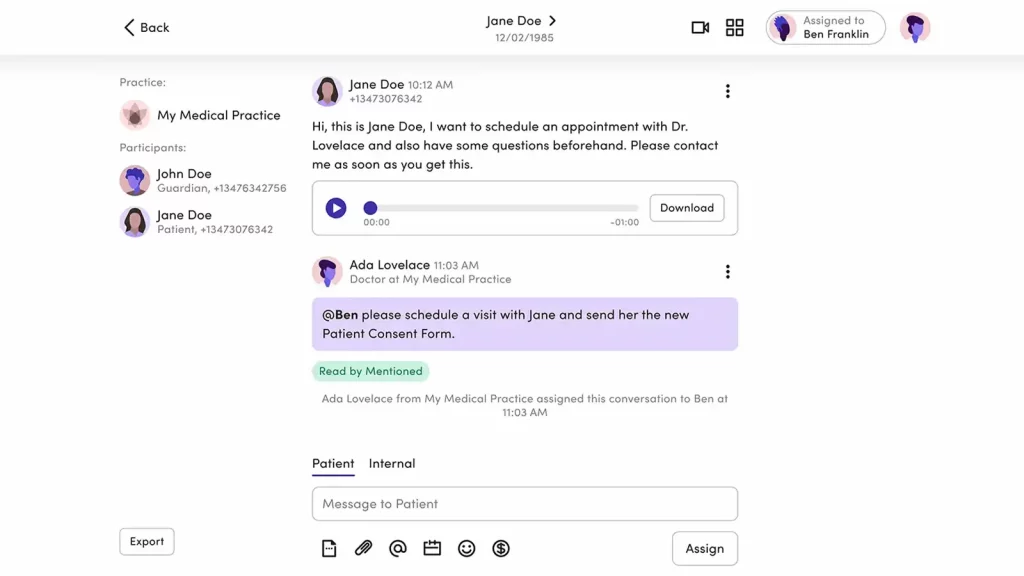
Klara is a simple, HIPAA-compliant communication tool built for healthcare teams. It’s a trusted Spruce Health alternative that keeps all messages, calls, and files in one secure place. With easy reminders, follow-ups, and patient intake, it helps practices cut phone tag and save time every day.
Klara Features
- 2-Way Messaging: Chat securely with patients and staff using HIPAA-compliant text messages.
- Automated Reminders: Reduce no-shows by sending automatic appointment confirmations and reminders.
- Broadcast Messaging: Send group messages for updates, closings, or announcements.
- Patient Intake Forms: Collect information digitally before appointments.
- Analytics Dashboard: Track message volume, response rates, and patient satisfaction.
Pros of Klara
- Clean and Simple Interface: Easy to use for both patients and staff.
- Strong Automation Tools: Automatically handles reminders, follow-ups, and broadcast updates.
- Improves Team Collaboration: Internal messaging makes coordination faster and smoother.
- Patient Convenience: Patients can text or upload documents directly without logging into portals.
Cons of Klara
- Limited Customization: Fewer design and layout options for messages compared to newer platforms.
- No Built-In Calling: Doesn’t include a VoIP system for phone calls, unlike tools like Emitrr or Spruce.
Klara Integrations
Klara integrates with many leading EHR and PMS systems to simplify workflows and ensure seamless communication between providers and patients.
- AthenaHealth
- DrChrono
- AdvancedMD
- Greenway Health
- Nextech
- ModMed
- eClinicalWorks
- Kareo
- Practice Fusion
Klara Pricing
Klara pricing plans start around $300/month.
Klara Ratings
- Capterra: 4.6/5
- G2: 4.4/5
Klara Customer Reviews
“Frequently receive error messages that a response cannot be sent to a number. Not sure if it is specific to a carrier. Also, despite the message, sometimes the families receive the response. Also a little pricey.”
“The video conferencing doesn’t support multiple service recipients (clients) at the same, such as for group sessions.”
Source: Capterra
Klara Support Channels
- Email and phone support
- Help center
- Chat support
- Customer success managers for onboarding
Want to know why businesses may consider alternatives to Klara? Watch our video for the key takeaways:
4. Solutionreach | Solutionreach vs Spruce Health
Solutionreach Overview
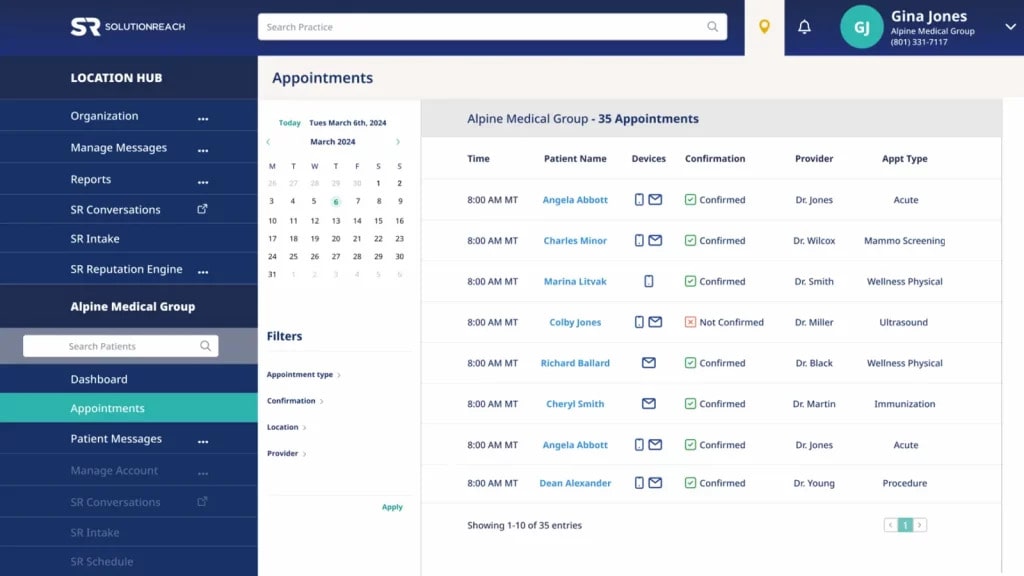
Solutionreach is a trusted patient communication platform and a strong Spruce Health alternative. It helps practices handle reminders, patient satisfaction surveys, scheduling, and outreach from one dashboard. With smart automation and easy engagement tools, it boosts patient satisfaction and keeps your team running efficiently.
Solutionreach Features
- Automated Appointment Reminders: Reduce no-shows with timely reminders sent via text, email, or voice.
- Online Scheduling: Let patients schedule or reschedule visits anytime without calling the front desk.
- Patient Surveys: Collect post-visit feedback easily to improve patient satisfaction.
- 2-Way Texting: Chat directly with patients in real time while keeping everything HIPAA-compliant.
- Recall Campaigns: Automate patient recalls for annual checkups or follow-ups.
Pros of Solutionreach
- Strong Automation Tools: Reduces admin work with smart reminders, recalls, and surveys.
- Excellent Patient Outreach: Helps maintain regular contact through texts, emails, and campaigns.
- Reputation Building: Makes it easy to collect and manage patient reviews.
Cons of Solutionreach
- Complex Interface: Some users feel the dashboard looks dated and takes time to get used to.
- Higher Pricing Tier: Advanced features often come with additional costs, which might be steep for small practices.
Solutionreach Integrations
Solutionreach offers a wide range of integrations across medical and dental practices to keep your workflow connected and efficient.
- Dentrix
- Eaglesoft
- Open Dental
- AdvancedMD
- Allscripts
- Curve Dental
- NextGen
- ModMed
- Kareo
Solutionreach Pricing
Solutionreach pricing starts around $329/month. Costs increase as more features or locations are added.
Solutionreach Ratings
- Capterra: 3.8/5
- G2: 3.7/5
Solutionreach Customer Reviews
“NOT fully compatible with Dentrix,( even though they said they were). Can not use all the features I would like.”
“Can be difficult to maneuver from time to time due to updates/ modifications made to the programing.”
Source: Capterra
Solutionreach Support Channels
- Email support
- Phone support
- Knowledge base
- Live chat for limited hours
5. Podium | Podium vs Spruce Health
Podium Overview
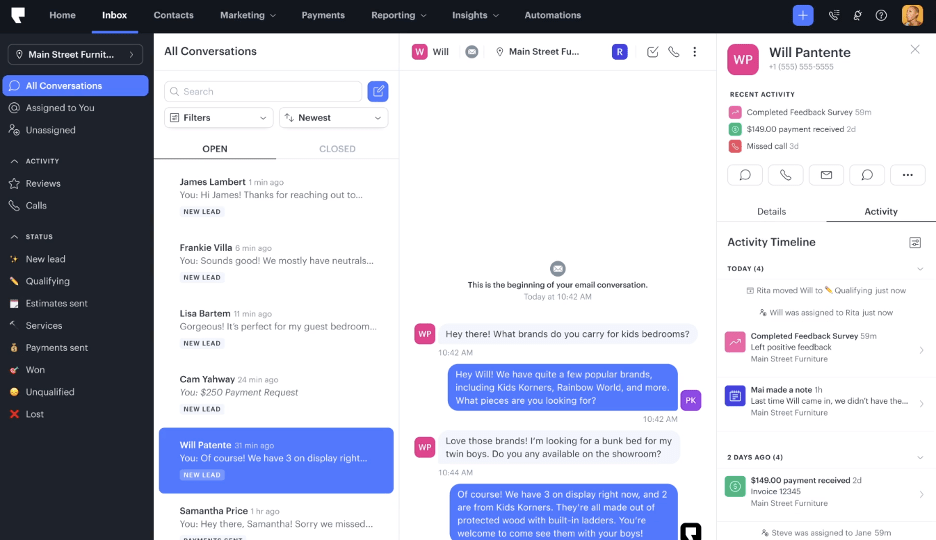
Podium is a communication and reputation platform that helps healthcare practices manage messages, reviews, and payments in one inbox. It’s a top Spruce Health alternative built to boost patient engagement, grow reviews, and strengthen your online presence effortlessly.
Podium Features
- Unified Inbox: Manage texts, Google messages, Facebook messages, and web chats all in one place.
- 2-Way Texting: Send and receive texts with patients directly through your office number.
- Payment Requests: Collect payments easily through text messages for a faster checkout experience.
- Automated Review Requests: Send review invitations automatically after appointments to build your online presence.
- Web Chat: Chat with website visitors in real time and continue the conversation through SMS.
Pros of Podium
- Reputation Powerhouse: Fantastic for growing and managing your Google and Facebook reviews.
- Simple Setup: Easy to install and start using, even for non-technical teams
- Text-Based Payments: Lets patients pay quickly via text, improving the payment experience.
- Centralized Messaging: Combines all incoming messages from multiple channels into one place.
Cons of Podium
- Higher Price Point: Podium is on the expensive side, especially for smaller practices.
- Limited Healthcare-Specific Tools: It’s not designed exclusively for medical offices, so some EHR features may be missing.
Podium Integrations
Podium connects with hundreds of popular business and healthcare platforms to simplify communication, billing, and reputation management.
- Salesforce
- HubSpot
- QuickBooks
- Dentrix
- Zapier
- Shopify
- Google Reviews
- Freshdesk
Podium Pricing
Podium pricing starts at around $399/month. No per-text charges. Flat monthly rates.
Podium Ratings
- Capterra: 4.3/5
- G2: 4.2/5
Podium Customer Reviews
“Continuous IT tickets that had months with inadequate service. The lack of communication when the system was not working properly but yet still taking our payments. I have multiple documents and IT tickets to support our challenges. This year cost with not the ability to get Google reviews made the experience a failure”
“The bulk messages don’t always send to everyone on the contact list.”
Source: Capterra
Podium Support Channels
- Email support
- Live chat
- Help center with guides
- Dedicated success reps for premium users
6. Weave | Weave vs Spruce Health
Weave Overview
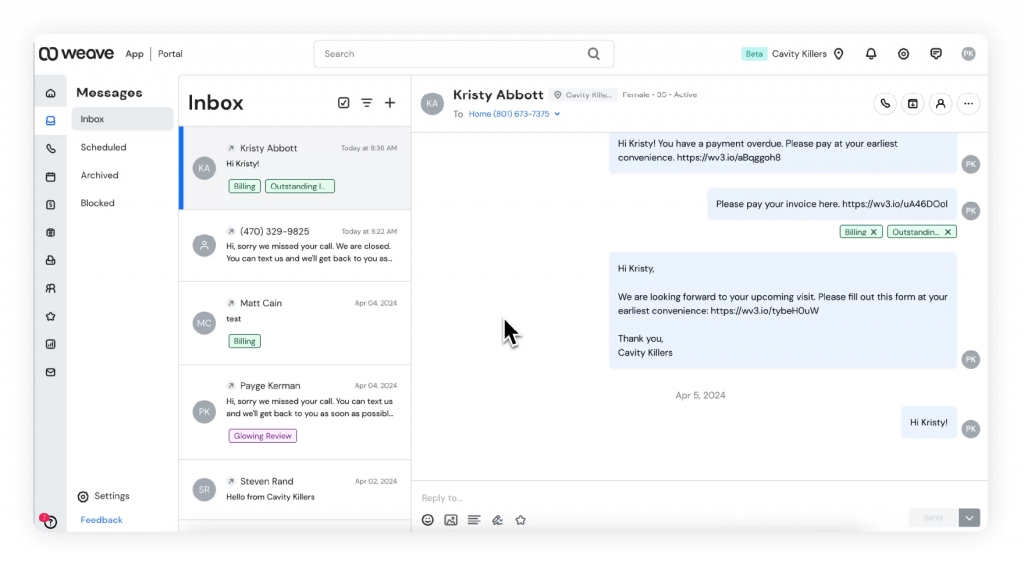
Weave is a unified healthcare communication platform. It combines calls, texts, payments, and reviews in one place, making it easy to manage everything from a single dashboard. With strong automation and engagement tools, it’s perfect for busy clinics that want simple, powerful communication.
Weave Features
- Appointment Management: Schedule, reschedule, and manage appointments with ease.
- Call Pop: Displays patient information when they call, so staff instantly know who’s on the line.
- Review Requests: Automatically send review invitations after visits to boost your online presence.
- Voicemail Transcription: Read voicemails instantly instead of listening to them one by one.
- Automated Reminders: Send confirmations and reminders to reduce no-shows.
Pros of Weave
- All-in-One System: Combines phone, texting, payments, and reviews in one platform.
- Seamless User Experience: Simple to use and intuitive for both staff and patients.
- Great Payment Tools: Text-to-pay makes billing faster and easier.
- Excellent Call Features: Caller ID and call recording make patient communication smoother.
Cons of Weave
- Higher Pricing Plans: Can be expensive for smaller practices compared to standalone tools.
- Occasional Call Drops: Some users report minor call connection issues during high usage.
Weave Integrations
Weave offers 100+ integrations tailored for healthcare and service businesses, connecting your communication, scheduling, and billing workflows seamlessly.
- Dentrix
- Open Dental
- Eaglesoft
- Curve Dental
- QuickBooks
- Salesforce
- Zapier
- Modento
- Nextech
Weave Pricing
Weave’s pricing plans start around $249 per month per location, depending on the plan and number of users. Custom pricing is available for larger practices with multi-location setups.
Weave Ratings
- Capterra: 4.3/5
- G2: 4.3/5
Weave Customer Reviews
“I don’t love that it does not directly attach to the medical record.”
“With Weave, it’s just a nightmare with the customer service and support. And guess what, any settings or setup you want to change, you only have to go through their customer support because whenever you make changes from their web portal, none of it gets actually reflected.”
Source: Capterra
Weave Support Channels
- Email and phone support
- Help center
- Onboarding team for training
7. Luma Health | Luma Health vs Spruce Health
Luma Health Overview
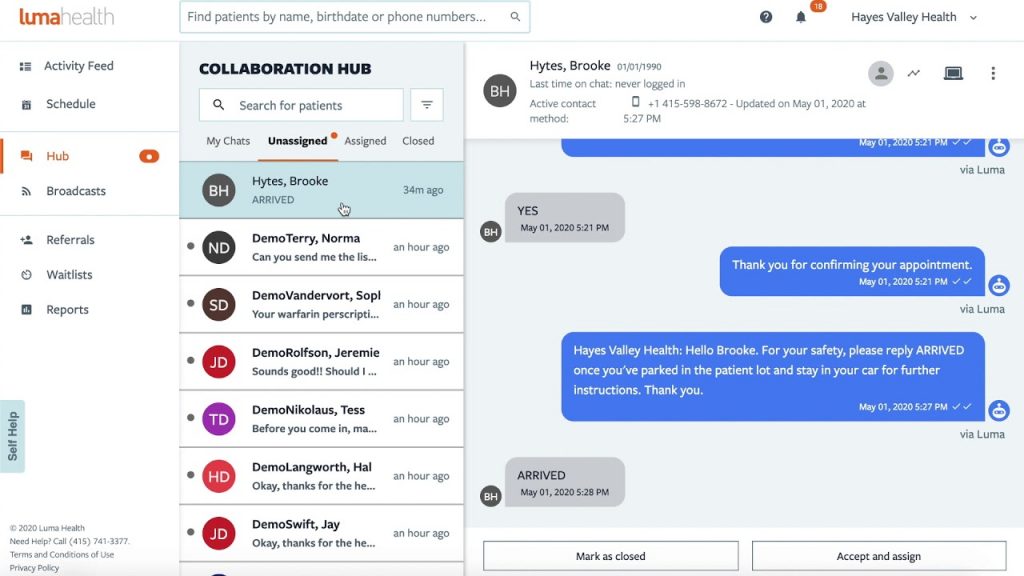
Luma Health is a patient communication platform that brings scheduling, reminders, and messaging into one HIPAA-safe system. It helps patients book faster, stay informed, and show up on time, all while reducing front-desk work for your team.
Luma Health Features
- Smart Scheduling: Patients can self-book, reschedule, or cancel appointments easily.
- Automated Reminders: Reduces no-shows with automatic text and email confirmations.
- Broadcast Messaging: Send bulk messages for important updates or campaigns.
- 2-Way Texting: Have secure conversations with patients in real time.
- Patient Feedback Surveys: Gather post-visit feedback automatically.
- Waitlist Management: Fill last-minute cancellations with patients who are ready to come in.
Pros of Luma Health
- Excellent Automation: Handles scheduling, reminders, and feedback effortlessly.
- Patient-Friendly Interface: Simple and mobile-first experience for patients.
- Increases Appointment Fill Rate: Smart waitlist and reminders help clinics stay booked.
- Strong Reporting Tools: Easy to see where your communication strategy is working best.
Cons of Luma Health
- Setup Takes Time: Initial onboarding and integration setup can take a few weeks.
- Limited Customization: Some users wish for more flexibility in template design and branding.
Luma Health Integrations
Luma Health offers 80+ integrations across healthcare systems to ensure smooth coordination between your EHR, scheduling, and communication tools.
- Epic
- Cerner
- AthenaHealth
- eClinicalWorks
- AdvancedMD
- Allscripts
- DrChrono
- Greenway Health
- ModMed
Luma Health Pricing
Luma Health pricing follows a custom model. It’s basically based on provider count and feature set.
Luma Health Ratings
- Capterra: 4.6/5
- G2: 4.5/5
Luma Health Customer Reviews
“The constant changes of my account representatives really made it difficult to build relationships. Overtime Luma’s account representatives stopped contacting the practice and as result we had to figure out solutions on our own. Additionally, they changed their payment terms to where if we didn’t pay them upfront then they would drop us as a customer.”
“The customer service support was very very slow at answering me back with questions I had about something”
Source: Capterra
Luma Health Support Channels
- Phone
- Onboarding specialists
- Help center
- Dedicated account manager for larger clinics
7. OhMD | OhMD vs Spruce Health
OhMD Overview
OhMD is a HIPAA-compliant platform that makes patient communication easy. With texting, telehealth, and digital forms all in one place, it helps providers manage reminders and messages effortlessly, reducing no-shows.
OhMD Features
- 2-Way Texting: Communicate securely with patients just like regular texting, without needing any extra apps.
- Telehealth Visits: Start video appointments directly from a text message, no downloads required.
- Automated Reminders: Send appointment confirmations and reminders automatically.
- Digital Intake Forms: Collect patient information before visits, saving time at check-in.
- Broadcast Messaging: Notify all patients about office closures, vaccine drives, or other updates in seconds.
Pros of OhMD
- Extremely Easy to Use: The interface feels like texting — simple and intuitive.
- No App Needed for Patients: Patients can reply directly to texts without downloading anything.
- Great for Small Practices: Affordable plans that work perfectly for independent clinics.
- Secure and Compliant: Fully HIPAA-compliant, keeping every message protected.
Cons of OhMD
- Limited Advanced Features: Doesn’t include as many automation tools as larger platforms.
- Basic Reporting: Analytics are simpler compared to enterprise-level systems.
OhMD Integrations
OhMD connects with a variety of healthcare and office systems, ensuring smooth coordination between communication and records.
- AthenaHealth
- DrChrono
- AdvancedMD
- eClinicalWorks
- ModMed
- Elation Health
- Greenway Health
- CareCloud
- Allscripts
OhMD Pricing
OhMD pricing plans start at around $7/month. But pricing may vary based on features and staff size.
OhMD Ratings
- Capterra: 4.7/5
- G2: 4.7/5
OhMD Customer Reviews
“Some users do not like it because it is a separate app. I can’t figure out a way to delete old clients from my records. At times it seems to freeze. I then just sign out and sign back in which fixes it. I was told that I need to upgrade to a newer version, so that may be my problem.”
Source: Capterra
OhMD Support Channels
- Email support
- Live chat
- Knowledge base with guides
- Onboarding and training help
8. TigerConnect | TigerConnect vs Spruce Health
TigerConnect Overview
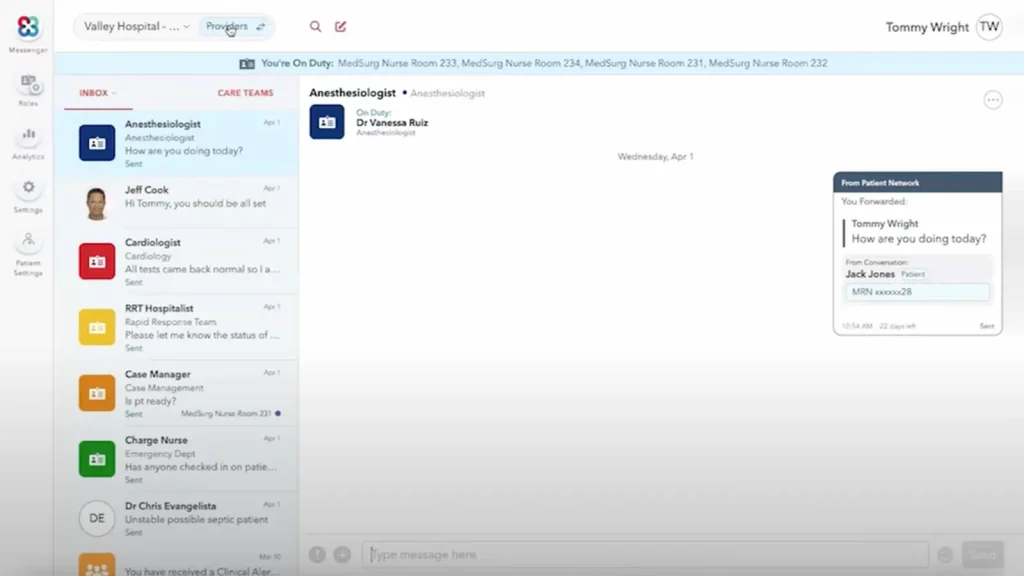
TigerConnect is a secure, HIPAA-compliant communication platform trusted by hospitals and clinics. It brings secure texting, calling, and alerts into one place, helping care teams collaborate in real time. Built for large, multi-department organisations, it’s a solid Spruce Health alternative for fast, reliable coordination.
TigerConnect Features
- Secure Messaging: Send and receive encrypted messages, photos, and files instantly.
- Voice and Video Calling: Communicate with colleagues and patients using integrated VoIP and video tools.
- Team Collaboration: Create group chats for care teams or departments to coordinate seamlessly.
- Automated Alerts: Send critical alerts or updates to specific staff members instantly.
- Shift-Based Messaging: Automatically route messages to the right on-call provider.
Pros of TigerConnect
- Built for Healthcare Teams: Designed for hospitals and clinics, not just general business use.
- Extremely Secure: Fully HIPAA-compliant with strong encryption and access control.
- Scalable and Reliable: Handles large volumes of users without lag.
- Improves Coordination: Keeps doctors, nurses, and staff on the same page.
Cons of TigerConnect
- Enterprise-Focused Pricing: Can be costly for smaller practices.
- Learning Curve: May take some time for staff to fully explore advanced features.
TigerConnect Integrations
TigerConnect offers powerful integrations across healthcare systems, ensuring your communication aligns perfectly with clinical workflows.
- Epic
- Cerner
- AthenaHealth
- Meditech
- Allscripts
- Salesforce Health Cloud
- Kronos
- Oracle Cerner
- PagerDuty
TigerConnect Pricing
TigerConnect pricing offers custom enterprise pricing depending on organisation size, feature set, and integration requirements.
TigerConnect Ratings
- Capterra: 4.6/5
- G2: 4.5/5
TigerConnect Reviews
“Trying to get out of a TigerConnect contract is almost impossible. I officially canceled my services with them under their required conditions and they still charge me an annual fee. Theres a big reason why all of their “customer service numbers” are designed to not allow you to speak live to a customer rep.”
“Impossible to be removed from system lists, which are occasionally accidentally used to send a message to the incorrect person. Sometimes notification bubbles cannot be removed and the app must either be uninstalled or the user must sign out.”
Source: Capterra
TigerConnect Customer Support Channels
- Live Chat
- Phone
- Resource Center
9. Mend | Mend vs Spruce Health

Mend Overview
Mend is a HIPAA-compliant telehealth platform that makes virtual and in-office communication simple. It combines video visits, texting, scheduling, and forms in one secure place, helping practices connect with patients easily and efficiently.
Mend Features
- Telehealth Video Visits: Host secure, high-quality virtual consultations with patients.
- 2-Way Messaging: Send and receive messages with patients or team members instantly.
- Digital Patient Intake Forms: Collect patient details electronically before appointments.
- Automated Reminders: Reduce no-shows with text and email appointment reminders.
- Patient Self-Scheduling: Let patients book and reschedule visits online anytime.
- Broadcast Messaging: Send important updates or alerts to your patient base.
Pros of Mend
- Strong Telehealth Capabilities: Provides reliable, HD-quality video visits for patients.
- User-Friendly Design: Simple for both patients and staff to navigate.
- Reduces No-Shows: Automated reminders and confirmations help keep schedules full.
- Secure and Compliant: Fully HIPAA-compliant with encrypted video and messaging.
Cons of Mend
- Limited Custom Branding: Fewer options to customise the patient experience visually.
- Occasional Video Lag: Some users note minor delays depending on internet speed.
Mend Integrations
Mend connects with a wide range of EHRs, CRMs, and scheduling tools to make communication seamless and keep patient data synced automatically.
- Epic
- Cerner
- AthenaHealth
- DrChrono
- eClinicalWorks
- Allscripts
- Practice Fusion
- Kareo
- Greenway Health
Mend Pricing
Mend offers custom pricing with flexible plans suited for both small practices and larger healthcare groups.
Mend Ratings
- Capterra: 4.6/5
- G2: 4.5/5
Mend Reviews
“The lag in audio n video feed was slightly off”
“Getting clocked out of of registering and needing chat assistance”
Source: Capterra
Mend Customer Support Channels
- Live Chat
- Phone
- Knowledge Base
Why Practices Wanting VoIP Alongside HIPAA Texting Often Land on Emitrr
Emitrr is built for teams that are juggling calls, texts, and a busy day all at once. Everything you need to reach out, follow up, or respond to patients’ lives in one place. It’s fast, easy to learn, and honestly feels like a tool made for how clinics actually work.
Centralized Dashboard
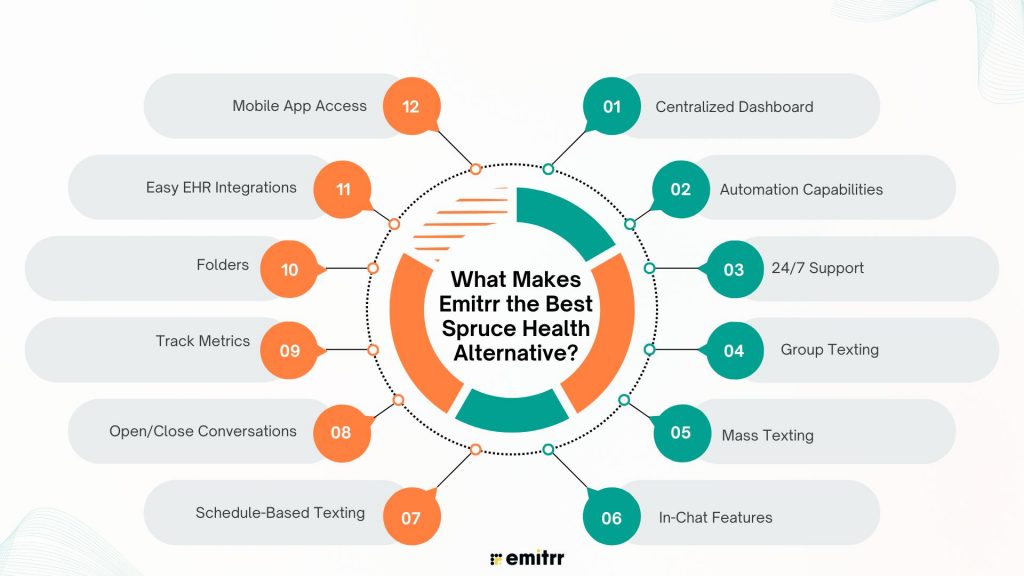
Think of Emitrr’s dashboard as your control center. You can handle texts, calls, reviews, voicemails, and reminders without hopping between screens. Everything you need is right there in front of you. The layout is simple enough that even the least tech-savvy person on your team will get the hang of it fast. Following up with patients or customers feels like a breeze instead of a chore.
How to Manage Customer Conversations in a Single Inbox In Emitrr? Step-by-Step Guide –
Automation Capabilities
Emitrr takes care of the little things that eat up your time. It automatically sends reminders, review requests, and follow-ups so you don’t have to remember every detail. You can even set it to trigger certain messages when specific actions happen. It’s like having an extra team member who never forgets a task and doesn’t need coffee breaks!
24/7 Support
We’ve all been there, something stops working and you can’t get hold of support. That’s not the case with Emitrr. Their team is available around the clock, and you’re talking to real people who actually care about helping you. Whether you reach out by chat, email, or phone, someone gets back to you quickly. It’s refreshing to use software where you never feel left hanging.
Group Texting
Sometimes, you just need to reach a bunch of people at once. With Emitrr, you can text an entire team or group of patients in one go, and the conversation still feels personal. No messy reply-all chaos, just smooth, organized chatting. It’s a simple way to keep everyone on the same page without extra effort.
Mass Texting
Need to let your whole patient list know you’re closed for a holiday or running a flu-shot clinic? Emitrr makes it easy. You can send one message to hundreds of people in seconds. It’s perfect for quick announcements or reminders, and it still sounds friendly and human. No more copying and pasting the same message all day.
In-Chat Features
Emitrr’s chat is more than just texting – it’s interactive. You can share links, send payment requests, ask for reviews, or collect patient feedback right inside the chat window. Everything happens in one thread, so it’s easy to follow. It’s basically texting, but smarter and made for business.
Schedule-Based Texting
Let’s face it, remembering to send follow-ups or reminders isn’t easy when your day’s packed. With Emitrr, you can schedule texts ahead of time, and the system sends them for you. Appointment reminders, birthday wishes, or post-visit messages go out like clockwork. Once you set it up, you can focus on everything else without worrying something slipped through the cracks.
Open/Close Conversations
If your inbox ever feels like a cluttered mess, this feature’s a game-changer. Emitrr lets you close a conversation once it’s handled, so you’re only looking at messages that still need attention. It keeps your workflow clean and your team organized. No more guessing what’s done and what’s not.
Track Metrics
Emitrr gives you a clear picture of how your team’s doing. You can see how fast replies are going out, how many texts you’re sending, and how patients are engaging. The reports are simple to understand, no confusing charts or jargon. It’s just useful data that helps you see where things are running smoothly and where you can improve.
Folders
If your team handles lots of different messages, folders will become your best friend. You can organize chats by department, location, or topic, so everything’s easy to find. No endless scrolling or digging for old conversations. It keeps your inbox tidy and helps everyone stay on track.
Easy EHR Integrations
Emitrr fits right into the tools you’re already using. It syncs seamlessly with your EHRs and CRMs, which means no more double data entry or lost notes. Once it’s connected, information flows automatically between systems. It’s one of those behind-the-scenes things that saves hours every week without you even noticing.
Mobile App Access
If your team’s always on the move, the mobile app is a lifesaver. You can call, text, and manage everything from your phone without missing a beat. It syncs perfectly with the desktop version, so you can pick up right where you left off. Whether you’re between appointments or out of the office, you’ll still stay connected.
Which Industries Are Catered By Emitrr?
Emitrr’s flexible setup works beautifully across all kinds of businesses where communication matters. Whether you’re talking to patients, clients, or customers, Emitrr helps you stay connected, save time, and deliver a smoother experience for everyone.
Healthcare
Emitrr makes patient communication simple and stress-free. Doctors and staff can send appointment reminders, follow up after visits, and even request reviews, all from one place. It’s fully HIPAA-compliant, so every message stays secure. Fewer missed appointments, faster replies, and happier patients, that’s what Emitrr brings to every practice.
Legal Services
For law firms, clear communication is everything. Emitrr helps attorneys and paralegals confirm appointments, share documents safely, and keep clients updated on cases without endless calls. It also adds a personal touch, quick texts to check in or remind clients about deadlines go a long way in building trust. The result is smoother workflows and less time spent chasing updates.
Retail
Emitrr gives retail businesses a direct, friendly way to reach customers. You can send order updates, sale alerts, or quick thank-you messages right to their phones. It helps you stay top of mind and encourages repeat visits without relying on email campaigns. Customers appreciate the instant updates, and that means better relationships and stronger loyalty.
Real Estate
In real estate, timing is everything, and Emitrr helps agents stay one step ahead. You can manage lead generation, confirm showings, and send quick updates after property tours in just a few clicks. It’s also great for coordinating between buyers, sellers, and team members. No missed calls, no lost leads, just smooth, ongoing communication that builds confidence with clients.
Education
Schools, colleges, and tutoring centers love how easy Emitrr makes parent and student communication. From class reminders and event updates to fee notifications, everything gets delivered instantly. It cuts down on back-and-forth calls and ensures no one misses important information. Teachers and administrators save hours every week, and parents stay in the loop without any fuss.
Automotive
Emitrr helps auto shops and dealerships stay connected long after the first visit. You can confirm appointments, send service reminders, or request feedback with just a few taps. A quick text about an oil change or inspection keeps customers coming back. It’s simple, professional, and helps turn one-time visitors into loyal clients.
Wellness
Spas, salons, and fitness studios run more smoothly with Emitrr. You can send booking confirmations, reminders, and even quick promotions for upcoming offers. Review requests go out automatically, helping you grow word of mouth effortlessly. It keeps your calendar full, reduces no-shows, and lets you focus more on your clients than your phone.
Home Services
If you’re in plumbing, electrical work, pest control, or cleaning, Emitrr makes scheduling and communication a breeze. You can send job updates, arrival alerts, or reminders with one click. Automated texts reduce cancellations, and two-way messaging keeps everyone on the same page. It’s the easiest way to stay organized while getting more work done.
Insurance
Emitrr helps insurance agents manage clients with clarity and care. You can send policy updates, renewal reminders, or claim follow-ups securely. It saves hours of back-and-forth and keeps every client feeling informed and supported. With secure messaging and quick replies, you build stronger, long-term relationships with policyholders.
Hospitality
For hotels, resorts, and travel services, Emitrr takes guest communication to the next level. You can confirm bookings, answer questions, and collect feedback, all through text. Guests feel cared for, and staff spend less time replying to endless emails. From check-in to checkout, it makes every interaction smoother and more personal.
Financial Services
Banks, advisors, and lending companies use Emitrr to keep financial conversations clear and compliant. You can confirm appointments, send payment reminders, and share updates securely in seconds. It removes the formality of long email chains and replaces them with quick, clear communication that clients appreciate. It’s professional, personal, and built for trust.
Frequently Asked Questions
Spruce Health is a communication platform for healthcare teams. It lets clinics call, text, and host telehealth visits, all from one shared inbox. It helps practices stay connected with patients while keeping everything HIPAA-compliant.
Many practices switch because they want better support, simpler workflows, or more integrations with their existing tools. Some find Spruce limited in automation and reporting, so they look for a platform that’s faster, easier, and more flexible.
Absolutely! Emitrr is simpler to use, has powerful automation, real-time analytics, and 24/7 human support. Practices love how it saves time and makes communication genuinely easier.
Yes, most leading alternatives including Emitrr, integrate smoothly with popular EHR and CRM systems. This means your patient data stays synced automatically without any double entry.
Yes, the best ones are! Emitrr, for instance, is fully HIPAA-compliant, encrypting all data and messages to protect patient privacy at every step.
Conclusion
At the end of the day, the right communication platform should make your life easier, not add more work to your day. Emitrr does exactly that. It keeps everything in one place, automates the busywork, and helps your team deliver faster, friendlier service every time.
If you’re ready to simplify communication and give your patients a better experience, book a demo with Emitrr today and see how it fits your practice!


 4.9 (400+
reviews)
4.9 (400+
reviews)