
Introduction
Luma Health alternatives come up when a practice asks for pricing and gets a custom quote with no number attached. Luma Health doesn’t publish pricing publicly, which makes it hard to compare value before you’re already in a sales conversation. The platform is strong on scheduling and patient flow, for multi-location practices in particular, but smaller groups often find the implementation timeline and opaque pricing structure harder to justify. If you want to see what you’d pay before talking to anyone, and get patient texting plus reminders plus a phone system in one place, these are the tools worth putting on your shortlist.
AI Summary
- Luma Health does not publish pricing; you need a sales call before you can compare it to anything.
- This blog covers alternatives that list their pricing publicly so you can evaluate without a demo first.
- Compares scheduling and patient flow features for both multi-location groups and smaller practices.
- Rates each alternative on texting, reminders, and how transparent they are on monthly cost.
- Emitrr is highlighted for practices that want published pricing, 500+ EHR integrations, and texting in one platform.
Why Practices Get Frustrated Trying to Price Out Luma Health
Here are some of the most common reasons healthcare providers seek alternatives to Luma Health:
- They want clearer pricing: Many users say Luma Health’s pricing isn’t always easy to figure out. You often need to request a custom quote, which can make comparing plans tricky. Practices prefer tools that show costs upfront. No surprises later.
- They need faster customer support: Some clinics mention waiting too long for responses, especially during busy hours. When you’re managing patients all day, even small delays can throw off your schedule.
- They face integration hiccups: While Luma connects with many EHRs, a few users report syncing issues or missing updates. For teams that rely on data accuracy, this can be frustrating and time-consuming to fix.
- They want more flexible automation: Clinics love automation, but many say Luma’s workflows could be more customizable. Some tools offer advanced features like an AI-powered receptionist that gives teams better control.
- They find setup overwhelming: A few users feel the onboarding process takes longer than expected. Smaller clinics, in particular, want something that’s quick to set up and doesn’t require extra training.
- They look for better value overall: Some practices feel they’re paying premium prices but not using all the features. They’re now shifting to platforms that offer more tools at the same or lower cost, especially those with built-in AI and marketing options.
What Transparent Patient Engagement Pricing Should Include
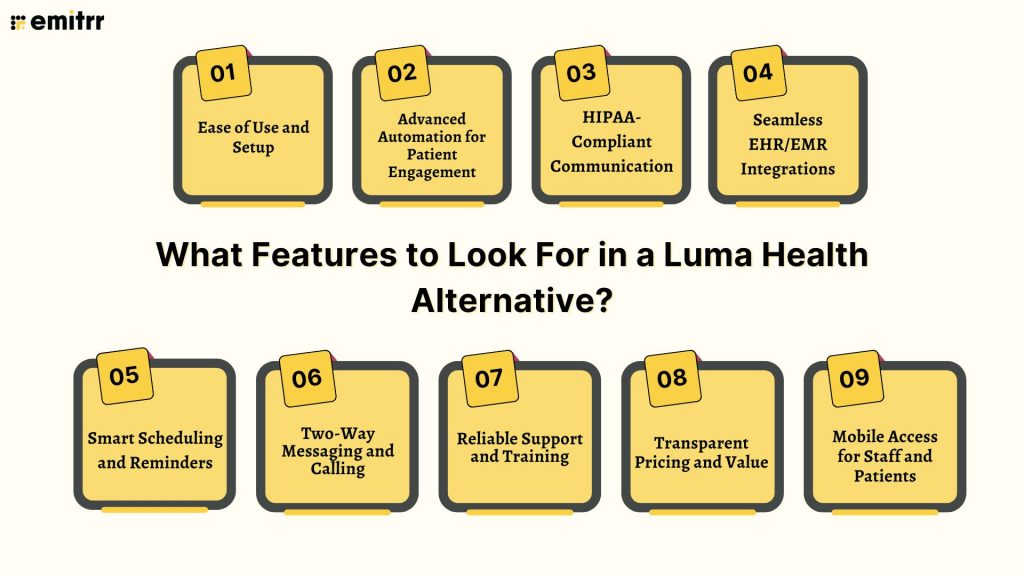
You can’t just pick the first new communication tool for your clinic that pops up! When you seek an alternative, you should go for something that actually makes life easier for your staff and patients. These are some things you should pay attention to:
Ease of Use and Setup
No one has time to spend weeks learning new software. The best alternative should be something your team can start using right away. Ideally, the same day it’s installed. It should feel intuitive, with everything right where you expect it to be. Simple drag-and-drop tools, guided onboarding, and clear instructions make all the difference. If your front desk can figure it out without calling support every hour, that’s a win.
Advanced Automation for Patient Engagement
Automation should do more than just send reminders. Look for a tool that helps you follow up with patients, send recalls, and even re-engage inactive ones automatically. Smart systems today can detect patterns, like who hasn’t booked in a while, and send personalized text messages to bring them back. That’s how you save time and fill your schedule.
HIPAA-Compliant Communication
Patient privacy isn’t optional. It’s absolutely essential! Make sure the platform you choose follows all HIPAA rules and keeps your messages encrypted. That means any data shared, whether it’s a text, photo, or form, stays secure. A compliant system protects both your patients and your reputation. You should never have to worry about data leaks or security breaches.
Seamless EHR/EMR Integrations
Your communication tool should work hand in hand with your EHR or EMR, not against it. Look for something that syncs appointments, reminders, and patient data automatically. That way, you don’t have to enter the same information twice. It also reduces errors. No mismatched names or missed updates. Integration isn’t just a nice feature anymore. It’s a must-have for smooth operations.
Smart Scheduling and Reminders
Reminders should feel personal, not robotic. The best tools let you send customized appointment messages by text, email, or even voice. They should also let patients reschedule or confirm in just a few clicks, no phone tag required. Bonus points if it supports waitlist management, so you can fill cancellations quickly. That’s how you keep your calendar full and your staff stress-free.
Two-Way Messaging and Calling
Communication shouldn’t be one-sided. Choose a tool that lets your team and patients message back and forth easily, like a normal conversation. Two-way texting helps with quick clarifications, confirmations, or updates. If it includes calling features too, even better, you can manage everything from one dashboard. It makes the experience feel more human and personal.
Reliable Support and Training
Even the best tools can have hiccups, so good support is non-negotiable. You want a company that actually picks up the phone or replies fast when you need help. Look for providers that offer onboarding sessions, training videos, and 24/7 assistance. The goal is to have your team feel confident, not confused, while using the system.
Transparent Pricing and Value
Pricing shouldn’t be a mystery. Go for a platform that clearly shows what’s included in each plan and what costs extra. Nobody likes hidden fees or surprise charges. A good tool gives you fair value for money, all the core features you need without forcing you to upgrade just to get the basics. Transparency builds trust, and that’s exactly what you should expect.
Mobile Access for Staff and Patients
Your team isn’t always at their desk, and your patients definitely aren’t. A good patient communication software should work just as well on mobile as it does on desktop. That means staff can reply to patients, view schedules, or check messages while on the move. Patients should also be able to confirm or reschedule appointments straight from their phones. That kind of flexibility keeps everyone connected, wherever they are.
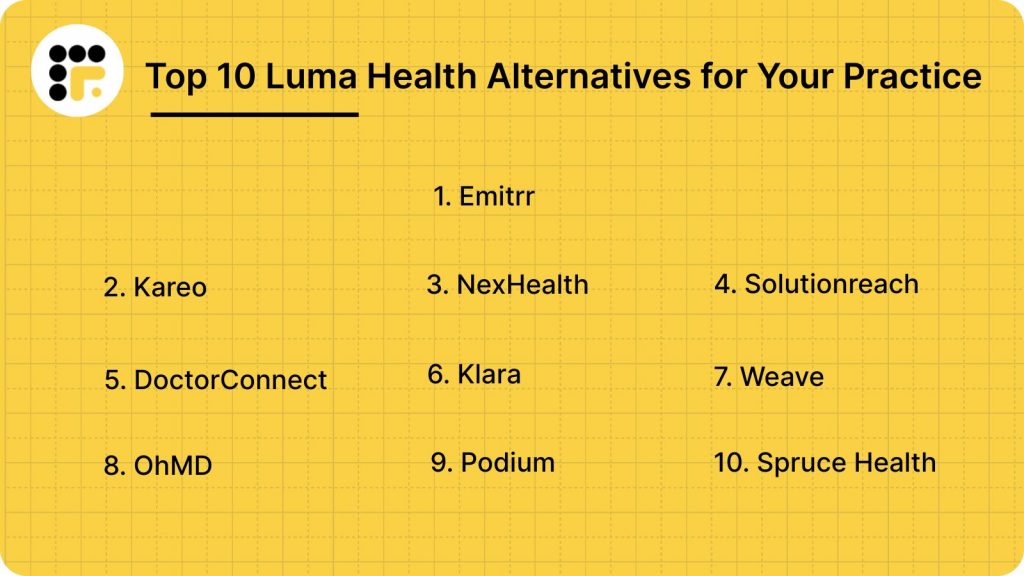
10 Best Luma Health Alternatives
Here are 10 powerful alternatives that make patient engagement smoother, faster, and easier, helping you connect better with patients while saving time.
Let’s dig deeper into each alternative to find the best match for your practice.
1. Emitrr | Best Luma Health Alternative
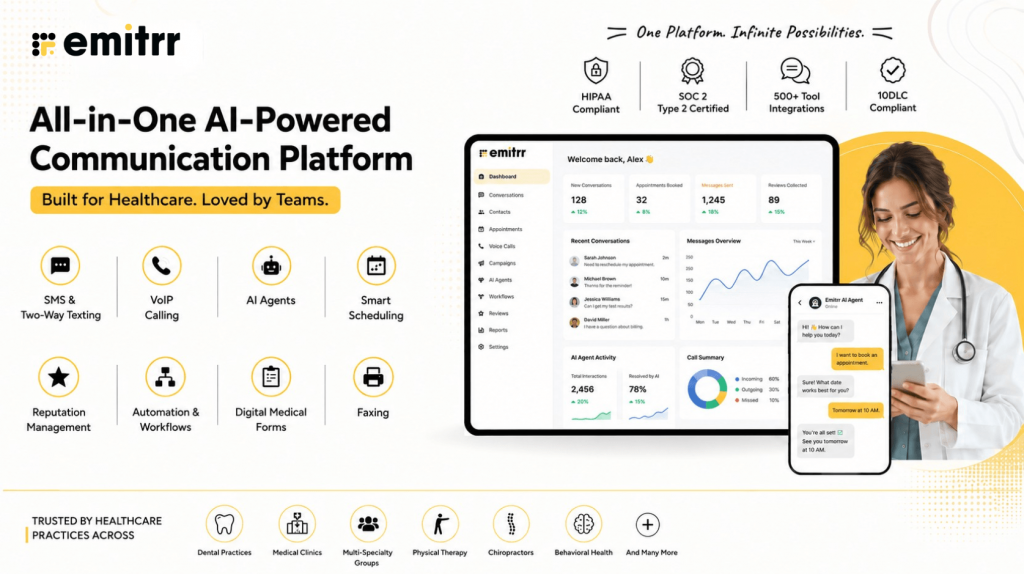
Emitrr Overview
Emitrr is an all-in-one communication platform designed for healthcare practices that want to save time and connect better with patients. It combines texting, calling, scheduling, automation, and review management into one simple dashboard. Whether it’s appointment reminders or patient follow-ups, Emitrr handles it all, so your team can focus on care instead of chasing tasks.
Emitrr Key Features
- Two-Way Texting: Chat with patients directly without switching between apps, making communication fast, easy, and personal.
- Smart Automation: Automatically sends reminders, recalls, and follow-ups so your front desk doesn’t have to.
- Group and Bulk Messaging: Reach multiple patients at once with updates, alerts, or promotional messages in seconds.
- AI-Powered Voicemail: Responds instantly to missed calls, ensuring no potential lead or patient query goes unanswered.
- Online Scheduling: Lets patients book, confirm, or reschedule appointments whenever it’s convenient for them.
- HIPAA-Compliant Messaging: Keeps every message and shared file secure with full healthcare-grade encryption.
- Feedback and Review Management: Collects reviews automatically after appointments to help boost your online presence.
- Unified Inbox: Brings calls, texts, and voicemails into one view, so your team never loses track of a conversation.
- Custom Templates: Create and reuse message templates to keep communication consistent and professional.
- Mobile Access: Manage patient messages and calls anytime, anywhere, with the easy-to-use mobile app.
Emitrr Pros
- Easy to Use: The dashboard is clean, intuitive, and simple enough for anyone to learn within minutes.
- All-in-One Platform: Handles texting, calling, reminders, and scheduling without needing multiple tools.
- Fast Automation: Automates everyday workflows, saving hours for front-desk staff every single week.
- Reliable Support: Offers 24/7 live chat and onboarding assistance to help your team whenever needed.
- Seamless Integrations: Works effortlessly with top EHR and CRM platforms to keep your operations running smoothly.
Emitrr Cons
There are a few additional features which are still in development.
Emitrr Integrations
- EHR/EMR Systems: Integrates with major platforms like Epic, Athenahealth, Dentrix, and DrChrono to keep patient data synced.
- CRM Platforms: Connects with HubSpot, Salesforce, and Zoho, helping you manage leads and patient relationships better.
- Calendar Tools: Syncs smoothly with Google Calendar and Outlook to avoid double-bookings or missed slots.
- Marketing and Review Apps: Works with Google Reviews and Facebook to collect and track patient feedback automatically.
Emitrr Pricing
Starts at $30 per month.
Emitrr Ratings
- Capterra: 4.9/5
- G2: 4.7/5
Emitrr Customer Reviews
“Exceptional! Friendly! The team at Emitrr handles your need promptly.”
“AWESOME. I would recommend to anyone looking for a messaging platform. Especially love having a text friendly retail number that is the SAME as the number we’ve always had.“
Source: Capterra
Emitrr Support Channels
- Email: support@emitrr.com
- Phone: +1 (210) 941-4696
- Live chat: Available directly on the Emitrr website
- Knowledge base: Includes extensive documentation, FAQs, and troubleshooting guides
- SMS support: Text for help
Curious how AI is reshaping the way healthcare teams work every day? Watch this quick video to see it in action.
2. Kareo | Kareo vs Luma Health
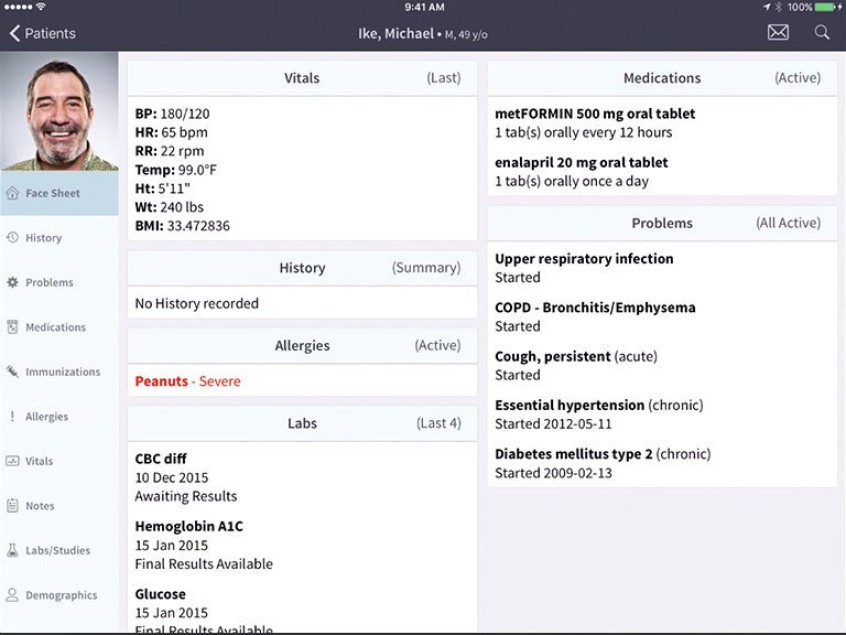
Kareo Overview
Kareo is a practice management and communication platform built for medical practices that want to simplify billing, scheduling, and patient engagement. It combines EHR tools, messaging, and telehealth features into one easy-to-use dashboard. Many clinics use it to streamline administrative work and focus more on patient care.
Kareo Key Features
- Integrated EHR and Billing: Keeps medical records and billing workflows connected in one system.
- Telehealth Appointments: Lets providers host secure telehealth consultations directly through the platform.
- Patient Messaging: Enables two-way texting for reminders, updates, and confirmations.
- Appointment Scheduling: Offers an intuitive calendar view to manage bookings and cancellations.
- Claims Management: Tracks insurance claims and reduces billing errors with built-in alerts.
Kareo Pros
- All-in-One Platform: Combines EHR, billing, and communication tools under one login.
- Strong Telehealth Capabilities: Makes remote consultations quick and secure.
- Easy Billing Management: Automates claims tracking and helps reduce payment delays.
- User-Friendly Interface: Clear layout that makes training and onboarding simple.
Kareo Cons
- Learning Curve for EHR Tools: Some users find advanced features take time to master.
- Occasional Lag: Reports of system slowdowns during high-traffic hours.
- Pricing Transparency: Costs for advanced modules aren’t always listed upfront.
- Limited Design Flexibility: Some customization options for reports and workflows are restricted.
Kareo Integrations
- EHR Systems: Fully integrated within Kareo’s own suite.
- Payment Gateways: Connects with tools for insurance and online payments.
- Accounting Software: Syncs with QuickBooks for financial management.
- Third-Party Apps: Works with select CRMs and telehealth tools.
Kareo Pricing
Custom pricing is available on request. Plans vary by clinic size and features.
Kareo Ratings
- Capterra: 4.1/5
- G2: 4.2/5
Kareo Reviews
Not enough reviews are available on popular websites.
Kareo Customer Support Channels
- Phone
- Live chat
- Online help center
- Training resources
3. NexHealth | NexHealth vs Luma Health
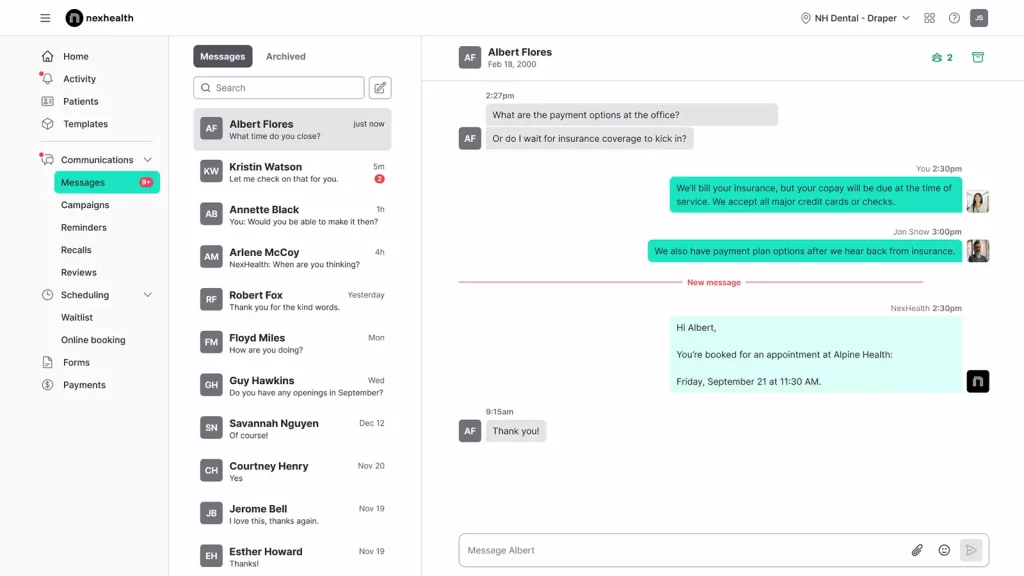
NexHealth Overview
NexHealth is a patient experience and communication platform known for its seamless EHR integration and easy scheduling. It helps clinics automate reminders, manage online bookings, and improve patient interactions with a sleek, modern interface. It’s especially popular among dental and medical practices that value real-time syncing with their EHR systems.
NexHealth Key Features
- Online Scheduling: Patients can book, cancel, or reschedule appointments anytime.
- EHR Integration: Syncs automatically with systems like Dentrix, Epic, and Open Dental.
- Automated Reminders: Reduces no-shows by sending texts or emails before appointments.
- Two-Way Messaging: Lets staff and patients chat directly from one unified inbox.
NexHealth Pros
- Strong EHR Sync: Updates patient data instantly without manual entry.
- Modern, User-Friendly Design: The clean interface makes navigation easy.
- Advanced Automation: Simplifies workflows for reminders and follow-ups.
- Multi-Channel Communication: Offers both email and text messaging for convenience.
NexHealth Cons
- Higher Pricing Tier: May be expensive for small clinics or solo practitioners.
- Limited Branding Options: Customization is slightly restricted in message templates.
- Occasional Form Glitches: Some users report minor syncing delays for digital forms.
- Support Response Time: Customer support can be slow during peak hours.
NexHealth Integrations
- EHR Systems: Works with Dentrix, Epic, Open Dental, Curve Dental, and Eaglesoft.
- Payment Tools: Integrates with Stripe and other processors for smooth billing.
- Calendar Apps: Syncs with Google Calendar and Outlook.
- CRM Platforms: Works with HubSpot and Salesforce for lead tracking.
NexHealth Pricing
NexHealth pricing plans start at around $350/month. There’s no free version available.
NexHealth Ratings
- Capterra: 4.7/5
- G2: 4.6/5
NexHealth Customer Reviews
“Online booking times do not reflect our actual schedule closely enough.”
“Sometimes patients tell us that they recieved a notice with the wrong time, also patients that have cancelled for the day and have beeen removed from the schedule still get an appointment reminder for the day.”
Source: Capterra
NexHealth Support Channels
- Email support
- Phone support
- Knowledge base
- Dedicated customer success team
4. Solutionreach | Solutionreach vs Luma Health
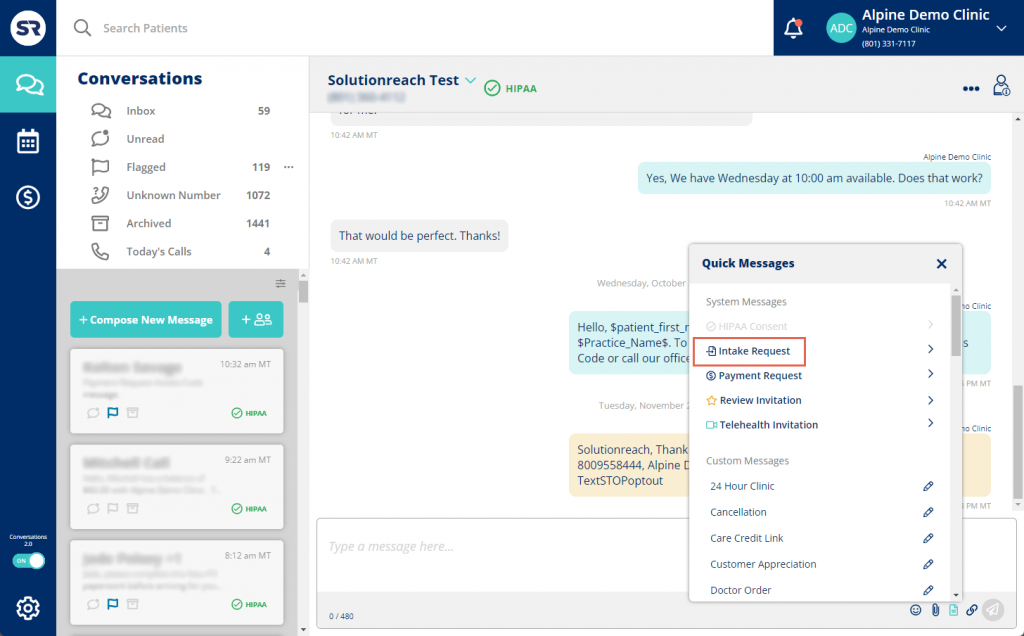
Solutionreach Overview
Solutionreach is a patient communication and engagement platform that focuses on keeping patients connected before, during, and after their visits. It’s known for its powerful automation features that help clinics reduce no-shows and increase satisfaction. From reminders and surveys to newsletters and marketing tools, Solutionreach helps practices stay top of mind with their patients.
Solutionreach Key Features
- Automated Reminders: Sends appointment reminders via text, email, or voice automatically.
- Two-Way Texting: Enables quick, HIPAA-compliant conversations between staff and patients.
- Patient Surveys: Collects feedback post-visit to improve care quality.
- Marketing Campaigns: Sends newsletters or promotions to keep patients engaged.
- Recall Management: Automatically reminds inactive patients to book follow-up visits.
Solutionreach Pros
- Robust Automation: Handles most patient communication without manual work.
- All-in-One Platform: Combines marketing, scheduling, and feedback tools in one dashboard.
- Improves Retention: Keeps patients engaged through recalls and reminders.
- Customizable Messaging: Personalizes texts and emails for a human touch.
Solutionreach Cons
- Steeper Learning Curve: The platform can feel complex for new users at first.
- Pricing on the Higher Side: May not fit smaller practices with limited budgets.
- Occasional Sync Delays: Some users report minor lags in message delivery.
- Outdated Interface: A few users mention the design feels less modern compared to newer tools.
Solutionreach Integrations
- EHR Systems: Integrates with Athenahealth, Dentrix, Eaglesoft, and Open Dental.
- Email and Marketing Tools: Works with Mailchimp and HubSpot.
- Payment Platforms: Syncs with billing software for easier invoicing.
- CRM Software: Connects with Salesforce for advanced data management.
Solutionreach Pricing
Solutionreach pricing starts around $329/month. Costs increase as more features or locations are added.
Solutionreach Ratings
- Capterra: 3.8/5
- G2: 3.7/5
Solutionreach Customer Reviews
“They lock you into an auto renewing contract then when you try to get out of it they drag their feet and continue to bill you for months after you disconnect them. Then they chaise you for the money because they did not stop their servers from sending messages when you disconnected their service.”
“NOT fully compatible with Dentrix,( even though they said they were). Can not use all the features I would like.”
Source: Capterra
Solutionreach Support Channels
- Email support
- Phone support
- Knowledge base
- Live chat for limited hours
5. DoctorConnect | DoctorConnect vs Luma Health
DoctorConnect Overview
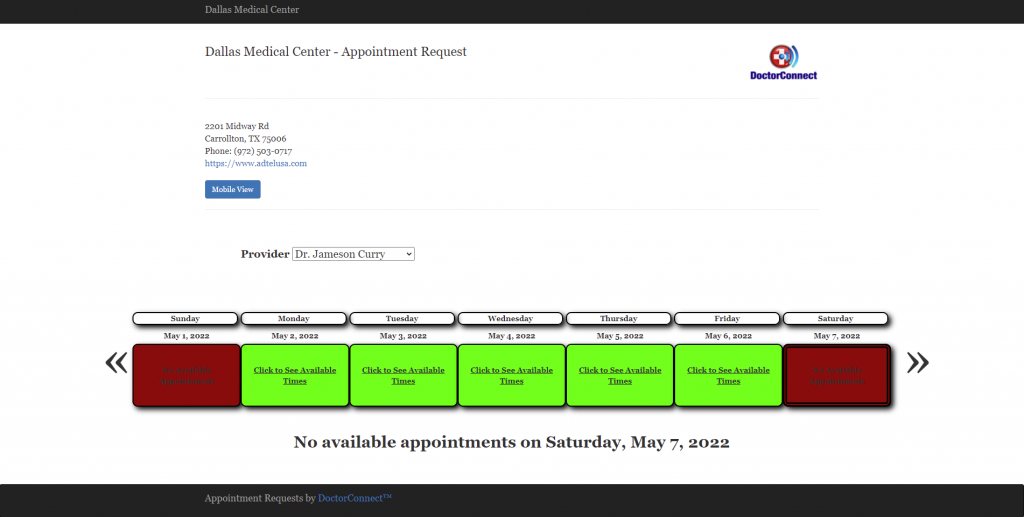
DoctorConnect is a patient relationship and reminder platform designed for busy healthcare practices. It automates communication tasks like appointment reminders, follow-ups, and patient satisfaction surveys. Known for its simplicity, it’s especially popular among small to mid-sized clinics that want powerful automation without complicated setups.
DoctorConnect Key Features
- Appointment Reminders: Sends automatic texts, emails, or calls to reduce no-shows.
- Online Scheduling: Allows patients to book appointments from their phones.
- Review Requests: Encourages patients to leave online reviews after visits.
- Recall Campaigns: Automatically messages patients due for check-ups or follow-ups.
- Reporting Dashboard: Tracks message performance, response rates, and feedback trends.
DoctorConnect Pros
- Super Easy to Use: Simple setup and layout that anyone on the team can learn quickly.
- Strong Automation: Handles most patient reminders and follow-ups automatically.
- Affordable Pricing: A good option for smaller clinics looking for value.
- Custom Messaging: Allows personalized messages to match your brand tone.
DoctorConnect Cons
- Limited Integrations: Doesn’t connect with as many EHR systems as larger platforms.
- Basic Interface: The design is functional but not as polished as newer competitors.
- Limited Analytics: Offers only basic reporting compared to more advanced tools.
- No Mobile App: Mobile access is available through browsers but not a dedicated app.
DoctorConnect Integrations
- EHR Systems: Works with Athenahealth, Kareo, and eClinicalWorks.
- Calendar Tools: Syncs with Google Calendar and Outlook.
- Payment Platforms: Connects with selected billing systems for reminders.
- Email Tools: Integrates with Outlook and Gmail for campaigns.
DoctorConnect Pricing
Plans start at $210, which vary based on practice size and usage.
DoctorConnect Ratings
- Capterra: 4.8/5
- G2: 4.7/5
DoctorConnect Customer Reviews
“Patients get calls on Sunday’s after 7:00 pm Example P Ross apt 4-13-18 received two calls on a Sunday after 7:00 pm. Please remove calls after 3:00 on Sundays”
“Did not integrate into my existing EHR, though the Sales Rep assured me it would. I have had the software for 3 days and never used it. The sales rep refuses to issue a refund. He states I am locked in a 1 year contract.”
Source: Capterra
DoctorConnect Support Channels
- Email and phone support
- Live chat
- Help center with FAQs
- Onboarding support for new clinics
6. Klara | Klara vs Luma Health

Klara Overview
Klara is a healthcare messaging and patient communication platform built to make healthcare conversations easier and faster. It focuses on two-way texting, automation, and secure communication, so your staff spends less time on calls and more time helping patients. Many clinics use Klara to manage daily communication without needing multiple tools or systems.
Klara Key Features
- Team Collaboration: Enables internal messaging for staff coordination.
- Broadcast Messaging: Sends updates or announcements to patient groups instantly.
- Integration with EHRs: Syncs patient data automatically to keep records accurate.
- File and Image Sharing: Allows easy exchange of forms or photos securely.
- Custom Workflows: Automates repetitive communication tasks based on patient needs.
Klara Pros
- Clean, Modern Interface: Easy to navigate for both staff and patients.
- HIPAA-Compliant Messaging: Keeps all communication private and secure.
- Reduces High Call Volume: Frees up front desk time with instant messaging.
- Team Coordination Tools: Helps doctors and staff communicate efficiently within one dashboard.
Klara Cons
- Limited Reporting: Analytics and insights are more basic than some competitors.
- Higher Cost for Small Practices: May feel expensive for smaller clinics.
- Occasional Notification Delays: Some users note slow alerts during high-traffic hours.
- Customization Gaps: Limited flexibility for message templates and workflows.
Klara Integrations
- EHR Systems: Works with Athenahealth, DrChrono, and AdvancedMD.
- Calendar Tools: Syncs with Google Calendar and Outlook.
- CRM Platforms: Connects with Salesforce and HubSpot.
- Telehealth Apps: Integrates with video platforms for virtual visits.
Klara Pricing
Klara pricing usually starts upwards of $300 per month.
Klara Ratings
- Capterra: 4.6/5
- G2: 4.4/5
Klara Customer Reviews
“Frequently receive error messages that a response cannot be sent to a number. Not sure if it is specific to a carrier. Also, despite the message, sometimes the families receive the response. Also a little pricey.”
“Can become confusing at times with all the messages in several different mailboxes at the same time. And I wish we could update our own messages to patients.”
Source: Capterra
Klara Support Channels
- Help center
- Live chat support
- Training during onboarding
Curious about Klara and how it fits into a modern healthcare communication stack? Watch the video above:
7. Weave | Weave vs Luma Health
Weave Overview
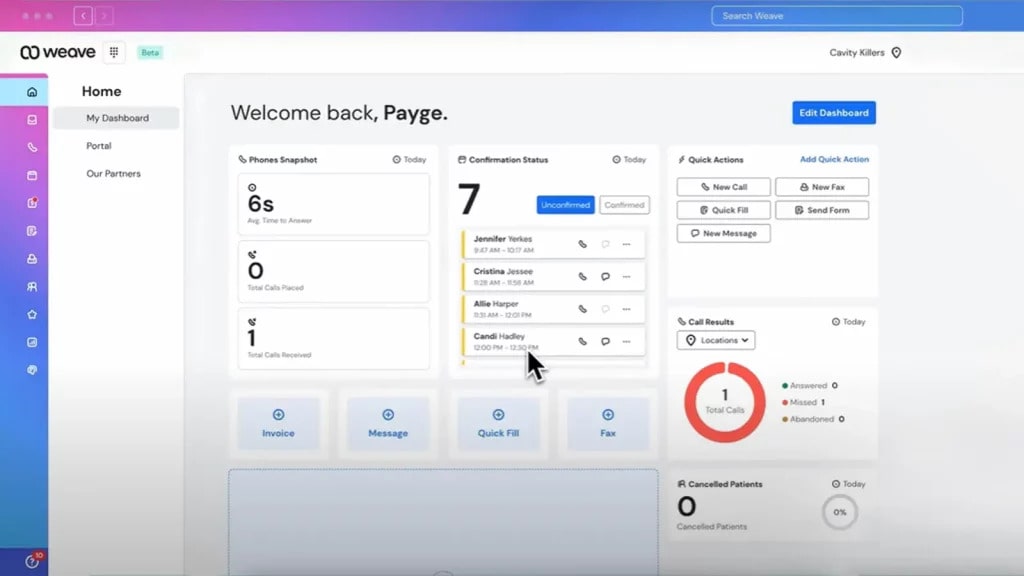
Weave is a communication and engagement platform that combines phone, text, and scheduling tools into one system. It’s especially popular with dental and medical offices that want a simple, all-in-one communication hub. With Weave, teams can handle calls, send reminders, manage payments, and track reviews – all from one dashboard.
Weave Key Features
- Unified Communication Platform: Combines texting, calling, and scheduling in one place.
- Automated Reminders: Sends customizable reminders and confirmations to patients.
- Payment Requests: Allows clinics to send secure payment links directly via text.
- Call Pop Feature: Displays patient details when they call, helping staff personalize conversations.
- Review Collection: Requests and tracks Google reviews automatically.
Weave Pros
- All-in-One System: Replaces multiple tools for calls, texts, and payments.
- Improves Efficiency: Reduces missed calls and helps staff respond faster.
- Strong Review Management: Makes collecting patient reviews effortless.
- Easy Payment Processing: Simplifies billing through secure text links.
Weave Cons
- Higher Pricing Plans: Some smaller clinics may find the cost steep.
- Integration Limitations: Doesn’t support every EHR or CRM system.
- Occasional Call Quality Issues: A few users report dropped calls during busy times.
- Requires Reliable Internet: Call and text functions depend heavily on stable Wi-Fi.
Weave Integrations
- Practice Management Systems: Works with Dentrix, Open Dental, and Eaglesoft.
- Payment Platforms: Integrates with Stripe and Square.
- Calendar Tools: Syncs with Google Calendar for appointments.
- Marketing Tools: Connects with review and CRM apps for tracking engagement.
Weave Pricing
There are not many details available regarding Weave pricing plans on review websites.
Weave Ratings
- Capterra: 4.3/5
- G2: 4.2/5
Weave Customer Reviews
“We deal with elderly patients, Weave gets very confusing to them when it’s sends them a message that for an appointment that we rescheduled. It is also very important because we have patient’s that are hearing impaired and depend on text messages.”
Source: Capterra
Weave Support Channels
- Phone
- Live chat
- Online help center
- Training resources
8. OhMD | OhMD vs Luma Health
OhMD Overview
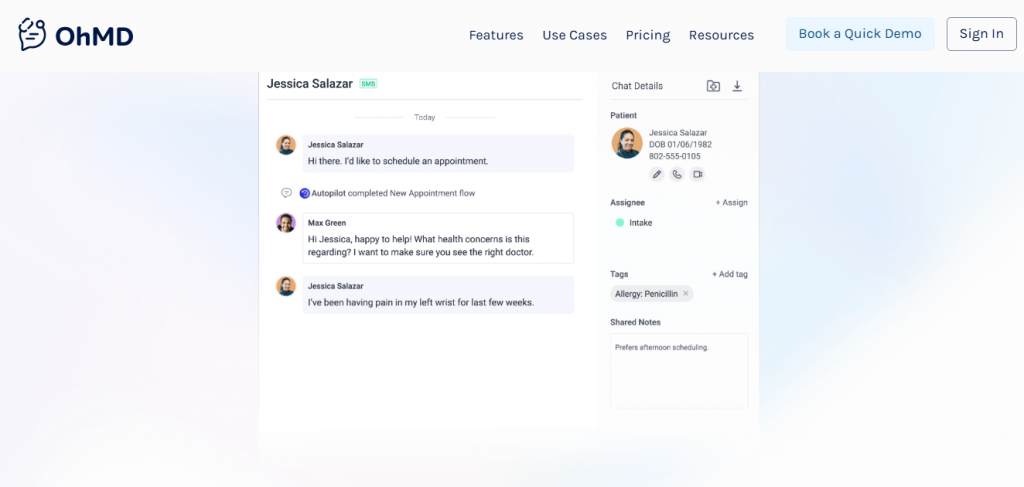
OhMD is a simple, secure patient communication tool designed to make texting in healthcare effortless. It helps practices cut down on phone calls by offering HIPAA-compliant two-way messaging, video visits, and automated reminders. Known for its simplicity and affordability, OhMD is especially popular among small and mid-sized healthcare practices.
OhMD Key Features
- HIPAA-Compliant Texting: Lets providers chat securely with patients without needing portals.
- Broadcast Messaging: Sends updates, closures, or reminders to large patient groups.
- Telehealth Integration: Supports secure video visits directly from the platform.
- Message Templates: Saves time by reusing pre-set text templates.
OhMD Pros
- Super Simple Setup: Works straight out of the box with minimal training.
- Affordable for Small Practices: Great option for budget-conscious teams.
- No App Required for Patients: Patients can respond from their native text app.
- Responsive Support Team: Quick and helpful customer service.
OhMD Cons
- Basic Reporting: Limited analytics and performance metrics.
- Fewer Integrations: Not as wide-ranging as competitors like NexHealth.
- No Advanced Automation: Lacks deeper AI-driven workflows.
- Limited Custom Branding: Templates have fewer design options.
OhMD Integrations
- EHR Systems: Integrates with Athenahealth, DrChrono, and eClinicalWorks.
- Telehealth Tools: Connects seamlessly for virtual consultations.
- Payment Tools: Supports select billing and collection software.
- CRM Platforms: Syncs basic patient contact details.
OhMD Pricing
Offers a free basic version. OhMD pricing plans start around $7/month per provider.
OhMD Ratings
- Capterra: 4.5/5
- G2: 4.5/5
OhMD Reviews
“Mostly the cost. There were some features we were looking for that were not offered by OhMD. We were able to get more features for less cost with another company.”
“Some users do not like it because it is a separate app. I can’t figure out a way to delete old clients from my records. At times it seems to freeze. I then just sign out and sign back in which fixes it. I was told that I need to upgrade to a newer version, so that may be my problem.”
Source: Capterra
OhMD Support Channels
- Email support
- Live chat
- Knowledge base with guides
- Onboarding and training help
9. Podium | Podium vs Luma Health
Podium Overview
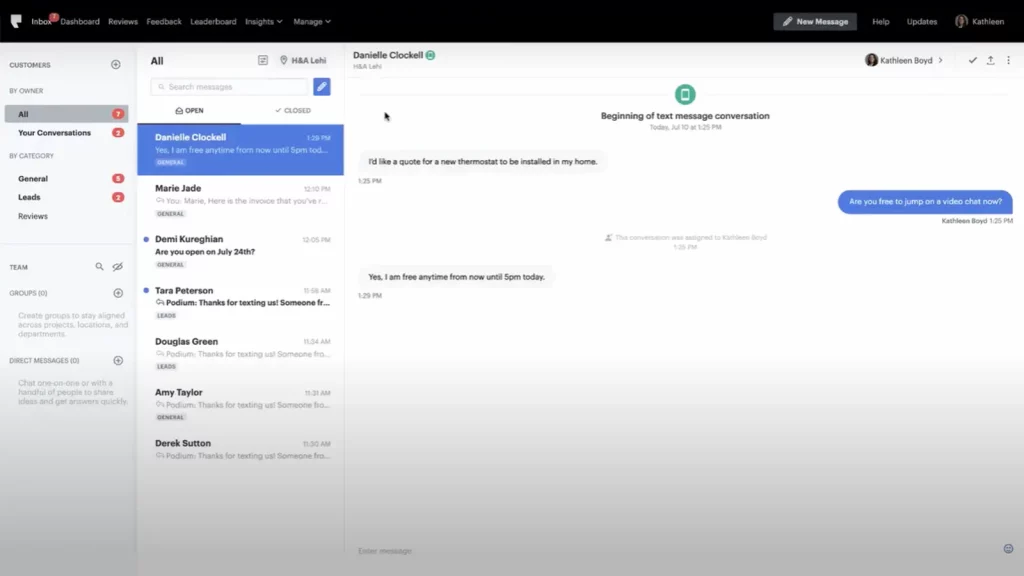
Podium is a customer messaging and reputation management platform built to help local businesses connect with clients through text, chat, and reviews. For healthcare practices, it simplifies review collection, appointment reminders, and text-based communication — all while boosting online visibility.
Podium Key Features
- Text Messaging Hub: Centralises all customer messages in one place.
- Review Management: Requests and tracks Google and Facebook reviews automatically.
- Payment Collection: Sends secure payment links over text for faster transactions.
- Webchat Widget: Converts website visitors into conversations instantly.
- Automated Replies: Handles FAQs and after-hours responses automatically.
Podium Pros
- Boosts Online Reputation: Increases patient reviews effortlessly.
- All-in-One Inbox: Combines messages from multiple platforms.
- Great for Multi-Location Practices: Keeps communication unified across branches.
- Strong Automation Tools: Reduces staff workload for reminders and feedback.
Podium Cons
- Higher Pricing: Premium features come at a cost.
- Learning Curve: Takes time to master all modules.
- Limited Healthcare Integrations: Focuses more on business messaging than medical-specific tools.
- Occasional Notification Delays: Some users report missed alerts.
Podium Integrations
- Payment Tools: Works with Stripe, QuickBooks, and Square.
- CRM Systems: Syncs with Salesforce and HubSpot.
- Review Platforms: Connects to Google, Facebook, and Yelp.
- Messaging Apps: Integrates with WhatsApp and Messenger.
Podium Pricing
Podium pricing starts at around $399/month. No per-text charges. Flat monthly rates.
Podium Ratings
- Capterra: 4.3/5
- G2: 4.2/5
Podium Customer Reviews
“It feels really expensive to me. At this point I might be able to get similar functionality for significantly less money, but nonetheless, because we’ve made the investment in it and trained our team on it, I selfishly don’t want to have to deplore another program and do another batch of training.”
“Small glitches which make some tasks harder to use.”
Source: Capterra
Podium Support Channels
- Email support
- Live chat
- Help center with guides
- Dedicated success reps for premium users
10. Spruce Health | Spruce Health vs Luma Health
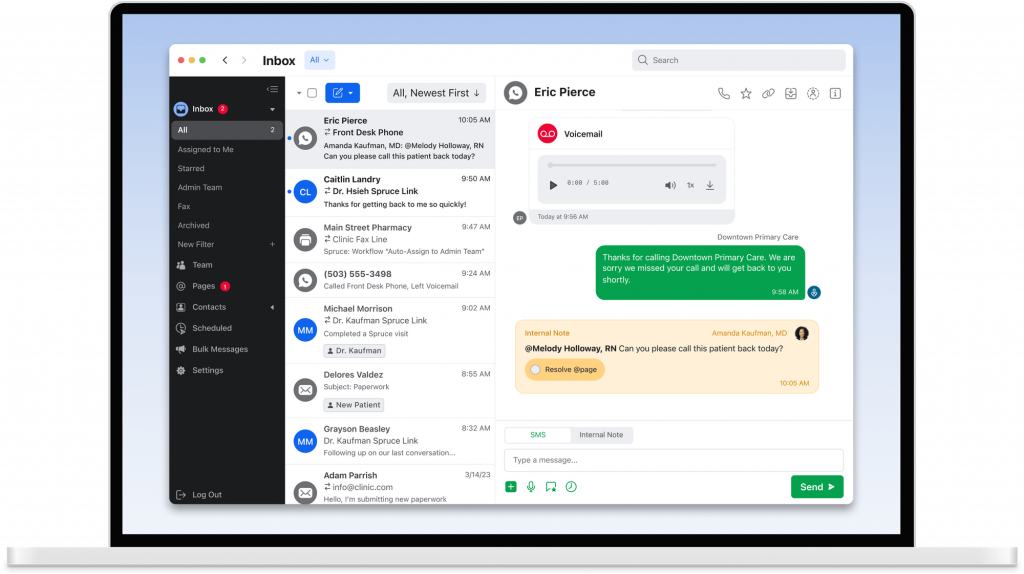
Spruce Health Overview
Spruce Health is a secure communication platform tailored for healthcare teams that need to manage patient messages, calls, and telehealth visits in one place. It’s ideal for multi-provider practices looking for HIPAA-compliant texting, calling, and team collaboration tools that work seamlessly together.
Spruce Health Key Features
- Unified Healthcare Communication: Combines texting, calling, and video visits.
- HIPAA-Compliant Messaging: Keeps all patient interactions secure.
- Shared Inbox: Lets teams manage patient conversations together.
- Call Routing: Directs calls to the right team or provider automatically.
- EHR Integrations: Syncs patient information and notes easily.
Spruce Health Pros
- All-in-One Platform: Manages calls, messages, and video visits under one roof.
- Excellent Security: HIPAA-compliant across every channel.
- Team Collaboration: Shared inbox improves internal coordination.
- Custom Workflows: Automates repetitive communication tasks.
Spruce Health Cons
- Occasional Sync Issues: Some users report delays in message updates.
- Limited Third-Party Integrations: Fewer CRM and marketing app connections.
- No Free Plan: Pricing can be a hurdle for solo practitioners.
- Interface Learning Curve: Takes a little time to explore all features.
Spruce Health Integrations
- EHR Systems: Works with Athenahealth, DrChrono, and AdvancedMD.
- Payment Tools: Integrates with Square and Stripe.
- Telehealth Tools: Connects seamlessly for virtual visits.
- Calendar Apps: Syncs with Google and Outlook.
Spruce Health Pricing
Spruce Health pricing plans start around $24 per user/month. Enterprise pricing is available upon request.
Spruce Health Ratings
- Capterra: 4.5/5
- G2: 4.5/5
Spruce Health customer reviews
“Sometimes, the notifications do not come through as a push notification on my device. I have had a couple instances where I had new messages and I had to open the app to find out. I wish there was an easy way to search the messages and files received.”
“Very confusing to start – no personal connection or onboarding that is not in a group setting. They say they do not have the manpower to work with small businesses. They do not offer 24-hour help.”
Source: Capterra
Spruce Health support channels
- Email support
- In-app live chat
- Setup help for new users
- Online help center
Why Practices Comparing Scheduling Platforms Often Add Emitrr to the Shortlist
Now, choosing the right communication tool isn’t just about features. It’s about how well it actually works for your team. Here’s what makes Emitrr stand out as the best Luma Health alternative for clinics that want simpler, faster, and smarter communication.
24/7 Live Support for Teams
Problems don’t always happen during business hours. That’s why Emitrr offers round-the-clock support to help your team whenever something goes wrong. You can reach the team through chat or email. Whether it’s setup, training, or troubleshooting, help is always just a message away.
Centralized Communication Dashboard
No more jumping between apps or tabs. Emitrr brings all patient calls, texts, and voicemails into one shared inbox. Your team can see every conversation in real time and assign or respond instantly. It keeps things organized and ensures no patient message slips through the cracks.
Smart Automation for Reminders and Follow-Ups
Emitrr takes care of repetitive tasks automatically. Appointment reminders, recalls, and follow-ups are sent right on time without your staff lifting a finger. You can even personalize messages, so they sound friendly instead of robotic. Automation means fewer no-shows and happier patients.
Group and Bulk Texting for Patients
Need to send a quick update or reminder to everyone? Emitrr makes it easy to reach multiple patients at once. You can broadcast messages about schedule changes, new offers, or important announcements in seconds. It’s fast, efficient, and still feels personal.
In-Chat Tools for Scheduling and Payments
Emitrr lets patients book appointments or make payments directly within the chat window. No redirects, no extra links, everything happens in one smooth conversation. It saves time for both your staff and your patients.
Custom Auto-Replies and Templates
Don’t leave patients hanging when your office is closed. Emitrr allows you to create automatic replies for off-hours, holidays, or specific scenarios. You can also use pre-built message templates to handle common questions quickly. It keeps your communication consistent and professional around the clock.
Schedule-Based Messaging for Timely Outreach
Emitrr helps you stay one step ahead with scheduled texts and reminders. You can plan messages in advance, whether it’s appointment confirmations, check-in reminders, or thank-you notes. It ensures your patients get the right message at exactly the right time.
Open and Close Conversations for Clarity
With Emitrr, you can easily manage ongoing and completed conversations. Once a patient query is resolved, you can close the thread and keep your inbox tidy. It’s a small feature, but it makes a big difference for busy teams handling hundreds of messages a day.
Real-Time Metrics and Insights
Emitrr gives you a clear picture of how your communication is performing. You can track response times, delivery rates, and engagement patterns in real time. These insights help you see what is working, and where your team can improve.
Folder-Based Message Organization
Tired of cluttered inboxes? Emitrr lets you organize patient messages by folder. You can have multiple folders like appointments, billing, or feedback. This kind of super-organised setup can help teams stay on top of conversations and find information quickly when needed.
Seamless Integrations with EHRs and CRMs
Emitrr plays nicely with your existing tools. It integrates with popular EHRs and CRMs, so patient data updates automatically. That means fewer manual entries, fewer mistakes, and more time for real patient care.
Mobile Access for On-the-Go Communication
Your team doesn’t have to be tied to their desks to stay connected. Emitrr’s mobile app gives you full access to chats, calls, and notifications wherever you are. Whether you’re between appointments or working remotely, you’ll never miss an important message again.
Which Industries Are Catered by Emitrr?
Emitrr isn’t just built for one kind of business. It’s built for any team that needs to communicate quickly, securely, and effectively. Here’s how different industries use Emitrr to make their day smoother and their customers happier.
Healthcare
In healthcare, privacy is everything. Emitrr’s HIPAA-compliant messaging ensures every text, reminder, or photo is encrypted and secure. Clinics use it to confirm appointments, share updates, and follow up with patients, all without risking data leaks. The platform also integrates with EHR systems, so doctors and front desks stay on the same page. It’s simple, safe, and built for healthcare standards.
Dental
For dental practices, having the perfect appointment workflow is everything. Emitrr helps send automated appointment reminders and recall messages to fill up empty slots fast. Dentists love how easy it is to follow up on treatment plans or reschedule missed visits through two-way texting. You can even gather patient reviews after appointments to boost your online presence. No extra tools needed!
Veterinary
Vet clinics use Emitrr to stay connected with pet owners around the clock. From post-surgery check-ins to vaccine reminders, everything runs through quick, personal texts. Pet owners can confirm or reply instantly, which saves time for busy staff. It’s a small touch that builds loyalty and keeps furry patients healthy and happy.
Wellness and Aesthetics
Salons, spas, and wellness clinics thrive on convenience and personalisation. And Emitrr nails both! It helps manage scheduling, payments, and client reminders through one simple dashboard. Automated follow-ups also make rebooking easy, so clients keep coming back. For teams focused on experience, this level of automation keeps operations smooth and customer service polished.
Legal Services
Law firms rely on communication that’s private and trackable. Emitrr’s secure messaging and call tracking help attorneys and clients stay in touch while maintaining confidentiality. Automated appointment confirmations cut down on no-shows, and follow-ups keep everyone updated. It’s the perfect mix of professionalism and practicality.
Real Estate
Agents and property managers use Emitrr to respond faster, which, in real estate, can make or break a deal. The bulk texting feature helps them share listings, schedule showings, or send open-house invites instantly. Real-time replies and mobile access mean no lead goes cold. It keeps agents responsive, professional, and always connected.
Financial Services
Banks, advisors, and loan consultants use Emitrr to simplify client communication. Whether it’s sending secure document requests or reminders about deadlines, everything happens safely within the platform. Automated workflows cut down manual follow-ups, helping teams manage more clients with less effort, all while maintaining trust and compliance.
Education
Schools and institutions use Emitrr to reach parents and students without delay. It’s perfect for broadcast messages about events, closures, or updates. Teachers and staff can also send one-on-one messages for more personal communication. It’s fast, organized, and helps everyone stay in the loop. No lost emails, no confusion!
Automotive
Car dealerships and service centers rely on timely communication. Emitrr helps send service reminders, follow-ups, and promotions to keep customers engaged. Two-way texting allows quick rescheduling and status updates, so clients never wonder when their car will be ready. It keeps workshops running smoothly and customers coming back.
Home Services
From plumbers to cleaning companies, home service providers use Emitrr to manage appointments and client messages easily. Smart automation handles reminders, follow-ups, and payment messages without the constant back-and-forth. Teams can also respond instantly to new leads, improving conversion rates and customer satisfaction. It’s a time-saver for small businesses that juggle multiple jobs every day.
Frequently Asked Questions
Luma Health helps clinics manage patient reminders, confirmations, and follow-ups all from one place. It saves front-desk time by automating tasks and making communication quick and consistent.
Some clinics mention slow customer support or pricing that isn’t always clear. A few also report issues with EHR syncing and limited customization options for automation.
If you’re in dental or medical, Emitrr is a great pick. It’s HIPAA-compliant, built specifically for healthcare teams, and combines texting, calling, scheduling, and reviews, all in one platform.
Most modern tools, including Emitrr, integrate smoothly with popular EHRs like Dentrix, Athenahealth, and Epic. You won’t have to re-enter data or worry about syncing issues.
Yes, many do! Emitrr, Weave, and NexHealth all support two-way texting and calling so your staff can talk to patients directly from one dashboard. It makes follow-ups and reminders much easier.
Definitely. Platforms like Emitrr offer flexible pricing with all key features included. There are no hidden charges or pressure to upgrade. It’s built to grow with your practice, not drain your budget!
Conclusion
At the end of the day, the best communication tool is the one that fits your workflow, and not the other way around. Luma Health is solid, but if you want more automation, better support, and an all-in-one experience, exploring alternatives makes sense.
Emitrr stands out because it brings together texting, calling, scheduling, and automation – basically everything your front desk needs to stay efficient and connected. It’s built for healthcare but powerful enough to handle communication for any service business!
Book a free demo with Emitrr today and see how effortless patient communication can truly be!

 4.9 (400+
reviews)
4.9 (400+
reviews)