
 4.9 (400+
reviews)
4.9 (400+
reviews)
Introduction
Did you know that a staggering 75% of workplace conversations are being recorded and analysed, reshaping how companies operate? With over 60% of businesses relying on VoIP technology, it’s clear this innovation is more than just a passing trend. Instead, it’s the future of communication.
In today’s fast-paced business landscape, communication isn’t just about staying connected; it’s about gaining insights, improving processes, and staying ahead of the competition. This is where call recording software comes into play. From delivering exceptional customer support to ensuring compliance and enhancing team training, it has become an indispensable tool for businesses striving to thrive. Solutions like Emitrr provide a seamless way to maximise the value of recorded conversations, transforming them into key assets for growth and efficiency.
Let’s explore some of the best VoIP phone recording software available and how they can help you take your communication game to the next level.
What is a call recording software?
VoIP call recording software is a powerful tool that helps businesses record and store voice conversations online using VoIP (Voice Over Internet Protocol) technology. Think of it as a smarter, more versatile alternative to traditional phone systems. Instead of relying on physical telephone lines, VoIP with call recording systems uses the internet to transmit calls, making them cost-effective and incredibly flexible for modern businesses.
With a call recording software, every incoming and outgoing call through a VoIP system can be securely recorded and saved for future use. These recordings can allow businesses to keep track of important conversations, monitor employee performance, and even resolve disputes with clarity. Whether it’s about ensuring compliance with legal standards or delivering top-notch customer service, accessing recorded calls equips businesses with the insights they need to operate efficiently and effectively.
Watch this video to learn more about VoIP:
Features To Look for in A Call Recording Software
Here’s all that can be done with VoIP call recorder software, making them a powerhouse for your business:
Quality assurance
Recording calls allows businesses to monitor interactions between employees and customers. This is invaluable for identifying areas where service delivery can be improved. For instance, if recurring customer complaints are spotted in recorded calls, businesses can address the root cause and refine their processes.
Training and development
Training new employees can be challenging, but recorded calls offer a practical solution. By listening to real conversations, new hires can learn how to handle tricky situations, understand customer needs, and pick up best practices from seasoned team members. It’s like having a ready-made training library tailored to your business.
Dispute resolution
Misunderstandings or disputes can arise in any business. Call recordings provide a reliable way to clarify what was actually said, ensuring that conflicts can be resolved fairly and efficiently. Whether it’s a billing query or a service complaint, having a factual record helps avoid unnecessary friction.
Regulatory compliance
In finance, healthcare, and legal services industries, call recording isn’t just a good-to-have—it’s often a regulatory requirement. VoIP systems help businesses stay compliant by securely storing call data and making it easily retrievable for audits or legal purposes.
Enhanced customer experience
Analysing recorded calls offers businesses insights into recurring issues or pain points customers face. This can lead to process improvements, better scripts for customer interactions, or even updates to products and services, all of which enhance the overall customer experience.
Performance evaluation
Managers can use recorded calls to evaluate employee performance in real-time scenarios. This helps identify top performers, highlight areas for improvement, and ensure that teams consistently meet quality standards.
Cost efficiency
Unlike traditional systems, VoIP cost as a call recording software is highly scalable. Businesses can manage high volumes of calls without investing in expensive hardware or infrastructure, making it a cost-effective solution for growing enterprises.
Data analytics and insights
Many VoIP recording systems now come with advanced features like transcription and analytics. These tools can help businesses track trends, measure customer sentiment, and make data-driven decisions that align with their goals.
By integrating VoIP call recording software into your business, you’re not just recording conversations, but you’re building a foundation for better service, stronger teams, and smarter decisions.

Security and Compliance Requirements of A Call Recording Software
VoIP call recording software must go beyond just capturing conversations; it needs to safeguard your data and comply with global privacy standards. With growing concerns over data protection and regulatory compliance, choosing a secure and compliant solution is essential for maintaining customer trust and avoiding costly penalties.
Here are the key security and compliance features every reliable call recording software should include:
- Regulatory Compliance: Ensure the platform adheres to major data privacy laws such as GDPR, CCPA (California Consumer Privacy Act), HIPAA, and PCI-DSS for industries handling sensitive or financial information.
- End-to-End Encryption: Look for AES-256 encryption or equivalent standards for both data in transit and at rest to prevent unauthorized access or interception.
- Secure Cloud Storage: The software should offer encrypted, redundant, and geo-distributed storage to ensure call recordings remain safe and retrievable when needed.
- Role-Based Access Control (RBAC): Limit access to call recordings based on user roles, ensuring only authorized personnel can listen, download, or share them.
- Audit Trails & Logging: Comprehensive audit logs help track every action performed on call recordings, providing transparency and accountability.
- Automatic Data Retention Policies: Define how long recordings are stored, deleted, or archived to meet compliance and internal governance standards.
- Consent Management Tools: Enable automated call recording disclaimers and obtain consent from both parties to comply with regional recording laws.
- Multi-Layer Authentication: Implement two-factor authentication (2FA) or SSO (Single Sign-On) for added user security.
How to choose a Call recording Software for your business
When selecting the right business phone system that records calls, it’s essential to choose a tool that not only fits your immediate needs but also supports long-term growth and efficiency.
Here are the key features to look for when choosing the best software:
Automatic recording
Look for software that automatically records all calls without needing manual intervention. This ensures that no important conversation is missed and reduces the chances of forgetting to start a recording.
AI-Powered Analytics
Modern call recording software now includes AI-powered analytics that turn conversations into actionable insights. These tools offer automatic transcriptions, keyword spotting, sentiment analysis, and AI-generated summaries to simplify reviews and performance tracking. With added voice tone and emotion detection, businesses can better understand customer interactions, boost agent performance, and make data-driven decisions that enhance overall efficiency and experience.
Call storage and retrieval
Cloud-based storage is crucial for easy access and management of recorded calls. Ensure the software offers a secure and reliable cloud storage solution, with intuitive retrieval options, so you can find specific calls quickly when needed.
High-quality audio
The clarity of your call recordings is essential for accurate monitoring and review. High-quality audio ensures that the recordings are clear and free of distortion, allowing you to assess both customer service quality and agent performance effectively.
Call segmentation
Look for software that allows you to segment calls by different criteria, such as department, agent, or customer. This feature simplifies the process of searching for specific calls and makes it easier to analyse conversations relevant to particular areas of your business.
Integration with other tools
The best VoIP call recording software should integrate seamlessly with other tools you already use, such as CRM software, email platforms, and customer support tools. This streamlines workflows, enhances productivity, and ensures that you have all the necessary data in one place for analysis.
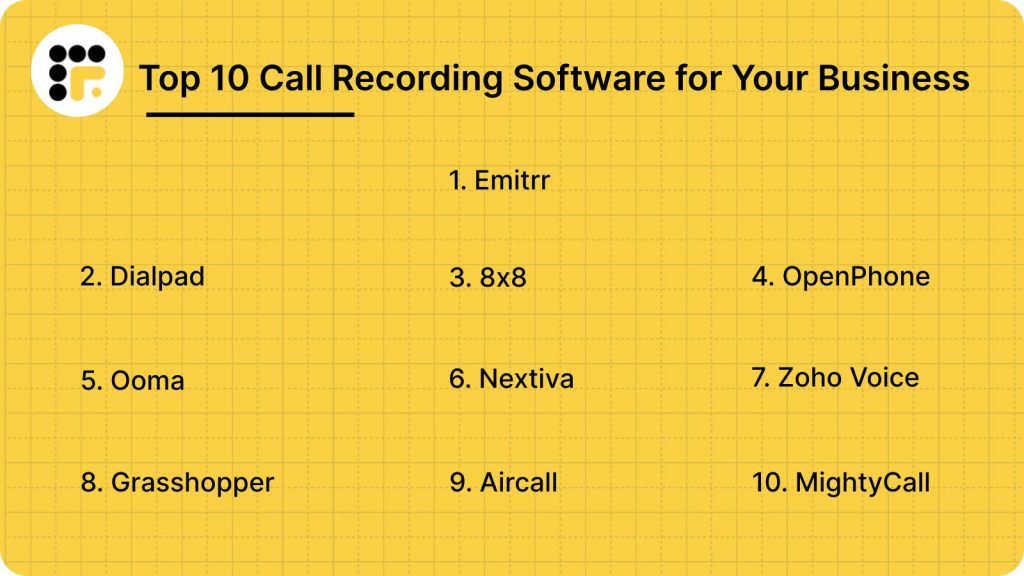
Top 10 call recording software
1. Emitrr
What is Emitrr?
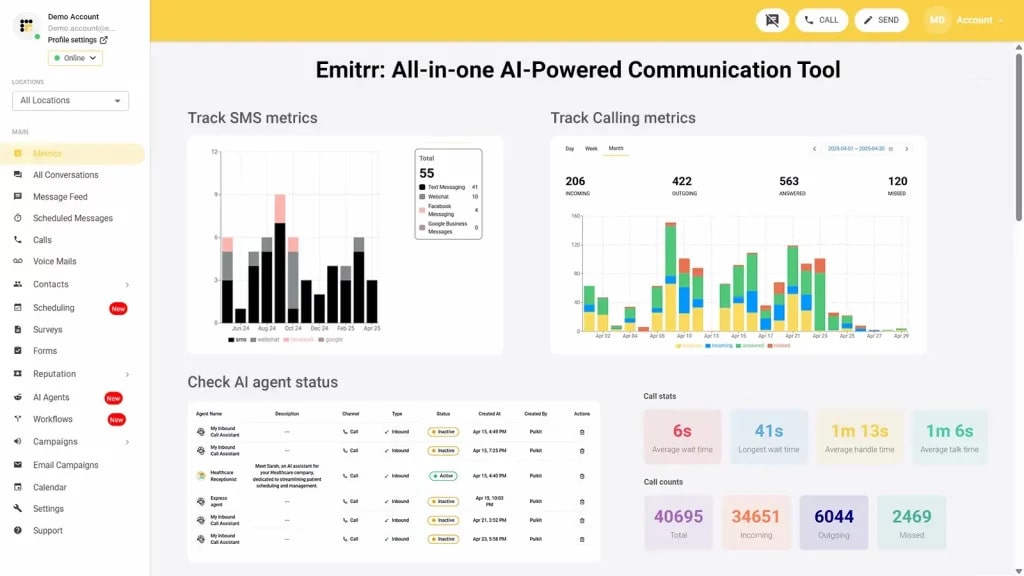
Emitrr is a leading call recording software and VoIP phone system tailored for small and medium-sized businesses. With advanced call recording features and budget-friendly pricing, it’s an excellent choice for streamlined communication. Whether you’re making VoIP calls or managing texts on the go, Emitrr ensures reliable, efficient, and high-quality interactions. Its intuitive interface and enhanced texting options make managing business communications hassle-free.
Key features of Emitrr
- AI call routing: Let AI call routing analyse whether a call is from a new patient or an old one from the existing patient data, and let it transfer the call directly to the relevant person or department without human interference.
- AI call handling: Let AI handle calls, be it level one calls for answering common queries, or canceling, rescheduling, or booking appointments. Or set actions and let it handle more complex calls, you decide.
- AI call forwarding: Let AI call forwarding direct incoming calls smartly by analysing the caller’s intent and context. Set it up to forward VIP calls to top agents, or to simply escalate urgent calls to the right person.
- AI call screening: Let AI call screening filter spam or robocalls, identify unknown callers to reduce call disruptions and unnecessary long call queues.
- AI call recording: Use Emitrr’s AI call agent to auto-record calls, to flag compliance breaches, and to train your team better for quality and compliance purposes.
- AI call queue: Let AI call queue handle common queries, bookings, cancellations, etc., to reduce call queue lines. Set up an auto message if a caller drops mid-way, and keep them engaged.
- AI SMS nudge: Let AI nudge callers standing in virtual queues to continue the conversation over SMS instead.
- Smart phone trees: Build a smartphone tree system that engages the caller seamlessly.
- AI summary and transcripts: Save time that may be wasted in listening to long calls. Use AI summary and transcript features to get a crisp summary of different phone calls.
- AI data and forms collection: Let AI collect patient forms and other information such as insurance details, patient demographics, reason of visit, medical history, and more beforehand.
- Dashboard and reports: Access dashboard and reports to analyse how many calls got dropped, the total number of calls received, missed, etc. And take necessary action to fix loopholes.
- Missed-calls-to-text: Use missed-calls-to-text to send a text message automatically to the caller if their call goes unanswered.
- Call pop: Call pop allows you to access the caller information easily on a single screen during a live call. And allow your team to save time in checking caller information.
- EHR/EMR/PMS integrations: Integrate the AI phone system with your existing software to ensure there are no major distractions in your existing workflow.
- Auto dialer: No need to find and manually dial the customer number every time. Simply open the customer chat and click on the auto dial to make a call instantly.
- CRM Integration: Automatically sync call history, recordings, and notes with your VoIP CRM integration.
- VoIP Texting: Send and receive SMS or MMS messages using your VoIP number.
- Click-to-Call Function: Allow website visitors or CRM users to start a call with a single click.
- Toll-Free Numbers: Give customers an easy way to reach you without long-distance charges.
- Multi-Location Management: Manage calls across different offices or branches from one system.
- Architecture to Support High Call Volumes: Built to handle heavy call loads without dropped connections.
Emitrr pros
- Help your staff save 100+ hours: Let your front desk save 100+ hours and focus on other important calls/tasks. Emitrr’s AI agent seamlessly manages level one calls, including answering common inquiries, booking, canceling, and rescheduling appointments, among other tasks.
- Reduce high call abandonment rate: Long call queues can lead to an increased call abandonment rate. Emitrr AI not only communicates the expected wait time to the caller but also nudges them to continue the conversation over text.
- Save time with seamless EHR/PMS/CRM integrations: No need to waste time manually trying to find a contact’s details. Emitrr integrates seamlessly with over 500+ EHR/PMS/CRM tools. So if an existing customer/patient calls, a call pop will give you the caller’s details in seconds, helping your team close a call and clear up call queues.
- Respond better with self-evolving AI: Emitrr’s SMS AI agent self-evolves with every conversation it has. Over time, your AI will start drafting better, contextually aware responses.
- Engage patients/customers after hours: No need to spend on hiring extra staff to cover after-hours queries/issues. Emitrr’s AI works 24/7, helping you keep your patients/customers engaged and save costs.
- Route callers to the right person/department: Emitrr’s AI phone agent recognizes if the caller is new or old based on the data available in the system. If the caller is new, it can collect essential information and feed it into the system, and if the caller is old, it can route them to the right person/department.
- Handle multiple calls without adding more extensions: You can let AI handle multiple incoming calls, without the need to remember phone numbers or increase expenditure by adding more extensions.
Emitrr cons
- More AI VoIP features will be rolling out soon!
Emitrr pricing plans
Emitrr offers two VoIP plans, Standard and Professional, to match different levels of business needs. Pricing starts at $20 per user per month when billed annually. Both plans come packed with a myriad of features that help businesses handle calls, automate follow-ups, and streamline customer communication seamlessly.
Take a quick look at Emitrr’s VoIP pricing for each plan:
| Name of the plan | Pricing if paid annually | Pricing if paid monthly |
| Standard | $20 per user per month | $25 per user per month |
| Professional | $30 per user per month | $35 per user per month |
Emitrr customer reviews
“Exceptional! Friendly! The team at Emitrr handles your needs promptly. Emitrr customer service is unmatched! I don’t need help often but when I do, it is handled quickly. The system is very user-friendly.”
“Our experience has been phenomenal. I used Zipwhip (no longer available) previously and Emitrr is everything Zipwhip was but with way more features.”
(Source: Capterra)
Emitrr support channels
- Email: support@emitrr.com
- Phone: +1 (210) 941-4696
- Live chat: Speak directly with a representative for instant support.
- FAQs/forum: Find answers to common questions or join discussions in the community.
- SMS: Text for assistance when on the go.
- Knowledge base: Explore comprehensive guides and resources to make the most of Emitrr’s features.
2. Dialpad

What is Dialpad?
Dialpad is a cloud-based communication platform tailored for businesses of all sizes. Its VoIP call recording software simplifies communication while offering AI-driven insights, seamless integrations, and robust call management features.
Key features of Dialpad
- Call routing: Efficiently direct incoming calls to the right team or department.
- Call centre management: Manage and monitor call centre operations with ease.
- Alerts/notifications: Stay updated with real-time alerts and notifications for important activities.
- Mobile access: Connect to your business communication system from anywhere using the mobile app.
Dialpad pros
- High-quality audio: Delivers crystal-clear calls for reliable communication.
Dialpad cons
- Learning curve for advanced features: Some functionalities may take time for users to adapt to.
- Limited international coverage: International call capabilities depend on the region.
- AI transcription accuracy: Occasional errors in transcriptions may require manual checks.
- Expensive upgrades: Full feature access often requires higher-tier plans.
Dialpad pricing plans
Dialpad pricing plans start at $20 per month.
Dialpad customer reviews
“The system has gone sharply downhill and has left us with unbearable amount of dropped calls and technical challenges. We’ve had so many issues that our customers now insist we use their enterprise services instead for calls with them. So now we pay for a service (stuck in a contract) that we don’t use.”
“Calls constantly drop. I’m not even able to use the service that I pay for because the web app continues to crash. Every time I enter a room with an international caller we drop off in 30 seconds. Rinse, wash, repeat.”
(Source: Capterra)
Dialpad Support Channels
- Phone
- Live chat
- Knowledge base
3. 8×8
What is 8×8?
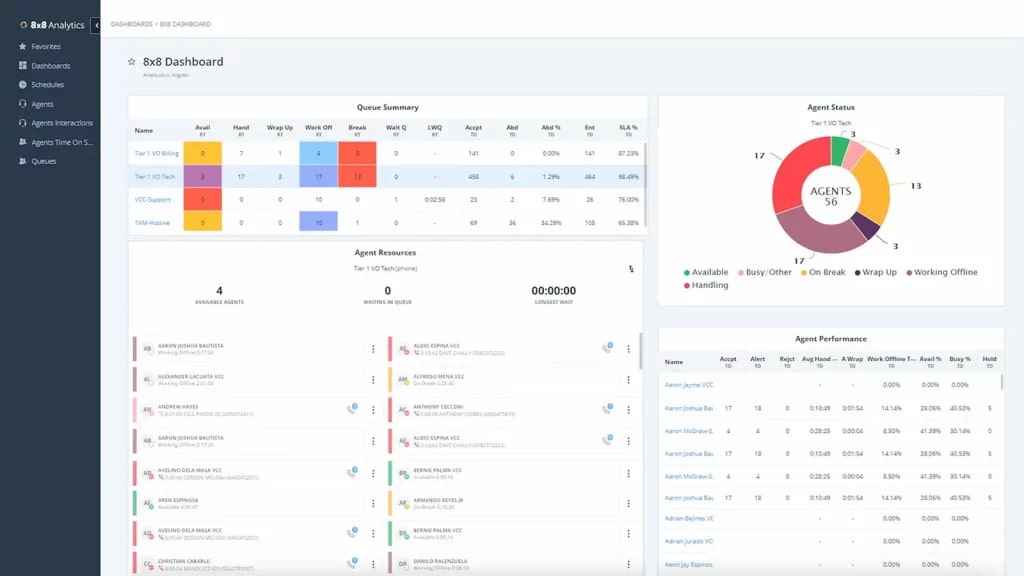
8×8 provides business phone systems with advanced VoIP features, call recording, HD audio, video conferencing, and contact centre solutions. Known for its reliability, 8×8 integrates communication and customer service into one platform, making it ideal for businesses aiming for streamlined operations.
Key features of 8×8
- Voice and video calls: Experience HD-quality voice and video communication for teams and customers.
- Call routing: Ensure calls reach the right team members with advanced routing capabilities.
- Auto attendant: Automate call handling with customised greetings and call forwarding.
- Call analytics: Gain insights into call performance with detailed analytics.
8×8 pros
- Unified communication: Integrates voice, video, and messaging into a single platform for ease of use.
- Global reach: Offers international call support across multiple countries.
8×8 cons
- Customer support delays: Some users report slower response times when reaching out for help.
- Complex setup: Advanced features may require technical expertise for proper implementation.
- Limited customisation: Certain features have restricted options for customisation.
- Occasional call drops: Issues with call reliability have been noted.
8×8 pricing plans
8×8 pricing starts at $24 per user/month.
8×8 customer reviews
“The sound quality is horrible. I constantly get complaints that there is tons of background noise (while I am in a soundproof booth alone) or that I sound like I am under water/in a tunnel/have a mouth full of marbles which is hardly acceptable in general, never mind in a business setting. the constant crashing and necessary reboots I could look past and chalk it up to my computer, but the sound quality is a company wide issue.”
“They lied. They said that they can integrate. But they can’t. Do not believe the sales people. They will tell you what you want to hear and not the capabilities of the system.”
(Source: Capterra)
8×8 support channels
- EmailPhone
- Phone
- Knowledge base
4. OpenPhone
What is OpenPhone?
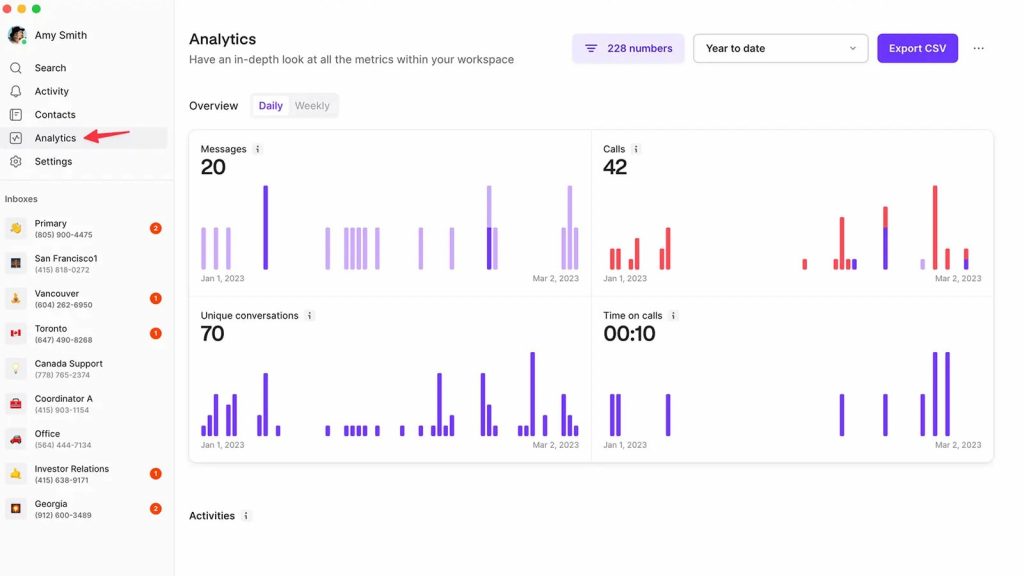
OpenPhone is designed to meet the needs of small and medium businesses with an easy-to-use interface, affordability, and seamless integrations. It allows call recording and lets you manage your phone system from anywhere, making business communication hassle-free.
Key features of OpenPhone
- Multiple business numbers: Use different numbers for varied business purposes.
- Text messaging: Send texts directly from your business number for professional communication.
- Call forwarding and recording: Redirect calls to your mobile or another number effortlessly, you can benefit from the call recording option as well.
- Voicemail transcription: Receive voicemail transcriptions straight to your inbox for convenience.
OpenPhone pros
- Affordable pricing: Cost-effective plans tailored for small businesses.
OpenPhone cons
- Limited advanced features: Misses some functionalities required by larger enterprises.
- Regional call quality issues: Users report occasional poor audio quality in certain locations.
- Basic international calling: Rates and options may not be competitive for frequent global use.
OpenPhone pricing plans
OpenPhone pricing plans start at $15 per user/month.
OpenPhone customer reviews
“They would rather you don’t have phone access let a paying customer leave when their service is no longer required.”
“Syncing doesn’t work – EVER. I have numerous screenshots and have sent them to IT. They keep asking for more details but seeing as how I’m trying to run a business, it’s hard to track everything over and over again to help them figure it out. I don’t receive calls and am not able to make calls. The phone rings (sometimes), I pick up and it automatically disconnects me. IT again, wanted me to give them phone numbers, times, etc. AND wanted to put some tracer on my phone. I don’t think so. After months of begging for a better outcome, nothing has changed.”
(Source: Capterra)
OpenPhone support channels
- Phone
- Blogs/FAQs
5. Ooma

What is Ooma?
Ooma offers a user-friendly VoIP call recording software designed to meet the needs of small businesses. With its affordable pricing and prompt customer support, it delivers professional communication tools without breaking the bank.
Key features of Ooma
- Call blocking: Automatically blocks spam and robocalls for uninterrupted communication.
- Mobile app: Take calls and manage your system on the go with Ooma’s app.
- Voicemail transcription: Receive voicemail transcriptions directly in text format.
- Virtual receptionist: Automate call handling with a system that greets and routes calls efficiently.
Ooma pros
- Reliable service: Known for consistent call quality and uptime.
Ooma cons
- Limited features on lower plans: Advanced functionalities are reserved for higher-tier subscriptions.
- Higher international calling rates: Costs for global calls may be less competitive compared to other providers.
Ooma pricing plans
Ooma pricing starts at $19.95 per month.
Ooma customer reviews
“I have a hard time logging into the app. I constantly have to reset my password for some reason.”
“The service was lacking. Our phone has been losing internet connection repeatedly and even though our internet speed/latency is beyond what Ooma requires, they still tried to blame the issues on my internet connection (and even told my staff that a jitter time of 1ms should be 5ms, even though the fact is a lower jitter number is desirable not higher).”
(Source: Capterra)
Ooma support channels
- Phone
- SMS
- Knowledge base
6. Nextiva

What is Nextiva?
Nextiva is an all-in-one communication platform offering tools for voice, video, messaging, and collaboration. The software is designed to support businesses of all sizes, combining reliability, scalability, and excellent customer service.
Key features of Nextiva
- Call forwarding: Seamlessly route calls to multiple devices or team members.
- Voicemail transcription: Convert voicemails into text and receive them via email.
- Mobile app: Manage calls and messages from anywhere with the mobile app.
- Video conferencing: Host HD video calls to connect with teams and clients.
Nextiva pros
- Reliable service: Offers consistent call quality and high uptime.
- Comprehensive features: Integrates various communication tools into one platform.
Nextiva cons
- Price: Plans are more expensive compared to some competitors, which may deter smaller businesses.
- Setup complexity: Initial setup may involve a learning curve for new users.
Nextiva pricing plans
Nextiva pricing starts at $25.95 per user/month.
Nextiva customer reviews
“Their approach to business appears to be: lure the customer in, demand a 3-year contract, hide the part about auto renewal, provide just average level service, hire less than competent support staff to handle customer complaints, and hope the customer doesn’t become aware of the auto renewal gimmick before the end of the contract term.”
“Lack of follow up for every issue. I would have to reach out to them multiple times to get a response.”
(Source: Capterra)
Nextiva support channels
- Phone
- Live chat
- Guides and blogs
7. Zoho Voice

What is Zoho Voice?
Zoho Voice is a versatile VoIP phone service that offers a range of features designed to streamline business communication. With features like call routing, voicemail transcription, and CRM integration, Zoho Voice is ideal for businesses already using Zoho tools.
Key features of Zoho Voice
- CRM integration: Sync call logs and customer interactions automatically with Zoho CRM.
- Voicemail transcription: Receive transcriptions of voicemails via email for easy access and review.
- Call analytics: Access detailed insights on call performance and agent productivity.
- Auto attendant: Direct calls to the appropriate team or department with an automated system.
Zoho Voice pros
- Seamless integration: Works effortlessly for businesses already using Zoho applications.
- Customizable call routing: Streamline communication with flexible call routing options.
Zoho Voice cons
- Limited advanced features: Lacks some of the enterprise-level tools found in other platforms.
- Learning curve: Some users experience a slight learning curve when setting up the platform.
- Expensive plans: The starting range for these plans is steeper compared to their counterparts.
Zoho Voice pricing plans
Starting at $34 per user/month.
Zoho Voice customer reviews
“they will steal your money and your phone number and hold them and not refund your money.”
“lack of features and slow development. We’ve been dealing with constant call drops and even incorrectly routed calls (i.e. I would call one number and a completely random person would pick up at a different number). Support has tried to help, but they just keep telling me changes were made. It stabilized for a little and then dropped calls started again.”
(Source: Capterra)
Zoho Voice support channels
- Phone
- FAQs/Blogs
8. Grasshopper

What is Grasshopper?
Grasshopper is a virtual phone system designed for small businesses. It offers essential features like voicemail, call recording, and business number management. With an easy-to-use interface, it provides businesses with a professional communication setup at an affordable price.
Key features of Grasshopper
- Multiple extensions: Set up different extensions for various departments or team members.
- Call forwarding: Forward calls to any phone, including your mobile.
- Voicemail transcription: Receive transcriptions of voicemails via email or text for easy access.
- Custom greetings: Record and customise professional voicemail greetings for your business.
Grasshopper pros
- User-friendly: Simple setup and easy to use, perfect for small businesses.
- Affordable: Cost-effective plans for businesses with basic communication needs.
Grasshopper cons
- Limited features for larger businesses: Lacks advanced features required by enterprise-level systems.
- Basic call management: Some users find the call management features too simple for larger teams.
Grasshopper pricing plans
Grasshopper pricing starts at $14 per month, with higher-tier plans offering additional features based on business needs.
Grasshopper customer reviews
“The website’s settings were hard to navigate and setting up the incoming call workflow was too cumbersome.”
“Poor call quality. Wi-fi calling is awful. They claim that they do not alter the caller id, yet the same calls coming in on the mobile device show the caller’s name (when published), but when routed through grasshopper you only see the name with very few exceptions.”
(Source: Capterra)
Grasshopper support channels
- Phone
- Chatbot
9. Aircall

What is Aircall?
Aircall is a cloud-based VoIP phone system designed for businesses that require advanced call management features. With a user-friendly interface and seamless integrations with CRM and helpdesk tools, Aircall is scalable to accommodate teams of all sizes, making it ideal for businesses that want to optimize their call centre operations.
Key features of Aircall
- Call routing: Automatically distribute calls to the right agents for efficient handling.
- Integrations: Seamlessly integrate with popular tools like Salesforce.
- Call queues: Manage incoming calls with intelligent queuing systems for a better customer experience.
- Analytics: Access real-time and historical analytics to track call centre performance.
Aircall pros
- Scalable: Suitable for businesses of any size, from small teams to large enterprises.
Aircall cons
- Price: Aircall is on the pricier side compared to other VoIP providers, which may not be ideal for smaller businesses.
- Learning curve: Some users report a slight learning curve when first using the platform.
- Poor call quality: Many users have reported the call quality needs improvement.
Aircall pricing plans
Aircall pricing starts at $40 per user/month.
Aircall customer reviews
“Call quality is really bad, all of my colleagues complain about calls dropping or customers not being able to hear them.”
“Too buggy. Impossible to mute on phone. Restarts everytime I change a headset. Low quality of sound. Hard to navigate the dashboard”
(Source: Capterra)
Aircall support channels
- Phone
- Blogs
10. MightyCall

What is MightyCall?
MightyCall is a virtual phone system designed to simplify communication for small businesses. MightyCall offers features like call recording, voicemail transcription, and toll-free numbers, all with a focus on simplicity and affordability. It’s cloud-based system ensures you stay connected, no matter where you are.
Key features of MightyCall
- Call forwarding: Forward calls to any phone, including your mobile devices, for convenience.
- Voicemail transcription: Receive voicemail transcriptions directly for quick and easy access.
- Call routing: Customise call routing options to ensure calls are directed to the right person or team.
- Custom greetings: Personalise voicemail greetings to maintain a professional image.
MightyCall pros
- Affordable pricing: Very cost-effective plans designed for small businesses with limited budgets.
- Simple setup: Easy to set up and manage, without the need for extra hardware or technical expertise.
MightyCall cons
- Limited advanced features: This may be too basic for larger businesses with more complex communication needs.
- Limited integrations: Fewer integrations with other business tools compared to some competitors.
MightyCall pricing plans
Starting at $15 per month per user.
MightyCall customer reviews
“it was unable to receive texts the way i needed it to. to cancel you have to call the company. i called but the line did not ring. the next day i was charged. i called again and was unable to reach anyone. i submitted an email ticket to close my account, and they did, but they refused to refund me.”
“they have outages of service because they use only amazon for their webservice”
(Source: Capterra)
MightyCall support channels
- Phone
- SMS
- Guides/Blogs
Why Is Emitrr The Best Call Recording Software For Your Business?
Emitrr is a reliable AI-powered VoIP call recording software tailored for small businesses, designed to capture VoIP calls while simplifying communication workflows. It leverages AI voice chatbots and intelligent IVR systems to streamline customer interactions and reduce manual effort. With features like an AI receptionist, automatic recording, secure cloud storage, and seamless tool integration, Emitrr ensures clear, searchable recordings and is backed by responsive 24/7 customer support.
Here’s why Emitrr stands out as the best call-forwarding VoIP service:
Integration with CRMs
Emitrr can easily integrate your existing CRM systems to offer personalized services. This seamless connection ensures your softphone call recording enhances productivity while improving customer satisfaction.
24*7 support
With round-the-clock support via chat, phone, and other channels, Emitrr guarantees help when you need it the most.
Advanced features and customisation
Emitrr offers advanced VoIP features like voicemail-to-text, missed call-to-text, detailed call pop-ups, and simultaneous ringing. These capabilities streamline communications, from scheduling to handling customer concerns, making it ideal for diverse business needs.
Check this video to know what the 3 essential things about voicemail transcription are:
HIPAA-Compliant for Healthcare
Emitrr is HIPAA-compliant, making it a secure choice for healthcare providers, clinics, and medical practices. Its secure call recording, encrypted storage, and access controls ensure that patient information and sensitive healthcare data remain confidential while supporting compliance with regulatory requirements.
AI-Powered Features
Emitrr leverages AI capabilities to provide actionable insights from recorded conversations. Features include automatic call transcription, keyword spotting, sentiment analysis, and AI-driven summaries, enabling better decision-making, improved agent performance, and enhanced customer experience.
Affordable pricing
Emitrr is a budget-friendly option that delivers excellent value for its features and services. It’s an affordable solution for small businesses.
Additional features
Beyond call recording, Emitrr supports text messaging, conversation assignment, team messaging, and more, providing a complete communication solution for growing businesses.
FAQs
Call recording software is a tool that automatically records phone or VoIP calls. It captures conversations so you can listen later, track important information, and improve communication for your business.
The main purpose of call recording is to monitor and improve customer service, ensure compliance, and keep accurate records. It helps businesses resolve disputes, train employees, and analyze conversations for better decision-making.
Yes, call recording is safe if you use secure and compliant software. Reputable tools offer encryption, secure cloud storage, and access controls to protect sensitive business and customer information.
In many cases, you will be notified at the start of the call with a message or beep indicating the conversation is being recorded. This is required by law in many countries and ensures transparency and consent.
Conclusion
If your business is looking to improve customer service, stay compliant, and track performance, VoIP call recording software is a must. Emitrr is one of the best options out there, offering a user-friendly interface, reliable call recording features, and seamless integration with your existing business tools. Whether you’re a small business or a growing enterprise, implementing VoIP phone recording software can help you streamline your operations and improve overall service quality. Book a demo today and see the difference for yourself!