
 4.9 (400+
reviews)
4.9 (400+
reviews)

Introduction to Electronic Medical Records Software
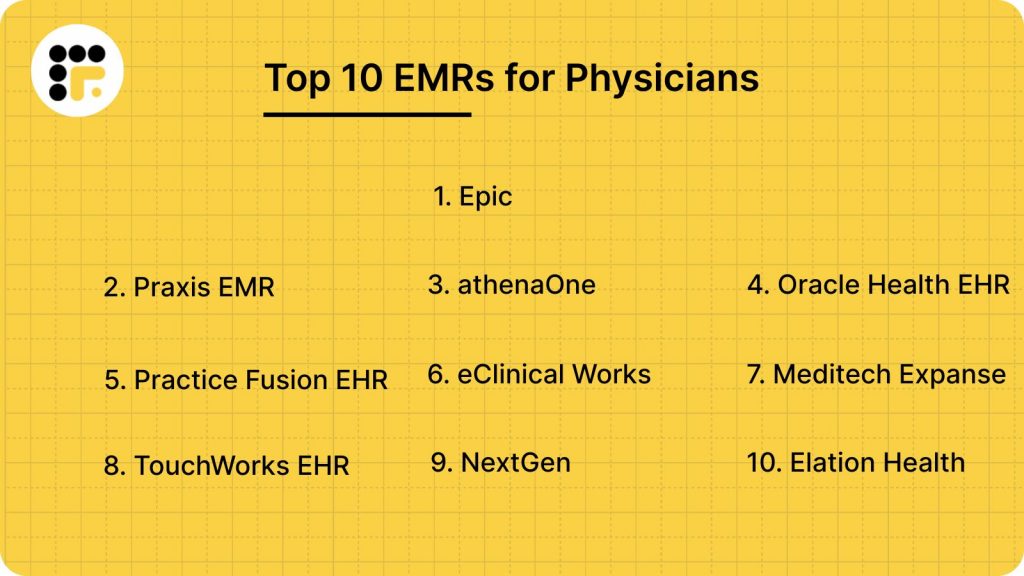
Finding the best EMR for Physicians can be tricky, thanks to so many options that are available today. And choosing the right one is absolutely critical, as migration, training, and getting used to a new EMR could take up a lot of time. To help you make the right decision, we have come up with this guide that compares the top 10 EMRs for Physicians on the basis of features, practice size, cost, pros & cons. Before we go into the details, take a quick glance at the list of emr systems in healthcare and their comparison in the table below.
Features to Look for in an EMR for Physicians
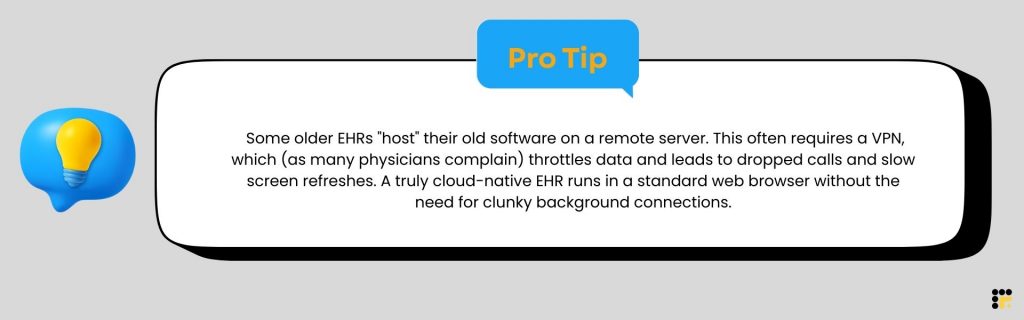
The kind of EHR system you get can dictate the quality of your service, the amount of time saved, burnout reduction, claim management, revenue, and more. So here are the top must-have features to look for in electronic medical records software for Physicians:
User-Friendly Interface
A clunky interface is one of the top reasons for physician burnout, so make sure that the electronic health records software you choose has a user-friendly interface and does not require multiple clicks to perform a simple task.
Patient-Portal
In the U.S., patients now expect you to offer a digital patient portal where they can easily access their records, see test results without calling the clinic, get digital prescriptions, and make online appointment bookings. So make sure the electronic healthcare record system you choose offers a patient portal to help you meet patient expectations and satisfaction.
E-Presribing
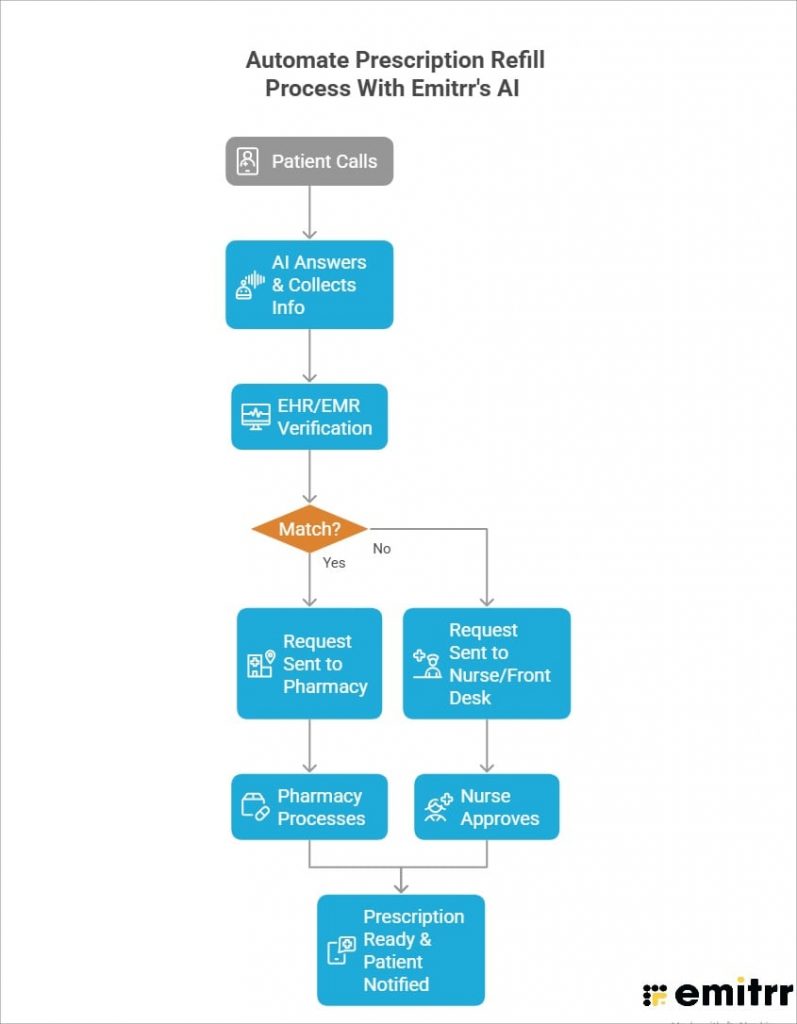
Physicians should look for an e-prescribing feature that allows them to send prescriptions straight to pharmacies without follow-up calls or paperwork. It should automatically check for allergies, correct dose, drug interactions, and show insurance coverage or alternatives. A good e-prescribing system should also make refills easy and keep medication lists updated, to reduce pharmacy back-and-forth. However, if you get many calls related to prescription refill, then adding a tool like Emitrr to your EMR system can drastically reduce calls & automate the process. Here’s an image explaining how it works.
Revenue Cycle Management (RCM)
Claim denials cost healthcare providers a lot of time & money. Hence, top electronic medical records software should offer an RCM feature that flags errors before you submit the claims, and a cloud-based EMR system that scrubs the claim should be a must-have feature.
Template-Free EMR
Fixed templates are often rigid, cumbersome, and slow down charting. The best electronic medical records software should offer AI-driven freehand templates that self-learn as you use them, giving you the ease, speed, and accuracy you prefer.
Integrated Scheduling
Efficient appointment scheduling is necessary to reduce patient wait times and to maximise patient flow. An EHR that offers integrated scheduling with features like reminders, rescheduling, and seamless appointment booking is a must. However, this feature could still be limiting as many EHRs don’t offer the capability to send automated follow-up messages & two-way communication. Adding a patient engagement tool like Emitrr to your existing EMR can help bridge this gap seamlessly.
Customizable Workflows
If you want to be able to tailor medical emr systems as per your practice’s needs instead of forcing everyone into the same rigid process, then make sure to look for customisable workflows in your EMR.
Interoperability
Interoperability allows the EMR to securely share patient data with pharmacies, labs, hospitals, specialists, and other EHR systems in healthcare. This gives physicians a complete view of a patient’s history without chasing records or relying on faxes.
Voice Recognition
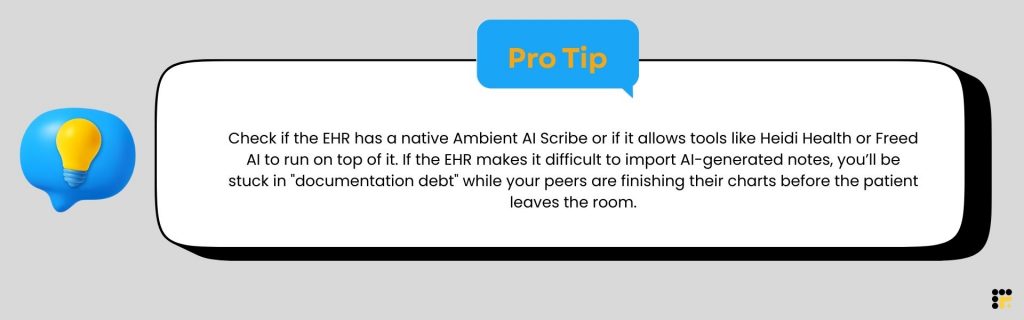
To limit screen time and to be able to actually pay attention to your patient, you should look for electronic medical record systems that offer voice recognition, a system that listens to your conversation and drafts a professional SOAP note for you to review and sign. This would help you not only reduce time spent on each patient but also boost patient satisfaction.
HIPAA-Compliance & Security
Top electronic medical record systems for physicians should offer security features such as role-based access, MFA, audit trails, and activity log, data encryption at rest and in transit, automatic log-off, etc., to ensure HIPAA compliance, reduce legal risk, and keep patient data safe.
Billing & Claim Management
Billing & claim management is a must-have feature in your EHR system. A good EHR helps you capture the right charges, submit correct claims to insurance, flag errors, and track payments without any manual follow-ups. Overall, it gives you clear visibility into revenue, shorten payment cycle, reduces claim denials, and lowers staff workload as well.
Reporting & Analytics
Look for reporting and analytics features in medical emr systems to get valuable insights into your practice performance and patient outcomes. This feature can help you in identifying areas for improvement to make better data-driven decisions.
Remote Accessibility
You should be able to access your EHR remotely from anywhere, be it on your mobile phone, desktop, laptop, or tablet.
Wondering how to choose the right EMR for your practice? Download this checklist for free!
Core Problems Electronic Medical Record Systems for Physicians Solve
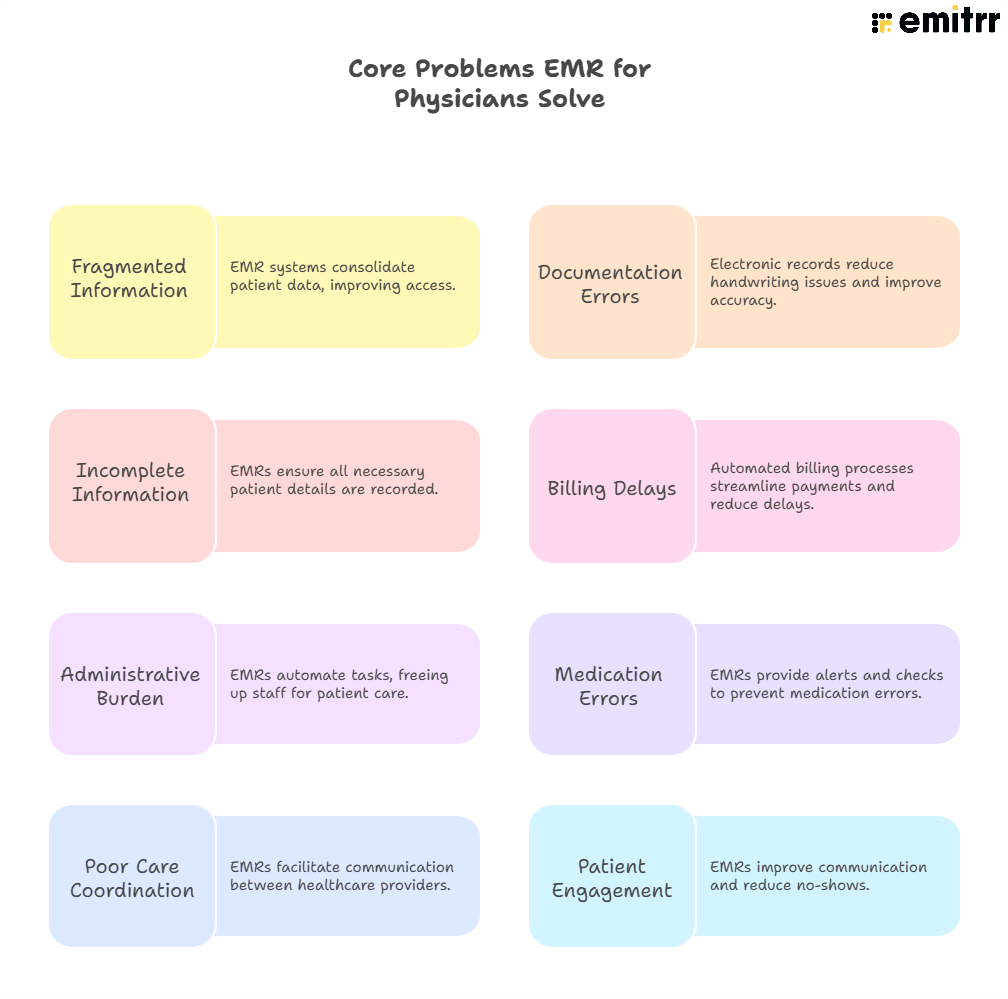
Here are some of the core problems that EHR for Physicians solves:
1. Fragmented Information Access
When a patient calls, there is so much information, such as patient charts, appointments, prescriptions, and history, that the provider or staff need access to. An EHR presents all this information at once during calls or workflows, allowing you to answer the patient without jumping between systems, helping you & your staff save a lot of time.
2. Documentation Errors
Practices that still rely on paper records often struggle with illegible handwriting, double entries, and documentation errors that lead to medical errors, delayed care, and even an impact on revenue. EHR comes with structured templates, auto-populated fields, and voice-to-text that reduce documentation time and improve accuracy.
3. Incomplete Patient Information
Missing patient information, history, or medical information leads to inaccurate treatment and misdiagnosis. However, electronic medical record systems collect and save patient information in a structured manner with mandatory fields ensuring patient information is accurate.
4. Billing Delays
Manual coding is not only time-consuming, but it can also lead to increased errors, denied claims, and compliance risks. EMR platforms automate coding and claim generation, flag billing issues before submissions, and help you save substantial time and money.
5. Reducing Patient No-Shows and Improving Engagement
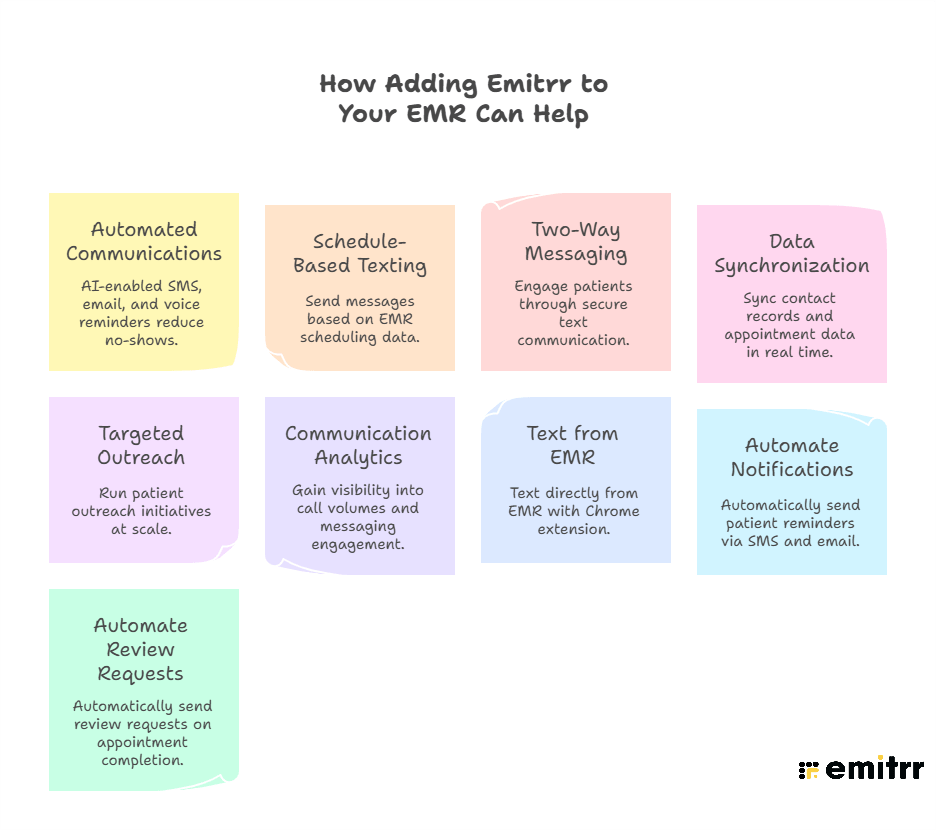
Many emr platforms offer SMS and reminders capabilities to some extent, but by integrating with patient engagement tools like Emirr, they can send follow-up reminders 2 days or even 2 hours before the appointment, and once it is confirmed, it can write confirmation back into the EHR. Similarly, providers can add Emitrr’s AI agent to tackle FAQs, appointment, or prescription-related calls and even answer queries after-hours. So if you struggle with high call volume, manual appointment follow-ups, reminders, etc., then EHR can help solve that by third-party integration.
6. Administrative Burden
Without EHR, providers and staff would spend too much time on paperwork, scheduling, and manual charting. With documentation, templates, AI scribe, scheduling, and billing integrated into the same system, the administrative burden is reduced to a good extent.
7. Medication and Diagnostic Errors
Incorrect dosages, missed allergies, or misread lab results can harm patients. Features like clinical decision support and e-prescribing offered by EMR platforms help in flagging potential allergies, abnormal lab values, etc., reducing diagnostic errors.
8. Poor Care Coordination
Providers often need to communicate with not just patients, but also other providers, labs, pharmacies, specialists, etc. An EMR helps in creating centralized and shareable records that can be accessed across departments and teams for smooth care coordination.
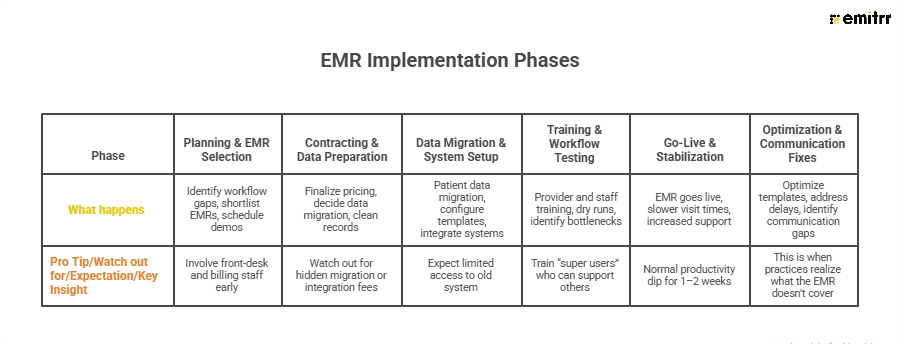
EMR Switching Timeline: What to Expect
Follow this week-by-week roadmap to minimize disruption and ensure a smooth EMR adoption.
Top 10 EMRs for Physicians: Detailed Analysis
Take a look at this detailed list of EMR systems in healthcare:
- Epic
- Praxis EMR
- athenaOne
- Oracle Health EHR
- Practice Fusion EHR
- eClinical Works
- Meditech Expanse
- TouchWorks EHR
- NextGen
- Elation Health
1. Epic: Best for Large Healthcare Organizations
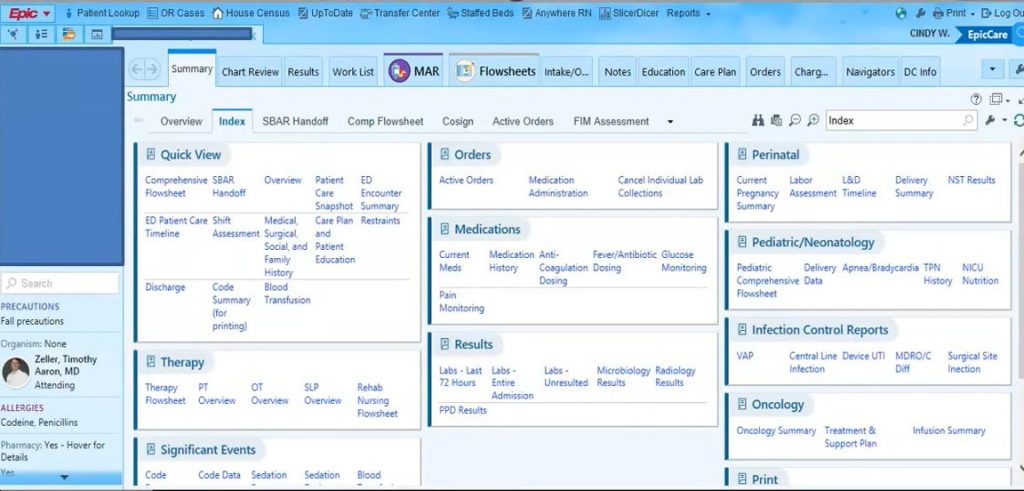
Epic EHR System Overview
Epic EHR software is a leading EHR platform that helps in streamlining patient care by offering documentation, billing, customized workflows, appointment scheduling, etc., in one place. Epic is a well-reputed EHR in the healthcare industry and is widely popular because of its interoperability, comprehensive features, and security. However, Epic EHR pricing is on the high end, making it more suitable for physicians or hospitals that operate on a large scale.
Epic EHR Features
- Interoperability and customizable workflows – Lets systems share data easily and adapts workflows to how doctors actually work.
- Clinical documentation – Helps doctors record patient visits quickly and accurately.
- Telehealth integration for remote health – Enables virtual visits so patients can be seen online.
- Billing & revenue cycle management – Manages claims, payments, and reduces billing errors.
- Appointment scheduling – Makes booking, rescheduling, and managing appointments easier.
- E-prescribing – Allows doctors to send prescriptions electronically to pharmacies.
- Data-driven insights with analytics – Uses data to improve care decisions and practice performance.
- Clinical documentation for record keeping – Keeps patient medical records organized and up to date.
- Care coordination tools – Helps care teams communicate and work together on patient treatment.
- Patient portals – Gives access to medical records, test results, direct communication with providers, etc.
- And more!
Pros & Cons of Epic EMR System
Take a look at the disadvantages and benefits of Epic EMR system.
| Pros of Epic EMR Software | Cons of Epic EMR Software |
| Seamless integration with other systems | The reporting feature is not very intuitive |
| Comes with a wide range of features | Steep learning curve |
| Intuitive interface | Difficult to get patient information |
| Great for sharing records seamlessly across different healthcare facilities | A vast number of features can make routine documentation feel cumbersome |
| Gives access to all patient info (vitals, labs, medications, and history) in one place | High implementation costs |
Epic EMR Pricing
- The starting price of a self-hosted Epic solution is $1200
- Epic EHR cost for large hospitals and clinics is $500,000
- Epic EMR per month cost is $200 to $35,000
- The cost of Epic Software training is $2000
Epic EMR Reviews
Here’s what users are saying about Epic EHR system:
“Epic is extremely efficient and easy to use. I am able to navigate it easily when searching for things that I need, as far as patient charting goes.”
“I do not like how difficult it is to get to the patient’s information. I understand it is for security reasons, but I wish there were a quicker way to search for a patient and pull up the patient in a faster manner.”
Source: Capterra
2. Praxis EMR: Best for Physicians Who Want Less Typing
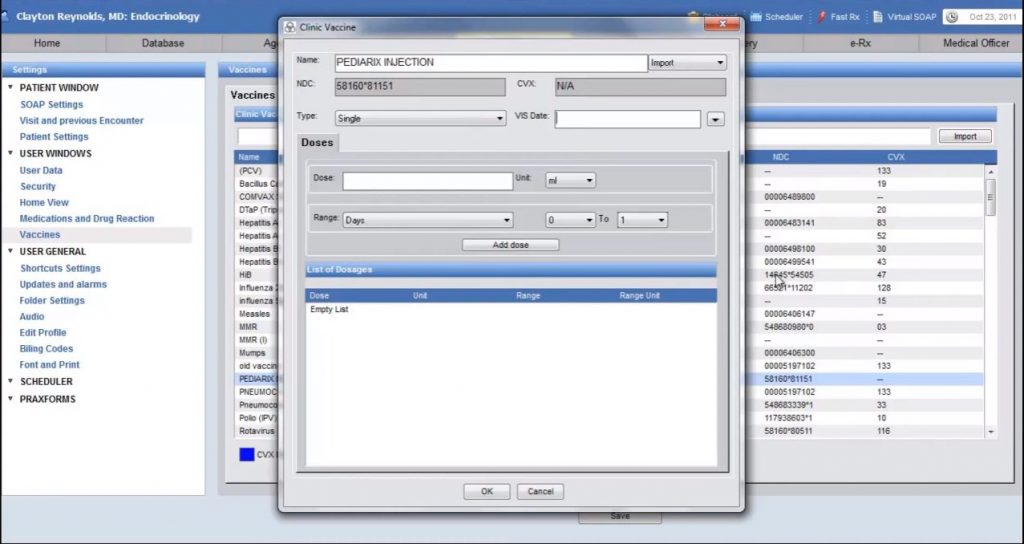
Praxis EMR Overview
Praxis is an AI EHR made for small and mid-sized physicians and other healthcare specialties. This EHR system is known for its AI-driven technology that learns from every interaction to give faster and more personalized documentation. Praxis EMR is highly rated by users for its customization, note-taking superiority, and template-free design that allows providers to chart in their own records. The only possible downside with this physician software is a steep learning curve and fewer integration options.
Praxis EMR Features
- AI-driven charting – Uses AI to create clinical notes automatically.
- Template-free design – Lets doctors document without rigid templates.
- Billing, claims, and revenue cycle management – Manages billing from claim to payment.
- Scheduling – Organizes and manages appointments easily.
- SOAP Notes – Structures notes into subjective, objective, assessment, and plan.
- Reporting and compliance – Generates reports and supports regulatory compliance.
- Voice & handwriting recognition – Converts speech or handwriting into text.
- Customization – Adjusts the EHR system to fit practice needs.
- Lab & medication integration – Connects lab results and medications in one place.
- Patient portal – Gives patients access to their records and messages.
- Secure messaging – Enables safe communication between patients and staff.
- AI-driven reminders – Sends automated reminders for visits and follow-ups.
Pros & Cons of Praxis EMR
| Pros of Praxis EMR | Cons of Praxis EMR |
| Can be extremely customized to individual physicians | Initial learning curve |
| Helps in reducing note-taking | Offers fewer integrations |
| Feels like a personalized assistant | Custom template creation maybe time consuming |
| Reliable customer support with a high user satisfaction rate | N/A |
Praxis EMR Pricing
Praxis offers an ownership model to all providers. For the first provider, it costs $219/month for 60 months, or $259 for 48 months. Adding additional providers is discounted at half off. After the Praxis plan, the provider owns Praxis for a lifetime, with updates, comprehensive support, and Upgrades for as low as $70/month for a lifetime.
Praxis EMR Reviews
Take a look at what users think of Praxis EMR:
“Flexibility. Allows a clinic to design it to do a lot of things. It has advanced SQL capability, which allows me to run queries on my custom data to produce reports to enhance patient care and services.”
“No dissatisfaction with the EMR. You can have it installed bare metal, virtualized, or hosted on the cloud.”
Source: Capterra
3. athenaOne: Best EMR for Small to Mid-sized Independent Medical Practices
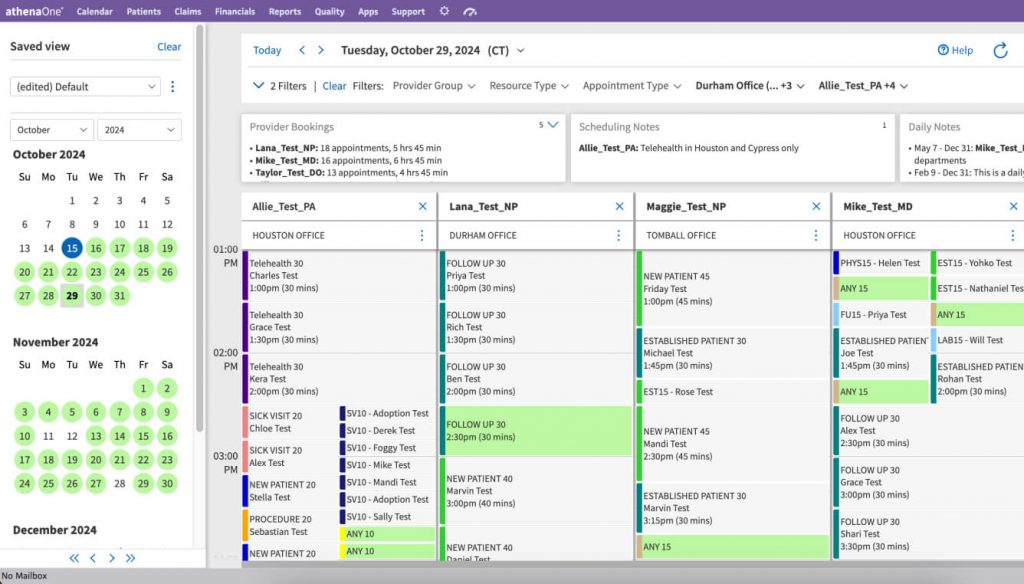
athenaOne Overview
athenaOne is a cloud-based, all-in-one platform from Athenahealth that offers EHR, practice management, medical biling and patient engagment into a single platform. Its AI-powered EHR streamlines documentation, while patient engagement tools keep patients informed. The platform also connects with labs, pharmacies, and registries, keeping charts up to date. athenaOne’s patient engagement feature is, however, limited, but its native integration with Emitrr helps in automating and writing back appointment confirmations; its AI agent can simplify prescription refills, reduce call volume, allow two-way texting, and more.
See how Athenahealth and Emitrr work together:
athenaOne Features
- AI-powered chart review & summary – AI quickly reviews and summarizes patient charts for faster decisions.
- Specialty-specific workflows – Workflows tailored to different medical specialties.
- Mobile documentation – Lets physicians document patient care from mobile devices.
- Real-time patient insights – Shows up-to-date patient information during care delivery.
- Integration with patient engagement tools – Extends physician EMR software within modern EMR systems to improve patient communication.
- Medical billing & practice management – Built-in physician billing software and physician practice management software for daily operations.
- Desktop-integrated speech-to-text dictation – Converts spoken notes directly into the medical record.
- Voice commands for hands-free navigation – Allows hands-free system navigation during clinical work.
- And more!
Pros & Cons of athenaOne
| Pros of athenaOne | Cons of athenaOne |
| Strong practice management + reporting capabilities | The platform faces bugs & issues frequently |
| Convenient mobile access and chart look-ups | Requires too many clicks and navigation steps |
| Its native integration with Emitrr solves the communication & patient engagement gap | AthenaOne pricing can be high & confusing |
| All-in-one system with intuitive interface | Unreliable customer service |
athenaOne Pricing
athenaOne EHR follows a performance-based pricing model, which means:
- They do not charge large upfront licensing fees.
- They take a percentage of your revenue only when you get paid.
athenaOne Reviews
Here’s what users are saying about athenaOne emr:
“Appointment scheduling and user interface is of the highest quality with this product. I appreciate the efficiency of improvements and how quick & easy it is for customers to utilize the online version of the appointment scheduling, and the customer support that is offered is fantastic.”
“At times, the bugs and issues with website improvements can be rather cumbersome. At times, it did take quite a bit of time for the bugs and issues to be rectified.”
Source: Capterra
4. Oracle Health EHR: Best for Small Multi-Specialty Organizations
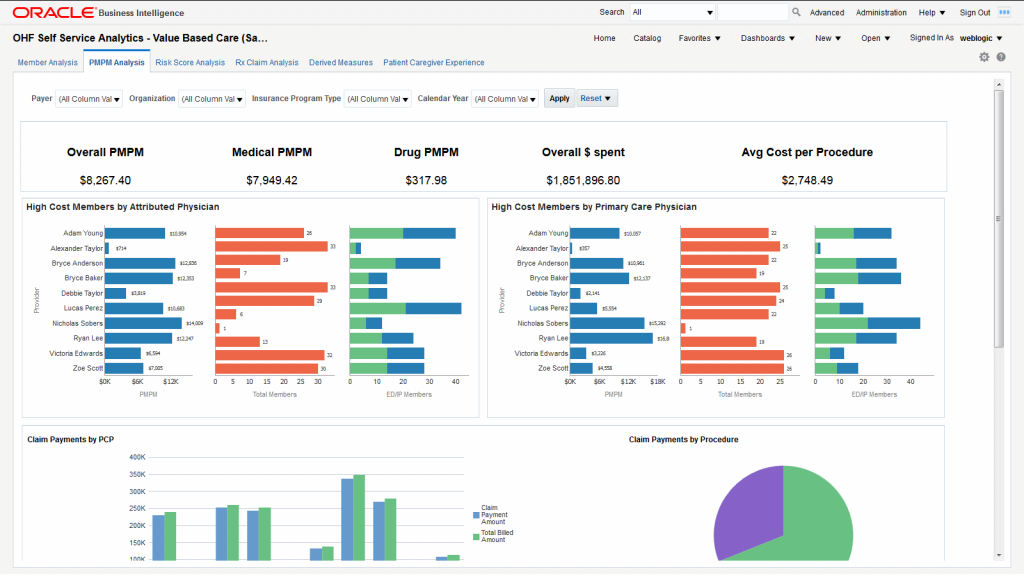
Oracle Health EHR Overview
Oracle Health (formerly Cerner) is another popular all-in-one, voice-first intelligent EHR solution that offers not just basic EHR features but also advanced AI automation features that help in automating clinical documentation through voice dictation, streamlining workflows, etc. Oracle EHR is a decent choice if you are looking for an affordable physician EHR; however, users often complain about the clunky interface, which makes navigation time-consuming.
Oracle Health EHR Features
- Clinic interoperability – Enables different systems and departments to share patient data smoothly.
- Clinical charting – Supports accurate and efficient documentation of patient encounters.
- Lab integration – Automatically pulls lab results into patient records.
- Medical billing integration – Connects physician billing software with EMR systems for smoother billing workflows.
- Voice dictation – Allows clinicians to dictate notes directly into the record.
- Medication management – Manages prescriptions, refills, and medication history safely.
- HIPAA compliance & security – Ensures data protection across electronic medical record systems and EHR systems.
- AI-powered assistants – Uses AI to support daily tasks within physician EMR software.
- Predictive and EHR-agnostic analytics – Delivers insights across multiple platforms without being tied to one system.
- Virtual nursing and remote patient engagement – Supports remote care and follow-ups beyond in-clinic visits.
- Patient portals with personalized tools and reminders – Gives patients access to records, reminders, and self-service tools.
- And more!
Pros & Cons of Oracle Health EHR
Take a look at the advantages & disadvantages of using Oracle Health EHR as a Physician:
| Pros of Oracle Health EHR | Cons of Oracle Health EHR |
| Affordable | Clunky navigation |
| Offers advanced analytics tools | Frequent updates may move settings |
| Straightforward for staff training | Not that compatible with third-party tools |
| Simplifies appointment scheduling | Offers an inconsistent user experience across facilities |
| Offers AI-powered assistants for simplifying workflows | Requires too many clicks to perform a simple task |
Oracle Health EHR Pricing
The information related to Oracle Health pricing is not available on their website.
Oracle Health EHR Reviews
Here’s what users are saying about Oracle Cerner Ambulatory EHR:
“Cerner PowerChart is an easy-to-use system. It is very easy to use and has multiple ways to chart on the same topic- making it very user-friendly.”
“There are many areas of PowerChart that are very repetitive and make you chart the same thing multiple times. Med Recs can also be confusing for beginners using this system.”
Source: Capterra
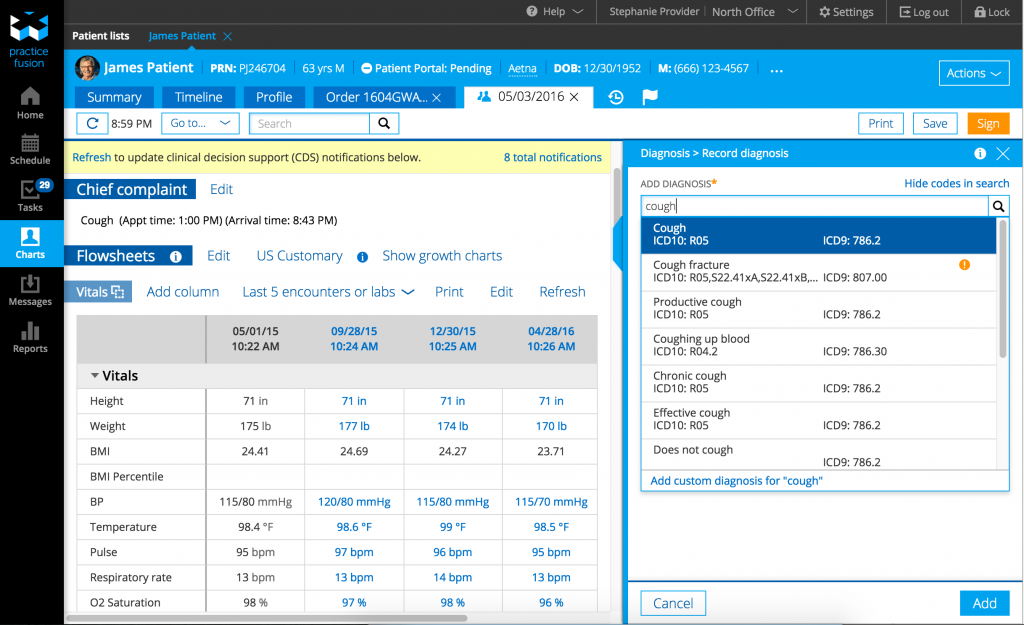
5. Practice Fusion EHR: Best Affordable Physician EMR Software
Practice Fusion EHR Overview
Practice Fusion is a cloud-based EMR that can be used by small or independent Physicians or medical practices to reduce admin burden and streamline workflows. This EHR software offers plenty of useful patient engagement, billing management, appointment scheduling, and other workflow management features at an affordable price. However, frequent system crashes and poor customer support are two big issues with this physician practice management software.
Practice Fusion EHR Features
- Patient records management – Organizes patient data within electronic medical record systems.
- Appointment scheduling – Simplifies booking and managing patient visits.
- E-prescribing – Sends prescriptions electronically to pharmacies.
- Billing & invoicing – Manages charges, payments, and invoices.
- Workflow management – Streamlines daily operations across physician software systems.
- Coding assistance – Helps apply accurate medical codes.
- Client portal – Gives patients access to their information online.
- Claims management & scrubbing – Reduces claim errors before submission.
- Templates – Speeds up documentation with reusable formats.
- Messaging – Enables secure communication between staff and patients.
- And more!
Pros & Cons of Practice Fusion EHR
Take a look at the advantages and disadvantages of using Practice Fusion EHR software:
| Pros of Practice Fusion EHR | Cons of Practice Fusion EHR |
| Quick to set up with a user-friendly interface | Recurring bugs, system crashes, and slow performance |
| Offers web-based access | Phone support is unavailable or ineffective |
| Affordable pricing | Advanced clinical features (charting, reporting) can be clunky |
| Customizable templates | Weak billing integration |
| Patient-engagement tools | Weak practice management integration |
Practice Fusion EHR Pricing
Practice Fusion pricing is quite affordable compared to other EMRs/EHRs, starting at $199/month per provider with a required annual commitment.
Practice Fusion EHR Reviews
Here’s what users are saying about Practice Fusion EMR:
“Easy to use EMR that allows our practice to scale up as we continue to grow. As a private clinic, having this ability is critical.”
“The UI needs some updating in some areas. Some of the functions can feel a bit dated, but it does not affect the functionality.”
Source: Capterra
See how Practice Fusion compares with AthenaHealth
6. eClinicalWorks: Best Customizable Physician EMR Software
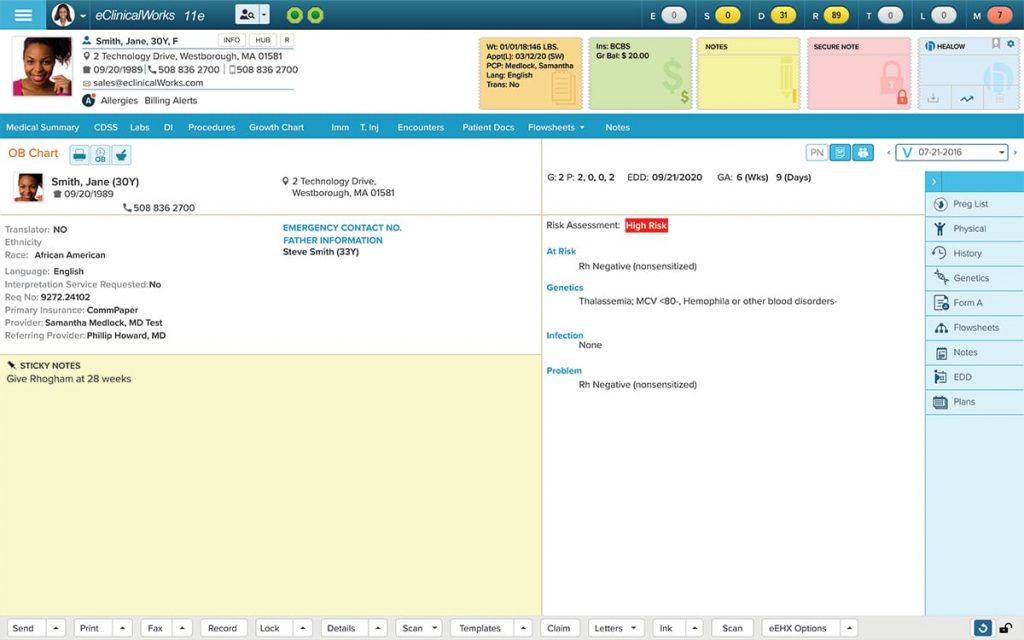
eClinicalWorks Overview
eClinicalWorks emr is a highly customizable, cloud-based and AI-powered EMR software suitable for physicians and other healthcare providers. ECW emr is known for its strong telehealth capabilities, integration with other systems, and robust set of features. If you have a mid-sized clinic looking for a practical and affordable EHR, then ECW is a good option to consider. However, poor customer support and a clunky interface are issues users often complain about with this physician software.
eClinicalWorks Features
- Document management – Stores and organizes files within electronic medical records software.
- Revenue cycle management – Manages payments and claims using physician practice management software.
- Referral management – Tracks and manages patient referrals efficiently.
- Patient portal – Gives patients secure access to their information.
- Mobile app – Allows access to records and tasks from mobile devices.
- Patient engagement – Improves communication and follow-ups with patients.
- Interoperability – Enables systems to share patient data easily.
- Cloud hosting – Hosts data securely with remote access and backups.
- And more!
Pros & Cons of eClinicalWorks
| Pros of eClinicalWorks EHR | Cons of eClinicalWorks EHR |
| Integrated EHR with scheduling, billing, and documentation in one place | Steep learning curve and clunky interface |
| Strong telehealth capabilities | System performance issues, such as slowdowns |
| Covers multiple medical disciplines | Problematic data migration |
| Automates charting | Inconsistent experience and bugs |
| Mobile-friendly interface | Poor and slow customer support |
| Integrated billing system | Does not allow external systems to create telephone encounters |
eClinicalWorks Pricing
There are three eClinicalWorks pricing options available:
- EHR only: $449/mo/per provider
- EHR with practice management: $599/mo/per provider
- RCM as a service: 2.9% of practice collections
eClinicalWorks Reviews
Take a look at these eClinicalWorks EHR reviews:
“eClinicalWorks is one of the most robust EMRs on the market. It gives you everything you need for your practice.”
“eClinicalWorks emr is known for the amount of ‘clicks’ it takes to complete a task. This is a bit much, but they are aware.”
Source: Capterra
7. Meditech Expanse EHR: Best EHR For Collecting Patient Info
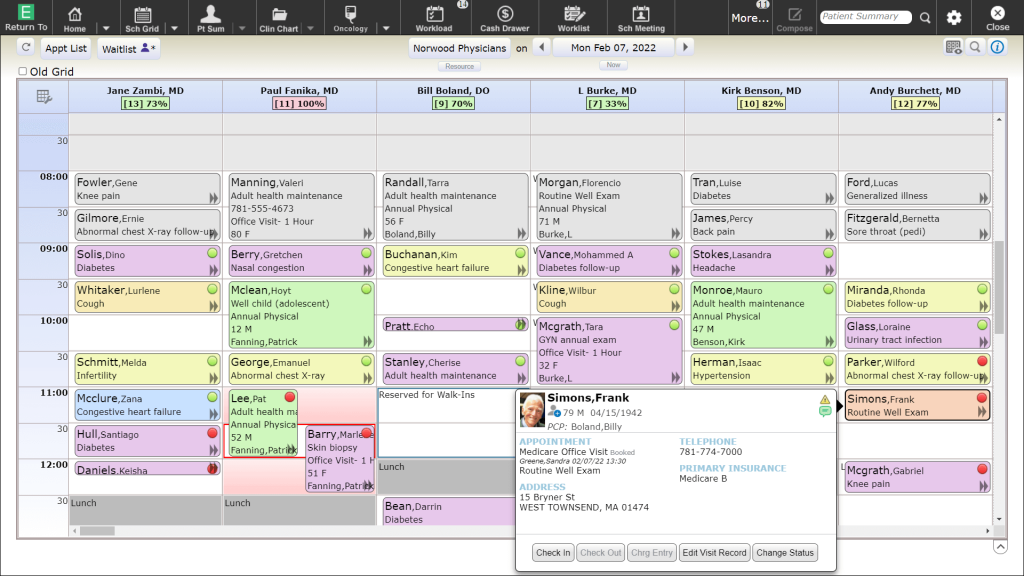
Meditech Expanse Overview
Meditech is one of the top ehr systems that healthcare providers kind of love and hate. It comes with a clunky user-interface and requires you to make multiple clicks, but once you get the hang of it, it is pretty easy to use and train your employees. It is not as customizable and has frequent downtimes, but it is really good at collecting patient information, billing, documentation, and charting. If you are a physician with mid-sized operations who can deal with the initial clunkiness of the UI but want something that’s more affordable than EHRs like ECW, then this could be a good choice for you.
Meditech Expanse Features
- Telehealth options – Supports virtual visits and remote consultations.
- Patient portal – Allows patients to access records and messages through physician EMR software.
- Interoperability – Allows systems to exchange patient data seamlessly.
- Revenue cycle / electronic claims – Supports claims processing within reliable EHR systems.
- Outpatient services – Manages care delivery for non-hospital visits.
- Virtual care – Enables remote patient monitoring and follow-ups.
- Templates – Speeds up documentation with reusable formats.
- Charting and reports – Helps record care and generate clinical reports.
- Scheduling & referral management – Manages appointments and referrals efficiently.
- Mobile app – Enables on-the-go access using secure cloud-based EMR technology.
- And more!
Pros & Cons of Meditech Expanse
| Pros of Meditech EHR | Cons of Meditech EHR |
| Great for billing & documentation | Clunky user interface |
| Affordable compared to other mid-sized EHRs like Epic | Customization is not as flexible |
| Great at collecting patient info | Frequent downtimes |
| Helpful for charting & viewing reports | Requires multiple steps |
| Easy to train staff | Poor templates |
Meditech Expanse Pricing
Meditech Expanse pricing starts at $49/user/month, but the actual cost of using Meditech EHR system can vary depending on the number of users, organization’s size, modules (like billing, charting), hosting, etc.
Meditech Expanse Reviews
Take a look at what users think of this physician software:
“The software works (which is better than other EMR software) and is highly HIPAA compliant.”
“The features are clunky and don’t seem to be updated for the 2020’s software standard most are used to. In particular, the lack of “click-ability” of most inputs and instead having to use the arrow keys is quite old-fashioned”
Source: Capterra
8. TouchWorks EHR: Best Versatile EHR for Large Clinics
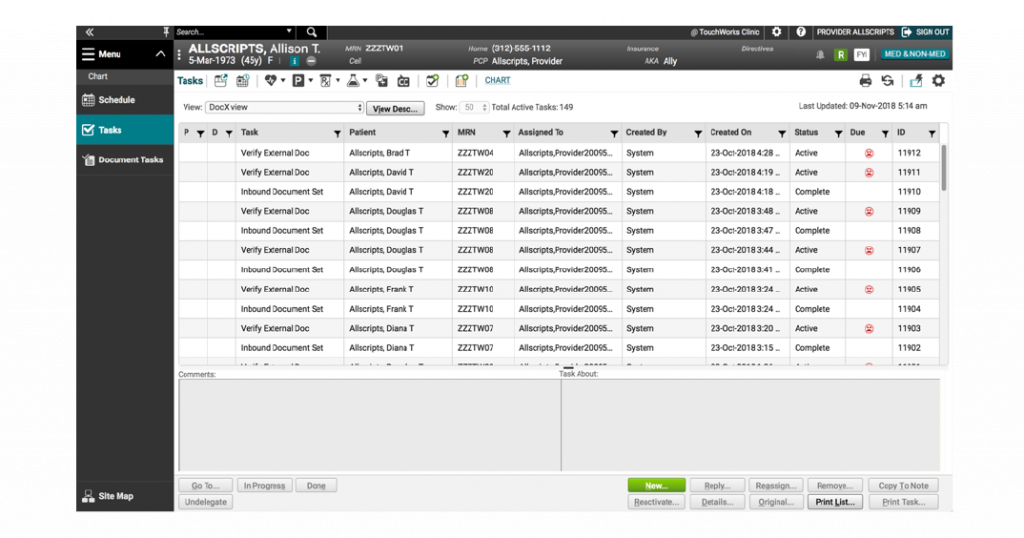
TouchWorks EHR Overview
TouchWorks EHR (now often called Altera TouchWorks) is another popular EHR for physicians and other healthcare professionals known for its large feature set and specialty workflow support. This healthcare EHR might be suitable for large or multi-specialty practices, but it requires IT support and time. For mid-sized or less technical physician practitioners, this physician EMR software might not be a great fit.
TouchWorks EHR Features
- Charting & clinical notes – Enables structured documentation within electronic medical record systems.
- Templates and decision support tools – Helps speed up notes and support clinical decisions.
- Billing, claims, and revenue cycle management – Streamlines payments using integrated physician billing software.
- Mobile access – Allows access to records from mobile devices.
- Scheduling – Simplifies booking and managing appointments.
- Interoperability – Allows data exchange across connected EHR systems in healthcare.
- e-Prescribing – Sends prescriptions electronically to pharmacies.
- Analytics & reporting – Provides insights through reports and performance data.
- Strong security – Protects patient data with advanced security controls.
- And more!
Pros & Cons of TouchWorks EHR
| Pros of TouchWorks EHR | Cons of TouchWorks EHR |
| Strong support for specialty workflows | UI responsiveness is not the best |
| Decent reporting and clinical decision support | Long training period |
| Versatile & customizable | Slow customer support |
| Large feature set | Slow updates and bug fixes |
TouchWorks EHR Pricing
TouchWorks EHR pricing is not made public.
TouchWorks EHR Reviews
Take a look at what users think of TouchWorks EHR:
“Extremely versatile and customizable product. User interface is fairly clean and easy to use. Vast number of features and options specific to your practice.”
“The company is slow to correct usability and bug issues. Support is slow and often does not seem very skilled. Extremely expensive to implement, upgrade, and patch.”
Source: Capterra
9. NextGen Healthcare: Best EMR with Practice Management System
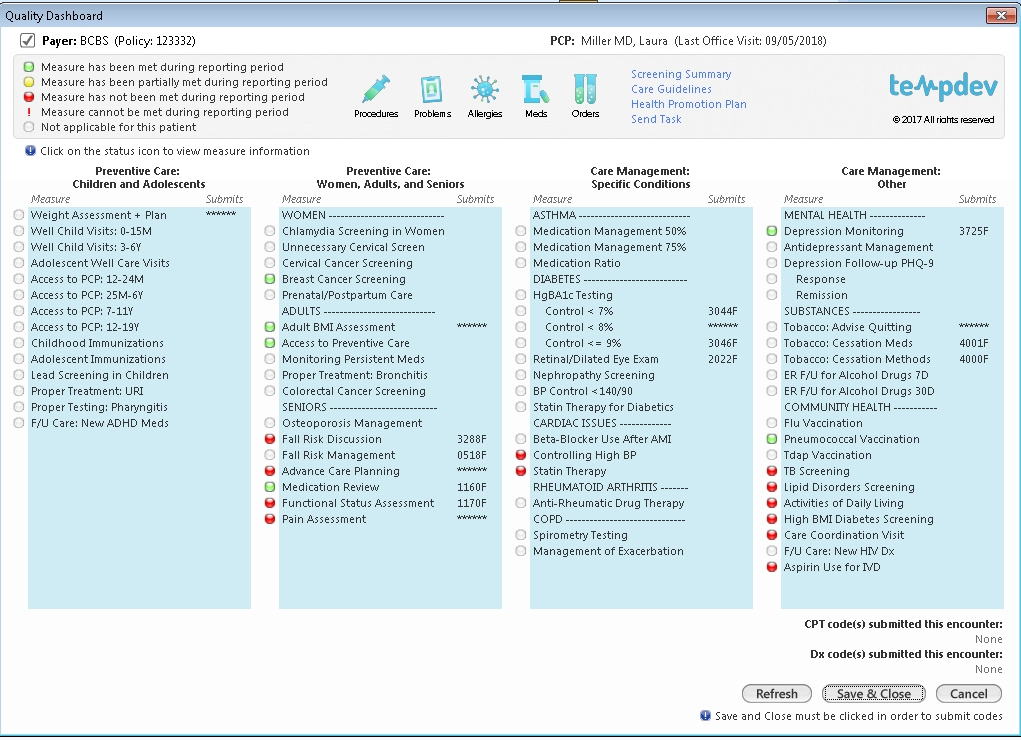
NextGen Healthcare Overview
NextGen Healthcare is a widely-used EHR and practice management system that runs almost everything a medical practice does, be it helping doctors document care, helping staff manage appointments and billing, and helping patients communicate. This physician EHR is powerful and customizable, but not the easiest system to learn quickly. Its integrated billing, patient engagement, and AI-assisted documentation features are really great and are a great choice for multi-provider clinics or practices with specialty services. But if you dread too many clicks and clunky workflows, then EHR could be a problem.
NextGen Healthcare Features
- Customisable workflows – Adapts daily operations within flexible EMR software.
- Revenue Cycle Management (RCM) – Manages billing and payments using physician practice management software.
- Specialty-specific templates – Provides templates tailored to different medical specialties.
- Online self-scheduling & secure messaging – Allows patients to book visits and message securely.
- Patient portals – Gives patients access to information through electronic medical record systems.
- Interoperability – Enables seamless data sharing between systems.
- AI-powered ambient listening for SOAP notes – Automatically captures and structures clinical conversations.
- Telehealth – Supports virtual visits and remote care delivery.
- And more!
Pros & Cons of NextGen Healthcare
| Pros of NextGen EMR | Cons of NextGen EMR |
| Strong scheduling and reporting tools | Users report confusion with billing, invoicing, and posting insurance/patient payments |
| Billing staff and coders sometimes find it easy to learn and use | Inconsistent customer support |
| Flexible add-ons and integrations | Requires too many clicks |
| Comprehensive practice management features | Confusing price |
NextGen Healthcare Pricing
NexGen Healthcare pricing is not available on their website, but as per other online sources, it starts around $549/provider/month for physicians.
NextGen Healthcare Reviews
Here’s what users are saying about NextGen EHR:
“As a medical biller and coder i absolutely enjoy using Nextgen Healthcare. It is a very easy software to learn, extremely practical, and with a lot of useful tools. I have used other medical software, but none surpasses my experience with Nextgen emr. I highly recommend it to any practice/Biller as it is very user-friendly.”
“I really have nothing negative to say about Nextgen Healthcare. My experience is nothing but positive, and I highly recommend it.”
Source: Capterra
10. Elation Health: Best EHR System for Independent Physicians
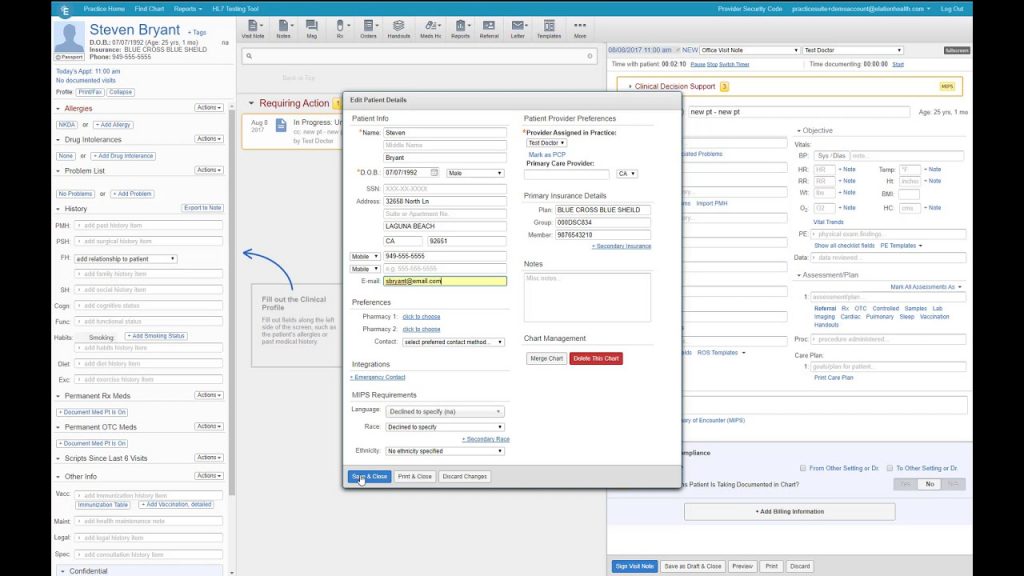
Elation Health Overview
Elation Health is an all-in-one EHR system offering a wide set of features like AI-powered documentation, smart e-prescribing, built-in reminders, and great cloud-based EMR accessibility. This electronic health system is good for independent physicians, primary care doctors, and small groups who want a modern, efficient EHR that feels easy to use. It is not ideal for mid or large healthcare groups.
Elation Health Features
- Smart ePrescribing – Sends prescriptions electronically to pharmacies.
- AI-powered documentation – Creates notes automatically in physician EMR software.
- Integration with labs and imaging centers – Pulls results directly into patient records.
- Integrated billing – Manages charges and claims using physician billing software.
- Mobile access – Allows physicians to work on the go.
- Automated workflows to reduce clicks – Streamlines daily tasks efficiently.
- Patient portal for communication & scheduling – Lets patients access info through electronic medical record systems.
- Online self-scheduling & forms – Lets patients book visits and submit forms online.
- Telehealth – Supports virtual consultations and remote care.
- And more!
Pros & Cons of Elation Health
| Pros of Elation Health EMR | Cons of Elation Health EMR |
| Clean & intuitive interface | Not as robust for hospital/large specialty workflows |
| Great for primary care documentation | Pricing can be a bit higher |
| Built-in reminders, preventative care support | Some advanced analytics are still growing |
| Cloud based EMR with good accessibility | Poor customer support |
| e-prescribing and core clinical documentation work well | Weak billing support |
Elation Health Pricing
The pricing of Elation Health EHR is not available on their website, but sources tell it could be between $349/month and $399/month.
Elation Health Reviews
Take a look at Elation Health EHR reviews:
“I love how user-friendly Elation is. The charting process is streamlined, and I can easily navigate through patient records. The customizable templates and workflows have saved me so much time, allowing me to focus more on patient care. The customer support team is also super responsive and helpful.”
“One thing I would like to see improved is the billing module. Sometimes, I have encountered minor glitches when generating claims, which can be frustrating. However, the support team has always been able to troubleshoot and resolve the issues quickly.”
Source: Capterra
EMR Comparison on the Basis of Day-to-Day Friction Points
Beyond feature lists, what matters most is how an EMR feels during a busy clinic day. This snapshot compares the above-mentioned EMRs across the most common usability pain points reported by physicians and practice teams.
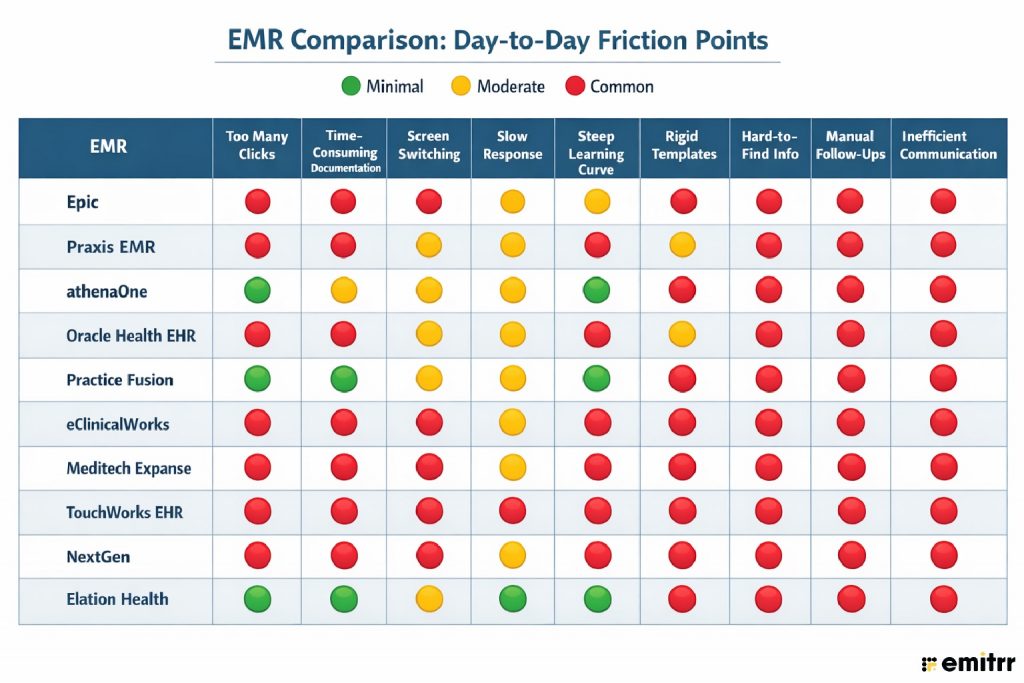
Disclaimer: Note: This comparison reflects general usability trends, not absolute performance. EMR experience can vary by specialty, implementation quality, and practice workflows. Refer to the provider’s website for more info.
Final Summary
Here’s a final summary of which medical electronic record system is best for whom:
- Choose EPIC EHR if you are a large healthcare business that doesn’t mind spending for an EHR that offers great features & an intuitive interface. However, there’s a steep learning curve involved with a compromise on the ease of getting patient info.
- Praxis is the top choice for small and mid-sized physicians who want to spend less time typing, with lots of customization, security, and features. However, for larger clinics/hospitals needing deeper integration, it may not be ideal.
- Choose athenaOne EHR if you are a busy mid-sized healthcare provider looking to get everything, billing, RCM, patient engagement, and practice management under one roof.
- Oracle Health EHR is best for small physicians or multi-specialty organizations that are looking for an affordable EHR, ease of training, and AI-powered assistants. However, if you dread too many clicks and poor UI, then skip this one.
- In the affordable category, Practice Fusion is another alternative to consider. It has a better UI than Oracle, great patient engagement tools, templates, etc. However, it struggles with charting, reporting, and billing issues.
- If customization, deep integration, charting & documentation are pain points you want to solve as a mid or large-sized healthcare group, ECW emr can be a good choice. But data migration, clunky interface, and learning curve are some issues you have to deal with.
- If, unlike Oracle, you cannot compromise on capabilities like billing & documentation, patient info collection, charting & viewing reports, then go with Meditech EHR. However, it offers poor templates and requires some time to get used to.
- Not the best, but TouchWorks is decent for large clinics that want customization and a range of features. But there are many issues with this one, such as poor UI, poor data searchability, a long training period, etc.
- If you are looking for an EHR + practice management system that simplifies scheduling, reporting, and integrations, then you can check out NextGen. But just like Oracle, it makes you click too much for simple tasks and causes problems with billing & invoicing.
- If you are an independent small physician who wants AI-powered efficiency, a clean interface, e-prescribing, and smooth clinical documentation work, then go for Elation EHR. It is not fit for hospital/large specialty workflows, though.

FAQs
Physicians should prioritize ease of use, fast documentation, specialty-specific templates, reliable e-prescribing, strong interoperability, and accurate billing support to avoid extra administrative work when comparing the top ehr systems in healthcare.
There is no single “best” EMR. Epic suits large health systems, athenaOne works well for cloud-based practices, and Practice Fusion or eClinicalWorks fit smaller clinics, depending on budget and workflow needs.
A well-designed EHR reduces manual charting, automates prescriptions and referrals, surfaces clinical data quickly, and minimizes after-hours documentation.
Voice dictation, smart templates, minimal clicks, fast load times, and integrated patient communication tools significantly reduce time spent on non-clinical tasks.
Cloud-based EMRs offer easier access, automatic updates, lower IT overhead, and better scalability, but performance depends on internet reliability and vendor uptime.
Interoperability is critical—physicians need seamless access to labs, imaging, referrals, and external records to make informed clinical decisions without data hunting.
Yes, medical electronic record systems with real-time coding support, MDM guidance, and claim scrubbing help reduce denials and ensure accurate reimbursement.
Physicians often cite excessive clicks, slow workflows, poor usability, and time-consuming documentation as the biggest pain points.
Most physicians become functional within 2–4 weeks, but full efficiency can take several months, depending on system complexity and training quality.
An EMR is a digital version of a patient’s chart within a single practice. It stores medical history, diagnoses, and treatment notes, but usually doesn’t travel easily outside that organization. An EHR, on the other hand, is designed for data sharing across providers and care settings. It allows authorized clinicians, labs, pharmacies, and specialists to access and update patient records in real time, supporting better care coordination and continuity of care.
Most EHRs offer basic portals and messaging, but many physicians still rely on complementary tools for texting, reminders, follow-ups, and no-show reduction.
Small practices often prefer simpler, cost-effective medical electronic record system like Practice Fusion or athenaOne, especially when ease of setup and affordability are priorities.
Conclusion
Choosing the right EMR for physicians, at the end, depends on the size of your practice, your current challenges, budget, among other things. In this guide, we compared the then best EHRs that are available in the market today, and all come with their respective pros and cons. At the end, the best physician EHR is the one that reduces staff workload, improves efficiency, and reduces errors. However, the patient communication and engagement part is still not covered to a full extent with even the best EHRs. To get the best out of it, we recommend pairing your EHR with a patient engagement and communication tool.