
 4.9 (400+
reviews)
4.9 (400+
reviews)
Introduction
Every healthcare practice works hard to deliver a positive patient experience, yet that effort does not always reflect online. Patients trust an online review as much as a personal recommendation, but even satisfied patients rarely leave feedback without a reminder. For practices that rely on Athenahealth, this often leads to fewer reviews, weaker visibility, and missed opportunities to strengthen reputation management. In this blog, you will get to know how to send SMS review requests in Athenahealth and turn patient satisfaction into a stronger online reputation.
What is SMS Review Request?
At the end of a busy clinic day, everything seems complete. Visits finish, charts close, and the schedule resets for tomorrow. But one important opportunity often goes unnoticed: capturing patient feedback.
An SMS review request solves this gap. It is a simple text message sent after a visit that asks patients to leave an online review. Short, direct, and easy to act on. Patients tap the link, rate their experience, and move on with their day.
While the Athenahealth Patient Portal supports many forms of patient communication, practices often find that it does not natively automate dedicated SMS review requests as part of reputation-building workflows. That is why many clinics look for ways to boost patient outreach via SMS, particularly for reviews and feedback collection.
In short, an SMS review request turns a positive patient experience into visible social proof.

What Are the Common Challenges with SMS Review Requests?
SMS review requests sound simple, but real-world execution often proves difficult. Many Athenahealth providers struggle to maintain consistency, timing, and follow-through.
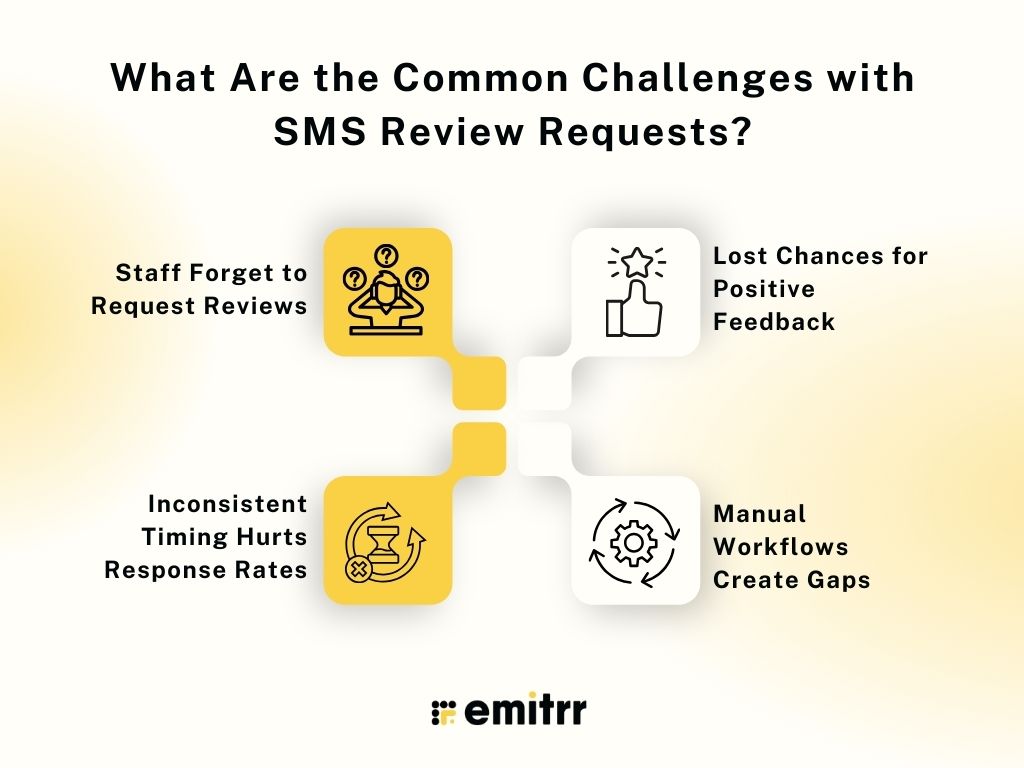
- Staff Forget to Request Reviews: Front desk teams juggle scheduling, billing, check-ins, and patient questions. Review requests rarely stay top of mind. As a result, many satisfied patients never receive a prompt.
- Inconsistent Timing Hurts Response Rates: Timing directly affects engagement. A delayed message loses impact. A poorly timed request feels awkward. Without healthcare automation, practices often send requests too late or not at all.
- Lost Chances for Positive Feedback: Happy patients leave the clinic with good intentions, but busy schedules. Without a timely SMS, feedback simply does not happen. Each missed request equals a missed reputation boost.
- Manual Workflows Create Gaps: Sending review requests manually requires staff effort and discipline. Some patients receive messages. Others do not. This inconsistency weakens results and limits review growth.
Watch how front desk teams in Athenahealth practices can save 70+ front desk hours every month without hiring more staff or changing your EHR.
Automate SMS Review Requests by Integrating Athenahealth with Emitrr AI
Emitrr’s AI reputation management makes review and reputation management in healthcare easier and more consistent. Clinics no longer depend on staff reminders or manual follow-ups. SMS review requests go out automatically, patient outreach feels personal, and feedback collection becomes part of the everyday workflow.
From pediatricians to wellness clinics, Emitrr supports practices that want steady review growth without adding administrative strain. Automated triggers send requests after visits, and smart routing guides patients to the right review platform.
Results practices have seen: In just 8 months, Citryn grew to more than 30 locations, delivered patient engagement and reputation management services through Emitrr, and generated 1,500+ new reviews.
When Athenahealth integrates with Emitrr AI, practices can achieve consistent review growth, gain clearer patient feedback, and strengthen patient trust.
Here’s what this integration helps you unlock:
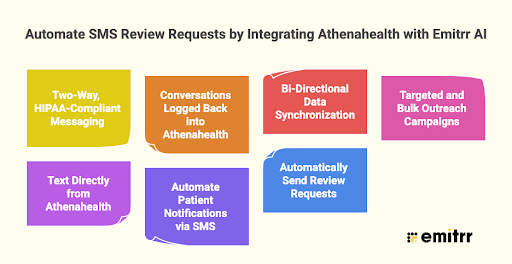
Two-Way, HIPAA-Compliant Messaging
Engage patients through secure, real-time two-way texting. Patients can confirm, reschedule, or ask questions without placing a call. Take a look at more texting software for Athena SMS integration
Conversations Logged Back into Athenahealth
All SMS interactions sync directly into Athenahealth, so staff always have a full communication history inside the EHR.
Bi-Directional Data Synchronization
Emitrr’s Athena SMS integration syncs patient records, appointments, and custom fields with Athenahealth in real time. No duplicate entry. No data gaps.
Targeted and Bulk Outreach Campaigns
Send updates, reminders, recalls, or educational messages at scale. Segment patients by visit type, provider, or location.
Text Directly from Athenahealth
With Emitrr’s Chrome extension, staff can send texts from within Athenahealth. No tab switching. No workflow disruption.
Discover the easiest way to text patients directly from Athenahealth:
Automate Patient Notifications via SMS
Send automated appointment reminders and alerts using your existing business number. Customize messaging based on appointment status.
Automatically Send Review Requests
Trigger SMS and email review requests after appointment completion. Set delivery timing such as one hour later, one day later, or a custom cadence.
How To Send SMS Review Requests in Athenahealth
When Emitrr integrates with Athenahealth, review requests no longer depend on staff reminders or manual follow-ups. The workflow runs automatically based on appointment activity.
Step 1. Integrate Athenahealth with Emitrr
Connect your Athenahealth account with Emitrr. Patient data and appointment status begin syncing in real time.
Step 2. Enable Review Automation
Activate review requests inside Emitrr. This setting controls when and how patients receive feedback prompts.
Step 3. Trigger Requests After Appointment Completion
Emitrr automatically sends an SMS once a visit shows as completed in Athenahealth. No staff action required.
Step 4. Guide Patients Through a Smart Review Page
Patients tap the SMS link and land on Emitrr’s review page:
- “Great” → Redirect to Google to post a public review
- “Below Expectations” → Private feedback form
This approach encourages positive reviews by addressing concerns before they are shared on public platforms.
Step 5. Capture Negative Feedback Privately
If a patient selects a low rating, Emitrr routes the response directly to the practice. Teams can follow up quickly and resolve issues.
Step 6. Monitor and Respond to Reviews
View Google reviews inside Emitrr. Respond from one dashboard without switching platforms.
Watch how to get more reviews and manage business reputation easily with Emitrr:
What Are The Best Practices for Sending SMS Review Requests?
A well-timed SMS review request can significantly increase patient responses. But results depend on more than just sending a text. Message timing, wording, and patient experience all shape whether patients choose to leave feedback.
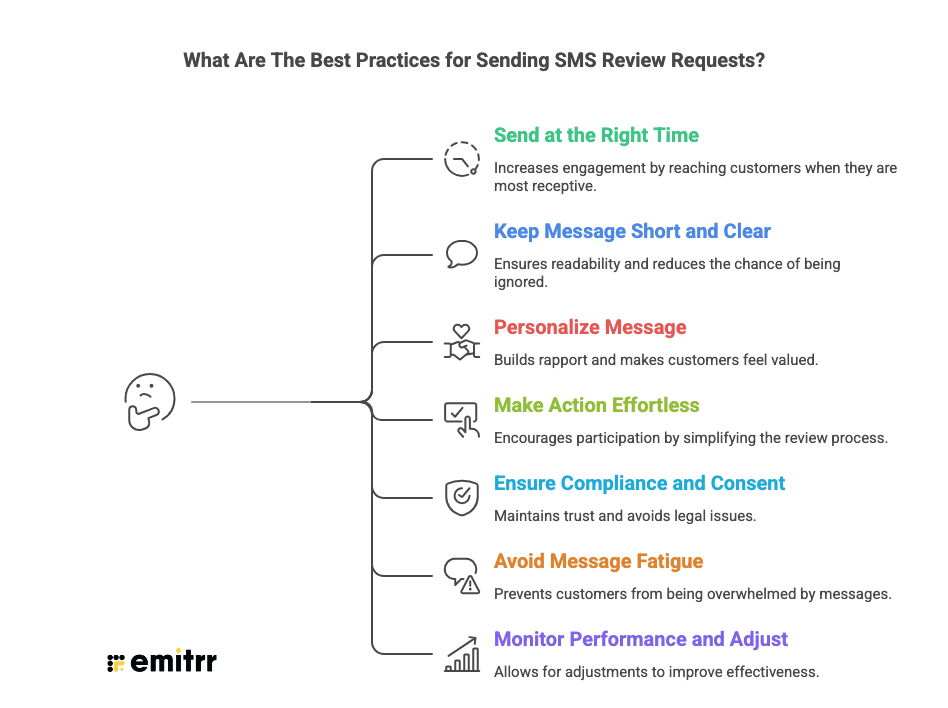
Send Requests at the Right Time
Reach out within 24 hours of the appointment. The visit stays fresh in the patient’s memory, which increases the likelihood of action. Delayed messages often lead to lower response rates.
Keep the Message Short and Clear
Patients respond better to concise texts. Avoid long explanations. A simple request with a direct review link works best.
Personalize the Message
Include the patient’s name or the provider’s name when possible. Personalization makes the message feel genuine rather than automated.
Make the Action Effortless
Always attach a direct review link. Extra steps reduce completion rates. The easier the process, the higher the conversion.
Ensure Compliance and Consent
Send SMS requests only to patients who opted in for text communication. Using HIPAA-compliant texting protects patient privacy, maintains trust, and ensures regulatory compliance.
Avoid Message Fatigue
Do not overwhelm patients with multiple reminders. One request and, if needed, a gentle follow-up is sufficient.
Monitor Performance and Adjust
Track delivery rates, click rates, and review conversions. Small adjustments in timing or wording can produce measurable improvements.
What Are The Key Benefits of Automating SMS Review Requests in Athenahealth?
Manually requesting reviews often leads to inconsistency. Some patients receive a reminder, others do not. Emitrr AI Automation changes this. Every completed visit becomes an opportunity to collect feedback and strengthen your online presence.
• Consistent Review Generation
Automation ensures every patient receives a review request after their appointment. No gaps caused by busy schedules or human oversight. Even on high-volume days, completed visits still trigger messages, which keeps review flow steady and predictable.
• Higher Patient Response Rates
Timing plays a major role in engagement. SMS requests sent soon after a visit reach patients when their experience is still fresh. A patient leaving the clinic can quickly tap the link and submit feedback before daily distractions take over.
• Stronger Online Reputation
A consistent stream of positive reviews improves ratings, credibility, and local search visibility. Practices with recent, frequent feedback often appear more trustworthy to prospective patients who compare providers online.
• Early Capture of Patient Concerns
Smart routing gives dissatisfied patients a private channel to share concerns. This allows practices to respond, resolve issues, and improve the experience before frustration turns into a public negative review.
• Reduced Front Desk Workload
Staff no longer need to remember who to message or when to send requests. The system handles outreach automatically, which frees the front desk to focus on patient interactions, scheduling, and in-clinic support.
• Measurable Reputation Growth
Automation makes performance visible. Practices can track how many requests were sent, how many patients clicked, and how many reviews were generated, which helps refine strategy and demonstrate ROI.
KeyTakeaways
- Patient reviews strongly influence healthcare decisions
- Manual processes often cause missed review opportunities
- Automated SMS requests significantly improve review response rates
- Athenahealth practices can benefit from integrated review automation
- Emitrr AI enables consistent, automated review generation to drive higher patient engagement
- This Automation strengthens the practice’s reputation and patient trust
- Review growth becomes predictable and measurable with Emitrr AI
Frequently Asked Questions
Athenahealth offers patient communication features like reminders and messages, but sending dedicated SMS review requests often requires customization or a third-party integration.
The ideal time is within 24 hours after the patient’s visit. The experience is still fresh, which increases the likelihood of a response.
Common reasons include poor timing, lengthy messages, lack of personalization, or patients not recognizing the sender. Keeping messages short and timely usually improves results.
Yes. Patients must opt in to receive SMS communications. This ensures compliance with regulations and prevents messages from being flagged as spam.