
 4.9 (400+
reviews)
4.9 (400+
reviews)
Overview of Psychiatrists Scheduling Software
Imagine this. It’s 8:00 PM. You’re reviewing tomorrow’s schedule and realize two patients are accidentally booked for the same time. Another one never confirmed, and someone else left a voicemail asking to move their session. But in the rush of the day, you missed it! Now you’re texting back and forth, shuffling appointments, and hoping nothing slips through.
All this, just to make your calendar work!
Now, picture the opposite. Patients book themselves into open slots based on your availability. The system sends reminders automatically. If someone cancels, another patient from your waitlist gets notified and grabs the spot. You don’t have to chase anyone or juggle calls.
That’s exactly what an online scheduling software does. It gives you a clear, clean calendar. And makes sure it stays that way! You could be working alone or even with a large care team, but it still functions the same. It takes the pressure off your front desk and helps you run your day with fewer surprises.
And the best part? Your patients feel the difference too! Making bookings gets easier, communication is faster, and they stay much more connected and committed to their care.
Features To Look For In A Psychiatrists Scheduling Software
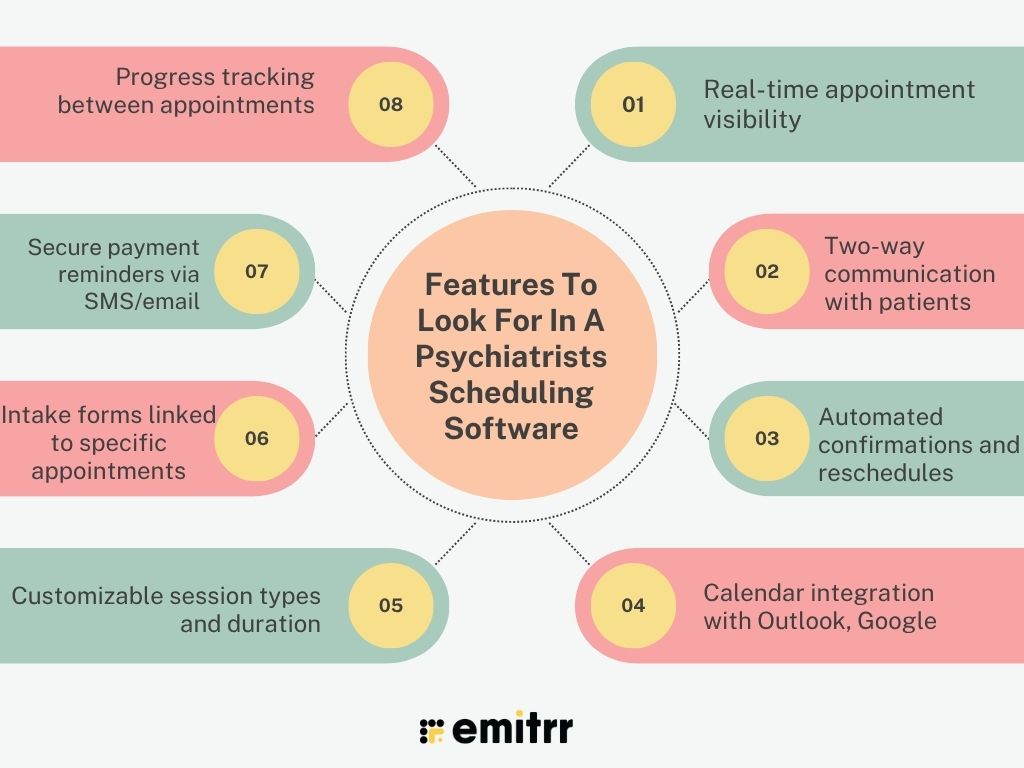
At its core, a great scheduling software should do one thing well: Make your life easier. It should handle the back-and-forth with patients and update your calendar in real time. Basically, save hours you’d otherwise spend rescheduling, confirming, or chasing down no-shows. The right features can make your entire day run smoother, without needing an extra set of hands. So here’s what you must look out for:
Real-time appointment visibility
Your schedule should never feel like a mystery. Real-time appointment visibility means your calendar updates the moment a patient books, cancels, or reschedules. No delays. No double bookings. Whether you’re working alone or with a big team, everyone stays on the same page. It also helps reduce confusion across locations or providers if you’re part of a group practice.
Two-way communication with patients
Patients won’t always want to call or email to reschedule. With two-way messaging, they can simply reply to an earlier text and let you know. You’ll see their response instantly, all in the same thread. It feels more natural for them, and you spend way less time following up. This is especially helpful in psychiatry, where keeping communication simple and low-pressure really matters.
Automated confirmations and reschedules
Tired of sending manual confirmations? Good software takes that off your plate. It can automatically confirm bookings, send follow-ups, and even offer reschedule links if someone cancels. Some AI-powered scheduling platforms go a step further and notify patients on your waitlist to fill that spot. This keeps your schedule running smoothly, reduces gaps, and saves your staff hours every week.
Calendar integration with Outlook, Google
Your life isn’t just your clinic calendar. You might have personal commitments, team meetings, or blocked time you don’t want patients to book. When your scheduling tool syncs with Google or Outlook, you get one unified view. Patients only see real availability, and you avoid accidental overlaps. It’s also helpful if you like checking your calendar on the go.
Customizable session types and duration
You’re not offering cookie-cutter appointments. Some sessions might be 20-minute medication checks, others might be 90-minute new patient evaluations. Your scheduling software should let you create custom session types, set durations, add fees, and apply specific rules. This helps patients book the right kind of appointment without confusion, and helps you prep accordingly.
Intake forms linked to specific appointments
You don’t want to waste the first 10 minutes of a session collecting basic info. When intake forms are linked to appointment types, patients automatically get the right form when they book. New patients get the full history form, while returning ones might just confirm insurance details. It’s smoother for them, and you can confidently walk into every session with the info you need.
Secure payment reminders via SMS/email
Talking about money isn’t easy in mental health care, but getting paid still matters. The best tools send secure, friendly reminders via text or email before or after the session. Some even include direct payment links. It helps avoid awkward follow-ups and makes it easier for patients to pay on time, especially for virtual visits.
Progress tracking between appointments
For ongoing care like therapy, ADHD support, or medication, it helps to track how things are going. Some tools let you add notes, set goals, or send quick check-ins between sessions. This gives you a better idea of how the patient’s doing. It also helps you catch progress or any concerns early.

Security & Compliance Requirements For Psychiatrists Scheduling Software
When you work in mental health, keeping patient information safe isn’t optional, it’s the law. A good scheduling tool should help you stay compliant without making your job harder. These features are key for privacy, security, and peace of mind.
HIPAA-compliant messaging and call handling
You can’t use just any platform to contact patients. All texts, calls, and voicemails need to follow HIPAA rules. That means everything must be secure and private. The right software handles this in the background with encrypted channels. You don’t have to think about it. It just works. And you avoid any legal trouble down the line.
Business Associate Agreement (BAA) coverage
If the company behind your software handles patient data, they need to sign a BAA. This is a formal agreement that says they’re responsible for protecting health info too. Without it, you’re taking on all the risk. A BAA shows the vendor understands healthcare rules and is ready to follow them. It’s not something to skip or delay. Make sure you get it before using the platform.
Role-based access and user permissions
Not everyone on your team needs access to everything. Your front desk might only need the calendar, while you need clinical notes. A good tool will let you control who sees what. This keeps sensitive info limited to the right people. It also reduces mistakes and keeps your team organized. Setting permissions takes just a few clicks but makes a big difference.
Encrypted appointment data and logs
Everything in your calendar should be locked down, including names, times, and reasons for visits. Encryption scrambles that data so no one else can read it, even if it’s stolen. It’s one of the simplest ways to protect your patients. The best software encrypts data at every stage, while it’s stored and while it’s sent. You won’t notice it’s happening, but it’s working behind the scenes. This is your first line of defense against data breaches.
Consent management for appointment reminders
You can’t send reminders unless the patient agrees to it. That’s where consent tracking comes in. Your software should ask for and record permission during the booking process. This helps you stay compliant and avoid unwanted messages. It also gives patients control over how they hear from you. Clear consent will keep communication smooth and legal.
Session audit trails for liability protection
An audit trail logs every change made to an appointment. Like who booked it, who moved it, and when. It’s your safety net if something ever gets questioned. You’ll have proof of what happened, step by step. It also keeps things transparent within your team. This is super helpful for practices with multiple staff members. It builds accountability without extra effort.
Staff training on safety and compliance
Even the best tools need smart users. Your team should know how to use the software without putting data at risk. Look for platforms that offer training or simple guides. This helps everyone stay on the same page with privacy rules. Regular updates are a plus too, so your staff doesn’t fall behind. A little training goes a long way in protecting your practice.
Data backup, recovery, and breach protocols
Things do go wrong, systems crash, power cuts happen, files get lost. Your scheduler should back up data regularly and have a plan to recover it fast. If there’s ever a breach, you should be notified right away. Good tools also come with clear instructions for what to do next. It’s like insurance for your calendar. You hope you never need it, but you’ll be glad it’s there.
Integrations Required For Psychiatrists’ Scheduling Software
Your scheduling software should be a good team player. It needs to connect with the tools you already use, your EHR, billing system, telehealth app, and more. The goal is to make your workflow simpler, not busier. When everything talks to each other, you save time, reduce errors, and spend less energy juggling between tabs.
Seamless EHR integration
This one’s a must. When someone books an appointment, the info should flow straight into their medical record. You shouldn’t have to copy anything manually. The right tool connects directly to your EHR, so everything stays in sync. It’s quicker, cleaner, and helps you avoid small mistakes that can pile up.
Calendar sync with smart filtering
It’s great when your schedule syncs with Google or Outlook. But it’s even better when you can filter out the times you don’t want to be booked. It could be break hours, admin hours, or blocked personal time. Patients only see what’s available, and you don’t have to worry about overlap. It keeps your day more balanced. And it saves your staff from double-checking everything.
VoIP and SMS under one interface
If your calls, texts, and appointment updates all happen in the same place, life gets way easier. You won’t need three apps just to answer one patient. A good scheduling system ideally should show you missed calls, text replies, and voicemail transcriptions. All of this tucked next to your calendar. It’s smooth, it’s fast, and it means fewer things get missed. Everything’s connected, so you’ll never be left guessing.
Custom triggers for follow-up sessions
Some sessions need a follow-up, but it’s easy to forget when things get busy. Good tools let you set automated reminders, like sending one two weeks after a first visit. It helps patients stay on track. And you don’t have to remember everything yourself.
Intake form automation via link or SMS
Chasing patients for paperwork is the worst. Instead, let the software send intake forms automatically right after booking. Patients get a link via email or text and can fill it out on their phone. You get the info before the session, without any back-and-forth. It’s quick, painless, and much more organized than handing out clipboards.
Payment and billing software sync
You don’t want to switch tools every time you charge a patient. When your scheduler connects with your billing software, payments move much faster. Completed appointments trigger invoices, and everything matches up. No need to copy info or risk errors. It makes end-of-day wrap-ups way smoother.
Telehealth platform integration
If you’re offering virtual sessions, this feature is a lifesaver. The platform should send out telehealth links automatically, right in the confirmation or reminder. That way, patients don’t get lost trying to figure out how to join. Everything shows up in the calendar, so you’re both ready to go. No extra clicks, no last-minute emails.
Analytics and reporting tool integration
Want to see how many sessions you had last month? Or how often people cancel? Your software should link to reporting tools so you can track that easily. It helps you spot trends and improve how you run your practice. Simple dashboards give you real answers, without needing to be a data expert.
AI note-taking or smart reminders
Some platforms go the extra mile with AI features. They can help take notes during sessions or remind you when a patient hasn’t booked in a while. These tools aren’t flashy, they’re just proactive and really helpful. They cut down on your mental load and help you stay one step ahead. It’s the kind of smart support every busy psychiatrist could use.
How Scheduling Software Helps Psychiatrists
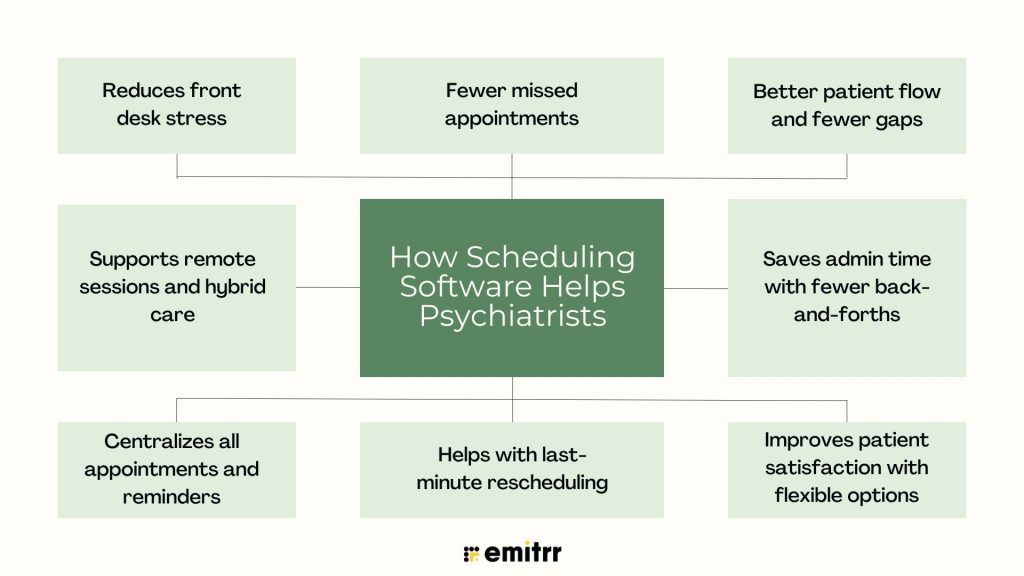
A good online scheduling software doesn’t just work to keep your calendar full. It actually helps you run the day without chaos, avoid mix-ups, and make things easier for your patients too. Here’s how:
Fewer missed appointments
We all forget things, your patients do too. But when a reminder text lands on their phone an hour before the session, they’re more likely to show up. Imagine someone forgot their 3 PM slot, but your system sends them a quick message at 2:00 PM. They see it, reply, and join on time. No awkward no-shows, no wasted time. Just a simple fix with a big impact.
Better patient flow and fewer gaps
Smooth scheduling means fewer awkward pauses between sessions. If someone cancels last-minute, the system can instantly alert another patient on your waitlist. For example, someone might cancel a Friday morning spot, and within minutes, another patient books it from the link they received earlier. Your day stays full, and your time isn’t wasted. That’s the kind of flow clinics dream about.
Saves admin time with fewer back-and-forths
Instead of your receptionist spending half the morning answering reschedule calls, patients just do it themselves. Picture a patient who finishes work late and realizes they won’t make it tomorrow. They open their last appointment message, click the reschedule link, and book a new time. All in under a minute. No calls, no follow-up emails. Your admin doesn’t even have to lift a finger.
Improves patient satisfaction with flexible options
Everyone’s schedule looks different. Some patients need evening sessions, some want Saturdays, and some don’t like calling to book at all. With online scheduling, they can choose the exact slot that works for them, even if they’re booking at 11 PM. That ease keeps people coming back. And with 99% of millennials open to self-scheduling, it’s exactly the kind of experience they expect.
Helps with last-minute rescheduling
A patient might get stuck in traffic or wake up sick. With the right tool, they can cancel and rebook in just a few taps. Say a patient has a sudden migraine and cancels from their reminder message. The software automatically notifies your next patient on the waitlist, who grabs the spot within minutes. You don’t have to scramble, and the patient still gets care later that week. It’s quick and stress-free.
Centralizes all appointments and reminders
No more scattered sticky notes or flipping between apps. Everything, right from bookings, cancellations, and reminders, stays in one place. If you want to check how many follow-ups are booked for next week, it takes two clicks. Say you’re reviewing your week on Sunday night, you open your dashboard and see everything lined up neatly. It just makes planning easier and more reliable.
Supports remote sessions and hybrid care
For psychiatrists doing both in-person and virtual care, this is huge. Your scheduler should send out telehealth links automatically and include them in reminders. Imagine it’s snowing and your next three patients can’t make it to the office. You quickly switch their sessions to virtual, and they already have the join link from their confirmation message. No phone calls, no confusion. It helps keep care going, no matter what.
Reduces front desk stress
When patients self-schedule, fill forms online, and get reminders without staff help, it takes a huge load off your team. Imagine your front desk used to handle 40 calls a day, and now it’s closer to 10. That means less stress, fewer interruptions, and more time for patient-facing work. It also creates a calmer vibe in your office, which matters a lot in mental health care. Less stress behind the desk makes everything feel smoother.
How To Choose the Right Scheduling Software for Psychiatrists
Not all scheduling tools are built for mental health care. Here’s a simple step-by-step guide to help you pick one that actually works for your practice:
Step 1: Make sure it’s HIPAA-compliant and offers a BAA
First things first. The software must be HIPAA-compliant to keep patient data safe. Look for secure texting, calling, and data storage. And don’t forget the BAA (Business Associate Agreement). If a platform won’t sign one, that’s a red flag. You need that legal coverage for peace of mind.
Step 2: Look for built-in communication tools
It’s a huge plus if the scheduler lets you text and call patients right inside the platform. That way, everything right from reminders, confirmations, to voicemails, stays in one place. It cuts down on phone tag and messy email threads. Plus, patients can reply directly and get what they need fast. No extra tools, no switching tabs.
Step 3: Check if it fits your EHR, billing, and telehealth stack
Your scheduler should connect with your existing tools. Whether it’s your EHR, payment system, or telehealth app, smooth integration saves time and prevents errors. You don’t want to manually copy data across platforms. Syncing also helps your staff avoid mix-ups and keeps everything organized in one flow.
Step 4: Test the patient experience
Try booking like a patient. Is it easy to choose a time? Can they cancel or reschedule without calling? A confusing or clunky process will drive people away. Look for something clean, mobile-friendly, and quick to use, even for a first-time patient.
Step 5: Focus on smart automation that reduces staff workload
Features like auto-reminders, waitlist notifications, and reschedule links may seem small, but they really add up. These save hours every week for your front desk. The less your team has to do manually, the smoother your schedule runs. Automation also lowers errors and makes the whole experience feel seamless.
Step 6: Compare pricing and check real-world reviews
Some platforms charge per provider, others per location. You should know how it scales as your practice grows. And before you commit, read what other psychiatrists or therapists say. Their experiences will tell you more than a sales page ever could.
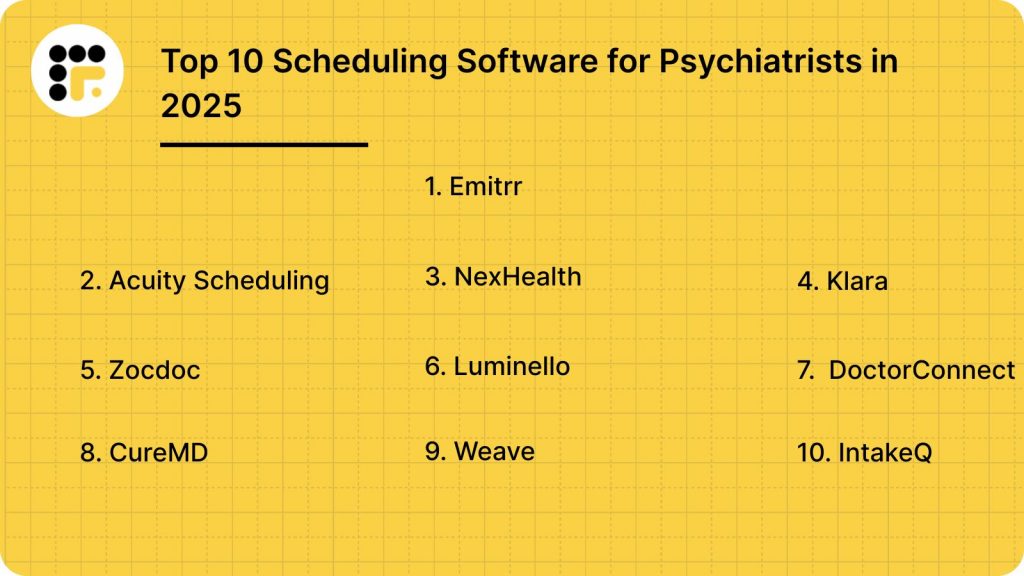
Top 10 Scheduling Software for Psychiatrists in 2025
There are tons of scheduling tools out there, but not all of them are built with psychiatry in mind. Some are too basic, others too bulky. Here’s a compilation of the top 10 scheduling software to look out for:
Let’s take a closer look at each one.
1. Emitrr
What is Emitrr?
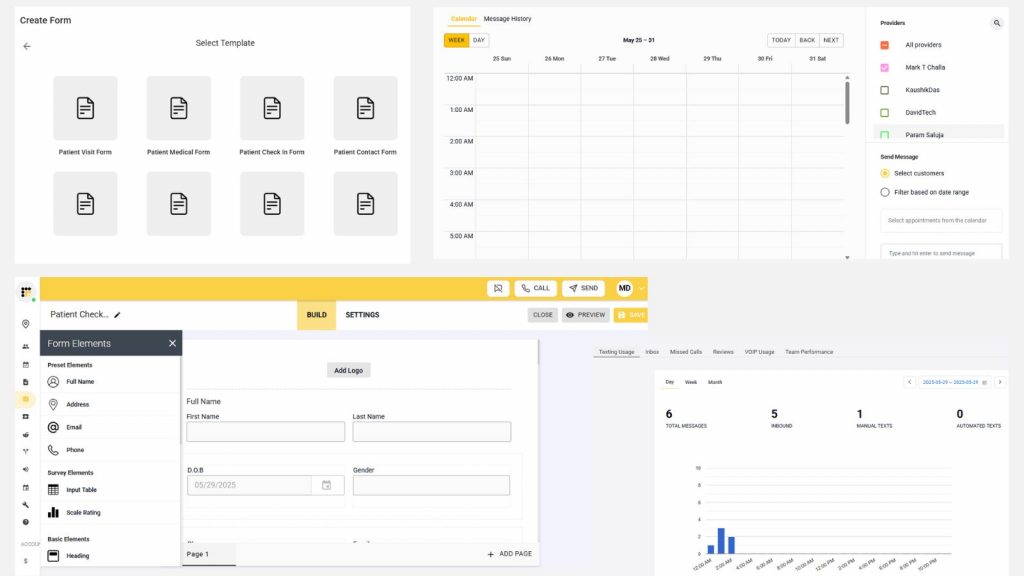
Emitrr is an all-in-one scheduling and communication platform made for psychiatric practices. Whether you’re working solo or managing multiple providers, it takes care of the behind-the-scenes work. From 24/7 online booking to smart reminders and two-way texting, Emitrr keeps your calendar full and your patients in the loop, without all the back-and-forth. Letting you spend more time focusing on care, not coordinating it.
Key features of Emitrr
- 24/7 online scheduling: Patients can book anytime, even after hours, no calls needed.
- Smart reminders: Text, email, or voice reminders go out automatically to cut down on missed sessions.
- Two-way texting: Reply to patient questions or reschedules in real time, right from the platform.
- Tool integrations: Works with 500+ systems like Epic, DrChrono, Dentrix, and Google Calendar.
- Waitlist and fill-ins: Emitrr automatically notifies patients when a cancelled slot opens up.
- Custom booking rules: Add buffers, control who can book what, and tailor scheduling your way.
- HIPAA-compliant: All communication is secure and meets US healthcare privacy laws.
- One simple dashboard: View bookings, messages, calls, and tasks all in one clean interface.
Emitrr pros
- Built for healthcare: Perfect for psychiatry, therapy, and other outpatient practices.
- Easy to use: No long training required for you or your staff.
- Flexible pricing: Scales with you as you grow.
- Solid support: Fast, helpful responses when you need them.
- Fewer no-shows: Practices see up to 90% fewer missed appointments.
- No long contracts: Monthly plans with zero lock-in.
- Emitrr AI agent: Use Emitrr AI agent to frame quick responses.
Take a look at this video to learn more about what Emitrr AI can do:
Emitrr cons
A few advanced AI features are still rolling out, but regular updates are happening.
Emitrr pricing
Plans start at $30 per month.
Emitrr ratings
- Capterra: 4.9/5
- G2: 4.7/5
Emitrr customer reviews
“they are such easy people to work with, the pricing is great, and the product works seamlessly for us.”
“We’ve been using Emitrr for both businesses for over a year now – it’s AMAZING!! Was super easy to set-up, the few times we’ve needed customer support was quickly addressed!!”
Source: Capterra
Emitrr support channels
- Email: support@emitrr.com
- Phone: +1 (210) 941-4696
- Live chat: Available on the Emitrr website
- Knowledge base: Includes guides, FAQs, and walkthroughs
- SMS support: Text the support number for help anytime
2. Acuity Scheduling
What is Acuity Scheduling?
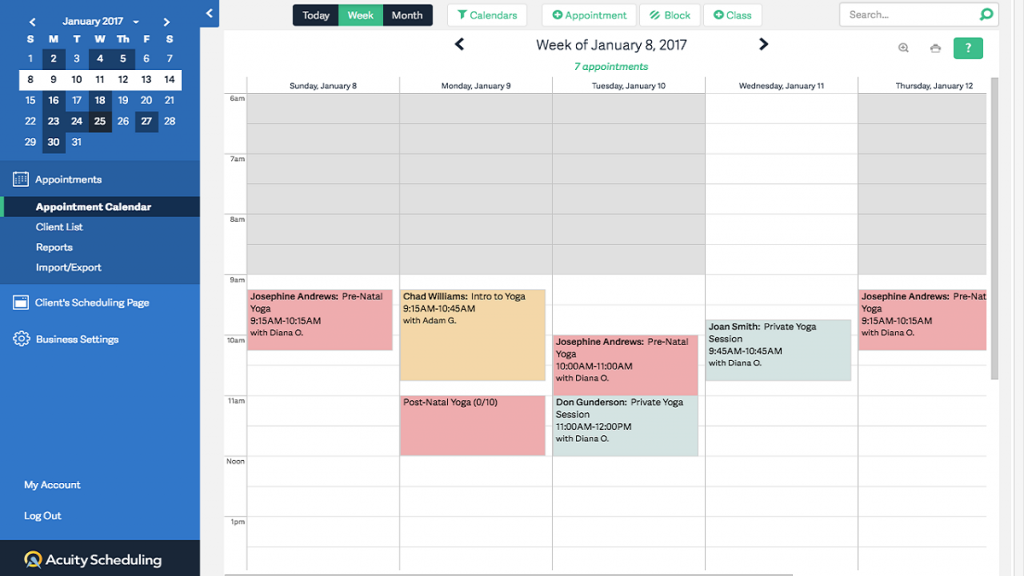
Acuity Scheduling is a popular online booking tool that helps you take control of your calendar without constant back-and-forth. It’s used by many healthcare providers, including mental health professionals, because it’s simple to set up and easy for patients to use. Patients can book sessions online, get reminders, and even pay upfront, all without needing to call your office.
Key features of Acuity Scheduling
- Patient self-booking: Clients can schedule appointments directly from your website or booking link, no login required.
- Automatic reminders: Email and text reminders go out before each appointment to help reduce no-shows.
- Payment collection: Accept payments through Stripe, Square, or PayPal at the time of booking.
- Custom scheduling blocks: Block off lunch, admin time, or therapy prep hours with ease.
Acuity Scheduling pros
- Very user-friendly: Clean interface for both providers and patients.
- Custom branding options: Add your logo and colors to match your practice.
- Time zone detection: Helpful if you offer virtual sessions or see patients across regions.
- Integrates with major calendars: Syncs easily with Google, iCal, Outlook, and Office 365.
Acuity Scheduling cons
- Not psychiatry specific: Not built specifically for medical or psychiatric practices.
- Dosen’t offer free two-way texting: Doesn’t include HIPAA-compliant two-way texting or clinical integrations without add-ons.
- Complex set-up: Some setup features may require a learning curve for solo providers.
Acuity Scheduling pricing
Plans start at $20 per month. HIPAA compliance is available on the Powerhouse plan ($49/month and up).
Acuity Scheduling ratings
- Capterra: 4.8/5
- G2: 4.7/5
Acuity Scheduling customer reviews
“Acuity does not make using it easy to learn, navigate or figure out. Their help features really stink. They have all this writing you can put into your availability type. I thought this was emailed to the client when they received their link. So I put all this time into writing up my parameters etc. and no one was following them. Finally I figured out that it is only shown when someone is scheduling and since I schedule in my coaching clients they never even see it!”
“YOU ARE ON YOUR OWN. NO PHONE SUPPORT. Not ideal for larger companies who want to do subscription memberships, it’s very limiting and messy. They only do POS with Square or Stripe which have super high CC processing fees.”
Source: Capterra
Acuity Scheduling support channels
- Email support via help desk
- Help Center with guides and video tutorials
- Community forum for user questions
3. NexHealth

What is NexHealth?
NexHealth is a modern patient experience platform built for healthcare practices. While it’s mostly used by dental and medical clinics, many mental health providers rely on it for scheduling, reminders, and intake forms. It’s built to reduce admin time and make the patient journey smoother.
Key features of NexHealth
- Patient self-scheduling: Patients can book directly from your website, emails, or even reminders.
- Digital forms: Send intake or consent forms that patients complete online before their session.
- Appointment reminders: Automated email and text nudges help reduce no-shows.
- Two-way messaging: Chat with patients in real time from a shared, HIPAA-compliant inbox.
NexHealth pros
- Easy to use: Clean layout that works well for both staff and patients.
- Great integrations: Syncs with EHRs like DrChrono, Dentrix, and Athenahealth.
- Paperless intake: Saves time with digital forms that flow right into your system.
- Secure messaging: HIPAA-compliant communication that’s simple to manage.
NexHealth cons
- Not psychiatry-specific: Some features may feel too general for mental health workflows.
- Higher pricing: May be expensive for solo or small practices.
- Limited automation: Advanced features are only in premium plans.
NexHealth pricing
Plans start from $350. It can vary based on your practice size and features.
NexHealth ratings
- Capterra: 4.7/5
- G2: 4.6/5
NexHealth customer reviews
“Professional front, but rigid terms and poor client handling reveal deeper issues. Moreover, we identified a major limitation in NexHealth’s software before any onboarding or integration began. Despite no services used or work performed, they refused a refund and plan to bill us twice more. This demonstrates a clear lack of professional integrity.”
“I’d like patients to be able to pay partial payments without needing to go through me to resend the patient request, and some bulk options/autofilling features would make the feature even more helpful.”
Source: Capterra
NexHealth support channels
- Live chat on website
- Email support
- Help Center with articles and guides
- Dedicated onboarding assistance
4. Klara

What is Klara?
Klara offers online scheduling, patient communication, and workflow automation, all in one place. It’s especially useful for practices that want to cut down on phone calls and centralize patient communication. While it’s not built only for psychiatry, many behavioral health clinics use it for its secure chat features and patient convenience.
Key features of Klara
- Secure messaging: Patients can text your practice directly without downloading an app.
- Online scheduling: Let patients book appointments through a link or your website.
- Broadcast messaging: Send updates or alerts to multiple patients at once.
- Staff collaboration: Internal messaging lets team members stay in sync during the day.
Klara pros
- Messaging-first system: Ideal for reducing phone volume.
- No app needed: Patients can text directly from their phones.
- HIPAA-compliant chat: Safe, secure, and easy to manage.
- Works for teams: Makes internal communication smooth and centralized.
Klara cons
- Limited scheduling tools: Lacks deep customization for appointment types.
- Not designed for psychiatry: Missing some mental health-specific options.
- Pricing varies by size: May be costly for smaller setups.
Klara pricing
Custom pricing based on size and features.
Klara ratings
- Capterra: 4.6/5
- G2: 4.5/5
Klara customer reviews
“The product is expensive for what you get and doesn’t integrate well with an external EHR.”
“Wish it had more languages, we are a diverse clinic with many languages.”
Source: Capterra
Klara support channels
- Email support
- Chat via website
- Resource library with guides and videos
- Dedicated onboarding support for new users
5. Zocdoc
What is Zocdoc?
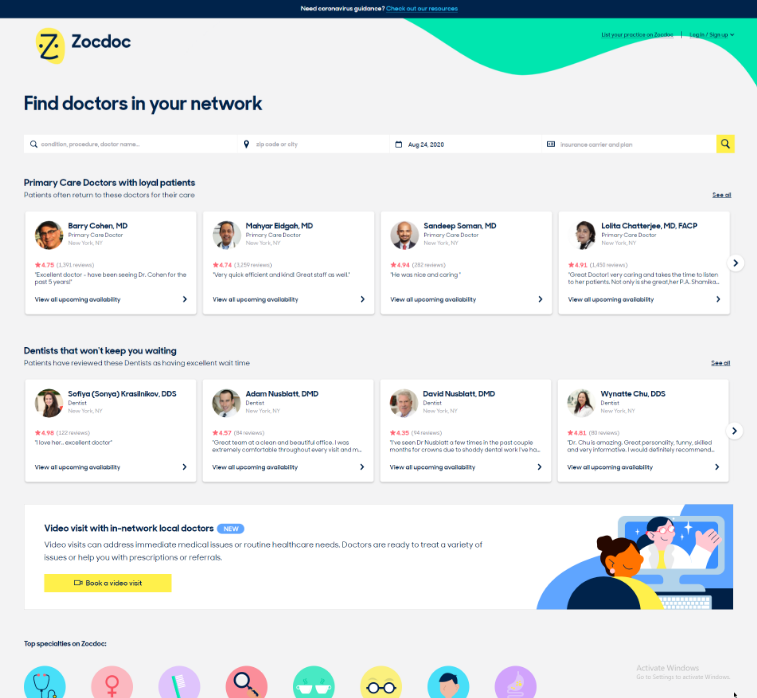
Zocdoc is a well-known healthcare marketplace that helps patients find and book appointments with providers in their area. It’s widely used across the US and gives your practice visibility to new patients searching online.
Key features of Zocdoc
- Online profile and bookings: Patients can discover your practice and book instantly via Zocdoc’s website or app.
- Real-time availability: Syncs with your calendar to prevent double-booking.
- Insurance filtering: Patients can search for providers who accept their specific plan.
- Appointment reminders: Built-in reminders help reduce no-shows.
Zocdoc pros
- High visibility: Good for attracting new patients searching online.
- Insurance-friendly search: Helps match you with the right-fit patients.
- Mobile booking: Easy for patients to book from anywhere.
- Quick setup: Your profile can be live and bookable in just a few steps.
Zocdoc cons
- Listing fees: Monthly listing costs may not work for smaller practices.
- Not customizable: Limited control over booking rules and session types.
- Patient dependency: Many bookings come through Zocdoc, not your own site.
Zocdoc pricing
There’s no setup fee. Providers pay per new patient booking.
Zocdoc ratings
Ratings are not widely available on trusted websites like Capterra and G2
Zocdoc customer reviews
Very few customer reviews are available on trusted websites like Capterra and G2
Zocdoc support channels
- Email and phone support
- Live chat on the website
- In-app ticketing system
6. Luminello
What is Luminello?
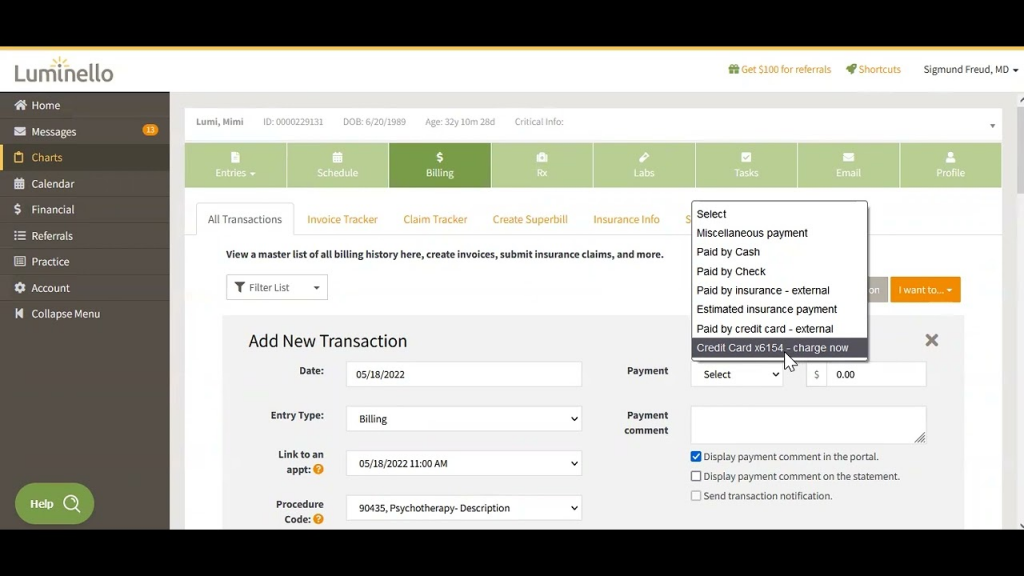
Luminello is one of the few scheduling platforms built specifically for mental health and psychiatry. It combines EHR features, online scheduling, messaging, and billing in one place. You can manage everything from intakes to progress notes without juggling tools.
Key features of Luminello
- Specialty EHR tools: Charting, e-prescribing, and secure patient messaging included.
- Custom scheduling: Set different rules by appointment type, provider, or availability.
- Patient portal: Patients can request appointments, view documents, and send messages.
- Billing and payments: Accept payments online and generate superbills with ease.
Luminello pros
- Psychiatry-specific design: Built for mental health workflows from the ground up.
- All-in-one platform: EHR, scheduling, notes, and billing in one place.
- Patient portal: Gives patients control without calling your office.
- Compliance built in: HIPAA-secure with strong privacy tools.
Luminello cons
- Clunky interface: Some users say the design feels outdated.
- Steep learning curve: May take time to fully learn all features.
- Limited calendar view: Hard to view multiple providers at once.
Luminello pricing
Pricing information is not openly available on review platforms.
Luminello ratings
- Capterra: 4.1/5
- G2: 4.3/5
Luminello customer reviews
“It can be a little difficult to find documents (such as ROI’s), so I think a search feature would greatly improve the EMR.”
“It would have been helpful to allow users to customize the calendar with more options (tags, filters, etc).”
Source: G2
Luminello support channels
- Email support
- Live chat for paid users
- Resource library and help articles
- Provider support forums
7. DoctorConnect
What is DoctorConnect?
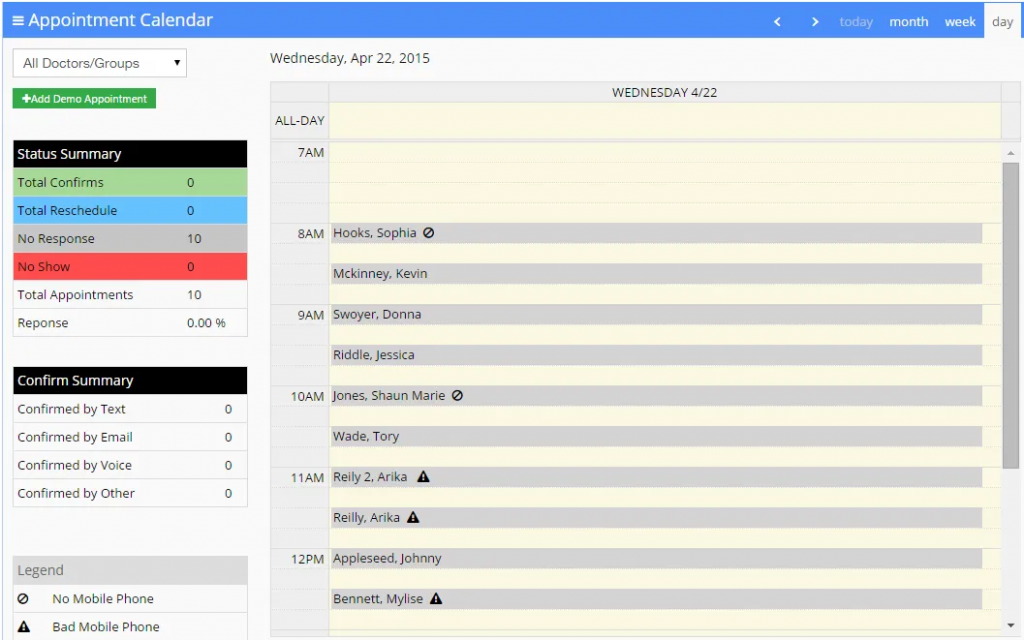
DoctorConnect is a patient engagement and scheduling platform designed to help medical and behavioral health practices cut down on no-shows and improve communication. It’s best known for its strong reminder system and easy-to-use interface. It also supports multi-location and multi-provider practices.
Key features of DoctorConnect
- Automated reminders: Sends texts, emails, and voice calls to reduce no-shows.
- Online booking: Patients can book from your website or a shared link.
- Waitlist management: Automatically fills cancelled slots using your waitlist.
- Two-way texting: Respond to patient messages from one shared inbox.
DoctorConnect pros
- Reliable reminders: Helps reduce missed appointments across the board.
- Quick setup: Easy to get started without much training.
- Multi-location support: Works well for group practices.
- Secure messaging: HIPAA-compliant communication with patients.
DoctorConnect cons
- Outdated design: The interface feels less modern compared to newer tools.
- Limited integrations: Doesn’t connect easily with all EHRs.
- Feature overlap: Some tools may feel repetitive if you already use a patient portal.
DoctorConnect pricing
Plans start at $210. Which may vary based on practice size and usage.
DoctorConnect ratings
- Capterra: 4.8/5
- G2: 4.7/5
DoctorConnect customer reviews
“Difficult to integrate with our current software system making more work.”
“Did not integrate into my existing EHR, though the Sales Rep assured me it would. I have had the software for 3 days and never used it. The sales rep refuses to issue a refund. He states I am locked in a 1 year contract.”
Source: Capterra
DoctorConnect support channels
- Email and phone support
- Live chat
- Help center with FAQs
- Onboarding support for new clinics
8. CureMD
What is CureMD?
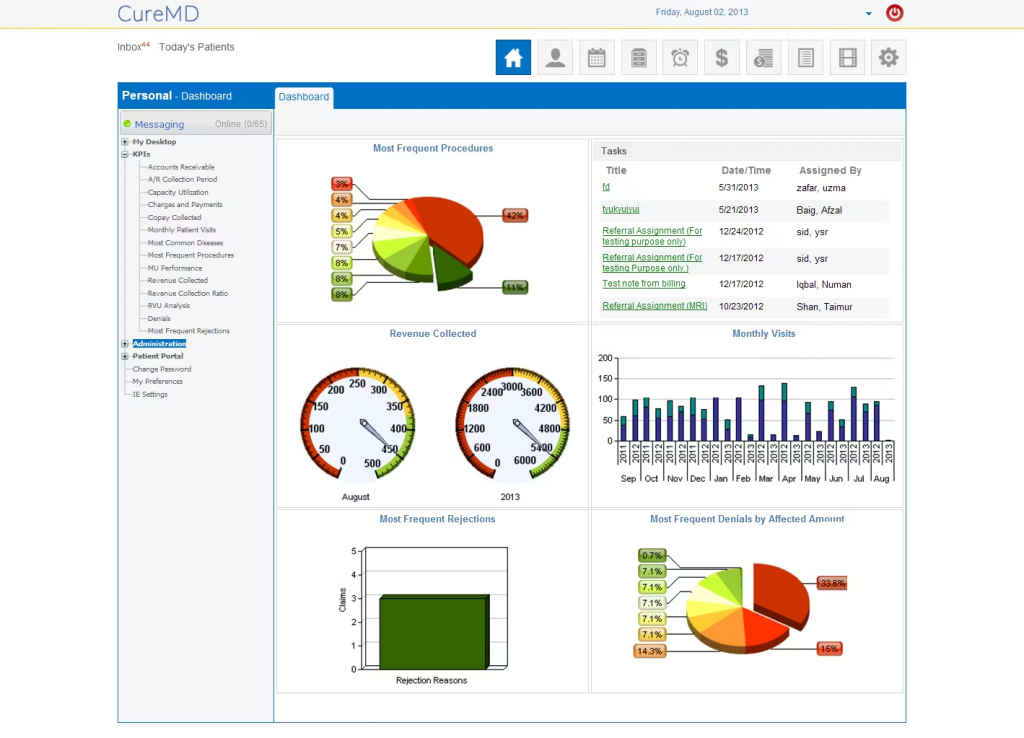
CureMD is a comprehensive practice management system that includes scheduling, EHR, billing, and telehealth features. It’s designed for both general medical and behavioral health providers, offering flexibility and full compliance. While it’s more robust than a basic scheduler, it’s ideal if you want everything under one roof.
Key features of CureMD
- Integrated scheduler: Manages appointments, reschedules, and follow-ups in one view.
- EHR and billing tools: Built-in documentation, claims, and e-prescribing.
- Telehealth included: Secure virtual sessions with no extra tools needed.
- Custom workflows: Tailor appointment types, durations, and scheduling rules.
CureMD pros
- All-in-one system: Combines EHR, scheduling, and billing in one place.
- Telehealth-ready: Built-in support for virtual visits.
- Customizable setup: Adapts well to psychiatry-specific needs.
- Secure and compliant: Meets HIPAA and ONC standards.
CureMD cons
- Steep learning curve: Takes time to get used to all features.
- Not budget-friendly: May be too much for smaller practices.
- Slower updates: Interface and tools may feel behind newer platforms.
CureMD pricing
Plans start from $195.
CureMD ratings
- Capterra: 3.5/5
- G2: 3.4/5
CureMD customer reviews
“Only works with internet explorer, which I REALLY dislike. Needs to be available on other browsers.”
“Technical glitches are harder to avoid at times. Customer service could also be better.”
Source: Capterra
CureMD support channels
- 24/7 phone and email support
- Live chat for current users
- Training videos and resource center
- Dedicated account manager for larger clinics
9. Weave

What is Weave?
Weave is a communication and scheduling platform that combines phones, texting, payments, and reminders, all in one system. It’s great for psychiatry clinics looking to cut down phone time and keep everything patient-related in one place. Though it’s used across many healthcare types, it’s particularly strong in helping small to mid-sized practices stay connected with patients.
Key features of Weave
- Two-way texting: Chat with patients from your office number using a shared inbox.
- Online booking: Let patients self-schedule appointments through your website.
- Integrated phone system: Manage calls, voicemails, and texts from one dashboard.
- Payment collection: Send payment requests via text and track them easily.
Weave pros
- All-in-one communication: Combines calls, texts, and reminders in one tool.
- Patient-friendly interface: Easy for patients to reply or reschedule.
- Good for teams: Supports multiple staff members across locations.
- HIPAA-compliant tools: Secure messaging and data handling built in.
Weave cons
- Not psychiatry-focused: General healthcare design may lack niche features.
- Higher cost: May be too pricey for solo providers.
- No built-in EHR: Doesn’t include charting or documentation tools.
Weave pricing
Custom plans are available. Pricing varies based on feature selection.
Weave ratings
- Capterra: 4.3/5
- G2: 4.4/5
Weave customer reviews
“The customer support is lacking and the fact when you have a problem and there is no manager to talk to is not helpful.”
“I don’t love that it does not directly attach to the medical record.”
Source: Capterra
Weave support channels
- Phone and email support
- Live chat
- Online Help Center
- Onboarding and setup training
10. IntakeQ
What is IntakeQ?
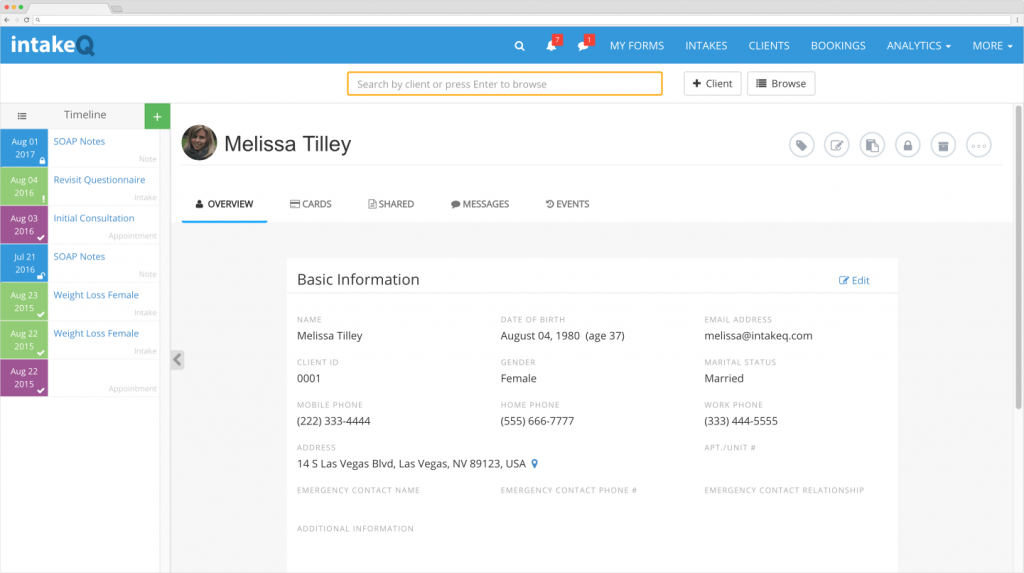
IntakeQ is a flexible tool focused on online scheduling, intake forms, and patient communication. It’s popular among therapists, psychiatrists, and solo mental health providers because of its ease of use and clean interface. You can manage bookings, collect forms, and even run secure telehealth sessions from the same place.
Key features of IntakeQ
- Online scheduling: Patients can book, cancel, or reschedule from your website or booking link.
- Smart forms: Create custom intake forms with e-signatures and automatic uploads.
- Secure messaging: HIPAA-compliant chat with patients through the portal.
- Telehealth built-in: Run virtual sessions without leaving the platform.
IntakeQ pros
- Great for solo practices: Lightweight, clean, and simple to use.
- Paperless workflows: Intake, consent, and notes handled online.
- Affordable plans: Budget-friendly for individual providers.
- Customizable templates: Tailor forms and scheduling rules easily.
IntakeQ cons
- Limited integrations: Doesn’t connect with all major EHRs.
- Basic reporting: Fewer analytics or advanced dashboards.
- No full EHR suite: Doesn’t include full clinical charting features.
IntakeQ pricing
Plans start at $49/month with add-ons for telehealth and advanced features.
IntakeQ ratings
- Capterra: 4.7/5
- G2: 4.6/5
IntakeQ customer reviews
“Not enough flexibility for processing intakes in bulk. Would like the ability to transfer in bulk between providers, link custom template office use fields with client custom fields so certain notes are pulled into the client’s record.”
“It just cannot do many of the things that they promise it can do.”
Source: Capterra
IntakeQ support channels
- Email support
- Chat available for paid users
- Help docs and video tutorials
- Setup support included with subscription
Why Emitrr Is The Best Scheduling Software For Psychiatrists
Emitrr helps you manage your practice without the daily scheduling chaos. Here’s why it works so well:
- Patients can book anytime: Your calendar stays open 24/7, so patients can schedule whenever it’s convenient, even at 1 AM.
- Recurring sessions are easy: Set up weekly therapy or monthly follow-ups once, and let Emitrr handle the rest automatically.
- Fewer no-shows with smart reminders: Text, email, or voice reminders go out automatically. Perfect for patients who forget or feel overwhelmed.
- Cancelled slots get filled fast: Emitrr alerts your waitlist when someone cancels, so you can keep your schedule full without lifting a finger.
- Texting made simple: Need to move an appointment or send a quick update? Just text patients directly from the platform, secure and HIPAA-compliant.
- One calendar for your whole team: Everyone sees the same live schedule, whether you’re solo or managing a full care team.
- Works with your tools: Syncs with 500+ platforms, including EHRs, billing software, and telehealth apps. So everything stays connected.
- Custom rules that fit your style: Add buffers after intense sessions, control how often patients can book, and tailor the flow to what works for you.
- Supports multi-provider and multi-location setups: Manage different clinics or schedules from one easy dashboard. No confusion, no mess.
- Clean, easy-to-learn interface: No training needed. Your team can pick it up quickly and start using it right away.
- Helpful insights for better planning: See which slots fill fast, when cancellations happen most, and how patients prefer to book.
- Straightforward pricing: No hidden charges! Emitrr grows with your practice, whether you’re just getting started or expanding.
- Support that’s actually responsive: Get help anytime via chat, call, or email. No long waits or confusing support tickets.
Recommended for watching: Communicate Schedule Changes Without Calling On Emitrr
FAQs
Look for HIPAA compliance, built-in texting, calendar syncing, and tools that reduce no-shows. It should be easy for patients to use and simple for your team to manage. Bonus points for waitlist features, EHR integration, and clear reporting.
Yes. Emitrr is fully HIPAA-compliant. It encrypts all messages, appointments, and patient data. You’ll also get a Business Associate Agreement (BAA) for extra peace of mind.
It cuts down phone calls, automates reminders, and lets patients reschedule on their own. Your staff spends less time juggling bookings and more time focusing on patient care. Everything runs smoother with fewer interruptions.
Not at all! Emitrr is super easy to set up. There’s no complicated training or tech knowledge needed. You can be up and running in no time, with help from their support team if needed.
Absolutely. You can set durations, add buffers between sessions, limit how often patients can book, and more. It’s built to match your pace and your practice.
Conclusion
Let’s be honest, scheduling can get messy. But it doesn’t have to be. With the right tool, you’ll actually end up making life easier for yourself, your team, and your patients.
With an online scheduling tool like Emitrr, you can expect fewer no-shows, less back-and-forth, smoother communication. Emitrr brings it all together in one place, so you can stop stressing about the calendar and focus on what you actually matters the most: providing great mental healthcare.
Think it’s time to make scheduling easier? Book a free demo with Emitrr today and see how simple it can be!