
 4.9 (400+
reviews)
4.9 (400+
reviews)
Introduction to VoIP for Medical Offices
Still relying on landlines or personal mobiles to run your clinic? It might be time for a change. VoIP (Voice over Internet Protocol) lets you make and receive calls over the internet. No tangled wires, no clunky desk phones, just smooth, secure communication on any device.
In healthcare, timing is everything. A missed call or a delayed message can lead to a missed appointment or a frustrated patient. VoIP for healthcare helps you stay ahead. It makes it easy for your front desk, nurses, or doctors to handle calls, send updates, and stay connected, all from one smart system. And this shift isn’t just for big hospitals. The global VoIP industry is set to cross USD 349.1 billion by 2034, showing just how fast clinics and practices are moving to smarter communication.
In this guide, we’ll show you why VoIP for healthcare matters in a medical office, how it can boost your workflow, and how to set it up with the right tools, like Emitrr. So, let’s dive in!
Importance of VOIP For Medical Office
Let’s look at how most clinics handle phone calls today. Usually, there’s one or two landlines at the front desk. During busy hours, those phones are constantly ringing. Patients wait on hold, calls get missed, and staff are overwhelmed trying to manage it all. Sometimes, team members even use personal mobiles just to catch up, which isn’t ideal for privacy or professionalism.
The result? Important calls go unanswered. Patients get frustrated. And that hurts your clinic’s reputation.
Here’s what the numbers show:
- 29% of healthcare calls go unanswered on average
- 68% of patients prefer calling over other channels
- 75% of patients hang up if told they’ll have to wait
- Nearly 1 in 3 callers hang up within 5 minutes of being on hold
That’s a big gap, and VoIP for healthcare helps you close it. With VoIP, your clinic can handle more calls at once. You’re no longer limited to one or two lines. Calls can be automatically routed, queued, or answered by a virtual assistant. This means:
- No more busy signals
- Shorter hold times
- Every caller gets a response
Patients get help faster, and your team feels less stressed. This alone improves patient trust and retention. VoIP for healthcare also makes your practice more flexible. Whether your doctor is working from home or a nurse is calling patients from another location, they can use the clinic number from any device. That’s because VoIP runs on the internet, not physical phone lines. So even if your staff isn’t in the office, your clinic is always reachable.
Another bonus? Most VoIP systems combine voice and text on one platform. So when patients expect reminders via call or text, you can meet that expectation easily. And yes, it’s secure too. Traditional phones don’t encrypt anything. But VoIP systems built for healthcare come with encryption, access controls, and audit logs. That means you can keep communication private and stay compliant with HIPAA and Canadian privacy laws.
In short, VoIP makes your medical office easier to reach, more efficient to run, and safer for patient communication. It’s not just a tech upgrade, it’s a smarter way to care.

Benefits of VoIP for Medical Office
VoIP for healthcare doesn’t just replace your phone line. It supports your clinic’s people, right from your front desk team to your patients. Here’s how:
For Your Staff
- No more juggling calls: With call routing and auto-attendants, incoming calls go directly to the right person. Staff don’t need to manually transfer or triage every call.
- Voicemail that works smarter: Missed a call? AI transcribes the voicemail and sends it to the right staff member’s email, with key points highlighted. No need to listen to messages or pass them around. Follow-ups happen faster, and nothing slips through.
- All-in-one inbox: Texts and calls show up in one dashboard, and AI can tag urgent messages or patient inquiries automatically. That way, your team isn’t switching between tools, and important messages never get buried.
- Works from anywhere: Whether staff are in the clinic or remote, they can make calls using the clinic number from any device. That helps with follow-ups, remote work, or overflow support.
- Reduces burnout: With fewer repetitive tasks and more automation, your team gets time back in their day. That means less stress and better focus.
For Your Admin Team
- Lower monthly costs: VoIP uses the internet, so you avoid traditional line rental and long-distance charges. Some clinics cut their phone bills by up to 50%.
- No bulky hardware: You don’t need to install PBX boxes or wiring. Most systems work on your current network and devices.
- Add new lines in clicks: Growing your team? Adding a new location? VoIP lets you add users easily without calling a technician.
- Better control and reporting: Admins get dashboards to view call logs, track performance, and see missed call data. That helps improve operations and accountability.
- HIPAA-compliant systems: VoIP built for healthcare includes encryption, user access controls, and audit logs. It’s a safer option for practices handling sensitive data.
For Your Patients
- Faster responses: VoIP routes calls quickly, reducing hold time. Patients reach the right person faster, which improves satisfaction.
- No more dead ends: Instead of busy tones or dropped calls, patients are greeted with auto-attendants that guide them to the help they need.
- Timely reminders: You can send automated voice or text reminders for appointments, prescriptions, or check-ins. This lowers no-shows and keeps patients engaged.
- Better privacy: When staff use VoIP apps, patients still see the clinic number, not a personal number. It feels more professional and secure.
- More ways to connect: Two-way texting lets patients ask questions, confirm appointments, or get quick updates without calling.
VoIP turns your phone system for healthcare into a smart tool that supports better care and a smoother day-to-day workflow.
Want to learn how a VoIP system can transform your business communication? Watch this YouTube video to explore all the benefits!
Use Cases of VoIP for Medical Office
VoIP phone systems for healthcare are something your team can lean on every single day. Whether it’s helping a patient book an appointment or keeping staff connected across locations, it fits right into your clinic’s workflow without needing a big change. Here’s how medical offices are using it in real life:
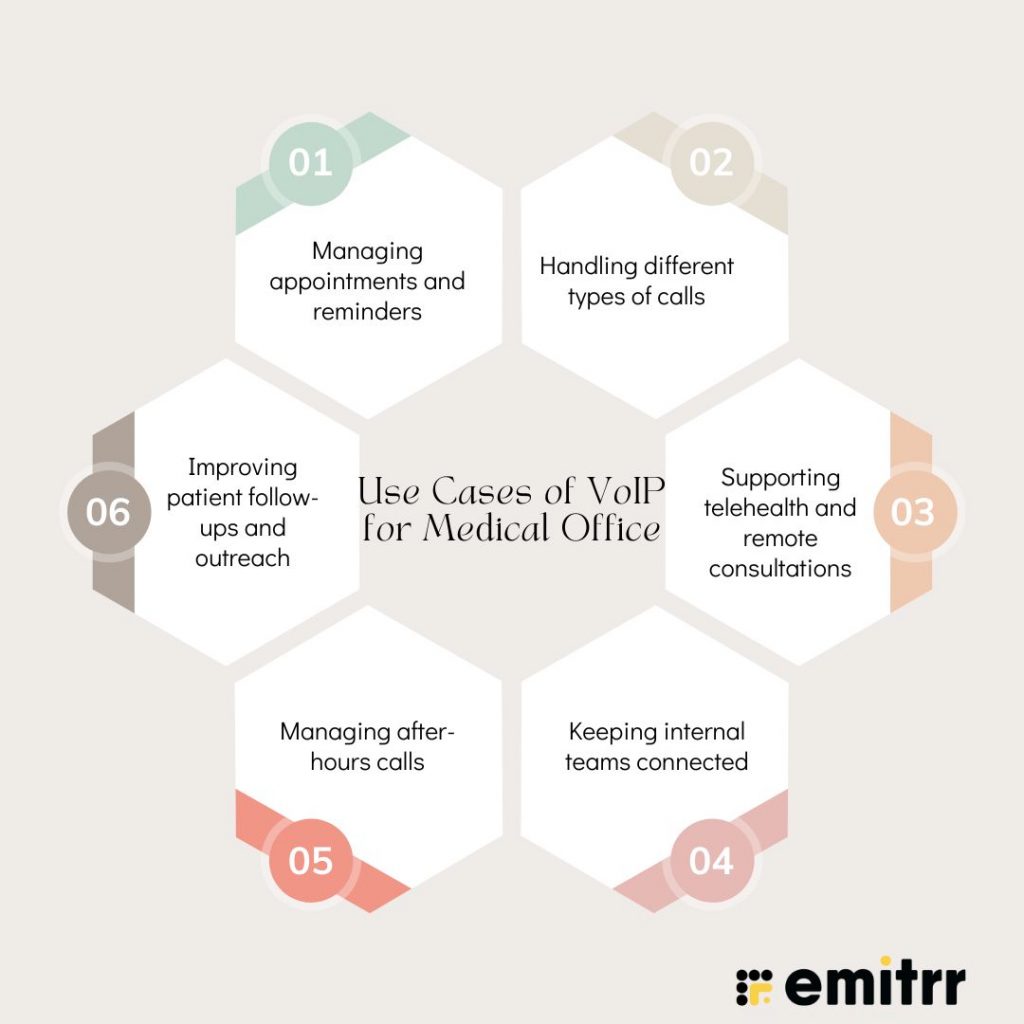
Managing appointments and reminders
We all know how much time goes into calling patients before their visit. With VoIP, you can automate those reminders. The system can call or text patients a day in advance and even let them confirm or reschedule right from their phone. Your staff no longer needs to chase confirmations all day. Patients appreciate the heads-up too. Life gets hectic, and these little reminders help them show up on time. Clinics using this setup often see fewer no-shows and a much smoother day overall.
Handling different types of calls
Not every call is the same – some are quick appointment requests, some are billing questions, and some need urgent attention. VoIP lets you set up a simple menu when someone calls in, so they choose who they want to speak to. Press 1 for appointments, 2 for billing, 3 for a nurse, it’s that easy. Calls get where they need to go, and patients aren’t left waiting while staff figure out where to transfer them. It keeps things flowing, especially when phones are ringing nonstop.
Supporting telehealth and remote consultations
VoIP for healthcare isn’t just about voice, many systems support video too. So, whether it’s a follow-up call, a quick consult, or even a remote therapy session, doctors can connect with patients from wherever they are. They can use the clinic number through the app, and everything gets logged like a regular call. You can even loop in another specialist or translator during the call without needing extra tools. It’s a simple way to offer care beyond the walls of the clinic.
Keeping internal teams connected
When you have multiple departments or branches, staying in sync can get tricky. VoIP phone systems for healthcare make internal calls feel effortless. Staff can dial a short extension to reach a colleague, even if they’re across town. Transferring calls is quick, and intercom or paging features help when something urgent comes up. Whether it’s a front desk paging a nurse or a doctor needing to talk to lab staff, everything happens in real time, no delays, no back-and-forth.
Managing after-hours calls
VoIP for healthcare gives you way more control over what happens after your clinic closes. You can set a message for after-hours callers that offers options, like reaching the on-call doctor or leaving a message that goes straight to the clinic inbox. For urgent cases, the system can ring multiple devices at once to make sure someone picks up. And the best part? Your staff can stay available without giving out their personal number. Patients feel supported, and your team stays protected.
Improving patient follow-ups and outreach
Following up with patients doesn’t have to be manual or messy. VoIP phone systems for healthcare make it easier to check in after visits, send updates, or even share general announcements like seasonal health alerts or vaccine drives. You can send a recorded message or even broadcast a quick reminder to a group of patients. And if someone leaves a voicemail, it can be turned into a text or email so your staff can respond faster. It’s a simple way to stay connected, even outside the exam room.
Reduce missed calls and confusion with professionally written voicemail greetings for a medical office. Download voicemail scripts tailored for medical offices.
Best Practices for VoIP in a Medical Office
Before you set up VoIP phone systems for healthcare in your clinic, there are a few important things to sort out. Getting these right from the start means fewer problems later, and a much smoother experience for both your team and your patients.
- Check your internet strength: Since VoIP runs on the internet, a weak connection will mess with call quality. Make sure your internet is fast and stable. If it cuts out often, talk to your provider. Having a backup option like a mobile hotspot is also a smart move.
- Choose a provider that gets healthcare: Not all phone systems for healthcare are built for clinics. Pick one that offers secure calling, protects patient privacy, and can sign a HIPAA agreement. It helps if they’ve worked with other medical offices before.
- Think about how your calls should flow: Plan what should happen when someone calls. Who should answer first? What if they’re busy? Should there be a menu with options? Mapping this out will help avoid confusion once the phones are live.
- Keep your call menu short and simple: If you’re adding a phone menu, don’t overdo it. Give callers just a few clear choices so they can reach the right person quickly.
- Set up voicemail and hold settings that make sense: Each staff member should have a proper voicemail message, and those voicemails should be checked often. If calls are going into a queue, play something helpful while they wait, not just silence or music on a loop.
- Train your whole team: Everyone who might answer a call should know how the system works. Show them how to pick up, transfer, send messages, and use any new tools. The more confident they feel, the better the experience will be for your patients.
- Give staff a quick guide: A small cheat sheet by the desk can go a long way. Just a list of basic steps and who to call if something goes wrong can save time and avoid mistakes.
- Lock down your system: Change any default passwords, make sure only the right people can access call logs or recordings, and remind your team to log out when they’re done. Security might not feel urgent until something goes wrong, so set it up properly from the beginning.
- Use reports to make adjustments: Once you’ve been using VoIP for a few weeks, check how it’s going. Are calls being missed at lunchtime? Are patients waiting too long on hold? Most systems give you this data, use it to make small tweaks that help things run smoother.
- Ask patients for feedback: Once you’re up and running, check in with your patients. Is it easier to reach you now? Have they noticed a difference? Their answers can help you spot anything that still needs improving.
- Always have a backup plan: If your internet goes down, you don’t want to be unreachable. Set your system to forward calls to a mobile or another number just in case. It’s a small step that keeps you connected when things go wrong.
Challenges of VoIP for Medical Office
Like any system, a VoIP phone system for healthcare isn’t perfect. It comes with a few hurdles that medical offices should know about. The good news? Most of these can be handled easily with the right setup and planning.
- It fully depends on internet and power: If your internet or electricity goes out, your phones will too. Unlike landlines, VoIP phone system for healthcare won’t work during outages unless you’ve got a backup plan. A secondary internet connection or a mobile hotspot can help keep you online during emergencies.
- Call quality can drop if your network isn’t strong: VoIP can sound crystal clear — but not if your internet is slow or overloaded. If multiple people are using Wi-Fi for big uploads or streaming, calls might get choppy or cut off. Setting up your network to prioritize phone calls can solve this.
- There’s a bit of a learning curve at first: Switching to VoIP isn’t always plug-and-play. Your team might need time to adjust to a new interface or device. Things like number porting, call routing, and voicemail setup also take some effort in the beginning.
- Security needs to be taken seriously: Since VoIP runs over the internet, it can be vulnerable if not properly protected. You’ll need strong passwords, encryption, and good habits to keep calls and voicemails secure. Also, make sure emergency services can find your correct clinic address through your VoIP settings.
- Tech glitches can still happen: Just like with any system, things can go wrong once in a while. Maybe a call doesn’t go through, or an update temporarily breaks something. That’s why it’s important to have a responsive support team and a backup communication option just in case.
Most of these challenges are easy to handle with a bit of planning. And with internet getting better everywhere, they’re less of a worry now. Plenty of clinics use VoIP every day, especially with tools like Emitrr that keep things simple and built just for healthcare.
How To Set Up VoIP for a Medical Office Using Emitrr
Getting VoIP up and running with Emitrr is actually pretty simple. No complicated tech setup, no long wait. Just follow these easy steps:
Step 1: Book a quick demo
Start by scheduling a quick demo with the Emitrr team. They’ll show you exactly how the VoIP system works and how it can fit into your clinic’s day-to-day. It’s an easy way to see what’s possible before you dive in.
Step 2: Talk through your call challenges
Let the team know where your current phone setup is falling short, maybe you’re missing calls, patients are stuck on hold too long, or after-hours support is a hassle. This helps them tailor everything to your clinic’s needs.
Step 3: Connect your tools
Emitrr works with most EHRs, CRMs, and patient platforms. So once you link them, your call data, voicemails, and follow-ups stay in sync automatically, no extra steps or duplicate work.
Step 4: Get your team trained
Once you’re set up, the Emitrr team helps your staff get comfortable with the new system. They’ll walk through how to answer and transfer calls, check voicemails, and use helpful features like voicemail-to-email. No one’s left guessing.
Step 5: Go live and get going
Now you’re ready to switch on the system. Calls start flowing through Emitrr, and your team can handle them more efficiently, with smart routing, fewer missed calls, and way less chaos at the front desk.
Case Study for Medical Office VoIP
A busy medical office operating across two growing neighborhoods was struggling with communication. Calls were going unanswered, patients couldn’t get through, and the front desk was constantly swamped. Without any visibility into call volumes or wait times, staff were overwhelmed, and patients were frustrated. Missed appointments and poor follow-up became common, and the clinic’s online presence took a hit.
To solve these issues, the clinic implemented Emitrr’s AI-powered VoIP solution. The setup was smooth, and the results were visible within just a few weeks:
- Missed calls turned into conversations: Whenever a patient couldn’t reach the clinic, Emitrr automatically sent a follow-up text. Many of those messages turned into booked appointments, helping the clinic recover lost revenue and improve the patient experience.
- Call routing became smarter and faster: Patients were greeted with a simple call menu and routed directly to the right department. This reduced hold times and made life easier for both patients and staff.
- Voicemails no longer slowed things down: Instead of checking messages manually, voicemails were transcribed and emailed to the right team member. Staff could respond faster and never miss important follow-ups.
- After-hours support got a major upgrade: With smart routing rules, urgent calls were forwarded to the on-call doctor while others received clear instructions or went to voicemail. The clinic stayed available without staff needing to give out personal numbers.
- No-shows dropped significantly: Emitrr’s two-way texting and voice features made it easier for patients to confirm or reschedule appointments. No-shows dropped by 90%!
- Online reputation got a boost: With built-in review prompts, patients were automatically encouraged to leave feedback. In just two months, the clinic saw a huge jump in 5-star reviews, helping attract new patients and build trust.
This transformation wasn’t just about switching phone providers. It was more about creating a more reliable, modern way to connect with patients. From call handling to follow-ups, everything became faster, more organized, and much easier to manage. So, if your clinic still relies on basic phone lines, moving to an AI-powered VoIP for healthcare like Emitrr might be the change your team and your patients will thank you for!
Recommended for watching:
FAQs
Yes, especially for busy practices. With VoIP, you can manage more calls at once, set smart routing rules, and even send appointment reminders, all from one system. It’s faster, more flexible, and much easier to manage than traditional landlines.
Since VoIP runs on the internet, a weak or disconnected network can affect it. But with a good backup like a 4G hotspot or call forwarding set up, you’ll stay reachable even during an outage.
A little, yes. But it’s fairly easy. Most teams get the hang of it quickly. Systems like Emitrr come with onboarding support and cheat sheets so your team knows exactly how to answer, transfer, or follow up on calls without confusion.
Definitely. With built-in texting and automated call reminders, VoIP helps patients confirm or reschedule with ease. Many clinics using Emitrr have seen a major drop in missed appointments after switching.
Emitrr is built specifically for medical offices. It combines VoIP with texting, reminders, EHR integration, and real-time reporting, all in one dashboard. So you’re not juggling tools, and nothing slips through the cracks.
Nope! Emitrr lets you keep your existing number. The transition is smooth, and the setup team handles all the technical bits so there’s no disruption to your clinic.
Conclusion
If your current phone setup is causing missed calls, long hold times, or frustrated staff, it might be time for a change. Emitrr’s AI-powered VoIP is built specifically for medical offices, which means it fits right into your workflow without the usual tech headaches. From routing calls smarter to reducing no-shows and helping your team stay on top of follow-ups, it’s a solution designed to save time and improve the patient experience.
You don’t need a big IT overhaul or new hardware, just a better system that works for you. So, book a free demo with Emitrr and see how easy it is to set up! Let your team focus on care, not call chaos.