
Introduction
Ever tried managing a full day of patients, follow-ups, and appointment reminders, all while answering calls and chasing reviews? That’s when most practitioners realise they don’t just need another phone system. They need a communication partner.
Adit is one of the platforms that many clinics use to keep things organised. But here’s the thing: not every tool fits every practice. Maybe your team might find it clunky. Maybe support feels slow. Or maybe your team needs a platform that’s faster, simpler, and more intuitive.
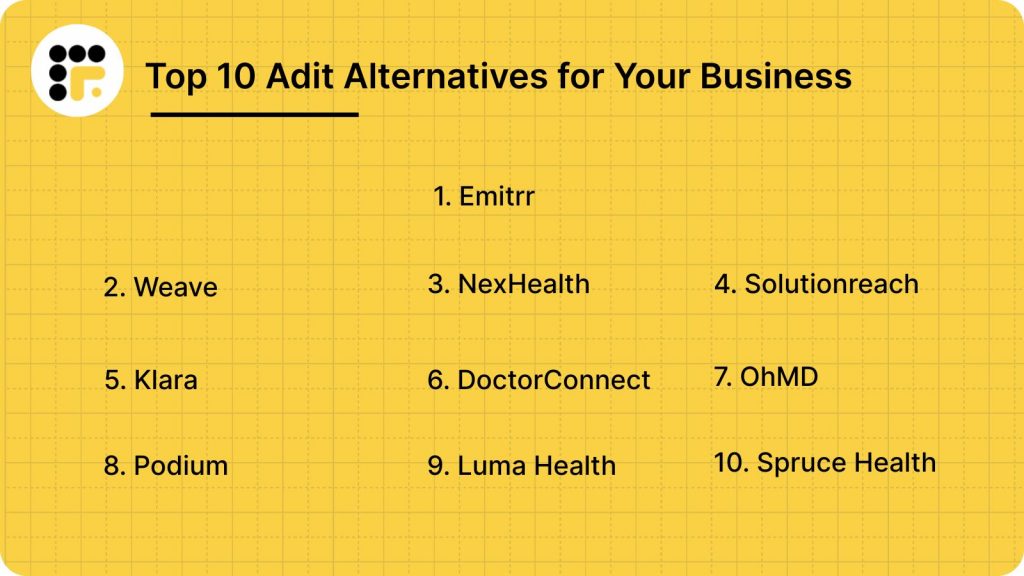
Here’s the good news. You’ve got many options! We’ve rounded up 10 excellent Adit alternatives that make patient communication effortless. So your staff spends less time on admin and more time actually caring for patients.
What is Adit?
Adit is a patient communication and practice management platform that helps healthcare providers handle appointments, messages, and reviews in one place. It’s designed to automate reminders, track calls, and improve online visibility for medical and dental offices.
It’s more like your digital front desk assistant. It manages calls, messages, and appointments so your team can focus on patient care instead of endless coordination.
Adit Features
- Online Scheduling: Patients can book appointments anytime, day or night, without needing to call your front desk.
- Call Tracking: Tracks every call so you can see where your leads come from and how many turn into patients.
- Automated Reminders: Sends out text and email reminders automatically to cut down on no-shows.
- Patient Reviews: Collects reviews after appointments and helps boost your online presence on platforms like Google.
- 2-Way Texting: Lets your team chat directly with patients through SMS from one dashboard.
- Analytics Dashboard: Gives an overview of appointments, messages, campaigns, and patient engagement in real time.
- Digital Forms: Patients can fill out forms online before their visit—no more paperwork chaos at the reception.
- Telehealth Integration: Allows video calls for virtual consultations, making it easier to see patients remotely.
- Payment Processing: Enables online bill payments right from the same system.
- Voicemail Drops: Lets you send pre-recorded messages to patients for quick updates or reminders without calling each one.
Adit Pros
- All-in-One Platform: Combines messaging, scheduling, reviews, and analytics under one login.
- Easy Appointment Booking: Simplifies scheduling for both staff and patients through online booking links.
- Automated Review Requests: Sends review prompts after every appointment without staff intervention.
- Built-In Call Tracking: Monitors inbound calls and records them for quality checks and training.
- Strong Analytics: Helps track patient engagement and campaign performance in one dashboard.
Adit Cons
- Complex Interface: Can feel cluttered and confusing for smaller clinics or new users.
- Slow Support Response: Users mention delayed replies from the support team during setup or troubleshooting.
- Limited Customisation: Some templates and reports can’t be tweaked easily to match your workflow.
- High Pricing Tiers: Costs go up when you add multiple modules, making it less affordable for small teams.
- Learning Curve: Staff might need extra time or training to get comfortable with all the features.
Adit Integrations
- EHR and Practice Management Systems: Open Dental, Dentrix, Eaglesoft, and others.
- Calendar Apps: Syncs with Google Calendar and Outlook for scheduling consistency.
- Accounting Software: Integrates with QuickBooks for billing and payment tracking.
- Marketing Platforms: Works with Google My Business and social media channels for reviews.
- Telehealth Tools: Supports virtual consultations via video integration.
Adit Pricing
Plans start at $399/month.
Adit Ratings
- Capterra: 4.6/5
- G2: 4.5/5
Adit Reviews
“I wish the App allowed you to do a bit more then it does. For instance you can over ride the voicemail for emergencies but can’t change the days and times the phones are on or off from the app. We work every other friday and its a pain to remember to log in and do it.”
“Our least favorite aspect of Adit is the requirement for a signature and email on every form, which is time-consuming and feels unnecessary.”
Source: Capterra
Adit Customer Support Channels
- Email Support: For sending queries or raising tickets.
- Phone Support: Available during business hours for direct assistance.
- Live Chat: For quick troubleshooting and FAQs.
- Knowledge Base: Includes setup guides, articles, and how-to videos.
- Onboarding Assistance: Helps new users with platform configuration and training.

Why Do Practices Seek an Adit Alternative?
Adit does a lot right – good ratings, packed features, and solid healthcare automation tools. But when clinics actually use it day to day, a few pain points come up again and again. Here’s what most say:
- Takes time to learn: The dashboard can feel heavy at first. Many teams say they needed extra training before everyone got comfortable using it.
- Not always beginner-friendly: Smaller practices or solo providers often find it overwhelming because there’s just too much going on in one place.
- Support can be hit or miss: While Adit scores well overall, some users mention that response times for help could be faster during busy hours.
- Pricing adds up quickly: The base plan itself is pretty costly, and once you add features like reviews or analytics, costs jump fast.
- Limited flexibility: A few users wish they could customise templates, reports, or workflows to fit their practice better.
- Better options for team texting: Many clinics move to alternatives like Emitrr for easier two-way texting and faster staff collaboration.
In short, Adit works well for established practices with time to learn the system. But if you want something simpler, faster, and more intuitive, many clinics say they found that in tools like Emitrr.
What Features to Look For in an Adit Alternative?
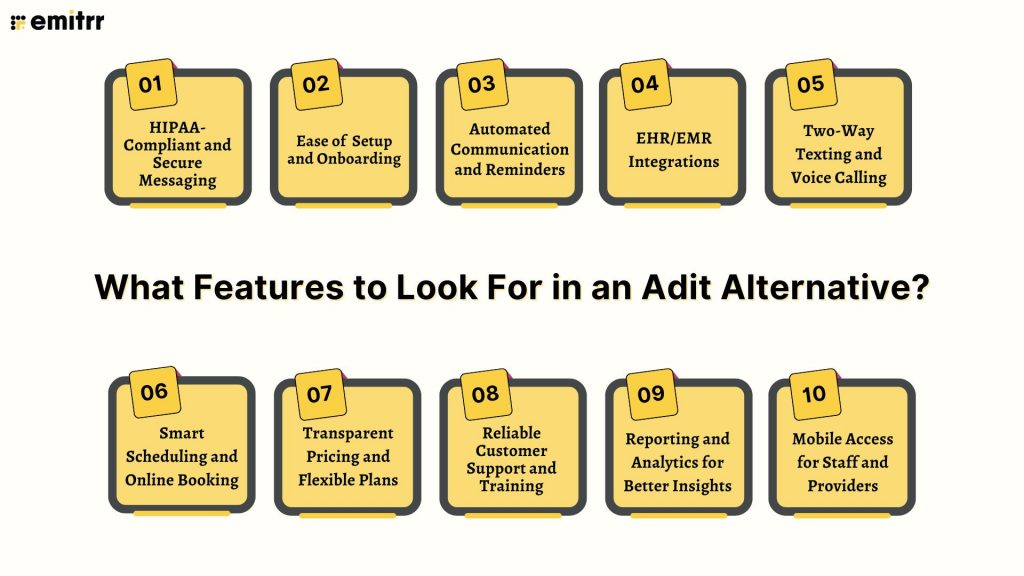
Before switching platforms, it helps to know what actually makes a patient communication tool worth your time (and money). Here’s what to look for when choosing an Adit alternative that truly works for your team and patients.
HIPAA-Compliant and Secure Messaging
Patient privacy isn’t optional. It’s the law. Any alternative you pick must follow HIPAA rules to keep sensitive health data protected. Look for features like message encryption, audit trails, and access control. The best platforms also handle opt-outs and consent automatically, so you’re always compliant without extra effort. Basically, if it’s not HIPAA-safe, it’s not worth using.
Ease of Setup and Onboarding
Who has time to spend weeks learning new software? The right tool should be quick to set up and easy for your team to pick up. Clear onboarding guides, short video tutorials, and live chat support go a long way. The smoother the setup, the faster your staff can start using it confidently. A clean, intuitive interface also makes day-to-day use simpler.
Automated Communication and Reminders
Tired of manually sending appointment reminders? Automation should be at the heart of your new platform. It should handle messages like reminders, recalls, and follow-ups on its own, saving hours every week. You just set the rules once, and it runs quietly in the background. That means fewer no-shows and a more consistent patient experience.
EHR/EMR Integrations
Your communication tool should talk to your EHR or EMR without any friction. That way, every message, note, and reminder is synced automatically, with no copy-pasting or double work. A platform with good integration ensures your team always has updated patient info in one place. It’s not just convenient. It prevents errors and saves time.
Two-Way Texting and Voice Calling
Patients expect quick, direct communication. Two-way texting and calling let you respond to questions, reschedule visits, or confirm details right away. Instead of one-sided reminders, you get real conversations that build trust. Bonus points if the platform supports voicemail drops or missed-call text replies. No patient ever feels ignored!
Smart Scheduling and Online Booking
Imagine patients booking their own appointments at midnight, no phone tag required. That’s what good online scheduling does. A strong alternative should let patients see available slots, book instantly, and even reschedule without calling your front desk. For your staff, it’s fewer interruptions and better calendar management. It’s a win for everyone.
Transparent Pricing and Flexible Plans
Hidden fees? Hard pass. The best alternatives make pricing simple and clear upfront. You should know exactly what you’re paying for and have the flexibility to choose features that fit your practice size. Whether you’re a solo provider or a multi-location clinic, transparent pricing means no surprises later.
Reliable Customer Support and Training
Even great software needs support sometimes. Look for a provider that offers responsive, knowledgeable help, whether through chat, email, or phone. Onboarding assistance and training resources can make a huge difference when you’re just getting started. You shouldn’t have to wait days for answers when your patient communication depends on it.
Reporting and Analytics for Better Insights
You can’t improve what you can’t measure. Choose a platform that gives you clear reports on messages sent, responses, no-show rates, and campaign performance. Real-time insights help you understand what’s working and what needs tweaking. This data can even shape better communication strategies for your practice over time.
Mobile Access for Staff and Providers
In healthcare, you’re never tied to your desk. A good alternative should have a mobile app or mobile-friendly dashboard so you can text patients, check messages, or confirm appointments on the go. Whether you’re between rooms or out of the office, your communication shouldn’t stop. Accessibility makes teamwork easier and keeps patients connected.
10 Best Adit Alternatives
Here are 10 great alternatives that make it easier to manage patient messages, reminders, and appointments, all while keeping communication smooth and stress-free.
1. Emitrr | Best Adit Alternative
Emitrr Overview
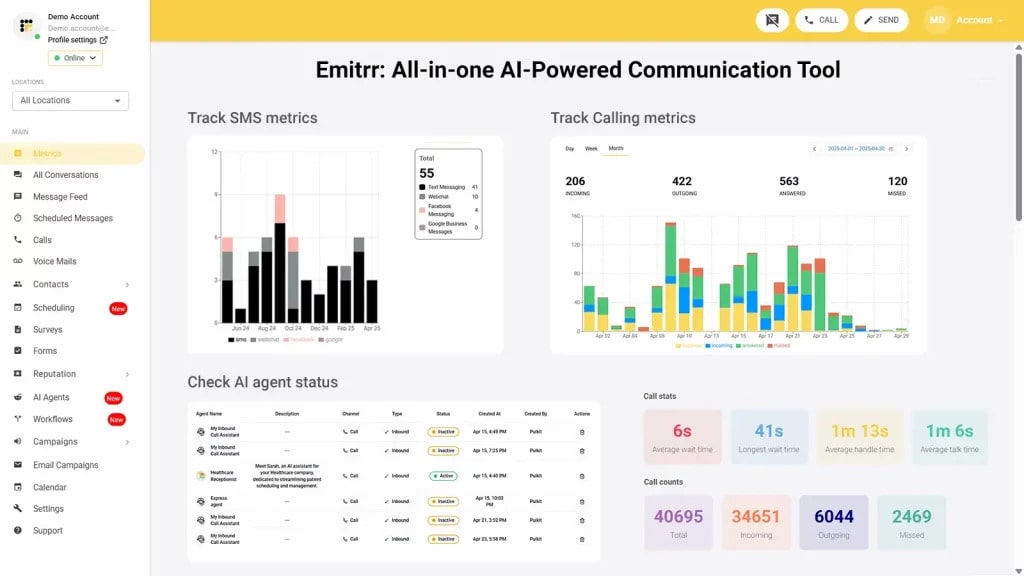
Emitrr is one of the top-rated platforms built specifically for healthcare practices that want smoother patient communication without the hassle. It brings texting, calling, scheduling, reminders, and automation together in one simple dashboard. You can send bulk messages, handle two-way chats, or even automate follow-ups — all from the same place. It’s HIPAA-compliant, easy to use, and trusted by hundreds of practices across the U.S. and Canada.
Emitrr Key Features
- Two-Way Texting: Chat directly with patients for confirmations, questions, or updates, just like regular texting, but fully HIPAA-secure.
- AI-Powered Voicemail Automation: If a patient calls after hours, Emitrr instantly replies with a text so no one gets missed.
- Smart Reminders and Follow-Ups: Automate appointment reminders, recall messages, and post-visit follow-ups to reduce no-shows.
- Unified Inbox: See every message, call, and text in one clean dashboard so your team stays on the same page.
- In-Chat Scheduling and Payments: Patients can book appointments or pay directly from the chat window, no extra clicks.
- Bulk Messaging Campaigns: Run SMS campaigns for promotions, health tips, or updates to hundreds of patients at once.
- EHR/EMR Integrations: Connect Emitrr easily with major systems like Dentrix, DrChrono, Open Dental, and more to sync patient data.
Emitrr Pros
- Super Simple to Use: Designed for healthcare teams, so even non-tech staff can get started in minutes.
- Saves Time Every Day: Automation handles repetitive tasks like reminders, freeing up your front desk.
- Reliable and HIPAA-Compliant: Built for healthcare privacy with end-to-end encryption and audit trails.
- Engages Patients Better: Texting and reminders help reduce no-shows and keep patients connected.
- All-in-One Platform: One dashboard for calls, texts, campaigns, and reports — no more juggling apps.
Emitrr Cons
There are a few additional AI-powered features that are still in development.
Emitrr Integrations
- CRM Platforms: Connects with HubSpot, Salesforce, and Zoho, helping you manage leads and patient relationships better.
- EHR/EMR Systems: Integrates with major platforms like Epic, Athenahealth, Dentrix, and DrChrono to keep patient data synced.
- Calendar Tools: Syncs smoothly with Google Calendar and Outlook to avoid double-bookings or missed slots.
- Marketing and Review Apps: Works with Google Reviews and Facebook to collect and track patient feedback automatically.
Emitrr Pricing
Plans starts at $30 per month.
Emitrr Ratings
- Capterra: 4.9/5
- G2: 4.7/5
Emitrr Customer Reviews
“Emitrr is extremely easy to use. Our business has many segments that reach different customers, so its nice to be able to segment them out and send quickly.”
“Overall very positive. The service works like I need it to, the customer service is amazing, up-time is great, and changes made seem to be well thought out and well, not just changes for change sake.“
Source: Capterra
Emitrr Support Channels
- Email: support@emitrr.com
- Phone: +1 (210) 941-4696
- Live chat: Available directly on the Emitrr website
- Knowledge base: Includes extensive documentation, FAQs, and troubleshooting guides
- SMS support: Text for help
Want to keep your patient schedule full and cut no-shows? Check out this quick video for proven tips!
2. Weave | Weave vs Adit
Weave Overview
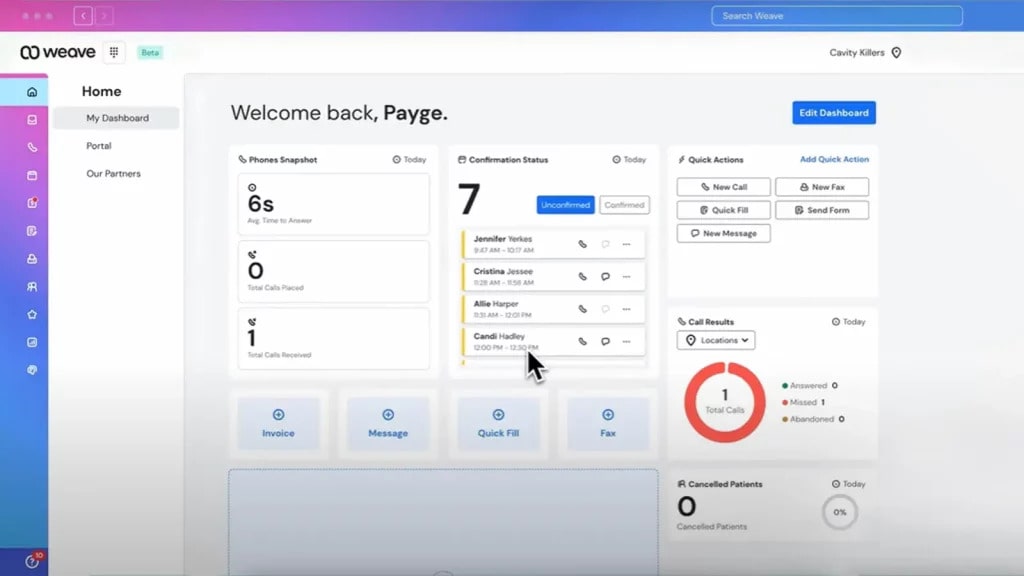
Weave is one of the most well-known tools for healthcare practices that want to combine phone, texting, and payments in one place. It helps clinics stay connected with patients through simple, two-way communication. Think of it as your front desk virtual assistant. You can text, call, collect payments, and even send reminders from the same dashboard.
Weave Key Features
- Unified Communication System: Combines phone calls, texting, and voicemails so teams can manage everything in one app.
- Two-Way Texting: Quickly confirm appointments or follow up with patients using simple, HIPAA-secure texting.
- Text-to-Pay: Send payment links by text so patients can pay right from their phones.
- Voicemail-to-Text: Converts voicemails into text messages so staff can read them instantly
Weave Pros
- Easy to Learn: Simple interface that staff can pick up quickly.
- All-in-One Platform: Handles phone, text, and payments in one place.
- Better Patient Reach: Reduces missed calls and helps connect faster with patients.
- Smooth Automations: Manages reminders and follow-ups without manual effort.
Weave Cons
- Higher Cost: Monthly pricing may feel steep for smaller clinics.
- Basic Reporting: Limited analytics compared to competitors.
- Scalability Limits: Works best for small or mid-sized practices, not large networks.
Weave Integrations
- Dentrix
- Open Dental
- Eaglesoft
- QuickBooks
- Stripe
- Slack
Weave Pricing
Weave’s pricing usually starts around $249 per month, depending on the plan and team size. Add-ons like advanced analytics or extra phone lines can increase the cost slightly.
Weave Ratings
- Capterra: 4.3/5
- G2: 4.2/5
Weave Customer Reviews
“With Weave, it’s just a nightmare with the customer service and support. And guess what, any settings or setup you want to change, you only have to go through their customer support because whenever you make changes from their web portal, none of it gets actually reflected.”
“We deal with elderly patients, Weave gets very confusing to them when it’s sends them a message that for an appointment that we rescheduled. It is also very important because we have patient’s that are hearing impaired and depend on text messages.”
Source: Capterra
Weave Support Channels
- Phone
- Live chat
- Online help center
- Training resources
3. NexHealth | NexHealth vs Adit
NexHealth Overview
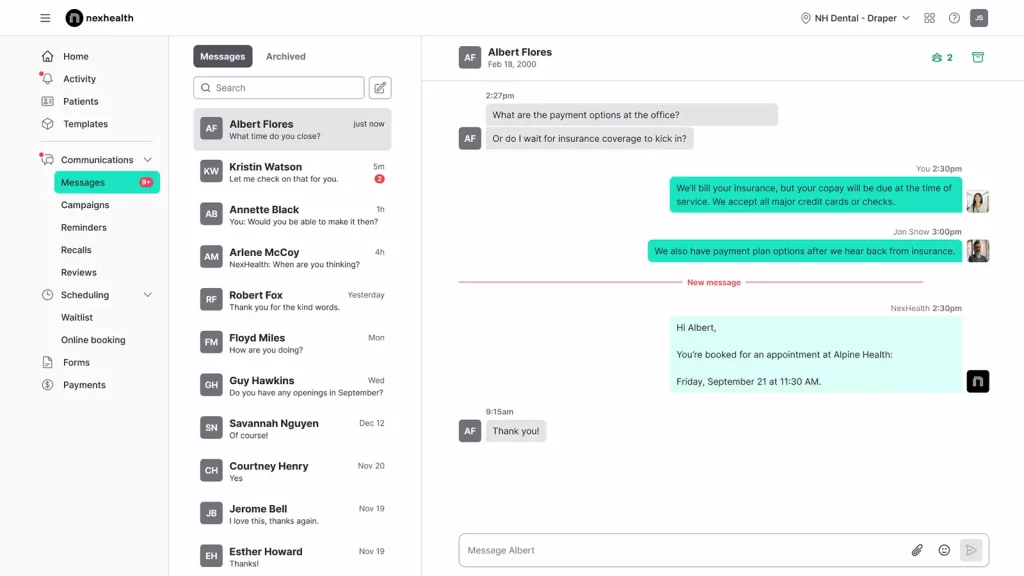
NexHealth is built for modern medical and dental practices that want to automate everything — from scheduling to follow-ups. It focuses on making communication smooth and patient experiences frictionless. Patients can book appointments online, fill out forms, and even leave reviews automatically after visits.
NexHealth Key Features
- Online Booking: Patients can schedule appointments right from your website, text, or email.
- Two-Way Texting: Chat with patients directly to confirm or reschedule visits instantly.
- Digital Intake Forms: Collect patient information and consent forms online. No clipboards needed.
- Automated Review Requests: Encourage patients to share feedback after their visit.
- Real-Time EHR Sync: Keeps all records up to date automatically.
NexHealth Pros
- User-Friendly Design: Clean interface that’s easy for staff and patients to navigate.
- Time-Saving Automations: Handles repetitive front-desk tasks like reminders and forms.
- Improves Patient Flow: Streamlines scheduling and check-ins effortlessly.
- Reliable Sync: Updates records in real time across connected systems.
NexHealth Cons
- Premium Pricing: May be expensive for smaller practices.
- Template Limits: Message customization options are limited.
- Minor Sync Delays: Some users report occasional lag between systems.
NexHealth Integrations
- Dentrix
- Eaglesoft
- Open Dental
- DrChrono
- Athenahealth
- Nextech
NexHealth Pricing
NexHealth pricing plans usually start at around $350/month.
NexHealth Ratings
- Capterra: 4.7/5
- G2: 4.6/5
NexHealth Customer Reviews
“Professional front, but rigid terms and poor client handling reveal deeper issues. Moreover, we identified a major limitation in NexHealth’s software before any onboarding or integration began. Despite no services used or work performed, they refused a refund and plan to bill us twice more. This demonstrates a clear lack of professional integrity. NexHealth not a company we can recommend.”
“Way to expensive. It was also hard to get in touch with tech support once we were an established customer”
Source: Capterra
NexHealth Support Channels
- Email support
- Phone support
- Knowledge base
- Dedicated customer success team
4. Solutionreach | Solutionreach vs Adit
Solutionreach Overview
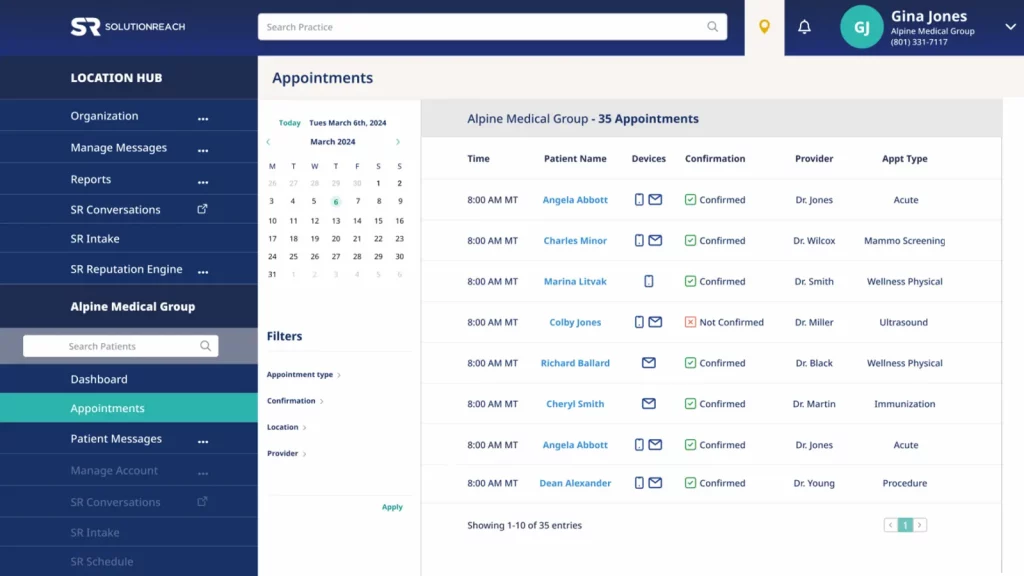
Solutionreach is one of the most established communication tools for healthcare practices. It helps automate reminders, recalls, surveys, and patient reviews to keep engagement consistent and simple. Many clinics use it to cut down no-shows and maintain strong relationships with patients. It’s a dependable platform if you want automation that just works.
Solutionreach Key Features
- Automated Reminders: Sends texts, emails, and calls to confirm appointments automatically.
- Patient Recall System: Notifies patients when it’s time for their next checkup.
- Online Reputation Management: Collects reviews and posts them on popular platforms.
- Two-Way Texting: Enables quick, secure conversations with patients.
Solutionreach Pros
- Better Patient Engagement: Combines texts, emails, and calls for broader reach.
- Easy Campaign Management: Makes it simple to schedule promotions or updates.
- HIPAA-Compliant: Fully secure for healthcare communication.
- Stronger Patient Retention: Keeps patients coming back with automatic reminders and recalls.
Solutionreach Cons
- Outdated Interface: The dashboard looks older compared to newer tools.
- Slow Data Sync: Some users report minor delays with EHR updates.
- Variable Support Speed: Customer service quality can depend on your plan.
Solutionreach Integrations
- Carestream Dental
- Dentrix
- Open Dental
- Athenahealth
- NextGen
- Eaglesoft
Solutionreach Pricing
Solutionreach pricing plans start around $329/month. The costs increase as you add more features and locations.
Solutionreach Ratings
- Capterra: 3.8/5
- G2: 3.7/5
Solutionreach Customer Reviews
“Customer service. Is poor. If you have any issues, which all products will, don’t expect a quick resolution.”
“The software is very specific about templates for scheduling, and we cannot differentiate between different appointment types.”
Source: Capterra
Solutionreach Support Channels
- Email support
- Phone support
- Knowledge base
- Live chat for limited hours
5. Klara | Klara vs Adit

Klara Overview
Klara focuses on making patient communication fast and effortless. It replaces voicemail and long phone waits with secure, two-way texting. Teams can manage all patient conversations, follow-ups, and prescription requests in one inbox. For most practices, Klara has cut phone time and helped staff stay organized.
Klara Key Features
- Two-Way HIPAA-Compliant Texting: Lets staff and patients chat securely anytime.
- Shared Team Inbox: Keeps all conversations visible to your entire team.
- Automated Appointment Reminders: Confirms visits without manual work.
- Message Routing: Sends messages to the right department automatically.
- Telehealth Support: Allows secure video visits directly from the platform.
Klara Pros
- User-Friendly Design: Simple and intuitive for both patients and staff.
- Fewer Phone Calls: Moves communication to text, saving staff hours every day.
- Team Collaboration: Shared inbox prevents missed or duplicate replies.
- Seamless Integrations: Works easily with many top EHR systems.
Klara Cons
- Limited Analytics: Reporting tools aren’t very detailed.
- Internet Dependent: Requires a steady connection to use.
- No Built-In Phone Feature: Focuses solely on messaging.
Klara Integrations
- Athenahealth
- DrChrono
- AdvancedMD
- ModMed
- Nextech
- Greenway Health
Klara Pricing
Klara pricing offers flexible plans tailored to your practice size. Most clinics pay around $300–$400 per month, with custom quotes for larger setups or multi-location practices.
Klara Ratings
- Capterra: 4.6/5
- G2: 4.4/5
Klara Customer Reviews
“Can become confusing at times with all the messages in several different mailboxes at the same time. And I wish we could update our own messages to patients.”
“Some patients, especially elderly or less tech-savvy individuals, may struggle to use the system.”
Source: Capterra
Klara Support Channels
- Help center
- Live chat support
- Training during onboarding
Curious about Klara and how it fits into a modern healthcare communication stack? Watch the video below:
6. DoctorConnect | DoctorConnect vs Adit
DoctorConnect Overview
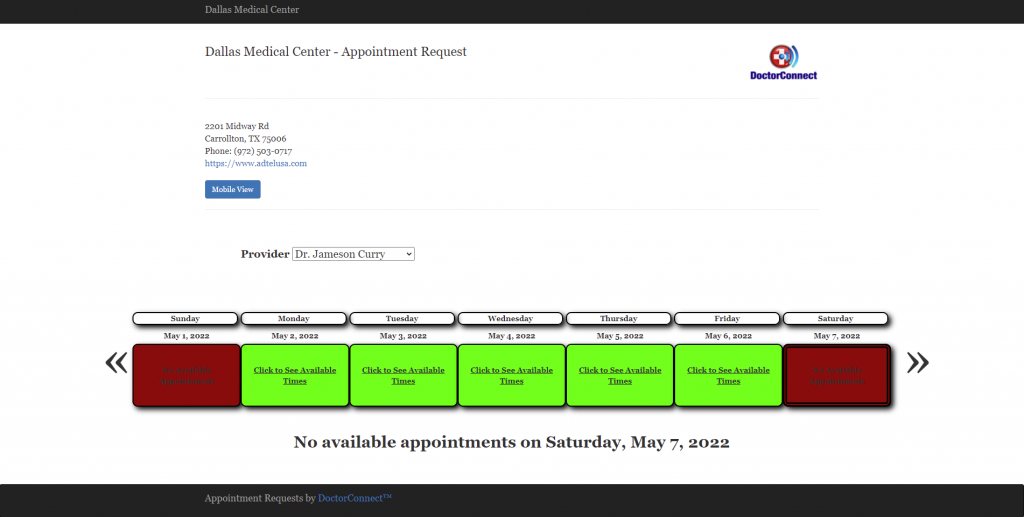
DoctorConnect is built to help healthcare practices manage patient communication without hassle. It automates reminders, recalls, surveys, and follow-ups from one dashboard. Clinics use it to improve appointment attendance and patient satisfaction. It’s a dependable platform if your team wants efficiency without adding complexity.
DoctorConnect Key Features
- Automated Reminders: Sends appointment confirmations and reminders via text, call, or email.
- No-Show Tracking: Monitors missed appointments and helps reschedule quickly.
- Patient Portal Access: Gives patients an easy way to view and confirm appointments.
- Recall Campaigns: Automatically reminds patients when they’re due for another appointment.
- Custom Messaging: Enables personalized communication for birthdays, checkups, and offers.
DoctorConnect Pros
- Simple and Reliable: Works smoothly without requiring much training.
- Boosts Patient Engagement: Keeps patients connected through regular reminders.
- Reduces No-Shows: Automates follow-ups to keep schedules full.
- Comprehensive Dashboard: Tracks messages, surveys, and reports in one place.
DoctorConnect Cons
- Outdated Interface: Looks a little older than newer competitors.
- Limited Customisation: Fewer options for branding and templates.
- Occasional Delays: Some users report slight lag in message delivery.
DoctorConnect Integrations
- Dentrix
- Open Dental
- Eaglesoft
- Nextech
- Greenway Health
- Allscripts
DoctorConnect Pricing
The plans start around $200. The exact costs would depend on practice size and usage.
DoctorConnect Ratings
- Capterra: 4.8/5
- G2: 4.7/5
DoctorConnect Customer Reviews
“I don’t like that we have to delete and create an appointment every time. We drag and drop a lot of our appointments that need to be rescheduled so I wish it had the capability to recognize that.”
“Documents aging functionality is not working (only needs form once a year…patients are getting it every visit). Causes us and our patients extra work.”
Source: Capterra
DoctorConnect Support Channels
- Email and phone support
- Live chat
- Help center with FAQs
- Onboarding support for new clinics
7. OhMD | OhMD vs Adit
OhMD Overview
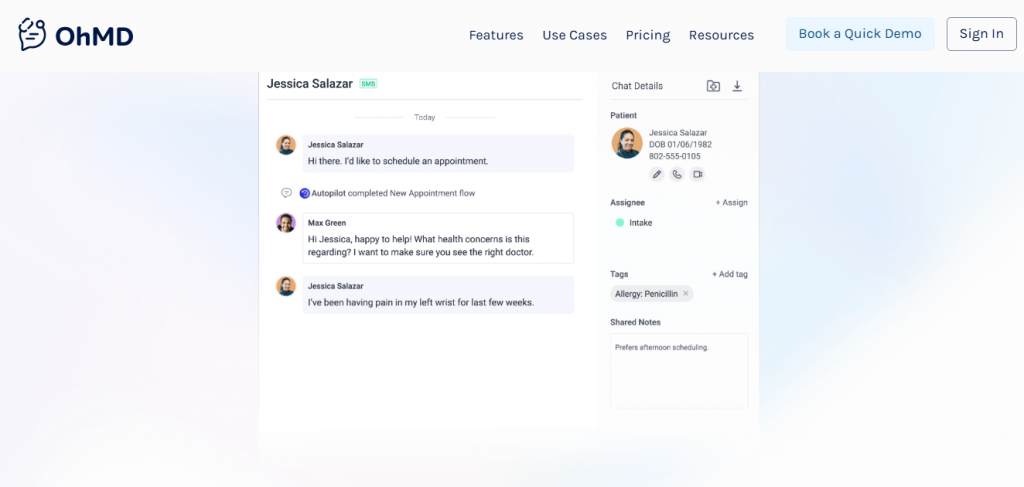
OhMD focuses on humanising healthcare communication. It lets teams connect with patients through secure texting and video, reducing the need for long phone calls. Many small and mid-sized clinics use it to simplify messaging, automate follow-ups, and create a better patient experience.
OhMD Key Features
- Two-Way Secure Texting: Lets patients reach the right team member instantly.
- Video Visits: Supports virtual consultations right inside the chat window.
- Automated Reminders: Sends appointment confirmations and check-in messages.
- Team Chat: Keeps staff connected internally for faster responses.
- Broadcast Messaging: Sends updates or alerts to large patient groups at once.
OhMD Pros
- Quick and Friendly: Makes patient communication personal and responsive.
- Easy Setup: Simple to install and start using within a day.
- Strong Patient Engagement: Encourages fast replies and higher follow-up rates.
- HIPAA-Compliant Messaging: Keeps all patient data secure.
OhMD Cons
- Limited Integrations: Doesn’t connect with as many EHRs as larger platforms.
- Basic Analytics: Lacks advanced reporting or campaign tracking tools.
- Occasional App Glitches: Some users report small bugs on mobile.
OhMD Integrations
- Athenahealth
- DrChrono
- ModMed
- Elation Health
- AdvancedMD
OhMD Pricing
OhMD pricing plans start at around $7/month. Final pricing may vary based on features and staff size.
OhMD Ratings
- Capterra: 4.7/5
- G2: 4.7/5
OhMD Customer Reviews
“Mostly the cost. There were some features we were looking for that were not offered by OhMD. We were able to get more features for less cost with another company.”
“Some users do not like it because it is a separate app. I can’t figure out a way to delete old clients from my records. At times it seems to freeze. I then just sign out and sign back in which fixes it. I was told that I need to upgrade to a newer version, so that may be my problem.”
Source: Capterra
OhMD Support Channels
- Email support
- Live chat
- Knowledge base with guides
- Onboarding and training help
8. Podium | Podium vs Adit
Podium Overview
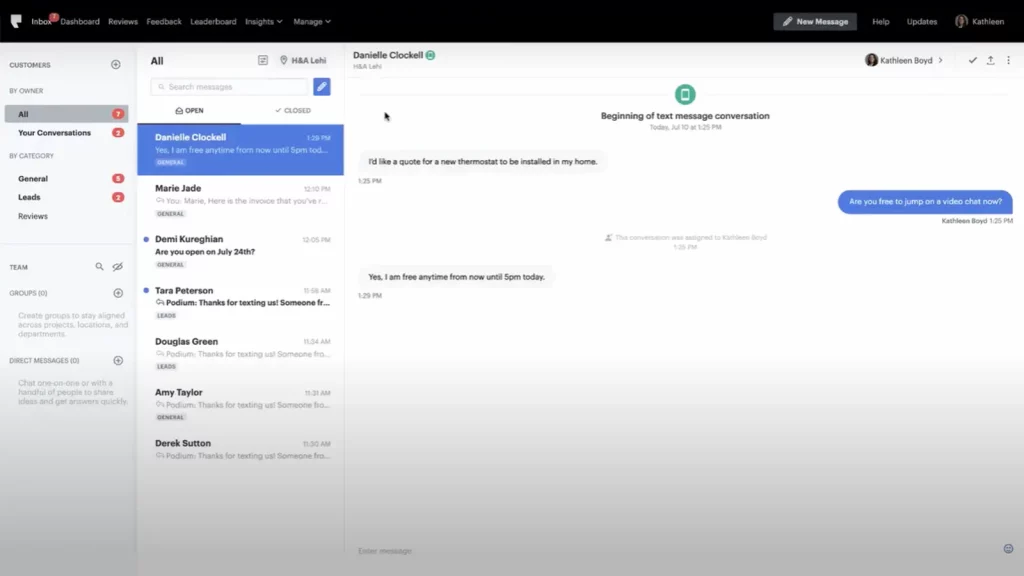
Podium is known for helping local businesses and healthcare practices manage reviews, payments, and messaging from one platform. It turns everyday communication into opportunities to build trust and get feedback. For clinics, it’s a great tool to collect patient reviews, send reminders, and chat through text without juggling multiple apps.
Podium Key Features
- Unified Inbox: Combines all patient texts, calls, and messages in one dashboard.
- Text-to-Pay: Lets patients make payments directly via secure text links.
- Automated Campaigns: Schedules reminders, announcements, or promotions easily.
- Website Chat Widget: Converts online visitors into booked appointments.
- Team Collaboration Tools: Keeps staff on the same page with internal chat options.
Podium Pros
- Excellent for Reviews: Makes collecting patient feedback effortless and consistent.
- Quick Payments: Speeds up billing through text-based payments.
- Streamlined Inbox: Keeps all communication neatly organised.
- Strong Brand Reputation: Widely trusted by healthcare and retail users.
Podium Cons
- Premium Pricing: Can be expensive for smaller practices.
- Limited Healthcare Focus: More generalised than healthcare-specific platforms.
- Complex Setup for Beginners: Some onboarding features require time to understand
Podium Integrations
- Dentrix
- Open Dental
- QuickBooks
- Stripe
- Salesforce
- HubSpot
Podium Pricing
Podium pricing starts at approximately $399/month. There are no charges for individual texts. The rates are set at a flat monthly rate.
Podium Ratings
- Capterra: 4.3/5
- G2: 4.2/5
Podium Reviews
“Inability to interface with Facebook for payments.”
“The interface can be a little overwhelming at times.”
Source: Capterra
Podium support channels
- Email support
- Live chat
- Help center with guides
- Dedicated success reps for premium users
9. Luma Health | Luma Health vs Adit

Luma Health Overview
Luma Health is built to make patient communication smooth and automated. It helps practices reduce no-shows, send reminders, and connect through texting, email, or calls. Designed for modern healthcare teams, Luma’s goal is to improve access and make patient journeys seamless from start to finish.
Luma Health Key Features
- Smart Reminders: Sends automatic reminders based on patient preferences.
- Two-Way Texting: Keeps patients and staff in sync with quick, HIPAA-safe messages.
- Patient Re-Engagement: Reaches out to inactive patients to bring them back.
- Referral Management: Tracks and automates patient referrals efficiently.
- Analytics Dashboard: Monitors communication metrics and engagement levels.
Luma Health Pros
- Strong Automation: Reduces staff workload with intelligent reminders and outreach.
- Better Patient Flow: Makes scheduling and follow-ups faster and easier.
- HIPAA-Compliant: Secure and reliable for healthcare environments.
Luma Health Cons
- Higher Pricing Tier: May feel costly for smaller clinics.
- Occasional Sync Delays: Some users report minor lag between EHR updates.
- Learning Curve: Initial setup takes time to customise fully.
Luma Health Integrations
- Epic
- Cerner
- Athenahealth
- DrChrono
- ModMed
- Nextech
Luma Health pricing
No fixed pricing, they follow a custom Luma Health pricing model. It’s basically based on provider count and feature set.
Luma Health ratings
- Capterra: 4.6/5
- G2: 4.5/5
Luma Health customer reviews
“The constant changes of my account representatives really made it difficult to build relationships. Overtime Luma’s account representatives stopped contacting the practice and as result we had to figure out solutions on our own. Additionally, they changed their payment terms to where if we didn’t pay them upfront then they would drop us as a customer.”
Source: Capterra
Luma Health support channels
- Phone
- Onboarding specialists
- Help center
10. Spruce Health | Spruce Health vs Adit
Spruce Health Overview
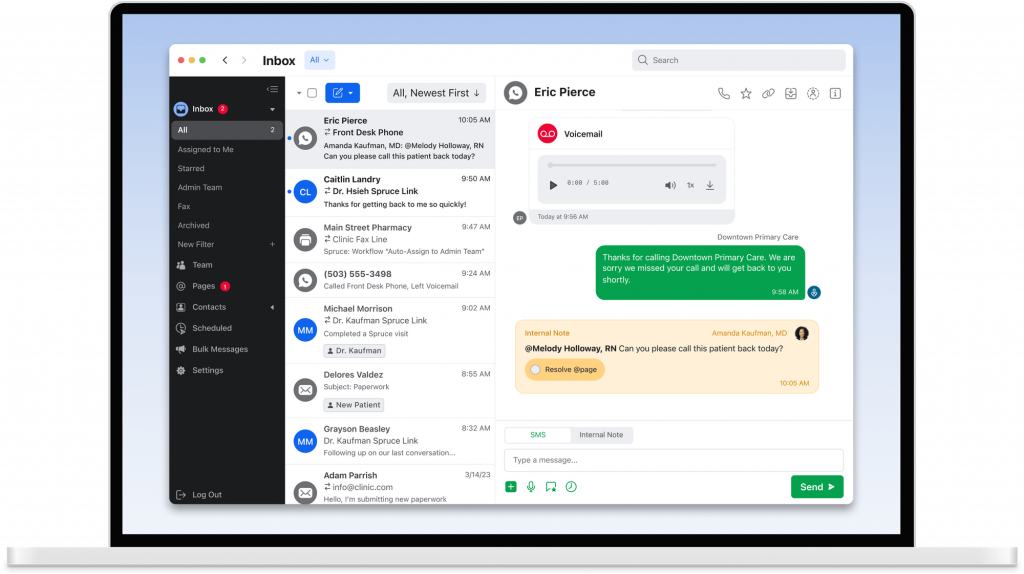
Spruce Health is a communication platform made specifically for healthcare. It brings calls, texts, voicemails, and video visits into one easy inbox. Many practices use Spruce to replace multiple apps, manage team communication, and give patients a smoother experience from start to finish.
Spruce Health Key Features
- HIPAA-Compliant Messaging: Keeps all patient interactions private and secure.
- Voicemail Transcription: Turns voicemails into text so staff can reply faster.
- Team Collaboration Tools: Allows internal notes, shared inboxes, and task assignments.
- Video Consultations: Offers secure telehealth sessions within the same platform.
- Custom Auto-Replies: Sends automated responses during off-hours.
Spruce Health Pros
- All-in-One Communication: Brings calls, messages, and video together seamlessly.
- Easy to Use: Clean design that staff learn quickly.
- Strong Compliance: Fully HIPAA-compliant for healthcare communication.
- Reliable Mobile App: Great for remote and on-call teams.
Spruce Health Cons
- Limited Customisation: Fewer branding or campaign options than competitors.
- No Built-In Marketing Tools: Focuses more on communication than outreach.
- Higher Cost for Add-Ons: Some advanced features come at an extra fee.
Spruce Health Integrations
- Athenahealth
- Elation Health
- DrChrono
- ModMed
- AdvancedMD
- Hint Health
Spruce Health Pricing
Spruce Health pricing offers plans starting from $24 per user per month, with advanced features available in higher tiers. Custom pricing is available for larger clinics or multi-location networks.
Spruce Health Ratings
- Capterra: 4.5/5
- G2: 4.5/5
Spruce Health customer reviews
“Very confusing to start – no personal connection or onboarding that is not in a group setting. They say they do not have the manpower to work with small businesses. They do not offer 24-hour help.”
“Sometimes, the notifications do not come through as a push notification on my device. I have had a couple instances where I had new messages and I had to open the app to find out. I wish there was an easy way to search the messages and files received.”
Source: Capterra
Spruce Health support channels
- Email support
- In-app live chat
- Setup help for new users
- Online help center
What Makes Emitrr the Best Adit Alternative?
If you’re looking for a tool that actually makes your day easier instead of adding more tabs to your browser, Emitrr is it. From reminders to reviews to payments — everything happens in one smooth flow. Here’s what sets Emitrr apart.
24/7 Support for Healthcare Teams
Healthcare doesn’t stop at 5 PM, and neither does Emitrr. Its support team is available round the clock to help you fix issues, answer questions, or guide you through setup. Whether you’re a small dental office or a busy clinic, you’ll always have a real person to reach out to. Even better, the platform itself works nonstop – sending reminders, handling calls, and responding to patients while you sleep. So your patients stay cared for, even after hours.
Unified Communication Dashboard
Imagine all your patient texts, calls, and voicemails showing up in one clean dashboard, that’s what Emitrr does. No switching between apps or missed messages. You can see who called, texted, or left a voicemail, and reply instantly. Every message thread stays organised, so your staff can easily pick up where someone else left off. It’s like your clinic’s communication control room, simple, tidy, and super efficient.
Smart Automation for Reminders and Campaigns
Tired of chasing patients for confirmations or feedback? Emitrr automates all that. You can schedule reminders, follow-ups, or even promotional campaigns ahead of time, and the AI takes care of the rest. It can send birthday greetings, vaccine reminders, or “we miss you” texts without anyone lifting a finger. Plus, you can personalize messages, so it still feels warm and human. It’s like having a smart assistant who never forgets a task.
Two-Way Texting and Voicemail Automation
Emitrr lets you text patients directly from your business number, no personal phones needed. When someone calls and you can’t answer, Emitrr automatically sends a friendly “Sorry we missed you!” text, keeping the conversation alive. Patients can reply anytime, and your staff can pick it up right from the dashboard. It turns missed calls into meaningful connections and helps your team handle more without feeling overwhelmed.
Group and Bulk Messaging for Announcements
Need to inform everyone about a holiday closure or a flu-shot drive? Emitrr makes that easy with bulk messaging. You can text hundreds or even thousands of patients at once, and each person still gets a message that feels personal. No messy group chats, just clean one-to-many communication. It’s perfect for updates, reminders, or quick alerts. Your message lands directly in their inbox, and you save hours doing it.
In-Chat Scheduling and Payments
Emitrr takes convenience to another level by letting patients schedule appointments or make payments right in the chat. No links, no phone tag, just one smooth conversation. Patients can confirm a time or pay a bill instantly, and your team sees it all in real time. This not only saves time but also reduces missed appointments and unpaid invoices. It’s like having your front desk built into your text inbox.
Custom Templates and Auto-Replies
We all have those messages we send over and over, appointment confirmations, “see you soon” notes, or insurance reminders. Emitrr lets you save them as templates so you can send them with one click. You can even set auto-reply text templates for off-hours or common FAQs like “What’s your address?” or “Do you accept insurance?” It keeps patients engaged without overwhelming your staff. The tone stays professional and friendly, just like your practice.
Real-Time Analytics and Tracking
Ever wondered how many people actually open or reply to your texts? Emitrr gives you those insights instantly. You can track message delivery, responses, and campaign performance right from your dashboard. It helps you see what’s working and what’s not, so you can keep improving your outreach. Think of it as a quick pulse check on how your communication strategy is performing, data that’s easy to understand and actually useful.
CRM and EHR Integrations
Emitrr connects seamlessly with your existing systems, whether it’s your EHR, CRM, or scheduling tool. That means no double entry, no switching screens, and no lost information. When a patient updates their appointment or responds to a text, that data syncs automatically. It saves your team hours every week and ensures everything stays accurate across platforms. Integration just happens quietly in the background, the way good tech should.
Mobile Access for Teams on the Move
Emitrr works wherever you do. Your staff can reply to patients, check voicemails, or manage reminders right from their phone. Whether you’re between appointments or out of office, you stay connected and in control. Mobile access makes it easy to respond fast and keep communication flowing, even when you’re not at your desk. At the end of the day, it’s flexibility that truly fits the rhythm of a busy healthcare day!
Which Industries Are Catered by Emitrr?
Emitrr adapts to how you work and is flexible enough to fit almost any industry that deals with calls, appointments, and follow-ups! Here’s how different industries use it every day.
Healthcare
Hospitals, clinics, and private practices use Emitrr to stay connected with patients effortlessly. From sending appointment reminders to handling after-hours messages, everything is automated yet personal. Doctors can spend less time chasing calls and more time focusing on care. And because it’s HIPAA-compliant, every message stays secure and confidential. It’s basically your front desk, only smarter.
Dental
Dentists love Emitrr because it helps cut down on no-shows and uses AI tools to enhance patient engagement between visits. Automated text reminders, easy confirmations, and recall campaigns make the whole experience smoother. You can even collect reviews and feedback without lifting a finger. Emitrr ensures your chairs stay full, and your staff stays stress-free.
Veterinary
For veterinary clinics, timing is everything, and Emitrr keeps that under control. From vaccine reminders to pet wellness check-ins, it helps staff manage communication without missing a beat. Pet parents can confirm or reschedule visits via text, and the clinic always stays in sync. It’s a simple way to offer warm, reliable care for furry clients!
Wellness and Aesthetics
Salons, spas, and cosmetic clinics use Emitrr to give clients a five-star experience before they even walk in. Appointment reminders, follow-ups, and reviews all happen automatically. You can send promotions, holiday offers, or “we miss you” messages in seconds. It keeps clients coming back, not because you asked, but because it feels effortless.
Legal and Financial Services
Law and finance firms deal with time-sensitive communication, and Emitrr makes that easy to manage. Secure texting, document sharing, and appointment coordination all happen within one dashboard. Clients can reach out without waiting on hold, and teams can reply faster with complete privacy. It’s compliance-friendly, efficient, and keeps everyone in the loop.
Real Estate
Agents and property managers use Emitrr to stay responsive to leads. Whether it’s sending open house reminders, sharing property links, or following up on visits, everything runs smoothly. No more missed messages or lost opportunities. Emitrr helps agents close deals faster and build stronger client relationships through consistent, quick communication.
Education
Schools and tutoring centres use Emitrr to keep communication with parents simple and instant. It’s great for sending announcements, event reminders, or report updates in bulk. Teachers and admins can also handle individual queries through secure texting. It makes every message clear, timely, and easy to manage without long email threads.
Automotive
Workshops, car dealerships, and service centres use Emitrr to handle bookings and reminders like pros. Customers get instant updates about repairs, service completion, or upcoming maintenance schedules. Payment links and review requests can be sent automatically. It’s fast, easy, and keeps customers coming back for their next service with zero hassle.
Home Services
Plumbers, electricians, cleaning services, anyone working in homes can rely on Emitrr to stay organised. You can send job updates, invoices, and scheduling reminders through text in seconds. Customers love the convenience, and your team never loses track of who’s next. It’s the easiest way to manage communication and build loyalty at the same time.
Frequently Asked Questions
Yes! Emitrr is fully HIPAA-compliant. Every message is encrypted, and patient data stays protected so you can communicate safely and confidently.
Adit helps with reminders, online booking, and feedback collection. It works well for basic communication needs but can feel limited when practices need faster texting or automation.
Most teams move away from Adit for simpler workflows, stronger automation, and better support. Tools like Emitrr offer quicker responses and smoother integrations without the extra clicks.
Emitrr is a top pick for dental and medical teams. It handles calls, texts, reminders, and reviews from one dashboard. No juggling between apps or losing patient messages.
Absolutely! Emitrr syncs easily with your current EHR, CRM, or scheduling tools, keeping all your patient info updated automatically without any manual work.
Conclusion
Switching from Adit or any other tool you’re using doesn’t have to be stressful. With Emitrr, everything just clicks with texting, calls, reminders, and payments all in one place! It’s designed to make life easier for busy healthcare teams while giving patients the quick, friendly experience they expect.
Are you ready to experience one platform, zero chaos, and support that’s always got your back? Book a free demo with Emitrr today!


 4.9 (400+
reviews)
4.9 (400+
reviews)