

Introduction
At 8:15 on a Monday morning, the shared inbox already holds a scheduling request, two refill questions, a billing message, a completed intake form, a text that says “my incision looks red”, and a voicemail transcript nobody has opened. All of it is legitimate. None of it is labeled. And the person who opens the inbox first has to guess what each item needs, who should handle it, and how soon.
That guess is the real problem. Most practices do not struggle to receive messages. They struggle to decide what each message needs, who owns it, and what happens next. When that decision lives in one staff member’s head, messages sit unassigned, two people answer the same patient, and the urgent item gets found by accident.
Healthcare inbox triage turns that unstructured inbox into an organised workflow. It uses clear categories, priority rules, routing, and follow-up so each message lands with the right owner and the right next step. This guide explains how to build it, with practical rules, examples by practice type, and the metrics that show whether it works.
What Is Healthcare Inbox Triage?
Healthcare inbox triage is the process of sorting incoming patient communication by intent, priority, ownership, and next action. Each message gets identified (what does the patient need?), ranked (how soon?), assigned (who handles it?), and followed through (what happens if nobody responds?).
It helps to separate two ideas that share a name:
- Communication triage decides which team or person handles a message and how quickly. A scheduling request goes to the front desk. A billing question goes to billing.
- Clinical triage assesses symptoms and decides on care. A nurse or clinician makes that call.
Automation can organise and route communications. It cannot, and should not, make clinical decisions. Qualified staff define the escalation criteria, review anything potentially urgent, and make the call.
The workflow in this guide has four parts:
- Sort: identify what the patient needs.
- Prioritize: decide which requests need attention first.
- Route: send each request to the right person or team.
- Follow up: trigger the next action when nobody responds.
When Does a Healthcare Inbox Need Triage Rules?
If any of these sound familiar, the inbox needs rules, not more effort:
- Messages remain unassigned.
- Multiple staff members respond to the same patient.
- Urgent requests are discovered late.
- Staff manually search for messages that belong to their team.
- The same patient contacts the practice repeatedly because the first request was missed.
Notice that none of these are volume problems. A practice with 50 messages a day can have all five, and a practice with 500 can have none. They are workflow problems: nobody decided who owns what. That is why hiring another person to “watch the inbox” rarely fixes them, and why teams that centralize channels without adding ownership rules often end up with the same pile in a different place. A shared SMS inbox helps teams see everything in one spot, but the sorting and ownership still have to be defined.
The Four Steps of Automated Healthcare Inbox Triage
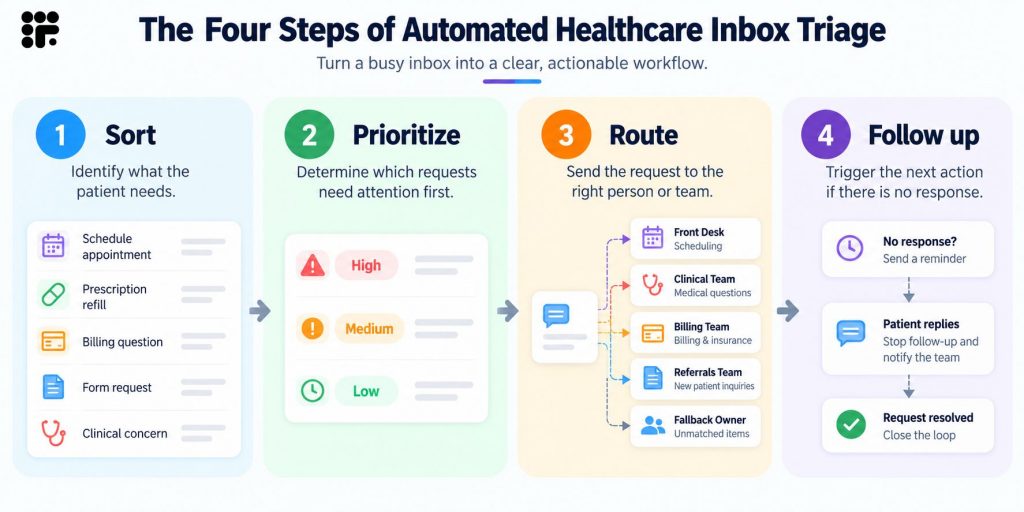
Sort. Identify what the patient needs: scheduling, a refill, billing, a form, a clinical concern.
Prioritize. Determine which requests need attention first, based on rules the practice defines rather than whichever message arrived first.
Route. Send the request to the appropriate person or team, with a fallback owner when the destination is unclear.
Follow up. Trigger the next action if the patient or the staff member does not respond.
These steps work through a combination of rules, AI classification, assignments, and workflow automation. Simple, predictable requests can be handled by keyword rules. Messy, free-text requests benefit from AI classification. Assignment settings decide who receives the work, and workflows decide what happens next. The sections below cover each step in turn.
How to Sort Patient Messages by Intent
Start with categories that reflect your actual work queues, not generic labels. If two categories go to the same person and get handled the same way, they are probably one category. If one category needs three different owners, it is probably three.
A practical starting set:
- Scheduling
- Prescription or refill
- Billing
- Insurance
- Referral
- Forms
- Test results
- General question
- Clinical concern
- Other
AI classification vs. keyword rules
Keyword rules work when patients use predictable words (“refill,” “reschedule,” “balance”). They break when patients write, “Can I get more of my blood pressure pills” or when one message contains two requests. AI classification reads the message for meaning, so it handles variation better, but it can still miss, which is why every category needs a fallback owner. Many practices use both: keyword rules for the obvious cases and AI tagging for everything else. For a more structured approach, organizing patient messages by intent can help define the categories used for triage.
Test before you commit
Pull a sample of 100 real historical messages and sort them by hand using your draft categories. Where staff disagree, the category definition is too fuzzy. Where many messages land in “Other,” a category is missing.
Think by channel
A tag that works well on texts may not behave the same way on voicemails, calls, or faxes. A short text saying “refill” is clear. A rambling voicemail transcript is not. Decide which channels each category should apply to, and review misfires by channel.
Keep it small
A taxonomy staff cannot remember is a taxonomy staff will not use. Every category should have a clear owner.
How to Prioritize Patient Messages by Urgency
Priority should come from rules the practice defines, not from whichever message appears first. Signals that commonly move a message up the queue:
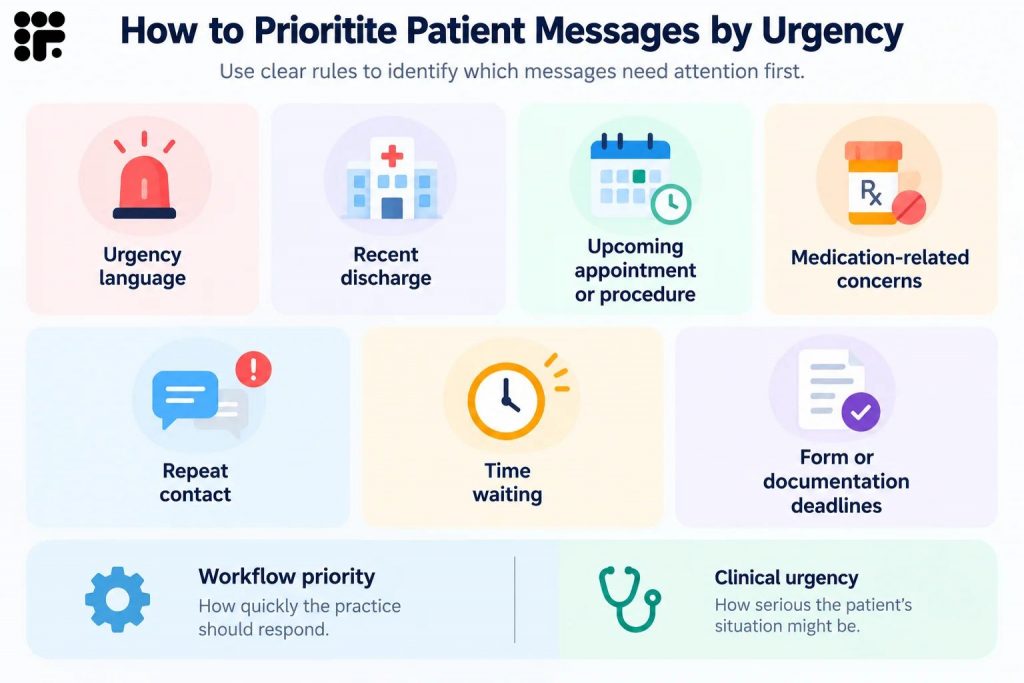
- Urgency language: words or phrases the practice has flagged for review
- Recent discharge: a patient who just left the hospital has a different need than one who last visited a year ago
- Upcoming appointment or procedure: a message about tomorrow’s visit is more time-sensitive than one about next month’s
- Medication-related concerns: side effects, running out, or confusion about doses
- Repeat contact: a patient who has already reached out about the same issue
- Time waiting: a message that has sat unanswered gets more urgent every hour
- Form or documentation deadlines: an unsigned consent form the day before a procedure
Keep two ideas apart: workflow priority (how quickly the practice should respond) and clinical urgency (how serious the patient’s situation might be). A healthcare triage software can raise a message’s priority based on rules. It cannot judge how sick someone is. Clinical teams should define escalation criteria for potentially urgent communications, and any message that meets them should go to a person immediately.
How to Route Patient Messages to the Right Team
Route by function, not by channel. A “text team” and a “voicemail team” create handoffs between people who are all doing the same job. Instead, send each request to the function that handles it:
- Scheduling goes to the front desk.
- Billing and insurance go to the billing team.
- Referrals go to the referral coordinator.
- Routine clinical questions go to the appropriate clinical queue.
- Unclear requests go to a designated fallback owner.
Individual vs. team assignment
Assigning it to one person creates clear ownership but a single point of failure when that person is out. Assigning to a team spreads coverage but can leave everyone assuming someone else has it. Many practices assign to a team and then use a distribution method to hand each item to a specific person.
When round-robin helps
Round-robin assignment rotates new items through the members of a team. It works well for high-volume queues where tasks are similar, such as scheduling or refills, because it spreads the load evenly and prevents one person from becoming the default. It works less well when tasks need specific skills or continuity with a particular patient.
Location and language
In multi-location practices, a message should reach the staff at the patient’s location. Language works the same way: a Spanish-language message should go to someone who can reply in Spanish.
The fallback owner
When automation cannot confidently decide where a message belongs, it needs a default destination with a real person responsible for it. Without one, unclear messages become the ones that sit.

Healthcare Inbox Triage Rules: Examples for Common Patient Requests
The table shows practical starting rules. Adapt each one to your own staffing, escalation policies, and clinical workflows, since a rule that suits a five-person practice will not fit a ten-location group.
| Request | Example Trigger | Routing or Action |
| Refill request | Patient texts “need a refill” or AI tags the message as prescription-related | Assign to the refill queue or nurse; send an acknowledgment; escalate if the patient says they have run out |
| Appointment request | Message asks to book or “see the doctor” | Assign to the front desk; send a booking link |
| Appointment cancellation or reschedule | Message mentions canceling, moving, or can’t make it | Assign to the front desk; offer reschedule options |
| Billing question | Message mentions a bill, balance, or charge | Assign to the billing team |
| Insurance question | Message mentions coverage, a card, or authorization | Assign to billing or insurance staff |
| Referral | Message from a patient or provider about a referral | Assign to the referral coordinator |
| Form request | Patient asks for a form or reports a problem with one | Send the form link; assign to the front desk if there is an issue |
| Clinical question | Message describes symptoms or asks about treatment | Assign to the clinical queue; flag for same-day review per practice criteria |
| Spam or low-intent message | No patient match, promotional language, or unrelated content | Move to a review folder; do not assign to staff |
How to Handle Spam, Duplicate, and Low-Intent Messages
Low-value messages add noise to the same inbox that holds patient requests, and they take time from the people who should be handling real ones. Common types:
- Spam: promotions and unsolicited outreach.
- Wrong numbers: messages meant for someone else.
- Duplicate patient messages: the same patient sends two texts and a voicemail about one issue.
- Automated notifications: system messages and delivery receipts.
- Messages with insufficient information: a text that says only “call me.”
Handle each differently. Spam and automated notifications can usually be filtered. Duplicates should be linked to the original request so only one person responds. Messages with too little information need a quick reply asking what the patient needs, ideally sent automatically so they do not wait for a person.
One caution: review filtered messages periodically. Any filter will occasionally catch a real patient message. A weekly check of what was filtered keeps false positives from becoming missed requests.
How to Build Escalation Rules for Unanswered Patient Messages
Triage does not end at assignment. Define what happens when something stalls:
- A message is not assigned. Route it to the fallback owner after a short window.
- A team member has not responded within the target window. Reassign it, send an internal alert, or move it to another queue.
- A patient replies to an automated workflow. Stop the automated sequence and assign the reply to the person who owns that stage.
- A request is identified as potentially urgent. Notify the clinical team immediately and do not wait for the normal queue.
Tools for escalation include reassignment, internal alerts, mentions that pull a specific person into the conversation, and escalation to another queue. Include after-hours handling to manage patient messages without overwhelming staff. Decide which messages wait until morning, which go to an on-call clinician, and what patients are told in the meantime.
How Workflows Turn Triage Into Follow-Up
Sorting a message is only useful if it leads to an action. A tag with no next step is just another label. Workflows connect the classification to what happens next:
- Patient replies: stop the automated sequence so the patient does not keep receiving messages after engaging.
- No reply: send the next reminder or follow-up.
- Form incomplete: send a follow-up asking the patient to finish it.
- Form submitted: notify the appropriate team.
- Specific intent identified: assign the conversation to the owner of that request.
- External system response: continue or branch the workflow based on data from another system, such as whether a patient is eligible or what an account balance shows.
Think of it as sort, route, then act. A refill request gets tagged, assigned to the nurse queue, and acknowledged by text, and if the patient never answers the follow-up question about their pharmacy, the workflow sends a reminder. Teams that already automate patient outreach can extend the same logic to inbound messages, which is how patient follow-up becomes part of the triage process rather than a separate task.
Healthcare Inbox Triage Examples by Practice Type
Small practice
Use a simple intent set of five or six categories and a single front-desk queue. Name one fallback owner. Start with the rule that matters most, usually separating clinical concerns from everything else, and add rules only as problems appear.
Multi-location practice
Combine location-based routing with team assignment. A scheduling request at the downtown office goes to that office’s front desk team, and a billing question goes to a central billing team regardless of location. Add language routing where the patient population needs it.
Specialty practice
Build separate queues for referrals, clinical questions, scheduling, and payer-related requests. Referral and authorisation traffic is high, so give it a dedicated owner and clear priority rules.
High-volume practice
Use AI screening and automated call routing for routine requests before staff intervenes. The AI can answer common questions, collect details, and tag the request, so staff start with a categorised item instead of a blank message. Staff time shifts to exceptions, clinical items, and patients who need a person.
How Emitrr Supports Automated Healthcare Inbox Triage
The principles above work with any tool that supports sorting, assignment, and workflows. Emitrr is one example of putting them into practice. Its team messaging inbox brings calls, SMS, voicemails, forms, and faxes into one contact-level timeline, and AI tagging and assignment rules help organize incoming requests. EHR connections, where available, depend on the integration in place.
Start With Intent, Not the Channel
AI tags can identify common request types, such as scheduling, billing, or prescription requests, and apply them across supported channels, including texts, phone, AI calls, and faxes. A ‘Manage Tags’ page keeps manual and AI tags in one place, so the team can see and edit the full list.
Channel controls decide where a tag is applied automatically. If a tag makes sense for texts but creates noise on voicemails or AI calls, the practice can switch it off for those channels. That supports the shared taxonomy described earlier without forcing staff to sort every message by hand. AI tag availability depends on the plan, so confirm what your account includes.
Turn Tags Into Routing Actions
A tag can do more than label a conversation. When a tag is added, it can trigger a rule: assign the conversation, send a template, or update a contact property. For simple cases, the tag itself has an ‘Assign to’ setting for a team or a person, with a shortcut into the rule editor for anything more involved.
In practice, that means scheduling conversations can go to the front desk, billing conversations to the billing team, referral conversations to the referral coordinator, and prescription-related conversations to the refill queue. Team assignment can be manual or round-robin, which fits different staffing models.
Keep the Handoff With the Conversation
Calls, texts, voicemails, forms, and attachments sit in the same contact thread. Internal notes, mentions, and tasks travel with the conversation, and transcripts and AI summaries give the receiving staff member context without replaying everything. A ‘Mentions’ view collects every conversation where a specific person’s attention is needed.
Up to three custom properties can be pinned to the conversation card, so key details are visible without opening the thread. The receiving person does not have to reconstruct what happened before taking ownership.
Automate the Next Step, Not the Clinical Decision
Workflows can stop automatically when a patient replies and can route replies to the team that owns that stage. They can branch based on form status, for example, sending a reminder only to patients who have not finished a consent form, updating contact properties as a patient moves through a sequence, and calling an outside system to check an account status before deciding what to send. An AI SMS agent for healthcare can collect routine information by text and hand complex or sensitive cases to staff.
Clinical judgement, urgency assessment, and exceptions stay with the healthcare team. Tags and rules organize the work. People decide what the work means.
As AI becomes more embedded in healthcare workflows, practices will need a clear way to assess where it adds value and where human oversight remains essential. Watch this video on how healthcare practices can evaluate AI in 2027.
How to Measure Your Healthcare Inbox Triage Performance
A short list of metrics shows whether triage is moving the right messages to the right owners:
- First-response time: how long from message receipt to the first reply.
- Unassigned messages past target: items with no owner after the target window.
- Misroute rate: the share of messages sent to the wrong team, found through a weekly sample.
- Average handoffs per request: how many times a request changes hands before resolution.
- End-of-day backlog: open items left when the day ends.
- Repeat contacts for the same issue: patients who had to reach out more than once.
The goal is not fewer messages. It is faster movement of the right messages to the right owner. A falling misroute rate and shrinking backlog tell you more than a lower message count. Review the numbers monthly, adjust categories where misroutes cluster, and tighten the fallback process wherever items go unassigned.
Key Takeaways
- Healthcare inbox triage sorts, prioritizes, routes, and follows up on patient communications. It does not replace clinical triage.
- Most inbox problems are ownership problems, not volume problems.
- Use a small set of intent categories that match real work queues, and test them on 100 real messages before committing.
- Separate workflow priority from clinical urgency, and let clinical teams define the escalation criteria.
- Route by function, assign a fallback owner, and use round-robin where tasks are similar and volume is high.
- Review filtered spam and low-intent messages regularly to catch false positives.
- Build escalation rules for unassigned, unanswered, and potentially urgent messages, including after-hours handling.
- Track first-response time, unassigned items, misroutes, handoffs, backlog, and repeat contacts.
FAQs
Healthcare inbox triage is the process of sorting incoming patient communications by intent, priority, ownership, and next action. It decides what each message needs, who should handle it, and what happens if nobody responds. It organizes communications and does not make clinical decisions.
Automated inbox triage uses a mix of keyword rules, AI classification, assignment settings, and workflows. The system identifies the request type, applies a tag, assigns the conversation to a team or person, and can trigger follow-up such as a reminder or an alert. Staff review exceptions and clinical items.
Set priority from rules the practice defines: urgency language, recent discharge, an upcoming appointment or procedure, medication concerns, repeat contact, time waiting, and form deadlines. Keep workflow priority separate from clinical urgency, and have clinical leadership define which messages need immediate human review.
Rules should include intent categories with clear owners, priority signals, routing by function, location, and language, a fallback owner, escalation for unassigned or unanswered messages, handling for spam and duplicates, and a review process to catch misroutes.
Test categories against real historical messages, keep the category list small, set a fallback owner for unclear requests, and review a weekly sample of routed messages. Track the misroute rate and adjust rules where errors cluster. Keep clinical and ambiguous messages under human review.
Yes. Texts, voicemails, calls, forms, and faxes can all feed the same triage workflow when they share one inbox and one set of categories. Some rules may need to differ by channel, since a tag that works well on text may be less reliable on a voicemail transcript, but the request should reach the same functional queue.
Conclusion
Healthcare inbox triage is not about handling fewer messages. It is about making sure every message has a category, a priority, an owner, and a next step. Start small: five or six intent categories, a clear fallback owner, and one rule for separating clinical concerns from everything else. Test the rules on real messages, review misroutes weekly, and add automation where the manual work is most repetitive.
Practices that define the workflow first and automate it second get faster responses without losing the human judgement that clinical communication requires.
Book a demo to see how Emitrr helps your team sort, route, and follow up on patient messages.

 4.9 (400+
reviews)
4.9 (400+
reviews)