
Introduction
A patient texts the practice on Tuesday morning: she is still waiting on a referral to a cardiologist. On Tuesday afternoon she leaves a voicemail asking the same thing, a little more urgently. On Wednesday, the referring office faxes over the records the cardiologist needs. Three communications, one patient, one issue.
In many practices, those three items reach three different people. The text sits in the messaging inbox with the front desk. The voicemail goes to whoever checks the phone system. The fax lands in a shared fax portal that someone opens when they have time. Nobody sees the whole picture, so nobody knows the voicemail and the fax are connected to the text, and the patient ends up calling a third time.
Patient communication triage fixes this by treating all three as one request. Instead of managing each channel separately, the practice brings them into a single workflow with shared categories, clear ownership, and defined follow-up. This guide explains how that works across channels, what to put in place first, where AI helps, and how to measure the results.
What Is Patient Communication Triage?
Patient communication triage is the process of identifying, prioritizing, assigning, and following up on patient communications regardless of channel. A text, a voicemail, a fax, a webchat conversation, and a submitted form all get the same treatment: what does this request need, how soon, who owns it, and what happens next.
It differs from clinical triage. Clinical triage assesses symptoms and decides on care, and it is done by qualified clinicians. Communication triage is operational. It makes sure a message gets to the right person quickly, with context. When a communication may involve a clinical concern, the triage process escalates it to a clinician. It does not make the clinical call.
The principle that holds the whole approach together: the request should determine the workflow, not the channel it arrived through. A prescription refill request is a refill request, whether it came by text, voicemail, or a fax from a pharmacy.
Why Faxes, Texts, and Voicemails Create Communication Gaps When Managed Separately
When each channel has its own inbox, tool, and owner, a predictable set of problems appears:
- Fragmented context. The person reading the text does not know a voicemail came in an hour later, and the person with the fax does not know a patient has been asking about it all week.
- Duplicate responses. Two staff members reply to the same patient through different channels, sometimes with conflicting information.
- Requests with no owner. An item sits in a channel that nobody is clearly responsible for. Each person assumes another team has it.
- Constant switching. Staff move between a fax portal, a phone system, and a messaging platform, which slows everyone down and increases the chance something is missed.
These problems also affect intake, where referrals and forms arrive from several directions at once. Fragmented communication can make patient intake workflows harder to manage, especially when information is spread across channels.
One point is worth making early: simply putting channels in one place does not solve this. A unified inbox where everything is mixed but nothing is categorized or owned is the same pile in a new location. The channels need to be connected by common categories and ownership rules, which the rest of this guide covers. Bringing communication channels together can create a more connected workflow across healthcare teams.
How Patient Communication Triage Works Across Multiple Channels
Follow one patient through the workflow. Maria is waiting for a cardiology referral.
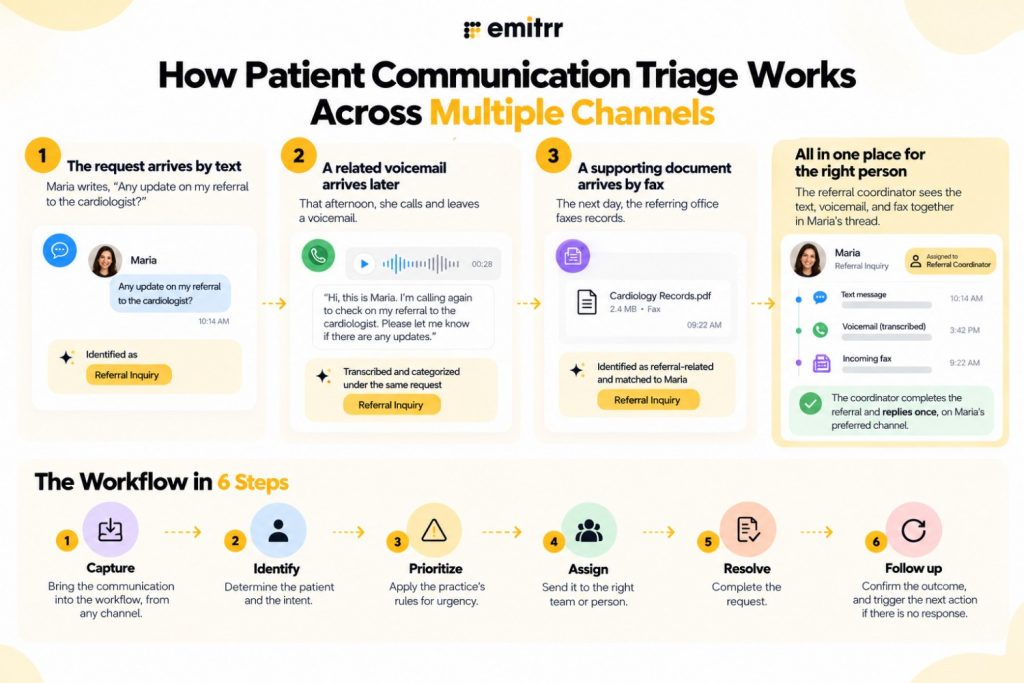
- The request arrives by text. Maria writes, “Any update on my referral to the cardiologist?” The message is captured in her contact thread and identified as a referral inquiry.
- A related voicemail arrives later. That afternoon, she calls and leaves a voicemail. The voicemail is transcribed, and because it matches the same patient and the same type of request, it lands in the same thread under the same category.
- A supporting document arrives by fax. The next day, the referring office faxes records. The fax is identified as referral-related, matched to Maria, and attached to the same conversation.
Because the three items share a patient and a category, a single owner, the referral coordinator, sees them together. She knows the records have arrived, so she can complete the referral and reply once, on the channel Maria prefers.
The progression that makes this possible runs in six steps: capture, identify, prioritize, assign, resolve, follow up.
- Capture: bring the communication into the workflow, from any channel.
- Identify: determine the patient and the intent.
- Prioritize: apply the practice’s rules for urgency.
- Assign: send it to the right team or person.
- Resolve: complete the request.
- Follow up: confirm the outcome, and trigger the next action if there is no response.
A channel-independent workflow depends on being able to recognize that a text, a voicemail, and a fax all refer to the same patient and the same issue. That is the job of the common record.
Create a Common Patient Communication Record
A common record is the set of information that stays consistent across every channel. Without it, each channel keeps its own version of the story. At a minimum, track:
- Patient identity: who this is, matched using more than a name where possible
- Intent: what the patient needs
- Priority: how soon it needs attention
- Location: which site or office the request belongs to
- Language: which language the patient uses
- Owner: who is responsible right now
- Status: open, in progress, waiting on patient, or closed
- Next action: what happens next, and by when
This record is the foundation of omnichannel patient communication. A text, voicemail, and fax can each look different, but once they are tied to the same identity, intent, owner, and status, the team can work them as one request. A broader approach to building a patient communication workflow that improves care delivery can help practices connect these steps into one consistent process.
How to Triage Each Patient Communication Channel
Every channel needs the same final answers, but each one gets there differently. The difference is in what staff receives and what has to be figured out.
| Channel | What Staff Receive | What Triage Needs to Determine |
| Text | Short, informal message, often a fragment | Patient identity (usually known from the number), intent, whether it is part of an existing conversation |
| Voicemail | Audio recording, with a transcript if enabled | Intent from unstructured speech, callback number, urgency cues in tone and wording |
| Fax | Document, often multi-page, with an unreliable cover sheet | Document type, which patient, sender, and urgency, all from the content |
| Webchat or forms | Typed conversation or structured submission | Whether the form is complete, intent from free text, and whether to move to SMS |
The practical takeaway: channels may need different preprocessing. A voicemail needs transcription, a fax needs to be read and matched to a patient, and a form needs a completeness check. But after preprocessing, all of them should enter the same operational workflow. The mistake is building a separate process for each channel and never connecting them.
Use One Patient Intent Taxonomy Across Communication Channels
A shared set of categories is what lets the workflow treat a fax and a text as the same kind of work. A practical starting list:
- Scheduling
- Refills
- Billing
- Insurance
- Referrals
- Forms
- Results
- Clinical concerns
- Records
- General questions
Some channel-specific categories are still necessary. Faxes need document-type labels, such as discharge summary or prior authorization, that do not apply to a text. Voicemails may need a “wrong number” category. Those can sit underneath the shared list as extra detail without breaking it.
The principle to hold onto is that a referral arriving by fax and a referral question arriving by text should ultimately reach the same functional queue. If they land in different places, the team is back to managing channels instead of requests. For a deeper guide to building the category list itself, see how to organize patient messages by intent.

Route Patient Communications by Function, Not by Channel
Many practices organize around channels: someone watches the fax portal, someone covers the phones, someone answers texts. That structure creates handoffs, because a single patient request can cross all three. The text person has to pass the question to the phone person, who has to ask the fax person whether the records came in.
Route by function instead:
- Scheduling goes to the front desk.
- Clinical questions go to the appropriate clinical queue.
- Billing goes to the billing team.
- Referrals go to the referral coordinator.
- Medical records go to the records team.
Each team then handles that work from every channel. Assignments can go to a whole team or to a specific individual. Team assignment spreads coverage, and individual assignment gives clear accountability. Round-robin distribution rotates new items among team members, which works well for high-volume, similar tasks. Backup ownership names who takes over when the primary owner is out.
In multi-site practices, add location and language to the routing rules so a request reaches the staff at the right site and a Spanish-language message goes to someone who can answer in Spanish.
Keep Patient Context Intact During Handoffs
A handoff is where context is most likely to be lost. The receiving person should not have to ask the patient to repeat what they already said. To prevent that:
- Keep related items together. Calls, texts, voicemails, forms, and faxes about one patient should be accessible in one place.
- Use internal notes and tasks to record what has already happened and what is still needed, such as “records received, waiting on insurance verification.”
- Use mentions when a specific person needs to act, so the request reaches them directly.
Preserving context reduces duplicate callbacks and repeated questions, which are two of the most visible signs of a fragmented process to patients. A patient who has to explain their situation to three people loses confidence in the practice, however well each employee does.
Build Follow-Up Into the Triage Workflow
Triage should not end when an item is assigned. Assignment says who owns it, and follow-up says what happens next. Define the outcome for each situation:
- Patient replies: the automated workflow stops, and staff take over the conversation.
- Patient does not reply: a reminder is sent, or the item escalates to a person.
- Form incomplete: a follow-up request goes to the patient.
- Form completed: the appropriate team is notified.
- Fax received: a review or referral workflow is triggered.
The key is that the workflow defines what happens after each outcome, instead of relying on someone to remember. A tagged conversation with no defined next step is just a label. Teams building out this stage can look at patient follow-up as part of the same system.
Where AI Helps and Where Human Review Still Matters
AI is useful in this workflow, but its role should be bounded.
AI can:
- Identify intent
- Summarize voicemail and fax content
- Collect structured information from patients
- Apply tags
- Route routine requests
- Support after-hours intake
Humans retain:
- Clinical judgment
- Patient identity verification where needed
- Decisions about urgency and care
- Exceptions and ambiguous requests
This human-in-the-loop distinction matters for healthcare communication automation. Automation handles the repetitive sorting, summarizing, and routing so staff can spend their time on the work that needs a person. When a request is unclear, sensitive, or potentially urgent, it should go to a human with the context AI collected. The same approach extends to document handling, with AI fax routing helping practices organize and direct incoming faxes more efficiently.
Watch Emitrr’s all-in-one voice agent handle patient calls, capture the right information, and route requests to the right team without adding another task to the front desk.
How to Roll Out Patient Communication Triage Without Disrupting Staff
A rollout that tries to change everything at once usually stalls. A phased approach works better:
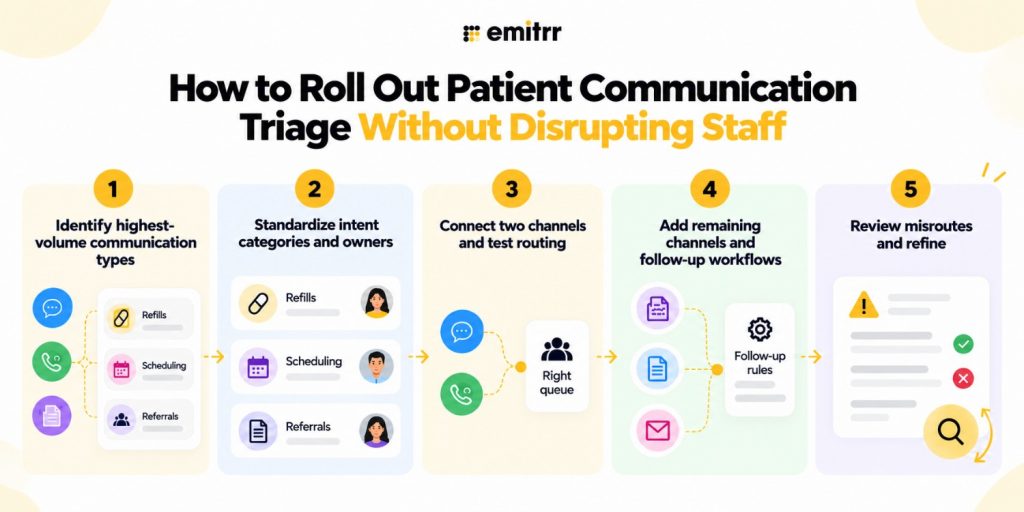
- Phase 1: Identify the highest-volume communication types. Look at a sample of recent texts, voicemails, and faxes and find what repeats most, such as refills, scheduling, and referrals.
- Phase 2: Standardize intent categories and owners. Agree on a shared list and name an owner and a fallback for each.
- Phase 3: Connect two channels and test routing. Start with two, such as texts and voicemails, and confirm requests reach the right queue.
- Phase 4: Add remaining channels and follow-up workflows. Bring in faxes and forms, and add the follow-up rules.
- Phase 5: Review misroutes and refine. Look at what went to the wrong place and adjust the rules.
Start with narrow, repeatable use cases before expanding automation. A single well-run refill workflow teaches the team more than a broad launch that nobody trusts.
How Emitrr Brings Patient Communications Into One Workflow
The approach above depends on a place where channels meet. Emitrr’s team messaging model combines calls, SMS, voicemails, forms, faxes, and attachments in contact-level threads, with assignment, AI tagging, workflows, tasks, and internal notes. The aim is continuity across channels, so a request keeps its context even when the channel changes.
One Conversation, Even When the Channel Changes
Calls, texts, voicemails, forms, and faxes can be accessed from the same patient or contact timeline. A staff member picking up a request sees what came before without reconstructing the history. That includes webchat: when a website visitor starts in webchat, the conversation can continue through SMS rather than staying isolated in a chat window, which is the idea behind webchat to text.
AI Tagging That Connects Communication to the Next Action
AI tags can identify intent across supported channels, including texts, phone, AI calls, and faxes. Tag behavior can be controlled by channel, so a tag appears where it is useful and stays off where it creates noise. Tags can then trigger assignments or workflow actions. Healthcare examples include routing scheduling, billing, referral, and prescription-related conversations to the right team, and flagging conversations that match practice-defined urgent criteria for prompt human review. AI tag availability depends on plan, so check what your account includes.
Assign Work Without Creating More Handoffs
Conversations can be assigned to teams or individuals, using manual assignment or round-robin where it fits. Mentions, tasks, and internal notes carry the staff-to-staff handoff inside the conversation itself. That creates accountability without needing a separate task-management system, since the owner, the notes, and the next step all live in the same thread.
Move From Triage to Automated Follow-Up
Workflows continue after the first communication. They can stop when a patient replies, branch based on form status, update contact properties, and call external systems through API actions where applicable. This connects each communication event to the next operational step, instead of leaving the team with a tagged conversation and no defined follow-up. Workflows can connect these steps into a broader AI-driven patient workflow, helping practices automate what happens after each communication.
Bring AI Into the Workflow Without Removing Human Oversight
Voice and SMS agents can handle routine screening, data collection, and after-hours communication. An AI SMS agent for healthcare can gather details by text, and complex or clinically relevant requests are handed to staff with the collected context. Automation takes on the repetitive communication work, and staff keep control over clinical decisions.
See what happens when routine patient communication stops overwhelming the front desk and how Emitrr helps move requests to the right place, faster.
How to Measure Patient Communication Triage
Measure across channels, not within each one:
- First-response time by channel
- Unassigned requests
- Duplicate responses to the same patient issue
- Handoff count per request
- Time to resolution
- Repeat contacts about the same issue
- Backlog by channel and request type
Cross-channel measurement matters more than measuring each inbox independently. A fax queue can look healthy, and a text queue can look healthy, yet a patient who uses both is still waiting. The meaningful question is how long a request takes to resolve once the patient contacts the practice, whichever channel they used. Falling duplicate responses and repeat contacts are usually the clearest sign that the channels are working as one.
Key Takeaways
- Patient communication triage identifies, prioritizes, assigns, and follows up on communications regardless of channel.
- The request should determine the workflow, not the channel.
- Centralizing channels is not enough without common categories and ownership rules.
- A common record of identity, intent, priority, location, language, owner, status, and next action is the foundation.
- Use one intent taxonomy across channels so a referral by fax and a referral by text reach the same queue.
- Route by function, with team or individual assignment, round-robin where useful, and backup ownership.
- Preserve context with notes, tasks, and mentions to reduce duplicate callbacks.
- Build follow-up into the workflow so triage does not end at assignment.
- AI handles repetitive work, and humans keep clinical judgment, identity verification, urgency decisions, and exceptions.
- Roll out in phases, starting with narrow, repeatable use cases.
FAQs
Patient communication triage is the process of identifying, prioritizing, assigning, and following up on patient communications regardless of channel. Texts, voicemails, faxes, webchat, and forms are handled through one workflow with shared categories and clear ownership.
Bring them into contact-level threads, tie each to a common patient record, use one intent taxonomy, and route by function instead of channel. Add ownership, backup coverage, and follow-up rules so each request has an owner and a next step.
Communication triage is operational. It decides who handles a message and how quickly. Clinical triage assesses symptoms and decides on care, and it is done by qualified clinicians. Communication triage escalates potentially clinical items to staff instead of deciding them.
Route by function: scheduling to the front desk, billing to the billing team, referrals to the referral coordinator, records requests to medical records, and clinical questions to the appropriate clinical queue. Add location and language rules for multi-site practices, and name a fallback owner for unclear requests.
It removes duplicate responses, repeated questions, and time spent switching between systems. When related calls, texts, voicemails, and faxes sit together with an owner and a status, staff spend less time reconstructing history and more time resolving requests.
Yes. AI can identify intent, summarize voicemails and faxes, collect structured information, apply tags, and route routine requests. Clinical judgment, identity verification, urgency decisions, and exceptions remain with staff.
Conclusion
Patient communication triage is less about technology than about a decision: the request, not the channel, determines the workflow. Once a practice commits to that, the supporting pieces fall into place: a common record, one set of categories, function-based routing, context that travels with the handoff, and follow-up built into the process.
Begin with the communication types that repeat most, connect two channels, and test the routing on real requests. Add the rest as the team gains confidence. The patient who texts, calls, and sends records for the same issue should experience one practice, not three.
Bring every channel into one workflow with Emitrr. Book a demo to see how it can help your team triage faxes, texts, and voicemails together.

 4.9 (400+
reviews)
4.9 (400+
reviews)