
 4.9 (400+
reviews)
4.9 (400+
reviews)

Introduction
Access to health information has become increasingly vital, and the Athena Patient Portal enables patients to view messages, schedule appointments, access lab results, and review their medical records in one place. For many patients, the first challenge is understanding how to set up the Athenahealth Patient Portal and what steps are involved after receiving an invitation from their provider.
This guide breaks down the setup process in a simple way. It explains what you need before you begin, how to activate your account, and what you can do once you log in, so you can start using the Athenahealth patient portal with confidence.
How To Set Up Athenahealth Patient Portal?
- Receive the Patient Portal Invitation From Your Healthcare Provider
- Open the Invitation Email and Click the Patient Portal Link
- Create and Set a Secure Password for Your Account
- Enable Two-Factor Authentication for Added Security
- Choose Your Preferred Security Verification Method
- Verify Your Phone Number Through Text Message Verification
- Review and Accept the Terms and Conditions
- Log In and Access Your Patient Portal Dashboard
What is Athenahealth Patient Portal?
The Athenahealth Patient Portal is a secure online platform that allows patients to access their health information digitally. Through the portal, patients can view messages from their care team, check lab results, review visit summaries, manage online appointments, and handle billing details. Access begins after completing Athena login using credentials linked to your provider.
Before you log in for the first time, you need a portal invitation from your healthcare provider, along with basic details such as your date of birth and contact information to verify your identity. For patients asking how do I set up Athena Patient Portal, these details help complete the activation process and enable secure access to the portal.

How To Set Up the Athenahealth Patient Portal (Step-by-Step Guide)
Before you begin, your clinic must have a valid email address on file. This email is usually shared during check-in at the front desk or confirmed with Athenahealth Patient Portal support. Once your email is registered, the portal invitation is sent automatically.
Step 1: Receive the Portal Invitation
After your email is added to the system, your healthcare provider sends a secure activation email or text. This message includes a link to register on the portal setup.
Step 2: Open the Invitation Link
Click the ‘Create My Account’ button in the email. You will be redirected to your healthcare provider’s AthenaHealth patient portal page to begin account setup.
Step 3: Set Your Password
Create a strong password that meets AthenaHealth’s security requirements. This password will be required every time you log in to your Athenahealth patient portal. After entering your password, click ‘Save and Continue’.
Step 4: Enable Two-Factor Authentication
A security message will appear explaining that two-factor authentication is required. Click ‘Continue’ to proceed with setting up an authentication method.
Step 5: Choose a Security Option
You will be asked to select one of the following verification methods:
- Text message (recommended)
- Phone call
- Security questions
Click ‘Set Up’ next to your preferred option.
This guide follows the text message option, though the other methods follow a similar process.
Step 6: Complete Text Message Verification
If you choose text message verification:
- Select your country
- Enter your mobile number
- Click ‘Send Code’
You will receive a one-time code via SMS. Enter the code in the verification field and click ‘Verify’ to continue.
Step 7: Accept Terms and Conditions
Review the Terms and Conditions displayed on the screen. Check the box to accept them and click ‘Continue’ to complete registration.
Step 8: Access Your Patient Portal Dashboard
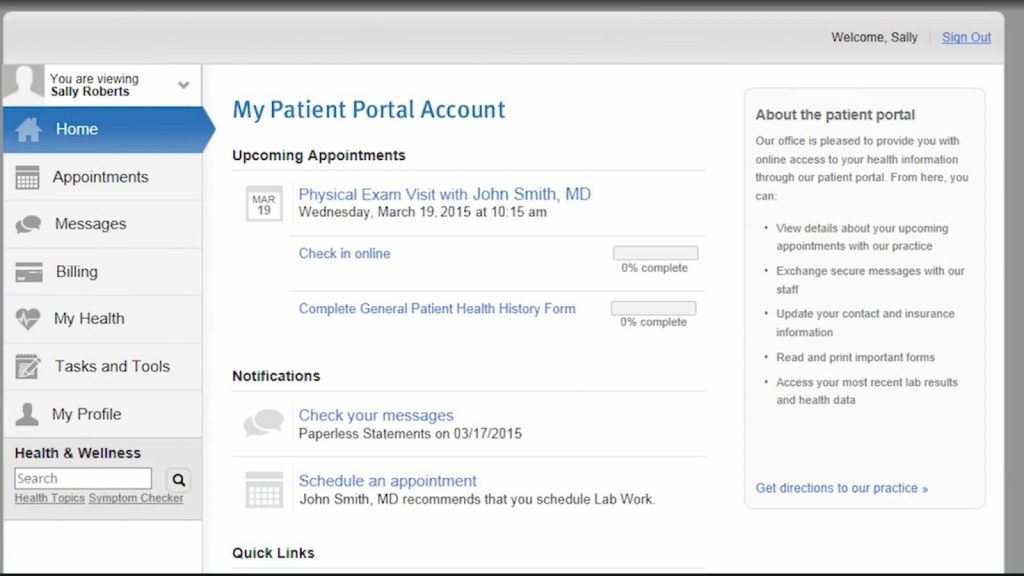
Your Athenahealth patient portal setup is now complete. You will be taken to your portal dashboard, where you can view medical records, messages, appointments, and other available features.
What You Can Do On The Athenahealth Patient Portal?
After activation, the Athenahealth patient portal gives patients access to a wide range of self-service features that support everyday healthcare needs:
- Exchange secure patient messages in Athena with providers and care teams
- Review lab results, diagnostic reports, and visit summaries
- Request prescription refills and track medication details
- Complete digital check-in forms before appointments to reduce waiting time
- Schedule, confirm, or adjust appointments
- Enable real-time online scheduling inside Athena via Emitrr
- View billing statements, check outstanding balances, and pay bills online
- Manage personal profiles and choose to share access with family members
- Create linked accounts for children, parents, or dependents
- Update medical details such as allergies, medications, and health history
- Access health education resources and a built-in health encyclopedia
- Use symptom-check tools for injuries, conditions, and preventive care guidance recommended by the Athena care team
- Receive appointment reminders and important health notifications via email or text message
How the Athenahealth Patient Portal Benefits Providers
For providers, the Athenahealth Patient Portal reduces routine administrative work and centralizes communication. It helps limit phone calls for basic requests, supports better care coordination across teams, and provides a reliable channel to share updates such as office closures or schedule changes.
Records remain organized within the EHR, and follow-ups and documentation follow a consistent structure, giving staff more time to focus on patient experience.
Check out this video to discover the easiest way to text patients directly from AthenaHealth –
Common Issues Patients Face During Setup (and How to Fix Them)
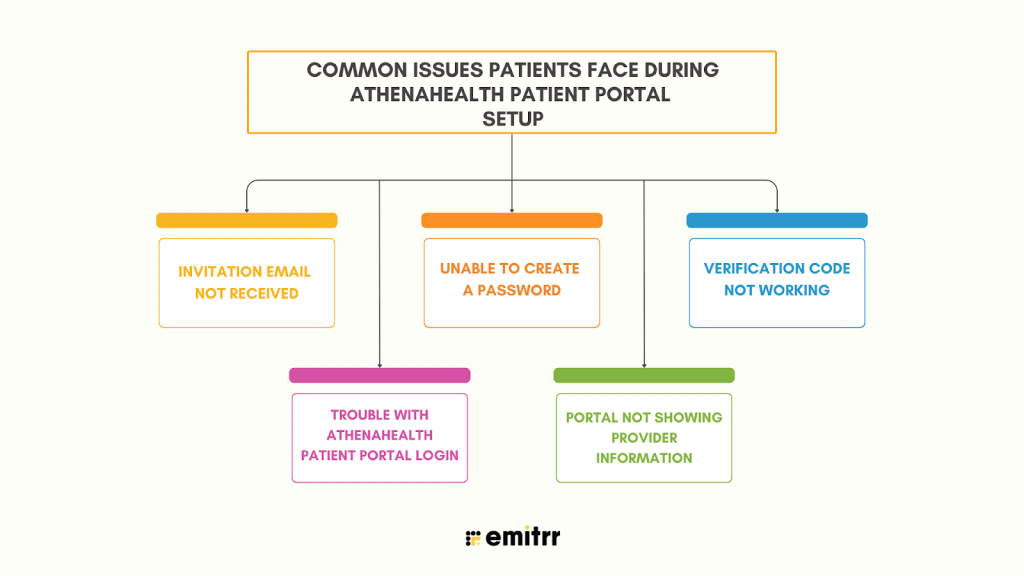
Patients sometimes run into issues during setup or Athenahealth Patient Portal login during first-time access. A recent study shows that nearly 65% of users stop using patient portals after the first day, and over 14% abandon the process due to setup complexity. Most of these problems are easy to resolve with a few quick checks and clear guidance.
Invitation email not received
If you don’t receive the activation email, confirm that the clinic has the correct email address on file. Checking spam or junk folders also helps. If the issue continues, the provider’s office can resend the invitation.
Unable to create a password
Password setup may fail if it does not meet Athenahealth’s security rules. Try using a stronger password that includes a mix of uppercase letters, lowercase letters, numbers, and symbols.
Verification code not working
If the text message or phone verification code does not arrive, confirm that the mobile number entered is correct. Requesting a new code usually resolves the issue.
Trouble with Athenahealth Patient Portal login
Login issues often happen after multiple failed attempts or forgotten passwords. Use the ‘Forgot Password’ option on the login page or contact the clinic to reset access.
Portal not showing provider information
If your portal appears incomplete, it may mean your account is linked to the wrong provider record. Contact the clinic to update your profile and reconnect your portal access.
How Emitrr Enhances Patient Communication Within AthenaHealth
EHR systems hold patient data, clinical notes, schedules, and the essentials of daily care, but they rarely offer the kind of fast, flexible communication tools that today’s clinics require. AthenaHealth is no exception. Its portal-based messaging works for secure updates, yet most clinics need quicker outreach, easier follow-ups, and a way to contact patients who never log into the portal. This is where a dedicated patient communication solution, such as Emitrr, delivers real value.
Emitrr adds that missing communication layer on top of AthenaHealth. It gives teams an efficient way to reach patients by text, automate routine message flows, and strengthen HIPAA-compliant communication across every touchpoint. With Emitrr healthcare automation, clinics handle replies with far less effort and maintain steady, reliable communication throughout the patient journey. The result is a smoother experience for staff and a better line of communication for every patient.
Two-Way Texting
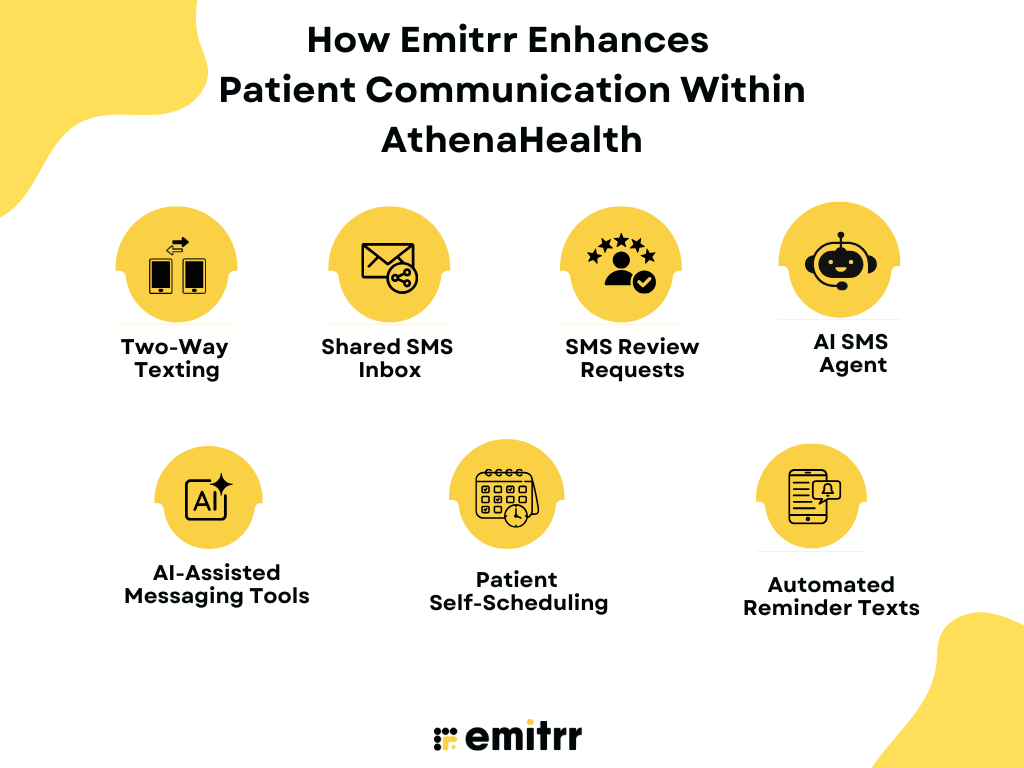
Emitrr gives clinics a direct channel to reach patients through two-way texting. Patients reply through regular SMS, and staff see every message in one place. This creates quick, natural conversations and removes the delay caused by portal logins.
Shared SMS Inbox
Your entire team can view and respond to patient messages from a shared SMS inbox. This avoids missed messages, removes siloed communication, and ensures every patient receives timely support. Since Emitrr is an official partner integration with AthenaHealth, staff do not have to switch between platforms and can send texts directly through Emitrr as part of the Athena workflow.
SMS Review Requests
Emitrr sends automated SMS review requests or short surveys after appointments. Clinics gather feedback faster, boost online reputation, and understand patient sentiment with minimal staff involvement.
AI SMS Agent
Emitrr’s AI SMS Agent handles common patient questions, appointment actions, and basic triage. It responds instantly and reduces the load on front-desk teams that would otherwise spend hours on routine messaging. When a patient delays a reply, the AI chatbot for healthcare sends gentle, context-aware nudges that prompt action.
Watch how Emitrr’s AI agent Sarah makes texting effortless for you:
AI-Assisted Messaging Tools
Emitrr offers a suite of AI features that help clinics craft better messages with less effort. AI-generated replies create patient-ready responses in one click, and the AI Message Enhancer refines tone, clarity, and professionalism. With AI conversational tools, teams can ask the system to write a full reply, suggest the best response, shorten or tune a message, or add empathy for sensitive situations. These tools support fast, accurate patient communication and reduce the workload on staff handling active patient threads.
Patient Self-Scheduling
Emitrr gives patients the ability to schedule, confirm, or adjust appointments directly through text. This patient self-scheduling feature removes the need for phone calls and cuts the back-and-forth that slows down staff. With AI scheduling, the system recommends the best time slots, routes requests correctly, and fills openings quickly.
Automated Reminder Texts
Emitrr automates reminders for upcoming visits, preparation instructions, follow-ups, and overdue appointments. These reminders adapt to patient type, visit type, or appointment status and reduce no-shows across the clinic.
FAQs
You can set up the portal by opening the activation email from your provider, verifying your identity, and creating a username and password. Once completed, you gain access to messages, appointments, records, and billing details.
Yes. AthenaHealth offers the athenaPatient mobile app, available on both iOS and Android. Patients can view messages, appointments, and records directly from the app.
Yes. The portal displays lab results once your provider releases them. You can view the results, reference ranges, and any notes your clinic adds.
Log in to the Athena Patient Portal, go to the ‘Messages’ section, select your provider, type your message, and send it. Providers receive your message inside their Athena inbox.
If your account locks, you can reset your password using the ‘Forgot Password’ link. If the issue continues, contact your clinic so they can verify your identity and unlock the account.
No. AthenaHealth and Epic are separate EHR systems. Both support scheduling, charting, billing, and patient portals, but they differ in interface, pricing, and workflow features.
Clinics can send medical records through the patient chart using secure messaging or by exporting documents through Athena’s records release feature. Patients typically receive these files in the portal or via secure email, depending on the clinic’s settings.
Conclusion
If you have been searching for how to set up Athenahealth Patient Portal, this guide gives you a clear path from activation to everyday use. A well-set portal improves access to information, yet strong patient communication often needs more than portal messaging alone. Integrating Emitrr with AthenaHealth adds smart automation and faster outreach that help clinics connect with patients more effectively. Schedule a demo with Emitrr today to learn more.