
 4.9 (400+
reviews)
4.9 (400+
reviews)

Introduction
If you’re a chiropractor, your day is already packed, seeing patients, answering phones, and trying to keep your schedule in order. It can get overwhelming pretty quickly. That’s where online scheduling software helps. It lets your patients book their own appointments anytime, day or night, without needing to call your clinic.
No more missed calls, back-and-forth texting, or messy calendars. The schedule updates automatically, and patients get reminders so they don’t forget their visits. You can even set up repeat appointments for long-term care plans.
It saves your team time, cuts down on no-shows, and gives your patients a smooth, easy experience. Whether you’re working alone or running a bigger practice, it helps everything run better, so you can focus more on helping your patients feel their best.
That’s why more and more chiropractic clinics are turning to online scheduling software. It’s not just about making booking easier, it’s about creating a better experience for both your team and your patients. In this blog, we’ll explore easy-to-use online scheduling tools for chiropractors, their features, pros, cons, and pricing to help you choose the best fit for your clinic. Let’s dive in!

Features to Look For In A Chiropractic Practice’s Scheduling Software
Let’s understand the features one by one:
Easy Online Booking for Patients
Patients should be able to book appointments at any time, even after office hours. With an online scheduling software for chiropractic practices, they can check available slots and book on their own. This means fewer phone calls and less back-and-forth for your front desk, and it supports better patient engagement in chiropractic practices.
Automatic Appointment Reminders
No-shows are frustrating, right? A good chiropractic online scheduling software will send automatic reminders through text or email. This helps patients remember their appointments and supports better pain management and regular chiropractic care. You can customize messages and maybe even share wellness tips!
Calendar That Syncs Across All Devices
Whether you’re using a phone, tablet, or computer, your calendar should always be current. If a manual therapist or spine specialist checks from their phone while heading to work, they should see the same updated schedule that your receptionist does at the front desk. It keeps everyone in sync.
Patient Self-Rescheduling and Cancellations
Letting patients change or cancel appointments online without calling makes life easier for everyone. It gives patients more control over their care, supports self-management, and reduces workload for your staff. Plus, it helps keep your calendar accurate and up-to-date.
Improve appointment show-up rates with plug-and-play SMS templates for chiropractors. Download the template bundle below.

Integration with EHR and Billing Systems
When your chiropractic scheduling software connects directly to your electronic health records and billing software, you don’t have to do double work. Everything, from patient assessment notes to invoices, is synced. This leads to fewer errors and smoother check-ins and checkouts.

Waitlist and Cancellation Management
If someone cancels last-minute, your software should automatically notify patients on the waitlist. This keeps your clinic running efficiently, fills gaps, and ensures musculoskeletal therapists or other staff don’t have long downtime. It’s great for keeping revenue steady and patients happy.
Flexible Scheduling for Different Appointment Types
Chiropractic clinics have different visit types, new patient consults, quick adjustments, long rehab sessions, and recurring appointments. Your software should let you set custom durations, assign specific providers, and manage room availability with ease.
Secure and HIPAA-Compliant
Patient information is sensitive, and your chiropractor app must be HIPAA-compliant to keep it protected. The software should ensure all health details, notes, and communication are secure, supporting trustworthy integrated patient communication.
Reporting and Analytics Tools
Want to know which day is your busiest? Or how many new patients came in this month? Great scheduling software gives you helpful reports so you can make better decisions and improve patient engagement in chiropractic practices.
Multi-Staff and Resource Scheduling
If you have more than one provider, or even massage rooms and therapy equipment, you need a system that can manage it all. You should be able to see who’s free, what rooms are available, and avoid double bookings.
Smart AI Capabilities
Some modern scheduling tools now come with AI features. These can predict your busiest days, suggest optimal booking times, prevent double-bookings, and even analyze patient habits. It’s like having a virtual assistant that boosts productivity and enhances your chiropractic answering service or team’s performance.
Security & Compliance Requirements for Chiropractic Practices Scheduling Software

When choosing scheduling software for your chiropractic clinic, making sure it meets key security and HIPAA compliance standards is just as important as its features. Let’s understand some of them specifically:
HIPAA Compliance
This is non-negotiable. Any software you use must follow HIPAA rules to protect your patients’ health information. This ensures your chiropractic care environment is not only caring but also responsible and legally protected.
Data Encryption During Transmission and Storage
All patient data, from appointment details to private notes, should be encrypted. That means it’s turned into unreadable code when it’s sent or saved, protecting it from hackers or accidental leaks.
Secure User Access and Role Permissions
Not everyone on your team should see everything. Your scheduling software should allow you to set permissions, for example, your receptionist sees the schedule but not private patient notes. It’s about protecting privacy and maintaining professional boundaries.
Audit Trails to Track Changes and Access
You should always be able to see who made what changes and when. If a patient’s appointment suddenly disappears, the system should show who deleted or moved it. This adds a layer of accountability to your clinic operations.
Secure Patient Data Storage
Whether your data is stored on a server or in the cloud, it must be protected with strong security systems. This helps build trust with your patients and keeps your chiropractor app reliable and safe to use.
Business Associate Agreement (BAA) Availability
The software provider should offer a BAA, a legal document that confirms they will protect your patient data as required by law. If a company can’t give you this, it’s a red flag.
Data Backup and Disaster Recovery Plans
Imagine your computer crashes, what happens to your appointments and patient records? Good software will automatically back up your data and have a plan to recover it, so you don’t lose anything.
Secure Integration with Other Systems
If you’re using an answering service for chiropractors, EHR, billing platform, or even telehealth tools, all of those systems should integrate smoothly and safely. There should be no risk to patient information as it moves between platforms.
Integrations Required for Chiropractic Practices Scheduling Software
Here’s a list of integrations that are required for your Chiropractic Practice scheduling software:
EHR Integrations
- Eclipse Chiropractic EHR
- PracticeQ
- DrChrono
- AdvancedMD Chiropractic EHR
- Cloud-Based Chiropractic EHR Software
- ChiroTouch
Workflow Automation
- Zapier
- HubSpot
Payment Processing
- ChiroCat
- DrChrono Payments
- AdvancedMD Payments
- Square for Healthcare
- Stripe
Patient Forms
- Jotform
Email Marketing
- Chirobasix
- Mailchimp
How does the right online scheduling platform help Chiropractic Practices?
The right online scheduling software for chiropractic practices can truly change how your clinic runs, making things smoother for both your staff and your patients. Here’s how it helps:
Saves Time for Everyone
Patients can book, reschedule, or cancel appointments on their own, anytime, from their phone or computer. Your front desk team gets fewer calls, and your chiropractors can focus more on chiropractic care than on admin work.
Keeps Your Calendar Full
With smart features like waitlists, automatic reminders, and recurring appointment scheduling software, you’re less likely to have last-minute cancellations or no-shows. That means your manual therapists or musculoskeletal therapists stay productive.
Improves Patient Experience
Today’s patients expect convenience. A simple, mobile-friendly chiropractor app that lets them manage their appointments boosts patient engagement in chiropractic practices. It shows you value their time and comfort.
Supports Self-Management and Wellness
By letting patients choose appointment times that fit their routine, you’re encouraging self-management support and helping them stay consistent with pain management and wellness tips you share.
We’ve created templates for Chiropractors to make your messaging smoother—grab them.
Connects Everything in One Place
A great chiropractic scheduling software connects with your EHR, billing system, and even a chiropractic answering service. You won’t need to copy info across systems, and you reduce errors and delays.
Gives Insights to Help You Grow
With built-in analytics, you can see trends like your busiest days, popular appointment types, or which provider is booked most. This helps with staffing, marketing, and better overall planning.
Keeps Patient Info Safe
A HIPAA-compliant platform keeps sensitive health information secure while still offering features like integrated patient communication, reminders, and updates. Your patients can trust you with their data.
Adapts as You Grow
Whether you’re a solo spine specialist or have a growing team, the right platform supports multiple providers, rooms, and appointment types. It’s scalable and flexible for your clinic’s future.
How to Choose the Right Scheduling Software for Chiropractic Practices?
Picking the right online scheduling software for chiropractic practices isn’t just about booking appointments; it’s about finding a tool that helps your clinic run better, improves patient care, and keeps data secure. Here’s how to choose the best fit:
Ensure It’s Easy for Patients to Use
Your patients should be able to book, reschedule, or cancel appointments without any confusion. A simple, clean interface improves patient engagement in chiropractic practices and supports self-management. Look for a tool that works like a breeze, even for older patients.
Look for HIPAA Compliance and Security
Your scheduling software must be HIPAA-compliant to protect patient information. It should include features like encrypted data, secure login, and access control. This ensures your chiropractor app handles sensitive information with care.
Check Integration with Your Existing Systems
The right chiropractic scheduling software should work smoothly with your EHR, billing tools, and even your chiropractic answering service. Seamless integration avoids double work and keeps all patient data in one place, from patient assessments to follow-up plans.
Choose Software with Automated Reminders
Automated appointment reminders via text or email reduce no-shows and help patients stay consistent with their pain management and chiropractic care routines. Bonus if you can send wellness tips too!
Make Sure It Supports Different Appointment Types
Whether it’s a new patient exam, a quick adjustment, or a recurring appointment, your software should let you set up and manage all types of visits. This is especially useful for clinics with spine specialists, manual therapists, and musculoskeletal therapists under one roof.
Consider Mobile and Multi-Device Access
You and your team should be able to access the schedule from any device, phones, tablets, or laptops. Mobile-friendly software is essential for flexibility, especially for chiropractors working across multiple locations or treatment rooms.
Look for Customizable Scheduling Options
Every clinic has different needs. Choose software that lets you customize time slots, provider availability, buffer times between sessions, and patient limits. The more control you have, the better your schedule will run.
Evaluate Customer Support and Training
Even the best tools need some getting used to. Make sure your provider offers onboarding, live support, or training videos. Good support ensures your staff can quickly learn the system and solve issues without delays.
Compare Pricing and Plans
Check what features come in each plan. Some platforms may charge extra for SMS reminders or AI tools. Pick one that fits your clinic size, budget, and growth plans. Some even offer free trials, great for testing!
Read Reviews from Other Chiropractic Clinics
Before committing, see what other chiropractors say. Reviews often reveal things like ease of use, how well the chiropractor app performs, and whether the provider keeps up with updates and support.
Top 10 Scheduling Software For Chiropractic Practices
- Emitrr
- Carepatron
- Square Appointments
- SKED
- Bookedin
- Goodcall
- Acuity Scheduling
- Setmore
- Noterro
- SimplyBook.me
1. Emitrr

Emitrr is a HIPAA-compliant online scheduling software for chiropractic practices that makes booking simple with self-scheduling, website widgets, and automated reminders. It integrates with 500+ EHR, EMR, and billing tools to reduce manual work. Perfect for solo chiropractors or multi-provider clinics, Emitrr also offers VoIP, SMS, AI, and review management, making it an all-in-one, affordable, and easy-to-use solution for modern chiropractic care.
Emitrr Features
- Automated appointment reminders: Set up and schedule one or more appointment reminder messages to reduce no-shows.
- Self-scheduling: Allow patients to see the booking slots of different providers and book an appointment 24/7 themselves.
- Web chat to text: Continue conversations in your inbox that started on the website.
- Digital forms: Send short links via SMS and collect patient insurance and other information beforehand.
- Recurring texts: Schedule recurring SMS for providing appointment or booking updates, for promotion and SMS marketing purposes, etc.
- Drip campaigns: Send a series of personalized messages to your contact list.
- Integrations: Connect with third-party apps and automate your workflow.
- Automation: Send replies or scheduled messages to your patients.
- Missed-call-to-text: Send an automated SMS containing an appointment booking link or any other message of your choice when a call is missed.
- End-to-end encryption: This ensures all SMS are encrypted so that they cannot be intercepted or accessed by unauthorized parties.
- Access controls: Put a limit on who can access patient data on your portal. And, create activity logs for each user to monitor their overall activity.
- File sharing: Share important documents like test reports, health insurance details, lab reports, etc., through a secure portal that carriers cannot trace.
- Text-enable number: Enable your existing healthcare clinic number to be able to text and call from the same number.
- Data privacy: Emitrr follows important data protection measures so that sensitive patient information can be kept private, including how it is stored and shared.
- Secure text messaging: When enabled, this secure SMS feature redirects you to a secure gateway where you can access and share data with your patients safely.
Here’s a quick view of how Emitrr’s secure texting feature works:
- Automation: Use customizable SMS templates and canned responses to answer frequently asked questions and to automate mundane tasks of your Chiropractic practice.
- 2FA: Set two-factor authentication and add an additional security layer to keep your patient data safe.
- Real-time alerts: Generate SMS alerts for changes in appointment schedules of different providers, updates in services, etc., and share them with your patients in real time.
- Text messaging: Take advantage of various texting capabilities, such as two-way texting, mass texting, schedule-based messaging, group texting, etc., to ensure seamless communication with your patients.
- Online appointment scheduling: Let your patients schedule their own appointments with just a single click.
- AI: Emtirr also offers an AI agent that helps in simplifying patient communication. Check out this video to know more about Emitrr AI:
Pros of Emitrr
- Exceptional customer service: Emitrr offers exceptional customer service 24×7 and even boasts a stellar 5/5 rating on Capterra for the same.
- Customization options: With Emitrr, you don’t have to pay for things you don’t need; the platform offers you a customized price quote and texting plan specifically tailored to your Chiropractic practice needs.
- 100% transparency, no hidden charges: This HIPAA-compliant texting platform offers 100% transparency in pricing right from the initial call and does not surprise you later with hidden charges.
- Secure communication platform: Emitrr is a HIPAA and TCPA-compliant platform. It ensures all your healthcare-related communication is being done securely.
Cons of Emitrr
More AI features are being built
Emitrr Pricing
Emitrr is an affordable scheduling software for Chiropractic Practitioners, and its pricing could vary based on the features and capabilities you choose. Get in touch with Emitrr’s support team to get a price quote.
Emitrr Integrations
Emitrr seamlessly integrates with more than 500 EHR/PMS software, including:
- Drchrono
- Denticon
- Dolphin
- AthenaHealth
- Dentrix Enterprise
- Curve Hero
- Dentrix
- Kareo
- Dentrix Ascend
- eClinicalWorks
- Orthotrac
- Eaglesoft
- OpenDental
- Practiceworks
- And more!
Emitrr Reviews & Ratings
Emitrr has an overall rating of 4.7/5 on g2 and 4.8 on Capterra. Have a look at what Emitrr users are saying:
“Overall very positive. The service works like I need it to, the customer service is amazing, up-time is great, and changes made seem to be well thought out and well, not just changes for change sake.
“Ease of use and addresses so many needs we had for our office! Love that we can schedule messages in advance which will save a lot of time and it works both on the computer and a phone app. Support staff has been extremely responsive and helpful getting us set up.
Source: Capterra
Emitrr Support Channels
- Email: Send email to Emitrr’s support team at support@emitrr.com
- Phone: Call Emitrr at +1 (210) 941-4696
- Live chat: Chat with Emitrr’s live representatives
- SMS
- Knowledge base
- FAQs/forum
2. Carepatron
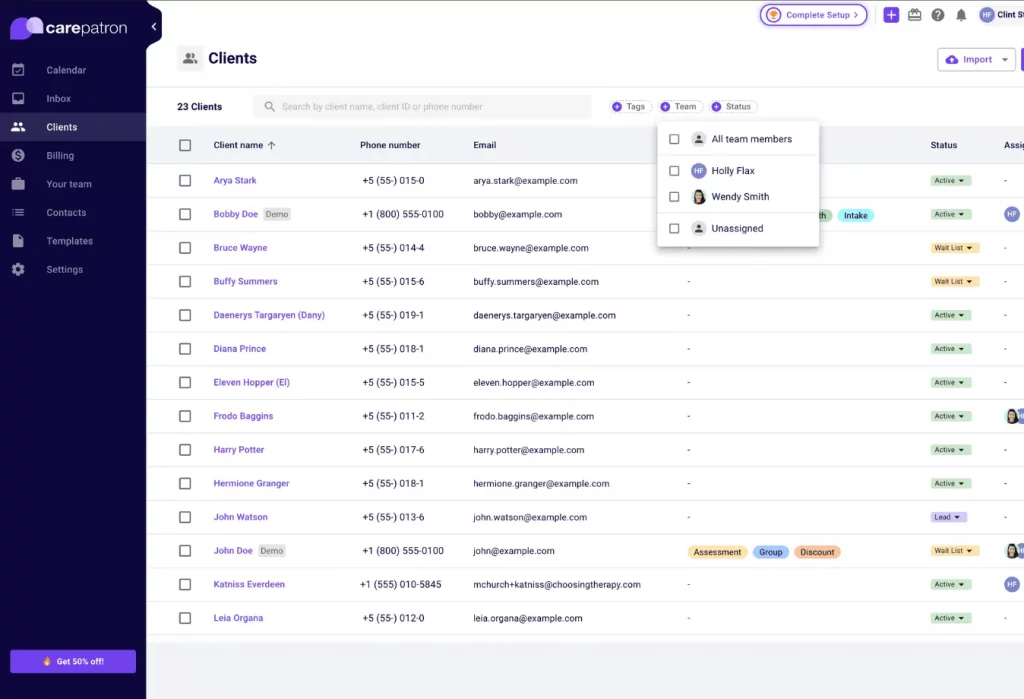
Carepatron is an all-in-one online scheduling software for chiropractic practices that helps manage appointments, patient records, communication, and billing, all from a single platform. Designed with healthcare professionals in mind, it streamlines daily tasks and helps chiropractors deliver better care without getting buried in admin work.
Carepatron Features
- Online Appointment Booking: Patients can book, cancel, or reschedule appointments easily through a secure portal.
- Calendar Syncing: Integrates with your existing calendars (Google, Outlook, etc.) to keep your schedule up to date.
- Custom Intake Forms: Collect patient information and medical history before their visit.
- Automated Reminders: Sends email or SMS alerts to reduce no-shows.
Carepatron Pros
- All-in-one platform: Carepatron combines scheduling, documentation, billing, and patient management, ideal for streamlining chiropractic workflows.
- Easy patient self-booking: Patients can schedule, reschedule, or cancel appointments on their own, reducing manual work for staff.
- Customizable intake forms: Chiropractors can gather detailed patient information before visits using fully customizable online forms.
Carepatron Cons
- Limited calendar customization: Carepatron lacks advanced calendar view options some chiropractors may need for complex scheduling.
- Might feel overwhelming for basic use: Smaller practices needing just scheduling may find the platform’s multiple features unnecessary.
- Basic reporting tools: The analytics and reporting capabilities aren’t very deep or tailored for chiropractic performance tracking.
- No phone support: Customer service is available via email and chat only, there’s no live phone support option.
Carepatron Pricing
Carepatron provides following pricing plans:
- Essential – $14/month
- Plus – $19/month
- Advanced – $24/month
Carepatron Integrations
- Google Calendar
- Outlook Calendar
- Xero (for billing)
- Stripe (for payments)
- Telehealth tools (built-in, no third-party required)
Carepatron Reviews
“Impressed at capacity and cost-effectiveness”
“Lack of transparency and lots of bugs”
Source: Capterra
Carepatron Support Channels
- Email Support
- Live Chat (within business hours)
- Help Centre with guides and tutorials
- No phone support is currently available
3. Square Appointments
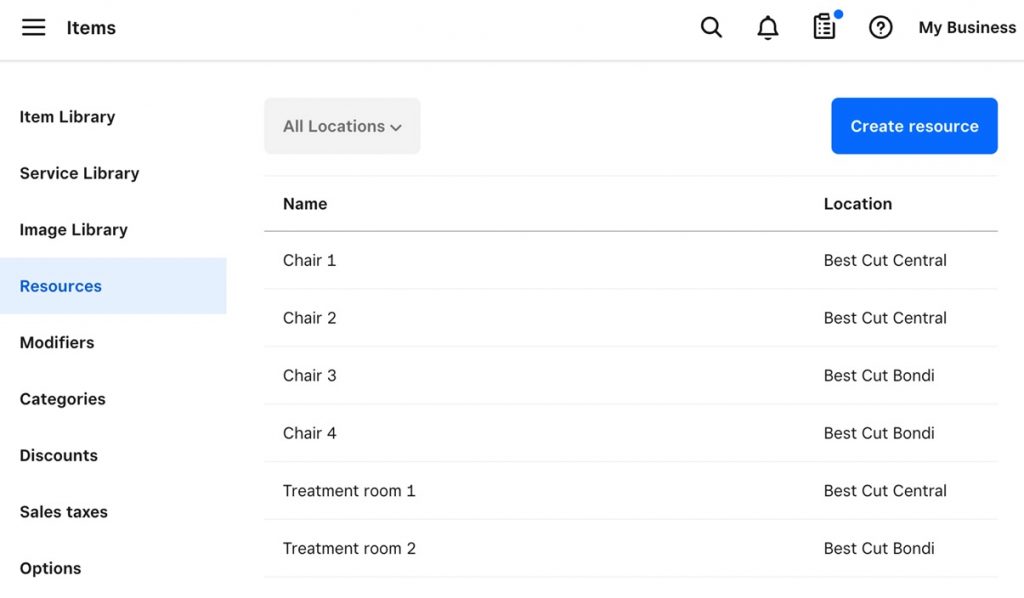
Square Appointments is a flexible online scheduling solution designed for service-based businesses like chiropractic clinics. It streamlines appointment booking while integrating seamlessly with Square’s payment tools, making it a great choice if you want a unified platform for scheduling, reminders, and payments.
Square Appointments Features
- Online Booking Pages: Let patients book appointments anytime via a website, Square page, or social media.
- Unlimited Staff Calendars: Ideal for multi-practitioner clinics with varying schedules.
- Text & Email Reminders: Reduces no-shows with automated reminders to patients.
- Integrated Payments & Deposits: Accept payments upfront, manage cancellation fees, and collect deposits.
- Resource Scheduling: Assign rooms or equipment for appointments (available on Premium plans).
Square Appointments Pros
- All-in-one platform: Combines booking, reminders, and payments in one place.
- Free plan available: Great for solo chiropractors or small practices.
- Scalable for growing clinics: Supports multi-staff and multi-location practices.
- HIPAA-conscious setup: Offers secure storage and encrypted communication.
- Part of the Square ecosystem: Seamless integration with other Square tools like POS and invoicing.
Square Appointments Cons
- Limited customization: Fewer branding and recurring appointment features compared to niche chiropractic software.
- Can get expensive: Advanced features and team management cost more with monthly fees.
- Advanced analytics only on Premium: Deeper reporting is not available in lower-tier plans.
- Free plan is limited: Only supports one location and basic features.
Square Appointments Pricing
Square Appointments offers these pricing plans:
- Free Plan – $0/month (1 location)
- Plus Plan – $29/month per location
- Premium Plan – $69/month per location
Square Appointments Integrations
- Google Calendar
- Square Payments & POS
- Google Search & Maps
- Squarespace
- WordPress
- Pixpa
- Zapier
- Mailchimp
Square Appointments Reviews
“Streamlined Appointment Scheduling”
“Square has lost its grip on service”
Source: Capterra
Square Appointments Support Channels
- Phone Support
- Help Centre with Articles and Guides
- Live Chat (available for paid plans)
- Onboarding and Account Setup Assistance for Premium Users
4. SKED
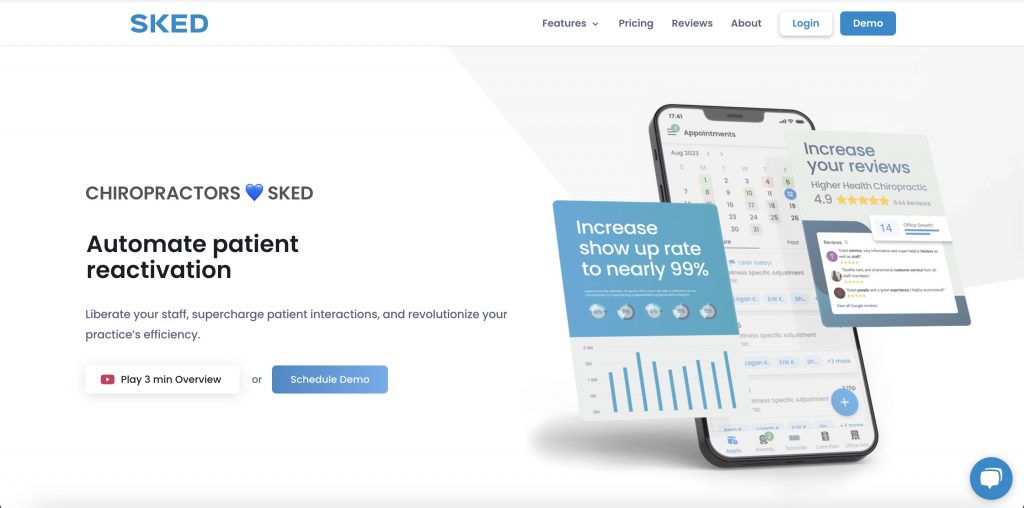
SKED is a scheduling and communication tool designed specifically for chiropractic practices. It streamlines online booking, patient reminders, rescheduling, and messaging, helping reduce front-desk stress and improve patient satisfaction.
SKED Features
- Online Booking & Self-Rescheduling – Patients can book and manage appointments via a mobile app or web portal.
- Smart Scheduling – Supports multiple providers with built-in availability rules, overbooking prevention, and holiday schedules.
- Automated Reminders & Two-Way Texting – Sends reminders and allows patients to respond or reschedule via text.
SKED Pros
- Chiropractor-focused design: Specifically built for chiropractic workflows and patient needs.
- Powerful communication tools: Two-way texting, reminders, and family scheduling reduce no-shows.
- Easy for patients: Patient-facing app allows families to book and manage visits easily.
- Strong patient retention: Reactivation campaigns and automated review requests support practice growth.
SKED Cons
- No public pricing transparency: Plans start at around $99/month but require a demo for full pricing.
- SMS usage limits: Some plans have set messaging limits; extra charges apply for high volume.
- Can be expensive for small practices: More advanced features are only available on higher-tier plans.
SKED Pricing
SKED offers following plans:
- Basic – $99/month
- Standard – $309/month
- Pro – $397/month
- Premium – $546/month
- Enterprise – Custom pricing
SKED Integrations
- ChiroHD
- Review Wave
- Zapier
- Google Calendar
- Apple Calendar
- Outlook Calendar
SKED Reviews
“Easy-to-use software for all businesses!”
“Great service”
Source: Capterra
SKED Support Channels
- Help Centre
- Live Chat & Email Support
- Dedicated Onboarding
- In-App Guides
5. Bookedin
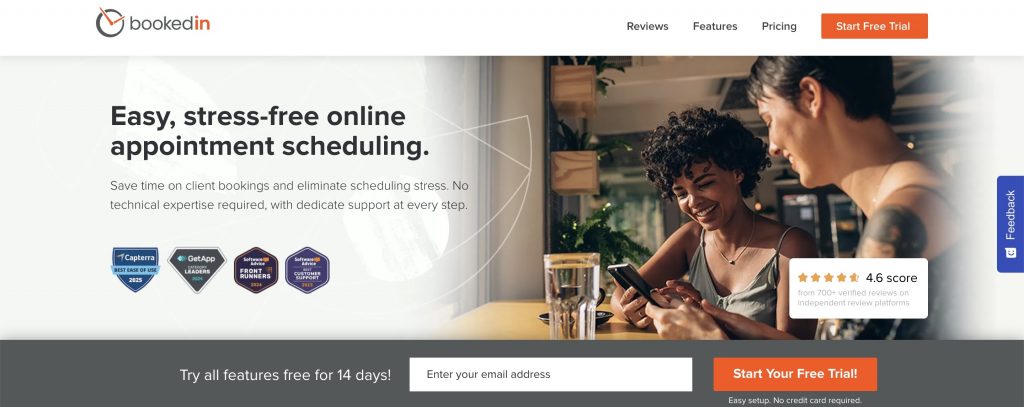
Bookedin offers a simple, polished online scheduling experience tailored for chiropractic clinics. It lets patients self-book appointments, pay upfront, and receive automatic reminders, all while reducing administrative burden. Whether you’re a solo chiropractor or managing a multi-provider clinic, Bookedin helps streamline appointment management so you can focus more on patient care.
Bookedin Features
- Online Booking & Payment: Patients can book via your website or social media and pay securely with Stripe, Square, or PayPal.
- Automated Reminders: Sends text and email notifications to confirm appointments and reduce no-shows.
- Recurring Appointments Support: Ideal for ongoing care plans with customizable recurring schedules.
- Custom Booking Forms: Intake forms help collect patient information ahead of visits.
Bookedin Pros
- User-friendly setup: No credit card required to start, easy for both clinic staff and patients.
- Integrated payment options: Works with major processors and handles deposits easily.
- Multi-staff support :Great for clinics with several chiropractors or treatment rooms.
- Dedicated support: Real people available via phone, email, and Zoom for quick help.
Bookedin Cons
- Higher cost at scale: Prices rise with the number of calendars; clinics may find tiered pricing less budget-friendly.
- Limited analytics: Basic reporting; deeper insights may require other tools.
- Extra SMS fees: Text reminders and confirmations may incur additional charges in certain plans.
Bookedin Pricing
Bookedin has 3 pricing plans:
- Free Plan – $0/month
- Plus – $30/month
- Pro – $39/month
(All plans include a 14‑day free trial.)
Bookedin Integrations
- Stripe
- Square
- PayPal
- Zoom
- Skype
- WordPress
- Squarespace
- Wix
Bookedin Reviews
“Using Bookedin for daily lot rental”
“Excellent Booking App”
Source: Capterra
Bookedin Support Channels
- Phone
- Zoom
- Help Center
- Live Chat
6. Goodcall

Goodcall is an online scheduling software for chiropractic practices that helps make appointment booking easier for both patients and staff. Instead of relying on phone calls and sticky notes, clinics can use Goodcall to let patients book, reschedule, or cancel appointments online. It helps reduce no-shows, saves time for your team, and keeps your schedule organised, all in one easy-to-use system.
Goodcall Features
- Online Appointment Scheduling: Patients can easily book, reschedule, or cancel appointments anytime, without needing to call the clinic.
- AI Receptionist: Handles calls instantly and guides patients to book appointments or get answers, perfect during after-hours or peak times.
- Calendar Integration: Syncs with your existing booking system to keep schedules up to date and avoid double-booking.
- Automated Reminders: Sends SMS or voice reminders to patients so they never miss an appointment, cutting down on no-shows.
Goodcall Pros
- Always Available: Your patients can get help anytime, even outside regular clinic hours.
- Reduces Missed Calls: AI receptionist handles overflow so no patient is left unheard.
- Easy to Set Up: No complicated setup or tech knowledge required.
- Affordable: Budget-friendly for small chiropractic practices with limited front desk staff.
- Time Saver: Helps with self-management support by automating routine patient questions and appointment requests.
Goodcall Cons
- Limited Human Touch: Some patients may prefer speaking with a real person instead of an AI voice.
- Not Ideal for Complex Requests: It handles basic tasks well, but can struggle with more detailed or nuanced patient needs.
- Less Personalization: Compared to some full-featured VoIP software for chiropractic practices, customization may be limited.
Goodcall Pricing
Goodcall provides 3 pricing plans:
- Starter: Starts at $59 per month per agent.
- Growth: Starts at $99 per month per budget.
- Scale: Starts at $199 per month per budget.
Goodcall Integrations
- Google Calendar
- Outlook Calendar
- Zapier
- ChiroTouch (via Zapier)
- Jane App (via Zapier)
- SimplePractice (via Zapier)
- HubSpot
- Zoho CRM
- Slack
Goodcall Reviews
“It was a good experience with goodcall, customers are happy”
Source: G2
Goodcall Support Channels
- Email Support
- Live Chat
- Help Center
- Limited Phone Support
7. Acuity Scheduling
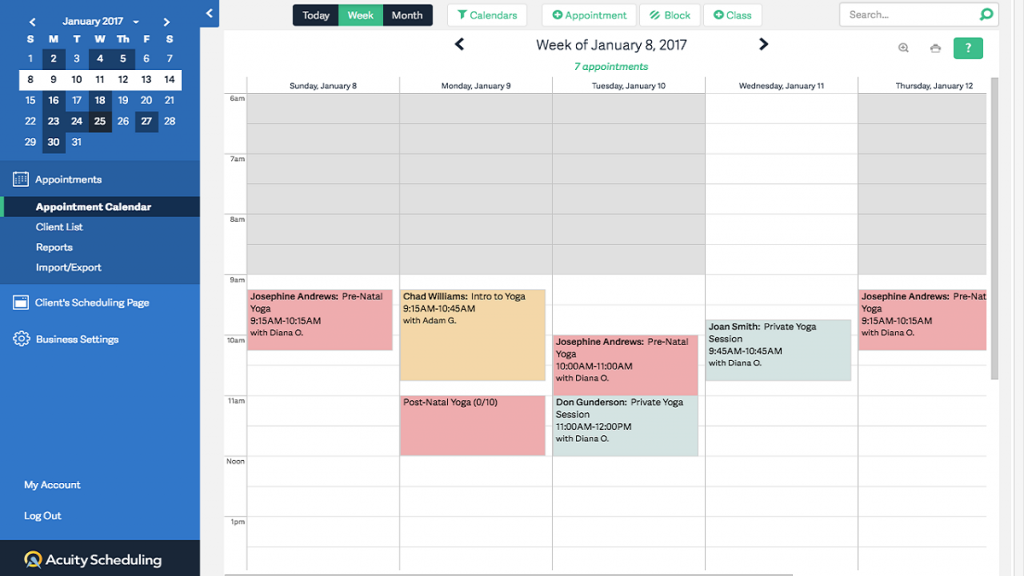
Acuity Scheduling is a well-known online scheduling software for chiropractic practices that allows patients to book appointments themselves, fill out intake forms, get automated confirmations and reminders, and even pay online. It’s mobile-friendly and helps manage multiple staff or clinic locations. While it helps reduce no-shows and saves admin time, many users report poor customer service and a lack of advanced features needed for growing practices.
Acuity Scheduling Features
- Online booking: Clients can book appointments 24/7 using a custom-branded booking page.
- Automated reminders: Send email and SMS confirmations and reminders to reduce no-shows.
- Calendar management: Manage multiple staff, locations, and appointment types from one dashboard.
- Custom intake forms: Gather client information before appointments with customizable forms.
- Calendar sync: Integrate with Google, Outlook, and other calendars to prevent double bookings.
- Payment processing: Accept payments, deposits, and invoices online at booking.
- Mobile app: Manage schedules and clients on the go with the Acuity mobile app.
- HIPAA compliance: Protect sensitive data (on select plans)
Pros of Acuity Scheduling
- Easy to use: Easy for clients to book, reschedule, and pay for appointments online, reducing back-and-forth communication.
- Highly customizable: Can be customized as per appointment types, forms, and branding.
- Calendar sync is good: Robust calendar sync and multi-location/multi-staff management.
- Useful features: Automated reminders and confirmations help minimize no-shows and keep clients informed
- User-friendly interface: Comes with a user -friendly website and mobile app for managing schedules on the go.
Cons of Acuity Scheduling
- Expensive: Advanced features like SMS reminders and HIPAA compliance are only available on higher-tier plans.
- Overwhelming: Some users find the interface initially overwhelming due to the breadth of features.
- Limited customization: Limited customization of certain automated emails and notifications.
- Limited support options: No phone support; support is primarily via email and online resources.
- Not suitable for small and mid sized practices: May be more feature-rich (and costly) than needed for very simple scheduling needs.
Acuity Scheduling Pricing
Acuity Scheduling offers a free plan with limited features and its paid plans starts at $20 per month.
Acuity Scheduling Integrations
- Google Calendar
- Outlook
- iCloud
- QuickBooks
- FreshBooks
- Mailchimp
- Google Analytics
Acuity Scheduling Reviews & Ratings
Acuity Scheduling is rated 4.8/5 on Capterra, and here’s what users are saying:
“YOU ARE ON YOUR OWN. NO PHONE SUPPORT. Not ideal for larger companies who want to do subscription memberships, it’s very limiting and messy. They only do POS with Square or Stripe which have super high CC processing fees..”
“Acuity Scheduling is very user-friendly and easy to setup. I liked being able to customize my account to my brand colors and logo. The online scheduling and billing features are easy for both clinician and client.”
Acuity Scheduling Support Channels
- Email support.
- 24/7 online help center
- Knowledge base
- AI-powered support and chat for common questions
- No direct phone support
- Community forums and FAQs for user-driven help
8. Setmore
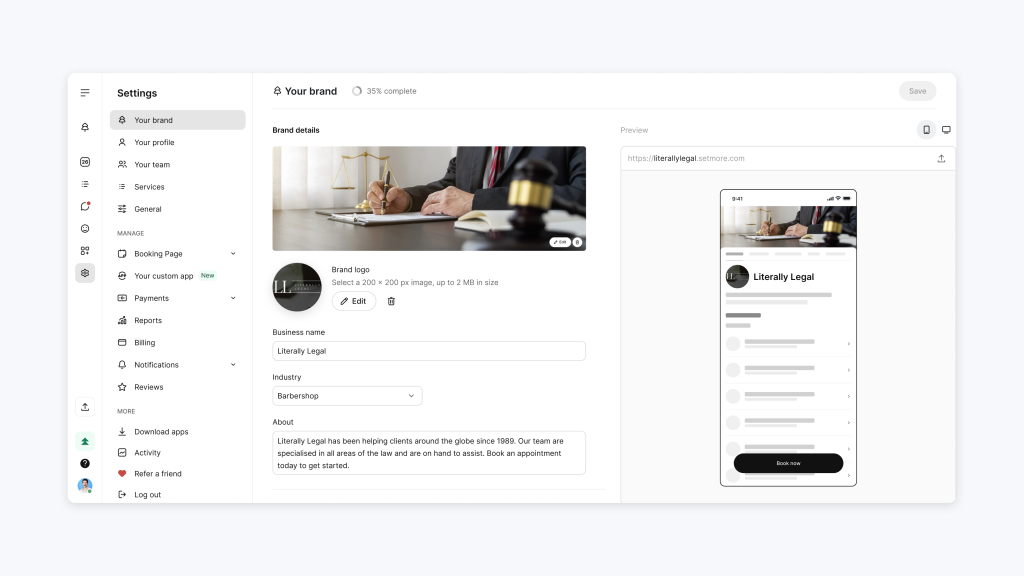
Setmore offers an easy-to-use, polished appointment booking platform ideal for chiropractic clinics. It lets patients self-schedule, pay, and receive reminders via email or SMS (on paid plans). With mobile app access and customizable booking pages, Setmore supports clinics of any size in managing appointments smoothly.
Setmore Features
- Online Booking & Calendar Sync: Patients can book appointments anytime; syncs with Google or Office 365 calendars.
- Automated SMS & Email Reminders: Reduces no-shows by sending confirmations and reminders (available in paid plans).
- Recurring Appointments: Ideal for ongoing chiropractic care plans with customizable schedules.
Setmore Pros
- Generous free plan: Supports up to 4 staff members with basic features.
- User-friendly interface: Easy for both clinic staff and patients to navigate.
- Reliable reminders: Keeps patients informed and reduces missed appointments.
- Mobile convenience: Manage your calendar from anywhere with a mobile app.
- Budget-friendly upgrades: Low-cost Pro and Team plans offer great value.
Setmore Cons
- Limited free features: Advanced tools like SMS reminders require paid plans.
- Basic analytics: Doesn’t offer deep performance or revenue reports.
- Branding limitations: Free and Pro plans include Setmore branding.
- Messaging limits: May have fair-use limits on reminder texts.
Setmore Pricing
Setmore offers three plans:
- Pro – $5/user/month
- Team – $5/user/month
- Setmore Health (Enterprise) – Custom pricing
Setmore Integrations
- Google Calendar
- Office 365 Calendar
- Stripe
- Square
- PayPal
- Zoom
- Google Meet
- WordPress
Setmore Reviews
“A good, easy to use program, well-priced, but with a lot of unusual glitches”
“Fantastic app for scheduling and appointments”
Source: Capterra
Setmore Support Channels
- 24/7 in-app chat
- Email support
- Phone support
- Help center
- Onboarding assistance (Pro/Team plans)
9. Noterro
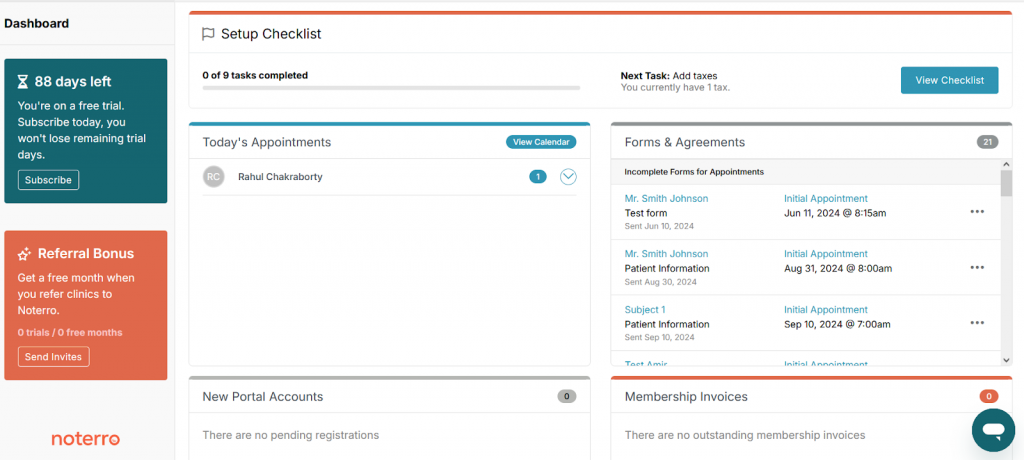
Noterro is a cloud-based practice management and online scheduling software designed specifically for healthcare professionals, including chiropractors. With tools that simplify appointment booking, patient charting, and invoicing, Noterro helps chiropractic clinics streamline daily operations, reduce no-shows, and offer a smoother patient experience.
Noterro Features
- Online Scheduling: Let patients book and manage appointments online anytime.
- SOAP Notes & Charting: Pre-built chiropractic templates make charting quick and compliant.
- Automated Reminders: Send SMS or email reminders to reduce last-minute cancellations.
- Billing & Invoicing: Create, track, and send invoices with ease.
- Patient Portal: Patients can access their bookings, forms, and documents securely.
Noterro Pros
- Easy-to-Use Interface: Noterro offers a clean, intuitive design that makes it easy for chiropractors and front-desk staff to manage appointments, charting, and billing.
- Affordable Pricing: With plans starting at just $25/month per practitioner, it’s a budget-friendly solution for solo chiropractors and small clinics.
- HIPAA-Compliant & Secure: Built with healthcare compliance in mind, Noterro keeps patient data safe and encrypted.
Noterro Cons
- Limited Advanced Reporting: Analytics and detailed performance reports are minimal, which may be a drawback for growing or data-focused practices.
- No Dedicated Mobile App: While mobile-friendly, Noterro doesn’t have a standalone mobile app, which could impact on-the-go accessibility.
- Fewer Integration Options: Compared to larger platforms, integration with third-party tools like EMRs, CRMs, or EHRs is limited.
Noterro Pricing
Noterro has 3 pricing options:
- Core – $30/month (includes 1 practitioner seat; additional seats at $12/month each)
- Plus – $50/month (includes 1 practitioner seat; additional seats at $12/month each)
- Max – $70/month (includes 1 practitioner seat; additional seats at $25/month each)
Noterro Integrations
- Google Calendar
- Stripe (for payments)
- Physitrack (for exercise programs)
- Jane (data import/export)
- Mailchimp (email marketing)
Noterro Reviews
“Fantastic business management program”
“Overall, it’s an easy to use platform”
Source: Capterra
Noterro Support channels
- Live Chat
- Email Support
- Help Center/Knowledge Base
- Webinars & Onboarding Guides
10. SimplyBook.me
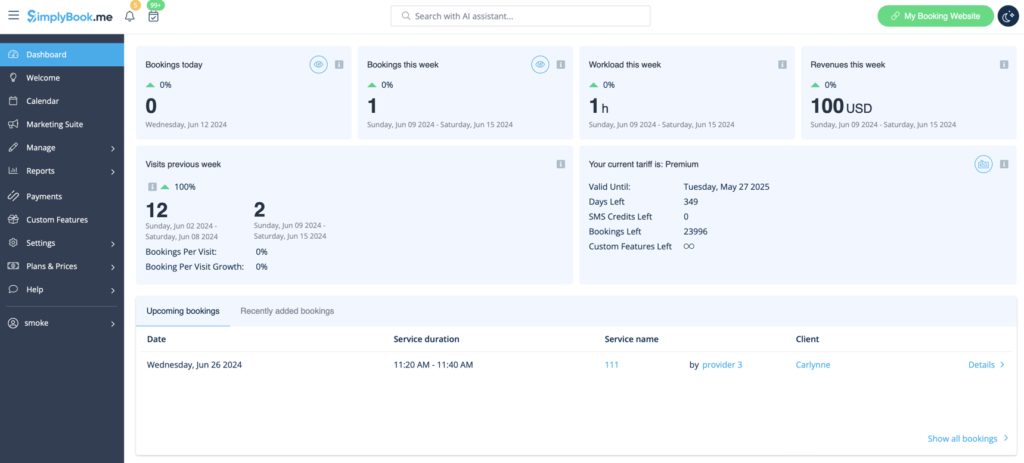
SimplyBook.me is an easy-to-use scheduling tool that helps chiropractic clinics manage appointments online. Patients can book their visits anytime, get automatic reminders, and even pay in advance. It’s a flexible system that you can customize to fit your clinic’s needs, helping you save time, reduce no-shows, and keep everything organized.
SimplyBook.me Features
- Online Booking Page: Let patients book appointments anytime from a custom booking site or your website.
- Automated Reminders: Send SMS, email, or WhatsApp alerts to reduce no-shows.
- Custom Intake Forms: Collect patient info and preferences before their visit.
- Online Payments: Accept payments, deposits, and tips through Stripe, PayPal, or POS.
- Calendar Syncing: Sync appointments with Google or Microsoft calendars.
SimplyBook.me Pros
- Highly Customizable: Add or remove features based on your clinic’s needs.
- Great Patient Experience: Simple and mobile-friendly for easy booking.
- Saves Time: Automation helps reduce manual scheduling tasks.
- Supports All Sizes: Works for solo chiropractors or multi-staff practices.
- Upfront Payments: Reduces last-minute cancellations with pre-paid options.
SimplyBook.me Cons
- Takes Time to Set Up: May feel overwhelming with too many feature options.
- Extra Messaging Costs: Some reminder types might cost more.
- Busy Interface: Admin dashboard can feel a bit cluttered.
- Complex Configurations: Multi-day or group bookings need manual workarounds.
SimplyBook.me Pricing
- Free – Basic plan with 50 bookings/mo and 1 add-on
- Basic – ~$9.99/month for 100 bookings + 3 add-ons
- Standard – ~$29.99/month for 500 bookings + 8 add-ons
- Premium – ~$49.90/month for 2,000 bookings + all add-ons
SimplyBook.me Integrations
- Google Calendar
- Microsoft 365 Calendar
- Zoom
- Microsoft Teams
- Stripe
- PayPal
- Square POS
- Meta (Facebook & Instagram)
- QuickBooks
- FreshBooks
SimplyBook.me Reviews
“It could be so much better, if they listen to their customers”
“A SIMPLE Solution”
Source: Capterra
SimplyBook.me Support channels
- 24/7 Live Chat
- Email Helpdesk & Knowledge Base
- Video Tutorials & FAQs
- Optional one-time setup support packages
Why is Emitrr the Best Scheduling Software For Chiropractic Practices?
Choosing the right online scheduling software for chiropractic practices is a big deal, but Emitrr makes it easy. Whether you’re a solo spine specialist or running a busy chiropractic clinic with multiple providers, Emitrr is built to save your time, boost efficiency, and support better patient engagement in chiropractic practices. Here’s why so many chiropractors love it:
One-Click Scheduling
Emitrr makes it incredibly simple for patients to book appointments, just one click and they’re in. It’s a game-changer for improving chiropractic care and encouraging self-management support, especially for patients who prefer easy tech over long phone calls.
AI Capablities
Emitrr acts like an intelligent assistant for your chiropractic clinic. With its advanced AI capabilities, it automates appointment reminders, follows up with patients, and even manages rescheduling, saving your staff time and reducing no-shows. The platform adapts to your clinic’s workflow, ensuring your schedule stays organized and efficient. Whether you run a solo practice or manage a larger team, Emitrr helps streamline daily operations so you can focus on delivering quality patient care.
Affordable for Every Practice Size
Unlike many scheduling tools with hidden fees, Emitrr is budget-friendly. Whether you’re just starting or expanding your clinic, it offers transparent pricing that makes sense, without cutting corners on quality.
End-to-End Automation
Emitrr does more than just schedule. It handles everything, appointment booking, automated reminders, and even post-visit feedback collection. No more chasing patients or worrying about no-shows. It’s like having a virtual assistant handling all your recurring appointment scheduling software tasks.
Smooth Integration with Everything You Use
Emitrr connects easily with your EHR, chiropractic answering service, VoIP phone system, and even your chiropractor app. It keeps your patient records, communications, and calendar in sync, so your team spends less time jumping between tools.
Easy to Use for Everyone on Your Team
Your front desk staff, manual therapists, and even new team members will pick it up in minutes. The layout is clean and intuitive, making it the perfect chiropractic scheduling software even for non-tech-savvy users.
24/7 Customer Support That Actually Helps
Need help at 8 p.m. on a Friday? Emitrr’s support team is always available and always helpful. They don’t just send links; they solve problems. This is a big win for clinics that need real-time answers during busy days.
Fast and Easy Setup
Emitrr helps you get up and running quickly, with no technical headache. They offer full onboarding support, training for your staff, and help syncing with your current systems.
Frequently Asked Questions
Online scheduling takes a huge load off your front desk. Instead of answering endless calls, your team can focus on patient care. The online scheduling software for chiropractic practices handles bookings, sends reminders, and updates calendars instantly. It helps reduce no-shows, fill gaps in the schedule, and keeps things running smoothly for your entire chiropractic team.
Yes! That’s one of the best parts. Patients can view available slots, book appointments, reschedule, or cancel, all on their own. This boosts patient engagement in chiropractic practices and encourages self-management support, making it easy for patients to stay on track with their chiropractic care.
Absolutely. A good chiropractic scheduling software should be HIPAA-compliant with encrypted data, secure login access, and role-based permissions. This ensures patient records, manual therapist notes, and health history are protected and handled with the highest standards.
Yes, most modern scheduling tools (like Emitrr) come with automated reminders via text or email. These help patients remember appointments and reduce no-shows. Some systems even let you send wellness tips or pre-visit instructions automatically.
Definitely. The best chiropractor app or scheduling platform should connect with your EHR, billing software, and even your chiropractic answering service. This way, all patient assessment data and communication are streamlined, no more jumping between tools.
Top tools offer smart cancellation features. If a patient cancels, others on the waitlist are notified instantly. Plus, patients can reschedule themselves online. This helps you fill empty slots quickly and maintain full schedules for your musculoskeletal therapists or spine specialists.
Yes. Advanced chiropractic online scheduling software supports multiple providers, rooms, and even locations. You can manage who’s available, when, and where, all in one dashboard. It’s ideal for growing practices or clinics offering varied services.
Conclusion
Choosing the right online scheduling software can make a big difference in how smoothly your chiropractic clinic runs. From reducing no-shows to saving time at the front desk, the right tool helps both your team and your patients. While there are many great options out there, Emitrr stands out for its simplicity, affordability, and powerful automation. With features like one-click scheduling, automated reminders, and seamless integration with your existing systems, Emitrr takes care of the hard stuff, so you can focus on delivering excellent care. It’s HIPAA-compliant, easy to set up, and built to support growing practices just like yours. Book your demo today!