
 4.9 (400+
reviews)
4.9 (400+
reviews)
In the optometry field, where detail is everything and timing is critical, how you speak to your patients can be the difference between life and death
SMS may be old hat compared to social media and email newsletters, but it still has punch when it comes to speed, reach, and ease. For busy clinics that need to stay in touch without getting overwhelmed by email and missed calls, SMS is a secret weapon waiting in the wings.
The majority of patients carry their phones with them everywhere they go. That means a carefully timed text can do anything from remind them of an upcoming appointment to prompt them for a review after they’ve visited. It keeps them thinking about your clinic, reduces no-shows, and establishes the type of trust that converts first-timers into repeat patients.
This is not merely a list of messages. It’s a how-to regarding where and how SMS can be integrated into your daily routine. You may be an independent practitioner or have a chain of clinics, but you will find real substance here.
Let’s discuss how SMS can benefit your clinic more.
Why SMS remains effective in optometry
Readability
First, because individuals read them. In comparison to emails, which people have a tendency to ignore or send directly to spam, SMS boasts an impressive open rate. The majority of texts are opened in a matter of minutes. When you’re confirming an appointment or a follow-up visit, timing is essential.
Precise
Second, it’s straightforward. No apps to download. No internet required. Just a quick ping that lands in your patient’s pocket.
Automated
Third, it can be automated. So your front desk spends less time on reminder calls and more time addressing in-person demands.
SMS types every optometrist must be sending
- Appointment reminders and confirmations
- Recall and follow-ups
- Eye care advice and seasonal reminders
- Promotional reminders such as discounts on lenses or frames
- Review and feedback requests
- Birthday or holiday greetings
- Payment and invoice reminders
- Emergency rescheduling or holiday closure
If you are not leveraging SMS in at least five of these buckets, you’re leaving money on the table.
How to compose SMS messages that really work
- Keep it brief: Each word matters. Don’t explain too much. Simply convey the important message clearly.
- Make it personal: Address the patient by name. Mention their last visit or unique need. It’s a little gesture that is highly effective.
- Always put a call to action: Maybe it’s a reply to confirm or clicking a link to set an appointment, providing them with the next step.
- Be compliant: Always obtain permission before texting patients. Provide them with an opt-out method. And don’t cross any privacy laws.
Types of SMS Appointment Reminder Templates for Optometrists
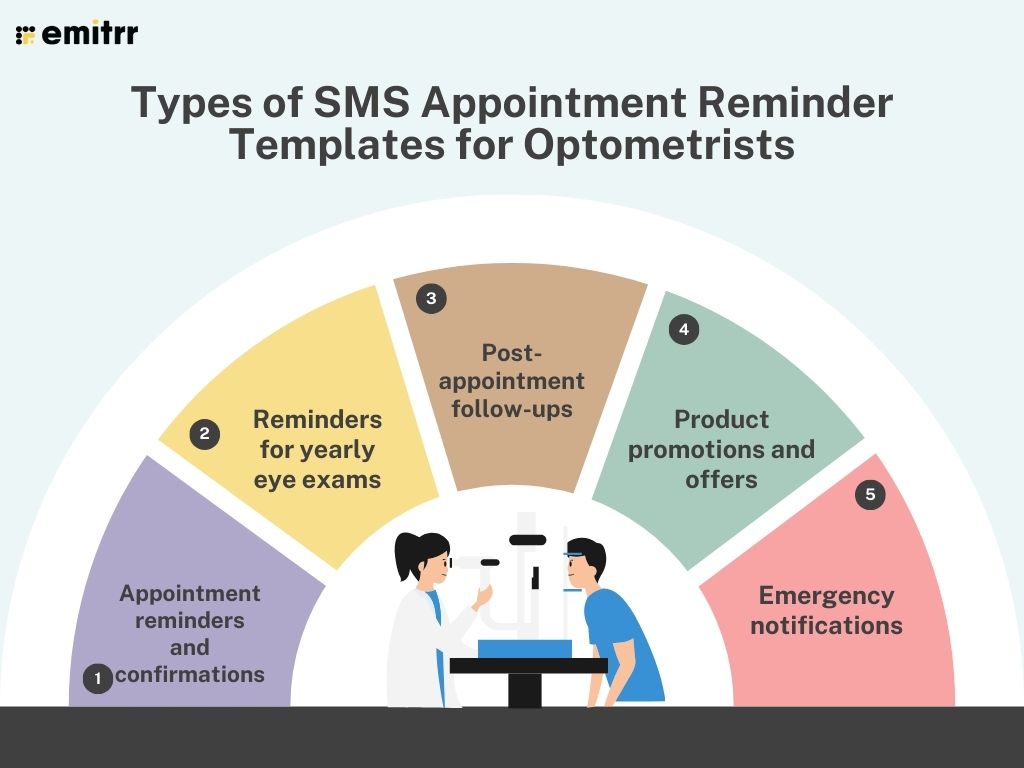
Appointment reminders and confirmations
Missed appointments aren’t just frustrating; they can dash your whole schedule and have your staff rushing around. The solution is a personalized, one-to-one text reminder that makes all the difference. It gets patients on time, reduces no-shows, and saves your staff from spending half their day on the phone chasing down confirmations.
Example Templates:
Friendly reminder
“Hi [First Name], it’s [Clinic Name] calling. Just a reminder about your eye appointment on [Date] at [Time]. Text back YES or call us at [Phone Number] to change the appointment. See you soon!”
Day-before reminder
“Hi [First Name], looking forward to seeing you tomorrow at [Time] for your check-up at [Clinic Name]. If you can, bring your glasses or contacts so we can make sure everything’s working as it should for you.”
Same-day reminder
“Hi [First Name], we’re looking forward to seeing you today at [Time]. Try to arrive 5 minutes early so we can check you in without the hassle. — [Clinic Name]”
Pro Tip: Keep it short for patients to answer. A quick YES or NO saves you phone tag and allows you to fill cancelled time slots more rapidly.
Reminders for yearly eye exams
Life is unpredictable and even well-behaved patients forget to schedule their yearly check-up. Friendly reminders remind them that an eye examination is more than a question of getting glasses updated; it’s a simple step that can help protect their overall health.
Example Templates:
Gentle reminder
“Hi [First Name], it’s been a year since your last check-up at [Clinic Name]. Take care of your eyes; you can book in seconds here: [Link].”
Urgency angle
“Hello [First Name], eye health check time each year! Bookings fill quickly; book now at [Link] so don’t miss out.”
Health benefit focus
“Your eyes can reveal a great deal about how healthy you are. A yearly check can detect early warning signs of conditions such as glaucoma or diabetes. Book yours today at [Link] or [Phone Number].”
Pro Tip: Never omit an in-booking link so patients can book directly from their phone without having to search for your number.
Post-appointment follow-ups
A timely follow-up shows you care after the patient leaves the exam room long after. Whether you’re checking on how they’re doing, reminding them to get glasses, or simply thanking them, it’s a small action that builds long-term loyalty.
Example Templates:
Thank you + next step
“Thanks for stopping by today, [First Name]! If your new prescription doesn’t quite feel right or you have a query, just reply to this message or give us a call.”
Pickup reminder
“Hi [First Name], your specs are ready and waiting in store at [Clinic Name]. Pop by at any time during [Hours], we can’t wait for you to try them out!
“Hi [First Name], hope you enjoyed being here today. We would love to hear what you thought; leave us a quick comment or a review here: [Link].”
Pro Tip: Friendly and concise. Patients appreciate the follow-up, but nobody likes reading a book after the visit.
Product promotions and offers
Frames, glasses, and contact lenses aren’t just part of eye care; they are also a fashion way for patients to update their appearance or protect their eyes. A timely promotion delivered via SMS strikes them instantly and gets more attention than an inbox-stuck email.
Sale announcement
“Flash Sale! 20% discount on all designer frames at [Clinic Name] until [Date]. Present this text upon checkout to redeem.”
Seasonal promotion
“Hi [First Name], protect your eyes in style! Enjoy 15% off all polarized sunglasses until [Date].”
VIP promotion
“You’re on our VIP list, [First Name]! Enjoy early access to our frame clearance event starting [Date]. Come and find your perfect pair before they’re gone.”
Pro Tip: Use promotions sparingly. Too many messages about sales can cause patients to unsubscribe; make each one feel special and worth opening.
Emergency notifications
Sometimes it doesn’t work out; inclement weather, power outages, or last-minute cancellations. At those times, speed is of the essence. A simple, concise text keeps patients informed and enables you to reschedule without a drama.
Example Templates:
Clinic closure
“Hi [First Name], due to [Reason], [Clinic Name] will be closed on [Date]. We will reach out to rebook your appointment.”
Urgent availability
“An opening came up today at [Time]. Call [Phone Number] if you would like to take the spot.”
Public safety
“For safety purposes, [Clinic Name] is rescheduling all appointments today because of [Reason]. Respond here so we can schedule you again.”
Pro Tip: During emergencies, cut the fluff. Patients need quick, concise info they can act on immediately.

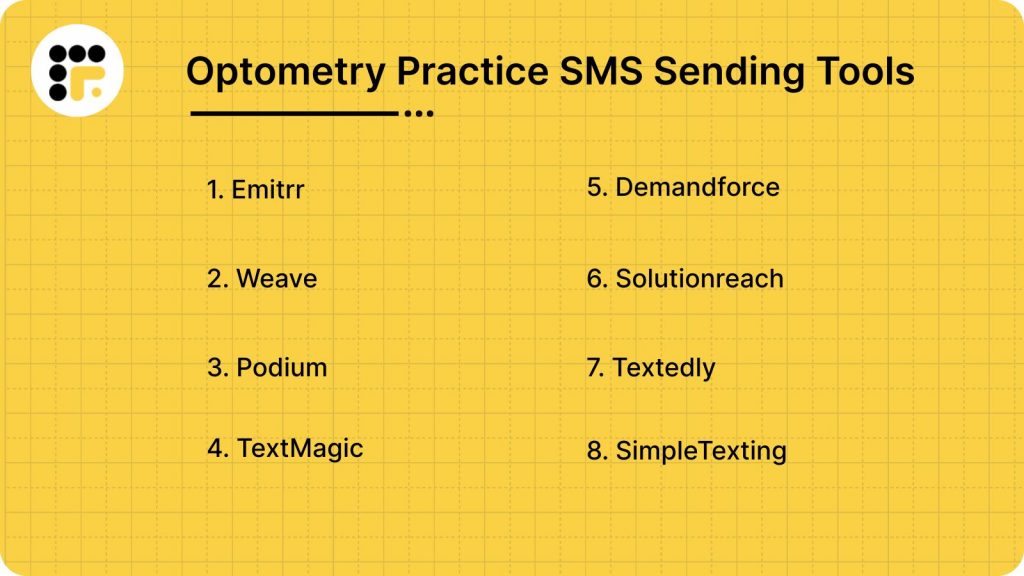
Optometry Practice SMS Sending Tools
A good SMS instrument for optometry practices is akin to having a remembers-forever, never-sleeps assistant always able to get the message through. For appointment confirmations, friendly reminders for annually scheduled checkups, or for an instant promotion of a new collection of designer frames, the best SMS instrument can make a big difference in patient participation and reduced no-shows. But not all SMS platforms are created equal — some minimalist and optometry-specific, others more universal but flexible enough to fit into your workflow. Below, we break down some of the top software used by optometry offices, their strengths and weaknesses, ratings, and integrate-friendly, so you can make a more informed decision.
1. Emitrr
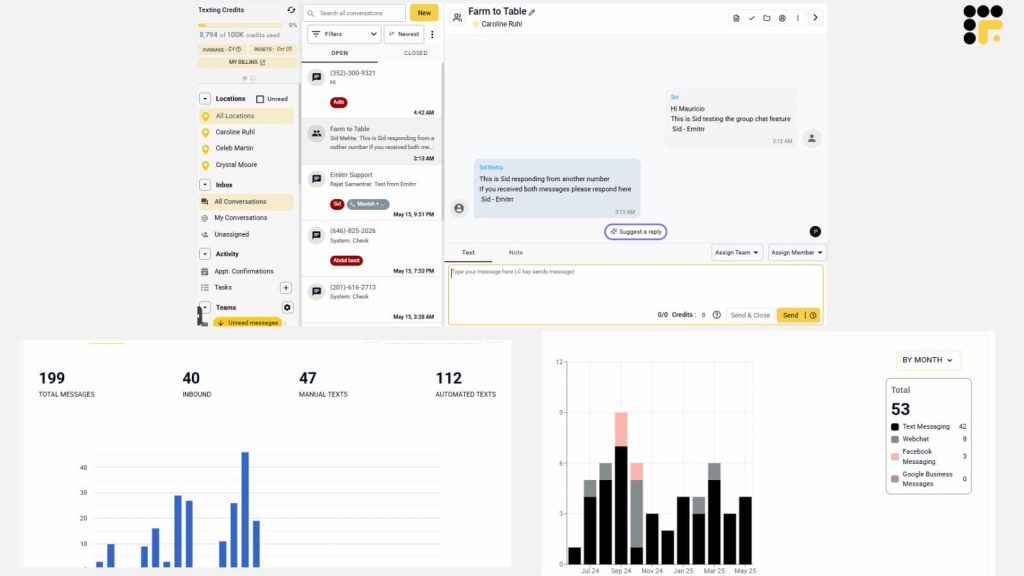
Emitrr is an all-in-one patient communication and engagement platform for healthcare practices like optometrists. With features like automated recall reminders, two-way texting, recall campaigns, and online review solicitations, Emitrr decreases the no-show percentage as well as raises patient retention. One of its greatest strengths is that it is not just a mass-texting software; it also exists alongside patient communication workflows, allowing real-time engagement. Clinics can also utilize it to gather feedback and marketing campaigns without having to use multiple individual tools. Its HIPAA-compliant infrastructure ensures sensitive patient data is secure, and its analytics dashboard lets you monitor campaign performance in depth. If you are looking for a combination of automation, personalization, and security in healthcare, Emitrr has a strong case.
Emitrr Pros
- Extremely intuitive with excellent customer support and ease of onboarding
- Extensive automation and campaign tools (reminders, drip SMS, review requests)
Emitrr Cons
- Interface can seem busy at first
- Pricing scales with volume; add-ons for healthcare might incur additional cost
Emitrr Ratings & Reviews
- Capterra: 4.9
- G2: 4.8
“More integration options or flexibility in customizing certain features to better suit our specific needs”
“I do not have any cons, I have been using it for a year now and literally it has accomplished everything I was hoping that it would. I would recommend it to anyone.”
Emitrr Pricing
- Pricing starts at $99 per month per user.
Emitrr Integrations
- Dentrix
- DrChrono
- Eaglesoft
- eClinicalWorks
- OpenDental
- HubSpot
- MailChimp
- Zapier
- Acuity Scheduling
- AthenaHealth
- Curve Hero
- Dental systems
2. Weave
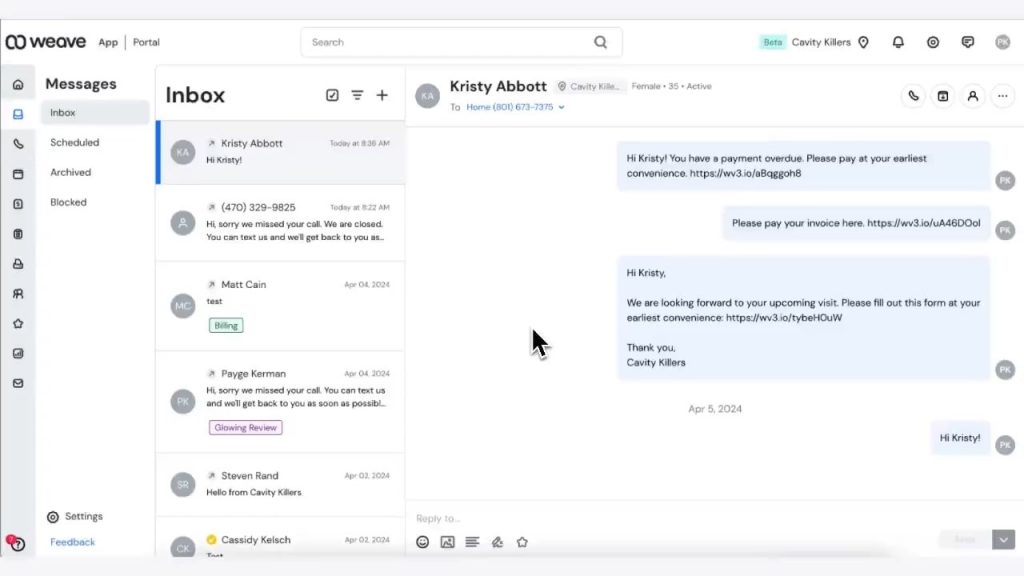
An all-in-one communication center, Weave combines phone systems, two-way texting, email, payments, and online scheduling. Particularly ideal for optometry clinics that desire a single dashboard for patient communications, reminders, and billing.
Weave Pros
- All features with real-time texting and appointment reminders; patient information pops up during calls
- Flat-rate plans feature VoIP phones, bulk SMS, reviews, texts-to-pay functionality
Weave Cons
- Pricing could be expensive for small practices; add-ons accumulate
- Some users complain of support delays and glitches
Weave Ratings & Reviews
- Capterra: 4.3
- G2: 4.3
“With Weave, it’s just a nightmare with the customer service and support. And guess what, any settings or setup you want to change, you only have to go through their customer support because whenever you make changes from their web portal, none of it gets actually reflected.”
“I don’t love that it does not directly attach to the medical record”
Weave Pricing
- Flat rate with a starting point of $249 for a single location
Weave Integrations
- Dentrix
- DentiMax
- Eaglesoft
- IntroMed
- Acuity Scheduling
- HubSpot, etc.
3. Podium

Podium is a review and messaging software that assists clinics in gathering patient feedback, sending two-way SMS, and handling inquiries in a single inbox. It’s ideal for building your online reputation.
Podium Pros
- Great at creating and managing patient reviews
- Easy interface and web-to-text feature
Podium Cons
- Less appointment automation and medical recall-focused
- More expensive with fewer features specifically geared towards optometry
Podium Ratings & Reviews
- Capterra: 4.6
- G2: 4.3
“Small glitches which make some tasks harder to use.”
“Continuous IT tickets that had months with inadequate service. The lack of communication when the system was not working properly but yet still taking our payments.”
Podium Pricing
- Price available on demand.
Podium Integrations
- Limited EHR integrations (primarily CRM and web lead sources)
4. TextMagic
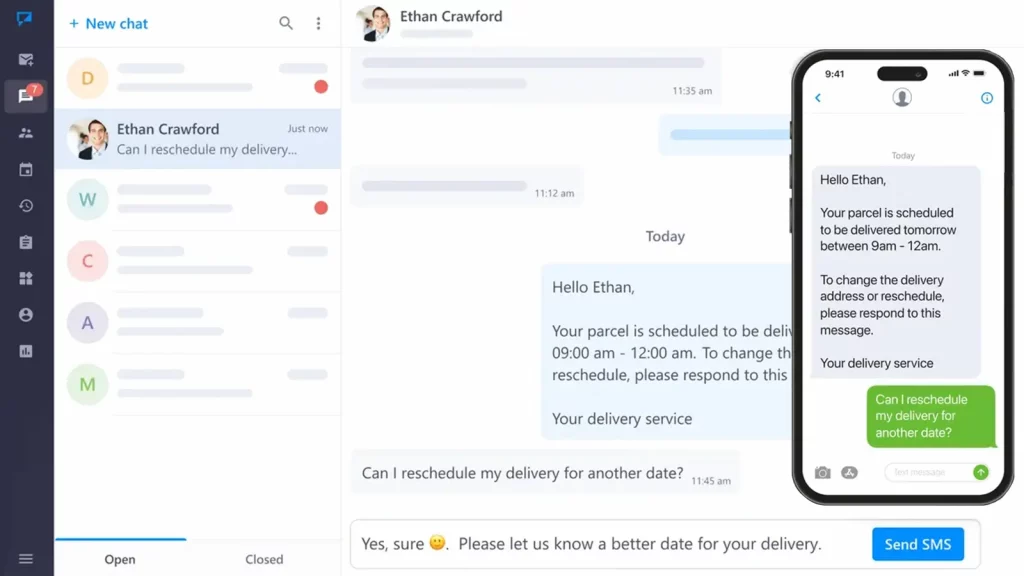
TextMagic is a low-cost, no-nonsense SMS system that allows clinics to send text reminders and campaigns without excessive setup.
TextMagic Pros
- Easy to use and budget-friendly
- Best for small clinics that require basic messaging
TextMagic Cons
- Lacking optometry-specific integrations
- Manual process without advanced automation
TextMagic Ratings & Reviews
- Capterra: 4.6
- G2: 4.3
“Haven’t experienced any issues or anything disappointing yet. All campaigns sent SMS to everyone. Customer service was prompt to respond in my experience so far.”
“I feel almost as if they are still developing the entire site, messages get lost or delivered wrong. my interface will show messages in the wrong order. Sometimes the site just wont even let me in because the “checking if you are a human” or two factor authentication wont load.”
TextMagic Pricing
- Pricing is available for demand.
TextMagic Integrations
- Basic API; not highly integrated with healthcare platforms
5. Demandforce
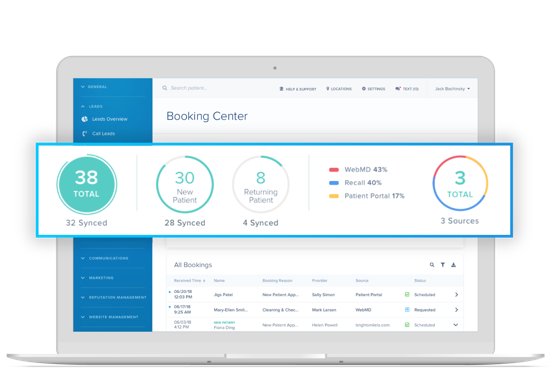
Demandforce is built for client communication and marketing automation, coupling SMS with recall campaigns and online reputation management.
DemandforcePros
- Integrated recall campaigns and marketing automation
- Good analytics for tracking ROI
Demandforce Cons
- Outdated interface with limited messaging workflow flexibility
- Costs escalate rapidly with add-ons
Demandforce Ratings & Reviews
- Capterra: 3.7
- G2: 3.3
“Integration into our EHR and the service we received following our decision to discontinue trialing their software during the evaluation period we were given.”
“For the price, the review request is all we used it for. So we were essentially paying $200 for an automated Request for Review email.”
Demandforce Pricing
- Pricing begins at around $299/month (depending on plan and services)
Demandforce Integrations
- Dentrix
6. Solutionreach
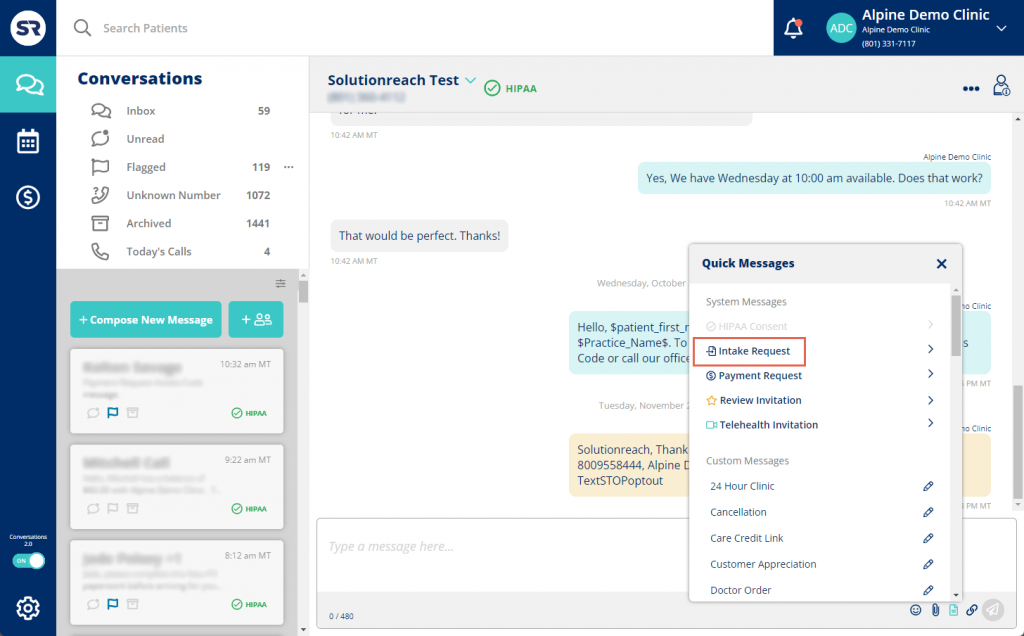
Solutionreach provides an end-to-end patient engagement suite specific to vision clinics. Via SMS, email, voice, intake forms, surveys, and online appointment scheduling, it ensures continuity of appointments and patient satisfaction.
Solutionreach Pros
- Easy-to-use reminder, recall, and newsletter platform
- Decreases no-shows and automates patient workflows
Solutionreach Cons
- The price quickly adds up, and the cost information tends to necessitate tailored quotes
- Glitches occasionally and offers limited template flexibility
Solutionreach Ratings & Reviews
- Capterra: 3.7
- G2: 4.5
“NOT fully compatible with Dentrix,( even though they said they were). Can not use all the features I would like”.
“Customer support and reliability are awful. We left because we could not count on them and when they screwed up they don’t admit their errors which is very frustrating.”
Solutionreach Pricing
- Pricing starts at $329 per month.
Solutionreach Integrations
- Kareo
- NextGen
- OfficeMate
- Epic
7. Textedly

Textedly provides an easy, budget-friendly SMS solution for optometry practices requiring broadcast messaging and updates with minimal automation.
Textedly Pros
- Cost-effective tiered pricing from as little as $26/month for 500 texts
- Easy setup broadcast campaigns and promotions
Textedly Cons
- Does not include healthcare integrations or HIPAA-ready functions
- Reporting tools and campaign tracking are rudimentary
Textedly Ratings & Reviews
- Capterra: 4.5
- G2: 4.6
“The leftover messages don’t roll over. They keep charging credit card even after the subscription was cancelled and will not issue a refund for their mistake. The worst customer service ever. Better use someone else.”
“The options that were Available. It didn’t allow me to make certain changes and filter which ones I didn’t want to send out”
Textedly Pricing
- Starter plans start at $26/month for 500 messages, progressing up to tiered volume plans
Textedly Integrations
- Limited; does not include CRM/EHR integration out of the box
8. SimpleTexting
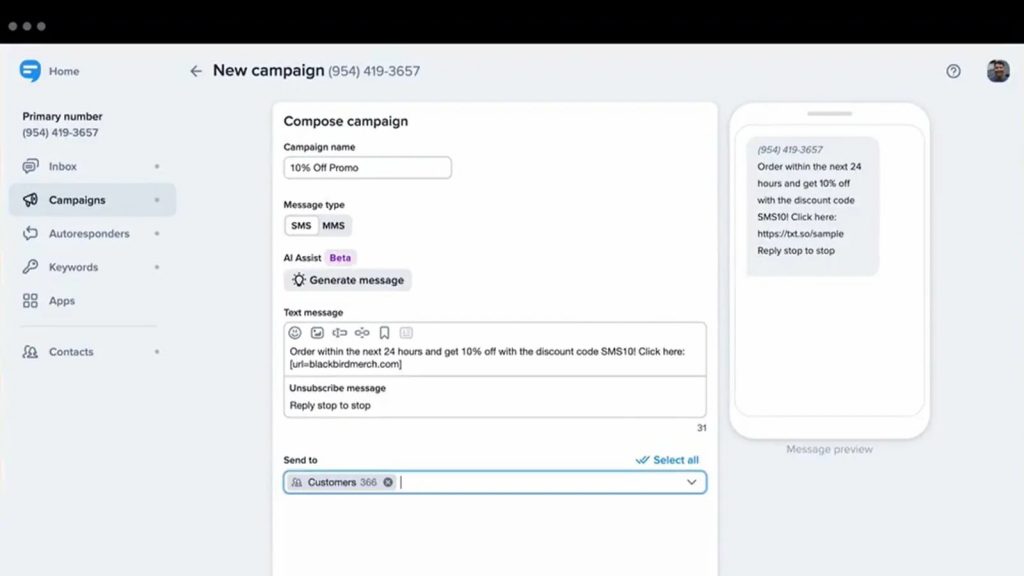
SimpleTexting offers simple SMS marketing and notification services—ideal for clinics that want to send reminders, promotions, or office updates with minimal hassle.
SimpleTexting Pros
- Fast setup, no contracts, easy-to-use interface
- Flexible, scalable plans
SimpleTexting Cons
- Not HIPAA-compliant out of the box
- Limited integrations with optometry applications
SimpleTexting Ratings & Reviews
- Capterra: 4.7
- G2: 4.7
“The hidden fees and the number change issue.”
“Nothing negative to report has been used twice already without issue.”
SimpleTexting Pricing
- Pricing begins at about $29/month for simple use
SimpleTexting Integrations
- General APIs offered; does not have specialized optometry software sync
How to Define Success
Open rate is the simplest place to start. It tells you whether your messages are actually being opened. But stopping there is like deciding on a book’s quality by its cover; it’s not the whole picture.
Look beyond the first click. Track the amount of patients who actually respond; whether that is confirming their appointment, rescheduling, or, yes, even canceling. All those actions are feedback on how well your SMS outreach actually works.
Notice what occurs when you roll out SMS reminders. If no-shows fall dramatically, you have got hard evidence it’s working.
If you are emailing patients to request reviews, observe how many of them actually send them in. Reviews not only are beneficial for your online reputation, but they also provide insight into how much patients value your service.
When you email them surveys, observe changes in patient satisfaction scores. Even a slight increase can show that your communication is making patients feel more cared about and connected.
And don’t forget the bottom line. For promotional campaigns, track the actual return on investment. Did your eyewear promotions lead to additional sales? Did appointment booking links receive adequate clicks to warrant the effort? Click-through rates here can show whether your patients find your offers relevant and worth acting upon.
FAQs
Because your patients actually read their texts. While emails get buried and phone calls go to voicemail, a text pops right into their pocket and is usually opened within minutes. Perfect for “don’t forget” moments.
Think of SMS as a gentle tap on the shoulder, not a constant poke. Stick to must-know updates, appointment reminders, follow-ups, and the occasional promo. If you’re sending marketing messages, keep it to once or twice a month.
Yes, get their “yes” first. Always ask for permission, give them a simple opt-out option, and follow HIPAA or your local privacy laws. Patient trust isn’t worth risking over a text.
Definitely. Use their name, mention their last visit, or reference something specific like “bring your glasses” or “don’t forget your contacts.” It’s small, but it makes people feel seen.
Go for one that plays nicely with your EHR, automates reminders, and keeps patient data safe. Emitrr, Weave, and Solutionreach are favorites in the optometry world.
Final thoughts
SMS is unsexy. It lacks snazzy graphics and trendy hashtags. But in an optometry clinic, where patients simply want quick responses, blunt reminders, and the promise that someone is hearing them, it plays like magic.
SMS’s true power lies in how reliable it is. Messages are short, to the point, and hard to ignore. It’s time to put an end to thinking about it as a last-resort backup plan and start incorporating it into your main communications strategy.
A single reminder at the right time can prevent a missed appointment. A single well-crafted message can turn a one-time patient into a loyal one. And when you throw that in with the proper tools, compliance checks, and cleverly worded templates, you are not just scheduling up appointment slots; you are building trust, strengthening relationships, and raising the level of care your patients enjoy on a daily basis.