
 4.9 (400+
reviews)
4.9 (400+
reviews)
Nurses are the backbone of modern healthcare, balancing critical patient care with a constant stream of admin tasks, coordination, and communication.
Yet, according to a 2023 study by the National Council of State Boards of Nursing, over 100,000 nurses left the workforce during the pandemic, and nearly 800,000 more may leave by 2027. The causes? Stress, burnout, and outdated systems that waste time and disrupt care.
One major culprit often overlooked? Inefficient, outdated nurse communication tools.
Nurses still spend hours navigating clunky pager systems, chasing phone calls, or trying to decipher handwritten notes, all while juggling urgent patient needs.
The solution? Intelligent, secure healthcare texting software, built to streamline workflows, cut through noise, and support faster, safer patient care.
This isn’t about simply replacing pagers with smartphones. It’s about giving nurses tools that:
- Instant, secure nurse-patient communication
- Faster coordination with care teams
- Real-time updates without HIPAA risks
- Seamless EHR and nurse-call system integration
The right nurse-patient messaging app isn’t just a nice-to-have. It’s a game-changer. In this blog, we break down exactly what to look for, how it supports nursing teams on the ground, the 10 best nurse communication solutions and why Emitrr, is emerging as the top choice for texting platforms for hospitals, clinics, and care facilities.
Let’s get into the basics first.

Features to Look For in Nurse Texting Software
Not all texting software for nurses is built for the chaos and urgency of healthcare, especially not for nurses. What works in retail, hospitality, or even general business communication often falls flat in a clinical setting. Nurses need tools that are fast, secure, integrated, and designed to reduce friction, not add to it.
Here are the essential features that separate solid nurse texting software from just another messaging app:
HIPAA-Compliant Messaging
HIPAA-compliant messaging for nurses is non-negotiable. Patient data must be protected at every touchpoint with accurate and highly secure compliance. The texting software for nurses should:
- Encrypt messages both in transit and at rest.
- Require user authentication (e.g., two-factor login).
- Offer remote wipe and audit logs.
- Ensure no personal device storage of PHI (Protected Health Information).
Pro tip: Look for medical texting software that’s HITRUST-certified—it’s the gold standard in healthcare security frameworks.
Real-Time Delivery and Read Receipts
Nurses don’t have time to wonder whether their messages went through or were seen. Real-time healthcare messaging with delivery status indicators and read receipts keeps communication transparent and urgent actions on track.
Group Messaging & Role-Based Routing
The ability to create group threads (like “Code Blue Team” or “Cardiology Night Shift”) helps speed up coordination. Even better? Role-based messaging lets users send messages to “on-call surgeon” or “available respiratory therapist” without needing to know who’s on duty, just the role.
EHR and Clinical System Integration
A great tool for patient messaging for nurses works with your hospital’s systems, not around them. Seamless integration with your EHR (like Epic, Cerner, or Athenahealth) ensures patient context is always available in conversations, while syncing with nurse call systems and scheduling tools helps automate critical alerts and shift communications.
Multimodal Communication (Text, Voice, Images)
Sometimes, text isn’t enough. The ability to quickly send photos of wounds, voice memos, or even short videos can save time and improve care. A nurse texting platform should support all three, without compromising compliance.
Smart Notifications with Escalation
Nurses can’t be glued to their phones. Smart notification settings help prioritize urgent messages while muting low-priority ones. Look for escalation logic that forwards unanswered messages to the next available team member automatically.
User-Friendly Interface
This might seem basic, but it’s huge. If the app is clunky, confusing, or slows nurses down, it’s a failure. Nurses are already juggling a thousand things; your platform for patient messaging for nurses should simplify their lives, not add steps.
Look for:
- Minimal clicks to send/receive.
- Clear visual indicators.
- Fast loading speeds.
- Mobile-first design.
Offline Messaging & Failover Options
Hospitals don’t shut down when Wi-Fi fails. Nurse messaging tools should have offline capabilities (messages queue until connection returns) and failover backup systems to ensure uptime during outages.
Audit Trails & Message Archiving
From a legal and compliance standpoint, having a secure archive of all message logs, complete with timestamps and delivery data, is essential. Bonus if the texting software for nurses integrates with your hospital’s compliance platform.
Support for BYOD (Bring Your Own Device) Security
Nurses often use their phones. The texting software for nurses offers a secure container on personal devices, keeping hospital data locked down without infringing on personal privacy. No dual phones, no headaches.

Security & Compliance Requirements For Nurse Texting App
Healthcare communication isn’t just about speed; it’s about protecting lives and data. When nurses use texting software, they’re often sharing sensitive patient information, medication details, or real-time updates that fall directly under HIPAA jurisdiction. That’s why compliance can’t be an afterthought. Texting software for nurses must be baked into the platform’s DNA.

Here’s what secure nurse texting software must deliver:
HIPAA Compliance (Health Insurance Portability and Accountability Act)
Any platform for patient messaging for nurses used in a clinical setting must meet HIPAA requirements. That means:
- End-to-end encryption: All messages, files, and attachments must be encrypted both at rest and in transit.
- Access controls: Each user must authenticate their identity through secure login methods like two-factor authentication (2FA).
- Audit controls: The system should log every action, who sent what, to whom, when, and from where.
- Remote wipe capability: If a nurse’s device is lost or stolen, the organization must be able to remotely delete any patient data.
- PHI protection: No message containing PHI should be stored unencrypted or outside the secure app container.
Note: If your vendor won’t sign a Business Associate Agreement (BAA), walk away. It’s a legal requirement.
HITRUST Certification
HIPAA compliance is mandatory, but HITRUST CSF certification is the industry benchmark for security. It combines HIPAA, ISO, NIST, and other frameworks into one unified standard. Choosing a texting provider that’s HITRUST certified adds an extra layer of assurance that the nurse communication software is built for the realities of healthcare.
Role-Based Access Control (RBAC)
Not every nurse needs access to every message. RBAC ensures users can only see the information relevant to their job. For example, a surgical nurse doesn’t need to view pediatric patient updates. This protects privacy, prevents accidental data exposure, and keeps information flow clean and efficient.
Secure Archiving & Message Retention Policies
Retention rules vary by state and facility, but nurse texting apps must offer configurable, compliant archiving features. This includes:
- Tamper-proof logs
- Time-stamped message trails
- Exportable records for audits or legal discovery
These logs protect both staff and patients in case of dispute, review, or incident reporting.
Data Residency & Cloud Security
Hospitals should know exactly where their data is stored and how it’s protected. The platform for patient messaging for nurses should:
- Use HIPAA-compliant cloud hosting (e.g., AWS or Azure with healthcare-grade configurations).
- Offer options for U.S.-only data residency to meet federal and state regulations.
- Conduct regular vulnerability testing and provide results to partners.
Mobile Device Management (MDM) Integration
For organizations that issue smartphones or enforce BYOD (Bring Your Own Device), integrating with MDM tools is crucial. This allows IT teams to:
- Enforce usage policies
- Control app access remotely
- Ensure encryption and data protection on every endpoint
Regular Security Audits & Penetration Testing
Ask your vendor: How often do you audit your platform? Best-in-class providers perform third-party penetration testing and vulnerability scans at least quarterly and share results transparently.
Improve patient communication with simple, effective SMS templates for nurses. Download now
Integrations Required For Nurse Texting Platform
A reputation and review management system is only as effective as the medical texting software connects with, especially your Practice Management Software (PMS). If your platform for secure texting for nurses doesn’t integrate seamlessly with your PMS, your team ends up chasing down patient visit details, missing key feedback windows, and losing control over your online presence.
That’s a problem, and it gets worse as you grow.
Tight integration ensures patient visits, appointment outcomes, and service details flow directly into your review and feedback process, automating when, how, and whom to ask for reviews.
Benefits of Texting Software for Nurses
Nursing is a job of seconds and split decisions. Every delay, whether it’s a missed call, a misrouted message, or a communication breakdown, can affect patient outcomes. Patient messaging for nurses built doesn’t just make messaging faster; it transforms how nurses coordinate, respond, and deliver care on the front lines.
Here’s how the right medical texting software directly helps nurses do their jobs better, safer, and with less burnout:
Faster Patient Care Coordination
When a nurse needs to reach a doctor, lab tech, or respiratory therapist, every minute counts. nurse-patient communication software:
- Enables real-time communication with the right team members.
- Reduces delays from missed calls, voicemail chains, or searching for contact info.
- Keeps all messages organized and centralized, so there’s no confusion about what’s been said or done.
Result: Faster test results, quicker medication changes, and better patient outcomes.
Reduces Communication Overload
Nurses are bombarded with alerts, alarms, pages, calls, and notifications. A smart texting software for nurses helps prioritize what matters, using:
- Role-based routing (e.g., notify “on-call cardiologist” instead of blasting everyone).
- Smart escalation rules when a message isn’t acknowledged.
- Muting or snoozing low-priority threads during urgent care situations.
It’s about cutting through the noise, not adding to it.
Improves Shift Handoffs and Continuity of Care
One of the biggest gaps in nursing care happens during shift changes. Medical texting software supports smoother transitions with:
- Threaded conversations that stay visible across shifts.
- Patient-specific message histories.
- Group updates that ensure the incoming nurse sees everything at a glance.
No more relying on sticky notes or rushed verbal updates.
Enables Mobile, Bedside Communication
Nurses rarely sit still. With secure texting apps on mobile devices:
- They can communicate on the go, without leaving the patient’s side.
- Access updates, alerts, or instructions while at the bedside.
- Capture and send images (e.g., wounds, medication labels) instantly for second opinions or documentation.
Mobility means faster decisions and less back-and-forth.
Cuts Down on Documentation Time
With EHR-integrated texting platforms, nurses spend less time typing and more time doing. Some platforms even sync texts directly into the patient’s medical record, reducing double entry and making audits easier.
Reduces Errors and Miscommunication
Misheard verbal orders, lost notes, and unclear phone messages can all lead to mistakes. Medical texting software eliminates ambiguity with:
- Clear, written communication.
- Time-stamped threads for accountability.
- Photo attachments and shared checklists for precision.
It’s all about making communication actionable and traceable.
Lowers Nurse Burnout
When communication flows smoothly, the job gets easier. Nurses feel more supported, more in control, and less mentally exhausted by avoidable delays or confusion. In a field where burnout is a crisis, even small wins in workflow make a big difference.
How To Choose the Right Texting Software for Nurses
Choosing a nurse communication software for nurses isn’t just an IT decision; it’s a patient care decision. The wrong choice can lead to slowdowns, frustration, or even compliance violations. The right one becomes a daily driver that helps nurses communicate faster, stay compliant, and improve care delivery across the board.

Here’s how to evaluate nurse-patient communication software with clarity and confidence:
Start With Your Clinical Workflow
Before evaluating features, map out how communication flows today:
- How do nurses currently reach doctors, lab techs, or departments?
- Where do delays, miscommunications, or handoff failures occur?
- What tools are already in place, EHRs, nurse call systems, pagers?
Choose software that fits into your real-world clinical workflow, not one that tries to force you into theirs.
Check For HIPAA Compliance First
Don’t even schedule a demo if the nurse communication software isn’t 100% HIPAA-compliant and willing to sign a Business Associate Agreement (BAA). Ask about:
- Encryption standards
- Audit trail functionality
- Message retention controls
- Secure mobile container support (especially for BYOD environments)
Security isn’t a feature, it’s a foundation.
Demand EHR and Scheduling Integrations
Your medical texting software should connect seamlessly with systems like:
- EHRs (Epic, Cerner, Athenahealth, etc.)
- Nurse scheduling platforms
- On-call directories
- Nurse call systems
This allows the nurse communication software to auto-pull patient data, match messages with clinical context, and route messages to the right on-duty person, without extra manual work.
Check Usability With Frontline Nurses
Your nurses are the end users. Get their input early. Look for software that:
- Requires minimal training
- Has a mobile-first design
- Supports fast actions with low friction
- Works well under pressure
A beautiful UI in a demo doesn’t mean it works in a trauma bay at 3 a.m. Field test it with your actual nursing staff.
Evaluate Speed, Uptime, and Scalability
A platform for secure texting for nurses built for hospitals must be fast and reliable under load. Ask vendors:
- What’s your average message delivery time?
- Do you support offline queuing and failover protection?
- What’s your uptime over the past 12 months?
If the platform can’t handle 1,000 nurses on a night shift, it’s not ready for prime time.
Prioritize Smart Features That Reduce Nurse Burden
Look for features that actively save nurses’ time, such as:
- Role-based messaging (no need to know who’s on call, just text the role)
- Escalation workflows if a message goes unanswered
- Pre-set message templates for common updates
- Ability to attach images or voice memos quickly
This isn’t about fancy features, it’s about practical efficiency.
Scrutinize Support and Implementation
You don’t want to be left on your post-sale. Strong vendors offer:
- Dedicated onboarding support
- Custom implementation plans
- 24/7 technical assistance
- Clinical training resources tailored to nurses
Ask to speak to existing hospital clients to get real feedback.
Consider Total Cost of Ownership
Don’t just look at license fees. Factor in:
- Training costs
- Support costs
- Integration/customization fees
- Potential ROI from saved nurse time and reduced delays
The cheapest option isn’t always the best, and the most expensive isn’t always the most useful. Balance cost with value.
Pilot Before You Commit
Roll it out with a specific unit (e.g., ER, ICU, or Med-Surg) and measure:
- Time saved per nurse per shift
- Message response times
- Nurse satisfaction and feedback
- Impact on patient handoffs and escalation processes
If the pilot proves value, you have data to justify full deployment.
Top 10 Texting Software For Nurses
1. Emitrr : Best Texting Competitor
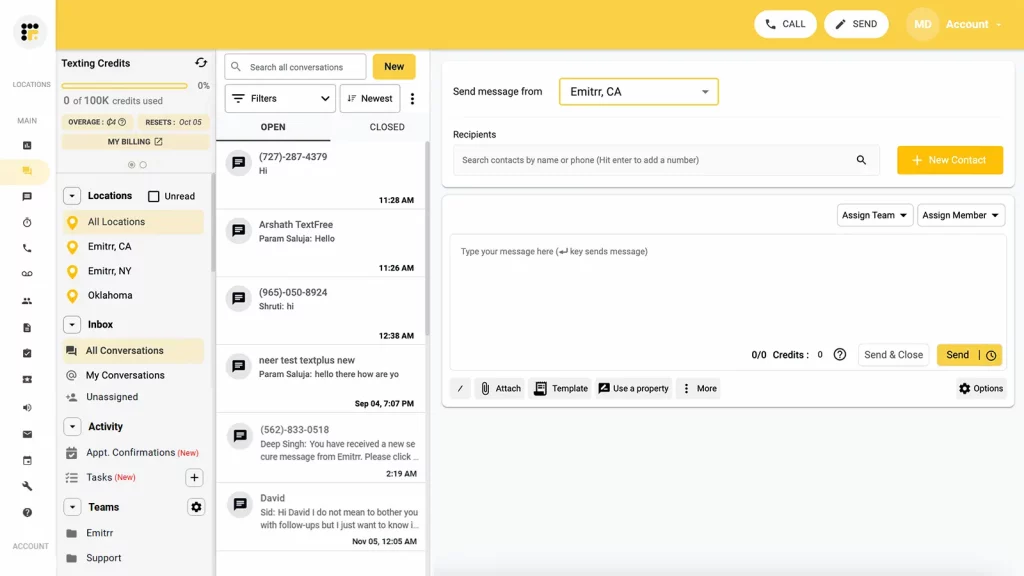
Emitrr Overview
Emitrr is a robust communication platform built specifically for nursing offices, combining patient engagement, automated follow-ups, and front-desk automation into one powerful, HIPAA-compliant system. This texting software for nurses goes beyond basic review requests with intelligent features that increase patient feedback, streamline survey delivery, and optimize review collection.
Key Features of Emitrr
- Online Review Requests: Send automated review invites after appointments via SMS, email, or voice.
- Automated Feedback Triggers: Review prompts are triggered by calendar events or treatment completion.
- Smart Survey Syncing: Real-time updates with your PMS ensure personalized feedback requests.
- Mobile Access: Monitor reviews, send follow-ups, and respond on the go from any device.
- Two-Way Texting: Collect direct feedback through secure SMS communication.
- Recall & Recare Follow-Up: Combine review outreach with recall reminders for a seamless patient journey.
- Waitlist Feedback Capture: Request feedback from patients who were rescheduled or moved off waitlists.
- Analytics Dashboard: Track review volume, ratings trends, and patient satisfaction metrics.
- AI-Driven Response Suggestions: Get intelligent reply templates for common review scenarios.
- Multi-Location Support: Manage reviews across multiple offices or providers from one dashboard.
Pros of Emitrr
- Multiple Integration: This nurse-patient communication integrates with 1,000+ CRMs and platforms, including major healthcare systems.
- All-in-one communication and review platform: feedback, reminders, and follow-ups.
- Highly Scalable: Built to scale across multi-location healthcare practices.
Cons of Emitrr
- Lack of Features: Some advanced features are still being rolled out in phases.
Emitrr Pricing
- Reputation tools start with SMS features at $149/month.
- Custom feedback and review package pricing available upon request.
Emitrr Integration
- MailChimp
- Denticon
- Zapier
- Salesforce
- HubSpot
- HouseCall Pro
- And many more
Emitrr Ratings
- Capterra – 4.8 / 5
- G2 – 4.7 / 5
Emitrr Reviews
“Appreciate that my internal team can see all messages going back and forth between field staff. It enables us to communicate the same message and support one another when even when we are working in different roles.”
“I LOVE Emitrr. The support you get is wonderful, the app is easy to use and they have been incredibly responsive. As a small business, we needed a messaging platform that wouldn’t break the bank and this meets all our needs (and then some) without making us feel overwhelmed. We came from Podium (had a terrible experience with them) and feel so valued at Emitrr!”
Source: Capterra
Emitrr Customer Support Channels
- Live chat
- Phone
- Knowledge base
- FAQs/Forum
- SMS
2. RevenueWell

RevenueWell Overview
RevenueWell’s feedback platform is designed to automate patient satisfaction tracking, improve retention, and boost your online reputation. This nurse-patient communication tightly integrates with healthcare PMS systems to ensure every review, recall, and post-visit message is timed and targeted for maximum impact. Let’s have a quick look at this HIPAA-compliant messaging software for healthcare:
Key Features of RevenueWell
- Self-Service Feedback Tools: Patients can leave reviews or feedback on their schedule, which helps to ease down
- Smart Approval Workflows: Approve, filter, or auto-publish positive reviews.
- Automated Review Reminders: Triggered by practice calendar and visit outcomes.
- Recall-Linked Review Campaigns: Combine reactivation outreach with satisfaction checks.
- Marketing Integration: Convert happy patients into promoters through campaign-connected review tasks.
Pros of RevenueWell
- Consists of Integration: Fully supports Dentrix, Eaglesoft, and Open Dental.
- Focuses on healthcare niche: Healthcare-specific workflows with built-in recall and feedback logic.
Cons of RevenueWell
- No advanced features: Some advanced features may require configuration during onboarding.
RevenueWell Pricing
- RevenueWell pricing starts at $189/month.
RevenueWell Integration
- Dentrix
- Eaglesoft
- Open Dental
- Mango Voice
- RingCentral
RevenueWell Reviews & Ratings
This therapist-client communication platform’s customer ratings on Capterra is 4.6/5 and on G2 is 4.7/5. Here’s what RevenueWell users are saying:
“This is not only friendly, fast and efficient but has many features that a very useful. The only forms are amazing and were so important during the height of COVID.”
“Freezes up often, not sure if messages are being sent. Patients like to sent photos of dental cards but the system does not display them. System does not recognize when patients confirm appointments. We wish the new patient forms were part of the overall package”
Source: Capterra
RevenueWell Customer Support Channels
- Phone
- Live Chat
- Help Center
3. PracticeMojo
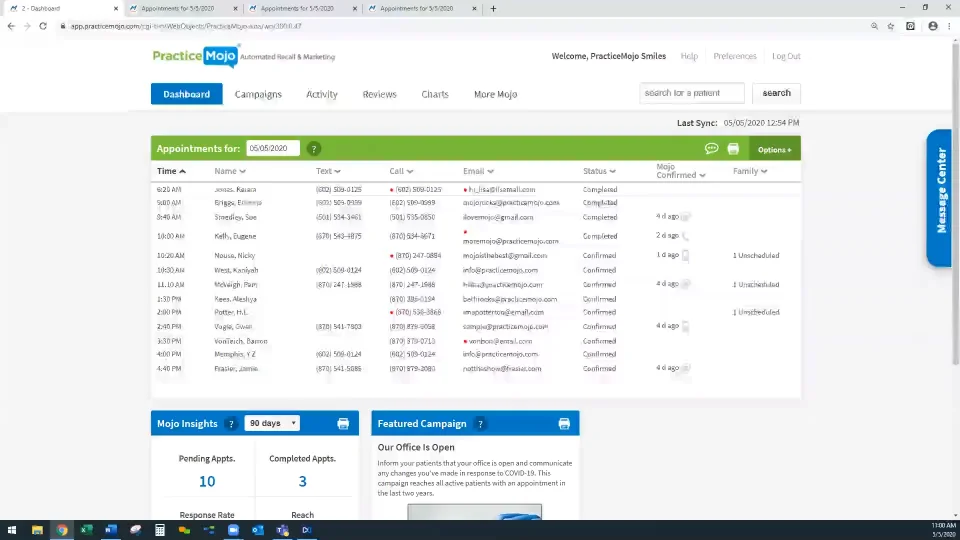
PracticeMojo Overview
PracticeMojo helps healthcare and nursing practices automate their reputation management by combining review requests, reminders, and recall outreach across multiple channels. It’s designed to reduce no-shows while increasing feedback volume and quality. Here are other details about this HIPAA-compliant messaging software for healthcare:
Key Features of PracticeMojo
- Post-Visit Review Prompts: Patients receive review requests via email, text, or voice calls.
- Automated Voice Surveys: Gather feedback using phone-based reviews.
- Recall-Driven Feedback: Target reviews from overdue hygiene or treatment patients.
- Multi-Channel Reputation Outreach: This HIPAA-compliant messaging software for healthcare engage patients wherever they are, SMS, email, or calls.
- Call Tracking for Feedback: Analyze which communication channels drive the most reviews.
Pros of PracticeMojo
- Lower steep for learning: Easy for staff to implement.
- Consistent in taking feedback: Focused on generating consistent positive feedback.
Cons of PracticeMojo
- Manual feature configuration: Some features require manual configuration during setup, and that can be frustrating for someone who is not in tech or does not understand features.
PracticeMojo Pricing
- Basic: Starts at $189/month.
PracticeMojo Integration
- Dentrix
- Eaglesoft
- Open Dental
- Mango Voice
PracticeMojo Reviews & Ratings
This HIPAA-compliant messaging software for healthcare has 4.3 rating on Capterra. Here’s what customers are saying about the platform:
Customer service was excellent. The program itself was undergoing a lot of changes while we were using it…both software and company ownership. That was ultimately our reason for leaving. We needed something more.
Traumatizing. Will never work with this company or any affiliated company in the future.
PracticeMojo Customer Support Channels
- Phone
- Live Chat
- Help Center
4. RingRx
RingRx Overview
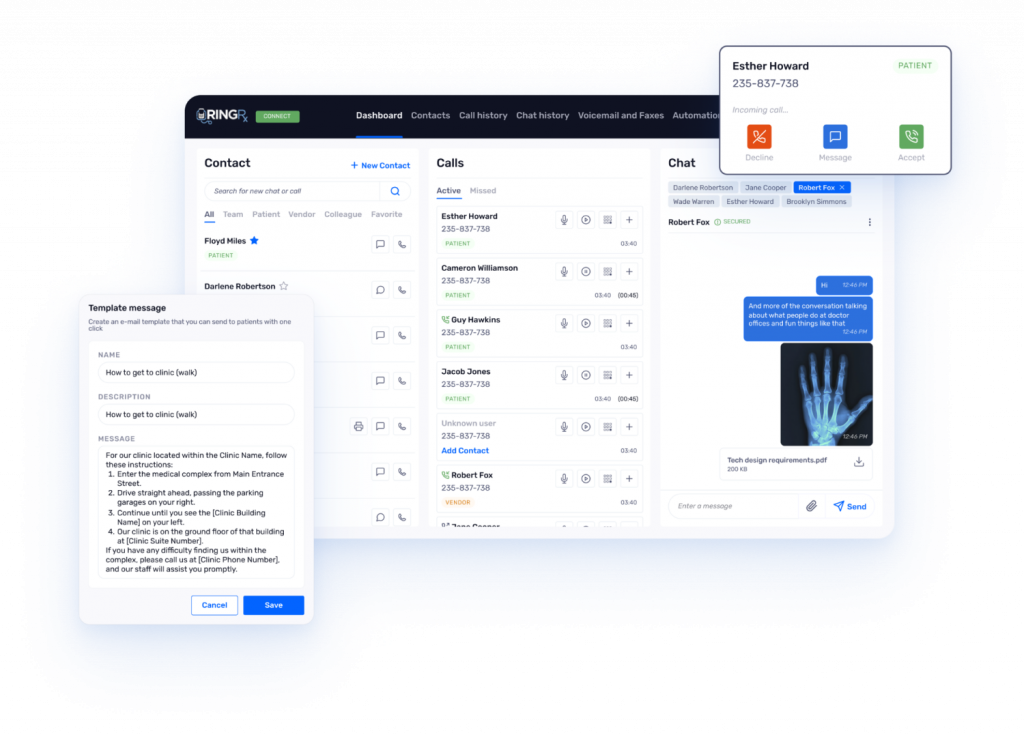
RingRx is a HIPAA-compliant reputation platform designed for healthcare. It combines secure communication, review automation, and feedback monitoring into one scalable solution. It’s ideal for nursing teams prioritizing data security and smart feedback flows. Here’s a quick look at features, pros, and cons of this HIPAA-compliant messaging software for healthcare:
Key Reputation Features of RingRx
- HIPAA-Compliant Review Requests: Secure survey delivery via text or voice, where there is no issue of security.
- Custom Feedback Workflows: This nurse-patient communication route reviews by provider, department, or case type. Easy feedback from customers can be taken where there is room for growth.
- On-Call Feedback Collection: Capture reviews from emergency or after-hours visits, which helps them to fill the gap that they are lacking to serve patients.
- Secure Review Logs: Maintain complete audit trails of all patient communication for the secure record and health history for further treatment.
- Multi-Channel Notifications: Get real-time alerts and notifications for any single activity happening. May it be appointment booking or confirmation.
Pros of RingRX
- Secure platform: This HIPAA-compliant messaging software is purpose-built.
- Highly scalable: Easily scalable for growing practices.
Cons of RingRx
- Lack of user-friendly UI: No native review dashboard; relies on integrations or APIs.
RingRx Pricing
- Lite: $15/month
- Grow: $19/month
- Clinic: $25/month
RingRx Integration
- Multiple EHRs and PMS platforms
- API capabilities for custom review flows
RingRx Ratings and Reviews
- G2: 1.5/5
- Capterra: 5.0/5
“Being able to text my clients is a great way to schedule appointments and send reminders. I also love that my assistant has her own extension and can communicate with clients from the same number. I really appreciate that it’s cloud-based and can be accessed from your personal phone through an app or a desktop computer. The fact that I don’t need to carry around two phones anymore has streamlined a lot of my own communication.”
“I do wish that there was a way for HIPAA-compliant texting app to receive photos. Many of my patients have tried to use this app to send photos of insurance cards. The more barriers to communication that I can take away the easier it is for them to access services.”
RingRx Customer Support Channels
- Phone
- Live Chat
- Knowledge Base
5. Ooma Office Pro

Ooma Overview
Ooma Office Pro offers flexible, affordable reputation tools tailored for small to mid-sized nurse practices. It includes automated review routing, mobile alerts, and patient feedback capture without requiring long-term contracts. Let’s have a quick look at this HIPAA-compliant messaging software for healthcare:
Key Reputation Features of Ooma
- Virtual Feedback Assistant: Automatically sends review requests based on appointment type or provider.
- Mobile App for Reviews: Monitor and respond to feedback from anywhere, so that it can be implemented in real-time.
- Real-Time Review Sync: Updates staff with new ratings and survey results instantly.
- Feedback Notes: Attach context to reviews for deeper follow-up insights.
- Scalable Outreach System: Easily expand as your practice grows.
Pros of Ooma
- Lower Pricing: Cost-effective and scalable, which is perfect for the small- to medium-sized companies.
- No long-term contracts: Avoid going through long-term contracts and paperwork with Ooma; it’s simpler to onboard.
Cons of Ooma
- Lack of features: Advanced features of this HIPAA-compliant messaging software for healthcare are available only in higher-tier plans.
- Lesser integrations: Limited PMS integrations without third-party tools.
Ooma Pricing
Ooma pricing starts at $19.95/month.
Ooma Reviews & Ratings
- Rating on Capterra – 4.5/5 stars based on over 500 reviews. Users praise Ooma for its reliable service and ease of use, especially for small businesses.
- Rating on G2 – 4.3/5 stars with a focus on its affordability and scalability. However, some reviews mention the lack of international calling features.
“Stay away at all costs”
“Ooma, all what I need”
Source: Capterra
Ooma Integration
- Salesforce
- NexHealth
- Additional integrations via third-party connectors
Ooma Customer Support Channels
- Phone
- Live Chat
- Knowledge Base
6. Klara

Klara Overview
Klara simplifies nursing office feedback by turning patient communication into secure review opportunities. It captures reviews through HIPAA-compliant channels and keeps all feedback in one place.
Key Reputation Features of Klara
- Call-to-Chat Review Redirection: Turn incoming scheduling or support calls into seamless feedback conversations. Automatically trigger a digital thread to capture insights without disrupting the workflow.
- Voicemail-Based Review Prompts: Don’t let missed calls go silent—follow up with personalized prompts to collect feedback. Capture valuable input directly from voicemail interactions.
- Secure Feedback Logs: Maintain a fully traceable record of every review-related exchange. Ensure compliance and clarity with audit-ready communication logs.
Pros of Klara
- App-free experience: Users don’t need to take a load of managing applications; it can be directly used by simply signing up for the platform.
- Centralized communication and review platform: Easy to take reviews from customers.
Cons of Klara
- Customisation limits: Templates are fixed in some plans.
- Higher cost for smaller practices: It may be pricey for solo psychiatrists.
Klara Pricing
- For Klara pricing, you need to contact the customer support..
Klara Integration
- Athenahealth
- AdvancedMD
- Greenway Health
- NextGen Healthcare
- ModMed
- Veradigm
- Meditab
Klara Reviews & Ratings
Klara customer ratings is & 4.5/5 on G2 and 4.3/5 on Capterra, and here’s what users are saying about it:
“What I like most about the Klara app is the simplicity of getting around the app. It’s very easy to use and you can speak with your provider with ease, as well as send and receive documents/forms.”
“The way the messages are labeled or assigned needs to improve. My suggestion is to bump up the screening of the type of msgs. Improvement is needed in picking up certain filtered words to help categorize the msgs.”
Source: Capterra
Klara Customer Support Channels
- LiveChat
- Knowledge Base
7. TigerConnect

TigerConnect Overview
TigerConnect is a clinical communication software designed to streamline secure messaging for care teams. It’s HIPAA- and HITRUST-certified, offering real-time delivery and read receipts.
Key Features for Nurses
- Group Chats & Role-Based Chatting: Immediately send roles or groups, such as “on-call cardiologist,” to facilitate coordination. Organize communication and make it context-specific.
- Secure Attachments: Share and receive photos, PDFs, and voice memos with end-to-end encryption. Send confidential information without sacrificing security.
- Admin Controls & Remote Wipe: Control access of users and delete information from stolen or lost devices. Maintain control and secure sensitive data at all times.
Pros of TigerConnect
- Fast real-time communication
- Enterprise-grade security
- Scalable across large hospitals
Cons of TigerConnect
- Pricing not publicly disclosed
- Can be complex for small practices
TigerConnect Pricing
For detailed TigerConnect pricing information, you need to reach out to our support team directly.
TigerConnect Integrations
- Epic
- Cerner
- Nurse call systems
- Scheduling tools
TigerConnect Reviews & Ratings
This healthcare texting platform is rated 4.5/5 on g2 and 4.7/5 on Capterra. Here’s what TigerConnect customers are saying:
“Ease of Use, Reliability, Efficiency. It allows staff to bridge the gap of patient care when our physicians are not physically present in clinic.”
“There were a lot of glitches. Would have multiple “updates” that could sometimes take an entire day to complete. Also it could be difficult to find specific groups since groups titled with the same thing could be duplicated, I wish that wasn’t an option.”
Source: Capterra
Customer Support Channels
- LiveChat
- Knowledge Base
8.QliqCHAT
QliqChat Overview
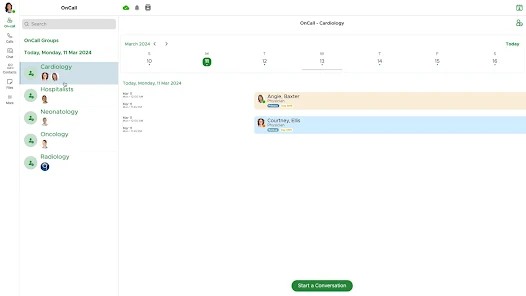
QliqCHAT offers HIPAA-secure texting for both internal staff and patients, without requiring recipients to download an app. It’s optimized for fast care-team coordination. Here is a quick look at this healthcare texting platform:
Key Features for Nurses
- App-Free Messaging Using Secure Links: Real-time communication via secure web links—no download required. Simplifies collaboration with care teams and patients.
- On-Call Scheduling & Auto Escalation: This healthcare texting platform automatically cover shifts with intelligent on-call schedules. Automatically escalate to the next available nurse if no one responds.
- Direct Image & Consent Upload to EHR: Capture and import patient images, consent forms, or documents into the EHR. Facilitates documentation while staying compliant.
Pros of QliqChat
- No app needed for external contacts
- Integrated on-call workflows
- Web and mobile access
Cons of QliqChat
- Pricing is only available on inquiry
- Setup may require hospital IT
QliqChat Pricing
You need to contact the support team for pricing.
QliqChat Integrations
- On-call routing systems
- EMRs
- Hospital MDM tools
QliqChat Review & Ratings
This texting software for nurses has a rating of 4.2 on Capterra. Here is what customers are saying about the platform:
“Qliq still has room to improve. Recently there has been an increase in downtime.”
Our users enjoy using Qliq to share secure messages and photos. It’s helped speed up the process instead of sitting around waiting for an email.
QliqChat Customer Support Channels
- Phone
- Technical Account Managers
9. TriageLogic Secure Texting

TriageLogic Overview
TriageLogic provides browser-based secure texting that enables nurses to instantly and securely reach doctors without app installation. Here is a quick look at this texting software for nurses :
Key Features of TriageLogic
- Secure Texting via Browser without Apps: This nurse communication software sends and receives end-to-end encrypted messages right in a web browser, no app needed. Easy to communicate and comply.
- Urgency Indicators & Read Receipts: Mark message priority and ensure delivery with read receipts in real time. Have priority updates read and responded to on time.
- Audit Logs & Message Archiving: Automatically record and retain all triage communication. Maintain a full record for documentation, review, and continuity of care.
Pros of TriageLogic
- Quick deployment, minimal setup
- Avoids app upkeep
- Improved accountability
Cons of TriageLogic
- Less rich than full mobile apps
- Limited to browser-based interactions
TriageLogic Pricing
You need to contact the support team for pricing of this healthcare texting platform.
TriageLogic Integrations
- Nurse triage systems
- Logging and documentation platforms
TriageLogic Reviews & Ratings
There are no reviews and ratings on Capterra and G2 for this healthcare texting platform.
TriageLogic Customer Support Channels
- Web support
- Documentation
10. Vocera Collaboration Suite
Vocera Overview
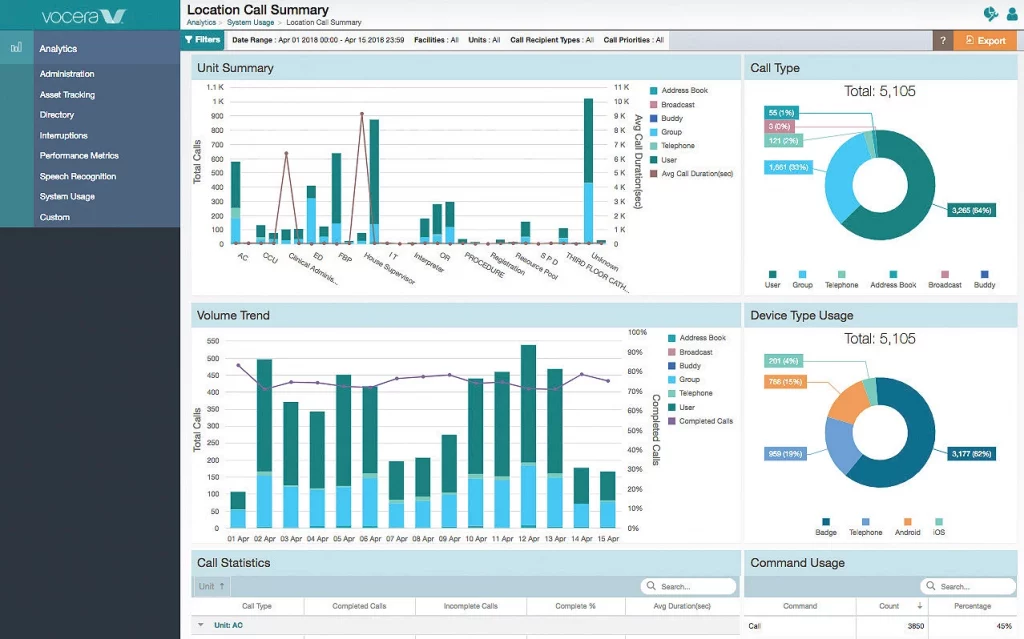
Vocera Collaboration Suite combines HIPAA-secure voice, text, and alerts into one unified platform, integrated with hospital systems and wearable badges. Here is a quick look at this nurse communication software:
Key Features Of Vocera Collaboration
- Secure Texting, Voice Calling & Real-Time Alerts: This healthcare texting platform enables fast, encrypted communication through text, voice, and urgent alerts. Designed for time-sensitive clinical workflows.
- Role/Group Messaging & Context-Aware Routing: Send messages to roles like “ICU Nurse” or “Charge RN” with patient context delivered automatically. Reduce delays and manual lookups.
- Wearable Badge & RTLS Integration: Support hands-free communication with wearable devices. Seamlessly connect with RTLS and nurse-call systems for location-based responsiveness.
Pros Of Vocera Collaboration
- Highly integrated clinical toolset
- Hands‑free communication with smart badges
- Proven response‑time improvements in hospitals
Cons Of Vocera Collaboration
- Potentially high setup and device costs
- Complex deployment in smaller clinics
Vocera Pricing
You need to contact the support team for pricing of this healthcare texting platform.
Vocera Collaboration Integrations
- EHRs
- Nurse-call
- RTLS systems
Vocera Rating & Reviews
This nurse communication software has a 4.0 rating on Capterra and 4.3 on G2. Here is what customers are saying about this platform:
“Vocera is a powerful tool for communication across your organization.”
I loved that it was always with me. I could quickly reach co workers, in their offices, lab, etc. Even if they were doing something, it was easy for them to answer hands free and multitask.
Customer Support Channels
- Phone
- Field Service
- Knowledge Base
Why Emitrr is the Best Nurse Texting Software
Automated, Real-Time Request for Reviews
Emitrr automatically sends out review requests right after patient appointments, no manual follow-up needed from staff. Whether it’s via SMS, email, or voice, messages are timed perfectly to when patients are most likely to respond. This ensures a steady stream of fresh, authentic Google reviews without adding to your team’s workload. It also closes the feedback loop faster, helping you react to issues before they escalate.
Two-Way Patient Texting
With HIPAA-compliant two-way texting, nurses and staff can communicate securely and directly with patients. This allows for immediate resolution of concerns, clarification of care instructions, or simple follow-up conversations. The system supports ongoing conversations over time, creating a more personalized and responsive experience for the patient while easing the communication burden on nurses.
Smart Integration With Nursing Practice Management Systems
Emitrr integrates seamlessly with popular healthcare and dental platforms like Denticon, Open Dental, Eaglesoft, and more. These connections allow it to automatically trigger review requests based on appointment type, treatment code, or provider. The integration minimizes admin work and makes sure feedback is tied to specific services, locations, or staff for sharper insights.
Multi-Channel Outreach
Emitrr doesn’t limit you to one method, it gives you the power to reach patients through SMS, email, or voice, depending on their preferences. This flexibility increases patient response rates and captures a broader range of feedback. Multi-channel engagement also helps practices connect more meaningfully with tech-savvy patients, seniors, or those with accessibility needs.
Unified Communication & Review Platform
Emitrr merges appointment reminders, two-way texting, follow-ups, and review requests into one platform. This all-in-one system reduces the need to jump between apps, improving workflow and staff productivity. Nurses and admins can see the full picture, appointment status, communication history, and feedback, all from a single dashboard, leading to more coordinated and effective patient interactions.
Customizable Review Flows
You can tailor when, how, and for whom review requests are sent. Whether you want to prompt reviews only after specific treatments, from certain providers, or at particular locations, Emitrr gives you full control. This is especially valuable for multi-specialty and multi-location practices, allowing them to gather focused, relevant feedback to guide localized improvements.
100% HIPAA-Compliant Infrastructure
Built specifically for the healthcare environment, Emitrr follows strict HIPAA standards to ensure all patient communication remains secure. This includes data encryption, audit logs, secure cloud hosting, and signed Business Associate Agreements (BAAs). Practices can safely manage reviews and patient engagement without risking data privacy or regulatory violations.
Advanced Analytics Dashboard
Emitrr’s dashboard turns feedback into actionable insight. You can track metrics like review volume, response rates, sentiment trends, and team-specific performance. These analytics help administrators and nurse managers identify service gaps, optimize staffing, and set realistic goals for improving patient satisfaction across units or locations.
Waitlist and No-Show Feedback Capture
Emitrr doesn’t just collect feedback from completed visits, it also follows up with patients who cancel, reschedule, or no-show. This allows your team to understand barriers to care, missed expectations, or scheduling issues that might otherwise go unaddressed. Capturing this kind of feedback helps reduce future no-shows and improves patient retention.
AI-Powered Review Response Suggestions
When feedback rolls in, good or bad, Emitrr uses AI to suggest professional, empathetic, and timely responses. These smart suggestions help your team maintain a consistent brand voice, handle criticism with care, and show appreciation to loyal patients. This feature saves time and ensures reviews don’t go unanswered, protecting your reputation online.
See how you can frame quick responses via Emitrr:
High Scalability
Whether you’re managing a small nursing practice or a large enterprise with dozens of providers across multiple sites, Emitrr scales with you. This texting software for nurses handles high volumes of patient interactions without compromising performance. Customizable settings also allow for granular control over messaging and review flows per location, department, or staff role.
Excellent Customer Support
Emitrr provides robust support through live chat, phone, email, and even SMS, plus a detailed knowledge base with tutorials and troubleshooting guides. Their team is responsive and trained in healthcare workflows, so they understand the urgency and precision required. From onboarding to daily use, Emitrr’s support ensures you’re never left hanging.
AI SMS Agent
Sarah, Emitrr’s intelligent SMS agent, handles appointment bookings, rescheduling, lead capture, reminders, and two-way conversations, entirely over text. She’s designed to work across industries and time zones, so your business is responsive, even when your team isn’t available.
Frequently Asked Questions
Yes, but only using HIPAA-compliant platforms that encrypt data and meet security standards.
Many do. Leading platforms like Emitrr, TigerConnect, and QliqCHAT offer integrations with EHRs such as Epic, Cerner, and Athenahealth.
Regular texting (e.g., SMS, iMessage) isn’t encrypted or traceable. HIPAA-compliant apps secure messages, log activity, and offer access controls.
Some platforms require it; others (like QliqCHAT and TriageLogic) offer app-free browser-based solutions. Emitrr also supports secure messaging for healthcare without extra complexity.
Pricing varies. Emitrr, for example, ranges from $30 to $299/month depending on features. Enterprise platforms may charge more.
Most platforms can go live within a few days to a few weeks, depending on the integration needs. Emitrr is known for fast, lightweight implementation.
Conclusion
The right nurse texting software reduces friction, speeds up decisions, and keeps everyone aligned, from the patient’s bedside to the physician’s inbox.
Whether you’re a hospital admin, nurse manager, or IT lead, investing in secure, nurse-friendly communication software isn’t just about compliance; it’s about protecting time, reducing burnout, and improving patient outcomes.
Emitrr is hands-down one of the best nurse communication tools. It stands out not just for its healthcare-grade compliance and feature set, but for how easily it adapts to real-world nursing workflows.
You want to explore and understand Emitrr. Schedule your demo with us right away!