
 4.9 (400+
reviews)
4.9 (400+
reviews)
Introduction
Managing calls, appointment reminders, and client updates can overwhelm even the most organized veterinary team. That’s why many clinics are turning to a veterinary texting app to simplify communication with pet owners.
In this guide, we review the best tools that help veterinary practices send reminders, answer client questions quickly, and keep conversations organized, so your team spends less time on the phone and more time caring for patients.
AI Summary
- Veterinary clinics communicate daily with pet owners for appointments, reminders, and follow-ups, making efficient messaging essential.
- Many clinics now use a veterinary texting app or veterinary client communication software to simplify conversations and reduce front-desk workload.
- This blog reviews the best tools that help clinics text a veterinarian’s clients, automate reminders, and manage communication in one place.
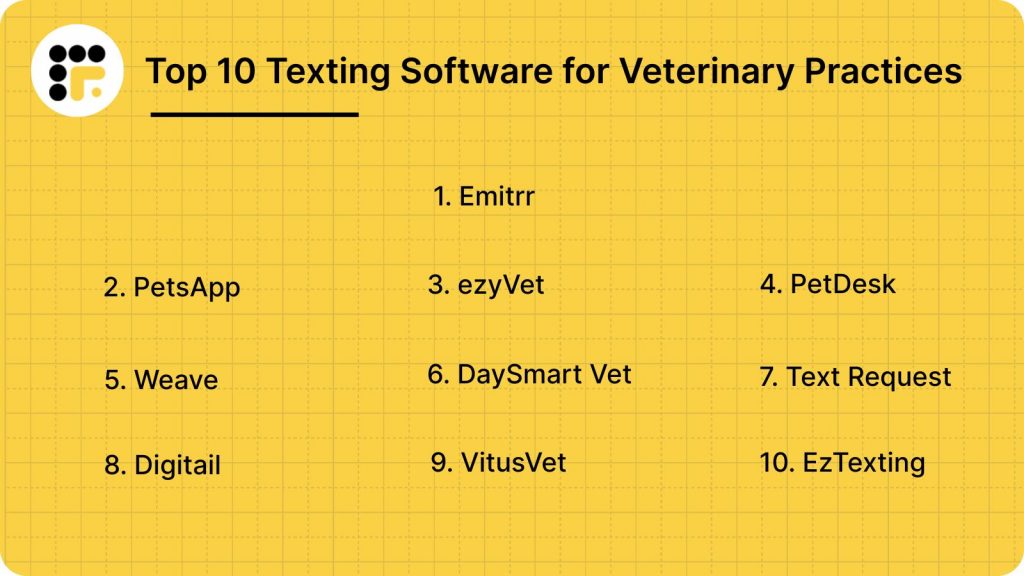
- We compare 10 platforms including Emitrr, PetsApp, ezyVet, PetDesk, Weave, DaySmart Vet, Text Request, Digitail, VitusVet, and EZTexting.
- Some solutions focus on texting, while others combine messaging with full veterinary clinic software for managing day-to-day practice operations.
- The guide helps you choose the right software for veterinary clinics based on your clinic’s communication and workflow needs.
What Features Should You Look for in Veterinary Texting Software?
Many SMS software for veterinarians check the same boxes on paper. But the right software needs to work for the way your clinic actually runs, fast-paced, short-staffed, and always on the move. Here are the essentials to look for:
HIPAA-compliant and secure messaging
You’re sharing sensitive details with clients every day, from updates about a pet’s condition to post-surgery care instructions. The platform you choose needs to be built for that kind of communication. That means HIPAA compliance, secure data handling, and confidence that messages won’t end up where they shouldn’t.
Two-way SMS & MMS capabilities
Sending a reminder is one thing. Getting a reply and being able to respond without switching tools makes a real difference. With two-way texting, your team can confirm appointments, answer quick follow-ups, and even guide pet owners through care instructions without a phone call. It’s simpler for them and less work for your staff.
Automated appointment reminders and follow-ups
Reminders are easy to forget when the front desk is juggling five things at once. That’s where automation helps. A good platform will let you schedule reminders for appointments, check-ups, or even prescription refills, so your team doesn’t have to send them manually each time.
Group texting for vaccine drives or promotions
Planning a vaccination clinic next weekend? Need to send a weather-related closure notice? Group texting lets you send the same message to multiple clients in seconds. You don’t need to copy and paste or send one at a time, just filter, write, and hit send.
Integration with popular PMS
Without integration, texting becomes another disconnected task. Look for software that works with your practice management system, so conversations show up in the right place and appointment info stays synced. It cuts down on errors and saves a lot of back-and-forth.
Mobile accessibility
Your team isn’t always at the front desk. With mobile access, staff can check messages, respond to clients, or follow up on a question from anywhere in the clinic or even from home if needed. It’s a small thing that makes a big difference in how responsive your clinic feels.
Shared inbox/team collaboration
One person handling all incoming texts doesn’t work when messages pile up. A shared inbox helps your whole team pitch in. Everyone can see what’s been answered, what still needs a reply, and who’s handling what.
Pre-built and customizable message templates
You’ll send certain texts dozens of times a week, pickup instructions, follow-ups, and reminders. Having templates for those common messages speeds things up. Being able to customise them to match your tone? Even better.
Dashboard with message tracking and analytics
You can’t improve what you can’t see. Platforms with tracking show which messages were delivered, which clients responded, and which campaigns drove bookings. These insights help clinics identify gaps and fine-tune outreach over time, especially when handling SMS reminders for pet clinics, reviews, and follow-ups.
Security & Compliance Requirements for Vet Texting Solutions
Texting may be convenient, but when client communication involves medical history, prescriptions, or treatment plans, convenience can’t come at the cost of compliance. In veterinary practices, every text exchanged with a pet owner could carry protected health information (PHI), and that brings legal responsibilities.
Choosing texting software that meets all these requirements is critical, not just for protecting data, but for protecting your practice. Here’s a breakdown of what your texting platform must have to stay compliant, secure, and audit-ready:
Documented Client Consent
Clients must actively agree to receive texts from your clinic. That includes:
- Written opt-in (paper or digital)
- Clear explanation of what they’ll receive (e.g., reminders, follow-ups, health updates)
- Easy opt-out method
- Disclosure of risks if texting isn’t fully encrypted
Why it matters: Vet texting without informed consent can lead to privacy complaints, fines, and damage to client trust.
End-to-End Encryption
All messages, including photos, instructions, or appointment details, should be encrypted from sender to recipient.
Look for platforms that use:
- AES-256 encryption for data at rest and in transit
- Secure HTTPS transmission
- Encrypted storage on secure servers located within the U.S. or other regions approved under applicable data privacy laws
Why it matters: Without encryption, intercepted messages could expose pet health details or client contact info.
Role-Based Access and Login Protection
Not every staff member needs access to every conversation.
Your software should allow:
- User-level permission controls (reception, techs, vets)
- Multi-factor authentication (MFA)
- Activity logs showing who accessed what
Why it matters: Limits exposure to data internally, and blocks unauthorized access if credentials are compromised.
Automatic Audit Trails
Every action, including messages sent, received, read, or deleted, should be automatically logged without requiring manual input.
This includes:
- Timestamped logs
- User IDs for sent/received messages
- Archived communication history
Why it matters: In an audit, being able to show a full record of communication protects your clinic.
Secure Data Retention and Remote Wipe
Most states require veterinary records to be stored for 3 to 7 years. Your texting platform should:
- Retain message history securely during that window
- Allow data export if needed for legal purposes
- Offer remote wipe if a device is lost or stolen
Why it matters: Loss of data (or too much retained for too long) can be a regulatory violation.
Business Associate Agreement (BAA)
Any vendor handling protected health information (PHI) on your behalf must sign a BAA, which formalizes their role in protecting your data and complying with HIPAA.
Why it matters: Without a BAA, your clinic assumes full legal responsibility for any breach, even if it was the vendor’s fault.
Built-In Technical Safeguards
A modern texting platform should go beyond access control. Look for:
- Auto-expiring or self-deleting messages
- Alerts for unusual login activity
- Detection of unencrypted messages containing PHI
- Optional message redaction features
Why it matters: These reduce the chance of accidental exposure or human error.
Alignment with VCPR and Telehealth Laws
Compliance in texting for veterinary practice isn’t just about HIPAA. Your software should also support compliance with:
- VCPR rules in your state (especially for telehealth messaging)
- Record retention laws governing how long the communication history must be kept
- State-specific privacy laws like the California Consumer Privacy Act (CCPA) or Virginia’s CDPA, if applicable
Moreover, pick the platform that:
- Support note-taking or tagging for compliance tracking
- Allow messages to be attached to the patient record
- Work in alignment with compliant telehealth protocols
Why it matters: Sending diagnostic advice without a VCPR, even over text, can lead to licensing complaints or board action.
Compatibility with PIMS or EHR Systems
Security doesn’t end at messaging; it extends to how communication data connects with your records. Platforms should:
- Sync with your Practice Information Management System (e.g., ezyVet, Cornerstone, AVImark, IDEXX Neo, etc.)
- Log texts into the patient file automatically or via API
- Prevent manual errors from copy-pasting conversations
Why it matters: Manually tracking messages is risky, time-consuming, and easy to get wrong.
Staff Training and Written Policies
Even the best platform won’t protect your clinic if your team isn’t using it correctly. Vendors should support:
- Routine staff training sessions
- Policy templates on texting dos and don’ts
- Administrative controls for setting clinic-wide texting rules
Why it matters: Security and compliance start with your team, and consistency matters across every shift.
Industry-Standard Security Certifications
Lastly, not all vendors are created equal. Look for providers that meet or exceed standards like:
- ISO 27001 (information security)
- SOC 2 Type II (data integrity and controls)
- HITECH Act compliance (healthcare-specific privacy standards)
These certifications show that the vendor takes data security seriously, not just in theory, but in practice.
Why it matters: These certifications show that your client data is handled responsibly and meets the latest regulatory expectations.
Watch this video and avoid making HIPAA violations when texting patients:
Integrations Required for Vet Texting Platforms
For a veterinary clinic, texting software should do more than just send and receive messages. It needs to connect smoothly with the systems your team already relies on. Below is a breakdown of the most important integration types to look for, along with the tools that support them best:
| Integration Type | Integration Benefits | Key Use Cases | Popular Software |
| PMS | Centralizes records, automates documentation, and improves workflow | Appointment reminders are auto-synced and documented in the patient’s record | Emitrr, ezyVet, AVImark, Cornerstone, IDEXX Neo, NaVetor, Digitail |
| Vet Appointment Scheduling | Automates reminders, reduces no-shows, streamlines confirmations | Clients receive real-time confirmations and reschedule links via SMS | Emitrr, Vetstoria, DaySmart Vet, PetDesk |
| Billing/Payments | Enables payment links via SMS, improves collections, syncs with accounting | Clinics send SMS invoices or pre-visit payment links for faster billing | Square, Stripe, VetBilling, QuickBooks |
| Lab/Diagnostics | Syncs lab results, reduces errors, enables client updates with minimal delay | Clients receive text alerts when results are ready or require action | IDEXX VetLab, Antech, Zoetis |
| Prescription Management | Simplifies refills, supports compliance, and reduces front desk workload | Refill reminders or pickup notifications sent via text | Vetsource, Covetrus |
| Digital Forms/Signing | Collects intake or consent forms digitally, cuts down paperwork and front desk time | New clients receive consent forms or check-in paperwork before the visit | Emitrr, Jotform, VetForm, Formstack |
| Marketing | Supports campaigns, bulk messaging, and personalized alerts | Wellness campaigns and reminder sequences delivered via segmented SMS | Emitrr, Mailchimp, HubSpot, ActiveCampaign |
| Two-Way Texting | Secure, trackable, real-time client communication with full message history | Clients can confirm appointments, ask questions, or share pet updates | Emitrr, Weave, PetDesk, Text Request |
How Texting Software Helps Veterinary Practices?
Let’s look at some of the top ways SMS software for animal clinics are beneficial:
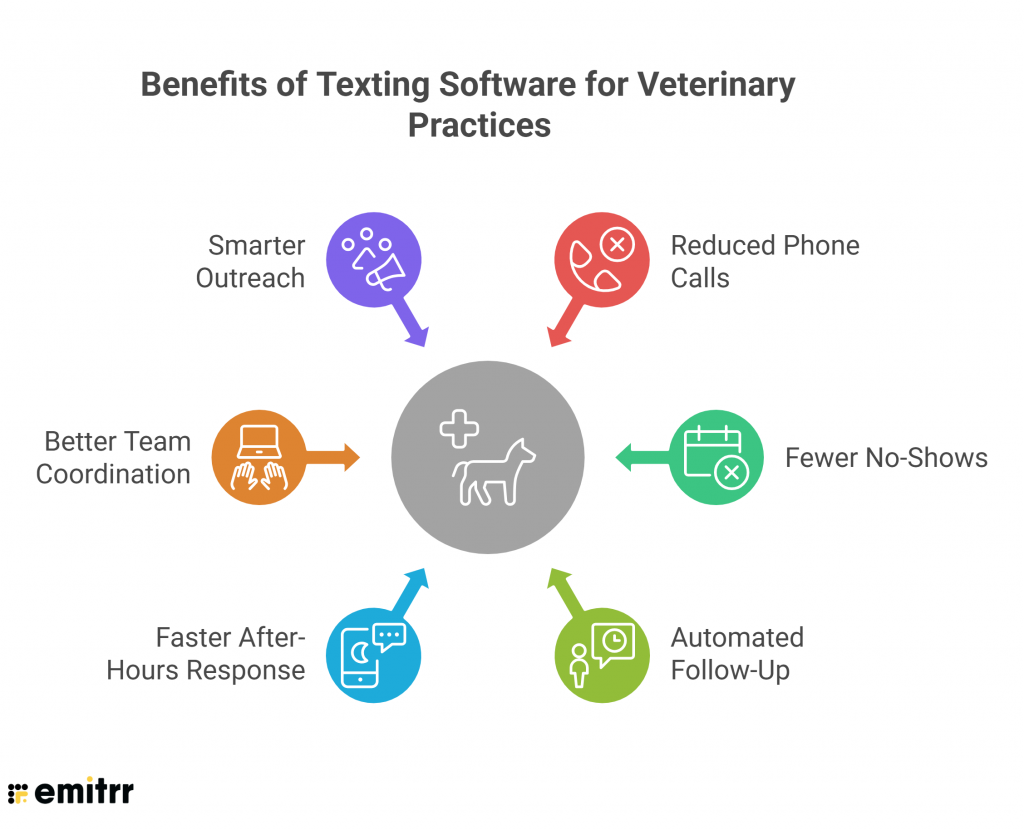
Fewer Phone Calls, Less Front Desk Overload
A large share of daily calls involve simple updates like appointment times or medication pickups. With texting, these messages are automated or answered instantly.
Benefit: Reduced hold times, faster service, and less burnout for staff.
Reduced No-Shows and Late Cancellations
Automated reminders and confirmations reduce missed appointments by keeping clients engaged and informed. Most clients see and respond to texts within minutes. SMS reminders sent 48 and 24 hours before appointments help reduce no-shows by up to 30%.
Benefit: More predictable scheduling, fewer empty time slots, and less wasted time for your team.
Automated Follow-Up Without Adding to the Workload
Many clinics struggle to follow up after visits, especially when the schedule is packed. Texting software can automate follow-up messages based on visit type. This helps ensure continuity of care without requiring someone to manually send messages.
Benefit: Better compliance with treatment plans and a higher standard of care, without adding work.
Faster Response After Hours
Texting tools can reply automatically to messages received after hours, letting clients know their request was received.
Benefit: Clients feel reassured, and you don’t lose touch with people reaching out while you’re closed.
Better Team Coordination
With a shared inbox, multiple staff members can see message history and jump in when needed. This avoids miscommunication and ensures clients aren’t waiting for a reply.
Benefit: Faster responses, no duplicate replies, fewer dropped conversations, and smoother internal handoffs.
Smarter Outreach at Scale
Group texting and automated campaigns let clinics communicate with dozens of clients at once, without making 50 calls or sending 50 emails.
Benefit: Better preventive care compliance, stronger client engagement, and more appointments booked with less effort.
10 Best Texting Software For Veterinary Practices
Quick overview:
| Software | Texting Features | Automation / AI | Integrations | Best For |
|---|---|---|---|---|
| Emitrr | Two-way texting, missed-call-to-text, broadcast SMS, templates | AI automation, reminders, auto-responses | CRM, EMR, veterinary clinic software | AI-powered veterinary client communication |
| PetsApp | In-app messaging with pet owners | Appointment reminders, automated updates | Veterinary practice management systems | Mobile communication with pet owners |
| ezyVet | Client messaging within platform | Workflow automation, reminders | ezyVet ecosystem and integrations | Advanced veterinary practice management |
| PetDesk | Two-way messaging, reminders | Automated appointment reminders | Veterinary practice management systems | Client engagement and retention |
| Weave | Two-way texting, team inbox | Automated reminders and responses | PMS integrations, VoIP systems | Phone + texting for veterinary clinics |
| DaySmart Vet | Client communication tools | Appointment reminders | Veterinary clinic management integrations | Scheduling and clinic management |
| Text Request | Two-way SMS, bulk texting, templates | Scheduled texts | CRM and business apps | Simple texting for veterinary practices |
| Digitail | Messaging with pet owners | Automated reminders and workflows | Veterinary clinic software ecosystem | All-in-one veterinary software |
| VitusVet | Client messaging via app | Appointment reminders | Veterinary practice management systems | Pet owner engagement apps |
| EZTexting | Mass texting, campaigns, templates | SMS scheduling and automation | CRM and marketing tools | SMS marketing for veterinary clinics |
Let’s now take a detailed look at the top options for HIPAA texting platforms for animal care:
1. Emitrr : Best Overall Veterinary Texting App
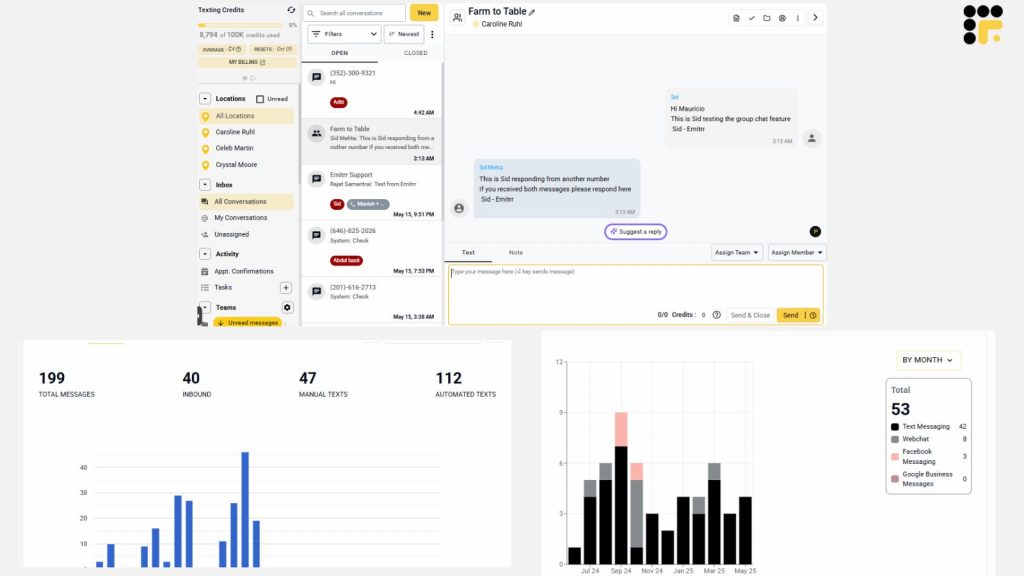
What is Emitrr?
Emitrr is an all-in-one texting and communication platform that stands out as a purpose-built texting platform designed specifically for service businesses, including veterinary practices. What makes it different is how deeply it understands the daily workflow of a clinic. Instead of offering just basic messaging, Emitrr gives you a complete communication system that helps reduce no-shows, speed up follow-ups, and save hours of phone time every week.
It’s more than just a veterinary texting app. Emitrr replaces scattered reminders, sticky note follow-ups, and overwhelmed front desks with one organized, automated, and secure solution. It’s also fully HIPAA-compliant vet communication, making it safe for exchanging sensitive information with pet owners.
Emitrr Features
- Unified Communication Management: Emitrr combines texting, VoIP for vet, web chat, voicemail, and contact management under one roof. Teams manage everything from a single dashboard without switching between tools.
- Two-Way HIPAA-Compliant Texting for Vets: Clients can reply directly to your texts, and your team can respond in real-time. All messages are fully encrypted and compliant with healthcare privacy laws.
- Bulk and Group Text Messaging: Send mass texts to thousands of customers at once or set up group conversations within the same thread. This helps with promotions, appointment reminders, or important updates, all with high open rates.
- Web Chat to SMS Continuation: Start a conversation with a visitor on your website and continue it via SMS after they leave. Emitrr ensures you stay connected even after a potential customer closes the browser.
- Automated Appointment Reminders and Follow-Ups: Emitrr allows businesses to send personalized reminders by text, email, or voice. Customers can confirm, cancel, or reschedule appointments simply by replying to a text, reducing no-shows and saving staff time.
- Missed Call Text-Backs: Every missed call triggers an automatic text, so you never lose a client just because you couldn’t answer.
- Pre-Built Message Templates: From pre-visit instructions to post-op care and review requests, you get ready-to-use templates built specifically for vet clinics.
- Customizable Auto-Replies: Set intelligent replies for after-hours messages, common questions, or specific services like grooming or boarding.
- Text-to-Pay Links: Secure payment links can be sent over text for convenience and faster billing turnaround.
- Shared Inbox with Internal Notes: Your whole team can see every message thread, add notes, and assign chats so nothing slips through the cracks.
- Photo, Video & Document Sharing: Share pet images, treatment visuals, receipts, or signed forms directly in the text conversation.
- AI-Powered Smart Replies: Emitrr has a special AI agent for vet that can handle FAQs like clinic hours, location, or booking links instantly, saving time on repetitive responses.
Emitrr Pros
- Streamlined User Experience: Emitrr’s dashboard is designed to cut clicks and save time, helping teams handle conversations faster with fewer steps.
- Seamless Integration with Key Tools: Emitrr connects easily with CRM, EHR, and practice management systems, keeping customer records and conversations in sync.
- Cost-Effective for Growing Teams: Transparent pricing plans allow businesses to scale communication without surprise costs or feature lockouts.
- All-In-One Communication Suite: From texting to calling to voicemail drops and review management, everything runs through one unified platform.
- Smart Automation for Busy Teams: Automate appointment reminders, missed call follow-ups, and customer outreach without juggling multiple tools.
- Text-Enabled Landlines: Emitrr can turn your existing business phone number into a texting number, letting customers text your landline without any extra work.
Emitrr Cons
- Some amazing features are still under development and will be rolled out soon.
Emitrr Pricing
Emitrr offers three pricing plans for its users: Standard, Pro, and Enterprise. These Emitrr pricing plans also depend on the number of messages you wish to send.
Here’s a detailed breakdown of the Emitrr pricing plans:
| Number of message credits | Standard | Pro | Enterprise |
| 500 | $42 per month | $45 per month | Contact Sales for a customized quote. |
| 1000 | $68 per month | $73 per month | |
| 2000 | $110 per month | $118 per month | |
| 3000 | $138 per month | $148 per month | |
| 5000 | $210 per month | $225 per month | |
| 7500 | $315 per month | $337 per month | |
| 10000 | $420 per month | $450 per month | |
| 15000 | $486 per month | $522 per month | |
| 20000 | $540 per month | $580 per month | |
| 30000 | $741 per month | $796 per month | |
| 40000 | $876 per month | $941 per month | |
| 50000 | $1011 per month | $1086 per month | |
| 100000 | $1820 per month | $1960 per month |
Emitrr Integrations
Emitrr offers 1000+ integrations across different industries such as dental, recruiting, real estate, etc., with tools like:
- MailChimp
- Denticon
- AthenaHealth
- Zapier
- Salesforce
- HubSpot
- HouseCall Pro
- And more!
Emitrr Customer Support Channels
- Live chat: Chat with Emitrr’s live representatives
- Phone: Call Emitrr at +1 (210) 941-4696
- Email: Send email to Emitrr’s support team at support@emitrr.com
- Knowledge base
- FAQs/forum
- SMS
Emitrr Rating
Emitrr has a solid 4.8-star rating on Capterra.
Emitrr Reviews
“You have it all integrated into one platform, the signatures, the amount of characters, you can attach files, send photos. You are able to create and send forms. Unlimited amount of things we can use and take advantage of.”
“I LOVE Emitrr. The support you get is wonderful, the app is easy to use and they have been incredibly responsive. As a small business, we needed a messaging platform that wouldn’t break the bank and this meets all our needs (and then some) without making us feel overwhelmed.”
(Source: Capterra)

2. PetsApp: Best for Vet–pet owner mobile communication
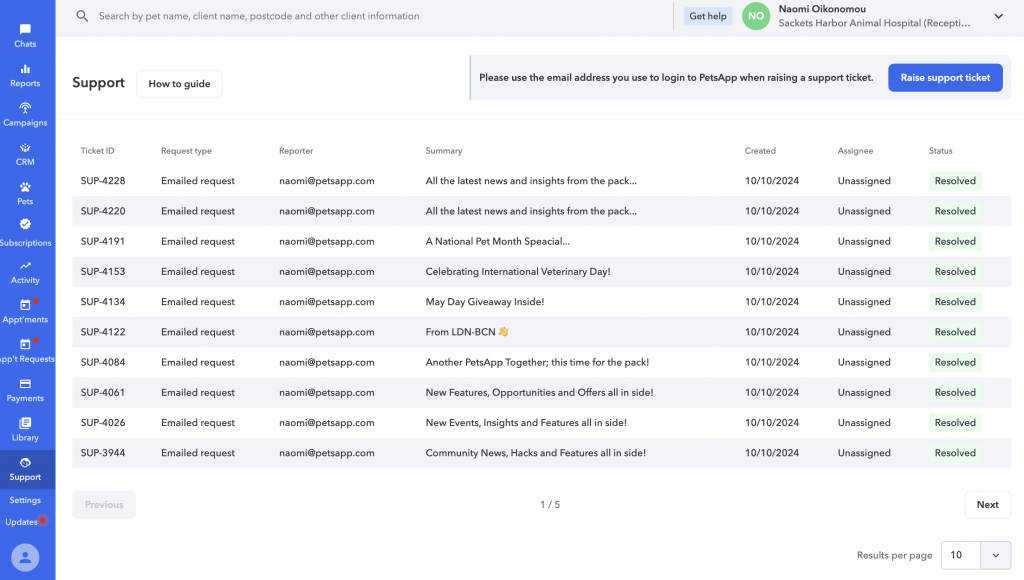
What is PetsApp?
PetsApp is a veterinary texting app and client engagement platform designed to streamline interactions between clinics and pet owners. It offers features like two-way SMS, appointment scheduling, and digital payments. However, users have noted limitations in its functionality for larger practices with complex workflows.
PetsApp Features
- Two-Way SMS and App Messaging: Enables unlimited communication between clinics and clients via SMS and the app.
- Appointment Booking and Reminders: Allows clients to request appointments, with reminders sent via push notifications, emails, and SMS.
- Digital Payments: Facilitates secure and fast payments, including card, Apple Pay, and Google Pay options.
- Wellness and Loyalty Plans: Offers customizable plans to enhance pet care compliance and client retention.
- Campaigns and Templates: Provides tools to engage clients with newsletters, promotions, and seasonal information.
PetsApp Pros
- User-Friendly Interface: Designed for ease of use, even for those not tech-savvy.
- Comprehensive Communication Tools: Combines SMS, app messaging, and video consultations.
- Integration with Practice Management Systems: Syncs with various PMS for streamlined operations.
- Client Engagement Features: Includes wellness plans and loyalty programs to boost client retention.
PetsApp Cons
- Limited Functionality for Larger Practices: This veterinary software may not fully meet the needs of practices with complex workflows.
- Pricing Transparency: Detailed pricing information is not readily available and may depend on specific business needs.
- Integration Delays: Some users have experienced delays in integrating with their existing practice software.
- Healthcare Plan Customization: Users have suggested that the healthcare plan feature could benefit from additional customization options.
PetsApp Pricing
- Contact support
PetsApp Integrations
- Google Analytics 360
- Covetrus Avimark
- Cornerstone
- Rapsody and more
PetsApp Customer Support Channels
- Email/Help Desk
- FAQs/Forum
- Knowledge Base
- Phone Support
- Chat
PetsApp Rating
PetsApp has a 4.8-star rating on Capterra.
PetsApp Reviews
“Communication is easier with PetsApp. It aligns us with a more modern way of doing things and appeals to a cross section of clients.”
“The search facility is a little clunky leaving me unsure sometimes if all the pet options have been listed when I’ve put in a name to search for.”
(Source: Capterra)
3. ezyVet: Best for Advanced veterinary practice management
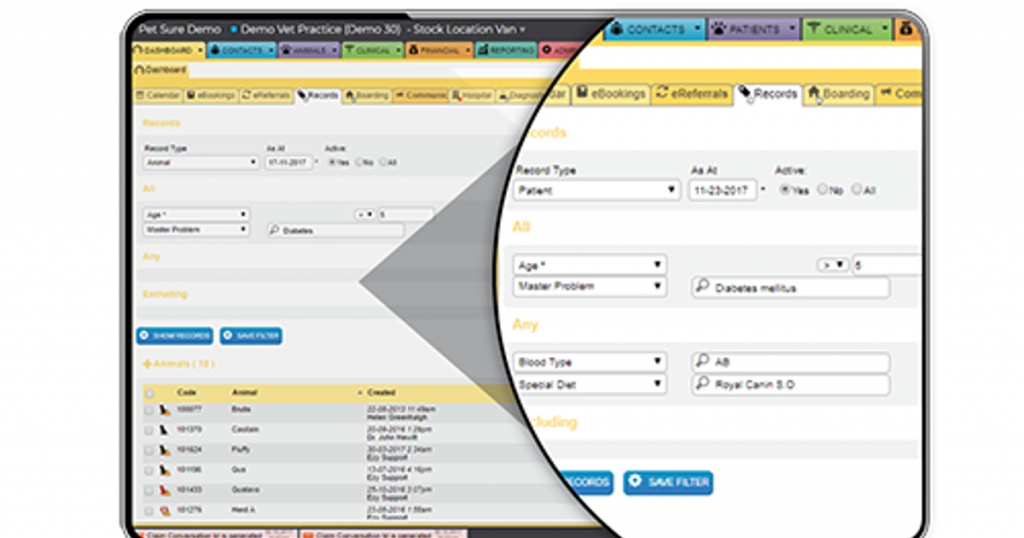
What is ezyVet?
ezyVet is a comprehensive, cloud-based veterinary practice management software designed to streamline clinic operations. It offers features like appointment scheduling, client communication, billing, and reporting, all integrated into one platform. While ezyVet provides a robust set of tools, some users have noted that its complexity can lead to a steep learning curve, especially during the initial setup phase.
ezyVet Features
- Appointment Scheduling: Real-time calendar bookings with customizable appointment types and statuses.
- Client Communication: Automated reminders and confirmations via email and SMS, directly from the platform.
- Invoicing & Payments: Integrated billing with customizable financial documents and remote digital payments.
- Task Automation: Advanced templating system to autofill notes and reduce repetitive data entry.
ezyVet Pros
- Comprehensive Feature Set: This veterinary software a wide range of tools covering various aspects of veterinary practice management.
- Cloud-Based Accessibility: Access the platform from anywhere, facilitating remote work and multi-location management.
- Integration Capabilities: Integrates with over 100 third-party applications, including diagnostics and payment systems.
- Customizable Templates: Allows for the creation of tailored templates to suit specific clinic needs.
ezyVet Cons
- Steep Learning Curve: Users have reported that the platform can be complex and may require significant time to master.
- Implementation Challenges: Initial setup and data migration can be time-consuming and may require dedicated support.
- User Interface Complexity: Some users find the interface to be cluttered, with too many tabs and options, leading to potential confusion.
- Inventory Management Issues: Reports indicate that the inventory system can be cumbersome and prone to errors.
ezyVet Pricing
Pricing starts at $245 per month.
ezyVet Integrations
- Xero
- SmartFlow
- PayJunction
- Zoom Workplace and more!
ezyVet Customer Support Channels
- Email/Help Desk
- FAQs/Forum
- Knowledge Base
- Phone Support
- 24/7 (Live rep)
- Chat
ezyVet Rating
This veterinarian software has a 4.7-star rating on Capterra.
ezyVet Reviews
“Very good. Fairly intuitive, however quickly scanning through records can be a bit cumbersome.”
“Not good at all, even after 7 months all vets still struggling to has grasp of the system.”
(Source: Capterra)
4. PetDesk: Best for client reminders and engagement
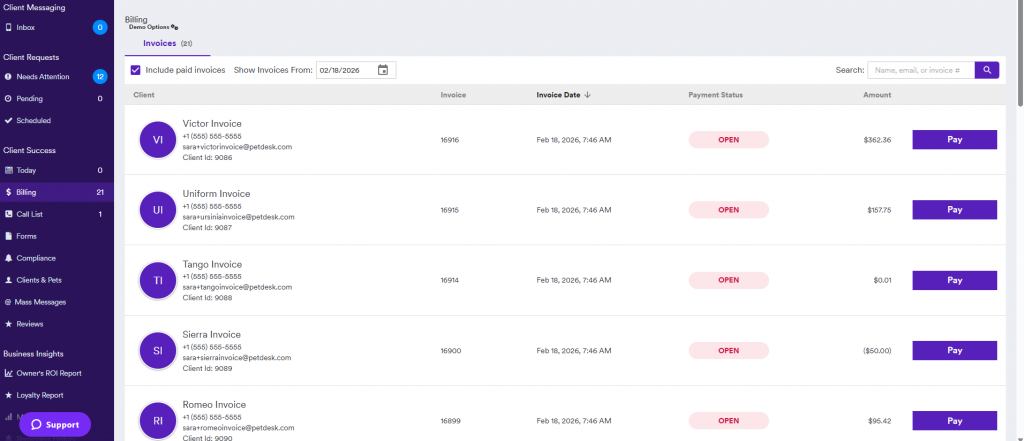
What is PetDesk?
PetDesk is a veterinary communication and client retention platform that helps clinics reduce phone traffic, improve client compliance, and streamline front-desk workflows. It offers a client-facing mobile app along with web-based tools for the practice. While it’s effective for client engagement, some clinics have found its customization options limited, especially for wellness plans and integrations with older PMS systems.
PetDesk Features
- Client Mobile App: A dedicated app for pet owners to request appointments, view records, and receive reminders.
- Digital Loyalty Programs: Customizable rewards programs that incentivize repeat visits and long-term client retention.
- Two-Way Texting and Push Notifications: Real-time updates and communication with clients through SMS and mobile app notifications.
- Centralized Communication Dashboard: This veterinarian software lets front-desk staff manage texts, appointment requests, and reminders from one interface.
- Online Review Requests: Automatically sends follow-up texts after visits asking clients for Google or Yelp reviews.
PetDesk Pros
- User-Friendly Interface: Designed for ease of use, even for those not tech-savvy.
- Comprehensive Communication Tools: Combines SMS, app messaging, and video consultations.
- Integration with Practice Management Systems: Syncs with various PIMS for streamlined operations.
- Client Engagement Features: Includes wellness plans and loyalty programs to boost client retention.
PetDesk Cons
- Limited Functionality for Larger Practices: May not fully meet the needs of practices with complex workflows.
- Pricing Transparency: Detailed pricing information of this veterinary hospital software is not readily available and may depend on specific business needs.
- Integration Delays: Some users have experienced delays in integrating with their existing practice software.
- Healthcare Plan Customization: Users have suggested that the healthcare plan feature could benefit from additional customization options.
PetDesk Pricing
- Contact support to know pricing of this veterinary hospital software
PetDesk Integrations
- Covetrus Pulse
- Hippo Manager
- ASI-ware
PetDesk Customer Support Channels
- Email/Help Desk
- FAQs/Forum
- Knowledge Base
- Phone Support
- Chat
PetDesk Rating
PetDesk has a 4.7-star rating on Capterra.
PetDesk Reviews
“It’s been great. I feel like I can concentrate more on my job and it helps our receptionist and manager be able to communicate to our clients in a efficient manner.”
“PetDesk is a useful tool, but is quite expensive and leaves much to be desired. It ended up causing too many issues and the cons outweighed the benefits.”
(Source: Capterra)
5. Weave: Best for phone and texting for vet clinics
What is Weave?
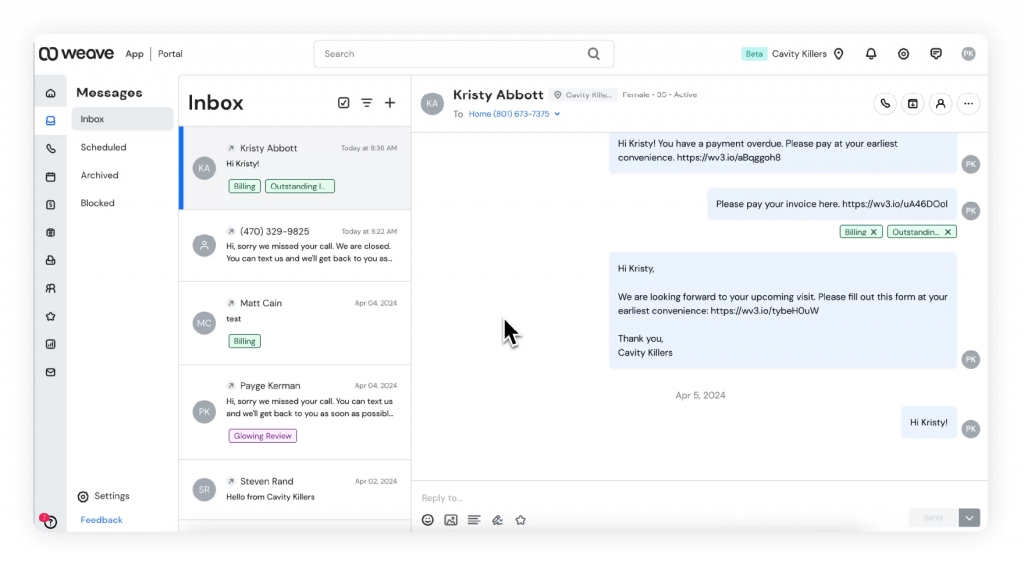
Weave is an all-in-one communication platform tailored for veterinary clinics, integrating VoIP phone systems, two-way texting, appointment scheduling, and payment processing into a unified interface. However, some users have noted that the pricing of this animal hospital software can be higher compared to competitors, and there may be occasional technical issues with the mobile app.
Weave Features
- Two-Way Texting: Enables real-time SMS communication with clients, facilitating appointment confirmations and quick updates.
- Online Scheduling: Allows clients to book appointments directly through the clinic’s website, with automatic updates to the practice management system. Weave
- Digital Forms: Offers customizable, digitized forms that clients can complete before appointments, reducing paperwork and streamlining check-ins. Weave
- Text-to-Pay: Provides secure payment options via text, enhancing convenience for clients.
Weave Pros
- Comprehensive Communication Tools: Combines phone, text, email, and payment functionalities into a single platform, reducing the need for multiple systems.
- Enhanced Client Engagement: Features like Call Pop and automated reminders help personalize client interactions and improve appointment adherence.
- Integration with Practice Management Systems: Seamlessly integrates with various veterinary PIMS, ensuring synchronized data across platforms.
- Flexible Payment Options: Supports multiple payment methods, including text-to-pay and digital wallets, facilitating prompt and convenient transactions.
Weave Cons
- Higher Pricing: Some users find Weave’s pricing to be on the higher side, especially for smaller practices with limited budgets.
- Mobile App Limitations: There have been reports of occasional glitches and performance issues with the mobile application.
- Complex Setup: Initial setup and integration with existing systems can be time-consuming and may require dedicated support.
- Additional Costs for Features: Certain advanced features may incur extra charges, potentially increasing the overall cost of the platform.
Weave Pricing
There are 3 weave pricing plans:
- Ultimate
- Elite
- Pro
Weave Integrations
- Mindbody
- eClinicalWorks
- athenaOne
- ezyVet and more!
Weave Customer Support Channels
- Email/Help Desk
- FAQs/Forum
- Knowledge Base
- Phone Support
- Chat
Weave Rating
Weave has a 4.3-star rating on Capterra.
Weave Reviews
“We love it! It was the best investment we made. The feedback we get from patients is so positive and they are so happy we are using this platform for our communication needs.”
“It has it’s pros and cons. It sometimes is confusing to me, seeing how it sends messages to patients that we rescheduled so I can see how it would be confusing to our elderly patients thanking them for coming in when we rescheduled their appointment.”
(Source: Capterra)
6. DaySmart Vet: Best for veterinary scheduling & clinic management

What is DaySmart Vet?
DaySmart Vet, formerly known as Vetter Software, is a cloud-based veterinary practice management solution designed to streamline clinic operations and enhance patient care. It offers features like appointment scheduling, client communication, billing, and inventory management. While DaySmart Vet provides a comprehensive suite of tools, some users have noted that its reporting capabilities could be more robust, and there may be a learning curve for new users.
DaySmart Vet Features
- Cloud-Based Access: Operate this animal hospital software from any device with a stable internet connection, eliminating the need for on-site servers.
- Appointment Scheduling: Dynamic, real-time digital calendar allows for easy booking and modification of appointments, coordinating schedules by vet, room, and treatment type.
- Digital Forms: Streamline the check-in and intake process with customizable consent and insurance templates, reducing paperwork and wait times.
- Inventory Management: Track stock levels in real-time, automate reordering, and manage expiration dates to ensure optimal inventory control.
- Integrated Payments: Accept payments via text and email, offering clients multiple convenient payment options and reducing accounts receivable
DaySmart Vet Pros
- User-Friendly Interface: Designed with an intuitive layout, making it easier for staff to navigate and utilize the system effectively.
- Comprehensive Feature Set: Combines scheduling, billing, inventory management, and client communication in one platform, reducing the need for multiple systems.
- 24/7 Customer Support: Offers round-the-clock assistance via chat, email, or phone, ensuring help is available when needed.
- Regular Updates: Continuously releases new features and functionality to help streamline your practice.
DaySmart Vet Cons
- Reporting Limitations: Some users have reported that the reporting and financial capabilities of this veterinary medical software could be more robust and customizable.
- Learning Curve: New users may require time to fully adapt to the system’s functionalities and workflows.
- Integration Challenges: While DaySmart Vet integrates with various partners, some users have experienced difficulties with certain integrations.
- Cost for Larger Practices: Pricing can become substantial for practices with a higher number of users, potentially impacting budget considerations.
DaySmart Vet Pricing
DaySmart Vet offers flexible pricing options to accommodate practices of varying sizes:
- 1–5 Users: $116 per month
- 6–10 Users: $293 per month
- 11–15 Users: $400 per month
- 16–20 Users: $493 per month
- 21–24 Users: $583 per month
- 25+ Users: Custom pricing available upon request
DaySmart Vet Integrations
- Vetstoria
- Stripe
- VitusVet
- Demandforce and more!
DaySmart Vet Customer Support Channels
- Email/Help Desk
- FAQs/Forum
- Knowledge Base
- Phone Support
- 24/7 (Live rep)
- Chat
DaySmart Vet Rating
DaySmart Vet has a 4.5-star rating on Capterra.
DaySmart Vet Reviews
“Easy to use, multiple ways to get to one place, mostly self explanatory. I can request a feature and I can usually get the feature added.”
“A lot of frustrations, not being able to search in the patient record is extremely frustrating on a daily basis.”
(Source: Capterra)
7. Text Request: Best simple client texting for veterinary practices

What is Text Request?
Text Request is a business texting platform designed to enhance communication for veterinary clinics. It offers features like two-way texting, mass messaging, and payment collection via SMS. While it provides robust communication tools, some users have noted limitations in search functionality and occasional notification issues.
Text Request Features
- Two-Way Texting: Engage in real-time conversations with clients, facilitating appointment confirmations and quick updates.
- Mass Texting: Send bulk messages for announcements or promotions, ensuring all clients receive timely information.
- Text-to-Pay: Collect payments securely through SMS, streamlining the billing process.
- Message Templates: Create and reuse templates for common messages using this veterinary medical software to save time and maintain consistency.
- Integrations: This software for veterinary practices connects with platforms like HubSpot, Zapier, and Square to synchronize data and automate workflows.
Text Request Pros
- User-Friendly Interface: Designed for ease of use, allowing staff to quickly adapt and manage communications efficiently.
- Efficient Communication: Enhances client engagement through timely text interactions, reducing phone call volume.
- Secure Payment Collection: Facilitates prompt payments via text, improving cash flow.
- Scalable Solutions: Offers plans suitable for clinics of various sizes, with features that grow alongside the practice.
Text Request Cons
- Search Functionality: Users have reported challenges with the name search feature, finding it inconsistent and cumbersome.
- Notification Issues: Some users experience delays or inconsistencies with message notifications, potentially impacting response times.
- Limited Customization: Certain features, such as message templates, may lack the desired level of customization for some users.
- Additional Costs: Exceeding message limits or accessing advanced features may incur extra charges, which can add up for smaller practices.
Text Request Pricing
The text request pricing depends on the kind of plan you choose. Here are the plans:
- Basic: $59 USD/month
- Starter: $139 USD/month
- Corporate: $279 USD/month
- Enterprise & High Volume: starting at $549 USD/month
Text Request Integrations
- HubSpot CRM
- SugarCRM
- Zapier
- Clio and more!
Text Request Customer Support Channels
- Email/Help Desk
- FAQs/Forum
- Knowledge Base
- Phone Support
- 24/7 (Live rep)
- Chat
Text Request Rating
This software for veterinary practices has a 4.6-star rating on Capterra.
Text Request Reviews
“Overall, I am very pleased with Text Request and the variety of features they provide to enhance our communication with clients and team members!”
“Experience with TextRequest overall was “mid”, there were many glaring UI issues, on top of what was already mentioned.”
(Source: Capterra)
8. Digitail: Best modern veterinary clinic software
What is Digitail?
Digitail is a comprehensive, cloud-based veterinary practice management software designed to streamline clinic operations and enhance patient care. It integrates scheduling, medical records, billing, inventory management, and client communication into a single platform. With features like AI-powered assistance and a dedicated pet parent app, Digitail aims to improve efficiency and client engagement. However, some users have noted that its rapid development can lead to occasional changes in functionality that require adaptation.
Digitail Features
- AI Veterinary Assistant: Automates SOAP notes, patient summaries, treatment planning, and patient intake, reducing administrative workload.
- Pet Parent App: Provides clients with access to their pet’s medical records, appointment scheduling, reminders, and invoices, enhancing communication and engagement.
- Integrated Telemedicine: Offers chat and video consultations, allowing for remote follow-ups and consultations, saving time for both staff and clients.
- Inventory Management: Real-time stock tracking with automated reordering and expiration date management to ensure optimal inventory levels.
- Advanced Reporting: Provides insights into finances, stock, appointments, and client interactions, aiding in data-driven decision-making.
Digitail Pros
- Comprehensive All-in-One Solution: Combines multiple functionalities into a single platform, reducing the need for multiple software solutions.
- User-Friendly Interface: Designed with an intuitive layout, making it easier for staff to navigate and utilize the system effectively.
- Enhanced Client Engagement: Features like the pet parent app and telemedicine capabilities improve communication and satisfaction.
- Continuous Updates: Regularly introduces new features and improvements based on user feedback.
Digitail Cons
- Adaptation to Updates: Frequent updates may require staff to adapt to new functionalities and workflows.
- Learning Curve: New users may require time to fully adapt to this vet software’s functionalities and workflows.
- Integration Challenges: While Digitail integrates with various partners, some users have experienced difficulties with certain integrations.
- Cost for Larger Practices: Pricing can become substantial for practices with a higher number of users, potentially impacting budget considerations.
Digitail Pricing
- Starts at $300 per month
Digitail Integrations
- Okta
- Stripe
- VetPay
Digitail Customer Support Channels
- Email/Help Desk
- FAQs/Forum
- Knowledge Base
- Phone Support
- 24/7 (Live rep)
- Chat
Digitail Rating
Digitail has a 4.7-star rating on Capterra.
Digitail Reviews
“Overall very good. I think Digitail has a lot of potential and I look forward to continuing to work with them.”
“I used to like the aspect, but now it is too bulky an counterintuitive.”
(Source: Capterra)
9. VitusVet: Best for pet owner communication & reminders
What is VitusVet?
VitusVet is a client engagement platform tailored for veterinary practices, offering tools like two-way texting, automated reminders, and a branded mobile app to enhance communication and streamline operations. While it provides a comprehensive suite of features, some users have noted occasional technical glitches and limitations in customization options.
VitusVet Features
- Two-Way Text and Picture Messaging: Enable your practice’s landline to securely send and receive text and picture messages with clients, with all communications stored in your practice management software.
- Automated Appointment and Refill Reminders: Reduce no-shows and improve compliance by sending customized reminders via text, email, or app notifications.
- Branded Client Mobile App: Offer clients a mobile app branded to your practice, allowing them to request appointments, access medical records, and receive reminders.
- Integrated Payment Solutions: Facilitate secure payments through text and email, with options for contactless transactions and next-day funding.
- PMS Integration: Seamlessly integrates with leading practice management systems, ensuring synchronized data and streamlined workflows.
VitusVet Pros
- Enhanced Client Communication: Improves client engagement through multiple communication channels.
- Operational Efficiency: Automates routine tasks, freeing up staff time for patient care.
- Comprehensive Feature Set: Combines communication, scheduling, and payment processing in one platform.
- Scalable Solutions: Suitable for practices of various sizes, from small clinics to large enterprises.
VitusVet Cons
- Technical Glitches: Some users have reported occasional issues with reminders and notifications.
- Customization Limitations: Limited options for customizing certain features to fit specific practice needs.
- Learning Curve: New users may require time to fully adapt to this vet software.
- Additional Costs: Some features may incur extra charges, potentially increasing the overall cost.
VitusVet Pricing
- Contact support
VitusVet Integrations
- Covetrus Pulse
- DaySmart Vet
- Advantage
- Cornerstone
VitusVet Customer Support Channels
- Email/Help Desk
- FAQs/Forum
- Knowledge Base
- Phone Support
- 24/7 (Live rep)
- Chat
VitusVet Rating
VitusVet has a 4.7-star rating on Capterra.
VitusVet Reviews
“I have always had excellent support from Vitus Vet in the event that I have ever needed help. They are very on top of it and have easy to follow instructions for changes that need to be made.”
“I do wish there was more customization and more reports accessible. We have had some issues with the reliability of their reminders.”
(Source: Capterra)
10. EZTexting: Best for Veterinary SMS marketing

What is EZTexting?
EZTexting is a versatile SMS marketing platform designed to facilitate communication between businesses and their clients. For veterinary practices, it offers tools to send appointment reminders, manage client interactions, and promote services through text messaging. While it provides a range of features suitable for various industries, some users have noted that certain advanced functionalities are restricted to higher-tier plans, and the mobile app lacks full feature parity with the desktop version.
EZTexting Features
- Two-Way Texting: Engage in real-time conversations with clients, allowing for quick responses to inquiries and appointment confirmations.
- Automated Appointment Reminders: Reduce no-shows by sending timely reminders to clients about upcoming appointments.
- Text-to-Pay Solutions: Facilitate secure payments through SMS, streamlining the billing process for both the clinic and clients.
- Campaign Calendar: Plan and schedule marketing campaigns with a visual calendar interface, ensuring consistent client engagement.
- Integration Capabilities: Connect with platforms like HubSpot, Mailchimp, and Salesforce to synchronize client data and automate workflows.
EZTexting Pros
- User-Friendly Interface: Designed for ease of use, allowing staff to quickly adapt and manage communications efficiently.
- Efficient Communication: Enhances client engagement through timely text interactions, reducing phone call volume.
- Secure Payment Collection: Facilitates prompt payments via text, improving cash flow.
- Scalable Solutions: Offers plans suitable for clinics of various sizes, with features that grow alongside the practice.
EZTexting Cons
- Feature Limitations on Lower Tiers: Some advanced features, such as automated workflows, are only available on premium plans.
- Mobile App Constraints: The mobile application does not offer the full range of features available on the desktop version.
- Cost at Scale: For practices with high-volume messaging needs, EZ texting software costs can escalate, making it less economical compared to some alternatives.
- Customer Support Challenges: Some users have reported unresponsive customer support and issues with account management.
EZTexting Pricing
EZ Texting offers four pricing tiers to accommodate different practice sizes and needs:
- Launch: $25/month, suitable for up to 500 contacts.
- Boost: $75/month, designed for 500 to 2,000 contacts.
- Scale: $125/month, accommodating 2,000 to 50,000 contacts.
- Enterprise: $3,000/month, tailored for businesses with over 50,000 contacts.
EZTexting Integrations
- Mailchimp
- HubSpot CRM
- Zapier
- Constant Contact
EZTexting Customer Support Channels
- Email/Help Desk
- FAQs/Forum
- Knowledge Base
- Chat
EZTexting Rating
EZTexting has a 4.4-star rating on Capterra.
EZTexting Reviews
“Pretty good, a little pricey but otherwise a good software”
“It’s great – does what I need it to do and I don’t have to spend a lot of time trying to figure things out.”
(Source: Capterra)
How to Choose the Best Texting Software for Your Vet Clinic
Not every texting platform will be the right fit for your clinic. Here’s what to look at before making a choice:
Size and type of practice
The needs of a two-person mobile practice are very different from those of a high-volume specialty clinic. If your team is small, you’ll want something that handles the busywork automatically. Larger teams may need things like user permissions, a shared inbox, or better control over how messages are managed.
Need for integration with existing systems
You shouldn’t have to copy appointment info from one system into another just to send a reminder. The best texting apps for vets connect with your existing PMS and scheduling software. Without integration, you’ll end up copying and pasting data between systems, wasting time and risking errors.
Volume of client communication
Some clinics send dozens of messages a day, reminders, follow-ups, prescription updates, and more. Others might only send a handful. If you’re texting often, you’ll want a plan that won’t punish you for high volume. Look for unlimited messaging or flat-rate options that let you scale.
Importance of after-hours engagement
If clients text your clinic after closing time, what happens? Some platforms let you send automatic responses, hold messages for later, or even route urgent messages to on-call staff. If you want to stay responsive without burning out your team, these features make a difference.
Budget vs. feature trade-offs
Some software bundles in a long list of features, payment tools, online reviews, forms, and surveys, but not all of it is useful for every clinic. It helps to separate what’s essential from what’s nice to have. Go with the one that fits how your team already works.
Support quality & ease of setup
Even the best tools fall short if support is slow or confusing. You’ll want real people to guide setup, answer questions quickly, and help your team get the most out of the platform. Especially during the first few weeks, fast, helpful support can make or break the experience.
What Makes Emitrr Stand Out for Veterinary Texting?
Emitrr is one of the few platforms that’s not just “compatible” with veterinary clinics, but built to support how they really work. Here’s what makes it stand out:
User-friendly interface
Veterinary teams don’t have time to sit through hours of software training or learn a complicated system. Emitrr was designed so that anyone in the clinic, from the front desk to the vet tech, can start using it within minutes. The interface is clean, andthe dashboard is organized in a way that makes it easy to track ongoing conversations.
So, the staff don’t need to memorize workflows or switch between screens to send or read a message. Everything is in one place, so even during peak hours, your team won’t lose time figuring out the tech.
Top-rated customer support that has your back 24/7
Most veterinary client communication software platforms promise good support. But when something goes wrong, a message fails, a reminder doesn’t send, or you’re stuck during setup, generic help docs or chatbots can be frustrating. What makes Emitrr different is the level of human support behind the tool. Their team responds quickly, talks you through real issues, and takes ownership when something’s not working.
Great value for money
A lot of platforms start at a low price but charge extra for everything beyond basic texting. Want reminders? That’s extra. Follow-ups? Another upgrade. Review requests? Add that to your bill, too.
This vet software takes a different approach. Most of the core tools clinics actually need, like appointment reminders, review collection, follow-ups, broadcast messages, and auto-replies, are included in one package. You don’t have to piece together different tools or keep track of usage caps that change your bill at the end of the month.
Unified platform for better team collaboration
In many clinics, different team members handle communication at different points in the day front desk in the morning, vet techs in the afternoon, and someone else after hours. If your messaging tool doesn’t support that kind of shared responsibility, things can become difficult to handle.
Emitrr provides such veterinary messaging tools that give your team access to a shared inbox where everyone can see message history, reply threads, and ongoing conversations. If one person steps away, another can pick up exactly where they left off. No guesswork, no double replies, and no confused clients.
Fully HIPAA-compliant messaging
You can’t risk client trust or legal consequences by using platforms that don’t take privacy seriously. Emitrr is built with healthcare-grade security from the start. Messages are encrypted, access is restricted based on roles, and everything is logged in case you ever need to show a communication history.
The veterinary client communication software meets HIPAA compliance standards, so you can send reminders, updates, and even post-visit follow-ups without wondering if the tool is safe to use.
Advanced AI-powered texting features
Emitrr brings in real AI assistance with Sarah, an AI texting assistant built into the platform. When clients text in to reschedule, ask for pickup times, check post-visit care, or request a refill, it responds instantly. It doesn’t just send canned messages, but understands what’s being asked, replies in the right tone, and keeps the conversation going until someone on your team steps in (if they even need to).
Beyond that, Emitrr’s AI:
- Automatically routes messages to the right team member based on visit type or keywords
- Responds after hours, so no message is ignored overnight
- Translates texts if clients reply in another language
- Summarizes and rewrites replies if your staff needs help keeping things short or on-brand
- Can even close conversations when the issue is resolved, so your inbox stays organized, and so much more.
The result? Clients feel heard right away. Your front desk gets room to breathe. And your team isn’t stuck replying to the same five questions all day.
Seamless CRM, EMR, and PMS integrations
Emitrr integrates with over 1,000 platforms, including hospital EMRs, scheduling tools, CRM systems, and form builders. For veterinary clinics that rely on multiple software tools to manage appointments, patient records, and client communication, this level of integration removes the friction that usually comes with using disconnected systems.
Every time a client books an appointment, fills out a web form, or updates their contact info, Emitrr can automatically sync that data across connected platforms. This ensures that no matter where the data starts, whether it’s from your PMS, a scheduling tool like Acuity, or a CRM like HubSpot, communication stays in sync, accurate, and visible to your entire team.
FAQs
Emitrr stands out with two-way texting for vets, HIPAA-compliant texting, automated reminders, pre-built templates, PMS integration, mobile access, AI-powered replies, and a shared inbox that makes team communication seamless and efficient.
Yes, most top platforms like Emitrr, PetDesk, and ezyVet offer integrations with leading PMS to sync appointments, reminders, and client records.
Pricing usually starts around $49 to $99/month, depending on features, user limits, and integrations. Some offer free trials or custom quotes for clinics.
Yes, if the software supports MMS. Emitrr, Weave, and others allow you to share images, videos, and even documents directly in the conversation.
Setup takes less than a day. Emitrr offers hands-on onboarding and support to get your team up and running quickly, no tech expertise needed.
No, it actually reduces it. Texting cuts down phone calls, automates reminders, and lets your team respond faster with fewer interruptions.
Top platforms like Emitrr are fully HIPAA-compliant with encrypted messaging and access controls to protect patient data.
Yes. Most tools offer mobile apps or browser access so your team can manage texts on the go, even during house calls or curbside check-ins.
A veterinary texting app is a tool that allows veterinary clinics to communicate with pet owners through SMS. Clinics can send appointment reminders, vaccination alerts, prescription updates, and follow-ups. Many platforms, like Emitrr, also include automation, templates, and integrations with veterinary clinic software to streamline client communication.
Using veterinary client communication software helps clinics reduce phone calls, decrease no-shows, and respond to clients faster. Text messaging is convenient for pet owners and helps veterinary teams manage communication more efficiently. Platforms like Emitrr also automate reminders and follow-ups, saving staff time.
Key Takeaways
- Choose Emitrr if you want a powerful veterinary texting app that helps your team text a vet client instantly, automate appointment reminders, and manage all client conversations in one place alongside your existing veterinary clinic software.
- Choose PetsApp if you want a veterinary client communication software with a mobile app where pet owners can message your clinic, request appointments, and access pet records easily.
- Choose PetDesk if your priority is improving client engagement through reminders, loyalty programs, and tools designed for modern veterinary practices.
- Choose Weave if you want an all-in-one communication solution that combines phone, texting, and payments with your existing veterinary software.
- Choose Text Request if you need simple text messaging for veterinary clinics with mass messaging, templates, and quick ways to text a veterinarian’s clients.
- Choose Digitail if you’re looking for a full veterinary clinic software that includes scheduling, medical records, and built-in communication tools.
- Choose VitusVet if you want a client communication platform designed for veterinary hospitals and animal hospitals, with messaging, reminders, and payment features.
- Choose EZTexting if your main goal is sending bulk SMS campaigns and marketing messages alongside your existing software for veterinary clinics.
After comparing the best texting software options for veterinary clinics, it’s clear that while many tools offer useful features, Emitrr stands out for one key reason: it’s built around how real clinics actually work.
If you’re ready to cut down phone traffic, reduce no-shows, keep clients better informed, and give your team more time for patient care, Emitrr is worth a closer look. Book a free demo today and see how much smoother your day could run.