
 4.9 (400+
reviews)
4.9 (400+
reviews)
Introduction
It’s 9:03 AM, and the phone’s ringing off the hook. A patient texts about rescheduling, another one’s waiting on a form link, and your front desk is already swamped. You’re trying to keep up, but between calls, SMS, voicemails, and forms, it’s all chaos!
Sound familiar? Textla might help a little, but only so much. Maybe you’re still flipping between platforms to respond. Maybe those intake forms are being emailed separately. Or maybe you’re still manually calling back missed calls at the end of a long day.
Here’s the thing: businesses today don’t just need a texting tool. They need a central place for everything. A tool that handles texts, calls, follow-ups, and even digital forms without making things harder.
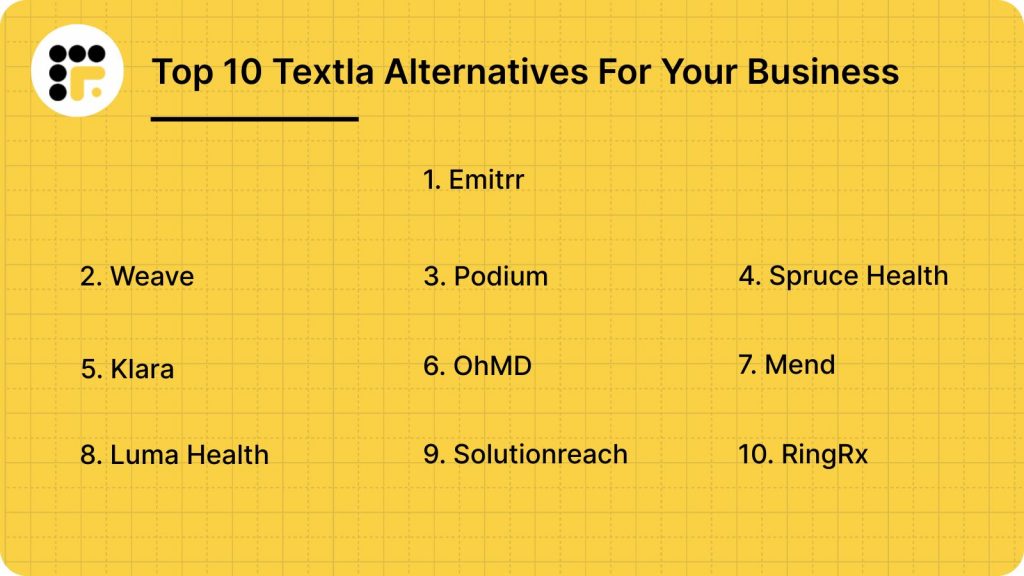
So, let’s go through the 10 top-rated Textla alternatives that actually make communication easier. Whether it’s auto-texting after missed calls, sharing consent forms, or keeping all messages in one place, these platforms are built to reduce stress and make your team’s life way easier. Let’s dive in!
What Is Textla?
Textla is a no-frills SMS marketing tool designed for small businesses and practices that want to send texts fast without overcomplicating things. You can blast out group messages, have one-on-one chats, and track how those messages are performing – all from a shared inbox. It runs on Twilio, supports toll-free texting, and is working on local number support too.
The setup is easy, and pricing starts low. Plans begin around $25-$50/month, with pay-per-text charges on top. That’s great if you’re just looking for basic outreach. But Textla is mainly built for texting. So if you’re looking to handle calls, collect digital forms, or automate reminders, you’ll likely outgrow it pretty fast.
Textla Features
- Two-Way Texting: Shared team inbox allows anyone to pick up and respond to incoming texts, keeping communication centralised.
- Contact Management: Import spreadsheets, segment by tags, and create keyword-based opt-ins to build targeted lists.
- Automated Follow-ups: Basic scheduling and autoresponders help with sending timely confirmations or nudges.
- Analytics: Track deliveries, open rates, responses, and opt-ins to measure engagement performance.
- Bulk SMS Campaigns: Send mass texts to contact lists with options for scheduling and basic personalisation. Great for promos and reminders.
- GDPR/TCPA Compliance: Includes built-in opt-in tools and opt-out links to help stay compliant with text marketing laws.
- User Interface: Drag-and-drop dashboard is easy to learn, but lacks advanced tools like form builders or call management.
Textla Pros
- Very Low Cost: Starts around $25/month with pay-as-you-go SMS pricing, great for budget-conscious teams.
- Simple to Use: Easy to navigate, even for non-tech users. No learning curve needed for basic text campaigns.
- Transparent Pricing: No hidden costs, just a small monthly fee and per-message charges.
- Fast Setup: Create your first campaign in minutes. Keywords, contact lists, and replies are easy to configure.
- Essential Integrations: Connects to popular tools via Zapier. No heavy setup or IT support needed.
Textla Cons
- Limited to SMS: No calling, forms, documents, or intake automation. It’s purely focused on texting.
- Toll-Free Only (for now): Only supports US toll-free numbers. Local numbers and short codes are still in development.
- Basic Automations: Doesn’t support multi-step workflows or branching logic unless you use Zapier.
- No Mobile App: Platform is browser-based only; there’s no dedicated mobile app as of now.
- Minimal Analytics: Reporting is surface-level. No deep dashboards or funnel visualisation tools.
Textla Integrations
- Zapier: Connects to hundreds of tools, including CRMs, calendars, and email platforms for basic automation.
- Bitly: Built-in link shortening for clean, trackable URLs in outbound messages.
- Kajabi: Supports creators using Kajabi for online content or coaching programs.
- Google Sheets: Push campaign stats or contacts into spreadsheets for manual reporting or syncing.
- Email Marketing: Integrates with tools like Mailchimp via Zapier to sync SMS with email campaigns.
- CRMs: No direct integrations with EHRs or major CRMs – all connections rely on Zapier workarounds.
Textla Pricing
- Free Trial: Textla offers a free trial to test the platform before committing, though credits may be limited.
- Starter Plan: Starts at $25/month when billed annually. Great for solo users or small teams just getting started.
- Pro Plan: Around $50/month with added features like keyword automation and higher usage limits.
Textla Ratings
- Capterra: 4.8/5
- G2: 4.7/5
Textla Reviews
“THE ERROR CODES CAN BE CONFUSING SOMETIMES. A FEW FEATURES THAT OUR BUSINESS COULD UTILIZE THAT TEXTLA DOES NOT OFFER YET.”
“While the customer support team is helpful and knowledgeable, their response times can sometimes be longer than expected. More frequent updates and new features would also be beneficial to keep the software fresh and competitive.”
Source: Capterra
Textla Support Channels
- Live Chat: Available during business hours directly from the dashboard.
- Email Support: Submit tickets via email for more technical or billing-related queries.
- Knowledge Base: Offers basic how-to articles, setup help, and video walkthroughs.

Why Do Practices Seek a Textla Alternative?
Textla works well for basic texting, but once you start using it regularly, a few roadblocks become hard to ignore. Here’s where practices begin looking for something more flexible, powerful, and aligned with how their team really works.
Missed Calls Fall Through the Cracks
Ever had a prospect call…and no one picked up? With Textla, that call just disappears into the void. There’s no automatic text-back, no “Sorry we missed you” message, just silence. And that silence can cost you a booking. Platforms like Emitrr or Weave swoop in with an instant text response when a call’s missed, giving you a second chance to catch the lead. It’s a small thing that makes a big difference.
Text Conversations Get Messy
When your front desk, assistant, and provider are all texting patients from the same inbox, it gets chaotic fast. Textla’s shared SMS inbox is decent, but it’s not always enough. Practices want one place where texts, calls, voicemails, and even form submissions all come together. That way, no one drops the ball, and everyone stays in the loop. The result? Smoother workflows and less “Wait, did you text them or should I?”
Still No Digital Intake or Consent Forms
Let’s be honest – patients don’t want to fill out paperwork in person anymore. And your team doesn’t want to chase forms over email. But Textla doesn’t offer built-in digital forms for intake or consent. That means the front desk is stuck collecting info manually. Most practices now look for platforms that let them send a quick form link via text, and boom, all that info flows right into the patient record.
Patients Get Confused and Drop Off
You send a text. They reply. Then…crickets. Or worse, you promise a follow-up but forget. Without true automation, those gaps show up fast. Patients get confused when conversations feel disjointed or when their questions fall through the cracks. Practices want an alternative that keeps the conversation going smoothly, so patients feel heard, not ghosted.
Reporting Doesn’t Tell the Full Story
Sure, Textla can tell you how many texts were sent. But what about real insights? Like, which reminders actually lead to booked appointments? Or how many patients clicked that form link you sent? For growing teams, surface-level data just isn’t enough. They need smarter dashboards that connect the dots between texts, actions, and results – so they know what’s working and what’s not.
What Features to Look for in a Textla Alternative
If you’ve hit the ceiling with what Textla can do, it’s probably time to level up. So what should you actually be looking for? Here’s a list of features that make life easier for your team:
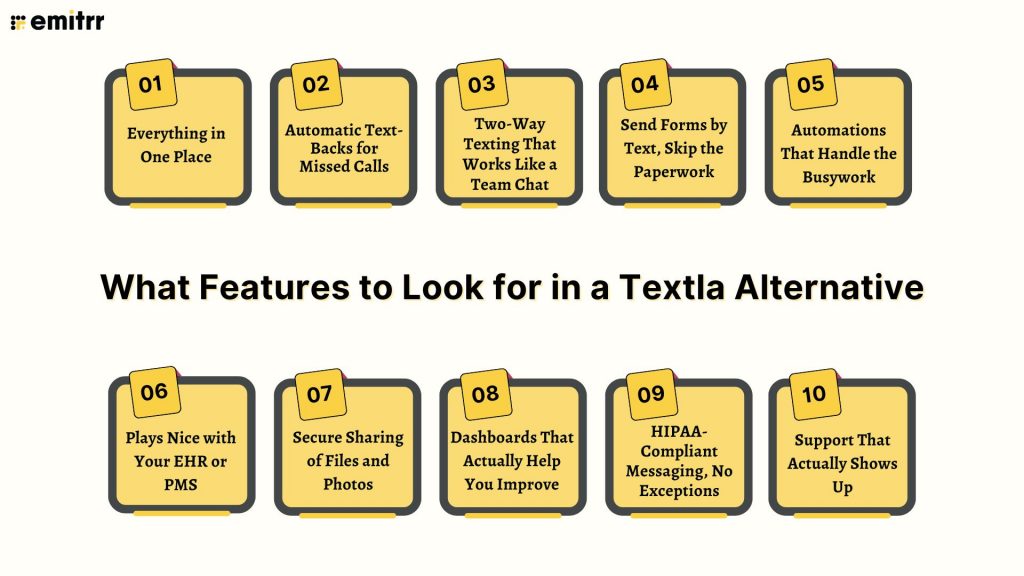
Everything in One Place
Wouldn’t it be nice if calls, texts, reminders, and forms all lived in the same dashboard? The best alternatives ditch the app-hopping and bring everything under one roof. Your team can reply to texts, return calls, send forms – all without switching tabs. It keeps things organised and makes multitasking way less chaotic. One view, one inbox, zero confusion.
Automatic Text-Backs for Missed Calls
Someone calls your office, and no one picks up. Instead of losing that lead, a good platform instantly sends a follow-up text like, “Sorry we missed you! Text us here or book online.” This one feature alone can recover dozens of lost opportunities each week. It’s like having a smart, polite virtual receptionist working 24/7 in the background.
Two-Way Texting That Works Like a Team Chat
Real-time, back-and-forth texting shouldn’t be a clunky experience. The best systems let your whole team see and respond to texts from one shared inbox. No more wondering if someone replied, or texting from personal numbers. Add notes, tag messages, and keep every thread moving smoothly, even when team members swap shifts or work remotely.
Send Forms by Text, Skip the Paperwork
Chasing down paperwork is exhausting. Great platforms let you send intake and consent forms via text – no printing, scanning, or waiting. Patients can fill them out right from their phone, sign electronically, and boom, it’s done! It saves your staff hours, keeps things compliant, and makes a great first impression.
Automations That Handle the Busywork
There’s no reason to manually send every reminder or follow-up anymore. A smart platform lets you automate texts and emails based on triggers – like when someone books, misses, or completes an appointment. From “see you tomorrow!” reminders to post-visit review requests, you can set it all up once and let it run on autopilot.
Plays Nice with Your EHR or PMS
Your messaging tool should sync with your existing systems, like Dentrix, Athena, or your PMS. If a patient books an appointment, the system should know to send a reminder. And if they reply by text, that response should update in the record. No double-entry, no disconnected data, just everything flowing as it should.
Secure Sharing of Files and Photos
Need to collect a photo of an insurance card or share post-op instructions? The right platform makes it easy to send and receive documents or pictures securely. And yes, it must be HIPAA-compliant. Bonus if it automatically stores those files in the right thread or patient record, so nothing gets lost.
Dashboards That Actually Help You Improve
You don’t want generic stats, you want answers. Like which reminders lead to no-shows, which campaigns get replies, or how quickly your staff responds to patients. Look for real-time reporting with visual dashboards that show what’s working and where you can improve. It’s the only way to grow without flying blind.
HIPAA-Compliant Messaging, No Exceptions
When you deal with patient info, privacy isn’t negotiable. Make sure any platform you choose offers encryption software, role-based access, secure servers, and signs a BAA. The best ones are HIPAA-ready out of the box. You shouldn’t have to jump through hoops to stay compliant, it should just be built in.
Support That Actually Shows Up
When something breaks or gets confusing, fast support is a lifesaver. Choose a provider that gives you real-time help, whether that’s live chat, a quick call, or hands-on onboarding. You’ll want a team that doesn’t just reply fast, but actually solves your problem with care. Because great tools are only as good as the help behind them.
10 Best Textla Alternatives
1. Emitrr | Best Textla Alternative
Emitrr Overview
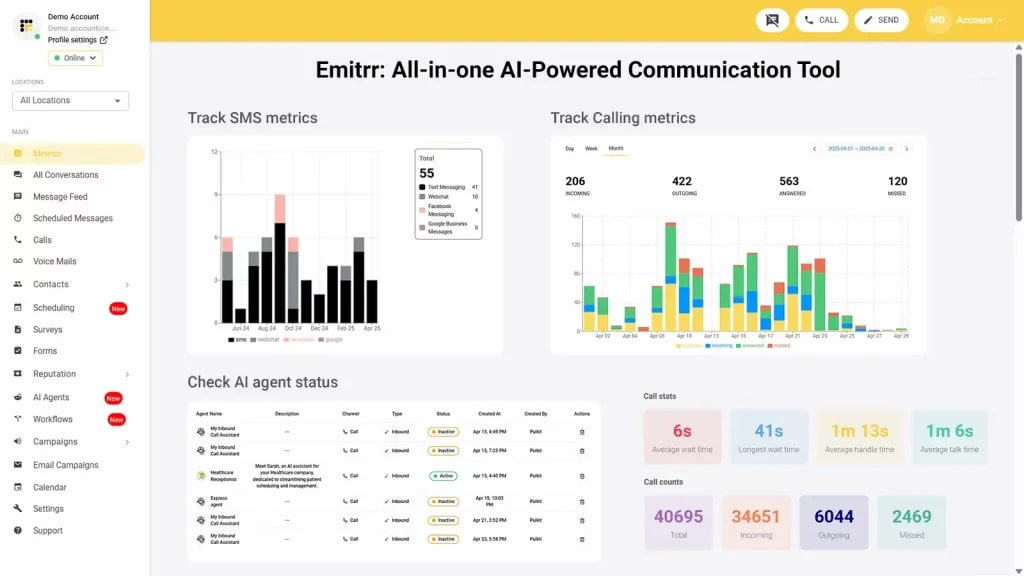
Emitrr is an all-in-one automation platform built for healthcare and service-based businesses. It combines texting, calling, digital forms, reminders, scheduling, and payments – all under one roof! Designed to replace 5-10 tools, it simplifies communication and automates front-desk tasks like intake, follow-ups, and reviews. Emitrr is HIPAA-compliant and trusted by thousands of practices for patient engagement and team collaboration. With over 500 integrations, it’s a modern solution for streamlining every step of the customer journey, right from inquiry to payment.
Emitrr Key Features
- All-in-One Inbox: Manage calls, texts, voicemails, and emails in a unified, shared inbox.
- Missed Call Text-Backs: Automatically send SMS follow-ups when a call goes unanswered.
- Digital Forms & E-Signatures: Collect intake or consent forms via secure links—no printing needed.
- Online Scheduling: Let patients book 24/7 and sync directly with your calendar or EHR.
- Text-to-Pay: Send payment links via SMS to collect balances or deposits instantly.
- AI Assistant: Handle FAQs, route conversations, and schedule appointments automatically.
- Automated Reminders & Campaigns: Schedule reminders, feedback requests, and multi-step follow-ups.
- HIPAA-Ready Compliance: End-to-end encryption, audit trails, and role-based access built in.
- Analytics Dashboard: Track message engagement, booking rates, and team response time.
- Multi-Location Management: Handle users, messages, and tasks across locations from one dashboard.
Emitrr Pros
- Truly All-in-One: Combines forms, texting, calling, and scheduling into one clean platform.
- Healthcare-Focused: HIPAA-ready with tools tailored for patient communication.
- Great Support: Known for quick, helpful support and smooth onboarding.
- Boosts Productivity: Automation reduces manual work and improves patient experience.
- Scalable for Teams: Easy to manage multiple users and locations.
Emitrr Cons
- A few advanced AI-powered features are still in development.
Emitrr Integrations
- CRM Systems: Salesforce, HubSpot, Zoho, and more.
- EHR/EMRs: Athena, Epic, Dentrix, DrChrono, and others.
- Payment Tools: Stripe, PayPal, QuickBooks.
- Productivity Apps: Google Workspace, Microsoft 365, Outlook, Dropbox.
- Marketing Tools: Mailchimp, ActiveCampaign, Zapier.
Emitrr Pricing
Plans start at $30 per month.
Emitrr Ratings
- Capterra: 4.9/5
- G2: 4.7/5
Emitrr Customer Reviews
“Overall very positive. The service works like I need it to, the customer service is amazing, up-time is great, and changes made seem to be well thought out and well, not just changes for change sake.“
“Emitrr is extremely easy to use. Our business has many segments that reach different customers, so its nice to be able to segment them out and send quickly.”
Source: Capterra
Emitrr Support Channels
- Email: support@emitrr.com
- Phone: +1 (210) 941-4696
- Live chat: Available directly on the Emitrr website
- Knowledge base: Includes extensive documentation, FAQs, and troubleshooting guides
- SMS support: Text for help
2. Weave | Weave vs Textla
Weave Overview
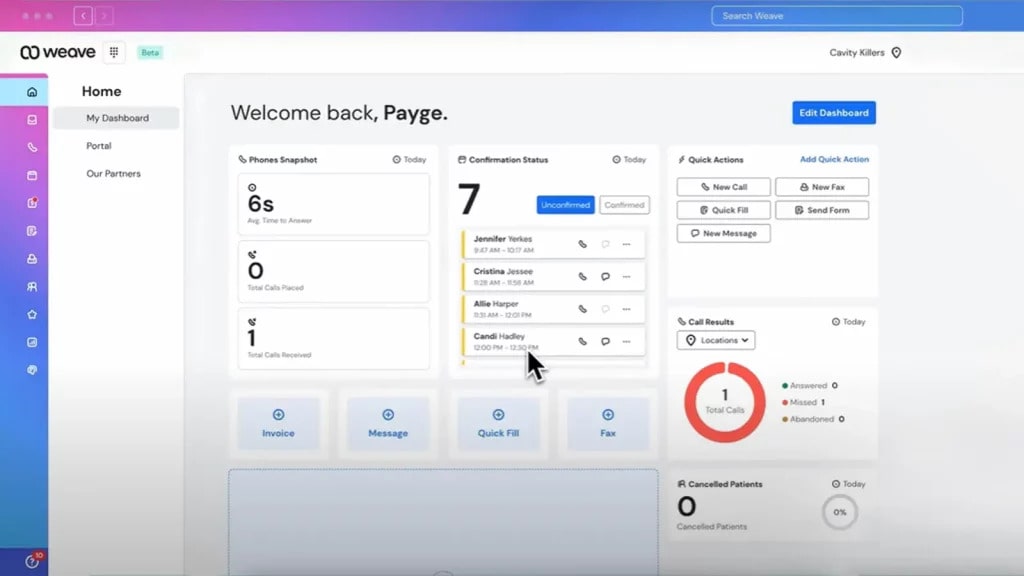
Weave is a powerful cloud communication platform designed specifically for dental, medical, and service-based practices. It brings together VoIP phone systems, texting, reviews, payments, and scheduling, all in one place. The focus is on improving patient experience while making it easier for front-desk teams to stay organised and responsive.
Weave Key Features
- VoIP Phone System: Built-in phone solution with call recording, missed call texts, and caller ID pop-ups.
- Two-Way Texting: Respond to patient texts from a shared team inbox.
- Appointment Reminders: Send automated SMS, email, or voice reminders for upcoming appointments.
- Online Reviews: Request and manage reviews from Google and Facebook within the dashboard.
- Digital Payments: Send payment requests via text and track collections easily.
Weave Pros
- Complete Phone + Text System: Strong integration between VoIP and SMS in one platform.
- Review Booster: Helps practices generate more 5-star reviews.
- Solid for Dental/Medical: Built with healthcare workflows in mind.
- All-in-One for Front Desk: Reduces the need for juggling multiple tools.
Weave Cons
- Can Get Pricey: Pricing can snowball when you choose features, so not ideal for very small teams.
- Learning Curve: Has lots of features, so onboarding may take time.
- Limited Integrations: Fewer direct EHR integrations compared to some competitors.
- No Intake Forms: You’ll need another tool to handle patient intake digitally.
Weave Integrations
- Practice Management Software: Dentrix, Open Dental, Eaglesoft
- Payments: Stripe (via Weave Payments)
- Calendar Sync: Google Calendar
- Other Tools: Slack (via Zapier), Outlook, and select review platforms
Weave Pricing
There are not many details available regarding their pricing plans on review websites.
Weave Ratings
- Capterra: 4.3/5
- G2: 4.2/5
Weave Customer Reviews
“Everything. Multiple people lied about being integrated with my software. They didn’t tell me there were additional charges that i would need to pay. They stated it would be much more user friendly”
“Software features that never worked for me. They increaed my billing fee without any prior notice or my approval.”
Source: Capterra
Weave Support Channels
- Phone
- Live chat
- Online help center
- Training resources
3. Podium | Podium vs Textla
Podium Overview
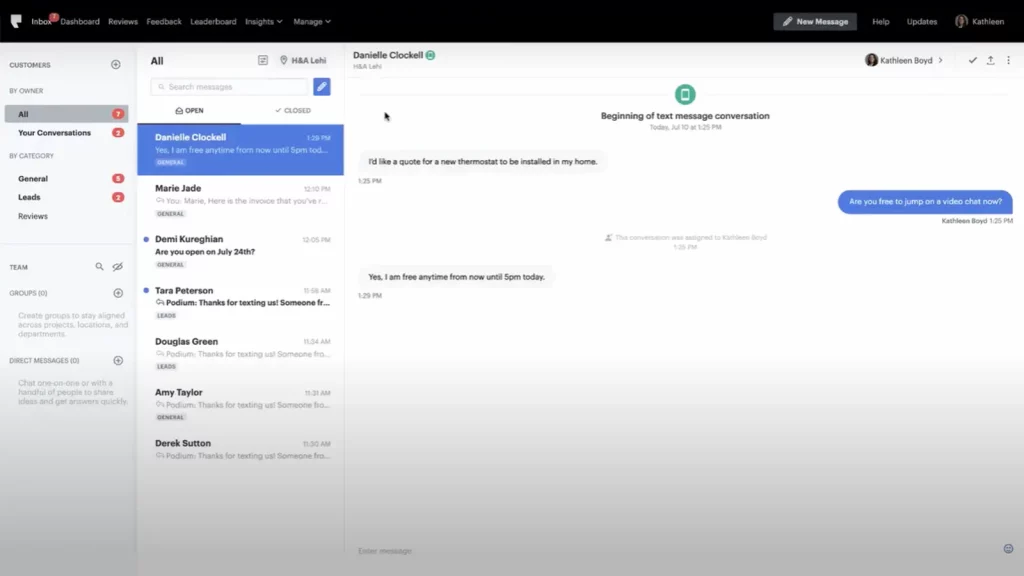
Podium is a customer communication and reputation management platform designed for local businesses. It helps teams connect with leads via text, collect payments, request reviews, and even manage webchat, all from a single dashboard. While Textla focuses on SMS marketing, Podium goes beyond that, offering tools to drive leads, boost your online presence, and convert inquiries into customers through conversational messaging.
Podium Key Features
- Webchat-to-Text: Website visitors can start a chat that instantly switches to SMS.
- Inbox for All Messages: Centralised inbox for text messages, Facebook messages, Google chats, and web inquiries.
- Online Reviews: Send automated review invites via text to boost ratings on Google and Facebook.
- Payments via Text: Send payment links and get paid fast, right from a conversation.
- Lead Conversion Tools: Turn texts into scheduled appointments or purchases with built-in automation.
Podium Pros
- Great for Lead Capture: Ideal if you want to turn website visitors into SMS leads quickly.
- Review Generation Superpower: Known for helping businesses rack up reviews fast.
- Unified Inbox: Makes it easy for teams to stay on the same page across channels.
- Payment Collection is Seamless: No separate invoicing tools needed.
Podium Cons
- Higher Price Point: Plans are steeply priced, which may not be suitable for small teams.
- No Digital Forms: There are no built-in intake or consent forms.
- Limited Healthcare Compliance: Not the best fit if you need full HIPAA compliance.
- Automation Isn’t Deep: Some automations are basic unless you upgrade.
Podium Integrations
- CRMs & E-commerce: Shopify, BigCommerce, Salesforce (via Zapier)
- Payments: Stripe, Square
- Review Platforms: Google, Facebook
- Other Tools: QuickBooks, HubSpot, Mailchimp (via Zapier)
Podium Pricing
Starts at around $399/month. No per-text charges. Flat monthly rates.
Podium Ratings
- Capterra: 4.3/5
- G2: 4.2/5
Podium Customer Reviews
“expensive compared to similar software providers”
“It feels really expensive to me. At this point I might be able to get similar functionality for significantly less money, but nonetheless, because we’ve made the investment in it and trained our team on it, I selfishly don’t want to have to deplore another program and do another batch of training.”
Source: Capterra
Podium Support Channels
- Email support
- Live chat
- Help center with guides
- Dedicated success reps for premium users
4. Spruce Health | Spruce vs Textla
Spruce Health Overview
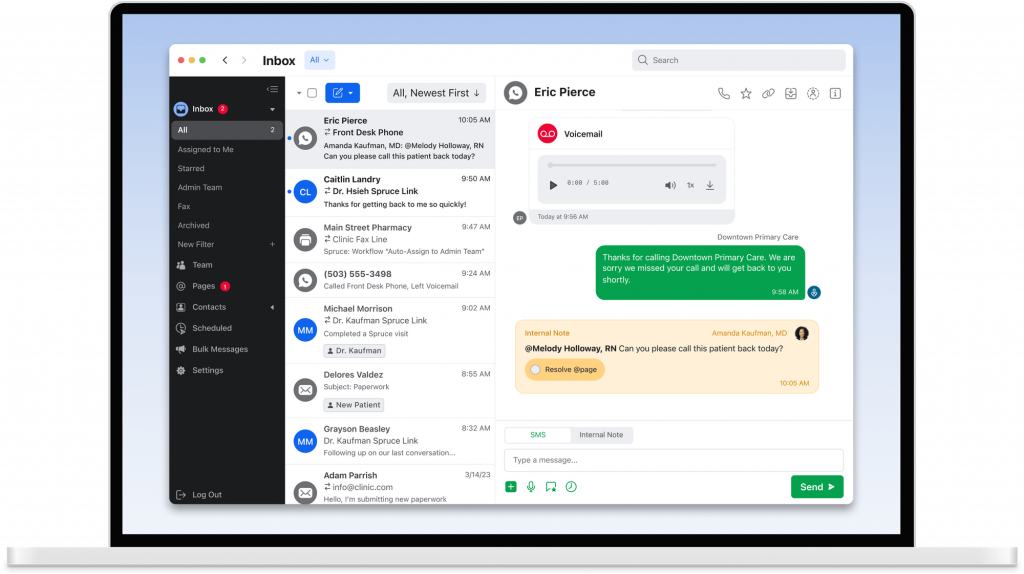
Spruce Health is a HIPAA-compliant communication platform built specifically for healthcare teams. Unlike Textla, which focuses mostly on SMS marketing, Spruce brings together phone, messaging, fax, and secure telehealth into one app. It’s designed for practices that want to manage everything from patient messages to virtual care without switching tools.
Spruce Health Key Features
- Unified Communications: Combine texting, calling, voicemail, and fax in a single app.
- Secure Messaging: HIPAA-compliant 2-way messaging with patients, complete with read receipts.
- Telehealth Visits: Built-in video visits that meet clinical security requirements.
- Team Collaboration: Internal notes, conversation assignment, and tagging to keep teams in sync.
- Shared Inboxes: Let multiple team members manage and reply to the same patient thread.
Spruce Health Pros
- Purpose-Built for Healthcare: Every feature supports HIPAA and clinical workflows.
- All-in-One Tool: Combines calls, messages, faxes, and video in one interface.
- Excellent Mobile App: Doctors and staff can manage care on the go.
- Secure Messaging: Keeps patient info safe without clunky portals.
Spruce Health Cons
- No Marketing Tools: Not built for review generation or text campaigns like Textla.
- Learning Curve: Can take time to train staff on all its features.
- Limited Form Builder: Doesn’t offer built-in digital intake or consent forms.
Spruce Health Integrations
- EHR Integrations: Compatible with Athena, DrChrono, and others via API
- Calendars: Google Calendar, Office 365 (limited syncing)
- Other Tools: Zapier for broader app connections
- Telehealth Platforms: Native video visit tool, no extra app needed
Spruce Health Pricing
Plans start around $24 per user/month. Enterprise pricing is available upon request.
Spruce Health Ratings
- Capterra: 4.4/5
- G2: 4.3/5
Spruce Health customer reviews
“You have to have a cellphone to use the phone feature, there is no softphone for laptop/desktop for direct calls, you have to dial through an intermediary number. It doesn’t show the caller’s ID, it shows your own spruce number as the caller. The support is horrible, is only a robot that never gives the appropriate support. I think I got to chat with a human when I was inquiring about the service, and it took time, I had to deal with the robot first.”
“Sometimes, the notifications do not come through as a push notification on my device. I have had a couple instances where I had new messages and I had to open the app to find out. I wish there was an easy way to search the messages and files received.”
Source: Capterra
Spruce Health support channels
- Email support
- In-app live chat
- Setup help for new users
- Online help center
5. Klara | Klara vs Textla

Klara Overview
Klara is a healthcare communication platform focused on making patient conversations easier and more efficient. It combines texting, calling, and internal messaging into one HIPAA-compliant workspace. Klara is built for care coordination, especially for specialty clinics and multi-location practices that need streamlined workflows.
Klara Key Features
- Two-Way HIPAA-Compliant Messaging: Patients and staff can text two-way securely without needing an app.
- Automated Intake & Reminders: Send pre-visit forms, appointment confirmations, and post-visit instructions automatically.
- Referral Management: Simplify referral communication between providers and practices.
- EHR Sync: Deep integrations with major EMRs for real-time data access.
- Website Chat Widget: Let patients start a secure conversation right from your website.
Klara Pros
- Built for Care Teams: Excellent for internal collaboration and handoffs.
- Automated Workflows: Saves time with smart message routing and pre-visit instructions.
- Great Patient Experience: No need for patients to download an app, just text back.
- Streamlines Referrals: Especially helpful for specialist practices.
Klara Cons
- Not Ideal for Marketing: Doesn’t offer mass texting, campaigns, or reviews.
- Learning Curve: Some workflows need training to set up properly.
- Higher Cost: Pricing can be steep for small clinics or solo providers.
- Limited Reporting: Analytics aren’t as detailed as some alternatives.
Klara Integrations
- EHR/EMRs: Epic, athenahealth, Greenway, DrChrono, and others
- Calendar Tools: Google Calendar and internal scheduling
- Other Apps: Custom API and integrations through partner platforms
Klara Pricing
Pricing usually starts upwards of $300 per month.
Klara Ratings
- Capterra: 4.6/5
- G2: 4.4/5
Klara Customer Reviews
“Some patients, especially elderly or less tech-savvy individuals, may struggle to use the system.”
“Front operations offerings are not well developed. Therefore, we use other systems for online scheduling, patient paperwork etc. It would be nice if you either develop Klara to fit the needs or partner with a solution that specializes in this space (ie, promptly, next patient, clearwave)”
Source: Capterra
Klara Support Channels
- Help center
- Live chat support
- Training during onboarding
6. OhMD | OhMD vs Textla
OhMD Overview
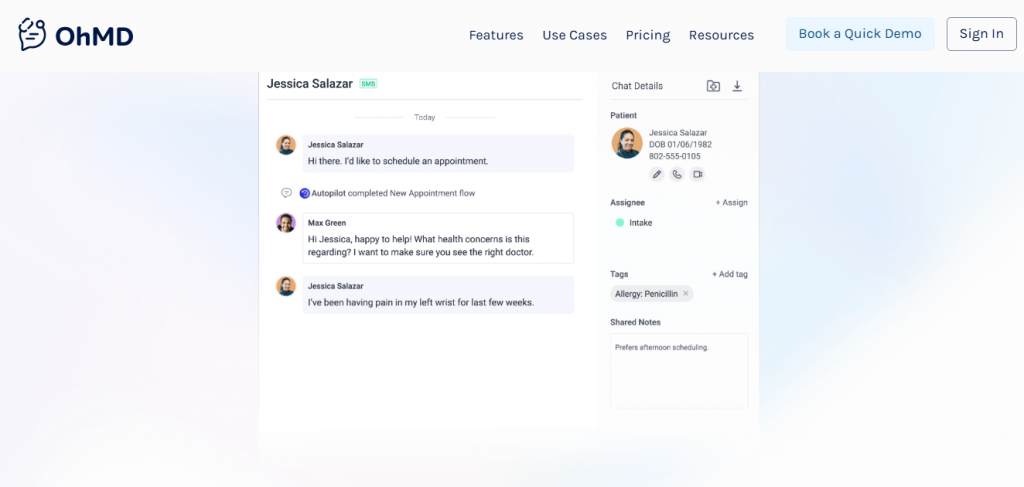
OhMD is a patient communication platform designed to replace phone calls with secure, two-way texting. Unlike Textla, which is primarily built for marketing messages, OhMD focuses on care team collaboration, HIPAA compliance, and patient engagement. It’s ideal for practices that want to cut down on phone tag and improve patient experience without juggling multiple tools.
OhMD Key Features
- Reminders & Automations: Automate appointment reminders, intake requests, or follow-up messages.
- Secure Two-Way Texting: Patients and staff can chat in real-time via HIPAA-compliant SMS.
- Video Visits: Start secure video calls directly from a text conversation.
- Internal Team Chat: Collaborate with colleagues and route messages internally.
- Broadcast Messaging: Send mass updates or alerts to patient groups without violating compliance and privacy policies.
OhMD Pros
- Super Easy to Use: Loved for its clean UI and smooth setup.
- Reduces Phone Time: Helps teams replace back-and-forth calls with quick texts.
- HIPAA-Compliant from the Start: Messaging, video, and file sharing are all secure.
- Flexible Messaging Tools: From mass texts to personal chats, it covers both outreach and care.
OhMD Cons
- Limited Customisation: Fewer branding and design controls compared to marketing-first platforms.
- No Built-In Payments: You’ll need a separate tool for billing or copay collection.
- Analytics Are Basic: Doesn’t offer in-depth funnel or campaign performance reporting.
- Cost Can Add Up: Pricing may rise quickly as you add users or features.
OhMD Integrations
- EHR/EMRs: Athenahealth, Epic, Greenway, DrChrono, and others
- Video Tools: Native video calling plus Zoom integration
- Calendar & Productivity: Google Calendar, Office 365
- Other Apps: Zapier for custom workflows
OhMD Pricing
Offers a free basic version. The paid plans start around $7/month per provider.
OhMD Ratings
- Capterra: 3.3/5
- G2: 3.4/5
OhMD Reviews
“Glitchiness, bugs problems, log in issues, error messages, constantly logging you out, lack of communication with support staff”
“Some users do not like it because it is a separate app. I can’t figure out a way to delete old clients from my records. At times it seems to freeze. I then just sign out and sign back in which fixes it. I was told that I need to upgrade to a newer version, so that may be my problem.”
Source: Capterra
OhMD Support Channels
- Email support
- Live chat
- Knowledge base with guides
- Onboarding and training help
7. Mend | Mend vs Textla

Mend Overview
Mend is a communication platform that blends telehealth capabilities, appointment reminders, digital intake, and messaging – all in one HIPAA-compliant hub. Unlike Textla, which is built primarily for texting, Mend is designed for complete patient engagement workflows, especially for clinics that offer virtual care and need robust intake automation.
Mend Key Features
- Telehealth Platform: Host secure video visits with HD quality, screen sharing, and live chat.
- Digital Intake Forms: Send forms before visits to collect insurance info, consent, and health history.
- Patient Messaging: Text with patients using a secure, compliant inbox.
- AI No-Show Predictor: Uses data to flag patients at risk of missing their appointment.
- Appointment Reminders: Automate SMS, email, and voice reminders to reduce no-shows.
Mend Pros
- Built for Virtual Care: Ideal if your practice offers telehealth services.
- Robust Intake Tools: Collect signatures, documents, and photos all before the visit.
- Customisable Reminders: Personalise SMS and email messages to fit your brand.
- Predictive Analytics: Their no-show predictor is a rare bonus feature.
Mend Cons
- More Than You May Need: If you’re only looking for texting, Mend might be overkill.
- Interface Can Be Complex: With so many tools, it takes time to learn everything.
- Premium Price: Pricing is higher than simpler platforms like Textla or Emitrr.
- Limited Marketing Features: It’s not designed for outbound campaigns or bulk SMS.
Mend Integrations
- EHR Systems: Epic, Cerner, athenahealth, NextGen, and more
- Calendars: Google Calendar, Outlook
- Automation & Forms: Custom APIs and webhooks, Zapier (limited)
- Video & Telehealth: Fully built-in, no third-party needed
Mend Pricing
They don’t offer a free plan, and detailed pricing is not listed on review sites like Capterra and G2. You’ll need to reach out to their team directly for a custom quote.
Mend Ratings
- Capterra: 4.6/5
- G2: 4.5/5
Mend Customer Reviews
“Getting clocked out of registering and needing chat assistance.”
“Terms of service – use of Telehealth is only available through consent, though terms state the patient’s info is not fully protected via emails and texts msg. Also, poor video quality – made it slightly uncomfortable not being able to see myself on the screen, as well as barely any visibility of the person I spoke with due to being an almost microscopic size.”
Source: Capterra
Mend Support Channels
- Email & Phone Support
- Live Chat (for active users)
- Help Center & Video Library
- Dedicated Account Manager for Larger Practices
8. Luma Health | Luma Health vs Textla
Luma Health Overview
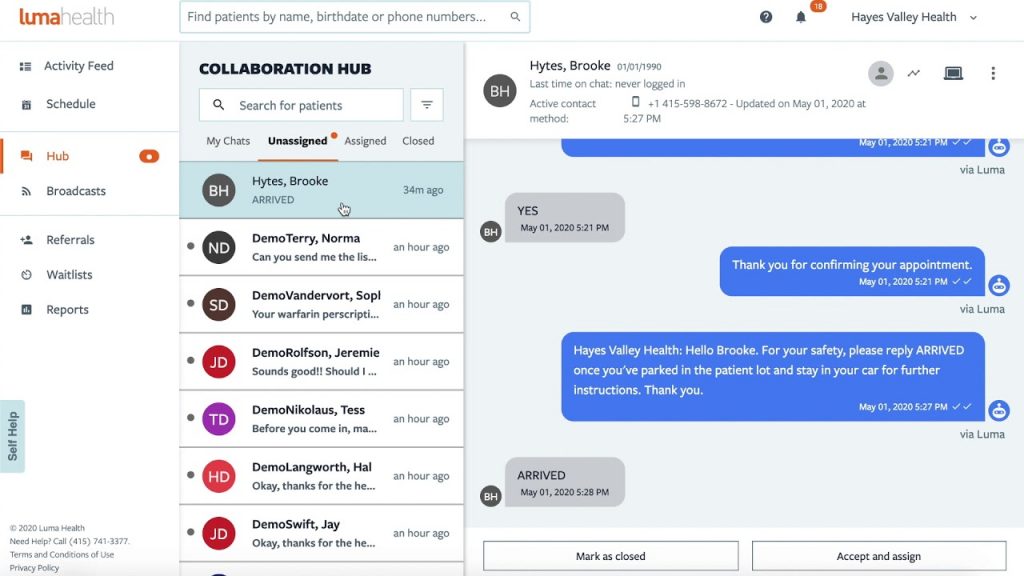
Luma Health is a patient communication and engagement platform made for modern healthcare teams. It goes way beyond texting, offering everything from smart scheduling and referrals to automated follow-ups and care pathways. Compared to Textla, which focuses mostly on messaging, Luma Health is built to optimise the entire patient journey across appointments, check-ins, and post-visit care.
Luma Health Key Features
- Smart Scheduling: Patients can self-book, reschedule, or get on a waitlist—all through mobile.
- Referral Management: Automatically reach out to referred patients and get them scheduled quickly.
- Broadcast Messaging: Send bulk texts or targeted campaigns for openings, updates, or vaccine alerts.
- Two-Way Messaging: HIPAA-compliant chat with patients that logs into their records.
Luma Health Pros
- Built for Healthcare: Every tool is designed with medical workflows in mind.
- Automates More Than Just Reminders: Great for follow-ups, reactivations, and referrals.
- Patient Self-Scheduling: Cuts down front-desk high call volume and wait times.
- Real-Time Sync with EHRs: Reduces manual data entry and missed updates.
Luma Health Cons
- Can Feel Complex: With so many modules, setup takes planning.
- Not Ideal for Small Clinics: May be more than needed if you’re just starting out.
- Higher Price Point: It’s not as budget-friendly as simpler tools like Textla.
- Learning Curve: Some users report needing more training upfront.
Luma Health Integrations
- EHR Systems: Epic, Cerner, athenahealth, eClinicalWorks
- Calendars & Comms: Google Calendar, Outlook, Twilio (for messaging)
- Automation Tools: Custom integrations via API and HL7 support
- Analytics Platforms: Connects with BI tools for deeper reporting
Luma Health Pricing
Custom pricing based on size and needs. No free plan available.
Luma Health Ratings
- Capterra: 4.7/5
- G2: 4.6/5
Luma Health Customer Reviews
“The fact that the team hid from us the lack of integration with our EMR until very late in the process.”
“The constant changes of my account representatives really made it difficult to build relationships. Overtime Luma’s account representatives stopped contacting the practice and as result we had to figure out solutions on our own. Additionally, they changed their payment terms to where if we didn’t pay them upfront then they would drop us as a customer.”
Source: Capterra
Luma Health Support Channels
- Live Chat & Email Support
- Phone Support (on higher plans)
- Help Center with Guides & Webinars
- Dedicated Success Manager (for mid-size and enterprise accounts)
9. Solutionreach | Solutionreach vs Textla
Solutionreach Overview
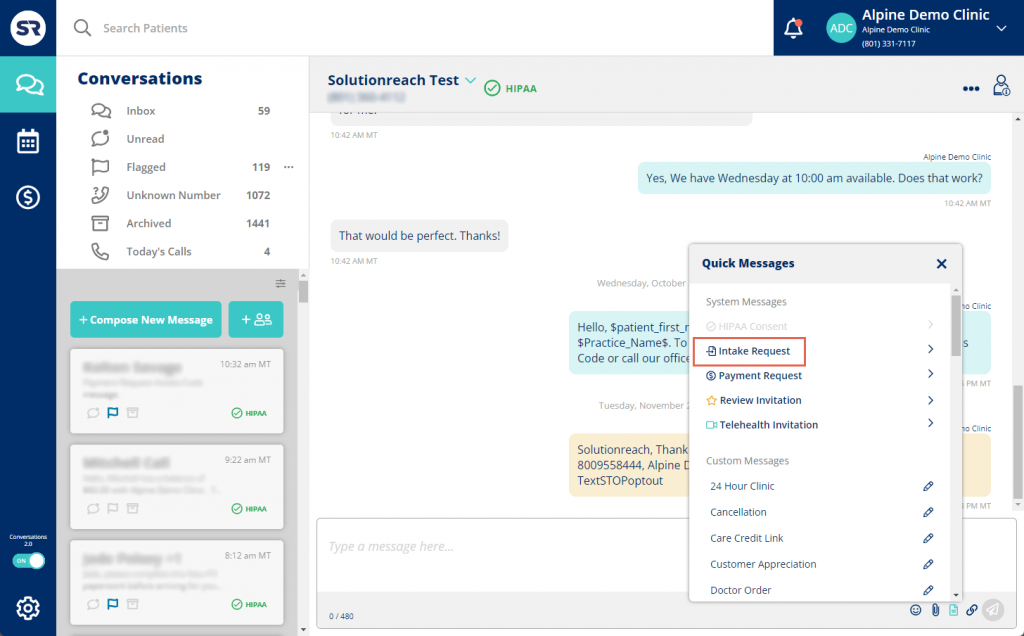
Solutionreach is a long-standing patient relationship management (PRM) platform built specifically for healthcare providers. It combines appointment reminders, surveys, reputation management, and two-way texting into one system. Compared to Textla, which is mostly about SMS marketing, Solutionreach offers a broader toolset to support patient retention, engagement, and satisfaction across the full care cycle.
Solutionreach Key Features
- Appointment Reminders: Automated SMS, email, and voice reminders to reduce no-shows.
- Two-Way Messaging: Staff and patients can chat securely with saved message histories.
- Reputation Management: Automatically request and manage online reviews post-visit.
- Group Messaging: Broadcast messages to targeted patient segments.
- Digital Intake Forms: Digital check-ins with e-forms sent via text or email.
Solutionreach Pros
- Healthcare-Focused: Built specifically for medical, dental, and vision practices.
- Improves Patient Retention: Great for long-term engagement and recall.
- Reputation Boost: Helps generate more reviews and visibility for your practice.
- Flexible Messaging Options: SMS, email, and voice tools in one place.
Solutionreach Cons
- Dated Interface: Some users feel the UI is clunky or hard to navigate.
- Steep Learning Curve: More features = more training time required.
- Limited Custom Integrations: Mostly works with specific EHRs; custom setups are limited.
- Support Wait Times: Some customers report delays in support response.
Solutionreach Integrations
- EHR/PMS: Compatible with 100+ systems including Dentrix, Eaglesoft, Open Dental, NextGen
- Messaging & Calendar Tools: Native messaging, Outlook calendar sync
- Review Platforms: Google, Facebook for reputation management
- Custom Integrations: Available through APIs and some middleware solutions
Solutionreach Pricing
Starts around $329/month. Costs increase as more features or locations are added.
Solutionreach Ratings
- Capterra: 3.8/5
- G2: 3.7/5
Solutionreach Customer Reviews
“It is very glitchy, you cannot get the system issues resolved, they claim that they have no issues of file for you, or records of you calling in to get tech support.”
“Occasional errors on sending messages and occasional system issues created problems.”
Source: Capterra
Solutionreach Support Channels
- Email support
- Phone support
- Knowledge base
- Live chat for limited hours
10. RingRx | RingRx vs Textla
RingRx Overview
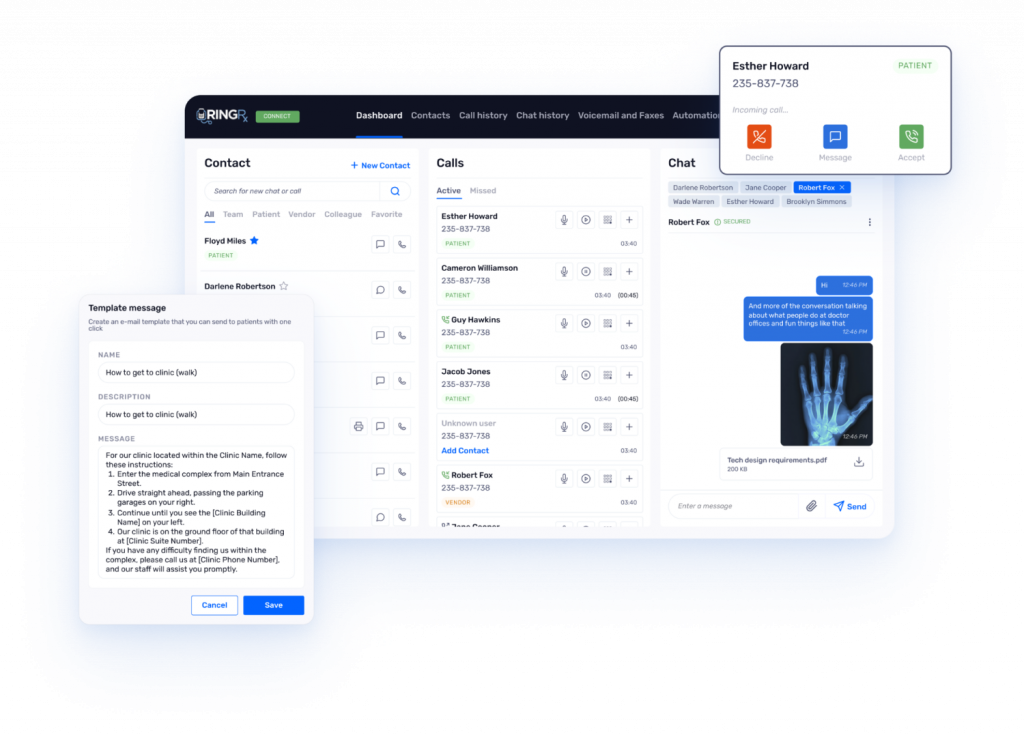
RingRx is a HIPAA-compliant VoIP phone system designed for healthcare professionals. It offers voice, text, fax, and voicemail features built into a secure platform, making it a strong option for practices that need more than just SMS communication. RingRx gives you a full phone system with texting as part of the package, ideal for clinics that need reliable communication across devices and channels.
RingRx Key Features
- VoIP Phone System: Full-featured cloud phone system with call routing, voicemail, and mobile app access.
- Text Messaging: HIPAA-compliant two-way SMS with patients.
- Voicemail Transcription: Voicemails get transcribed and delivered via email or SMS.
- Call Logs & Analytics: Track call volumes, missed calls, and staff responsiveness.
- Faxing Capabilities: Send and receive digital faxes, no machine required.
RingRx Pros
- VoIP + Text in One: Great for teams that want phones and texts in the same system.
- Fully HIPAA-Compliant: All communication is encrypted and secure.
- Easy for Remote Teams: Cloud-based access means staff can call/text from anywhere.
- Simple Faxing Built In: One of the few tools offering integrated digital fax.
RingRx Cons
- Less Focus on Marketing: Doesn’t include campaign tools or review requests like Textla.
- Setup Takes Time: VoIP systems can be tricky to configure for some teams.
- Limited Form Features: No intake forms or automations for patient paperwork.
- UI isn’t the Flashiest: Functional but not as sleek as newer platforms.
RingRx Integrations
- EHR Systems: Works with Athena, eClinicalWorks, and other major medical platforms.
- Productivity Tools: Integrates with Google Workspace, Outlook, and calendars.
- Fax & Messaging Services: Built-in digital fax and HIPAA SMS.
- CRM/Helpdesk (via API): Custom integrations possible with developer setup.
RingRx Pricing
RingRx plans typically start around $19/month per user for voice features. Texting is an optional add-on, and pricing is available on request based on volume and features.
RingRx Ratings
Capterra: 4.8/5
G2: 4.17/5
RingRx Customer Reviews
“I do wish that there was a way for HIPAA compliant texting app to receive photos. Many of my patients have tried to use this app to send photos of insurance cards. The more barriers to communication that I can take away the easier it is for them to access services.”
Source: Capterra
RingRx Support Channels
- Phone & Email Support
- Help Center & User Guides
- Live Chat (for business hours)
- Onboarding Team for Setup
Why Emitrr Is the Best Textla Alternative
Emitrr isn’t just a messaging tool – it’s a full-fledged communication platform that handles everything from forms to follow-ups. Whether you’re running a dental clinic or a tutoring service, Emitrr adapts to your workflow, saves time, and keeps patients or clients engaged. Here’s what makes it shine:
Seamless Onboarding and Easy-to-Use Interface
No complicated setup, no long learning curve. Emitrr’s dashboard feels intuitive from day one. You can build forms, send messages, and track appointments in just a few clicks. Their support team is hands-on too, they help you import contacts and customise SMS templates to match your practice. Most teams say they were confident using it right away.
All-in-One Inbox for Calls, Texts, Forms, and Payments
Tired of toggling between apps just to follow one conversation? Emitrr combines everything – texts, calls, emails, form submissions, and even payments – in one shared inbox. That means your team can pick up a patient conversation mid-stream without asking, “Who spoke to them last?” It’s communication without the chaos.
Missed Call Text-Backs That Recover Lost Patients
When someone calls, and no one picks up, most systems let the opportunity go cold. Emitrr steps in with an instant auto-text: “Sorry we missed you! Text us here, and we’ll follow up.” This simple touch brings back patients who might’ve otherwise moved on. It’s like having a smart receptionist that never sleeps.
Built-In Intake Forms and E-Signatures
Paper forms and PDF attachments slow everyone down. Emitrr lets you build beautiful digital forms with e-signatures and send them by text or email. Patients can fill them out on their phones – no printing, no scanning. Once submitted, they’re automatically stored in the patient record.
Automations That Actually Save Time
Emitrr doesn’t just remind, it thinks ahead. Set up automated flows like: booking confirmation leading to pre-visit form, then appointment reminder and even post-visit SMS review requests! Once built, they run quietly in the background, saving your team from hours of manual follow-ups. It’s set-and-forget that actually works.
Works Seamlessly Across Healthcare, Dental, and Service Businesses
Whether you’re a vet, a physiotherapist, or a property manager, Emitrr flexes to fit your workflow. It integrates with industry-specific tools like EHRs and CRMs, making data syncing seamless. No matter your size or specialty, you get a smooth, connected experience from day one.
Affordable for Clinics of Any Size
You don’t need a huge team or budget to get started. At just $30/user, Emitrr offers powerful functionality that would usually cost hundreds across multiple apps. There are no surprise fees, and core features like calling, texting, and reminders are included. For many practices, it pays for itself in no-show reduction alone.
Real-Time Analytics to Optimise Team Performance
What’s working? What’s not? Emitrr shows you the numbers in real time, from appointment confirmations to average staff response times. These insights help you coach your team, tweak your messaging, and improve patient engagement. It’s like having a live dashboard of your front desk performance.
HIPAA-Compliant, Secure Messaging
In healthcare, security isn’t optional, it’s mandatory. Emitrr comes HIPAA-ready with end-to-end encryption, access controls, and full audit trails. You don’t have to worry whether your messages are compliant. That peace of mind? Huge for clinics, especially when compared to basic SMS platforms.
Fast, Responsive Support with 24/7 Access
Emitrr’s support team doesn’t leave you hanging. Whether it’s 3 p.m. or 9 p.m., someone’s there to help via chat, SMS, or phone. Plus, even the library of how-to guides and video tutorials makes self-service a breeze. And when you need need help, you get human help – fast.
Which Industries Are Catered by Emitrr?
Emitrr isn’t one-size-fits-all. It’s built to flex across a range of industries. Whether you’re managing patient care, client communication, or appointment-heavy workflows, Emitrr helps you automate, organise, and respond faster. Here’s how it fits different sectors:
Veterinary Clinics
Vets love how Emitrr simplifies pet owner communication. Send check-up reminders, pre-appointment forms, or post-surgery updates by text, no phone tag required. You can also use it to share pet care instructions, photos, and even payment links. It saves time and keeps pet parents in the loop.
Wellness and Medspa Clinics
Spas and cosmetic clinics need smooth booking, fast replies, and reliable follow-ups. Emitrr helps you confirm appointments, send pre-treatment tips, collect waivers, and gather reviews – all via text. It’s perfect for staying fully booked and fully branded, without chasing paperwork or playing phone tag.
Healthcare and Dental Practices
Doctors, dentists, and therapists use Emitrr to reduce no-shows, send digital intake forms, and follow up automatically. It’s HIPAA-compliant by default, so patient data stays secure. You can text appointment reminders, collect consent digitally, and even manage post-visit feedback – all from one dashboard. It’s like having a virtual front desk assistant.
Legal and Financial Services
Emitrr makes it easy for lawyers and accountants to stay in touch securely. Send document requests, appointment reminders, and invoice links – all through encrypted messages. Clients can e-sign contracts or intake forms on the go, and every interaction is logged for compliance. It’s communication that’s both professional and protected.
Real Estate and Property Managers
From showings to lease renewals, real estate teams run on fast communication. Emitrr lets agents send appointment reminders, rental applications, and signed agreements in just a few clicks. Tenants can reply via text, reducing delays and miscommunication. Plus, you can handle maintenance updates or rent reminders on autopilot.
Education and Tutoring Services
Emitrr helps schools and tutors streamline enrolment, schedule lessons, and update families. Send out class schedules, sign-up links, or absence notifications with ease. Bulk texts make sure no parent misses an update. It’s a modern way to keep classrooms, students, and parents connected.
Automotive Services
Mechanics and garages use Emitrr to keep customers informed at every step. From “Your car is ready” to “Here’s your service quote,” everything can be sent by text. You can even share inspection checklists or collect payment links. That means less waiting on the phone, and faster turnaround in the shop.
Home Services and Contractors
For plumbers, HVAC techs, or electricians, Emitrr makes job management simple. Confirm appointments, send ETA texts, and collect job approvals or deposits, all via mobile. Your team can text from the field, and clients always know what’s happening. It keeps jobs on time and customers happy.
Retail and Local Businesses
Local shops and boutiques use Emitrr to build customer loyalty. Send out SMS promotions, alert customers about pick-ups or restocks, and request reviews after a purchase. It’s a low-effort way to drive repeat visits and keep your brand top of mind—even after the sale.
Frequently Asked Questions
Textla sticks to what it knows best – texting. But if you need to handle phone calls, collect digital forms, or automate your workflows, it starts to fall short. It’s simple, but sometimes too simple for growing teams.
Emitrr brings everything under one roof. Whether someone texts, calls, or fills out a form, it’s all tracked in the same place. You don’t have to chase messages across apps anymore – reminders, replies, and updates just happen automatically.
Yes, absolutely! You can export your contact list and past messages from Textla, and Emitrr’s team will help move everything over. No tech headache – they’ll guide you every step of the way.
It sure does! If you miss a call, Emitrr instantly sends a friendly text back. And when someone submits a form, it can fire off a confirmation or next steps – all without you lifting a finger.
Yes, 100%. Emitrr was built with healthcare in mind. Everything’s encrypted, HIPAA-compliant, and trackable. So you get peace of mind knowing all patient/client info is protected at every step.
Conclusion
Textla does a good job if you’re only looking for basic SMS communication. But as your business or practice grows, so do your needs. You want something that not only sends messages but also helps you handle missed calls, automate reminders, collect info, and keep everything in one easy-to-manage place. That’s where many practices start looking beyond Textla, and why so many turn to more flexible, full-featured tools.
Emitrr stands out because it brings everything together, all in a single, HIPAA-compliant platform. No more juggling 5 different tools. It’s simple to get started, easy for teams to use, and backed by fast, helpful support whenever you need it. If you’re tired of piecing together your workflow, it might be time for a smarter, all-in-one communication system. Book a time with Emitrr and see how it can enhance not only communication, but also your overall workflow!