
 4.9 (400+
reviews)
4.9 (400+
reviews)

Introduction
The growing adoption of VoIP software for doctors isn’t just a trend; it’s a strategic response to the evolving needs of modern medical practice. Across the phone systems for the healthcare industry and for clinics seeking the best VoIP for doctors, this shift is evident. With telemedicine becoming a standard offering, remote work arrangements for administrative staff, and an increased focus on patient engagement, healthcare providers need communication systems like Emitrr that can adapt and scale with their practice.
Practices demand the best VoIP for medical offices more than ever as part of their healthcare phone system strategies. This comprehensive guide explores the 10 best VoIP software solutions for doctors and medical practices:
- Dive deep into key features, strengths, and limitations of each platform.
- Understand which solution might be the perfect fit for your practice.
- Evaluate critical factors like HIPAA compliance and EHR integration.
- Consider cost, scalability, and the quality of customer support.
- Why VoIP phone systems for healthcare are crucial factors into decision-making?

Why VoIP Software is Essential for Doctors
Voice over Internet Protocol, also known as VoIP, marks a fundamental shift in the landscape of traditional telephone systems when it comes to internet-based communication. It minimizes the dependency on copper wires and circuit-switched networks by simply converting voice signals into digital data packets that travel over the internet. In 2025, this technology for the healthcare industry opens up a world of possibilities in comparison to the age-old traditional hospital phone systems, which simply cannot match.
VoIP has numerous applications in the healthcare field other than voice calling. The modern medical practice has an intricate ecosystem where communication is required to be fluid, secure, and integrated with a number of other systems. VoIP supports all of these important practices here, whether by appointments, telehealth, specialist coordination, or emergency contact, everything gets supported by VoIP.

Let’s have a closer look at key benefits of choosing the best HIPAA-compliant VoIP software that transform and simplify medical operations and healthcare communications:
1. Substantial Cost Savings
Embracing VoIP in medical practices can bring huge savings on communication costs. Landlines have high monthly impediments, costly long-distance charges, and high maintenance involved. VoIP helps save most of these costs since most of the costs are based on your internet infrastructure. The monthly communication expenses at medical practices are usually reduced drastically, hence enabling the medical practices to divert the funds to other activities such as improvement of patient care or expanding the practices. Phone systems for healthcare often provide the most reliable means for cost savings. For many clinics, this means transitioning to VoIP phone systems for healthcare for both savings and feature upgrades.
2. HIPAA Compliance and Security
In VoIP systems dedicated to medical practices, excellent security options are installed so that patient information is always secure during the entire communication. Such systems provide end-to-end encryption, secure data transmission, as well as a clear audit trail. Above all, a good VoIP provider will provide Business Associate Agreements (BAAs) that will make the difference in complying with HIPAA and will absolve your practice of any possible breach.
3. Enhanced Mobility and Flexibility
Present-day practice of medicine might no longer be confined to the office environment alone. Physicians must also be accessible as they conduct hospital rounds, handle satellite offices, or even when they are consulting at their homes. The use of VoIP systems offers unparalleled mobility to healthcare providers to ensure they are always in a position to establish professional communication capabilities, irrespective of where they are physically located. This versatility can be very useful to those practices with multiple offices, traveling physicians, or after-hours consultations. Healthcare phone systems and hospital phone systems offer robust mobile support options.
4. Seamless Integration Capabilities
One of the biggest changes that VoIP can bring to medical practice is that it can be easily integrated with the current healthcare technology. VoIP solutions can coexist with Electronic Health Records (EHR) systems, practice management software, scheduling platforms, and patient portals. This integration saves the staff the time and inconvenience of having to work with several systems simultaneously and contributes to a more efficient workflow that will eventually benefit both providers and patients. Healthcare phone system integration is essential for any modern platform. Practices value systems that rank as the best VoIP for medical offices for their seamless integrations.
5. Advanced Features That Enhance Patient Experience
Modern VoIP systems come packed with features that directly improve patient satisfaction and practice efficiency. Intelligent call routing ensures patients reach the right department or provider quickly. Voicemail-to-text functionality allows busy healthcare providers to quickly scan messages without interrupting patient care. Two-way texting capabilities enable appointment reminders, follow-up communications, and quick clarifications without the need for lengthy phone calls. Best VoIP for doctor communications often offers these advanced, patient-centric features. The trend for advanced features is most visible in high-end hospital phone system installations.
Missed a call? Download professional voicemail greeting scripts for doctors now.

Overcoming Implementation Challenges and Setting Success Criteria
Migration to VoIP technology should be well planned, and a set of realistic expectations should be set. It is essential to be aware of the typical issues that people face and how contemporary options resolve them so that the right choice can be made. Internet dependency is the major concern of healthcare providers. This is a thing to be concerned about, considering the sensitivity of communication around healthcare, given that failure to pick up the phone might equate to an emergency case of a patient.
However, contemporary VoIP systems overcome this by having cellular backup, the automatic capacity to route calls to mobile phones, and also cooperation with various internet service providers. The point is to choose a provider that takes the issue of reliability no less seriously than you do with regards to patient care.
The issue of staff training is, of course, natural in the healthcare setting, where time is of the essence. Nowadays, VoIP interfaces emphasize healthcare processes and are built with clear dashboards that resemble well-known medical software, not business software in general. The best ones work well as augmentation to what is already in place instead of necessitating the training of employees to learn new procedures. VoIP healthcare options now include extensive onboarding support, even in the phone systems for healthcare segment.
Early VoIP system call quality problems have been fixed by improvements in compression algorithms and networks. VoIP networks can mean better audio quality than the older phone lines and do so when the system is used and deployed correctly today. Such considerations result in vital selection criteria. The most important is overall HIPAA compliance; not the ticks in the box, but every single detail of communication that is out to preserve patient privacy. End-to-end encryption, proper storage of data, and Business Associate Agreements are common offers that the right system provides. VoIP for healthcare systems are setting the compliance standard and so when choosing healthcare VoIP software, make sure it is compliant to the same standards.
Watch this video to learn the Pros and Cons of VoIP –
How to Choose the Right VoIP Software for Your Practice
The stakes are high when it comes to choosing the right phone systems for the healthcare industry. The right VoIP phone systems for healthcare institutions and practices can enhance patient care, streamline your workflows, reduce operational costs, and position your practice for future growth. The wrong choice, however, can lead to compliance issues, frustrated staff, and dissatisfied patients.

Here’s a list of features and top factors to be considered when making a selection:
1. Conducting a Comprehensive Needs Assessment
The landscape of phone systems for healthcare is booming, and users are spoilt for choice, really. Before delving into the area of particular VoIP solutions, however, it is vital to step back and carefully examine the special communicational requirements of your practice. This evaluation will then be your guiding star throughout the selection process and assist in making sure that you finally choose a solution that will go hand in hand with your needs.
2. Evaluating Call Volume and Patterns
You need to start with an analysis of your current call volume and patterns. What is the volume of calls being received at your practice? What are your best calling hours? Do you feel seasonal variation in the number of calls? Comprehension of such patterns enables you to select a system of appropriate size and capabilities. A case in point, a busy practice can use the advanced capabilities of call queuing and routing, whereas a small practice would be more versed in ease of use and affordability.
3. Assessing Staff Size and Structure
Don’t only think of your current number of staff, but also of your expansion expectations. What will be the number of users required to access the VoIP system? Do you employ remote employees or part-time employees? Are there various user roles where different feature sets are required? Knowledge of your staffing structure will enable you to pick the right solution in terms of user management functionality and pricing models. If you’re scrambling to find the best VoIP for medical offices, it’s important to consider whether it’s flexible enough for staff of all sizes.
4. Determining Telehealth Requirements
As telehealth grows to be more relevant in the provision of healthcare, you should consider the existing and potential telemedicine requirements. Are you already conducting online consultations? Do you have the intention of expanding telehealth services? The integration of video conferencing capabilities into healthcare VoIP solutions can be available in some, or it can be more effective when it is used along with the support of dedicated telehealth platforms.
5. Prioritizing HIPAA Compliance
HIPAA compliance is not an extra added feature for medical practices—it must be regarded as a legal requirement, and as such, it can make or break your VoIP implementation. Make sure your selected VoIP allows personalized text messages, voicemails, and voice messages to be encrypted end-to-end. This encryption ought to be strong and periodically revised to meet rising security threats. When they say that their service is encrypted, don’t just trust them—request specific technical information on how their encryption works.
6. Business Associate Agreement Availability
A VoIP provider who has the capability to handle any form of protected health information should be ready to provide a Business Associate Agreement. This agreement spells out their legal responsibilities in terms of data protection of patients and offers your practice valuable legal coverage. Should a provider be hesitant or unfit to sign a BAA, disqualify them immediately.
7. Secure Data Handling Practices
Investigate how your potential VoIP provider handles, stores, and protects data. Where are their servers located? What access controls are in place? How do they handle data backups and disaster recovery? These details matter significantly when it comes to maintaining HIPAA compliance. If you’ve decided to go ahead with the best HIPAA-compliant VoIP for healthcare, stay assured that it’ll outline these details clearly in documentation.
8. EHR System Compatibility
If your practice uses an Electronic Health Records system, ensure your VoIP solution can integrate effectively. This integration might include features like click-to-dial from patient records, automatic call logging, or screen pops that display patient information when calls are received. These integrations can save significant time and reduce the risk of errors.
9. CRM and Scheduling Tool Integration
Many practices use Customer Relationship Management systems or specialized text scheduling tools. VoIP integration with these systems can streamline appointment scheduling, follow-up communications, and patient engagement activities. Look for solutions that offer pre-built integrations with popular healthcare software or robust APIs that enable custom integrations.
10. Interface Design and Navigation
Look for VoIP systems with clean, intuitive interfaces that don’t require extensive training to master. The best systems feel familiar and natural from the first use, with logical navigation and clear visual hierarchy. Another important factor is mobile app quality. Since healthcare providers often need to communicate while away from their desks, evaluate the quality of mobile applications offered by VoIP providers. Are the apps stable and feature-rich? Do they offer the same functionality as the desktop versions? Can they maintain call quality over cellular networks?
11. Leverage Reviews and Trial Options for Validation
Before making a final decision, take advantage of available resources to validate your choice and ensure the VoIP system will truly meet your practice’s needs. Professional review platforms like G2, Capterra, and industry-specific healthcare technology sites provide valuable insights from real users who have implemented these systems in live practice environments. Additionally, don’t hesitate to ask potential VoIP providers for references from existing healthcare customers.
Top 10 VoIP Software for Doctors
In the sea of best VoIP software solutions in the market, selecting an ideal fit can be, hands-down, challenging. We’ve come up with the top 10 VoIP platforms, helping you narrow down your choices and choose the “one” that gives your communication channels a boost.
1. Emitrr : Best VoIP Competitor
Overview:
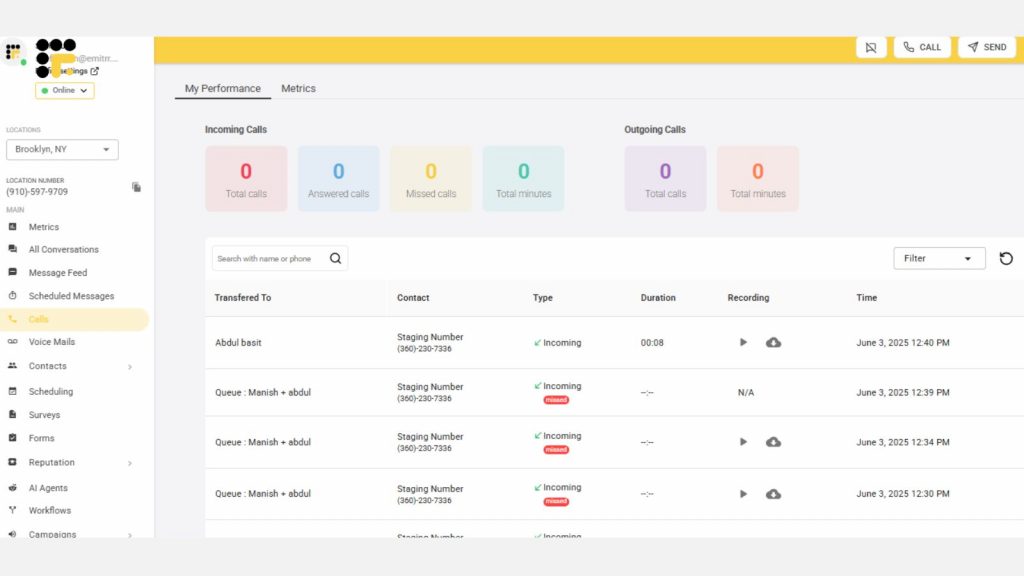
Emitrr stands out as the best VoIP for doctors by focusing specifically on healthcare practices and their unique communication needs. Built from the ground up with medical professionals in mind, Emitrr combines traditional VoIP functionality with healthcare-specific features that address the daily challenges faced by doctors, nurses, and administrative staff. The platform recognizes that healthcare communication extends far beyond simple voice calls, incorporating patient engagement tools, automated workflows, and compliance features into a unified solution.
Key Features:
- AI call handling to let AI handle level one calls for answering common queries, or canceling, rescheduling, or booking appointments.
- Smart call routing directs patients to the right department or provider quickly, improving call efficiency.
- EHR/EMR/PMS integrations to ensure there are no major distractions in your existing workflow.
- Call pop feature to access the caller information easily on a single screen during a live call.
- AI summary and transcript features to get a crisp summary of different phone calls.
- Auto dialer to find and manually dial the customer number every time. Simply open the customer chat and click on the auto dial to make a call instantly.
- Missed call text-back feature ensures no patient inquiry goes unanswered by sending automatic follow-up messages.
- Built-in appointment reminder system helps reduce no-show rates and boosts patient satisfaction.
- AI automation handles tasks like call handling, appointment booking, and follow-ups, saving staff time.
- Two-way texting capabilities allow practices to communicate with patients through their preferred channel.
- Automated review request workflows make it easy to collect patient feedback and build online reputation.
- Automated texting campaigns support preventive care, follow-ups, and health education easily scheduled and sent through the platform.
Pros:
- The healthcare-specific design ensures every feature serves a purpose in medical practice operations.
- Staff experience a minimal learning curve since the interface reflects familiar healthcare workflows rather than generic business communication patterns.
- Patient engagement features are particularly valuable for practices aiming to improve satisfaction scores and reduce administrative burden.
- The platform’s focus on automation helps smaller practices operate efficiently without needing additional staff.
- Automated appointment reminders, review requests, and follow-up communications significantly reduce administrative workload while improving patient outcomes and practice reputation.
Cons:
- Emitrr’s specialized focus on healthcare, while generally an advantage, can sometimes feel limiting for practices that need more general business communication features.
- Practices with significant non-patient communication needs might find some business-oriented features less robust than those offered by general-purpose VoIP systems.
- The platform’s relatively newer presence in the market means it may have fewer integrations available compared to more established VoIP providers, though this gap is rapidly closing as the platform grows.
Integrations:
Emitrr offers seamless integration with popular EHR systems and practice management platforms commonly used in healthcare settings, including:
Customer Support Channels:
Emitrr provides multiple support channels including phone, email, and live chat support. The support team includes healthcare communication specialists who understand the unique challenges and requirements of medical practices.
Customer Reviews & Ratings:
Dr. Sarah Mitchell from a family practice notes, “The automated appointment reminders alone cut our no-show rate by 40%, and patients love the text messaging feature.”
A pediatric clinic administrator shared, “Setup was incredibly straightforward – we were fully operational within two days with minimal staff training required.”
An internal medicine practice highlighted, “The missed-call text-back feature has been a game-changer for patient satisfaction. We never lose touch with patients who can’t reach us during busy hours.”
A dental practice manager emphasized, “The review automation has helped us build our online reputation significantly. Patients actually follow through with leaving reviews now that the process is so simple.”
Pricing:
Emitrr offers three main pricing tiers designed specifically for healthcare practices. The Starter plan begins at $29 per user per month and includes essential VoIP calling, basic texting, and appointment reminders. The Professional plan at $49 per user per month adds advanced automation features, review management, and comprehensive patient engagement tools. The Enterprise plan at $79 per user per month includes all features plus priority support.

2. RingRx
Overview
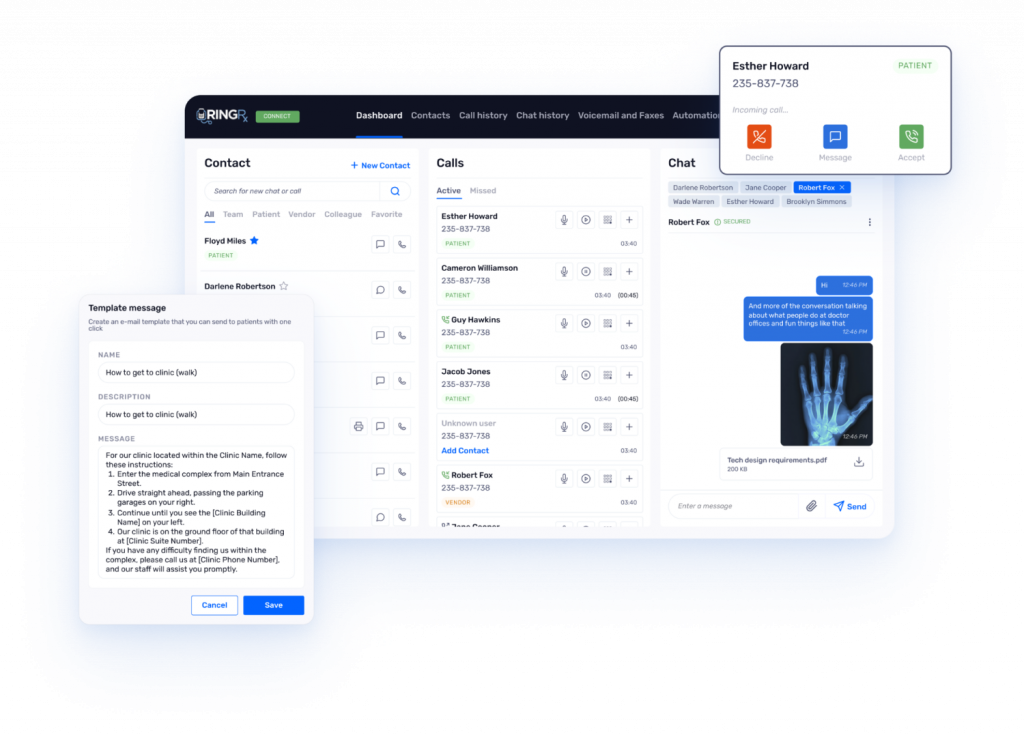
RingRx positions itself as a healthcare-focused communication platform that combines traditional VoIP functionality with specialized features for medical practices. The platform emphasizes compliance and security while providing the communication tools that healthcare providers need for daily operations. Built with medical workflows in mind, RingRx offers a balance between general business communication capabilities and healthcare-specific requirements.
Key Features
- HIPAA-compliant voice communications with encrypted calling and secure voicemail systems
- Appointment scheduling integration, automated patient reminders, and basic patient engagement tools
- Call routing and queue management features help practices handle high call volumes efficiently
- Mobile applications for providers who need communication access while away from the office
- Basic analytics and reporting for call management and practice insights
Pros:
- Offers robust HIPAA compliance and competitive pricing for small to medium healthcare practices.
- Integration with common healthcare software is straightforward.
- Mobile functionality supports providers on the go.
- Ensures reliable call quality and security, making it a practical choice for practices needing essential communication tools.
Cons:
- Feels like a general VoIP system with added healthcare features rather than a purpose-built platform.
- Advanced automation and patient engagement tools are limited compared to specialized solutions, potentially requiring supplementary systems for more complex practice needs.
Integrations:
RingRx provides basic integration with popular EHR and practice management systems like Epic and Cerner, though the depth of these integrations varies, limiting advanced functionality for complex workflows.
Customer Support Channels:
RingRx, one of the popular names in the list of VoIP phone systems for the healthcare industry offers standard business support via phone and email during regular business hours, with responsive assistance for setup, troubleshooting, and compliance queries.
Customer Reviews & Ratings:
Dr. Michael Chen from an orthopedic practice notes, “The HIPAA compliance features give us peace of mind, and the call quality has been consistently reliable.”
A cardiology clinic administrator shared, “The integration with our existing EHR system worked smoothly, though we wish there were more automation features available.”
Pricing:
RingRx offers competitive healthcare-specific packages starting at $25/user/month, including HIPAA-compliant voice, voicemail, and basic integrations. Higher tiers add advanced features like analytics.
3. NUACOM
Overview:
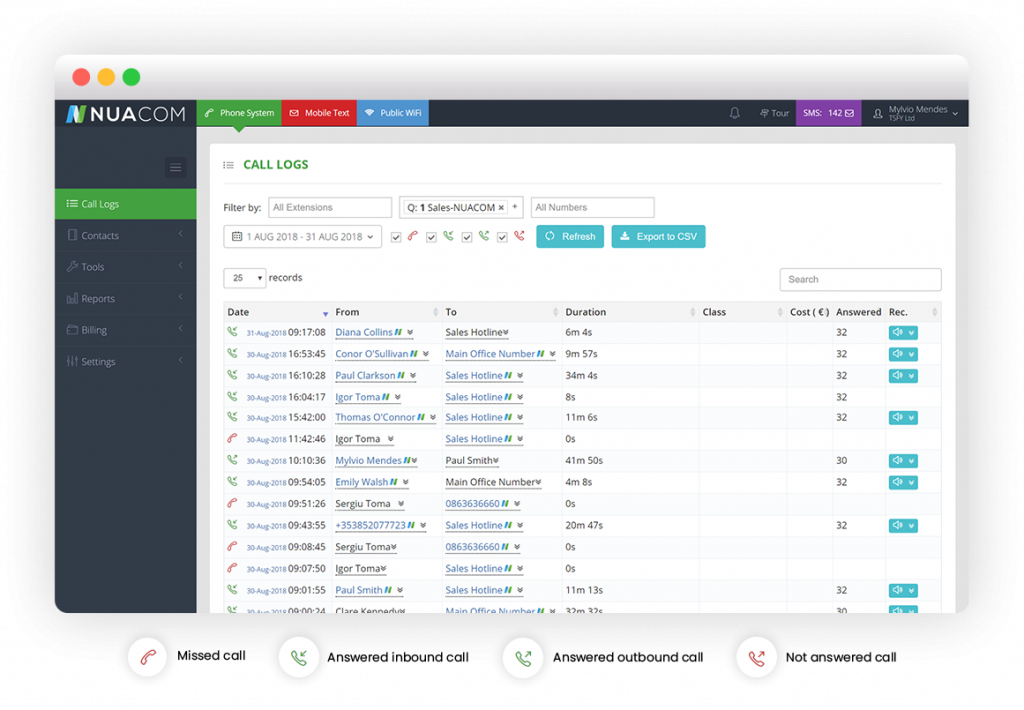
NUACOM offers a cloud-based VoIP solution tailored for various industries, including healthcare. It provides reliable communication tools for medical phone service with some healthcare-specific adaptations, focusing on flexibility for practices with distributed operations. While not exclusively designed for healthcare, NUACOM supports medical practices with basic VoIP functionality and mobile access.
Key Features:
- Call routing and voicemail management for efficient communication
- Mobile applications supporting multi-location practices
- Basic integration with business and healthcare systems
- Reliable uptime and call quality for consistent performance
- Flexible configuration for varying practice communication needs
Pros:
- Delivers dependable VoIP functionality with good uptime and call quality.
- Its flexibility suits practices with diverse communication needs.
- Mobile apps enable connectivity across locations.
- The platform is easy to configure, making it accessible for small to medium practices seeking straightforward solutions.
Cons:
- Healthcare-specific features are limited, lacking advanced patient engagement or automation tools.
- HIPAA compliance is present but less comprehensive than specialized platforms, requiring additional solutions for complex workflows.
Integrations:
NUACOM offers basic integrations with general business tools like CRMs and limited connectivity with healthcare systems, such as select EHR platforms, but lacks deep healthcare-specific integration.
Customer Support Channels:
Standard support via phone and email during business hours, with responsive assistance for setup and technical issues.
Customer Reviews & Ratings:
Dermatology practice manager: “Basic calling features work well, and uptime is reliable, but we needed separate patient engagement tools.”
Dr. Amanda Rodriguez, family clinic: “The system is reliable, but the lack of healthcare-specific automation means manual tasks persist.”
Pricing:
Standard VoIP pricing starts at $15/user/month, with basic features and limited healthcare-specific add-ons, lacking unique value for medical practices.
4. 8×8

Overview
8×8 provides enterprise-grade communication tools with healthcare-specific packages, blending voice, video, chat, and collaboration. Designed for scalability, it ensures HIPAA compliance and robust features, making it suitable for larger practices despite its complexity for smaller ones.
Key Features
- HIPAA-compliant voice, video, chat, and collaboration tools
- Encrypted communications for secure patient interactions
- Integration with healthcare and business software systems
- Advanced call routing and queue management for high volumes
- Scalable infrastructure for large-scale deployments
Pros
- Offers reliable infrastructure and comprehensive features, ideal for large practices.
- HIPAA compliance and extensive integrations ensure secure, efficient communication.
- Advanced tools like video and analytics support complex workflows, making it a robust choice for enterprise needs.
Cons
- The platform’s complexity can overwhelm smaller practices.
- Pricing is higher than specialized healthcare solutions.
- The interface may feel cluttered with features not all practices need.
Integrations
Extensive integrations with EHR systems like Epic, Cerner, and business tools like Salesforce and Microsoft 365, supporting both healthcare and general workflows.
Customer Support Channels
Comprehensive support via phone, chat, and email, with tiered service levels for priority assistance.
Customer Reviews & Ratings
Dr. Jennifer Park, multi-specialty clinic: “Enterprise-grade features are robust, but the learning curve was steep for our smaller practice.”
Radiology center administrator: “Reliable call quality, but pricing grew expensive with added users and features.”
Pricing
Enterprise-focused pricing starts at $24/user/month, with healthcare packages including compliance features, though costs may escalate for smaller practices.
5. Zoom Phone

Overview
Zoom Phone extends Zoom’s video conferencing expertise to VoIP, offering seamless voice and video integration. Tailored for general business use, it includes healthcare compliance features, making it ideal for telehealth-focused practices but less specialized for medical workflows.
Key Features
- Seamless integration with Zoom’s video conferencing platform
- HIPAA-compliant call routing, voicemail, and mobile apps
- Basic telehealth support for voice and video patient interactions
- Familiar interface requiring minimal staff training
- Scalable for practices of varying sizes
Pros
- Excels in video integration, ideal for telehealth practices.
- Its familiar interface ensures quick adoption.
- Competitive pricing suits organizations using other Zoom services.
- Reliable call quality supports consistent communication.
Cons
- Healthcare-specific features are limited, missing advanced patient engagement or automation tools.
- The platform is primarily designed for general business, requiring separate solutions for complex medical workflows.
Integrations
Strong integration with business tools like Microsoft 365 and Google Workspace, with limited healthcare-specific connectivity to EHR systems.
Customer Support Channels
Standard support via phone, chat, and email, with tiered service levels for faster response times.
Customer Reviews & Ratings
Dr. Robert Kim, telehealth practice: “Zoom video integration is excellent for telemedicine, making patient consultations seamless.”
Psychiatry clinic administrator: “Familiar interface was easy to adopt, but we needed separate tools for reminders and engagement.”
Pricing
Pricing starts at $10/user/month, bundled with Zoom services, offering value for practices already using Zoom’s ecosystem.
6. Intermedia Unite
Overview
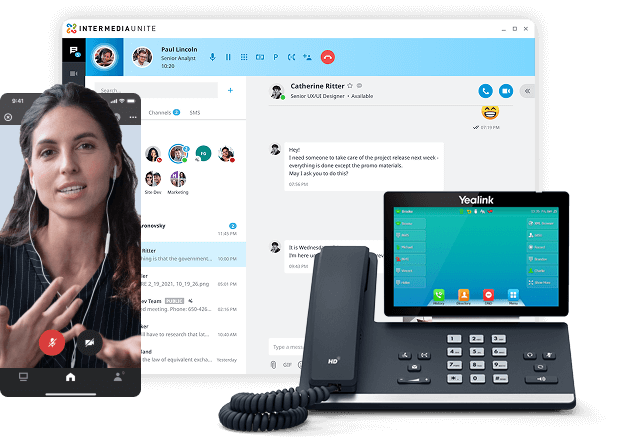
Intermedia Unite offers a unified communication platform with voice, video, chat, and collaboration tools, including healthcare compliance options. It provides reliable service for medical practices but lacks deep healthcare-specific functionality, suiting general communication needs.
Key Features
- HIPAA-compliant voice, video, and chat capabilities
- Call routing and voicemail management for efficient operations
- Mobile apps for on-the-go provider communication
- Basic integration with business and select healthcare systems
- Reliable uptime and call quality for consistent performance
Pros
- Ensures reliable service with good call quality and uptime.
- Flexible deployment options suit various practice sizes.
- Mobile apps support provider mobility.
- The platform’s compliance features meet basic healthcare needs.
Cons
- Limited healthcare-specific features and patient engagement tools require additional solutions.
- Automation capabilities are minimal, impacting efficiency for complex medical workflows.
Integrations
Standard integrations with business tools like Microsoft 365, with limited connectivity to healthcare systems like select EHR platforms.
Customer Support Channels
Business-focused support via phone and email, with responsive assistance during standard hours.
Customer Reviews & Ratings
Podiatry practice manager: “Call quality and uptime are consistent, and the mobile app works well for on-call doctors.”
Dr. Lisa Thompson, urgent care: “Solid communication features, but we needed extra software for patient engagement.”
Pricing
Pricing starts at $20/user/month, with standard communication features and optional healthcare compliance add-ons.
7. Phone.com

Overview
Phone.com provides a straightforward VoIP solution for small to medium healthcare practices, offering basic communication features with compliance add-ons. Its simplicity and affordability make it accessible, though it lacks advanced healthcare functionality.
Key Features
- Basic VoIP with call routing, voicemail, and texting
- HIPAA-compliant add-ons for secure communication
- Mobile apps for provider accessibility
- Simple setup for small practices
- Basic call analytics for operational insights
Pros
- Easy to implement and budget-friendly, ideal for small practices.
- Its straightforward interface requires minimal training.
- Compliance add-ons meet basic HIPAA requirements for secure communication.
Cons
- Limited healthcare-specific features and automation tools.
- Advanced patient engagement and EHR integration capabilities are minimal, requiring supplementary systems.
Integrations
Basic integrations with general business tools and limited connectivity to healthcare systems like select EHRs.
Customer Support Channels
Standard support via phone and email, with reliable assistance for setup and troubleshooting.
Customer Reviews & Ratings
Small family practice owner: “Budget-friendly and simple to set up, but we outgrew its basic features quickly.”
Dr. Mark Stevens, chiropractic clinic: “Good for basic calls, but lacks modern patient engagement tools.”
Pricing
Pricing starts at $12/user/month, with HIPAA-compliant add-ons available for additional fees.
8. KrispCall

Overview
KrispCall offers a cloud-based VoIP solution with strong international calling capabilities, suitable for general business use. While it includes basic compliance features, its healthcare-specific functionality is minimal, targeting practices with diverse patient bases.
Key Features
- International calling with competitive rates
- Basic call routing, voicemail, and mobile apps
- Limited HIPAA-compliant communication options
- Basic analytics for call performance
- Multi-device support for provider flexibility
Pros
- International calling is cost-effective, ideal for practices with diverse patients.
- Its pricing is competitive.
- Basic VoIP functionality is reliable for small practices with minimal compliance needs.
Cons
- Healthcare-specific features and automation are very limited.
- HIPAA compliance is basic, requiring additional tools for robust patient engagement and security.
Integrations
Basic business integrations with CRMs, with minimal healthcare-specific connectivity to EHR systems.
Customer Support Channels
Standard support via phone and email, with assistance for setup and technical issues.
Customer Reviews & Ratings
Small clinic administrator: “International calling works well for our diverse patients, but lacks healthcare automation.”
Dr. Patricia Wong, family practice: “Adequate for basic needs, but we needed extra tools for compliance and engagement.”
Pricing
Pricing starts at $10/user/month, with international calling features and basic compliance add-ons.
9. Acefone
Overview
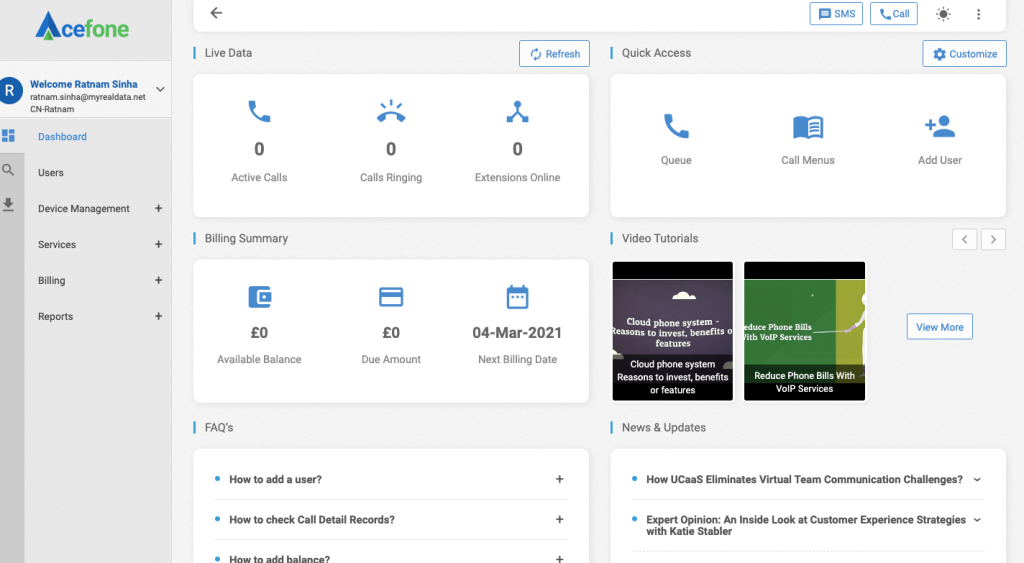
Acefone provides cloud-based VoIP services with a focus on international connectivity, offering basic communication tools for healthcare practices. While affordable, its healthcare-specific features are minimal, suiting general business needs over specialized medical workflows.
Key Features
- International calling with competitive rates
- Basic call routing, voicemail, and mobile apps
- Limited HIPAA-compliant communication options
- Simple call analytics for operational insights
- Multi-device support for provider accessibility
Pros
- Offers cost-effective international calling and reliable basic VoIP functionality.
- Its affordability and ease of use make it suitable for small practices with straightforward communication needs.
Cons
- Minimal healthcare-specific features and automation capabilities.
- Limited HIPAA compliance requires additional tools for secure, complex medical workflows.
Integrations
Basic integrations with general business tools like CRMs, with minimal connectivity to healthcare systems like EHRs.
Customer Support Channels
Standard support via phone and email, with reliable assistance during business hours.
Customer Reviews & Ratings
Medical office manager: “Competitive international rates, but more suited for general business than healthcare.”
Dr. Kevin Martinez, small clinic: “Basic calling works fine, but we needed separate compliance solutions.”
Pricing
Pricing starts at $10/user/month, with basic VoIP features and optional compliance add-ons.
10. OpenPhone
Overview
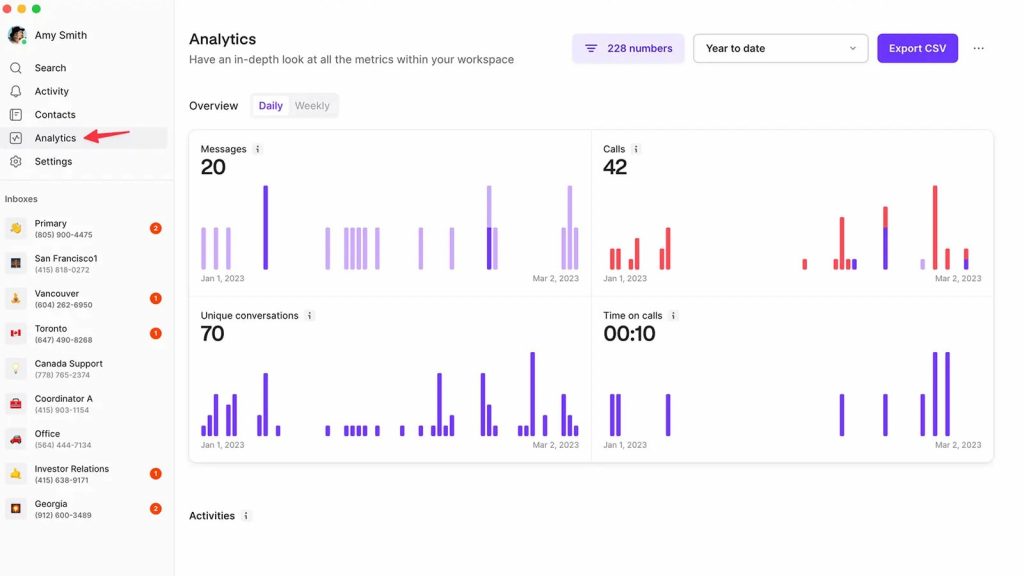
OpenPhone offers a modern, user-friendly VoIP system designed for small businesses, including healthcare practices. Its simplicity and transparent pricing make it ideal for startups, though it lacks advanced healthcare-specific features and compliance tools.
Key Features
- Simple call routing, voicemail, and texting capabilities
- Mobile apps with modern interface design
- Basic business communication features
- Limited HIPAA-compliant add-ons
- Basic analytics for call tracking
Pros
- Modern interface and easy setup are perfect for small practices.
- Transparent pricing and reliable basic functionality support quick adoption.
- Ideal for startups or practices with minimal needs.
Cons
- Limited healthcare-specific features and compliance capabilities.
- Advanced patient engagement and automation tools are absent, requiring additional solutions for complex workflows.
Integrations
Basic integrations with business tools like Slack and Google Workspace, with minimal healthcare-specific connectivity to EHR systems.
Customer Support Channels
Standard support via phone and email, with responsive assistance for setup and issues.
Customer Reviews & Ratings
Startup clinic founder: “Modern interface and easy setup were perfect for our new practice.”
Dr. Rachel Adams, wellness center: “Great for basic communication, but we needed more patient engagement features.”
Pricing
Pricing starts at $13/user/month, with transparent plans including basic VoIP and texting features.
Why choose Emitrr?
When evaluating VoIP solutions for your medical practice, Emitrr emerges as a standout choice that addresses the specific challenges and opportunities facing healthcare providers today. While many communication platforms claim to serve healthcare practices, Emitrr was built from the ground up with medical professionals in mind, and here’s why:
1. Smart AI Call Agent That Knows What to Do
Emitrr now offers a smart AI Call Agent that helps your front desk breathe easier. It knows how to route calls to the right place, keeps callers in a queue when things get busy, and transfers calls smoothly when needed. No more juggling phones or putting people on hold forever. With these AI-driven features, your team stays focused on patients, while the system handles the chaos.
2. Healthcare-Focused Design That Makes a Difference
Emitrr has been grounded on a strong command of the medical practice, where its architecture was not an afterthought regarding healthcare features being tacked on to a general business communication service. Each of their features plays a certain role in how health care is offered, including how patient information is presented at the time of a call to the follow-ups that can be done by the programs and aid in the stability of care. The platform acknowledges the fact that ordinary business communication is not the same with healthcare communication as such.
3. Comprehensive HIPAA Compliance Built Into Every Feature
All voice communications are all end to end encrypted employing the best security protocols in the industry. Text and voice mail communications as well as even system messages are guarded just as important as the information on patient health. Business Associate Agreements are already available as a normal feature of the platform and have not been developed as a pricey add-on. Such adherence to compliance also applies to the fullness of audit trails, data storage security and frequent security checks that guarantee the continued security of patient data.
4. Patient-Centric Features That Drive Results
Emitrr’s patient engagement capabilities transform routine communications into opportunities for improved care and practice growth. The two-way texting functionality enables natural, convenient communication between patients and practice staff, supporting everything from appointment confirmations to post-visit follow-ups.
The missed-call text-back feature ensures that no patient inquiry goes unanswered, automatically reaching out to callers who don’t connect with a live person. This capability significantly improves patient satisfaction while reducing the administrative burden on staff who would otherwise need to manually return calls.
Automated appointment reminders go beyond simple notifications, offering patients convenient options to confirm, reschedule, or cancel appointments directly through text responses. This automation dramatically reduces no-show rates while freeing staff to focus on more valuable patient interaction activities.
5. Exceptional Ease of Use That Minimizes Disruption
Healthcare staff are already managing complex workflows and multiple systems throughout their workday. Emitrr’s intuitive interface design ensures that adopting the platform enhances rather than complicates daily operations. The dashboard presents information in familiar healthcare contexts, making the learning curve minimal for medical professionals.
Training requirements are significantly reduced compared to generic VoIP systems because the interface reflects healthcare workflows rather than generic business processes. Staff can become productive with the system quickly, minimizing the disruption that often accompanies technology implementations in busy medical practices.
Ensure every caller feels heard. Download professional doctor voicemail greetings.
Frequently Asked Questions
Voice over Internet Protocol (VoIP) is a technology that enables voice communications over internet connections rather than traditional phone lines. For doctors, VoIP is important because it offers significant cost savings, enhanced mobility, HIPAA-compliant security features, and integration capabilities with healthcare software systems.
HIPAA compliance in VoIP software involves multiple layers of protection to ensure patient health information remains secure during all communications. Compliant VoIP systems use end-to-end encryption for voice calls, text messages, and voicemails, ensuring that even if data is intercepted, it cannot be read by unauthorized parties. Most of the VoIP phone systems for the healthcare industry increasingly support such integrations.
Yes, most modern VoIP systems in the landscape designed for healthcare can integrate with existing medical software including Electronic Health Records (EHR) systems, practice management platforms, and scheduling tools. These integrations can provide valuable features like click-to-dial functionality directly from patient records, automatic call logging that updates patient files, and screen pops that display relevant patient information when calls are received.
Small medical practices should prioritize several key factors when selecting specialized VoIP hospital phone systems. First, ensure the system offers comprehensive HIPAA compliance features including encryption, audit trails, and Business Associate Agreements without requiring expensive upgrades. Look for intuitive, easy-to-use interfaces that minimize training requirements for busy staff.
While some free medical phone service VoIP options exist, they are generally not suitable for medical practices due to significant limitations in security, compliance, and feature availability. Free VoIP services typically cannot provide the HIPAA compliance features that healthcare practices required by law, including proper encryption, Business Associate Agreements, and secure data handling practices.
Conclusion
When evaluating your options, remember that the cheapest solution is rarely the best value for healthcare practices. The unique requirements of medical practice communication—from compliance needs to patient engagement opportunities—demand solutions designed specifically for healthcare environments. The cost of non-compliance or patient dissatisfaction far outweighs any potential savings from generic communication platforms.
As you move forward with VoIP evaluation and implementation, start by conducting a thorough assessment of your practice’s specific communication needs. Consider your call volumes, staff structure, integration requirements, and growth plans. This assessment will guide your evaluation process and help ensure you choose a solution that truly fits your practice.
Don’t skip the trial process. Most reputable VoIP providers offer free trials or demonstrations that allow you to test the system with your actual workflows and use cases. Involve key staff members in this trial process to gather comprehensive feedback about usability, feature effectiveness, and overall fit with your practice operations.
The investment you make in communication technology today will impact your practice operations, patient satisfaction, and competitive position for years to come. Choose wisely, prioritize healthcare-specific features and compliance, and select a partner who understands the unique challenges and opportunities facing medical practices in today’s healthcare environment.