
Introduction
If you work in healthcare, you already know how much time goes into documentation. From charting SOAP notes to updating EHRs, the paperwork never really ends.
According to the 2024 Medscape Physician Burnout & Depression Report, over 60% of physicians say too many bureaucratic tasks, especially documentation, are a leading cause of burnout. This means doctors today spend more hours on screens than with patients. That’s not just tiring, it’s unsustainable.
That’s where AI medical transcription software is making a difference.
Instead of typing during or after appointments, providers can now use tools that listen in, capture the conversation, and instantly turn it into structured clinical notes. The result? Less time on documentation, fewer after-hours logins, and more focus on patient care.
If you are looking for an AI software for medical transcription, then you must read this blog. You will get a curated list of 10 reliable AI transcription tools, so that you can find the best one for your needs.
Let’s dive in.
What is an AI Medical Transcription Software?
AI medical transcription software is an advanced technology that automatically converts spoken words into written AI clinical documentation. It listens to patient-provider conversations, understands the medical context, and generates structured notes that can be added directly to an EHR.
This isn’t the same as old-school medical dictation software tools.
Traditional medical dictation requires a provider to record their notes after a visit, then either type them up later or send them to a transcriptionist. It’s time-consuming, often manual, and can create delays in documentation.
AI tools take a different approach. They don’t just capture what’s said; they process it in real time, identify key medical terms, and organize the content into formats like SOAP, H&P, or discharge summaries. Some even work passively during appointments, requiring no voice commands or prompts.
The result: notes are ready faster, accuracy improves, and providers can move through their day without constantly stopping to type.
You must also take a look at this video to find out top AI tools that are changing the landscape of healthcare:
What Features Should You Look for in AI Medical Transcription Software?
Not every AI transcription tool is built the same. Some are simple note recorders, while others are full-fledged assistants that help reduce the load at every step of the clinical workflow.
Here are the features that make the biggest difference:
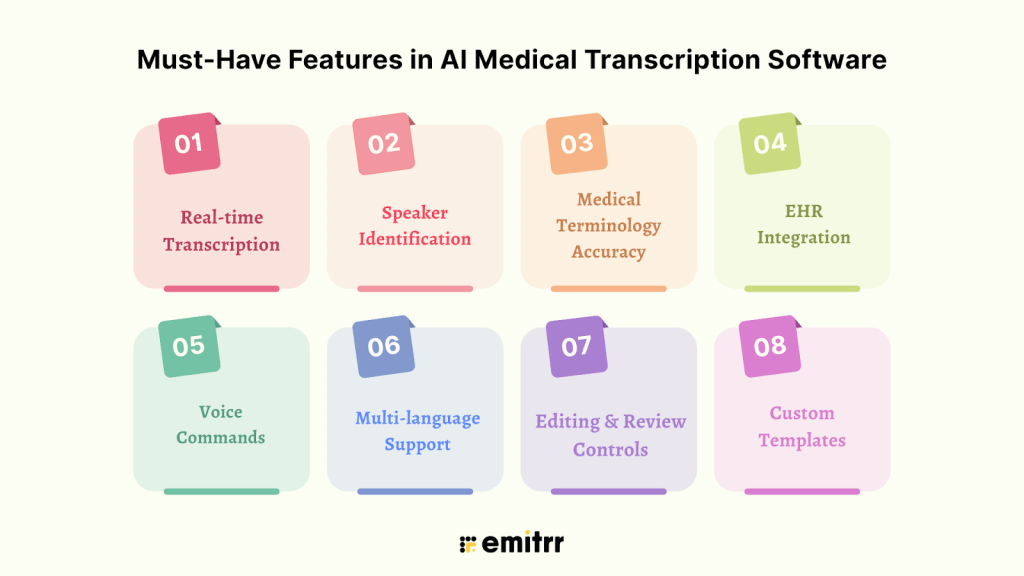
Real-time AI Medical Transcription
The ability to transcribe speech into text instantly is one of the biggest advantages of AI-powered tools. Real-time transcription helps you complete notes during or right after a visit, so you’re not catching up at the end of the day. This feature is especially valuable for high-volume clinics, where even a 5-minute delay per chart adds up quickly. Some tools even generate summaries as the conversation happens, helping reduce lag between visits.
Speaker Identification
When both provider and patient are speaking, it’s critical that the system can tell who said what. Good medical transcribing software uses voice models to distinguish speakers and tag them accordingly. This keeps conversations clear, especially during follow-ups or when more than two people are involved (such as a nurse, translator, or caregiver). Without this, you’d have to manually edit the transcript, defeating the point of automation.
Medical Terminology Accuracy
Clinical conversations are filled with complex terminology: medication names, abbreviations, anatomical terms, and procedure codes. A generic voice tool can miss or misinterpret these. High-quality AI transcription software is trained specifically on medical data, allowing it to correctly identify terms like “metoprolol,” “CABG,” or “HbA1c” without needing corrections later. The better the model, the less cleanup you’ll have to do.
EHR Integration
An isolated tool, even if accurate, isn’t much help if you have to copy and paste everything. The most useful medical transcribing software integrate directly with your electronic health record (EHR) system. This allows notes to flow into the correct sections, like history, physical exam, assessment, and plan, without extra steps. Some even sync with scheduling systems or allow note insertion using voice commands.
Voice Commands
Some tools require active commands to transcribe, while others work passively in the background. Ambient transcription tools “listen” during the patient visit and automatically generate a note without you needing to interact. This can feel more natural and requires no disruption to your workflow. Medical dictation software for doctors that support voice commands allow you to format notes, insert headings, or skip sections just by speaking.
Multi-language Support
In clinics where patients speak multiple languages or providers speak with strong accents, basic transcription software often struggles. A good AI medical transcribing software should be able to recognize speech accurately regardless of accent, and ideally support other spoken languages as well. This ensures that nothing is lost in translation and improves access for more diverse populations.
Editing and Review Controls
Even the most advanced AI will occasionally mishear a word or phrase. That’s why built-in editing and review options are essential in a medical transcribing software. These let you proofread and revise the transcript before finalizing it. Look for tools that highlight areas of uncertainty, suggest edits, and allow quick adjustments without forcing you to retype entire sections. Time-saving features like auto-corrections and learning from past edits can also make a big difference.
Custom Templates
Every provider documents a little differently. Some follow strict SOAP formatting. Others use problem-oriented notes or narrative summaries. The best AI medical transcription platforms let you customize output templates, so you can organize information the way you prefer. This not only saves time but also keeps your documentation consistent and easier to code or bill against.

Security & Compliance Requirements for AI Medical Transcription Platform
When you’re handling sensitive patient data, privacy isn’t optional; it’s a legal and ethical responsibility. Any AI medical transcription app you use must meet strict security standards to protect patient information and keep your practice compliant with industry regulations.
Here are the key compliance and security features to look for:
HIPAA Compliance
HIPAA compliance is non-negotiable. The Health Insurance Portability and Accountability Act outlines how Protected Health Information (PHI) must be handled, stored, and transmitted. An AI medical transcription app or tool must follow these rules to legally process patient conversations.
Look for tools that offer a Business Associate Agreement (BAA) and follow strict guidelines on data access, storage, breach response, and audit logs. If a tool doesn’t explicitly state HIPAA compliance, it’s best to steer clear.
GDPR
For clinics or companies operating in or serving patients within the European Union, GDPR sets the standard for data privacy. It gives individuals control over how their data is used and stored. AI transcription software that claims GDPR compliance must have clear policies around consent, data portability, the right to be forgotten, and lawful processing of personal information.
Even U.S.-based practices working with EU patients remotely may be impacted, so it’s smart to check if your software vendor aligns with these rules.
SOC 2 Certification
SOC 2 isn’t healthcare-specific, but it’s a widely accepted benchmark for cloud-based software security. Developed by the American Institute of CPAs, this certification evaluates how a vendor manages data in five key areas: security, availability, processing integrity, confidentiality, and privacy.
When a transcription provider is SOC 2 certified, it means their internal systems and data management practices have been independently audited. It’s one more layer of trust, especially important if your notes are stored in the cloud.
Data Encryption at Rest and in Transit
Encryption is the backbone of data security. “At rest” means the data stored on servers is encrypted. “In transit” means any information sent between devices, such as from your tablet to the cloud, is also protected. A good AI transcription tool will use strong encryption protocols (like AES-256) in both cases to ensure that data can’t be intercepted or accessed without authorization.
This is critical for preventing breaches, especially if you’re using the tool across multiple devices or locations.
Audit Trails and Access Control
You should be able to see who accessed what data, when, and from where. Audit trails log this information automatically, making it easier to track activity, spot suspicious behavior, and stay compliant during audits. Alongside that, role-based access control (RBAC) ensures that only authorized users can view or edit certain records.
This level of control is particularly important in group practices, where multiple people interact with the same patient data but don’t all need the same access.
Integrations Required for AI Medical Transcription Software
Below are the most essential integrations to consider:
EHR/EMR Systems
Integration with your Electronic Health Record (EHR) or Electronic Medical Record (EMR) system is the most critical connection to have. Whether you’re using Epic, athenahealth, Cerner, DrChrono, or Practice Fusion, your AI medical transcription app should push notes directly into patient charts without manual copy-paste.
Without this link, even the best transcription software becomes a waste, creating extra steps instead of saving time.
Practice Management Software
Many practices use dedicated software to manage appointments, patient intake, billing, and follow-ups. When transcription software can integrate with these systems, it keeps documentation aligned with scheduling, billing codes, and patient communications. This reduces errors and ensures smooth handoffs between the front desk, providers, and billing teams.
CRM
For organizations that rely on patient relationship management (PRM or CRM) platforms, especially in concierge care, telehealth, or multi-location practices, an integration here allows patient notes and interactions to sync in one place. This helps ensure that your team has a full view of patient history, preferences, and care timelines, even outside of clinical visits.
Cloud Storage Platforms
Some transcription platforms let you export or archive transcripts for backup or further processing. Integration with cloud storage tools like Google Drive, Dropbox, or OneDrive can make it easy to organize and share notes securely, especially in group practices or research settings.
This also helps avoid data silos and gives teams quick access without relying solely on EHRs for everything.
Calendar & Scheduling Tools
If your AI transcription tool can connect with tools like Google Calendar, Outlook, or a scheduling app tied to your practice software, it can prepare charts ahead of time or automatically link notes to appointments. Some tools even label transcripts based on appointment type or patient ID, making it easier to track what’s been documented and what hasn’t.
Team Communication Tools
For larger clinics or cross-functional teams, integration with messaging platforms like Slack or Microsoft Teams can help keep everyone in the loop. Notes, reminders, or alerts can be routed to the right people instantly, without logging into multiple systems.
This can be especially useful in post-visit workflows, where transcription notes need to be reviewed, approved, or handed off for billing or follow-up.
How is AI Medical Transcription Software Beneficial?
Now, before we understand how to find the best software, let’s understand the real-time benefits of having an AI medical documentation software:
Cuts Documentation Time by 70–80%
One of the most immediate gains is the time saved. By turning conversations into clinical notes automatically, AI transcription tools remove the need to type or dictate afterward. Providers who previously spent two hours each evening catching up on charts can now finish most documentation during or right after visits. Some platforms even offer ambient scribing, generating structured notes without requiring any manual prompts.
Frees Up Provider Time for Patient Care
When you’re not buried in documentation, it shows. More time opens up for focused exams, stronger patient communication, or even a moment to breathe between appointments. This is especially valuable in high-volume practices, where every minute counts. Freeing up just 15 minutes per day adds up to over an hour per week, time that can go back into patient care or personal well-being.
Reduces Burnout and After-Hours Charting
After-hours charting is a leading cause of physician exhaustion. AI tools cut down the need to log back in after work. AI charting helps generate notes in real time or shortly after visits, so most providers finish documentation before the end of the day. This helps reduce emotional fatigue, improves work-life balance, and lowers the risk of long-term burnout.
Medical Transcriptionist Services Improves the Accuracy of Notes
Unlike manual transcription, which is prone to typos or missed details, AI transcription systems are trained on clinical language and can pick up on terminology, medication names, and abbreviations accurately. They also eliminate the errors that come from memory lapses when documenting long after the visit.
Some platforms even allow real-time corrections or learning from provider feedback to improve future accuracy.
Speeds Up Billing and Coding with Structured Notes
AI tools that generate notes using templates like SOAP or H&P make it easier for billing teams to extract the right information. Well-structured AI medical notes reduce back-and-forth between providers and coders, prevent billing delays, and help support accurate coding.
This means faster claims submission, fewer denials, and more predictable cash flow.
Enhances Patient Satisfaction via Faster Follow-Ups
When notes are ready right after a visit, providers can act on them faster, whether that’s ordering labs, sending prescriptions, or following up with care instructions. Patients appreciate timely communication and faster turnaround. A smoother documentation process behind the scenes often translates to a more seamless experience for the patient.
How to Choose the Right AI Medical Transcription Platform?
With so many options available, it’s easy to get overwhelmed. The right transcription tool isn’t necessarily the most advanced; it’s the one that fits smoothly into your day-to-day practice. Here are seven key questions to help you find the best medical transcription software:
What’s your average patient volume?
If you’re seeing 30+ patients a day, you’ll need a system that can keep up without lagging. High-volume clinics often benefit from real-time or ambient tools that eliminate end-of-day backlogs. For smaller practices, a simpler solution that supports batch processing or voice-command notes might be enough.
Does it support your specialty’s vocabulary?
A tool built for general practice might not understand the language used in specialties like oncology, orthopedics, or behavioral health. Look for platforms trained on your field’s terminology so that the notes don’t need constant corrections. Some even let you customize vocabularies or add frequently used phrases.
Is it real-time or delayed transcription?
Some software offers real-time transcription, meaning your notes are ready before the visit ends. Others process recordings after the fact, which might work if you’re okay reviewing notes later. Consider your workflow preferences, whether you like to finish documentation during visits or batch it afterward.
What are the privacy guarantees?
Make sure the software meets required privacy standards. For U.S. practices, HIPAA compliance is essential. For international providers, GDPR may apply. Look for features like end-to-end encryption, data residency options, and a Business Associate Agreement (BAA) if applicable.
How easy is the EHR integration with the medical transcribe?
The tool should talk to your EHR, not just export a text file. A good integration pushes the note directly into the patient chart, already organized. Ask whether the tool works with your current system (Epic, Cerner, athenahealth, etc.) and whether it requires IT setup or works out-of-the-box.
Is pricing flat or usage-based?
Some tools charge per minute, per encounter, or per user. Others offer flat monthly rates. For high-volume practices, flat-rate pricing is often more predictable. For occasional use, pay-as-you-go might make more sense. Be sure to check if there are extra costs for integrations, setup, or support.
Is there responsive customer support?
When something goes wrong or you just need help, it matters how quickly someone responds. Look for vendors with a dedicated support team, clear onboarding, and access to live help (not just a chatbot). Reviews from other healthcare providers can give you a sense of how well a company handles support.
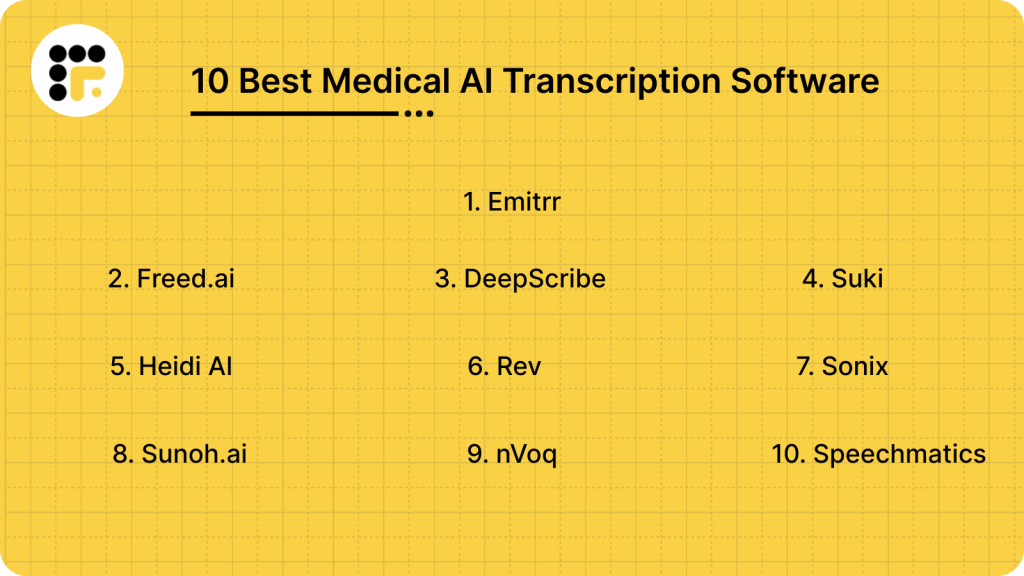
Best Medical AI Transcription Software
1. Emitrr: Best Medical Transcription Software
What is Emitrr?
Emitrr is the best medical transcription software and an all-in-one AI tool. The platform is designed specifically for healthcare practices, combining ambient medical transcription, patient communication, and workflow automation in one system. Unlike most tools that only handle documentation, Emitrr covers the entire post-visit experience, transcribing patient conversations, structuring notes, syncing with EHRs, and even triggering follow-up messages or reminders.
Built for busy clinics and small-to-mid-sized healthcare teams, Emitrr helps reduce charting time, eliminate after-hours work, and improve patient follow-through, without needing to juggle multiple apps. It’s HIPAA-compliant and designed for real-time use on both desktop and mobile, making it accessible across clinical settings.
What sets Emitrr apart is its ability to go beyond documentation. It automates follow-up actions, integrates directly with your existing systems, and provides round-the-clock support so your team never feels stuck mid-workflow.
Emitrr Features
- Real-Time AI Transcription: Captures patient-provider conversations as they happen and instantly converts them into structured SOAP, H&P, or narrative notes, ready for review before the next visit.
- Customizable Note Templates: Choose or design documentation templates that match your workflow, by specialty, provider, or visit type. Consistency improves charting and billing accuracy.
- EHR-Friendly Export & Integration: Seamlessly integrates with major EHRs. Notes can be pushed directly into the system or exported in formats that fit your current workflow.
- Patient Follow-Up Automation: Automatically sends post-visit instructions, appointment reminders, or check-in texts, without requiring manual triggers from staff.
- Two-Way Texting & Communication Hub: Built-in patient communication system allows you to manage inbound/outbound texts, missed call responses, and review requests, all from one place.
- HIPAA-Compliant Infrastructure: Ensure end-to-end encryption, access control, and audit trails for full compliance with healthcare data regulations with this medical transcription service provider.
- Speaker Identification: Identifies and labels multiple speakers during an encounter (provider, patient, family member), keeping notes clear and accurate.
- Mobile & Desktop Accessibility: Use it on your tablet, phone, or desktop. Emitrr syncs in real time, so you’re never tied to one device.
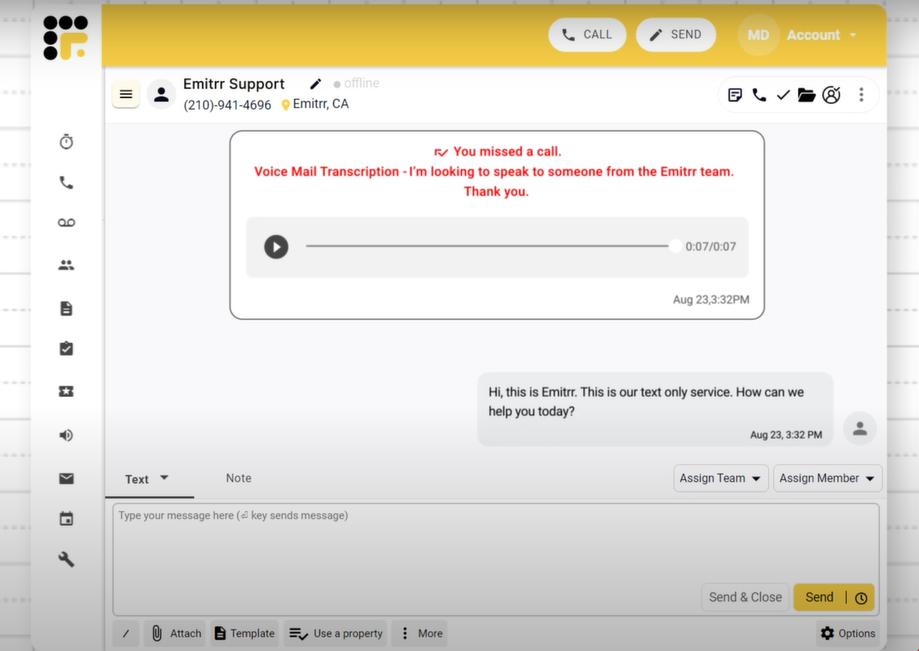
- Call Transcription & Voicemail Capture: Automatically transcribe missed calls and voicemails with this medical transcription service provider and turn them into actionable messages for follow-up or patient records.
Take a look at how Emitrr’s voicemail transcription feature works:
- Live Chat & Website Integration: Allows practices to capture patient questions directly from the website and convert them into appointments or callbacks.
- Intelligent Reminders & Smart Queues: Automatically prioritizes follow-up messages based on patient needs, upcoming appointments, or care gaps.
- Multi-Location & Team Support: Supports collaboration across teams and locations, ideal for growing practices or multi-specialty clinics.
- Speech Recognition: Learns from clinician edits and adapts over time, improving accuracy and context handling.
Emitrr Pros
- All-in-One Workflow Support: Emitrr doesn’t just transcribe; it manages AI medical documentation, patient communication, and follow-ups in one streamlined system. This reduces tool overload and simplifies staff training.
- Real-Time Accuracy That Saves Hours: With transcription accuracy above 95%, most notes are ready with minimal to no edits. This helps clinicians complete charts between visits, cutting after-hours work significantly.
- Fully Customizable for Any Specialty: Templates, note formats, and even terminology can be adjusted to match your specific needs using this medical transcription service provider, whether you’re in family medicine, pediatrics, behavioral health, or a niche specialty.
- Hands-Free, Ambient Experience: Providers don’t have to issue voice commands or click anything. Emitrr listens passively and builds the note as the visit unfolds.
- Built-In Patient Communication: No need for separate texting or reminder apps. Emitrr includes two-way texting, auto-responses to missed calls, and review requests, all from the same dashboard.
- No Learning Curve for Staff: This medical transcription service provider offers an intuitive and clean dashboard mirroring existing workflows. Most teams are fully onboarded and productive within days.
- Designed for Multi-Provider, Multi-Location Practices: Works seamlessly across providers, locations, and specialties, allowing for centralized oversight and decentralized use.
- Fast Note Finalization and Review Tools: Providers can review, edit, and finalize notes in minutes, keeping the documentation process moving without delay.
- Responsive, 24/7 Customer Support: Support is available anytime you need it, including during clinic hours, after-hours, and weekends. Real people, not chatbots.
- No EHR Disruption: You don’t have to switch systems. Emitrr fits into your current tech stack without requiring complex integrations or replacements.
- HIPAA Compliant Transcription Software: Emitrr is a HIPAA compliant transcription software, so healthcare professionals can use it for maintaining confidentiality.
Emitrr Cons
Some advanced features are still being rolled out in phases.
Emitrr Pricing
Emitrr offers custom pricing based on your business needs, you can get in touch with the support team for more information.
Emitrr Integrations
Emitrr offers 500+ integrations across industries, including dental, real estate, recruiting, and more, with platforms such as:
Emitrr Customer Support Channels
- Live chat: Chat with Emitrr’s live representatives
- Phone: Call Emitrr at +1 (210) 941-4696
- Email: Send email to Emitrr’s support team at support@emitrr.com
- Knowledge base
- FAQs/forum
- SMS
Emitrr Rating
Emitrr has a solid 4.8-star rating on Capterra.
Emitrr Reviews
“Big Emitrr Fan! Dedicated team of professionals; always willing to go above and beyond to help customers. Great product and looking forward to all their updates and improvements they are rolling out.”
“I’ve tried 4 different platforms, Emitrr has worked the best for me. The support staff has been very receptive and efficient discussing my requests and needs.”
(Source: Capterra)
2. Freed.ai
What is Freed.ai?
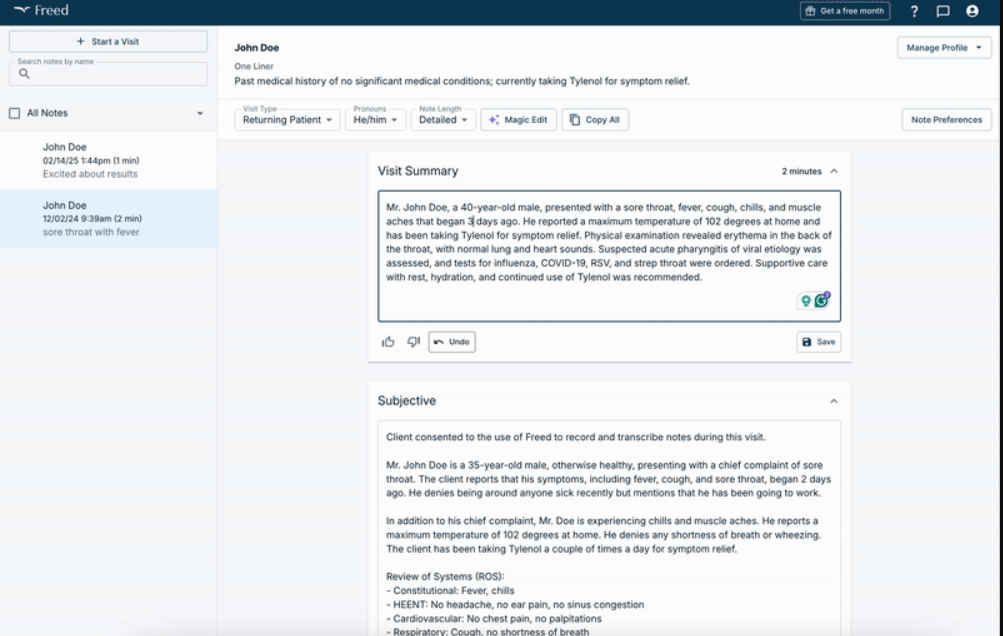
Freed.ai is an AI medical scribe built to simplify clinical documentation by automatically converting doctor-patient conversations into structured SOAP notes. It runs in the background during visits, capturing real-time audio and generating complete, review-ready notes within minutes.
This HIPAA compliant transcription software is designed for ease of use, with no voice commands or manual prompts required. It’s also cloud-based and accessible via desktop or mobile. That said, freed.ai does come with a few limitations. It currently doesn’t offer direct EHR integration, meaning users must copy and paste notes manually into their medical record system. Additionally, some providers have noted minor inaccuracies in noisy environments, and the platform’s in-app editing tools are still developing.
Freed.ai Features
- Automatic transcription: Captures visit audio and instantly produces structured notes.
- Medical terminology database: Tailors transcription to medical terminology for fields like family medicine, psychiatry, pediatrics, and more.
- Speech recognition: Learns from clinician edits and adapts over time, improving accuracy and context handling.
Freed.ai Pros
- Highly accurate & fast: Claimed to reduce documentation time by up to 80–90%, with clean, SOAP-ready notes.
- User-friendly interface: Clean design with minimal setup, avoids medical dictation complexity.
- HIPAA-compliant & secure: This AI medical transcription platform meets data protection standards and supports real-time note export.
Freed.ai Cons
- Limited EHR integration: Notes must be manually copied or moved until full integration rolls out.
- Performance in noisy settings: Accuracy may drop in crowded or multi-speaker environments.
- Editing constraints: Fewer in-app editing tools, requiring use of external systems for revisions.
Freed.ai Pricing
The pricing starts at $99/month.
3. DeepScribe
What is DeepScribe?
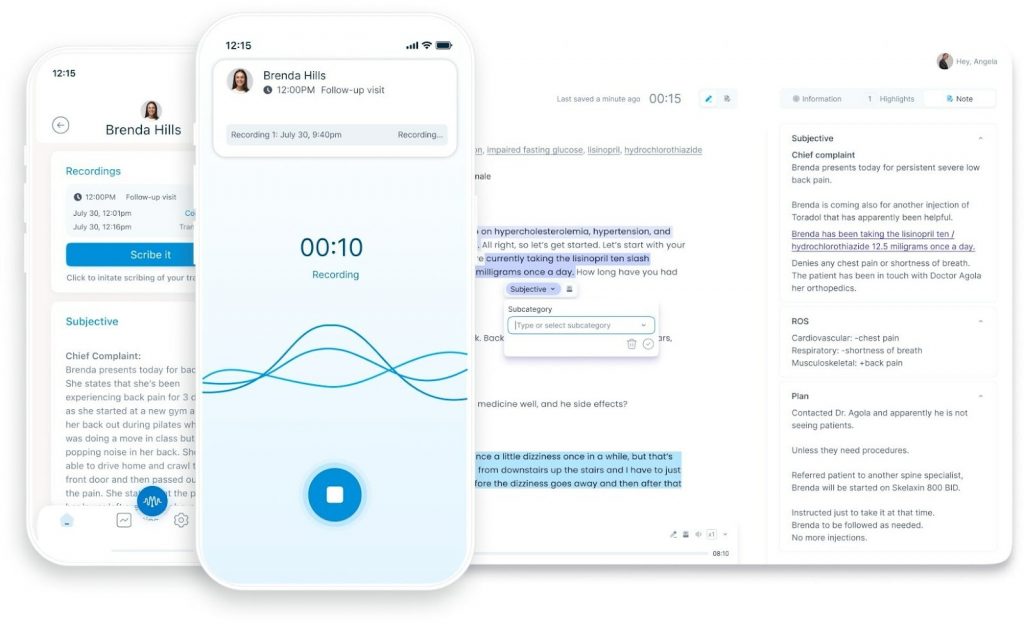
DeepScribe is an AI-powered ambient medical scribe designed to reduce the time clinicians spend on documentation. It passively listens to conversations during patient visits and generates structured SOAP notes, which can be reviewed and inserted directly into the EHR. It is built with HIPAA compliance, offers integration with major EHRs, and supports a wide range of medical specialties from family medicine to behavioral health.
This medical transcription platform also continuously learns from user interactions, which helps improve note quality over time. However, DeepScribe isn’t without drawbacks. Initial onboarding can take a few weeks, depending on the clinic’s needs. Some users have also reported that turnaround time can vary, especially when edits are required. And while real-time scribing is available, some notes may still require review before finalization, which adds a step for busy providers.
DeepScribe Features
- Ambient AI scribing: Automatically listens and generates notes without requiring voice commands or manual input during visits.
- EHR integration: Works with major EHR platforms, pushing finalized notes directly into patient records.
- Specialty-specific language models: Recognizes terminology across various medical fields, reducing manual corrections.
DeepScribe Pros
- Reduces documentation time: This medical transcription platform helps providers finish notes during the workday, often before the next patient.
- Hands-free workflow: No need for typing or dictating; the AI runs in the background.
- Improves work-life balance: Cuts down on after-hours charting and late-night EHR sessions.
DeepScribe Cons
- Onboarding can take time: Implementation and training of this medical transcribe tool may require 2–4 weeks depending on setup.
- Inconsistent turnaround: Some notes may need manual review, delaying finalization.
- Not fully real-time in all cases: Certain encounters might not generate notes instantly, requiring follow-up verification.
DeepScribe Pricing
- Contact support
DeepScribe Integrations
- athenaOne
- DrChrono
- AdvancedMD EHR
- eClinicalWorks and more!
DeepScribe Customer Support Channels
- Email/Help Desk
- FAQs/Forum
- Chat
DeepScribe Rating
DeepScribe has a 4.6-star rating on Capterra.
DeepScribe Reviews
“I have had a great experience with deepscribe. They have very helpful staff.”
“Sometimes the AI does not transcribe complete notes and have to reprocess them. Cannot make corrections on the schedule if make mistake Cannot perform on mobile devices the full software function”
(Source: Capterra)
4. Suki
What is Suki?
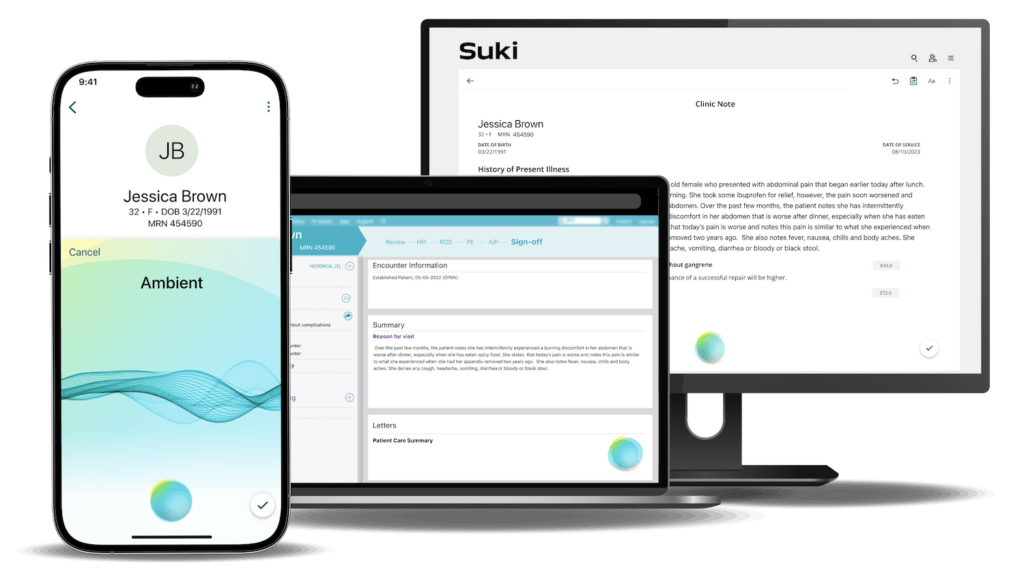
Suki is a voice-enabled AI assistant built for clinical documentation. Unlike passive ambient scribes, Suki requires voice interaction, providers speak their notes out loud, and Suki transcribes and structures them in real time. It supports SOAP note formatting, integrates with EHRs, and is designed for speed, mobility, and hands-free use.
This medical transcriptionist software is often used by solo providers and small practices who want more control over the documentation process without relying on full-time scribes or complex tech stacks. Its mobile app is especially useful for providers who chart on the go.
While Suki is an impressive medical voice recognition software, it’s not a fully ambient scribe. It requires spoken input, so it doesn’t automatically generate notes from conversations. This might be limiting for providers looking for a completely hands-off experience.
Suki Features
- Voice dictation & commands: Providers can dictate notes, search patient records, and issue voice commands for formatting.
- Real-time transcription: This medical transcriptionist software generates structured notes instantly as you speak, reducing typing time.
- EHR integration: This medical dictation software for doctors syncs with systems like Epic and Cerner to streamline documentation directly into patient charts.
Suki Pros
- Highly accurate voice recognition: This medical dictation software understands medical terminology across multiple specialties.
- Fast & responsive: Notes are created in seconds, helping reduce AI medical charting time per visit.
- Mobile-friendly: Fully functional on smartphones and tablets, ideal for providers who move between rooms or locations.
Suki Cons
- Requires active dictation: Unlike ambient scribes, this medical dictation software needs voice input, it doesn’t passively listen during visits.
- Limited automation: No background transcription or summarization of patient conversations.
- May require a learning curve: Users need to get comfortable speaking in a structured, note-friendly format for getting bestthe results with this medical transcribe.
Suki Pricing
- Contact support
Suki Integrations
- Athena
- Cerner
- Epic
- Meditech
Suki Customer Support Channels
- Email/Help Desk
5. Heidi AI
What is Heidi AI?
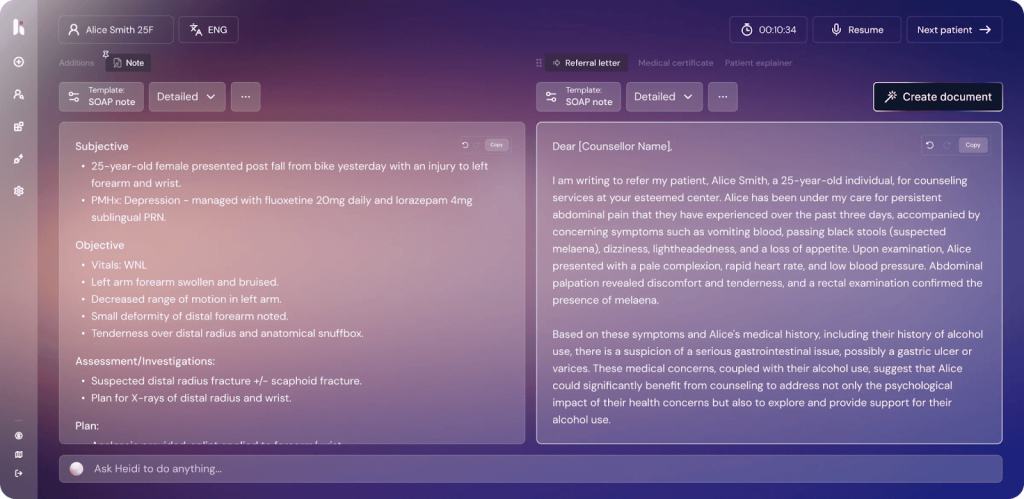
Heidi AI is an ambient AI medical scribe built to support primary care and behavioral health providers. It listens to patient-provider conversations during the visit and automatically creates structured AI clinical notes, without requiring voice commands or dictation. The goal is to reduce administrative burden, speed up documentation, and help clinicians close charts before the end of the day.
However, Heidi AI isn’t yet a fit for every specialty. Some users note that it performs best in straightforward, conversation-based visits and may miss complex inputs in multi-party or fast-paced settings. Editing tools are improving, but some workflows still require review and minor adjustments before finalizing notes.
Heidi AI Features
- Ambient clinical scribing: Automatically listens during patient visits and generates SOAP notes with no need for dictation or manual prompts.
- EHR-ready exports: Notes can be reviewed and inserted into most major EHRs, reducing manual data entry.
- Designed for primary care: Focused vocabulary and workflow support for general medicine, pediatrics, and behavioral health.
Heidi AI Pros
- Hands-free workflow: No voice commands needed.
- Reduces after-hours charting: This AI medical transcription platform helps clinicians finish notes before the day ends, improving work-life balance.
- Clean, structured output: Notes are well-organized and easy to edit or review before submission.
Heidi AI Cons
- Limited specialty support: May not fully capture terminology for complex specialties like cardiology or surgery.
- Requires clear audio: Accuracy can dip in noisy environments or when speakers overlap.
- EHR sync isn’t always automatic: In some setups, users must manually copy notes into their system.
Heidi AI Pricing
There are three pricing plans:
- Pro
- Together
- Enterprise
6. Rev
What is Rev?
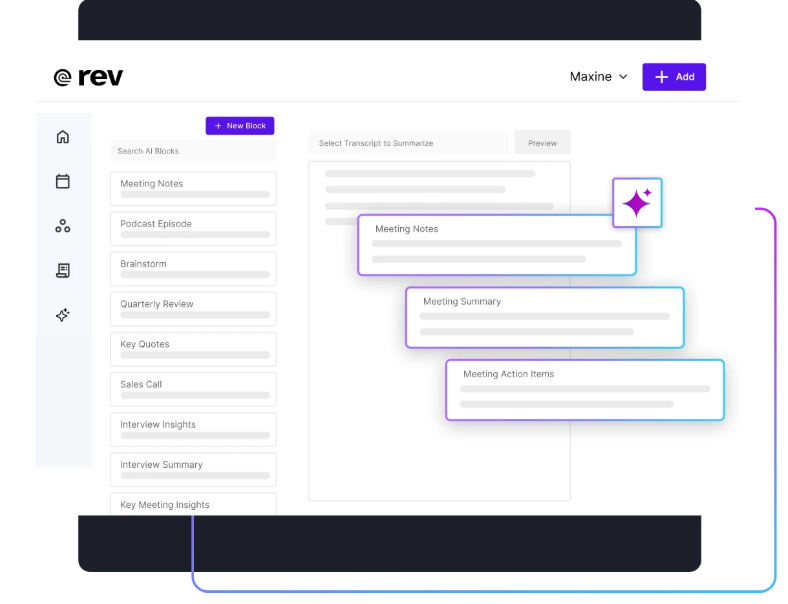
Rev is a popular software for medical transcription that offers both AI-powered and human transcription services. While not built exclusively for healthcare, Rev is often used by medical professionals who need accurate transcripts for consultations, interviews, or recorded dictation. However, it doesn’t create structured clinical notes or integrate with EHR systems out of the box.
Rev Features
- AI and human transcription options: Choose between fast, low-cost AI transcription or highly accurate human-generated transcripts.
- Multi-format upload support: Upload audio or video files in various formats via desktop or mobile.
- HIPAA compliance (available by request): Medical transcription with privacy protection for qualified users.
Rev Pros
- Fast turnaround: AI transcripts are available within minutes; human transcription usually within 12–24 hours.
- High accuracy: Human transcription delivers up to 99% accuracy for recorded notes or interviews.
- User-friendly interface: Easy upload, tracking, and download through web or app.
Rev Cons
- Not built for live clinical scribing: This software for medical transcription doesn’t work in real time or generate SOAP-formatted notes automatically.
- Manual EHR entry required: You’ll need to copy/paste or format transcripts yourself.
- HIPAA coverage requires special setup: Not all users automatically receive HIPAA-compliant services, you must request and qualify for it.
Rev Pricing
There are three pricing plans:
- Basic
- Pro
- Enterprise
Rev Customer Support Channels
- Email/Help Desk
- FAQs/Forum
- Knowledge Base
- Phone Support
Rev Rating
Rev has a 4.7-star rating on Capterra.
Rev Reviews
“Rev (Temi) is a great product if you don’t mind editing a little”
“Very good. We’ve used Rev forever it seems like. Very happy with the product and experience”
(Source: Capterra)
7. Sonix
What is Sonix?
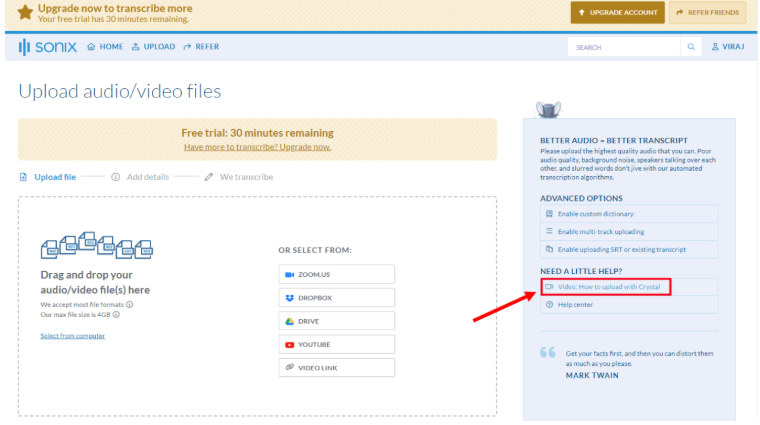
Sonix is an AI-driven transcription platform designed for fast, multi-language audio and video transcription. While it’s not built specifically for healthcare, many professionals use it for documentation, research, and note capture. Sonix stands out for its speed, clean interface, and broad language support, making it a flexible option for providers who need to transcribe patient interviews, voice memos, or consults across different languages.
That said, Sonix lacks healthcare-specific features like medical vocabulary support, SOAP note formatting, or EHR integration. It’s a general-purpose tool, best for supplemental documentation, not real-time scribing or clinical note generation.
Sonix Features
- Multi-language AI transcription: Supports over 40 languages and accents, with time-stamped transcripts and speaker labeling.
- In-browser transcript editor: Edit transcripts directly inside the platform with playback syncing.
- Audio & video upload options: Transcribe from MP3, MP4, Zoom recordings, or even YouTube links.
Sonix Pros
- Fast & accurate for general speech: Delivers transcripts within minutes, with high accuracy for clear recordings.
- Supports global use: Excellent for multilingual practices or clinics with non-English-speaking patients.
- Searchable transcripts: Quickly find keywords or phrases across entire audio libraries.
Sonix Cons
- Not built for medical use: May struggle with clinical terms, abbreviations, or specialty language.
- No EHR integration: Requires manual copy-paste if used in a healthcare setting.
- No HIPAA compliance by default: Not suitable for handling PHI unless special agreements are in place.
Sonix Pricing
There are three pricing plans:
- Standard
- Premium
- Enterprise
Sonix Customer Support Channels
- Email/Help Desk
- FAQs/Forum
- Knowledge Base
- Chat
Sonix Rating
Sonix has a 4.9-star rating on Capterra.
Sonix Reviews
“My overall experience is excellent, they are quite transparent when you’re making purchases and the easy of use is paramount”
“I wish there was a little more control over how SRT subtitles are exported, especially the ability to automatically split subtitles at the end of sentences. Also, it would be nice if Sonix could better identify speakers automatically.”
(Source: Capterra)
8. Sunoh.ai
What is Sunoh.ai?
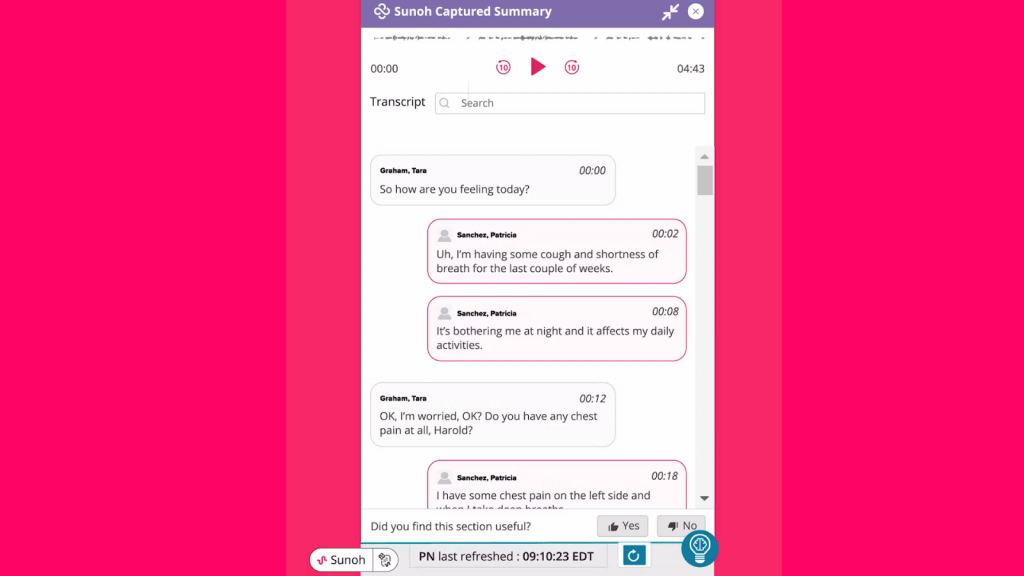
Sunoh.ai is an ambient AI medical scribe developed by eClinicalWorks, designed to help healthcare providers document patient encounters without manual typing or dictation. It listens to the conversation between the provider and patient during the visit and generates structured clinical notes in real time.
Unlike general-purpose transcription tools, Sunoh.ai is tailored specifically for healthcare and integrates directly with eClinicalWorks EHR. It’s built to reduce administrative burden, speed up documentation, and improve accuracy, especially for primary care, pediatrics, and urgent care workflows.
Though Sunoh.ai is well-suited for users of the eClinicalWorks ecosystem, it may not be the right fit for clinics using other EHR platforms.
Sunoh.ai Features
- Ambient clinical scribing: Captures natural conversations and converts them into ready-to-review SOAP notes.
- EHR integration: This AI medical scribe seamlessly syncs with eClinicalWorks, enabling direct note insertion.
- Multi-specialty support: Trained to handle terminology for family medicine, internal medicine, pediatrics, and more.
Sunoh.ai Pros
- Hands-free workflow: No need to dictate or type, just start the encounter and let the med scribe handle documentation.
- Designed for clinicians: Built specifically for the pace and language of medical visits.
- Native EHR integration: Eliminates the need to switch between tools or manually transfer notes.
Sunoh.ai Cons
- Locked to eClinicalWorks: Currently only works within the eClinicalWorks EHR system.
- Early in the market: As a newer tool, this med scribe still be evolving in terms of speed, editing features, or specialty depth.
Sunoh.ai Pricing
There are three pricing plans:
- Pro
- Business
- Custom
Sunoh.ai Integrations
- athenaOne
- Epic
- eClinicalWorks
Sunoh.ai Customer Support Channels
- Email/Help Desk
- FAQs/Forum
Sunoh.ai Rating
Sonix has a 4.1-star rating on Capterra.
Sunoh.ai Reviews
“better recently since updates the hpi notes are much better, the sunoh recording doesn’t time out or not give me a recording like it used to before where I wouild lose the information”
“It’s an excellent tool for all physicians and mid levels. Makes charting easier, more complete, more accurate, and helps us to actually listen to our patients instead of worrying about charting.”
(Source: Capterra)
9. nVoq
What is nVoq?
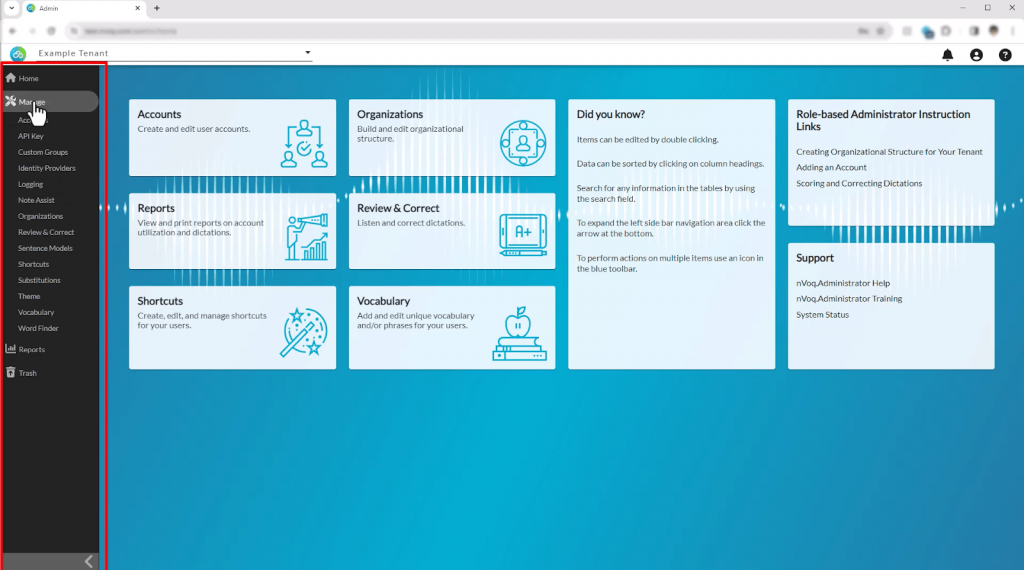
nVoq is a cloud-based medical speech recognition software designed specifically for healthcare professionals. It allows providers to dictate notes, commands, and documentation directly into their EHR or clinical systems using real-time voice-to-text technology. Unlike passive ambient scribes, nVoq requires active voice input, making it ideal for clinicians who prefer control over what gets documented.
The platform supports medical vocabularies across multiple specialties and is used in various care settings, including home health, hospice, long-term care, and outpatient clinics. It’s HIPAA-compliant and built to improve documentation efficiency without relying on full scribe workflows.
However, because nVoq is dictation-based, it doesn’t automatically generate notes from live conversations and may not suit those looking for a fully hands-free experience.
nVoq Features
- Real-time speech-to-text dictation: Converts spoken input directly into written notes within EHRs or other systems.
- Custom voice commands & shortcuts: Users can create templates, macros, and automations for common phrases or tasks.
- HIPAA-compliant cloud platform: Ensures data security while supporting voice documentation across multiple devices.
nVoq Pros
- Fast & accurate dictation: Delivers high recognition accuracy, especially with clinical vocabulary.
- Flexible use across care settings: Works well in mobile, remote, and facility-based environments.
- Customizable workflow tools: Voice shortcuts and templates help speed up repetitive documentation tasks.
nVoq Cons
- Not an ambient scribe: Requires active dictation; does not passively listen or summarize conversations.
- No native EHR integration: Integration depends on system configuration; often used via direct text input or overlays.
- Learning curve for shortcuts: New users may need time to adapt to voice commands and personalization tools.
nVoq Pricing
- Contact support
10. Speechmatics
What is Speechmatics?
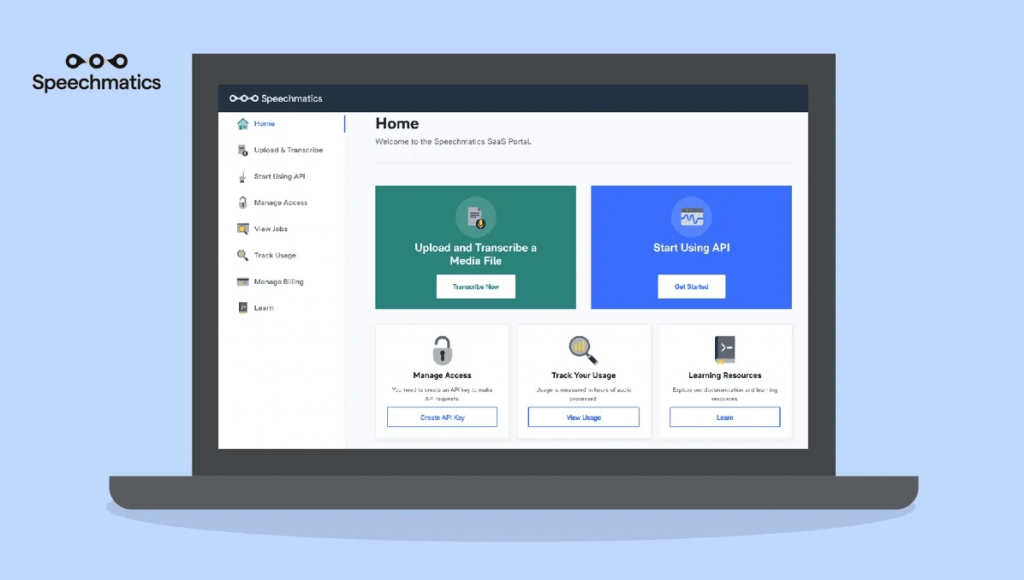
Speechmatics is an AI-driven speech recognition engine that specializes in transcribing audio and video content with high accuracy across multiple languages. It’s designed for developers and enterprises looking to build voice-powered solutions, rather than being a plug-and-play tool for healthcare providers.
While not built specifically for medical use, Speechmatics can be integrated into custom healthcare applications where high-quality transcription is needed, such as call analytics, patient support systems, or voice documentation tools.
However, since it lacks out-of-the-box EHR integration, structured note formatting, or HIPAA compliance by default, Speechmatics is better suited for back-end applications rather than front-line clinical use.
Speechmatics Features
- Real-time & batch transcription: Converts speech to text instantly or processes pre-recorded files.
- Multilingual support: Supports over 30 languages and multiple dialects for global scalability.
- Speaker diarization: Differentiates between multiple speakers in an audio file for cleaner transcripts.
Speechmatics Pros
- Highly scalable API: Ideal for building voice features into larger systems or applications.
- Strong multilingual accuracy: Works well in international or multilingual environments.
- Developer-friendly platform: Offers extensive customization and integration flexibility.
Speechmatics Cons
- Not healthcare-specific: Doesn’t include clinical language models or structured note output like SOAP.
- No native EHR integration: Requires technical development to connect with healthcare systems.
- HIPAA compliance not standard: Must be configured appropriately to meet privacy standards in clinical use.
Speechmatics Pricing
There are three pricing plans:
- Free
- Pro
- Enterprise
Speechmatics Customer Support Channels
- Email/Help Desk
- FAQs/Forum
- Phone Support
- Chat
What Makes Emitrr Stand Out as the Best AI Medical Scribe?
With so many transcription platforms promising speed and accuracy, what makes Emitrr different isn’t just its AI engine; it’s how Emitrr is built around real clinical needs.
Here’s why it stands out as a medical transcription AI:
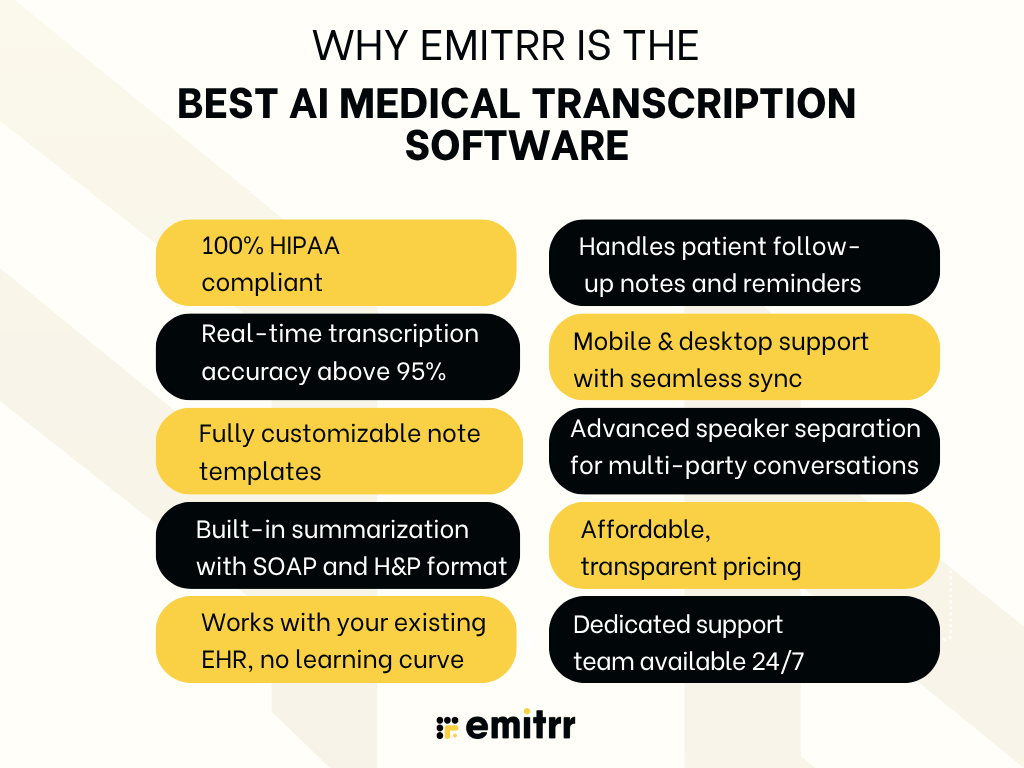
100% HIPAA-compliant
Emitrr was built with healthcare compliance in mind from day one. All data, whether it’s being recorded, stored, or transferred, is encrypted to meet HIPAA standards. The platform also offers BAAs, so you can be confident that your patient information is being handled securely. For practices that undergo regular compliance checks or audits, this level of security is non-negotiable. It is the best HIPAA-compliant transcription software available on the market.
Real-time medical transcription accuracy above 95%
Accuracy matters. An AI medical transcriptionist software that needs constant corrections creates more work, not less. Emitrr’s engine has been trained on thousands of hours of real clinical conversations across multiple specialties. As a result, it captures medical terms, abbreviations, drug names, and patient concerns with an accuracy rate above 95%, even in live, fast-paced scenarios. This means your notes are clean from the start, saving time on revisions.
Fully customizable medical transcription AI note templates
Every provider documents differently. Emitrr gives you complete control over how your notes are structured. Whether you prefer SOAP notes, H&P layouts, or narrative summaries, you can create templates that mirror your preferred documentation style. This consistency not only speeds up note review but also helps your billing and coding team locate the right information without delays.
Built-in summarization with SOAP and H&P formats
Emitrr doesn’t just transcribe, it organizes. The AI listens to the conversation, identifies context, and builds out summaries in structured formats like SOAP (Subjective, Objective, Assessment, Plan) or H&P (History & Physical). Providers don’t need to rearrange or reformat afterward; the draft is ready for review as soon as the visit ends.
Works with your existing EHR, no learning curve
Many transcription tools claim to integrate, but then leave you copy-pasting from one screen to another. Emitrr connects directly with popular EHRs like Epic, Cerner, athenahealth, DrChrono, and others. Notes flow into the correct patient records with minimal setup, and there’s no need to juggle multiple tabs or retrain your staff. You stay in one workflow, without interruptions.
Handles patient follow-up notes and reminders
This medical transcription AI goes beyond just charting the encounter. It helps streamline what happens next, whether that’s scheduling a follow-up, sending post-visit instructions, or noting down a callback reminder. These features are built into the same interface, so you don’t need to switch systems to keep patient communication on track.
Mobile and desktop support with seamless sync
Whether you’re documenting from your workstation or in between consults on a mobile device, Emitrr works across platforms. Your notes sync instantly across desktop and mobile, so nothing gets lost if you switch devices. For providers who travel between locations or work remotely, this flexibility keeps documentation uninterrupted and makes it one of the best software for medical transcription.
Advanced speaker separation for multi-party conversations
In real-world settings, it’s not just one-on-one conversations. Interactions can include patients, family members, nurses, or even translators. Emitrr’s AI can identify and separate these voices, tagging each speaker in the transcript clearly. This feature is critical for maintaining clarity in records, especially when multiple perspectives or concerns are raised during a visit.
Affordable medical transcription ai with transparent pricing
Emitrr offers pricing that makes sense for healthcare practices of all sizes, making it one of the best medical transcription software. There are no surprise charges for integrations, usage spikes, or support. You can choose from flexible monthly plans or annual contracts, depending on your needs. For practices just starting with AI tools, this transparent pricing makes it easy to try without long-term risk.
Dedicated support team available 24/7
Emitrr’s support team is available around the clock. Whether it’s onboarding, troubleshooting, or answering questions about integrations, you get help from real people who understand clinical operations, not just generic support agents reading from a script.
FAQs
Most leading tools are HIPAA-compliant and offer end-to-end encryption, audit trails, and access controls. Always verify if the vendor provides a BAA before use.
Yes, if the platform is trained on medical data. Top tools can handle complex terminology used in cardiology, oncology, and other specialties with over 95% accuracy.
Most AI transcription platforms integrate with major EHRs like Epic, Cerner, athenahealth, and DrChrono. Always check for native integrations or API compatibility during evaluation.
One of the top all-in-one solutions is Emitrr. It offers real-time transcription, customizable note templates, strong EHR integrations, and built-in tools for follow-ups, making it the best choice for practices that want more than just basic note-taking.
Yes. While AI is highly accurate, reviewing AI generated doctors note ensures clinical precision, especially in complex or nuanced cases. Many tools flag low-confidence sections to speed up this process.
Hiring a scribe can cost $30K–$50K annually. AI tools, by contrast, often start around $200–$500 per month, making them significantly more affordable long-term.
Yes, you can use free medical transcription software, but the free tools won’t come with the security features or understand medical dictation as well. For medical professionals, it is better to be safe and use a reliable paid tool like Emitrr.
Emitrr is a reliable HIPAA compliant transcription software that is popularly used by healthcare professionals. This med scribe offers AI integrations, security features, SOAP notes, missed-call-to-text, and many useful features that help your front desk save time.
Conclusion
Thus, AI medical transcription software is no longer just a nice-to-have; it’s becoming a key tool in reducing the time and stress tied to clinical documentation. By automating note-taking, improving accuracy, and fitting neatly into existing EHR systems, these tools help providers reclaim hours each week.
Each solution listed in this blog has its strengths. Some focus on specialty support, others on ambient scribing or deep EHR integration. But for practices looking for an all-in-one platform that covers transcription, task automation, follow-ups, and compliance, Emitrr clearly stands out.
If you’re looking to simplify documentation, cut down on after-hours charting, and give your team a tool they’ll actually enjoy using, schedule your free demo with Emitrr today.


 4.9 (400+
reviews)
4.9 (400+
reviews)