
Introduction: The Silent Revolution of Communication in Primary Care
Texting has become the primary communication lifeline in healthcare, with SMS rapidly becoming the most convenient way patients contact their primary care clinics. SMS texting in primary care is becoming mission-critical as the primary way to communicate efficiently with patients, from appointment reminders to secure interactions post-visit.
Properly implementing a patient texting solution can decrease your inbound call volume by up to 60% and reduce no-shows by as much as 40%. Clinics that utilize SMS texting solutions report faster triage of patients, faster generation of online reviews, and improved responsiveness during after-hours clinic times. As hybrid care models (telehealth and in-person) are on the rise, utilizing a safe and HIPAA-compliant texting software for your primary care clinic has become a necessity.
This blog dives into some of the top HIPAA-compliant texting solutions, their features, and how to make the right decision based on your clinic’s goals.

Overview of Texting Services for Primary Care Clinics
A texting service for primary care is much more than SMS; it is a HIPAA-compliant platform that allows secure communication between a clinic and patients via two-way communication. Unlike consumer messaging applications, texting services, when utilized, have been designed specifically for healthcare. This makes it easier to ensure secure delivery of everything from appointment reminders to lab results.
This can change workflows from reactive (answering calls) to proactive (automated reminders, outreach, and follow-up). Clinics are able to manage schedules better, decrease call volume, and develop deeper patient connections/relationships, all without any additional hiring.
You can think of it like a “virtual waiting room” for patients. They can ask questions, reconfirm visits, and see updates without having to call. This modern mobile-first concept increases staffing efficiency, satisfaction, and revenue.
Important Features to Explore When Searching for a Clinic Texting Software

When reviewing the compliance of a HIPAA-related messaging software, you should take into account that texting is more than just texting. The best medical texting software is an integrated, feature-rich platforms that cover multifaceted communication.
- Two-way Messaging: Non-negotiable for any medical patient messaging platform that allows real-time chats with patients while they are asking questions about their medications or appointments (no more phone tag!).
- Automated Reminders and Confirmations: An essential way to reduce patient no-shows. Patients receive timely reminders with confirmation links to increase attendance and clinic revenue.
- Missed-Call Text-back: Gives you the ability to turn missed phone calls into opportunities. A text-back is sent automatically to callers who do not reach your team, emphasizing urgent questions and capturing leads.
- Online Review Management: A text can prompt happy patients to leave Google reviews, which is a powerful way to improve your online visibility for new patients to find you.
- Security and Compliance: It is non-negotiable. You need a HIPAA-compliant texting app that includes encrypted messaging, access controls, and audit logs to comply with regulations.
- Bulk Messaging and Templates: You can do things like send mass updates (flu shot updates, weather closures). Save time with common reuse templates for certain scenarios.
- Unified Inbox: Everyone on the staff views and manages messages on one dashboard. This provides continuity, eliminates missing text messages, and prevents patients from repeating the same questions.
- Web-to-Text Conversion: A widget on a website that allows visitors to instantly initiate a text conversation, perfect for lead capture and patient ease of use.
- AI SMS Generator: Tools like Emitrr’s AI generator produce high-quality messages fluently and align with HIPAA services in seconds–from patient appointment reminders to marketing campaigns, the AI auto-generates HIPAA-compliant text messages, shortens the text, provides a set of A/B variants, ties into your CRM system, and charades–without the writing abilities needed.
Security and Compliance Requirements
- Every text in a healthcare context would be PHI, which means that HIPAA-compliant texting with patients is not merely advisable, but mandatory. Messaging from non-compliant apps like WhatsApp or iMessage, for example, sanctions such as immense fines and unreliable patients.
- HIPAA compliant texting uses encrypted communication methods to ensure data is safe in transit and available at rest; permitted access controls and role-based permissions mean only authorized staff can view the most sensitive info
- Accountability is key in case of disputes or breaches, so it is crucial to maintain audit trails and logs of all messages. When using cloud-based tools, you need to ensure that the provider has their SOC2 certification and is certified in data protection.
- When we choose HIPAA-compliant texting platforms, we not only decrease our legal risk but also increase trust from the patient side with genuine, secure, and professional communication.

Integration Requirements for Primary Care Texting Platforms
Any medical texting platform’s real value is how it integrates with your other current capabilities. A stand-alone platform adds to a clinic’s busy manual workflows, but the best platforms are an intelligent layer that works seamlessly through your workflow.
- EHR Integrations: These should be non-negotiable for your clinic. You can look for messaging platforms that integrate with Epic, Athenahealth, eClinicalWorks, Kareo, NextGen, etc. This integration would allow automated deadline reminders and update the patient chart without being manually entered by the user after the appointment, thereby minimizing human error and preserving time for more important tasks.
- Calendar Sync: Auto-sync with Google Calendar or Outlook prevents missed appointments and helps staff ensure everyone’s schedules are aligned. Integrations like this keep patient messages in one area that your staff can access when and where they want.
- CRM or Intake Systems: Platforms like Jotform or Typeform allow clinics to send secure forms via SMS to patients. This eliminates the need for hard copy paperwork in the intake process while automating the protocol for clinics.
- Review Platforms: Automatically prompt visits in an integrated interaction with Google, Facebook, or Healthgrades review platforms can effortlessly elevate your business reputation online.
- Billing Software (if available): On specific platforms, you can send a pre-visit secure co-pay reminders or payment link to patients. This option reduces some administrative burdens or helps improve collections, which is still an additional administrative time savings.
How Text Messaging Software is Beneficial to Your Primary Care Clinic
Benefits of a modern text messaging system in primary care extend well beyond simply being able to send messages. They primarily improve three areas of a clinic’s business: financial health, operational efficiency, and patient experience.

Financial Health
- Decrease the No-Show Rate: When you automate appointment reminders and confirmations through these platforms, the money goes right back in your pocket. A well-scheduled workflow and a corridor full are two critical components of a profitable schedule, and decreasing no shows by as much as 40% makes an enormous difference to your revenue.
- Better Patient Collections: Patients are more likely to pay with an easy text reminder with secure co-pay links. Cash flow improves by allowing patients to pay via text, without you needing to make another mish-mash of calls to collect.
- Increase New Patients: By improving your online image through more reviews or capturing more leads through online web-to-text, this platform allows your practice to grow new patient acquisition.
Operational Efficiency
- Time Savings: Automates routine tasks like reminders, FAQs, and voicemails, which allows staff to have more time for patient care.
- Optimized Workflows: The ability to sync with EHRs and calendars allows more time in between activities to ensure everything is up to date and accurate.
- Improved Communication: Team communication is seamless and compliant with the setup of a centralized inbox and secure messaging.
Enhanced Patient Experience
- Modern Convenience: A patient texting service gives patients a convenient, fast, and easy way to connect that is more efficient than phone calls.
- Personalized Care: Make timely updates, check-ins, and follow-ups on a proactive basis by person and not on a general basis.
- Faster Response Time: AI can respond in seconds, while inboxes allow for unification of comments to allow teams to respond faster together.
Selecting the Right Texting Software for Your Clinic
Choosing the correct HIPAA-compliant texting software is essential and needs to be personalized with the requirements of your clinic.
- State your Objectives: Articulate what you wish to do; for instance, decreasing no-show appointments, drafting reviews automatically, or making appointment scheduling convenient. A clear goal will help you decide the right platform.
- Check for HIPAA Compliance: This is not optional. You should only consider platforms that offer real HIPAA-compliant texting with patients.
- Ease of Use for Staff: Desk staff should be able to use it with minimal training. Everyday usage required an easy, natural interface.
- Work with Multiple Providers/Teams: If it is a multi-specialty practice, choose one with role-based permissions, so only the particular team members get the message.
- Confirm Integration Capability: Check to ensure the medical texting software you are considering integrates with your EHR, calendar, and other systems, eliminating manual tasks while allowing for seamless workflows.
- Find Robust Onboarding & Support: Vendor demonstrations, phone calls with account managers, 24/7 live chat & email support. Make sure that the service provider is able to answer every question you have.
Top 10 Texting Software Services for Primary Care Clinics
1. Emitrr : Best Texting Competitor
Emitrr Overview
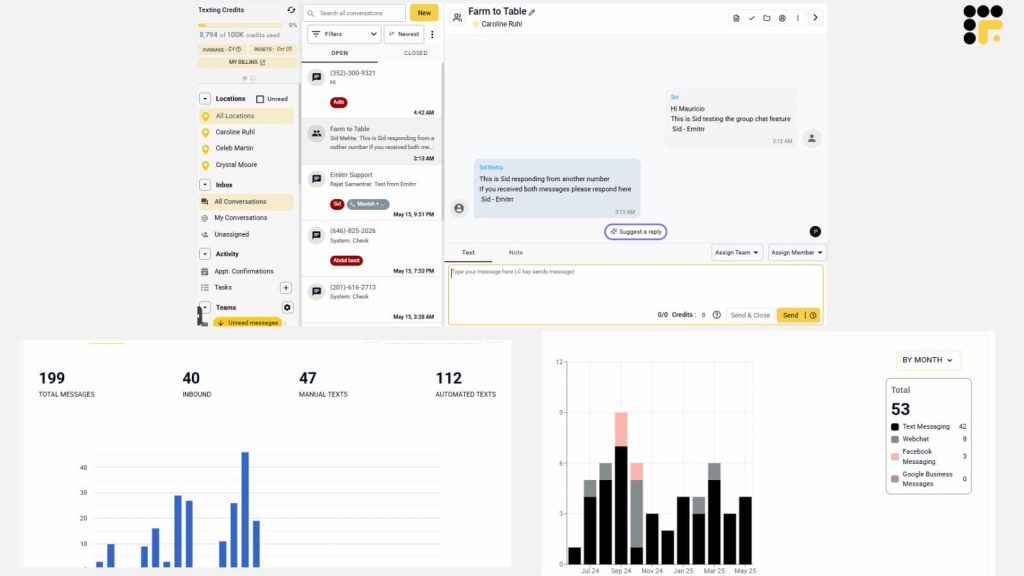
Emitrr is an end-to-end, HIPAA-compliant communication platform that simplifies operations for medical and dental practices. Emitrr combines business texting for clinicians, methods for automating comprehensive workflows with AI, and a shared inbox with a team to ultimately help clinics decrease their overall call volume as well as decrease the amount of time staff spend on these calls. This healthcare texting platform is designed to increase patient engagement, control online reputation, and reduce no-shows with smart, automated workflows. With functions that are designed for ease of use and compliance, Emitrr is the optimal choice for small to mid-size practices that want to be operationally efficient. With enhanced AI technology, Emitrr incorporates features like a self-evolving SMS agent and AI Phone agent that will allow clinics to support their patients 24/7 without requiring additional staff time.
Key Features of Emitrr
- Centralized messaging and collaboration with Shared Team Inbox.
- AI Appointment Reminders, and Intelligent Auto-Replies.
- Missed-Call Texting- Automatically contact a patient who has called and not left a message.
- Online Review Management- Manage reviews on Google and Facebook.
- Two-way Texting, AI Voice Agent, and Smart Phone Trees.
- Compatible with 1,000+ EHRs/CRMs such as Athenahealth and NextGen.
- AI Message Enhancer and Auto-Replies for staff response.
- AI SMS Campaigns, AI Rule Engine, Auto Dialer.
- Call Recording & Summarization, as well as AI Forms & Data Capture.
- Web-to-Text conversion widget for websites.
Pros of Emitrr
- Designed for healthcare clinics.
- Friendly interface and fast, painless setup.
- Numerous (100+) AI automation features save significant staff time every month.
- Great onboarding and support with fast response times.
- Affordable for small- and medium-sized practices.
- Comprehensive HIPAA-, HITECH-, and SOC2-compliant platform
Cons of Emitrr
- Some advanced features are under development.
Emitrr Pricing
Starting at $30/user per month.
Emitrr Integration
- MailChimp
- Denticon
- Zapier
- Salesforce
- HubSpot
- HouseCall Pro
- And many more
Emitrr Reviews & Ratings
- Capterra – 4.8 / 5
- G2 – 4.7 / 5
“Appreciate that my internal team can see all messages going back and forth between field staff. It enables us to communicate the same message and support one another when even when we are working in different roles.”
“I LOVE Emitrr. The support you get is wonderful, the app is easy to use and they have been incredibly responsive. As a small business, we needed a messaging platform that wouldn’t break the bank and this meets all our needs (and then some) without making us feel overwhelmed. We came from Podium (had a terrible experience with them) and feel so valued at Emitrr!”
Source: Capterra
Emitrr Support Channels:
Email, phone, live chat, knowledge base, and SMS.
2. Luma Health (now Artera)

Overview of Luma Health
Luma Health, now called Artera, is a patient engagement system that automates patient communications and simplifies the entire care journey. This HIPAA-compliant texting is a comprehensive solution that can be used by any healthcare organization, from small physician practices to mega multi-national organizations. This platform is well known for its smart workflows, automated patient intake, and all-in-one scheduling and communications. This medical texting software is here to modernize clinics’ patient workflows, reduce administrative burden, and enhance patient results. This HIPAA-compliant texting will automate the co-pay collections process and enable you to track whether your messages are being delivered.
Key Featuresof Luma Health
- Intelligent Patient Scheduling & Appointment Reminders for patients
- Encrypted, two-way messaging and video visits
- Automating patient intake forms and online registration
- Patient recalls and outreach campaigns for preventative care.
- Online review management and reputation management.
- Broadcast messaging with approvals for sending bulk messages.
- LumaPay for automated co-pay and balance collections.
Pros of Luma Health
- Exceptional in automation and patient engagement
- Excellent Integrations with all major EHRs, including Epic and Cerner.
- Feature richness: comprehensive, supports all your communication needs.
- Intuitive User Interface for both staff and patients.
Cons of Luma Health
- This medical texting software can cost more than simple solutions.
- Staff may struggle to get up to speed with all the features.
- Workflow customization options are in question as used by a select few users.
- Pricing is often enterprise-level
Luma Health Pricing
Custom cost; not publicly listed
Luma Health Integration
- Oracle Health
- NextGen Healthcare
- Greenway Health
- eClinicalWorks
- athenahealth
- Epic
Luma Health Reviews
“Luma Health – flexible and intuitive”
“Luma Health is A Gamechanger for Any Medical Practice”
Source: Capterra
Luma Health Support Channels
- Phone Support
- Email Support
- Live Chat
- Help Center & Knowledge Base
- Webinars & Training Sessions
- Dedicated Account Managers
3. OhMD

OhMD Overview
OhMD is an advanced platform that enhances healthcare communication through HIPAA-compliant messaging, automated workflow, and patient engagement tools. This healthcare texting platform is a good fit for practices that want to streamline communication and prioritize patient engagement without compromising security, while also giving an easy-to-use platform and interface that resembles your favorite texting/messaging app! OhMD makes it safe and easy to communicate back and forth with patients (using your existing landline number) without the need for a patient portal/app as this is a HIPAA-compliant texting app. OhMD follows a “human-in-the-loop” approach that allows for the automation of administrative workflows while still keeping your staff in charge of patient communication. Here is a quick look at this medical texting software:
Key Features of OhMD
- Two-way HIPAA-compliant text messaging without the need for a patient portal or app
- Automated communication workflows: Those for scheduling, for check-ins, and leaving requests for refill prescriptions.
- Digital intake forms that you can send securely via text.
- Group messaging for staff collaboration and patient reintegration (to the outpatient).
- Customizable templates for the most common types of messaging are needed.
- EHR integrations to connect OhMD with your existing electronic health record system.
Pros of OhMD:
- Very easy to use for staff and patients.
- Integrates seamlessly with many EHR systems.
- Strong focus on patient accessibility and patient-centered care.
- Less administrative burden – spend less time managing your workload and more time on patient communication.
Cons of OHMD
- Some people may find the initial setup process time-consuming.
- Not much public information is given on pricing.
- Some users have reported minor technical issues.
OhMD Pricing
This patient texting service offers basic SMS features for free, but more comprehensive OhMD pricing plans start at $250 a month.
OhMD Integration
- Athenahealth
- AdvancedMD
- DrChrono
- Veradigm
- Allscripts
- eClinicalWorks
OhMD Reviews & Ratings
This patient texting service has a rating of 4.8/5 on g2 and here’s what OhMD users are saying:
“I like using OhMD because most patients have their phones set up to block unknown callers, and many don’t even check their voicemail.”
“I’ve only been using OhMD for about 2 months so I’m not sure what all I can do with it. What I use it for is to communicate with patients about scheduling appointments. I don’t like that I can’t message patients directly, and when they message me back, my entire office can see the conversation. I wish it were more private.”
Source: g2
OhMD Customer Support Channels
- Phone
4. Klara

Klara Overview
Klara is a communications platform that aims to minimize phone calls and increase efficiencies, providing a unified communication experience with secure text messaging, web chat, and voicemail transcription. Klara is purpose-built for medical practices that use different EHR systems and would like to create a modern, secure communication experience for their patients, without the need to have a patient app. This healthcare texting platform creates value by consolidating all communication activity from patients into one easy-to-manage inbox, giving clinics a more efficient way to manage conversations with their patients. This medical texting software focuses on a more conversational patient experience.
Key Features of Klara
- Secure, two-way messaging between patients and providers.
- Telemedicine, via video visits.
- Appointment reminders and workflow automation for patient onboarding.
- Voice-to-text transcription for voicemails.
- Secure patient portal to access health information and results.
- Call-to-text capability, to turn down call volume into secure messages.
Pros of Klara
- Reduces phone call volume and phone tag.
- Connects with many popular EHR systems.
- Patient-friendly, with no patient app or separate password.
- A mobility app to communicate with patients while in the field.
Cons of Klara
- Not Publicly Listed. Pricing is not publicly listed, so this can be a little concerning for some practices.
- Some are also reporting that there have been occasional technical difficulties on the user end.
- A few reviewers mention integration issues.
Klara Pricing
For Klara pricing, you need to contact support.
Klara Integrations
This patient text messaging service integrates with over 1000 third-party apps and software which include
- athenaOne
- PrognoCIS
- ModMed
- Nextech EHR & PM
- AdvancedMD EHR
- Intergy
- Adhook
- HIPAA Link
- And more!
Klara Reviews & Ratings
Klara customer ratings is & 4.5/5 on G2 and 4.3/5 on Capterra, and here’s what users are saying about it:
“What I like most about the Klara app is the simplicity of getting around the app. It’s very easy to use and you can speak with your provider with ease, as well as send and receive documents/forms.”
“The way the messages are labeled or assigned needs to improve. My suggestion is to bump up the screening of the type of msgs. Improvement is needed in picking up certain filtered words to help categorize the msgs.”
Source: Capterra
Klara Support Channels
- Phone
- Chat
5. Spruce Health
Spruce Health Overview
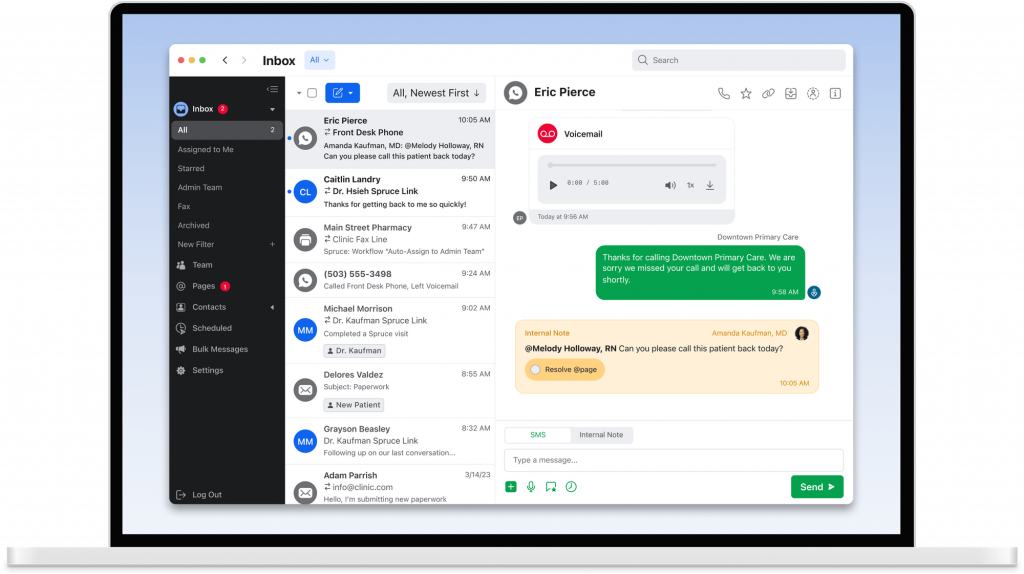
Spruce Health is a comprehensive healthcare communication software suited to medical practices. It provides a single platform that integrates secure messaging, telehealth, team collaboration, and digital fax. Spruce Health is a good option for clinics looking to merge multiple communication methods into a single HIPAA-compliant method. Spruce Health got its start by enabling healthcare professionals to communicate securely with their clients and each other. This medical texting software offers a single inbox to manage all client communication. This healthcare texting platform helps to enhance patient interactions with their clients by offering automated workflows, file sharing, and other features.
Key Features of Spruce Health
- Secure Messaging offers texting, voice, and video messaging.
- Telemedicine offers video calls.
- Integrated billing and payment processing.
- Digital fax service, with feedback.
- A centralized inbox manages your communications with patients and teams.
- Custom workflow and care team messages.
Pros of Spruce Health
- Excellent customer service and support, reviewed by users too.
- It was a reliable and good fax solution.
- Fully HIPAA compliant, your patient data is secure.
- Easy to use with a seamless way to communicate with your clients.
Cons of Spruce Health
- Some users suggest it has a complex interface with less customization.
- Some users report that their pricing is expensive, especially when renewal comes.
- Some users suggest that they have limited reporting and analytics capabilities.
- Some users reported it felt slow or had glitches.
Spruce Health Pricing
This dermatology patient engagement software offers two pricing plans:
- Basic Plan ($24/user/month): Includes HIPAA compliance, 2-way SMS, secure messaging, video telemedicine, clinical questionnaires, and dedicated support.
- Communicator Plan ($49/user/month): Adds auto-attendant IVR, missed-call text-back, urgent escalation, bulk messaging, mobile payments, API access, and advanced phone system features.
Spruce Health Integrations
This HIPAA-compliant texting for orthopedic practices offers integration with various third party platforms:
- Athenahealth
- Elation Health
- Hint Health
- Spruce API (with webhooks)
- Keragon (no-code automation)
- Morf Health (no-code automation)
Spruce Health Reviews & Ratings
This patient communication platform for orthopedics has a rating of 4.5/5 on Capterra and g2 4.5/5 on g2. And here’ what Solutionreach’s customers are saying:
“Some functions are not easily implementable such as blocking unwanted phone numbers or rerecording personal messages, though they do explain it quite clearly on their APP customer guide.”
“Sometimes, the notifications do not come through as a push notification on my device. I have had a couple instances where I had new messages and I had to open the app to find out. I wish there was an easy way to search the messages and files received.”
Source: Capterra
Spruce Health support channels
Customer support channels offered by this orthopedic clinic texting software are:
- Email support
- In-app live chat
- Setup help for new users
- Online help center
6. Mend

Mend Overview
Mend was formed as a digital health platform that supports in-person and virtual care. The company views patient engagement and experience as essential to its platform and prides itself on developing a customizable product for scheduling, communications, and patient intake. Having a very good ability to support telemedicine, this healthcare texting platform has also shown that it can use artificial intelligence to predict no-shows, allowing clinics to schedule more efficiently and protect revenue. Mend offers a safe method to share videos, images, and files, with notifications and alerts in real time.
Key Features of Mend
- Telehealth with HD video and an interactive waiting room.
- PredictiveIQ technology to predict no-shows and cancellations.
- Automated appointment reminders through text and email.
- Digital intake forms for a paper-free experience for patients.
- Secure chat and sharing of files.
- Ability to capture payments and highly regarded API support.
Pros of Mend
- Highly customizable and flexible platform.
- Predictive no-show technology provides clinics with the ability to protect revenue.
- Less reliance on hardware and software for patients and providers.
- Integrates with many medical practice management software solutions.
Cons of Mend
- Users have reported that the interface can be clunky and difficult to navigate.
- No free trial and no free-for-life plan.
- Pricing is enterprise-level and comes at a high cost.
Mend Pricing
Mend has not shared any information related to its pricing; you will have to get in touch with them to know that.
Mend Integrations
This therapist scheduling software seamlessly gets integrates with PMS and EHR systems, including:
- eClinicalworks
- Kipu
- AdvancedMD
- Athenaone
- Allscripts
- Acumen
- And more!
Mend Reviews & Ratings
Mend has an overall customer service rating of 4.6/5 on Capterra and 4.7/5 on g2. Here’s what Mend users are saying about this therapist scheduling software:
“Major healthcare compliance concerns and as an organization, we’ve had to do much of the groundwork to both identify and push to resolve, including educate vendor on why it was a concern. We discovered very serious flaws in patient consent process that indicate Mend does not actually meet multiple federal standards (HIPAA, CMS Regs, and UETA, E-Sign Act) in this area, despite their contract and all business materials clearly stating they do.”
“I also love the messaging feature and ability to call a client if they are not showing up it helps save time finding a chart and calling the client so we can connect as soon as possible.”
Source: Capterra
Mend Support Channels:
- Email/Help Desk
- FAQs/Forum
- Knowledge Base
- Phone Support
- 24/7 (Live rep)
- Chat
7. SimpleTexting
SimpleTexting Overview
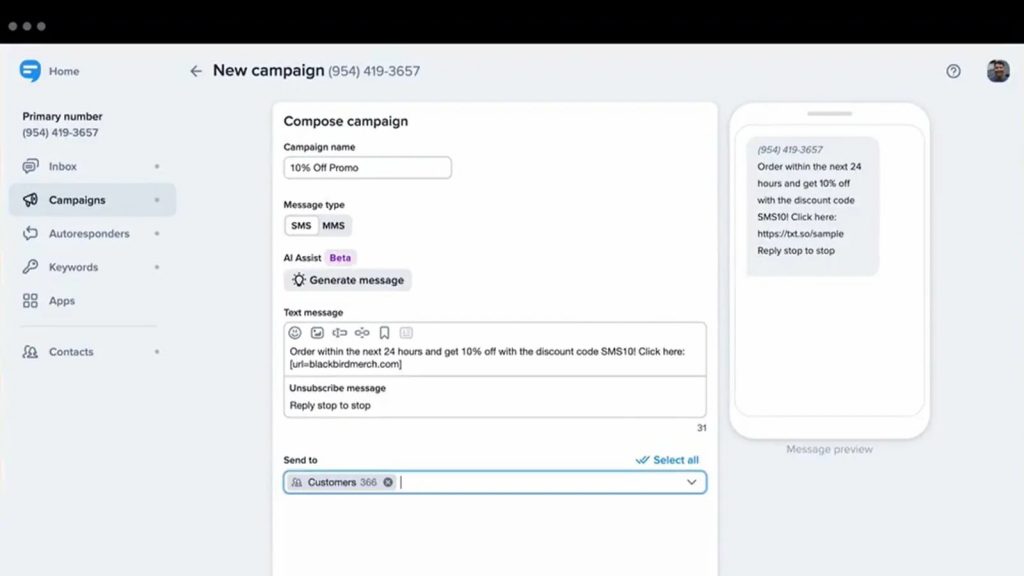
SimpleTexting is a powerful SMS marketing and communications tool that can work well for primary care clinics. SimpleTexting is not designed exclusively for healthcare, but there are some useful features, such as two-way messaging, excellent analytics, and strong integrations that can help improve patient communication and engagement. SimpleTexting is helpful for bulk two-way messaging, and the interface is easy to learn with targeted text blast capabilities. Organizations will nevertheless have to take additional steps to be HIPAA compliant, as it was not designed as a healthcare messaging platform.
Key Features of SimpleTexting
- Two-way messaging for patient chats in real time.
- Bulk texting because of alerts/reminders to groups.
- Automation messaging, with an ability to leverage templates.
- Text-to-landline
- Analytics and reporting for message tracking.
- Integration capability for 1000+ applications.
Pros of SimpleTexting
- It is user-friendly and easy to set up.
- Strong analytics can lead to stronger data-driven decisions.
- Integration for 1,000+ applications.
- Multiple plans based on usage.
Cons of SimpleTexting
- Not built to be HIPAA compliant, so clinics would need to take additional steps to lock it down for security.
- Limited custom capability for branding.
- Pricing may add up quickly for high-volume messaging.
- Some reports of slow customer support.
SimpleTexting Pricing
SimpleTexting’s pricing starts at $39 a month and goes up to $899 a month, depending on your choice of plan.
However, that’s not it. SimpleTexting charges extra for a number of things as well. Here’s a quick breakdown of the extra cost of SimpleTexting:
- SimpleTexting charges $20 per user per month for each additional teammate.
- It charges $10 per month per number for any additional number that you may add.
- It charges $10 to activate a local number.
SimpleTexting Integrations
This healthcare texting platform integrates with 1000+ third-party CRM/EHR/social media apps and tools including, but not limited to:
- MailChimp
- Salesforce
- Slack
- Hubspot
- SimpleTix
- Follow up boss
- Zapier
- Podio
- WordPress
- Amplifier
- Integrately
- And much more!
SimpleTexting Reviews & Ratings
- SimpleTexting Capterra reviews & ratings: SimpleTexting has over 200 customer reviews and a rating of 4.7/5 on Capterra.
- SimpleTexting g2 reviews & ratings: On g2, SimpleTexting has more than 600 reviews and a rating of 4.7/5.
Here’s what customers are saying about this healthcare texting platform:
“SimpleTexting is a great option if you are looking to reach a larger audience than traditional email. The user interface is clear and straightforward and texts are sent reliably.”
“The app is a bit glitchy, and it does get pretty expensive when you have a decent amount of people on your list since you are charged based on sent messages. Eventually I may be priced out if I keep building.”
Source: Capterra
SimpleTexting Customer Support Channels
Here a list of SimpleTexting customer support channels that you can find:
- Phone
- Chat
- FAQs
- Knowledge base
8. Weave
Weave Overview
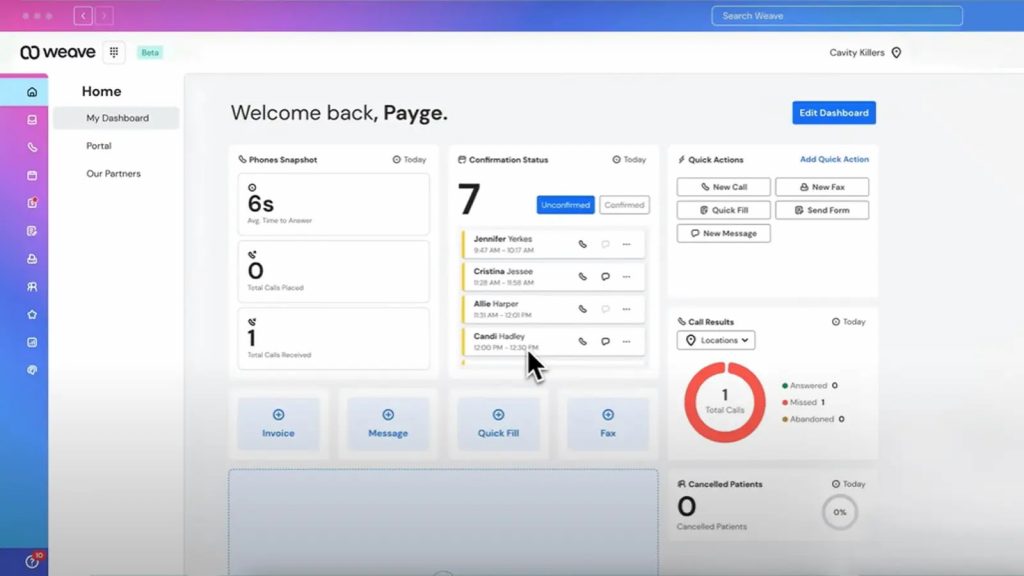
Weave is a platform that provides a powerful communications hub for businesses – especially small to medium-sized enterprises (SMEs) – with a strong presence in the healthcare market. Weave combines a business phone system into one platform via text messaging, scheduling, and payment tools. Weave is a powerful tool that allows clinics not only to communicate with their patients but also to manage a range of front office functions. Weave has developed a platform where clinics can optimize their patient experience by streamlining processes through an all-in-one solution. Weave offers patient engagement tools and communication capabilities, such as automatically requesting reviews and sending missed call texts to patients.
Key Features of Weave
- VoIP calling and analytics for your business phone system
- Two-way texting for patient communication.
- Automated appointment reminders and scheduling.
- Web forms and web assistants for patient intake
- Send review requests automatically (on a link to your webpage) for one strong online reputation signal.
- Contact Pop for instant key consumer information.
- Payment management tools like Text-to-Pay
Pros of Weave
- All-in-one solution with multiple tools (combined phone, text, forms), which is difficult to replicate.
- Amazing appointment management and scheduling functions.
- Simple and easy-to-use interface, strong functionality.
- Strong analytics that will give users ongoing insights into their business performance.
Cons of Weave
- Difficulty onboarding, specifically with regards to porting your phone number to Weave.
- The user experience is very basic, with a dull color scheme and no customization.
- Some features are not available in the mobile app version.
- Pricing is not disclosed publicly.
Weave Pricing
This HIPAA-compliant texting service offers 4 pricing plans:
- Ultimate: $399 per month + $750 setup fees
- Pro: Need to contact support
- Elite: Need to contact support
- Essentials: Need to contact support
Weave Integrations
This mental health communication software offers multiple integration options:
- Rx30
- PioneerRx
- PrimeRx
Weave Reviews
“I like the compatibility with my companies office software that we use. It is easy to use and user friendly. It wasnt a long or hard process to integrate and implement into our office staff. “
“Weave is used in our office 5 days a week, and we use both the phone service and Weave app for communications.”
Source: Capterra
Weave Support channels
- Chat
- Phone
- Email/Help Desk
- FAQs/Forum
- Knowledge Base
9. Solutionreach
Overview:
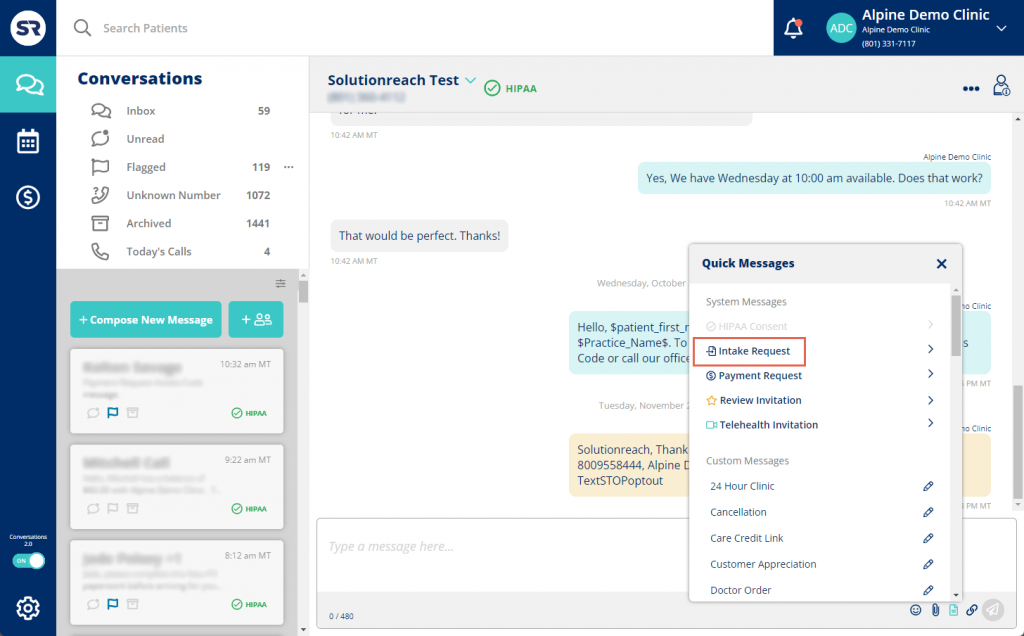
Solutionreach is a cloud-based patient engagement system that focuses on optimizing communication and improving workflows. It is built for practices of any size, though it mainly emphasizes solutions related to no shows, patient feedback, and automated communications to help improve efficiency. The software helps practices grow their patient population through online reputation management and targeted campaigns that focus on recalls. The software uses automated communication such as text messages, emails, and phone calls whenever applicable, allows practices to fill any open appointments, schedules recalls, and eases check-ins while increasing efficiency.
Key Features of Solutionreach:
- Automated appointment reminders via text, email, and phone calls.
- Two-way texting for real-time communications.
- ASAP waitlist to fill any open appointments.
- Digital patient intake and patient surveys.
- Automated review requests and patient surveys.
- Section batch messaging for communicating with specific groups of patients.
Pros of Solutionreach:
- Effective in reducing no-shows and cancellations.
- Versatile features cover a wide spectrum of patient engagement needs.
- Allows practice to grow with reviews and referrals.
- Easy to use and simple interface.
Cons of Solutionreach:
- A small number of users report occasional technical issues or system crashes.
- Difficult to work with some EHRs and need special expertise
- Only limited customizable options for newsletters and other forms of communication
- High costs for large practices.
Solutionreach Pricing:
Solutionreach pricing is anywhere from $400 to over $1,500 per month, depending on the size of the clinic.
Solutionreach Integrations
- Athenahealth
- DrChrono
- AdvancedMD
- OfficeMate
- LiquidEHR
- AcuityLogic
Solutionreach Reviews & Ratings
This texting software for therapy has a rating of 3.8/5 on Capterra and g2 4.3/5 on g2. And here’ what Solutionreach’s customers are saying:
“The communication abilities with patients was great. I loved being able to reach our to patients remotely in the event of inclement weather and cancellation or closures.”
“Customer support and reliability are awful. We left because we could not count on them and when they screwed up they don’t admit their errors which is very frustrating.”
Source: Capterra
Solutionreach Support Channels
- Chat
- Knowledge base
- Phone
- FAQs
10. Doximity
Doximity Overview
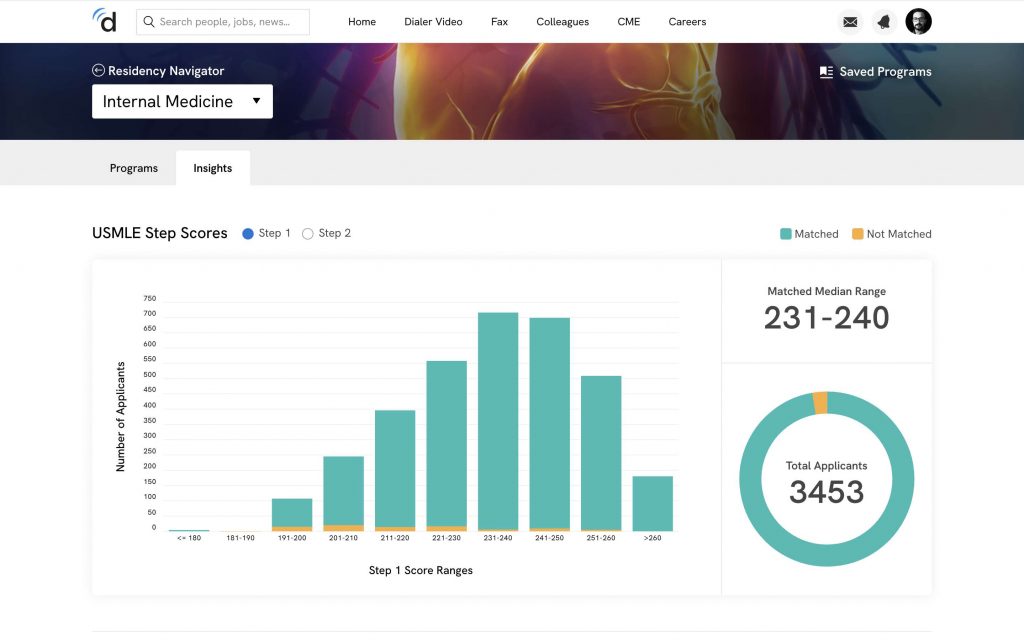
Doximity is a professional community of physicians with communication tools that are HIPAA-compliant. Doximity is primarily of value to connect healthcare providers together, but it also offers a HIPAA-compliant way of calling and texting patients from your device without using a personal number that will show up on their telephone bill as being your personal number. This medical texting software is valuable for clinicians who need a very simple nd HIPAA-compliant way of communicating without using a personal number. The main features, calling, texting, etc., are free and are popular because of its simplicity and the large number of healthcare providers on the platform.
Key Features of Doximity:
- Dialer that is HIPAA compliant for calling patients with the clinic office caller ID.
- Secure messaging for communicating with patients and colleagues.
- Secure e-fax for sending and receiving medical records.
- Telemedicine tools for video communication.
- Digital CV and a clinician directory.
Pros of Doximity
- Provides a secure, simple telemedicine tool.
- Hides the provider’s phone number when calling patients.
- Makes HIPAA-compliant faxing easy regardless of where you are.
- Strong network to connect with other clinicians.
Cons of Doximity
- Not a full-suite patient engagement platform like others
- Tech Issues. According to some users, the app may sometimes have technical difficulties in calls.
- Integration with some EHRs is not as comprehensive.
Doximity Pricing
The basic features are free, but premium services may require payment.
Doximity Integrations
- Calendly
- MEDITECH
Doximity Ratings & Reviews
Doximity has a rating of 4.1 on Capterra. Here is what customers are saying about this platform
“Very poor when I reported a fraudulent review that’s absolutely could not have ever have happened. Doximity said they would look into it and then I never heard anything back.”
Fair product. I ultimately chose another company with similar monthly price with more robust options
Doximity Support Channels
- Help Center
Reasons Why Emitrr is the Best Choice for Primary Care Clinics
When it comes to finding the right HIPAA-compliant texting software to use for primary care clinics, it can determine your success. Emitrr is the clear choice. Here is why:
- Safe & Compliant: Designed with healthcare in mind and HIPAA, HITECH, & SOC2 compliant, you can have peace of mind and know that patient data is safe when using a truly HIPAA-compliant texting app.
- Easy to Integrate: Connects out of the box with many of the major EHRs like Athenahealth, eClinicalWorks, and NextGen to eliminate manual data entry and help keep your communications in sync.
- User Support: 24/7 support through phone, chat, or email is essential for busy clinics, and missed call support is a must.
- Smart Automation: Automates many tasks related to reviews, missed call texts, and other repetitive tasks, allowing staff to spend more time on patient care.
- AI SMS Agent: Sarah, Emitrr’s intelligent SMS agent, handles appointment bookings, rescheduling, lead capture, reminders, and two-way conversations, entirely over text. It is designed to work across industries and time zones, so that your business is always responsive, even when your team isn’t available.
- Custom Built for Primary Care: Specifically designed for clinics, Emitrr simplifies communications with patients while maintaining an organized administrative load, enabling clinics to grow.
Frequently Asked Questions
Ans: For small clinics, reviewing options that fit easily into your operational workflow and are affordably scaled for small budget clinics can serve them better. Emitrr, OhMD, and Spruce Health are a good mix of features, easy to use, HIPAA-compliant texting solutions for medical professionals.
Ans: Regular SMS is NOT HIPAA compliant. Use a HIPAA-compliant texting patients system that will encrypt your data and more securely protect patient information.
Ans: Yes. Some texting systems, such as Emitrr, Luma Health, and Weave, integrate with EHR systems like Epic, Athenahealth, eClinicalWorks, and others.
Ans: A medical texting service can sync with your EHR or your calendar service and send appointment reminders automatically. Many services also support confirm/cancel/reschedule as appropriate.
Ans: Identify your uses, make sure they are HIPAA compliant, check the EHR integrations, make sure they are easy to use, and deliver good support.
Ans: There are some platforms that have free trials, but usually, in order to build and deliver a fully HIPAA-compliant texting app, it will require a paid plan or payment for compliance reasons.
Ans: SMS is unencrypted. Secure messaging inside a medical patient messaging system is encrypted and securely stored.
Conclusion
Texting is now recognized as vital for text messaging in primary care. And AI-powered solutions today improve patient experience, reduce costs and equities, and enhance patient flows.
Select secure, compliant tools, such as HIPAA-compliant texting platforms like Emitrr, to ensure your messaging data is safe, secure, and compliant while simplifying communication.
Clinics that implement an AI-powered medical patient messaging system will be able to meet the expectations of the modern patient and run a more streamlined and profitable practice. As the first step, choosing a trusted solution such as Emitrr will lead to an immediate benefit in workflow and engagement. Book a demo now to experience how Emitrr can transform your practice.

 4.9 (400+
reviews)
4.9 (400+
reviews)