
Introduction: The Hidden Cost of Empty Appointment Slots
Imagine this: A patient cancels their appointment an hour before the visit. Your front desk is busy checking in patients. By the time someone notices the cancellation, the slot has already gone unused.
This happens every day in clinics using athenahealth. Same-day cancellations, no-shows, and reschedules leave gaps in the schedule, costing practices thousands in lost revenue every month.
The good news: waitlist automation can automatically fill these empty slots before they go to waste. In this guide, we’ll show you how practices using Athenahealth can reduce schedule gaps with automated waitlists, SMS notifications, and AI-driven scheduling workflows.
Why Empty Appointment Slots Are So Hard to Prevent
Most clinics don’t intentionally leave gaps in their schedule. In fact, front desk teams work hard to keep the calendar full. Yet empty appointment slots still happen regularly, even in well-managed practices using systems like athenahealth.
The challenge isn’t scheduling patients in the first place. The real problem is what happens after the appointment is booked.
Last-Minute Cancellations Are Common
Patients often cancel appointments the same day or the night before. When this happens, the front desk team usually doesn’t have enough time to find another patient who can come in on short notice. Even if someone on the schedule wants an earlier appointment, staff may not know who to contact quickly.
Manual Outreach Takes Too Long
Many practices still try to fill open slots by calling patients one by one. This process is slow and inefficient. Staff might spend 30–60 minutes dialing numbers, leaving voicemails, or waiting for callbacks, only to find that most patients aren’t available.
Waitlists Are Often Informal
Some clinics keep a waitlist in a spreadsheet or a note inside their scheduling system. But without automation, these lists are rarely updated or used consistently. When a cancellation happens, staff may not have time to review the waitlist and start contacting patients.
Front Desk Teams Are Already Busy
During clinic hours, staff are focused on checking in patients, answering phones, handling insurance questions, and managing documentation. Filling a last-minute opening quickly becomes a low priority task, even though it directly impacts revenue.
Patients Don’t Always Pick Up Calls
Phone calls are still a common way to reach patients about earlier appointments, but many people don’t answer unknown numbers during the day. By the time the clinic hears back, the opportunity to fill the slot may already be gone.
Because of these challenges, even clinics using platforms like athenahealth can end up with multiple empty slots each week. That’s why many practices are now turning to automated waitlists and instant patient notifications to recover those appointments before they go unused.
The Problem With Manual Waitlists in Athenahealth
Practices using athenahealth have a powerful scheduling system, but filling last-minute openings can still be challenging without automated workflows. When cancellations happen during the day, most clinics still rely on manual processes to backfill those appointments, which makes it difficult to react quickly.
Athena Schedules Change Constantly During the Day
Appointments inside athenahealth change throughout the day as patients cancel, reschedule, or move appointments through the portal. Each change creates a potential gap in the provider’s schedule.
Staff Must Manually Find Replacement Patients
When a slot opens, front desk teams usually have to:
- scan upcoming appointments
- identify patients who might want an earlier visit
- call or message them individually
This process takes time, and by the time someone responds, the slot may already be lost.
Front Desk Teams Are Already Busy
Clinic staff using athenahealth spend most of their day checking in patients, answering calls, and handling insurance questions. Filling a sudden opening often becomes a lower priority task.
Patients Willing to Come Earlier Are Hard to Identify
Many patients would happily take an earlier appointment, but without a structured waitlist, clinics don’t always know who to contact when a slot opens.
How to Minimize Empty Slots With Waitlist Automation in Athenahealth
Practices using athenahealth rely on its scheduling system to manage appointments, cancellations, and patient records. However, when a patient cancels or reschedules, the system typically just updates the schedule, it doesn’t automatically reach out to other patients to fill that opening.
As a result, many clinics still rely on staff to manually call patients or review upcoming appointments to see who might want an earlier slot.
To solve this, many practices integrate automation platforms like Emitrr with athenahealth. These tools monitor schedule changes and automatically notify patients when an earlier appointment becomes available.
How the Process Works
Here’s a simple example of how automated waitlists typically work:
- A patient cancels or reschedules an appointment in Athena.
- The schedule updates and a slot becomes available.
- The automation platform identifies patients who may want an earlier appointment.
- Those patients receive a text notification offering the open slot.
- The first patient who accepts gets scheduled into the appointment.
Instead of calling patients one at a time, the system reaches multiple potential patients instantly, dramatically increasing the chances that someone will accept the appointment.
Why Automation Makes a Difference
The biggest advantage of waitlist automation is speed and reach. Instead of contacting one patient at a time, the system can notify several patients at once. The faster the clinic reaches patients, the higher the chance that someone will take the available slot.
For busy practices using athenahealth, automated waitlists help ensure that cancellations don’t automatically translate into lost appointments.

Example: How a Same-Day Cancellation Gets Filled Automatically
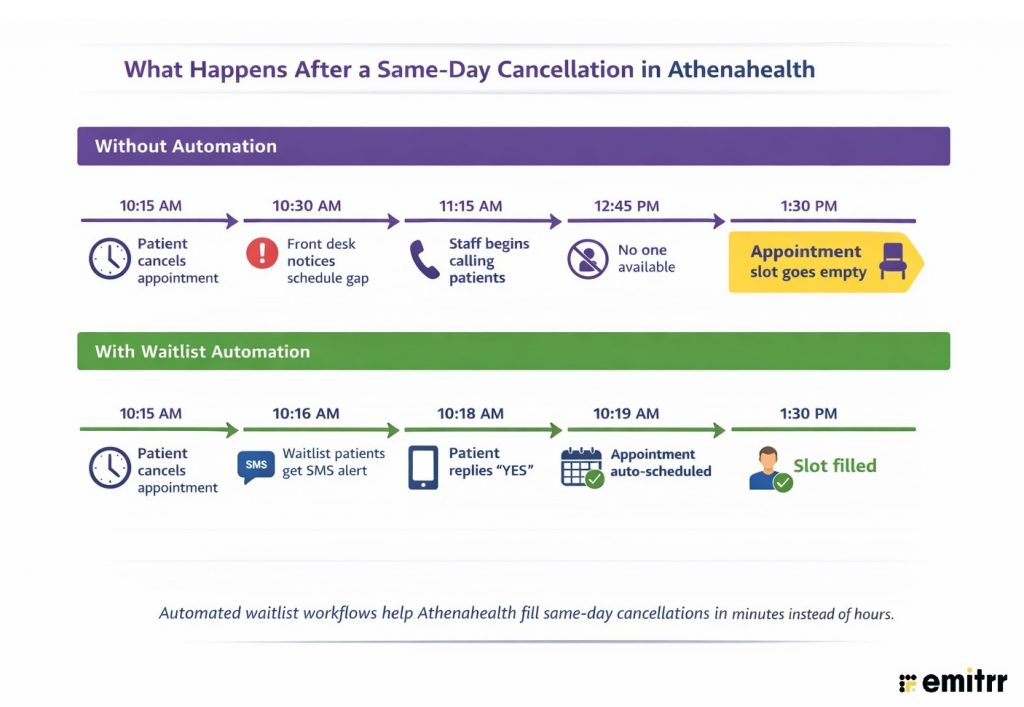
To understand the impact of waitlist automation, it helps to see how it works in a real scheduling scenario.
Practices using athenahealth often add automation tools like Emitrr to streamline patient communication and scheduling workflows. With features like two-way texting, automated reminders, and AI-driven waitlist notifications, Emitrr helps clinics instantly notify patients when earlier appointments become available, making it much easier to fill last-minute cancellations.
Here’s how that workflow looks in a real scheduling scenario.
Scenario: A Same-Day Cancellation
Imagine a busy orthopedic clinic using athenahealth. The schedule is fully booked for the day, but at 10:15 AM, a patient cancels their 1:30 PM appointment.
Normally, this would create a gap in the schedule. The front desk might try calling a few patients, but many won’t answer or won’t be able to come in on short notice. By the time someone responds, the appointment slot may already be lost.
With automated waitlist workflows, the process looks very different.
Step 1: The Cancellation Creates an Open Slot
As soon as the patient cancels, the scheduling system updates the calendar and identifies the newly available appointment.
Step 2: Waitlisted Patients Are Notified Instantly
Patients who previously said they would like an earlier appointment automatically receive a message such as:
“An earlier appointment is now available today at 1:30 PM. Reply YES to claim the slot.”
Step 3: A Patient Accepts the Appointment
Within a few minutes, a patient who had originally been scheduled for next week replies to the message and accepts the earlier appointment.
Step 4: The Slot Is Filled
The patient is booked into the open slot, and the provider’s schedule stays full for the day.
The Result:
Instead of spending time making phone calls, the clinic fills the appointment within minutes. The front desk staff can focus on patient care rather than scrambling to fix scheduling gaps.
This type of automation helps practices using athenahealth recover appointments that would otherwise remain empty, especially when cancellations happen at the last minute.
How Athenahealth Appointment Reminders Can Trigger Waitlist Opportunities
Instead of reminders being a one-way notification, they can become a two-way workflow that keeps the schedule flexible and easier to fill inside Athena.
Turning Reminder Responses Into Waitlist Opportunities
With a two-way reminder workflow connected to athenahealth, patients receive a message before their appointment that gives them multiple options.
For example:
“You have an appointment scheduled tomorrow at 3:30 PM. Reply 1 to confirm, 2 to reschedule, or 3 to join the waitlist for an earlier appointment.”
This simple interaction creates three useful outcomes for the clinic:
- Confirmation: The patient confirms the appointment, helping reduce no-shows.
- Rescheduling: If the patient can’t make the appointment, the slot opens earlier, giving the clinic more time to fill it.
- Waitlist Enrollment: Patients who want earlier appointments can easily join a waitlist.
Building a Continuous Pool of Patients for Open Slots
When patients choose the waitlist option, they essentially signal that they are available and interested in earlier appointment times. This creates a pool of patients who can be contacted immediately whenever a slot opens in the athenahealth schedule.
Automation platforms like Emitrr make this process seamless by integrating with Athenahealth schedules and managing these responses automatically.
When a cancellation occurs:
- the newly available slot appears in Athena
- patients on the waitlist are notified instantly
- the first patient who accepts can take the appointment
Instead of relying on staff to manually find patients who might want earlier appointments, this workflow ensures that every schedule change becomes an opportunity to fill an empty slot.
The Revenue Impact of Filling Empty Slots in Athenahealth
Every unfilled appointment in the athenahealth schedule represents lost revenue and unused provider time. While cancellations and reschedules are common, the real impact depends on how quickly those openings can be filled.
Healthcare no-show and cancellation rates typically range from 5% to 30%, depending on the specialty. For busy practices, that can translate into multiple unused appointment slots every day.
Example: Revenue Impact for an Athenahealth Practice
Consider a clinic using athenahealth that sees 45 patients per day with an average visit value of $160.
| Metric | Without Waitlist Automation | With Waitlist Automation |
| Same-day cancellations | 5–7 per day | 5–7 per day |
| Appointments recovered | 1–2 per day | 4–5 per day |
| Staff time spent filling slots | ~70 minutes daily | ~10 minutes |
| Estimated monthly revenue recovered | ~$3,000 | ~$9,500+ |
Even though cancellations remain the same, filling 3-4 additional appointments per day can add thousands in recovered revenue each month. For practices using athenahealth, improving how quickly cancellations are backfilled can make a measurable difference in both schedule efficiency and revenue performance.
How Emitrr Helps Athenahealth Practices Fill Empty Slots Automatically
Practices using athenahealth often add Emitrr to improve how they handle cancellations, reminders, and patient communication. Emitrr integrates with Athenahealth schedules and helps clinics respond to appointment changes faster, making it easier to backfill open slots before they go unused.
Automated Waitlist Notifications
When a patient cancels or reschedules an appointment, Emitrr can automatically notify patients who are open to earlier visits. The first patient who accepts can take the newly available slot.
Two-Way Appointment Reminders
Patients can confirm, cancel, or reschedule appointments directly through text messages. This helps clinics identify schedule changes sooner and refill appointments more quickly.
Waitlist Enrollment Through Reminders
Reminder messages can also allow patients to join a waitlist if they prefer an earlier appointment. This creates a pool of patients who can be notified whenever a slot opens.
Schedule-Based Messaging
Practices can notify specific groups of patients, such as those scheduled later in the week, when earlier appointments become available. The best part is that you do not have to send messages to patients one by one. Either upload a contact list of select multiple recipients and hit send once.
Automatic Write-Back to Athenahealth
When a patient confirms, cancels, or reschedules through Emitrr, the update is automatically written back into athenahealth. This ensures the appointment status stays synchronized without staff needing to manually update the schedule.
By combining these workflows with the scheduling capabilities of athenahealth, clinics can reduce empty appointment slots while minimizing manual work for front desk staff.
Key Takeaways
- Empty appointment slots in athenahealth are often caused by last-minute cancellations and reschedules.
- Manual waitlists and phone calls make it difficult for clinics to backfill appointments quickly.
- Waitlist automation in Athenahealth workflows helps identify patients who want earlier appointments and notify them instantly when a slot opens.
- Automated reminders and two-way messaging allow patients to confirm, reschedule, or join a waitlist, creating more opportunities to fill cancellations.
- By automating cancellation backfills, practices can recover more appointments, reduce schedule gaps, and improve revenue per provider day.
Frequently Asked Questions
Athenahealth provides robust scheduling and appointment management tools, but it does not offer a fully automated waitlist system that notifies patients when earlier appointments become available. Many practices use integrated communication platforms like Emitrr to automate waitlists and backfill cancellations.
Clinics can reduce empty slots by identifying patients who want earlier appointments and notifying them when a cancellation occurs. Automated waitlist workflows help practices quickly offer newly available appointments instead of relying on manual phone calls.
Yes. Waitlist automation allows clinics to automatically notify multiple patients when an appointment becomes available. This increases the chances of filling cancellations quickly and keeping provider schedules full.
Two-way reminders allow patients to confirm, cancel, or reschedule their appointments directly from a message. This helps clinics detect schedule changes earlier and create opportunities to refill open slots in athenahealth.
Conclusion
Waitlist automation helps Athena users respond faster by identifying patients who want earlier appointments and notifying them as soon as a slot becomes available. This makes it easier to backfill cancellations and keep schedules full without adding more work for staff.
Platforms like Emitrr extend Athenahealth’s scheduling capabilities with automated reminders, waitlist notifications, and real-time updates, helping practices fill more appointments and minimize empty slots. If you’re looking to optimize your Athenahealth schedule and reduce cancellations, Emitrr can help automate the entire process.
Book a free demo today!

 4.9 (400+
reviews)
4.9 (400+
reviews)