

 4.9 (400+
reviews)
4.9 (400+
reviews)
IntakeQ/PracticeQ X Emitrr Integration
IntakeQ and PracticeQ handle your intake forms and scheduling. Emitrr connects the communication layer, automated reminders that get forms completed, two-way texting for sensitive client conversations, and review requests that build your reputation on autopilot.

Planning to integrate Emitrr with IntakeQ/PracticeQ? Review a quick checklist to understand what's required before integration.
Why Connect IntakeQ / PracticeQ with Emitrr?

Get Forms Back Before the Appointment
Emitrr automates the intake form nudge, patients receive their form link by text and complete it before they arrive. No chasing, no paper at check-in.

HIPAA-Compliant Texting From One Number
Communicate with clients safely from your practice number. Every message is HIPAA-secure, documented, and accessible in a shared inbox.

Fewer No-Shows in Sensitive Specialties
Timely, gentle reminders reduce missed appointments by up to 90%, without the awkward confirmation call that puts clients on the spot.

Reviews That Reflect Your Actual Quality of Care
Automated post-session review requests help private practitioners grow their profile by up to 800%, with zero manual outreach required.
Features You Get With the IntakeQ / PracticeQ + Emitrr Integration

Automated Intake Form Delivery and Follow-Up

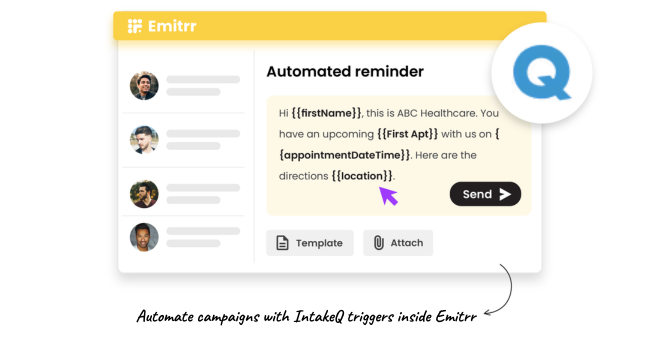
Send intake form links via text as soon as an appointment is booked, no manual step needed.
Send a follow-up reminder if the form hasn’t been completed 24 hours before the session.
Forms route back into PracticeQ records automatically, no manual data entry at check-in.
Customise form sets by appointment type, new client, returning, telehealth, or specialist referral.
Automated Session Reminders and Confirmations
Send reminders at pre-set intervals tailored to your practice, 48 hours, 24 hours, and 1 hour before.
Confirmation replies update appointment status in PracticeQ automatically.
Use considerate, plain-language message templates appropriate for mental health and therapy clients.
Handle rescheduling requests by text — clients reply directly and staff respond from one inbox.
Real-Time Two-Way Client Texting
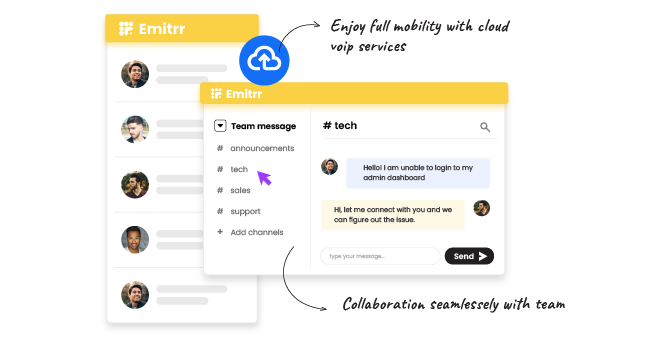
Clients text your practice number, not a personal phone, for questions, rescheduling, or quick check-ins.
All messages are HIPAA-compliant and stored in a centralised inbox visible to your team.
Use message templates for common replies, reducing response time without sounding robotic.
Flag urgent client messages for immediate attention with inbox priority tags.
Post-Session Review Request Automation
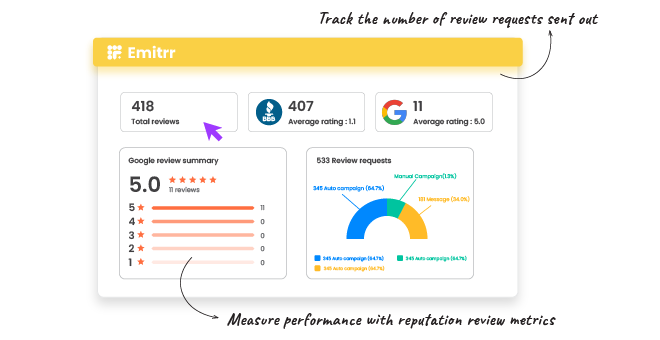
Emitrr sends a review request text after each completed session, triggered automatically from PracticeQ.
Clients who had a positive experience are guided to Google or your preferred platform in one tap.
Practitioners who rarely ask for reviews in person now build consistent review volume passively.
View all reviews across platforms from one Emitrr dashboard, no manual monitoring required.
Key Use Cases
Front Desk / Admin
Practitioners / Clinical Staff
Practice Owners & Managers
Frequently Asked Questions
Ready to Connect Emitrr with IntakeQ / PracticeQ?
Your practice runs on relationships and trust. Emitrr makes sure every communication, before, during, and after the session, reflects that same standard of care.
