
 4.9 (400+
reviews)
4.9 (400+
reviews)
Introduction
Healthcare delivery has shifted dramatically in the past decade, but the real transformation happened when telemedicine software moved from being a convenience tool to a clinical necessity. What was once considered a supplementary service is now a core part of modern healthcare infrastructure.
Today, a robust telemedicine platform is not just about video calls. It’s about enabling secure clinical workflows, streamlining documentation, supporting remote diagnostics, integrating with EHR systems, and improving patient access, all within a compliant and scalable telemedicine system.
From independent practices to multi-location health systems, providers are adopting online telemedicine software to reduce no-shows, expand access to care, manage chronic conditions remotely, deliver speciality services, and improve operational efficiency.
If you are a practice owner and are confused about telemedicine software and whether you should invest in one, sit glued to your screen as we’ll help you get insights into:
- The meaning of telemedicine software
- How it can benefit your practice
- The kind of pain points it can solve for you
- How to choose the right telemedicine platform
- The core features you must look for in a telemedicine system
- End-to-end telemedicine workflows
Let’s get right into it!
What Is a Telemedicine Software?
Telemedicine software is a clinical technology solution that enables healthcare providers to deliver medical care remotely through secure digital channels. At its core, a telemedicine platform facilitates real-time or asynchronous patient consultations, clinical documentation, prescribing, care coordination, and follow-ups; all within a compliant and integrated telemedicine system.
Unlike basic video conferencing tools, true online doctor software is purpose-built for healthcare. It includes HIPAA-compliant video infrastructure, digital intake forms, EHR integrations, secure messaging, billing workflows, and ePrescribing capabilities. The goal is not just communication; it is complete remote clinical care delivery.
What Pain Points Does a Telemedicine Platform Address?
Irrespective of what practice you run and how big or small it is, a telemedicine platform will help you solve the following problems:
- Limited patient intake: If you want to blur geographical boundaries and offer great patient care, you will be able to do so with the help of telemedicine software.
- High no-shows: When you make appointments more convenient and accessible, you will see a drastic reduction in patient no-shows.
- Overloaded Clinical Staff: If you’re facing problems with respect to inefficiencies in scheduling or fragmented patient documentation, a telemedicing platform will save the day for you.
- Inefficient Chronic Care Management: Chronic conditions such as hypertension, diabetes, and asthma need continuous monitoring. You will be able to conduct remote check-ins and follow-ups with the help of a modern telemedicine platform.
- Patient Demand for Digital Convenience: Today’s patients expect healthcare experiences similar to other digital services. Telemedicine software will help you deliver secure video visits, digital medical forms, and online communication, aligning healthcare with modern expectations.
- Scalability Challenges: A scalable telemedicine SaaS solution will help you standardize care delivery across regions without expanding physical infrastructure.

Telemedicine Software vs Telehealth Software: What’s the Difference?
Telehealth and telemedicine are often used interchangeably, but they are not identical. Here’s how both are different:
Telemedicine Software
Telemedicine specifically refers to remote clinical services that include diagnosing, treating, prescribing, and managing medical conditions through a digital telemedicine platform. It focuses on direct patient care delivered by licensed healthcare providers.
Here are some examples:
- Virtual doctor consultations
- Remote diagnosis in dermatology
- Online therapy sessions
- ePrescribing during a digital visit
A telemedicine system is therefore built around clinical workflows, compliance, documentation, and medical-grade communication.
Telehealth Software
Telehealth is a broader umbrella term that includes telemedicine but extends beyond clinical care.
Telehealth software may include the following:
- Remote patient monitoring devices
- Health education webinars
- Wellness coaching
- Administrative communication tools
- Public health outreach programs
While telehealth software can support non-clinical services, online doctor software under telemedicine is focused strictly on delivering medical treatment and clinical decision-making.
To explain in brief, here are some key differences between telehealth and telemedicine software:
| Aspect | Telemedicine Software | Telehealth Software |
| Primary Purpose | Remote clinical diagnosis & treatment | Broad digital health services |
| Focus | Medical care delivery | Clinical + non-clinical services |
| Workflow | Structured telemedicine workflow | May not require clinical documentation |
| Compliance Requirements | Strict HIPAA + prescribing rules | Varies depending on use case |
To summarize:
- All telemedicine software is part of telehealth.
- Not all telehealth software qualifies as telemedicine.
Understanding this distinction is critical when selecting a telemedicine SaaS solution for clinics. If your goal is to enable full clinical workflows, right from consultation to documentation to prescription, you need a dedicated telemedicine platform, not just a general telehealth communication tool.
Up next, we’ll explore the different types of telemedicine delivery models and how they shape clinical workflows.
Types of Telemedicine Software
Not all telemedicine software operates the same way. The type of telemedicine platform you choose directly impacts your clinical workflows, specialty use cases, patient experience, and scalability.
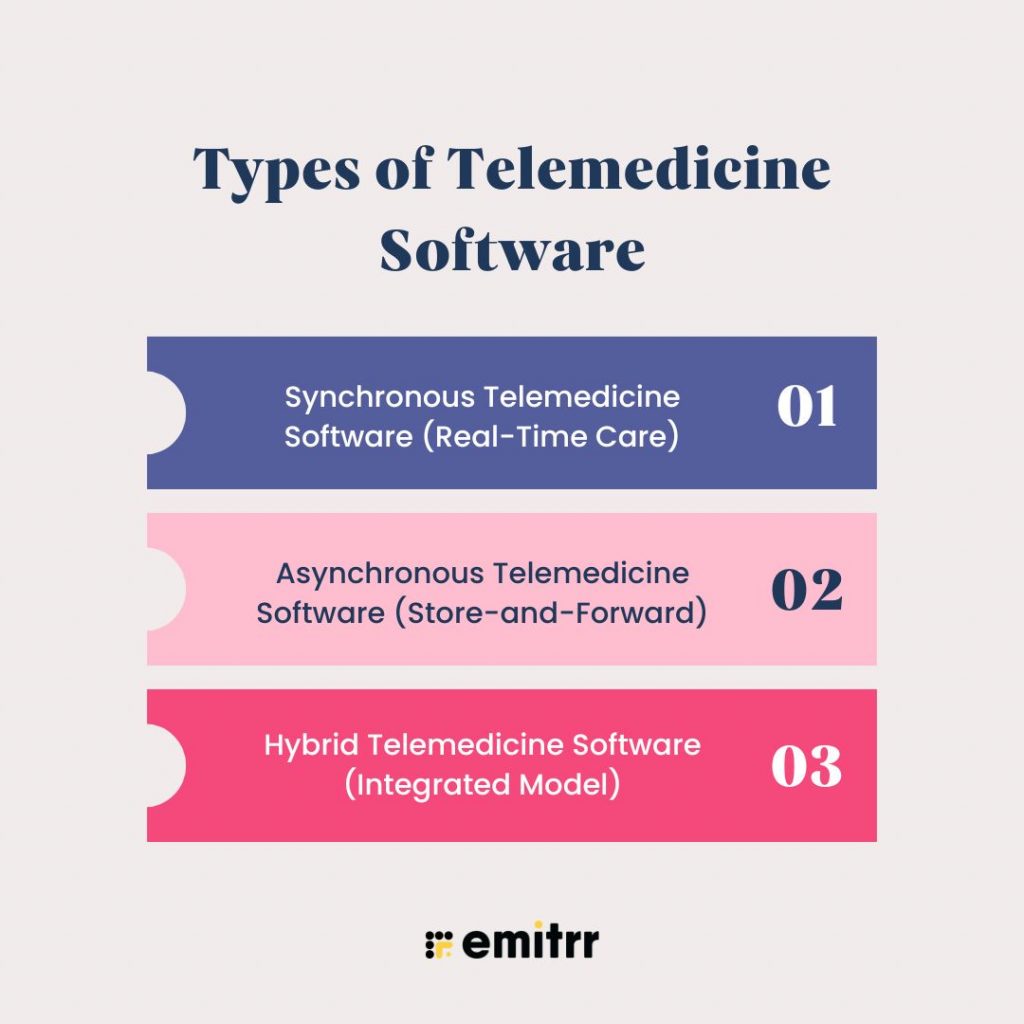
Broadly, a modern telemedicine system falls into three core categories:
- Synchronous (Real-Time) Telemedicine
- Asynchronous (Store-and-Forward) Telemedicine
- Hybrid Telemedicine Models
Each type supports different clinical scenarios and practice goals.
Let’s explore each model in detail.
Synchronous Telemedicine Software (Real-Time Care)
Synchronous telemedicine refers to live, real-time interaction between a provider and a patient using online doctor software.
How does a Synchronous Telemedicine Software work?
In the case of a Synchronous Telemedicine Software, patients join a secure virtual room at a scheduled time. The provider conducts the consultation via:
- HIPAA-compliant video conferencing
- Real-time audio
- Secure chat
- Screen sharing for labs or imaging
The telemedicine platform often integrates with EHR systems to allow documentation during the visit and supports ePrescribing immediately after.
Synchronous Telemedicine Software is perfect for the following use cases for your practice:
- Primary care consultations
- Behavioral health sessions
- Urgent care triage
- Medication management
- Follow-up visits
A synchronous telemedicine system mirrors in-clinic workflows such as follow-up, online appointment scheduling, e-prescriptions, live consultations, lab orders, virtual visits, and digital patient intake.
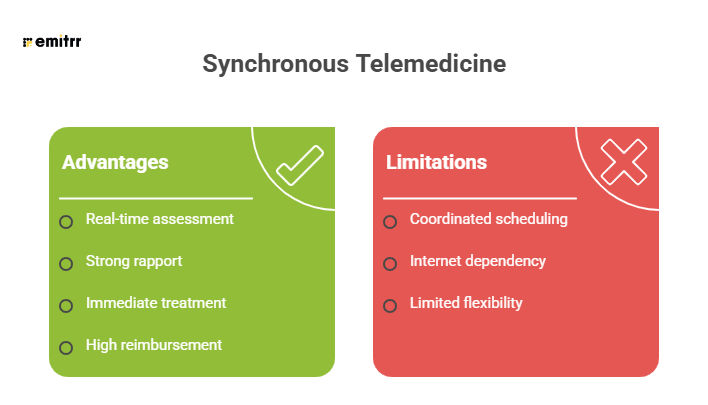
Advantages and limitations of Synchronous Telemedicine Software:
Asynchronous Telemedicine Software (Store-and-Forward)
Asynchronous telemedicine, often referred to as store-and-forward telemedicine, does not require live interaction. Instead, patient data is collected, stored, and reviewed by a provider at a later time.
How does an Aynchronous Telemedicine Software work?
In the case of a asyncronous telemedicine software, the patients upload images, medical history forms, symptom descriptions, lab results, and recorded vitals for the provider to review. The provider then documents the findings based on the information provided by the patient and responds with a diagnosis or treatment plan.
This form of asynchronous telemedicine is growing rapidly because it improves efficiency and flexibility.
This model is ideal for you if:
- You run a dermatology practice
- You run a radiology center
- You are into managing chronic conditions
- You get a lot of prescription refill requests
- You need to conduct post-operative check-ins
- You need to conduct behavioral health assessments
The typical workflow of an asynchronous telemedicine software includes patient submission, automated triage, provider review, clinical response, and documentation & follow-ups.
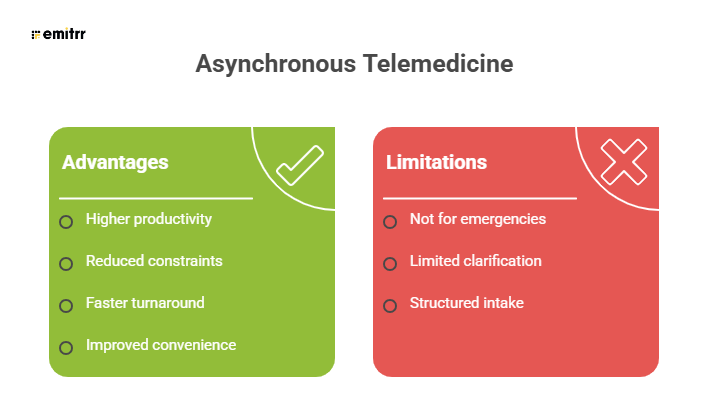
Advantages and limitations of ASynchronous Telemedicine Software:
Hybrid Telemedicine Software (Integrated Model)
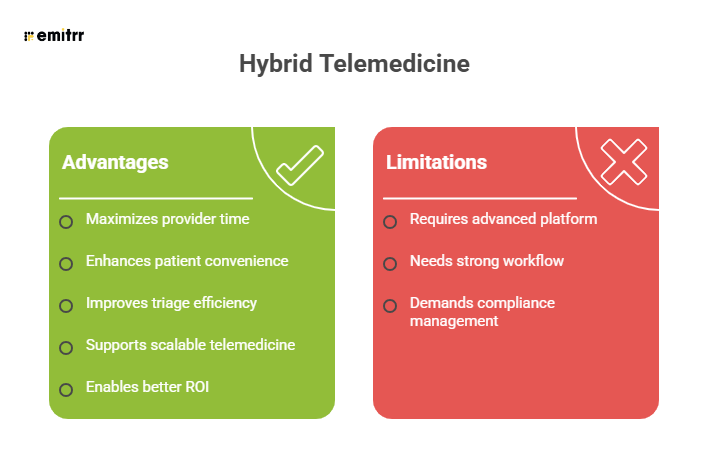
Most advanced healthcare organizations now adopt a hybrid telemedicine system that combines both synchronous and asynchronous capabilities.
Healthcare delivery is not one-dimensional. Some conditions require live evaluation, while others benefit from structured asynchronous review. A hybrid telemedicine platform allows you to conduct real-time visits when necessary, offer image-based consultations, automate follow-ups, and blend remote patient monitoring with live check-ins.
This telemedicine model is ideal for you if you:
- Are a primary care provider
- Run a multi-specialty clinic
- Run a behavioral health practice
- Look into chronic disease programs
Here’s what the workflow of a hybrid telemedicine platform looks like:
- The patient completes digital intake
- The AI agent routes the cases based on pre-set rules
- A minor issue gets an asynchronous review
- A complex issue gets the patient a scheduled live consultation
- Follow-up is done via secure messaging or digital monitoring
Advantages and limitations of a hybrid telemedicine system:
Synchronous vs Asynchronous vs Hybrid Telemedicine Models: A Comparison
| Basis of Differentiation | Synchronous Telemedicine | Asynchronous Telemedicine | Hybrid Telemedicine |
| Interaction Type | Live, real-time video/audio consultation | Store-and-forward (no live interaction required) | Combination of live and store-and-forward |
| Scheduling Requirement | Requires scheduled appointment | No real-time scheduling needed | Flexible – depends on case complexity |
| Clinical Use Cases | Primary care, behavioral health, urgent care | Dermatology, radiology, follow-ups, chronic care | Multi-specialty clinics, health systems |
| Provider Availability | Provider and patient must be present simultaneously | Provider reviews cases at their convenience | Mix of scheduled and flexible review |
| Patient Experience | Interactive, conversational | Structured submission and delayed response | Adaptive – live for complex, async for simple cases |
| Workflow Structure | Mirrors in-clinic visit workflow | Triage-based digital review workflow | Intelligent routing + dynamic workflow |
| Turnaround Time | Immediate during visit | Varies (minutes to hours) | Immediate or delayed depending on path |
| Technology Requirements | Stable internet + video infrastructure | Secure data capture + image upload capability | Advanced platform supporting both modes |
| Efficiency Level | Moderate (time-bound visits) | High (batch case review possible) | Very high (optimized resource allocation) |
| Best for Scaling | Small to mid-sized practices | High-volume specialty care | Enterprise and multi-location practices |
| Revenue Alignment | Strong alignment with traditional reimbursement | Reimbursement varies by specialty and payer | Optimized revenue through blended care models |
| Clinical Depth | Suitable for comprehensive evaluation | Limited to structured or visual cases | Supports both simple and complex evaluations |
| Flexibility | Limited due to real-time requirement | Highly flexible | Highly flexible and scalable |
Clinical Workflow in Telemedicine
A successful telemedicine software implementation is not defined by video quality alone; it is defined by how seamlessly it supports the entire clinical workflow from patient intake to follow-up care.
A modern telemedicine platform must replicate and often improve traditional in-clinic processes while maintaining compliance, efficiency, and clinical integrity. When designed correctly, a digital telemedicine system enhances provider productivity, reduces administrative burden, and improves patient experience.
Below is a comprehensive breakdown of the end-to-end telemedicine workflow and how advanced online doctor software supports each step.
Stage-1: Digital Appointment Scheduling & Patient Onboarding
This is the first stage of the telemedicine workflow that begins before the clinical encounter. A well-designed telemedicine platform integrates scheduling directly with provider calendars and EHR systems, preventing double bookings and minimizing no-shows. This stage includes online appointment scheduling, automated SMS confirmations and reminders, digital intake forms, and collecting telemedicine consent.
Digital patient onboarding will help you reduce front-desk workload, shorten visit preparation time, and ensure that you receive complete patient data before the virtual consultation begins. Convenient, right?
Stage-2: Pre-Visit Digital Patient Intake & Triage
The next stage of the pre-visit patient intake, which is critical for efficient telemedicine workflow execution. Here, you get your patients to update their medical history, current symptoms, list of medications, allergies, upload images, and fill out other pre-visit questionnaires.
Gathering this information will help you spend more time diagnosing and less time gathering baseline information during the visit. If you invest in an advanced telemedicine software, you can use rule-based triage to route patients to appropriate providers, identify and address urgent cases, and determine which type of care is suitable.
Stage-3: Virtual Consultation
This stage is the action that you take after collecting all patient data. Remote Consultation can be synchronous or asynchronous dpeending on the patient.
Synchronous Telemedicine includes secure HIPAA-compliant video conferencing, real-time audio communication, screen sharing for labs or imaging, and lab documentation. Asynchronous Telemedicine includes store-and-forward review of patient-submitted data, provider evaluation, and written diagnosis and treatment recommendations.
When you reach this stage, you need to ensure:
- Patient identity verification
- Provider licensure compliance (state-specific rules)
- Secure data transmission
- Documentation standards
Stage-4: Clinical Documentation & EHR Integration
Documentation is a non-negotiable component of the telemedicine workflow. A clinical-grade telemedicine platform will help you chart patient data directly during the visit, use customizable templates, auto-populate patient history, sync all data with your EHR, and capture telemedicine-specific billing modifiers.
Seamless integration with your EHR will prevent duplicate documentation and ensure continuity of care. If you wish to reduce post-visit charting time and lower the risk of compliance errors, this is a step you cannot miss.
Stage-5: ePrescribing & Orders Management
A complete telemedicine system must support secure electronic prescribing. Without ePrescribing integration, you will have to use separate systems, which will disrupt your workflow efficiency.
Look for key capabilities like e-prescription generation, controlled substance compliance, pharmacy integration, and lab and imaging orders. This is critical because fragmenting the prescribing process increases risk, slows care delivery, and creates unnecessary administrative work.
Stage-6: Billing, Coding & Reimbursement Processing
Telemedicine reimbursement requires accurate coding and documentation. An advanced telemedicine SaaS solution will help you with CPT code alignment, telemedicine modifiers, automated claim generation, insurance verification, and payment processing.
Remember that billing rules can vary by payer and state, hence the telemedicine platform must support compliance-based configuration. Once you optimize the telemedicine workflow, you’ll see improvements in reimbursements and a sharp decline in claim denials.
Stage-7: Post-Visit Follow-Up & Care Continuity
Telemedicine does not end when the virtual visit concludes. Post-visit care is equally important. With offerings like secure messaging, follow-up scheduling, care plan distribution, remote monitoring, and automated reminders, you will be able to provide better patient engagement without requiring physical visits.
Stage-8: Remote Patient Monitoring Integration
This is an advanced workflow layer that includes connected devices, real-time tracking of vitals, and alert-based intervention triggers. This added layer of RPM will help you extend telemedicine from episodic care to continuous care management.
Stage-9: Compliance and Security
Compliance should be considered and catered to across every stage of the workflow. Your HIPAA-compliant telemedicine platform must include end-to-end encryption, secure authentication, role-based access controls, audit logs, and BAAs. Violation of any of these will pose a huge compliance and regulatory risk.
Stage-10: Automation & AI
If you wish to optimize your workflows, then automation and AI are the way forward. Doing so will not only reduce administrative workload but also maintain clinical accuracy. AI-powered triage, automated documentation summaries, appointment reminders, and intelligent routing are some ways in which you can automate workflows.
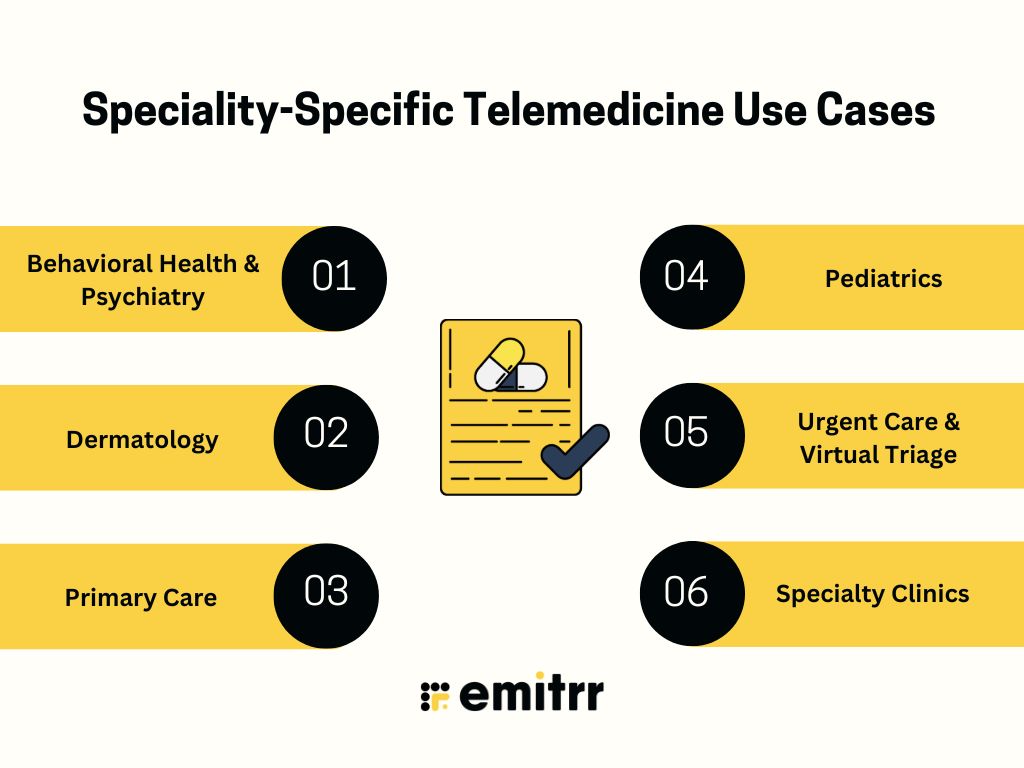
Speciality-Specific Telemedicine Use Cases
Not all telemedicine software is used the same way across specialties. Each clinical domain has unique workflow requirements, documentation needs, compliance considerations, and patient interaction styles.
A flexible telemedicine platform must adapt to specialty-specific workflows, not force providers into a one-size-fits-all model. Below is a comprehensive breakdown of how different specialties use a modern telemedicine system and what features are essential for each.
Behavioral Health & Psychiatry
Behavioral health was one of the earliest and fastest adopters of online doctor software, primarily because mental health care relies heavily on conversation rather than physical examination.
Common use cases of telemedicine for behavioral health include:
- Individual therapy sessions
- Psychiatric evaluations
- Medication management
- Group therapy sessions
- Substance use counseling
Telemedicine will work for behavioral health practices because it removes geographic barriers to mental health access, reduces all stigma for patients, improves appointment adherence, and enables continuity of care. Given all the use cases, a specialized telemedicine platform for behavioral health must prioritize privacy, minimal technical disruptions, and seamless scheduling for recurring sessions.
Dermatology
Again, dermatology is another specialty where asynchronous telemedicine is widely used. Common use cases for asynchronous telemedicine in dermatology include:
- Rash evaluations
- Acne management
- Skin lesion assessment
- Post-procedure follow-ups
- Chronic skin condition monitoring
Since many dermatological diagnoses are visually driven, there is no need for live interaction in most cases. This further leads to higher provider efficiency and faster turnaround time.
Primary Care
Primary care telemedicine use cases are broader and often require hybrid workflows. Some primary care-related telemedicine use cases include the following:
- Acute minor illness consultations
- Chronic disease management
- Preventive care check-ins
- Medication refills
- Follow-up visits
If you’re running a primary care clinic and want to address the aforementioned use cases, then you need a telemedicine platform that mirrors full clinical workflows, including billing, coding, and compliance documentation.
Pediatrics
Telemedicine adoption in pediatrics focuses on accessibility and parental convenience. Here are some common use cases that a telemedicine platform caters to:
- Evaluation of minor illnesses
- Fever consultations
- Behavioral health check-ins
- Developmental assessments
- Follow-up visits
A telehealth platform for your pediatric practice will reduce exposure risk in waiting rooms, improve after-hours care access, and support quick triage decisions. Make sure that the telemedicine platform you pick includes structured intake forms that capture guardian information and pediatric-specific history.
Urgent Care & Virtual Triage
Telemedicine for urgent care is specifically designed for rapid evaluation and decision-making. Here are a few common use cases of telemedicine software for urgent care practices:
- Minor injuries
- Cold and flu symptoms
- UTI assessments
- Triage before ER visits
- Work-from-home consultations
A telemedicine platform for urgent care must support quick visit turnover, minimal technical friction, and automated routing to escalate cases when necessary.
Specialty Clinics
Specialty practices such as Cardiology, Endocrinology, etc., can use telemedicine for follow-up and chronic condition monitoring rather than first-time complex diagnostics. Follow-up visits, lab results discussions, treatment plan suggestions, and remote monitoring reviews are some common use cases of telemedicine software for such types of practices.
If you manage a specialty clinic, then you need a telemedicine system that offers seamless integration with your existing systems, helps you with data visualization dashboards, and supports secure document exchange.
How to Choose a Telemedicine Software
Choosing the right telemedicine software is not just a technology decision; it’s a strategic clinical and operational investment. The right telemedicine platform should align with your specialty workflows, compliance requirements, patient volume, and long-term growth plans.
Many clinics make the mistake of selecting a tool based solely on video quality or price. However, a true clinical-grade telemedicine system must support end-to-end workflows, secure data handling, and scalable infrastructure.
Below is a structured framework to evaluate and compare online doctor software effectively.
Core Feature Checklist
Before evaluating advanced capabilities, ensure the telemedicine software includes essential core features. Here are some core features that you simply cannot miss out on:
1. HIPAA-Compliant Video
Video infrastructure must be secure, encrypted, and specifically designed for healthcare. Unlike consumer video tools, a clinical-grade telemedicine platform should include:
- End-to-end encryption
- Waiting room functionality
- Role-based access controls
- Business Associate Agreement (BAA) availability
Without HIPAA-compliant video, your telemedicine system exposes your practice to legal and regulatory risk.
2. Secure Messaging
Secure messaging extends care beyond the live visit. A robust telemedicine SaaS solution should offer:
- Encrypted patient-provider messaging
- Document sharing
- Structured communication logs
- Attachment support (labs, images, care plans)
Secure messaging strengthens follow-up care and improves patient engagement.
3. Online Scheduling
Integrated scheduling is critical for workflow efficiency. Your online telemedicine software should provide:
- Self-scheduling capabilities
- Calendar sync
- Automated reminders
- Recurring appointment management
Disconnected scheduling systems create operational friction and increase no-shows.
4. EHR Integration
Seamless EHR integration ensures documentation continuity. The ideal telemedicine platform should:
- Sync patient records automatically
- Allow in-visit charting
- Support telemedicine billing modifiers
- Prevent duplicate data entry
Integration reduces administrative burden and protects clinical accuracy.
5. Billing Tools
Telemedicine reimbursement requires accurate coding. A comprehensive telemedicine system should support:
- CPT and HCPCS code selection
- Telemedicine modifiers
- Automated claim generation
- Insurance eligibility checks
- Payment processing
Billing support directly impacts revenue cycle performance.
6. Analytics & Reporting
Data-driven insights improve operational performance. Advanced telemedicine software should provide:
- Visit volume tracking
- Provider utilization metrics
- Revenue reporting
- No-show analysis
- Patient engagement data
Analytics enable informed decision-making and scalable growth.
Technical Infrastructure
Beyond features, the technical foundation of the telemedicine platform determines performance, scalability, and reliability.
1. Cloud-Based Telemedicine SaaS
Make sure to prioritize a cloud-based telemedicine SaaS model. Cloud-based systems also support multi-location practices more efficiently than on-premise deployments.
Here are some benefits of investing in a cloud-based telemedicine software:
- No on-site hardware requirements
- Automatic updates
- Remote access from anywhere
- Lower IT maintenance costs
- Scalable storage capacity
2. Browser-Based vs App-Based Access
When evaluating online telemedicine software, consider accessibility. In the case of browser-based telemedicine, you don’t need any downloads, you get better patient access, faster onboarding, all of it without any major technical barriers. App-based telemedicine, on the other hand, may offer deeper device integration, support push notificationsm and also require installation and frequent updates. For maximum patient convenience, many practices prefer browser-based telemedicine platforms. Make sure to assess your use case before you decide which type of telemedicine platform you want.
3. Scalability
Your telemedicine system should grow with your practice. Evaluate key factors like multi-provider support, multi-location capability, enterprise-level user management, role-based permissions, and seamless load handling during peak traffic. Scalability ensures that the platform supports future expansion without requiring migration.
Clinical Workflow Support
Even the most advanced telemedicine software fails if it doesn’t align with clinical workflows. Make sure to get a deep understanding of documentation, intake automation, and workflow customization.
1. Documentation Tools
Clinical documentation must be seamless and efficient. Look for:
- Customizable templates
- Auto-fill patient history
- SOAP note support
- Integrated charting during visits
- Export and EHR sync capability
Strong documentation tools reduce provider burnout and compliance risk.
2. Intake Automation
Manual intake slows down telemedicine workflows.
Your telemedicine platform should support:
- Digital consent forms
- Pre-visit questionnaires
- Structured symptom collection
- Automated triage routing
Intake automation ensures providers enter the consultation prepared.
3. Specialty Customization
Different specialties require different workflows.
Evaluate whether the telemedicine system supports:
- Behavioral health templates
- Dermatology image uploads
- Chronic care tracking
- Pediatric guardian management
- Urgent care triage logic
Specialty customization determines clinical efficiency and patient satisfaction.
Compliance Readiness
Compliance is foundational when choosing a telemedicine solution. Here are some key compliance requirements that your telemedicine platform must meet:
1. Business Associate Agreement (BAA)
A legitimate telemedicine SaaS provider must sign a Business Associate Agreement.
A BAA ensures:
- Shared responsibility for PHI protection
- Clear compliance obligations
- Legal protection for your organization
If a vendor does not offer a BAA, it should not be considered.
2. Encryption Standards
Security protocols must include:
- End-to-end encryption
- Data encryption at rest
- Secure socket layer (SSL) certification
- Multi-factor authentication
A secure telemedicine platform protects patient trust and regulatory compliance.
3. Audit Reporting & Access Logs
A compliant telemedicine system should include:
- Detailed activity logs
- User access tracking
- Audit trail reporting
- Breach detection alerts
Audit capabilities are critical for HIPAA investigations and internal governance.
Why Emitrr Is a Clinical-Grade Telemedicine Platform
Choosing the right telemedicine software is not just about enabling virtual visits; it’s about building a reliable, compliant, and scalable digital care infrastructure.
Emitrr is designed as a clinical-grade telemedicine platform that goes beyond video calls. It supports complete telemedicine workflows, from patient intake to documentation, secure messaging, billing, and follow-up, within a fully compliant and scalable telemedicine SaaS framework.
Here are the key elements that make Emitrr stand out:
- Built for Clinical Workflows: Many tools offer video conferencing. Emitrr is built to support structured clinical workflows. The Emitrr telemedicine system aligns with real-world healthcare operations. Right from seamless digital intake and consent management to automated triage routing, from in-visit documentation support to follow-up automation, Emitrr adapts to your specialty-specific workflow requirements.
- HIPAA-Compliant Telemedicine Software: Emitrr is not a communication tool; it is purpose-built, HIPAA-compliant online telemedicine software designed for clinical delivery. Emitrr offers end-to-end encryption, secure data storage, role-based access control, audit trails and activity logs, and a Business Associate Agreement. This ensures PHI protection, reduces legal risk, and paves the way for secure doctor-patient communication.
- Secure Patient Messaging & Video Conferencing: Emitrr integrates secure messaging and video within a unified telemedicine system. By combining messaging and video into one telemedicine SaaS environment, Emitrr eliminates fragmented tools and improves continuity of care. With Emitrr, you’ll get encrypted patient-provider conversations, secure document and image sharing, seamless follow-up engagement, high-quality, secure video sessions, virtual waiting rooms, multi-provider access controls, and stable connectivity architecture.
- Operational efficiency: Emitrr’s telemedicine platform supports one-click online appointment scheduling, scheduled-based texting, and automated reminders, ensuring that providers, staff, and patients stay aligned without manual coordination. Automation reduces front-desk workload and improves patient adherence, which are the key drivers of telemedicine ROI.
- Scalability: Emitrr is built as a cloud-based telemedicine SaaS solution, enabling scalability across practice sizes. Offering zero on-premise hardware requirements, rapid deployment, multi-location support, secure cloud hosting, and enterprise-grade performance, Emitrr’s telemedicine software scales with your expansion.
All in all, if your goal is to implement a secure, scalable, and workflow-driven telemedicine system, Emitrr provides the infrastructure and clinical alignment required for long-term success.
Frequently Asked Questions
Emitrr stands out because it is built as a clinical-grade telemedicine software rather than a basic video tool. Unlike generic virtual meeting solutions, Emitrr supports structured clinical workflows, secure messaging, HIPAA-compliant video, EHR integration, scheduling automation, and billing alignment. Its telemedicine platform is designed specifically for healthcare providers who need an end-to-end telemedicine system that improves operational efficiency while maintaining regulatory compliance.
Yes, Emitrr is fully designed as HIPAA-compliant telemedicine software. The platform includes end-to-end encryption, secure cloud hosting, role-based access control, audit logs, and Business Associate Agreements (BAAs). Every interaction within the telemedicine platform, including secure messaging, file sharing, and live consultations, is protected to ensure patient data privacy and compliance with healthcare regulations.
Absolutely. Emitrr is built as a flexible telemedicine system that supports specialty-ready configuration. Whether you operate in behavioral health, dermatology, pediatrics, primary care, or urgent care, the telemedicine platform can be customized to match your workflow. From intake automation to documentation templates and triage routing, Emitrr adapts to specialty needs rather than forcing providers into a generic structure.
Yes. Emitrr’s telemedicine software is designed to integrate seamlessly with EHR systems and support billing workflows. Providers can document visits, apply telemedicine billing modifiers, and streamline reimbursement processes directly within the telemedicine platform. This integration prevents duplicate data entry and ensures continuity of care across digital and in-person visits.
Emitrr operates as a cloud-based telemedicine SaaS solution, making it highly scalable for growing practices and enterprise healthcare networks. The telemedicine system supports multi-provider access, location-specific configurations, centralized reporting, and role-based permissions. Whether you’re a single clinic or a multi-location organization, Emitrr’s infrastructure supports long-term expansion without operational disruption.
Conclusion
Telemedicine is no longer a supplementary service; it is a foundational component of modern healthcare delivery. Choosing the right telemedicine software determines whether your virtual care model becomes an operational advantage or a fragmented add-on.
Emitrr is designed as a clinical-grade telemedicine platform that supports complete digital workflows, ensures HIPAA compliance, integrates with existing systems, and scales with your growth. From secure messaging and video to automation, documentation, and specialty-specific configuration, Emitrr delivers a comprehensive telemedicine system built for real-world healthcare operations.
If your goal is to implement secure, scalable, and workflow-driven online telemedicine software, Emitrr provides the infrastructure and clinical alignment needed to succeed in today’s digital healthcare environment. Eager to learn more? Book a quick demo with us!