

Introduction
When was the last time you searched for a doctor, dentist, or physical therapist online?
Chances are, you didn’t start by visiting a practice’s website.
Instead, you searched on Google.
You looked at the clinics that appeared near the top of the page, checked their reviews, glanced through a few photos, confirmed they were open, and maybe even clicked the Call or Directions button.
That’s exactly how most patients search today.
In many cases, your Google Business Profile (GBP) is the first interaction a patient has with your practice. Before they visit your website, or even call your front desk, they’re already forming an opinion based on what they see on Google.
A complete, accurate, and well-maintained profile can help you:
- Appear in Google Maps and local search results
- Build trust with prospective patients
- Increase phone calls and appointment bookings
- Make it easier for patients to find the right clinic location
On the other hand, an outdated profile with incorrect hours, missing services, or poor-quality photos can send patients straight to your competitors.
Whether you’re running a single clinic or managing dozens of locations, optimizing your Google Business Profile is one of the simplest and most effective ways to improve your healthcare SEO strategy.
In this guide, you’ll learn how to optimize every part of your profile, avoid common mistakes, and manage Google Business Profiles across multiple healthcare locations.
What You’ll Learn
By the end of this guide, you’ll know:
- Why Google Business Profile is important for medical SEO
- How to claim and verify your profile correctly
- How to optimize every section of your profile
- Healthcare-specific optimization best practices
- Common mistakes that hurt local rankings
- How to manage profiles across multiple locations
- A simple maintenance checklist to keep your profile up to date
Let’s begin with the most important question.
Why does Google Business Profile matter so much in the first place?
Chapter 1: Why Google Business Profile Matters
Imagine two dental clinics located on the same street.
- Both have experienced dentists.
- Both offer similar treatments.
- Both charge comparable prices.
Yet one clinic consistently receives more appointment requests.
Why?
Often, the difference isn’t the quality of care.
It’s visibility.
If patients can’t easily find and trust your practice online, they’ll book with someone else.
That’s where Google Business Profile comes in.
Your Google Business Profile Is Often Your First Impression
Years ago, patients relied heavily on referrals from friends, family, or other doctors.
Today, even after getting a recommendation, most people still search online before booking an appointment.
For example, if a friend recommends a dermatologist, you’re likely to Google the practice before calling.
You’ll probably check:
- Reviews
- Photos
- Office hours
- Location
- Services
- Website
- Appointment options
Within a few minutes, you’ve already decided whether the practice feels trustworthy.
That entire decision happens before you even visit the website.
This is why your Google Business Profile is often referred to as your digital front door.
It Helps Patients Find You
When someone searches for:
- Dentist near me
- Pediatrician in Chicago
- Physical therapist nearby
Google usually displays a map with a few local businesses before showing traditional website results.
This section is commonly known as the Local Pack, and it’s where many patients begin their search.
If your profile is optimized, your practice has a better chance of appearing in these local results.
That means more visibility, more clicks, and more opportunities to attract new patients.
It Helps Patients Choose You
Getting found is only half the battle.
Once your profile appears in search results, patients immediately start comparing their options.
Imagine these two listings.
Practice A

- 12 reviews
- Last photo uploaded four years ago
- No business description
- Missing appointment link
Practice B

- Hundreds of recent reviews
- Professional clinic photos
- Updated business hours
- Clear service list
- Easy online booking
Which one would you choose?
Most patients would feel more confident choosing Practice B.
Not necessarily because it offers better care, but because it provides more information and appears more trustworthy.
A well-optimized profile removes uncertainty and makes it easier for patients to take the next step.
It Can Generate Appointments Without Patients Visiting Your Website
Many healthcare organizations think of their website as the main source of new appointments.
But that’s no longer always the case.
Patients can now:
- Call directly from your Google Business Profile
- Get directions to your clinic
- Read patient reviews
- Visit your booking page
- View your office hours
Sometimes, a patient completes their entire journey without ever visiting your homepage.
That’s why your Google Business Profile should be treated as more than just an online directory listing, it’s an important patient acquisition channel.
It’s Even More Important for Multi-Location Healthcare Organizations
If you manage multiple clinics, every location should have its own Google Business Profile.
Why?
Because patients search locally.
Someone in Dallas isn’t looking for your Houston clinic.
Likewise, a patient searching for “urgent care near me” expects to see nearby locations—not your corporate headquarters.
Each profile should include the correct:
- Address
- Phone number
- Business hours
- Services
- Photos
- Reviews
This helps Google recommend the right location to the right patient.
It Supports Your Overall Healthcare SEO Strategy
Google Business Profile isn’t a replacement for your website. The two work together.
Your website helps Google understand your practice in detail.
Your Google Business Profile helps patients discover and interact with your practice locally.
When both are optimized, they reinforce each other and strengthen your overall local SEO for healthcare strategy.
Key Takeaways
Your Google Business Profile isn’t just another business listing.
For many patients, it’s the first interaction they’ll have with your practice.
A well-optimized profile helps you:
- Improve visibility in local search results
- Build trust before the first appointment
- Increase calls, directions, and appointment bookings
- Support your broader medical practice search engine optimization efforts
Now that you understand why it matters, let’s make sure your profile is set up correctly.
Chapter 2: How to Claim & Verify Your Google Business Profile
Before you start optimizing your Google Business Profile, you need to make sure you actually own it.
This sounds obvious, but many healthcare organizations discover that:
- Their profile was automatically created by Google.
- A former employee still owns the listing.
- Multiple profiles exist for the same clinic.
- The information displayed is outdated.
If you don’t fix these issues first, any optimization work you do later will have limited impact.
Let’s build a strong foundation.
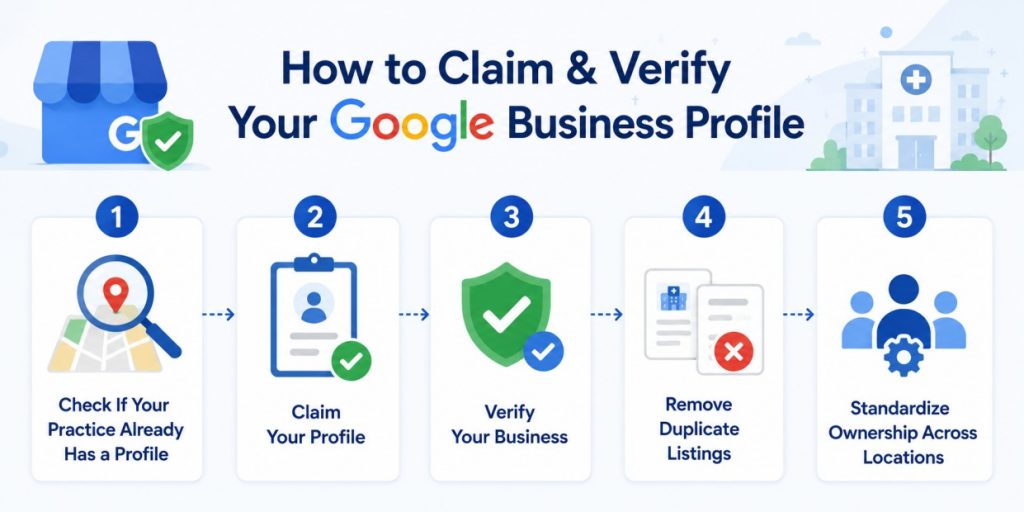
Step 1: Check If Your Practice Already Has a Profile
Google automatically creates Business Profiles for many businesses using publicly available information.
So before creating a new profile, search for your practice on Google and Google Maps.
If you manage multiple locations, search for each one individually.
For example:
- ABC Dental – Downtown
- ABC Dental – North Austin
- ABC Dental – Round Rock
As you search, create a simple spreadsheet with:
| Location | Claimed? | Verified? | Duplicate Found? |
| Downtown | ✅ | ✅ | No |
| North Austin | ❌ | No | Yes |
| Round Rock | ✅ | Pending | No |
This gives you a clear picture of which locations need attention.
Step 2: Claim Your Profile
If your profile already exists but isn’t managed by your organization, you’ll need to claim ownership.
Once you become the verified owner, you’ll be able to:
- Edit business information
- Upload photos and videos
- Respond to reviews
- Add services
- View profile insights
If no profile exists, create one using your official business information.
Pro Tip: Use a company-owned Google account instead of a personal email. This prevents access issues if an employee leaves the organization.
Step 3: Verify Your Business
After claiming your profile, Google will ask you to verify that your business is legitimate.
Verification methods may include:
- Postcard verification
- Phone verification
- Email verification
- Video verification
- Bulk verification (for eligible multi-location businesses)
Once verified, you’ll have full control over your profile.
Step 4: Remove Duplicate Listings
Duplicate profiles are more common than you might think.
For example, a clinic that has moved locations or changed its name may end up with multiple listings.
This can confuse both patients and Google.
Instead of concentrating reviews and visibility on one profile, your reputation gets split across several.
If you find duplicate listings, request that Google remove or merge them whenever possible.
Step 5: Standardize Ownership Across Locations
If your organization manages multiple clinics, avoid letting each location create and manage its own profile independently.
Instead:
- Keep ownership under one company-managed Google account.
- Give team members the appropriate level of access.
- Document who manages each profile.
This makes it much easier to maintain consistency as your organization grows.
Quick Checklist
Before moving on, confirm that every location:
✅ Has its own Google Business Profile
✅ Has been claimed
✅ Has been verified
✅ Doesn’t have duplicate listings
✅ Is managed through a company-owned account
Once that’s done, you’re ready to optimize your profile.
Chapter 3: How to Optimize Every Part of Your Google Business Profile
Many healthcare organizations stop after adding their business name, address, and phone number.
That’s a good start—but it’s far from enough.
Every section of your Google Business Profile helps Google understand your practice and helps patients decide whether they should choose you.
Let’s look at the most important sections.
Section 1: Business Information
This information tells Google who you are, where you’re located, and what services you provide.
Getting these basics right lays the foundation for everything else.
Business Name
Your business name should match the name patients already know.
For example:
✅ Green Valley Dental
❌ Green Valley Dental | Best Dentist in Dallas
Adding extra keywords to your business name might seem like a good SEO tactic, but it goes against Google’s guidelines and can put your listing at risk.
Keep it simple and consistent across your website, social profiles, and online directories.
Business Category
Choosing the right category is one of the most important optimization steps.
Your primary category tells Google what your practice does.
For example:
| Practice Type | Recommended Primary Category |
| Dental Practice | Dentist |
| Pediatric Clinic | Pediatrician |
| Physical Therapy Clinic | Physical Therapist |
| Urgent Care | Urgent Care Center |
You can also add secondary categories if they accurately represent additional services.
For example, a dental practice may include:
- Cosmetic Dentist
- Emergency Dental Service
- Pediatric Dentist
Only choose categories that genuinely apply to your practice.
Address & Phone Number
Patients should never have to guess where your clinic is located or which number to call.
Make sure your business name, address, and phone number are consistent across:
- Your website
- Google Business Profile
- Healthcare directories
- Insurance directories
- Social media profiles
Even small inconsistencies can create confusion, especially for organizations with multiple locations.
Website
Every Google Business Profile should link to the most relevant page on your website.
For a single-location practice, that may be your homepage.
For multi-location organizations, each profile should ideally link to its own location page.
For example:
Instead of:
www.healthcaregroup.com
Use:
www.healthcaregroup.com/locations/chicago
This creates a better patient experience and supports your medical website SEO efforts.
Section 2: Patient Information
Now that patients know who you are, they want to know whether your practice meets their needs.
These fields help answer that question.
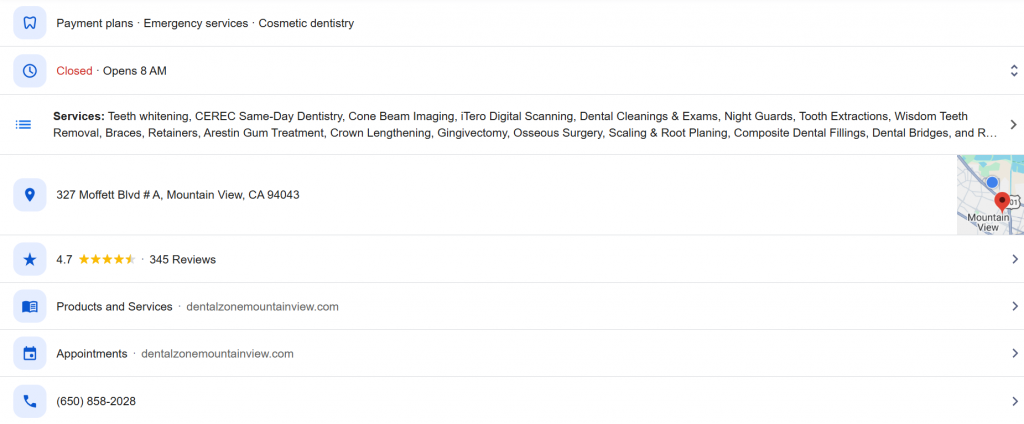
Business Hours
One of the quickest ways to lose a patient’s trust is by displaying incorrect business hours.
Imagine driving to a clinic because Google says it’s open, only to find the doors locked.
That’s a frustrating experience—and one that’s easy to avoid.
Review your hours regularly and update them whenever there are changes.
Don’t forget to add special hours for holidays or temporary closures.
Services
Many practices only list broad categories like “Dentist” or “Medical Clinic.”
Instead, include the specific services patients search for.
For example, a dental practice might list:
- Teeth Cleaning
- Dental Implants
- Invisalign
- Root Canal Treatment
- Emergency Dentistry
Similarly, a physical therapy clinic could include:
- Sports Rehabilitation
- Dry Needling
- Post-Surgical Therapy
- Balance Therapy
A detailed service list helps patients understand what you offer and gives Google more context about your practice.
Business Description
Your business description should clearly explain:
- Who you are
- What you do
- Who you help
- What makes your practice unique
Avoid generic statements like:
“We provide high-quality healthcare services.”
Instead, write something more specific.
For example:
Green Valley Physical Therapy helps patients in Austin recover from injuries, improve mobility, and return to their daily activities through personalized treatment plans and experienced therapists.
Write for patients—not search engines.
Appointment Links
Once a patient decides to book, make the process as simple as possible.
Adding a direct appointment link allows patients to schedule without navigating through multiple pages on your website.
The fewer steps required, the more likely patients are to complete the booking.
For practices using patient communication platforms, integrating online scheduling with appointment reminders and confirmations can create an even smoother experience.
Section 3: Trust Signals
When patients find your practice on Google, they usually ask themselves one question:
“Can I trust this provider?”
The following sections help answer that question.
Photos
Photos are often the first thing patients notice after your reviews.
High-quality images make your practice feel more welcoming and help patients know what to expect before they arrive.
Upload photos of:
- The clinic exterior (so patients can easily recognize it)
- Reception area
- Treatment rooms
- Providers and staff
- Parking or entrance
- Accessibility features, if applicable
Avoid stock photos wherever possible. Patients want to see your actual clinic, not generic images downloaded from the internet.
Pro Tip: Refresh your photos every few months. New images show that your practice is active and well-maintained.
Videos
Videos aren’t required, but they can help your practice stand out.
Simple videos work best, such as:
- A short clinic tour
- A welcome message from a provider
- A walkthrough showing patients where to park or check in
You don’t need expensive production equipment. Even a short, well-lit video recorded on a smartphone can make your profile feel more personal.
Attributes
Attributes give patients additional information about your practice before they contact you.
Depending on your clinic, these may include:
- Wheelchair-accessible entrance
- Wheelchair-accessible parking
- Accepting new patients
- Online appointments
- Language assistance
While these details may seem small, they often influence a patient’s decision—especially if they’re looking for a specific accommodation.
Reviews
Reviews deserve a guide of their own, but they play an important role in your Google Business Profile.
Positive reviews build trust and show prospective patients what they can expect from your practice.
Just as important is responding to reviews—both positive and negative.
A simple thank-you message shows patients that you value their feedback. If you receive negative feedback, respond professionally without discussing any patient-specific information.
Common Mistake: Waiting for reviews to happen naturally. Instead, create a process for requesting feedback after appointments through email or text.
FAQs
Your Google Business Profile allows patients to ask questions.
Rather than waiting for those questions to appear, answer the ones you hear most often at your front desk.
For example:
- Do you accept walk-ins?
- Which insurance plans do you accept?
- Is parking available?
- Do you offer same-day appointments?
- What should I bring to my first visit?
Providing answers upfront improves the patient experience and reduces repetitive phone calls.
Messaging
Some patients prefer sending a message instead of making a phone call.
If messaging is available for your profile, make sure someone on your team monitors it regularly.
Responding quickly helps patients get the information they need and creates a better first impression.
For practices handling a high volume of inquiries, using a centralized communication platform can help ensure messages don’t go unanswered.
Quick Checklist
Before moving on, ask yourself:
✅ Are your photos recent and high quality?
✅ Have you uploaded at least one video?
✅ Are your practice attributes complete?
✅ Do you have a process for collecting reviews?
✅ Have you answered common patient questions?
If not, these are some of the easiest improvements you can make to your profile.
Chapter 4: Healthcare-Specific Optimization Tips
Many Google Business Profile best practices apply to every business.
But healthcare has unique challenges.
Patients aren’t just looking for a nearby business—they’re looking for the right provider.
Here are a few ways healthcare organizations can optimize their profiles more effectively.
Highlight Your Specialties
Patients rarely search for a “medical clinic.”
Instead, they search for the care they need.
For example:
- Pediatrician
- Sports injury clinic
- Dental implants
- Skin cancer screening
- Physical therapy for back pain
Make sure your services, business description, and website clearly reflect the treatments you offer.
The more specific you are, the easier it is for Google—and patients—to understand your expertise.
Optimize Every Location Individually
If you operate multiple clinics, avoid using the same description, photos, and services for every location.
Each profile should reflect what’s available at that clinic.
For example, one location may offer:
- MRI services
- Sports medicine
- Evening appointments
Another may specialize in:
- Pediatrics
- Vaccinations
- Same-day appointments
Unique profiles help patients find the right location and give Google more relevant information to work with.
Make It Easy to Learn About Your Providers
Many patients choose a doctor, not just a practice.
If possible, link each Google Business Profile to a location page that includes:
- Provider names
- Specialties
- Professional photos
- Languages spoken
- Appointment options
This gives patients the confidence they need before booking.
Keep Patient Privacy in Mind
When responding to reviews or posting updates, never share patient-specific information.
Even if a patient mentions their treatment, your response should remain general and professional.
Protecting patient privacy isn’t just good practice,it’s essential in healthcare.
Keep Your Information Updated
Healthcare changes frequently.
Providers join or leave.
Services expand.
Office hours change.
Review your profile regularly to ensure patients always see accurate information.
A well-maintained profile creates a better experience and signals to Google that your business information is reliable.
Chapter 5: Use Google Posts to Keep Your Profile Active
Many healthcare organizations optimize their Google Business Profile once and never update it again.
While your business information may not change often, your profile shouldn’t remain static.
Google Posts let you share timely updates directly on your Business Profile, helping patients see that your practice is active and engaged.
While posting regularly won’t automatically move you to the top of search results, it can increase engagement and give patients another reason to choose your practice.
What Should You Post?
You don’t need to publish promotional content every week. Focus on updates that patients actually find useful.
Here are a few ideas:
- Introduce new providers joining your practice.
- Announce new services or treatment options.
- Share holiday or revised office hours.
- Promote health awareness campaigns like Breast Cancer Awareness Month or Flu Season.
- Highlight community events or free health camps.
- Share simple healthcare tips or patient education content.
For example, a pediatric clinic might post reminders about back-to-school vaccinations, while a dental practice could share oral hygiene tips during National Children’s Dental Health Month.
How Often Should You Post?
Aim for 2–4 posts per month.
Consistency is more important than frequency. A profile that’s updated regularly sends a stronger signal than one that’s active for a week and then ignored for months.
Pro Tip: Repurpose content from your blog, newsletter, or social media instead of creating new content specifically for Google Posts.
Chapter 6: Common Google Business Profile Mistakes to Avoid
Even a well-established healthcare organization can lose visibility because of simple mistakes.
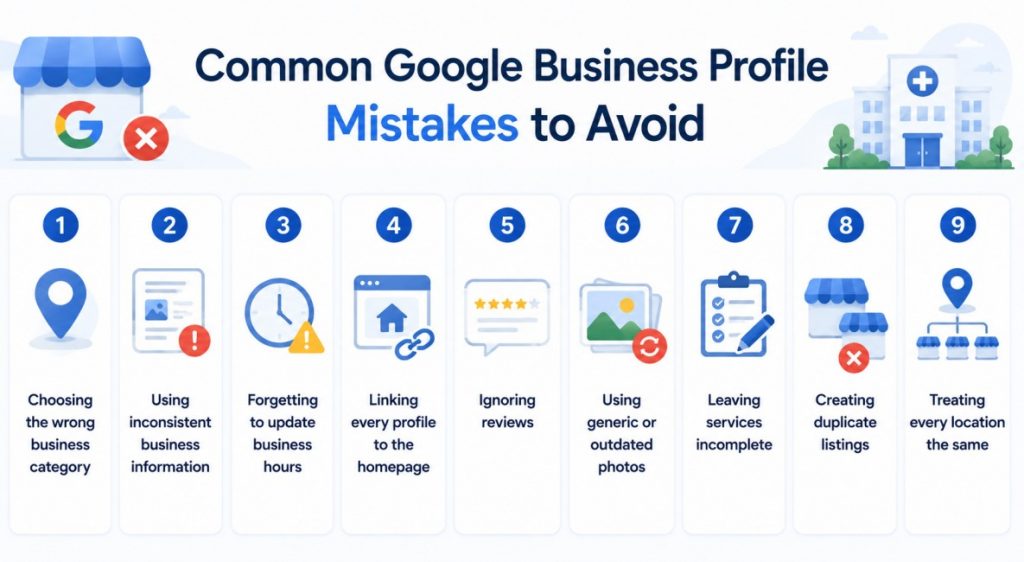
The good news? Most of them are easy to fix.
1. Choosing the Wrong Business Category
Your primary category tells Google what your practice does.
Choosing a broad category like Medical Clinic when you’re actually a Pediatrician or Physical Therapist can reduce your chances of appearing in relevant searches.
Always choose the category that best represents your primary service.
2. Using Inconsistent Business Information
Your practice name, address, and phone number should be consistent across every platform, including:
- Your website
- Google Business Profile
- Healthcare directories
- Social media
Inconsistent information creates confusion for both patients and search engines.
3. Forgetting to Update Business Hours
Incorrect hours are one of the quickest ways to lose a patient’s trust.
Remember to update your profile for:
- Holidays
- Temporary closures
- Seasonal schedule changes
- Special events
4. Linking Every Profile to the Homepage
If you have multiple locations, don’t send every patient to your homepage.
Instead, link each Google Business Profile to its corresponding location page.
This creates a better patient experience and supports your local SEO for medical practices.
5. Ignoring Reviews
Patients notice more than just your rating.
They also notice whether you respond.
Create a simple process for requesting reviews after appointments and replying to patient feedback promptly and professionally.
6. Using Generic or Outdated Photos
Your photos should reflect your current practice.
Replace old or low-quality images with recent photos of:
- Your clinic
- Your team
- Treatment rooms
- Reception area
Authentic photos build more trust than stock images.
7. Leaving Services Incomplete
Listing only “Medical Clinic” or “Dental Office” doesn’t tell patients much.
Instead, add the specific services available at each location.
This helps patients understand what you offer and gives Google more context about your practice.
8. Creating Duplicate Listings
Multiple listings for the same clinic can split reviews, confuse patients, and weaken your local presence.
Audit your profiles regularly and merge or remove duplicate listings whenever possible.
9. Treating Every Location the Same
This mistake is common among multi-location healthcare organizations.
Avoid copying the same description, photos, and services across every clinic.
Each location should have its own:
- Photos
- Business description
- Services
- Office hours
- Contact information
This creates a more accurate experience for patients and improves local relevance.
Quick Audit
If you’re not sure where to begin, review your Google Business Profile using this checklist:
- Is every field complete?
- Are your business hours accurate?
- Is your primary category correct?
- Are your photos recent?
- Do you have a direct appointment link?
- Are all major services listed?
- Have you responded to recent reviews?
If you answered “no” to any of these, you’ve already identified opportunities to improve.
Chapter 7: Managing Google Business Profiles for Multiple Locations
Managing one Google Business Profile is fairly straightforward.
Managing 20, 50, or even 100 locations is a different challenge altogether.
Without a clear process, it’s easy for profiles to become inconsistent. One location updates its holiday hours, another doesn’t. One responds to reviews regularly, while another hasn’t replied in months.
The goal is to give every location a consistent online presence while still allowing each clinic to showcase what makes it unique.
Standardize the Basics
Every location should follow the same standards for:
- Business name format
- Business categories
- Business description
- Photo quality
- Review response guidelines
- Branding and logos
This keeps your brand consistent across all locations.
Let Each Location Highlight Its Strengths
While the overall branding should remain consistent, each profile should reflect the services and providers available at that location.
For example:
| Location | Highlight |
| Downtown Clinic | Same-day appointments |
| North Clinic | Pediatric specialists |
| East Clinic | Sports injury rehabilitation |
This helps patients find the location that’s best suited to their needs.
Assign Clear Ownership
Decide who is responsible for maintaining your profiles.
For larger organizations, responsibilities are often shared:
- Corporate marketing manages branding and profile standards.
- Individual locations update office hours and photos.
- Front desk teams monitor and respond to reviews.
Having clear ownership ensures profiles stay accurate throughout the year.
Chapter 8: Monthly Google Business Profile Maintenance Checklist
Optimizing your profile isn’t a one-time task.
Set aside a little time each month to review and update your information.
Every Month
- Check business hours
- Respond to new reviews
- Upload new photos if available
- Verify contact information
- Review unanswered questions
Every Quarter
- Update your business description if services have changed.
- Review business categories.
- Add new services or remove outdated ones.
- Publish fresh Google Posts.
- Check for duplicate listings.
Every Year
- Audit every location.
- Update provider information.
- Refresh your photo gallery.
- Review links to your website and appointment pages.
Pro Tip: Create a recurring checklist for your marketing team so these tasks don’t get overlooked.
Chapter 9: Before-and-After Optimization Example
Let’s see how these changes can make a difference.
| Before Optimization | After Optimization |
| Basic business description | Clear, patient-focused description |
| Few or outdated photos | Professional, up-to-date clinic photos |
| Generic service list | Detailed services for that location |
| No appointment link | Direct online booking link |
| Inconsistent business hours | Accurate hours with holiday updates |
| Few review responses | Regular responses to patient feedback |
None of these changes require advanced SEO knowledge.
They’re simply about making your profile more helpful for patients.
And that’s exactly what Google wants to reward.
How Emitrr Helps
Keeping Google Business Profiles updated is only one part of attracting and retaining patients.
Once a patient discovers your practice, their experience depends on how easily they can communicate with your team.
That’s where Emitrr helps.
With Emitrr, healthcare organizations can:
- Send automated appointment reminders to reduce no-shows.
- Respond to patient messages from one shared inbox.
- Request reviews automatically after appointments.
- Enable online scheduling and confirmations.
- Communicate with patients through text messages instead of phone calls.
- Manage patient conversations across multiple locations.
Instead of juggling multiple communication tools, your team can manage patient interactions from one platform while continuing to deliver a great patient experience.
Conclusion
Your Google Business Profile is often the first impression patients have of your practice.
A complete and well-maintained profile helps patients find you, trust you, and book appointments more easily.
To recap:
- Claim and verify every location.
- Complete every important section of your profile.
- Keep your information accurate and up to date.
- Collect and respond to patient reviews.
- Publish regular updates through Google Posts.
- Create a consistent process for managing multiple locations.
Most importantly, remember that Google Business Profile optimization isn’t about trying to “game” the algorithm.
It’s about making it as easy as possible for patients to find the information they need and choose your practice with confidence.
When combined with a strong website and an effective healthcare SEO strategy, an optimized Google Business Profile can become one of your most valuable sources of local patient acquisition.

 4.9 (400+
reviews)
4.9 (400+
reviews)