
 4.9 (400+
reviews)
4.9 (400+
reviews)
Introduction
Have you ever tried calling your insurance provider with a question about prior authorization or billing? You probably already know how frustrating it can be: long wait times, endless transfers, and still no clear answer. You are not alone.
In a recent U.S. survey conducted in November 2024, more than 80% of patients reported experiencing confusion or miscommunication between their healthcare providers and insurance companies at least some of the time. It gets worse as only 19% of those surveyed said they usually understand their coverage details and costs before heading into a procedure. The rest are left wondering, “What will this cost me? Who’s approving it? Do I even need this authorization?”
And when people try to get answers? It is a maze. Some call their doctor, others try the insurance helpline, and about 30% of people admit they have no idea where to even begin.
The shift to cloud-based call center solutions allows medical insurance agents to respond faster, connect systems seamlessly, and offer real support to the people on the line.
In this blog, we are breaking down the top 10 medical insurance call center software in 2025 that are helping insurance providers simplify communication and improve their service.

What is Medical Insurance Call Center Software?
Medical insurance call center software functions as a specialized phone system for insurance, supporting communication workflows between insurers, healthcare providers, and policyholders. It helps streamline how support teams handle both inbound inquiries and outbound interactions related to coverage, claims, billing, and prior authorizations; basically, areas where clarity and efficiency are necessary.
Unlike landlines, medical insurance call center software meets the demands of healthcare and insurance teams. It routes calls based on the type of inquiry, provides instant access to policy and claims data, and maintains unified communication across phone, email, and messaging channels. This helps minimize delays, reduce confusion, and improve the overall quality of service.
Additionally, maintaining security as a top priority. With sensitive health and financial data involved, this software offers clear ways to stay HIPAA-compliant, embedding the necessary protections without complicating day-to-day operations.
By improving both operational efficiency and patient experience, medical insurance call center software offers a more responsive, coordinated approach to overall medical insurance communication.
Key Features to Look for in Medical Insurance Call Center Software
Medical insurance agents deal with time-sensitive calls, data-heavy conversations, and strict privacy regulations often all at once. Without the right tools, even simple queries can turn into complicated back-and-forths. This explains why basic phone features are not enough for ideal medical insurance call center software. It needs to support real-time decisions, simplify communication, and maintain security at every step.
Below are the key features that make that possible:

HIPAA-compliant Communication
Every conversation, whether it is a phone call, text, or email, needs to meet strict privacy standards. Medical insurance call center platforms must offer secure, encrypted channels and, most importantly, HIPAA compliance. This protects both patient data and the organization’s credibility without slowing down communication.
AI-powered Assistance and Automation
AI tools in medical insurance call center software can recognize what a caller needs, bring up relevant records instantly, and even suggest next steps. These features reduce repetitive tasks, cut down response time, and allow agents to focus on resolving more complex issues. AI chatbots for insurance agents handle routine queries like coverage checks or claim updates through web or app chat, allowing agents to focus on more complex cases. This reduces repetitive work, speeds up responses, and improves accuracy.
Smart IVR and Call Routing
A well-designed IVR system guides callers based on their needs, saving time for both the caller and the agent. With intelligent call routing, calls reach the right department quickly, reducing transfer loops and helping resolve issues in fewer steps. On the outbound side, auto-dialers for insurance agents help reach policyholders more efficiently by automatically connecting calls, reducing manual effort, and speeding up response times for follow-ups or renewals.
Claims and Billing Support Tools
Questions about claims and billing are frequent and mostly urgent. Built-in billing tools that allow agents to view claim statuses, confirm payment details, or correct billing errors help support teams respond with accuracy and speed.
Integration with EHR/EMR and CRM
Having patient and policyholder details scattered across platforms leads to delays. A fully integrated system connects the call center software with EHR, EMR, and VoIP CRM platforms so agents have all the information they need in one place, without switching screens or making follow-up calls.
Omnichannel Communication
Phone support is not always the first choice anymore. Patients expect the option to reach out via text for insurance marketing, email, or even chat. Omnichannel systems keep those conversations connected, so no matter how someone reaches out, the context is never lost.
Call Recording and Audit Logs
Recordings offer more than quality checks; they provide accountability. With clear audit trails and access to call recordings, insurance teams can confirm what was discussed, spot errors, and reference past conversations for accurate follow-ups.
Real-time Analytics and Reporting
Quick access to live call analytics data allows managers to track call volumes, response times, agent productivity, and more. This helps identify problems early and make adjustments that improve overall performance.
Voicemail-to-text Conversion
This feature allows you to convert voicemail to text, making it easier to scan and respond to messages without listening to each one. Voicemail transcription provides a clear written record of what was said, helping agents prioritize follow-ups and avoid missing important details, which is useful during high call volume.
Watch this video for 3 key things about voicemail transcription that can actually save your time and effort:
Voicemail Transcription – 3 Essential Things to Know
Patient Callback and Queue Management
Long hold times can frustrate even the most patient callers. Call queue management tools with scheduled reminder call options allow people to hold their place in line without staying on the phone, creating a smoother and more respectful experience.
Customizable Call Flows and Scripts
Not every call follows the same pattern. With customizable flows and health insurance call center scripts, agents are guided based on the caller’s needs, be it a quick coverage check or a complex case review. This keeps conversations efficient and consistent across the board.

Why Medical Insurance Call Center Software Is Essential for Healthcare Providers
Healthcare providers are expected to deliver timely care while managing a growing volume of insurance-related calls. These discussions, which range from previous authorizations to billing clarifications, affect organizational efficiency as well as the client’s experience. Even basic improvements might cause delays, misunderstandings, or revenue shortages if the proper tools are not used. Medical insurance call center software facilitates communication, reduces manual efforts, and keeps support teams aligned across channels.
Following are the ways medical insurance call center software supports healthcare operations:

Handle high call volumes efficiently
Particularly during claim cycles or benefits renewals, call queues might rapidly fill up. Wait times can be reduced by intelligent routing and automated support, which also helps manage workload without overwhelming employees.
Reduce insurance-related delays
Insurance agents can reply to coverage inquiries or claim updates without having to loop in numerous departments, reducing needless delays, with real-time access to policy details and integrated case history.
Improve patient satisfaction and trust
Clear answers build confidence. Not having to repeat yourself or check for status updates enhances the possibility that patients will feel supported by their insurance agent and provider.
Automate repetitive communication tasks
Policy verifications, text reminders, and general status checks can be automated, so staff can focus on conversations that need attention and oversight.
Ensure accurate claim handling
Discrepancies in documentation or coding often lead to rejections. With connected systems and clear call histories, teams can double-check information in one place and reduce avoidable errors.
Enable remote or hybrid call agents
Cloud-based systems give the flexibility to support patients from anywhere without compromising on security or performance visibility. Managers can still track key metrics and assist agents in real time with remote office phone systems.
Lower operational and admin costs
By eliminating repeated tasks and misrouted calls, operational overhead decreases. Insurance teams can spend less time resolving issues caused by system gaps and more time keeping calls efficient and accurate.
Security & Compliance Requirements For Medical Insurance Call Center
What happens when a patient calls to check on a denied claim, only to find out their personal information ended up somewhere it shouldn’t? That one call doesn’t just reflect on customer service, but it raises questions about trust, privacy, and how seriously data protection is being taken.
Medical insurance call centers handle sensitive health and financial data with every interaction. Coverage details, prior authorizations, claims data—it is all personal, all confidential, and all vulnerable if not handled securely. A missed safeguard or loose access setting can lead to more than a frustrated patient. It can trigger legal consequences, reputational damage, or worse, an actual data breach.
For this reason, compliance with healthcare data protection regulations is essential to the day-to-day functioning of the system. Down below are the critical safeguards every platform must follow:
HIPAA, GDPR, and local health law compliance
The software must support full compliance with HIPAA in the U.S., GDPR for global operations, and any regional health data laws. These standards outline how patient data should be collected, stored, accessed, and shared.
End-to-end data encryption
All information transmitted during a live call or stored afterwards must be encrypted to prevent unauthorized access. This keeps both voice and written records protected across the entire communication process.
Role-based access control
Not every team member needs access to every piece of data. With role-based controls, system access is limited based on responsibilities. This helps prevent misuse and keeps sensitive records available only to those who need them.
Secure cloud data storage
Data should be hosted on secure, health-compliant cloud servers with controlled access points and backup systems in place to prevent data loss or exposure.
Detailed call logs and audit trails
Every interaction, be it calls, texts, or notes, should leave a traceable log. These records support internal reviews, help resolve disputes, and are often required during regulatory checks or audits.
Two-factor authentication
Verifying user identity through a second step (like a mobile code or authenticator app) adds a critical layer of protection to prevent unauthorized access, even if login credentials are compromised.
User activity monitoring
Monitoring who accessed what, when, and for how long helps identify unusual patterns. If someone’s access behavior raises a flag, administrators can act quickly.
Regular system audits
Scheduled reviews of the system’s security settings, access controls, and performance keep everything up to standard. Audits help catch blind spots and correct potential risks before they escalate.
Breach detection and alert systems
The faster a breach is identified, the faster it can be contained. Real-time alerts and monitoring tools help detect unusual activity early, so you can respond before serious damage is done.
Things to Consider Before Choosing Medical Insurance Call Center Software
Prior to signing up on a platform, it is crucial to carefully consider more than the long list of features, because what is important is how well the medical insurance call center software fits into your daily workflows. Instead of slowing down your team with clutter or confusion, you want tools that work for them.
Assess HIPAA compliance certification
Privacy and security are a must in medical insurance communication. Look for clear, certified compliance that protects every call, message, and record. It should support HIPAA compliance audits across departments and workflows. A signed Business Associate Agreement (BAA) is also essential for handling protected health information securely.
Evaluate EHR and CRM integration options
Faster resolutions are possible with a well-connected system. Accessing the right data at the appropriate time, whether it be provider notes, claim information, or patient history, is made simpler when the medical insurance call center software offers integration with your EHR and CRM systems.
Consider the ease of onboarding for staff
An interface that is clear and well-designed makes a big difference. It is a good sign when your team can grasp the layout and begin using it without the need for long tutorials or workarounds. It gives employees confidence from day one and saves training time.
Review automation and workflow features
Medical insurance call center software can intelligently automate repetitive processes like call routing, follow-ups, and ticket creation. Agents can focus on more intricate situations that need close attention.
Compare scalability for future growth
Any increase in your workforce or call volume should be accompanied by the medical insurance call center software. A scalable system must grow with you and should not need to undergo a complete overhaul every time your business expands.
Analyze support and training availability
A solid backup improves the performance of even the best software. Accessible documentation, training materials, and dependable vendor support allow your team to stay on track and provide prompt clarifications when needed.
Understand pricing structure and contracts
Having clear pricing makes planning easier. Check for solutions that are long-term, flexible, and clear about what is covered. A well-written contract minimizes surprises later on and allows you more freedom to modify it as your needs change.
Top 10 Medical Insurance Call Centre Software for 2025
- Emitrr
- Dialpad
- VoiceSpin
- Talkdesk
- Exotel
- RingCentral
- Aircall
- Freshdesk Contact Center
- Nextiva
- Vonage
1. Emitrr
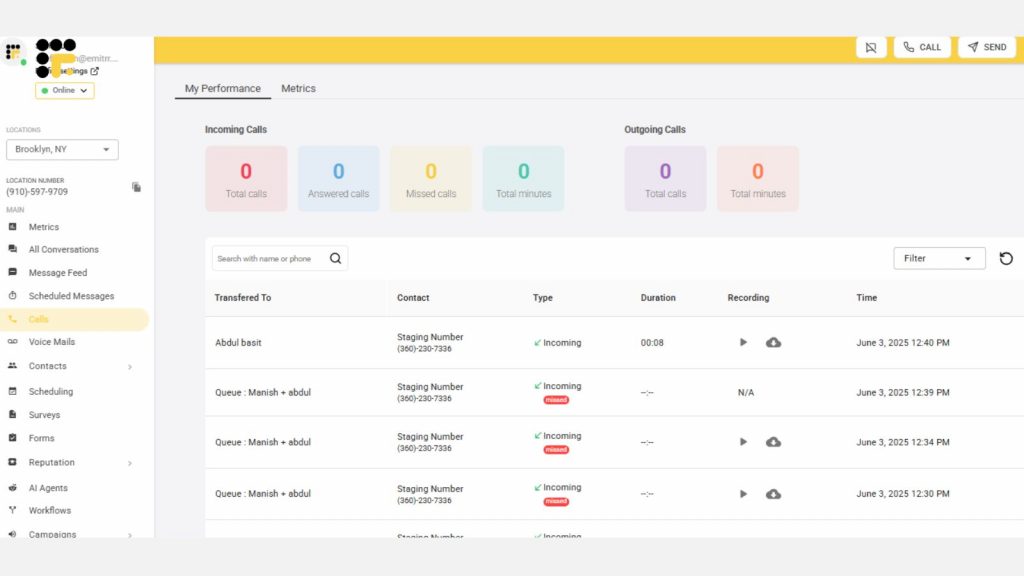
Emitrr simplifies medical insurance communication. Calls sync with live policy and provider data, giving agents the power to resolve questions in the moment. Automated appointment reminders, policy renewal nudges, and AI call routing help reduce manual follow-up tasks. Cloud-based and secure, it also keeps multi-location and remote teams tied into the same system. That combination of automation, integration, and security makes it uniquely suited to insurance workflows.
Key Features of Emitrr:
- Complete HIPAA & HITECH compliance through encryption and access controls
- AI-powered call routing and auto-dialer for targeted outreach and follow-ups
- Smart voicemail transcription converts voice to text instantly
- Automated appointment, claim update, and renewal reminders
- Two-way texting and seamless integration with insurance reply templates
- Syncs bidirectionally with EHR & CRM systems
- Custom call flows for benefit verification, billing disputes, and provider coordination
- Live analytics that show call bottlenecks and wait-time trends
- Cloud-based design with dependable uptime and quick setup
- Responsive support and easy onboarding
- Pre-built insurance-specific workflows to reduce setup time and manual configuration
- Unified dashboard for monitoring active conversations, voicemails, and pending callbacks
- Tag-based ticketing system to categorize calls by type: claim denial, policy inquiry, etc.
- Consent capture and documentation for sensitive discussions or plan changes
- Support for remote and hybrid teams with real-time team visibility
- Easy escalation paths within the interface for supervisors to step into priority calls
- Built-in training tools and call recording for agents’ onboarding and compliance review
Pros of Emitrr:
- Handles claim-related follow-ups efficiently
- Keeps all agents informed with centralized data
- Reduces missed voicemails & follow-ups
- Automates routine communications by freeing agents for complex cases
Cons of Emitrr:
- More exciting features are on the way!
Pricing of Emitrr:
- Emitrr pricing starts at $59 per month, with flexible plans so you only pay for what you use.
Emitrr Ratings and Customer Reviews:
Emitrr is rated 4.8 on G2 and 4.9 on Capterra, and here’s what customers are saying about the platform:
“Emitrr has been a wonderful tool for our business. It has vastly improved our marketing efforts and is super easy to use/user friendly. The customer service is unmatched – anything I ask for help with is acknowledged quickly and usually resolved within a day or less. They also are quick to implement new ideas from clients. I don’t have one negative thing to say about Emitrr.”
“I so appreciate the Customer Service that is quick and helpful. If there is not an immediate answer, they are open to considering alternatives and resolve our needs. The Emitrr tools easily meet our needs for texting and web bots on our websites. Our staff find the interface easy to use, as do the community that access our services. Both the desktop and cell phone apps work well.”
Emitrr Support Channels:
- Email/Help Desk
- FAQs/Forum
- Knowledge Base
- Phone Support
- 24/7 (Live rep)
- Chat
2. Dialpad

Dialpad serves medical insurance teams by providing a unified platform for secure voice, video, and messaging. Live call transcriptions ensure accurate documentation of insurance inquiries and claim discussions. HIPAA-ready encryption and easy Business Associate Agreement setup support compliance from the start. Integration with call analytics allows teams to spot trends in patient questions or bottlenecks in coverage-related calls. And video meetings can be used for provider consultations or internal case reviews with full context.
Key Features of Dialpad:
- HIPAA-compliant voice, messaging, and call recording for secure insurance communications
- AI-powered call routing to direct inquiries on claims, coverage, and authorizations to the right agent
- Real-time voice transcription for accurate recordkeeping of policyholder interactions
- Integrated auto-dialer for proactive outreach on renewals, document requests, and approvals
- Voicemail transcription that converts voice to text for faster follow-ups during peak hours
- Real-time analytics to track call volumes, agent responsiveness, and inquiry trends
Pros of Dialpad:
- Crystal-clear audio via dual-cloud architecture
- Instant transcripts during calls aid accuracy
- One-click Business Associate Agreement (BAA) setup
Cons of Dialpad:
- Can be costly for smaller teams
- Configuration might be tech-heavy for non-IT staff
Pricing of Dialpad:
- Dialpad pricing starts at $20 per user per month.
Dialpad Ratings and Customer Reviews:
Dialpad is rated 4.4 on G2 and 4.2 on Capterra, and here’s what customers are saying about the platform:
“A good dialer for the busy sales team.”
“Dialpad has allowed me to easily connect with and stay connected with both my clients and my team. My administrators also have good oversight of what I have going on, so they can ensure my calls/meetings are covered if I need to be out for any reason.”
Dialpad Support Channels:
- Email and live chat
- Phone support
- Knowledge base
3. VoiceSpin

VoiceSpin is designed for insurance use and offers IVR, an AI auto-dialer, agent scoring, and omnichannel tools. Ideal for high-volume outbound outreach (like renewal reminders) plus inbound claim support. Analytics and reporting dashboards help measure agent effectiveness.
Key Features of VoiceSpin:
- IVR menus that triage coverage, claim, and billing inquiries before they reach an agent
- AI auto-dialer to streamline outbound calls for renewals, missing documents, or follow-ups
- Queue callback system that holds a caller’s place without keeping them on hold
- Custom routing rules based on query type, policy ID, or urgency
- Secure call recording with tagging for compliance and quality control
- CRM and third-party integration support to connect policy and patient data
- Cloud-hosted solution for scalable, distributed insurance call center operations
Pros of VoiceSpin:
- Focused on lead follow-up and renewal campaigns
- Supports blended inbound/outbound call flow
- Detailed analytics on agent performance
Cons of VoiceSpin:
- Pricing starts at ~$36/user/month and can rise quickly
- Less adoption for deeper healthcare data workflows
Pricing of VoiceSpin:
- VoiceSpin offers a tiered pricing structure with a starting price of $40 per user per month for the Basic plan.
VoiceSpin Ratings and Customer Reviews:
VoiceSpin is rated 3.3 on G2 and 4.8 on Capterra, and here’s what customers are saying about the platform:
“Support response time can be improved, no web chat on site.”
“I would love to have an option to download the entire recordings content in bulk and I already know voicespin team were working on such a solution. “
VoiceSpin Support Channels:
- Email/Help Desk
- FAQs/Forum
- Knowledge Base
- Phone Support
- 24/7 (Live rep)
- Chat
4. Talkdesk

Talkdesk Healthcare Experience Cloud delivers enterprise-level features—99.999% uptime, HIPAA/GDPR compliance, insurance claim workflows, voice biometrics, and CRM integrations. It offers call, message, and chat channels with full audit trails and encryption.
Key Features of Talkdesk:
- AI-guided agent workspace that surfaces relevant claim history, policy details, and next steps during live calls
- Seamless integration with EHR and CRM systems to sync patient, provider, and policy data across every interaction
- Voice biometric authentication to verify patient identity quickly and securely before discussing claim or policy details
- Automated workflows powered by Copilot and Autopilot to handle repetitive tasks like prior authorization updates, follow-up reminders, and eligibility confirmations
Pros of Talkdesk:
- High reliability with 99.999% uptime
- Tools for personalized member interactions
- Automated handling reduces routine call load
Cons of Talkdesk:
- Enterprise pricing can be out of reach for smaller teams
- Complexity may overwhelm lightly staffed operations
Pricing of Talkdesk:
- Talkdesk pricing typically starts at around $75 per user per month
Talkdesk Ratings and Customer Reviews:
Talkdesk is rated 4.4 on G2 and 4.5 on Capterra, and here’s what customers are saying about the platform:
“The knowledge support base is a bit cumbersome to navigate when looking for a direct answer. I prefer self-service, so it would prefer to find direct answers from their knowledge base, but a lot of times I need to reach out to support. Thankfully, their support is quick and efficient.”
“Some limitations with reporting; reports lag a lot hindering us to rely on the TalkDesk reports more often”
Talkdesk Support Channels:
- Email/Help Desk
- FAQs/Forum
- Knowledge Base
- Phone Support
- 24/7 (Live rep)
- Chat
5. Exotel

Common in APAC medical insurance markets, Exotel supports patient outreach for appointment scheduling, benefits verification, and follow-up. Its IVR flows can triage incoming queries to billing, claims, or eligibility teams. SMS and voice reminders are automated based on insurance events or billing cycles. Real-time call logs serve both operational review and compliance needs. It delivers a simple, reliable telephony layer for providers and clinics managing insurance workflows via secure phone contact.
Key Features of Exotel:
- IVR flows customized for insurance inquiries
- Secure call and message routing for healthcare providers
- Call tracking with detailed logs and analytics
- Smart routing based on agent availability and call priority
Pros of Exotel:
- Strong regional support in India, U.A.E., and beyond
- Easy setup for appointment and claim reminder triggers
- Focused on compliance and call capture
Cons of Exotel:
- Limited presence in Western markets
- Lacking advanced AI analytics or healthcare system integrations
Pricing of Exotel:
- Exotel pricing starts at approximately ₹1,499 per user per month
Exotel Ratings and Customer Reviews:
Exotel is rated 4.3 on G2 and 4.3 on Capterra, and here’s what customers are saying about the platform:
“Friendly interface, robust features for business communication, and reliable customer support.”
“Multiple follow-ups are required to close the requirements.”
Exotel Support Channels:
- Email/Help Desk
- FAQs/Forum
- Knowledge Base
- Phone Support
- 24/7 (Live rep)
- Chat
6. RingCentral

RingCentral offers a unified messaging and calling backbone with certified HIPAA compliance and business continuity features. Integration with care platforms and EHRs triggers patient record pop-ups during calls, which improves accuracy. SMS enables eligibility updates and claim status alerts directly from the call queue. Administrators can monitor call flow and queue times to optimize agent staffing. It also supports secure faxing and e-signatures for routine insurance forms and authorizations.
Key Features of RingCentral:
- HIPAA-compliant VoIP calling with encrypted voice communication for secure insurance conversations
- Auto-attendant and smart call routing to connect policyholders to the right team—claims, billing, or authorizations
- Encrypted voicemail-to-email feature to access messages quickly and securely
- Call logs and recordings are stored safely for compliance, training, and dispute resolution
- Built-in video, fax, and messaging to unify insurance-related communication under one platform
- CRM and EHR integrations to pull up patient and policy information during live calls
Pros of RingCentral:
- Built for healthcare teams managing sensitive patient and insurance information
- All-in-one solution combining voice, messaging, fax, and video tools in one secure platform
- Easy to manage with a user-friendly interface and responsive customer support
Cons of RingCentral:
- Limited EHR integrations
- Texting feature is limited to certain plans
Pricing of RingCentral:
- RingCentral pricing will cost you around $19 per user per month.
RingCentral Ratings and Customer Reviews:
RingCentral is rated 4.5 on G2 and 4.3 on Capterra, and here’s what customers are saying about the platform:
“It is a good app and interface, but too expensive.”
“RingCentral has a good dashboard to create easy virtual events for groups and companies. It is suitable for small business events.”
RingCentral Support Channels:
- Email/Help Desk
- FAQs/Forum
- Knowledge Base
- Phone Support
7. Aircall

Aircall supports insurance teams looking for fast call log integration and compliance. Once connected to CRM or ticketing, call details and transcripts auto-update with each patient interaction. AI transcription helps agents validate claim details after the call. One-click call forwarding or shared inbox features reduce the need for manual reminders. Small medical insurance teams benefit from quick setup and clear voice logs that streamline follow-up processes.
Key Features of Aircall:
- End-to-end encryption that secures every voice interaction, from initial coverage queries to sensitive billing and claim discussions
- HIPAA- and GDPR-ready platform with tools and access controls designed to support data protection in regulated insurance environments
- Over 100 platform integrations, including Salesforce, Zendesk, and WebPT, making it easier for agents to access policy details and patient records without switching systems
- Real-time call transcriptions that help agents review conversations instantly and keep accurate logs for coverage confirmations or claim-related follow-ups
- AI scribe support that captures and summarizes key points from calls, reducing manual note-taking and helping teams stay focused on resolution and compliance
Pros of Aircall:
- Easily integrates with EHR and ticketing systems
- Live transcription tools support accurate records
- Secure for small-to-mid healthcare teams
Cons of Aircall:
- Lacks advanced insurance-specific features
- Some compliance features require integration partners
Pricing of Aircall:
- Aircall pricing plans essential pack starts at $30 per/ license
Aircall Ratings and Customer Reviews:
Aircall is rated 4.3 on G2 and 4.3 on Capterra, and here’s what customers are saying about the platform:
“Really good support team, time-wise speaking. Easy to understand stadistics and information. Good integration with HubSpot.”
“Aircall serves its purpose as a secondary/business number for my job. the texting and capabilities work. integrates well with hubspots and logs communication seamlessly!”
Aircall Support Channels:
- Live Chat
- Email Support
- Phone Support
8. Freshdesk Contact Center

Freshdesk offers ticket-based case handling that works well for billing, coverage questions, and claim follow-ups. Incoming calls, texts, or chats convert into tickets with secure note fields and encryption. Agents follow structured workflows that capture patient intent, coverage checks, or appeal status. Reporting dashboards track resolution time, escalation trends, and compliance activity. For teams relying on a central dashboard rather than individual CRMs. This provides solid case tracking in insurance support.
Key Features of Freshdesk Contact Center:
- HIPAA-compliant communication tools for handling claims, authorizations, and patient inquiries securely across teams
- Call routing and IVR flows that direct policyholders to the right department—eligibility, billing, or coverage clarification—without unnecessary transfers
- Voicemail transcription that converts voice messages to text, making it easier for agents to manage high call volumes and respond faster
- Real-time analytics dashboard to track call status, resolution timelines, and agent performance across insurance operations
- CRM and EHR integrations that sync policyholder data and case history directly into the support workflow for faster and more informed service
Pros of Freshdesk Contact Center:
- Good for teams already familiar with Freshdesk
- Multi-channel support with secure fields
- Affordable entry-level pricing
Cons of Freshdesk Contact Center:
- Enterprise-level compliance requires configuration
- Lacks deep telephony analytics or call encryption by default
Pricing of Freshdesk Contact Center:
- Freshdesk Contact Center pricing starts at $15 per agent/month (billed annually).
Freshdesk Contact Center Ratings and Customer Reviews:
Freshdesk Contact Center is rated 4.4 on G2 and 4.5 on Capterra, and here’s what customers are saying about the platform:
“Freshdesk offers a user-friendly interface that makes it easy for both agents and customers to navigate.”
“One drawback of Freshdesk is that its advanced features can be complex to set up and may require additional training for the team. Additionally, the mobile app has limited functionality compared to the desktop version, which can sometimes lead to delays in customer support.”
Freshdesk Contact Center Support Channels:
- Email/Help Desk
- FAQs/Forum
- Knowledge Base
- Phone Support
- 24/7 (Live rep)
- Chat
9. Nextiva

Nextiva acts as a reliable backbone for mid-sized insurance practices needing secure voice, text, and call routing. Agents gain quick access to voicemail transcriptions and call notes tied to patient files. Its CRM and EHR integrations speed up benefit verification and claims lookups. It offers a robust set of tools without enterprise-level complexity.
Key Features of Nextiva:
- Auto-attendant and smart call routing that guide policyholders to the right team—claims, billing, or pre-authorizations—based on keypad input or caller history
- Voicemail-to-email and transcription so agents can read and respond to voice messages faster, even during peak hours or shift handovers
- CRM and EHR integrations that give agents instant access to policy details, claim records, and patient information during live calls
- Team messaging and video conferencing tools that help internal departments—like underwriting, provider coordination, or compliance—collaborate in real-time
- Call analytics and reporting dashboard that tracks call volume, response time, and common inquiry types across medical insurance workflows
Pros of Nextiva:
- Strong uptime and call quality
- Easy to scale across locations
- Centralized platform for voice, text, and video
Cons of Nextiva:
- HIPAA compliance is only available on enterprise plans
- Higher pricing compared to some competitors
- The interface can feel complex for first-time users
Pricing of Nextiva:
- Nextiva pricing starts at $23.95/user/month.
Nextiva Ratings and Customer Reviews:
Nextiva is rated 4.5 on G2 and 4.6 on Capterra, and here’s what customers are saying about the platform:
“I like having the convenience of a VoIP system for remote work, and that there is a capability of having the app on both my desktop and my mobile phone.”
“Texting was easy, Ease of calling, call flows were easy to manage.”
Nextiva Support Channels:
- Email/Help Desk
- FAQs/Forum
- Phone Support
10. Vonage

Vonage sits at the intersection of insurance workflows and programmable telephony. Insurance teams can build custom voice, SMS, and fax flows that trigger around claims or authorizations. Secure SMS reminders and call notifications reach patients at critical times. API integration with policy systems allows data-driven message content. While it requires technical setup, its flexibility makes it ideal for workflows that rely on document exchange or tightly scheduled insurance events.
Key Features of Vonage:
- HIPAA-compliant voice/SMS with encryption and designation via BAA
- Customizable API for telephony, fax, and messaging
- Secure workflows that connect to other provider systems
Pros of Vonage:
- Highly configurable for insurance-specific flows
- Strong documentation and developer support
- Good regional message and fax compliance
Cons of Vonage:
- Requires developer resources to implement
- Not a ready-made call center—needs build-out
Pricing of Vonage:
Vonage pricing is divided into three plans:
- Mobile Plan: Starting at $19.99 per user/month
- Premium Plan: Starting at $29.99 per user/month
- Advanced Plan: Starting at $39.99 per user/month
Vonage Ratings and Customer Reviews:
Vonage is rated 4.2 on G2 and 4.3 on Capterra, and here’s what customers are saying about the platform:
“I like that you can buy local phone numbers. I like the real estate it uses within Salesforce.”
“Easy integration. The web API is quite simple so I don’t have difficulty integrating the verify to my app.”
Vonage Support Channels:
- Phone support
- Email/help desk
- FAQs/forum
- 24/7 live representative
Why is Emitrr the Best Medical Insurance Call Center Software?
In medical insurance, every call has weight. A single missed update on a claim or delay in prior authorization can disrupt care, cause confusion, and create avoidable costs. Emitrr is designed with these realities in mind. It brings a refreshing simplicity to complex medical insurance workflows without slowing teams down with cluttered systems or disconnected tools.
As a dedicated VoIP phone system for insurance, Emitrr aligns communication with policy data, claim status, and patient records in real-time. Agents can manage calls, route inquiries, follow up on pending approvals, and document every step without switching between tabs. From intake teams handling benefits verification to back-office staff coordinating with providers, Emitrr keeps every conversation focused, documented, and one step ahead.
Take a closer look at what makes Emitrr stand out:
Fully HIPAA-compliant and secure
With Emitrr, you don’t have to worry about privacy getting overlooked. Every call, message, and voicemail is protected with strong data safeguards that keep your communication HIPAA-compliant from start to finish.
AI-powered call routing and prioritization
Calls do not get lost in queues here. Emitrr uses intelligent routing to send calls where they need to go based on urgency, type, or department, helping teams stay ahead without wearing out their time or patience.
Smart voicemail transcription
Forget rewinding voicemails to catch that one key detail. Emitrr’s voicemail transcription helps convert voice to text instantly, so agents can read, prioritize, and respond quickly even during peak hours.
Automates appointment reminders and follow-ups
Patients can easily forget a missed call or a scheduled procedure. Emitrr handles this by sending follow-ups and text appointment reminders automatically. These minor adjustments have a significant impact on reducing no-shows and retaining a neat claim process.
Watch how Emitrr’s AI agent, Sarah, makes this effortlessly smooth: Introducing Sarah: The AI Agent That Makes Texting Effortless
Two-way texting and omnichannel support
Some people prefer a call. Others respond faster to a text message. Emitrr enables you to meet them where they are most comfortable with two-way texting, email, and call support all in one place. It creates a smoother experience for the team and the people reaching out.
Seamless integration with EHR and CRM systems
With Emitrr, there is no need to juggle multiple platforms. It integrates smoothly with your existing EHR and CRM tools, so information flows seamlessly, reducing repetition and making every interaction more informed.
Customizable workflows for medical teams
Emitrr allows you to shape workflows that match your internal processes, so nothing feels forced or out of sync. You can also plug in tools like insurance sales text message templates to stay consistent in messaging across the board.
Real-time analytics and AI-driven insights
Emitrr helps you see what is working and what is getting stuck. With live dashboards and insights, managers can track call volumes, resolution times, and agent performance without digging through reports. That kind of visibility leads to faster improvements.
Easy onboarding and responsive support
Getting started does not require a tech background or weeks of training. Emitrr’s setup process is straightforward, and with a responsive support team, your questions get answered, and help is genuinely helpful.
Cloud-based with high uptime and reliability
Emitrr runs on a reliable cloud infrastructure with high uptime, so your communication stays uninterrupted whether your team is at the office, working remotely, or split across multiple locations.
FAQs
It helps healthcare providers manage patient calls, insurance queries, appointment scheduling, and claim-related communication in one place.
Yes, if it handles patient information, it must be HIPAA-compliant for data security and privacy.
Yes, AI can automatically sort and prioritize insurance queries, suggest responses to agents, and follow up on pending claims, saving your team time and reducing delays.
Yes, there are scalable options available that suit both small practices and large healthcare organizations.
Conclusion
If you are in medical insurance, you know answering calls is only one part of the job. It’s about getting the right information to the right person—fast, clearly, and securely. Emitrr helps make that happen while keeping your team’s workflow focused and manageable.
Book a free demo with Emitrr today and experience a smarter way to handle medical insurance calls from start to finish.