

Introduction
Ask a referral coordinator what their day looks like, and you’ll rarely hear “reviewing clinical documentation” or “coordinating complex cases.” You’ll hear about phone tag, retyping the same patient details into three different places, and trying to remember which referrals from last week never got a callback.
Referral intake automation isn’t about replacing that person. It’s about removing the parts of their day that don’t require judgment in the first place, so what’s left is the work that actually needs a human. To understand what automation changes, it helps to first see the manual workflow it’s replacing, step by step, and then look at what the same process looks like once automation is layered in.
This guide walks through both versions of that workflow, compares them stage by stage, and covers what to keep in mind if you’re structuring or restructuring your own referral intake process.
AI Summary
- Manual referral intake depends on staff remembering to complete each step, which is exactly where delays, missing information, and lost referrals tend to creep in.
- Automation doesn’t remove any of the core steps in referral intake. It removes the dependency on someone manually triggering each one.
- The biggest practical differences show up in confirmation speed, missing-information follow-up, and non-responder tracking, the three places manual workflows break down most often.
- Clinical judgment and complex-case handling should stay human-led even in a fully automated workflow.
- Structuring the workflow well, before automating it, matters more than the automation tools themselves.
The Standard (Manual) Referral Intake: How It Works
Most practices without automation follow a version of this process, whether or not it’s written down anywhere:
Step 1: Receive the referral. It arrives by fax, email, voicemail, or paper, often through whichever channel the referring office happens to use.
Step 2: Log it. Someone reads the referral and enters the basic details into a spreadsheet, an EHR queue, or a shared inbox.
Step 3: Confirm receipt. Staff call or email the referring provider and the patient to let them know the referral arrived, though this step is frequently the first one skipped when things get busy.
Step 4: Triage. Someone decides who should handle the referral and how urgent it is, usually based on experience rather than a documented rule.
Step 5: Fill information gaps. Staff call the patient to collect anything missing, such as date of birth, insurance details, contact information, or the reason for the visit.
Step 6: Chase authorizations. Staff call or email payers to confirm insurance eligibility and, where needed, get prior authorization.
Step 7: Schedule. Someone checks the calendar manually and either books the patient directly or sends available times and waits for a reply.
Step 8: Verify insurance again, if required. A second round of checks before the booking is finalized, particularly if authorization took a while to come through.
Step 9: Clinical review. A note or task is left for the clinician to review the referral before or shortly after scheduling the appointment.
Step 10: File documentation. Referral documents get scanned and attached to the chart, or key details are typed in by hand.
Step 11: Chase no-shows and non-responders. Referrals that never got a response are tracked on paper or in a spreadsheet, with staff periodically circling back when they have time.

Why the Manual Workflow Breaks Down
Every step above depends on a person remembering to do it. There’s no system automatically confirming receipt, no automatic flag when a referral is missing information, and no automatic tracking of who hasn’t responded yet.
That dependency is where things go wrong. A referral confirmation that only happens “when staff has a minute” means some referring providers hear back the same day and others wait a week, with no obvious reason for the difference. A missing insurance field that isn’t caught until scheduling means staff has to stop, reach out, wait for a response, and then pick the referral back up, adding a delay and another point where it can stall. Non-responders tracked on paper are only followed up on if someone happens to notice the paper.
None of these failures look dramatic individually. A referral that sits an extra day, a phone call that goes to voicemail, a spreadsheet row nobody’s looked at in a week. But add them up across a normal week’s referral volume, and the result is the same thing every time: referrals quietly disappear, insurance problems get discovered late, and follow-up becomes inconsistent depending on who’s on shift.
See where patient intake can go wrong and how to prevent it: watch the video on 12 costly patient intake mistakes
The Referral Intake Workflow With Emitrr
Automation doesn’t remove the steps above. It changes who, or what, is responsible for triggering each one.
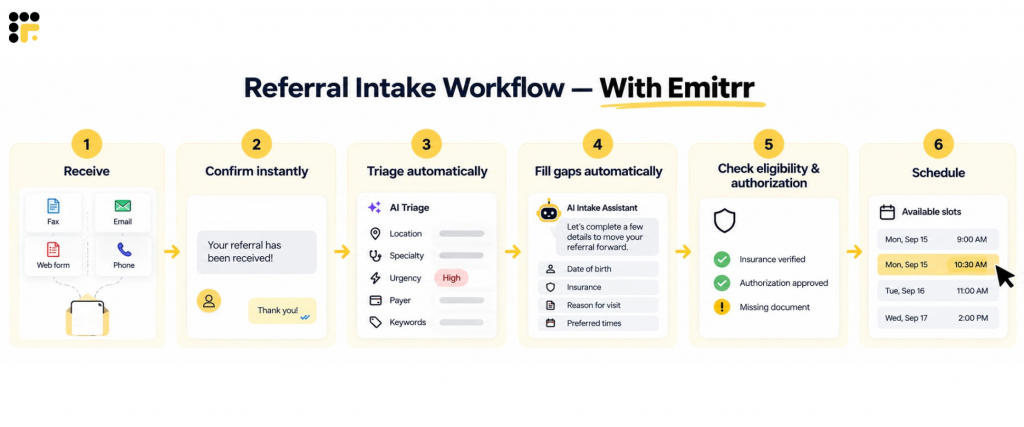
Receive. All referrals, whether they arrive by fax, web form, email, or phone, land in one unified inbox. A referral record and timestamp are created automatically the moment it arrives, so nothing sits unnoticed in a channel nobody checked that day.
Confirm instantly. A branded SMS or email confirmation goes out to both the referring provider and the patient right away, with two-way replies so either can clarify missing details immediately instead of waiting for a callback.
Triage automatically. The system reads referral details, including location, specialty, urgency, payer, and keywords, tags the referral, and routes it to the right queue and priority without a manual lookup.
Fill gaps automatically. An intake form or AI assistant asks the patient or referring office for anything missing, such as date of birth, insurance, or reason for visit, and stores it directly into structured fields instead of a notepad someone has to transcribe later.
Check eligibility and authorization automatically. Insurance and authorization status is checked as part of the workflow. If something’s missing, a task is created and routed to the right staff member with exactly what’s needed to resolve it.
Schedule. Available slots are offered through a self-scheduling link, or booked automatically where the system can write to the calendar. Where write-back isn’t supported, staff get a one-click booking request to confirm instead of starting from scratch.
Clinical review. Referrals that need clinical judgment are auto-assigned to the right clinician or nurse with the full intake packet attached, so nobody has to ask the patient the same questions twice.
Hand off clearly. Assignments and notifications make sure the right person sees the referral at the right time, with shared notes and mentions keeping everyone on the same thread instead of scattered across separate conversations.
Follow up automatically. Non-responders get automated reminders on a set cadence, including AI-driven calls or texts. After a few attempts without a response, the case escalates to a person for manual outreach rather than quietly aging out.
Document and sync. Intake data, confirmations, and outcomes write back to the EHR automatically where supported, or attach as structured PDFs where write-back isn’t available. Status stays current for everyone looking at the referral, regardless of which system they’re checking it from.
Track performance. Dashboards show referral volume, time-to-first-contact, conversion rates, authorization delays, and open tasks, along with which referral sources are performing best.
Stay compliant. PHI is exchanged through secure chat or OTP links, with consent capture built into forms and messaging so compliance isn’t a separate manual checklist.
Quick Comparison: Manual vs. Emitrr-Enabled Workflow
| Stage | Without Automation | With Emitrr |
|---|---|---|
| Receipt | Arrives via fax, email, voicemail, or paper; staff manually open and log into a spreadsheet or inbox | All channels land in one inbox; record and timestamp created automatically |
| Confirmation | Staff manually call or email to confirm receipt, often delayed | Instant branded SMS/email confirmation with two-way replies |
| Triage | Owner and priority decided by staff memory or a printed rule sheet | Auto-tagged and routed by specialty, urgency, payer, and location |
| Missing data | Staff call patients to chase DOB, insurance, contact, and reason for visit | Automated form or AI assistant collects it into structured fields |
| Authorization | Staff call payers separately; issues often found late, causing cancellations | Auto-checked; missing items flagged and routed as a task |
| Scheduling | Manual calendar check; book by hand or wait on email/text replies | Self-scheduling link or auto-booking, with one-click confirm as fallback |
| Clinical review | Manual note or task left in the chart | Auto-assigned to the clinician with the full intake packet attached |
| Follow-up | Non-responders tracked on paper or spreadsheet; staff re-call periodically | Automated reminders on a set cadence, escalating to a person after preset attempts |
| Documentation | Scanned PDFs or manual transcription; parallel spreadsheets if no EHR upload | Auto-synced to EHR or attached as structured PDFs; status always current |
| Reporting | No centralized visibility or audit trail | Dashboards track volume, time-to-contact, conversion, and referral-source performance |
Best Practices for Structuring Your Referral Intake Workflow
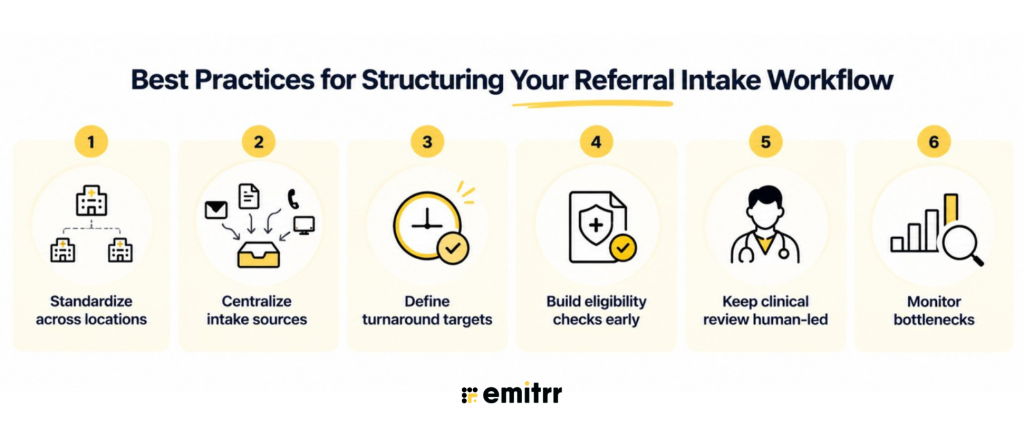
Standardize steps across locations. If one location skips confirmation calls and another doesn’t, patients get an inconsistent experience depending on where their referral happens to land. Write the process down and apply it the same way everywhere.
Centralize intake sources before automating anything. Automation works best when referrals are already flowing into one place. Bolting automated triage onto four separate inboxes just automates the confusion.
Define SLA or turnaround targets. Without a target, “we’ll get to it when we can” becomes the default. Even a simple rule, like confirming receipt within one business day, gives staff and automation something concrete to aim for.
Build eligibility checks in early. Catching an insurance problem at intake is a phone call. Catching it after scheduling is a cancellation, a rescheduled visit, and an unhappy patient.
Keep clinical review human-led. Automation should get the right information to the right clinician faster. It shouldn’t make the clinical call for them.
Monitor bottlenecks, not just volume. A dashboard showing how many referrals came in this month is less useful than one showing where referrals are actually getting stuck. Track time spent at each stage, not just totals.
Key Takeaways
- Manual referral intake involves the same eleven or so steps at nearly every practice, from receiving the referral through chasing non-responders.
- The manual version breaks down specifically because each step depends on a person remembering to trigger it, not because the steps themselves are wrong.
- Automation keeps the same steps but removes the dependency on memory, particularly around confirmation, missing-information follow-up, and non-responder tracking.
- Clinical review and complex-case judgment should remain human-led, even in a heavily automated workflow.
- Structuring and standardizing the workflow before automating it produces better results than automating a process that was already inconsistent.
Frequently Asked Questions
A typical workflow includes receiving the referral, logging it, confirming receipt, triaging it, filling in missing information, checking insurance and authorization, scheduling, clinical review, documentation, and following up with non-responders.
There’s no universal standard, but the longer a referral sits without confirmation or contact, the less likely the patient is to still want the appointment. Many practices aim to confirm receipt within a business day and reach the patient within a few days of receiving a complete referral.
Referrals typically stall due to missing information that never gets chased down, non-responders who never receive a second follow-up attempt, or authorization issues discovered too late in the process. Individually, these look like small delays, but they compound quickly across a normal referral volume.
When a referral has to be matched to a specific provider based on specialty, location, or insurance panel, scheduling shifts from finding any open slot to finding the right slot with the right provider, which adds complexity to the scheduling step in particular.
They describe the same underlying steps. The manual workflow is that process performed by hand at every stage, while automation refers to using tools and rules to trigger those same steps automatically, so they happen consistently regardless of staff bandwidth on any given day.
Conclusion
Referral intake automation isn’t a different process from the one your staff already run. It’s the same steps, just no longer dependent on someone remembering to do each one at the right time. Practices that automate the repetitive parts of intake, confirmation, missing-information collection, and follow-up tend to see the biggest, fastest improvement, while keeping clinical judgment exactly where it belongs.
Book a demo to see how Emitrr automates referral intake without changing the parts of the process that need a person’s judgment.


 4.9 (400+
reviews)
4.9 (400+
reviews)