

 4.9 (400+
reviews)
4.9 (400+
reviews)
PDS MDSuite EHR X Emitrr Integration
MDSuite runs your dental practice. Emitrr fills your schedule. Automate hygiene reminders, send digital patient forms, and make sure every missed call becomes a text, not a lost patient.

Planning to integrate Emitrr with PDS MDSuite EHR? Review a quick checklist to understand what's required before integration.
Why Connect PDS MDSuite EHR with Emitrr?

Recall Without the Manual Work
Emitrr automates hygiene recalls and reactivation messages based on your MDSuite schedule. No spreadsheets. No manual calls.

Text Patients Two Ways
Patients reply, confirm, and reschedule via text. All conversations are HIPAA-compliant and visible in one inbox.

Cut No-Shows by Up to 90%
Automated reminders go out before every appointment. Patients confirm with one text. Empty chairs become the exception, not the rule.

More Reviews, More New Patients
Post-visit review requests go out automatically after every appointment. Dental practices have grown reviews by up to 800%.
Features You Get With the PDS MDSuite EHR + Emitrr Integration

Dental Recall and Reactivation Automation

Identify patients due for hygiene visits from MDSuite data and send recall texts automatically.
Target lapsed patients, 6 months, 12 months, 18 months overdue, with tiered campaigns.
Include direct scheduling links inside every recall message.
Track recall acceptance rates and recovered appointments in the Emitrr dashboard.
Digital New Patient and Medical History Forms
Send new patient intake and medical history forms via SMS before the first visit.
Patients complete forms on any device, no app, no printing, no clipboard.
Completed form data syncs back into MDSuite.
Eliminate day-of paperwork and speed up check-in for every new patient.
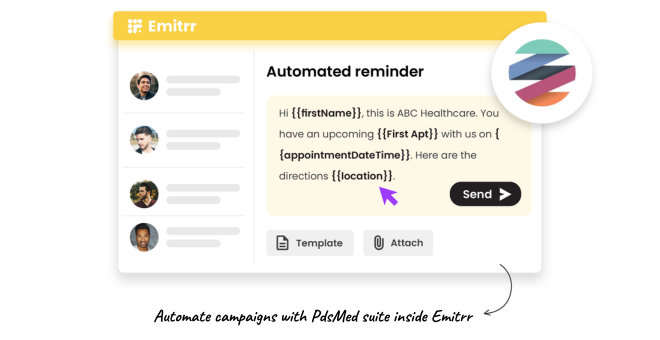
Automated Hygiene and Procedure Reminders
Send reminders for cleanings, exams, fillings, and oral surgery at intervals you set.
Patients confirm with one reply, no call, no portal needed.
Unconfirmed appointments trigger a second automated reminder.
Reminder content is customisable per appointment type in MDSuite.
Missed Call-to-Text for New Patient Inquiries
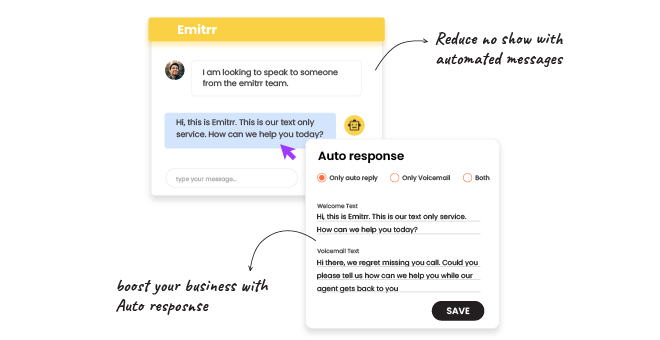
Every missed call to your front desk triggers an instant text to the caller.
Patients get an immediate response even during peak hours or after close.
Replies route into the shared inbox for staff follow-up.
Never lose a new patient inquiry to an unanswered phone call again.
Key Use Cases
Front Desk
Clinical Staff
Practice Owners
Frequently Asked Questions
Ready to Connect Emitrr with PDS MDSuite EHR?
Keep your dental schedule full, your recall pipeline active, and your front desk free to focus on patients who are already in the chair.
