
Introduction
Looking for robust patient follow-up software to reduce no-show rates and boost patient retention? We got you!
In this guide, we have discussed the top 10 solutions for following up on patients’ post-doctor appointments on the basis of features, pricing, pros, cons, and support. So, keep reading to find out the best patient follow-up solution for your medical practice to boost patient engagement.
What is Patient Follow Up Software?
Patient follow-up software is a tool that helps doctors track, manage, and automate any kind of post-appointment communication. This could include sending post-care instructions, preventative health measures, sending patient surveys, medication refill reminders, sending patient recall and reminder messages, or emails. Utilizing a patient follow-up software for all these things can help medical practices reduce no-shows, improve adherence to treatment plans, reduce readmission rates, and improve patient retention.
How does Patient Follow Up Software Work? (An overview)

This software automates key follow-up tasks, such as:
- Appointment Reminders: Sends automated text message, email, or phone call reminders to reduce no-shows.
- Post-Treatment Check-Ins: Ensures patients are recovering well and following prescribed care plans.
- Medication & Treatment Adherence: Sends reminders for prescriptions, therapy sessions, or follow-up visits.
- Patient Satisfaction Surveys: Gather patient feedback to improve healthcare services.
- Billing & Payment Reminders: Helps patients stay on top of outstanding medical bills.
This technology eliminates manual follow-ups and allows healthcare professionals to focus on patient care while maintaining efficient communication.
Who Benefits from Patient Follow-Up Software?
Various sectors within the healthcare industry can leverage patient follow up software to enhance their services and operational efficiency, including:
- Hospitals & Clinics: Improve post-discharge care and reduce readmission rates.
- Dental Practices: Ensure patients complete treatments such as braces, implants, or cleanings.
- Medical Spas & Aesthetic Clinics: Follow up on procedures, offer aftercare guidance, and encourage repeat visits.
- Chiropractic & Physical Therapy Centers: Help patients stay consistent with rehabilitation programs.
- Mental Health & Wellness Providers: Send therapy session reminders and track patient progress.
By adopting patient follow up software, healthcare providers can ensure better patient outcomes, increased efficiency, and higher patient satisfaction—all while reducing administrative burdens.

Benefits of Using Patient Follow-Up Software
Implementing patient follow-up software is a game-changer for healthcare providers, offering many benefits that enhance patient care, streamline operations, and improve overall efficiency. Here’s a closer look at why healthcare organizations are adopting this technology:
Improved Patient Engagement
- Ensures timely and personalized communication through automated reminders, updates, and follow-up messages.
- Encourages patients to take an active role in their care by keeping them informed and engaged.
- Supports multiple communication channels (SMS, email, phone calls, patient portals) for better accessibility.
Enhanced Care Continuity
- Keeps patients on track with treatment plans, reducing missed appointments or follow-ups.
- Sends medication reminders to improve adherence and prevent health complications.
- Provides post-treatment guidance to ensure proper recovery and reduce hospital readmissions.
Operational Efficiency
- Automates time-consuming administrative tasks, freeing up staff to focus on patient care.
- Reduces the burden on receptionists and medical assistants by handling appointment confirmations and rescheduling.
- Minimises paperwork by digitizing patient interactions and follow-up records.
Data-Driven Insights for Better Decision-Making
- Provides real-time analytics and reports on patient engagement, missed appointments, and treatment adherence.
- Identifies trends and patterns that help optimize patient care strategies.
- Enables healthcare providers to measure patient satisfaction through automated patient satisfaction surveys.
Compliance and Security
- Ensures compliance with HIPAA, GDPR, and other healthcare regulations to protect patient data.
- It uses secure communication channels and encryption to maintain confidentiality.
- Allows healthcare providers to track and audit follow-up communications for regulatory purposes.
Reduced No-Show Rates
- Significantly decreases missed appointments with automated reminders and rescheduling options.
- It helps optimize appointment scheduling, leading to better clinic efficiency and revenue generation.
Strengthened Patient-Provider Relationships
- Builds trust by maintaining consistent communication between visits.
- Offers personalized messages and check-ins, making patients feel valued and cared for.
- Enhances patient satisfaction, leading to positive word-of-mouth referrals and reviews.
- As per Black Book Research 2025, 86% patients said personalized and secure follow-ups increased their trust in their healthcare provider drastically.
Increased Revenue & Cost Savings
- A 2024 survey by MGMA showed missed appointments can cost healthcare providers over $250,000 per year, but patient follow-up software can reduce no-show rates by 38% and help them cut the loss.
- Reduces revenue loss from no-shows and last-minute cancellations.
- Lowers administrative costs by automating manual follow-up processes.
- It helps retain patients through better engagement and satisfaction, improving long-term profitability.
Multi-Specialty Support
- Adaptable across various healthcare sectors, including hospitals, dental clinics, wellness centers, and telehealth services.
- Customizable workflows for different specialties, ensuring optimal digital patient engagement.
By integrating patient follow-up software, healthcare providers can boost efficiency, enhance patient care, and drive better health outcomes—all while simplifying day-to-day operations.
You can also watch this video to learn how to schedule messages individually and in a group chat:
Key Features of Patient Follow-Up Software
Here are some key features you should look for in a patient tracking system:
- Automated Appointment Reminders & Recalls: Look for this feature to send automated appointment reminders and recalls via SMS, email, and call notifications for upcoming visits.
- Post-Treatment Follow-Ups: Automated surveys and feedback collection to ensure patient satisfaction.
- Two-way Texting: Look for a two-way texting feature to allow your patients to text you back in case of any concern post-discharge.
- Scheduling and Rescheduling: Look for patient experience software that allows you to send self-booking links, smart reminders for overdue payments, and an easy appointment rescheduling option.
- Customizable Communication Templates: Personalize messages for different patient needs.
- Integration with EHR/PMS Systems: Synchronizes patient records and appointment data.
- Multi-Channel Communication: Reach patients via SMS, email, and voice calls.
- Analytics and Reporting: Track follow-up success rates and identify areas for improvement.
- HIPAA Compliance & Secure Messaging: All communication you do with the patient, including follow-up communication, should be done securely and in a HIPAA compliant manner.
- AI Automation: Look for AI automation features, website chatbot or AI SMS chatbot to send instant responses to patients after hours.
Looking for ready-to-use patient texting SMS templates? Then here are the best ones, Download the templates now!
Comparison of Top Patient Follow-Up Software Solutions 2025
| Software | Category | Patient Follow-up Features | Pricing | HIPAA Compliance |
| Emitrr | Patient Communication Software | Automated reminders (calls/text/email), recalls, feedback collection, reviews, AI automation | Patient follow-up SMS plans start at $149/month Custom Pricing is also available | ✅ HIPAA-compliant with BAA |
| ClickUp | Project Management/CRM | Task reminders & workflows (requires customization for patient use) | Ranges from $7/month per user – $12/month per user | 🚫 Not HIPAA-compliant by default |
| Salesforce (Health) | Healthcare CRM | Patient journeys, reminders, care plans, multi-channel messaging | Ranges from $325/month per user – $500/month per user | ✅ HIPAA-compliant with BAA |
| eClinicalWorks | EHR/Practice Management | Reminders, recalls, patient portal, messaging | Starts at $449/month per provider | ✅ HIPAA-compliant |
| NextGen Healthcare | EHR/Practice Management | Automated reminders, messaging, patient portal | Contact sales | ✅ HIPAA-compliant |
| athenaOne | EHR/Practice Management | Reminders, messaging, telehealth | Contact sales | ✅ HIPAA-compliant |
| AllegianceMD | EHR/Practice Management | Reminders, patient portal, follow-up messaging | Contact sales | ✅ HIPAA-compliant |
| Practice Fusion | EHR/Practice Management | Reminders, messaging, patient portal | Starts at $149/month per provider | ✅ HIPAA-compliant |
| DocPlus | Chiropractic EHR | Intake, SOAP notes, reminders | Contact sales | ✅ HIPAA-compliant |
| LeadSquared | CRM & Marketing Automation | Automated messaging/workflows (can adapt to patient follow-up) | Contact sales | ✅ HIPAA compliance available on request |
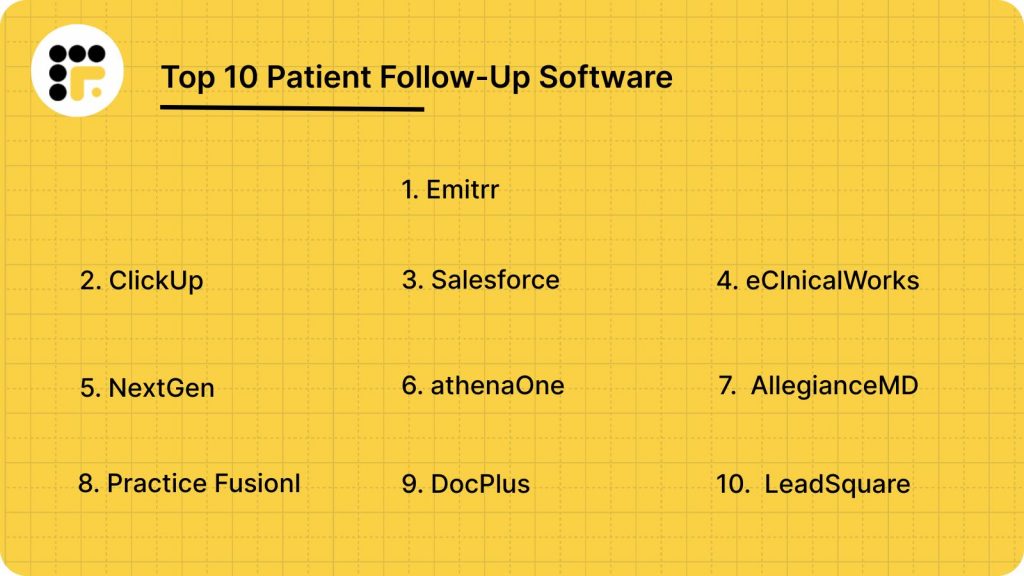
Top 10 Patient Follow-Up Software: Detailed Analysis
- Emitrr
- ClickUp
- Salesforce
- eClinicalWorks
- NextGen
- athenaOne
- AllegianceMD
- Practice Fusion
- DocPlus
- LeadSquared
1. Emitrr: Best All-in-one Patient Management Software

Emitrr is our top pick as the best patient follow-up software and is popularly used by hospitals and medical healthcare centers across different specialties. This software offers all the key features for complete patient management, such as automated reminders and recalls, AI automation, digital forms and surveys, and VoIP features, among others. Emitrr is also HIPAA compliant, affordable, and highly customizable for better patient engagement.
Key Features of Emitrr
- Automated Follow-Ups: Set triggers to automatically send emails or texts after visits, form submissions, or specific time intervals, no manual reminders needed.
- Drag-and-Drop Campaign Builder: Create and launch multi-step campaigns without technical help, text, email, and reminders, all automated.
- Multi-Channel Communication: Send and receive messages via text, email, and voice from one platform, with every interaction logged for full visibility.
- Consent Management: Capture and store digital consent from doctors or patients with automatic timestamping and compliance-ready logs.
- Group Texting with Segmentation: Create audience groups based on specialty, geography, or interaction type.
- EHR/EMR/PMS Integration: Syncs with medical record or practice management systems for seamless data flow.
- Customizable Intake Forms: Build and send digital forms for documentation, onboarding, or feedback.
- Real-Time Reporting Dashboards: Get insights into rep activity, outreach performance, and account health.
- Call Routing and VoIP Support: Route incoming calls to the right person or department automatically.
- Mobile App with Offline Mode: Access core CRM features even when reps are in low-connectivity areas.
- AI-Based Engagement Suggestions: Smart alerts to follow up with inactive contacts or high-potential leads.
- Two-Way Texting with Templates: Send structured replies instantly using saved templates; ideal for high-volume outreach or patient reminders.
- Internal Team Chat & Notes: Reps, support teams, and managers can leave notes, share updates, and collaborate directly within the contact record.
- Automated Review Requests: Ask for patient feedback via email or SMS at the right time, track responses in real-time.
- Task Assignment & Team Collaboration: Assign tasks, set deadlines, and track completions within the CRM, ideal for multi-department coordination.
- Missed Call Alerts & Voicemail Capture: Automatically notify reps of missed calls and log voicemails, so no opportunity slips away.
- Smart Reminders for Compliance Checks: Emitrr can flag accounts that need documentation updates, re-verification, or regulatory reviews.
Ensure patients receive clear guidance, even when you can’t answer. Download voicemail greetings templates for healthcare now!
Learn how to automate no-show follow-up messages for your customers with Emitrr:
Pros of Emitrr
- Integration with 1,000+ CRMs: Effortlessly connects with popular CRM platforms for a seamless workflow.
- Unified Communication System: Combines calls, texts, and emails for streamlined management.
- Multi-Location Management: Ideal for multi-location healthcare clinics, allowing centralized communication across all properties.
- Essential Patient Management Features: Comes with all patient management features such as automated reminders, recalls, follow-ups, feedback forms & surveys, among others.
- Exceptional Customer Support: A dedicated team ready to assist whenever needed.
- Time-Saving Automation: Automates repetitive tasks, boosting staff efficiency and productivity.
- Affordable: Emitrr offers the best value for money and is one of the most affordable patient follow up software.
Cons of Emitrr
- Some features are still under development and will be rolled out soon.
Emitrr Pricing
- Emitrr offers a text-based pricing model for SMS starting at $149 monthly.
Emitrr Integration
Emitrr offers 500+ integrations across with tools like:
- Drchrono
- Denticon
- Dolphin
- AthenaHealth
- Dentrix Enterprise
- Curve Hero
- Dentrix
- Kareo
- Dentrix Ascend
- eClinicalWorks
- Orthotrac
- Eaglesoft
- OpenDental
- Practiceworks
- And more!
Emitrr Ratings
- Capterra – 4.8 / 5
- G2: 4.7/5
Emitrr Reviews
“Emitrr has been an excellent tool for our business. It has vastly improved our marketing efforts and is super easy to use/user friendly. The customer service is unmatched – anything I ask for help with is acknowledged quickly and usually resolved within a day or less. They also are quick to implement new ideas from clients. I don’t have one negative thing to say about Emitrr.“
“User-friendly layout and design that helps.Especially with our business mode, which uses multiple numbers. Customer support has always been invaluable and responsive. We use this daily and use all the features it offers. It was easy to implement and was a seamless integration into our system.“
2. ClickUp

ClickUp is a powerful task and project management platform that streamlines healthcare workflows, making it an ideal solution for hospitals, clinics, and medical facilities. With its intuitive dashboards, automation capabilities, and customizable templates, ClickUp helps healthcare providers manage patient records, track appointments, and optimize administrative tasks—all in one secure, HIPAA-compliant system.
Key Features of ClickUp
- ClickUp Docs: Centralized space for storing patient records, onboarding materials, and administrative documents.
- 15+ Dashboard Views: List, Board, and Calendar views to manage patient details, appointments, and medical resources.
- ClickUp Forms: Customizable e-forms for capturing patient intake data, assessments, and discharges.
- Automation: Streamline repetitive admin tasks like sending emails and processing paperwork with this patient management software.
- Reminders & Notifications: Never miss an appointment or procedure with automated alerts.
- Healthcare-Specific Templates: Patient Management and Patient List templates with custom fields for organizing patient data.
Pros of ClickUp
- Highly secure platform with SOC 2 compliance and privacy-oriented features.
- Customizable dashboards to track patient workflows, supplies, and schedules.
- Automates repetitive tasks, reducing administrative workload.
- Built-in CRM templates tailored for healthcare management.
- 1,000+ integrations to connect with existing medical tools.
- Advanced scheduling with Calendar and Reminder features.
Cons of ClickUp
- The steep learning curve for new users.
- Limited mobile functionality, as not all views are available on the app.
ClickUp Pricing
- Free Forever Plan
- Unlimited Plan: $7/month per user
- Business Plan: $12/month per user
- Enterprise Plan: Contact for pricing
(Pricing based on annual billing)
ClickUp Integrations
- Slack
- Google Drive
- Zoom
- Outlook
- Salesforce
- Dropbox
- Zapier
- Microsoft Teams
- HubSpot
- Trello
ClickUpReviews
G2: 4.7/5
ClickUp Reviews
“There are too many bugs; even on an enterprise plan, you interact with many different people from customer support; support doesn’t care, and many bugs will be confirmed as unattended behaviour, but it will take weeks and months to solve even critical bugs. Also, the fact that it is pushing for a one-in solution means everything is there, but nothing is really “industry-leading” itself.“
“For me, the worst part is that ClickUp has a history of unethical business practices, trying to push the workspace owners to pay more and more. Their latest move: They’ve quietly moved some guest members in our (and everyone else’s; check Reddit) workspace to a new paid seat role, “limited member.” ClickUp now has an algorithm that decides who is allowed to be a guest and who isn’t. While we were informed that a new member role is now available for selection, there was no notification about automatically moving our workspace guests to a paid tier. We certainly did not consent to this. They even moved an account we purely use for testing to a paid tier. There is no way to return the automatically converted internal guests to the member role. How is this legal?“
3. Salesforce

Salesforce for Healthcare, a leading patient tracking software, offers Customer 360, a healthcare-focused solution to streamline patient management. With customizable forms, real-time medication tracking, and intelligent appointment management, Salesforce helps healthcare providers optimize workflows, reduce administrative bottlenecks, and enhance patient experiences.
Key Features of Salesforce
- Detailed Patient Records: Store and manage comprehensive patient information, including clinical data and assigned physicians with this patient tracking software.
- Customizable Forms: Collect patient details such as contact info, medical history, and preferences.
- Appointment Management: Optimize scheduling by informing patients of required lab reports and reducing confusion.
- Medication Tracking: Monitor prescriptions, dosages, and refills in real time.
Pros of Salesforce
- Robust CRM functionality tailored for healthcare providers.
- Customizable data fields to fit diverse patient needs.
- Automated appointment reminders to minimize no-shows.
- Seamless patient communication through integrated messaging tools and patient tracking system.
Cons of Salesforce
- High cost, making it less accessible for smaller clinics.
- Complex interface, requiring time to master navigation.
Salesforce Pricing
- Enterprise Plan: $325/month per user
- Unlimited Plan: $500/month per user
(Pricing based on annual billing)
Salesforce Integrations
- Microsoft Outlook
- Google Workspace
- Zoom
- Slack
- HubSpot
- Dropbox
- Twilio
- DocuSign
- Zendesk
Salesforce Ratings
- G2: 3.8/5
Salesforce Reviews
“Everything. Customer support is non-existent, or simply doesn’t care about small businesses.“
“I’ve tried to be a low-maintenance customer, but I keep running into issues beyond the scope of help docs. For instance, the account manager that set up our account set it up incorrectly as a trial (even though we are being billed). So, after 30 days of use, we were locked out of our account. Simple fix, right? Wrong. After getting the runaround for a few days, we finally got a support ticket filed. It will be fixed soon, right? Wrong. We are on 2 weeks now being locked out of the account we are paying for, and nobody at Salesforce seems to care. I’m emailing daily to hope we can resume service, but I’m giving the same brief and unhelpful responses daily.”
4. eClinicalWorks

eClinicalWorks is a comprehensive heathcare management platform that enhances patient engagement and streamlines clinical workflows. Electronic health records (EHR), appointment scheduling, automated reminders, and an AI-powered virtual assistant enable healthcare providers to deliver efficient and seamless care. The platform also integrates with Healow apps, allowing patients to schedule visits, check in, and make payments conveniently.
Key Features of eClinicalWorks
- Electronic Health Records (EHR): Securely manage patient records, prescriptions, and lab results with this patient tracking software.
- Patient Portal: This enables patients to book appointments, view test results, and communicate with physicians.
- Healow Apps Integration: Supports mobile-friendly scheduling, check-ins, and payments.
- eClinicalMessenger: Automated patient reminders for appointments, lab results, and wellness checks.
- Eva (AI Virtual Assistant): Fetches patient histories, compare progress notes, and assists in scheduling.
- Revenue Cycle Management (RCM): Tracks earnings and improves financial performance.
Pros of eClinicalWorks
- Comprehensive EHR system with secure patient record management.
- AI-powered assistant (Eva) to enhance provider efficiency.
- Automated reminders to reduce no-shows and improve patient engagement.
- Mobile-friendly patient experience through apps.
- Integrated billing and revenue tracking for better financial oversight.
Cons of eClinicalWorks
- Customer support wait times can be long.
- The user interface is not very intuitive for beginners.
Pricing of eClinicalWorks
- EHR Only: $449/month per provider
- EHR with Practice Management: $599/month per provider
- RCM as a Service: 2.9% of practice collections
(Pricing based on annual billing)
eClinicalWorks Integrations
- Healow
- Twilio
- LabCorp
- Quest Diagnostics
- Surescripts
- Change Healthcare
- Stripe
eClinicalWorks Ratings
- G2: 3.6/5
eClinicalWorks Reviews
“There are multiple sections in which information does not transfer, often resulting in users entering the same information manually numerous times.“
“I dont like that it freezes often and that some features dont work as they are supposed to. Specifically, we tried to make the kiosk check-in work for our practice, but it would always freeze and allow patients to sign consents electronically.“
5. NextGen

NextGen is a robust electronic health record (EHR), practice management, and revenue cycle management platform designed to streamline healthcare operations. With cloud-based EHRs, customizable scheduling, and efficient billing tools, NextGen helps healthcare providers enhance patient care, improve financial workflows, and optimize administrative processes.
Key Features of NextGen
- Cloud-Based EHRs: Securely store and access patient medical histories, allergies, and prescriptions from any device.
- Customizable Scheduling: Prevent overbooking with flexible calendar settings and online appointment booking.
- Color-coded Scheduling Templates: Organize patient appointments efficiently.
- Revenue Cycle Management (RCM): Build transparent billing systems, reduce denials, and accelerate collections.
- Offline Form Management: Complete digital documentation without an internet connection and sync it later.
Pros of NextGen
- Remote access to patient records with cloud-based EHR.
- Flexible and organized scheduling with color-coded templates.
- Comprehensive billing tools to improve financial management.
- Offline documentation support for uninterrupted workflow.
Cons of NextGen
- Occasional glitches that may disrupt workflows.
- The user interface could be more intuitive and modernized.
NextGen Pricing
- Contact NextGen for pricing details
NextGen Integrations
- LabCorp
- Quest Diagnostics
- Surescripts
- Change Healthcare
- Twilio
- Stripe
- Microsoft 365
NextGen Ratings
- G2: 3.7/5
NextGen Reviews
“There is no way to cc a provider. Really. For every professional note in the history of the written word, you can cc a provider, which is considered a basic medical-legal necessity. I recommend that, just like this email, there be a way to copy a provider, whether it be a provider, consultant (or other entity), on the note.“
“It’s sometimes very slow; we get a lot of downtime, e-rx doesn’t work sometimes, and patients complain that their scripts are not making it to the pharmacy. You must be a member of the “community” to teach yourself how to do certain things.“
6. athenaOne

athenaOne is a comprehensive patient management software designed to enhance patient care, streamline workflows, and optimize revenue cycle management. With cloud-based EHRs, automated reminders, and telehealth capabilities, athenaOne helps healthcare providers improve efficiency and strengthen patient experience.
Key Features of athenaOne
- Electronic Health Records (EHR): Maintain detailed patient histories, medications, allergies, and test results.
- athenaTelehealth: Provide virtual consultations for remote patient care with this patient experience solution.
- Automated Reminders & Cancellations: Reduce missed appointments with smart scheduling adjustments.
- Cloud-Based Medical Billing: Simplify mobile, online, and in-person payments with this patient management software.
- athenaCollector: Detect insurance issues and claim errors before submission.
Pros of athenaOne
- Comprehensive patient record management with easy access to test results and history.
- Integrated telehealth support for virtual patient consultations.
- Automated appointment reminders to minimize no-shows.
- Built-in claim validation to reduce errors and improve revenue cycle efficiency.
Cons of athenaOne
- Initial setup and configuration can be complex.
- Prescription management can be cumbersome.
athenaOne Pricing
- Contact athenaOne for pricing details
athenaOne Integrations
- Epic
- Cerner
- Surescripts
- LabCorp
- Quest Diagnostics
- Change Healthcare
- Stripe
- Twilio
athenaOne Ratings
- G2: 3.5/5
athenaOne Reviews
“Terrible business practices. Signed an agreement for a percentage of my collections. After two years, Athena raised rates on me despite our agreement saying otherwise and tried to force me to sign a different contract—also terrible customer service. Constantly changing CSM. Terrible “enhanced billing” where you still have to do the bulk of the work for backend and front-end billing. Athena also makes switching to a different EMR difficult and essentially holds you hostage. I would NOT recommend it to colleagues.“
“The system itself is good once it is set. However, the setup is confusing, and the “team” assigned may know less than you do about how the system works. Support after implementation is good enough. However, it does not come pre-setup with any reasonable amount of pre-formatted tools, reports, workflows, or anything to operate a standard medical practice. Disgusting.“
7. AllegianceMD

AllegianceMD is a user-friendly patient experience software integrating electronic health records (EHR), practice management, and patient engagement tools to streamline clinical workflows. With features like ePrescriptions, automated reminders, and an advanced patient portal, AllegianceMD enhances efficiency for healthcare providers while improving patient experience.
Key Features of AllegianceMD
- ePrescriptions: Electronically send prescriptions to pharmacies and check for drug interactions.
- Insurance Eligibility Tracking: Verify patient coverage before services are rendered.
- Patient Portal: Enable online registration, appointment scheduling, and refill requests.
- Automated Reminders: Reduce no-shows with timely appointment notifications with this patient experience software.
- Online Payments & Statement History: Simplify billing with digital payment options for patients.
Pros of AllegianceMD
- Streamlined prescription management with drug interaction checks.Centralized patient database for easy access to medical records.
- Automated patient reminders to prevent scheduling conflicts.
- Secure online payments and billing history tracking for patients.
Cons of AllegianceMD
- Platform performance issues, with occasional lags.
- Outdated interface that could benefit from design improvements.
AllegianceMD Pricing
- Contact AllegianceMD for pricing details of this patient experience software
AllegianceMD Integrations
- Surescripts
- Change Healthcare
- LabCorp
- Quest Diagnostics
- Stripe
- Twilio
AllegianceMD Ratings
- G2: 4.8/5
AllegianceMD Reviews
“Several updates have been made over the past 2 years, and each one has made it less practical or has turned off a much-needed feature, etc.“
“Robust, Cost-effective EMR/EHR System – We have found a WINNER!”
8. Practice Fusion

Practice Fusion is a cloud-based electronic health records (EHR) platform designed for independent practices of all sizes. With intuitive patient charting, seamless e-prescriptions, and lab integrations, it simplifies clinical workflows and enhances efficiency. The platform also integrates with leading medical billing services to streamline financial management.
Key Features of Practice Fusion
- Comprehensive Patient Charting: Thousands of templates and custom shortcuts to speed up documentation.
- E-Prescriptions: Collaborates with 98,000+ pharmacies for seamless medication management.
- Lab & Imaging Center Integration: Connects with 500+ labs for easy test ordering and result retrieval.
- Superbills Generation: Automatically pulls chart details to create detailed service charge breakdowns.
- Billing System Integration: Works with top billing services like AdvancedMD and Veradigm.
Pros of Practice Fusion
- Extensive pharmacy and lab network for seamless prescriptions and diagnostics.
- Time-saving charting tools with customizable templates and shortcuts.
- Automated superbills to streamline revenue tracking.
- Smooth integration with third-party medical billing services.
Cons of Practice Fusion
- Occasional downtimes reported by users.
- Billing inconsistencies that may lead to revenue loss.
Practice Fusion Pricing
- Starts at $149/month per provider
Practice Fusion Integrations
- AdvancedMD
- Veradigm
- LabCorp
- Quest Diagnostics
- Surescripts
- Change Healthcare
Practice Fusion Ratings
- G2: 3.9/5
Practice Fusion Reviews
“Their customer service is THE WORST. It took eight business days to respond to one of our more serious complaints—hours on hold with no resolution. We added a new prescriber, and it was over 2 months before any of the features worked for her despite being billed for her subscription. They would not let us out of our contract and modified our other prescriber’s contract to renew her for another year even though we did not ask to do that. I have never experienced such unprofessional customer service from an EMR before.“
“Several updates have been made over the past 2 years, and each one has made it less practical or has turned off a much-needed feature, etc.“
9. DocPulse

DocPulse is a comprehensive patient management solution that simplifies healthcare workflows from admission to discharge. With automated bed charge calculations, real-time room management, and advanced billing features, DocPulse helps healthcare providers minimize administrative delays and focus on patient care. The patient communication software offers robust insurance support, ensuring seamless claims processing and payment tracking.
Key Features of DocPulse
- HIPAA-Compliant Infrastructure: Ensures data security and patient confidentiality with this patient communication software.
- Automated Bed Charge Computation: Calculates stay duration and room type for accurate billing.
- Insurance & Billing Support: Check claim eligibility, process payments, and reconcile bills.
- Comprehensive Discharge Reports: Generate detailed summaries for patients upon discharge.
Pros of DocPulse
- Real-time room and bed availability tracking for better patient flow.
- Seamless billing management with automatic charge computation.
- Advanced insurance support for easy claims processing.
- Secure, HIPAA-compliant platform for data protection.
Cons of DocPulse
- Limited patient reminder options for follow-ups.
- No offline support, requiring an internet connection to function.
DocPulse Pricing
- Contact DocPulse for pricing details
DocPulse Integrations
- Surescripts
- Change Healthcare
- Stripe
- Twilio
- LabCorp
- Quest Diagnostics
DocPulse Ratings
- Capterra: 5/5
DocPulse Reviews
“It’s great software. The only thing missing is if it could give SMS/ Whatsapp reminders to patients.“
10. LeadSquared

LeadSquared is a comprehensive CRM and healthcare management platform that enhances patient intake, engagement, and retention through workflow automation, marketing tools, and task management features. With self-service patient portals, automated appointment reminders, and targeted marketing capabilities, LeadSquared helps healthcare providers streamline operations and improve patient experience.
Key Features of LeadSquared
- HIPAA-Compliant System: Ensures patient data security and compliance.
- Self-Service Patient Portal: Allows patients to book appointments and verify insurance digitally.
- Automated Marketing Tools: Set up text messages, emails, and lead segmentation for targeted campaigns.
- Task Assignment & Monitoring: Track practice performance with filters based on center, doctor, or timeline.
- Multichannel Reminders & Follow-Ups: Reduce no-shows with automated notifications.
Pros of LeadSquared
- Streamlined Patient Intake: Streamlined patient intake with digital verification and self-service options.
- Automated Patient Engagement: Automated marketing campaigns for improved patient engagement.
- Efficient Task Management: Comprehensive task management to track patient data and practice performance.
- HIPAA-Compliant Security: HIPAA-compliant platform ensuring data privacy.
Cons of LeadSquared
- The user interface and experience could be more intuitive.
- Lacks advanced marketing automation for complex campaigns.
LeadSquared Pricing
- Contact LeadSquared for pricing details
LeadSquared Integrations
- Twilio
- Stripe
- Microsoft Outlook
- Google Workspace
- Salesforce
- HubSpot
- Zoom
LeadSquared Ratings
- G2: 4. 5
LeadSquared Reviews
“I have used Hubspot Zoho CRM before using Leadsquared. UI is the worst. Also, they don’t even have the basic functionality of Lead Merger, etc. The team takes weeks to get even small reports, and they don’t allow us to create those minor changes, which other CRMs do.“
“LSQ turned off a mission-critical feature for us without any prior notice. This has caused us to lose business!“
Use Cases for Patient Follow-Up Software
Patient follow-up software is crucial in enhancing patient care, improving adherence to treatment plans, and streamlining communication across various healthcare specialties. Here’s how different medical practices can benefit from automated follow-ups:

Dental Practices
- Send automated reminders and dental recall SMS for routine cleanings, exams, and follow-up treatments like fillings or root canals.
- To ensure optimal recovery, notify patients about orthodontic adjustments, implant checkups, and post-procedure care.
- Reduce no-shows and last-minute cancellations with appointment confirmation messages.
Specialty Clinics
- Ensure patients follow post-surgical care instructions by sending medication reminders and recovery guidelines.
- Track patient progress and send surveys to monitor treatment effectiveness for chronic conditions.
- Schedule follow-ups for physical therapy, dermatology, cardiology, and other specialty services to improve long-term care.
Medical Spas & Aesthetic Clinics
- Automate appointment reminders for cosmetic treatments like Botox, fillers, laser therapy, and skincare consultations.
- Educate clients on post-treatment care to maximize results and satisfaction.
- Offer promotional follow-ups to encourage repeat visits and enhance client retention.
Veterinary Clinics
- Send reminders for pet vaccinations, wellness checkups, and parasite prevention treatments.
- Follow up on post-surgery recovery and medication adherence for pets with Vet crm.
- Improve client engagement with pet health tips, diet recommendations, and appointment scheduling.
Primary Care Providers
- Automate reminders for annual wellness visits, routine vaccinations, and preventive screenings.
- Ensure continuity of care by following up on chronic disease management (e.g., diabetes, hypertension).
- Provide timely notifications for lab results, medication refills, and lifestyle guidance.
By implementing patient follow-up software, healthcare providers across various fields can improve patient compliance, reduce missed appointments, and enhance overall care quality—leading to better health outcomes and stronger provider-patient relationships.
Future of Patient Follow-Up Software
The landscape of patient follow-up software is rapidly evolving, driven by advancements in artificial intelligence (AI), predictive analytics, and patient-centered care. These innovations transform how healthcare providers engage with patients, improve adherence, and enhance efficiency.
AI-Powered Communication
- AI-driven chatbots and virtual assistants revolutionize patient follow-ups by responding instantly to inquiries, scheduling appointments, and medication reminders.
- Natural Language Processing (NLP) enables automated systems to understand patient concerns and route them to the right healthcare professional.
- AI-powered tools can personalize follow-ups based on a patient’s medical history, treatment progress, and preferences, ensuring more meaningful interactions.
Predictive Analytics for Proactive Care
- Predictive analytics helps healthcare providers anticipate patient needs by analyzing past behavior, appointment history, and health trends.
- The software can identify high-risk patients who may need immediate intervention, such as those with chronic conditions or post-surgical recovery concerns.
- By leveraging data-driven insights, healthcare organizations can improve outcomes, reduce hospital readmissions, and enhance preventative care strategies.
The Rise of Patient-Centered Care
- As healthcare shifts towards a patient-first approach, follow-up software is designed to offer patients more control and convenience.
- Features like self-scheduling portals, telehealth integrations, and mobile app notifications are becoming standard, allowing patients to manage their care on their own terms.
- Enhanced two-way communication via secure messaging ensures patients feel supported beyond their clinic visits, leading to better engagement and satisfaction.
How Emitrr Stays Ahead of the Curve
Emitrr, a leading patient follow-up software, is embracing these future trends by offering:
- AI-driven automation for appointment reminders missed call follow-ups, and patient surveys.
- Predictive patient engagement based on health data and trends to proactively reach out.
- Seamless integrations with EHR systems, telehealth platforms, and CRMs for a connected healthcare experience.
- Personalized follow-up workflows that adapt to patient needs, ensuring better adherence and engagement.
As technology advances, patient follow-up software will become more intelligent, personalized, and proactive, leading to better patient outcomes and a more efficient healthcare system.
Why Emitrr is the Best Choice for Patient Follow Up Software
After comparing 10 best patient engagement tools and follow up software, we think Emitrr is the best solution to go for and here’s why:
Unique Features Tailored for Patient Follow-Up
Emitrr automates communication processes, including appointment reminders, follow-ups, and secure texting, ensuring timely patient interactions. The platform’s user-friendly interface allows for customizable workflows, enabling healthcare providers to tailor communication strategies to specific patient needs.
Seamless Integration with EHR/PMS Systems
Emitrr integrates with over 500 Electronic Health Record (EHR) and Practice Management Software (PMS), facilitating smooth data exchange and reducing administrative burdens. This integration ensures that patient information is consistently updated across platforms, enhancing the accuracy and efficiency of healthcare delivery.

HIPAA-Compliant Patient Communication
Prioritizing patient privacy, Emitrr offers HIPAA-compliant communication channels, ensuring that all patient interactions remain confidential and secure. This compliance is crucial for maintaining trust and adhering to regulatory standards in healthcare.
User-Friendly Interface and Customizable Workflows
The platform’s intuitive design allows healthcare providers to navigate and utilize its features easily. Customizable workflows enable practices to automate routine tasks, such as sending appointment reminders and follow-up messages after visits, thereby improving efficiency and patient satisfaction.
Proven Success Stories in Healthcare Practices
Emitrr has a track record of success across various healthcare settings. For instance, SPA Creek Health reported a threefold increase in website conversions and saved two hours daily by implementing Emitrr’s automated communication features.
Emitrr’s comprehensive features, seamless integrations, commitment to security, and proven effectiveness make it an exceptional choice for healthcare providers seeking to improve patient follow-up and overall engagement.
AI Driven Patient Experience Tools
Emitrr is now offering AI agent and automation tools to send instant replies to patients for general queries, AI enhance to improve the tone of the tone, AI text generator to draft quick follow-up, reminder, and recall messages, and more. Take a look at this video to see what else Emitrr AI can do:
FAQs
It enhances patient satisfaction, reduces no-shows, improves treatment adherence, and streamlines administrative tasks for healthcare providers.
Yes, software like Emitrr offers HIPAA compliance to ensure patient data security and confidentiality.
It ensures timely communication, medication adherence, early detection of health issues, and increased patient satisfaction.
Many software solutions offer seamless EHR/EMR integration to sync patient data and streamline workflows.
Many hospitals prefer using Emitrr, which is a complete patient management and communication software to manage patient records. This software integrates with 500+ EHR/EMR/PMS systems that help in managing patient records with ease.
Patient follow-up software costs anywhere between $100-$700 per user per month, depending on the platform you choose, features and integration you require, practice size, and more.
Emitrr is the best patient follow-up software offering features like automated reminders, recalls, and follow-ups via SMS or email. The software is HIPAA compliant, affordable, and integrates with 500+ EHR/PMS systems.
Conclusion
Patient follow-up software is no longer a luxury—it’s a necessity. By automating reminders, enhancing patient engagement, and optimizing workflows, healthcare providers can reduce no-shows, improve treatment adherence, and deliver superior patient care.
Regarding the best patient follow-up solution, Emitrr stands above the rest. With HIPAA-compliant secure messaging, seamless integration with 500+ EHR/PMS systems, and AI-powered automation, Emitrr is the ultimate tool for streamlining patient communication and enhancing practice efficiency.
Ready to transform your patient follow-up process?
Book a free demo with Emitrr today and experience firsthand how it can elevate your healthcare practice, improve patient retention, and boost operational efficiency. Don’t settle for less—choose Emitrr, the gold standard in patient follow-up software!


 4.9 (400+
reviews)
4.9 (400+
reviews)