
Overview Of Medical Office Phone System
Picture this – your front desk handles calls, texts, and voicemails from one simple dashboard. Staff answer calls on headsets or their phones. Doctors call patients from a mobile app, and it shows the clinic’s number, not their personal one. All of it works through the internet, without any messy phone lines!
That’s what VoIP does. It replaces your old phone system with a smarter one that’s built for how clinics actually work. You get calling, texting, voicemail-to-email, and even video, all in one secure, HIPAA-compliant platform. It’s also easy on your budget. Many clinics managed to cut their phone costs significantly, with lower rates for both local and international calls. For small practices, that kind of savings goes right back into patient care.
In short, a VoIP software for medical office gives your clinic flexibility, security, and better patient communication, all in one place.
Features To Look For In VoIP for Medical Offices
If you’re thinking about switching to VoIP for your clinic, it’s not just about making and receiving calls. You want a healthcare VoIP solution that works with how your team already operates, one that will save time, cut out the hassle, and keep your patients happy. So, here’s what you should be prioritizing when picking a provider:
Multi-channel communication
Your healthcare VoIP solution should do more than just voice calls. Look for one that handles texts and even faxes, too. Having everything in one place makes life much easier for your front desk. If a patient misses a call, staff can send a quick text to follow up, no chasing, no phone tag. It’s small things like this that really speed up the day.
Auto-attendant and call menus
If your phones are always ringing, this one’s a game-changer. An auto-attendant can greet callers and route them to the right department, without involving your staff every time. Something as simple as “Press 1 for appointments, Press 2 for billing” keeps calls organized and reduces the chaos at the front desk. If you’ve got more than one provider or location, go for a menu that can handle it all.
Smart call handling tools
This is where things really start to feel modern. Call queues help when lines are busy by keeping patients on hold with helpful messages instead of a dead dial tone. You can route after-hours calls to whoever’s on call. And voicemail-to-email? Total time-saver. You don’t need to dial in to hear messages, they land right in your inbox as audio or text.
If you’d like to see how it actually works in a real clinic setting, watch this video:
Two-way texting with patients
Here’s one to prioritize. People don’t want to call for everything anymore; they’d rather text. Look for a two-way system that lets your staff text from your clinic number and get replies in one place. VoIP software for medical office should be HIPAA-compliant, of course, but also easy to use. Imagine a patient texting “running 10 mins late”, and your team sees it on-screen instantly, it makes everything smoother.
Integration with EHR or scheduling software
The VoIP system for medical practices should integrate with your current EHR and scheduling tools, so that your staff spends less time reconciling records and more time delivering care when calls, voicemails, appointment reminders, and patient messages sync directly with platforms like Epic, Athenahealth, or DrChrono. Integration also makes sure every interaction is logged automatically, which reduces errors while improving communication for patients, follow-ups, and overall practice efficiency.
Custom Dial Menus and Personalized Greetings
Set up greetings that match your clinic’s tone, warm and helpful, not robotic. You can also customize hold messages for after-hours, holidays, or emergencies.
Get Access to free voicemail greetings for medical practices
Smart automated appointment reminders
Reminders are an absolute must. This is because no-shows cost you time and money. Just in the US alone, no shows account for more than $150 billion a year! A good AI-powered healthcare VoIP solution can call or text patients before their appointments and let them confirm or reschedule on the spot. Some even send recall reminders for follow-ups. A
This is a big time-saver. When a patient calls, your system should recognize the number and bring up their info automatically. That means no digging through records or asking for repeated details. Some VoIP platforms even log calls and texts right into the patient record, so every conversation stays tracked. If you want a VoIP software for medical office, keep your schedule tight without your team having to make all those calls manually.
Mobile and remote access
If your team isn’t always at the front desk, mobile access is non-negotiable. Whether it’s a doctor on call or a nurse working remotely, they should be able to make calls from the clinic number right from their phone or laptop. Medical office phone systems keep communication professional and ensures nothing gets missed.
Telehealth-friendly tools
You might not need video calling in your VoIP software for medical office, but it’s good to have something that plays well with telehealth. Some VoIP phone systems for small medical offices let you launch video calls directly or send secure links via text. Your VoIP doesn’t need to be fancy, just something that fits into your existing workflow without creating more work.
Call recording and call logs
Think of this as your behind-the-scenes tool for quality control. Recordings help train new staff or review how calls are handled (just be sure to get consent where needed). Detailed call logs show you what’s happening, like how many calls are missed and how long patients are waiting. Some VoIP software for medical office even auto-texts patients when a call is missed, which helps keep them engaged.
A simple dashboard you won’t hate using
Let’s be honest, nobody wants to deal with clunky software. Go for a VoIP software for medical office that’s clean, intuitive, and easy for your team to pick up quickly. The faster they get comfortable with it, the smoother your patient communication will be.
Before upgrading your medical office phone system, make sure your patient forms are streamlined. Download these popular medical forms for free:
- Medical history form
- Medical claim template
- Medical consent form
- Medical authorization form
- Medical referral form
- Medical records request form
- Medical permission form
- Emergency medical form
- Medical declaration form
Security & Compliance Requirements For Medical Office VOIP Provider
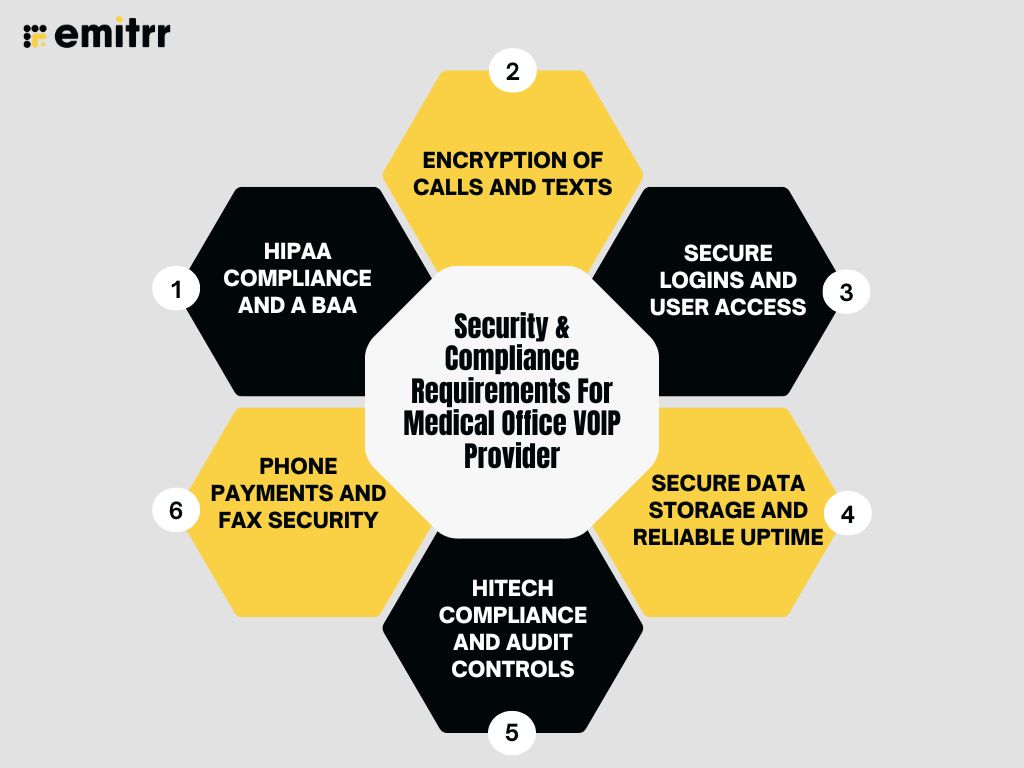
When it comes to healthcare, privacy isn’t optional, it’s mandatory. If your healthcare VoIP solution handles patient communication, it needs to follow the same security standards as your EHR. That’s where HIPAA and VoIP compliance come in. Let’s say a patient leaves a voicemail with sensitive medical info. A VoIP software for medical office won’t just store it on a random machine. A Cloud phone system for medical offices will encrypt the message, send it securely to the right staff member, and limit who can access it. It might even transcribe it, so you don’t have to listen to it out loud in a shared space.
Here’s what you should be looking out for:
HIPAA compliance and a BAA
The first question to ask any VoIP provider is: Will you sign a Business Associate Agreement (BAA)? If the answer is no, that’s your signal to walk away. A BAA means the provider agrees to follow HIPAA rules when handling Protected Health Information (PHI). It’s the baseline for working with any healthcare tech partner.
Encryption of calls and texts
All patient communication should be encrypted, both voice and text. That means when you’re speaking to a patient or sending a reminder, no one else can access that data in between. Look for a cloud phone system for medical offices offering end-to-end encryption, especially for messaging.
Secure logins and user access
Basic passwords aren’t enough anymore. Your VoIP software for medical office should have secure login tools like single sign-on (SSO) or multi-factor authentication (MFA). These add extra layers of protection. Even if someone guesses a password, they still can’t get in without a second security check, like a code sent to your phone.
Secure data storage and reliable uptime
Ask where the provider stores your data. The cloud phone system for medical offices should be in HIPAA-compliant data centers with strong certifications (like SOC 2 or ISO 27001). Also, factor in the uptime, you don’t want your phones going down in the middle of a busy clinic day. Look for a provider that guarantees 99.9% or higher uptime and has a disaster recovery plan in place.
HITECH compliance and audit controls
HITECH is basically an extension of HIPAA, covering how electronic health data is stored and shared. A compliant VoIP provider should support this too, including features like audit logs, timeout settings, and secure user management. You should know exactly who accessed a voicemail or sent a message, and when.
Phone payments and fax security
If your clinic takes payments over the phone, your VoIP system should offer a secure way to collect payment details. Some healthcare VoIP phone systems for clinics even support automated, secure payment input via phone. And if you still use fax, make sure that’s secured too, since faxes often include PHI.
Lastly, even with the best healthcare VoIP solution in place, security depends on how your team uses it. Your staff needs to know that they shouldn’t text PHI from personal numbers or download files to unsecured devices. Some VoIP providers go a step further and even help by setting smart defaults to avoid common mistakes. These mistakes may seem insignificant, but they can compromise compliance requirements if not taken seriously.
Want to learn how a VoIP system can transform your business communication? Watch this YouTube video to explore all the benefits!
Integrations Required for Medical Office Phone Systems
Your VoIP phone systems for clinics shouldn’t sit on its own island. In a medical office, it needs to talk to the tools you already use every day. Your EHR, scheduler, billing software, and even patient messaging platforms. When it all works together, your team spends less time on manual tasks and more time helping patients.
Here’s what you should be looking for:
EHR and practice management integration
This is probably the most important one. Your healthcare phone system software should be able to connect with your EHR or practice management software. When a patient calls, their record should pop up on your screen, showing upcoming appointments, payment history, or notes from the last visit. A cloud phone system for medical offices saves your staff from hunting for info while the phone is ringing. Some common integrations you need to look out for include Athenahealth (athenaOne), Epic Systems, eClinicalWorks, AdvancedMD, and NextGen Healthcare.
Scheduler and calendar connection
If your VoIP phone systems for clinics links with your scheduler, everything gets simpler. Let’s say a patient calls to move their appointment. With the right healthcare phone system software, your staff can update the appointment, send a confirmation text, and note it in the system, all in the same window. Some setups even let you send reschedule links via text from a missed call. That way, patients can pick a new time without calling back, and your schedule stays full without constant follow-ups.
Patient communication platforms
If your clinic already uses a patient engagement tool for surveys, reminders, or check-ins, check if your VoIP can integrate with it. Even if the integration isn’t direct, having an open API means your IT team can create simple connections. For example, pushing voicemail transcripts into a patient’s chart or setting up a trigger to send a follow-up text when someone misses a call.
Billing and payment reminders
Billing integration isn’t always top of mind, but it should be. Imagine if your VoIP phone systems for clinics flagged a patient who has an unpaid balance as soon as they called. Your staff could gently remind them or send a payment link right away. Some AI-powered VoIP tools even support smart text reminders for overdue balances. If your billing process includes phone calls or payment discussions, this integration saves time and adds a little more polish to your process.
CRM and review platforms
For larger clinics or those focused on growth, CRM integration is worth exploring. Some VoIP systems connect with marketing tools or review platforms. After a visit or call, you could send an automated text message saying, “Hope your appointment went well. Mind leaving a quick review?” These small touches go a long way in boosting your online presence. Plus, they help turn every patient touchpoint into a chance for feedback or engagement.
Internal tools like Slack or Teams
If your team uses Slack, Microsoft Teams, or any internal messaging app, it’s helpful if your healthcare phone system software can send updates there. For example, getting a message when a voicemail arrives or when call queues are getting long. It’s not essential, but it adds convenience if your team already works in this VoIP phone system for small medical offices.
In short, your healthcare phone system software should work with the medical communication software that already run your practice. Whether it’s pulling up patient info, sending reminders, logging calls, or collecting feedback, good integration makes everything easier for your staff and for your patients.
Reduce missed calls and confusion with professionally written voicemail greetings for medical offices. Download voicemail scripts tailored for medical offices.
How a VOIP Provider Helps a Medical Office?
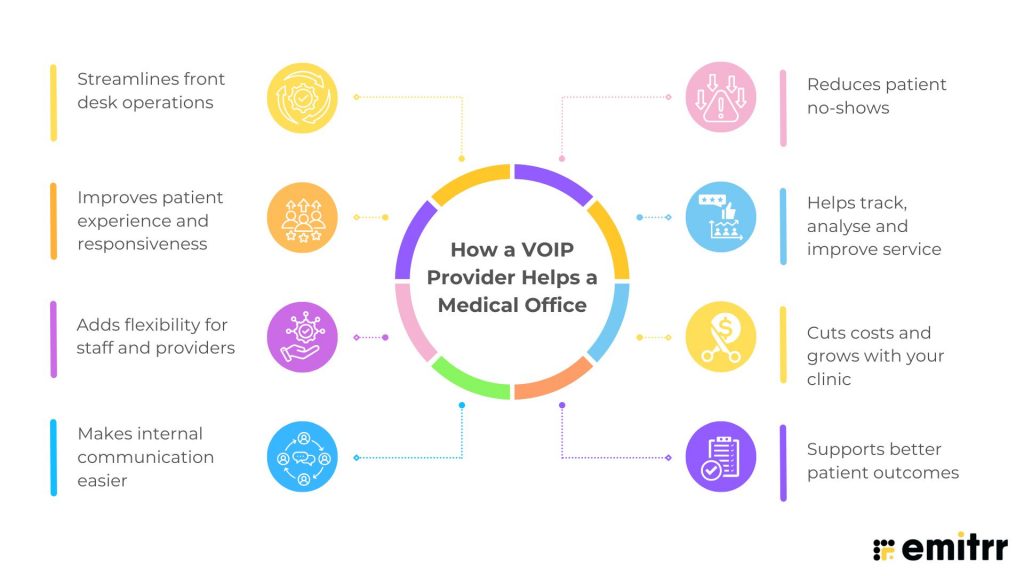
Running a clinic is all about staying connected. Connected with your patients, team, and across locations. A smart VoIP system brings all of that together in one place, helping your practice run more smoothly every day. Here’s how it can make a real difference:
Streamlines front desk operations
The front desk handles a lot, right from answering calls to juggling appointment requests. With healthcare phone system software, things get easier. Auto-attendants greet patients with menu options, call queues keep them informed during hold times, and multiple calls can be managed without overwhelming one staff member.
For example, a pediatric clinic that switched to VoIP and noticed fewer voicemails and missed calls during busy mornings. Parents got through faster, and the team wasn’t swamped at 8 AM anymore.
Improves patient experience and responsiveness
VoIP helps patients feel cared for, even when no one’s physically at the desk. After-hours calls can offer helpful prompts like “Press 1 to reach the on-call doctor,” instead of a generic voicemail. And during clinic hours, features like texting make it easier for patients to ask questions or confirm appointments.
Think of a patient who just had surgery. They might not want to wait on hold just to ask about a side effect. A quick secure text, and a timely reply, can make all the difference in their experience and trust.
Adds flexibility for staff and providers
With VoIP, your medical communication software travels with your team. Doctors can return calls from their laptop or phone, and it’ll still show the clinic’s number. Whether working remotely or doing hospital rounds, providers stay connected without using personal lines.
During the pandemic, many clinics relied on VoIP apps to stay up and running. Staff took calls from home, forwarded messages, and kept care going, all from their devices.
Makes internal communication easier
VoIP isn’t just about patient calls. It helps your team stay in sync too. Staff can call extensions, message each other, or transfer calls quickly. Some medical communication software even support internal chat or video meetings for quick case discussions.
In a multi-location setup, this is a game-changer. A nurse at one branch can transfer a call to another office without the patient even realizing they’re in a different building.
Reduces patient no-shows
Missed appointments waste time and hurt revenue. Healthcare phone system software helps reduce no-shows with built-in reminders. The medical communication software can call or text patients before their visit, and even allow them to confirm or reschedule with a quick reply. It’s proactive, simple, and keeps your schedule more stable.
Many clinics have noticed a drop in no-shows within weeks of using smart automated voice and text reminders through their VoIP system.
Helps track, analyse and improve service
Want to know when most calls come in? Or which hours need more staff coverage? VoIP gives you detailed call logs, wait times, missed call reports, and even text activity. These insights help you tweak your schedule and workflows based on real data.
For example, a practice noticed a spike in missed calls around lunchtime. By rotating break shifts and enabling auto-text replies, they improved call coverage and reduced patient complaints.
Cuts costs and grows with your clinic
VoIP systems are usually more affordable than traditional phone setups. But the bigger win is how easy they are to scale. Need to add a new provider? Just add a user. Opening a second location? No new phone lines needed, they connect to the same cloud system.
Clinics that have plans to scale up can easily benefit from healthcare phone system software. They don’t need a new medical communication software, just plugg into the one they already have, and all calls can be managed from one dashboard.
Supports better patient outcomes
When communication is smooth, care gets better. VoIP allows your staff to follow up faster, share results securely, and document calls in real time. Voicemails can be transcribed and sent to the right team member, helping with quick triage and follow-ups.
Say a patient needs a dosage change. With healthcare phone system software, the nurse can check the voicemail, confirm with the doctor, and text the updated instructions, all in one workflow. That kind of continuity reduces missteps and keeps patients on track.
Whether you’re trying to improve call handling, patient engagement, or internal coordination, VoIP can be the tool that ties it all together.
How To Choose the Best Phone System for Medical Office
Choosing a best phone system for medical office can directly impact patient experience, scheduling efficiency, and HIPAA compliance. With so many vendors claiming to be “healthcare-ready,” it becomes crucial to ask the right questions upfront. The goal is to ensure your VoIP platform not only handles high call volumes but also integrates with your EHR, secures patient data, simplifies reminders, and reduces admin workload rather than adding to it. Before signing a contract, make sure your vendor can confidently answer the essentials below.
- Do you integrate with our EHR and scheduling system (Epic, Athenahealth, eClinicalWorks, etc.)?
- Are you fully HIPAA-compliant, and do you sign a Business Associate Agreement (BAA)?
- How do you handle call encryption, data security, and PHI storage?
- What uptime guarantee do you provide, and how often do you experience outages?
- Can you automate appointment reminders, recalls, and patient follow-ups?
- What call-handling features are included: IVR, call routing, voicemail-to-text, after-hours call triage?
- How does your system support multi-location or growing provider teams?
- Do you offer real-time analytics for call volume, missed calls, wait time, and staff performance?
- What does billing actually include: hidden fees, per-user add-ons, setup, training, phone hardware?
Best VoIP for Medical Offices
The right VoIP system can truly change how your medical office runs day to day. Whether it’s handling patient calls, sending reminders, or just making communication easier for your team, picking the right VoIP phone system for small medical offices really matters.
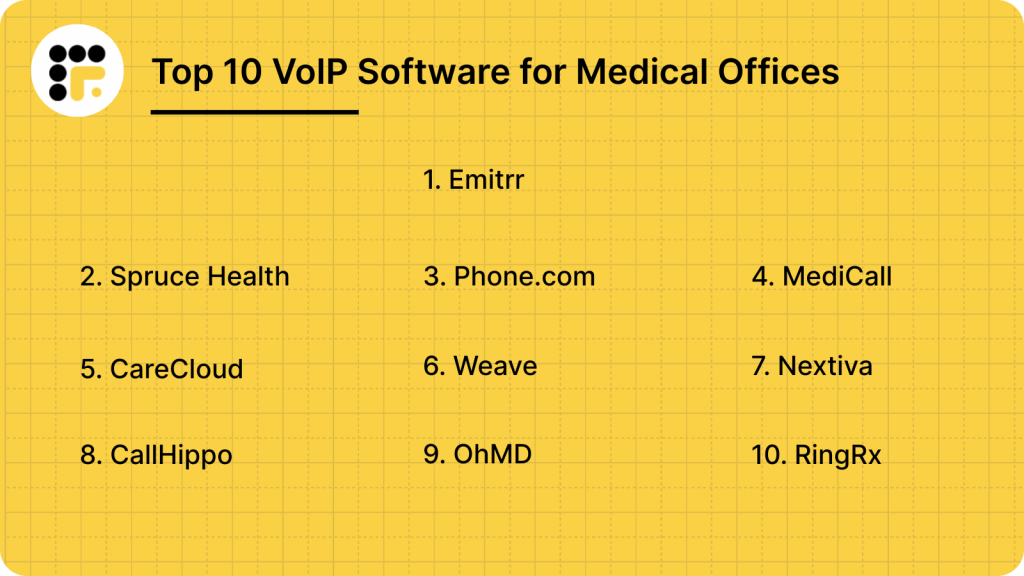
Here are 10 best VoIP for medical offices:
Let’s take a closer look at what each one brings to the table:
1. Emitrr: Best VoIP for Medical Offices

What is Emitrr?
Emitrr is a robust HIPAA-compliant VoIP for healthcare and texting platform made for medical offices. It lets your team send patient appointment reminders, follow-ups, review requests, and even missed-call texts, all from one easy-to-use inbox. You can call and text patients, handle real-time questions, and connect the medical communication software with your EHR or scheduler. Whether you’re a small clinic or a multi-location practice, Emitrr helps you reduce phone volume, improve response times, and run day-to-day operations more efficiently.
Key features of Emitrr
- AI voice agent: An intelligent, always-on call handler designed to automatically handle inbound calls, execute workflows like booking appointments, answering FAQs, routing to departments, or collecting information, respond to queries using pre-defined logic and escalate to human agents if needed. For practices that need automated outbound voice communication as well, A2P calling can help deliver calls at scale for reminders, notifications, and other patient communication workflows.
- AI receptionist: Automatically answers missed calls with intelligent responses via text or voice. AI receptionist captures intent and helps initiate the right action, without human intervention.
- AI call summary: Transcribe the full conversation in the language spoken (English, Spanish, etc.). and summarize the key discussion points in plain language.
- VoIP cold/blind transfers: Instantly transfer a live call to another user, number, or extension without speaking to the recipient beforehand.
- Round robin call flow for queue: Allows admins to configure fair, sequential call distribution across a team or department.
- Unified communication inbox: Manage all inbound and outbound calls, texts, and voicemails from one shared dashboard.
- HIPAA-compliant VoIP calling: Make and receive secure calls from any device, ideal for both in-clinic and remote staff.
- Missed-call texting: This VoIP for healthcare providers automatically follow up with a text when a patient’s call goes unanswered.
- Interactive voice response (IVR): Automate call routing with customizable menus, directing callers to the right department or information.
- Custom call routing: Set up smart call flows with auto-attendant menus like “Press 1 for billing.”
- Voicemail-to-text: Get voicemails transcribed into text so your team can respond faster.
- Click-to-call function: Start a call directly from your dashboard or EHR—no need to dial.
- Caller ID masking: Show your clinic’s number on outbound calls to protect staff privacy.
- Deskphone support: Offers native support for SIP-based deskphones (hardware VoIP phones from brands like Cisco, Yealink, Polycom, Grandstream, etc.)
- Call tracking and logs: Keep detailed records of every call including time, outcome, and recording.
- Smart call forwarding: Route calls to team members based on working hours or availability.
- EHR/CRM integrations: Connect with over 1,000 systems like DrChrono, Epic, Dentrix, and Kareo
Emitrr pros
- Built for healthcare: Designed specifically for medical, dental, and veterinary practices.
- Very easy to use: Clean dashboard and fast onboarding make it simple for staff.
- Saves staff time: Smart call routing directs patient calls to the right team member, reducing back-and-forth and freeing up staff for in-office tasks.
- Responsive support team: Known for fast issue resolution and onboarding help.
- Affordable plans: This HIPAA compliant VoIP offers well-prices plans. These are suitable for small to medium size medical offices as well.
Emitrr cons
There are a few additional features which are still in development.
Emitrr pricing
Here’s a breakdown of the Emitrr pricing plans:
| VOIP Pricing | Standard / User / Month | Pro / User / Month |
| Monthly Plan | $25.00 | $35.00 |
| Yearly Plan | $20.00 | $30.00 |
Emitrr ratings
- Capterra: 4.8/5
- G2: 4.7/5
Emitrr customer reviews
“Dedicated team of professionals; always willing to go above and beyond to help customers. Great product and looking forward to all their updates and improvements they are rolling out.“
“Exceptional! Friendly! The team at Emitrr handles your need promptly.”
Source: Capterra
Emitrr support channels
- Email: support@emitrr.com
- Phone: +1 (210) 941-4696
- Live chat: Available directly on the Emitrr website
- Knowledge base: Includes extensive documentation, FAQs, and troubleshooting guides
- SMS support: Text for help

2. Spruce Health: Best Medical VoIP for Remote Visits
What is Spruce Health?
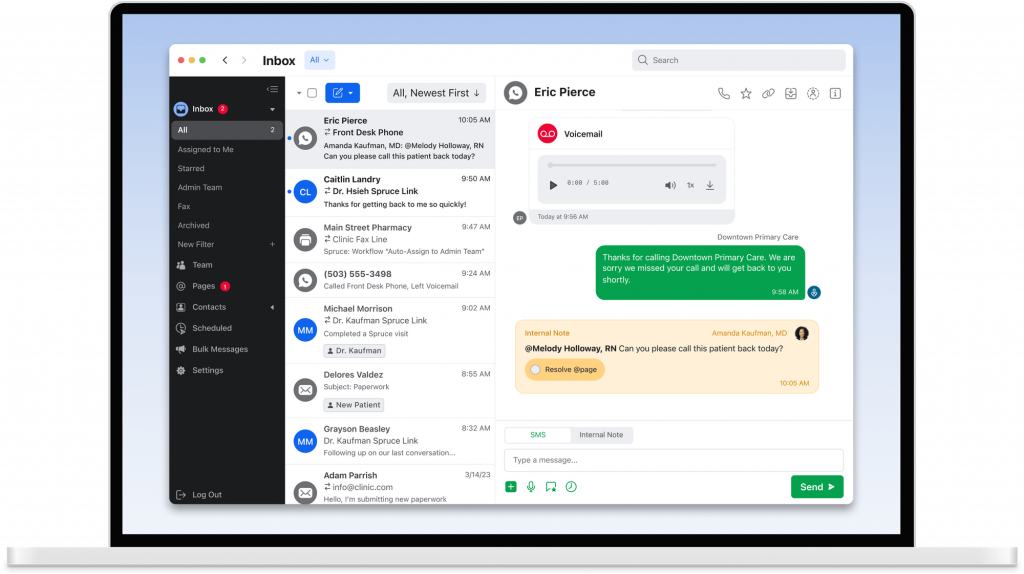
Spruce Health is a HIPAA-compliant VoIP platform built for medical clinics. This VoIP for healthcare providers combines calling, texting, video visits, voicemail, and even fax, all in one place. Whether your front desk is handling appointment calls or your providers are doing virtual consults, Spruce helps manage it all from a single app. This HIPAA-compliant VoIP offers a lot more than basic features:
Key features of Spruce Health
- Text and call in one app: Use one number for both voice calls and patient texting.
- Voicemail transcription and text-back: Missed calls get auto-transcribed and can trigger an instant SMS reply.
- Auto-attendant and call routing: This HIPAA-compliant VoIP direct calls to the right staff or department with custom phone trees.
- Internal team messaging: Chat securely with staff, assign conversations, and leave internal notes.
Spruce Health pros
- All-in-one communication: This HIPAA-compliant VoIP combines phone, SMS, voicemail, and telehealth in one app.
- Easy team coordination: Assign threads and tag staff to streamline response.
- Patient-friendly interface: Patients don’t need an app for basic communication.
- No long-term contracts: Month-to-month plans with predictable pricing.
Spruce Health cons
- Limited EHR integrations: Fewer plug-and-play options than larger platforms.
- Advanced tools cost more: Some features, like bulk messaging, are available only in higher tiers.
Spruce Health pricing
The basic plans start at $24 per user/month
Spruce Health ratings
- Capterra: 4.5/5
- G2: 4.5/5
Spruce Health customer reviews
“I wish porting a number didn’t take so long. We have had a lot of interruptions during our wait.”
“It would be a much better software if it wasn’t for the inability to integrate with many other platforms yet.”
Source: Capterra
Spruce Health support channels
- Email support
- In-app live chat
- Setup help for new users
- Online help center
3. Phone.com: Best Phone system for Small Medical Offices

What is Phone.com?
Phone.com is a cloud-based VoIP system that works well for small and mid-sized medical practices. While it’s not healthcare-exclusive, this VoIP for healthcare offers HIPAA-compliant calling, texting, and voicemail features when configured properly. With flexible plans and tons of customisation, clinics can set up greetings, call routing, and voicemail handling in minutes, all without breaking the budget. Let’s have a quick look at this VoIP for healthcare providers
VoIP for healthcare providersKey features of Phone.com
- Cloud-based phone system: Set up extensions, call routing, voicemail, and more with no hardware needed.
- Auto-attendant setup: Create custom greetings and direct patients with easy call menus.
- Voicemail to email/text: Get voicemail messages delivered straight to your inbox or mobile device.
- Business texting: Send basic appointment reminders or quick updates from your office number.
Phone.com pros
- Budget-friendly pricing: This HIPAA-compliant VoIP offers great value for small clinics that need essential VoIP tools.
- Highly customizable: Over 50 features you can tailor to your clinic’s workflow.
- HIPAA mode available: Offers compliance support and will sign a BAA.
- Easy setup: Simple enough for non-tech teams to manage.
Phone.com cons
- Not healthcare-specific: Lacks medical tools like reminders or secure patient messaging.
- Basic texting only: Standard SMS isn’t encrypted for PHI unless configured carefully.
Phone.com pricing
The basic plan will cost you around $14.99/month. Unlimited plans start around $24.99/month per user.
Phone.com ratings
- Capterra: 3.6/5
- G2: 3.7/5
Phone.com customer reviews
“Absolutely NEVER would have chosen Phone.com had we known the hassle this was going to be. No one in their right mind would rationally choose phone.com.”
“The system is super glitchy. I don’t think I have ever had a video chat that did not have some issues. October and Nov 2024 the system has actually crashed (servers down) several times – right in the middle of big client meetings. It has completely disrupted our business and reflects poorly. We would like to stay with Phone.com, but unfortunately we are probably going to have to leave, and pay a lot more for a more reliable platform.”
Source: Capterra
Phone.com support channels
- 24/7 live phone support
- Chat support
- Online knowledge base and tutorials
4. MediCall: Best VoIP for Reducing No-Shows
What is MediCall?
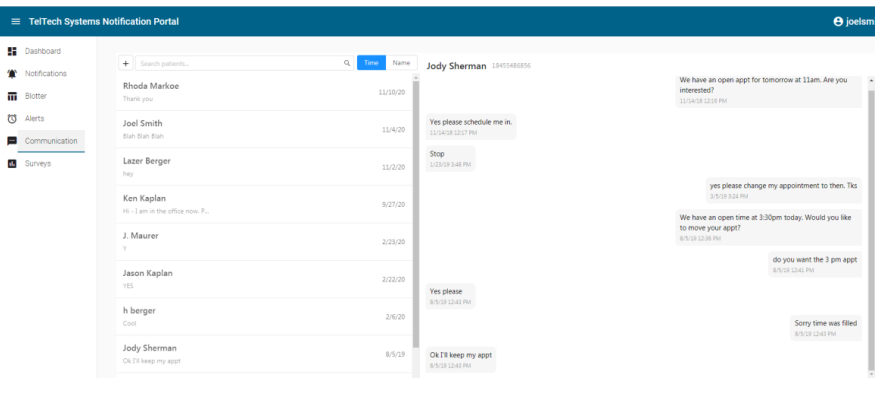
MediCall is an automated VoIP-based communication tool designed to reduce no-shows and keep patients informed. This VoIP software for healthcare is not a full phone system but works alongside your existing VoIP setup to automate outbound calls, appointment reminders, and other routine patient interactions. Think of this VoIP software for healthcare as a virtual assistant that makes reminder calls, sends texts, and emails, without staff having to lift the phone. Here is a quick look at this VoIP software for healthcare:
Key features of MediCall
- Automated appointment calls: Schedule voice reminders to go out ahead of appointments.
- Soft pay balance reminders: Gently nudge patients about unpaid balances via call or message.
- Broadcast announcements: Share updates like office closures or flu shot clinics with your full patient list.
- Scheduler sync: This VoIP software for healthcare pulls data from your PMS or EHR to ensure reminders match your calendar.
MediCall pros
- Reduces no-shows: Patients get multiple reminders, improving attendance rates.
- Hands-off outreach: This HIPAA-compliant VoIP automates repetitive outbound calls so staff stay focused.
- Multi-channel reach: Uses call, text, and email depending on patient preference.
- Custom message templates: Personalize what patients hear in automated calls.
MediCall cons
- Not a full phone system: You still need a separate VoIP provider for inbound calls.
- Limited interaction: It’s mostly one-way, patients confirm or cancel, but can’t chat.
- Setup time: Requires initial configuration and message recording.
- Pricing is steep: Then plans are on the costlier side.
MediCall pricing
Typically, the plans start around $999. However, detailed pricing information is not widely available.
MediCall ratings
- Capterra: Not widely rated
- G2: Not widely rated
MediCall customer reviews
“I expect to make the design more user friendly.”
Source: Capterra
MediCall support channels
- Email support
- Phone support
- Onboarding help
- Template guides
5. CareCloud: Best VoIP for Multi-location Medical Offices
What is CareCloud?
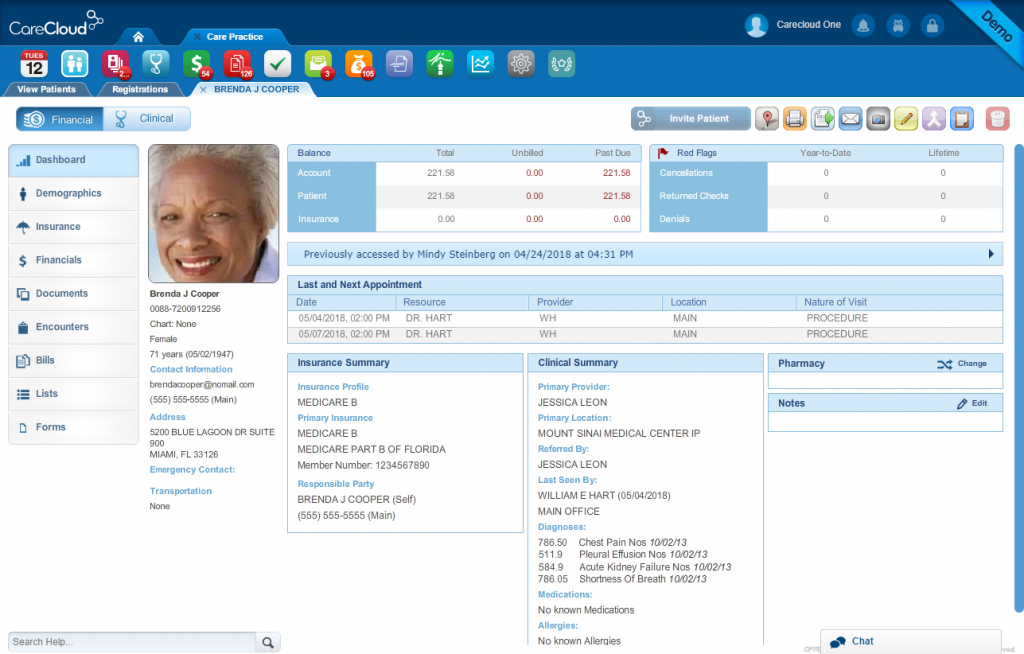
CareCloud is an all-in-one practice management and VoIP-based communication tool. This medical office phone system streamlines call handling, appointment reminders, and patient engagement, right from your EHR dashboard. Ideal for clinics wanting communication tools deeply tied to scheduling and patient data. Here are other details about this VoIP software for healthcare:
Key features of CareCloud
- Appointment reminders: This medical office phone system sends automated texts, emails, or voice reminders.
- Patient timeline sync: Logs call history and communication into patient records.
- Smart call routing: Direct calls to the department and staff members. You can create custom phone trees.
- Broadcast messaging: Send bulk announcements for events, delays, or follow-ups.
CareCloud pros
- Fully integrated system: This VoIP software for healthcare combines scheduling, billing, and patient outreach in one place.
- HIPAA-compliant engagement: All messages and reminders meet healthcare privacy standards.
- Scalable for large practices: Works well for multi-location clinics needing centralized communication.
CareCloud cons
- Higher cost: Full platform pricing is on the premium end.
- Learning curve: Takes time to train staff on the complete suite.
CareCloud pricing
Plans start around $499/month. The full suite plan for this medical office phone system might cost even more.
CareCloud ratings
- Capterra: 3.6/5
- G2: 3.7/5
CareCloud customer reviews
“The group posting payments could be more attentive to what they are doing. At times they post things incorrectly. I have to keep a close watch on patient billing because I have noticed that some payments are posted twice or they will write off the incorrect amount. By doing this it shows a credit for our patients when in actuality they owe the practice money.”
“The functions of it were complex and difficult.”
Source: Capterra
CareCloud support channels
- Phone and email support
- In-app ticketing
- Online knowledge base
- Live onboarding sessions
6. Weave: Best For Ease of Use

What is Weave?
Weave is a VoIP and patient communication platform designed for healthcare practices. This VoIP software for healthcare brings together calling, texting, reviews, payments, and scheduling tools into one system. With this medical office phone system, your front desk can manage phone calls, reply to missed calls via text, and even collect payments over the phone, using a single, easy-to-use interface. Let’s have a quick look at this VoIP software for healthcare:
Key features of Weave
- VoIP phone system: Use desk phones or mobile apps to handle calls with caller ID, hold, transfer, and call logs.
- Missed call texts: This VoIP software for medical offices automatically texts patients back when a call is missed to keep the conversation going.
- Call recording and analytics: Monitor call quality, review call history, and train staff with recordings.
- Integrated patient pop-ups: When a patient calls, see their name, upcoming appointment, and balance instantly.
Weave pros
- All-in-one tool: This medical office phone system combines VoIP with reviews, payments, and messaging.
- Boosts front desk efficiency: Instant patient info reduces call time and errors.
- Great for follow-ups: Helps clinics reduce missed calls and improve outreach.
- User-friendly interface: Easy for non-tech staff to learn and use quickly.
Weave cons
- Higher pricing tier: This medical office phone system can get expensive for small practices.
- Setup takes time: Onboarding can take longer due to phone changes.
- Contract required: Often sold on annual agreements, not month-to-month.
Weave pricing
There are not many details regarding this VoIP software for medical office pricing plans on review websites.
Weave ratings
- Capterra: 4.3/5
- G2: 4.3/5
Weave customer reviews
“The initial set up with the phones was difficult and we had to get some replaced.”
“I don’t love that it does not directly attach to the medical record.”
Source: Capterra
Weave support channels
- Email and phone support
- Help center
- Onboarding team for training
7. Nextiva: Best VoIP for Large Medical Offices

What is Nextiva?
Nextiva is a cloud-based VoIP platform that helps healthcare offices manage patient calls, internal team communication, and call routing from a single dashboard. While not exclusively built for healthcare, this VoIP software for medical offices offers HIPAA-compliant voice services when configured correctly. This VoIP software for healthcare is especially popular with larger clinics and multi-location practices looking for enterprise-grade reliability and support. Here are other details about this VoIP software for medical office:
Key features of Nextiva
- Medical office VoIP with auto-attendant: Manage all inbound calls with customizable routing menus and call forwarding.
- Call recording and voicemail-to-email: Keep a record of important conversations and get voicemail transcriptions via email.
- Team collaboration tools: Built-in messaging, file sharing, and video meetings to support internal coordination.
- Call analytics: Get detailed insights into call volume, wait times, and missed calls to improve patient service.
Nextiva pros
- Reliable call quality: Crystal-clear voice with strong uptime and support.
- Great for scaling: Supports multiple locations, teams, and roles with ease.
- Customizable call flows: Helps ensure patients always reach the right person.
- HIPAA-ready: Can be configured to meet healthcare compliance needs.
Nextiva cons
- Not healthcare-specific: Lacks built-in features like patient texting or appointment reminders.
- Requires HIPAA configuration: You must request a signed BAA and configure settings carefully.
- Learning curve: This medical office VoIP may be more complex than plug-and-play options for small practices.
Nextiva pricing
Nextiva pricing plans usually start around $25 per user per month. Custom pricing is also available for larger teams or healthcare bundles.
Nextiva ratings
- Capterra: 4.6/5
- G2: 4.5/5
Nextiva customer reviews
“We didn’t even let users know they could login–it’s that bad. The cost of their service just cannot compete with the rest of the market.”
“Some of the important features aren’t as intuitive to get to. Have someone in your company go into the interface and give them a list of things to find and get fed back through that. When you build an application, it’s easy to lose sight of new user experience.”
Source: Capterra
Nextiva support channels
- Phone support
- Email and ticket system
- Live chat via website
- Resource center with setup guides and FAQs
8. CallHippo: Best VoIP for Managing Large Call Volume

What is CallHippo?
CallHippo is a cloud-based VoIP solution that works well for medical offices needing efficient, compliant, and scalable communication. This VoIP software for medical offices lets healthcare staff make and receive patient calls from anywhere using internet-connected devices. With features like call routing, analytics, voicemail, and integrations, this cloud-based VoIP phone system for healthcare helps streamline front-desk operations and improve patient call handling. Let’s have a look at other features, pros, cons, and more about this cloud-based VoIP phone system for healthcare:
Key features of CallHippo
- Smart call routing: This cloud-based VoIP phone system for healthcare automatically direct incoming calls to the right staff or department based on preset rules.
- Voicemail with transcription: Let patients leave messages and have them transcribed for quick review.
- Call analytics dashboard: With this VoIP software for medical office monitor call volumes, response times, and missed calls to improve service.
- CRM/EHR integrations: Connects with tools like Zoho, Salesforce, and can be customized for EHR sync.
CallHippo pros
- Quick setup: Easy to deploy without needing complex hardware.
- Multi-device access: Make or receive calls from desktop, mobile, or tablet.
- Good for remote teams: This automated phone system for doctors office works well for distributed clinics or after-hours call handling.
- Affordable for small practices: Competitive pricing with basic features included in starter plans.
CallHippo cons
- Not healthcare-exclusive: Some features of this medical office VoIP may need customization for clinical use.
- Limited native EHR support: Direct integrations with major EHRs may require third-party help.
CallHippo pricing
The basic CallHippo pricing plan usually starts from $20 per user/month.
CallHippo ratings
- Capterra: 4.5/5
- G2: 4.3/5
CallHippo customer reviews
“Fraud never try this platform. Your card will be charged for $700.”
“The lack of customer service explaining how to handle my questions and issues.”
Source: Capterra
CallHippo support channels
- Email support
- Live chat on website
- Help center with video tutorials
- Ticket-based support system
9. OhMD: Best Affordable Medical Office VoIP

What is OhMD?
OhMD is a HIPAA-compliant communication platform built to simplify how medical offices text and call patients. This VoIP software for medical offices can offer your medical office a secure platform for two-way texting, VoIP calling, and basic automation. This cloud-based VoIP phone system for healthcare will slash down on phone tag and improve response times. This robust VoIP software for medical office has a lot more to offer, let’s have a look:
Key features of OhMD
- VoIP calling and texting: Make and receive patient calls using your office number and follow up via secure text.
- Secure chat with patients: Offers encrypted texting with quick verification for PHI compliance.
- Auto-replies and on-call routing: Set after-hours messages or forward urgent calls to designated staff.
- Broadcast messaging: Send announcements or alerts to a large group of patients instantly.
OhMD pros
- Fast to implement: This automated phone system for doctors office is very easy to set up and start using.
- No app required: Patients can text without downloading anything.
- Secure texting and voice: Great for compliance without sacrificing convenience.
- Budget-friendly: Flat monthly pricing makes it accessible for smaller practices.
OhMD cons
- Not a full VoIP suite: This cloud-based VoIP phone system for healthcare lacks complex call center features like analytics or call queues.
- Limited integrations: EHR sync is available but not as extensive as larger platforms.
- Manual follow-up needed: No automated reminders or scheduling built-in.
OhMD pricing
OhMD pricing plans start at around $7/month. But, pricing may vary based on features and staff size.
OhMD ratings
- Capterra: 4.7/5
- G2: 4.7/5
OhMD customer reviews
“Some users do not like it because it is a separate app. I can’t figure out a way to delete old clients from my records. At times it seems to freeze. I then just sign out and sign back in which fixes it. I was told that I need to upgrade to a newer version, so that may be my problem.”
Source: Capterra
OhMD support channels
- Email support
- Live chat
- Knowledge base with guides
- Onboarding and training help
10. RingRx: Best VoIP for Creating Custom Workflows
What is RingRx?
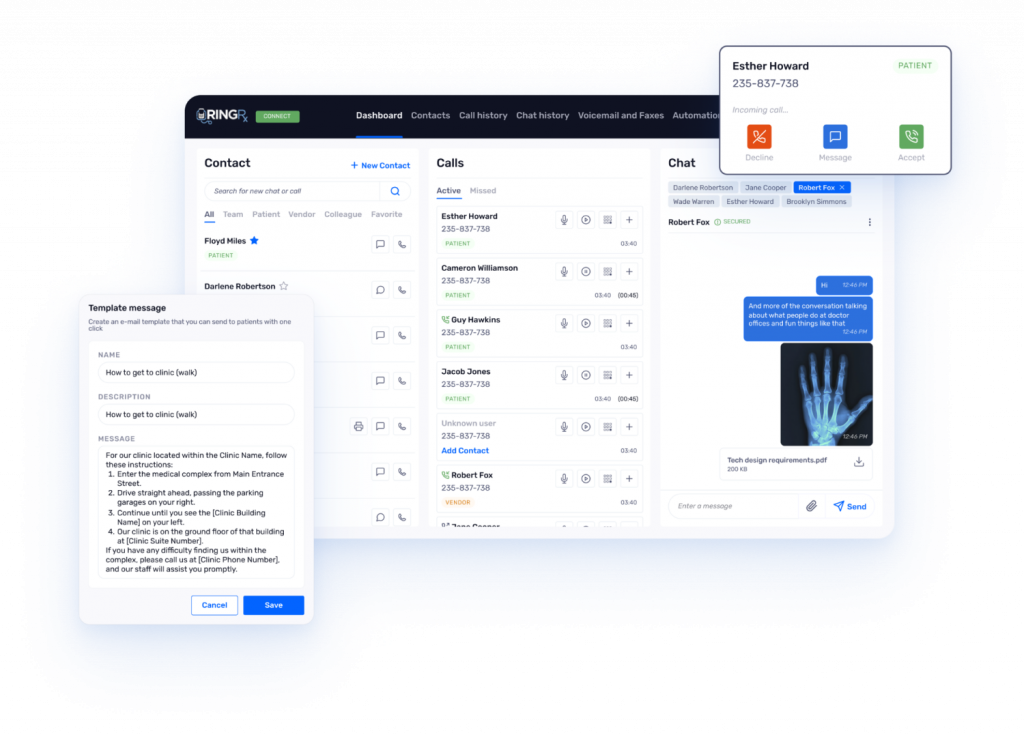
RingRx is a VoIP phone system built specifically for healthcare providers. VoIP software for medical office offers a secure, HIPAA-compliant calling and messaging solution designed to meet the needs of clinics, private practices, and behavioral health professionals. Whether you’re looking to reduce call handling issues or improve patient communication, this one is one of the best VoIP phone systems for healthcare that brings together voice, voicemail, and text into one medical-grade platform. Here’s a quick look at this VoIP software for medical office:
Key features of RingRx
- HIPAA-compliant VoIP calling: Make and receive encrypted calls with call logs securely stored.
- Auto attendant and call routing: Easily route patients to the right person or department.
- Encrypted voicemail-to-email: Patients can leave messages, which are transcribed and securely sent to your inbox.
- Call logs and recordings: Track all calls with detailed logs and optional call recording for internal use.
RingRx pros
- Built for healthcare: Designed with medical workflows and HIPAA compliance in mind.
- All-in-one solution: Combines voice, voicemail, texting, and routing in a single system.
- Easy to manage: User-friendly interface for managing extensions, schedules, and voicemail settings.
- Supports telehealth workflows: Works well with on-call doctor rotations and mobile devices.
RingRx cons
- Limited EHR integrations: Doesn’t natively integrate with many EHRs, though workarounds exist.
- Texting feature limited to certain plans: With this cloud-based VoIP phone system for healthcare you may need a higher-tier plan for full texting access.
RingRx pricing
The basic plan will cost you around $19 per user/month.
RingRx ratings
- Capterra: 4.7/5
- G2: 4.7/5
RingRx customer reviews
“I do wish that there was a way for HIPAA compliant texting app to receive photos. Many of my patients have tried to use this app to send photos of insurance cards. The more barriers to communication that I can take away the easier it is for them to access services.”
Source: Capterra
RingRx support channels
- Email and phone support
- Setup guidance for new users
- Help articles and documentation
- Onboarding calls for larger teams
Download professional voicemail greeting scripts made for medical offices. Save front desk time and ensure patients always hear the right message.
Why Emitrr Is The Best Automated Phone System for Doctors Office
If your clinic is still juggling separate tools for calls, texts, reminders, and follow-ups, Emitrr wraps it all into one simple, healthcare-friendly platform. Here’s how Emitrr stands out as the best phone system for doctors office:
- Built for healthcare clinics: Emitrr’s VoIP phone system for healthcare is designed keeping the specific needs of medical offices in mind. Every feature is tuned to support your daily workflow.
- HIPAA-compliant and secure: This VoIP phone system for small medical offices encrypts data, controls access, and provides a Business Associate Agreement to keep patient communication compliant and protected.
- One dashboard for calls and texts: Staff can view, manage, and reply to all messages in one place, no switching tabs or checking multiple apps.
- Automatic follow-up on missed calls: If a patient calls and no one picks up, Emitrr instantly sends a text to keep the conversation going and capture the opportunity.
- Smart voicemail transcription: Voicemails are automatically turned into text and sent to email, so staff can follow up quickly without checking machines.
- Customizable auto-attendants and call flows: Set up clear menus and routing based on departments, providers, or hours, making it easier for patients to reach the right person the first time.
- Built-in appointment reminders: Automate texts or voice messages for upcoming appointments, helping reduce no-shows without manual calls.
- Seamless EHR and PMS integration: Emitrr connects with Athenahealth, Epic Systems, eClinicalWorks, NextGen, Practice Fusion, and more, syncing call logs and patient data smoothly.
- Supports remote and in-clinic teams: Doctors and staff can access the system from any device, using the clinic’s number even while working off-site or from home.
- Scales as your practice grows: Whether you’re adding users or opening new locations, you can expand your system without needing new hardware or extra IT help.
- Quick to set up and simple to learn: Onboarding is fast, and most clinics start using it confidently within days, no technical background needed.
- Reliable call quality with 99.99% uptime: Your phones stay online and calls remain clear, even during peak hours or busy mornings.
- Fair pricing with no hidden charges: Plans start at $30/month, with transparent billing and no surprise fees for extra calls or texts, making it one of the most affordable medical phone systems
- Responsive customer support: Need help? The support team is available by phone, email, or chat, and they actually understand how clinics work.
- AI-Powered Features: Emitrr’s AI-powered features for VoIP are designed to handle the communication load many clinics struggle with, making it one of the best VoIP phone systems for healthcare. From answering incoming calls to managing appointment bookings and follow-ups, the system works seamlessly in the background. At the center of it is Sarah, Emitrr’s intelligent AI receptionist, who can converse naturally with patients, answer common questions, and route calls based on intent, all without human intervention. This not only frees up staff time but also ensures no patient query goes unanswered.
Curious what that looks like in action? Watch this video to see how it works:
Emitrr isn’t just about handling calls, it’s about making your clinic more responsive, efficient, and easy to reach. From cutting no-shows to saving time at the front desk, it’s a phone system built to keep your practice running smoothly.
Frequently Asked Questions
Not quite. Medical offices need HIPAA-compliant systems that protect patient data and offer features built for healthcare communication, like secure voicemail, call logs, and audit trails.
Absolutely! With smart automated appointment reminders and quick follow-up texts, patients are more likely to confirm or reschedule in advance, helping your clinic run smoothly.
Definitely. Emitrr is designed to be easy to set up and affordable, even for solo providers. It saves time, prevents missed calls, and streamlines front desk tasks without needing extra staff.
If a patient call goes unanswered, Emitrr can automatically send a text message, keeping the conversation going and reducing the risk of lost appointments or leads.
Not at all. Most platforms, including Emitrr, offer clean, user-friendly dashboards. Teams can get up to speed quickly, often within a day or two.
VoIP can be HIPAA compliant if the provider offers end-to-end encryption, secure data storage, and signs a Business Associate Agreement (BAA). Always verify before choosing a medical office phone system.
Medical offices typically use EHR/EMR platforms like Epic, Athenahealth, eClinicalWorks, and appointment/scheduling software that integrate with VoIP for medical offices for smoother patient communication.
Most practices use HIPAA-secure VoIP platforms like Emitrr that offer comprehensive VoIP features such as call routing, call queuing, AI voice agent, IVR, missed-call-to-text, etc., designed specifically for medical phone systems to manage patient calls and queries efficiently.
Emitrr is one of the best VoIP software for medical offices, as it is HIPAA compliant, integrates with EHRs, and supports secure messaging, virtual fax, and call routing, AI voice agent, etc.; basically everything that is expected from the best VoIP for medical offices.
VoIP relies on internet connectivity, so poor network quality can lead to dropped calls or latency, critical for any healthcare phone system.
Zoom can be HIPAA compliant only if you use Zoom for Healthcare with a signed BAA; the standard Zoom plan is not suitable for a medical office phone system.
Emitrr, Weave, AthenaHealth, Klara, etc., are some of the most commonly used medical software.
Yes. HIPAA applies to all patient-related calls, voicemails, and messages handled through phone systems for healthcare.
VoIP can be PCI compliant if it uses secure encryption and meets card data handling standards. Always confirm compliance when selecting a healthcare VoIP solution.
Google Voice is generally not HIPAA compliant because it does not provide a BAA, making it unsuitable as a best phone system for medical office use.
Conclusion
The right VoIP system won’t just help you answer calls. It will help your team stay on top of patient needs, reduce missed appointments, and communicate better every day! And with a platform like Emitrr, you don’t just get great features, you get a solution built specifically for medical offices. So are you ready to see how it fits into your clinic’s workflow?
Book a free demo with Emitrr and explore how smarter calling and texting can upgrade your entire patient experience!


 4.9 (400+
reviews)
4.9 (400+
reviews)