

Introduction
Before trusting a veterinary clinic with their pet’s care, most pet owners do a quick online search. And what stands out first? The reviews. A few genuine, positive comments can inspire confidence. But a couple of unanswered complaints can be enough to make someone look elsewhere.
Reputation today isn’t built by word of mouth alone, it’s built online, where every experience is public. In a profession rooted in trust, staying on top of client feedback isn’t optional anymore. It’s essential. That’s why it is essential to have review and reputation management software for veterinary practices. Since these make it easier to collect feedback, track what clients are saying, and respond promptly, without piling more work on your team.
If your clinic isn’t managing its reputation online, you’re likely missing out on new clients. In this blog, we’ll break down what to look for in a solution, how these tools help, and which platforms are worth your attention, so you can choose the one that fits your practice best.
What is a Veterinary Review and Reputation Management Software?
Review and reputation management software helps vet clinics keep track of client feedback across different websites, without having to log in and out of every review platform. It’s built to make things easier for teams that are already overburdened.
When a pet owner finishes their appointment, the software can automatically send them a quick text or email asking how things went. If the client leaves a review, it gets pulled into one dashboard, whether it’s on Google, Yelp, Facebook, or any other site. That way, your team isn’t constantly switching between tabs to keep track.
Over time, these tools can show you what’s going well and where clients are getting frustrated. If someone leaves a poor review, you’ll know right away and can follow up before it causes lasting damage.
General-purpose review tools might offer some of these features, but they aren’t built with veterinary practices in mind. Vet-focused or healthcare software usually connects with your scheduling or reminder system, supports medical privacy rules like HIPAA, and fits into how your clinic already runs. Thus, it is better to choose latter.
What Features Should You Look for in Online Reputation Management Software?
Choosing the right software starts with knowing which features actually make a difference in day-to-day clinic life. Here are the essentials worth paying attention to:
Automated Review Requests
Good software takes the task of asking for reviews off your team’s plate. It can automatically send a text or email to clients after their appointment, prompting them to share their experience. This not only saves time, it also increases the chances of getting more reviews consistently.
Multi-Platform Monitoring
Your clients don’t stick to one platform, and neither should your software. It should track reviews across Google, Yelp, Facebook, and other places where pet owners go to read feedback. Having it all in one place makes it easier to spot trends and respond faster.
Negative Review Alerts
You don’t want to find out about a bad review weeks later. The right software will alert you the moment a negative comment comes in, giving you a chance to respond quickly and turn the situation around. This is why veterinary practice negative review management is a must-have feature.
In-Platform Response Capability
Being able to reply directly from the software, without needing to log into each review site, saves time and ensures nothing is missed. This is especially helpful when you want to handle responses promptly, even on busy days.
Review Aggregation Dashboard
A clear, organized dashboard gives you a full view of how your clinic is doing. You can see new reviews, ratings, trends, and client sentiment in one place, making it easier to stay informed without doing a deep dive.
Client Sentiment Analysis
Beyond star ratings, look for tools that can pick up on tone and recurring themes in your feedback. Sentiment analysis helps you understand how people feel about their visit, not just what they rated it.
Customizable Messaging Templates
The ability to tweak your review request messages ensures they match your tone, values, and branding. Whether you want something warm and friendly or straight to the point, customization keeps communication consistent.
Analytics and Reporting
Numbers matter. Look for software that tracks response rates, review volume, average rating over time, and platform-specific performance. These reports help you measure progress and know what’s working, and what’s not.

Security & Compliance Requirements for Vet Online Review and Reputation Management Software
Here are four security and compliance essentials your veterinary review management software should cover:
HIPAA-compliance
If your review software also includes texting, appointment reminders, or any messaging that could mention a diagnosis, treatment, or procedure, it’s best to choose a HIPAA-compliant provider. This ensures that client information is encrypted, stored securely, and never shared without consent.
Look for tools that:
- Sign Business Associate Agreements (BAAs)
- Support encrypted messaging
- Provide secure access logs and audit trails
- Allow clients to opt-in before receiving any communication
Secure data encryption
Encryption ensures that sensitive data, like client names, emails, and phone numbers, is protected from unauthorized access. Reputable software providers use encryption both “in transit” (as data moves between systems) and “at rest” (while it’s stored on servers).
This is importance because if your software isn’t properly encrypted, even basic contact information could be exposed in a data breach. That puts your practice’s reputation at risk and could damage client trust.
So look for:
- End-to-end encryption
- Encrypted cloud storage with trusted providers (like AWS or Azure)
- SSL certification on all web portals and client dashboards
Role based-access control
Not everyone on your team needs full access to the software. Look for tools that let you set user roles, so front desk staff can send review requests but not view detailed client histories, for example. This limits the risk of accidental exposure, keeps sensitive information on a need-to-know basis, and helps you stay organized as your team grows.
Data retention policies
Good software doesn’t just collect data, it handles it responsibly. That includes storing information only as long as needed and offering clear options for deleting or exporting data when requested.
For example, if a client asks you to stop communication or requests their data be removed, your software should allow you to act quickly without jumping through hoops.
Check for:
- Clear data retention timelines
- Ability to delete client data on request
- Secure backups and scheduled data purging
- GDPR-aligned policies for international clients (if applicable)
Integrations Required for Vet Online Review and Reputation Management Software
Even the best review tool won’t reach its full potential if it doesn’t work well with the rest of your clinic’s systems. For veterinary practices, seamless integration is what makes the difference between another platform to manage, and one that saves time without adding work.
Here are the key integrations to look for:
Practice management software
Your review system should connect directly with the software you already use to run your clinic. When integrated properly, it can automatically trigger review requests after appointments, sync client contact info, and keep all activity tied to the correct pet and owner.
Look for compatibility with systems like Cornerstone, AVImark, eVetPractice, etc. This saves your team from duplicate data entry and ensures your review requests are timely and accurate.
Client communication tools
Your review software should work hand-in-hand with the platforms you already use to reach pet owners, whether that’s through texting, email, or even phone calls. This ensures that review requests feel like a natural part of the client journey rather than an extra message that gets ignored.
Platforms like Emitrr, Weave, PetDesk, and VitusVet are commonly used in veterinary practices and offer built-in or seamless integrations with review workflows. This kind of setup keeps all messages consistent and ensures your staff isn’t switching between systems just to manage reviews.
Online scheduling
When your scheduling software and review tool talk to each other, automation becomes a lot smoother. Appointments booked online can automatically trigger review requests after the visit, and no one has to remember to manually follow up. Popular platforms that some clinics use include Vetstoria, Calendly, Emitrr and Zocdoc.
Payment processing
While not critical, this is a growing area. If your clinic accepts digital payments, linking that activity to your review flow makes sense. A simple “Thanks for your payment” message can double as a gentle prompt for a review. Examples include, Square, Stripe and Clover.
Social media
Your review software should make it easy to share great feedback where people can see it. Look for tools that can:
- Automatically post 5-star reviews to Facebook
- Offer easy embeds for testimonials on your site
- Sync with your Google Business Profile
This helps boost visibility and builds credibility for potential clients researching your clinic online.
CRM and marketing
For clinics doing email marketing or running re-engagement campaigns, review data can be incredibly useful. Integration with CRM tools helps you segment happy clients, identify those who might need extra attention, and even retarget with follow-ups or educational content.
Useful integrations might include:
- HubSpot
- Mailchimp
- Zoho CRM
- ActiveCampaign
This lets you take reputation management beyond just reviews, and into building long-term client relationships.
How Online Review and Reputation Management Software Helps Veterinary Practices?
Reputation management isn’t just about collecting stars for show. When done right, it becomes a core part of how your practice grows, earns trust, and keeps clients coming back.
Here’s a closer look at the actual ways review software helps veterinary clinics thrive:
Attracts new clients
Most pet parents won’t book an appointment without first checking online reviews. When your clinic has dozens, or hundreds, of positive reviews, it makes a strong first impression. It tells potential clients that others trust you with their pets, and they likely can too. Veterinary review automation tools helps you collect this feedback consistently, so your online presence always looks active and reliable.
Boosts clinic visibility on local search
Google rewards businesses that are active and well-reviewed. When your practice has a steady flow of recent, high-quality reviews, you’re more likely to show up in the “3-pack” on local search results. This means when someone searches “vet near me,” your name appears higher, bringing in more clicks, calls, and new appointments.
Increases appointment bookings
Positive reviews act as endorsements. When someone sees real stories from other pet owners, especially ones mentioning staff friendliness, gentle handling, or quick care, they’re more likely to book. This kind of social proof helps break the hesitation many people feel when choosing a new clinic.
Reduces staff time spent on manual follow-ups
Manually calling or emailing clients for feedback takes time your team often doesn’t have. With review software, requests go out automatically after each visit. Clients receive a short, friendly prompt by text or email, and your staff doesn’t have to track who’s been asked. It’s set-and-forget, but still personal.
Helps resolve issues before they escalate publicly
No clinic is perfect, and sometimes clients aren’t happy. The key is catching problems early. Many platforms can alert you when a negative review is posted or even when a low rating is left in a private survey before it hits Google. This gives you the chance to follow up, apologize, and possibly turn the situation around before it goes public.
Encourages happy clients to advocate for you
Plenty of satisfied clients simply don’t think to leave a review unless you ask. Review software gives them that nudge at the right moment, when their positive experience is still fresh. As those reviews stack up, your online profile becomes one of your best marketing tools.
Identifies training needs based on consistent feedback
When multiple reviews mention the same issue like long wait times, billing confusion, or rushed appointments it’s a signal. Review tools help you spot those patterns and use them as coaching opportunities. On the flip side, they also help you recognize what your team is doing well, so you can double down on it.
Improves client retention and loyalty
When clients see that their feedback is not only read but acted on, it builds trust. Prompt responses, especially to concerns, show clients you care beyond the visit. And when clients feel heard, they’re far more likely to stick with your clinic over time, even when others are offering lower prices or flashier promos.
How to Choose the Right Online Review and Reputation Management Software for Your Practice?
With so many platforms out there, it’s easy to get distracted by flashy features. But not every software will fit the way your veterinary clinic works. The right choice is one that matches your pace, your team’s comfort level, and your long-term goals.
Here’s what to consider before making a decision:
Define your requirements
Start with the basics. A solo vet handling 10 appointments a day needs a different setup than a multi-location animal hospital seeing 100+ pets. Map out your daily workflow, the tools you already use (like PIMS or texting platforms), and how review management needs to fit into that picture. A solution that plays well with your existing tools will save time and reduce friction.
Evaluate ease of use for front desk staff
The best software is the one your team will actually use. Look for a clean, intuitive interface with minimal learning curve. Can someone new to the system send a review request in under a minute? Can they view and respond to reviews without going through training manuals? If it’s too complex, it won’t get used consistently.
Check scalability and multi-location support
If your clinic is growing or you plan to open more locations make sure the software can grow with you. Can you manage reviews for multiple locations under one account? Does it offer location-specific dashboards, review tracking, and reporting? You’ll save time and avoid the need to switch platforms later.
Look into pricing models
Some platforms charge based on the number of users, while others price by location or appointment volume. Understand what’s included in the base price and what counts as an “add-on.” Be clear on whether texting credits, extra integrations, or additional locations cost extra. Transparent pricing helps you avoid surprises.
Review support options
Tech issues and questions come up, especially during setup. Make sure the vendor offers real support, not just a help center full of articles. Look for live chat or phone support, dedicated onboarding assistance, and short training sessions to help your team get up and running fast.
Ask about mobile accessibility
If you or your team handle tasks from a phone or tablet, mobile access is non-negotiable. Can you view reviews, respond, and send requests from your mobile device? A responsive mobile dashboard gives you flexibility and helps you stay on top of feedback even when you’re not at your desk.
Look into security and compliance
Reputation software deals with client data, so security matters. Ask about encryption, data storage policies, and HIPAA compliance, especially if the platform handles any appointment reminders or follow-ups that mention care details. Choosing a secure, privacy-conscious tool helps you avoid risk and builds client trust.
Top Online Review and Reputation Management Software for Veterinary Practices
1. Emitrr
What is Emitrr?
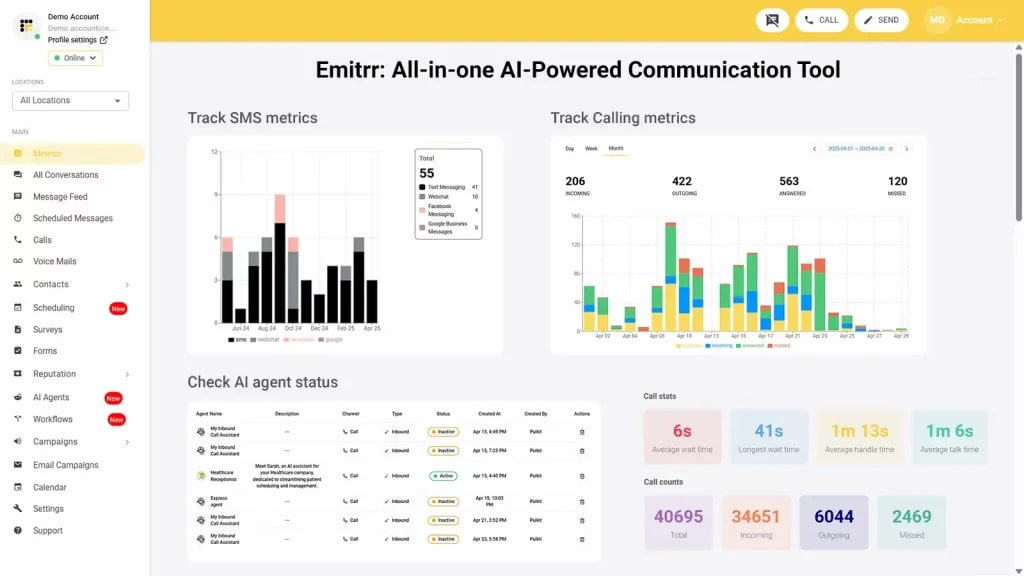
Emitrr is a communication and reputation management platform designed to help businesses take control of their online presence. Built for service-driven industries like veterinary care, Emitrr helps teams collect reviews, manage feedback, and respond faster, all from one centralized place. Whether it’s a solo practice or a multi-location clinic, Emitrr makes it easier to build trust and attract new clients without adding to your staff’s workload.
Emitrr Features
- AI-powered reputation management tools: Automates monitoring, flagging, and follow-ups, so you stay ahead without daily check-ins.
- Automated SMS review requests: Trigger review requests automatically based on events like service completion, product delivery, or support interactions.
- Centralized dashboard: View, filter, and manage reviews from Google, Facebook, and other platforms, all in one place.
- Real-time alerts: Get notified immediately when a new review is posted or when a client leaves a low rating.
- Smart auto-responses: Drafts helpful, professional replies that you can send as-is or tweak with a click.
- Sentiment analysis: Helps prioritize reviews that express frustration, confusion, or strong emotion, so you can act faster.
- Review routing: Assign reviews to the appropriate team (e.g., tech support, front desk, or operations) based on content.
- Customizable response templates: Ready-to-use replies tailored to different service types, tones, or client situations.
- HIPAA-compliant workflows with role-based access control: Built with role-based access control, audit logs, and secure communication to support healthcare and veterinary privacy needs.
- Review performance tracking: Visual dashboards show trends, response rates, platform breakdowns, and more.
- Seamless integration: Connects easily with popular CRMs, EHRs, and communication tools your team already uses.
- Bulk review request campaigns: Perfect for product launches, service follow-ups, or re-engagement outreach.
- Multi-location review management under one login: Manage reviews across different locations from one account, with filters and location-specific reporting.
Emitrr Pros
- All-in-one communication suite: Review management, texting, missed call automation, VoIP, voicemail drops, and follow-ups, all in one platform.
- Streamlined user experience: Clean, intuitive interface that staff can learn quickly, even without technical experience.
- Fast setup & easy onboarding: Clinics can get started within days, with personalized onboarding support and ready-to-use templates.
- Mobile-friendly access: Full functionality on mobile and tablet devices, so you can manage reviews even on the go.
- Responsive customer support: Dedicated support team that understands the needs of veterinary and healthcare businesses.
- Scalable for growing clinics: Works for solo clinics and multi-location operations alike, with flexibility built in.
- Affordable: Offers robust features without enterprise-level costs, ideal for budget-conscious practices.
Emitrr Cons
- Some advanced features are still being rolled out in phases.
Emitrr Pricing
Emitrr pricing starts at $59 per month, with flexible plans so you only pay for what you use.
Emitrr Integrations
Emitrr offers 500+ integrations across industries, including dental, real estate, recruiting, and more, with platforms such as:
Emitrr Customer Support Channels
- Live chat: Chat with Emitrr’s live representatives
- Phone: Call Emitrr at +1 (210) 941-4696
- Email: Send email to Emitrr’s support team at support@emitrr.com
- Knowledge base
- FAQs/forum
- SMS
Emitrr Rating
Emitrr has a solid 4.8-star rating on Capterra.
Emitrr Reviews
“Big Emitrr Fan! Dedicated team of professionals; always willing to go above and beyond to help customers. Great product and looking forward to all their updates and improvements they are rolling out.”
“I’ve tried 4 different platforms, Emitrr has worked the best for me. The support staff has been very receptive and efficient discussing my requests and needs.”
(Source: Capterra)
2. Freshreview
What is Freshreview?
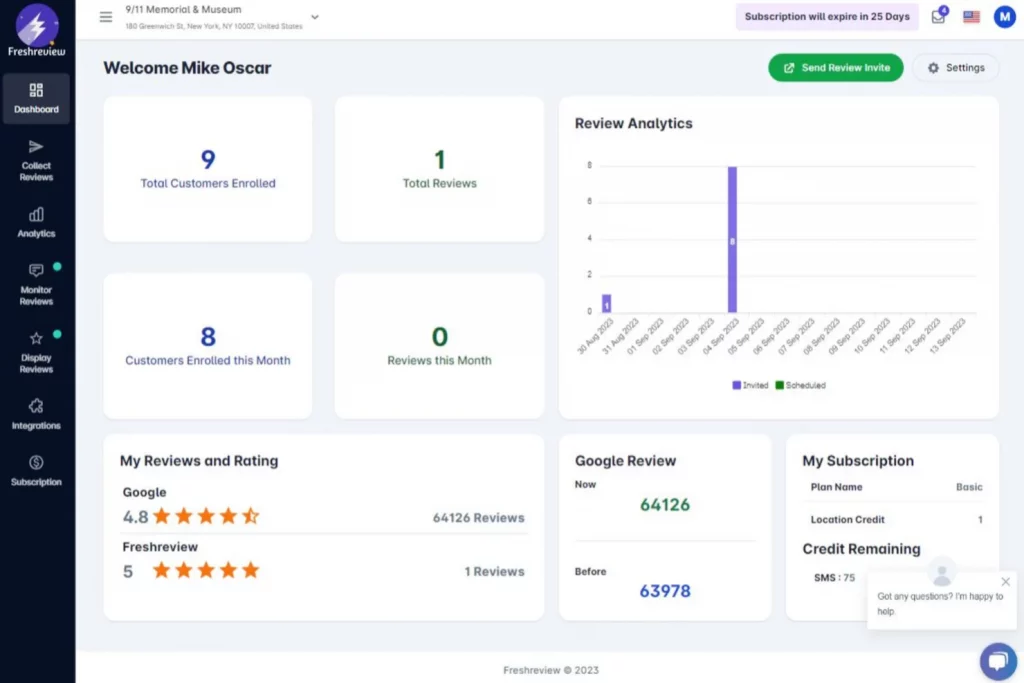
Freshreview is an online review management tool designed to help small businesses collect and display customer feedback across platforms like Google and Facebook. It focuses on helping businesses improve their online reputation through automated review requests and performance tracking. While it’s easy to set up and use, Freshreview lacks some advanced features like two-way texting or deep platform integrations, which can limit its scalability for growing or multi-location practices.
Freshreview Features
- Automated review requests: Sends review prompts via email or SMS after client interactions, based on simple triggers.
- Review widget for websites: Allows clinics to showcase Google and Facebook reviews directly on their site in real-time.
- Performance analytics dashboard: Tracks reviews over time, average ratings, and engagement metrics across platforms.
- Multi-platform monitoring: Collects and displays reviews from major platforms in one centralized dashboard for best veterinary reputation monitoring.
Freshreview Pros
- Simple interface: Easy to navigate, even for teams with limited tech experience.
- Quick setup: Can be up and running in under a day with minimal effort.
- Affordable for small clinics: Entry-level pricing that works for single-location veterinary practices with basic needs.
Freshreview Cons
- No two-way messaging: Doesn’t support texting clients back or managing conversations in-platform.
- Limited integrations: Does not integrate with common veterinary PIMS or communication tools.
- Basic automation rules: Lacks advanced automation triggers or smart workflows for follow-ups or segmentation.
Freshreview Pricing
- Contact support
Freshreview Customer Support Channels
- Email/Help Desk
- 24/7 (Live rep)
- Chat
Freshreview Rating
Freshreview has a 5-star rating on Capterra.
Freshreview Reviews
“We had a great experience with the tool so far. Remember tools are there to help you and if you don’t ensure happy customers, tools can’t help you there. I loved the support from the freshreview team. They were patient and responsive throughout the period.”
“I wish there were more insights or analytics built in.”
(Source: Capterra)
3. Daysmart Vet
What is Daysmart Vet?
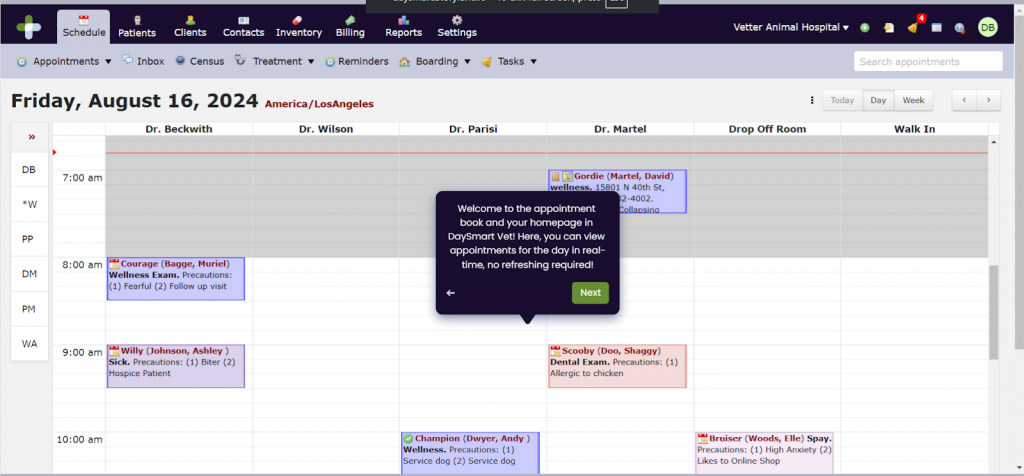
DaySmart Vet is a full-service practice management software designed specifically for veterinary clinics. It combines scheduling, medical records, client communication, and payment processing in one platform. While its primary strength lies in clinic operations, it also offers basic review and reputation management tools as part of its broader system. However, clinics looking for more advanced or customizable reputation features may find it somewhat limited in that area.
Daysmart Vet Features
- Built-in review request system: Sends automatic review requests after appointments to collect client feedback.
- Practice management integration: Offers a seamless experience with medical records, billing, and scheduling all in one place.
- Client communication tools: Includes text and email reminders, confirmations, and limited follow-ups.
- Customizable dashboards: Allows clinics to monitor appointment volume, review metrics, and client engagement in one interface.
Daysmart Vet Pros
- All-in-one platform: Combines medical records, payments, scheduling, and basic review tools, no need for multiple systems.
- Tailored for veterinary practices: Built with veterinary workflows in mind, making daily tasks smoother and more efficient.
- Good for mid-to-large clinics: Scales well for busier clinics that need robust scheduling and patient tracking tools alongside reputation management.
Daysmart Vet Cons
- Limited Reputation Features: Review tools are basic compared to dedicated platforms, no advanced routing, AI responses, or sentiment analysis.
- Complex Setup: Because it’s a full PIMS, onboarding takes longer and requires more staff training.
- Pricing Can Be High for Smaller Clinics: Not the most budget-friendly option if all you need is review and feedback management.
Daysmart Vet Pricing
Daysmart Vet offers flexible pricing options to accommodate practices of varying sizes:
- 1–5 Users: $116 per month
- 6–10 Users: $293 per month
- 11–15 Users: $400 per month
- 16–20 Users: $493 per month
- 21–24 Users: $583 per month
- 25+ Users: Custom pricing available upon request
Daysmart Vet Integrations
- Vetstoria
- Stripe
- VitusVet
- Demandforce and more!
Daysmart Vet Customer Support Channels
- Email/Help Desk
- FAQs/Forum
- Knowledge Base
- Phone Support
- 24/7 (Live rep)
- Chat
Daysmart Vet Rating
Daysmart Vet has a 4.5-star rating on Capterra.
Daysmart Vet Reviews
“Easy to use, multiple ways to get to one place, mostly self explanatory. I can request a feature and I can usually get the feature added.”
“Sometimes it feels like they don’t have developers that know anything about veterinary medicine and how the business works.”
(Source: Capterra)
4. iVet360
What is iVet360?
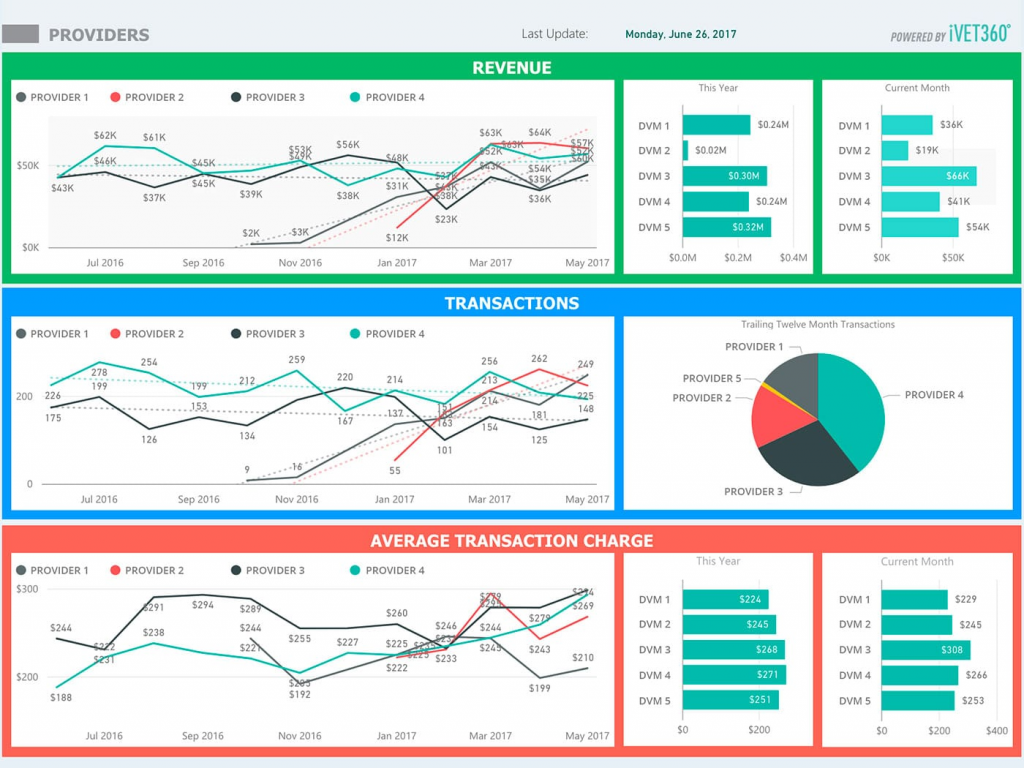
iVet360 is more than just software, it’s a veterinary business support service that offers marketing, HR, analytics, and reputation management all rolled into one. The platform focuses heavily on improving clinic performance by combining technology with hands-on consulting. While iVet360 provides valuable insights and personalized service, it may not be ideal for clinics that just want a standalone, self-managed review tool without the added consulting costs or service bundles.
iVet360 Features
- Automated review monitoring: Tracks and pulls in reviews from platforms like Google and Facebook into one dashboard.
- Review performance reports: Provides regular reporting with actionable insights on how your clinic’s reputation is trending.
- Consulting-backed strategy: Includes support from marketing experts who help develop response plans and review campaigns.
- Local SEO optimization: Helps improve your visibility in local search through listings management and reputation signals.
iVet360 Pros
- Full-service support: Offers more than just tools, includes expert help with marketing, HR, and business strategy.
- Custom reputation plans: Builds review campaigns around your clinic’s goals and performance history.
- Proactive management: Helps you stay ahead of potential issues with regular check-ins and strategic updates.
iVet360 Cons
- Not a pure software solution: Heavily service-driven, which may not suit clinics that prefer to manage tools in-house.
- Higher price point: Costs are typically bundled with marketing or consulting services, which may be overkill for smaller practices.
- Less control over day-to-day settings: Customizations or updates often go through their team, limiting direct, real-time control for your staff.
iVet360 Pricing
- Contact support
iVet360 Customer Support Channels
- Phone
iVet360 Rating
iVet360 has a 4.9-star rating on Google.
5. Provet Cloud
What is Provet Cloud?
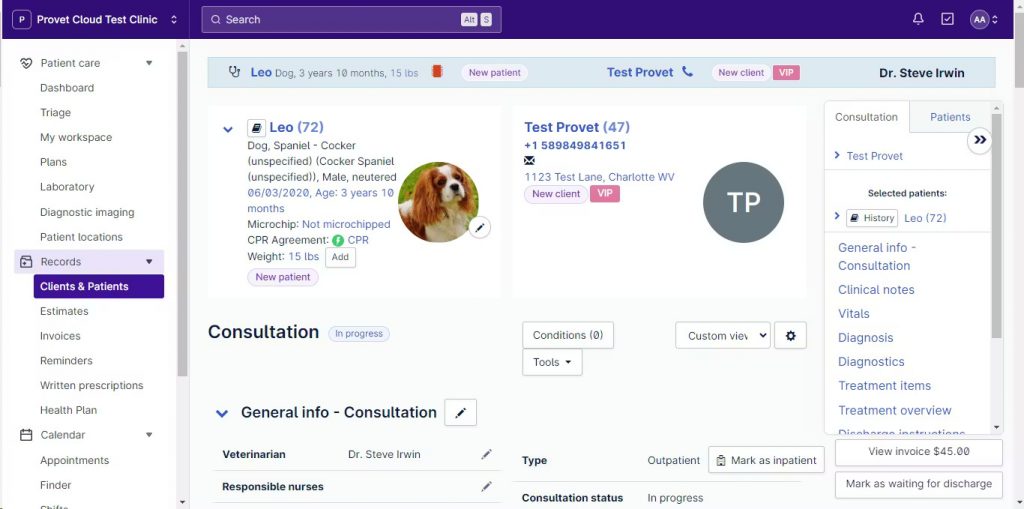
Provet Cloud is a cloud-based veterinary practice management software designed for clinics of all sizes. It offers features for appointment scheduling, patient records, invoicing, communication, and basic client feedback tools. Its goal is to streamline clinical workflows and improve the client experience. While it does include some review management capabilities, those features are secondary and may lack the depth needed for clinics focused specifically on reputation building.
Provet Cloud Features
- Client feedback surveys: Allows clinics to collect post-visit feedback, helping to monitor satisfaction.
- Centralized client communication: All client interactions, texts, emails, and notes, are stored in one place for easy access.
- Reporting and analytics tools: Tracks appointment trends, revenue, and limited feedback metrics for performance insights.
Provet Cloud Pros
- Designed for veterinary practices: Built specifically for veterinary workflows, with features tailored to clinical operations.
- Cloud-based accessibility: Accessible from any device with an internet connection, ideal for mobile teams or multi-location clinics.
- All-in-one platform: Combines medical records, billing, scheduling, and limited feedback tools in one system.
Provet Cloud Cons
- Limited review management features: Doesn’t offer full integration with platforms like Google or Facebook for public review tracking.
- No advanced reputation tools: Lacks sentiment analysis, AI response suggestions, or multi-platform review automation.
- Setup and learning curve: Robust system with many features, which can take time for staff to learn and adopt fully.
Provet Cloud Integrations
- Xero
- PetsApp
- Weave and more!
Provet Cloud Customer Support Channels
- Email/Help Desk
- FAQs/Forum
- Knowledge Base
- Phone Support
- Chat
Provet Cloud Rating
Provet Cloud has a 4.1-star rating on Capterra.
Provet Cloud Reviews
“Booking confirmation to patients gave less missed appointments. More flexible than our previous system though there are still some annoying bugs in the system which takes time to get solved.”
“Excellent, the product works well. They are receptive to improvements and feedback and are continually moving the product forward. The UI is one of the best in the veterinary market”
(Source: Capterra)
6. RepuGen
What is RepuGen?
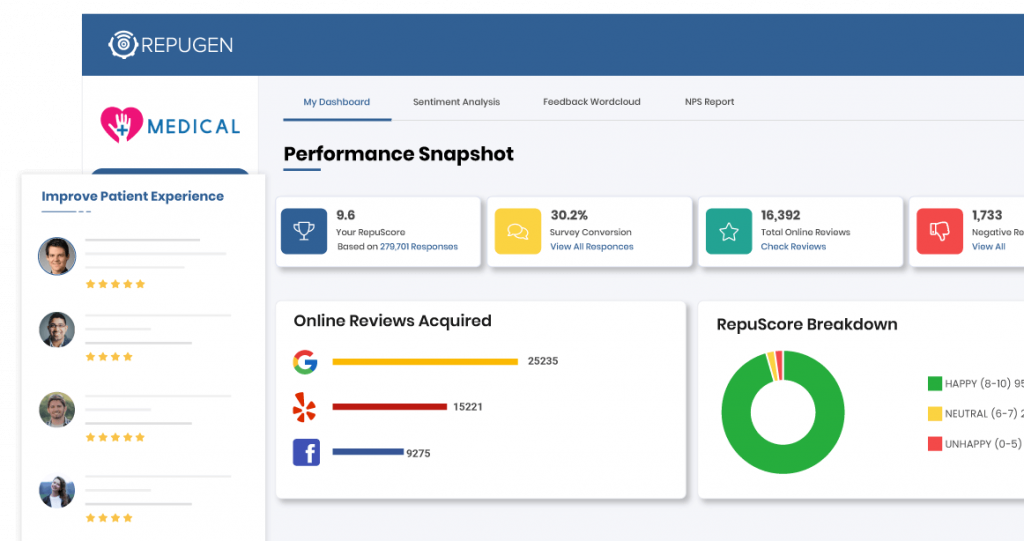
RepuGen is a reputation management platform built for healthcare providers, including veterinary practices. It focuses on collecting patient (or client) feedback through automated surveys, boosting positive reviews, and addressing negative experiences early. Its strength lies in tracking customer sentiment and improving client satisfaction, but it may feel more clinical and less flexible for small vet clinics looking for broader communication features or tighter workflow integrations.
RepuGen Features
- Automated review requests: Sends follow-up messages to clients after visits, prompting them to leave a review on platforms like Google or Facebook.
- Net promoter score (NPS) tracking: Measures overall client satisfaction with NPS surveys to identify promoters and detractors.
- Sentiment analysis: Uses AI to assess the tone of client responses and flags negative feedback for quick attention.
- Real-time alerts: Notifies staff instantly when a low score or negative review is submitted.
RepuGen Pros
- Healthcare-focused reputation platform: Built with privacy and service-based industries in mind, including dental, medical, and veterinary clinics.
- Strong analytics and reporting: Offers useful insights into trends in client sentiment, review performance, and satisfaction metrics.
- Quick setup and automation: Easy to get started, with ready-made templates and automated follow-up flows.
RepuGen Cons
- Limited integrations with veterinary PIMS: Doesn’t directly integrate with popular vet software systems like Cornerstone or AVImark.
- No built-in two-way texting or communication tools: Focuses only on reputation, so you’ll need other tools for client messaging or reminders.
- Interface may feel more clinical than vet-specific: Designed more for human healthcare, which might not fully match the tone or workflow of veterinary practices.
RepuGen Integrations
- Covetrus Avimark
- OMSVision
- Dolphin Management and more!
RepuGen Customer Support Channels
- Email/Help Desk
- FAQs/Forum
- Phone Support
RepuGen Rating
RepuGen has a 4.3-star rating on Capterra.
RepuGen Reviews
“I think this is a good value, but some of the needs we have are being developed as we need them.”
“RepuGen has increased our online reputation from a 2 star rating to over 4 stars in a very short time.”
(Source: Capterra)
7. Birdeye

What is Birdeye?
Birdeye is an all-in-one reputation and customer experience platform that helps businesses collect reviews, manage online presence, and engage with clients across multiple channels. While it’s widely used across various industries including healthcare it’s not built specifically for veterinary practices. That means it offers a broad feature set but may require more customization to fit into a vet clinic’s daily operations.
Birdeye Features
- Automated review requests: Sends personalized review invitations via text and email based on client interactions.
- Multi-platform review monitoring: Tracks reviews from Google, Facebook, Yelp, and dozens of other sites in one dashboard.
- Messaging and webchat: Includes two-way texting, live chat, and even chatbot features for lead capture and client communication.
- Listing management: Keeps your clinic’s information consistent across online directories and improves local SEO.
Birdeye Pros
- Comprehensive feature set: Offers everything from reviews to messaging, surveys, listings, and web chat, ideal for practices wanting an all-in-one platform.
- Highly customizable: Flexible workflows, templates, and branding options allow clinics to tailor the system to their needs.
- Strong reputation in the industry: Used by thousands of businesses, with proven tools for managing and improving online presence.
Birdeye Cons
- Not veterinary-specific: While powerful, the platform isn’t designed with vet workflows or practice management systems in mind.
- Can feel overwhelming for small teams: The sheer number of features and settings can make it more complex than needed for clinics with simpler needs.
- Higher cost for full access: Pricing may stretch the budget for small to mid-sized veterinary practices, especially if only using a few core features.
Birdeye Integrations
- Quickbooks
- Mailchimp
- Xero
- Zapier and more!
Birdeye Customer Support Channels
- Email/Help Desk
- FAQs/Forum
- Knowledge Base
- Phone Support
- 24/7 (Live rep)
- Chat
Birdeye Rating
Birdeye has a 4.7-star rating on Capterra.
Birdeye Reviews
“Great system for online review management, highly recommend utilizing the integrations and auto responses for a seamless online presence!”
“Overall, they are super responsive- until you try to cancel your contract.”
(Source: Capterra)
What Makes Emitrr Stand Out for Veterinary Online Review and Reputation Management?
Here is why Emitrr is the best reputation management software for veterinary clinics:
Automated SMS & email review request flows
Emitrr sends out review requests automatically after appointments via text or email, no manual input needed. You set the rules once, and the system takes care of the follow-ups, ensuring reviews keep coming in without your staff having to remember a thing.
Two-way texting with clients in the same platform
Need to follow up on a review or respond to a client concern? With Emitrr, you don’t have to switch tools. The platform supports full two-way texting, so you can communicate with clients directly, whether it’s about their feedback or a scheduling issue.
Google and Facebook review integration
Emitrr connects directly with Google and Facebook, allowing you to request reviews for the platforms that matter most, and track them all in one place. This saves time and ensures nothing slips.
HIPAA-compliant data handling
Even though veterinary clinics aren’t always required to follow HIPAA, Emitrr treats your data with that level of care. All client information is securely encrypted and managed with strict access controls, giving your team and your clients peace of mind.
Fully customizable review request templates
You’re not locked into a one-size-fits-all message. With Emitrr, you can write the review request in your own words, whether you want it to sound friendly, professional, or more casual. You can also choose when the message goes out and how often, so it feels just right for your clients. It offers AI agent Sarah that can really transform the way you communicate with your patients.
Watch this video to know more about it:
Aggregated dashboard for quick insights
See all your reviews, ratings, and client feedback in one place. Emitrr’s dashboard makes it easy to track what’s working, where clients are happy, and what areas may need attention, all without digging through multiple platforms.
Simple UI your staff will actually use
Emitrr is built with busy teams in mind. The interface is clean, intuitive, and easy to learn. Even non-technical staff can send requests, view reviews, and respond without extra training or confusion.
Cost effective
Emitrr offers powerful features at a price point that works for smaller and mid-sized veterinary practices. You get automation, support, and flexibility without the enterprise-level cost.
Dedicated support
Whether you’re setting things up or need help navigating a tricky review situation, Emitrr’s support team is responsive, helpful, and familiar with the needs of vet clinics. You’re not just another account, you’re a partner.
FAQs
Emitrr is a top choice for veterinary clinics. It offers automated review requests, two-way texting, Google and Facebook integration, and HIPAA-compliant data handling. It’s designed to save your team time while helping you build a strong, trusted online reputation.
The easiest way is to send automated review requests right after appointments. Tools like Emitrr and Freshreview can trigger texts or emails that link directly to your Google review page, increasing the chances clients will respond.
Yes. While HIPAA doesn’t always apply to animal care, Emitrr is built with HIPAA-level security and offers role-based access, encrypted messaging, and audit tracking, making it a safe choice for practices that want to keep client data secure.
Pricing varies. Basic tools like Freshreview may start under $100/month, while platforms like Emitrr offer more features and still remain affordable for small to mid-sized clinics. iVet360, being service-based, may cost more due to bundled consulting and marketing support.
Some do. Emitrr and other advanced platforms offer direct or indirect integrations with popular PIMS like Cornerstone and AVImark, allowing automated review requests based on appointments or client interactions.
Marketing software focuses on outreach, ads, emails, promotions, while review management tools help you gather, monitor, and respond to client feedback. Some platforms, like iVet360, blend both. Others, like Emitrr, keep the focus on reputation, messaging, and automation.
Conclusion
Thus, choosing the right review and reputation management software isn’t just a tech decision, it’s a growth decision. From improving your local search visibility to turning happy clients into vocal advocates, the right tool can have a lasting impact on how your clinic is perceived and how it performs.
We explored five popular options in the market, each with its own strengths. But for veterinary clinics looking for a balance of automation, ease of use, and secure communication, all in one place, Emitrr checks all the boxes. It simplifies review collection, keeps client communication flowing, and helps your team stay on top of every piece of feedback without extra effort.
If your goal is to build trust, grow faster, and keep client satisfaction high, Emitrr is worth a closer look. Schedule a demo today and see how it fits into your practice.


 4.9 (400+
reviews)
4.9 (400+
reviews)