
Introduction
Virtual visits are no longer just an option, they’ve become a normal part of how patients receive care. But offering online appointments without the right system can quickly become messy and overwhelming. Practices need a solution that keeps records organized, supports smooth video consultations, and handles documentation without creating extra administrative work. That’s where EMR for telehealth becomes essential.
A well-designed EMR for telehealth doesn’t just store patient data, it connects scheduling, charting, prescriptions, billing, and virtual visits into one streamlined workflow. It helps providers deliver care efficiently while maintaining accuracy, compliance, and a positive patient experience. In this blog, we’ll explore how it works, the key features to look for, and why choosing the right system can make a major difference in your practice’s growth and day-to-day operations.
What is EMR for Telehealth?
EMR for telehealth is a digital system that helps doctors take care of patients online while keeping their medical records organized. It allows providers to do video visits, write notes, send prescriptions, and check patient history forms all in one place. Instead of using separate tools, everything is connected, which makes virtual care smoother and easier.
In simple terms, EMR for telehealth helps healthcare providers deliver safe and efficient online care without losing track of important patient information. It saves time, reduces paperwork, and improves the experience for both doctors and patients.
Benefits of using EMR for Telehealth
Using EMR for telehealth does more than just store patient records; it completely improves how virtual care is delivered. From documentation to billing, it helps healthcare providers work smarter, stay organized, and offer a better experience to patients.
Here are some of the key benefits of using EMR for telehealth in modern healthcare practices:
Effortless Telehealth Documentation
With EMR for telehealth, doctors can write notes during or right after a virtual visit without feeling rushed or overwhelmed. Everything is saved in one place, so there’s no need to deal with extra paperwork later. It keeps records clear, organized, and easy to review whenever needed.
Anywhere Access to Patient Records
An EMR for telehealth lets providers securely check patient information from anywhere. Whether they’re at the clinic or working remotely, they can quickly see medical history, medications, and past visit details. This makes virtual appointments smoother and more prepared.
Better Continuity of Care
Because all patient information stays connected in one system, EMR for telehealth helps providers deliver consistent care. Doctors can easily track progress, review past treatments, and make better decisions during each visit.
Stronger Data Security & Compliance
A good EMR for telehealth keeps patient information protected with secure logins and encrypted data. This helps practices stay compliant with healthcare rules and gives patients peace of mind that their data is safe.
Integrated ePrescribing & Lab Orders
With EMR for telehealth, doctors can send prescriptions and lab requests directly through the system. This saves time, reduces mistakes, and makes the process faster for patients.
Smoother Scheduling & Virtual Workflow
An organized EMR for telehealth makes booking and managing virtual appointments easier. Automated reminders help reduce missed visits, and everything runs more smoothly from start to finish.
Improved Patient Experience
Overall, EMR for telehealth makes online patient experience more convenient and less stressful for patients. Appointments are easier to attend, communication is smoother, and everything feels more organized and professional.

Key Features of EMR for Telehealth
An effective EMR system is essential for delivering smooth and efficient virtual care. When combined with tools like a text message system, telehealth workflows become faster, more organized, and easier to manage. Below are the key features every EMR should have to support telehealth services.
Integrated Video Consultations
A strong EMR for telehealth should include built-in, secure video conferencing. Providers should be able to launch virtual visits directly from the patient chart without switching platforms. This keeps appointments simple and reduces technical confusion for both staff and patients.
Secure Messaging & Communication
Secure messaging allows providers and patients to communicate safely between visits. When connected with text messaging, appointment confirmations and updates can be sent quickly through a text message, improving communication and reducing no-shows.
Online Scheduling & Appointment Management
Patients should be able to book appointments online, reschedule, or cancel telehealth appointments online. An EMR that integrates with sms that can automatically send a text reminder with a secure link, making scheduling faster and more convenient.
Digital Intake Forms & e-Documentation
Telehealth requires paperless workflows. EMRs should offer digital intake forms, e-signatures, and structured documentation templates. This reduces errors and ensures that information shared through a message is properly recorded inside the system.
E-Prescribing Capabilities
Electronic prescribing allows providers to send prescriptions directly to pharmacies during a virtual visit. This eliminates delays and improves the patient experience, especially when combined with a text message confirming next steps.
Automated Alerts & Reminders
Automated reminders help patients remember appointments and follow-ups. A well-integrated EMR can automatically trigger an SMS after a consultation, improving continuity of care.
Billing & Insurance Integration
Telehealth services need accurate billing and insurance verification. An EMR should support telehealth-specific billing codes and real-time eligibility checks. This reduces claim errors and administrative workload.
Reporting & Analytics
Data tracking is important for improving performance. A good EMR provides reports on telehealth visits, response times, and trends. When paired with sms messaging, you can measure how many text messages convert into scheduled appointments.
Compliance & Security Controls
Telehealth requires strict privacy protections. An EMR must offer encryption, secure access controls, and audit trails. This ensures that any text message or patient communication linked to the system remains protected and compliant.
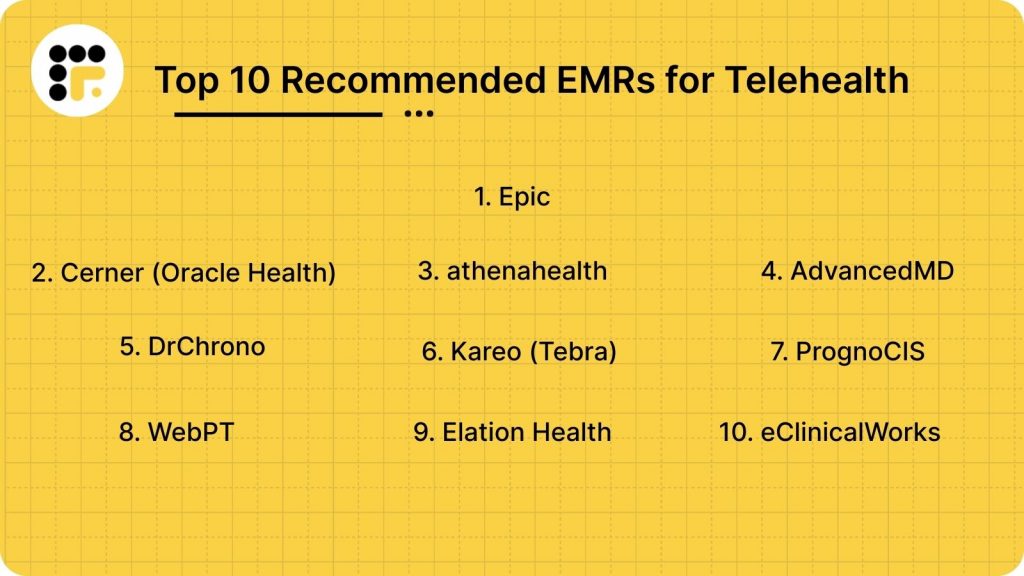
Top 10 EMRs for Telehealth
- Epic
- Cerner (Oracle Health)
- athenahealth
- AdvancedMD
- DrChrono
- Kareo (Tebra)
- PrognoCIS
- WebPT
- Elation Health
- eClinicalWorks
1. Epic
Epic Overview
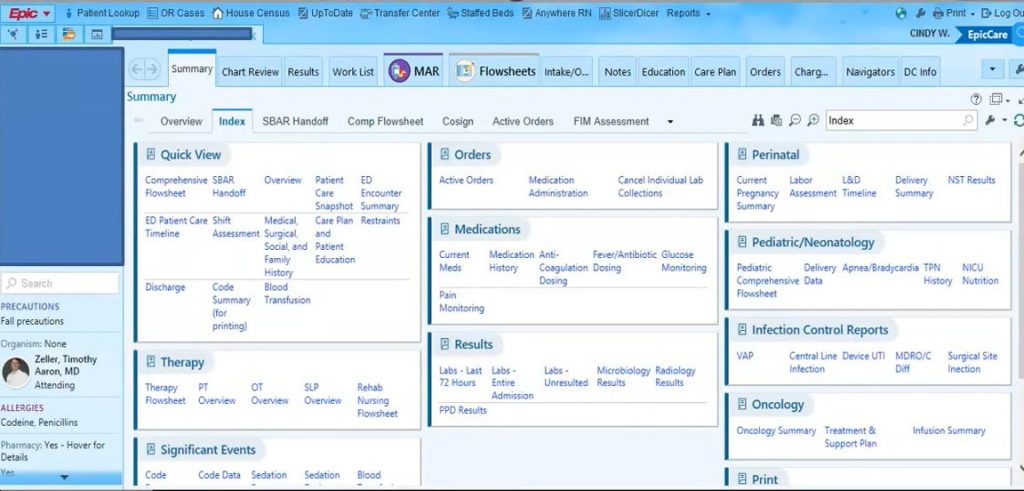
Epic EMR is a widely used electronic medical record system designed to help hospitals and healthcare organizations manage patient information digitally. It allows providers to store medical records, document visits, schedule appointments, handle billing, and send prescriptions all within one connected platform. Many large health systems use it because it supports both in-person and virtual care, making it a strong option for organizations looking for a reliable EMR for telehealth that keeps patient data organized, secure, and easy to access.
Epic Features
- MyChart Patient Portal: A widely used portal where patients can schedule appointments, view records, message clinicians, check results, and pay bills.
- Telehealth Integration: Virtual visit support is built directly into the platform.
- Enterprise Analytics: Dashboards and reports for clinical quality, performance, utilization, and finance.
- Population Health Tools: Supports care gap tracking, preventive care alerts, and outcome measurement.
- Predictive Analytics: Tools for risk stratification, resource planning, and quality improvement.
Epic Pros and Cons
| Pros | Cons |
| Extremely powerful and comprehensive — supports complex care environments | Very expensive to implement and maintain |
| Exceptional interoperability and continuity across multiple sites | Long implementation timelines |
| Robust reporting, analytics, and population health capabilities | Requires dedicated IT and support resources |
| Highly configurable workflows for different specialties | Interface can feel complex or dated |
| Strong patient engagement through MyChart | Less suitable for small clinics or solo practices |
| Handles enterprise-level billing and revenue cycle needs | Customization adds time and cost |
Epic Pricing
They support custom pricing. To get one, you need to contact their support team.
Epic Reviews
“Great interface! User friendly! 100% Recommend!”
“Epic Makes Life Easier “
2. Cerner (Oracle Health)
Cerner Overview
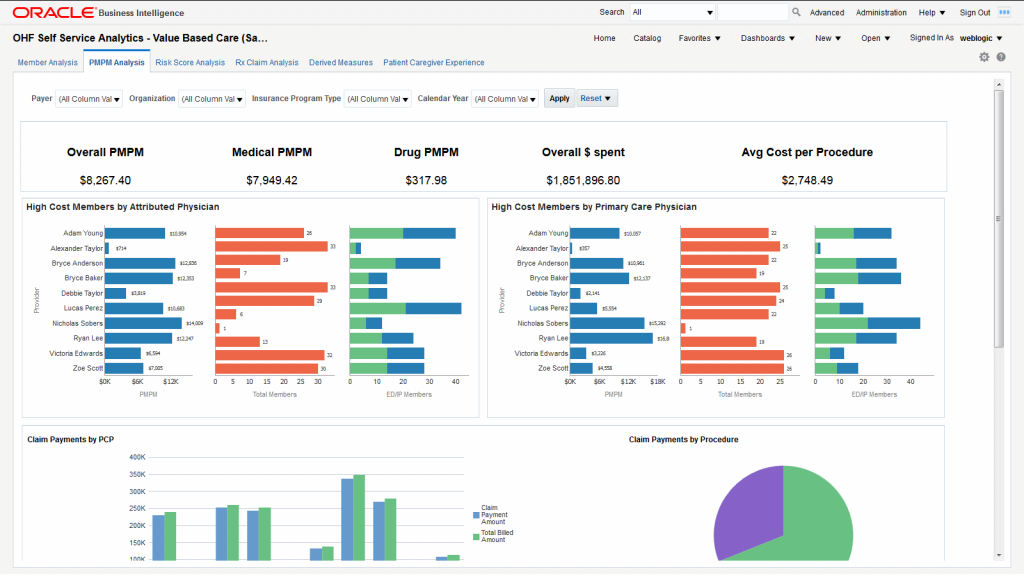
Cerner (Oracle Health) is an electronic medical record system designed to help healthcare organizations manage patient information in a digital and organized way. It allows providers to document visits, track medical histories, manage appointments, handle billing, and coordinate care across departments. The platform also supports virtual care capabilities, making it suitable for organizations that need a dependable EMR for telehealth while maintaining secure, centralized patient records across their network.
Cerner Features
- Patient Charting & Documentation: Comprehensive digital charts with problem lists, histories, meds, labs, and imaging.
- Clinical Decision Support: Real-time alerts, reminders, and safety checks embedded in workflows.
- Order Entry (CPOE): Physicians can place orders for labs, meds, imaging, and procedures directly in the system.
Cerner Pros and Cons
| Pros | Cons |
| Extremely comprehensive clinical and operational capabilities | Can be expensive and resource-intensive to implement |
| Scales across hospitals, clinics, and large health systems | Complexity often requires specialist support and training |
| Strong interoperability and data exchange support | Interface can feel dated compared to modern cloud platforms |
| Deep analytics and population health tools | Customization can be time-consuming |
| Robust revenue cycle and financial management | Small clinics may find it too heavyweight |
| Enterprise-grade security and compliance | Long implementation timelines |
Cerner Pricing
The starting price for Cerner is around $25 per user per month
Cerner Reviews
“Good product”
“perfect for all”
3. Athenahealth
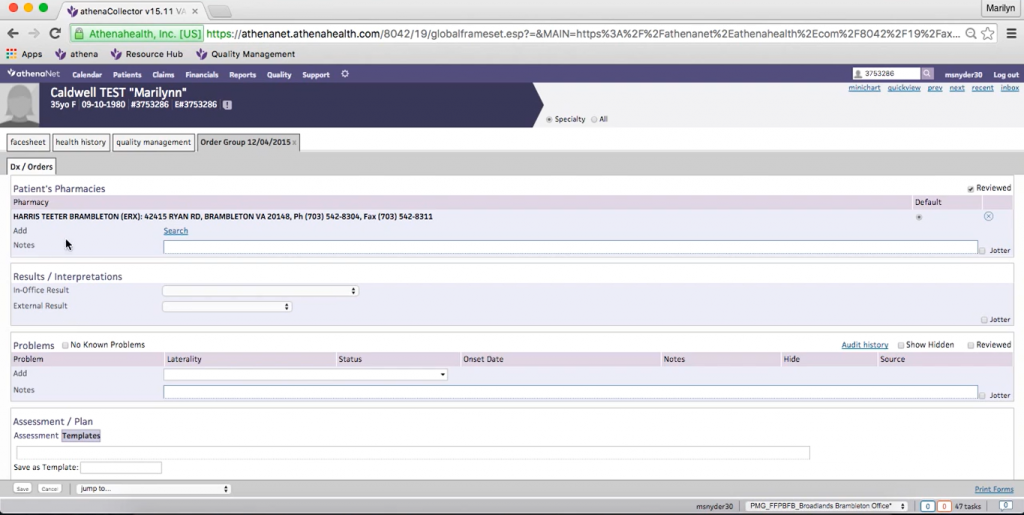
Athenahealth Overview
Athenahealth is a cloud-based electronic medical record system used by many small and mid-sized healthcare practices. It helps providers manage patient records, appointments, and billing in one platform. It also supports virtual visits, making it a practical option for practices looking for a simple and flexible EMR for telehealth.
Athenahealth Features
- Connected EHR & Charting: Patient charts, visits, histories, and clinical notes all live in one place that’s accessible on desktop or mobile.
- Decision Support Alerts: Real-time clinical alerts for safety warnings, reminders, and evidence-based suggestions.
- Specialty-Agile Templates: Documentation templates that flex across specialties without heavy setup.
- Online Scheduling & Check-In: Patients can book appointments, fill out intake forms online, and check in digitally.
- Patient Portal: Secure access for patients to view records, communicate with providers, check lab results, and pay bills.
- Automated Messaging: Appointment reminders and follow-ups via email or SMS to reduce no-shows.
Athenahealth Pros and Cons
| Pros | Cons |
| Combines software + managed revenue cycle services, reduces administrative burden | Cost is often higher than basic EMRs, especially for small practices |
| Strong claims follow-up and denial management support | Setup and onboarding take time due to the depth of features |
| Good at reducing revenue leakage and improving cash flow | The user interface isn’t the most modern or intuitive |
| Excellent interoperability, works well with external labs, imaging, and other systems | Some smaller clinics find reporting less flexible |
| Patient engagement tools are tightly integrated | Customization beyond defaults can be limited |
Athenahealth Pricing
One needs to get custom pricing for Athenahealth from their support team.
Athenahealth Reviews
“User-Friendly EMR with Excellent Scheduling Tools”
“EMR good for large groups, more cumbersome for small or solo practices.”
4. AdvancedMD
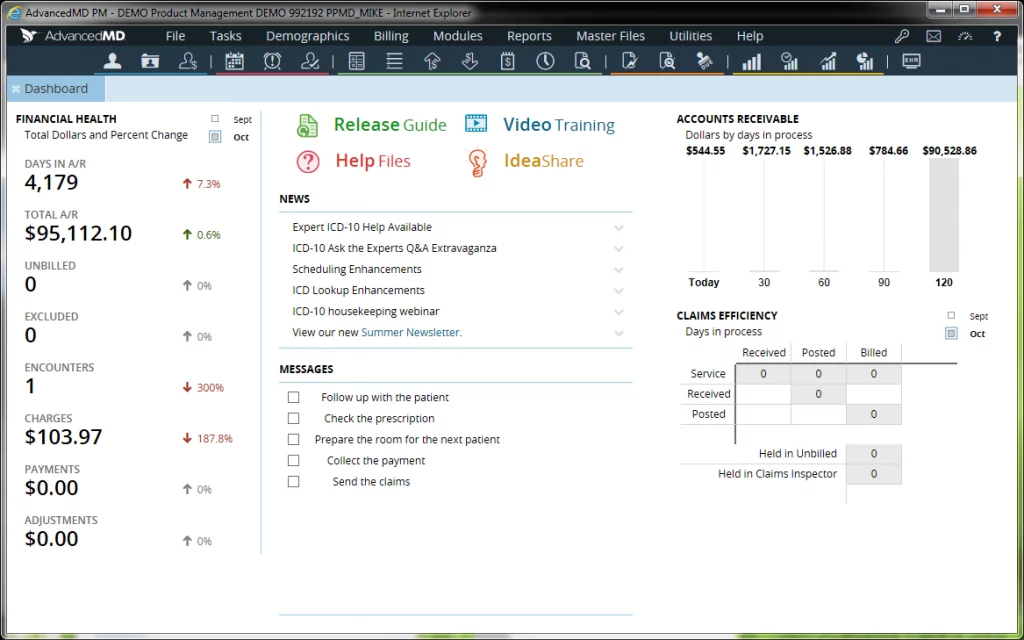
AdvancedMD Overview
AdvancedMD is a cloud-based medical software platform designed for independent practices and specialty clinics. It offers electronic medical records, practice management software, and billing tools in one system. The platform also includes telehealth capabilities, allowing providers to conduct virtual visits and manage documentation smoothly, making it a useful option for practices looking for a reliable EMR for telehealth.
AdvancedMD Features
- Patient Portal: Patients can request appointments, view records, check lab results, and communicate securely.
- Clinical Templates: Customizable templates for documentation tailored to your specialty.
- Mobile Accessibility: Access schedules, patient charts, and tasks on iPad, iPhone, or other devices.
Reporting & Analytics: Dashboards and reports to track clinical quality, financial health, and operational performance. - Task & Workflow Management: Tools to assign, track, and prioritize daily tasks.
- Interoperability: Connects with labs, pharmacies, imaging centers, and other healthcare systems.
AdvancedMD Pros and Cons
| Pros | Cons |
| All-in-one system with EHR, practice management, and RCM | Can be expensive for smaller practices |
| Strong billing and revenue cycle tools improve cash flow | Difficulty to adapt- for new users |
| Built-in telehealth and mobile support | The interface may feel complex or dated |
| Patient portal and engagement tools improve access | Customization can require training |
| Reporting and analytics offer practice insights | Support experience varies by user |
| Cloud-based with flexible access | Some advanced features add extra cost |
AdvancedMD Pricing
They provide custom quotes.
AdvancedMD Reviews
“Started off good but now terrible”
“AMD, the EMR you love to hate”
5. DrChrono
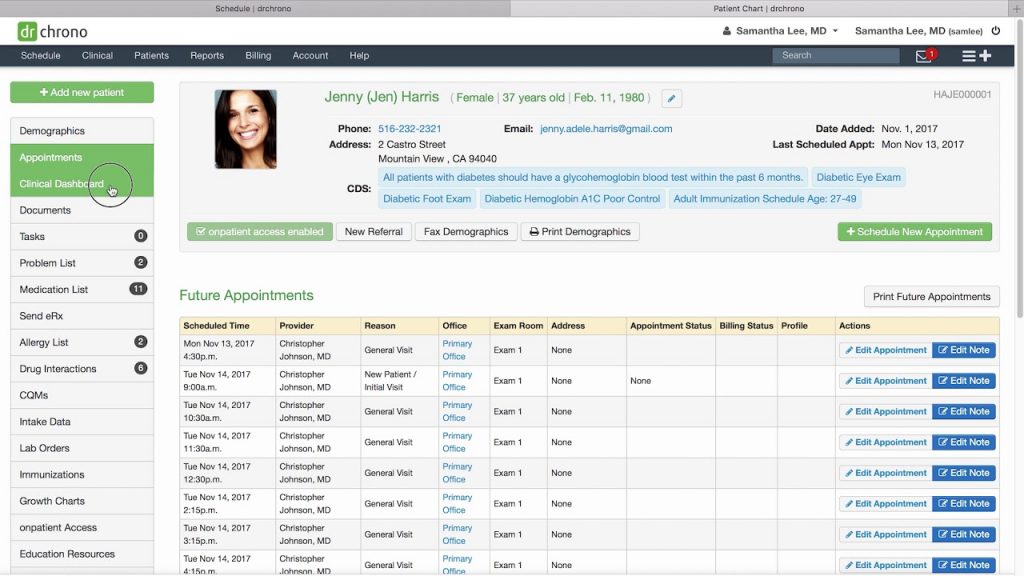
DrChrono Overview
DrChrono is a cloud-based electronic medical record system designed for small to mid-sized practices. It offers tools for charting, scheduling, billing, and patient communication in one platform. Known for its customizable templates and mobile-friendly design, it also supports virtual visits, making it a convenient choice for providers who need a flexible and easy-to-use EMR for telehealth.
DrChrono Features
- Practice Management Tools: Scheduling, appointment reminders, patient check-in, and front-desk workflows.
- Revenue Cycle Management (RCM): Claims creation, submission, tracking, and payment posting.
- Telehealth Integration: Built-in support for virtual visits so providers can care for patients remotely.
- ePrescribing (eRx): Send prescriptions electronically to pharmacies.
- Patient Portal: Patients can view records, request appointments, pay bills, and message providers online.
- Clinical Templates & Forms: Customizable templates to speed up documentation and charting.
DrChrono Pros and Cons
| Pros | Cons |
| Easy to use and intuitive, especially for small practices | Some advanced features require higher-tier plans |
| Built-in telehealth and mobile app support | Reporting and analytics can feel basic |
| Flexible templates and customizable workflows | Support quality may vary |
| Patient portal and engagement tools help retention | Revenue cycle tools may not be as strong as larger systems |
| Cloud-based with good interoperability | Some integrations require third-party tools |
DrChrono Pricing
One needs to contact their support team to get the exact quote.
DrChrono Reviews
“Look elsewhere, actions made us lose clients”
“Pretty good, I like it and would be good for doctors”
6. Kareo (Tebra)
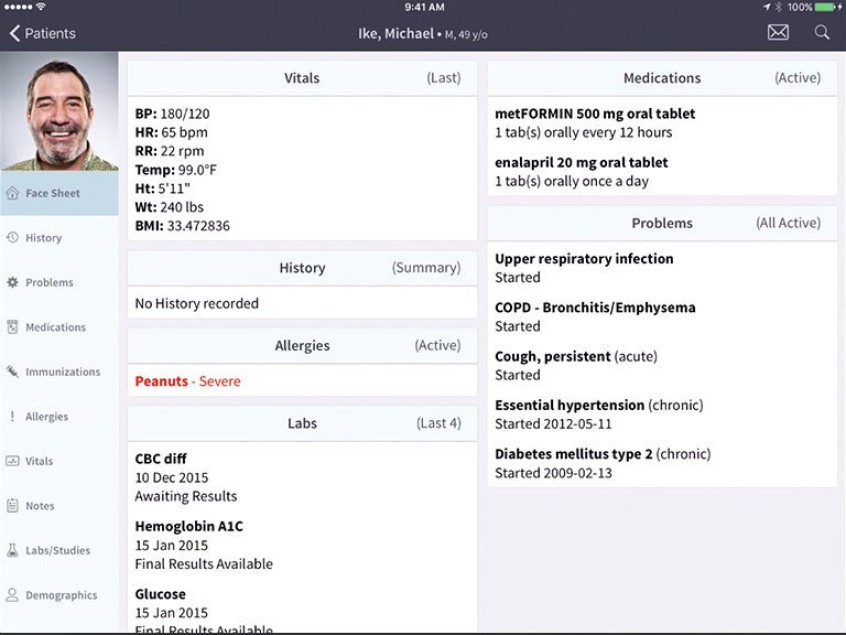
Kaero Overview
Kaero (Tebra) is a healthcare technology platform that combines telehealth, patient engagement, and communication tools into one system. It helps providers manage virtual visits, streamline scheduling, and improve patient interactions through automated messaging and follow-ups. With its strong focus on digital care and workflow efficiency, Kaero can support practices looking to enhance their EMR for a telehealth experience by making remote care more organized and patient-friendly.
Kaero Features
- Cloud-Based Practice Management: Tools to schedule appointments, manage calendars, and streamline front-desk workflows.
- Electronic Medical Records (EMR): Digital patient charts, clinical documentation, and SOAP notes.
- Billing & Revenue Cycle Management: Claims submission, tracking, payments posting, and denials management.
- Telehealth Integration: Built-in support for virtual patient visits.
- ePrescribing (eRx): Send prescriptions electronically to pharmacies
Kaero Pros and Cons
| Pros | Cons |
| Easy to use and setup for small practices | Some advanced features may require add-ons |
| Combines clinical, billing, and patient engagement in one place | Limited deep customization compared with larger EMRs |
| Built-in telehealth and mobile access | Reporting tools can be basic for larger clinics |
| Strong patient portal and reminders | Customer support experience varies |
| Automated billing workflows improve revenue cycle | Not ideal for large multispecialty organizations |
Kaero Pricing
Contact their support team to get the exact pricing for your practice.
Kaero Reviews
“Tebra is a good product!”
“Go with Tebra for a good EMR system”
7. PrognoCIS
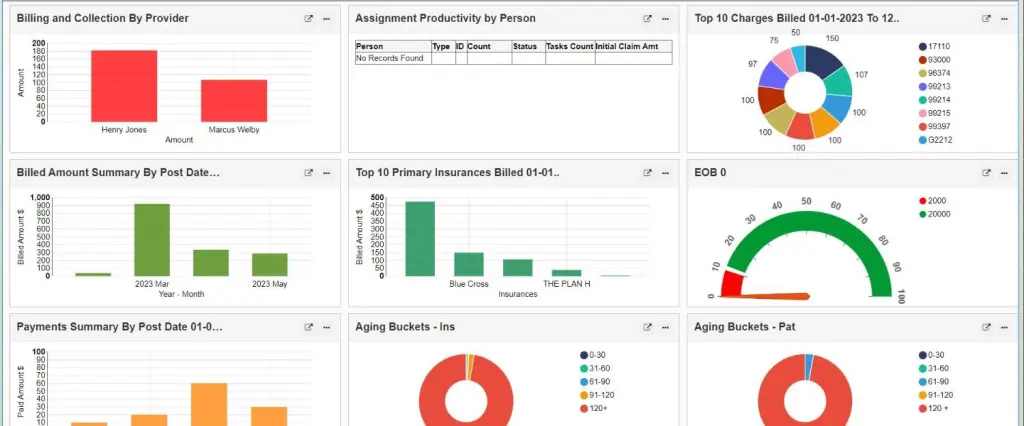
PrognoCIS Overview
PrognoCIS is a specialty-focused healthcare software platform that supports clinical workflows across different medical fields. It offers customizable templates, strong billing features, and flexible deployment options for growing practices. For providers offering remote services, it also includes tools that support virtual consultations and digital record management, helping practices maintain an efficient EMR for telehealth setup without disrupting their existing workflow.
PrognoCIS Features
- Electronic Health Records (EHR): Centralized digital patient charts, clinical documentation, and visit history.
- Practice Management: Scheduling, appointment reminders, registration, and front-desk workflows.
- Revenue Cycle Management (RCM): Claims submission, billing, payment posting, and denial tracking.
- Telehealth Integration: Built-in support for virtual visits so providers can see patients remotely.
- ePrescribing (eRx): Send prescriptions electronically to pharmacies.
- Patient Portal: Patients can view records, request appointments, pay bills, and communicate securely.
PrognoCIS Pros and Cons
| Pros | Cons |
| Offers a complete all-in-one solution with EHR, billing, and telehealth | Can feel complex for first-time users |
| Built-in telehealth capabilities | Interface may seem outdated to some |
| Strong practice management and RCM tools | Customization may require training |
| Patient portal and mobile access improve engagement | Support experience varies by user |
| Works for many specialties, including multispecialty clinics | Advanced reporting may be less intuitive |
PrognoCIS Pricing
Pricing starts at $280 per provide per month.
PrognoCIS Reviews
“Poor Billing & Service. “
“PrognoCIS EMR- Best Value for the money”
8. WebPT
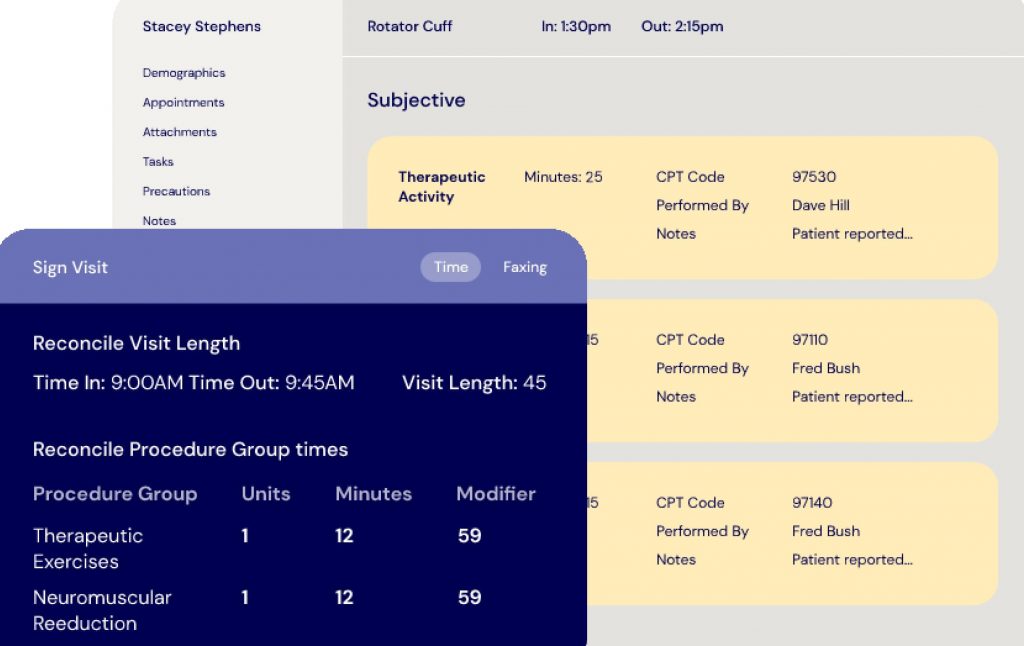
WebPT Overview
WebPT is designed specifically for physical therapy clinics. It focuses on therapy documentation, progress tracking, and compliance needs unique to rehab providers. The platform also supports virtual therapy sessions, helping clinics manage treatment and documentation within a structured EMR for telehealth workflow.
WebPT Features
- Specialized EMR for Rehab Therapies: Designed for physical therapy, occupational therapy, speech therapy, and related specialties.
- Clinical Documentation Tools: Easy-to-use charting, note templates, SOAP notes, and treatment plans tailored to therapy workflows.
- Telehealth Integration: Built-in support for virtual therapy sessions.
- Patient Scheduling & Calendar: Manage appointments, recurring sessions, waitlists, and reminders.
- ePrescribing (eRx): Send prescriptions and care orders electronically.
- Patient Portal: Enables patients to view appointments, messages, and documentation securely.
WebPT Pros and Cons
| Pros | Cons |
| Built specifically for therapy specialties | Not ideal for general medical practices |
| Strong clinical documentation tailored to rehab workflows | Can be costly for small individual practices |
| Telehealth included | Learning curve for new users |
| Scheduling and outcome tracking tools help streamline care | Some users find interface less modern |
| Built-in billing and RCM workflows | Support satisfaction may vary |
| Reporting and analytics for performance insight | Customization options may be limited |
WebPT Pricing
They provide custom pricing, to get one, contact their support team.
WebPT Reviews
“WebPT Gets the Job DONE”
“WebPT Ok for Basic Therapy EMR”
9. Elation Health
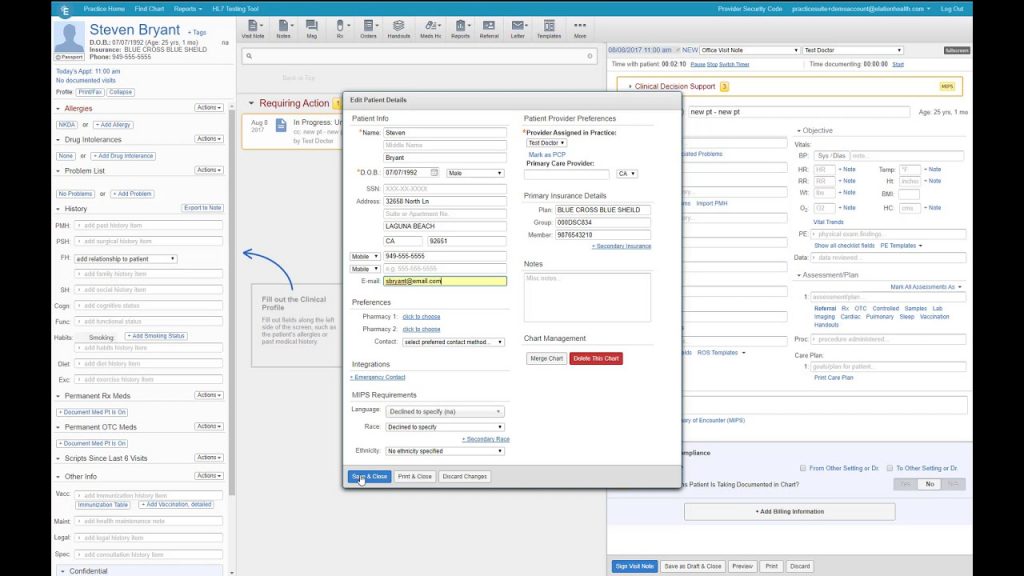
Elation Health Overview
Elation Health is a primary care–focused electronic medical record system built to support relationship-based care. It’s known for its clean interface and strong charting tools that help providers track patient history over time. The platform also supports virtual visits and digital workflows, making it a practical choice for primary care practices that want a streamlined EMR for telehealth without unnecessary complexity.
Elation Health Features
- Electronic Health Records (EHR): Centralized digital patient charts, medical histories, and clinical documentation.
- Telehealth Built-In: Native telehealth support so providers can host virtual visits without extra tools.
- Patient Portal: Patients can view records, send messages, schedule visits, and see lab results.
- ePrescribing (eRx): Send prescriptions electronically to pharmacies, including refill management.
- Clinical Templates & Workflows: Easy-to-use templates that adapt to provider needs without heavy customization.
Elation Health Pros and Cons
| Pros | Cons |
| Clean, intuitive, and easy-to-use interface | May lack some advanced billing features |
| Telehealth built in — no separate system needed | Not as feature-rich for large multispecialty practices |
| Strong patient engagement tools | Advanced reporting can be limited compared to larger EMRs |
| Excellent mobile access and patient portal | Some users may require training on workflows |
| Focus on preventive care and quality measures | Fewer customization options than some competitors |
| Scales well for small and medium practices | Full revenue cycle management may require add-ons |
Elation Health Pricing
To get the custom quote, one needs to contact their support team.
Elation Health Reviews
No reviews are available.
10. eClinicalWorks
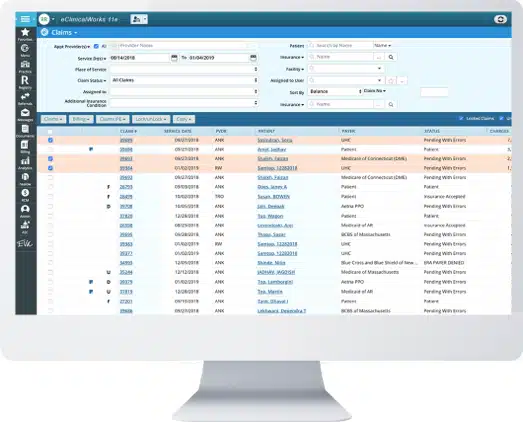
eClinicalWorks Overview
eClinicalWorks is a widely used electronic medical record system designed for ambulatory and outpatient practices. It offers tools for clinical documentation, population health management, patient engagement, and revenue cycle support. The platform also includes built-in telehealth capabilities, allowing providers to conduct virtual visits while keeping patient records centralized, making it a solid option for practices seeking a scalable EMR for telehealth solution.
eClinicalWorks Features
- Comprehensive EHR/EMR Platform: Centralized clinical documentation, charting, and patient records.
- Telehealth Integration: Built-in virtual visit support to connect with patients remotely.
- Practice Management Tools: Scheduling, front-desk workflows, visits, appointments, and registration.
- Revenue Cycle Management (RCM): Claims processing, billing, payment posting, and denial tracking.
- Patient Portal (healow): Allows patients to view records, schedule visits, send messages, and check lab results.
eClinicalWorks Pros and Cons
| Pros | Cons |
| Comprehensive all-in-one platform for clinical, billing, and telehealth needs | Can be complex and overwhelming for new users |
| Strong telehealth and patient engagement tools | Learning curve and training often needed |
| Integrated RCM improves billing workflows | Interface may feel dated compared to modern systems |
| Patient portal and mobile access enhance accessibility | Customization can require extra support |
| Reporting and analytics provide practice insights | Support experience varies by user |
| Scales from small clinics to larger practices | Some advanced features may need additional cost |
eClinicalWorks Pricing
To get the exact quote, one needs to contact their support team.
eClinicalWorks Reviews
“eClinicalWorks – good”
“Eclinicalworks is 💯 the way to go!”
Elevate Your Workflows by Integrating Your Chosen EMR with Emitrr!
When your EMR for telehealth works smoothly with the right communication tools, everything just feels easier. Your team spends less time managing systems and more time focusing on patients.
Here’s how connecting your EMR for telehealth with Emitrr can simplify your daily workflow and improve the way you communicate with patients:
Seamless EMR Integration for Smarter Communication
With your EMR for telehealth connected, appointment details and patient information sync automatically. That means fewer manual updates and fewer chances for mistakes. Your staff can focus more on helping patients rather than fixing small administrative errors.
Automated Appointment Reminders & No-Show Reduction
Reminders go out automatically based on what’s scheduled inside your EMR for telehealth. Patients get timely texts or emails, so they’re less likely to forget their appointments. This helps reduce no-shows and keeps your schedule running as planned.
Two-Way Texting & Centralized Messaging
Patients can reply directly to messages, making communication simple and quick. All conversations stay organized and connected to your EMR for telehealth, so your team always knows what’s going on. It keeps everything clear and easy to manage.
Online Scheduling & Instant Confirmations
Patients can book appointments online without needing to call the office. The booking updates your EMR for telehealthautomatically, so there’s no double entry. It’s convenient for patients and saves time for your staff.
Review & Feedback Automation
After a visit, patients can automatically receive a message asking for feedback. Since it connects with your EMR for telehealth, the timing feels natural and relevant. This makes it easier to collect reviews and build trust with new patients.
AI-Powered Call Handling & Missed Call Text Back
If your office misses a call, an automatic text can be sent right away. When connected to your EMR for telehealth, this helps make sure no potential patient is ignored. Even during busy hours, communication stays active.
Key Takeaways
Virtual care is here to stay, and having the right EMR for telehealth makes all the difference. It helps keep patient records organized, simplifies documentation, and supports smooth virtual visits without adding extra workload.
Choosing a reliable EMR for telehealth allows your practice to deliver better care, improve efficiency, and create a more convenient experience for patients, both online and in person.
FAQs
A traditional EMR mainly supports in-person visits, while EMR for telehealth includes built-in tools for virtual care such as secure video visits, online scheduling, and remote documentation.
The best EMR for telehealth should include secure video conferencing, real-time charting, ePrescribing, lab integration, billing support, and strong data security to ensure smooth and compliant virtual care delivery.
Yes, a reliable EMR for telehealth includes encrypted data, secure login controls, and compliance safeguards to protect sensitive patient information during virtual visits and digital record storage.
Healthcare practices need EMR for telehealth to efficiently manage virtual visits while keeping patient records accurate and organized. It helps streamline documentation, reduce administrative work, improve communication, and ensure a smoother experience for both providers and patients.


 4.9 (400+
reviews)
4.9 (400+
reviews)