
Introduction
Outbound faxing remains an important part of healthcare communication for sending records, referrals, and clinical documents to external providers. While the system allows staff to send faxes directly from patient records, the process often involves multiple manual steps like selecting documents, entering fax numbers, and tracking delivery status.
These steps can lead to delays, errors, and failed transmissions if workflows are not optimized. Even with digital tools today, faxing is still widely used and needs to be efficient and reliable.
In this guide, you’ll learn how to boost outbound faxing in Athenahealth by improving workflows, reducing common errors, and implementing smarter, more efficient practices.
What Is Outbound Faxing in Athenahealth and How Does It Work?
Outbound faxing in Athenahealth is the process of sending patient records, referrals, lab results, and other clinical documents to external providers directly from the system. It allows healthcare teams to manage document sharing within a single workflow, reducing the need for separate tools or manual handling.
In day-to-day operations, inbound vs outbound faxing represents two key functions—receiving documents into the system and sending them out. While inbound faxes are reviewed and attached to patient charts, outbound faxing requires careful selection of documents and accurate recipient details to ensure successful delivery.
The system uses internet faxing, which enables the digital transmission of documents over secure networks instead of traditional fax machines. This makes the process faster and more accessible, allowing staff to send faxes directly from their computers. At the same time, the Athenahealth Patient Portal supports digital communication, though faxing is still widely used for sharing information with external providers.
How the Process Works
In a typical workflow, outbound faxing involves a few simple steps that show how Athena fax works in practice:
- Selecting the relevant patient record
- Choosing the document(s) to be sent (e.g., referral notes, visit summaries)
- Entering or selecting the recipient’s fax number
- Sending the fax through the system’s integrated fax functionality
- Tracking the delivery status (sent, pending, or failed)
This process is straightforward, but it still relies on manual inputs, which can impact speed and accuracy if not handled carefully.
What Are the Common Problems With Outbound Faxing in Athenahealth?
Outbound faxing in Athenahealth is useful, but many healthcare teams run into recurring issues that slow down workflows and affect reliability. These problems are often tied to manual processes, system limitations, and external dependencies.
Here are the most common challenges:
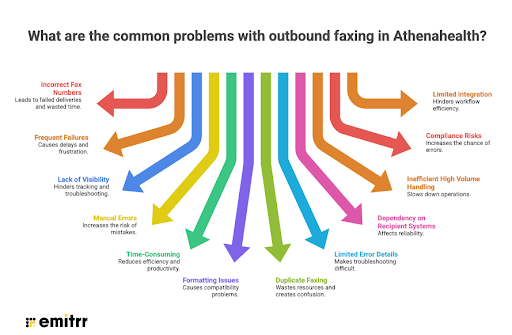
1. Incorrect or Outdated Fax Numbers
Entering the wrong fax number or using outdated contact information is one of the biggest causes of failed transmissions. Even a small formatting error can result in delivery failure.
2. Frequent Fax Failures and Busy Signals
Faxes may fail due to busy recipient lines, network issues, or temporary service disruptions. This often requires multiple retries, which delays communication.
3. Lack of Real-Time Delivery Visibility
Users may not always get clear or immediate confirmation on whether a fax was successfully delivered, making follow-ups difficult and time-consuming.
4. Manual Document Selection Errors
Selecting the wrong patient document or missing important attachments can lead to incomplete or incorrect information being sent.
5. Time-Consuming Workflow Steps
The process involves multiple steps, opening charts, attaching files, and entering numbers, which can slow down staff, especially when handling high volumes of faxes
6. Formatting and File Compatibility Issues
Certain file types, large documents, or improperly formatted files may not transmit correctly, leading to failed or partially delivered faxes.

7. Duplicate Faxing
Without clear tracking, staff may resend the same fax multiple times, confusing recipients and creating unnecessary workload.
8. Limited Error Details
When a fax fails, the system may not always provide detailed error messages, making it harder to identify and fix the root cause quickly.
9. Dependency on Recipient Systems
Even if everything is correct on your end, the receiving system (fax machine or server) may cause failures due to downtime, poor connectivity, or incompatibility.
10. Inefficient Handling of High Fax Volumes
Practices that send a large number of faxes daily may struggle with backlogs, delays, and staff overload if workflows are not streamlined.
11. Compliance Risks Due to Human Error
Sending documents to the wrong recipient or including incorrect patient information can create serious data privacy and compliance issues.
12. Limited Integration with Other Workflows
Faxing may not always be fully aligned with other processes like referrals or billing, leading to fragmented workflows and extra manual effort.
How Do You Improve Outbound Fax Workflow Efficiency?
Use this practical checklist to streamline outbound faxing workflows and reduce delays, errors, and manual effort:
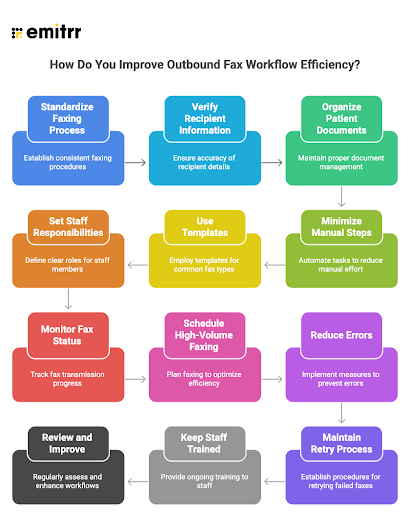
✅ Outbound Fax Workflow Efficiency Checklist
✔ Standardize Your Faxing Process
- Create a clear, step-by-step workflow for sending faxes
- Use consistent naming conventions for documents
- Define when and how faxes should be sent
✔ Verify Recipient Information
- Double-check fax numbers before sending
- Maintain an updated directory of frequently used contacts
- Use standardized formats for entering numbers
✔ Organize Patient Documents Properly
- Ensure documents are labeled clearly
- Attach only relevant and complete files
- Avoid sending duplicate or unnecessary pages
✔ Minimize Manual Steps Where Possible
- Reduce repeated data entry
- Use pre-filled fields when available
- Avoid switching between multiple screens unnecessarily
✔ Use Templates for Common Fax Types
- Create templates for referrals, records, and summaries
- Standardize HIPAA-compliant fax cover sheets
- Ensure all required information is included
✔ Set Clear Staff Responsibilities
- Assign ownership for sending and monitoring faxes
- Avoid duplication of work across team members
- Establish accountability for follow-ups
✔ Monitor Fax Status Regularly
- Check delivery status (sent, pending, failed)
- Follow up on failed or delayed faxes promptly
- Keep a simple tracking system if needed
✔ Schedule High-Volume Faxing Smartly
- Avoid peak hours when lines may be busy
- Batch non-urgent faxes when possible
- Prioritize urgent communications
✔ Reduce Errors Before Sending
- Review documents and recipient details before hitting send
- Confirm patient information is correct
- Ensure all attachments are included
✔ Maintain a Retry Process
- Define how and when to resend failed faxes
- Avoid repeated blind retries without checking the issue
- Escalate persistent failures when needed
✔ Keep Staff Trained and Updated
- Train new staff on the correct workflow
- Share common mistakes and how to avoid them
- Update processes based on feedback
✔ Regularly Review and Improve Workflows
- Identify bottlenecks in the process
- Gather input from staff
- Continuously refine for better efficiency
What Are the Key Security Best Practices for Athenahealth Faxing?
Protecting patient data during faxing is essential for maintaining compliance and avoiding data breaches. While Athenahealth provides a secure system, organizations must follow proper practices to ensure safe transmission of sensitive information.
HIPAA Compliance and System Security
Athenahealth is widely recognized for supporting secure healthcare workflows, and many organizations rely on it as a HIPAA-compliant platform. However, whether Athenahealth is HIPAA compliant in practice depends on how it is configured and used. Proper safeguards, user controls, and internal policies play a key role in maintaining compliance.
Secure Fax Transmission Practices
To fax securely in Athenahealth with HIPAA compliance, teams must follow strict verification and data-handling protocols. This includes confirming recipient details, using secure networks, and ensuring that only authorized staff are involved in sending sensitive documents.
Access Control and User Permissions
Limiting access to faxing features helps prevent unauthorized use. Role-based permissions ensure that only trained and approved staff can send patient information externally.
Error Prevention and Data Accuracy
Human errors, such as entering incorrect fax numbers or selecting the wrong documents, can lead to serious security risks. Implementing verification steps before sending helps reduce these risks.
Audit Trails and Monitoring
Maintaining records of all fax activity improves transparency and accountability. Tracking sent faxes, delivery status, and user actions supports compliance and helps identify potential issues.
Staff Training and Compliance Awareness
Regular training ensures that staff understand security expectations and follow best practices consistently. Awareness plays a critical role in protecting patient data and maintaining compliant workflows.
How Emitrr Helps Boost Outbound Faxing in Athenahealth?
While Athenahealth handles outbound faxing efficiently, many workflows don’t end once a fax is sent. Tasks like patient follow-ups, appointment coordination, and handling missing information still require manual effort. This is where Emitrr helps bridge the gap by improving what happens after fax transmission.
AI-Powered Patient Communication
Outbound faxes such as referrals, lab orders, and insurance requests often require immediate patient interaction. Emitrr uses AI to automatically trigger messages for next steps like appointment reminders, pre-visit instructions, or requests for additional information. This ensures faster response times and reduces delays in care coordination.
Seamless Integration with Athenahealth
Emitrr integrates with Athenahealth seamlessly, allowing patient data, communication workflows, and updates to sync without manual input. This helps eliminate repetitive tasks and ensures that outbound fax workflows connect directly with patient communication processes.
Discover the easiest way to text patients directly from Athenahealth:
Automated Follow-Ups and Task Management
After sending a fax, staff often need to track referrals, confirm appointments, or follow up on incomplete information. Emitrr automates these tasks by assigning, tracking, and sending reminders, ensuring nothing is missed and reducing administrative workload.
Secure and Structured Communication
Fax responses often require clarification or additional details, which can slow down workflows if not handled efficiently. Emitrr addresses this with two-way messaging, allowing staff to quickly communicate with patients, gather missing information, and respond in real time. At the same time, it ensures HIPAA-compliant communication, so all patient interactions remain secure while helping teams prioritize urgent conversations and reduce delays.
Multi-Channel Communication Beyond Faxing
While faxing is essential for document transmission, it doesn’t support real-time communication. Emitrr extends workflows by enabling communication through SMS, calls, and other channels, helping teams manage patient interactions more effectively.
Reduced Administrative Burden
Managing fax-related workflows can be time-consuming. Emitrr reduces manual work by automating key tasks such as:
- Referral updates
- Insurance follow-ups
- Pre-appointment reminders
- Re-engagement for missed appointments
This allows staff to focus on higher-value tasks instead of repetitive coordination.
Improved Patient Experience
Patients often lack visibility into what happens after a fax is sent. Emitrr helps close this gap by sending timely updates, confirmations, and instructions. This improves transparency, reduces confusion, and creates a smoother overall patient experience.
Frequently Asked Questions
Outbound fax failures are often caused by incorrect fax numbers, poor network connectivity, formatting issues, or misconfigured settings within Athenahealth.
You can improve fax speed by standardizing workflows, using templates, automating repetitive tasks, and ensuring all system settings are properly configured.
Yes, Athenahealth supports automation through integrations and workflow tools that allow auto-faxing from patient records, reducing manual effort.
You can monitor fax status using Athenahealth’s reporting and tracking features, which show whether a fax was successfully delivered or failed.
Best practices include verifying recipient details, limiting access to authorized staff, using secure networks, and maintaining compliance with healthcare data protection standards.
Emitrr enhances faxing by automating workflows, reducing manual errors, improving delivery success rates, and integrating seamlessly with Athenahealth systems.
Conclusion
Improving outbound faxing in Athenahealth means building a workflow that is reliable, efficient, and easy for staff to manage. By fixing common issues, standardizing processes, and following strong security practices, healthcare teams can reduce errors, save time, and ensure documents are delivered without delays.
A major part of efficiency also depends on what happens after a fax is sent. Tasks like follow-ups, patient coordination, and handling missing information can take up significant time when done manually. Emitrr helps simplify these steps by improving communication, automating routine tasks, and ensuring every fax leads to timely action.
To see how this can work for your practice, try a free demo with Emitrr and explore how it can improve your outbound faxing workflows.


 4.9 (400+
reviews)
4.9 (400+
reviews)