
Introduction
Writing a prescription takes a minute. Managing it takes months. Between the order and the patient’s last dose, a prescription generates pharmacy questions, prior authorization requests, first-fill problems, refill requests, renewal deadlines, and a steady stream of “where is my medication?” calls. Very little of that work is a clinical decision. Most of it is communication: collecting the right details, getting the request to the right person, and telling the patient what happened.
That administrative layer is what prescription management covers. When it’s built around phone tag, voicemail, and a shared inbox, requests sit unassigned, patients call twice, and nurses spend their days chasing information instead of reviewing it. When it’s built around structured intake, clear routing, and automatic updates, the same team handles more with fewer interruptions, and providers still make every clinical call.
This guide maps the prescription lifecycle stage by stage, shows where communication breaks down, and explains how request management, routing, status notifications, and renewals can be streamlined with automation without taking decisions away from clinicians.
What Prescription Management Covers (and Where It Stops)
Prescription management is everything around a prescription except the decision to prescribe it. The clinician decides what to prescribe, whether to continue it, and whether the patient needs to be seen. Everything else, including collecting requests, verifying identity, matching a chart, checking protocol, routing, transmitting, and notifying, is administrative work that can be standardized.
That distinction matters because it sets the limits of automation. The administrative layer can be consistent and fast. The clinical layer needs a person.
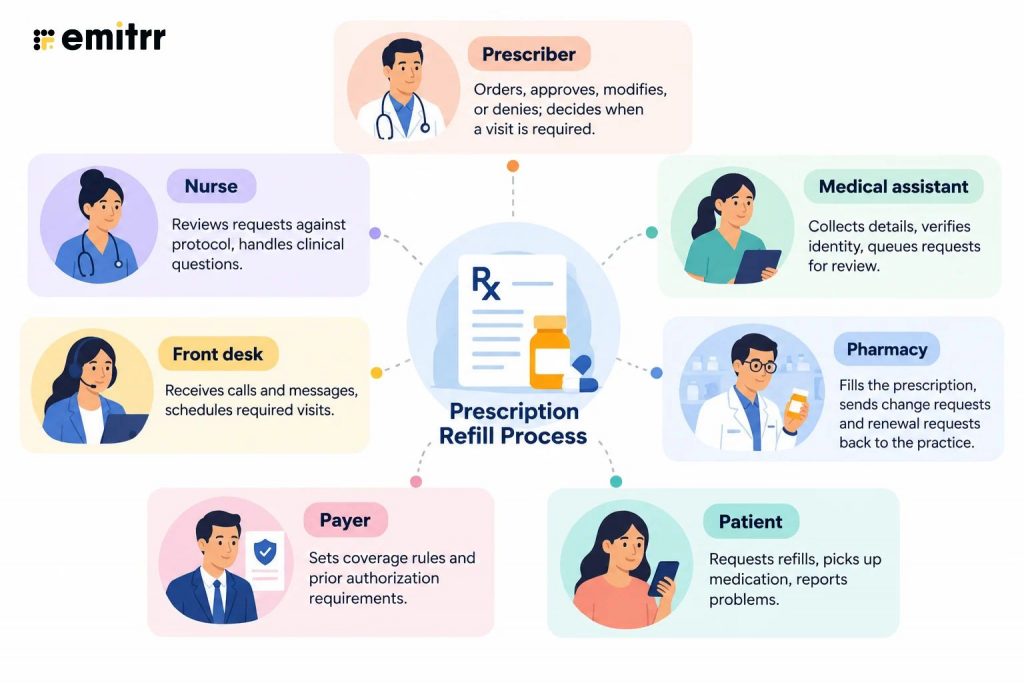
Several people touch a single prescription:
A prescription management system also isn’t the same thing as e-prescribing. E-prescribing transmits an order to a pharmacy through a certified network, and it requires infrastructure. A prescription management system covers what happens around that transmission.
| E-Prescribing Software | Prescription Management System | |
| Core job | Send the prescription to the pharmacy | Capture, verify, route, track, and communicate around it |
| Typical home | EHR module or standalone certified tool | Workflow and communication layer connected to the EHR |
| Handles | Order transmission, medication history, controlled-substance prescribing requirements | Request intake, routing, status updates, renewals, audit trail |
| Leaves to staff | Intake, follow-up, patient updates | Clinical approval |
Practices usually need both. Understanding how e-prescribing works inside the EHR clarifies where transmission ends. Within the wider market, prescription refill software tends to sit at the communication and workflow layer rather than the transmission layer, which is why prescription management software for healthcare is best evaluated by which part of the lifecycle it actually covers.
The Prescription Lifecycle, Stage by Stage
A prescription passes through six stages. Each has a different owner and a different way of going wrong.
| Stage | What Happens | Who Owns It | Where Communication Breaks Down |
| 1. New prescription | Prescriber orders and e-prescribes; patient is told what to expect | Prescriber, medical assistant | Patient leaves unsure what was sent where; outdated pharmacy on file |
| 2. Pharmacy receipt and clarification | Pharmacy receives the order and may send back a change request, cancellation, or prior authorization request | Pharmacy, nurse, payer | Requests land in an inbox or fax queue nobody owns, so responses slip |
| 3. First fill and pickup | Pharmacy fills the order; patient picks it up or doesn’t | Pharmacy, patient | Practice never learns the prescription wasn’t picked up |
| 4. Early-use check-in | Patient starts therapy; questions and side effects surface | Nurse, prescriber | Patient waits on the main line, or quietly stops |
| 5. Refill and renewal | Refills are used; renewal is needed when they’re exhausted or expired | Patient, nurse, prescriber | Requests arrive by voicemail, text, or pharmacy; status is unclear |
| 6. Review and discontinuation | Medication is reviewed, changed, or stopped | Prescriber, nurse | Old prescriptions stay active at the pharmacy; patient is confused |
Pharmacy and Payer Clarifications (Changes, Cancellations, Prior Authorization)
Pharmacies send questions back to the practice: a requested change because of stock or coverage, a cancellation after a dose change, a prior authorization request from the payer. Each one needs a prompt answer, because the patient is waiting on it. These messages often arrive through an inbox, a task queue, or fax, and without clear ownership they age quietly. Practices still managing prescription refills by fax feel this most, since a faxed clarification has no timer and no assigned owner.
The fix is procedural before it’s technical: every pharmacy message gets a category, an owner, and a response target. Automation then makes sure those targets are visible.
First Fill and Pickup: The Gap Between “Sent” and “Started”
A transmitted prescription is not a started prescription. Patients skip the first fill because of cost, a prior authorization, a stock problem at the pharmacy, or simple confusion about what they were prescribed. The practice usually finds out weeks later, if at all, when the patient returns with no improvement.
A short first-fill check-in closes that gap. A text a few days after prescribing, asking whether the patient picked up their medication, gives the practice a chance to fix a barrier early.
Renewals as a Lifecycle Event, Not an Inbox Item
A refill uses fills already authorized. A prescription renewal needs a new authorization, often a visit, and a fresh clinical decision. Treating both as the same type of inbox item is how a request that needed an appointment sits for days before anyone notices. Managed as a lifecycle event, a renewal is anticipated and scheduled, not discovered when the patient runs out.

Prescription Request Management: How Requests Enter the System
Prescription request management starts with the channel. Requests rarely arrive one way.
- Phone: Live calls with details given from memory. Common problems include incomplete information, hold times, and transcription errors.
- Voicemail: Messages left outside office hours. Common problems include unclear details and delays in listening to and logging voicemail-based prescription refill requests.
- Text: Informal messages with partial details. Common problems include a lack of structure and requests getting mixed with other messages.
- Portal: Structured requests that are often separate from other channels, requiring staff to check one more place to manage requests.
- Pharmacy-initiated: Electronic renewal requests sent to the practice. Common problems include requests sitting in a queue and arriving with pharmacy data but limited patient context.
When each channel lands in a different place, staff spend time checking places instead of reviewing requests, which is why prescription refill requests overwhelm front desk staff at practices with high volume. In busy practices, refill calls can make up most of a phone nurse’s day. The first step toward fixing that is to centralize prescription refill requests so every channel feeds one queue.
Watch how an AI agent reduces prescription refill call volume by 40%
Minimum structured fields at intake
Collecting these as structured fields, instead of free text, speeds review and reduces back-and-forth:
- Patient full name as listed in the chart, date of birth, and best callback number
- Medication name (exact spelling), strength, form and route, quantity, and directions
- Last fill date or remaining refills, if known
- Pharmacy name and phone number
- Prescribing provider, so the request routes correctly
- Urgency or pickup timeframe
- Relevant clinical context, such as a recent medication change or adverse reaction, and allergies not already in the chart
- Insurance details if prior authorization or a coverage check might be required
- Consent to send refill details to the pharmacy, where local policy requires it
Complete refill requests help providers review information and make approval decisions faster, as seen with structured refill intake.
Identity verification. Name, date of birth, and phone number are the baseline. For callers on an unregistered number, stronger checks, such as confirming the registered phone number and a one-time code, protect the patient’s record.
Where the request lands. The best destination is the EHR record staff already work in: a patient case, a telephone encounter, or a refill order. When everything lands there, nurses don’t have to check a second platform to know what’s pending.
Prescription Processing Workflow: Routing, Review, and Handoffs
A prescription processing workflow moves a request from intake to resolution in a defined sequence. Steps marked (A) can be automated; steps marked (H) need a person.
Step 1: Intake and tagging (A). The request is captured and classified as a refill, renewal, or other request type. Tagging requests by intent so staff opens a sorted queue is the same principle behind how to organize patient messages by intent.
Step 2: Identity and chart check (A). Patient identity is verified, and the medication is matched against the chart.
Step 3: Eligibility against protocol (A). Rules check things like whether the patient was seen within the required window.
Step 4: Routing (A). The request goes to the right queue or provider based on rules.
Step 5: Review and decision (H). A nurse or provider approves, modifies, denies, or requires a visit.
Step 6: Pharmacy transmission (A or H). Approved requests are transmitted, either through an approved workflow or by staff.
Step 7: Patient notification (A). The patient is told what happened.
Step 8: Logging (A). The request and its outcome are recorded in one thread.
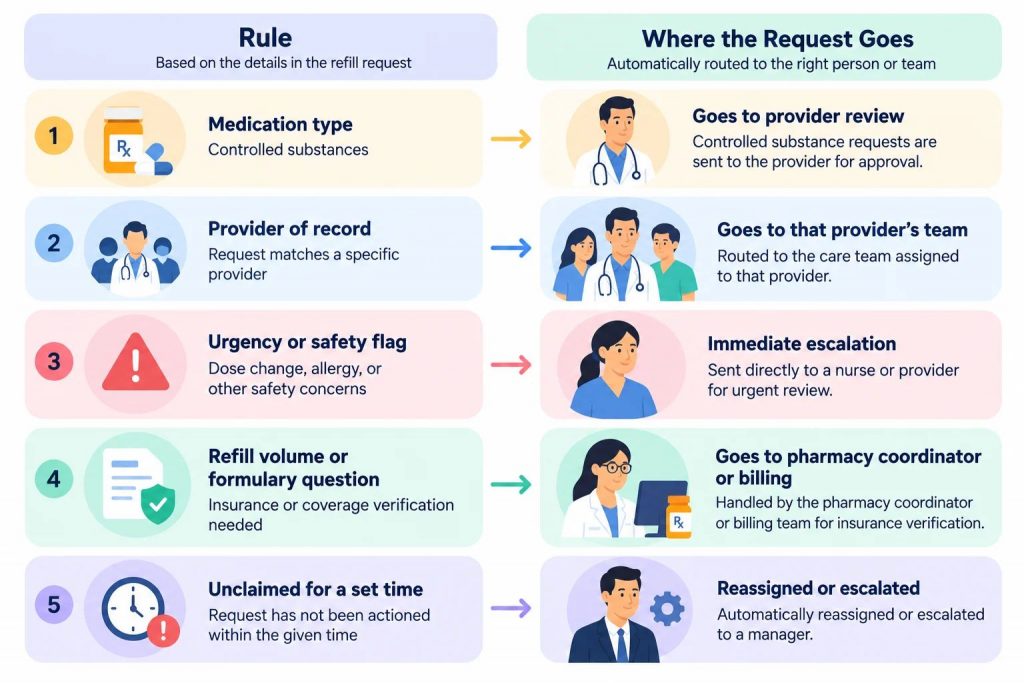
Typical Routing Rules
Prescription Status Notifications: What to Tell Patients and When
Patients call for a prescription refill because they haven’t heard anything. A request submitted on Monday with no update by Wednesday looks lost, so the patient calls to check, which interrupts staff for a question the system could have answered. Prescription status notifications fix it at the source.
| Event | Example Patient Message | Channel | Privacy Consideration |
| Request received | “We received your refill request and will update you after review.” | Text | Leave out the medication name |
| Sent to pharmacy | “Your request was approved and sent to your pharmacy.” | Text | Keep to minimum necessary |
| Needs an appointment | “Your provider needs to see you before this can be renewed. Reply to book a visit.” | Text with reply | No clinical detail |
| Needs prior authorization | “Your insurance requires approval first. We’ve started the process.” | Text | No diagnosis or medication detail |
| Denied, with next step | “We couldn’t approve this request. A nurse will contact you.” | Call or secure link | Reasons belong in a secure channel |
Minimum-necessary content matters in every message. Practices weighing what a text can safely include can start with whether texting a patient’s name a HIPAA violation is a real risk, then use secure links for anything sensitive. Two-way texting also lets the patient answer a question or correct a detail in the same thread, without a callback.
Prescription Renewal Management: Staying Ahead of Expiring Prescriptions
Prescription renewal management turns a surprise into a schedule. A refill request that turns out to be a renewal is a delay, because the visit or review that should have happened earlier now blocks the patient.
| Renewal Situation | What Should Happen | Owner |
| Refills nearly exhausted | Flag the prescription for renewal before the patient runs out | Nurse or coordinator |
| Visit required before renewal | Reach out and book the visit ahead of the request | Front desk or scheduling workflow |
| Prescription expired | Treat as a renewal; route for provider review | Provider |
| Medication recently changed | Hold for clinical review | Nurse or provider |
| Controlled substance | Always individual clinician review | Prescriber |
Renewal-due outreach works best when it books the visit instead of waiting for a request, which is where AI appointment scheduling closes the loop between a flagged renewal and an open slot. Supply-based nudges, which tell a patient before they run out, belong to a separate workflow built around prescription refill reminders.
Prescription Workflow Automation: What to Automate and What to Keep Human
Automation fits the repetitive, rule-based work. It doesn’t belong anywhere a clinical judgment is required.
| Task | Automate? | Human Checkpoint |
| Request capture across channels | Yes | Staff review incomplete or unclear requests |
| Identity verification | Yes | Staff step in when verification fails |
| Chart matching | Yes | Staff resolve ambiguous matches, such as duplicate charts |
| Protocol checks | Yes | Provider decides when protocol doesn’t fit |
| Routing | Yes | Manager reviews unclaimed or escalated items |
| Patient notifications | Yes | Staff handle sensitive denials by call |
| Follow-ups and reminders | Yes | Escalation to staff after set attempts |
| Approval of a refill | No | Always nurse or provider |
| Controlled substances | No | Always individual clinician review |
| Exceptions and mismatches | No | Staff resolve; automation flags them |
Signs Your Prescription Process Is Leaking Time
Waste in a prescription workflow is easy to feel and hard to see. These signals point to where it’s coming from.
– Repeat status calls from the same patients
- Likely cause: No updates after submission
- Where to look first: Notification timing and content
– Requests sitting unassigned
- Likely cause: No routing rules or unclear ownership
- Where to look first: Queue assignment and escalation timers
– Duplicate requests for the same medication
- Likely cause: Patients resubmit after receiving no response or use multiple channels
- Where to look first: Status updates and channel consolidation
– Patients returning with unfilled new prescriptions
- Likely cause: No first-fill check-in
- Where to look first: Post-prescribing follow-up
– Lapsed renewals and last-minute urgent requests
- Likely cause: Expiration dates tracked informally
- Where to look first: Renewal tracking and outreach
– Providers returning requests for missing details
- Likely cause: Incomplete intake
- Where to look first: Required fields at capture
Several of these issues stem from the same root cause: manual steps that are difficult to complete consistently amid daily workloads. These gaps increase operational costs through manual prescription refill workflows and can leave patients facing longer prescription refill delays.
Where Emitrr Fits in the Prescription Lifecycle
Emitrr sits in the communication and workflow layer of the lifecycle. It doesn’t replace the EHR or the e-prescribing system. It captures requests, structures them, routes them, and keeps patients informed, so staff starts from a complete, assigned request instead of a voicemail.
Capturing and Structuring Requests Across Calls, Texts, and Forms
Patients can request a refill by calling or replying to a text. If a call goes unanswered, an automatic text prompt captures the request. An AI answering service for healthcare collects structured details immediately, including identity verification, medication name and dose, preferred pharmacy, and urgency, using guided questions or digital medical forms and surveys so fields are filled consistently. For non-registered callers, verification can include multiple steps such as date of birth, a registered phone number, and a one-time code. The approach is described in more depth in automating prescription refills with AI voice agents.
Where the EHR is integrated, Emitrr checks the active medication list and, if policy requires, whether a recent appointment exists. If the EHR blocks automated ordering, the system creates a tracked refill case with all collected fields, so the request lands in the record staff already use. The AI collects and routes. It does not approve.
Routing and Status Notifications Without Extra Staff Work
Requests are classified as refills and routed by rule: to a medication refill queue, to the prescribing provider when the medication needs review, or to an on-call clinician when a request is urgent or involves a controlled substance or safety flag. Where the EHR is integrated, the patient’s last visit and provider can inform routing. Assignees receive in-app, email, and mobile notifications with a pre-populated request, and if no one claims it within a configured time, it can be reassigned or escalated.
Patients are notified automatically when the request is submitted and again when it’s approved, with secure links or forms for anything sensitive. Staff and patients stay in the same thread, which supports the pattern of moving routine requests out of the phone queue.
Renewal Outreach and Visit Scheduling
Business rules can enforce conditions such as a recent visit within a set number of months before a refill moves forward. When a rule isn’t met, the workflow can direct the patient to book a visit instead of leaving the request stuck. Combined with scheduling, that turns a renewal that would have stalled into a booked appointment, and patient follow-up software handles the reminders and non-responders along the way. Capabilities that depend on the EHR, such as writing to the schedule, vary by integration.
One Thread, One Audit Trail, and What Staff Still Own
Every step, including collection, assignment, provider review, pharmacy submission, and patient notification, is logged in the same patient conversation thread, which makes handoffs traceable and supports a clean HIPAA audit trail.
Staff and providers still own the decisions that matter: approvals, controlled substances, medication changes, requests the system couldn’t confidently match to a chart, and any exception automation flags for review.
Key Takeaways
- Prescription management is the administrative and communication work around a prescription, and it stops where the clinical decision begins.
- A prescription management system covers more than e-prescribing: intake, routing, status updates, renewals, and audit trail.
- Delays cluster at handoffs: pharmacy clarifications, first-fill pickup, multi-channel intake, and renewals discovered late.
- Structured intake and one destination in the EHR do more to speed up a prescription processing workflow than any single tool.
- Prescription status notifications cut repeat calls because patients stop wondering what happened.
- Prescription renewal management works best when renewals are anticipated and a needed visit is booked before the request arrives.
- Automate capture, verification, routing, notifications, and follow-ups. Keep approvals, controlled substances, and exceptions human.
Frequently Asked Questions
Prescription management is the administrative and communication work around a prescription across its lifecycle, from transmission to the pharmacy through refills, renewals, and discontinuation. It covers intake, verification, routing, tracking, and patient updates, while the clinical decision to prescribe or continue a medication stays with the provider.
E-prescribing software transmits the prescription to the pharmacy through a certified network. A prescription management system handles what happens around that transmission: capturing requests, routing them, tracking status, managing renewals, and keeping patients informed. Most practices need both.
Prescription request management is the process of receiving requests from every channel, collecting complete and structured details, verifying identity, and placing each request in front of the right person with the context they need. Its goal is to make sure no request depends on someone remembering to check a voicemail or inbox.
Most status calls happen because a patient hasn’t heard anything. Automatic updates when a request is received, sent to the pharmacy, or needs an appointment answer the question before the patient asks. Two-way messaging also lets patients respond without calling.
Look for multi-channel request capture, structured intake with identity verification, EHR integration that places requests in the record staff use, rule-based routing, patient status notifications, renewal tracking, controlled-substance safeguards, and a full audit trail. Confirm exactly what the integration can and can’t write to your specific EHR.
No. Automation can collect details, verify identity, check protocol, route requests, and notify patients, but approval is a clinical decision for a nurse or provider. Controlled substances should always receive individual clinician review.
Conclusion
Good prescription management isn’t about removing people from the process. It’s about removing the waiting, retyping, and chasing that surround the decisions only people can make. When requests arrive complete, land in the right place, move by rule, and keep patients informed, the same staff handles more with fewer interruptions, and providers see requests with the context they need. Mapping your own prescription lifecycle and noticing where messages stall is the fastest way to see where automation will help most.
Book a free demo and see how Emitrr captures, routes, and tracks prescription requests while your team keeps every clinical decision.


 4.9 (400+
reviews)
4.9 (400+
reviews)