
Introduction
Population health management software helps healthcare organizations identify, analyze, manage, engage, and monitor defined patient populations. Depending on the platform, it may combine clinical and claims data, segment patient cohorts, identify care gaps, support care-management teams, automate patient outreach, or report on quality and utilization. However, not every product performs all these functions.
Some population health management platforms focus on risk and analytics. Others support care coordination, quality reporting, social determinants of health, or value-based care. Organizations may also need a separate communication and workflow-execution platform to turn patient lists and care-gap information into completed actions. This might include contacting a patient, scheduling an appointment, collecting information, or assigning a follow-up to a staff member.
This guide compares 10 population health management software platforms and solutions based on the role each performs within the broader PHM technology stack. It also explains the features buyers should evaluate, the differences among platform categories, and how to choose software that addresses the capability missing from an organization’s current systems.
AI Summary
- PHM software helps organizations analyze, manage, engage, and monitor defined patient populations.
- Not every PHM platform performs the same function.
- Emitrr is best for patient communication and PHM workflow execution.
- CareJourney is best for claims-based population and provider intelligence.
- HealthHelper is best for service-supported panel management and care-gap closure.
- Socially Determined is best for SDOH and social-risk intelligence.
- Oracle Health Data Intelligence is best for enterprise healthcare data and analytics.
- HealthEdge GuidingCare is best for payer-side care and utilization management.
- Azara DRVS is best for FQHC and community health reporting.
- Organizations should choose a solution based on the capability missing from their existing healthcare technology stack.
How We Evaluated Population Health Management Software
We evaluated these population health management tools according to their role within the PHM technology stack and the healthcare organizations they serve. The comparison considers:
- Population identification and segmentation: Whether the solution can build or receive patient cohorts using clinical, claims, demographic, payer, or operational data.
- Risk and care-gap visibility: Whether it identifies or displays higher-risk patients, rising-risk populations, and open preventive or chronic care needs.
- Care management and coordination: Whether care teams can use worklists, assignments, care plans, referrals, and follow-up tasks to manage patient needs.
- Patient engagement and workflow execution: Whether the platform can turn identified needs into outreach, conversations, scheduling, intake, and documented follow-up.
- Analytics and reporting: Whether users can monitor population status, utilization, quality measures, program participation, and operational performance.
- EHR and data interoperability: Whether the solution can exchange relevant information with EHRs, claims systems, payer platforms, health information exchanges, or other healthcare systems.
- Security and HIPAA support: Whether the vendor provides appropriate safeguards, access controls, encryption, auditability, and Business Associate Agreement availability.
- Scalability and implementation: Whether the platform can support multiple locations, larger populations, complex permissions, and the organization’s available implementation resources.
- Pricing transparency: Whether buyers can understand the starting price, included capabilities, usage fees, implementation costs, and additional module requirements.
- Customer experience: Whether verified ratings, reviews, support options, and implementation feedback indicate a dependable vendor relationship.
Population Health Management Software at a Glance (TL;DR)
| Platform | Best For | Core Focus | EHR/Data Integration | Pricing Starting Point |
| Emitrr | Patient communication and PHM workflow execution | Outreach, two-way communication, scheduling, follow-up, and automation | athenahealth, Tebra, eClinicalWorks, and 500+ total integrations; write-back varies | AI Agent from approximately $99/month; complete platform pricing varies |
| CareJourney by Arcadia | Claims-based population and provider intelligence | Population, provider, network, referral, cost, and utilization intelligence | Claims and clinical-data connections; access to a large beneficiary dataset | Custom enterprise pricing |
| HealthHelper | Service-supported panel management and care-gap closure | Technology-enabled service with dedicated coordinators | Works within client EHR workflows; supported systems must be confirmed | Flexible module pricing with performance-based options |
| Socially Determined | SDOH data and social-risk intelligence | Social-risk analytics and population-level SDOH insights | APIs and data ingestion; supported data sources vary | Custom enterprise pricing |
| J2 Interactive | Custom healthcare data integration and implementation | Healthcare interoperability, consulting, and custom builds | Custom EHR, HIE, CRM, and data-platform integrations | Custom project pricing |
| Castell | Value-based care enablement | Population analytics, care management, and VBC performance | Custom clinical and claims-data integration; supported systems must be confirmed | Custom enterprise pricing |
| Oracle Health Data Intelligence | Enterprise healthcare data and analytics | Multi-source healthcare data and enterprise intelligence | Oracle Health and supported external systems through standards and connectors | Custom enterprise pricing |
| athenahealth | EHR-connected population management for ambulatory organizations | Care-gap management, quality performance, and coordinated care | athenaOne plus supported multi-EHR care-management workflows | Custom practice or enterprise pricing |
| HealthEdge GuidingCare | Payer-side care and utilization management | Care management, case management, and health-plan workflows | Payer, claims, clinical, and HealthRules ecosystem connections | Custom enterprise pricing |
| Azara DRVS | FQHC and community health quality reporting | Population analytics, UDS reporting, care gaps, and dashboards | Clinical, health-plan, and SDOH data with multiple-EHR support | Contact Azara for pricing |
Looking to improve chronic care workflows with AI? Watch this video to discover the top 5 AI tools transforming patient engagement and care management.
Top 10 Population Health Management Software Platforms and Solutions
- Emitrr
- CareJourney (by Arcadia)
- HealthHelper
- Socially Determined
- J2 Interactive
- Castell
- Oracle Health Data Intelligence
- Athenahealth
- HealthEdge GuidingCare
- Azara (DRVS)
1. Emitrr: Best for Patient Communication and PHM Workflow Execution
Overview
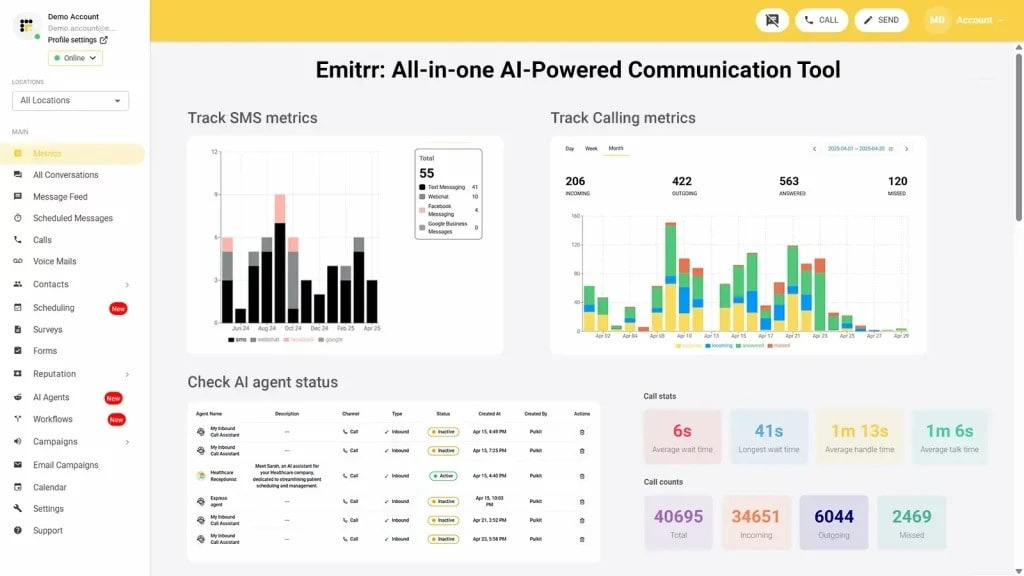
Emitrr is a healthcare communication and workflow-execution platform for organizations that already identify patient populations through an electronic health record, PHM platform, payer file, API, or patient list.
Many population health analytics tools can show which patients require attention but do not provide a complete operational path for reaching them. Emitrr helps convert those patient lists, appointment events, and workflow signals into outreach, conversations, scheduling activity, intake, and tracked follow-up.
This makes Emitrr suitable for healthcare organizations that do not need another risk engine but need a better way to move identified patients toward the next operational step.
Emitrr Key Features
- Automated patient campaigns: Launch bulk or event-triggered SMS, voice, and email campaigns for selected patient populations. Organizations can use text campaigns for recalls, reactivation, preventive-care reminders, program updates, or other approved outreach.
- Two-way patient texting: Enable patients to respond to reminders, ask questions, confirm appointments, report barriers, or request scheduling changes through two-way texting.
- Patient recall and reactivation: Contact patients who are overdue for preventive, recurring, or follow-up care instead of relying on staff to work through lists manually.
- Appointment automation: Send confirmations, reminders, cancellation follow-ups, and self-scheduling or rescheduling links. Emitrr’s appointment reminder software supports automated communication before scheduled visits.
- AI voice agent: Use an AI voice agent for inbound and outbound conversations involving scheduling, information collection, confirmations, recalls, and routine questions.
- Missed-call-to-text: Automatically send a message when a patient’s call goes unanswered. The missed-call-to-text feature helps convert a lost call into a trackable conversation.
- Shared team inbox: Organize conversations using assignments, routing rules, tags, internal notes, and status tracking. A shared inbox for patient communication gives staff a common view of patient conversations and open follow-ups.
- Secure communication: Use OTP-verified secure chat and encrypted communication workflows when protected health information needs to be exchanged. Emitrr also offers a Business Associate Agreement for healthcare customers.
- Digital forms: Send mobile-friendly forms, collect electronic signatures, and transfer information into supported systems where the integration permits it.
- Multilingual communication: Translate incoming and outgoing messages across supported languages, helping organizations communicate with diverse patient populations.
- EHR-triggered workflows: Initiate communication using appointment, patient, or workflow information received from integrated systems.
- Communication reporting: Track message delivery, responses, call activity, campaign results, AI usage, and team performance.
Pros of Emitrr
- Converts population lists and clinical or operational events into actionable patient workflows.
- Supports genuine two-way communication rather than notification-only outreach.
- Combines texting, calling, scheduling, forms, and team communication.
- Supports EHR write-back where the integration permits it.
- Works for independent practices and multi-location healthcare organizations.
- Helps address the gap between identifying a patient need and securing patient action.
- Offers healthcare-specific workflows across different medical specialties.
Cons of Emitrr
- It is not a standalone population analytics platform.
- It does not provide actuarial modeling or native clinical risk scoring.
- Integration depth and write-back vary by EHR.
- Advanced AI capabilities may require additional usage-based pricing.
- Organizations still need an EHR, PHM platform, payer file, or another source to identify clinical cohorts and care gaps.
Emitrr Pricing
Emitrr offers two VoIP pricing plans: Standard and Professional. Messaging, integrations, workflow automation, and AI usage may be priced separately.
| Name of the plan | Pricing if paid annually | Pricing if paid monthly |
| Standard | $20 per user per month | $25 per user per month |
| Professional | $25 per user per month | $30 per user per month |
Emitrr Integrations
Emitrr integrations connect the platform with more than 500 healthcare and business systems. Healthcare integrations include:
- athenahealth
- eClinicalWorks
- DrChrono
- Spry PT
- Dentrix
- Denticon
- Eaglesoft
- Dentrix Ascend
- Dentrix Enterprise
- Curve Hero
- Zapier
- Salesforce
- HubSpot
- Mailchimp
Emitrr Customer Support Channels
- Live chat: Chat with Emitrr’s support representatives.
- Phone: Call Emitrr at +1 (210) 941-4696.
- Email: Contact support@emitrr.com.
- Knowledge base: Access product guidance and troubleshooting resources.
- FAQs and forum: Review answers to common product questions.
- SMS: Contact the team through text messaging.
Emitrr Ratings
Emitrr maintains strong ratings across trusted review platforms, with a 4.8 on Capterra and a 4.8 rating on G2.
Emitrr Reviews
“You have it all integrated into one platform, the signatures, the amount of characters, you can attach files, send photos. You are able to create and send forms. An unlimited number of things we can use and take advantage of.”
2. CareJourney by Arcadia: Best for Claims-Based Population and Provider Intelligence
Overview
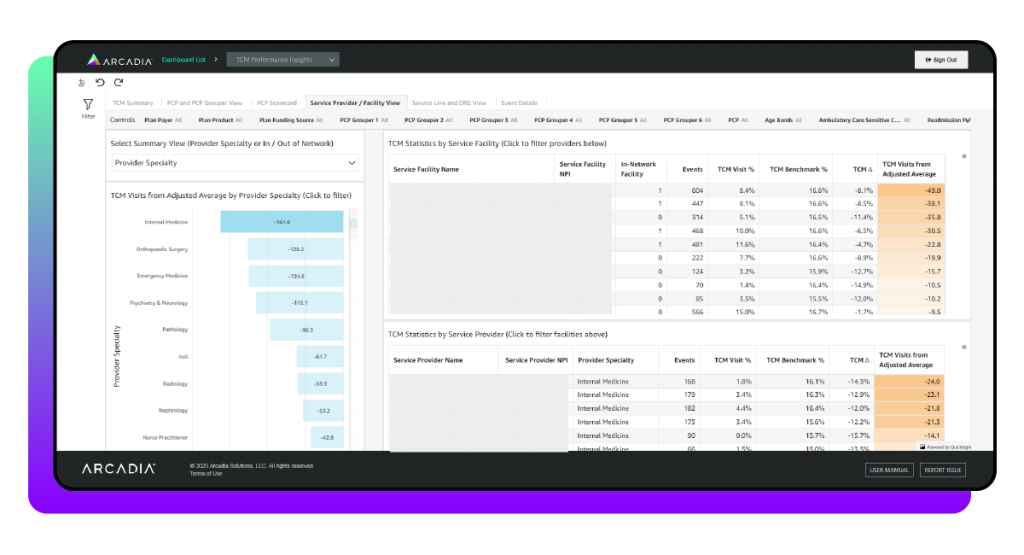
CareJourney provides claims-based population, provider, and network intelligence for accountable care organizations, payers, provider groups, and organizations operating under value-based care arrangements.
Its strength lies in showing patterns that may not be visible from one organization’s EHR. Longitudinal claims information can help users understand where patients receive care, how providers perform, where referrals go, and how utilization and cost vary across a network.
Key Features
- Patient cohort builder: Create populations using claims, diagnoses, utilization, demographic, geographic, and cost criteria.
- Longitudinal patient journeys: Examine where patients receive care across providers and settings over time.
- High-need patient identification: Find patients with complex utilization, elevated spending, or patterns indicating greater support needs.
- Provider benchmarking: Compare providers using cost, quality, utilization, referral, and outcome indicators.
- Network performance analysis: Evaluate provider networks across cost, quality, utilization, and care-delivery measures.
- Referral-pattern analysis: Identify referral destinations, out-of-network movement, and potential leakage.
- Post-acute provider comparison: Compare skilled nursing, home health, and other post-acute providers.
- Market intelligence: Analyze provider supply, market share, geographic opportunities, and patient flows.
- Cost and utilization reporting: Examine admissions, emergency use, procedures, episodes, and total cost.
- Data exports: Deliver selected population and provider data to external systems for additional analysis or action.
Pros
- Provides extensive claims-based population intelligence.
- Offers a strong fit for ACO benchmarking and network optimization.
- Supports provider, market, referral, utilization, and cost analysis.
- Uses longitudinal data to show care delivered beyond one organization.
- Helps value-based care organizations identify performance and network opportunities.
Cons
- Focuses primarily on intelligence rather than patient communication.
- Requires another system to execute outreach and engagement workflows.
- May be more complex than an independent practice requires.
- Pricing is not publicly available.
- Users need analytical and operational resources to convert insights into action.

3. HealthHelper: Best for Service-Supported Panel Management
Overview
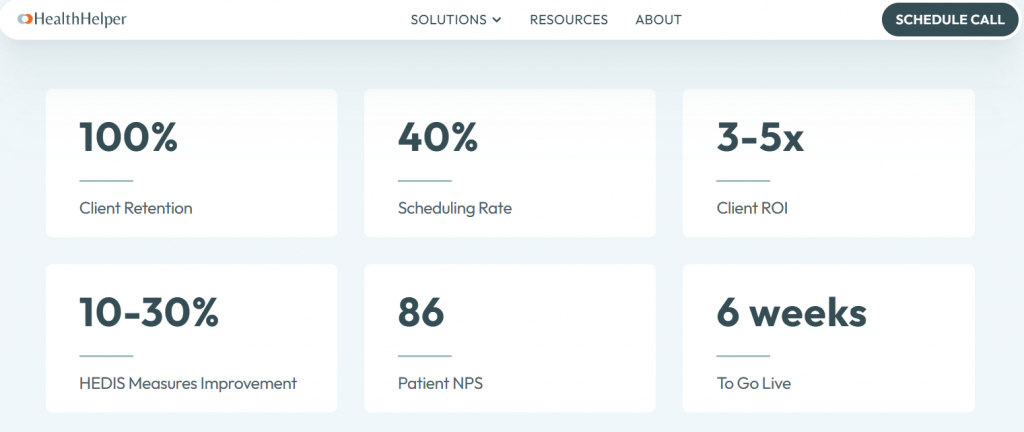
HealthHelper combines technology, automation, and dedicated coordinators to help practices manage patient panels, address open care needs, schedule services, monitor care transitions, and coordinate referrals.
Unlike self-managed PHM software, HealthHelper provides operational support alongside its technology. This model may suit practices that lack sufficient internal staff to work through patient lists and coordinate the next step with each patient.
Key Features
- Automated patient-list creation: Combine EHR, payer, coding, and quality data to identify patients requiring action.
- Prioritized care-gap worklists: Rank open care needs so coordinators know which patients to address first.
- Coordinator-led outreach: Use dedicated coordinators to contact patients on behalf of the practice.
- Direct appointment scheduling: Schedule recommended services during the outreach interaction.
- EHR documentation: Record patient contacts, outcomes, and completed actions in the practice workflow.
- Transition monitoring: Detect hospital and emergency department events that may require follow-up.
- Post-discharge coordination: Help patients arrange recommended primary or specialty care after discharge.
- Referral tracking: Monitor referrals from initiation through scheduling and completion.
- Referral-loop closure: Follow up on incomplete or unresolved referrals.
- Pre-visit planning: Identify outstanding care opportunities before scheduled appointments.
- Performance reporting: Track completed appointments, addressed care needs, quality improvements, and financial outcomes.
Pros
- Combines technology with human care-coordination support.
- Reduces the workload placed on internal practice teams.
- Moves patients from identified care needs to scheduled services.
- Supports care gaps, transitions, referrals, and visit preparation.
- Offers flexible module and performance-based pricing options.
Cons
- Its service-led model may not suit organizations seeking software only.
- It does not replace enterprise population analytics.
- Scalability and cost depend on the selected modules and service scope.
- A complete public list of supported EHRs is unavailable.
- Organizations have less direct control than they would with a fully self-managed platform.
4. Socially Determined: Best for SDOH and Social-Risk Intelligence
Overview
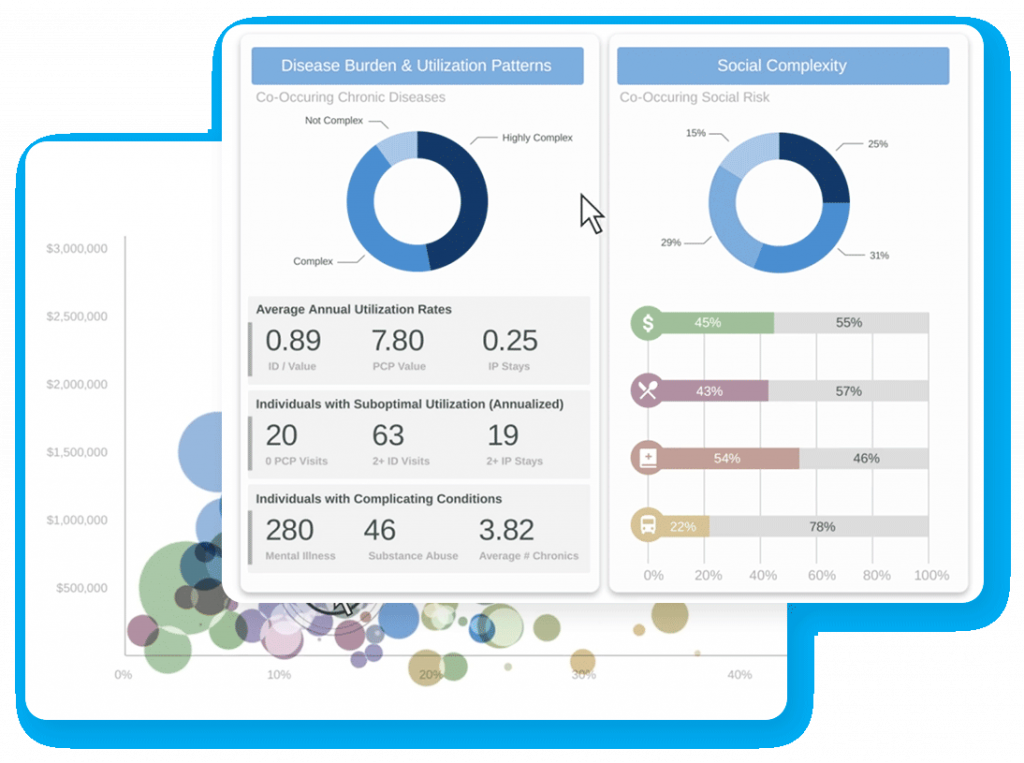
Socially Determined helps healthcare organizations identify social risks that can influence access, utilization, cost, and health outcomes. Its focus is social determinants of health, or SDOH, rather than complete clinical population management.
The platform enriches existing patient, member, claims, or clinical data with additional context about factors such as housing, food access, transportation, financial strain, and community resources. Organizations can use this information to understand where barriers are concentrated and which populations may require additional support.
Key Features
- Patient-level social-risk profiles: Add social-risk indicators to individual patient or member records.
- Community-level risk scores: Measure social vulnerability across neighborhoods and service areas.
- Geographic risk mapping: Display concentrations of housing, food, transportation, financial, and access barriers.
- Risk-factor identification: Show which social conditions contribute to elevated risk within a population.
- SDOH population segmentation: Create groups based on shared social barriers and vulnerabilities.
- Data enrichment: Append external social-risk information to clinical, claims, or member data.
- Health-equity analysis: Compare risks and outcomes across demographic and geographic populations.
- Market analysis: Identify communities where new services, access points, or support may be required.
- API-based delivery: Send social-risk scores and supporting information into existing systems.
- Risk monitoring: Track changes in population-level social-risk patterns over time.
Pros
- Provides specialized SDOH and health-equity intelligence.
- Adds nonclinical context to claims and clinical information.
- Supports patient-level and community-level analysis.
- Helps organizations identify geographic concentrations of unmet need.
- Is relevant for payers, health systems, life-sciences companies, and community programs.
Cons
- It does not provide complete care-management functionality.
- It does not replace a patient communication or outreach platform.
- Identified risks still require intervention through other systems and teams.
- Pricing is not publicly disclosed.
- Its value depends partly on the completeness and accuracy of the organization’s underlying patient data.
5. J2 Interactive: Best for Custom Healthcare Interoperability
Overview
J2 Interactive is a healthcare software-development and consulting company rather than a conventional off-the-shelf PHM platform. It builds customized interoperability, health information exchange, analytics, CRM, and population-health environments.
J2 Interactive may be appropriate when an organization’s primary challenge is not selecting a standard application but connecting legacy systems, normalizing data, implementing a healthcare data platform, or creating a custom workflow.
Key Features
- Custom interface development: Build connections among EHRs, laboratories, HIEs, claims systems, CRMs, and other platforms.
- FHIR application development: Create applications and workflows that exchange information through Fast Healthcare Interoperability Resources APIs.
- HealthShare implementation: Configure InterSystems HealthShare for health information exchange and longitudinal records.
- HIE development: Create infrastructure for exchanging clinical information across healthcare organizations.
- Salesforce Health Cloud implementation: Configure healthcare CRM, engagement, service, and coordination workflows.
- Clinical-data normalization: Standardize terminology and information received from different healthcare systems.
- Patient identity matching: Link records belonging to the same person across multiple sources.
- Custom healthcare analytics: Develop dashboards, reporting environments, and healthcare data models.
- Portal development: Build interfaces through which patients and providers can access information.
- Managed services: Maintain, monitor, and support implemented healthcare data environments.
Pros
- Provides extensive healthcare-specific integration expertise.
- Works with major EHR and healthcare data environments.
- Supports highly customized enterprise requirements.
- Offers FHIR, HIE, InterSystems, and Salesforce expertise.
- Suits organizations with complex legacy or multi-vendor systems.
Cons
- It is not an off-the-shelf PHM software platform.
- It requires a custom discovery and implementation project.
- Pricing and delivery timelines depend on project scope.
- It requires more internal stakeholder involvement than standard SaaS deployment.
- It is not suitable for organizations seeking immediate self-service software.
6. Castell: Best for Value-Based Care Enablement
Overview
Castell combines technology, clinical services, care-management support, and operational expertise to help healthcare organizations manage value-based care performance.
The solution connects population management with the clinical, operational, and financial requirements of value-based contracts. It may be relevant for organizations that need broader enablement and services rather than a standalone population health analytics tool.
Key Features and Services
- Population identification: Use clinical and claims information to find patients eligible for specific programs.
- Patient prioritization: Organize patients by risk, utilization, open care needs, and intervention opportunity.
- Care-manager worklists: Give care teams organized lists of patients requiring outreach or follow-up.
- Quality-measure tracking: Monitor performance against measures connected with value-based contracts.
- Contract performance monitoring: Track clinical and financial results across payer arrangements.
- Provider performance reporting: Compare practices and providers against cost, quality, and utilization expectations.
- Care-management support: Combine technology with care teams managing selected patient populations.
- Network analysis: Evaluate utilization, referral, cost, and outcome patterns across providers.
- Opportunity identification: Surface potential improvements involving documentation, care gaps, and utilization.
- Practice transformation: Support organizations as they adapt workflows for value-based care.
Pros
- Combines technology with clinical and operational expertise.
- Aligns population management with value-based contract performance.
- Supports clinical and financial objectives.
- Offers broader enablement than a standalone analytics product.
- Can help organizations develop internal value-based care capabilities.
Cons
- It is not a conventional self-service software platform.
- Software functionality and service delivery may be difficult to separate.
- Pricing is not publicly available.
- Suitability depends on the organization’s partnership and contracting model.
- It may be excessive for practices that need only reporting or patient communication.
7. Oracle Health Data Intelligence: Best for Enterprise Healthcare Data and Analytics
Overview
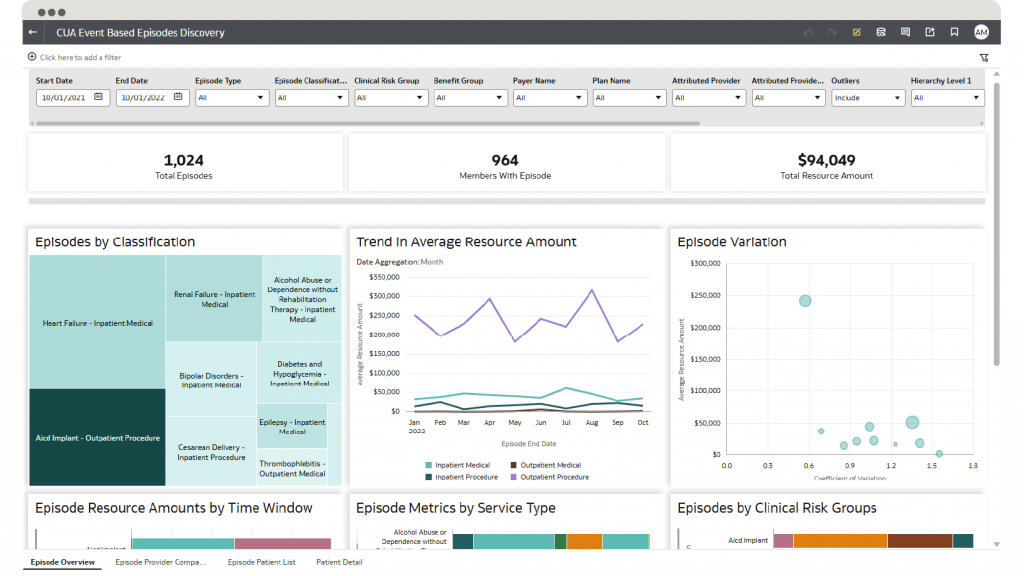
Oracle Health Data Intelligence is a cloud-based population health data platform that supports healthcare data aggregation, quality management, care management, clinical intelligence, and organizational analytics.
It is designed for organizations that need to bring information from multiple sources into a coordinated data environment. Its breadth makes it more appropriate for large healthcare enterprises than for smaller practices seeking a focused population health management tool.
Key Features
- Multi-source data aggregation: Combine clinical, claims, enrollment, financial, and operational data.
- Longitudinal patient records: Consolidate information from multiple encounters and systems.
- Population registries: Create patient groups based on attribution, conditions, measures, or care needs.
- Patient prioritization: Surface patients requiring attention based on risk, utilization, clinical information, or open gaps.
- Quality-gap alerts: Display payer-submitted and internally identified quality gaps in supported clinical workflows.
- Diagnosis-gap insights: Alert clinicians to possible missing diagnosis or risk-coding information.
- AI-generated summaries: Present summarized patient and population information inside supported workflows.
- Quality dashboards: Track organizational and provider performance against configured measures.
- Contract monitoring: Compare value-based care performance across contracts and populations.
- Care-management worklists: Organize patients and activities for population-health teams.
- Risk and episode analytics: Apply risk scores, episode groupers, utilization categories, and service classifications.
- Role-based access: Restrict patient and population information according to user and organizational responsibilities.
Pros
- Supports a broad range of enterprise healthcare data.
- Covers clinical, financial, operational, and population-health analytics.
- Suits large health systems with complex data environments.
- Offers cloud-based and extensible data infrastructure.
- Connects with the wider Oracle Health ecosystem.
Cons
- It can require substantial implementation resources.
- It may be too complex for small and midsized practices.
- Pricing is not publicly available.
- Individual capabilities may require additional products or configuration.
- Direct patient communication may require a complementary platform.
8. athenahealth: Best for EHR-Connected Population Health Workflows
Overview
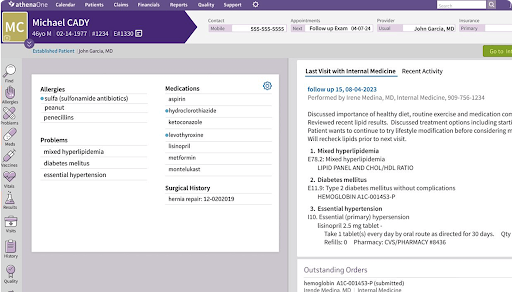
athenahealth connects population health insights with EHR, care-management, patient-engagement, referral, and quality-reporting workflows. It is particularly relevant for ambulatory organizations already using athenaOne or considering a broader commitment to the athenahealth ecosystem.
Its primary advantage is the ability to surface population-level information closer to the clinical workflow. This can reduce the need for users to move between a separate analytics platform and the patient chart when reviewing care or diagnosis gaps.
Key Features
- Point-of-care gap alerts: Surface care and diagnosis gaps inside the patient chart.
- Population panels: Organize patients according to care programs, quality requirements, or open gaps.
- Program enrollment tracking: Show which patients participate in specific care-management programs.
- Automated gap outreach: Contact patients with open care needs and prompt appointment scheduling.
- Payer-data integration: Bring payer-provided gap and performance information into clinical workflows.
- Hospital notifications: Alert teams to relevant hospital events involving attributed patients.
- Multi-EHR care management: Coordinate and document care for patients whose records span different EHRs.
- Referral management: Track referrals and determine whether outside services were completed.
- Quality reporting: Monitor HEDIS, electronic clinical quality measures, and value-based care performance.
- Data Explorer: Analyze whether patient and provider populations have satisfied relevant measures.
- Provider performance views: Compare care-gap and quality performance across providers.
- Marketplace extensions: Add complementary PHM and value-based care applications.
Pros
- Surfaces PHM information within clinical workflows.
- Offers a strong fit for organizations already using athenaOne.
- Combines EHR, care coordination, engagement, and reporting.
- Supports care-management activity across multiple EHRs.
- Connects care-gap identification with patient outreach and clinical action.
Cons
- Its best value may depend on using the wider athenahealth ecosystem.
- Some capabilities require additional modules or services.
- External integration depth varies.
- Pricing is not publicly transparent.
- It may require a broader platform commitment than some organizations want.
9. HealthEdge GuidingCare: Best for Payer Care and Utilization Management
Overview
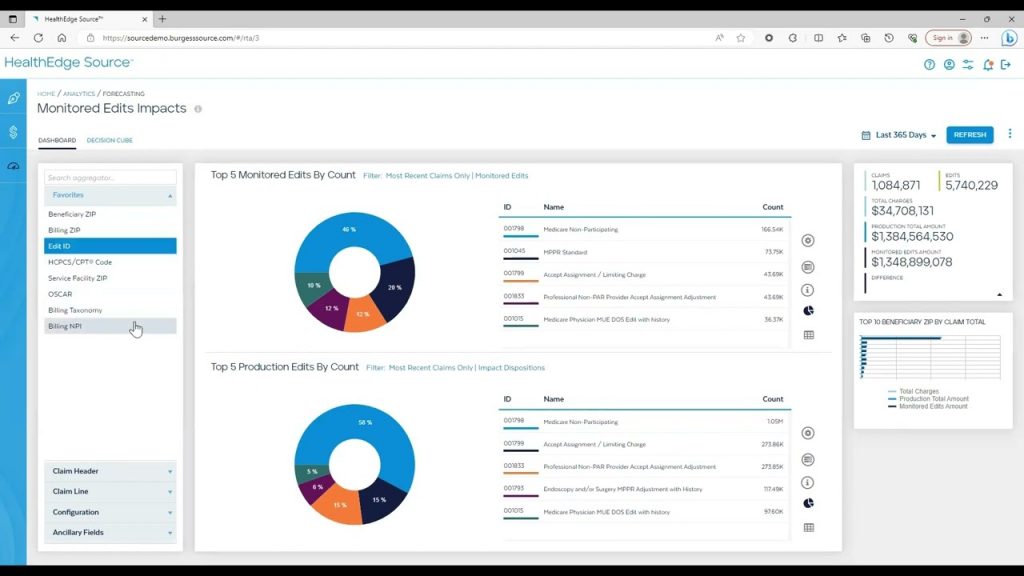
HealthEdge GuidingCare supports payer-focused care management, utilization management, authorizations, appeals, grievances, and population-health workflows.
Its capabilities are designed around health-plan operations rather than the day-to-day needs of an independent provider practice. Health plans can use the platform to identify members for programs, manage complex cases, review service requests, and document decisions across regulated workflows.
Key Features
- Electronic care plans: Create and maintain individualized member care plans.
- Automated case identification: Identify members who may qualify for care-management programs.
- Care-manager work queues: Assign and prioritize tasks for care-management teams.
- Health-risk assessments: Capture member health, behavioral, functional, and social needs.
- Utilization reviews: Manage prospective, concurrent, and retrospective reviews.
- Prior authorization: Process requests from submission through clinical review and determination.
- Clinical-guideline access: Apply MCG and InterQual criteria during utilization review.
- Appeals and grievances: Track cases, documents, decisions, correspondence, and deadlines.
- Authorization correspondence: Manage notifications sent to members and providers.
- Workflow automation: Apply configurable rules to route cases and assign reviews.
- Consolidated member record: Combine care, authorization, enrollment, and encounter information.
- Audit-ready decision tracking: Record criteria, rules, actions, and decisions associated with each case.
Pros
- Designed specifically for health plans and payer operations.
- Combines care and utilization management.
- Supports complex authorization and clinical-review workflows.
- Offers integrated appeals and grievance management.
- Provides configurable workflows for large member populations.
Cons
- It is not designed primarily for independent provider practices.
- Enterprise implementation can require substantial configuration.
- Pricing is not publicly available.
- Some functions require separate GuidingCare modules.
- Patient-engagement capabilities may require complementary solutions.
10. Azara DRVS: Best for FQHC and Community Health Reporting
Overview
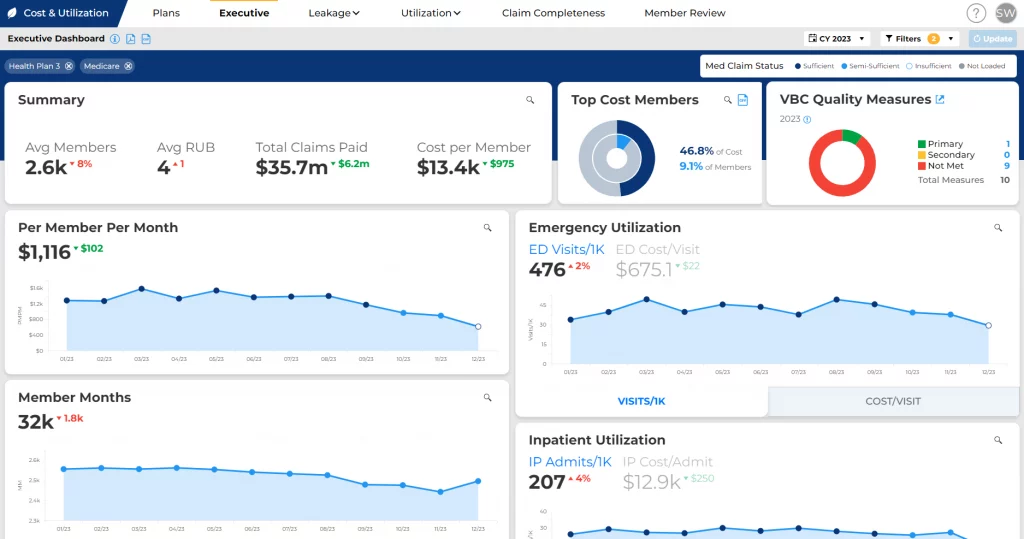
Azara DRVS centralizes clinical and operational information to support population reporting, quality improvement, mandated reporting, and value-based care. It is particularly well aligned with federally qualified health centers, community health centers, primary care associations, and safety-net organizations.
Its reporting and registry capabilities help organizations review performance at the patient, provider, site, and enterprise levels. It also addresses reporting requirements and workflows that are particularly important in community health settings.
Key Features
- Multi-source data aggregation: Combine clinical, claims, health-plan, practice-management, admission-discharge-transfer, and SDOH information.
- Patient registries: Create population lists using conditions, demographics, providers, locations, programs, and open gaps.
- Care-gap worklists: Generate patient-level lists of missing screenings, visits, tests, and services.
- UDS and UDS+ reporting: Produce required health-center reports using centralized organizational data.
- HEDIS reporting: Monitor health-plan quality measures across patient populations.
- Provider scorecards: Compare performance across clinicians, sites, and organizational groups.
- Pre-visit planning: Show outstanding care opportunities before an appointment.
- Chronic-disease dashboards: Monitor measures associated with diabetes, hypertension, and other conditions.
- Hospital-event monitoring: Use admission, discharge, and transfer information to identify follow-up needs.
- Risk-adjustment visibility: Surface potential coding and documentation gaps.
- Cost and utilization analysis: Review hospital use, emergency care, and healthcare spending patterns.
- Exportable reports: Share authorized patient lists, quality results, and performance information.
Pros
- Offers a strong fit for FQHCs, CHCs, and safety-net organizations.
- Provides specialized UDS and quality-reporting capabilities.
- Combines information from multiple healthcare sources.
- Offers patient, provider, site, and organization-level visibility.
- Supports population-health and value-based care programs.
Cons
- Pricing is not publicly available.
- Implementation depends on EHR and data-source connectivity.
- Its strongest fit is concentrated in community health and similar settings.
- Direct patient communication may require another platform.
- Independent product-review volume appears limited.
Key Features to Look for in Population Health Management Software
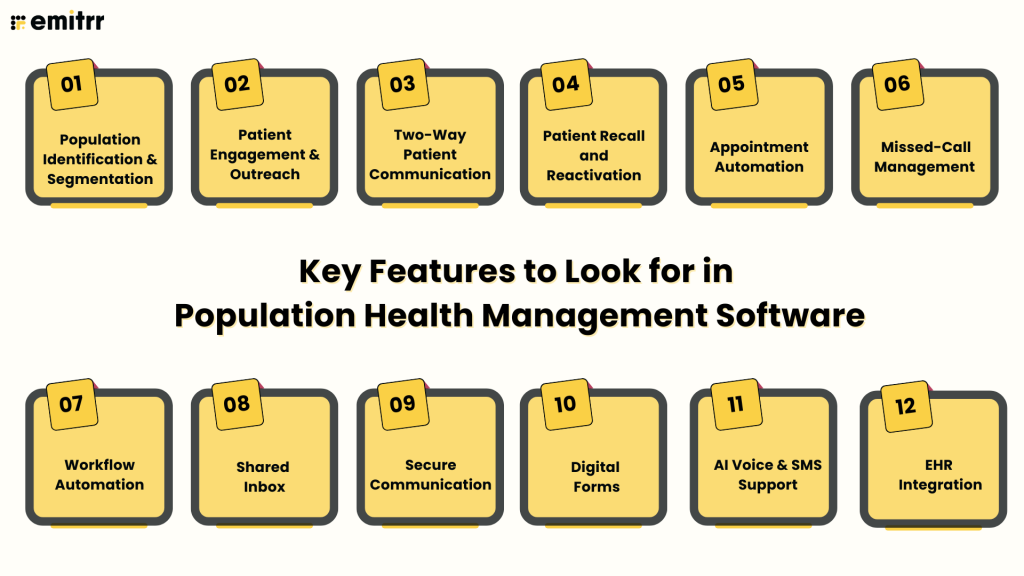
The right population health management software should help an organization move from identifying a patient population to completing the operational work that follows. This includes reaching patients, managing responses, scheduling services, collecting information, coordinating staff, and measuring whether outreach led to action. Organizations that need more context on the underlying process can first review what population health management is and how it works
Here are the features you must look for:
Population Identification and Segmentation
The software should allow teams to create, import, or receive patient cohorts based on relevant clinical, demographic, payer, and operational criteria. Examples include patients overdue for preventive services, recently discharged patients, inactive patients, or people enrolled in a chronic care program.
Users should be able to divide these populations by provider, location, preferred language, last visit, appointment status, insurance type, or another useful field. The resulting segments should be available for reporting, assignment, or outreach without requiring teams to rebuild the list manually.
Patient Engagement and Outreach
Patient engagement software for population health should help organizations reach patients through channels appropriate for the population, including SMS, voice, email, and secure messaging. Supporting more than one channel is important because some patients prefer texting, others respond better to calls, and some may not have a mobile number.
The platform should support both bulk and event-triggered outreach. It should also record delivery status, responses, opt-outs, and unsuccessful contact attempts so teams can understand which patients were reached.
Two-Way Patient Communication
One-way notifications cannot handle the questions and barriers that often follow population outreach. Patients may need to confirm an appointment, ask for another time, report that a service was completed elsewhere, request transportation support, or speak with a staff member.
Two-way communication allows the workflow to continue within the same conversation. The software should preserve conversation history, identify the patient, route responses to the correct team, and prevent multiple staff members from sending conflicting replies.
Patient Recall and Reactivation
Recall and reactivation features help organizations contact patients who are due or overdue for preventive, recurring, or follow-up care. Patient lists may come from an EHR, payer file, PHM platform, API, or uploaded file.
The platform should support personalized outreach, follow-up attempts, response tracking, and suppression rules for patients who schedule, decline, or opt out. Teams should also be able to distinguish patients who could not be reached from those who were contacted but did not schedule.
Appointment Automation
Population outreach frequently asks patients to schedule or return for care. The software should therefore support appointment confirmations, reminders, cancellation follow-ups, no-show recovery, and self-scheduling or rescheduling links.
Where an EHR or scheduling integration permits it, patient responses and appointment changes should update the primary schedule. If write-back is unavailable, the platform should create a visible task or queue for staff reconciliation instead of treating the request as complete.
Missed-Call Management
Unanswered calls can prevent patients from scheduling care, responding to outreach, completing referrals, or asking important follow-up questions. PHM software should help organizations capture and manage these missed access opportunities.
Useful features include missed-call-to-text automation, after-hours call handling, call routing, voicemail transcription, call summaries, and tracked callbacks. The system should collect enough context to route the inquiry without attempting to make clinical decisions.
Workflow Automation
Population health workflow automation should trigger actions using information such as patient status, appointment activity, outreach responses, imported lists, or data received from connected systems.
Useful capabilities include:
- Event-triggered communication
- Multi-step SMS, voice, and email workflows
- Response-based stop rules
- Automated tags and routing
- Staff assignments
- Escalation rules
- Exception queues
- Status tracking
- Human handoffs
- EHR updates where supported
Every automated pathway should have a defined outcome. If the system cannot complete an action, it should assign the issue to a person or team rather than allowing it to disappear inside the workflow.
Shared Inbox
Patient communication often becomes fragmented across phone systems, individual inboxes, personal devices, and separate texting applications. A shared inbox gives authorized team members a common view of conversations and outstanding work.
The platform should support assignments, tags, internal notes, routing rules, user permissions, and conversation statuses. Managers should be able to see which requests are unassigned, awaiting a response, escalated, or complete.
For multi-location organizations, inboxes and routing rules should direct patients to the correct location, department, or care team while preserving centralized oversight.
Secure Communication
Standard consumer messaging channels may not be appropriate when staff need to exchange protected health information. When comparing HIPAA-compliant population health management software, buyers should look beyond the marketing label and examine the safeguards supporting actual data use.
Buyers should evaluate:
- Business Associate Agreement availability
- Encryption in transit and at rest
- Secure links or authenticated patient access
- Role-based user permissions
- Audit logs
- User authentication
- Data-retention controls
- Access revocation
- Document security
- Incident-response procedures
A vendor’s claim of being HIPAA compliant is not sufficient by itself. The organization must also assess how the product will be configured, who can access patient data, and how staff will use it.
Digital Forms
Population outreach may require patients to complete intake forms, update demographic information, sign documents, provide referral details, or answer screening questions before staff can proceed.
The software should offer mobile-friendly forms, electronic signatures, structured fields, completion tracking, and secure document handling. Where supported, collected information should transfer into the appropriate EHR record or staff workflow.
If the submitted information requires clinical review, the system should create a task for an authorized team member rather than making an independent decision.
AI Voice and SMS Support
AI agents can help organizations manage high volumes of routine patient communication. Appropriate uses may include answering common questions, collecting structured information, confirming appointments, handling scheduling requests, and conducting approved outbound outreach.
Buyers should evaluate the actions an AI agent can perform, the information it can access, and how it handles uncertainty. The system should support configurable guardrails, human transfers, escalation rules, conversation summaries, and clear limits around clinical questions.
Pricing should also be reviewed carefully because voice minutes, messages, call transfers, and advanced AI workflows may involve usage-based fees.
Multilingual Communication
Population health programs should account for patients who prefer or require communication in another language. The platform should capture language preferences and support translated outreach without requiring staff to switch between separate applications.
Relevant capabilities include automatic message translation, multilingual templates, language detection, and multilingual voice support. Organizations should verify which languages and channels are available and whether sensitive or clinical content requires human review.
EHR Integration
The software should exchange relevant information with existing clinical and administrative systems. EHR-integrated population health software may use native connectors, APIs, HL7, FHIR, browser extensions, middleware, or file exchange to support these workflows.
Buyers should confirm:
- Which EHR versions are supported
- What patient and appointment data can be accessed
- Whether synchronization is one-way or two-way
- How frequently information updates
- Which actions can write back to the EHR
- Whether forms or communication records can be added to the chart
- How failed updates and duplicate records are handled
- Whether additional integration fees apply
An integration should be evaluated according to the workflow it enables, not simply whether the vendor displays the EHR’s logo.
Communication and Operational Reporting
Population health reporting software should show whether population-level workflows are reaching patients and producing the intended operational response. Relevant metrics may include delivery rates, response rates, call volumes, missed calls, scheduling conversions, campaign results, staff response times, and unresolved conversations.
Teams should be able to filter results by campaign, location, provider, patient segment, channel, or time period. Reports should also separate communication activity from clinical outcomes. A high response rate shows that patients engaged with the outreach, but it does not prove that a clinical gap was resolved.
Scalability and Multi-Location Administration
The platform should support increasing patient volumes without forcing teams to manage every conversation or campaign manually. Scalability may depend on automation capacity, message and call limits, user permissions, integration performance, and the ability to manage exceptions.
Multi-location organizations should look for centralized administration, location-level access, shared templates, population separation, configurable routing, consolidated reporting, and standardized workflows. The system should provide enterprise visibility while ensuring that local teams only access the patients and conversations relevant to their responsibilities.
Which Population Health Management Software Is Right for You?
The right solution depends on the job the organization needs the technology to perform.
| If You Need… | Best Platform |
| Automated patient outreach, two-way communication, scheduling, recalls, and follow-up workflows | Emitrr |
| Claims-based population intelligence, provider benchmarking, and ACO network analysis | CareJourney by Arcadia |
| An external team to manage patient panels, address care gaps, and coordinate appointments | HealthHelper |
| SDOH data enrichment and social-risk intelligence | Socially Determined |
| A customized healthcare data integration or interoperability project | J2 Interactive |
| Technology and services supporting value-based care performance | Castell |
| Enterprise-scale aggregation and analysis of clinical data | Oracle Health Data Intelligence |
| Population workflows closely connected with an ambulatory EHR ecosystem | athenahealth |
| Payer-side care management, case management, and utilization management | HealthEdge GuidingCare |
| UDS reporting, quality dashboards, and population analytics for FQHCs or CHCs | Azara DRVS |
Key Takeaways:
- Choose based on the capability missing from the current technology stack. An organization with strong analytics but weak patient response workflows has a different requirement from one that lacks reliable claims aggregation or care-gap reporting.
- Confirm EHR compatibility before comparing secondary features. A long capability list offers limited value if the software cannot receive the required information or return completed actions to the organization’s established systems.
- Implementation resources and total cost also matter. Buyers should account for integration work, data preparation, training, configuration, services, usage fees, maintenance, and internal staffing rather than comparing subscription prices alone.
- Some organizations will need an analytics platform and a separate workflow-execution platform. This combination can preserve specialized intelligence while improving the organization’s ability to reach patients and complete operational follow-up.
- For deployment planning, read this guide on how to implement population health management in your organization.
Frequently Asked Questions
Population health management software helps organizations identify, segment, analyze, manage, engage, and monitor patient or member populations. Specific functions vary by platform and may include analytics, risk visibility, care-gap alerts, care management, reporting, or patient outreach.
Important features include population segmentation, risk and care-gap visibility, care-management workflows, patient engagement, automation, reporting, EHR interoperability, access controls, auditability, and multi-location administration. The required combination depends on the organization’s goals and existing technology.
An EHR primarily stores and manages individual patient records and clinical workflows. PHM software analyzes or coordinates activity across defined patient populations. Some EHRs include population health capabilities, while others connect with separate PHM platforms.
Yes, many PHM platforms integrate with EHRs through native connectors, APIs, HL7, FHIR, ADT feeds, or file exchange. Integration depth varies, so organizations should confirm available data, synchronization frequency, and write-back capabilities.
Many vendors provide security capabilities and Business Associate Agreements that support HIPAA-compliant use. Buyers must still evaluate access controls, encryption, audit logs, data handling, subcontractors, and configuration. Purchasing software does not make an organization HIPAA compliant by itself.
Costs range from relatively focused per-user or usage-based subscriptions to custom enterprise contracts. Total cost may include implementation, integrations, data migration, training, additional modules, support services, messaging, AI usage, and internal staffing. Buyers should compare population health management software pricing based on total cost of ownership, not only the advertised subscription rate.
Conclusion
Population health management software includes several product categories rather than one uniform type of platform. Some solutions provide claims-based intelligence, risk visibility, care management, SDOH analysis, quality reporting, or enterprise data aggregation. Others help teams execute the communication and administrative work that follows.
Healthcare organizations should identify the missing capability in their existing stack before comparing population health management software vendors. EHR compatibility, security, implementation effort, scalability, data requirements, and total cost should carry more weight than the length of a vendor’s feature list.
For organizations that can already identify patient populations but need a better way to reach patients and complete the next operational step, Emitrr adds scalable communication and workflow execution through texting, voice, scheduling, forms, AI agents, and team-based follow-up. Book a demo with Emitrr to see how it can support your existing PHM technology stack.

 4.9 (400+
reviews)
4.9 (400+
reviews)