
Introduction
Dialpad alternatives come up most often when a business wants AI-powered calling features but finds the per-user cost hard to justify at scale. Dialpad is a strong VoIP platform with real AI transcription and coaching built in, but it’s priced at the premium end of the SMB market and features like analytics and integrations are gated behind higher tiers. Healthcare practices often find it’s not purpose-made for patient communication, since there’s no HIPAA texting, EHR integration, or patient reminder automation included. These alternatives give you calling and AI features without the per-user ceiling.
AI Summary
- Dialpad’s AI transcription and coaching features are genuinely strong but come at a per-user premium that compounds as teams grow.
- This blog covers alternatives with AI-assisted calling at a lower per-user cost or a volume-based pricing model.
- Explains why healthcare practices evaluating Dialpad find no native HIPAA texting, EHR integration, or patient reminder automation.
- Rates each alternative on AI call feature quality, SMS depth, and whether analytics require a tier upgrade.
- Emitrr is recommended for healthcare teams that want VoIP and texting with healthcare compliance that Dialpad doesn’t cover.
Watch this video to see how Emitrr outshines Dialpad for growing tech businesses –
Why Teams Paying a Per-User Premium for AI Calling Features Start to Question the Value
While VoIP Dialpad has been a popular choice for businesses seeking comprehensive communication solutions, there are instances where customers have found it difficult to continue with Dialpad phone system. Here are some core reasons why people are looking for VoIP alternatives to Dialpad:
- Call drops: Users experience frequent call interruptions and disconnects, leading to disruptions in communication.
- Connectivity issues, lag: Users encounter delays and poor network connectivity, resulting in laggy audio or video during calls.
- Buggy conferencing: Dialpad conference call feature often experiences technical issues, such as audio glitches or dropped participants.
- Integration issues: Users face difficulties integrating Dialpad phone with other software or platforms, limiting its compatibility and usefulness in a broader ecosystem.
- Terrible support, worst customer service: Users receive inadequate assistance and unhelpful responses from Dialpad customer service team, exacerbating problems instead of resolving them.
- Extremely pricey: Dialpad pricing plans are excessively expensive, making them unaffordable for many users, especially small businesses or startups.
- Misleading advertising: Dialpad marketing may overpromise on features or benefits, leading to false expectations among users and disappointment upon using the product.
- The system is clunky: Dialpad user interface and overall system design are cumbersome and unintuitive, making it difficult for users to navigate and use effectively.
- Issues with call routing: Users encounter problems with calls being incorrectly routed or failing to connect to the intended recipient, causing frustration and inefficiency.
- Unorganized message threads: Dialpad messaging interface lacks organization and coherence, making it challenging for users to manage and keep track of conversations effectively.
- Extra charges and unreasonable billing: Users may incur additional fees or encounter billing discrepancies with Dialpad’s service, leading to unexpected expenses and dissatisfaction.
- Fake promises, fewer features delivered: Dialpad software may fail to deliver on promised features or functionalities, leaving users feeling deceived and dissatisfied with the product.
- Not robust and offers limited features: Dialpad phone system lacks robustness and versatility compared to other communication platforms, offering only a limited range of features and capabilities.
- Caller ID and common features not available: Dialpad VoIP may lack essential features such as caller ID or call forwarding options, hindering users’ ability to manage calls effectively.

What Business VoIP With AI Features Should Include at Each Pricing Tier
Here are VoIP features that you must look for in a Dialpad alternative:
- Call recording: Use call recording to record calls easily and access them to monitor adherence, call quality, or to take notes.
- Call forwarding: Call forwarding feature diverts incoming calls automatically from your old business phone number to your new VoIP device.
- Call encryption and security: Encrypt your calls to ensure customer conversations remain private and secure.
- Mobile integration: Integrates third-party tools with your small business VoIP and starts taking calls anywhere, anytime.
- Conference calling: Look for a VoIP alternative to Dialpad that lets multiple people join your call using this feature.
- Users & extensions: Use this feature to remove or add users and their extensions.
- Analytics dashboard: Get detailed analysis on various calling metrics such as average handle time, total calls made, missed calls, calls answered, etc, with the call analytics feature.
- Call transfer: Call transfer is an important feature to look for in your ideal Dialpad replacement.
- Call queues: Call queuing lets your callers know how many callers are ahead of them in the queue and when they can expect the call to be answered.
- Voicemail transcripts and summaries: Avoid listening to the entire call and get call summaries instead with a voicemail transcription software.
- Toll-free numbers: Offer toll-free numbers so that your customers can call you for free.
- AI integration: AI is an emerging trend, and different cloud phone system providers may integrate it differently, but it’s a great feature to look for
- Auto attendant: Auto attendant allows calls to be answered by an auto-attendant to direct the caller to the right person or department.
Want to know more about Dialpad beyond what you see on its website? Take a look at our video review:
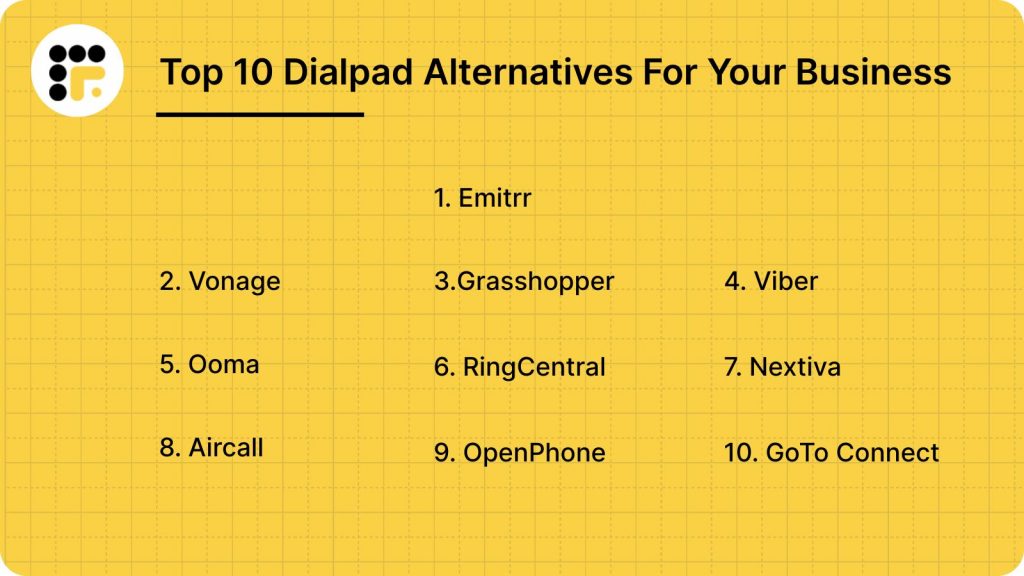
10 Best Dialpad Alternatives
Let us dive into the details of the top Dialpad alternatives, breaking down their key features, advantages, and potential limitations. This closer look will help you find the VoIP solution that best aligns with your business’s communication needs and growth plans.
1. Emitrr: Best Dialpad Competitor
What is Emitrr?
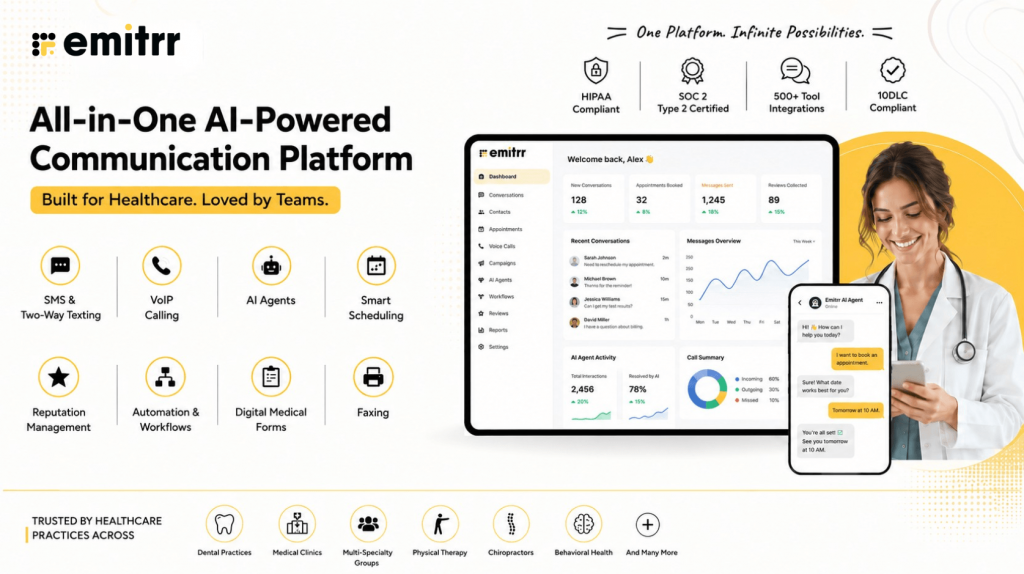
Emitrr offers the best communication platform with a VoIP phone system and texting features at its core. Whether it’s making AI VoIP calls or sending texts on the go, Emitrr has your back for seamless communication. Our cutting-edge texting features and user-friendly interface make staying connected effortless. Emitrr is best for businesses that want an all-in-one, AI-driven communication solution to manage calls, texts, and customer engagement from one place. Here’s a quick overview of this VoIP alternative to Dialpad:
Key Features Of Emitrr
- IVR/Call Tree with Forwarding on Key Press: Emitrr’s IVR (Interactive Voice Response) and Call Tree features allow users to set up multiple branches in the call flow, so calls are directed based on the caller’s input.
- AI call routing: Let AI call routing analyse whether a call is from a new patient or an old one from the existing patient data, and let it transfer the call directly to the relevant person or department without human interference.
- AI call handling: Let AI handle calls, be it level one calls for answering common queries, or canceling, rescheduling, or booking appointments. Or set actions and let it handle more complex calls, you decide.
- AI call forwarding: Let AI call forwarding help forward incoming calls smartly by analysing the caller’s intent and context. Set it up to forward VIP calls to top agents, or to simply escalate urgent calls to the right person.
- AI call screening: Let AI call screening filter spam or robocalls, identify unknown callers to reduce call disruptions and unnecessary long call queues.
- AI call recording: Use Emitrr’s AI call recording call agent to auto-record calls, to flag compliance breaches, and to train your team better for quality and compliance purposes.
- AI call queue: Let the AI call queue handle common queries, bookings, cancellations, etc., to reduce call queue lines. Set up an auto message if a caller drops mid-way, and keep them engaged.
- AI SMS nudge: Let AI nudge callers standing in virtual queues to continue the conversation over SMS instead.
- Smart phone trees: Build a smartphone tree system that engages the caller seamlessly.
- AI summary and transcripts: Save time that may be wasted in listening to long calls. Use AI summary and transcript features to get a crisp summary of different phone calls.
- AI data and forms collection: Let AI collect patient forms and other information, such as insurance details, patient demographics, patient visit, medical history, and more, beforehand.
- Dashboard and reports: Access the dashboard and reports to analyse how many calls got dropped, the total number of calls received, missed, etc. And take necessary action to fix loopholes.
- Customizable Call Flows: Design detailed call trees to efficiently route callers to the right department or team member, improving customer service.
- Organized Call Groups: Streamline team collaboration by directing incoming calls to groups of employees with shared extensions for faster response times.
- Unique Extensions for Teams: Assign distinct extensions to employees or departments to simplify internal and external communication.
- Business and After-Hours Call Handling: Configure different call routing rules for business hours and after-hours to manage customer expectations effectively.
- Scalable VoIP Capabilities: Easily add new phone numbers, teams, or locations as your business grows without any technical challenges.
- Cloud-Based Access Across Devices: Use Emitrr’s VoIP system on desktops, mobile devices, or tablets for seamless communication from anywhere.
- Team Collaboration with Extensions: Enhance internal communication by enabling direct dialing and extensions for team members.
- Call Recording Options: Record calls automatically or selectively based on compliance needs and business requirements.
- Advanced Performance Metrics: Monitor key call data like response times, missed calls, and average handling times to improve team efficiency.
- Call Queue Groups: Calls can be sent to a pre-defined group of team members (or extensions) who are assigned to handle specific types of inquiries, ensuring callers reach someone in that specialized team.
- Call pop: Use the call pop feature to access caller information and calling history during a live call to offer a quick resolution.
- Ring Everyone: In situations where immediate response is critical, calls can be set to ring all available team members simultaneously, ensuring the first available person picks up the call.
- Missed call text: It works as a missed-call-text back software to send automated SMS to callers whose calls go unanswered.
- Set up Call Groups with Multiple Extensions/Team Members: You can create a call queue with multiple extensions or team members, allowing calls to route to a group rather than a single person, ensuring someone is available to answer during peak hours or when handling high call volumes.
- Call Routing: Direct and incoming calls automatically to the right department or person.
- Multiple Extensions Setup: You can create individual extensions for each user and even customize them for individual availability and forwarding preferences.
- Customize User availability: Customize each user’s availability on a day-by-day basis, allowing flexibility to account for specific schedules, such as part-time shifts, vacations, or other variable working hours. And define specific working hours for each user.
- Call Forwarding: Each extension can have its own call forwarding rules (similar to call queue groups), allowing calls to be forwarded to another extension, number, or voicemail if the user is unavailable or has missed a call.
- Call Recording: Automatically record all incoming and outgoing calls if desired, ensuring there is a record for training, compliance, or quality assurance purposes, or turn off recording based on specific regulations or privacy requirements.
- Set up Business Working Hours: Define standard business hours for your organization to control call routing automatically based on availability.
- Bulk/Mass Text Messaging: Send 1000s of text messages at once and achieve a 98% open rate with bulk texting or mass messaging.
Emitrr is the best alternative to Dialpad as it provides robust features when it comes to VoIP and text messaging, helping you to optimally stay connected with your customers without overburdening your team. For quite some time, 100s of Dialpad customers have migrated to Emitrr for better texting and not just VoIP.
Emitrr Pros
- No Downtime: With Emitrr, you can rest assured knowing that the software is thoroughly tested, providing 99.99% uptime for uninterrupted calling.
- User-Friendly VoIP Features: Emitrr features a streamlined dashboard that is intuitive and extremely easy to navigate.
- Superior Call Quality: Emitrr delivers HD audio quality, ensuring flawless communication with your customers.
- Simple Dashboard Setup and Training: The setup process for Emitrr is quick and straightforward, allowing for fast onboarding with minimal hassle.
- Effortless Integrations: This VoIP phone system easily integrates with your CRM, EHR, or PMS tools.
- Cost-Effective and Flexible Pricing: Emitrr offers a variety of features and greater value than Dialpad cost with its affordable and adaptable pricing plans.
- Abundant Features: Designed for small businesses, this VoIP phone system includes a multitude of features for calling, texting, review management, and more that can be included in your plan.
Emitrr Cons
More VoIP features are coming soon!
Emitrr Pricing
Emitrr offers two VoIP plans, Standard and Professional, to match different levels of business needs. Pricing starts at $20 per user per month when billed annually. Both plans come packed with a myriad of features that help businesses handle calls, automate follow-ups, and streamline customer communication seamlessly.
Take a quick look at Emitrr’s VoIP pricing for each plan:
| Name of the plan | Pricing if paid annually | Pricing if paid monthly |
| Standard | $20 per user per month | $25 per user per month |
| Professional | $30 per user per month | $35 per user per month |
Emitrr Integrations
Emitrr phone system offers integrations with more than 1000 tools across different industries, with tools like:
- Mailchimp
- Salesforce
- Zapier
- HubSpot
- HouseCall Pro
- And more!
Emitrr Reviews
“There are several things I like about Emitrr: 1) they have built a powerful, easy to use web interface. 2) The onboarding of our staff and contacts was excellent 3) Any issues we have had were addressed immediately and professionally by Emitrr staff 4) they are improving the product on an ongoing basis”
“Great product that makes running a small business easier, i own and operate 2 small businesses and having an auto text responder, missed call responses and the voicemail system set up is a game changer for me”
Source: Capterra
Emitrr Support Channels
- Email: Send email to Emitrr’s support team at support@emitrr.com
- Phone: Call Emitrr at +1 (210) 941-4696
- Live chat: Chat with Emitrr’s live representatives
- FAQs/forum
- SMS
- Knowledge base
2. Vonage: Best customizable VoIP
What is Vonage?
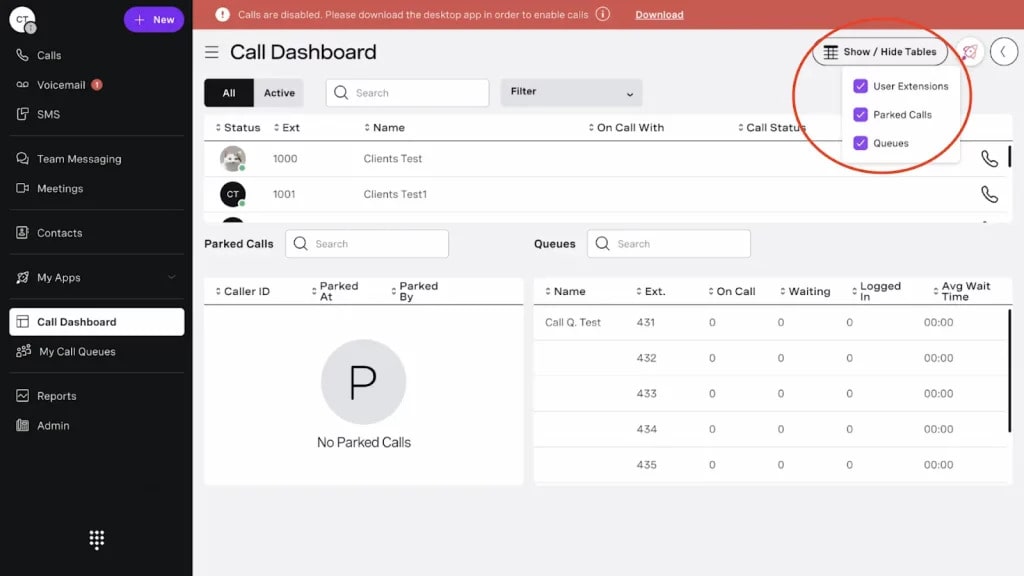
Vonage offers VoIP communication solutions. Offering a suite of services including Voice over Internet Protocol (VoIP) phone systems, messaging, and video conferencing. Serving as an alternative to platforms like Dialpad, it aims to meet diverse business communication needs. Vonage is best for businesses that require reliable VoIP services and scalable communication solutions for remote teams, customer support, and unified collaboration. We’ll explore its features, reviews, and applicability across various business contexts, enabling you to make an informed decision about your communication strategy. Here’s a quick look at this Dialpad alternative:
Key Features Of Vonage
- Automatic Call Distribution (ACD): Automatically routes incoming calls to the most appropriate agent or department based on predefined criteria, enhancing efficiency and customer satisfaction.
- Call Center Management: Provides tools to manage and optimize call center operations, including agent performance monitoring, queue management, and reporting.
- Call Conferencing: Enables multiple parties to participate in a single call, fostering collaboration and facilitating meetings without the need for physical presence.
- Call Recording: Allows users to record calls for quality assurance, compliance, or training purposes, providing a valuable resource for reviewing interactions with customers or clients.
- Call Routing: Directs incoming calls to specific destinations or individuals based on predefined rules or criteria, ensuring calls are efficiently handled and directed.
- Call Transfer: Enables seamless call transfer between agents or departments, allowing for smooth escalation or handoff of customer inquiries or issues.
- Caller ID: Displays identifying information about the incoming caller, such as their phone number or name, providing context to the recipient before answering the call.
Pros of Vonage
- Customizable Dashboard: Vonage provides a highly customizable dashboard, allowing users to create their own features using their API, although some small business owners may find it somewhat complex.
- User-Friendly Interface: Vonage features an intuitive interface, making it easy to navigate with minimal training required.
- Helpful Customer Service: Users frequently commend Vonage for delivering prompt and effective solutions to customer inquiries.
Cons of Vonage
- Desktop app crashes frequently: Users may encounter frequent crashes when using Vonage’s desktop application, disrupting workflow and causing inconvenience.
- App often freezes: The Vonage app may experience frequent freezing, hindering smooth communication and productivity.
- Limited integrations: Vonage may have limited integrations with other software and tools, limiting its compatibility and functionality in certain business environments.
- Fake promises: Vonage may make promises or claims that are not fulfilled, leading to disappointment and loss of trust among users.
- Compulsory contract signing: Users may be required to sign compulsory contracts with Vonage, restricting flexibility and imposing long-term commitments.
- Poor call quality: Vonage’s call quality may be subpar, leading to unclear audio and frustrating communication experiences for users and customers.
- Non-reliable service: Vonage’s service may suffer from unreliability, causing disruptions and potentially impacting business operations.
- Call forwarding does not work: Users may encounter issues with Vonage’s call forwarding feature, leading to missed calls and communication delays.
- Don’t get notifications for missed calls or texts: Users may not receive notifications for missed calls or text messages on Vonage, potentially causing delays in responding to important communications.
- Gets stuck all the time, does not answer phone calls, drops calls on hold: Users may experience frequent issues with Vonage’s performance, including being stuck, unresponsive, and dropping calls unexpectedly, leading to frustration and inefficiency.
Vonage Pricing
This alternative to Dialpad offers a range of business communication plans, with pricing typically based on the number of users and specific features included. The core Vonage pricing plans are as follows:
- Mobile Plan – Starting at $19.99 per user/month
- Premium Plan – Starting at $29.99 per user/month
- Advanced Plan – Starting at $39.99 per user/month
Vonage Integrations
This competitor of Dialpad offers an API using which you can build the features you need; however, this could be a complicated process.
Vonage Reviews
“Call lag is the main issue and can become quite frustrating for our team and our customers. Also the in ability to see on screen when a call is being transferred who is transferring it to you.”
“The fact that vonage is pretty easy to use , specially if you have a team of people and users within a number of 20-30 it can be an amazing.”
Source: Capterra
Vonage Support Channels
- Phone Support
- Email/Help Desk
- FAQs/Forum
- 24/7 (Live rep)
Tired of reading through comparisons? Watch our Vonage video for a quick breakdown:
3. Grasshopper: Best VoIP for Small Businesses
What is Grasshopper?
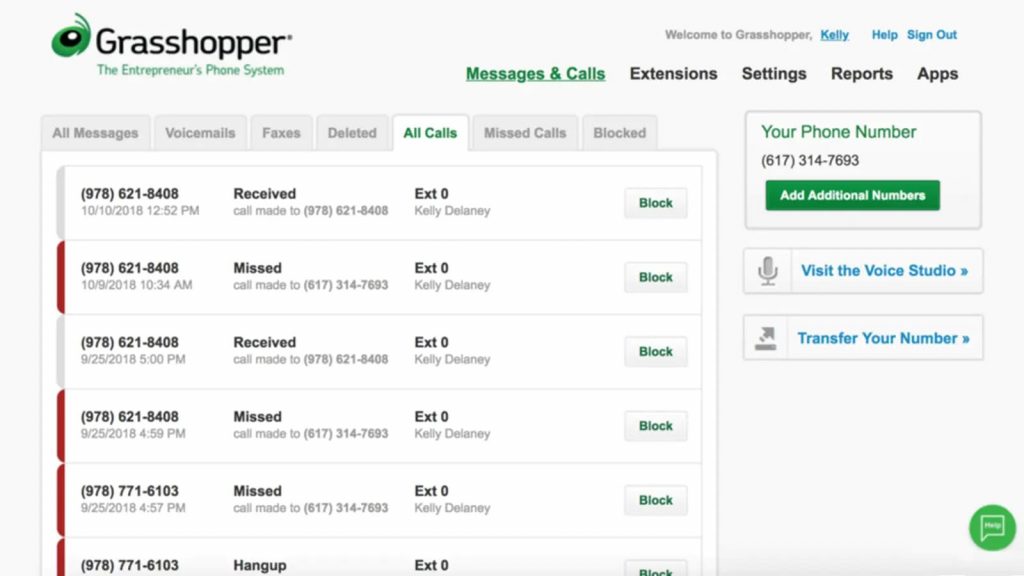
Grasshopper is a virtual phone system made for small businesses and entrepreneurs. This Grasshopper alternative to Dialpad helps users manage business calls while keeping personal and work communications separate. Grasshopper is best for small businesses and startups that need a simple, easy-to-set-up phone system with basic calling and texting features. In the next section, we will explore Grasshopper’s main features and benefits to show how it can make business communications smoother. If you need a straightforward phone system with basic calling and texting, Grasshopper can be a solid choice, especially for new or small businesses looking for an easy setup.
Key Features Of Grasshopper
- Automated Attendant: Grasshopper’s automated system directs callers to the right department or person with custom greetings.
- Automatic Call Distribution: Calls are automatically routed to available agents or departments for efficient handling.
- Call Center Management: Tools for monitoring agent performance, tracking calls, and generating reports streamline call center operations.
- Call Conferencing: Easily set up conference calls for collaboration with clients or team members.
- Call Logging: Detailed call logs provide insights into call activity, helping track trends and improve efficiency.
- Call Monitoring: Supervisors can monitor live calls for coaching and quality control purposes.
- Call Routing: Customize call handling based on factors like time, location, or keywords for better customer service.
Pros of Grasshopper
- Cost-Effective: Grasshopper is a budget-friendly VoIP phone system, with prices beginning at just $14 per month. However, it provides only basic features.
- Reliable Call Quality: Grasshopper users appreciate the reliable call quality provided by the service.
Cons of Grasshopper
- Inadequate customer support: Grasshopper’s customer support may not effectively address user issues or provide timely assistance.
- Text messaging functionality is unreliable: Users may encounter difficulties with Grasshopper’s text messaging feature, experiencing issues with sending or receiving messages.
- System inefficiencies lead to missed calls: Grasshopper’s system may be time-consuming to navigate, resulting in missed calls and potential customer dissatisfaction.
- Complex interface complicates usage: The system’s interface may be overly complex, making it difficult for users to understand and utilize its features effectively.
- Lack of analytics tools: Grasshopper lacks comprehensive analytics capabilities, limiting users’ ability to track performance metrics and gain insights from call data.
- Frequent automatic logouts: Users may experience frequent automatic logouts from the Grasshopper system, disrupting workflow and causing inconvenience.
- Inability to view caller names: Users may not be able to see the names of incoming callers, making it challenging to identify and prioritize important calls.
- Loss of data when porting numbers: When porting numbers to another provider, users may lose access to all associated records, including text messages, call logs, and voicemails, which can result in data loss and operational setbacks.
Grasshopper Pricing
This alternative to Dialpad offers three pricing plans for its virtual phone system. Here are the three core Grasshopper pricing plans-
- Solo – $29 per month for one number and three extensions.
- Partner – $49 per month for three numbers and six extensions.
- Small Business – $89 per month for five numbers and unlimited extensions.
Grasshopper Integrations
This alternative to Dialpad integrates with a bunch of software, including:
- Skype
- Google Voice
- Zapier
- And more!
Grasshopper Reviews
“Beyond the calling, texting, and call log there are almost no features. No analytics, unique features, and overall a boring application.”
“Easy setup and most importantly the customer support is awesome. 7 help and always very helpful.”
Source: Capterra
Grasshopper Support Channels
- FAQs/Forum
- 24/7 (Live rep)
- Knowledge Base
- Email/Help Desk
- Phone Support
- Chat
Wondering whether Grasshopper still makes sense in 2026? Watch our video for a closer look:
4. Viber: Best VoIP for Ease-of-Use

What is Viber?
Viber is a widely used messaging and calling app that offers free communication services. With its easy-to-use interface and various features, this alternative to Dialpad allows users to connect through text, voice, and video calls. Viber is best for individuals and small businesses that want a simple, reliable app for free messaging and calls. In the next section, we’ll explore Viber’s features and benefits, making it easy to understand how it can enhance your communication experience, whether for personal or business use.
Key Features Of Viber
- Chat/Messaging: Viber allows users to send text messages, stickers, and multimedia files, facilitating seamless communication between individuals and groups.
- Live Chat: With Viber’s live chat feature, users can engage in real-time conversations with friends, family, or businesses, enhancing immediacy and responsiveness.
- Multi-Channel Communication: Viber supports multiple communication channels, including text messaging, voice calls, and video calls, providing users with versatile options for staying connected.
- Personalization: Viber offers personalized experiences through features like customizable chat backgrounds, stickers, and user profiles, allowing users to express themselves uniquely.
- Reporting/Analytics: Viber provides reporting and analytics tools that enable businesses to track communication metrics, analyze user engagement, and gain insights into performance.
- Video Support: Viber supports high-quality video calls, allowing users to connect face-to-face with friends, family, or colleagues, regardless of their location.
- Batch Communications: Viber’s batch communications feature enables businesses to send messages to multiple recipients simultaneously, streamlining communication efforts and reaching a broader audience efficiently.
Pros of Viber
- Beginner-friendly: User reviews suggest that Viber is very easy to use, convenient, and beginner-friendly.
- Video calling feature: Viber offers a video calling feature as well, unlike many VoIP phone systems.
- Free VoIP service: Viber offers a free plan with basic VoIP features.
Cons of Viber
- Call doesn’t end even if you hang up: Users may experience instances where calls fail to terminate even after hanging up, leading to confusion and potential privacy concerns.
- Cannot block calls from unknown numbers: Viber cannot block calls from unknown or unidentified numbers, potentially resulting in unwanted interruptions and spam calls.
- Call quality deteriorates with network: Users may encounter deteriorating call quality, such as dropped calls or audio distortion, particularly in areas with poor network coverage or congestion.
- No option for blocking contacts: Viber does not provide an option to block specific contacts, leaving users vulnerable to unwanted communication or harassment from individuals they wish to avoid.
Viber Pricing
This alternative to Dialpad offers both free and business-oriented services, with pricing that depends on the specific use case:
- Viber for Personal Use: Free
- Viber Out: Pay-as-you-go rates start at around $0.01 per minute, varying by country. And other Subscriptions are available for specific countries or regions, with monthly rates starting at around $5.99 per month, offering unlimited calls to designated countries.
Viber Integrations
This alternative to Dialpad offers integrations through Zapier.
Viber Reviews
“Does not work that well on iOS devices and lags a lot the user interface is a bit outdated and does not get calls through unless app is being used.”
“It is very easy to use, convenient and beginner-friendly and the settings are amazing and the design is very good and visually appealing.”
Source: Capterra
Viber Support Channels
- Chat
5. Ooma: Best for Improving Collaboration
What is Ooma?
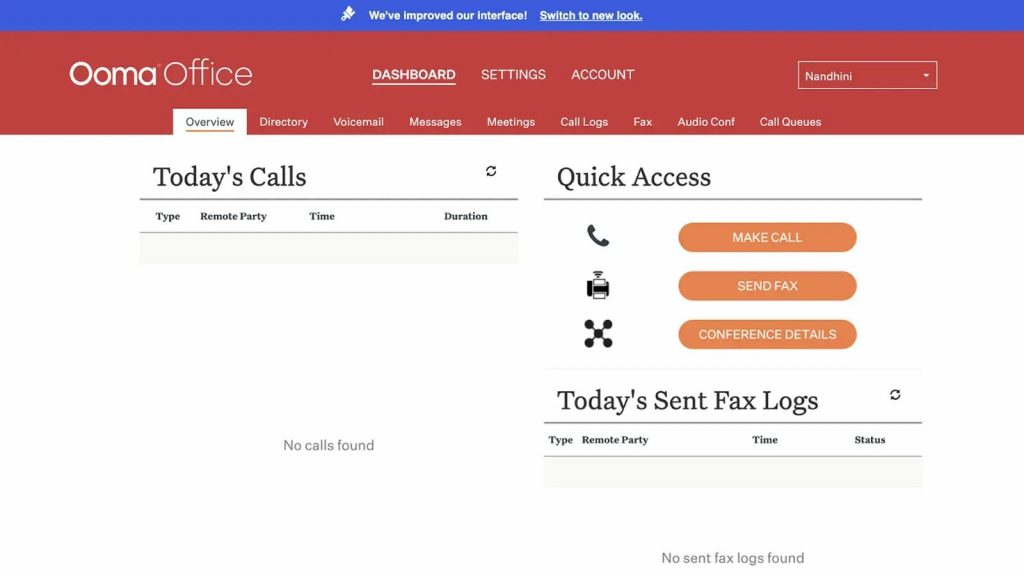
Ooma is a VoIP phone designed to streamline business operations and enhance connectivity. While it boasts features aimed at improving collaboration and customer interactions, it’s important to take a closer look at what this Dialpad competitor has to offer for businesses wanting to evaluate their communication. Ooma is best for small to mid-sized businesses seeking an affordable, easy-to-use VoIP solution for calls, conferencing, and basic team communication. Here’s a quick look at this Ooma alternative:
Key Features Of Ooma
- Call Center Management: Ooma offers tools to efficiently manage call center operations, including call routing, agent performance tracking, and queue management, aimed at improving customer service and productivity.
- Call Conferencing: Ooma facilitates seamless conference calls, allowing multiple participants to join meetings and collaborate effectively, enhancing communication within teams and with clients.
- Call Recording: Ooma provides call recording functionality, enabling businesses to record and store conversations for training purposes, quality assurance, and compliance with industry regulations.
- Caller ID: Ooma displays caller identification information, allowing users to see the incoming caller’s phone number or name before answering the call, enhancing call screening and prioritization.
- Chat/Messaging: Ooma offers chat and messaging capabilities, enabling real-time communication between team members and clients, fostering collaboration and quick information exchange.
- Multi-Channel Communication: Ooma supports various communication channels, including voice calls, messaging, and conferencing, allowing users to communicate seamlessly across different platforms and devices.
- VoIP Connection: Ooma leverages Voice over Internet Protocol (VoIP) technology to establish high-quality voice connections over the internet, offering flexibility, cost savings, and scalability for businesses.
Pros of Ooma
- Affordable International Calling Rates: Ooma has a low per-minute charge for outbound calls placed to countries beyond the U.S., Mexico, Canada, and Puerto Rico.
- Free Toll-Free Number: Ooma provides an 800 toll-free number at no cost.
- Simple Initial Setup: Setting up Ooma is straightforward, allowing you to get started quickly.
Cons of Ooma
- False Promises: Users have reported instances of Ooma failing to deliver on promised features or performance, leading to disappointment and frustration.
- Limited Features: Ooma may lack advanced features compared to competitors, limiting its functionality and versatility for businesses with complex communication needs.
- Lack of Call Hold/Transfer: Ooma’s absence of call hold and transfer features can hinder efficient call management, potentially leading to delays and disruptions in customer service.
- Poorly Designed User Interface: Some users find Ooma’s user interface to be poorly designed and unintuitive, making it difficult to navigate and utilize effectively.
- Rude Customer Service: Ooma’s customer service representatives have been criticized for being rude or unhelpful, resulting in negative experiences and dissatisfaction among users.
Ooma Pricing
This Dialpad competitor offers a few different pricing plans for its business phone solutions, catering to small and medium-sized businesses. Here’s a breakdown of the main Ooma pricing plans:
- Ooma Office – $19.95 per user/month
- Ooma Office Pro – $24.95 per user/month
- Ooma Office Pro Plus – $29.95 per user/month
Ooma Integrations
This Dialpad competitor can be integrated with many third-party tools, including:
- Salesforce
- Intuit quickbooks
- HubSpot
- Zoho
- And more!
Ooma Reviews
“Sometimes the call quality is horrible or just flat out unable to connect and it seems they have a lot of outages.”
“I love the customer service the best!!!! They are always on top of their game, and willing to go above and beyond to help you out.”
Source: Capterra
Ooma Support Channels
- Chat
- Email/Help Desk,
- FAQs/Forum
- 24/7 (Live rep)
- Phone Support
6. RingCentral: Best for Call Center Management
What is RingCentral?
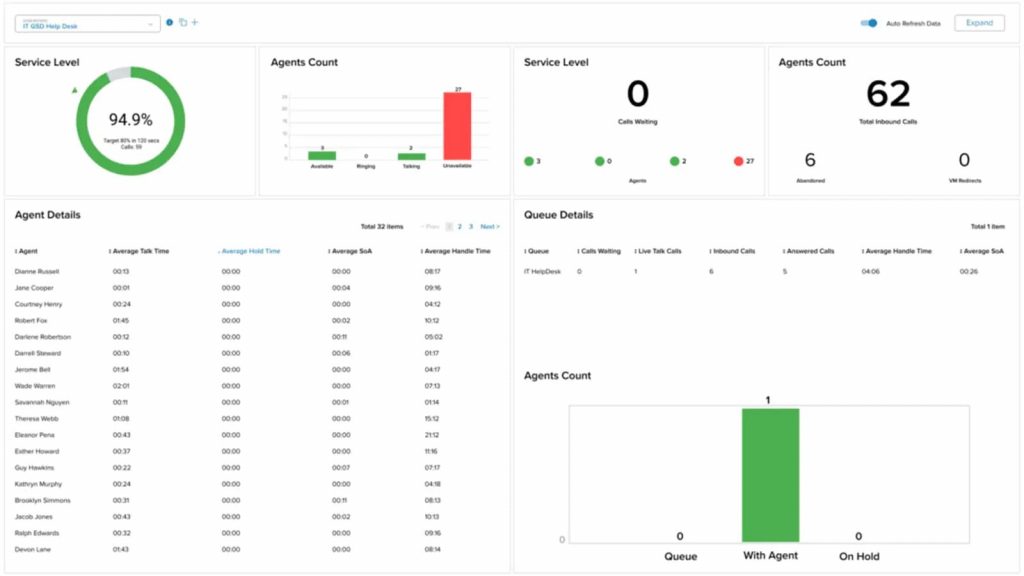
RingCentral is a cloud-based communication platform designed to support businesses of all sizes with its unified communications system, combining voice, video, messaging, and collaboration tools. This Dialpad competitor and RingCentral alternative aims to improve team productivity and enhance customer engagement. RingCentral is best for businesses that need a robust, scalable communication solution with advanced collaboration and integration capabilities. However, to determine if it truly meets business needs, let’s examine RingCentral’s features and drawbacks.
Key Features of RingCentral
- Call Center Management: RingCentral provides a robust set of call center management tools, including call routing, queuing, agent performance tracking, and analytics. These features help businesses optimize customer service by efficiently managing inbound calls and improving agent productivity.
- Call Conferencing: With RingCentral, businesses can set up high-quality conference calls that support multiple participants. This feature is essential for remote teams or those who need to collaborate with clients or stakeholders in real-time, making meetings more effective and inclusive.
- Call Recording: RingCentral offers call recording functionality, allowing businesses to record customer interactions for quality assurance, training, and regulatory compliance. These recordings can be stored securely and accessed whenever needed, improving service and accountability.
- Caller ID: The platform provides caller identification, allowing users to view incoming call details, such as the caller’s name and number. This feature helps with call screening, making it easier to prioritize and handle calls accordingly.
- Team Messaging: RingCentral offers a messaging solution that enables team collaboration through text-based communication. This feature promotes seamless communication between employees, allowing them to share files, updates, and engage in group chats for improved workflow management.
- Multi-Channel Communication: RingCentral supports multiple communication channels, including voice calls, video meetings, team messaging, and faxing. This integrated approach allows businesses to maintain communication with clients and team members, regardless of the medium or device they prefer to use.
- VoIP Service: With VoIP technology, RingCentral enables businesses to make calls over the internet, reducing costs compared to traditional phone lines. VoIP connections are highly flexible, scalable, and reliable, making it ideal for businesses that need an affordable yet robust communication solution.
Pros of RingCentral
- User-Friendly: This Dialpad competitor’s users appreciate the simplicity of this phone system.
- Cost-Effective Pricing: Considering the features RingCentral provides, its pricing is very competitive with good value for money.
- Abundant Features: Users enjoy the availability of numerous features at various service levels.
Cons of RingCentral
- Complexity of Setup: Some users have reported that RingCentral’s setup process can be overwhelming, particularly for businesses without dedicated IT support. Configuring the system to meet specific business needs may take time and effort, which could delay adoption.
- Limited Integrations: While RingCentral does offer a variety of integrations with popular platforms like Microsoft Teams, Salesforce, and Google Workspace, it may not integrate as seamlessly with niche or custom software solutions, limiting its usefulness for businesses with specialized needs.
- Customer Support Issues: Though RingCentral provides 24/7 support, there have been complaints about the quality of service. Customers have reported long wait times, unhelpful responses, and difficulty in resolving technical issues, which can cause frustration for businesses relying on the platform.
- Occasional Call Quality Issues: While RingCentral generally offers reliable call quality, some users have reported issues with dropped calls or poor audio quality during peak usage times. These problems can disrupt communication, affecting both internal team collaboration and customer-facing interactions.
- Limited Analytics Features: RingCentral’s analytics and reporting tools are not as detailed as some competitors in the market. For businesses that require in-depth reporting for optimizing performance or customer experience, RingCentral may fall short compared to other platforms offering more advanced analytics.
- Mobile App Limitations: Although RingCentral’s mobile app provides access to most features, some users find the app less intuitive and more prone to glitches than the desktop version. This can cause issues for businesses that rely on mobile communication while on the go.
RingCentral Pricing
This Dialpad competitor offers a range of business communication plans, with pricing based on features and the number of users. Here’s a breakdown of the RingCentral pricing plans for MVP (Message, Video, Phone):
- Essentials – Starting at $19.99 per user/month (limited to 20 users)
- Standard – Starting at $27.99 per user/month
- Premium – Starting at $34.99 per user/month
- Ultimate – Starting at $49.99 per user/month
RingCentral Integrations
This Dialpad competitor offers API and also integrates with 300+ options, including:
- HubSpot
- Zendesk
- And others
RingCentral Reviews
“It could be operator error, but it sometimes does not alert me right away when I miss a call/receive a voicemail on my cell phone.”
“I love how you can forward your calls to another number within the app. I love how ring central has the ability to transcribe your voicemails into text emails.”
Source: Capterra
RingCentral Support Channels
- Knowledge Base
- Chat
- Email/Help Desk
- Phone Support
- 24/7 (Live rep)
- FAQs/Forum
Want to see how RingCentral compares with other solutions? Watch our video for the key takeaways:
7. Nextiva: Best Affordable Dialpad Alternative
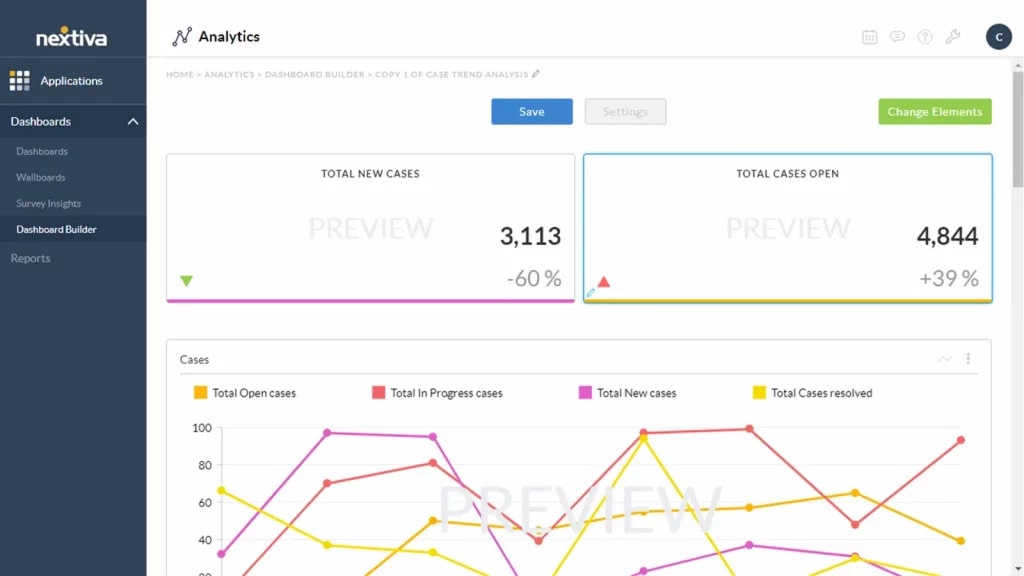
What is Nextiva?
Nextiva stands out as a premier voice-over-internet-protocol (VoIP) service, renowned for its advanced features and seamless communication solutions. Elevating business operations, this competitor of Dialpad and Nextiva alternative offers comprehensive solutions, including dedicated business numbers and hassle-free faxing. Nextiva is best for businesses that need a reliable, all-in-one VoIP system with strong customer support and scalable communication tools. Let’s take a closer look at the features of this Dialpad competitor:
Key Features of Nextiva
- Call Center Management: Nextiva offers basic call center management features, but its capabilities may be limited for businesses with complex call center needs, potentially leading to inefficiencies in managing customer interactions.
- Call Conferencing: Nextiva provides call conferencing functionality, but its features may lack advanced options found in other platforms, potentially limiting its usefulness for large-scale or high-profile meetings.
- Call Queues: Nextiva’s call queue management aims to organize incoming calls, but its effectiveness may vary depending on the complexity of your call routing needs, potentially resulting in longer wait times for customers.
- Call Recording: While Nextiva offers call recording capabilities, its features may be basic compared to more robust solutions, potentially limiting its usefulness for detailed analysis or compliance purposes.
- Multi-Channel Communication: Nextiva supports various communication channels, but its integration between channels might not be as seamless or intuitive compared to dedicated platforms, potentially impacting collaboration efficiency.
- VoIP Connection: Nextiva relies on VoIP technology for voice communication, but the quality and reliability of its VoIP connection may be subject to internet conditions, leading to potential disruptions in communication.
- Video Conferencing: Nextiva provides video conferencing capabilities, but its features and user experience might not be as advanced or polished compared to standalone video conferencing solutions, potentially limiting its appeal for organizations with demanding video conferencing needs.
Pros of Nextiva
- Affordable pricing: Nextiva’s phone system begins at $30, making it comparable to other budget-friendly phone options.
- High call quality: Customers of Nextiva value the HD-quality calls that the service provides.
- Provides remote calling app: Nextiva offers an app that allows for calling from anywhere, at any time.
Cons of Nextiva
- Not user-friendly: The interface of Nextiva lacks user-friendliness, making navigation challenging and frustrating.
- Inefficient dashboard: Users often face the inconvenience of managing too many dashboard logins, leading to inefficiency and confusion.
- Poor support: Nextiva’s support services are subpar, leaving users feeling unsupported and dissatisfied with their experience.
- Complex layout: Navigating Nextiva’s platform can be cumbersome and difficult due to its complex layout and lack of intuitive design.
- Difficult setup: Setting up Nextiva is often a challenging process, requiring significant time and effort to configure effectively.
Nextiva Pricing
This Dialpad competitor offers a few different VoIP and business communication plans, with pricing based on features and the number of users. Here’s an overview of Nextiva pricing plans:
- Essential – Starting at $23.95 per user/month (billed annually, for 20-99 users)
- Professional – Starting at $27.95 per user/month (billed annually, for 20-99 users)
- Enterprise – Starting at $37.95 per user/month (billed annually, for 20-99 users)
- Ultimate – Starting at $67.95 per user/month (for comprehensive needs, with custom features)
Nextiva Integrations
This Dialpad competitor integration options include:
- HubSpot
- Salesforce
- Zoho
- Workbooks
- Act!
- Goldmine
Nextiva Reviews
“Service is spotty, Calls get dropped, Phones disconnect from service, Voice Packets get lost. Forever ongoing contract auto-renewals without notifications to the client.”
“The phone system was with a lot of technical problems. Auto attendant not working, CRM not working, SMS not working.”
Source: Capterra
Nextiva Support Channels
- Phone Support
- Email/Help Desk
- FAQs/Forum
Curious whether Nextiva is suitable for your business? Watch the video for a quick breakdown:
8. Aircall: Best for Business Communication

What is Aircall?
Aircall is a phone and communication platform designed to enhance business communication and collaboration. While this competitor of Dialpad and Aircall alternative promises to streamline workflows and improve customer interactions, it’s important to review its features and functionalities to see if it aligns with your organization’s needs. Aircall is best for sales and support teams that need strong CRM integrations and a reliable, cloud-based calling platform. Here’s a quick look at this Dialpad competitor:
Key Features of Aircall
- Call Center Management: Aircall provides tools to efficiently manage call center operations, including call routing, agent performance tracking, and queue management, aimed at improving customer service and productivity.
- Call Conferencing: Aircall facilitates seamless conference calls, allowing multiple participants to join meetings and collaborate effectively, enhancing communication within teams and with clients.
- Call Queues: Aircall’s call queue feature organizes incoming calls and distributes them to available agents, reducing wait times for callers and ensuring efficient handling of customer inquiries.
- Call Recording: Aircall offers call recording functionality, enabling businesses to record and store conversations for training purposes, quality assurance, and compliance with industry regulations.
- CRM Integration: Aircall integrates with Customer Relationship Management (CRM) platforms, allowing agents to access customer information during calls, personalize interactions, and streamline workflows.
- Real-Time Reporting: Aircall provides real-time reporting and analytics tools, allowing businesses to monitor call metrics, track agent performance, and make data-driven decisions to optimize communication processes.
- VoIP Connection: Aircall leverages Voice over Internet Protocol (VoIP) technology to establish high-quality voice connections over the internet, offering flexibility, cost savings, and scalability for businesses.
Pros of Aircall
- User-friendly: Aircall’s interface is very easy to use, and users love that about Aircall.
- Reliable customer support: Aircall’s customer service team is professional and very helpful in providing quick solutions.
Cons of Aircall
- Limited Integrations: Aircall’s integration options are limited, potentially restricting its compatibility with other software systems and limiting workflow automation possibilities.
- High Price: Aircall’s pricing may be considered relatively high compared to competitors, making it less accessible for smaller businesses or those operating on a tight budget.
- Contract: Aircall may require users to sign lengthy contracts, locking them into a commitment that could be inconvenient or restrictive.
- Billing Team Ethics: Some users have reported ethical concerns regarding Aircall’s billing team, suggesting potential issues with transparency or fair billing practices.
- Unstable Connection: Aircall’s connection stability may be inconsistent, leading to dropped calls or poor call quality, which can disrupt business operations and frustrate users.
Aircall Pricing
This Dialpad replacement offers several pricing plans tailored for businesses of different sizes and needs. Here’s an overview of Aircall pricing options:
- Essential – Starting at $29 per user/month (billed annually)
- Professional – Starting at $49 per user/month (billed annually)
- Custom (Enterprise) – Custom pricing, based on specific business needs
Aircall Integrations
This Dialpad replacement integration includes:
- Slack
- HubSpot
- Shopify
- Salesforce
- Zapier
- Front
- and more!
Aircall Reviews
“Call quality is really bad, all of my colleagues complain about calls dropping or customers not being able to hear them.”
“The interface is pretty simple, it’s very easy to use and organize calls.”
Source: Capterra
Aircall Support Channels
- FAQs/Forum
- 24/7 (Live rep)
- Knowledge Base
- Chat
- Email/Help Desk
- Phone Support
9. OpenPhone: Best VoIP to Streamline Operations
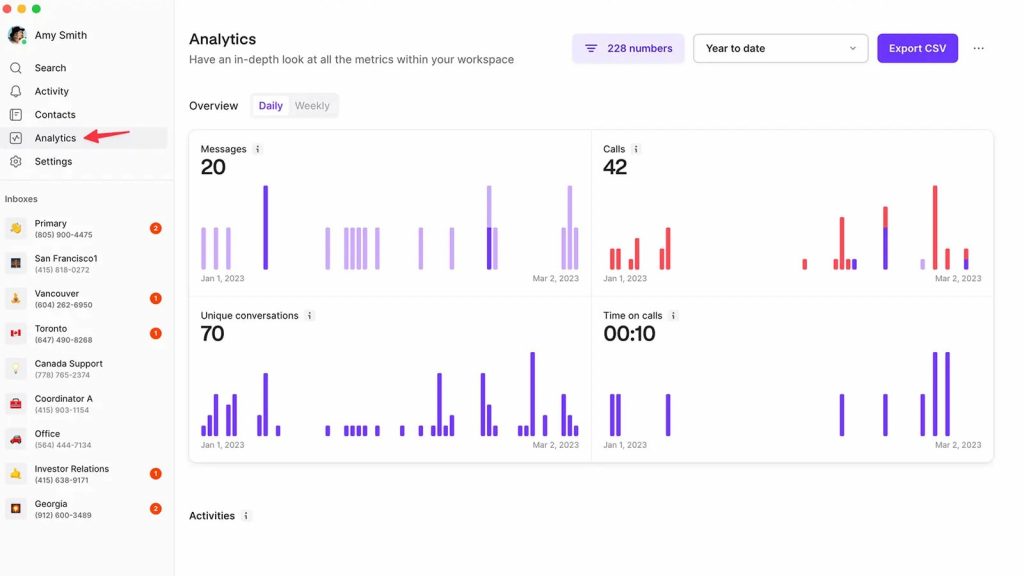
What is OpenPhone?
OpenPhone offers innovative communication solutions tailored for businesses that want to streamline operations and enhance customer interactions. With a focus on simplicity and versatility, this Dialpad replacement and OpenPhone alternative provides a range of features designed to meet the diverse needs of modern organizations. OpenPhone is best for startups and small businesses looking for an easy-to-use, affordable, and flexible phone system with business texting and calling capabilities. In this overview, we’ll explore what this Dialpad replacement has to offer and key considerations for businesses.
Key Features of OpenPhone
- Automated Attendant: OpenPhone offers an automated attendant feature, allowing businesses to set up virtual receptionists to greet callers and route them to the appropriate departments or extensions, improving call handling efficiency.
- Call Conferencing: OpenPhone facilitates seamless call conferencing, enabling multiple participants to join a conference call simultaneously, enhancing collaboration and communication among team members and clients.
- Call Logging: OpenPhone provides call logging functionality, allowing users to keep track of incoming and outgoing calls, including timestamps, durations, and caller information, aiding in call management and follow-up.
- Call Recording: With OpenPhone’s call recording feature, users can record phone conversations for training, quality assurance, and compliance purposes, ensuring accurate information capture and facilitating performance evaluation.
- Call Routing: This competitor of Dialpad offers call routing capabilities, enabling businesses to customize call forwarding rules based on various criteria such as time of day, caller ID, or department, ensuring calls are directed to the appropriate recipients promptly.
- Mobile Access: OpenPhone provides mobile access to its communication platform, allowing users to make and receive calls, send messages, and access voicemail from their smartphones, ensuring connectivity and accessibility on the go.
- VoIP Connection: OpenPhone leverages Voice over Internet Protocol (VoIP) technology to establish voice connections over the internet, offering cost-effective and reliable communication solutions for businesses without the need for traditional phone lines.
Pros of OpenPhone
- Affordable price: With pricing starting at $13, OpenPhone is one of the most affordable VoIP phone systems.
- Great app: OpenPhone’s iOS app is very easy to use and functions smoothly.
Cons of OpenPhone
- Inability to Answer Calls: Users have reported issues with OpenPhone where calls cannot be answered, leading to missed opportunities and frustration.
- Automatic Call Disconnections: Some users experience automatic call disconnects while using OpenPhone, disrupting communication and causing inconvenience.
- Calls Not Received: This competitor of Dialpad may fail to receive incoming calls at times, impacting accessibility and potentially causing missed connections with clients or colleagues.
- Poor Quality Customer Service: Users have encountered instances of poor-quality customer service from OpenPhone, characterized by unhelpful responses and lack of resolution to issues.
- Terrible Calling Quality: OpenPhone users have reported experiencing terrible call quality, including issues such as dropped calls, static, or poor audio, negatively impacting communication effectiveness.
OpenPhone Pricing
This Dialpad replacement offers straightforward pricing plans for businesses of all sizes, with features tailored to communication needs. Here’s an overview of OpenPhone pricing:
- Basic Plan – Starting at $13 per user/month (billed annually)
- Standard Plan – Starting at $20 per user/month (billed annually)
- Premium Plan – Starting at $40 per user/month (billed annually)
OpenPhone Integrations
This Dialpad replacement integration includes:
- Salesforce
- HubSpot
- Zapier
- And more!
OpenPhones Reviews
“Worst onboarding and support experience ever. If you expect to just sign up and immediately get going – forget about it.”
“They would rather you don’t have phone access let a paying customer leave when their service is no longer required.”
Source: Capterra
OpenPhones Support Channels
- Email/Help Desk
- Knowledge Base
- Chat
Want to know more about Quo (formerly OpenPhone)? Watch our video review for a quick breakdown:
10. GoTo Connect: Best for Unified Communications
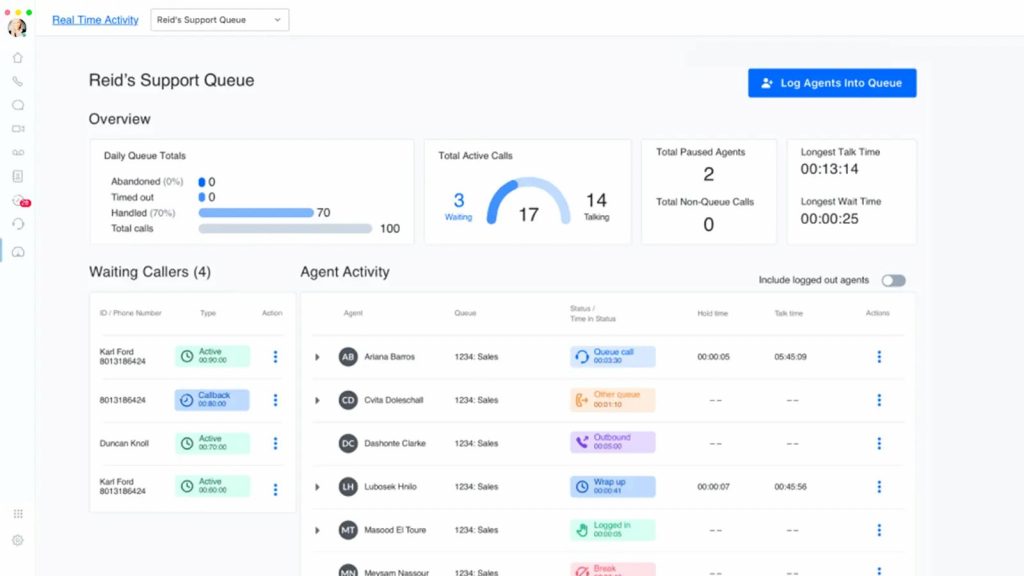
What is GoTo Connect?
GoTo Connect is a virtual phone system designed for small businesses and entrepreneurs. GoTo Connect is a cloud-based platform that centralizes interactions and enhances customer experiences. Users can manage communication needs with ease, keep personal and professional calls separate, and stay connected with clients. GoTo Connect is best for small businesses and solo entrepreneurs who need a straightforward, reliable VoIP system for calls, conferencing, and client communication. Here’s a quick look at this Dialpad replacement and GoTo Connect alternative:
Key Features Of GoTo Connect
- Unified Communications: This competitor of Dialpad combines voice calling, video conferencing, messaging, and collaboration tools into one platform for streamlined communication.
- Scalability and Flexibility: Easily scale up or down to adapt to changing business needs without hassle.
- Reliability and Call Quality: Enjoy crystal-clear voice calls and smooth video conferencing experiences with reliable performance.
- Advanced Call Management: Efficiently handle calls with features like call routing, auto-attendant, call forwarding, and voicemail management.
- Integration and Compatibility: Seamlessly integrate with popular business applications for enhanced productivity and collaboration.
Pros of GoTo Connect
- Great integrations: Users love how easy it is to integrate this software with their third-party tools and apps.
- Video conferencing option: GoTo Connect, unlike many other VoIP software, offers video conferencing options, which makes communication very easy for certain business professionals.
Cons of GoTo Connect
- Limited Customization: Users may find that GoTo Connect lacks extensive customization options, limiting the ability to tailor the platform to specific business needs.
- Complex Setup: Setting up GoTo Connect may be complex for some users, requiring technical expertise or assistance to configure effectively.
- Occasional Connectivity Issues: Users may experience occasional connectivity issues or downtime, impacting the reliability of the service.
- Cost: Some users may find GoTo Connect to be relatively expensive compared to other VOIP solutions, especially for smaller businesses or startups with limited budgets.
- Customer Support: Users may encounter challenges with customer support responsiveness or effectiveness, leading to delays in issue resolution or inadequate assistance.
- Limited Features: While GoTo Connect offers a comprehensive set of communication tools, some users may find it lacks certain advanced features or capabilities available in competing platforms.
- Compatibility Issues: Users may experience compatibility issues with certain devices or operating systems, limiting the accessibility and usability of the platform.
GoTo Connect Pricing
This Dialpad replacement offers flexible pricing plans designed to meet the needs of businesses, whether small or large. Here’s an overview of GoTo Connect pricing:
- Basic Plan – Starting at $19.99 per user/month (billed annually)
- Premium Plan – Starting at $24.99 per user/month (billed annually)
- Enterprise Plan – Starting at $39.99 per user/month (billed annually)
GoTo Connect Integrations
This Dialpad replacement integration includes:
- Zoho
- MailChimp
- Zapier
- Salesforce
- And more!
GoTo Connect Reviews
“The app does not work very well for which I depend on it greatly being out of the office so I had to modify and my a second number for my phone to have it forwarded to it.”
“I like that you can customize it to do almost anything that you want. It has great flexibility and we as an organization have control on how we want to use it.”
Source: Capterra
GoTo Connect Support Channels
- Email/Help Desk
- Phone Support
- Chat
- FAQs/Forum
- Knowledge Base
- 24/7 (Live rep)
How Emitrr Compares to Dialpad for Teams That Also Need Patient Communication
Hassle-free migration
Centralized dashboard
Round-the-clock support
Easy data transfer
Integrations
Diverse Features
Dispositions
Automation capabilities
Folders
Unread filter
Assign conversations
Metrics
Call forwarding
Emitrr allows you to forward a live call to another number or person, which is missing from Dialpad.
Text-enable your landline
Translation
This is a unique and important feature that allows you to communicate with your clients who speak different languages. This feature seamlessly translates outgoing and incoming messages, keeping the language preference of the client in consideration.
Learn more about what our customers have achieved through Emitrr:
Which Industries are catered by Emitrr?
Emitrr’s VoIP system can be used by businesses across all industries, including but not limited to:
Healthcare
Healthcare professionals running an outpatient clinic, therapy clinic, or any other clinic, can rely on Emitrr healthcare VoIP system to improve patient communication. Using it, you can integrate your PMS/EHR software, and access patient information in seconds during a live call. You can also get call transcripts to save time, record conversations for future references, park a live call and much more!
Here’s a short video explaining everything you need to know about a HIPAA-compliant phone system:
Home Service Business
Home service business owners can use Emitrr’s VoIP to improve communication with team members or clients. Since a home service business requires you to always be on the go, you cannot be tied to your desk with a landline phone. Be it transferring calls, getting on a conference call, recording call conversations, etc., there is a lot that you can do from VoIP for home services anytime anywhere.
Real Estate Business
Real estate business owners constantly need to interact with their clients, teammates, etc. and are always on the go. So, with the help of a VoIP phone for real estate, they can take advantage of unlimited calls, and various calling features and simplify communication in seconds.
Marketing Agencies
Marketing agency owners can use Emitrr’s VoIP phone to keep track of calls, integrate it with their third-party marketing tools, and can improve communication with their clients or team members at a very affordable cost.
Nonprofits
Nonprofits often operate on limited budgets, and maintaining constant communication with members can be expensive when relying on traditional landlines or standard cell phones. By utilizing VoIP services for nonprofits, they can significantly reduce their communication costs, leading to substantial savings over time.
Legal Practices
Legal professionals can leverage VoIP to stay connected with clients, colleagues, and others while on the move. With a VoIP system designed for law firms, they can record calls, transfer calls, participate in conference calls, and much more.
Retail Stores
For small e-commerce businesses, implementing a VoIP system can lead to significant savings in both costs and time when it comes to communication with customers and vendors.
FAQs
Yes, Dialpad offers a free 14-day trial. The free trial gives you access to its text, talk, and meeting features, but with limited user access and limited feature access.
As per the reviews that are available on G2 and Capterra, Dialpad does not have good customer support. Their customers frequently complain about delays in response and inefficient support agents. If customer service is something that you cannot settle for, then you should consider choosing Emitrr, as it has been given a solid 5-star rating for the same.
To cancel your Dialpad subscription, log in to your Dialpad account and go to the account settings. Under account settings, access the “cancel subscription” option, and your subscription will be canceled.
Emitrr is a strong alternative, offering better scalability, deeper automation, or more affordable pricing depending on your needs.
Emitrr is better for businesses needing automated communication, SMS-first workflows, and AI-driven tools. Dialpad is great for voice calls and AI transcriptions, but Emitrr excels in patient/customer engagement and multi-channel automation.
Some of the disadvantages of Dialpad are:
– Limited SMS automation
– Can get expensive with add-ons
– Some features are only in higher-tier plans
– Integrations may require workarounds
Competitors include RingCentral, Vonage, 8×8, Nextiva, and Aircall for business phone and UCaaS. For teams needing AI voice agent, deeper automation and two-way messaging tied to workflows and customer outreach, platforms like Emitrr are also alternatives.
RingCentral usually wins for full unified communications (voice, messaging, video, integrations) and scalability, while Dialpad is simpler with strong AI calling features. For teams focused on secure messaging, automation, and workflow-driven outreach rather than just VoIP features, Emitrr can be an even better fit.
No, Dialpad does not have a free version. It offers tiered paid plans with varying features instead.
Aircall emphasizes call center and sales calling features, with easy phone management and integrations. Dialpad blends VoIP calling with AI assistance, messaging, and meetings. Aircall is great for sales/ops teams; Dialpad covers broader unified communications.
Dialpad plans typically start around $15–$25 per user per month for core calling and messaging, with higher tiers adding analytics, CRM integrations, and contact center features.
Dialpad is a full business communications platform with VoIP calling, messaging, video, and AI features, while Quo focuses on simple SMS and messaging automation. For teams that need richer workflow automation, secure two-way messaging, and patient/customer engagement tools, platforms like Emitrr extend beyond Quo’s basics and Dialpad’s core UC features.
Conclusion
With Emitrr, your transition is synonymous with seamless execution, expert guidance, and access to advanced features that fuel your business growth. Equipped with all the insights, the moment has come to seize this opportunity. If you’re a Dialpad user seeking enhanced capabilities, competitive pricing, 24/7 customer support, and an escape from software glitches, the choice is crystal clear – embrace Emitrr for a future of smooth communication. Book a Demo, now!


 4.9 (400+
reviews)
4.9 (400+
reviews)