

Introduction
A patient has an appointment tomorrow, but the insurance card on file is from last year. Another patient’s plan shows active coverage, yet the response does not explain the benefits for the scheduled service. Both appointments are on the calendar, but your team still has questions to resolve before check-in.
Insurance eligibility verification confirms whether a patient has coverage for the relevant date of service. Benefits verification takes the next step by checking available information about covered services, cost-sharing, and plan limitations. Together, these checks help staff identify missing information and explain the next step before the patient arrives.
In this blog, we will walk you through the insurance verification workflow, what to check in payer responses, how to resolve common delays, and which tasks can be automated. We will also explain how Emitrr supports information collection, connected workflows, and patient follow-up around checks performed by external eligibility systems.
AI Summary
- Eligibility verification checks coverage for the patient and relevant date of service.
- Insurance benefits verification examines available service-specific coverage, cost-sharing, and limitations.
- The workflow includes information collection, an eligibility inquiry, response review, discrepancy resolution, documentation, and patient communication.
- Missing information, failed requests, and unclear responses need follow-up rather than an assumption about coverage.
- Automation can support external checks, information requests, status updates, and staff handoffs.
- Emitrr supports the surrounding workflow and communication. The eligibility lookup remains with an external system.
What Insurance Eligibility and Benefits Verification Covers
Insurance eligibility and benefits verification answers two related questions: does the patient have applicable coverage, and what does the plan report about benefits relevant to the planned care?
Eligibility verification checks whether coverage applies to the identified patient for the requested date. An active result establishes an important starting point, but staff still need to review the plan and service context.
Benefits verification, also called verification of benefits or VOB, examines details such as copays, deductibles, coinsurance, covered service categories, and visit limits. The information available depends on the payer, plan, inquiry, and verification method.
For example, a physical therapy patient may have active insurance coverage while still having a deductible to meet and a limit on covered visits. Confirming eligibility alone would leave those questions unanswered.
Several related checks remain separate:
- Network participation concerns the provider’s relationship with the patient’s specific plan and network.
- Prior authorization concerns any required payer review before a service.
- Claim payment depends on the submitted claim and applicable coverage and payment conditions.
When verification identifies an authorization requirement, it should create a separate next action. Prior authorization automation addresses the documentation, tracking, and communication involved in that process.
An explanation of benefits, or EOB, is different from a pre-service benefits check. It explains how a health plan processed a claim after care. It is not an eligibility response or a bill.
What to Check Before the Patient’s Visit
A useful medical insurance verification checklist connects each finding to the scheduled visit. Staff needs enough information to identify the correct patient, understand the relevant benefits, and recognize what still requires investigation.
| Item to verify | Why it matters | Follow-up if unclear |
| Patient and subscriber identifiers | Names, dates of birth, member IDs, and subscriber relationships help match the correct record. | Compare the submitted information with current insurance details and correct discrepancies. |
| Payer and plan details | Similar insurance names can refer to different products, networks, or administrators. | Confirm the specific plan and appropriate payer destination. |
| Coverage status and effective dates | Coverage must be evaluated against the planned date of service. | Check the coverage effective date, any termination date, and the date used in the inquiry. |
| Other insurance | Coordination of benefits can affect which plan is primary. | Confirm additional coverage and resolve unclear payer order through the appropriate source. |
| Provider, location, and network | In-network benefits and out-of-network benefits may differ. | Verify participation for the specific provider, location, and plan. |
| Service-specific benefits | General coverage information may not explain the planned service. | Request the relevant service category or obtain additional payer clarification. |
| Copay, deductible, and coinsurance | These details support the patient responsibility estimate. | Confirm applicable amounts, remaining deductible information, and service-specific conditions. |
| Remaining benefits and visit limits | Prior use may affect the benefits available for additional care. | Check available usage information, the applicable benefit period, and shared limits. |
| Referral or authorization requirements | A separate requirement may remain even when coverage is active. | Assign the requirement to the responsible team and track its next action. |
Copay verification checks any applicable fixed payment. Deductible verification checks the amount that may remain before particular benefits apply. Coinsurance is the patient’s percentage share of an applicable covered cost. How these amounts interact depends on the plan and service.
Collecting these details through digital intake forms gives staff a consistent starting point. Patient-submitted information still needs to be checked against the appropriate verification source.
Check any available out-of-pocket maximum information alongside the deductible and coinsurance. Record the applicable benefit year so staff do not confuse calendar-year limits with a different plan benefit period.
The Insurance Eligibility Verification Workflow
The insurance verification process should move a scheduled patient from current information to a reviewed result and a documented next action. Patient-supplied details start the inquiry, the external system returns information, and staff resolves anything the response does not establish.
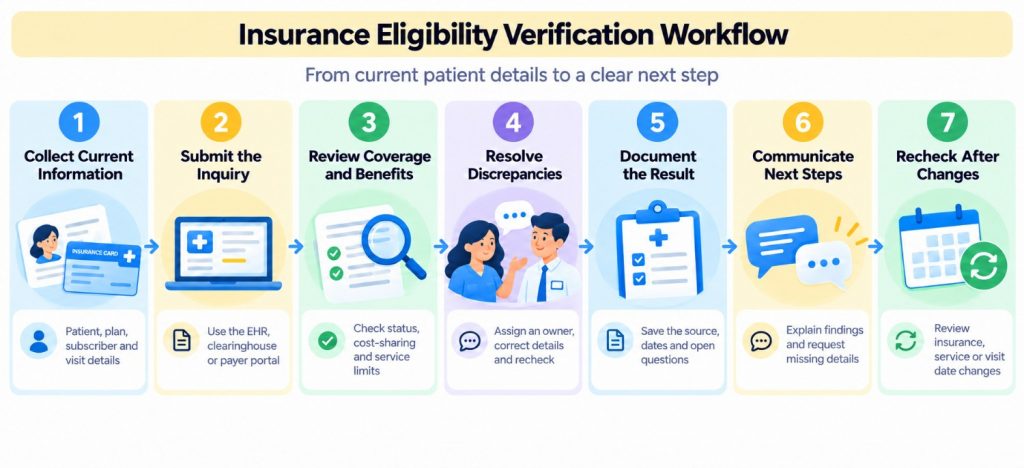
Collect Current Patient and Insurance Information
Start with the patient’s name, date of birth, payer, member ID, and subscriber details. Collect the group number and other identifiers when the verification method requires them. For dependent coverage, confirm the subscriber’s information and relationship to the patient.
Request current insurance card images when your collection process supports them. A card can help staff identify a transcription error, but possession of a card does not establish current coverage.
Connect the inquiry to the planned service, provider, location, and date of service. Include the appropriate service category or procedure information when supported and needed.
Before submission, look for missing fields, an incorrect subscriber relationship, or insurance information that conflicts with the patient’s latest submission. Making insurance information collection part of patient intake helps catch these issues before they become repeated callbacks.
Submit the Eligibility and Benefits Inquiry
Submit the request through the practice’s supported verification method. This may be an electronic health record, or EHR, connected service, an insurance clearinghouse, or a payer portal eligibility check.
Electronic eligibility verification commonly uses 270/271 eligibility transactions. A 270 is the inquiry, and a 271 is the response. For example, Medicare’s HIPAA Eligibility Transaction System accepts 270 requests and returns 271 responses through authorized connections.
For EHR eligibility verification, confirm that staff selected the correct insurance record, service context, and date before sending the inquiry. Record the transaction outcome accurately. A request that failed because of a connection error is different from a payer response reporting inactive coverage. A request awaiting a response should remain pending.
Confirm the payer ID and requesting provider’s National Provider Identifier (NPI) where required. Select the relevant service type codes supported by the verification system so the inquiry addresses the planned care.
Review Coverage and Relevant Benefits
Review what the response actually establishes. Confirm the patient match, requested date, coverage status, and available service-specific benefits.
Then check the details relevant to the appointment: cost-sharing, benefit limits, network information where returned, and additional requirements. A general “active” result may still leave the planned service unresolved.
For example, a response may show a therapy visit limit without stating how many visits remain. Record the limit and flag the missing usage information. Do not assume that the full allowance is available.
Active coverage is not a guarantee of payment for every planned service. Eligibility and benefit information remains subject to the applicable plan terms and the circumstances of the service and claim.
Review eligibility response codes and accompanying messages before assigning a status. A patient-matching error or rejected inquiry requires correction and resubmission; it does not establish that the patient lacks coverage.

Resolve Missing or Conflicting Information
Match the follow-up to the problem. Ask the patient for corrected identifiers or updated insurance details. Send incomplete benefit information or conflicting payer responses to the verification team or appropriate payer contact.
Every unresolved case should have:
- A specific question that remains unanswered.
- A staff member or team responsible for resolving it.
- A next action and follow-up deadline.
- A record of the latest attempt.
For example, “Member ID does not match; patient asked to complete updated form; registration team to review tomorrow” is more actionable than “Insurance issue.”
Use HIPAA-compliant online forms within your approved collection process when requesting sensitive insurance details. After correcting the information, submit a new check and review the response.
Document the Result and Verification Date
Save enough context for another authorized staff member to understand what was checked without repeating the work. Record the verification source, check date, relevant date of service, provider or location context, returned coverage and benefit details, and any available transaction or reference number. Keep unresolved questions separate from confirmed findings.
A note such as “Coverage active for November 5; specialist benefit returned; remaining deductible unavailable; billing review pending” communicates both the result and its limits. Store the result where authorized scheduling and billing staff can access it. Broader HIPAA audit trail considerations also matter when evaluating how systems record access and changes.
Avoid using a permanent patient-level “verified” label as the only record. A patient can have several appointments with different dates, services, or benefit requirements.
Communicate the Next Step to the Patient
Explain the information relevant to the patient’s appointment in plain language. State what has been confirmed, whether an estimate is available, and what information remains outstanding.
A missing-information request should be specific:
“Hi [First Name], we need updated insurance information for your appointment on [Date]. Please complete this form: [Form Link]. Reply if you need help.”
A patient responsibility estimate needs reliable benefit information and the relevant pricing inputs. A coinsurance percentage alone does not establish a dollar amount. Explain any unresolved assumptions rather than presenting an estimate as a final charge.
Route disputed costs or unclear coverage questions to the appropriate staff member. Insurance questions raised during AI for payer calls also need that connection between available source information and human follow-up.
Record whether the patient responded, submitted corrections, or still needs assistance.
Recheck When Relevant Details Change
Recheck when the patient reports new insurance, the appointment moves to a different coverage period, or the planned service, provider, or location changes in a way that affects the original inquiry.
Set a practice-defined schedule for pre-visit insurance verification. Leave enough time to resolve exceptions and determine which changes require another inquiry. For ongoing treatment, an earlier result should remain identifiable as an earlier result. It should not silently become the coverage determination for every future visit.
Why Insurance Verification Gets Delayed
Delays often occur between steps: information arrives without review, a result lacks necessary detail, or an unanswered question sits without an owner. Identifying the specific failure helps the practice fix the process.
- Incomplete patient information creates avoidable rework: A missing subscriber date of birth or outdated member ID can prevent a usable response. Check required fields before submission and request the exact correction needed.
- Limited responses leave service questions open: A payer may confirm active coverage without returning enough detail about the planned care. Track “response received” separately from “review complete.”
- Disconnected systems make staff reconstruct the case: The verification result may sit in one application while the patient’s updated information arrives elsewhere. The same handoff problem appears in EHR-integrated referral communication: staff need access to the record and the conversation needed for the next action.
- Changing information makes earlier checks less useful: A rescheduled visit or replacement plan can leave staff reviewing a result that no longer matches the appointment.
- Unowned exceptions remain unresolved: “Needs follow-up” is insufficient unless someone owns the task and knows when it is due. Track missing-information cases, failed transactions, and unclear benefits separately so the team can work the right queue.
These gaps can carry forward into billing. For practices using NextGen, billing workflow gaps deserve attention alongside the initial eligibility check.
Which Parts of Insurance Verification Can Be Automated
Automated insurance verification includes two kinds of work: requesting information from an external verification system and coordinating the administrative steps around it. A practice may automate information requests and reminders even when its eligibility checks still require staff action.
Collect Missing Insurance Information
Send a digital form before the visit and request the details needed for the inquiry. Where the system supports completion tracking, remind patients whose required submissions remain incomplete.
Check the status of the relevant request. A patient who completed last year’s registration form may still need to submit current insurance information.
A practical sequence is to send the request, check its completion status before the appointment, remind patients who have not completed it, and send unresolved cases to staff. Patient intake automation provides the broader framework for coordinating these steps.
Automated form reminders should stop when their completion condition is met. Staff still need to review submitted information for missing or conflicting details.
Request Checks Through Connected Systems
An authorized connection can submit an inquiry or retrieve a result when the external system exposes that capability. An eligibility verification API, or application programming interface, allows software to exchange supported requests and responses.
Before selecting insurance verification software, establish which payers, service types, dates, response fields, and error conditions the connection supports. Also confirm whether it initiates a new check or retrieves an existing result.
Real-time eligibility verification requests a response during the current interaction. Batch eligibility verification organizes checks for multiple patients, often around an upcoming schedule. Supported behavior varies by service. Medicare HETS, for example, accepts real-time transactions and does not accept batch transactions directly.
For an EHR-specific implementation, such as automating insurance eligibility in NextGen, assess the actual connection and returned data rather than assuming every integration provides the same functions.
Update Status and Assign Exceptions
Eligibility status tracking should show where the work stands without changing the meaning of the payer’s response.
Useful workflow states include information requested, ready for inquiry, response received, staff review needed, and patient follow-up pending. Keep the underlying coverage result and verification date alongside that progress information.
Route insurance verification exceptions according to their cause. Missing patient details belong with the team collecting information. Unclear benefit responses belong with staff equipped to investigate them.
For EHR-integrated workflows, confirm whether each action updates a communication record, contact property, appointment record, or EHR field. Those are different operations.
Follow Up With Patients Without Repeating Completed Requests
Patient insurance follow-up should respond to what the patient has already done.
If the patient submits the requested form, stop the associated completion reminders. If the patient replies with a question, route it to staff and adjust the follow-up sequence according to the configured behavior.
A reply is evidence of engagement, not necessarily resolution. “I cannot open the form” requires assistance. It does not mean the practice has received updated insurance information.
Sending forms via text message can give patients a direct route to the collection step while keeping the reminder focused on a clear action.
How Emitrr Supports Insurance Eligibility Verification Workflows
Emitrr supports the information collection, workflow coordination, and communication surrounding health insurance eligibility verification. Emitrr does not currently provide native insurance eligibility verification. The lookup is performed by an external system, with available actions depending on authorized access and the supported connection.
Its workflow features can help staff request information, use returned data, update configured properties, and take ownership of replies.
Forms and Form Status Filters for Insurance Information Collection
Emitrr’s digital intake forms can request insurance details before the appointment.
When a workflow sends a form link through an action such as Send SMS or Send Email, it creates a form request that remains available to downstream workflow steps. A later branch can evaluate that specific request’s status.
For example, a workflow can send an insurance-information form after an appointment is created, then check its status before the visit. Patients with incomplete submissions can receive a reminder, while completed submissions bypass that reminder.
This reduces repeated requests to patients who have already responded. Form completion establishes that information was submitted; staff or the connected verification process must still establish coverage and benefits.
Watch how Emitrr’s digital intake forms help healthcare practices collect patient information before the visit:
Custom API Actions for External Eligibility Information
Emitrr’s Custom API action lets a workflow call an external endpoint and use the information returned.
Setup includes the request method, URL, headers, query parameters, and body as required by the external service. Running Test captures the response and exposes returned fields for later workflow steps. Available JSON fields can then support branching, personalization, or forwarding information.
For insurance coverage verification, an authorized endpoint might return a result that directs the workflow toward staff review or a missing-information request. The exact behavior depends on what that endpoint accepts and returns.
This capability does not, by itself, establish an out-of-the-box payer connection, clearinghouse connection, or EHR write-back. Review the required data exchange alongside Emitrr’s supported integrations before defining the workflow.
Test successful responses, missing fields, unavailable results, and failed requests. A failed request must not trigger a message telling the patient that coverage is inactive.
Edit Record for Workflow Status Updates
Emitrr’s Edit Record action updates contact properties during a workflow. The setup path is Edit Record → Contact → selected property → configured value.
Where the required properties are available, a practice can use this action to track administrative progress, such as information requested or staff review needed. That gives the team a visible indication of the next task.
Confirm the supported properties and values before implementation. Updating an Emitrr contact property is a separate action from updating the EHR or recording a payer determination.
For patients with multiple appointments, keep verification details associated with the relevant visit in the appropriate system. A contact-level status should not overwrite the distinction between a completed check for one appointment and an unresolved check for another.
Stop on Reply and Assign Replies for Patient Follow-Up
Within an Emitrr Send SMS step, Stop workflow on reply allows a response window to be configured in business days. When the contact replies within that window, the remaining workflow is canceled.
Assign replies to automatically assigns the responding conversation to the selected team or member. These settings can operate independently or together.
For example, a dedicated insurance-information sequence can send a form request, stop its remaining follow-ups when the patient replies within the configured window, and assign that reply to registration staff.
Keep this sequence focused on the information request. Because stop-on-reply cancels the remaining workflow, unrelated actions should not depend on continuing that same sequence.
Staff then review the response and determine whether patient insurance verification can proceed or whether another correction is needed.
Templates and Conversation Assignment for Staff Handoffs
Emitrr’s email templates help standardize requests while leaving space for the patient’s specific next action. Staff can create or edit them under Settings → Manage Templates → Email Templates and use them in the workflow’s Send Email action.
Create separate templates for missing subscriber details, updated insurance requests, and unresolved questions. Each should explain what the patient needs to do and how to get help.
Conversation assignment supports insurance inquiry routing by directing replies to the team responsible for review. The receiving staff member should have access to the relevant conversation and know what remains outstanding.
For supported Athena workflows, confirmed custom actions can also create patient cases for insurance queries. That is an integration-specific action and should be evaluated separately from conversation assignment or eligibility checking.
Key Takeaways
- Patient eligibility verification and benefits verification answer different questions.
- Checks need accurate patient identifiers, the relevant service context, and the correct date of service.
- Active coverage does not resolve every question about network participation, benefits, authorization, or payment.
- Missing data, failed inquiries, and unclear responses need an owner and a next action.
- Insurance eligibility verification automation can connect external checks with information requests, status tracking, and follow-up.
- Emitrr supports those surrounding workflows, while the eligibility lookup remains with the external verification system.
FAQs
Insurance eligibility verification checks whether a patient has applicable health insurance coverage for a specified date of service using information from the payer or an authorized verification source.
Eligibility verification checks coverage status. Benefits verification examines available details about covered services, cost-sharing, and plan limitations relevant to the planned care.
Verify insurance early enough to resolve questions before the visit. Recheck when insurance, appointment dates, providers, or planned services change in a way that affects the earlier result.
No. Active coverage does not establish that every service is covered or payable. Service benefits, network status, applicable requirements, and claim review still matter.
Yes. Supported connections can automate inquiries or result retrieval. Forms, reminders, status updates, and exception routing can also be automated around the check.
No. Emitrr supports information collection, external API actions, workflow updates, and patient follow-up. Eligibility results come from the connected external system.
Conclusion
Insurance eligibility verification is useful when the result matches the patient’s planned visit and tells staff what to do next. Accurate information collection, careful response review, documented findings, and timely patient communication make that possible.
Start by checking where your current process stalls. If staff repeatedly chase the same missing details, requests continue after patients respond, or unclear results sit without ownership, those are concrete workflow problems to address.
Emitrr helps practices coordinate information requests, supported external data, workflow updates, and patient replies. Book a demo to explore insurance verification workflows with your existing systems.

 4.9 (400+
reviews)
4.9 (400+
reviews)