
Introduction
Dental software runs almost everything inside your practice today. From reminders and payments to patient texts and scheduling, your systems decide how smooth your day feels. When you have the right tools, no-shows drop, collections improve, and your front desk isn’t constantly overwhelmed.
But is your current software actually helping you grow? Is it capturing missed calls, speeding up replies, and making life easier for your team? Some platforms focus on reports and numbers. Others focus on communication and automation. If yours no longer fits where your practice is headed, it might be time to explore better options. Let’s look at the top alternatives to Practice By Numbers and find what truly works for you!
AI Summary
This blog explores the top 10 Practice By Numbers alternatives for dental practices. While Practice By Numbers is strong in analytics and reporting, many clinics look for alternatives that offer better patient communication, automation, and reputation management. The guide compares platforms like Emitrr, NexHealth, Weave, and others across features, pricing, and workflows. Emitrr stands out as a strong alternative due to its AI-powered texting, missed call automation, unified inbox, and built-in review growth tools that reduce front desk workload and increase bookings.
What Is Practice By Numbers?
Practice By Numbers, or PbN, is a dental analytics and practice management tool built for dental offices. It connects with systems like Dentrix or Eaglesoft and pulls in data about appointments, billing, production, and collections. That data is then displayed in dashboards so you can clearly see how your practice is performing.
It focuses heavily on numbers, revenue, case acceptance and provider performance. It also includes basic automation like reminders and online scheduling. If you like tracking performance closely, PbN gives you strong visibility. But its main strength is analytics, not advanced front desk communication.
Practice By Numbers Features
- Business Dashboards: Visual charts showing daily production, collections, and key performance indicators.
- Revenue Reports: Tracks financial performance across daily, monthly, and yearly periods.
- Patient Reminders: Sends automated confirmations and dental recall messages via text.
- Online Scheduling: Lets patients book appointments online with real-time calendar syncing.
- Digital Forms: Sends intake and consent forms electronically before visits.
- Insurance Checks: Verifies patient eligibility automatically before appointments.
- Payment Links: Allows patients to pay securely online through digital payment requests.
- Review Requests: Automatically prompts patients to leave reviews after visits.
- AI Receptionist: Optional add-on that can help handle incoming calls.
- PMS Integrations: Syncs with major dental systems to pull appointment and financial data.
Practice By Numbers Pros
- All-in-One Platform: Combines reporting, reminders, scheduling, and payments into one system.
- Clear Dashboards: Makes it easy to see production and revenue at a glance.
- Task Automation: Reduces manual reminder and confirmation calls.
- Goal Tracking: Helps practices monitor progress toward production targets.
- Multi-Location Support: Works well for DSOs managing multiple offices.
Practice By Numbers Cons
- Higher Pricing: Can feel expensive, especially for smaller or single-location practices.
- Learning Curve: The wide feature set takes time to fully understand.
- Workflow Gaps: May not fit highly specialized or niche practice workflows perfectly.
- Limited Mobile Use: Some users want a stronger mobile or tablet experience.
- Extra Tools Needed: Advanced texting or call automation may require additional software.
Practice By Numbers Integrations
- PMS Syncing: Integrates with Dentrix, Eaglesoft, Open Dental, and similar systems for real-time data syncing.
- Accounting Links: Connects with tools like QuickBooks to align financial reporting.
- Calendar Sync: Keeps appointments aligned with scheduling systems.
Practice By Numbers Pricing
Pricing is custom and typically starts at a few hundred dollars per month per location. Final cost depends on office size and add-ons like AI phone answering.
Practice By Numbers Rating
- Capterra: 4.7/5
- G2: 4.6/5
Practice By Numbers Reviews
“I wish they had an app for my phone, but considering how innovative and responsive they have been thus far, that is probably going to happen at some point.”
“I wish there was a Facebook and Instagram integration within Practice by Numbers.”
Source: Capterra
Practice By Numbers Support Channel
- Phone Support: Direct helpdesk support during US business hours.
- Email & Ticketing: Submit tickets for technical or setup assistance.
- Live Chat: Quick support for urgent questions.
- Knowledge Base: Online guides and FAQs for self-service help.
- Onboarding & Training: Guided setup and training included with subscription.
Why Practices Look for a Practice By Numbers Alternative
Even satisfied clinics often explore other options. Here’s why:
Pricing and Scalability Concerns
If you only have one or two locations, PbN can feel expensive. You’re essentially paying enterprise-level prices for some features a small office might not use. As you grow to multiple locations, costs multiply. Some practices want the ability to scale up or down more flexibly, or look for flat fees. In short, cost and scalability often motivate a switch.
Limited Flexibility for Different Practice Types
Every dental specialty has unique workflows. Orthodontists, oral surgeons, and pediatric dentists have forms, appointment types, and follow-up processes that differ. If a system is too generic, it forces workarounds. Practices in niche fields often want an alternative that lets them configure templates and automations specifically for their patient flow.
Communication and Patient Engagement Limitations
Today’s patients, in fact, everyone lives on their phones. They love texting, web chat, AI-powered scheduling, etc. If your system only does basic text reminders but can’t automate web chat questions or voice calls, you lose efficiency. Practices focused on top-notch patient engagement often seek alternatives that offer every communication channel: SMS, email, Google Business messages, even live chatbots – all from one inbox.
Reporting and Analytics Gaps
While PbN has great dashboards, some practices find them overwhelming or too generic. They may want very specific reports, like “production by procedure type” or “ROI on marketing campaigns,” at the click of a button. Others just prefer a simpler one-page overview of key metrics. If PbN’s reporting feels like too much or not targeted enough, a clinic might look elsewhere for clearer, actionable insights.
Workflow Fit for Front Desk and Providers
Getting doctors and front-desk staff aligned is crucial. Some teams feel that PbN is great for owners/management, but the staff still needs better front-office tools. For example, a front-desk person might want a mobile app to confirm appointments on the go, or dentists might want quick alerts for unscheduled treatment. If the software doesn’t streamline the exact daily routines of each role, users search for a better fit.
Integrations with PMS, EHR, and Calendars
Dentistry is evolving with more cloud-based and specialized software. Practices using newer EHRs or digital imaging systems may need bi-directional sync with those tools. Similarly, if your team relies on a shared Google/Outlook calendar, you want any new patient software to write appointments there automatically. Gaps in integration (like no sync with your specific EHR) can drive a switch.
Reputation Management and Review Workflows
Online reviews can make or break a practice. If Practice By Numbers only offers a rudimentary review prompt, clinics may want more specialized tools. Dedicated dental reputation management platforms automate review collection, respond to negative feedback privately, and show multi-platform rating dashboards. If your practice is serious about marketing itself through great reviews, this becomes a key factor.
Support Experience and Onboarding Time
Software adoption hinges on support. If your staff struggled to set up Practice By Numbers, or if support felt slow, you’ll consider alternatives promising easier rollout. Some vendors offer white-glove onboarding with dedicated coaches. Others have community forums or 24/7 chat support that smaller practices find appealing. A frustrating initial experience can prompt a change.
In a nutshell, dental practices look for an alternative to Practice By Numbers when they want more flexibility, better pricing, advanced engagement tools, or simply a more tailored fit for their office.
What To Look For In a Practice By Numbers Alternative
When you start comparing systems, it is easy to get distracted by feature lists. Instead of looking for “more features,” focus on the right features – the ones that genuinely reduce workload and improve patient experience. Here’s what you should prioritize when looking for a Practice By Numbers Alternative:
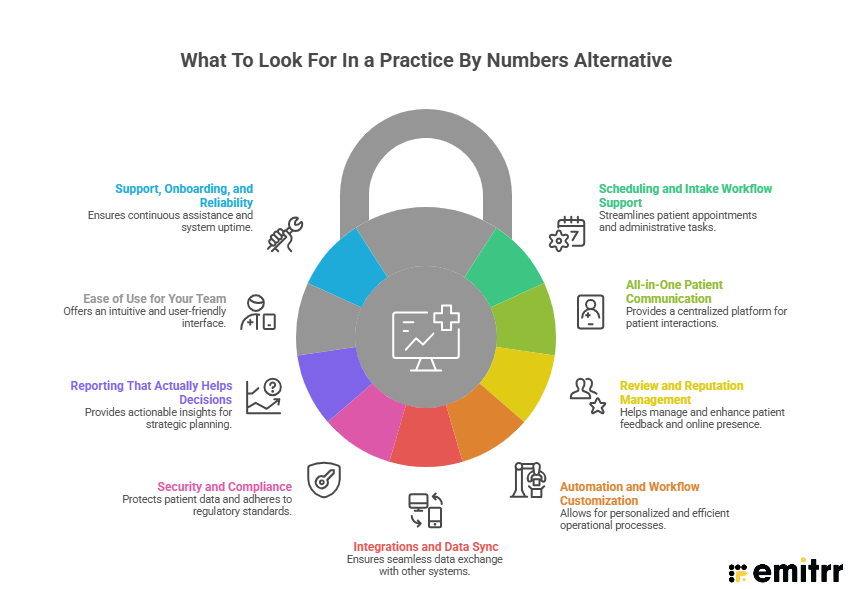
Scheduling and Intake Workflow Support
A strong alternative should make appointments feel effortless. Smart scheduling with live availability allows patients to book on their own without calling the office. Automated reminders and confirmations reduce no-shows and free up your front desk from repetitive calls. Electronic intake forms that patients complete before arriving eliminate clipboard bottlenecks and shorten check-in time. Insurance eligibility checks during booking or check-in help prevent billing surprises. When scheduling and intake are automated properly, your office runs smoother and patients feel more cared for.
All-in-One Patient Communication
Your alternative should bring every patient interaction into one place. Calls, texts, emails, Google messages, and even social media inquiries should land in a single, organized inbox. When communication is scattered across multiple platforms, messages get missed, and leads slip through the cracks. A unified communication hub ensures your team responds quickly, no matter how a patient reaches out. It creates consistency, reduces confusion, and keeps conversations organized.
Review and Reputation Management
Online reputation is one of the biggest growth drivers for dental practices. Your alternative should automatically send SMS request reviews after appointments and make it easy for patients to leave feedback on platforms like Google. It should also give you a dashboard where all reviews are visible in one place, with the ability to respond quickly. Some systems flag negative feedback privately so you can resolve issues before they go public.
Automation and Workflow Customization
Every dental practice operates differently. That is why flexibility matters. The best systems allow you to build custom automation rules that match how your office works. For example, if a patient cancels, the system could automatically notify people on your waitlist. If insurance details are missing, it could trigger a verification alert. If a specific treatment is completed, it could schedule a follow-up message sequence. The more you automate repetitive tasks, the more time your team has to focus on patient care instead of admin work.
Integrations and Data Sync
Your software should connect seamlessly with your existing systems. Appointments created in your practice management system should appear automatically in your communication tool, and vice versa. Patient details, financial information, and scheduling updates should sync in real time without manual entry. Many also support calendar syncing and secure email connections. Smooth integrations eliminate double work and reduce human error.
Security and Compliance
HIPAA compliance is not optional. Any Practice By Numbers Alternative must provide encrypted communication, secure login protocols, role-based access controls, and detailed audit logs. The vendor should provide a Business Associate Agreement and clearly explain how patient data is protected. If a system does not clearly highlight compliance measures, that is a major red flag. Patient privacy is non-negotiable in healthcare.
Reporting That Actually Helps Decisions
Data only matters if it leads to action. Instead of overwhelming dashboards, look for reporting that highlights real insights. For example, no-show rates by appointment type, response times by staff member, or recall gaps by treatment category. Some modern platforms also offer predictive insights, helping you anticipate production trends based on current schedules. When reporting is focused and actionable, you can make smarter decisions without digging through endless charts.
Ease of Use for Your Team
The best software feels intuitive from day one. Your front desk should not need weeks of training to send messages or manage appointments. The interface should be clean and organized, with common tasks just a click away. Mobile access or tablet-friendly interfaces add flexibility for busy teams. Features like SMS templates, canned responses, and quick search tools save time and reduce mistakes. If your team enjoys using the system, adoption becomes effortless.
Support, Onboarding, and Reliability
Technology is only as strong as the team behind it. Look for vendors that provide dedicated onboarding, live support, and fast response times. System reliability is equally important. Downtime during a busy day can disrupt everything. Strong vendors publish uptime guarantees and continuously improve their products based on customer feedback. Long-term reliability ensures your investment continues to support growth, not create stress.

Top 10 Practice By Numbers Alternatives
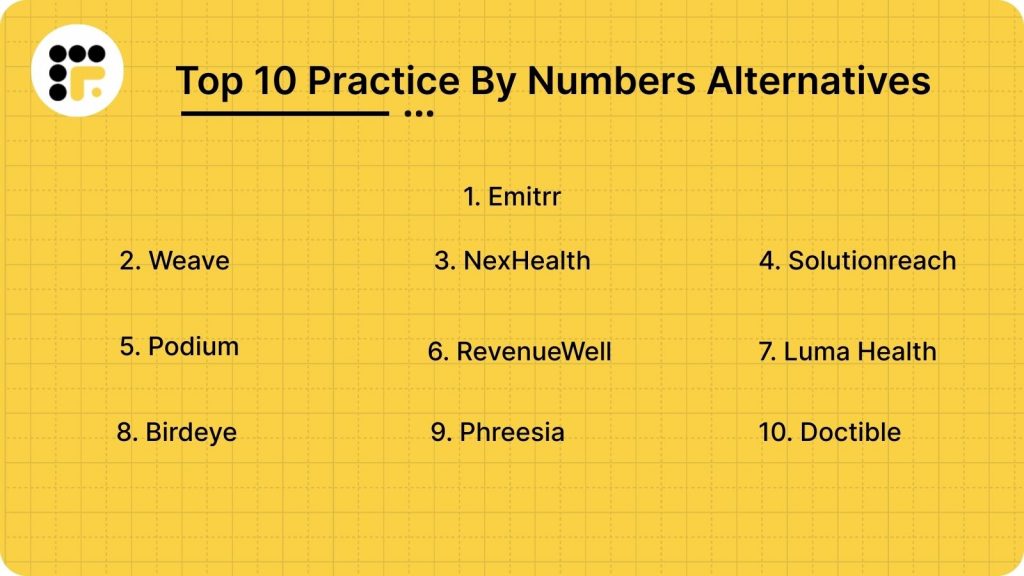
Listed below are some of the top Practice By Numbers alternatives for your dental practice:
Let’s dive into each alternative in more detail:
1. Emitrr | Best Practice By Numbers Alternative
Emitrr Overview
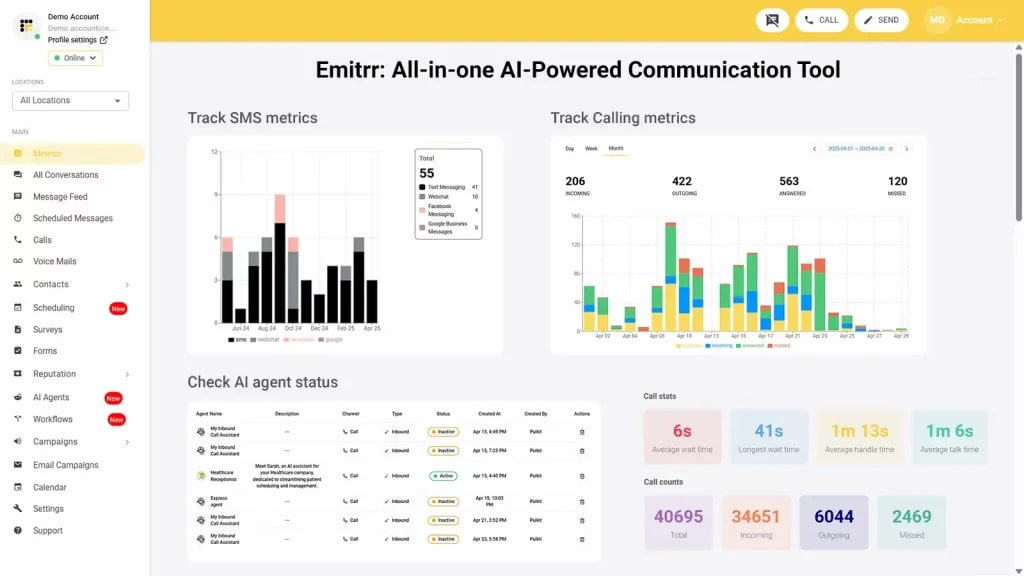
Emitrr is a modern patient communication platform built specifically for dental and healthcare practices. It acts like a virtual assistant for dental offices, handling texting, calling, automation, and review management in one place. Instead of focusing only on analytics dashboards, Emitrr also majorly focuses on what drives growth – faster responses, better follow-ups, and stronger patient engagement.
Emitrr Key Features
- Unified Inbox: All patient conversations – texts, call logs, and chats appear in one organized dashboard, so nothing gets missed.
- Two-Way Texting: Patients can text your main office number, and your team replies just like a simple chat thread.
- Integrated VoIP Phone: Optional cloud-based phone system with call pop-ups and conversation tracking.
- Missed Call Text Back: Automatically texts anyone who calls but doesn’t reach someone, helping you capture potential patients instantly.
- 24/7 AI Receptionist: Intelligent automation answers common questions, books appointments, and handles after-hours inquiries without staff involvement.
- Review Automation: Sends automatic review requests after visits to steadily grow your Google ratings.
- Smart Workflows: Custom automation rules trigger timely reminders, recalls, and patient follow-ups.
- Secure Payments: Send secure payment links through text for balances or co-pays.
- HIPAA Compliance: Fully encrypted communication built for healthcare security standards.
- PMS Integrations: Syncs seamlessly with Dentrix, Eaglesoft, Open Dental, Athenahealth, and other major systems.
Emitrr Pros
- All-in-One Communication: Replaces separate texting, reminder, and phone tools with one streamlined platform.
- Strong Automation: Handles confirmations, missed calls, and follow-ups automatically.
- AI-Powered Engagement: Intelligent bots manage common patient questions and booking requests.
- Better Lead Capture: Instant responses mean fewer missed opportunities.
- Responsive Support: Quick onboarding and helpful support make switching smooth.
Emitrr Cons
- Evolving features: Some advanced AI-driven capabilities are still being rolled out.
Emitrr Integrations
- Dental PMS Sync: Connects directly with major systems like Dentrix, Eaglesoft, Open Dental, Athenahealth, and Curve. Appointments and patient updates sync automatically in real time, eliminating double entry.
- Review Platform Integration: Integrates with Google Business to streamline review requests and management from one dashboard.
- Extended App Connections: Supports additional workflow automation through broader app integrations, helping you connect communication with other tools your practice already uses.
Emitrr Pricing
Plans start at $30 per month.
Emitrr Ratings
- Capterra: 4.9/5
- G2: 4.7/5
Emitrr Customer Reviews
“Ease of texting to my customers, sending and receiving is fast and stable Easy template build outs for quick texting.”
“Emitrr customer service is unmatched! I don’t need help often but when I do, it is handled quickly. The system is very user friendly.“
Source: Capterra
Emitrr Support Channels
- Email: support@emitrr.com
- Phone: +1 (210) 941-4696
- Live chat: Available directly on the Emitrr website
- Knowledge base: Includes extensive documentation, FAQs, and troubleshooting guides
- SMS support: Text for help
2.Weave | Weave vs Practice By Numbers
Weave Overview
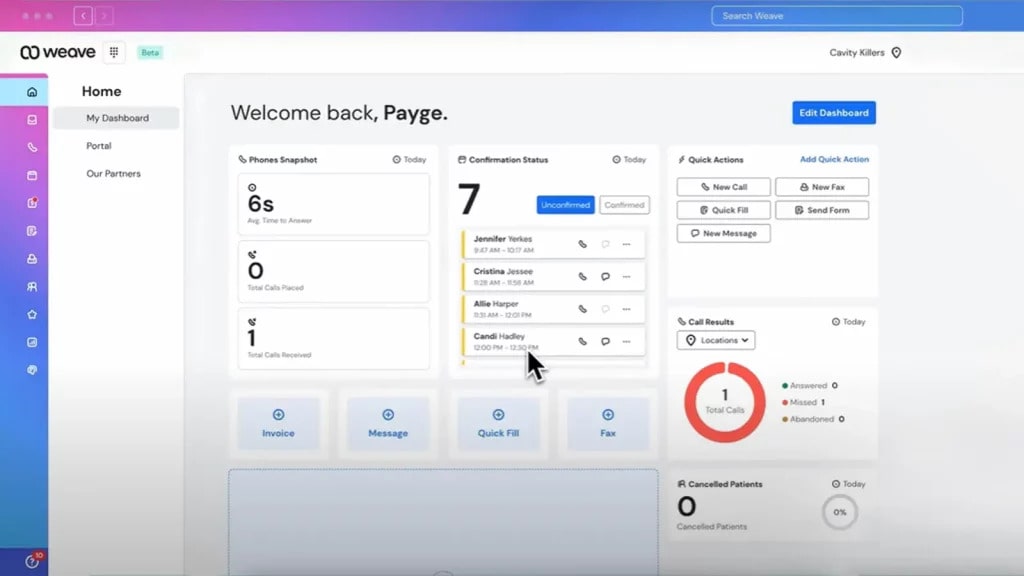
Weave is a communication-first platform designed for dental and healthcare practices. It combines a VoIP phone system, texting, reminders, payments, and review management into one tool. While Practice By Numbers focuses heavily on reporting and analytics, Weave focuses more on improving day-to-day patient communication.
Weave Key Features
- VoIP Phone System: Cloud-based calling with call pop-ups, recordings, and performance tracking.
- Two-Way Texting: Patients can text your main office number and get quick replies.
- Missed Call Text Back: Automatically follows up with patients who didn’t reach someone.
- Online Scheduling: Allows patients to book appointments digitally.
- Review Requests: Sends automated review invitations after visits.
- Digital Payments: Collect balances securely through text-based payment links.
Weave Pros
- Integrated Phone: Fully built-in VoIP system eliminates the need for separate phone vendors.
- Unified Dashboard: Calls and texts are managed in one place.
- Easy Adoption: Simple interface that front desk teams adapt to quickly.
- Reputation Support: Built-in tools to grow Google reviews.
- Multi-Location Support: Works well for growing or multi-office practices.
Weave Cons
- Higher Cost: Bundled phone and communication features can increase monthly pricing.
- Limited AI Depth: Automation exists, but lacks advanced AI-driven conversations.
- Basic Reporting: Not built for deep financial analytics like Practice By Numbers.
Weave Integrations
- Dental PMS Sync: Connects with Dentrix, Eaglesoft, Open Dental, and other major systems.
- Payment Systems: Integrates with payment processors for easier collections.
- Google Reviews: Syncs with Google for reputation management.
Weave Pricing
Weave’s pricing typically starts around $249 per month, depending on the plan and team size.
Weave Ratings
- Capterra: 4.3/5
- G2: 4.2/5
Weave Customer Reviews
“With Weave, it’s just a nightmare with the customer service and support. And guess what, any settings or setup you want to change, you only have to go through their customer support because whenever you make changes from their web portal, none of it gets actually reflected.”
“We deal with elderly patients, Weave gets very confusing to them when it’s sends them a message that for an appointment that we rescheduled. It is also very important because we have patient’s that are hearing impaired and depend on text messages.”
Source: Capterra
Weave Support Channels
- Phone
- Live chat
- Online help center
- Training resources
3. NexHealth | NexHealth vs Practice By Numbers
NexHealth Overview
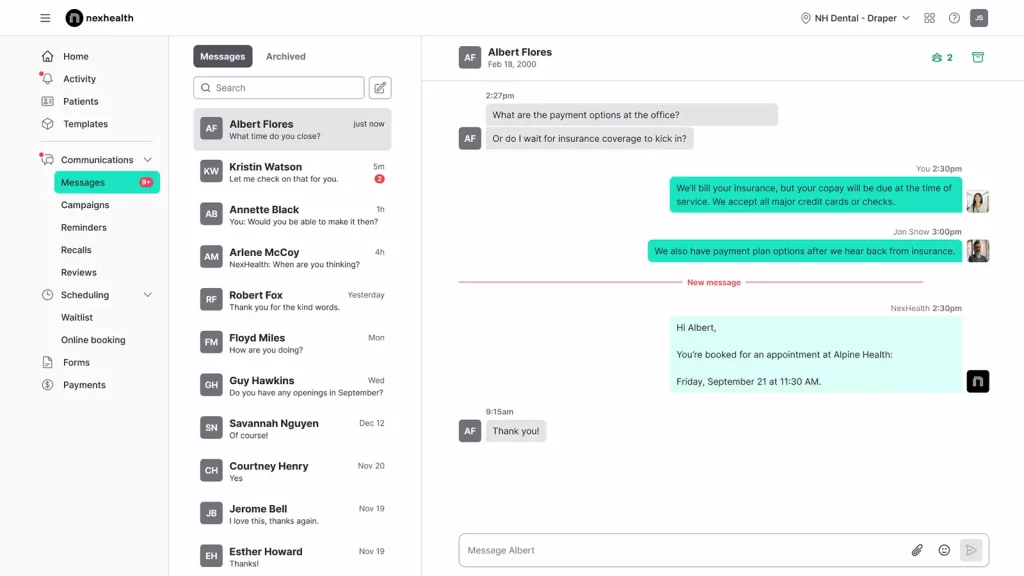
NexHealth focuses heavily on patient experience and seamless PMS integration. It’s built to make scheduling, intake, and digital forms feel effortless for both patients and staff. While Practice By Numbers leans toward analytics and reporting, NexHealth leans toward smooth front-office workflow and patient convenience.
NexHealth Key Features
- Online Scheduling: Real-time appointment booking that syncs directly with your PMS.
- Digital Forms: Paperless intake forms that patients complete before arriving.
- Two-Way Texting: Secure patient messaging tied directly to appointment workflows.
- Automated Reminders: Smart confirmations and recall campaigns to reduce no-shows.
- Insurance Verification: Automated eligibility checks during scheduling.
- PMS Integration Engine: Deep, real-time sync with major dental software systems.
NexHealth Pros
- Deep PMS Sync: Strong real-time integration with Dentrix, Eaglesoft, and Open Dental.
- Patient-Friendly Booking: Clean online scheduling experience that increases convenience.
- Streamlined Intake: Reduces front desk paperwork and check-in delays.
- Modern Interface: Clean design that feels intuitive.
- Multi-Location Ready: Supports scaling practices with centralized management.
NexHealth Cons
- Higher Pricing Tier: Premium integration often comes at a higher cost.
- Limited Phone Features: Does not include built-in VoIP like Weave.
- Less AI-Focused: Automation exists, but not as AI-driven as newer platforms.
NexHealth Integrations
- Dental PMS Sync: Deep integrations with Dentrix, Eaglesoft, and Open Dental.
- Payment Platforms: Connects with payment processors for balance collection.
- API Access: Allows custom integrations for enterprise setups.
NexHealth Pricing
NexHealth pricing plans usually start at around $350/month.
NexHealth Ratings
- Capterra: 4.7/5
- G2: 4.6/5
NexHealth Customer Reviews
“Way to expensive. It was also hard to get in touch with tech support once we were an established customer”
“Professional front, but rigid terms and poor client handling reveal deeper issues. Moreover, we identified a major limitation in NexHealth’s software before any onboarding or integration began. Despite no services used or work performed, they refused a refund and plan to bill us twice more. This demonstrates a clear lack of professional integrity. NexHealth not a company we can recommend.”
Source: Capterra
NexHealth Support Channels
- Email support
- Phone support
- Knowledge base
- Dedicated customer success team
4. Solutionreach | Solutionreach vs Practice By Numbers

Solutionreach Overview
Solutionreach is one of the older, established patient communication platforms in dentistry. It focuses on appointment reminders, recall campaigns, and patient engagement tools. Compared to Practice By Numbers, it offers stronger marketing-style outreach but less focus on financial analytics.
Solutionreach Key Features
- Appointment Reminders: Automated confirmations via text, email, and voice.
- Recall Campaigns: Reactivation messaging for overdue patients.
- Patient Surveys: Collect feedback after visits.
- Two-Way Messaging: Secure texting between staff and patients.
- Digital Forms: Online intake and consent forms.
- Broadcast Messaging: Send announcements to segments of your patient base.
Solutionreach Pros
- Established Platform: Long-standing presence in dental communication.
- Retention Focused: Strong recall and reactivation campaigns.
- Multi-Channel Outreach: Text, email, and voice messaging options.
- Survey Tools: Built-in patient feedback collection.
- Enterprise Ready: Works well for larger practices.
Solutionreach Cons
- Dated Interface: Some users feel the dashboard looks older compared to newer platforms.
- Limited AI Automation: Lacks advanced AI-driven workflows.
- Pricing Structure: Can feel expensive for smaller offices.
Solutionreach Integrations
- Dental PMS Sync: Integrates with major systems like Dentrix and Eaglesoft.
- Survey Platforms: Syncs patient feedback into dashboards.
- Calendar Sync: Coordinates appointments across systems.
Solutionreach Pricing
Solutionreach pricing plans start around $329/month. This is not a flat fee. The costs may increase as you add more features and locations.
Solutionreach Ratings
- Capterra: 3.8/5
- G2: 3.7/5
Solutionreach Customer Reviews
“The software is very specific about templates for scheduling, and we cannot differentiate between different appointment types.”
“Customer service. Is poor. If you have any issues, which all products will, don’t expect a quick resolution.”
Source: Capterra
Solutionreach Support Channels
- Email support
- Phone support
- Knowledge base
- Live chat for limited hours
5. Podium | Podium vs Practice By Numbers

Podium Overview
Podium is built around messaging and online reputation. It helps practices turn conversations into appointments and reviews. While Practice By Numbers focuses on analytics and reporting, Podium focuses heavily on texting, lead capture, and review growth. If your main goal is improving online presence and responding quickly to inquiries, Podium often becomes a strong option.
Podium Key Features
- Two-Way Texting: Centralized inbox for patient messages from SMS and web chat.
- Web Chat Widget: Captures website visitors and converts them into text conversations.
- Review Automation: Automatically requests Google reviews after visits.
- Payment Links: Send secure payment requests through text.
- Missed Call Text Back: Follows up automatically with missed callers.
- Bulk Messaging: Send announcements and promotions to patient segments.
Podium Pros
- Reputation Focused: Excellent for generating and managing online reviews.
- Strong Lead Capture: Website chat converts traffic into conversations.
- Simple Interface: Easy for front desk teams to use.
- Fast Response Tools: Encourages quick patient follow-ups.
- Multi-Location Ready: Works well for larger groups and franchises.
Podium Cons
- Less Dental-Specific: Not built exclusively for dental workflows.
- Limited Scheduling Depth: Does not offer deep PMS scheduling automation.
- Pricing Can Scale Up: Costs increase with added features and locations.
Podium Integrations
- PMS Sync: Integrates with common dental systems for contact syncing.
- Google Integration: Connects directly with Google for reviews and messaging.
- Payment Processors: Supports digital payment platforms.
Podium Pricing
Podium pricing starts at approximately $399/month. There are no charges for individual texts. The rates are set at a flat monthly rate.
Podium Ratings
- Capterra: 4.3/5
- G2: 4.2/5
Podium Reviews
“Inability to interface with Facebook for payments.”
“The interface can be a little overwhelming at times.”
Source: Capterra
Podium support channels
- Email support
- Live chat
- Help center with guides
- Dedicated success reps for premium users
6.RevenueWell | RevenueWell vs Practice By Numbers
RevenueWell Overview
RevenueWell is a marketing and patient communication platform designed for dental practices. It blends reminders, newsletters, recall campaigns, and promotional messaging into one system. Compared to Practice By Numbers, it focuses more on patient retention and marketing outreach rather than analytics dashboards. It works well for practices that want structured campaigns to drive repeat visits.
RevenueWell Key Features
- Automated Reminders: Text and email confirmations to reduce no-shows.
- Recall Campaigns: Reactivate overdue patients automatically.
- Email Marketing: Send newsletters and promotions to patient lists.
- Online Scheduling: Allow patients to request or book appointments online.
- Two-Way Texting: Secure patient messaging within the platform.
- Reputation Management: Automated review requests after visits.
RevenueWell Pros
- Marketing Focused: Strong tools for newsletters and campaigns.
- Retention Support: Helps bring inactive patients back.
- Dental-Specific: Built specifically for dental offices.
- Structured Automation: Pre-built workflows simplify setup.
- Multi-Office Capable: Supports growing practices.
RevenueWell Cons
- Older Interface: Some users feel the dashboard could be more modern.
- Limited AI Tools: Does not heavily focus on AI-powered conversations.
- Pricing Transparency: Custom quotes required.
RevenueWell Integrations
- Dental PMS Sync: Integrates with major systems like Dentrix and Eaglesoft.
- Email Platforms: Connects email campaigns with patient data.
- Review Platforms: Syncs review requests to Google.
RevenueWell Pricing
RevenueWell pricing offers custom plans based on practice size and selected marketing modules.
RevenueWell Ratings
- Capterra: 4.5/5
- G2: 4.5/5
RevenueWell Customer Reviews
“Too many outages and periods of time where we could not get help in our office.”
“Very outdated and counterintuitive. Every seemingly simple change was hidden in a sub submenu. It was difficult to coordinate between the different departments handling each feature and customer service was nearly unreachable.”
Source: Capterra
RevenueWell Support Channels
- Phone
- Live Chat
- Help Center
7.Luma Health | Luma Health vs Practice By Numbers

Luma Health Overview
Luma Health is built around patient access and engagement. It focuses on scheduling optimization, recall management, and filling open slots automatically. While Practice By Numbers leans toward analytics and dashboards, Luma leans toward improving patient flow and reducing empty chair time.
Luma Health Key Features
- Smart Waitlist: Automatically fills cancelled appointments from a digital waitlist.
- Automated Reminders: Sends confirmations and reminders through text and email.
- Recall Campaigns: Reactivates overdue patients with structured outreach.
- Two-Way Messaging: Secure two-way texting between patients and staff.
- Online Scheduling: Digital booking tools that sync with your calendar.
- Capacity Optimization: Tools to analyze and improve appointment utilization.
Luma Health Pros
- Waitlist Automation: Strong tools for filling last-minute openings.
- Access-Focused: Designed to reduce scheduling gaps.
- Multi-Location Support: Works well for larger dental groups.
- Healthcare Built: Designed specifically for medical and dental practices.
- Operational Insights: Helps improve appointment efficiency.
Luma Health Cons
- Higher Cost Tier: Often priced for mid-to-large practices.
- Less Communication Depth: Not as focused on advanced AI texting or calling.
- Limited Phone Integration: No built-in VoIP system.
Luma Health Integrations
- Dental PMS Sync: Integrates with Dentrix, Eaglesoft, Open Dental, and other major systems.
- Calendar Systems: Syncs appointment availability in real time.
- Patient Portals: Connects with digital patient access systems.
Luma Health Pricing
Luma Health pricing uses custom plans based on practice size and selected access modules. It is typically positioned for scaling or multi-location practices.
Luma Health ratings
- Capterra: 4.6/5
- G2: 4.5/5
Luma Health customer reviews
“The constant changes of my account representatives really made it difficult to build relationships. Overtime Luma’s account representatives stopped contacting the practice and as result we had to figure out solutions on our own. Additionally, they changed their payment terms to where if we didn’t pay them upfront then they would drop us as a customer.”
Source: Capterra
Luma Health support channels
- Phone
- Onboarding specialists
- Help center
8.Birdeye | Birdeye vs Practice By Numbers

Birdeye Overview
Birdeye is primarily a reputation management and patient experience platform. It helps practices and businesses collect, monitor, and respond to reviews across multiple platforms. Compared to Practice By Numbers, Birdeye focuses much more on online presence and brand reputation rather than internal analytics.
Birdeye Key Features
- Review Generation: Automated requests to grow Google and Facebook reviews.
- Review Monitoring: Tracks reviews across multiple online platforms.
- Two-Way Messaging: Central inbox for SMS, web chat, and social messaging.
- Survey Tools: Collect patient feedback privately before it goes public.
- Listings Management: Updates business info across directories.
- Reputation Dashboard: Analytics on review trends and ratings.
Birdeye Pros
- Reputation Leader: Strong multi-platform review management.
- Central Messaging: Handles SMS and web chat in one place.
- Brand Visibility Tools: Helps maintain accurate business listings.
- Multi-Location Ready: Built for scaling practices.
- Marketing Support: Good for brand growth strategies.
Birdeye Cons
- Less Dental-Specific: Not built exclusively for dental workflows.
- Limited Scheduling Tools: Does not deeply manage appointments.
- Premium Pricing: Can feel expensive for smaller practices.
Birdeye Integrations
- Dental PMS Sync: Syncs patient lists for review campaigns.
- Google & Facebook: Direct integration for review management.
- CRM Systems: Connects with common CRM platforms.
Birdeye Pricing
Birdeye pricing offers custom plans based on features and the number of locations.
Birdeye Ratings
- Capterra: 4.7/5
- G2: 4.6/5
Birdeye Customer Reviews
“There can be many issues/delays with updating auto-texts for different office hours or holiday hours. We are told we can call BirdEye to make these changes, but then we are always required to send an email to BirdEye Support with the updated hours we would like. Sometimes there is a delay with the auto-text hours being updated, the update request might be inaccurate for our auto-response, or the auto-texts are sent to clients at inaccurate times/outside of what was requested. It would be nice for better consistency with update requests or for businesses to be able to control editing their own auto-responses.“
Source: Capterra
Birdeye Support Channels
- Email and ticket support
- Live chat on website
- Help centre with how-to guides
- Onboarding and training included
9.Phreesia | Phreesia vs Practice By Numbers
Phreesia Overview
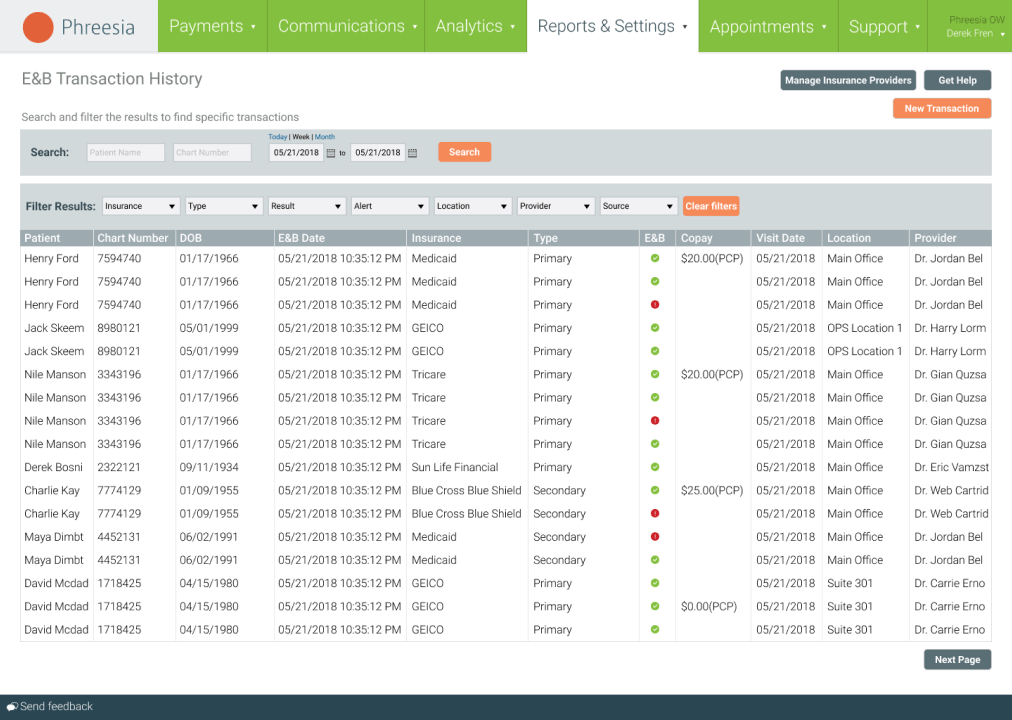
Phreesia is built around patient intake, forms, and payments. It focuses on digitizing check-in workflows and improving the financial side of patient visits. While Practice By Numbers emphasizes analytics and reporting, Phreesia emphasizes front-desk efficiency and patient self-service. If your biggest pain point is paperwork, check-in delays, or collecting balances, Phreesia often becomes a strong option.
Phreesia Key Features
- Digital Intake Forms: Patients complete forms before arriving, reducing in-office paperwork.
- Self Check-In: Tablet or kiosk-based check-in for faster front desk flow.
- Insurance Verification: Real-time eligibility checks before appointments.
- Automated Reminders: Text and email confirmations to reduce no-shows.
- Patient Surveys: Collect feedback after visits.
- Payment Collection: Collect co-pays and balances during digital check-in.
Phreesia Pros
- Paperless Workflow: Great for eliminating clipboard-based intake.
- Faster Check-In: Speeds up patient flow during busy hours.
- Strong Payment Tools: Built-in balance collection features.
- Enterprise Ready: Works well for multi-location practices.
- Healthcare Focused: Designed specifically for medical and dental settings.
Phreesia Cons
- Limited Communication Depth: Not focused heavily on AI texting or missed-call automation.
- Higher Cost Tier: Often priced for mid-to-large organizations.
- Less Reputation Focus: Review management is not a primary strength.
Phreesia Integrations
- Dental PMS Sync: Integrates with major dental and healthcare systems.
- Payment Platforms: Connects with payment processors for collections.
- EHR Systems: Syncs intake data directly into patient records.
Phreesia Pricing
Phreesia pricing details are not publicly available. They offer custom pricing based on the size of your practice and the volume of patient intake.
Phreesia Ratings
- Capterra: 4.3/5
- G2: 4.1/5
Phreesia Customer Reviews
“Our end users have difficulty at times when they have to navigate patient arrival through Phreesia and through our native EHR.”
“Some setting were not as user friendly. It was always a hassle to authorize insurance policies when they were not coming up as automatically being verified.”
Source: Capterra
Phreesia Support Channels
- Phone
- Live Chat
- Help Center
10.Doctible | Doctible vs Practice By Numbers

Doctible Overview
Doctible is a dental-focused communication and marketing platform. It blends reminders, texting, recall campaigns, and simple marketing tools into one system. Compared to Practice By Numbers, it is less analytics-heavy and more centered around patient engagement and retention. If you want a dental-specific platform that combines communication with light marketing features, Doctible is often considered.
Doctible Key Features
- Two-Way Texting: Secure patient messaging through a centralized inbox.
- Appointment Reminders: Automated confirmations and recall campaigns.
- Web Chat: Website chat widget that converts visitors into text conversations.
- EasyFill Waitlist: Helps fill last-minute cancellations.
- Review Automation: Sends review requests after appointments.
- Broadcast Messaging: Send announcements and updates to patients as bulk texts.
Doctible Pros
- Dental Specific: Built with dental practices in mind.
- Waitlist Tools: Helps reduce empty chair time.
- Simple Interface: Easy for front desk teams to use.
- Affordable Entry: Often priced lower than enterprise competitors.
- Retention Focused: Good recall and reminder structure.
Doctible Cons
- Limited AI Depth: Does not offer advanced AI receptionist capabilities.
- Basic Reporting: Minimal analytics compared to reporting platforms.
- Scaling Limits: May feel limited for very large multi-location groups.
Doctible Integrations
- Dental PMS Sync: Connects with Dentrix, Eaglesoft, and Open Dental.
- Google Reviews: Integrates with Google for reputation management.
- Calendar Systems: Syncs appointment availability.
Doctible Pricing
Starts at $249/month. Custom pricing available for large groups.
Doctible Ratings
- Capterra: 4.7/5
- G2: 4.6/5
Doctible Customer Reviews
“This company offers poor integration with practice management software.”
“They hold no responsibility for their errors in syncing with our Eaglesoft system. Patients are confirming appointments and then it doesn’t indicate on our schedule. They claim to have corrected this issue several times, but it keeps happening. Patients get aggravated that we call them to remind them of their appointments when they have already confirmed through Doctible, but Doctible didn’t change on our schedules.”
Source: Capterra
Doctible Support Channels
- Phone
- Help Center
- Chat
Why Emitrr Is a Strong Practice By Numbers Alternative
So what makes Emitrr different? Let’s break down why it’s the upgrade many practices switch to:
HIPAA-Compliant with Full Audit Trail
Emitrr is built with healthcare compliance at its core. It is a fully HIPAA-compliant texting app, which means patient conversations, calls, and messages stay secure and protected. Every interaction is logged with timestamps and user details, creating a clear audit trail you can rely on. You always know what was sent, when it was sent, and who handled it. For dental practices, that kind of transparency adds confidence and accountability without adding extra work.
One Inbox for Calls, Texts, and Reviews
Emitrr brings every patient interaction into one simple, organized inbox. Whether a patient calls, sends a text, replies to a reminder, or leaves a review, your team sees it all in one place. That means no jumping between systems and no missed messages. It keeps communication clean and easy to manage. For busy front desks, that kind of clarity makes a huge difference.
Smarter Automation That Reduces Front Desk Load
Emitrr is built to take repetitive tasks off your team’s plate. Missed calls trigger automatic text responses. Appointment reminders go out without manual effort. Follow-ups can be scheduled automatically based on treatment type or patient behavior. Instead of constantly reacting, your front desk can focus on patients in the office.
Faster Follow-Ups That Drive More Bookings
Speed matters more than ever in dental marketing. When a patient reaches out and gets an instant reply, the chances of booking increase significantly. Emitrr ensures no inquiry goes unanswered, even after hours. Automated follow-ups keep leads warm without your staff chasing them manually. The result is more confirmed appointments and fewer lost opportunities.
Review and Reputation Management Are Built In
Online reviews are a major growth driver, and Emitrr makes them part of your everyday workflow. After appointments, patients can automatically receive review requests through text. All reviews are visible in one dashboard, making it easy to respond quickly. Positive experiences turn into public five-star feedback. Negative comments can be addressed promptly before they escalate.
Flexible Workflows for Different Practice Types
Every dental practice operates differently, and Emitrr adapts to that. Pediatric clinics, orthodontic offices, multi-location groups, and general dentistry practices can all customize workflows to match their needs. Automation rules can be adjusted based on appointment type, provider, or patient behavior. This flexibility ensures the system works around your office – not the other way around.
Integrations That Keep Your Data Aligned
Emitrr connects directly with major dental practice management systems like Dentrix, Eaglesoft, and Open Dental. Appointments, patient details, and updates sync automatically in real time. There is no double entry and no manual data transfer. Everything stays aligned across systems. That smooth integration reduces errors and saves hours of administrative work.
AI-Powered Calling and Texting Support
Emitrr goes beyond basic reminders with intelligent automation. AI can respond to common patient questions, confirm appointments, and handle simple conversations without staff involvement. Features like automated missed calls to text ensure that even when your lines are busy, patients still feel heard. It creates a modern, responsive experience that today’s patients expect.
Real-Time Visibility Into Patient Conversations
Practice owners and managers can see exactly how communication is flowing. You can track response times, message volumes, and booking trends in real time. If there is a bottleneck, it becomes visible immediately. This level of transparency helps improve team performance without micromanaging. Instead of guessing what is happening, you can see it clearly.
Easy Setup Without Disrupting Daily Operations
Switching systems can feel stressful, but Emitrr’s setup process is designed to be smooth. Integrations are handled carefully so your day-to-day operations continue running. Templates, workflows, and automation can be configured quickly. Most practices are up and running without weeks of disruption. That simplicity makes adoption easier for the entire team.
Support and Onboarding That Feels Truly Hands-On
Emitrr emphasizes real human support, not just ticket systems. New practices receive guided onboarding to ensure everything is configured properly from day one. Questions are answered quickly, and support feels proactive rather than reactive. Many practices mention how responsive and involved the support team is. That kind of partnership makes a noticeable difference over time.
Key Takeaways
- Strong Reporting: Practice By Numbers excels at financial tracking and performance dashboards, but it may feel expensive and less agile for daily front desk communication needs.
- Unified Communication: A good alternative should combine texting, calling, scheduling, and review management in one place while still offering meaningful analytics.
- Emitrr Advantage: Emitrr stands out with unlimited two-way texting, AI-powered call handling, and built-in review automation that directly reduces no-shows and increases bookings.
- NexHealth Fit: NexHealth works well if deep PMS integration and seamless patient self-scheduling are your top priorities.
- Weave Strength: Weave shines in phone and text coordination, especially with its built-in VOIP system.
- Review-Focused Tools: Podium and Birdeye are strong choices if your primary goal is managing and growing online reviews across platforms.
- Enterprise Options: Solutionreach, RevenueWell, and Luma Health often suit larger practices focused on marketing campaigns and outreach strategies.
- Intake Specialist: Phreesia is ideal if your biggest pain point is digital intake forms and payment collection.
- Dental Marketing: Doctible focuses more on dental-specific marketing tools like web chat and waitlist features.
- Growth Priority: If streamlining patient communication and boosting bookings is your main goal, Emitrr should be at the top of your shortlist.
Ultimately, the best Practice By Numbers alternative depends on the biggest challenge your office is trying to solve. And if that challenge is streamlining patient communication and increasing bookings, you should consider Emitrr’s AI-powered communication tools!
FAQs
It depends on what you’re trying to fix. If communication and automation are your priorities, Emitrr is one of the strongest options available. It’s built to reduce workload while helping you grow.
Absolutely! This is because AI is built into the core of the platform. From missed call text-back to smart responses, it’s designed to handle conversations automatically and efficiently.
In most cases, yes. Phone numbers can usually be ported, and your Google reviews stay on Google. Most vendors, including Emitrr, help make the transition smooth.
They’re built for healthcare, so encryption and HIPAA compliance are standard. Just make sure you receive a Business Associate Agreement and confirm the details before moving forward.
Look for platforms that allow centralized oversight but still support location-level customization. Emitrr supports multi-location practices while keeping communication streamlined.
Automation usually delivers quicker returns because it reduces no-shows and improves booking speed. Reputation management will drive steady growth over time. So ideally, you should look for a system that handles both.


 4.9 (400+
reviews)
4.9 (400+
reviews)