
Introduction
Improving patient response rates in Athenahealth is critical for keeping schedules full, reducing no-shows, and minimizing front desk workload. Yet many practices struggle to get patients to confirm appointments, respond to reminders, or engage with follow-up messages.
The challenge usually isn’t the patients; it’s the communication workflow. When reminders are generic, one-way, or poorly timed, patients are far less likely to respond. In this guide, we’ll walk through practical strategies that help healthcare practices increase patient responses, automate communication, and improve engagement while using Athenahealth.
AI Summary
- Patient response rates improve when communication is timely, personalized, and easy to reply to.
- Two-way SMS messaging significantly increases engagement compared to calls or one-way reminders.
- Automated reminders and follow-ups help reduce missed appointments and improve confirmations.
- Event-based messaging ensures patients receive relevant reminders tied to their appointment details.
- AI-powered messaging tools can handle confirmations, rescheduling, and common patient questions automatically.
- Integrating Athenahealth with advanced communication platforms enables real-time syncing, automated workflows, and higher patient response rates.
Why Patient Response Rates Matter for Healthcare Practices
Patient response rates directly impact a clinic’s efficiency, revenue, and overall patient experience. When patients quickly respond to reminders or messages, practices can reduce no-shows, fill empty slots, and keep schedules running smoothly.
Effective patient communication ensures that clinical and administrative teams are not constantly chasing confirmations, which saves valuable staff time. Tools like athenahealth appointment reminders and patient messaging integration can automate outreach and significantly improve response consistency.
High response rates also influence patient satisfaction. When patients receive timely, relevant notifications and can confirm appointments through secure messaging, they feel more engaged and confident in their care. Practices that leverage two-way texting and automated messaging often see better adherence to care plans and fewer last-minute cancellations. Many healthcare organizations are also using communication automation to improve patient engagement inside Athenahealth by delivering timely reminders, personalized outreach, follow-up messages, and convenient two-way communication that encourages patients to stay actively involved in their care journey.
By prioritizing communication workflows with integrated solutions, healthcare providers can improve operational efficiency while delivering a more seamless experience for patients.
Common Reasons for Poor Patient Response Rate in Athenahealth
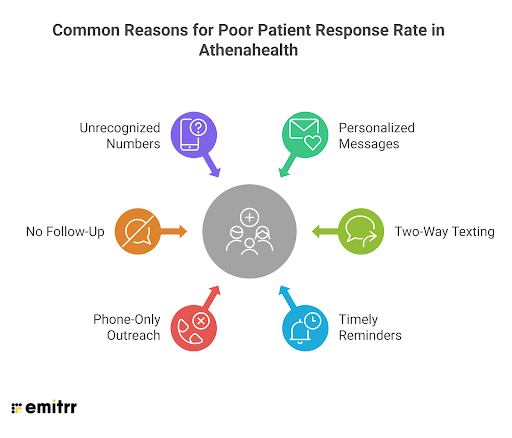
Understanding why patients fail to engage helps practices design more effective communication strategies. Some common factors include:
Messages That Don’t Feel Personal
Patients are more likely to respond when reminders include their provider’s name, visit type, and appointment details. Generic texts get ignored, personalized messaging shows patients the message is relevant to them.
Limited Reply Options
If patients can’t respond directly to a reminder, engagement drops. Two-way texting gives patients an easy, instant way to confirm, reschedule, or ask questions, instead of leaving a voicemail or waiting on hold.
Poor Timing
Sending messages too early or too late reduces response rates. Aligning reminders with patient behavior, like a day-before text or morning-of alert, ensures messages are read and acted on.
Phone-Only Outreach
Many patients prefer texting over calls. Practices that rely heavily on phone calls miss quick responses that could have been captured via SMS or VoIP messaging integrated with Athenahealth.
No Follow-Up After Initial Reminder
One message isn’t enough. Automated follow-up sequences ensure patients who haven’t replied receive timely reminders, reducing no-shows and keeping schedules full.
Messages From Unrecognized Numbers
Patients often ignore messages from unknown numbers. Since Athenahealth doesn’t let clinics text from their own business number, using a recognizable line (via VoIP or integrated SMS) significantly increases the chance a message is read and responded to.
By addressing these factors through personalized, timely, and two-way messaging, clinics can dramatically increase patient engagement, reduce no-shows, and improve operational efficiency, the exact problems solved by integrating Athenahealth with Emitrr.

11 Ways to Improve Patient Response Rates in Athenahealth
Improving patient response rates is about creating timely, relevant, and convenient communication that patients actually respond to. By combining automation, personalization, and smart scheduling, practices can reduce no-shows, fill empty slots, and free staff from manual follow-ups.
Text Patients From Your Own Business Number
When messages come from the clinic’s main phone number, whether landline or VoIP, patients instantly recognize the sender and are more likely to read and reply. Familiar numbers reduce confusion, encourage trust, and eliminate the hesitation of responding to unknown or short‑code numbers.
Learn how to text patients from your existing phone number inside Athenahealth.
Enable Two-Way SMS That Connects Back to Athenahealth
Instead of sending one‑way appointment reminders, enable two‑way SMS inside Athenahealth to let patients confirm, reschedule, ask questions, or notify issues via text. Because replies are written back into Athenahealth automatically, staff always have full context, and every patient interaction becomes an opportunity for engagement rather than a dead end.
See how to text from Athenhealth directly:
Automate Multi‑Touch Appointment Reminders
Triggered messaging based on real appointment events in Athenahealth keeps your practice top‑of‑mind. Reminders at booking, 3-7 days before, 24 hours before, and day‑of give multiple chances for patients to respond without manual effort, and each automated touchpoint increases the likelihood of confirmation replies.
Personalize Messages Using Appointment Context
Including provider name, visit type, date/time, and instructions makes outreach feel relevant instead of generic. When patients see personally meaningful information instead of templated text, they are far more inclined to reply or take action.
Segment Outreach to Relevant Patient Groups
By filtering appointment lists from Athenahealth by criteria such as provider, visit type, location, or status, staff can send highly targeted messages. Patients only receive information that applies to them, which increases responsiveness compared to blanket messages that often get ignored.
Turn Missed Calls into Immediate SMS Conversations
When patients call and reach voicemail or an unanswered line, automated text follow‑ups reach them quickly with a message like “Sorry we missed your call, how can we help?”. This keeps potential engagement alive and prompts replies where a call alone might have failed.
Enable Automated Follow‑Up After Missed Appointments
Set up auto responses in Athenahealth to boost patient response rate. If a patient doesn’t show up, a timely, automated follow‑up text increases the chance they’ll reply with a reschedule request, ask a question, or confirm their intent. This turns no‑show events into new engagement opportunities.
Leverage AI to Handle Replies and Frequently Asked Questions
AI‑powered SMS agents and automated responses can instantly address common questions, from rescheduling to insurance queries, encouraging patients to reply without waiting on staff. Faster responses mean more engagement overall.
Use Multilingual Messaging to Remove Language Barriers
Athenahealth’s native messaging doesn’t support multilingual outreach, which can limit engagement for diverse patient bases. Providing messaging in a patient’s preferred language improves comprehension and comfort, leading to significantly higher response rates from communities who might otherwise ignore or misunderstand messages.
Enable VoIP‑Powered Communication for Richer Engagement
VoIP integration pulls patient contact info directly from Athenahealth and gives staff the ability to call or text instantly from within their workflows. Click‑to‑call features, call pop‑ups with patient context, and voicemail sync all reduce friction, the easier communication feels for staff, the faster patients get timely replies.
Combine Channels (SMS + Email + Voice) for Better Reach
Reaching patients in multiple channels increases the chance they see and respond to messages. Some patients prefer texts, others respond to voice or email, giving options increases overall engagement and doesn’t rely on any one channel alone.
How Integrating Athenahealth with Emitrr Improves Patient Response Rates
When it comes to communication capabilities, Athena alone is not enough and does not offer a lot of features and ways to improve the patient response rate. This is exactly where adding a HIPAA-compliant tool like Emitrr to Athenahealth comes in handy, as it offers native integration with Athena.
Two-Way Messaging Built for Real Replies
Emitrr enables true two‑way SMS and secure messaging so patients can reply to appointment reminders, ask questions, or confirm visits directly via text. When replies are automatically logged back into Athenahealth, staff get full context, and patients feel heard, which boosts engagement.
Automated Multi‑Touch Reminders Triggered by Athenahealth Events
Instead of generic messages, Emitrr allows you to send reminders at key milestone events pulled from Athenahealth, at booking, 24 hours before, and on the day of the visit. Because each message feels timely and relevant, patients are more likely to respond or confirm.
Sending Messages From Your Clinic’s Number
Athena itself does not allow you to send messages from your existing number, but with Emitrr, messages aren’t sent from an unrecognizable or shared system number; they are sent from your current business number (including VoIP). This increases trust and response rates because patients instantly recognize who the message is from and are comfortable replying.
Turn Missed Calls Into Conversation Opportunities
With the missed-call-to-text feature, if a patient call goes unanswered, Emitrr can auto‑send a text acknowledging the attempt and asking how the practice can assist. This converts missed interactions into engagement opportunities, improving overall response rates.
Smart Follow‑Ups After Missed Appointments
When an appointment is missed, Emitrr automatically sends follow‑up messages offering rescheduling options. Because these texts are immediate and action‑oriented, patients are more likely to reply and rebook.
Multilingual Messaging for Wider Patient Engagement
Emitrr supports patient communication in their preferred language. When patients receive outreach in a language they understand best, comprehension increases, and with it, the willingness to respond.
AI‑Powered Messaging and Intelligent Response Handling
Emitrr offers an AI agent that helps craft personalized, context‑aware texts and can reply to common questions instantly. Patients get quick, relevant responses without staff needing to intervene, which dramatically improves engagement.
See what more Emitrr AI SMS agent can do:
Smart Schedule Notifications That Prompt Action
If a provider’s schedule changes or a new opening appears, the system automatically identifies relevant patients and sends tailored notifications. These messages aren’t just alerts; they prompt patients to act (confirm a new slot, book a cancelled visit, or adjust a timetable).
Targeted Outreach Based on Appointment and Patient Segments
Emitrr pulls patient data like visit type, insurance, or last appointment to send segmented campaigns. Patients receive outreach that truly applies to them, increasing the chance they’ll read and reply.
Real‑Time Bi‑Directional Sync With Athenahealth
Contacts, appointment details, and communication history sync automatically between Emitrr and Athenahealth. Every message, reply, and call note is logged in the EHR, ensuring staff always have the latest patient context, which speeds up follow‑up and increases the likelihood of timely patient responses.
Multichannel Communication for Maximum Reach
Emitrr combines SMS, email, and voice outreach in a single workflow. Some patients prefer texts, others respond better to VoIP, or emails. Giving them options increases the overall response rate without adding work for your team.
Best Practices to Improve Patient Response Rates
Improving patient response isn’t just about tools, it’s about how you use them strategically. These best practices combine operational insight, patient psychology, and workflow efficiency to make messages more likely to get replies.
1. Time Messages Around Decision Points
Send reminders when patients are most likely to act, booking confirmation, 24 hours before, and same-day. Understanding when patients think about their appointments increases response rates.
2. Make Communication Predictable
Patients respond better when messages follow a consistent pattern (reminder → follow-up → post-appointment check). Predictable timing builds trust and reduces missed replies.
3. Speak the Patient’s Language
Use multilingual messaging when appropriate. Patients are far more likely to reply when they can read and understand messages in their preferred language, not just because the reminder exists.
4. Reduce Effort for Patients
Make it easy to respond: short replies, quick confirm/reschedule buttons, clear instructions. The less friction, the higher the response rate.
5. Segment for Relevance, Not Just Convenience
Instead of blasting everyone, only message patients for whom the content matters (upcoming visit type, insurance, last appointment). Relevant communication drives action; irrelevant communication drives ignorance.
6. Combine Automation With Human Oversight
Automation saves time, but monitor replies and intervene when needed. Patients often respond faster when someone is ready to act on their replies immediately.
7. Test, Learn, Repeat
Use analytics to track response rates by message type, timing, language, and channel. Small tweaks to timing or wording can have outsized impact on patient engagement.
8. Leverage Multi-Channel Nudges
Use SMS, email, and VoIP thoughtfully; patients differ in how they respond, and providing multiple touchpoints increases total engagement without spamming.
Frequently Asked Questions
You can increase responses by sending personalized, automated SMS and email reminders directly from Athenahealth, enabling two-way replies, leveraging multilingual messaging, and using AI-powered follow-ups.
Yes. Sending messages from your clinic’s phone number or VoIP line increases trust and makes patients more likely to read and reply, unlike generic system numbers.
Absolutely. Emitrr syncs appointment data, patient contacts, and communication history in real time, ensuring messages are accurate and replies are logged automatically into Athenahealth.
Yes. Emitrr allows instant automated follow-ups for no-shows inside Athenahealth, enabling patients to reschedule quickly, reducing empty slots and improving engagement without extra staff effort.
Sending messages in a patient’s preferred language increases comprehension and comfort, leading to higher reply rates and improved overall response for diverse patient populations.
Conclusion
Improving patient response rates in Athenahealth is about making communication seamless, personalized, and actionable. By integrating Emitrr, practices can automate follow-ups, enable two-way messaging, leverage multilingual outreach, and intelligently manage schedules, all while ensuring every reply is logged directly into Athenahealth.
The result? Faster patient responses, fewer no-shows, full schedules, and more time for staff to focus on care.
Integrate Athenahealth with Emitrr Today, book a free demo to learn more!

 4.9 (400+
reviews)
4.9 (400+
reviews)