
Introduction
Telehealth has transformed healthcare delivery in recent years. With virtual care usage rising 38x since pre-pandemic levels (McKinsey, 2021), healthcare organizations are increasingly leveraging telehealth EHR solutions like eClinicalWorks Telehealth to provide high-quality patient care remotely.
However, many healthcare providers still face challenges such as claim denials, billing errors, and workflow inefficiencies. According to a 2023 study by the Medical Group Management Association (MGMA), 43% of practices reported claim denials due to improper telehealth billing codes, and 39% experienced EHR configuration difficulties during virtual visits.
This guide explores eClinicalWorks Telehealth capabilities, setup, workflow, billing best practices, and tips to optimize your TeleVisit experience for patients and staff alike.
What is eClinicalWorks Telehealth?
eClinicalWorks Telehealth is a fully HIPAA-compliant telehealth platform integrated into the eClinicalWorks EHR. It allows providers to conduct virtual visits directly through the Patient Portal or the Healow app, eliminating the need for third-party telehealth platforms.
Purpose & Benefits
- Enables remote consultations, follow-ups, and chronic care management
- Maintains accurate clinical documentation and billing compliance
- Supports patient engagement and continuity of care without disrupting in-office workflows
Why Telehealth Matters in eClinicalWorks
Many healthcare teams struggle with fragmented systems, leading to manual documentation errors, billing inaccuracies, claim denials, no-show patients, and workflow inefficiencies.
By integrating telehealth directly into the EHR, eClinicalWorks ensures that virtual patient care aligns seamlessly with in-person workflows, allowing providers to focus on patient care rather than administrative challenges.
Core Capabilities of eClinicalWorks Telehealth
Seamless TeleVisit Integration
eClinicalWorks Telehealth allows providers to launch TeleVisits directly from patient progress notes, eliminating the need to switch between multiple systems. This integration ensures that virtual visits are recorded in real-time, reduces workflow interruptions, and minimizes the risk of missing or duplicate documentation. Providers can focus more on patient care and less on administrative tasks.
Multi-Device Accessibility
Patients can join virtual visits through desktop or laptop browsers or via the Healow app on iOS and Android devices. No extra downloads or software installations are required, making TeleVisits accessible to patients with varying technical skills. This flexibility ensures a smooth patient experience, improving attendance and engagement.
Virtual Waiting Room
A built-in virtual waiting room allows patients to queue before their appointments, giving staff better control over scheduling and patient flow. Providers can monitor who is waiting, prioritize urgent cases, and reduce idle time, resulting in a more efficient and organized virtual visit process.
Real-Time Clinical Documentation
During TeleVisits, providers can capture vitals, symptoms, treatment recommendations, and progress notes directly in the EHR. Real-time documentation ensures that records are complete, accurate, and audit-ready, reducing errors in clinical notes and supporting proper billing. All entries sync automatically to the patient’s chart.
Pre-Visit Questionnaires & Screening
eClinicalWorks Telehealth supports customizable pre-visit questionnaires and clinical screenings, including assessments for depression, respiratory illnesses, and Social Determinants of Health (SDH). Collecting this information ahead of the visit allows providers to tailor their care, address patient-specific concerns efficiently, and make the most of the TeleVisit time.
Integrated Scheduling & Notifications
The platform manages virtual and in-person appointments through a unified scheduling interface. Automated email and SMS appointment reminders with TeleVisit links help reduce no-shows and ensure patients are prepared for their appointments. This integration keeps administrative work streamlined and boosts overall practice efficiency.
On-Demand Video & Audio Calls
Providers can initiate instant video or audio calls with patients without requiring prior scheduling. This feature is particularly useful for urgent consultations, follow-ups, or brief check-ins, improving responsiveness and patient satisfaction while maintaining continuity of care.
Screen Sharing & Patient Education
During TeleVisits, providers can share test results, lab reports, imaging, and educational materials with patients in real-time. This capability enhances patient understanding, promotes shared decision-making, and helps patients follow treatment recommendations accurately, even from a remote setting.
Wearable Device Integration
The platform can collect and process data from patient wearables, such as blood pressure monitors, glucose meters, or fitness trackers. Integrating this data into the TeleVisit workflow allows providers to monitor chronic conditions, track trends over time, and make informed treatment decisions without in-person visits.
Mobile Telehealth for Providers
With the eClinicalMobile app, providers can conduct TeleVisits from anywhere using iOS or Android devices. This mobility ensures care continuity when providers are on the move, enabling real-time virtual consultations and maintaining patient engagement outside the traditional clinic environment.
Analytics & Reporting
eClinicalWorks Telehealth includes built-in analytics tools to track the number, duration, and types of TeleVisits, as well as patient demographics and engagement metrics. This data helps practices optimize their virtual care delivery, identify trends, improve patient satisfaction, and support strategic decisions for resource allocation.
| Feature | Benefit |
| TeleVisit Integration | Launch virtual visits directly from progress notes |
| Multi-Device Access | Patients join via desktop or healow app (iOS/Android) |
| Virtual Waiting Room | Efficient patient flow management |
| Real-Time Documentation | Capture vitals, symptoms, and notes during visits |
| Pre-Visit Questionnaires | Custom surveys for patient prep & screenings (depression, SDH, respiratory) |
| Integrated Scheduling | Manage in-person and virtual visits in one interface |
| On-Demand Calls | Video/audio calls without scheduling |
| Screen Sharing | Share labs, imaging, and health education materials |
| Wearable Device Integration | Collect BP, glucose, and other device data |
| Mobile Telehealth | eClinicalMobile app for on-the-go visits |
| Analytics & Reporting | Track visit volume, duration, patient demographics |
Security & Compliance Features of eClinicalWorks Telehealth
- Encrypted Audio/Video Communication: All TeleVisits use secure, HIPAA-compliant encryption, ensuring patient health information is protected during transmission.
- Audit-Ready Logs: Every TeleVisit action is timestamped and linked to the provider and patient, creating a complete, traceable record for audits and compliance.
- Consent Management: The system captures verbal or written patient approval for TeleVisits, helping practices meet legal and regulatory requirements.
- CMS Telehealth Billing Support: Built-in coding guidance and modifier support minimize claim rejections and ensure billing aligns with CMS and payer rules.

eClinicalWorks Telehealth Setup
Setting up eClinicalWorks Telehealth correctly is critical to ensure smooth virtual visits, accurate documentation, and compliant billing. This section covers technical requirements and a step-by-step setup guide for providers and patients.
Technical Requirements
For Providers
To conduct TeleVisits effectively, healthcare providers need:
- eClinicalWorks V11e (browser-based) or desktop version – Ensures access to the latest features and seamless integration with patient records.
- Webcam and microphone – Essential for clear, two-way audio/video communication during TeleVisits.
- Healow TeleVisit enabled – Activation in the system is required to start virtual visits and integrate them with EHR documentation.
For Patients
Patients also need the right setup to join TeleVisits smoothly:
- Smartphone, tablet, or computer – Flexible options allow patients to connect using devices they already own.
- Stable internet connection – A reliable connection ensures uninterrupted audio/video quality during the visit.
- Patient Portal access or Healow app – Provides secure access to join TeleVisits, complete pre-visit questionnaires, and receive reminders.
Step-by-Step Setup
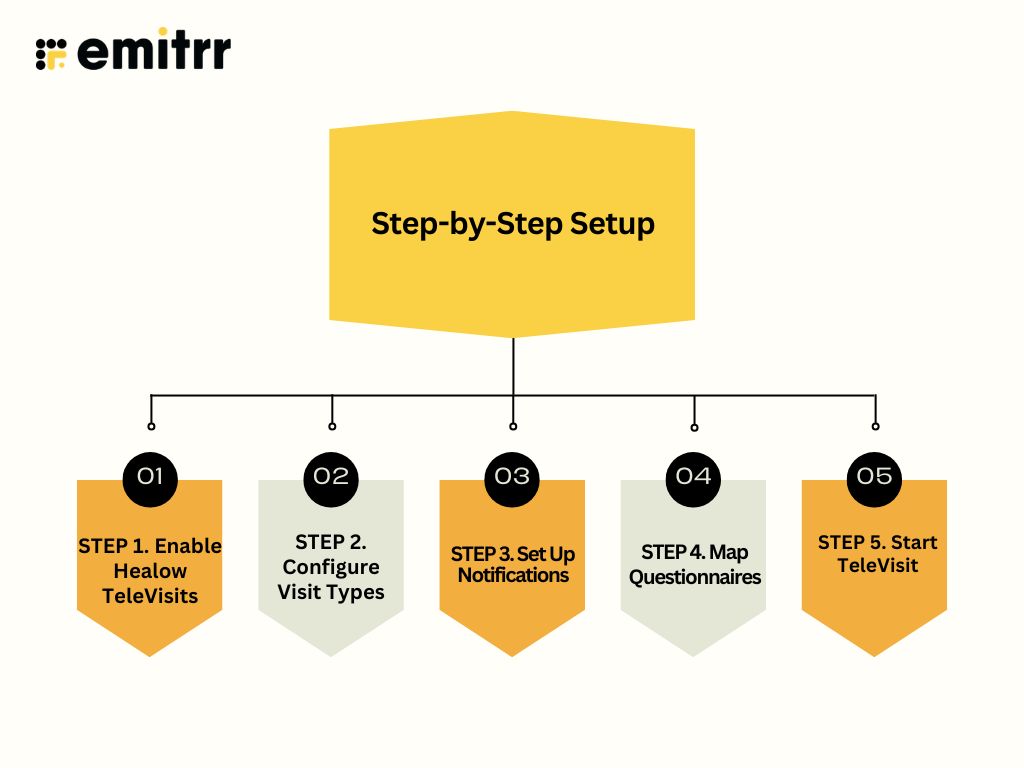
STEP 1. Enable Healow TeleVisits
- Navigate to: Admin > Product Activation > Healow TeleVisits > Activate
- Register each provider by entering essential information (email, NPI, ZIP code).
- This enables the TeleVisit feature for all selected providers, linking it with the EHR system.
STEP 2. Configure Visit Types
- Go to: Admin > User Admin > Visit Type Codes > Add
- Create a visit type named “Telehealth” or “Virtual Visit”, and ensure the Healow TeleVisit checkbox is selected.
- This step categorizes TeleVisits in the system for scheduling, documentation, and billing.
STEP 3. Set Up Notifications
- Access: Healow > Patient Portal Settings > Email/SMS reminders
- Configure automatic notifications with TeleVisit links to remind patients of upcoming appointments.
- Proper reminders reduce no-shows and improve patient engagement.
STEP 4. Map Questionnaires
- Navigate to: Patient Portal Settings > Form (Ques & Imm) > Map to TeleVisit type
- Select pre-visit forms or clinical screenings to assign to TeleVisits (e.g., depression, respiratory illness, SDH).
- Ensures providers have patient information ready before the TeleVisit starts.
STEP 5. Start TeleVisit
- Providers initiate a session by clicking Start TeleVisit in the patient’s progress note.
- Patients receive a notification via Patient Portal or Healow app and join the virtual visit.
- Real-time documentation is captured directly into the patient chart, ensuring seamless workflow and billing readiness.
TeleVisit Workflow for Providers
- Patient books a TeleVisit online
- Patient receives a reminder and a link
- Patient enters virtual waiting room
- Provider starts the TeleVisit from the chart
- Real-time documentation and vitals collection
- Orders, prescriptions, and clinical notes completed
- Billing and coding are triggered automatically
Best Practices for Optimizing eClinicalWorks Telehealth
Optimizing eClinicalWorks Telehealth ensures smooth virtual care delivery, accurate documentation, and proper billing. Here’s a breakdown of best practices for providers, billing teams, and IT staff.
For Providers
- Standardize TeleVisit Workflows: Create consistent procedures for starting, conducting, and documenting TeleVisits. Standardization reduces errors, saves time, and ensures all team members follow the same process.
- Use Documentation Templates: Leverage pre-built or customized templates for progress notes, vitals, and treatment recommendations. Templates streamline documentation, improve accuracy, and support audit-ready records.
For Billing Teams
- Double-Check CPT Codes and Modifiers: Verify that TeleVisit CPT codes and modifiers like 95 or GT are correctly applied. Accurate coding prevents claim denials and accelerates reimbursement.
- Maintain Audit-Ready Records: Ensure every TeleVisit has complete, traceable documentation, including date, time, provider, and patient details. This safeguards compliance and simplifies audits or payer reviews.
For IT Teams
- Ensure Proper Configuration: Regularly check that the Healow TeleVisit feature, visit types, notifications, and portal access are properly configured. Proper setup reduces technical issues and enhances user experience.
- Train Staff Regularly: Provide ongoing training for providers, billing personnel, and support staff. Educated teams can efficiently manage TeleVisits, address patient questions, and maintain compliance.
Enhancing Telehealth with Emitrr
While eClinicalWorks Telehealth provides a robust platform for virtual visits, integrating Emitrr can further improve patient communication and operational efficiency. Emitrr specializes in automated SMS, reminders, and two-way messaging, which perfectly complements TeleVisit workflows.
How Emitrr Adds Value to Telehealth
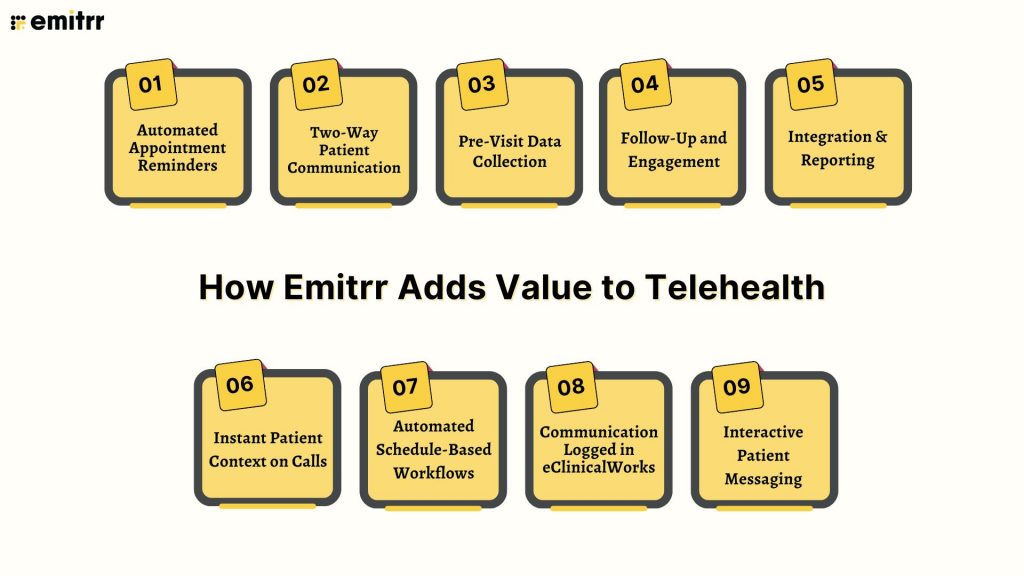
- Automated Appointment Reminders: Emitrr can send customized SMS and email reminders for TeleVisits, ensuring patients join on time and reducing no-shows. This works alongside eClinicalWorks’ built-in notifications for maximum coverage.
- Two-Way Patient Communication: Patients can respond to reminders, confirm appointments, or ask questions directly through two-way texting, enabling faster resolutions and reducing administrative phone calls.
- Pre-Visit Data Collection: Emitrr can deliver pre-visit questionnaires or forms via SMS, prompting patients to submit information ahead of TeleVisits. This complements eClinicalWorks’ pre-visit forms and ensures providers are prepared.
- Follow-Up and Engagement: After TeleVisits, Emitrr can automatically send follow-up messages, patient satisfaction surveys, or health tips, enhancing patient engagement and improving retention.
- Integration & Reporting: Emitrr’s reporting tools provide insights on message delivery, patient responses, and engagement rates, helping practices optimize virtual care and workflow efficiency.
- Instant Patient Context on Calls: Emitrr shows patient and appointment details automatically when a call comes in. Staff can respond quickly without switching screens, making interactions smoother and more personal.
- Automated Schedule-Based Workflows: Using ECW appointment data, Emitrr triggers reminders, confirmations, follow-ups, and recall campaigns. This ensures patients are contacted on time without manual effort.
- Communication Logged in eClinicalWorks: All messages and interactions are recorded directly in ECW charts. Practices maintain a complete history of patient communication for compliance and continuity of care.
- Interactive Patient Messaging: Patients can ask questions or confirm appointments via SMS. Staff manages all responses from a centralized inbox, ensuring nothing gets missed.
Why Use Emitrr with eClinicalWorks Telehealth?
By combining eClinicalWorks Telehealth for clinical documentation and virtual care with Emitrr for communication and engagement, healthcare providers can:
- Reduce missed appointments and improve patient compliance
- Streamline pre-visit and post-visit processes
- Maintain consistent communication without adding staff burden
- Enhance overall patient experience and satisfaction
Conclusion
eClinicalWorks Telehealth offers a comprehensive, HIPAA-compliant platform that empowers healthcare providers to deliver virtual care efficiently while maintaining accurate documentation, billing compliance, and patient engagement.
When set up correctly and combined with best practices for providers, billing, and IT teams, TeleVisits become seamless, reducing claim denials and improving operational efficiency.
Integrating Emitrr with eClinicalWorks takes patient communication to the next level. With features like automated reminders, two-way messaging, pre-visit data collection, and follow-up engagement, Emitrr ensures that patients stay informed, responsive, and engaged, all while keeping records centralized in eClinicalWorks. Together, Telehealth and Emitrr create a unified, patient-centric virtual care experience.
Boost your practice efficiency and patient satisfaction, explore how Emitrr can enhance your eClinicalWorks Telehealth workflows. Book a demo now.
Frequently Asked Questions
A fully HIPAA-compliant telehealth platform integrated into eClinicalWorks EHR, enabling virtual visits through the Patient Portal or healow app.
Providers can launch a TeleVisit directly from the patient’s progress note using the “Start TeleVisit” button.
Providers need eClinicalWorks V11e, a webcam, and the Healow agent; patients need internet access and the Patient Portal or Healow app.
Ensure proper setup, accurate documentation, correct CPT codes/modifiers, and confirm patient consent for TeleVisits.
Emitrr automates reminders, enables two-way SMS communication, collects pre-visit data, logs interactions in ECW, and sends follow-ups, improving engagement and reducing no-shows.


 4.9 (400+
reviews)
4.9 (400+
reviews)