
 4.9 (400+
reviews)
4.9 (400+
reviews)

Overview Of VoIP Phone System for Healthcare
Imagine this: your front desk manages calls, texts, and voicemails from an easy-to-use dashboard. Doctors can contact patients through a mobile app, displaying the clinic’s number instead of their personal numbers. Staff can answer calls using headsets or their phones. Everything operates over the internet without the hassle of traditional phone lines!
This is what VoIP software for healthcare offers. It upgrades your outdated phone system to a more intelligent solution designed specifically for the needs of healthcare practices. You get integrated calling, texting, voicemail-to-email, and even video capabilities, all within a secure, HIPAA-compliant VoIP platform. Plus, it’s budget-friendly. Many clinics have significantly reduced their phone expenses, benefiting from lower rates for both local and international calls. For smaller practices, such savings are directed back into enhancing patient care.
In summary, a VoIP software for healthcare delivers flexibility, security, and improved patient communication, all in a single solution and in this guide we are going to look at the 7 best VoIP software for healthcare that you can choose from. Here’s a quick glance:

But before we go into the detailed comparison, we must discuss a few important things about the most secure VoIP:
Why You May Need a HIPAA-Compliant VoIP Phone Instead?
You may come across many great VoIP phone providers; however, when it comes to healthcare, it is essential to pick only and only HIPAA-compliant VoIP phones, which are not that many. A HIPAA-compliant phone service for healthcare is different from a standard VoIP phone in terms of the security features it offers. A HIPAA-compliant phone system for healthcare often comes with features like end-to-end encryption, user access control, 2FA, audit trails, secure call recording storage, and so on. If you do not want to compromise your patient’s sensitive information and breach HIPAA regulations, then make sure to pick an option from the list shared in this guide. We strongly recommend going with Emitrr. Keep on reading to find out why.
Want to learn how a VoIP system can transform your business communication? Watch this YouTube video to explore all the benefits!
Importance of VoIP Phone Systems for Healthcare
VoIP software for healthcare offer several key benefits over traditional phone systems:
- HIPAA Compliance: Several VoIP software for healthcare, like Emitrr, offers built-in security features and a signed Business Associate Agreement, which is extremely crucial for HIPAA compliance.
- Remote Flexibility: One of the biggest advantages of medical phone systems is that you and your staff can make and receive calls from anywhere, which is indeed an ideal solution for remote workers.
- Cost Savings: As we all know, the best phone system for a medical office uses the internet, which also comes with a comparatively lower monthly cost and help healthcare practices save 30% to 50% on their phone bills.
- Scalability: Most secure VoIP is not limited to offering robust features but also scales wth you as your healthcare practice grows, whether you are opening a second location or adding new team members, VoIP excels.
- Advanced Features: Features like call routing, voicemail to text, IVR, two-way texting, call analytics, and more boost efficiency, improve customer experience, and support smarter business operations.
Use Case Comparison: VoIP for Healthcare vs. HIPAA-Compliant VoIP
Here’s a quick comparison table showing different use cases within a healthcare clinic, and whether a standard or HIPAA-compliant VoIP phone system is more suitable.
| Use Case | Standard VoIP for Healthcare | HIPAA-Compliant VoIP |
| General internal staff communication | ✅ Suitable | ✅ Suitable |
| Front desk appointment scheduling | ✅ Suitable | ✅ Suitable |
| Voicemail with patient details | ❌ Risk of PHI exposure | ✅ Required |
| Discussing patient information over phone | ❌ Not secure | ✅ Required |
| Telehealth consultations (audio/video) | ❌ Not compliant | ✅ Required |
| Sending/receiving faxes with PHI (eFax) | ❌ Not secure | ✅ Required |
| Integration with Electronic Health Records (EHR) | ⚠️ Possible but insecure | ✅ Required |
| Emergency broadcast/alert systems | ✅ Suitable | ✅ Suitable |
| Remote work / mobile doctor consultations | ⚠️ Risk if not encrypted | ✅ Required |
| Patient follow-up calls with clinical details | ❌ Not secure | ✅ Required |
| Billing and insurance coordination | ⚠️ Depends on data involved | ✅ Safer & compliant |
Features To Look For In VoIP Software for Healthcare
If you’re thinking about switching to VoIP for your hospital, then it’s not just about making and receiving calls. You want a system that works with how your team already operates, one that will save time, cut out the hassle, and keep your patients happy. So, here’s what you should be prioritizing when picking a phone system provider:
HIPAA-Compliant calls
The best phone system for healthcare providers needs to be HIPAA-compliant. This means the healthcare VoIP phone provider should offer features like end-to-end encryption for calls, voicemails & messaging. It should offer clear logs for accountability, role-based access, and secure cloud storage for call and voicemail recordings to ensure the patient’s PHI remains secure and confidential.
To support secure patient communication workflows, here are must-have downloadable medical form PDFs that help document health details, insurance information, and compliance-related records:
Learn more about HIPAA-Compliant calls in this short video:
Multi-channel communication
Your hospital phone system should offer more than just voice calls. Find one that also manages texts and faxes, keeping everything in one system simplifies operations for your front desk. If a patient misses a call, the staff can quickly send a follow-up text, eliminating the need for back-and-forth phone calls. It’s these little conveniences that truly enhance productivity throughout the day.
Voicemail Transcription
Listening to every voicemail often becomes a time-consuming task for front-desk staff, and let’s be real, they don’t always listen to all of these voicemails. A great solution to this is looking for a HIPAA compliant VoIP for healthcare that offers a voicemail transcription feature. This feature transcribes voicemails into texts, allowing your front desk to quickly see what the call was about without wasting time listening to the entire call. You can also use professional voicemail greetings for healthcare to set clear expectations for callers while maintaining a compliant and patient-friendly communication experience.
Auto-attendant and call menus
If your phones are constantly ringing, VoIP phone systems for healthcare could be a game-changer. An auto-attendant can greet callers and direct them to the appropriate department without requiring your staff’s involvement each time. A prompt like “Press 1 for appointments, Press 2 for billing” keeps calls organized and minimizes chaos at the front desk. If you have multiple providers or locations, opt for a menu that can manage everything seamlessly.
IVR and call routing
Your telehealth communication software should offer features like IVR and call routing, so that patients can be directed to the right department/person, and wait times can be reduced. Look for a hospital phone system software that offers multi-level IVR, smart call routing, and customizable call flow capabilities to ensure your patients do not get lost in a call maze.
Call transfer & call conferencing
Healthcare professionals often need to transfer calls between departments or discuss treatment and other things with their team. As such, looking for features like call conferencing and call transfer, with sub-features like warm transfer or blind transfer in your VoIP phone systems for doctors, is a must.
Call queuing & call hold
Hospitals and clinics receive a very high volume of calls, and so, features like call queueing with estimated wait times and call hold are a must to reduce the patients’ frustration. Within this feature, you could also look for sub-features like hold music, call-back request, and intelligent call queuing when analyzing different medical practice VoIP solutions.
Integration with EHR or scheduling software
This feature of the medical office phone system is a significant time-saver. When a patient calls, your system should detect the number and automatically display their information. This means no more sifting through records or asking for repetitive details. Some VoIP phone systems even log calls and texts directly into the patient record, ensuring every conversation is tracked. If you want a medical office phone system that genuinely supports your admin team, this is what to prioritize.
Mobile and remote access
If your team isn’t always at the front desk, mobile access is essential. Whether it’s a doctor on call or a nurse working remotely, they should be able to make calls from the clinic number directly from their phone or laptop. This keeps communication professional and ensures that nothing falls through the cracks. So make sure to look for this feature when analyzing the best medical VoIP systems.
Call recording and call logs
Call recordings can be used to train new staff or evaluate how calls are managed (just make sure to obtain consent when necessary). Detailed call logs provide insights into what’s happening, such as the number of missed calls and how long patients are on hold. Some medical office phone system even automatically text patients when a call is missed, helping to keep them engaged.
Telehealth-friendly tools
You may not require video calling in your VoIP system, but having a feature that integrates well with telehealth is beneficial. Some platforms allow you to initiate video calls directly or send secure links through text. It doesn’t need to be elaborate, just something that seamlessly fits into your existing workflow without adding extra tasks.
A simple dashboard you won’t hate using
Let’s be honest, no one wants to navigate clunky software. Choose a VoIP system that is clean, intuitive, and easy for your team to learn quickly. The sooner they feel comfortable using the medical office phone system, the smoother your patient communication will be.
Multi-device sync & push notifications
Last, but not least, look for a telehealth communication software that allows you to access it on different devices, be it a desktop, mobile phone, tablet, etc. Another thing that could come in handy is to get notified every time you miss a call or if someone leaves a voicemail so that you don’t end up missing it altogether.

Also, look for these security features to ensure HIPAA compliance:
- HIPAA and HITECH Act Compliance: The Health Insurance Portability and Accountability Act (HIPAA) sets the standard for protecting sensitive patient data. The HITECT Act goes a step further and emphasizes the adoption of secure electronic communication.
- Secure storage & data encryption: Security doesn’t mean just locking things up; it is about making sure that only the right people have access to them. So, look for a VoIP service for healthcare that comes with end-to-end encryption on all communications, such as voice calls, messages, voicemails, and files.
- User access control: When it comes to VoIP, it’s not necessary for every team member to have full access. A reliable VoIP system should provide role-based access, enabling you to grant permissions only to necessary healthcare staff members. This will help in reducing the risk of unintentional data breaches and will ensure that patient information remains secure.
- Audit Trails and Activity Logs: Need to know who listened to a voicemail? Or when a call was transferred? This is where audit trails come in. These detailed call logs will let you see every action within your VoIP system.
- Business Associate Agreement (BAA): Your VoIP provider must sign a BAA. It is a legal requirement under HIPAA. It outlines how the provider will safeguard PHI (Protected Health Information) and what they’re responsible for in case of a breach. You must always request a signed BAA before onboarding, and don’t go with vague promises in its place.
- Secure call recording, voicemail & SMS storage: Next, you must make sure that the VoIP provider offers secure call recording, voicemail, and SMS storage options to avoid any breaches.
Integrations Required for Healthcare Phone System
A VoIP software for healthcare needs to connect seamlessly with various tools to improve communication effectively. This integration can maximize the benefits of VoIP in healthcare settings and improve hospital phone systems for providers.
EHR/EMR Systems
Your VoIP system should integrate with your EHR or practice management software. When a patient calls, their record should display on your screen, showing upcoming appointments, payment history, or notes from their last visit. This feature of the medical office phone system saves your staff from searching for information while the phone is ringing. Some common integrations to look for include Athenahealth (athenaOne), Epic Systems, eClinicalWorks, AdvancedMD, and NextGen Healthcare.
CRM/Patient Engagement Tools
For larger clinics or those aiming for growth, exploring CRM integration is worthwhile. Some VoIP phone systems connect with marketing tools or review platforms. After a visit or call, you could send an automated text that says, “Hope your appointment went well. Would you mind leaving a quick review?” These small gestures can significantly enhance your online presence.
Patient communication platforms
If your clinic already utilizes a patient engagement tool for surveys, reminders, or check-ins, see if your medical office phone system can integrate with it. Even if the integration isn’t direct, having an open API allows your IT team to establish simple connections. For instance, they could push voicemail transcripts into a patient’s chart or set up a trigger to send a follow-up text when someone misses a call.
Scheduling platforms
If your medical office phone system is integrated with your scheduler, everything becomes easier. For example, if a patient calls to change their appointment, a good voip phone systems for healthcare allows your staff to update the appointment, send a confirmation text, and record it in the system, all within the same interface. Some VoIP phone systems for healthcare, such as Emitrr, even enable you to reschedule links via text after a missed call. This way, patients can choose a new time without having to call back, helping to keep your schedule full without the need for constant follow-ups.
Billing/RCM integrations
Billing integration may not always be a priority, but it should be. Imagine if your hospital phone system alerted you to a patient with an unpaid balance as soon as they called. Your staff could gently remind them or send a payment link immediately. Some AI-powered VoIP phone system tools even offer smart text reminders for overdue balances. If your billing process involves phone calls or payment discussions, this integration saves time and adds a touch more professionalism to your operations.
How to Choose the Right VoIP Software for Healthcare?
Here’s a guide on how you can choose the right VoIP software for healthcare.
Create a Checklist Based on Hospital Size and Department Needs
Different departments within a hospital have different communication needs. Create a checklist based on hospital size, patient volume, and department functions to ensure the VoIP software for healthcare can cater to specific requirements. This is essential when selecting the best phone system for medical office that meet your facility’s needs.
Look at Ease of Integration with Your Current Tech Stack
The VoIP phone systems for healthcare should integrate smoothly with your existing software, such as EHRs, CRMs, and billing systems. This is to reduce manual data entry and to improve communication efficiency. Proper integration is a key feature of modern healthcare phone systems.
Prioritize Usability for Both Medical and Non-Technical Staff
Choose a hospital phone system with an intuitive interface that can be easily used by both clinical staff and administrative teams. A user-friendly medical phone systems reduces training time and ensures all employees can quickly adapt to the new communication tools.
Compare Pricing Tiers: Per User vs Per Location
Consider the pricing structure—whether it’s per user, per location, or a hybrid model, and evaluate the medical phone systems based on your hospital’s budget and size.
Check Provider’s Healthcare Client Portfolio and Support
Check the provider’s experience in the healthcare sector and their support options, ensuring they offer 24/7 assistance for hospital operations.
Top Best VoIP Software for Healthcare
1. Emitrr: Best VoIP Phone System for Healthcare

Emitrr Overview
Emitrr is the best HIPAA-compliant VoIP software for healthcare that offers various calling features, including missed-call-to-text, call routing, direct dialer, call recording, extensions, and more. This medical office phone system also lets your team coordinate and manage calls easily with features like smart call routing, call queuing, voicemail transcription, and more. You can call and handle real-time questions, and connect the system with your EHR or scheduler. Whether you’re a small clinic or a multi-location practice, the best phone system for medical offices helps you reduce phone volume, improve response times, and run day-to-day operations more efficiently. Here’s a quick look at the best VoIP for medical offices:
Emitrr Features
- IVR/Call tree with forwarding on key press: Emitrr’s IVR (Interactive Voice Response) allows users to set up multiple branches in the call flow so that calls can be directed based on the caller’s input.
- Call routing: The call routing feature routes the caller automatically to the most appropriate person and saves precious business hours.
- Call queue groups: Using the call queue feature of the best voip for medical offices, you can send calls to a pre-defined extension or group of team members who are assigned to handle specific queries.
- Extension: With the best VoIP for medical offices, you can forward calls to an individual’s direct extension to quickly connect with the intended contact. And allow each team member to have their own dedicated extension to customize forwarding preferences as per their availability.
- Ring everyone: Set calls to ring to all available team members simultaneously, ensuring the call gets answered by the first available person.
- Another call tree: Forward calls to an entirely new call tree or IVR, to provide more options or direct callers to specialized teams.
- Setup call groups with multiple extensions/team members: Set up a call queue with multiple team members or extensions, allowing calls to route to a group rather than a single person.
- Call recording settings: Automatically record all outgoing and incoming calls for training, compliance, or quality assurance purposes.
- User-specific working hours: Set specific working hours for each user to ensure calls are only forwarded to them when they are available.
- AI feature: This hospital phone systems is currently building AI features that will come in handy in improving customer communication via calls.
- Toll-free numbers: This hospital phone systems allow your customers to call you for free.
- Call pop feature: Access caller information and calling history during a live call to offer a quick resolution.
- Multi-location management: Manage the calling performance of your business across multiple locations.
- Missed call text: Use this feature of the best VoIP for medical offices to send automated SMS to callers whose calls go unanswered.
- Quick dialer: The most secure VoIP offers a dialer button that allows you to dial quickly without changing screen or typing the number.
- Voicemail transcription: Get the transcripts of your voicemails into text to save time in listening to calls.
- Multi-device sync: Keep your team synced across multiple devices, be it tablet, laptop, desktop, or phone.
- Push notifications: Receive instant notifications while receiving calls, text, voicemails, etc. when using this healthcare VoIP solution.
VoIP security features:
- End-to-end encryption: This feature of this VoIP phone system provider ensures that all the messages in transit are encrypted so that they cannot be accessed or intercepted by unauthorized parties.
- Access controls: Limit who can access patient data on your portal. Also, create activity logs for each user to monitor overall activity.
- File sharing: With the most secure VoIP you can share important documents like health insurance details, lab reports, test reports, etc., through a secure portal that can’t be traced by carriers.
- Data privacy: The best phone system for small medical offices follows important data protection measures to keep sensitive patient information private, including how it is stored and shared.
- Secure text messaging: The secure text messaging feature, when enabled, redirects you to a secure gateway where you can access and share data with your patients safely.
- 2FA: Set two-factor authentication to add an additional layer of security and to keep your patient data safe.
If you want to have a clear understanding of what VoIP actually is and things to know before getting started with VoIP, then this video is for you, check this out now!!
Pros of Emitrr
- No downtime: The most secure VoIP is thoroughly tested and offers 99.99% uptime for uninterrupted calling, and is the best phone system for healthcare.
- Seamless integrations: The best phone systems for small medical offices can seamlessly integrate with over 1000+ CRM, EHR, and PMS tools, among others.
- Superior call quality: This call transfer software comes with HD voice quality to offer a seamless calling experience to your customers.
- User-friendly VoIP features: Emitrr, the best phone systems for small medical offices, offers a streamlined dashboard that is intuitive and very easy to navigate.
- Easy dashboard setup and training: Setting up best phone systems for small medical offices the requires minimal training and setup, ensuring quick onboarding of customers.
- User-friendly: Emitrr has an intuitive dashboard that is very easy to navigate and use.
- Affordable & flexible pricing: Emitrr offers great features at a very affordable price, offering the best value for money.
- Excellent customer service: Emitrr offers excellent customer service and is even rated 5/5 on Capterra for the same.
- HIPAA compliant & secure voip for healthcare: Emitrr is not only HIPAA compliant, but it also complies with BAA and offers advanced security features like limited access to call recordings, user access management, end-to-end encryption, and more.
Cons of Emitrr
- More advanced features are being launched.
Emitrr Pricing
Emitrr offers different pricing plans for different capabilities. For VoIP, there are 2 pricing plans – Standard and Professional.
- Standard: $20 per user per month
- Professional: $25 per user per month
Emitrr Integration
Emitrr seamlessly integrates with over 500 EHR/PMS software, including:
- Denticon
- AthenaHealth
- Dolphin
- Drchrono
- Eaglesoft
- Dentrix Enterprise
- Curve Hero
- Dentrix
- Dentrix Ascend
- Kareo
- eClinicalWorks
- OpenDental
- Orthotrac
- Practiceworks
- And more!
Emitrr Customer Support Channels
- Phone: Call Emitrr at +1 (210) 941-4696
- SMS
- Live chat: Chat with Emitrr’s live representatives
- Knowledge base
- Email: Send email to Emitrr’s support team at support@emitrr.com
- FAQs/forum
Emitrr Reviews & Ratings
The best VoIP for medical offices has a cumulative rating of 4.8 on Capterra and 4.7/5 on g2. Have a look at what Emitrr users are saying:
“You have it all integrated into one platform, the signatures, the amount of characters, you can attached files, send photos. You are able to create and send forms. Unlimited amount of things we can use and take advantage of.”
“Emittr’s on boarding was superior to other texting software companies. We found the platform to be user friendly for clients and internal staff. The live chat feature on website is outstanding.”
Source: Capterra
2. NUACOM: Best VoIP for Patient Care Coordination

NUACOM Overview
NUACOM is a cloud phone system that is meant to improve collaboration and communication between you and your clients. The VoIP system provider caters to businesses across all industries and even healthcare. NUACOM is a HIPAA-compliant phone system for healthcare and comes with security features like limited access to call recordings, encryption, etc. Ease of use and quick onboarding are the platform’s biggest highlights; however, users find this hospital phone system to be on the expensive side. Let’s have a look at this VoIP system provider:
NUACOM Features
- SoftPhone & mobile access: This medical phone system allows you to manage calls from desktop or mobile devices, set availability, and transfer calls between devices.
- Security: This medical phone systems comes with encryption, GDPR-compliant call recording, HIPAA compliance and fraud detection.
- IVR: Allows for patient assistance with IVR and customizable menus.
- Voicemail-to-email: Turns voicemails into emails.
- Analytics & reporting: Comes with real-time dashboards, wallboards for agent activity, performance tracking, and detailed reporting tools.
Pros of NUACOM
- Easy to use & set up: Users love how easy it is to use NUACOM and how intuitive their dashboard is.
- Good customer support: Many users’ reviews suggest that the customer service team of this medical phone system is quite responsive and good at solving queries.
- Quick onboarding and implementation process: Another thing NUACOM users love is their quick onboarding and training process.
Cons of NUACOM
- Pricer: Many users have highlighted that NUACOM’s pricing is on the expensive side compared to other similar products.
- Voicemail-to-text feature is missing: This VoIP for healthcare does not offer a voicemail-to-text feature, so it takes too much time for users to listen to voicemails.
NUACOM Pricing
This cloud VoIP for healthcare providers offers three kinds of pricing options:
- Unlimited: $24.99 a month
- Enterprise: $34.99 a month
- Custom: Custom price
NUACOM Integration
The specific EHR or PMS platforms supported are not explicitly listed on NUACOM’s website, but the mention of EHR integration indicates that such capabilities are available, likely through APIs or custom integration services.
NUACOM Customer Support Channels
- Email Support
- Phone Support
- Live Chat
- 24×7 Support
- Training & Documentation
NUACOM Reviews & Ratings
This cloud phone system for healthcare has a rating of 4.8 on g2, and here’s what users are saying about it:
“What i like least is that the price is a little on the higher side.”
“What i like best is that they have web access and a phone app, we are just getting started using this so a lot more to discover.”
Source: g2
3. Nextiva: Best Affordable Wireless Phone System for Healthcare

Nextiva Overview
Nextiva is an AI-powered HIPAA-compliant VoIP tool that can be used by healthcare teams to improve patient and staff communication. Based on the features you want, the software offers four different kinds of pricing options to choose from. The call quality of this cloud phone system for healthcare is quite good, and the pricing is competitive; however, customers often complain about dropped calls and other audio-related issues with this VoIP phone system provider. Here’s a quick look at this VoIP phone system for healthcare:
Nextiva Features
- Smart call routing: This VoIP phone system for healthcare routes incoming calls smartly as per the availability of the agent.
- Conversational AI: This VoIP phone system provider use advanced conversational AI to allow callers to use their natural language when describing the issue.
- Call presence: This healthcare phone system lets you monitor the phone status of your employees.
- Voicemail notifications: Get notified when someone leaves a voicemail.
- Anonymous call rejection: Turn on this feature of the VoIP phone systems for healthcare to automatically reject anonymous calls.
- AI voicemail transcription: Utilize AI to get a summary of a voicemail.
Pros of Nextiva
- Competitive pricing: With pricing options starting at $20 per user per month, Nextiva offers competitive pricing.
- Offers app for remote calling: This healthcare VoIP phone system comes with an app that allows you to make calls from anywhere, anytime.
- Good call quality: Nextiva offers good call quality and HD voice clarity, if the internet connection is stable.
Cons of Nextiva
- Dropped calls & audio problem: Many users have complained about facing audio problems when using this voip phone, some even highlighted how randomly the call drops.
- Binds you in a contract: This healthcare phone system offers contractual pricing models, so once you sign up for it, you are bound in a contract.
- Difficult to navigate and use: Many users have highlighted that it is a bit difficult to use Nextiva.
- Limited integration with EHR/PMS: This healthcare phone system may offer integration with your existing EHR/PMS tool via API, which can be inconvenient for some.
Nextiva Pricing
There are four Nextiva pricing options available:
- Digital: $20/user/month
- Core: $30/user/month
- Engage: $40/user/month
- Power Suite: $60/user/month
Nextiva Integration
This healthcare phone system has not listed the EHR/PMS tools that it integrates with, we think it facilitates these integrations with API, which could be an inconvenience.
Nextiva Customer Support Channels
- Phone
- Live chat
- Ticket submission
Nextiva Reviews & Ratings
This phone VoIP system has a rating of 4.5/5 on g2, and here’s what Nextiva users are saying:
“It does allow for some more advanced call flow features than some other VOIPs provide. However, there are VOIPs that provide all these same features self-service without wasting hours of time everytime you need a small change.”
“I like that Nextiva is HIPAA compliant and that everything can be done easily online. All the UI’s are easy to understand and use. If something is tricky, their support team is quick to answer. I like that there is more control on the user end than having to always call support to implement a change.”
Source: G2
4. JustCall: Best VoIP for Clinics and Private Practices

JustCall Overview
JustCall is a cloud-based, AI-powered VoIP designed for all kinds of businesses. For healthcare providers, a phone VoIP system offers a secure, HIPAA-compliant VoIP phone system that streamlines patient communications, automates appointment reminders, and integrates with EHR/EMR software to reduce administrative tasks and improve operational efficiency. However, hidden pricing, difficult integration, and hidden pricing are a few challenges you might encounter with this VoIP phone system for healthcare industry.
JustCall Features
- HIPAA compliance: This phone system for healthcare industry comes with advanced encryption, secure call recording, and strict access controls to protect patient data.
- AI-powered analytics: Track sentiment analysis, emotion detection, keyword spotting, and call scoring to monitor and improve call quality.
- EHR/EMR integration: This VoIP phone system for healthcare industry automatically logs calls, AI-powered summaries, and notes directly into EHR/EMR software for seamless documentation.
- Automated workflows: Send appointment reminders and follow-ups via call and SMS, reducing manual workload.
- AI voice agent: Answers FAQs and books appointments after hours or during peak times.
- Intelligent call routing & IVR: Use advanced call routing and interactive voice response to connect patients to the right department quickly, even during emergencies.
Pros of JustCall
- HIPAA-complaint healthcare VoIP system: Robust HIPAA-compliant security and privacy controls.
- Seamless integration: This VoIP phone system for healthcare industry integrates seamlessly with many EHR/EMR systems for automated documentation.
- Powerful AI features: Comes with many AI features for analytics, coaching, and workflow automation.
- Robust healthcare features: Reduces administrative burden and improves patient experience, and is ideal VoIP for clinics and private practices.
- Scalable: JustCall is highly scalable for clinics, hospitals, and telehealth providers.
Cons of JustCall
- Requires customization: Some advanced features may require setup or customization for full benefit.
- Hidden pricing: Pricing details for healthcare-specific plans are not fully transparent on the website.
- Difficult integration: Integration with specific EHR/EMR systems may require technical support or API configuration.
- Usage limitations: Bulk SMS and some features may have usage limits or require higher-tier plans
JustCall Pricing
JustCall’s pricing options start at $29/user/month, but healthcare-specific pricing may vary based on compliance and integration needs.
JustCall Integration
This phone system for medical office has not mentioned any EHR/PMS software with which it integrates; it facilitates integration with many tools via custom API.
JustCall Customer Support Channels
- Live Chat
- Email Support
- Phone Support
- Help Center & Documentation
- Onboarding & Training
- AI Voice Agent
JustCall Reviews & Ratings
This phone system for medical office has a rating of 4.3/5 on g2, and here’s what users are saying about this phone system for healthcare industry:
“Occasionally, there’s a slight delay in connecting calls or syncing with third-party apps, but it’s rare and not a major issue. I would also love to see more customization options in reporting dashboards, though the current setup still gets the job done well.”
“The AI Voice Agent is a game-changer—it automates responses, provides real-time transcription, and handles follow-ups effortlessly.”
Source: g2
5. OhMD: Best VoIP Solution for Telemedicine

OhMD Overview
OhMD is a modern HIPAA-compliant patient communication platform. This phone system for medical office mostly offers texting features, but it also comes with a few VoIP calling features such as call-to-text, quick dial, etc. Whether you leverage multiple channels or execute a robust patient communication strategy, this phone system for medical office can be customized to your needs. This VoIP phone system for healthcare industry comes with plenty of useful features; however, the expensive pricing, failure in sending SMS, and other technical glitches are common issues with this software. Let’s have a look at other parameters of this VoIP phone system for healthcare industry:
OhMD Features
- AI voice assistant: Use OhMD’s new voice assistant to answer phone calls.
- EHR integrations: With this phone system for medical office you can seamlessly connect OhMD with your existing PHM/EHR software.
- Call-to-text: Give patients the ability to opt for a text conversation right from your phone menu speeding up your communication workflow.
- Broadcast & reminders: With this phone system for medical office you can send reminders and broadcast messages to your patients for different use cases,
- Website chat: Add a website chat widget, and convert visitors into customers.
- Video visits: Launch a patient video visit or phone call in a single tap from a text message.
- Single-click calls: Call patients from the chat thread in a single click.
Pros of OhMD
- HIPAA compliant: OhMD is a HIPAA-compliant VoIP system for healthcare and comes with encryption, and other essential security features.
- Live website chat: This phone system for medical office offers a live website feature that helps in converting visitors into potential patients.
- Video visit: Using OhMD’s video visit feature, you can cater to your patients from anywhere and offer them more flexibility.
- Plenty of features: This software comes with plenty of features, be it for texting, reputation management, or automation.
Cons of OhMD
- Expensive: OhMD’s paid plan starts at $250 a month, which is quite expensive compared to other OhMD alternatives.
- Lacks app: The biggest disadvantage of this healthcare contact center software is that it does not offer an app even with the paid plan, which means it does not support remote calling.
- Limited calling features: Since this healthcare call center solution is mostly an SMS communication app, it supports very limited calling features.
OhMD Pricing
OhMD’s pricing plans start at $250/month which is quite expensive.
OhMD Integration
This healthcare contact center software integrates with PMS and EHR software seamlessly, including:
- Athenahealth
- Allscripts
- Cerner
- DrChrono
- AdvancedMD
- Veradigm
- Epic
- eClinicalWorks
OhMD Customer Support Channels
- Phone
OhMD Reviews & Ratings
This healthcare call center solution has a rating of 4.8/5 on g2 and here’s what OhMD users are saying about this phone system for healthcare industry:
“I like using OhMD because most patients have their phones set up to block unknown callers, and many don’t even check their voicemail.”
“I’ve only been using OhMD for about 2 months so I’m not sure what all I can do with it. What I use it for is to communicate with patients about scheduling appointments. I don’t like that I can’t message patients directly, and when they message me back, my entire office can see the conversation. I wish it were more private.”
Source: g2
6. Dialpad: Best VoIP to Reduce Patient Wait Times

Dialpad Overview: Best Healthcare Call Center VoIP
Dialpad is essentially an AI-powered call transfer software designed for industries across different domains, but it also offers a HIPAA-compliant phone system that healthcare professionals can use. Using this software’s extensive features, such as routing, voicemail drop, and online scheduling, among others, you can simplify patient communication and improve service for your healthcare clinic. The best advantage of this healthcare call center software is that it offers competitive pricing; however, call drop and quality issues are its biggest drawbacks.
Dialpad Features
- HIPAA compliance: This hipaa compliant call center software ensures HIPAA compliance with its enterprise-level encryption, and customizable data retention policies.
- Unlimited calling: Use Dialpad’s business telephone service and make unlimited calls.
- AI-powered call & voicemail transcriptions: Use Dialpad’s AI integration to get call notes, summaries, and more.
- Hold queues: Use this feature to put callers on hold.
- Multi-level auto attendant: Use multi-level auto attendant and improve your customer service.
- Extensions: With this HIPAA-compliant call center software, you can add or remove users and extensions as per your changing business needs.
- HD voice: Interact with your customers in high-quality HD voice.
- Contact syncing: Sync your contact information by integrating Dialpad with your existing CRM tools.
Pros of Dialpad
- Intuitive interface: Dialpad’s design is very sleek and intuitive, which allows users to get a hang of it in no time.
- Useful calling features: Users love the numerous features this VoIP phone service for healthcare offers, including call recordings, unlimited calls, integrations with your favorite app, and more.
- AI transcript feature: This HIPAA-compliant call center software offers a few AI integrations, such as an AI transcript that helps in taking notes during a call. This feature can specially be helpful for therapists looking for a VoIP phone.
Cons of Dialpad
- Frequent call disconnections: The users of this healthcare phone system face call disconnection issues frequently, especially when the call volume is high.
- Poor call quality: User reviews suggest that Dialpad’s call quality is inconsistent. The call transfer software works just fine sometimes, but sometimes, the call quality is quite poor and gets fixed only after a reset.
Dialpad Pricing
There are three Dialpad pricing options to choose from:
- Standard: $15/user/month
- Pro: $25/user/month
- Enterprise: Custom
Dialpad Integrations
This hospital call center software has not shared any information on their website regarding integrations with EHR/PMS tools. However, this healthcare phone system does integrate with other CRM tools.
Dialpad Support Channels
- Livechat
- Call
- FAQs
- Help Center
Dialpad Reviews & Ratings
This hospital call center software has a rating of 4.2/5 on Capterra, and 4.4/5 on g2. See what Dialpad customers are saying about this healthcare phone system:
“Concerns that not all calls are connecting. While phone does ring, appears regularly as calls missed where no notifications were delivered for, “calls.”
“The Dialpad support team has always been very helpful and responsive.”
Source: Capterra
7. RingRx: Best VoIP for Call Automation

RingRx Overview
RingRx is a HIPAA-compliant VoIP phone system made specifically for healthcare providers, including hospitals, solo practitioners, clinics, and enterprises. This hospital call center software streamlines communication by offering secure voice, text, fax, and video features that can be accessed from desk phones, mobile devices, or the web. This VoIP system provider focuses on healthcare and ensures compliance with privacy regulations. However, very limited EHR/PMS integration is the reason why users opt for options like Emitrr instead. Here’s a quick look at this VoIP system provider:
RingRx Features
- HIPAA Compliance: All features are designed for healthcare, ensuring full compliance with privacy regulations across all communication channels.
- Mobile app: This voip system provider enables secure communication on the go, so providers are accessible from anywhere without needing a separate phone.
- HD voice quality: Delivers clear, high-definition audio for improved communication and workflow.
- Call queuing: Allows you to easily manage high call volumes by routing patients to available agents, offering music-on-hold, and ensuring calls are answered in order.
- Voice, Text, Fax, and Video: RingRx offers secure, HIPAA-compliant voice calls, texting, faxing, and video conferencing, all accessible from mobile devices, desk phones, or the web.
Pros of RingRx
- Faxing: This voip system providers also offers HIPAA-compliant web and machine faxing, with tracking and management tools to reduce paperwork errors.
- Number portability: Allows practices to bring their existing business phone numbers to RingRx without any interruption.
- Virtual receptionist: Automates call handling and routing for practices with limited front-desk staff.
Cons of RingRx
- Limited EHR integrations: This voip phone service for healthcare offers very limited integrations compared to some competitors
- Photo messaging: Currently, the HIPAA-compliant texting feature does not support receiving photos, which can be a barrier for certain patient communication needs.
- Call recording: Available as an add-on feature, not included in all plans
RingRx Pricing
This voip phone service for healthcare offers a free trial and three pricing plans:
- Lite: $15/user/month
- Grow: $19/user/month
- Clinic: $25/user/month
Integration RingRx
This VoIP phone service for healthcare offers integrations with tools like Elation health, QGenda, Amion, etc. It can facilitate more integrations by building a custom API for you.
RingRx Customer Support Channels
- Email/Help Desk
- Phone Support
- Knowledge Base
- FAQs/Forum
RingRx Reviews & Ratings
RingRx has a single rating of 1.5/5 stars on g2. And here;s what the user said:
“It was easy and fast to setup, but lacked the features my business needed.”
“My virtual assistant had very little access bc the web portal doesnt reflect text messages. They also continued billing me after my number was ported.”
Source: G2
8. Spruce Health: Best for Modern Clinics
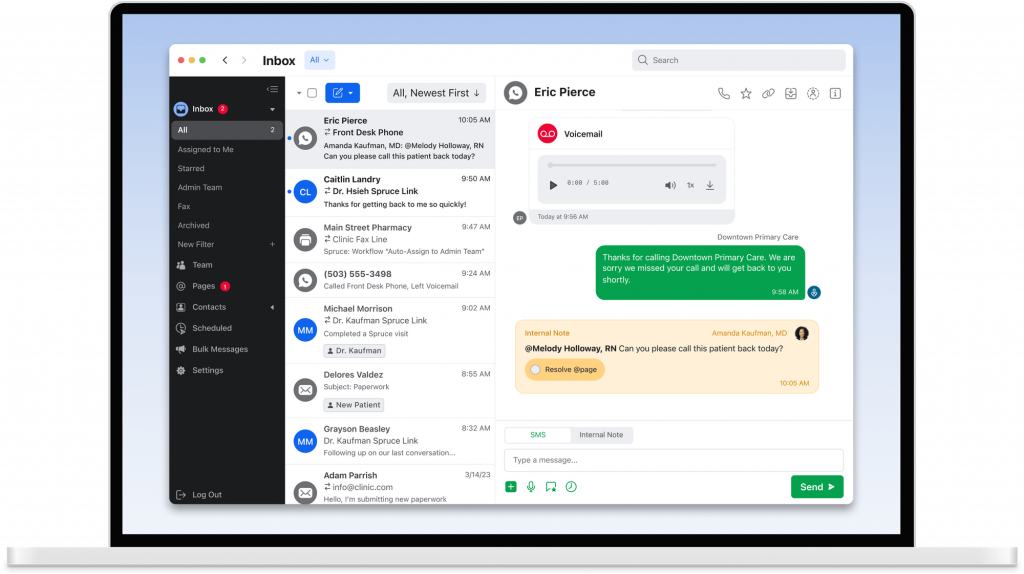
What is Spruce Health?
Spruce Health is another VoIP software for healthcare that integrates texting, calling, video calls, voicemail, and more in one central platform. From managing appointment scheduling to helping you do virtual consultations, this robust platform is capable of managing everything from a single dashboard. Here are other details about this VoIP for healthcare:
Key features of Spruce Health
- Text and call in one app: Use one number for both voice calls and patient texting.
- Voicemail transcription and text-back: Missed calls get auto-transcribed and can trigger an instant SMS reply.
- Auto-attendant and call routing: Direct calls to the right staff or department with custom phone trees.
- Internal team messaging: Chat securely with staff, assign conversations, and leave internal notes.
Spruce Health pros
- All-in-one communication: Combines phone, SMS, voicemail, and telehealth in one app.
- Easy team coordination: Assign threads and tag staff to streamline response.
- Patient-friendly interface: Patients don’t need an app for basic communication.
- No long-term contracts: Month-to-month plans with predictable pricing.
Spruce Health cons
- Limited EHR integrations: This secure VoIP for hospitals comes with fewer plug-and-play options than larger platforms.
- Advanced tools cost more: Some features, like bulk messaging, are available only in higher tiers.
Spruce Health pricing
The basic plans start at $24 per user/month
Spruce Health ratings
- Capterra: 4.5/5
- G2: 4.5/5
Spruce Health customer reviews
“I wish porting a number didn’t take so long. We have had a lot of interruptions during our wait.”
“It would be a much better software if it wasn’t for the inability to integrate with many other platforms yet.”
Source: Capterra
Spruce Health support channels
- Email support
- In-app live chat
- Setup help for new users
- Online help center
9. Weave: Best for Reducing Missed Calls

What is Weave?
Weave is another patient communication and engagement platform that is specifically designed for healthcare. Healthcare practices have different needs, and they can cater to all the requirements. This robust platform helps the front desk not only save time but also manage day-to-day operations effortlessly. It also has a lot more to offer. Let’s have a quick look at it:
Key features of Weave
- VoIP phone system: Use desk phones or mobile apps to handle calls with caller ID, hold, transfer, and call logs.
- Missed call texts: Automatically text patients back when a call is missed to keep the conversation going using this secure VoIP for hospitals.
- Call recording and analytics: Monitor call quality, review call history, and train staff with recordings.
- Integrated patient pop-ups: When a patient calls, see their name, upcoming appointment, and balance instantly.
Weave pros
- All-in-one tool: Combines VoIP with reviews, payments, and messaging.
- Boosts front desk efficiency: Instant patient info reduces call time and errors.
- Great for follow-ups: Helps clinics reduce missed calls and improve outreach.
- User-friendly interface: Easy for non-tech staff to learn and use quickly.
Weave cons
- Higher pricing tier: This cloud VoIP for healthcare providers can get expensive for small practices.
- Setup takes time: Onboarding can take longer due to phone changes.
- Contract required: Often sold on annual agreements, not month-to-month.
Weave pricing
There’s not much details regarding weave pricing plans on review websites.
Weave ratings
- Capterra: 4.3/5
- G2: 4.3/5
Weave customer reviews
“The initial set up with the phones was difficult and we had to get some replaced.”
“I don’t love that it does not directly attach to the medical record.”
Source: Capterra
Weave support channels
- Email and phone support
- Help center
- Onboarding team for training
10. 8×8: Best Phone Service for Therapists
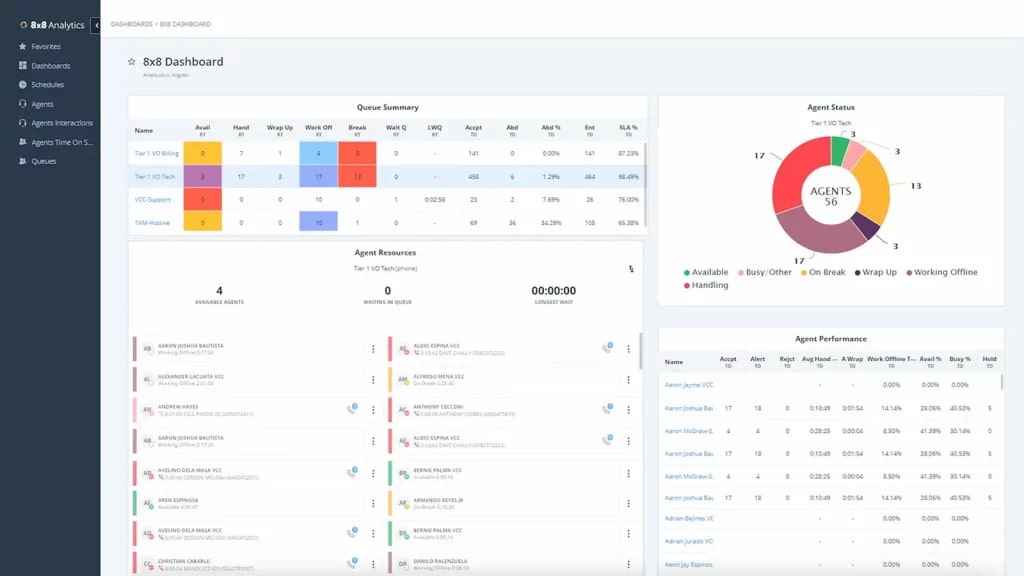
8×8 is an end-to-end secure platform that supports voice calls, video consultations, chat, and more!! This software is not only limited to HIPAA compliance, but it is also an ideal software if you are looking to streamline patient communication. Here is a quick look at this VoIP software for healthcare:
Key features of 8×8
- Automated Attendant: An automated system that greets and routes incoming calls to the correct department or individual.
- Call Center Management: Features designed to supervise, manage, and optimize call center operations for better efficiency.
- Call Conferencing: A functionality that allows several participants to join a single call for group discussions and collaboration.
- Call Logging: The practice of recording details of each call, including time, duration, and contact information.
- Call Recording Software: This VoIP software for counseling offers a feature where therapists can record phone conversations for purposes such as quality control, training, or compliance.
- Call Routing: The process of directing calls to the appropriate agent or department according to set criteria.
- Mobile Access: The capability to use communication tools and services through mobile devices, offering flexibility and remote management.
- Online Voice Transmission: The method of sending voice data over the internet, typically using VoIP technology.
- IVR/Voice Recognition: Interactive Voice Response systems offered by this VoIP software for counseling leverage voice recognition technology to assist with call management and navigation.
8×8 Pros
- Ease of Use and Flexibility: This VoIP software for therapists offers an intuitive hosted system that’s simple to set up and maintain, while delivering exceptional performance.
- Consistent Call Quality: The platform ensures clear, high-quality calls, maintaining superior voice clarity for each conversation.
- Powerful Features and Reliable Connectivity: This VoIP software for therapists delivers robust communication features and stable connectivity, greatly enhancing business communication.
- Smooth Mobile App Integration: 8X8 seamlessly integrates VoIP handsets with mobile apps, providing a consistent and dependable communication experience.
8×8 Cons
- Poor Customer Experience: The service resulted in a frustrating customer experience with inadequate resolution.
- Unexpected Charges: Despite attempts to resolve the issue, the customer’s card was charged again the next month without any resolution.
- Unhelpful Automated Responses: The customer’s attempts to resolve issues via email led to automated replies that provided no useful assistance.
- Inadequate Support: The customer service team of this VoIP for telehealth incorrectly blamed outdated phones for the issues, offering no viable solution.
- Subpar Support Service: Interactions with 8X8 support were frustrating and didn’t effectively resolve the problems.
- Ongoing Billing Problems: Recurring charges continued even after the customer tried to fix the issue.
- Ineffective Automated Replies: Automated emails failed to provide meaningful support and didn’t address the customer’s concerns.
- Incorrect Diagnosis and Unresolved Issues: Support agents misidentified the problems as outdated devices, preventing proper resolution.
8X8 Pricing
- 8×8 pricing offers different subscription packages. The basic package starts at $24 per month for limited features.
8X8 Integrations
Integration options offered by this remote therapy phone solution include:
- Slack
- Microsoft Teams
- HubSpot CRM
- Freshdesk
- Zendesk Suite
- ServiceNow
- Microsoft Outlook
- Copper
8X8 Ratings
- Capterra: 4.0 / 5
- G2: 4.0 / 5
8X8 Reviews
“Horribly unreliable, inconsistent and no one is responding to our emails. The system its self worked okay without the integration but the inaccurate billing is wild to me.”
“Good VOIP phone service, but support has turned to garbage and apps are laggy”
Source: Capterra
8×8 Customer Support Channels
- Phone Support
- Chat
- Knowledge Base
- Support Portal
Why Emitrr is the Best VoIP for Healthcare?
If your clinic is still juggling separate tools for calls, texts, reminders, and follow-ups, Emitrr wraps it all into one simple, secure healthcare communications platform. Here’s how it stands out:
- HIPAA-compliant and secure: The platform encrypts data, controls access, and provides a Business Associate Agreement to keep patient communication compliant and protected.
- Built for healthcare clinics: Emitrr’s VoIP phone system for healthcare is designed keeping the specific needs of medical offices in mind. Every feature is tuned to support your daily workflow.
- One dashboard for calls and texts: Staff can view, manage, and reply to all messages in one place, no switching tabs or checking multiple apps.
- Customizable auto-attendants and call flows: Set up clear menus and routing based on departments, providers, or hours, making it easier for patients to reach the right person the first time.
- Built-in appointment reminders: Automate texts or voice messages for upcoming appointments, helping reduce no-shows without manual calls.
- Automatic follow-up on missed calls: If a patient calls and no one picks up, Emitrr instantly sends a text to keep the conversation going and capture the opportunity.
- Seamless EHR and PMS integration: The best phone system for medical office connects with Athenahealth, Epic Systems, eClinicalWorks, NextGen, Practice Fusion, and more, syncing call logs and patient data smoothly.
- Smart voicemail transcription: Voicemails are automatically turned into text and sent to email, so staff can follow up quickly without checking machines.
- Supports remote and in-clinic teams: Doctors and staff can access the system from any device, using the clinic’s number even while working off-site or from home.
- Quick to set up and simple to learn: Onboarding is fast, and most clinics start using it confidently within days, no technical background needed.
- Scales as your practice grows: Whether you’re adding users or opening new locations, you can expand your system without needing new hardware or extra IT help.
- Reliable call quality with 99.99% uptime: Your phones stay online and calls remain clear, even during peak hours or busy mornings.
- Responsive customer support: Need help? The support team of the best phone system for medical offices is available by phone, email, or chat, and they actually understand how clinics work.
- Fair pricing with no hidden charges: Plans start at $30/month, with transparent billing and no surprise fees for extra calls or texts.
- AI-Powered Features: Emitrr’s AI-powered features for VoIP are designed to handle the communication load many clinics struggle with. From answering incoming calls to managing appointment bookings and follow-ups, the system works seamlessly in the background. At the center of it is Sarah, Emitrr’s intelligent AI receptionist, who can converse naturally with patients, answer common questions, and route calls based on intent, all without human intervention. This not only frees up staff time but also ensures no patient query goes unanswered.
Curious what that looks like in action? Watch this video to see how it works:
FAQs
On average, a healthcare VoIP system or VoIP for healthcare can cost anywhere between $25-$30 per line, depending on the features you want and the VoIP service for healthcare you choose.
Emitrr is the best VoIP provider because of the handy features, excellent customer support, affordable prices, and seamless integration with PMS/EMR it offers.
VoIP for healthcare providers is needed to reduce the cost of patient calls, to allow patients to make bookings via call, to offer better patient experience, and to reduce AHT for staff to focus on more matters.
Yes, most VoIP software for healthcare, like Emitrr, follows industry standards like HIPAA to ensure patient data privacy and security
Yes, most modern healthcare VoIP solutions like Emitrr can integrate with electronic health record (EHR) or electronic medical record (EMR) systems to offer you a seamless experience in one dashboard.
VoIP typically costs less than traditional landline systems, with no need for complex hardware installations.
Yes, cloud phone systems for healthcare like Emitrr are ideal for multi-location healthcare practices.
You and your staff could end up revealing sensitive PHI on call, and so, to avoid violating HIPAA compliance, you should ask how patient data is protected during phone calls. Does the phone system provider offer end-to-end encryption in calls so that no one can breach and hear your private conversations?
Emitrr offers HIPAA-compliant phone and text service with plenty of features for both VoIP and texting functionality. If you are a healthcare provider looking for a solution that can cater to both calls and texting, then Emitrr is a great pick for you.
Emitrr is the best HIPAA-compliant phone service for therapists, offering features like secure cloud storage, SOAP notes, end-to-end encryption, user access control, secure texting, and more.
Conclusion
Choosing one of the best VoIP software for healthcare can be a game changer for you for all calling-related tasks. And after comparing the seven best VoIP options specifically meant for healthcare providers, we recommend you book a demo with Emitrr and see how it can help you simplify your calling needs.