
Introduction
Podium alternatives are the most searched topic in local business communication tools, and the consistent theme across Capterra and G2 reviews is the same: the price is high, the contract is difficult to exit, and support is inconsistent after the sale. Podium starts at $399 a month, and practices and local businesses that signed on for reviews and texting often find they’re paying for features they don’t use and missing the ones they actually need, like HIPAA-compliant messaging or EHR integration for healthcare teams. These alternatives cover reviews, texting, and patient communication at a lower price with no annual contract required to get started.
AI Summary
- Podium starts at $399/month, has annual contracts that are difficult to exit, and support quality drops after the sale three consistent complaints across G2 and Capterra.
- This blog covers alternatives that cover texting and review automation under $100/month with no annual commitment required.
- Identifies which Podium features most customers actually use daily versus what they’re paying for and not opening.
- Rates each alternative on review request automation, two-way texting quality, HIPAA compliance, and pricing flexibility.
- Emitrr is highlighted as the clearest Podium alternative for healthcare practices — covering reviews, texting, and VoIP at a fraction of the cost.
Why Small Businesses and Healthcare Practices Keep Outgrowing Podium’s Value Proposition
Here are some major reasons why you should consider Podium alternatives:
Too Pricey for Smaller Teams
Podium’s pricing can be steep for small businesses or teams on a budget. If you’re running a smaller operation and only need essential features, this platform might feel too costly. In such cases, exploring Podium alternatives could offer more value, letting you access crucial tools at a more reasonable price.
Need More Personalization
While Podium offers useful features, some users find that it lacks the flexibility to personalize messages, workflows, or branding elements to their liking. If customization is crucial for your business’s unique communication needs, considering alternatives with more robust personalization options could help you better align with your brand.
Scalability Issues
Businesses experiencing rapid growth sometimes find Podium doesn’t scale as seamlessly as they need. It may be worth exploring Podium alternatives if you anticipate major expansion or growing communication needs. Look for platforms designed to handle increased demand while offering features that evolve as your business grows.
Missing Key Features
Despite a strong lineup of features, Podium might not offer everything your business requires. If you’re in need of specialized tools or capabilities to streamline your workflow, other platforms might be a better fit. Seeking out alternatives with the exact features you need could enhance efficiency and effectiveness.
Less User-Intuitive
Podium’s user interface can be confusing or cumbersome for some, especially if you’re looking for a simple, intuitive platform. If a straightforward and easy-to-navigate experience is critical for you and your team, consider exploring alternatives that make communication and task management simpler from the start.
Not-so-Easy Integrations
Integrating Podium with other software might feel complicated or limited. If your business relies on smooth connections between various systems, this can be a hassle. Choosing a platform known for seamless integrations could make your workflows more efficient, saving time and reducing frustration when syncing your favourite tools.
If you’re facing any of these challenges with Podium, considering a Podium alternative could offer you the features, pricing, and flexibility you need to run your business smoothly.
What Reviews and Business Texting Should Cost Without a Long-Term Contract
Here are the features to look for, similar to Podium:
Multi-Platform Messaging
Manage all your communication in one place, from SMS and email to social media. You don’t have to juggle different apps, saving time and simplifying your workflow. This unified messaging makes staying in touch with your customers quicker and far more efficient.
Performance Analytics
Get clear insights into how your messages are performing. These reports help you see what’s working and what’s not, so you can make smarter decisions. Analyze message open rates, engagement, and conversion data to improve your communication strategies over time.
Launch Targeted SMS Campaigns
Create and send SMS campaigns aimed at specific groups of people. By targeting the right audience with personalized messages, you boost engagement and make sure your efforts don’t go unnoticed, keeping communication effective and relevant to their needs.
Text Message Scheduling
Schedule your messages and set them to go out when it matters most. Even if you’re not available, your texts are sent at the ideal time, ensuring you always stay engaged with your audience without manual effort.
Bulk Messaging
Send out bulk texts effortlessly to hundreds or thousands of people in one go. It’s ideal for reaching a wide audience quickly, whether you’re announcing a sale or sharing important news, making mass communication smooth and efficient.
Ready-to-Use Message Templates
Save time with pre-built SMS templates for your most common messages. No need to start from scratch—just personalize the details and send. It’s a smart way to maintain consistency while keeping communication fresh and efficient.
Personalized Communication
Make your messages feel special by adding personal touches, like the recipient’s name or details relevant to them. Personalized texts can lead to stronger relationships and a higher response rate since people appreciate feeling seen and valued.
Send Multimedia Files
Enhance your texts by attaching images, videos, or documents. This makes communication more engaging, especially when words aren’t enough to get your message across. Use it to share product photos, event invites, or promotional videos.
Centralized Inbox
View all your messages from different channels in one simple inbox. This way, you won’t miss a beat, and managing conversations becomes more organized, helping you respond promptly and keep up with customer interactions effortlessly.
Efficient Contact Management
Keep all your contacts in one place and manage them easily. You can update information, organize lists, or group people based on criteria like location or interest, ensuring you stay organized and communicate effectively with each segment.
Contact Segmentation
Divide your contact list into specific groups for better-targeted messages. For example, send a special offer to repeat customers or updates to new leads. Segmentation helps make your messages more relevant and impactful.
SMS-Based Surveys
Gather valuable feedback by sending quick, easy-to-respond-to SMS digital forms and surveys. They’re perfect for understanding customer satisfaction or collecting insights in real time. Since surveys are simple and on the go, response rates are usually high.
Automated Replies
Set up automatic responses for when you’re unavailable or to answer common questions. It saves time and ensures customers get an immediate reply, even if you can’t respond personally right away, improving overall customer satisfaction.
Drip Message Campaigns
Automate a series of messages that go out over time, like a welcome series for new customers or reminders for upcoming events. Drip campaigns help nurture relationships and keep your brand top of mind.
Organized Conversations
Keep all your conversations neatly organized for easy reference. This feature makes it simple to track past messages, quickly catch up on interactions, and never miss important details, which is crucial for excellent customer service.
Website Chat to SMS
Turn live website chats into text conversations. If a visitor leaves your site, you can continue the chat via SMS, ensuring the conversation doesn’t end abruptly and providing a seamless communication experience.
Seamless Software Integration
Connect easily with your existing tools, like your CRM or email platform. Integrations make your work smoother by sharing information across systems and automating tasks, enhancing your workflow efficiency.
Interactive 2-Way Messaging
Engage in real-time two-way messaging conversations with customers via SMS. This allows you to answer questions, handle requests, or provide support instantly, making your communication more interactive and personal.
Mass Texting
Send one message to a large audience all at once. Mass texting is perfect for announcements or urgent updates and makes reaching a wide group quick and simple, while still keeping your communication clear and efficient.
Automated Responses
The program automatically replies based on triggers, such as a customer asking for store hours. This ensures they get immediate answers without you having to type them, saving time and making communication more consistent.
Text-Enabled Landline
Transform your existing landline into a text-friendly number. This feature keeps your main contact point consistent while giving customers the option to text instead of call, making it more convenient for everyone.
Support for Multiple Languages
Communicate with customers in their preferred language. This feature breaks down language barriers, making your business accessible to a broader audience and showing that you value all of your customers.
Advanced VoIP Features
Make and receive calls over the internet with features like call forwarding and voicemail. VoIP enhances your phone system’s capabilities, giving you better call quality and more control over your communication setup.
Manage Online Reputation
Track and respond to reviews across various platforms. This helps you maintain a positive brand image and shows that you care about customer feedback, which is crucial for building trust and attracting new business.
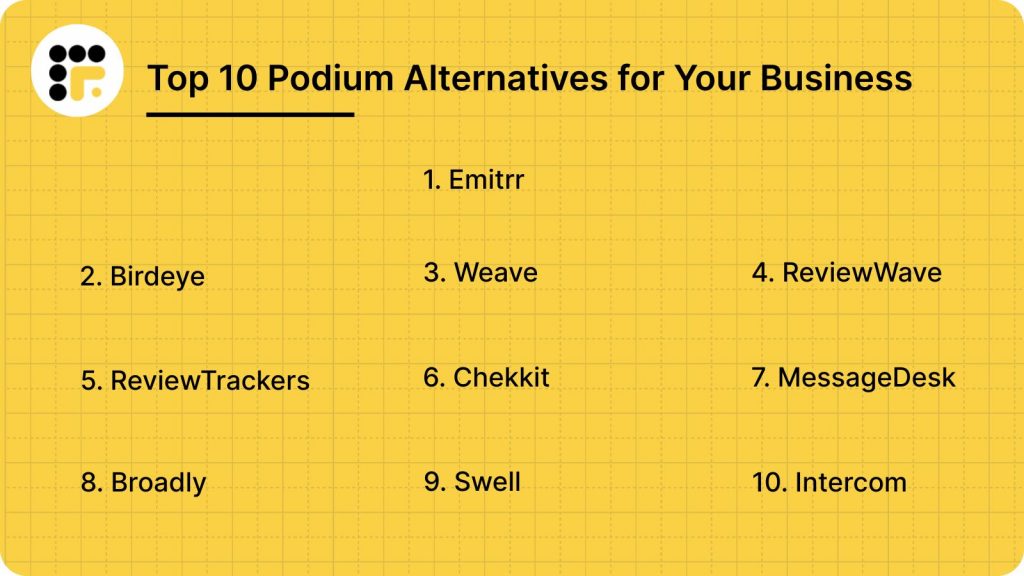
10 Best Podium Alternatives in 2026
1. Emitrr: Best Podium Replacement
Emitrr Overview
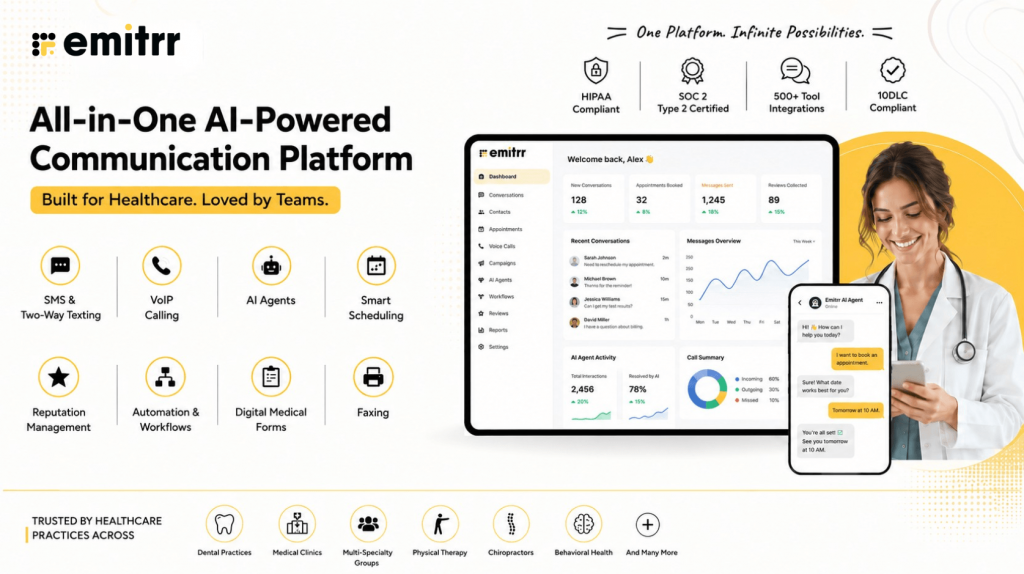
Emitrr is a versatile communication and AI reputation management platform that helps businesses improve customer communication and enhance their online presence. Specializing in review generation and automated messaging, Emitrr offers unique features like two-way texting, secure link sharing, and automated reminders to support seamless customer experiences. Additionally, its reputation management tools, including review monitoring, response automation, and competitive analysis, ensure that businesses can easily build and maintain a strong reputation. Emitrr’s blend of communication and reputation management features makes it an ideal choice for businesses looking to strengthen customer interactions and maintain a positive online reputation. It is by far one of the best Podium competitor.
Emitrr Features
- Two-Way Texting: Engage in real-time, two-way communication with customers, allowing for quick responses and stronger relationships.
- Custom AI SMS agent: Create a custom AI SMS agent by setting up the name, image, function, description, and more, or choose from existing templates.
- Automate responses: Respond to texts automatically within seconds, keeping prospects engaged at all times.
- AI-generated replies: No need to type or think what to write, use Emitrr’s AI SMS generator to generate replies, keeping in mind the tone and context of the conversation.
- AI message enhancer: Enhance the tone or quality of your message by using the AI message enhancer feature.
- AI rule engine: Let AI filter messages and route replies from customers to the right person.
- AI-generated SMS campaigns: Type in a prompt and create SMS campaigns using AI within seconds.
- Train AI with knowledge base: Train your AI agent using existing data, knowledge bases, website links, and more.
- Self-evolving AI SMS agent: As it has more conversations and understands more context, this AI SMS agent gets better and evolves itself.
- Secure Link Sharing: Send secure, encrypted links via text for sensitive data like payment links or documents, ensuring customer privacy and trust.
- Group Texting: Effortlessly communicate with team members at once with group texting, streamlining updates and promotions.
- Text Alerts: Instantly notify customers or staff of urgent information, ensuring timely delivery for critical updates.
- Mass Texting: Reach large audiences for events or promotions with a single message, maximizing engagement.
- Multimedia Messaging: Enhance communication by including images, videos, or GIFs to make interactions more dynamic.
- Automated Review Requests: Automatically send review requests post-interaction, proactively boosting online reputation by gathering valuable feedback.
- CRM Integration: Sync with your CRM for seamless data flow and access to customer information during communications.
- Review Response Inbox: Centralize all customer review responses in one place, ensuring quick, consistent replies that maintain a positive brand image.
- Reputation Monitoring: Track and monitor reviews across multiple platforms in real-time to stay informed about customer feedback.
- Automated Review Responses: Set up auto-responses to reviews, providing timely engagement and maintaining brand consistency.
- Competitive Benchmarking: Compare your reviews and reputation to competitors’, identifying areas where you excel or need improvement.
- Review Analytics: Gain insights into customer sentiment trends and monitor reputation metrics to understand how your business is perceived over time.
- Customer Feedback Collection: Gather direct feedback from customers through surveys or text-based inquiries, identifying areas for improvement.
- Automated Reminders: Send automatic reminders for appointments, payments, or events to reduce no-shows and keep customers informed.
- Live Chat: Engage customers instantly with real-time chat, offering personalized support and enhancing satisfaction.
- No-Show Follow-Ups: Automatically reconnect with customers who missed appointments, recovering potential lost opportunities.
- Payment & Cancellation Follow-Ups: Set up automated reminders for outstanding payments or cancellations to maintain transparency and improve cash flow.
- Performance Metrics: Analyze key performance indicators like open rates and customer response rates to assess communication effectiveness.
- SMS Templates: Use customizable templates for efficient, professional messaging that enhances customer interactions.
Watch this video to learn how Emitrr’s AI agent Sarah makes texting effortless:
Emitrr Pros
- Reliable Platform Stability: Count on Emitrr’s 99.99% uptime to keep calls, texts, and chats running without interruption.
- Streamlined User Experience: Emitrr’s dashboard is designed to cut clicks and save time, helping teams handle conversations faster with fewer steps.
- High-Quality Voice Calls: Enjoy HD-quality voice calls that deliver a clear, professional experience on every customer interaction.
- Seamless Integration with Key Tools: Emitrr connects easily with CRM, EHR, and practice management systems, keeping customer records and conversations in sync.
- Cost-Effective for Growing Teams: Transparent pricing plans allow businesses to scale communication without surprise costs or feature lockouts.
- All-In-One Communication Suite: From texting to calling to voicemail drops and review management, everything runs through one unified platform.
- Smart Automation for Busy Teams: Automate appointment reminders, missed call follow-ups, and customer outreach without juggling multiple tools.
- Customizable Workflows and Call Routing: Set up flexible call trees, queue groups, and user-specific schedules to match your business’s real communication needs.
- Text-Enabled Landlines: Emitrr can turn your existing business phone number into a texting number, letting customers text your landline without any extra work.
Emitrr Cons
- Some amazing features are still under development and will be rolled out soon!
Emitrr Pricing
Emitrr offers three pricing plans for its users: Standard, Pro, and Enterprise. These Emitrr pricing plans also depend on the number of messages you wish to send.
Here’s a detailed breakdown of the Emitrr pricing plans:
| Number of message credits | Standard Price with 10 DLC | Pro Price with 10 DLC | Enterprise |
| 500 | $45.00 | $64.00 | Contact Sales for a customized quote. |
| 1000 | $64.00 | $94.00 |
Emitrr keeps things flexible; you only pay based on how many messages you send each month. So, whether you’re a small team or a growing business, you can scale as you need. Larger enterprises with specific requirements can reach out to the sales team for a customized quote.
For businesses in the healthcare sector, there is an additional $200 fee to unlock all the advanced automation tools you might need. And if you want to tap into Emitrr’s AI features, upgrading to the Pro plan is the way to go.
Emitrr Integrations
Emitrr offers 500+ integrations across different industries such as dental, recruiting, real estate, etc., with tools like:
Emitrr Ratings & Reviews
Emitrr has a solid 4.9/5 star rating on Capterra, and here’s what customers are saying about the platform:
“You have it all integrated into one platform, the signatures, the amount of characters, you can attach files, send photos. You are able to create and send forms. Unlimited amount of things we can use and take advantage of.”
“I LOVE Emitrr. The support you get is wonderful, the app is easy to use and they have been incredibly responsive. As a small business, we needed a messaging platform that wouldn’t break the bank and this meets all our needs (and then some) without making us feel overwhelmed.”
(Source: Capterra)
Emitrr Customer Support Channels
- Live chat: Chat with Emitrr’s live representatives
- Phone: Call Emitrr at +1 (210) 941-4696
- Email: Send email to Emitrr’s support team at support@emitrr.com
- Knowledge base
- FAQs/forum
- SMS
2. Birdeye

What is Birdeye?
Birdeye is an AI-powered platform designed to help businesses grow by managing their online reputation, improving client retention, and converting leads. It offers a range of features like two-way messaging, customizable reports, and data visualization to automate and streamline customer communication, making it ideal for various industries, especially healthcare.
Birdeye Features
- Two-way Messaging for Patients: Enables seamless communication between healthcare businesses and their patients.
- Alerts and Notifications: Keeps patients updated on appointment schedules and other important information.
- API and Activity Tracking for Healthcare: Helps healthcare businesses track and manage patient interactions with ease.
- Customizable Reports and Forms: Allows businesses to create reports and forms tailored to their needs.
- Automated Responses: Streamlines communication by automatically responding to common queries.
- AI Data Visualization: Uses AI and machine learning to automate patient health data management and visualization.
Birdeye Pros
- User-friendly: The platform is easy to navigate and set up, even for non-tech-savvy users.
- Great Online Reputation Analysis and Management: Helps businesses manage their online reputation effectively with powerful tools.
Birdeye Cons
- Bugs and Clunky Software: Some users report software bugs, which can make the system feel inefficient.
- Slow Customer Support: Customer support can be slow, leading to delays in resolving issues.
Birdeye Pricing
Birdeye pricing starts at $350 per month.
Birdeye Reviews & Ratings
According to Capterra, Birdeye has a customer rating of 4.7/5 out of 500 customer reviews.
“like Birdeye’s capabilities as a service to allow you more functionality for your clients, whether it’s the reports or the tags/tickets you can assign. It’s an easy tool to onboard and everyone loves it upon logging in.”
“SMS marketing list segmentation needs serious work. The tags are complicated and confusing. Cannot send SMS marketing to more than one list at a time.
Source: Capterra
Birdeye Support Channels
- 24/7 (Live rep)
- FAQs/Forum
- Email/Help Desk
- Phone Support
- Knowledge Base
- Chat
3. Weave
What is Weave?
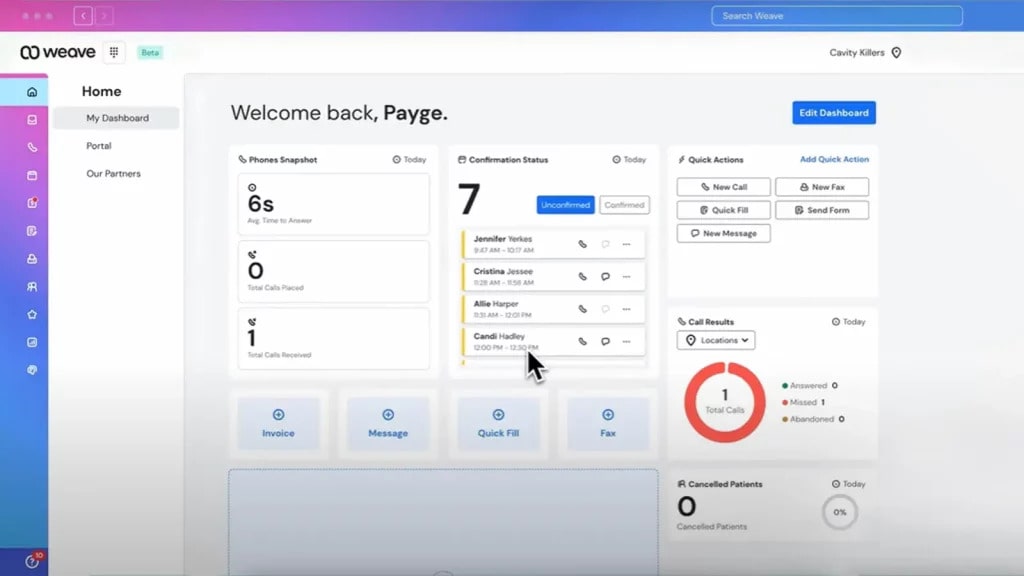
Weave is a relationship management platform that promises clients efficient customer support and quick solutions. Weave offers communication tools to automate tasks such as scheduling, review management, and much more. The Weave platform is practical and helps in customer engagement through customer satisfaction.
Weave Features
- Two-Way Texting: Enables real-time communication with clients through text messages for better engagement.
- Easy Online Scheduling: Simplifies the scheduling process for both clients and businesses, reducing manual effort.
- Web Chat Services: Facilitates easy communication with clients through live web chat for quick resolutions.
- Bulk Messaging: Allows businesses to send promotional messages to a large audience for better engagement.
- Bulk Emails: Helps businesses send mass emails for promotions, reminders, and updates to clients.
- Customizable Reminders: Automates reminders to clients, providing scalability and improving operational efficiency.
- Google Business Messages and Facebook Messenger Integration: Seamlessly integrates with popular platforms like Google Business and Facebook Messenger for easy communication.
- Review Surveys and Reputation Metrics: Gathers feedback from clients to manage online reputation effectively and measure customer satisfaction.
- VoIP Phone System: Provides better call quality and connectivity over the internet, reducing communication costs.
Weave Pros
- Variety of Features: Offers a wide range of tools that cater to various business needs, from messaging to scheduling and reviews.
- Ease of Use: The platform is intuitive and easy to navigate, making it accessible to businesses of all sizes.
Weave Cons
- Slow Customer Support: Response times from customer support can be slow, leading to potential delays in resolving issues.
- Expensive for the Features Offered: Some users find Weave’s pricing high compared to the features available on similar platforms.
Weave Pricing
Weave pricing offers 4 plans:
- Ultimate: $399 per month + $750 setup fees
- Pro: Need to contact support
- Elite: Need to contact support
- Essentials: Need to contact support
Weave Reviews & Ratings
According to Capterra, Weave has 4.3/5 ratings out of 500 customer reviews.
“While working in a busy dental office, Weave makes my life so much easier when it comes to patient communication. I love the ease of being able to text or call patients using Weave. The patient payment feature is amazing as well. I highly recommend Weave! Also, it is super convenient to call customer support and speak to an actual representative to diagnose any technical issues.”
“Having to navigate through a lot of places to get info on one patient.”
Source: Capterra
Weave Support Channels
- FAQs/Forum
- Phone Support
- Chat
- Email/Help Desk
- Knowledge Base
4. ReviewWave

What is ReviewWave?
ReviewWave is a comprehensive platform designed to help healthcare practices manage their online reputation, streamline communication, and improve patient engagement. With features like automated review requests, appointment reminders, and advanced analytics, it ensures your practice maintains a strong digital presence while enhancing overall efficiency. ReviewWave simplifies patient interactions, making it easier to build trust and attract more patients through positive online reviews and better engagement.
ReviewWave Features
- Automated Review Requests: Send review requests to patients automatically, boosting your practice’s online reputation effortlessly.
- Appointment Reminders: Schedule and send reminders to patients, reducing missed appointments and optimizing your practice’s workflow.
- Two-way Texting: Communicate directly with patients in real-time, improving engagement and providing timely responses.
- Website Widgets: Add interactive widgets to your website for easy appointment booking and streamlined patient interactions.
- Analytics Dashboard: Track key performance metrics like review trends and patient feedback to make data-driven decisions.
- Call Tracking: Monitor call activity to understand patient inquiries better and improve your practice’s communication strategy.
ReviewWave Pros
- User-Friendly Interface: Simple and intuitive design, making it easy for healthcare staff to manage patient communication.
- Boosts Online Reputation: Effective in increasing positive reviews and enhancing the overall online presence of your practice.
ReviewWave Cons
- Pricey for Small Practices: The cost may be high for smaller practices with limited budgets.
- Limited Customization: Some users find a lack of flexibility in customizing workflows to fit unique needs.
ReviewWave Pricing
- Starts at $299 per month
ReviewWave Integrations
- Dentrix
- Eaglesoft
- Open Dental
- ChiroTouch
- Genesis Chiropractic Software
- Kareo
- TheraNest
- AdvancedMD
- Office Ally
- Square
- Stripe
ReviewWave Reviews & Ratings
According to Capterra, ReviewWave has 4.7/5 ratings out of 500 customer reviews.
“I would NOT use Aloha / Review Wave. They are average in effectiveness and terrible at customer service.”
“ From the beginning, Review Wave has been exceptional. The training was thorough and setup and use have been super easy. Any time there is an issue their customer service always assists us fast and resolves any issues.”
Source: Capterra
ReviewWave Support Channels
- Phone
- Live Chat
- Knowledge Base
5. ReviewTrackers
What is ReviewTrackers?
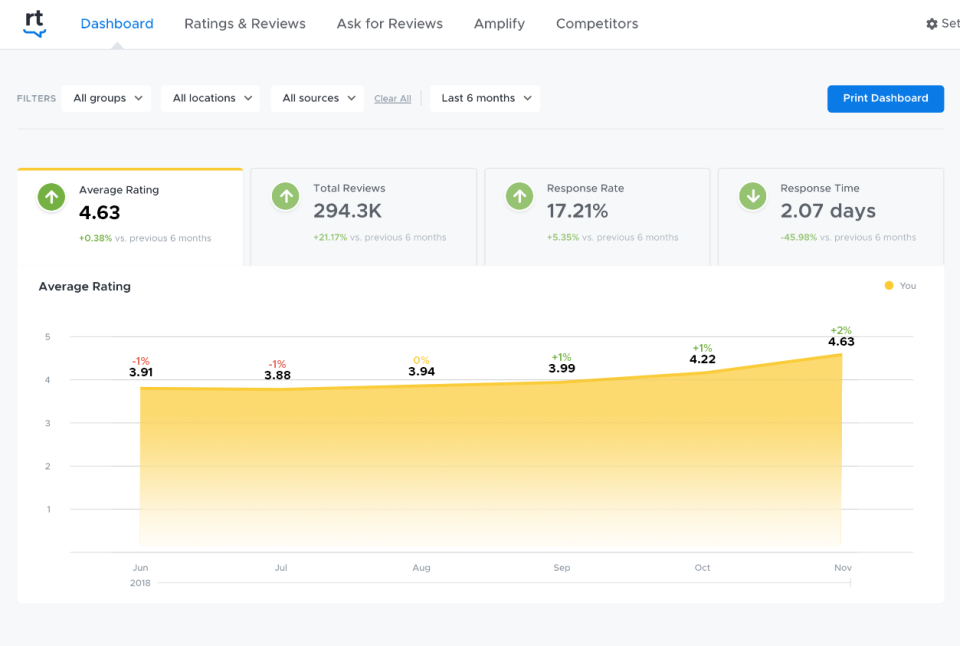
ReviewTrackers is a reputation management platform that empowers businesses to improve their online image by collecting and managing customer reviews. It emphasizes understanding customer feedback to boost satisfaction and loyalty. With features like review monitoring, automated alerts, and data-driven insights, ReviewTrackers helps shape customer strategy, optimize engagement, and drive better decision-making to reach your business objectives. It provides actionable analytics to enhance your brand’s presence and reputation.
ReviewTrackers Features
- Review Notification: Get instant alerts when new reviews are posted to act quickly.
- Campaign Management: Use email and SMS campaigns to engage and retain customers.
- Review Monitoring and Analysis: Track and analyze reviews from multiple platforms for actionable insights.
- Negative Feedback Management: Understand and address negative feedback to improve customer satisfaction.
- Review Request & Surveys: Collect reviews and feedback easily to gauge customer experiences.
- Response Management: Manage and respond to reviews to foster better customer relationships.
ReviewTrackers Pros
- Ample Integration: Connect easily with various platforms to streamline your operations.
- Ease of Use: Navigate the platform without hassle, making it accessible for any user.
ReviewTrackers Cons
- Expensive: The cost is higher compared to competitors, which may not suit smaller businesses.
- Poor Response Management: Some users report limitations in managing responses efficiently.
ReviewTrackers Pricing
ReviewTrackers does not have fixed pricing. To get a quote, you’ll need to request a demo directly from their team.
ReviewTrackers Integrations
- Salesforce
- HubSpot
- Zapier
- Slack
- Hootsuite
ReviewTrackers Ratings & Reviews
According to Capterra, ReviewTrackers has a rating of 4.7/5 out of 500 customer reviews.
“I love Review Tracker. We had to cancel our subscription to this and other social tools at one point and it is the software I missed the most. It streamlines my day to day responsibilities and allows me to report to my team easily and effectively with pre-designed reports that provide all of the necessary information. My colleagues who consume the reports, find them easy to use and allows them to better understand how their locations are operating.”
“I’ve had little luck getting my clients to act upon receiving the request email from ReviewTrackers to leave an online review for me (on Google, etc.). ReviewTrackers doesn’t allow the email subject or the actual content of the email invite to be customized. Currently it’s “follow up” which will not get the client’s attention.. therefore, they won’t open the email and leave you a review. This constitutes a waste of effort and money.”
Source: Capterra
ReviewTrackers Support Channels
- Phone Support
- FAQs/Forum
- Knowledge Base
- Email/Help Desk
6. Chekkit
What is Chekkit?
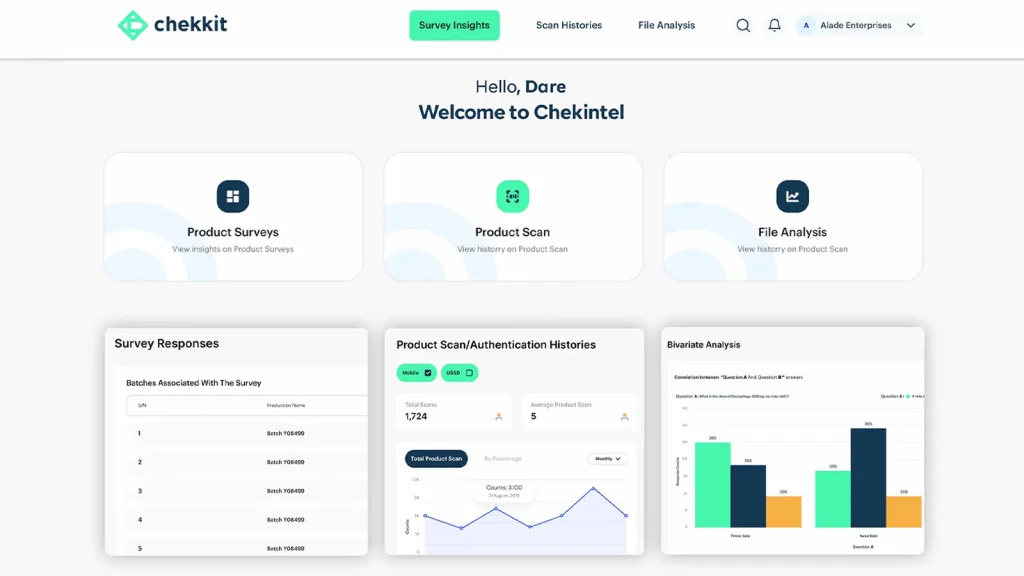
Chekkit software focuses on enhancing customer experience and turning conversations into conversions. The Chekkit platform focuses on the growth and scalability of local businesses. The Chekkit app lets you send texts to multiple platforms like Facebook Messenger, Google, and Instagram. Chekkit software serves the aim of bringing scalability to your business.
Chekkit Features
- Online Scheduling: Allows clients to book appointments easily.
- Web Chat Feature: Offers live chat on your website to interact with visitors.
- Digital Forms: Collect and handle client details digitally for a smooth process.
- Customizable Reminders: Set up personalized reminders to keep clients informed.
- Review Notification Update: Get notified about new reviews for timely responses.
- Campaign Management: Use email and SMS to retain and engage customers.
- Review Monitoring and Analysis: Track and analyze online reviews to understand customer feedback.
- Negative Feedback Management: Address and manage negative feedback for improved customer satisfaction.
- Review Request & Survey Feedback: Collect feedback with survey links and review requests.
Chekkit Pros
- Fairly Priced: Offers affordable plans for small and medium-sized businesses.
- Ease of Use: Simple, user-friendly interface that’s easy to navigate.
Chekkit Cons
- Slow Review Updates: Review updates may take time to reflect.
- Limited Functionality: Lacks some advanced features found in competitor platforms.
Chekkit Pricing
- Starts at $99/month
Chekkit Integrations
- Slack
- Zapier
Chekkit Ratings & Reviews
According to Capterra, Chekkit has 4.8/5 out of 500 customer reviews.
“My overall experience has been extremely positive. The software is extremely useful and inexpensive. The value for me and my company is immense and I will definitely recommend it to others.”
“Overall, the experience with Chekkit was great, however, our organization wasn’t ready to fully commit to using the software to the best of it’s ability. In an ever changing world where online reviews will likely make or break a decision for someone to walk in your door, Chekkit certainly assists in getting the reviews required to promote your business.”
Source: Capterra
Chekkit Support Channels
- Chat
- 24/7 Live Rep
- Knowledge Base
- FAQs/Forum
- Email/Help Desk
- Phone Support
7. MessageDesk

What is MessageDesk?
MessageDesk is a HIPAA-compliant secure messaging app designed for healthcare providers, offering a platform for doctors, nurses, and organizations to communicate efficiently. With basic patient texting functionalities and automated features, MessageDesk integrates seamlessly with EHR systems to streamline workflows and improve patient outreach.
Features of MessageDesk
- Text Enable Existing Number: Text-enable your existing business number to offer both calling and texting capabilities.
- EHR Integration: Easily integrate with your existing EHR/EMR system for quick access to patient data.
- Broadcast Texting: Send bulk messages to patients about schedule changes, greetings, offers, and more.
- Automated Healthcare Texting: Automate patient outreach with custom SMS reminders and confirmations.
- Shared SMS Inbox: Centralize all team communications in one inbox, simplifying collaboration.
Pros of MessageDesk
- Intuitive and Easy to Use: Simple interface for quick adoption by healthcare teams.
- Shared SMS Inbox: Streamlines team communication in a single, unified space.
- Easy Contact List Import: Import patient lists with ease for efficient communication.
Cons of MessageDesk
- Limited Features: The functionality is basic, lacking more advanced tools.
- Expensive for Smaller Practices: The pricing may be high for smaller healthcare providers.
- Customization Limitations: The platform offers limited customization options.
MessageDesk Pricing
The following are MessageDesk pricing plans
- Operator: $29 per month for 1 user
- Team: $79 per month for up to 5 users
- Custom: Contact support for custom pricing and additional needs.
MessageDesk Integrations
- Slack
- Mailchimp
- Trello
- QuickBooks
MessageDesk Reviews & Ratings
According to Capterra, MessageDesk has 4.8/5 ratings out of 500 customer reviews.
“So far so good! This has been a great tool helping us to text our owners and keep the lines of communication open while not keeping our front desk on the phone constantly.”
“Better attendance at meetings as this reaches those who do not check emails frequently.”
Source: Capterra
MessageDesk Support Channels
- FAQs
- Help desk
- Phone
- live chat.
8. Broadly

What is Broadly?
Broadly is a customer engagement platform designed to help businesses improve their online reputation and customer satisfaction. Through tools for review generation, customer communication, and reputation management, Broadly assists businesses in enhancing their digital presence. The platform is user-friendly and effective, offering features that simplify managing feedback, boost client retention, and nurture customer relationships.
Broadly Features
- Review Generation: Send review requests to customers to improve your online presence.
- Customer Feedback Collection: Gather feedback efficiently to understand and address client needs.
- Review Monitoring and Analysis: Track reviews across multiple platforms to manage and analyze customer opinions.
- Automated Review Requests: Send automated review requests to streamline feedback collection.
- Customizable Templates: Use pre-built templates for faster, consistent customer responses.
- Customer Activity Tracking: Track customer interactions for more personalized communication.
- CRM Integration: Sync customer data with your CRM to manage contacts easily.
- Performance Metrics: Monitor key performance indicators to assess campaign success.
Broadly Pros
- Ease of Use: The platform is simple and intuitive, making it easy to use for any team.
- Strong Review Generation: Effective tools for generating and managing customer reviews.
- Automated Follow-Ups: Automated review requests and follow-ups save time and increase the likelihood of customers leaving feedback.
- Centralized Review Management: Broadly consolidates reviews from multiple platforms, making it easy for businesses to monitor and respond to feedback.
- Insightful Analytics: Provides performance metrics and insights that help businesses assess the effectiveness of their customer engagement efforts.
Broadly Cons
- Limited Customization: Fewer options for customization compared to some competitors.
- Costly for Small Businesses: Pricing may be higher for smaller teams with limited budgets.
Broadly Pricing
- Broadly offers personalized pricing plans, so interested users need to contact the sales team for a quote.
Broadly Integrations
- Google My Business
- Yelp
- QuickBooks
- Clio
- Housecall Pro
- Jobber
- Mindbody
- Square
- Salesforce
- Zapier
Broadly Ratings & Reviews
According to Capterra, Broadly has a rating of 4.8/5 out of 500 customer reviews.
“Broadly helped us establish our online presence, provided us with a platform to manage our customer relationships, and keeps our online reputation looking stellar!”
“We will be switching to a platform that has access to more review options. More user friendly for the customer.”
Source: Capterra
Broadly Support Channels
- Phone Support
- Email Support
- Live Chat
- Knowledge Base
- FAQs
9. Swell

What is Swell?
Swell is a customer engagement and reputation management platform designed to help businesses grow by improving customer feedback, boosting online presence, and streamlining client interactions. Swell offers a variety of tools to simplify review generation, enhance communication, and monitor customer satisfaction. With user-friendly features, it aims to make reputation management seamless and effective for businesses looking to improve their customer experience and engagement.
Swell Features
- Review Generation: Automatically request reviews after services to build a strong online reputation.
- Customizable Surveys: Collect customer feedback to understand and improve service quality.
- Web Chat: Engage website visitors instantly with live chat functionality.
- Appointment Scheduling: Allows customers to easily book appointments online.
- Automated Reminders: Send appointment or payment reminders to reduce no-shows and late payments.
- Response Management: Manage and respond to customer reviews from one platform.
- Analytics Dashboard: Access insights and performance metrics to gauge customer satisfaction and engagement.
- Bulk Messaging: Send messages to multiple customers at once, ideal for updates or promotions.
- Payment Processing: Enable secure online payments directly through the platform.
Swell Pros
- Easy-to-Use Interface: A user-friendly design makes it simple to manage customer interactions.
- Efficient Review Collection: Automated review requests increase the likelihood of customer feedback.
- Comprehensive Insights: Detailed analytics help businesses monitor and improve customer satisfaction.
Swell Cons
- Limited Integrations: Fewer integrations compared to some competitors, which may limit compatibility.
- Higher Price for Small Businesses: It can be costly for smaller teams or businesses with limited budgets.
Swell Pricing
Swell pricing starts at approximately $199 per month. Pricing can vary based on business size and feature needs, and a customized quote is available upon request.
Swell Integrations
- Google My Business
- QuickBooks
- Slack
- MindBody
- HubSpot
Swell Rating & Reviews
According to Capterra, Swell has 4.6/5 ratings out of 500 customer reviews.
“Swell CX gives you the tools to better manage your customer experience and more meaningfully interact with your consumers. That’s a powerful benefit, and one that will help you achieve greater success in your business.”
“We call your program “Not so Swell”.”
Source: Capterra
Swell Support Channels
- Live Chat
- Email Support
- Knowledge Base
- FAQs
10. Intercom

What is Intercom?
Intercom is a customer communication platform designed to help businesses build better relationships with their customers through personalized messaging and support. With tools for live chat, automated messaging, and a customer data platform, Intercom enables businesses to engage with customers across their journey, improve customer experience, and streamline support. It’s ideal for companies looking to enhance customer engagement, onboard users, and boost retention rates.
Intercom Features
- Live Chat: Engage customers in real-time on your website or app for quick support.
- Automated Messaging: Send targeted, automated messages based on user behavior to enhance engagement.
- Help Center: Provide customers with self-service support through articles and guides.
- Product Tours: Guide new users through onboarding with interactive product tours.
- Customizable Chatbots: Automate common questions and gather customer info with AI-powered bots.
- Inbox Collaboration: A shared team inbox streamlines customer inquiries for faster resolution.
- Customer Data Platform: Store and analyze customer data to personalize interactions.
Intercom Pros
- Comprehensive Communication Tools: Combines live chat, automated messaging, and customer data for effective engagement.
- User-Friendly Interface: Easy to navigate and set up, even for non-technical teams.
Intercom Cons
- High Cost for Small Teams: Pricing can be steep for small businesses with limited budgets.
- Learning Curve for Advanced Features: Some features may require training to fully utilize.
Intercom Pricing
Intercom pricing consists of the following plans:
- Essentials: Starts at $74/month
- Pro: Starts at $153/month
- Premium: Custom pricing for larger businesses needing advanced customization, data analytics, and dedicated support.
Intercom Integrations
- Salesforce
- Slack
- HubSpot
- Shopify
- Google Analytics
- Zendesk
Intercom Rating & Reviews
According to Capterra, Intercom has 4.5/5 customer ratings out of 500 reviews.
“Better and more convenient contact between us and our customers is always appreciated. Easy history tracking is made possible by this intuitive tool. It’s simple to record my conversations and analyze them afterwards for development purposes.”
“Quickly and simply, I can access the Macros and write/update the articles in the assistance center. Streamlining the process of submitting tickets to the correct division for handling user concerns. It’s a time saver for all teams because they can deal with it themselves.”
Source: Capterra
Intercom Support Channels
- Live Chat
- Email Support
- Help Center
- Community Forum
How Emitrr Compares to Podium on Texting, Reviews, and Healthcare Compliance
When teams start looking for a Podium alternative, they’re usually after something better, not just another version of the same thing. They want a platform that’s easier to manage, covers more ground, and doesn’t bring hidden costs or limits. Emitrr was built with those exact needs in mind.
Instead of juggling multiple tools or paying extra every time you need a simple feature, Emitrr brings everything your business needs into one easy-to-use platform. Here’s what makes it stand out:
AI Workflows Built for Real Conversations
Most chat systems follow a fixed script. Emitrr’s AI workflows do more. They guide conversations naturally, whether someone’s booking an appointment, changing a time slot, or asking a question. The goal isn’t to replace your team, but to make them faster and more efficient while keeping conversations human and friendly.
Want to see how Emitrr’s AI Voice Agent is transforming businesses? Watch this YouTube video now!
Transparent Pricing Without Feature Lock-In
Emitrr believes in honest pricing. You get full access to all features from day one, no hidden upgrades or surprise charges just to unlock texting or extra lines. What you see is what you get, so you can plan confidently without worrying about add-ons later.
Full-Scale Texting Suite
Emitrr is built for businesses that rely on conversations, not just emails. It includes two-way texting, mass messages, automated replies, reminders, and follow-ups, everything in one place. Customers can reply when it suits them, and your team can keep the conversation flowing without missing a message.
Chrome Extension for Easy Access
You don’t need to stay tied to your inbox. With Emitrr’s Chrome extension, you can reply to customers directly from your website, CRM, or calendar — without switching tabs or opening new apps.
Dedicated Human Support on Every Plan
With Emitrr, support means talking to a real person who knows the platform inside out. No bots or long wait times just quick, personal help that actually solves your problem. It’s one of the biggest reasons teams stay with Emitrr for the long run.
Zero-Hassle Migration Setup
Switching platforms shouldn’t be stressful. Emitrr’s team helps you move your contacts, set up inboxes, and train your staff, so you’re ready to go without downtime or lost data.
Unified Communications in One Platform
Emitrr brings together chat, texting, voicemail, and web leads in one clean dashboard. No more switching between tools or missing messages — everything is organized and easy to manage, leading to faster responses and better customer experiences.
Easy-to-Use Interface
Emitrr is built for everyone, not just tech experts. The interface is simple and intuitive, so your team can start using it confidently within hours, not weeks.
Optimized for Appointment-Driven Businesses
Emitrr works especially well for businesses where timing is key, such as healthcare, home services, education, real estate, and law firms. It handles appointment confirmations, reminders, and updates automatically, saving time and reducing no-shows.
Seamless Review & Reputation Management
Emitrr makes it easy to collect reviews after every service. It sends a friendly, automated message to happy customers, helping you grow your online reputation naturally without being pushy.
Built-In Compliance for Regulated Industries
Emitrr ensures every message follows the right rules. Whether you need HIPAA-compliant communication, TCPA SMS compliance, or strong data security, all protections are built in from the start.
Are your patient text messages HIPAA compliant? Watch this video to learn more –
Which Industries are catered by Emitrr?
Emitrr caters to a wide range of industries, making communication easier and more efficient:
Healthcare
Emitrr is ideal for healthcare providers, offering HIPAA-compliant communication tools like SMS, VoIP, and healthcare appointment reminders. It integrates with over 500 EHR/PMS systems like Denticon and Dentrix. Beyond managing appointments, it helps with follow-ups, billing, and reputation management, making it a comprehensive solution for medical practices to streamline operations and improve patient engagement.
Wellness
Emitrr enhances wellness businesses by automating appointment bookings, reminders, and feedback collection via SMS and email. It helps spas, salons, and fitness centers reduce no-shows and keep customers engaged with personalized offers, streamlining daily operations and improving client satisfaction.
Education
Emitrr supports schools and colleges with seamless communication to students, parents, and faculty. It offers bulk SMS, two-way texting, ready-to-use templates, and automated reminders, ensuring important updates like schedules and events are sent efficiently, reducing manual work and improving engagement.
Legal Services
Emitrr streamlines communication for law firms with secure messaging, automated appointment reminders, and reputation management tools. It also offers a VoIP system for easy client communication, ensuring confidentiality and reducing administrative workload while improving client engagement and satisfaction.
Real Estate
Emitrr simplifies communication for real estate professionals by automating appointment scheduling, sending reminders, and providing feedback collection tools. It helps property managers and real estate agents stay organized and maintain smooth communication with clients and tenants, streamlining daily operations.
Home Services
Emitrr supports home service businesses by automating job scheduling, appointment reminders, and follow-ups. Plumbers, HVAC companies, and cleaning services can enhance customer communication, improve efficiency, and ensure timely service, all while reducing manual tasks and increasing customer satisfaction.
Retail
Emitrr helps retailers automate communication with customers, from order confirmations to shipping updates. It improves engagement with SMS and email promotions, loyalty program rewards, and post-purchase follow-ups, driving sales and customer retention while simplifying daily operations.
Automotive
Emitrr helps automotive businesses like dealerships and service centers automate test drive scheduling, service reminders, and follow-ups. By personalizing communication and streamlining reminders, it improve customer satisfaction and retention, helping businesses stay organized and responsive.
Insurance
Emitrr simplifies communication for insurance agencies with automated reminders for policy renewals and claims updates. The platform’s two-way texting ensures direct interaction with clients, and bulk messaging helps notify clients about offers and updates, improving client retention and reducing manual effort.
Frequently Asked Questions
Some of Podium’s main competitors include Emitrr, Birdeye, Broadly, Weave, and ReviewTracker.
Podium is a platform that helps local businesses manage customer messages, reviews, and payments from one place.
Podium’s pricing starts around $249 per month, depending on the plan and features you choose.
Yes, Podium is built for local and small businesses that want to communicate easily with customers and grow their online reputation.
Platforms like Emitrr, Weave, SalesCaptain, Birdeye, and NiceJob offer similar or better features than Podium, such as messaging, reviews, and customer communication.
Weave is more focused on phone systems plus communication.
Podium focuses on reviews and messaging.
Emitrr provides both review management and advanced AI automation at a lower cost.
Podium offers messaging and review tools.
SalesCaptain adds CRM-style lead and marketing features.
Emitrr stands out with stronger automation and simpler workflows.
Conclusion
Podium can be a great tool for businesses that want to manage reviews and messages in one place. But if you’re looking for something more flexible, affordable, and built to grow with your business, Emitrr is a strong alternative. It combines texting, reviews, automation, and customer support in one simple platform without the extra costs or complexity. Schedule a free demo with Emitrr AI to learn more!


 4.9 (400+
reviews)
4.9 (400+
reviews)