
Introduction
A patient needs to move tomorrow’s appointment. Another wants to know whether a referral arrived. Someone else has a billing question or needs a prescription refill. All these messages land in the same voicemail queue, leaving your team to identify each request before returning the calls.
AI voicemail tagging automatically labels messages by the patient’s reason for calling. These categories help staff organize patient voicemails and identify the team responsible for responding. Staff then review message details, timing, and practice protocols to decide which requests need attention first.
This blog explains how AI voicemail tagging works, how to organize and prioritize patient callbacks, and how Emitrr connects voicemail categories with conversation assignment and follow-up tracking.
AI Summary
- AI voicemail tagging automatically categorizes recorded messages by the patient’s reason for calling.
- Healthcare-specific categories help distinguish appointment requests, referral inquiries, billing questions, and prescription calls.
- Transcripts capture the message, summaries condense its details, and tags identify its category.
- Staff determine callback priority using message details, timing, and practice protocols. Intent tags do not establish clinical urgency.
- Emitrr supports automatic voicemail tags, customizable categories, tag-triggered conversation assignment, unified timelines, and Open/Closed voicemail status.
- AI Tags are available to Texting Pro and VoIP Pro users, plus Voice AI Agent users across all plans. Voicemail use requires the relevant calling setup.
What AI Voicemail Tagging Does
AI voicemail tagging uses artificial intelligence to identify the purpose of a recorded message and apply a relevant label. Staff receive an initial indication of the work involved without manually categorizing every voicemail.
For example, a patient might say, “I have an appointment tomorrow morning, but I need to move it to next week.” Automated call categorization gives staff an initial indication of the request without manually labeling every message. For patient voicemail management, the category helps identify the work while the transcript provides the details.
This process is also called automatic voicemail categorization or AI voicemail classification. Voicemail intent detection means recognizing why someone called, such as asking about a referral or requesting help with a statement. It does not determine clinical urgency.
Tags, transcripts, and summaries provide different information:
- Voicemail transcription converts the spoken message into written text.
- AI voicemail summaries provide a shorter description of the request.
- AI voicemail tags identify the request category.
For the appointment-change example, the transcript captures the patient’s words. A summary might say, “Patient requests moving tomorrow’s appointment to next week.” The tag identifies the scheduling category.
Voicemail-to-text workflows turn recordings into readable requests. Voicemail transcription tags add a category, helping staff recognize the type of work alongside the patient’s message.
The category remains a starting point. Background noise, unclear wording, or several requests in one message can make classification harder. Staff should review the transcript or original recording when a label appears incomplete or incorrect.
Why High-Volume Patient Voicemails Need More Than a Callback List
A callback list shows who called and when. Effective healthcare voicemail management also requires knowing what the patient needs, who should respond, and whether the request has been handled.
- Mixed requests create sorting work: Appointment changes, referral inquiries, billing questions, and prescription calls may arrive in the same queue. Someone must identify each message’s purpose before the appropriate team can act.
- Repeated listening adds to the workload: A receptionist may listen to a billing message and pass it to billing staff, who then listen again. A visible request category gives staff a clearer starting point for the handoff.
- Unclear ownership leaves work waiting: Several people can hear a message without anyone accepting responsibility for the response. A shared queue needs a clear callback owner, especially when different departments are involved.
- Arrival order does not explain response needs: A cancellation for an appointment later that morning may need prompt scheduling attention. A question about a visit next month may follow a different response timeline.
Practices working to handle high call volume need to address these handoffs alongside the incoming workload. Recognizable categories help identify the work, while clear responsibilities help staff move it forward.
An attempted callback also does not always resolve the request. The patient may not answer, documents may still be missing, or another staff member may need to review the details. High-volume voicemail management needs to keep that unfinished work visible.
When every voicemail needs sorting before anyone can respond, callbacks become harder to manage. Watch this video to understand why healthcare voicemail workflows break down and how AI can help:
Common Patient Requests AI Can Tag in Voicemails
Useful healthcare conversation categorization reflects the requests your team receives every day. Appointment, referral, billing, and prescription categories give staff a practical starting point for identifying the appropriate response.
The examples below show possible category names and responsibilities.
| Request type | Sample voicemail | Suggested category | Responsible team | Next action |
| Appointment change | “Can I move my appointment tomorrow morning to next week?” | Appointment change | Front desk or scheduling | Check the existing appointment and available alternatives |
| Referral inquiry | “Did you receive the referral my doctor sent?” | Referral inquiry | Referral coordinator or designated staff | Check receipt and identify any missing information |
| Billing question | “I have a question about the balance on my statement.” | Billing inquiry | Billing team | Review the account before responding |
| Prescription request | “Can my refill request go to a different pharmacy?” | Prescription request | Designated prescription or clinical team | Review the request through the practice’s prescription process |
Some messages involve more than one department. Clear care coordination helps staff carry relevant information through these handoffs when a request requires several people’s input.
Appointment Requests and Schedule Changes
Appointment request voicemails may include new-patient inquiries, rescheduling, cancellations, and questions about an existing visit. An appointment category helps front-desk staff recognize scheduling work. However, a request to change tomorrow morning’s appointment needs a different timing review from an inquiry about availability next month.
Before responding, staff should check the scheduled visit, requested change, and any relevant preparation requirements. The tag identifies the work; scheduling staff confirm the available options.
Referral Questions
Referral inquiry voicemails often ask whether documents arrived, whether a visit can be scheduled, or what the patient should do next.
For example, a patient may ask whether the practice received a referral from their primary care provider. A referral category helps the designated team recognize that the inquiry requires a record check.
Staff should verify receipt, identify missing information, and explain the next step. The tag itself does not establish that the referral is complete or ready for scheduling.
Billing Questions
Billing inquiry voicemails may concern a statement, account balance, payment, or insurance-related charge. A billing category helps identify the administrative team equipped to answer. This can reduce unnecessary handoffs when front-desk staff do not have the information needed to respond.
Billing staff should review the account before returning the call. The category identifies the question but does not explain the charge or determine the answer.
Prescription Calls
Prescription refill voicemails may include refill requests, pharmacy changes, or questions about an existing prescription.
For example, a patient might request a refill through a different pharmacy. A prescription category helps the designated team recognize the work and begin the appropriate review.
Patient intent classification does not authorize a refill, determine medication suitability, or establish clinical urgency. Prescription requests remain subject to the practice’s clinical review and response procedures.
How to Organize and Prioritize Tagged Patient Voicemails
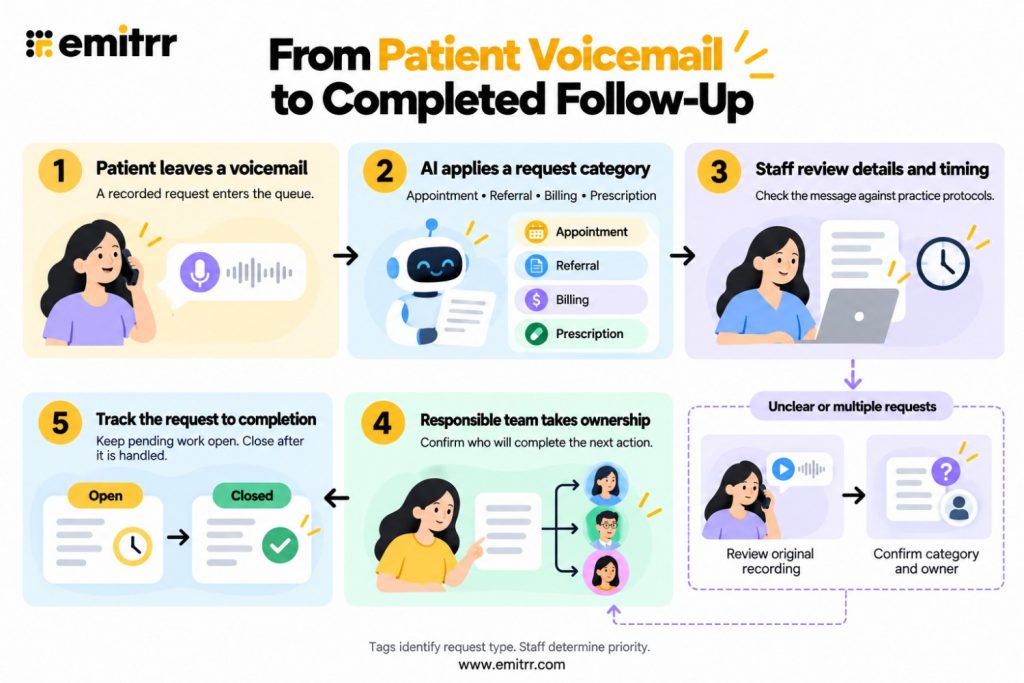
Categories become useful when they support a consistent callback process. Staff need to review the details, assess timing, assign responsibility, and track the request until the required action is complete.
A defined patient follow-up process helps keep the next action clear when a callback does not resolve the request immediately, the patient is unavailable, or additional information is needed.
Step 1: Group Voicemails by Request Type
Use meaningful categories to separate appointment, referral, billing, and prescription work. Categories should help staff recognize related requests without creating so many labels that they become difficult to use.
Review the tag alongside the transcript, summary, or original recording. A message labeled “Appointment” could also contain a billing question. Both parts need attention, even if the initial category captures only one.
Where your software supports category filters or grouped views, use them to review related requests together. Include unclear and uncategorized messages in routine checks so they do not remain outside the callback workflow.
This approach supports front desk voicemail management by reducing repeated sorting before staff decides what to do.
Step 2: Review Timing and Response Needs
To prioritize patient calls, look beyond the category. Check appointment dates, requested callback timing, and the effect of leaving the request unanswered.
A cancellation for later that day may need scheduling attention while there is still time to update the calendar. A preparation question for tomorrow’s visit may need an answer before the patient can follow the instructions.
Prescription timing should be assessed by the responsible staff. Messages containing clinical concerns should follow the practice’s established clinical review procedures.
Avoid treating categories as a fixed priority ranking. Two appointment messages can have different response needs. Patient callback prioritization depends on the details within each message, not simply the tag attached to it.
Step 3: Assign a Responsible Team or Staff Member
Match each request with the team equipped to handle it. Scheduling work may belong with the front desk, while account questions belong with billing. Referral and prescription messages should follow the practice’s designated responsibilities.
When several people share a queue, identify an individual callback owner where needed. A department assignment explains where the work belongs; a named owner clarifies who will take the next action.
Include relevant context during handoffs. If a patient has already sent a related text or spoken with another staff member, that information helps the receiving team avoid repeating questions.
Tag-based conversation assignment can automate the initial handoff when configured. Staff should still review unclear or multi-part messages and adjust ownership when necessary.
Step 4: Track the Request Until It Is Handled
Voicemail follow-up tracking should distinguish an attempted response from a completed request.
If a patient does not answer, record the attempt through the practice’s established process and keep the next action visible. If a referral document is missing, the request remains pending even after staff speak with the patient.
Before marking work complete, confirm the relevant outcome. Was the appointment updated? Was the referral question answered? Was the billing inquiry handled? Did the prescription request reach the required review process?
Routine checks of unresolved requests help teams identify messages waiting for another callback, missing information, or an internal handoff. This makes patient callback management more dependable than treating a played recording as completed work.
Appointment changes need follow-through after the callback. Watch this video to find practical ways to manage follow-up and keep your healthcare practice’s schedule full.
How Emitrr AI Voicemail Tagging Helps Manage Patient Calls
Emitrr’s AI conversation tagging helps teams organize patient conversations by request type. Applied to voicemails, patient conversation tagging connects the recorded request with its category, responsible owner, and follow-up status.
These capabilities support patient communication for healthcare practices by helping teams organize incoming requests and coordinate the next action.
AI Tags are available to Texting Pro users, VoIP Pro users, and Voice AI Agent users across all plans. AI Tags access and voicemail service are separate considerations: receiving voicemails requires the relevant calling setup.
Automatically Apply AI Tags to Patient Voicemails
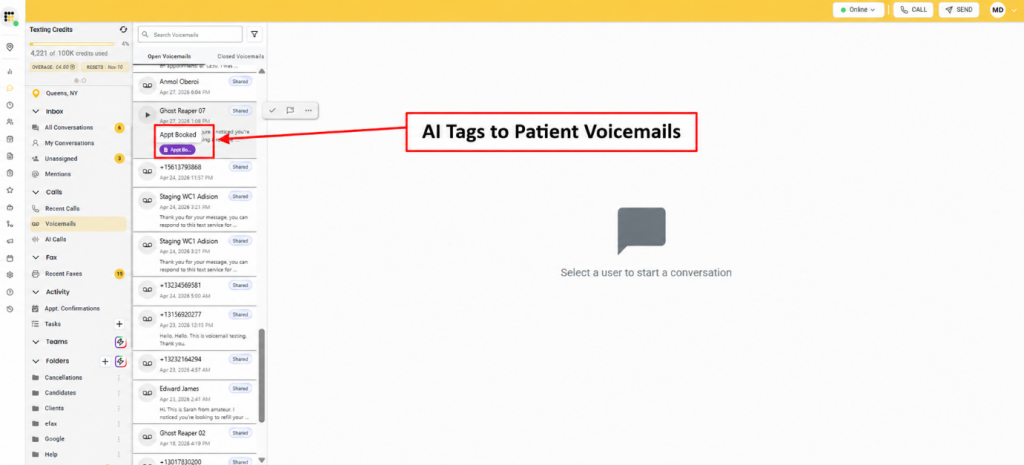
Emitrr supports automatic AI tags for voicemails. The AI identifies the patient’s intent and applies a relevant category, reducing the need for staff to label each request manually.
Healthcare accounts receive automatically created AI tags, including existing healthcare accounts. These healthcare-specific AI tags give practices a starting point for organizing patient requests. For example, an appointment-related tag helps staff recognize scheduling work before reviewing the requested date or change. A billing-related tag identifies a request for the billing team to review.
Staff should still check unclear messages and correct categories when needed. Automatic labeling does not establish clinical urgency or confirm that the requested action has been completed.
Manage Categories Around the Requests Your Practice Receives
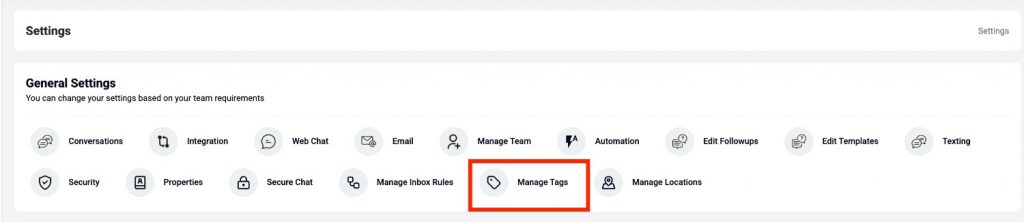
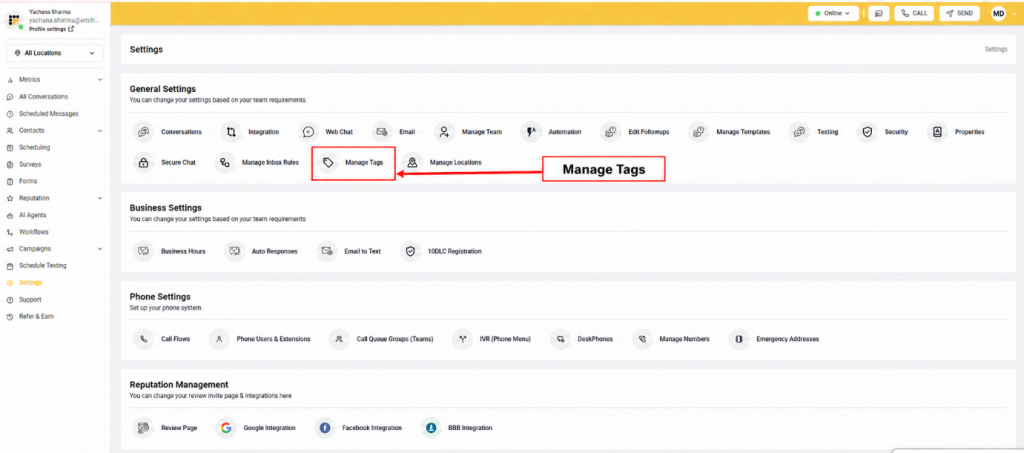
Go to Settings → Manage Tags to review manual and AI tags in one place. Staff with the appropriate access can search, create, edit, and delete tags.
Practices can create categories around the intents that matter to their workflow. Appointment requests, referral inquiries, billing questions, and prescription calls are useful examples. Each category should have a clear meaning so staff understand what work belongs under it.
AI tags also have a Channels setting with Text, Phone, AI Calls, and Fax options. Disabling a channel prevents the AI from automatically applying that tag to conversations from that channel. Review channel settings so a category intended for one type of communication does not create unnecessary labels elsewhere.
Keep the category list focused on work your team can act on. Custom tags should describe the request without implying a clinical assessment.
Review Voicemails Within the Patient Conversation
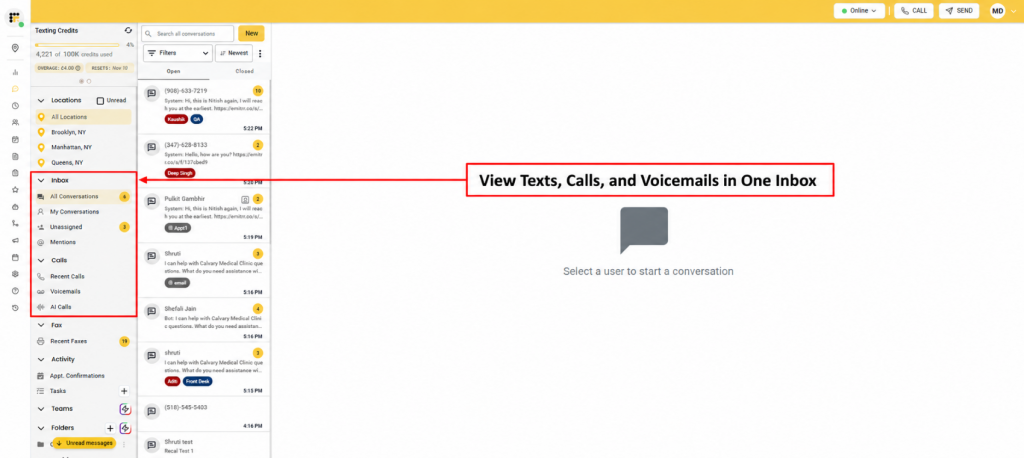
Emitrr places calls and voicemails inside the patient’s conversation timeline alongside messages. Incoming, outgoing, and missed calls appear as events, helping staff understand the sequence of communication before responding.
For example, a patient may leave a referral voicemail and then send a text with additional information. Staff can review both within the timeline rather than treating them as separate requests.
Selecting a call or voicemail takes staff to that point in the conversation, with available AI summary information providing a quick overview. AI voicemail summaries help staff get oriented, while the original message remains important for checking details.
Visibility follows the voicemail’s access rules:
- User-extension voicemails are private to that user
- Queue voicemails are visible to queue members and owners
- Shared voicemails follow location-based access, with owner visibility
A shared voicemail inbox therefore does not mean every employee can see every message. Configure the workflow around the staff who need access to handle the request. Voicemail email alerts also depend on the user having access and notifications enabled.
Assign Tagged Conversations to the Appropriate Team
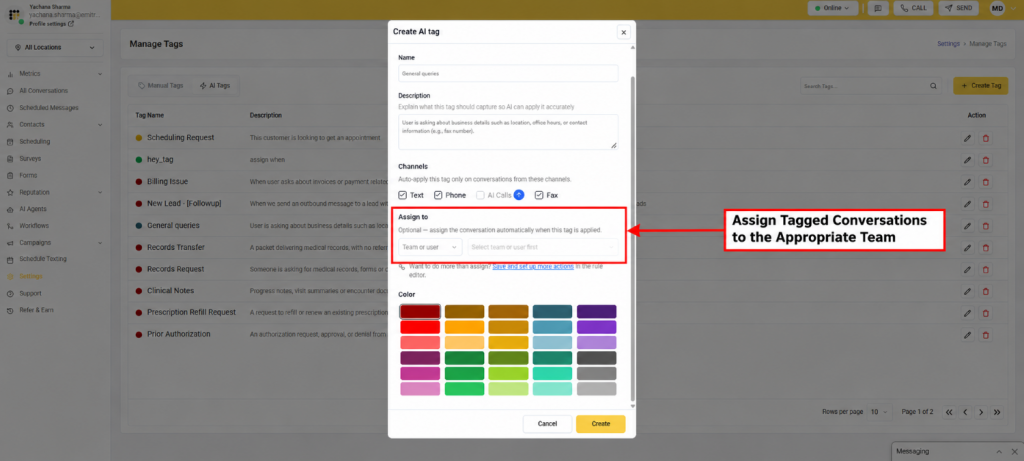
When creating or editing a tag, use the Assign to setting to select a Team or User. The conversation is assigned automatically whenever that tag is applied.
For example, an appointment-request tag can assign the conversation to the front desk. A billing tag can assign it to billing. Referral and prescription categories should connect to the staff responsible for those workflows.
This assignment works through a Conversation Rule. It reduces the manual work between recognizing the request and placing it with the appropriate owner. For additional actions, Save and set up more actions opens the rule editor.
Teams also support two assignment strategies. Manual, the default, keeps the assignment at the team level unless a member is explicitly selected. Round Robin distributes supported assignments among team members in rotation, including voicemail queue assignments and inbox rules that assign conversations to a team.
Automated voicemail routing helps with the initial handoff, but staff should review messages that contain several requests. Assigning a conversation does not mean the underlying scheduling, billing, referral, or prescription work is complete.
Track Voicemail Follow-Up With Open and Closed Status
Emitrr voicemails can be marked Open when follow-up is needed or Closed when the request has been handled. These controls help staff distinguish unresolved patient requests from completed work.
If a patient does not answer a callback, keep the voicemail open while the next action remains pending. If a referral question depends on a missing document, confirm the outcome before marking the voicemail closed.
Open and closed voicemails give the team a practical way to review remaining work. Staff can check unresolved requests during routine queue reviews and follow up with the responsible owner.
For medical office voicemail management, the combination matters: the tag identifies the request, assignment identifies the owner, and status shows whether follow-up is still needed.
Key Takeaways
- Automatic AI tags help staff categorize a voicemail backlog by the patient’s reason for calling.
- Appointment, referral, billing, and prescription categories provide a starting point for organizing work.
- Callback priority depends on message details, timing, and practice protocols.
- Clear owners and completion tracking help prevent requests from remaining unresolved.
- Emitrr connects automatic voicemail tagging with customizable categories, patient conversation history, tag-triggered assignment, and Open/Closed tracking.
- Voicemail visibility follows user, queue, and location-based access rules.

FAQs
AI voicemail tagging automatically labels a recorded message according to the caller’s request. In healthcare, categories can help staff recognize appointment inquiries, referral questions, billing requests, and prescription-related calls.
Transcription converts speech into written text. Tags identify the request category. Staff use the transcript for details and the tag as a starting point for organizing the work.
Tags make request types easier to recognize. Staff then review appointment dates, response needs, and practice protocols to decide callback order. Tags alone do not determine clinical urgency.
Yes. These are examples of patient intents that can be categorized through AI tagging. Available categories depend on the configured tags, and unclear or multi-part messages still need staff review.
Yes. When creating or editing a tag, select a Team or User under Assign to. Emitrr automatically assigns the conversation when that tag is applied, using a Conversation Rule.
AI Tags are available to Texting Pro and VoIP Pro users, plus Voice AI Agent users across all plans. Receiving voicemails also requires the relevant calling setup.
Conclusion
A voicemail backlog becomes easier to manage when staff can recognize each request, assess its timing, and identify who owns the next action. AI voicemail tagging provides the category that starts this process.
Emitrr brings automatic tags together with patient conversation context, assignment, and Open/Closed status. Your team can spend less time sorting messages and keep a clearer view of the requests that still need attention.
Book a demo to see how Emitrr AI voicemail tagging helps organize patient calls.


 4.9 (400+
reviews)
4.9 (400+
reviews)