
Introduction
The first-ever text sent carried the message “Merry Christmas.” This was way back in 1992, which was 31 years ago, to be precise! Since then, text messaging, particularly group texting apps, has come a long way and has become a crucial part of everyday digital communication. Whether you possess the now indomitable smartphone or the not-so-smart phone of the 2000s, you can always send a text message!
Businesses have also realized the importance of texting for customer communication. Text messages get read within 5 minutes of delivery and have a 98% open rate! It can be used for various communication purposes, such as marketing campaigns, customer support, notifications, surveys, reminders, etc.
In this article, we will detail the top 15 group texting apps based on their features, pros, cons, integrations, pricing and reviews.
What is a group texting app?
A group texting app or mass texting software facilitates group text communication for businesses. You might have come across the words “mass texting” or “broadcast texting,” which also seem to convey the same message as group texting. However, group text vs mass text is different.
What is Group Texting?
Group texting is messaging many contacts at once by adding them to a group. Group texting can take two forms
- A single text chain with all contacts in a group being able to see each other’s messages. The group is visible to both the sender and the recipients.
- A individual text chain between only the sender and recipients. The sender has multiple one-on-one text chains with the recipients. The group is a common place where the sender can draft the message and is visible only to the sender.
Features to Look For in The Best Group Text Messaging App
Here are the must-have features to look for in a group texting messaging app:
AI Automation
In today’s day and age, group chat platforms cannot be void of AI features. AI automation feature allows you to respond smartly to customer replies and queries, and can also automatically send follow-up messages to those customers who haven’t replied to your previous messages. AI features help keep customer engagement rates up.
Broadcast/Mass Texting
The most important feature that a mass group text app should offer is obviously the broadcast feature. Through this feature, you can send text message blasts to your entire customer list or a segment of your customer base. All you have to do is create a group with all your intended recipients, you can also simply upload contacts or select an existing list on the platform to create a group. Once the group is created you can draft the message and hit send. Each recipient will get the message separately.
File Upload
When creating a group, you must be able to upload a list of contacts as per your needs. If you want to send a mass text to a specific segment of customers that you have created, an easy file upload of the contacts is necessary to send mass texts without any hiccups.
Apart from the contact list file upload, you may also need to send some necessary documents to your customer base or your team. Therefore the mass group text app should also have a file upload option.
Read Receipts
Read receipts are a very important feature when opting for the best group texting app, as it help inform the sender if the recipient has received the message and read it. Imagine a scenario where an emergency notification was sent to a group of people. In emergencies, it is important to know whether everyone has received the message and read it. The read receipts feature will be of great help!
Scheduled Texts and Autoresponders
Scheduling features allow users to send messages at a later time. This feature can be especially useful for customer communication involving reminders and time-sensitive information. Autoresponders allow you to send a text message every time you miss a call, which also ensures that your clients feel heard every time they call you. Having both is a necessity for the best group messaging app.
Personalization Features
Personalization becomes handy when it comes to connecting with your clients, customers, and patients, as it ensures a personal touch that makes them feel valued. Personalization features allow the sender to address the recipient with details such as first name, and last name, or use other relevant properties. This helps in creating a more personal touch with the recipient. Hence, it is important to look for a group texting platform that offers personalization features.
File Sharing
File sharing is yet another factor to consider when searching for group text messaging services. This option can be present in the form of attachments. Having the feature to attach documents and files will allow users to share important files and information with customers.
Ease of Use
While opting for a group messaging platform, it is important to search for software that has intuitive features that are easy to use so that you do not end up facing trouble while using the app and connecting with customer support now and then. Ease of use is vital but quite underestimated, but if considered seriously, it can be a game changer for your business.
Automation Features
With automation, you can communicate with customers by clicking a button. No human intervention will be needed. For example, a reminder automation system will automatically send reminders to the database by integrating with the CRM. All you would need to do is turn on the automation! Hence automation features are crucial if you are looking for an app for group texting.
Integration Capabilities
While looking for a group texting service, it is important to go for software that offers seamless integration capabilities. Easy integration with your existing CRM, ticketing platform, system of record, etc. is indeed a must-have.
Security and privacy
When it comes to an app for group texting, it is vital for you to look for an app that adheres to legal rules and guidelines, and any conversation containing PHI (patient health information) must be encrypted as per the HIPAA guidelines. So look for a group text message app that provides end-to-end encryption.
Security and Compliance Requirements of a Group Texting App
The security and compliance requirements when using group messaging apps mainly depend on the type of communication and users involved. For general use, the Telephone Consumer Protection Act (TCPA) compliance must be followed, but for more regulated industries like healthcare, law, and finance, strict industry-specific security requirements must be taken into account. Here’s a deeper look:
Standard security features:
- Consent: As a business owner, you must get clear and verifiable consent from users before sending them informational or promotional messages.
- Clear opt-out: Your message should include a simple way for users to opt out of your messages. For example, replying with “STOP” opts them out.
- Time restrictions: SMS should only be sent during specific hours, usually between 8 am to 9 pm, depending on your state laws.
- Identity disclosure: Senders need to clearly identify their organization in their business text messages.
For Healthcare providers:
- BAA agreement: The group messaging app for healthcare providers should sign a BAA with the healthcare organization, agreeing to protect Protected Health Information (PHI) as per the HIPAA rules.
- Patient consent: Healthcare providers must get explicit patient consent before communicating any kind of PHI via text message, and patients need to be informed of the risks.
- Minimum necessary standard: If the message includes PHI, the app must ensure that only the minimum amount of necessary information is shared.
Other security features:
- End-to-end encryption: This feature ensures that only the sender and intended recipients can read messages, keeping them unreadable to app providers or network carriers.
- Data encryption at rest & in transit: Protects stored data (servers, backups) and while being transmitted over networks.
- Multi-factor authentication (MFA): Helps prevent unauthorized access even if login credentials are compromised.
- Access controls & user permissions: Allows you to define roles (admin, staff, volunteers, clients) with restricted access.
- Audit Logs & Message Tracking: Allow you to keep a record of who sent/received messages.
How to Choose a Group Texting App for Your Business?
The best group text messaging apps should offer the best value for money, while easily helping you solve your use case.
Here’s how you can choose the right group texting app for your business:
1. Ease of use
The first and most basic thing to look for is the ease of use. Setting up and sending group texts using a group communication app should be fairly easy. You should be able to upload your contact list, type and send or schedule your messages with minimal effort.
2. Group texting features
The best app for group text messages should offer basic features that allow you to schedule messages, send broadcast or mass text messages, etc. Many platforms like Emitrr also allow you to send images, links, other MMS group messages, and even generate messages using AI.
3. Security and compliance
When using group texting for SMS marketing or industry-specific messaging, it is important to consider the security and compliance requirements as well to avoid legal troubles. Make sure the platform offers easy opt-in/opt-out features and complies with other industry-specific texting rules, including TCPA, HIPAA (for healthcare), GDPR, FERPA, etc.
4. Pricing
Pricing is another essential feature to consider when choosing the best app for group texting. Choose a platform that offers a flexible and affordable pricing model with a clear breakdown of what is included in their plans. You may also want to consider the size of your contact list, number of messages you want to send, etc., to choose the best value for money option.
5. Scalability
Last but not least, consider scalability when looking for the best text message app. This means how easy it is to scale with your chosen app when your business grows. Can the platform easily adjust to your business when it starts growing? Can you add more features? Adjust SMS credits?
All these factors will help you choose the ideal group communication app for your business.
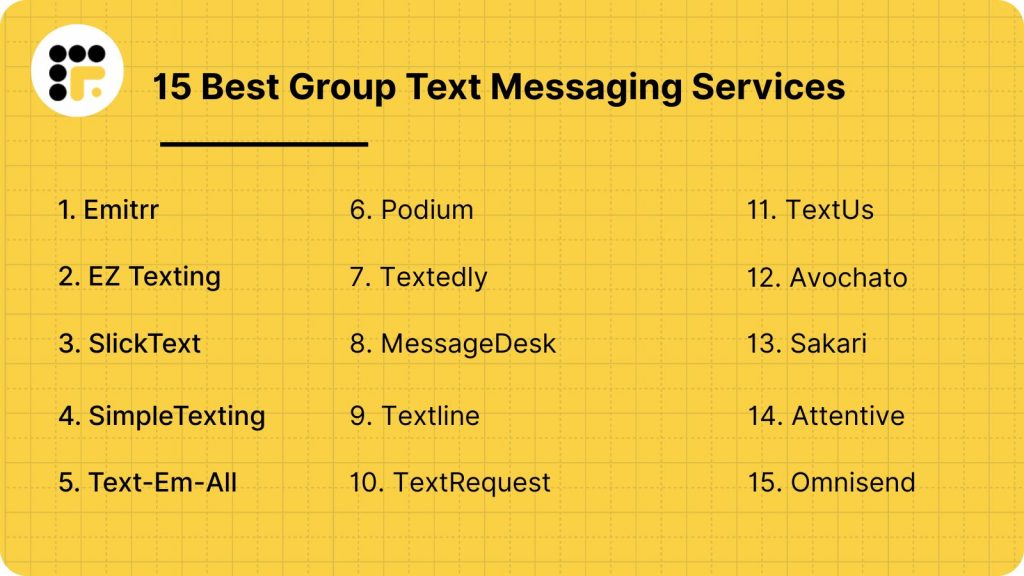
15 Best Group Text Messaging Services
- Emitrr
- EZ Texting
- SlickText
- Simple Texting
- Text-Em-All
- Podium
- Textedly
- MessageDesk
- Textline
- Text Request
- TextUs
- Avochato
- Sakari
- Attentive
- Omnisend
Emitrr | Best Group Texting Platform
What is Emitrr?
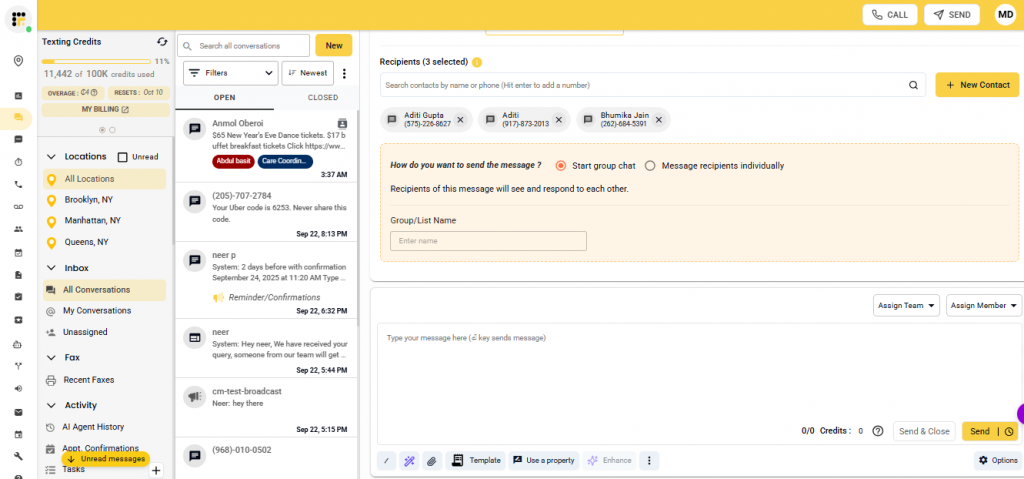
Emitrr is customer communication and interaction software and one of the best group texting apps for businesses. The group texting feature offered by Emitrr is one of the best in the game! It has the separation you would want for group texting and mass texting. Both of these features are available, and you can use either according to your preference. With Emitrr, you can connect with your audience at ease and manage all conversations on a single dashboard. Emitrr is an ideal mass text messaging service for businesses across all types and sizes. Its affordable pricing, unwavering support, and a plethora of features are all you need to simplify communications for your business.
Emitrr Features
- Omni-channel messaging: This feature allows businesses to communicate with customers through various channels under one platform. These channels include text, email, Google My Business, Facebook, and more.
- AI SMS agent: Using Emitrr’s AI SMS feature, you can generate messages in your group using AI, enhance the tone of the message, or even see reply suggestions.
- Analytics and metrics: This feature allows you to track the status of your campaigns by helping track the delivery rates, missed calls, VoIP usage, and more.
- SMS marketing campaigns: This feature lets you set up manual and automated SMS campaigns.
- Schedule text messages: You can schedule messages for later by setting up the date and time.
- Assign conversations: This feature allows to assign conversations to team members. You can assign conversations to an entire team or an individual.
- Broadcast texting: Send text blasts to thousands of recipients at once.
- Two-way texting: Two-way texting feature allows both the sender and recipient to send messages to each other. The customer can reply to the message.
- Customizable templates: You access a list of templates and also edit the templates according to your need.
- Read receipts: This feature shows whether the receiver has read the message or not.
- Typing indicators: This feature shows you if the recipient is typing often indicated through a series of dots.
- Personalization: This feature allows you to add personalization based on the contact. For eg, you can address each contact by their first name.
- Contact management: Segment contacts based on data like area code, city, date subscribed, custom fields, and more.
- Unified inbox: Manage and access conversations happening on different platforms, Web, Facebook, phone, etc., in one single place.
- SMS surveys: Send survey forms, review links, etc. to gather customer feedback.
- Landline texting: Text-enable your existing landline number and use it to send SMS.
- Reputation management: Build your online reputation across different review platforms with intuitive tools like survey automation, feedback tracking, link sharing, and more.
- Opt-outs: Give options to your customers to opt out of your messages.
- Web chat to text: Continue website conversations in your inbox with web-chat-to-text.
- VoIP: Enjoy a range of calling features like IVR, edit extensions, call recordings, voicemail transcription, call transfers, disposition, and more.
Emitrr Pros
- Exceptional has customer support with stellar ratings across all platforms.
- Emitrr’s dashboard is simple to setup and navigate.
- Emitrr has numerous valuable features such as reputation management, voip, mass texting, conversation management etc.
- The interface is quite user-friendly and requires a very small learning curve.
- Emitrr is the new age texting platform and offers AI texting features as well, including AI message generator, AI text enhancer, automation, etc.
- Emitrr is budget-friendly and offers adaptable pricing.
- Emitrr offers effortless and native integrations with over 1000+ CRMs.
- Emitrr is highly customizable according to the customer need.
- Ideal for those looking for a group texting app with replies.
Here’s a video showing how easily you can create groups for group texting using Emitrr:
Emitrr Cons
- More features are in the pipeline and will be launched soon
Emitrr Integration
- Zapier
- Hubspot
- Mailchimp
- HousecallPro
- Slack
- Freshdesk
- Salesforce
- Chrome extension
- Instagram Business
- Facebook Messenger
- Zendesk Support
- Dolphin
- Dentrix
- and more.
Emitrr Pricing
- It starts at $30 per month

Emitrr Support
- Live chat: Chat with Emitrr’s live representatives
- Phone: Call Emitrr at +1 (210) 941-4696
- Email: Send email to Emitrr’s support team at support@emitrr.com
- Knowledge base
- FAQs/forum
- SMS
Emitrr Reviews & Rating
- Capterra: 4.8/5
- G2: 4.7/5
I LOVE Emitrr. The support you get is wonderful, the app is easy to use and they have been incredibly responsive. As a small business, we needed a messaging platform that wouldn’t break the bank and this meets all our needs (and then some) without making us feel overwhelmed.”
Emitrr is amazing, it helps with our multiple companies and is so user-friendly. Anytime we have a problem and reach out the team is super responsive.
Source – Capterra
Check out how to schedule groups texts using Emitrr:
EZ Texting

What is EZ Texting?
EZ Texting is an all-in-one group text message app and text marketing solution for businesses. EZ Texting also offers some great group texting features. EZ Texting allows the integration of contacts directly from your CRM. This will make text communication with your customers easier and quicker. You can achieve one-on-one communication with your customers entirely through the group texting service.
EZ Texting Features
- Generative AI: Generate two-way personalized messages to run targeted campaigns.
- Two-way texting: Send one-on-one text messages to your customers in real-time. Interact with customers who respond to your bulk message in separate message threads.
- Custom keywords: Create unlimited SMS keywords for different types of campaigns.
- Bulk texting: Create targeted contact lists and send out SMS for marketing purposes.
- Contact management: Send targeted messages to customers by segmenting them into groups and lists.
- Analytics and reporting: Check detailed metrics, such as click rate, delivery rate, etc., and see how your bulk SMS campaigns are performing.
EZ Texting Pros
- Ease of use
- Streamlined process for reaching target audience.
- User-Friendly Interface
EZ Texting Cons
- Poor customer support
- Problems with sending messages reliably
- Insufficient range of available Functions
- Failure of message delivery
EZ Texting Integrations
- Mailchimp
- HubSpot Marketing Hub
- HubSpot CRM
- Zapier
- Squarespace
EZ Texting Pricing
- Ez Texting pricing starts at $20 a month and goes up to $3000 a month, depending on the number of contacts you choose for sending group texts.
EZ Texting Support
- Phone
- Chat
- Knowledge Base
EZ Texting Reviews & Ratings
- Capterra: 4.8/5
- G2: 4.7/5
I beg you (Who is reading this – AVOID THEM ) I have been their customers for 2+ years and I have started at a low package. without any notification or anything I was robbed in the BRIGHT DAYLIGHT
I use the service to send out surveys and it has really increased the response rate from when I was just sending the survey by e-mail.
Capterra
SlickText

What is SlickText?
SlickText is a group messaging app that helps facilitate customer communication. It is a mobile marketing tool that offers businesses solutions to communicate effectively with their customers. Mass texting and group texting are pretty much the same in the SlickText platform.
SlickText Features
- MMS messaging: Attach images to your messages to boost your engagement rate with your customers.
- Mass text messaging: Send mass text messages to multiple recipients at once. Personalize messages at scale.
- Detailed analytics: Gain detailed insights into your text marketing efforts right from click rates and opt-in stats to response data and abandoned cart revenue.
- SMS Surveys: Engage with your contacts by sending them SMS surveys. Choose from a range of templates available.
- Contact segmentation: Segment contacts based on data like area code, city, date subscribed, custom fields, and more.
- Keywords: Allow people to join your SMS list by sending a keyword set by you.
SlickText Pros
- Ease of use
- Robust Customer Support
SlickText Cons
- Lack of integration
- Manual contact addition
- Inability to use custom forms
- Lack of automation
SlickText Integrations
- Slack
- Mailchimp
- Shopify
- HubSpot CRM
- Zapier
- Constant Contact
SlickText Pricing
- SlickText pricing starts at $29 per month and goes up to $939 a month, depending on the number of credits you want to send group text messages.
SlickText Support
- Chat
- Phone
- FAQs
- Knowledge base
SlickText Reviews & Ratings
- Capterra: 4.8/5
- G2: 4.8/5
The set up process was easy, and using the platform is a breeze.
Terrible. Stay away! There are far better services you can use!
Capterra
SimpleTexting

What is SimpleTexting?
SimpleTexting is one of the apps for group communication for businesses and organizations. Simpletexting’s group text service lets you reach large groups of people with a single text. Coordinate teams, send alerts, or stay in touch with customers using SMS group texts.
SimpleTexting Features
- Integrations: Connect SimpleTextingwith third-party apps and streamline your workflows.
- MMS messaging: Send multimedia messages that include images, videos, etc to your contacts in just a few clicks.
- Bulk messaging: Send out messages to thousands of contacts at once.
- Scheduled messages: Schedule text messages for your customers for a later time and date.
- Two-way texting: Engage in one-on-one conversations with users directly from the SimpleTexting platform.
- Text-to-Join keywords: Set up custom keywords that users can text to a number to subscribe to messages.
SimpleTexting Pros
- User-friendly interface
- Ample integrations
SimpleTexting Cons
- Bad user experience
- Expensive product
- No group texting feature
SimpleTexting Integrations
- Mailchimp
- Trainual
- Unbounce
- Zapier
- Ontraport
SimpleTexting Pricing
- SimpleTexting pricing starts at $39 per user per month for 500 messages and goes up to $909 per month per user for 50000 messages.
SimpleTexting Support
- Phone
- Chat
- FAQs
- Knowledge base
SimpleTexting Reviews & Ratings
- Capterra: 4.7/5
- G2: 4.7/5
I was disappointed with Customer Service and the way they charge their customers. Like the service was disappointed with the charges and the customer service.
Easy to setup and use. The data tracking is better than our previous texting application. Being able to resend people a text who clicked on our link had been very beneficial. I strongly recommend SimpleText.
Text-Em-All

What is Text-em-all?
Text-Em-All is one of the popular mass messaging apps. Text-Em-All allows businesses to send personalized, informational, and emergency text messages (and calls) fast. Group texting features come under Text-Em-All’s mass texting service. The mass texting service of Text-Em-All allows the fast delivery of personalized, informational mass text messages to contact groups of any size.
Text-Em-All Features
- MMS messaging: Send multimedia files to your customers using the MMS texting option.
- Flexible inbox: Share your inbox with your team and make it easy for them to collaborate on message threads.
- SMS and voice broadcast: Send both voice and SMS broadcasts simultaneously.
- SMS Personalization: Add personalized properties in your text messages like first name, last name, location etc.
- SMS Surveys: Collect feedback and gain insight from your customers through SMS surveys.
- Text signatures: Create a text message signature and enable it automatically to any text message.This signature will be automatically appended at the end of your message.
- SMS templates: Add previously created text messages to your text broadcast or create new templates for future use.
Text-Em-All Pros
- User-friendly software
- Flexibility and unlimited calls
- Best group texting app for small business
- Affordable group texting app
Text-Em-All Cons
- Typing delay in messages
- Confusing updates
- Exchange rate issues
- Complicated initial set up
Text-Em-All Integrations
- Okta
- Greenhouse
- Bullhorn ATS & CRM
- IconCMO
- ChMS
- Avionté
Text-Em-All Pricing
- Text-Em-All pricing plans start at $19 a month and go up to $599 a month.
Text-Em-All Support
- Phone
- Chat
- Knowledge base
Text-Em-All Reviews & Ratings
- Capterra: 4.7/5
- G2: 4.8/5
It does what we need it to do without any problems. Its a hassle-free tool that is reasonably priced.
It’s a very nice platform, very versatile, and no complaints!!!!
Capterra
Podium

What is Podium?
Podium is a mass texting platform that uses text messaging to help local businesses attract more leads, convert leads at a higher rate, and retain more customers. Podium users can send group text messages through its text marketing feature.
Podium Features
- Reviews and reputation management: Send review requests via SMS and so that businesses can collect reviews from platforms like Google and Facebook.
- SMS Surveys: Send out SMS surveys by sending survey forms or links and gather customer feedback effectively.
- Unified Inbox: Manage all conversations from a unified inbox.
- SMS marketing: Use SMS to communicate with your customers or to send out SMS marketing messages.
- SMS Marketing: Utilize SMS to run targeted SMS marketing campaigns and follow up with customers with drip campaigns.
- Integrations: Integrate with third-party apps to simplify and automate your business workflow.
Podium Pros
- Ease of use
- Ease of communication
- Automation
Podium Cons
- Setup delay
- High cost
- Lacking attributes
- Poor customer service
Podium Integrations
- Mailchimp
- Shopify
- Calendly
- QuickBooks Online
- HubSpot CRM
- Housecall Pro
Podium Pricing
- Podium pricing starts at $399 per month
Podium Support
- Chat
- Phone Support
- Email/Help Desk
- Knowledge Base
Podium Reviews & Ratings
- Capterra: 4.3/5
- G2: 4.5/5
“The product is easy to use and the UX is top notch. While I wish there was a few more customizable options from team management it is easy to use even for people who aren’t tech savvy”
We previously used Podium and we switched to a less expensive option. Well, you get what you pay for. Podium is a far better product. Reviews increase, we get paid faster using card readers or text to pay. Excellent customer service!
Capterra
Textedly

What is Textedly?
Textedly is one of the popular apps for group communication, suited for small businesses. Textedly is a good option for growing businesses, with its varied pricing plan. As your business expands, you can move on to higher plans that suit your needs. It is seen as one of the most affordable options for growing businesses.
Textedly Features
- Mass texting: Send text messages to thousands of contacts at once and save hours worth of daily time.
- Text message scheduling: Schedule text messages for a later date to keep your calendar full.
- Reviews and reputation management: Easily collect customer feedback and manage your online reputation.
- Text message marketing: Send mass marketing messages to customers and follow up with drip campaigns.
Textedly Pros
- Ease of use
- Extensive features
- User-friendly
Textedly Cons
- Inadequate customer support
- Hidden charges
- Delay in sending and receiving messages
- Lacks intuitive user interface design.
- Limited CRM integrations
Textedly Integrations
- Zapier
Textedly Pricing
- Textedly pricing starts at $26 per month for 500 messages, and goes up to $2999 per month for 200000 messages.
Textedly Support
- 24/7 (live rep)
- Chat
- Email/Help desk
- Phone support
Textedly Reviews & Ratings
- Capterra: 4.6/5
- G2: 4.6/5
The textedly web text message service is very awesome and it is above my overall expectations.
Good price for messages, but not good service for companies who sending SMS to new monthly, fresh and updated lists of customers.
Capterra
MessageDesk

What is MessageDesk?
MessageDesk is a group text message app ideal for local businesses. MessageDesk serves tradespeople like plumbers, contractors, maid services, and landscapers, as well as professionals like lawyers, attorneys, and CPAs, and nonprofits, churches, and other organizations. Thus, mass texting service allows users to unify text conversations, connect teams, reach more people, and broadcast at scale, along with sending broadcast text or group texts to the entire customer list for text message marketing campaigns, special offers, updates, alerts, etc.
MessageDesk Features
- Shared SMS inbox: Unify all team communications in one single inbox, making collaboration easier and more efficient.
- Text enable existing number: Get your existing business number text enabled to enjoy both calling and texting.
- Third-party integration: Integrate MessageDesk with your existing CRM for easy data access. Never switch context again.
- Broadcast texting: Send broadcast text messages to your customers and personalize each message with interesting properties.
- Automated texting: Automate customer outreach for effective communication, and send customized SMS notifications and confirmations.
MessageDesk Pros
- Ease of use
- User-Friendly
- Ideal for those looking for a group texting app with replies
MessageDesk Cons
- High cost
- Complex automation
- Difficult contact management
- Deletion difficulties
MessageDesk Integrations
- Zapier
- QuickBooks Online
MessageDesk Pricing
- MessageDesk pricing starts at $49 per user per month
MessageDesk Support
- Phone
- Learning center
MessageDesk Reviews & Ratings
- Capterra: 4.8/5
- G2: 4.7/5
The benefits it has is that it separates messages for you.
The only thing I disliked is that I wish it had integration with sales platforms (HubSpot, SalesForce, etc.) for sales related usage in my industry.
Capterra
Textline

What is Textline?
Textline is an app for group chat that is ideal for modern customer support, sales, and logistics teams. This bulk texting app is a platform that teams can use for collaborative work. Textlines’s group texting feature can be used to create groups with either your customers or your employees. Basically, Textline’s group text message app is a many-to-many approach that keeps all recipients and their replies in a single text thread.
Textline Features
- Group text messaging: Send messages in groups and get replies on the same text thread.
- Mass texting: Send thousands of personalized text messages in a few clicks.
- SMS templates: Reduce time spent manually typing messages with SMS templates.
- Text message scheduling: Schedule a single text message or mass group text messages to go out at a future time and date.
- Two-way texting: Engage in two-way conversations with customers.
- Automated texting: Set up automated messages based on pre-set keywords.
- Text message surveys: Create personalized SMS surveys and get actionable insights.
Textline Pros
- Ease of use
- Good integrations
- Ease of communication
- Affordable group texting app
Textline Cons
- Poor customer service
- Limited features
- Errors and delays in sending messages
Textline Integrations
- HubSpot
- Talkdesk
- Help Scout
- Zendesk Support
- Aircall
Textline Pricing
- Textline pricing starts at $20 per agent per month and goes up to $50 per agent per month.
Textline Support
- Email/Help Desk
- Knowledge Base
- Chat
Textline Reviews & Ratings
- Capterra: 4.9/5
- G2: 4.5/5
I love Textline from both the perspective of a customer who appreciated the actual companies customer service and user of their app in giving my own customers better service.It doesn’t feel native to iOS and some screens did not render well.
Text Request

What is Text Request?
Text Request is an app for group communication built for customer engagement. Text Request is a text blast service designed to scale with its customers, from one person handling a few conversations to thousands of employees sending millions of messages. With Text Request’s mass texting feature, you can send one message to multiple people and no one else can see who else got it.
Text Request Features
- Webchat to text: Start conversations right from your website with a live chat widget for texting and collect contact info to follow up once the user leaves the site.
- Landline texting: Get your existing landline number text enabled and enjoy both calling and mass texting from the same number.
- API and Integrations: Use out-of-the-box integrations offered by Text Request or create your own with their API and webhooks.
- SMS Reviews: Send mass SMS review requests to generate reviews for your services.
- Signatures: Create custom SMS signatures for each user so your contacts always know who they’re talking to.
- SMS templates: Use available SMS templates instead of crafting messages from scratch.
Text Request Pros
- Ease of use
- Great customer service!
- Variety of features
Text Request Cons
- Hidden fees and misleading promises
- Limited customization for smaller businesses.
- confusing and redundant onboarding.
- Unstable, typing issues, notification problems.
Text Request Integrations
- HubSpot CRM
- Zapier
- Square Point of Sale
- Pipedrive
- Clio
- Square for Retail
Text Request Pricing
- Text Request pricing starts at $59 per month and goes up to $549 per month, depending on your group texting needs.
Text Request Support
- Phone
- Chat
- Knowledge Base
Text Request Reviews & Ratings
- Capterra: 4.6/5
- G2: 4.6/5
Ease of use and great customer service! from customer communications to reservations it helps us in all aspects of our communications.
The only thing I feel might be missing, is that it is hard to tell who the text is directed to. Sometimes you have to go way back into the previous texts to figure out who it belongs to.
TextUs

What is TextUs?
TextUs is a mass text messaging platform and an app for group texting built specifically for inside sales, recruiting, and customer service teams. TextUs is mainly used by these businesses: staffing and recruiting, HR, financial services, healthcare, inside sales, SaaS, property management, higher education, and Non-profit organizations.
TextUs Features
- Contact Management: Segment contacts based on data like area code, city, date subscribed, custom fields, and more.
- Mass Texting: Send mass text messages to your customer base.
- Real-Time Chat: Chat with customers in real time with web chat.
- Reporting & Statistics: Get reports about your campaigns and its performances.
TextUs Pros
- Ease of Use
- Device compatibility
TextUs Cons
- Time-consuming
- Difficulty keeping up with group message members
- Delayed delivery of texts
- Unintuitive interface
- Difficulty in tracking conversations
TextUs Integrations
- JobDiva
- Salesforce Sales Cloud
- Greenhouse
- HubSpot CRM
- Tracker
TextUs Pricing
- TextUs pricing starts at $300 per month.
TextUs Support
- Help center
- Knowledge base
TextUs Reviews & Ratings
- Capterra: 4.7/5
- G2: 4.7/5
It can be hard to keep up-to-date with the members on a group message and entering in their phone numbers is a hard process.
The ability to tag and group people by industry or customer was awesome and made it easy to message multiple people for generic messages.
Capterra
Avochato

What is Avochato?
Avochato is a group text app for businesses, teams, marketers, and contact centres. Users can segment, import, and broadcast to their contacts to scale team communications with Avochato. It has a dedicated broadcast texting feature, with which you can send one-to-many messages at the click of a button. Industries using Avochato include e-commerce, insurance, home care agencies, realtors, auto dealerships, delivery and logistics companies, and more.
Avochato Features
- 2-Way Messaging: Two-way texting feature allows both the sender and recipient to send messages to each other.
- Automated Responses: This feature sends automated responses to a customer based on their queries.
- Customizable Templates: You can access a list of pre-saved templates and customize them
- File Sharing: You can attach files and documents to your text messages.
- Group Messaging: You can send mass text messages to your customer list.
Avochato Pros
- Ease of use
- Easy communication
- Easy setup
- Affordable group texting app
Avochato Cons
- Messaging Issues
- Contact management
- Missing features
- Notification Issues
- Not user-friendly
Avochato Integrations
- Slack
- Salesforce Sales Cloud
- Microsoft Teams
- Zapier
- Cognito Forms
Avochato Pricing
- Avochato pricing starts at $19 per month and goes up to $35 per user per month, the pricing could vary depending on your group messaging needs.
Avochato Support
- Phone
- Knowledge center
Avochato Reviews & Ratings
- Capterra: 4.7/5
- G2: 4.4/5
My customers were very impressed with my quick response times as well. I love that I can text my customers either from the web dashboard, from the mobile friendly dashboard, or from the iPhone app.
Just an awful customer service experience all the way around. I would NEVER recommend such an awful company.
Capterra
Sakari

What is Sakari?
Sakari is a cloud-based SMS marketing platform designed to help sales, marketing, and customer service teams send and receive text messages. Businesses can utilize the platform to create and send bulk messages across multiple contacts to automate marketing campaigns. It also offers rich text messaging functionality, which enables administrators to add maps, media, icons, call-to-action buttons, and more using a centralized dashboard. It lets teams send appointment reminders and review requests.
Features of Sakari
- SMS Templates: Save yourself the hassle of creating mass messages from scratch, use pre-saved templates instead.
- SMS personalization: Personalize messages at scale by adding interesting properties.
- Automated texting: Set up SMS automation to send auto replies to customers when they ask a query.
- Mass texting: Send text messages to thousands of contacts simultaneously with just a few clicks.
- Reporting/analytics: Check the performance of your mass texting campaigns by monitoring detailed metrics.
- Two-way texting: Engage in two-way conversations with customers.
Sakari Pros
- The software is easy to use and navigate
- The platform is cost-effective
- The customer support team is responsive
Sakari Cons
- The integration options are limited
- The templates could be more user-friendly
- Issues like contact duplication persist
Sakari Integrations
- Hubspot
- ActiveCampaign
- Pipedrive
- Aircall
- Slack
- Intercom
Sakari Pricing
Sakari offers a standard plan priced at $25 per month that encompasses 823 segments and goes up to $495 per month for18822 message segments.
Sakari Support
- Phone
- Help center
Sakari Reviews & Ratings
- Capterra: 4.5/5
- G2: 4.5/5
The reliability was excellent as well–all my campaigns and messages have been delivered flawlessly during the six months that I’ve used it.
Tracking could be a bit more robust when it comes to shortcodes and 800 numbers with integrations.
Capterra
Attentive

What is Attentive?
Attentive is and AI-powered SMS & email platform that helps retail enterprises to e-commerce entrepreneurs engage customers. This mass texting service offers smart tools for you to acquire more customers, build a dynamic audience base, integrate your data, and personalize your communications. This platform serves retail and e-commerce, travel and hospitality, food and beverage, and entertainment industries.
Attentive Features
- AI-assisted live agent: Engage with your customers in real-time with an AI assisted live agent, ensure seamless interaction.
- Two-way texting: Engage in two-way conversations with your customers and answer queries in real time.
- Mass text messaging: Send text blasts to thousands of contacts at once in just a few clicks.
- Personalized texting: Send personalized text messages at scale, and choose from a range of properties.
- Contact segmentation: Segment your contact lists based on demographics, use case and more.
Attentive Pros
- The platform is very easy to use and intuitive
- The customer support is great
- Sending out mass campaigns is seamless
Attentive Cons
- The reporting functionality is clunky
- The integration options are limited
- The contact segmentation tool is very basic
Attentive Integrations
- Mailchimp
- Shopify
- FreshDesk
- Zendesk Suite
Attentive Pricing
Contact support to request a Attentive’s pricing quote.
Attentive Support
- Help center
- knowledge base
Attentive Reviews & Ratings
- Capterra: 4.8/5
- G2: 4.6/5
Setting up the campaigns when I was getting started was a bit confusing for the sign up marketing box on the website.
My overall experience with Attentive is positive. They give us so much support as an agency partner.
Capterra
Omnisend

What is Omnisend ?
Omnisend is a group texting service that automates your marketing across the entire customer journey. It mainly caters to the E-Commerce industry. You can capture and grow subscriber lists with landing pages & popups and engage customers with ready-made email templates & newsletters.
Omnisend Features
- Automation: Automate customer outreach for effective communication, and send customized SMS notifications and confirmations.
- SMS marketing: Create targeted contact lists and send out SMS for marketing purposes.
- Contact segmentation: Segment contacts based on data like area code, city, date subscribed, custom fields, and more.
- Third-party integrations: Connect with third-party apps and streamline your workflow as you bring all tasks onto one single dashboard.
- Mass texting: Send text messages to thousands of contacts simultaneously with just a few clicks.
Omnisend Pros
- The automation features are great
- The platform is quite easy to navigate
- It is easy to import contact lists
- The customer support is responsive
Omnisend Cons
- The reporting functionality is very basic
- The email content builder is glitchy
- The SMS features could be more advanced
Omnisend Integrations
- WIX
- Shopify
- Shoplaza
- Woo commerce
- Ecwid
- WordPress
Omnisend Pricing
Omnisend offers two pricing plans:
- Standard: $16 per month for 500 contacts
- Pro: $59 per month for 2500 contacts
If you wish to send messages to more than 2500 contacts, you can get a custom quote.
Omnisend Support
- Live chat
- Contact center
Omnisend Reviews & Ratings
- Capterra: 4.7/5
- G2: 4.5/5
The features that I love the best on Omnisend is that I am able to go through analytics and other critical information about my visitors that help me turn them into customers.
There’s very little to dislike, but one area that could be improved is the pricing structure for smaller businesses. It would be great if there were more flexible pricing options for those just starting out.
Capterra
Why is Emitrr the Best Group Text Messaging Service?
From the detailed analysis, it is clear that Emitrr is the best group texting app for business, as it retains a fine balance between all the essential categories by scoring the highest in the number of features it offers and the customer service rating, and scoring the second highest in the remaining categories of overall rating and ease of use. Here are some elements that make Emitrr the best group messaging app and why it stands out from the rest:
- With Emitrr, you only pay for the features you use, and hence it is a super affordable option for businesses as they grow.
- Emitrr’s customer support has garnered stellar reviews, making it the most reliable software out there!
- The platform is intuitive and easy to use. You can also assign your team members to each of the conversations and make it easy to manage them.
- Some more conversation management tools provided by Emitrr include a notes feature for team members, a translation feature for versatile customer communication, folderizing conversations for easy access, etc.
- Some group text messaging services offered by a group messaging app like Emitrr that truly take the group texting game up a notch include sequences, automation, metrics, and conversation assignments.
- If your goal is to easily create groups and send them mass texts, you will be able to do it effortlessly with this group texting app.
Let’s have a look at how each of these features functions in Emitrr.
AI-Driven Texting Automation
Emitrr offers AI-driven texting features that can help you save time in drafting messages, replying to texts in groups, and even in automating responses. Here’s a video showing what more you can do with Emitrr’s AI SMS agent:
Transparent Pricing and Quality Assurance with Emitrr
Emitrr understands the problems of businesses and addresses the problems of hidden charges to make sure that you do not feel cheated. Hence, we ensure that we remain transparent with you and maintain flexible pricing without compromising on quality. We offer the best group messaging app in affordable price with no hidden charges.
Experience Exceptional Support and Training with Emitrr
Emitrr has robust customer support, which ensures that in case of any issue, we help you out instantly with the solution. Our customer support has gotten 5 out of 5 stars on some reputable platforms, such as Capterra. With Emitrr’s group text messaging service say yes to comfort and say bye to hassle.
Optimize Your Outreach with Emitrr’s Comprehensive Sequence Feature and Detailed metrics
With Emitrr’s sequence feature, you can add more than one text message to a campaign. Essentially, you can add ‘n’ number of follow-up steps to the initial message. A contact enrolled in a particular campaign will go through all the pre-established steps of the sequence. That’s not all, you can also see the metrics of the campaign step-wise. The metrics show the following information: the number of delivered messages, failed messages, and responded and not responded messages. All this information is available for the overall campaign and also for each of the steps.
Streamline Your Campaigns with Emitrr’s Advanced Automation
Automation allows you to run campaigns without human intervention, and Emitrr excels when it comes to automation. At Emitrr, you just need to set up the automation once, and it will keep running. Each time a customer is added to a list specified in the automation, the campaign will begin for that customer. To make the campaign more targeted, you can try setting up auto-responders based on the stage of the campaign each customer is at. Emitrr is indeed the best app for group communication.
Seamless CRM Integration in Emitrr
Integration with your existing CRM or EHR will help sync contacts to Emitrr along with its updated properties. The properties include information about the customer, such as their first name, last name, date of birth, last date of appointment, tags, etc. These properties can then be used as personalization tokens for the messages. This will help give the message a more personal touch. Now send personalized messages through one of the best group texting apps for business.
Optimize Customer Engagement with Mass assignment of conversations
If you ever send department-specific mass text messages to your customer list, it would be incredibly helpful if these conversations get assigned to the team members of that specific department. They will be more equipped to deal with these conversations. With Emitrr, you can do it seamlessly and assign an entire group to a team.
Group Texting Services FAQs
Emitrr is the best app for group communication out there. When compared with its 11 competitors, Emitrr offers all the required group texting features, has the best support rating, doesn’t require a learning curve, and is reasonably priced. Emitrr can be used by budding and established businesses alike, with the support team ready to make customizations as and when required. Not only will you be able to reach out to your customers in an efficient manner, but you will also be able to achieve operational efficiency along the way.
In a group SMS app, you create a close group where people can see each other’s responses and be a part of the conversation. On the other hand, when you send a mass text message to a large group of people, the message reaches them separately instead of a closed group, and each response that you receive will be a separate message thread with the concerned recipient. Mass text is also known as bulk text.
Yes, you can usually add or remove people from a group text. The process varies by device and messaging app.
Yes, there are plenty of apps out there that businesses can use for sending mass text messages. You can use group chat apps for work purposes. Apps such as Emitrr provide mass texting service along with many advanced texting features.
You can text a large group of people by using the mass texting feature on a group texting app. With the broadcast text feature you can send bulk messages to people individually by crafting just one message.
Emitrr is a text messaging platform that allows businesses to send unlimited text messages
Yes, you can send group texts on Android and iPhone but you can only send limited mass texts with them.
Emitrr, Textline, Textedly, Messagedesk, etc., are some of the best group texting apps for small businesses as they offer an intuitive interface, affordable pricing, and excellent features helping small businesses excel in their SMS marketing or group communication efforts.
Emitrr is the best HIPAA-compliant group texting app meant for healthcare professionals who want to ensure patient privacy is not compromised when communicating with the patient, their family members, or internally with the team. For this, the platform offers robust security features like secure messaging, user access control, auto-log out, end-to-end encryption, and more.
Conclusion
A group messaging app is a great tool that can help streamline customer communication for your business. If you are looking to finalise a group texting app for your business, then we suggest going for Emitrr, as it has everything you need for your business. If you want to take your communication game up a notch, then say a big yes to Emitrr. From a variety of features to robust customer support, it is indeed offering the best group texting services out there!!


 4.9 (400+
reviews)
4.9 (400+
reviews)