
Introduction
Imagine two clinics offering the same quality of care.
Both appear on Google.
A patient clicks the first website.
It loads slowly.
The navigation is confusing.
The appointment button is hard to find.
They leave within a few seconds.
The second website loads instantly.
It clearly explains the services offered, introduces the providers, answers common questions, and makes booking an appointment easy.
Which clinic is more likely to get the patient?
Probably the second one.
Your website isn’t just an online brochure anymore.
It’s often the deciding factor between a patient choosing your practice or your competitor.
In this guide, you’ll learn how to build a healthcare website that’s easy for patients to use and easy for Google to understand—without getting lost in technical SEO jargon.
Chapter 1: Why Your Website Matters for Local SEO
Many people think Google Business Profile is enough.
It’s incredibly important—but it’s only one piece of the puzzle.
Google also looks at your website to understand:
- Who you are
- What services you offer
- Where you provide care
- Which locations you serve
- Whether your information is trustworthy
A well-optimized website supports everything you’ve done with your Google Business Profile.
Think of it this way:
- Your Google Business Profile helps patients discover you.
- Your website helps convince them to book.
Both need to work together.
Your Website Answers Questions Your Google Business Profile Can’t
A Google Business Profile has limited space.
Your website lets you explain things in detail.
For example:
A patient searching for a physical therapist may want to know:
- What conditions do you treat?
- Which therapist should I see?
- Do you accept my insurance?
- What happens during the first visit?
If your website answers these questions clearly, patients are much more likely to book an appointment.
Google Uses Your Website to Build Trust
Google wants to recommend businesses that provide accurate, helpful information.
That’s why your website should clearly explain:
- Your services
- Your providers
- Your clinic locations
- Contact information
- Frequently asked questions
The more complete and trustworthy your website appears, the easier it is for Google to understand your practice.
Key Takeaway
Your website shouldn’t exist just because every business needs one.
It should help patients:
- Learn about your practice
- Find the right provider
- Get answers quickly
- Book an appointment easily

Chapter 2: The Ideal Website Structure
Imagine walking into a hospital where nothing is labeled.
No signs.
No directions.
No reception desk.
Finding the right department would be frustrating.
A confusing website creates the same experience.
Patients should be able to find what they’re looking for within a few clicks.
Here are the pages every healthcare website should have.
Homepage
Think of your homepage as your welcome desk.
It should quickly answer four questions:
- Who are you?
- What services do you offer?
- Where are you located?
- How can patients book an appointment?
Avoid trying to explain everything on one page.
Instead, guide visitors to the pages that matter.
Location Pages
If you have multiple clinics, every location deserves its own page.
Each location page should include:
- Address
- Phone number
- Office hours
- Google Map
- Providers at that location
- Services offered
- Parking information (if helpful)
- Appointment button
This also supports your local SEO efforts because Google can clearly associate each location with a specific city or neighborhood.
Service Pages
Patients don’t search for “healthcare.”
They search for specific services.
For example:
- Dental implants
- Physical therapy
- Knee pain treatment
- Pediatric vaccinations
Each major service should have its own page that explains:
- What the service is
- Who it’s for
- What patients can expect
- Common questions
- How to book an appointment
Provider Pages
Many patients choose a provider before they choose a practice.
A provider page should include:
- Professional photo
- Specialty
- Experience
- Areas of expertise
- Languages spoken
- Locations they practice at
- Appointment options
This helps patients feel more confident before booking.
FAQ Pages
Every practice receives the same questions repeatedly.
For example:
- Do you accept my insurance?
- Do I need a referral?
- What should I bring?
- Do you offer telehealth?
- What are your office hours?
Adding these answers to your website helps both patients and search engines.
It also reduces unnecessary phone calls to your front desk.
Website Structure Example
Homepage
│
├── About Us
├── Locations
│ ├── Dallas
│ ├── Austin
│ └── Houston
│
├── Services
│ ├── Dental Implants
│ ├── Invisalign
│ ├── Emergency Dentistry
│ └── Teeth Whitening
│
├── Providers
│ ├── Dr. Sarah Smith
│ ├── Dr. John Lee
│ └── Dr. Emily Chen
│
├── FAQs
└── Contact
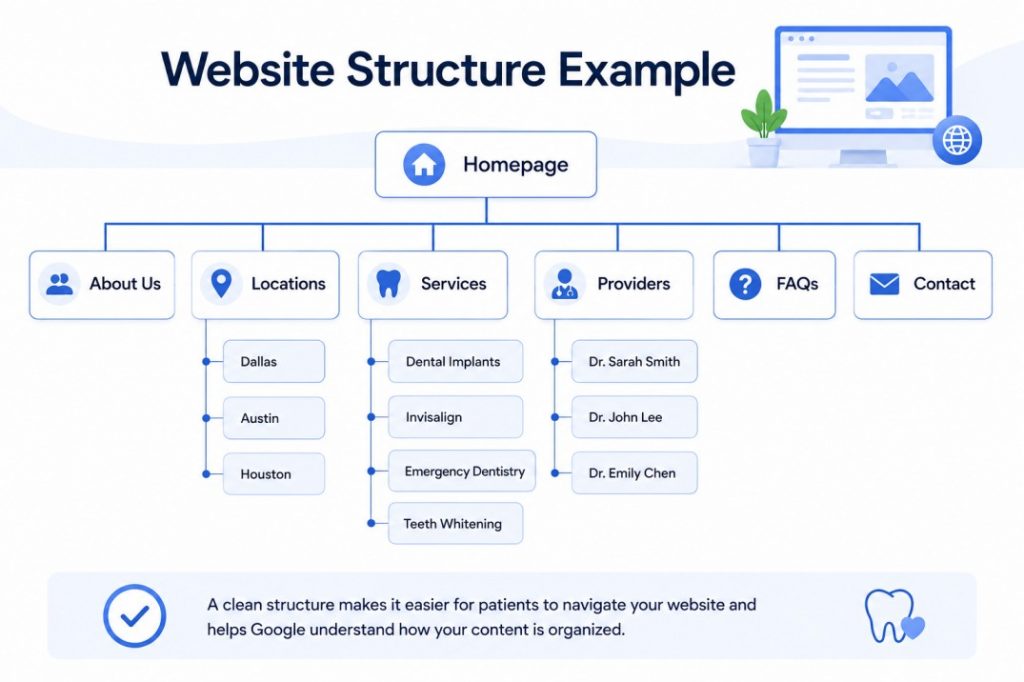
A clean structure makes it easier for patients to navigate your website and helps Google understand how your content is organized.
Chapter 3: Create Content Around What Patients Search For
One of the biggest misconceptions about healthcare SEO is that it’s all about adding keywords to your website.
It isn’t.
Good SEO starts with understanding what your patients are actually searching for.
For example, a dentist may describe a treatment as endodontic therapy, but most patients simply search for root canal treatment.
Similarly, an orthopedic clinic may offer arthroscopic knee reconstruction, while patients search for knee pain specialist or ACL surgery.
The goal isn’t to “dumb down” your content—it’s to use language your patients understand.
Start with Your Services
The easiest way to decide what pages your website needs is to list your core services.
For example, if you run a dermatology clinic, your website might include pages for:
- Acne treatment
- Skin cancer screening
- Mole removal
- Eczema treatment
- Cosmetic dermatology
Each major service should have its own dedicated page.
Trying to cover everything on one “Services” page makes it harder for both patients and Google to understand your expertise.
Think Like a Patient
Instead of asking,
“What treatments do we offer?”
Ask,
“What would a patient type into Google?”
For example:
| Instead of… | Patients Usually Search… |
| Orthodontics | Braces for adults |
| Endodontics | Root canal treatment |
| Otolaryngology | ENT doctor near me |
| Physical Medicine | Back pain treatment |
| Obstetrics | Pregnancy doctor |
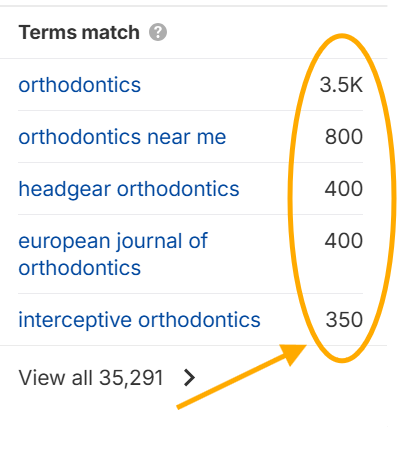
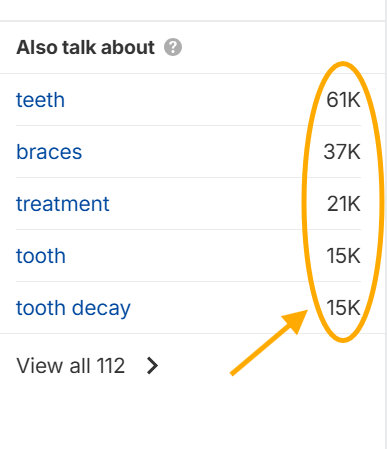
This simple exercise can help you create pages that match real patient searches.
Answer Common Questions
Patients don’t just search for treatments.
They also search for answers.
For example:
- What causes knee pain?
- Is Invisalign worth it?
- How long does physical therapy take?
- When should I see a dermatologist?
- Are dental implants painful?
These questions are excellent topics for blogs and FAQs.
They help patients make informed decisions while also supporting your medical website SEO strategy by expanding the amount of helpful content on your website.
Focus on Quality, Not Quantity
You don’t need hundreds of pages.
A website with 30 genuinely helpful pages will usually outperform one with 300 thin or repetitive pages.
Whenever you create new content, ask yourself:
Will this page genuinely help a patient?
If the answer is yes, you’re probably moving in the right direction.
Key Takeaway
Good healthcare SEO isn’t about stuffing keywords into your website.
It’s about creating pages that answer the questions your patients already have.
When your content matches patient intent, both your visitors and search engines benefit.
Chapter 4: Simple On-Page SEO Best Practices
Once you’ve created the right pages, the next step is making them easy for Google to understand.
Don’t worry—you don’t need to be an SEO expert.
A few simple improvements can go a long way.
Write Clear Page Titles
Your page title is one of the first things both Google and patients see.
Instead of a generic title like:
Services
Be more specific:
Dental Implants in Austin | Green Valley Dental
Or:
Physical Therapy for Back Pain | ABC Rehab Clinic
A clear title tells Google what the page is about and gives patients confidence they’ve found the right information.
Write Helpful Meta Descriptions
A meta description is the short summary that often appears beneath your page title in Google search results.
While it isn’t a direct ranking factor, it can influence whether someone clicks on your website.
A good meta description should:
- Explain what the page covers
- Include the primary service
- Encourage the user to learn more
For example:
Learn about dental implants, treatment options, costs, and what to expect. Schedule an appointment with our experienced dental team today.
Think of it as a short advertisement for your page. Once the page is live, a free SEO checker will show you whether your title and meta description are the right length or getting cut off in search results.
Use Simple, Descriptive URLs
Your page URLs should be easy to read.
Good:
yourclinic.com/services/dental-implants
Not so good:
yourclinic.com/page?id=247
Short, descriptive URLs help users understand where they’re going and make your website easier to navigate.
Organize Content with Headings
Headings aren’t just for design—they improve readability.
Instead of presenting one long block of text, break your content into sections using clear headings.
For example:
- What Is a Root Canal?
- Who Needs This Treatment?
- Benefits
- Recovery Time
- Frequently Asked Questions
Patients can quickly scan the page and find the information they need.
Optimize Your Images
Images make your website more engaging, but they should also be optimized.
Here are a few simple tips:
- Use high-quality photos of your clinic and providers.
- Compress large image files so pages load faster.
- Give images descriptive file names where practical (e.g., dental-implant-consultation.jpg instead of IMG1234.jpg).
- Add descriptive alt text to improve accessibility and help search engines understand the image.
Keep Your Content Easy to Read
Many healthcare websites use overly technical language.
Remember, you’re writing for patients—not medical professionals.
Use:
- Short paragraphs
- Clear headings
- Bullet points
- Simple language
If a medical term is necessary, explain it in plain English.
For example:
Instead of writing:
Temporomandibular Joint Disorder
You might write:
TMJ (jaw joint pain) and briefly explain what it means.
The easier your content is to understand, the more likely patients are to stay on your website and take action.
Quick On-Page SEO Checklist
Before publishing a page, ask yourself:
✅ Does it have a clear title?
✅ Is the meta description helpful?
✅ Is the URL simple and descriptive?
✅ Are headings used to organize the content?
✅ Are images optimized?
✅ Is the content easy for patients to understand?
If you can answer “yes” to each of these, you’ve already covered the on-page SEO basics that matter most.
Chapter 5: Technical SEO
When people hear “technical SEO,” they often think it means coding, developers, or complex backend work.
But for most healthcare websites, the truth is simpler:
If your website is fast, mobile-friendly, and easy for Google to read—you’re already ahead of many competitors.
Let’s break it down in a practical way.
Website Speed: Every Second Matters
Patients don’t wait for slow websites.
If your page takes too long to load, they leave and choose another provider.
This is especially important in medical website SEO, where users are often in a hurry—looking for urgent care, pain treatment, or nearby clinics.
What affects speed?
- Large images
- Too many plugins (common in WordPress sites)
- Poor hosting
- Heavy design elements
Simple fixes:
- Compress images before uploading
- Remove unnecessary plugins
- Use a reliable hosting provider
- Keep page design clean and minimal
Rule of thumb: If your website feels slow to you, it’s definitely slow for patients.
Mobile-Friendly Design (Non-Negotiable)
Most healthcare searches happen on mobile:
- “dentist near me”
- “urgent care open now”
- “pediatrician nearby”
If your website doesn’t work well on a phone, your local SEO for healthcare efforts will underperform—no matter how good your content is.
A good mobile experience means:
- Text is easy to read without zooming
- Buttons are easy to tap
- Appointment booking is simple
- Pages don’t feel cluttered
Quick test: Open your website on your phone. If you struggle, your patients will too.
HTTPS (Security Matters More Than You Think)
If your website URL starts with http:// instead of https://, it looks unsafe to both users and Google.
Healthcare websites must especially prioritize trust.
HTTPS:
- Protects user data
- Builds credibility
- Is a basic requirement for modern websites
Most hosting providers offer SSL certificates (which enable HTTPS) by default.
If you don’t have it enabled yet—this is a priority fix.
Simple Schema (Help Google Understand Your Site)
You don’t need to get technical here.
Think of schema as a way of telling Google:
“This is a clinic. This is the doctor. This is the location. This is the phone number.”
It helps improve how your listing appears in search results.
For healthcare websites, basic schema can include:
- Clinic name
- Address
- Phone number
- Services
- Doctors
If you’re using a website platform like WordPress, many plugins can handle this automatically.
Core Web Vitals (Don’t Overthink It)
Core Web Vitals is just Google’s way of measuring user experience.
In simple terms, it checks:
- Does your page load quickly?
- Is it stable while loading?
- Can users interact with it easily?
You don’t need to obsess over the metrics.
Instead, focus on the basics:
- Fast loading pages
- Clean design
- No broken layouts
- Mobile-friendly structure
That alone will cover most of what matters for search engine optimization for healthcare.
Key Takeaway
You don’t need advanced technical SEO to rank well.
Most healthcare websites struggle because of simple issues:
- Slow loading speed
- Poor mobile experience
- Confusing design
- Missing security (HTTPS)
Fixing these basics alone can significantly improve your visibility.
Chapter 6: Internal Linking (Connect Your Website Smartly)
Internal linking simply means linking one page of your website to another.
It sounds basic, but it plays a big role in both user experience and SEO.
Why Internal Links Matter
Think of your website like a hospital building.
If every department is connected with clear signs, patients can easily find what they need.
Without signs, they get lost.
Internal links act like those signs.
They help:
- Patients navigate your website
- Google understand your website structure
- Important pages get more visibility
How to Use Internal Links Effectively
You don’t need a complicated strategy.
Just follow this simple logic:
Link related pages together
For example:
- A blog about knee pain → links to your orthopedic service page
- A service page → links to provider pages
- A location page → links to appointment booking
Examples in Healthcare Websites
If you have a page on dental implants, you can link to:
- Consultation booking page
- Dentist profile page
- Related services like tooth extraction
If you have a physical therapy page, you can link to:
- Back pain blog articles
- Therapist profiles
- Location pages
Keep It Natural
Internal links should feel helpful, not forced.
Instead of stuffing links everywhere, ask:
“Would this link help the patient understand or take the next step?”
If yes, include it.
If not, skip it.
Chapter 7: Conversion Optimization (Turning Visitors Into Patients)
Getting traffic to your website is only half the job.
The real question is:
Do patients actually book an appointment once they land on your site?
This is where most healthcare websites lose opportunities.
They rank on Google… but don’t convert visitors into patients.
Let’s fix that.
Make Booking an Appointment Obvious
Many healthcare websites hide their most important action.
Patients shouldn’t have to search for how to book.
Your “Book Appointment” button should be:
- Visible on every page
- Easy to find on mobile
- Above the fold (no scrolling needed)
- Repeated in key sections
Think of it like this:
If a patient is ready to book, don’t make them think—make it easy.
Use Simple and Clear Call-to-Actions (CTAs)
Avoid vague buttons like:
- “Submit”
- “Learn More”
- “Get Started”
Instead, use clear, action-based language:
- “Book an Appointment”
- “Schedule a Visit”
- “Call Now”
- “Check Availability”
For seo for medical practice, clarity always beats creativity.
Patients are not trying to decode your website—they just want to take the next step.
Online Booking = Fewer Friction Points
Every extra step reduces the chance of conversion.
Compare:
- Click website → find form → fill details → wait for response
vs - Click website → book appointment instantly
The second option wins almost every time.
If possible, integrate online scheduling directly into your website.
This is especially powerful for:
- Dental clinics
- Physiotherapy centers
- Urgent care
- Dermatology clinics
Build Trust Before Asking for Action
Healthcare is a trust-based decision.
Before booking, patients want reassurance.
Your website should clearly show:
- Doctor or provider profiles
- Patient reviews
- Clinic photos
- Years of experience
- Insurance acceptance (if applicable)
People don’t book because you say you’re good.
They book because they see proof.
This is a key part of medical marketing SEO that many websites ignore.
Contact Forms Should Be Simple
Long forms kill conversions.
Most healthcare websites ask for too much information upfront.
Instead, keep it simple:
- Name
- Phone number
- Reason for visit (optional)
That’s it.
You can always collect more details later during intake.
Add Multiple Ways to Contact You
Not every patient wants to book the same way.
Some prefer:
- Calling
- Online booking
- Filling a form
- Sending a message
Give options, but don’t overwhelm.
At minimum, include:
- Call button
- Appointment booking
- Contact form
For many local SEO for healthcare journeys, the easier you make contact, the higher your conversion rate.
Trust Badges Matter More Than You Think
Small signals can influence big decisions.
Add visible trust indicators like:
- “Board-certified doctors”
- Insurance accepted logos
- Accredited clinic badges
- Years in practice
These reduce hesitation and increase confidence.
Key Takeaway
A well-designed healthcare website doesn’t just inform—it converts.
If patients can’t:
- Find a doctor they trust
- Understand your services
- Book an appointment easily
…then even strong healthcare SEO traffic won’t translate into growth.
Chapter 8: Common Website Mistakes in Healthcare SEO
Even good clinics make simple mistakes that hurt performance.
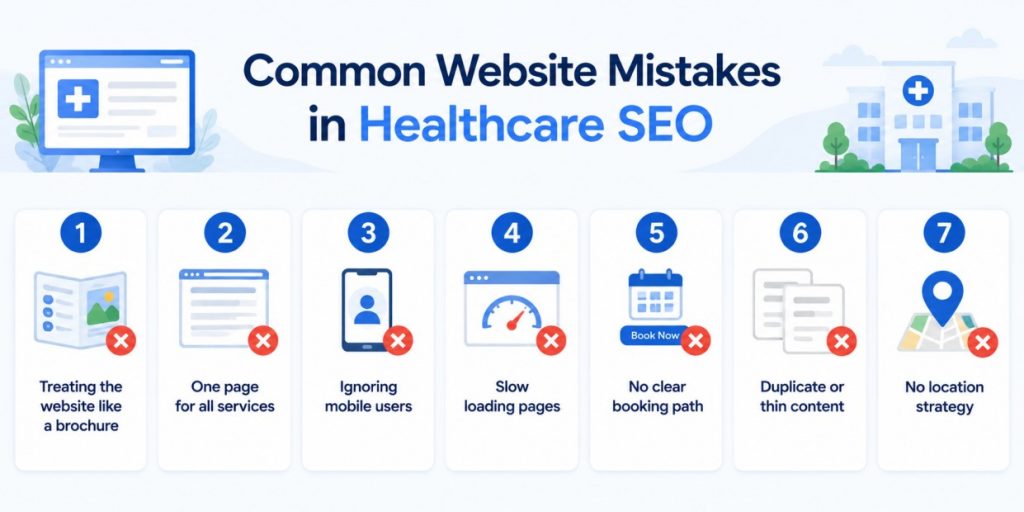
Let’s fix them.
1. Treating the Website Like a Brochure
Your website is not just “about your clinic.”
It should guide patients toward booking an appointment.
If it only describes services but doesn’t convert, it’s underperforming.
2. One Page for All Services
Many healthcare websites list everything on a single page.
This confuses both patients and Google.
Instead, create separate pages for each major service.
This improves medical website SEO and user clarity.
3. Ignoring Mobile Users
If your website doesn’t work smoothly on mobile:
- Patients leave quickly
- Rankings suffer
- Conversions drop
Mobile experience is no longer optional.
4. Slow Loading Pages
Large images and heavy designs can make websites slow.
Slow websites = lost patients.
Simple fixes often make a big difference.
5. No Clear Booking Path
If patients can’t easily find how to book:
They won’t book at all.
Always keep your primary CTA visible.
6. Duplicate or Thin Content
Copy-pasting service descriptions across pages weakens SEO.
Each page should feel unique and helpful.
7. No Location Strategy
Multi-location clinics often forget to create separate pages per location.
This hurts hospital SEO and local visibility.
Each location should have its own dedicated page.
Key Takeaway
Most website problems are not technical—they are structural and clarity issues.
Fixing them improves both SEO and patient conversions.
Chapter 9: Website Audit Checklist
Before you finish optimizing your website, run through this simple checklist.
SEO Basics
- Clear page titles
- Unique service pages
- Optimized URLs
- Proper headings (H1, H2)
Local SEO for Healthcare
- Location pages for each clinic
- Embedded Google Maps
- Local keywords used naturally
- Consistent NAP (Name, Address, Phone)
Conversion Elements
- Visible “Book Appointment” button
- Simple contact form
- Online booking option
- Clear CTAs on every page
Trust Elements
- Doctor/provider profiles
- Patient reviews
- Clinic photos
- Insurance information
Technical Basics
- Mobile-friendly design
- Fast loading pages
- HTTPS enabled
- No broken links
Final Thought
If your website checks most of these boxes, you’re already ahead of many healthcare organizations.
You don’t need perfect search engine optimization for healthcare.
You need a website that is:
- Easy to understand
- Easy to navigate
- Easy to trust
- Easy to book from
That’s what Google rewards—and what patients respond to.

 4.9 (400+
reviews)
4.9 (400+
reviews)